
SD-Access: underlay, overlay, fabric roles, and the three planes
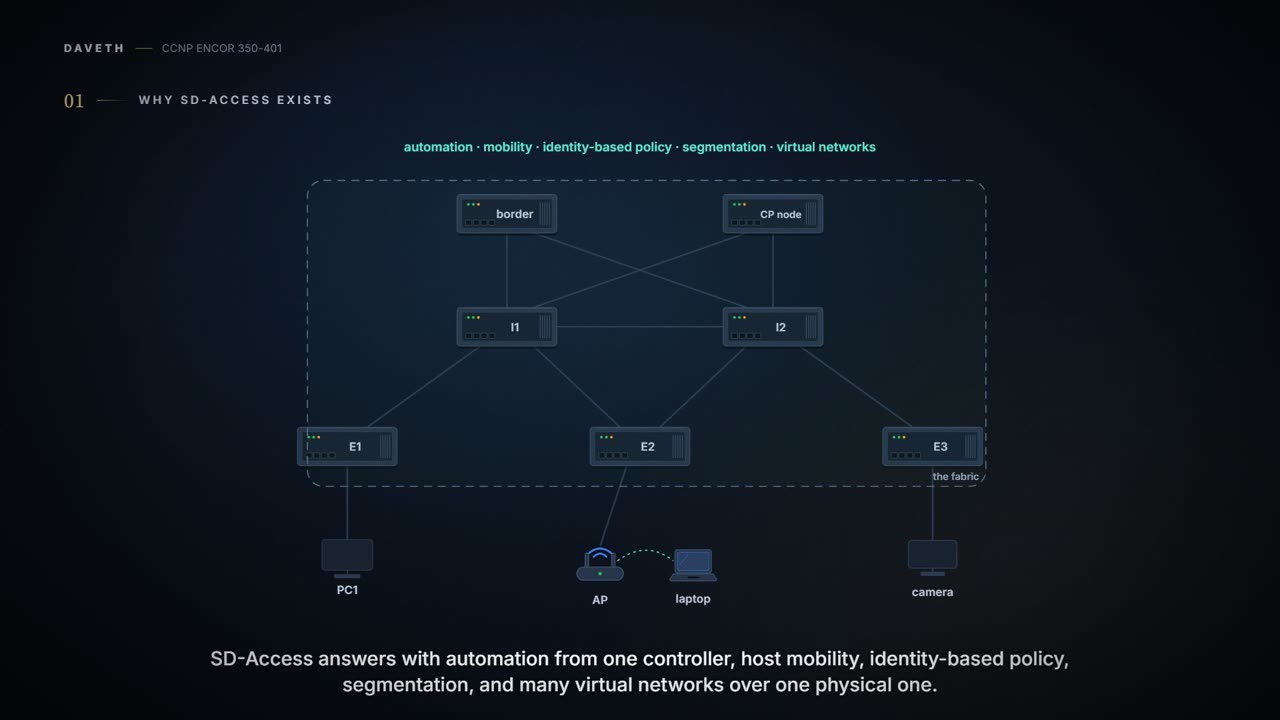
SD-Access answers what hurts in a traditional campus: slow manual configuration, inconsistent policy, roaming users. Its overlay is automated by the controller and has three planes: LISP as the control plane, with the control plane node as map server; VXLAN as the data plane, because it carries the original Ethernet header; and TrustSec as the policy plane.
By Arif, founder of Daveth · Updated
The full 9 min walkthrough is in Daveth Pro (Network). See what the plan opens
What this page answers
What are the three planes of SD-Access?
Control plane: LISP, with the control plane node as the map server holding remote destinations. Data plane: VXLAN, which carries the original Ethernet header. Policy plane: TrustSec, with group-based policy. Read it in “4.1 Why SD-Access exists”
Why does SD-Access use VXLAN instead of LISP encapsulation?
Because VXLAN carries the original Ethernet header, MAC-in-IP, and LISP's encapsulation does not. LISP stays as the control plane. Read it in “4.1 Why SD-Access exists”
4.1 Why SD-Access exists
The guide starts with what hurts in a traditional campus. Manual configuration is slow and error-prone, and gets worse as users, endpoints and applications keep arriving; consistent policy gets hard, and separate wired and wireless policies leave gaps; and as users roam, finding and troubleshooting them gets harder. If you've ever tried to keep the same rules on forty switches by hand, you know which of those bites first.
SD-Access answers with a list:
- Network automation: one point of automation, orchestration and management (the controller) instead of per-device configuration.
- Assurance and analytics: telemetry to predict network and security risks, including in encrypted traffic.
- Host mobility for wired and wireless clients.
- Identity services: Cisco ISE identifies users and devices and supplies the context for policy.
- Policy enforcement: group-based policies with Security Group ACLs (SGACLs), based on identity rather than IP addresses and subnets. (TrustSec's Security Group Tags are called Scalable Group Tags in SD-Access; same SGT.)
- Secure segmentation: guest, corporate, facilities and IoT separated more easily.
- Network virtualisation: one physical network carrying many VRFs, called virtual networks (VNs), each with its own policies.
Most of the list is one idea: stop tying who you are to where you plugged in. The rest of the lesson is how the fabric pulls those two apart. It works like a mobile number that moves house with you, instead of a landline that belongs to the house.
The traditional campus ties a user's rights to their IP address, which is a bit like tying your salary to your desk number.
SD-Access has two main components: the campus fabric and the controller, Cisco DNA Center in the guide, renamed Catalyst Center (v1.2's blueprint, item 4.5). The campus fabric is a Cisco-validated overlay with every plane it needs (control, data, management, policy). Managed from the CLI or through NETCONF/YANG APIs (09-6), it's called a campus fabric; managed through the controller, it's SD-Access. It's designed for enterprise campus and branch networks, not data centre, service provider or WAN (06-3). Consider it your house with and without the smart-home hub: same wiring, same switches, but only one of them you run from an app.
The architecture has four layers:
| Layer | What's in it | Where it's taught |
|---|---|---|
| Physical | switches, routers, servers, wireless (WLCs and APs), the controller appliances | here |
| Network | the underlay and the overlay | here |
| Controller | Catalyst (DNA) Center's automation and assurance subsystems, and ISE | 07-8 |
| Management | the controller's GUI and workflows | 07-8 |
The physical layer is ordinary Cisco hardware, but every device that actively takes part in the fabric must meet its hardware (ASIC, FPGA) and software requirements. Access switches that don't take part actively but are brought in by automation are extension nodes; Cisco's design guide calls them extended nodes (section 4.5). Switches give wired access, routers WAN and branch access, WLCs and APs wireless access, and the controller and ISE are the two controller appliances required. (The guide writes "the SD-WAN fabric" in that list; it means SD-Access.) The layers stack like a theatre: machinery under the stage, the actors on it, the director in the wings, and an audience that only ever sees the show, which is the management layer's GUI.
"SD-Access = campus fabric + Cisco DNA Center" is the only equation in networking where renaming one term (to Catalyst Center) doesn't change the answer.
The network layer has two sub-layers. The underlay is the physical network, and its sole purpose is to carry packets between the fabric's devices; the overlay is a virtual, tunnelled network that interconnects them and hides the underlay's limits. Think of it as the postal sorting network under a company's internal mail: the sorting offices move sacks between buildings and never read the names on the envelopes inside.
Because everything rides on it, the underlay has to be fast, scalable and highly available. A Layer 2 underlay with spanning tree is possible but not recommended; the recommended design is Layer 3 routed access with IS-IS as the IGP. The guide's reasons for IS-IS: neighbours form without IP dependencies, peering works over loopbacks, and it treats IPv4, IPv6 and non-IP traffic alike. Cisco's design guide adds that routed access gives the highest availability without loop-avoidance protocols. There are two ways to build it:
- Manual underlay: configured by CLI or API, not by the controller. You can customise it (OSPF instead of IS-IS, say) and run SD-Access over an existing or third-party IP network.
- Automated underlay: the controller's LAN Automation builds an IS-IS routed access design with Plug and Play, including unicast and multicast routing. Fewer mistakes, faster to build, but no manual customisation.
Two current details the guide doesn't have. The underlay is IPv4 only; the overlay can be IPv4 only or dual stack for endpoints, and IPv6 endpoint traffic rides the IPv4 underlay. (IS-IS could carry IPv6, as the guide says; Cisco's current design simply keeps the underlay IPv4 and puts IPv6 in the overlay.) And VXLAN adds at least 50 bytes of headers, so Cisco recommends a campus-wide MTU of 9100 to carry jumbo frames without drops. That's roughly equivalent to posting a letter in a bigger envelope: if the post box slot is sized for the letter, the envelope jams.
The underlay is the only campus network that never learns a single user's address, and never gets a helpdesk call about one either.
In SD-Access the overlay is fully automated whichever underlay you chose: its control plane protocols, addressing and global configuration all come from the controller. Configure it yourself by CLI or NETCONF/YANG and it's a campus fabric, not SD-Access. The overlay has three planes of operation:
| Plane | Based on | Answers |
|---|---|---|
| Control | LISP | where is this endpoint? |
| Data | VXLAN | how is it carried? |
| Policy | Cisco TrustSec | is it allowed? |
Control plane: LISP. LISP maps an endpoint ID (EID, the endpoint's address) to a routing locator (RLOC, the address of the edge or border it sits behind). Remote destinations live in a central mapping database, the LISP map server, which in SD-Access is the control plane node; each router keeps only its local routes and asks the map system for the rest. That buys smaller routing tables, host mobility, address-agnostic mapping (IPv4, IPv6, MAC) and segmentation through VRFs; Cisco added the distributed anycast gateway, VN extranet and fabric wireless on top of the original LISP. (LISP itself is 04-5's.) Picture yourself at a big hotel's front desk: nobody knows every guest's room except the desk, and the desk updates the moment someone changes rooms.
Data plane: VXLAN. LISP is the control plane, but SD-Access doesn't use LISP's encapsulation: it uses VXLAN, because VXLAN carries the original Ethernet header (MAC-in-IP) and LISP's doesn't. That lets the fabric carry Layer 2 and Layer 3 overlays over any IP network, with the VN and group policy built in. For SD-Access, VXLAN was extended into VXLAN Group Policy Option (VXLAN-GPO) to carry TrustSec's scalable group tags. Its new fields:
- Group Policy ID (16 bits): the SGT. (The guide and Cisco's design guide both say "up to 64,000" tags; the field is 16 bits, which is 65,536 values, and Cisco calls the SGT "a 16-bit value".)
- G bit: 1 when an SGT is being carried.
- D bit (Don't Learn): the egress VTEP mustn't learn the source address.
- A bit (Policy Applied, defined only when G is 1): 0 means policy must still be applied, and the device that applies it sets the bit to 1; 1 means policy has been applied and later devices mustn't apply it again.
(The guide cites draft-smith-vxlan-group-policy-05, Cisco's design guide draft -04, and calls the format VXLAN-GBP as well; the draft couldn't be fetched here, so the field definitions are the guide's.) The encapsulation works like a parcel in a courier's bag: the couriers read only the outer address, RLOC to RLOC, in the outer IP header; the VNI and the SGT are a sticker on the parcel that only the depots at each end read.
Policy plane: TrustSec. SGTs are assigned to authenticated groups of users or devices, and policy (ACLs, QoS, PBR, segmentation) is written against the tag instead of a MAC, IPv4 or IPv6 address. The tags give network-based segmentation (VNs) and group-based segmentation (policies) together, policies independent of addresses, enforcement wherever the host is, wired or wireless, policy across legacy or third-party networks inside VXLAN, and policy extended to external networks by the SGT Exchange Protocol (SXP). It acts kind of like a wristband at a festival: the steward at each gate checks the colour, not your name or which car park you came from. (TrustSec itself, SGACLs and SXP are 08-7's; SGTs leaving the fabric are 06-5's.)
The A bit is the packet's "already frisked" stamp, so the next bouncer waves it through.
Every SD-Access device takes one or more roles, and the guide lists five:
- Control plane node: holds the EID-to-RLOC mapping system.
- Fabric border node: connects external Layer 3 networks to the fabric (for example, a core device).
- Fabric edge node: connects wired endpoints (for example, an access or distribution device).
- Fabric WLAN controller: connects APs and wireless endpoints.
- Intermediate nodes: routers or switches that provide only underlay services, with no fabric role. Cisco's design guide: they need no VXLAN, no LISP and no SGT awareness.
One device can play several; in Figure 23-6 the core devices are both borders and control plane nodes. Cisco's design guide goes as far as Fabric in a Box, every role on one device. It's a bit like a small restaurant where the owner takes the orders, cooks and washes up: same jobs, fewer people.
The edge node onboards wired users and devices, including fabric APs. It's a LISP tunnel router (xTR) that provides the anycast gateway, authenticates endpoints, assigns them to host pools, and enforces group policy for traffic to fabric endpoints. It authenticates an endpoint (802.1X), places it in a host pool (SVI and VRF) and a scalable group (SGT), then registers its host address (MAC, /32 IPv4 or /128 IPv6) with the control plane node, and it encapsulates and decapsulates the endpoint's traffic. The source's SGT travels in the VXLAN header, but only the destination's edge knows the destination's group, so that's where the policy for traffic to fabric endpoints gets applied. Cisco calls edges the fabric's equivalent of access switches.
The control plane node is a LISP map-server/map-resolver with SD-Access additions (fabric wireless, SGT mapping). Its host tracking database maps every EID, IPv4, IPv6 or MAC, to its current edge or border; it takes registrations from edges, borders and fabric WLCs, answers lookups, and updates edges and borders when clients move. It holds every endpoint in the fabric, so it needs the scale for it, and Cisco recommends two, active/active.
Border nodes are LISP proxy tunnel routers (PxTRs) that connect external Layer 3 networks and translate VRF and SGT information between domains. Three types, with the guide's names and Cisco's current ones:
| Guide | Cisco design guide | Connects | Registers routes with the control plane node |
|---|---|---|---|
| internal (rest of company) | internal | known parts of the organisation: data centre, WLC, firewall | yes |
| default (outside) | external | unknown networks, the Internet, public cloud; the default exit | no |
| internal + default (anywhere) | internal and external | both | yes, for the known side |
The fabric WLC sits outside the fabric, connects through an internal border, onboards wireless users, and registers wireless clients with the control plane node on behalf of the edges, mapping each to its AP and that AP's edge. Wireless is where the fabric changes the data path. Traditionally, control and client data both ride CAPWAP to a central WLC. In SD-Access the control plane stays on the WLC, but fabric APs send client data in VXLAN straight to their fabric edge, which routes it and applies the same SGT and VRF policy as for wired users; the AP must connect directly to a fabric edge or an extended node. Wireless clients use the same host pools as wired ones, and the fabric WLC can be thought of as a fabric edge for wireless clients; the AP's CAPWAP control traffic to the WLC is itself carried in VXLAN across the fabric. Extended nodes (the guide's extension nodes) are Layer 2 switches that extend the fabric's VLANs into non-carpeted areas, connected directly to an edge or in a chain of extended nodes.
Continue the lesson
The whole lesson, with its drawings and its questions. The rest of this section and 9 more after it.