
ping and traceroute, properly
Check the basics first: a ping says whether reachability works, and a failure points at interfaces, routing, ACLs or firewalls. Read each character: ! is a reply, . a timeout, U unreachable, M could not fragment. A router's ping is sourced from its outgoing interface, so source it from the user's gateway to ask the user's question. Traceroute walks the path one TTL at a time.
By Arif, founder of Daveth · Updated
The full 11 min walkthrough is in Daveth Pro (Network). See what the plan opens
What this page answers
How does traceroute work?
The router sends UDP probes to an unused port on the destination, three with a TTL of 1; the first router drops them and returns ICMP Time Exceeded. The next three go with TTL 2, and so on, until the destination answers port unreachable. Read it in “4.1 Start with the basics”
Why does a ping from the router work when users cannot connect?
Because a router's ping uses its outgoing interface as the source. Source the ping from the user's gateway interface instead, and remember the far end must be able to route the reply back to that source. Read it in “4.1 Start with the basics”
What do the ping output characters mean?
! a reply came back, . timed out, U destination unreachable, Q source quench, M could not fragment, ? unknown packet type, & packet lifetime exceeded. Read it in the lesson
4.1 Start with the basics
A ping from R1 to a server works. A user behind R1 still can't reach it. How can both be true? Hold that question; by section 4.3 you'll have the answer, and it's the most useful thing ping teaches.
The guide's advice is to check the basics before anything clever: if a BGP peering won't come up, check the two peers can reach each other before you start debugging BGP, because problems often live lower in the stack, down to an unplugged cable. Its flow: gather the facts (the addresses involved), test with ping, record the result and move on; a successful ping says the problem probably isn't basic reachability, a failed one points you at interfaces, routing, ACLs or firewalls. It's like checking the power socket before taking the telly apart.
ping sends ICMP Echo messages and waits for replies, to learn whether a host is up, the round-trip delay and the packet loss. It succeeds only if the echo request reaches the destination and the destination gets an echo reply back within the timeout, 2 seconds on Cisco routers by default. The echo is ICMP type 8 and the reply type 0. You can think of it as knocking on a door and waiting: an answer means someone's in and could hear you, and it says nothing about whether they'll let you into the kitchen.
The guide calls ping "one of the most useful and underrated" tools, which makes it the only command whose fan club is the certification guide.
By default IOS sends five 100-byte echoes with a 2-second timeout. Each one prints a character, and Cisco lists what they mean. If you've ever watched a delivery tracker, it's the same idea: every parcel gets its own status, and the status tells you roughly where to go looking.
| Character | Meaning |
|---|---|
! | a reply came back |
. | timed out waiting for a reply |
U | a destination unreachable came back |
Q | source quench (destination too busy) |
M | could not fragment |
? | unknown packet type |
& | packet lifetime exceeded |
The last line gives the success rate (replies out of echoes sent) and the round-trip min/avg/max: "Success rate is 100 percent (5/5), round-trip min/avg/max = 1/1/1 ms" in Example 24-1; ..... and 0 percent when nothing comes back. Read the row like a nurse reads a pulse: a steady run of beats, a gap, or nothing at all, and each means something different.
One more thing shapes what you see. Routers send no unreachable messages more often than once every half second by default. Echoes go out back to back, so when every echo earns an error, every other error is suppressed and that echo times out instead: M.M.M or U.U.U, not five of a kind. A mixed row isn't always a flaky path.
Five dots is IOS's way of saying "I knocked five times and nobody came", which is not the same as "nobody lives here".
The defaults answer "is it there?". The options answer sharper questions:
- repeat: a long run shows the moment something changes, like a doorbell camera left recording while you fix the lock. Example 24-4 sends 100: 21 dots, then 79
!, as the destination became reachable. - size, with df-bit: send 1500 bytes with Don't Fragment set to find an MTU problem, for instance where a tunnel adds overhead; size alone also tests QoS policies that treat packet sizes differently. A router that can't forward it without fragmenting replies, and the ping prints
M. Size without DF proves much less: Example 24-5's 1500-byte ping succeeds, and that only shows it arrived, fragmented or not. - source: by default the source is the outgoing interface, which the router picks from its routing table when there's more than one; set it (a loopback, say) to test a specific path, and remember the far end must be able to route the reply back to that source. Just like when you ring a shop from your mobile instead of the office phone: the call reaches them either way, but whether they can call you back depends on the number they see. In the extended ping, the interface name must be spelled out in full (Ethernet0/0, not E0/0).
- ToS: 184 in decimal marks the echoes Expedited Forwarding, for testing QoS, though some providers don't honour ICMP marked that way. (184 is 0xB8, DSCP 46 in the top six bits: 05-2.)
- data pattern: all 0s (0x0000) or all 1s (0xFFFF) helps chase framing, line coding or clocking faults on serial links.
- Record and Timestamp ask the routers on the way to write into IP options: Record the first nine hops' addresses, Timestamp their clocks.
The extended ping (type ping alone) prompts for all of them, with the defaults in brackets: repeat 5, size 100, timeout 2, ToS 0, DF off, data pattern 0xABCD.
That's the answer to section 4.1's puzzle: R1's ping used R1's own address, and the server may have no route back to the user's subnet. Source the ping from the user's gateway interface and you're asking the question the user is asking, like a mystery shopper who walks in through the customer entrance instead of the staff door.
Before D2, work it out from section 4.2: a 1500-byte ping with DF set, across a link whose MTU is 1400. What does it print?
D2
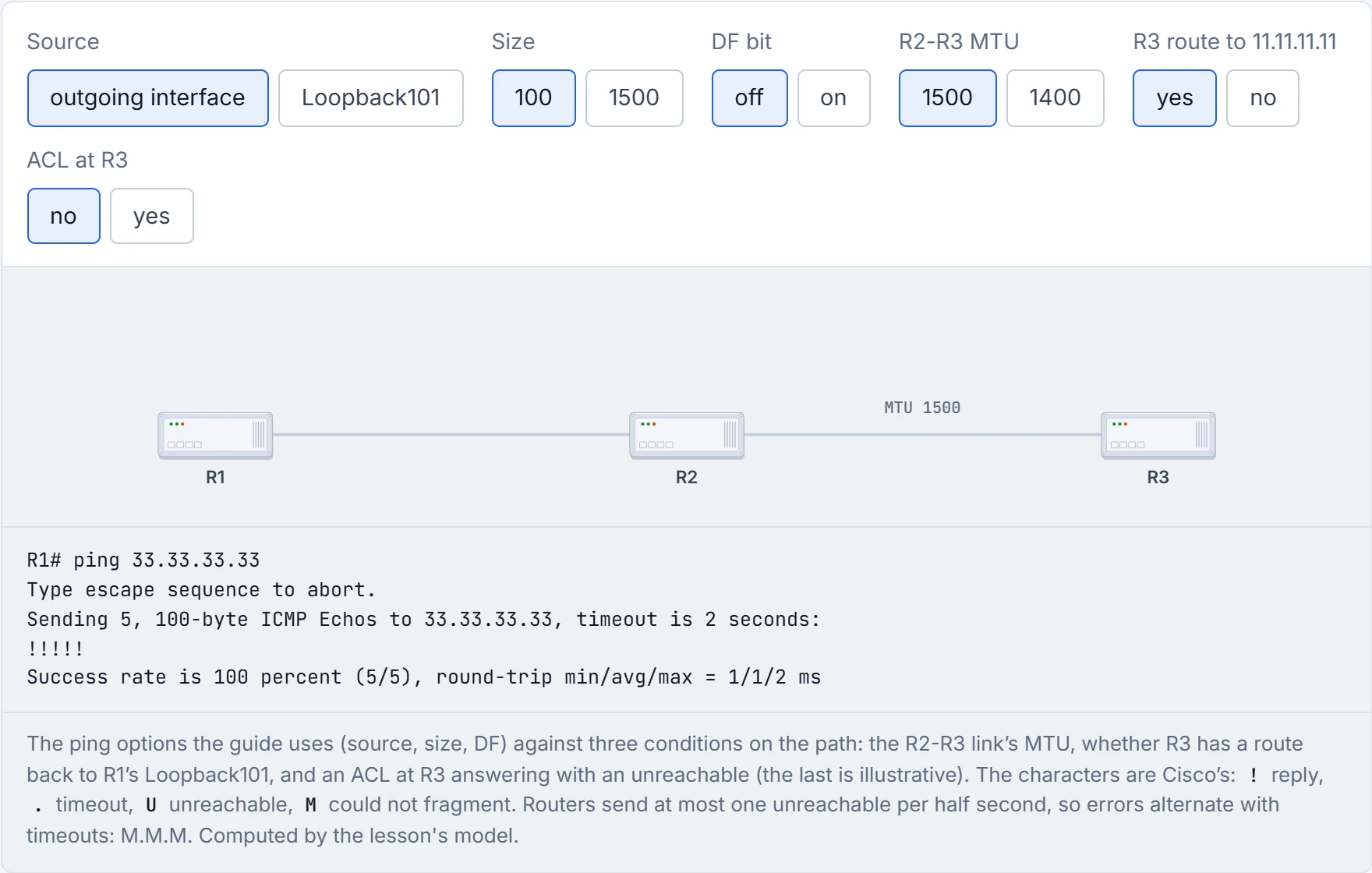
M.M.M: R2 can't fit it on the next link without fragmenting, it isn't allowed to, and it says so, as often as the half-second limit lets it. Turn DF off and the same ping works, fragmented. Now source it from Loopback101 and take away R3's route back: the echoes arrive and the replies have nowhere to go, so you get five dots from a path that works perfectly in one direction. Add the ACL at R3 too and it's still five dots: a router that drops a packet with an access list normally answers with an unreachable, and R3's unreachable needs a route back just as much as its reply does.
A ping sourced from an address the far end can't route back to is a letter with the return address of a house that doesn't exist: delivered, read, and answered into the void.
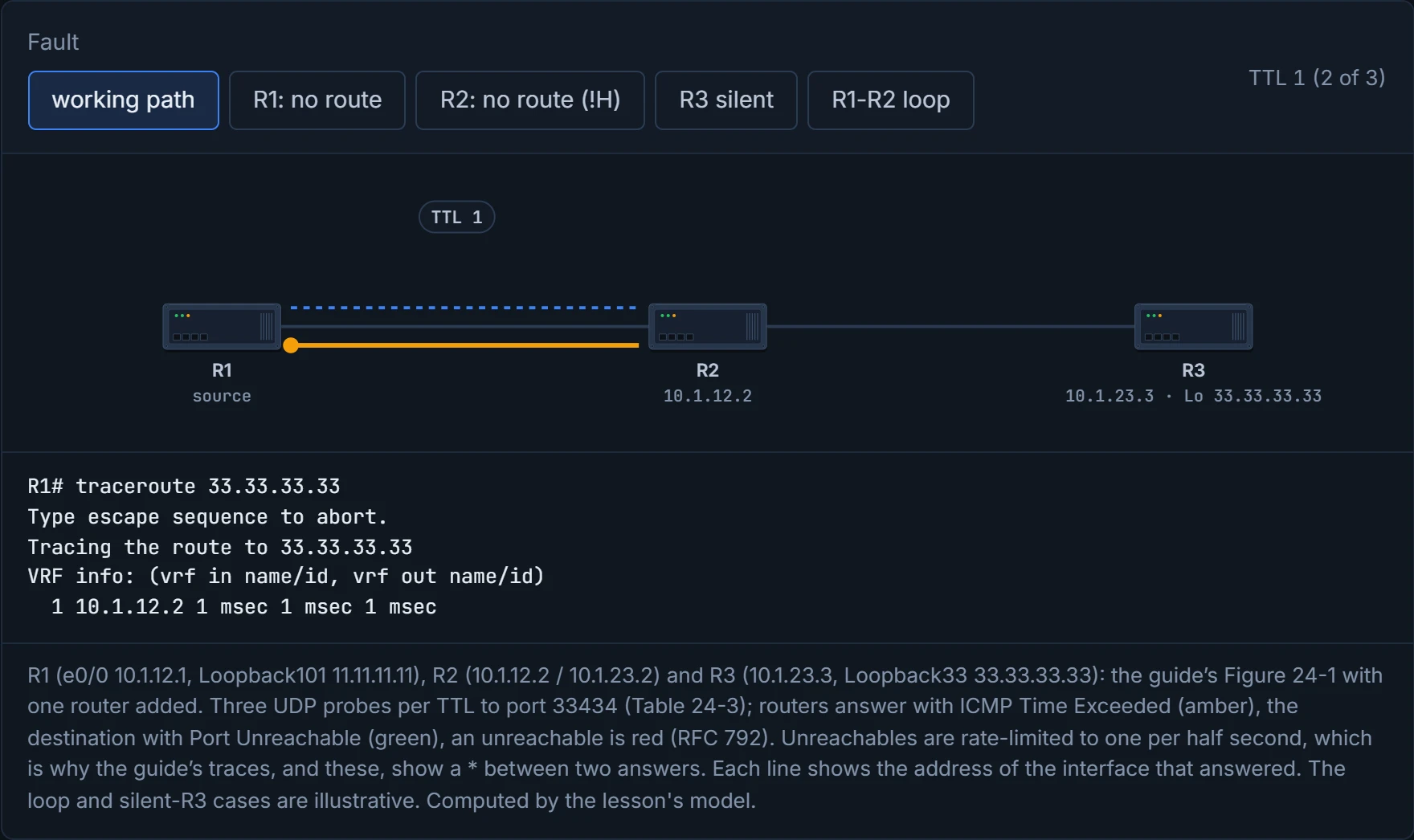
traceroute shows the hops between source and destination, as IP addresses or DNS names, and the time to each, and is used to find where traffic stops and which path it takes. Cisco's explanation of how: the router sends UDP probes to an unused port on the destination, three with a TTL of 1; the first router decrements the TTL to zero, drops the probe and returns an ICMP Time Exceeded; the next three go with TTL 2, reaching the second router, and so on. When probes finally reach the destination, they hit a port nothing listens on, the destination returns ICMP Port Unreachable, and the trace is finished. Time Exceeded is ICMP type 11 code 0; Port Unreachable is type 3 code 3. It's a bit like posting a run of letters with one stamp, then two, then three: each post office uses up a stamp, and the office that uses the last one sends the letter back with its own postmark on it.
What you see: a line per TTL, with the address of the interface that answered (not the destination you typed: Example 24-8's trace to 22.22.22.22 shows 10.1.12.2) and three round-trip times; * for a probe that timed out; up to 30 hops by default before it gives up, which is why a trace with no route prints thirty lines of stars (Example 24-9). The guide's next move is the right one: show ip route on R1 shows no route for 22.22.22.23 (Example 24-10).
Predict before reading on: R1 has a route towards R2, but R2 has none to 33.33.33.33. What does hop 2 show? D1 lets you check.
In Example 24-11, R1 has a less specific route through R2, but R2 has no route to the destination, so hop 2 shows R2's address with !H: R2 answered "destination host unreachable". Once R2 gets Loopback123, the same trace succeeds (Examples 24-12, 24-13).
A single star isn't a failure. The guide's successful trace prints 1 10.1.12.2 0 msec * 1 msec, one probe of three timing out on a working path, and the failing one prints !H * !H. Both are the half-second limit from section 4.2: the three probes arrive together, the first earns an unreachable, the second gets nothing, the third comes after the timeout. Picture yourself asking a busy receptionist three questions in a row: they answer the first, wave the second away, and answer the third once they've caught up.
The options: probe count (3 by default), timeout (3 seconds), source, port (33434 by default), minimum and maximum TTL (1 and 30), and numeric to skip name lookups; a higher minimum TTL skips hops you already know or want to hide. The extended traceroute prompts for them all, as the extended ping does.
D1
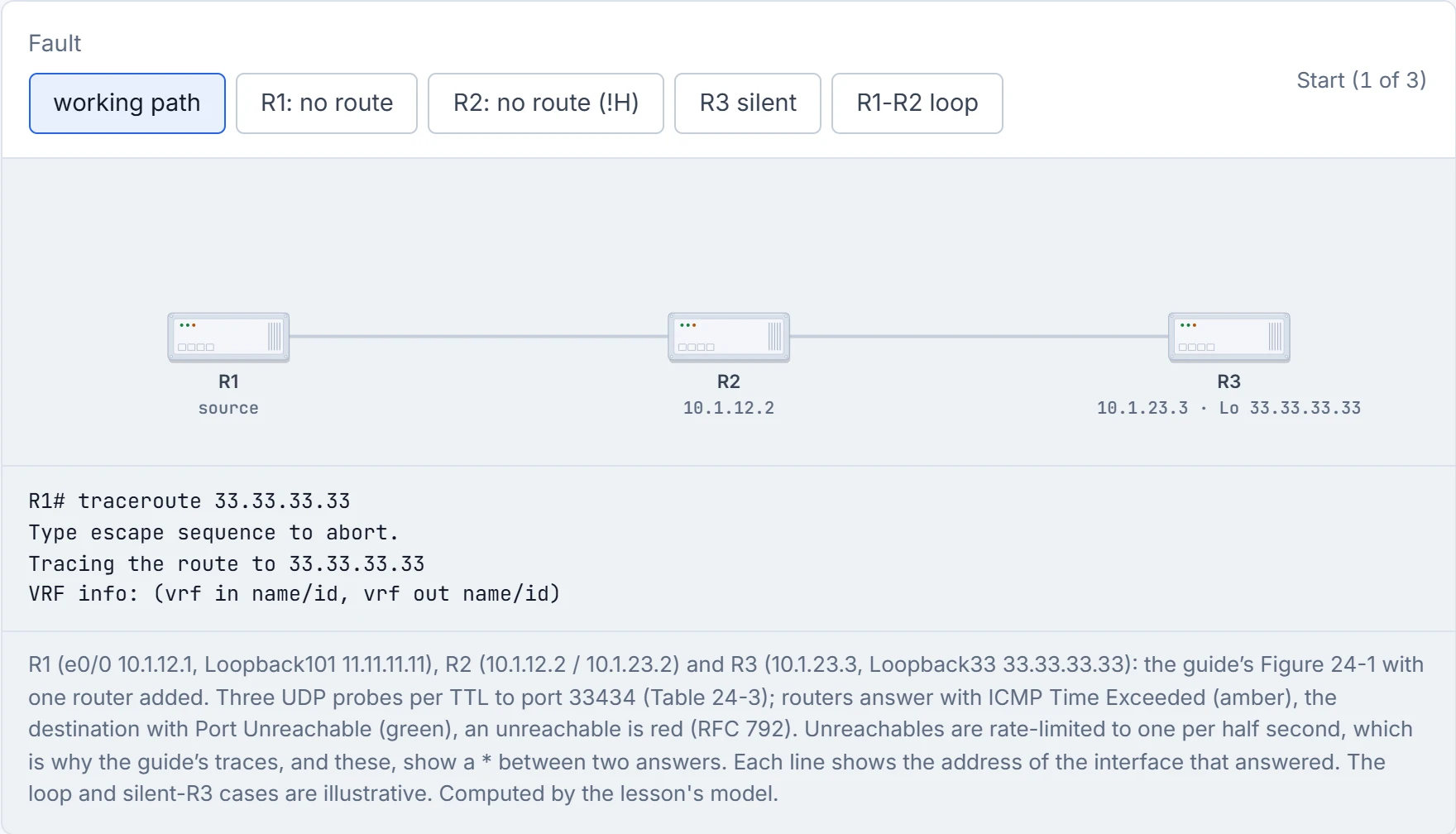
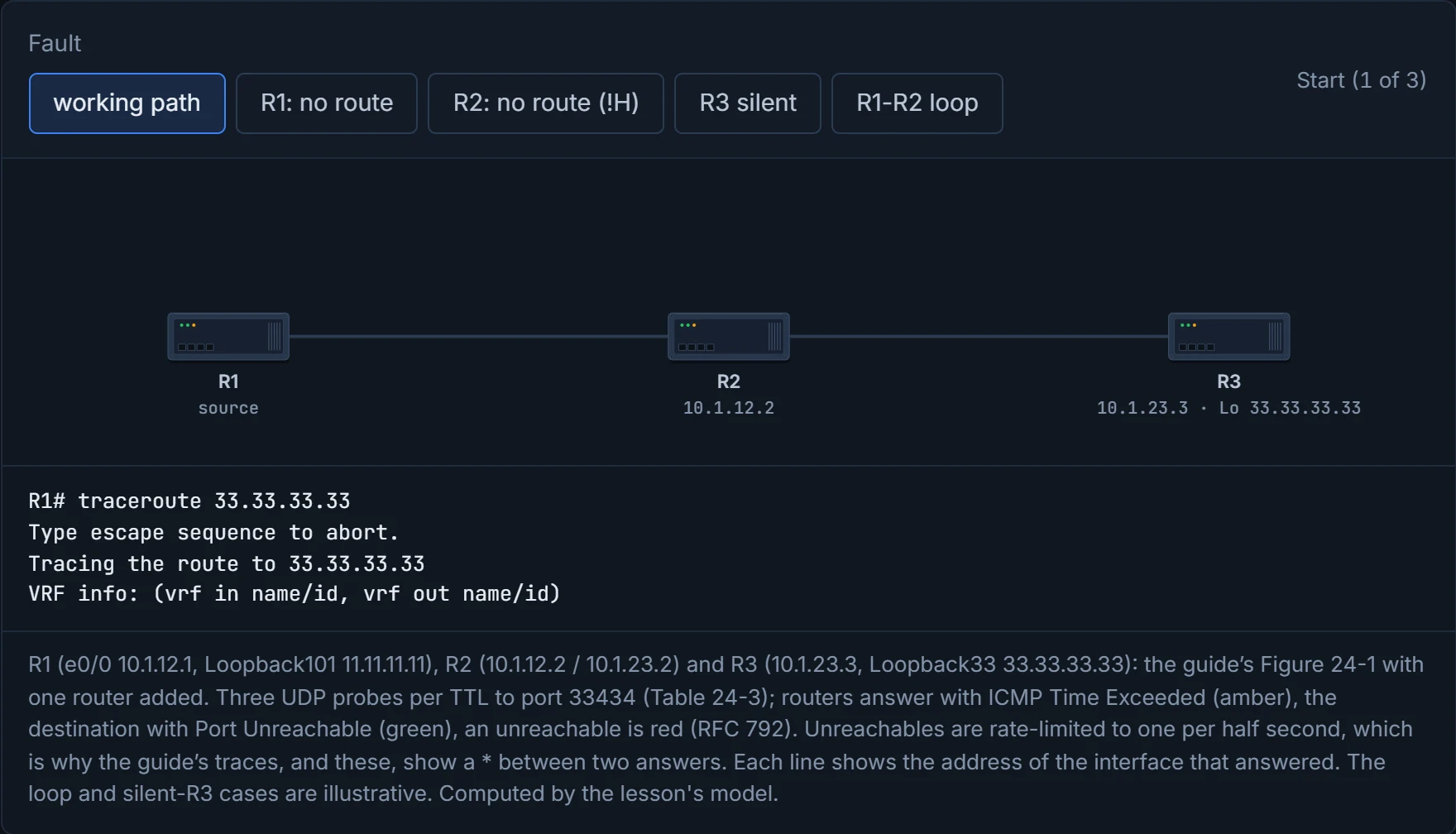
Step 1 of 3 R1 is about to trace the route to 33.33.33.33.
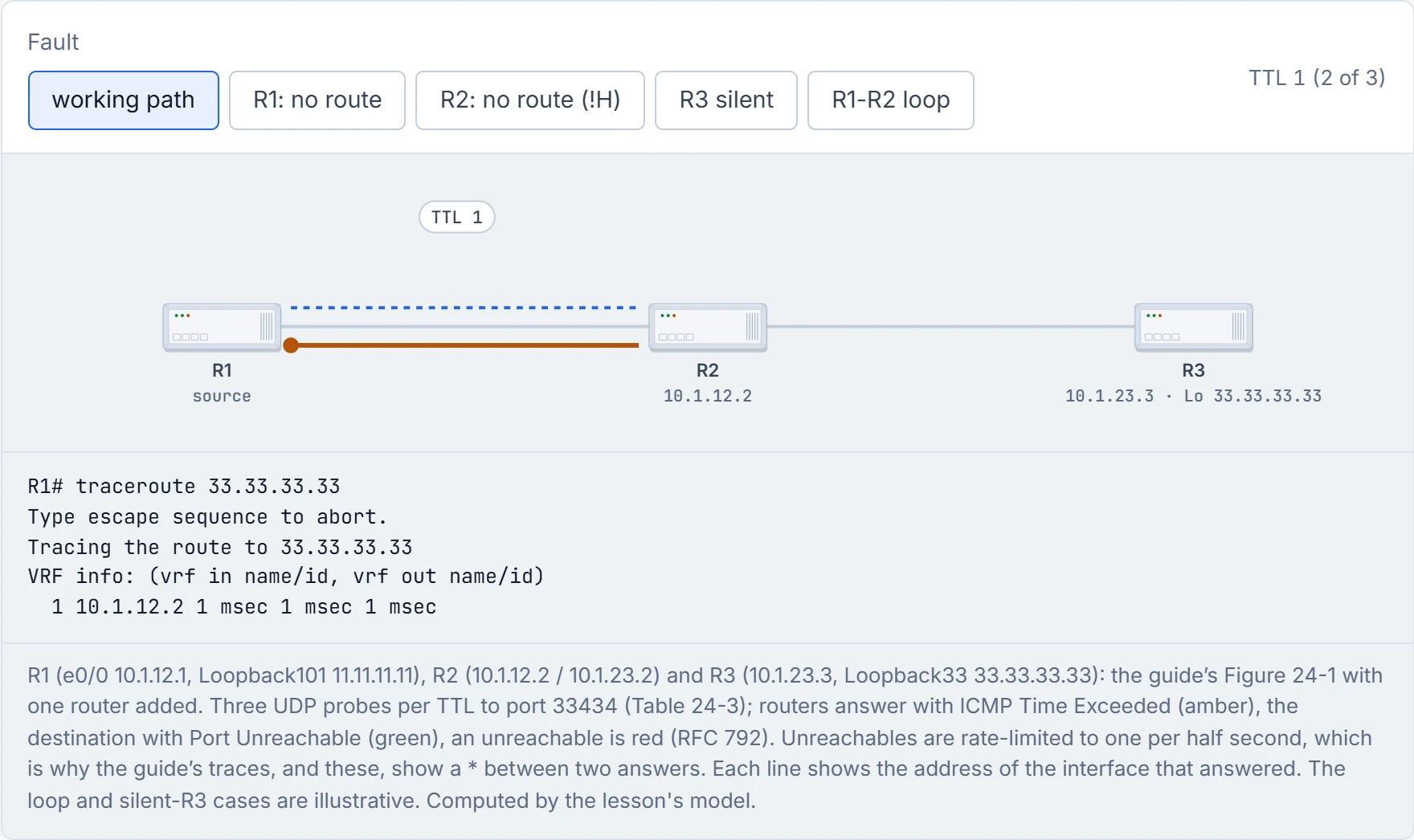
Step 2 of 3 TTL 1 expires at R2: ICMP Time Exceeded (type 11) from 10.1.12.2.
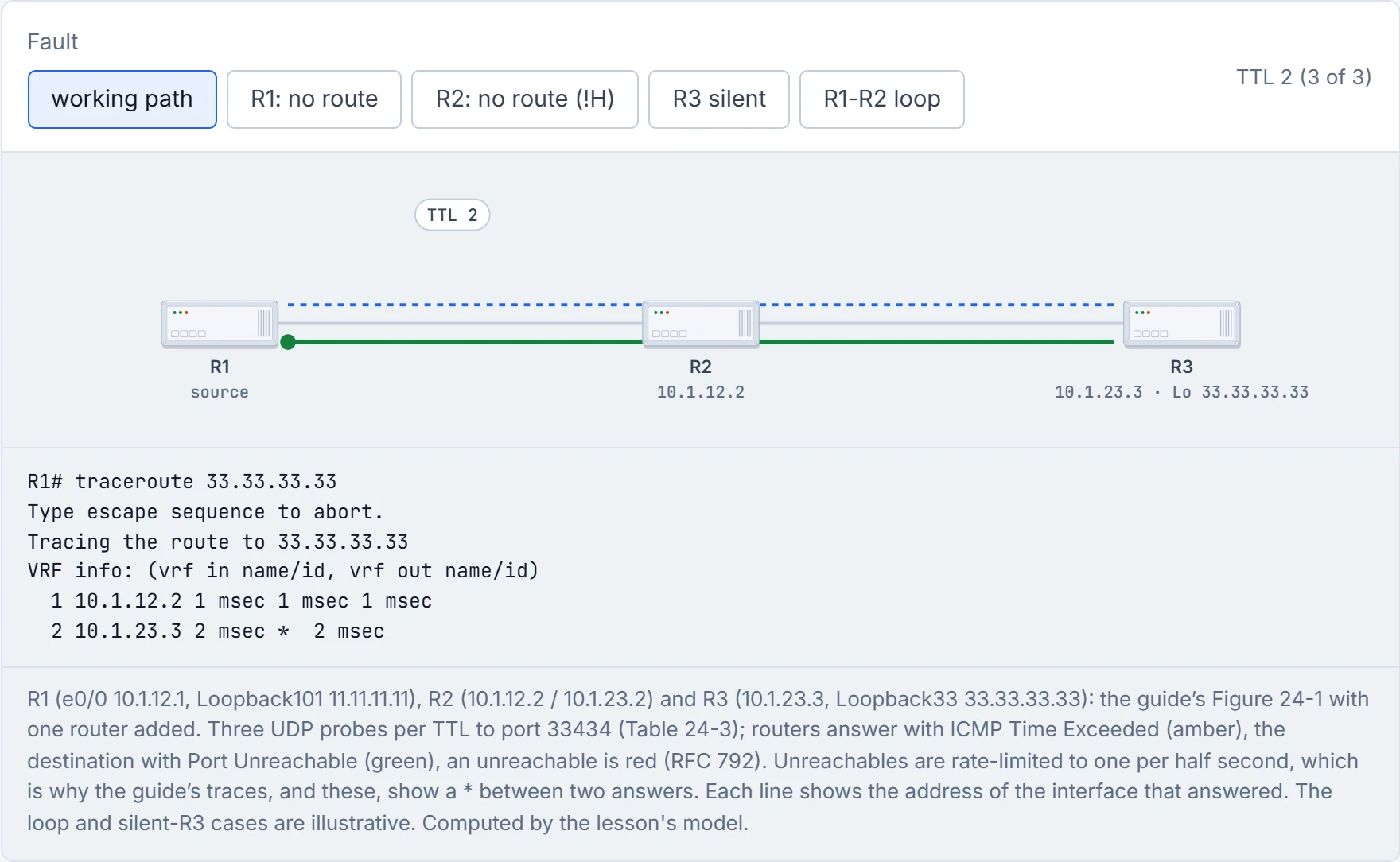
Step 3 of 3 TTL 2 reaches R3, the destination: the probes hit an unused UDP port, so R3 returns Port Unreachable (type 3 code 3), which ends the trace. The middle probe arrived within half a second of the first, so R3 didn’t answer it: unreachables are rate-limited. The trace is over: reached 33.33.33.33.
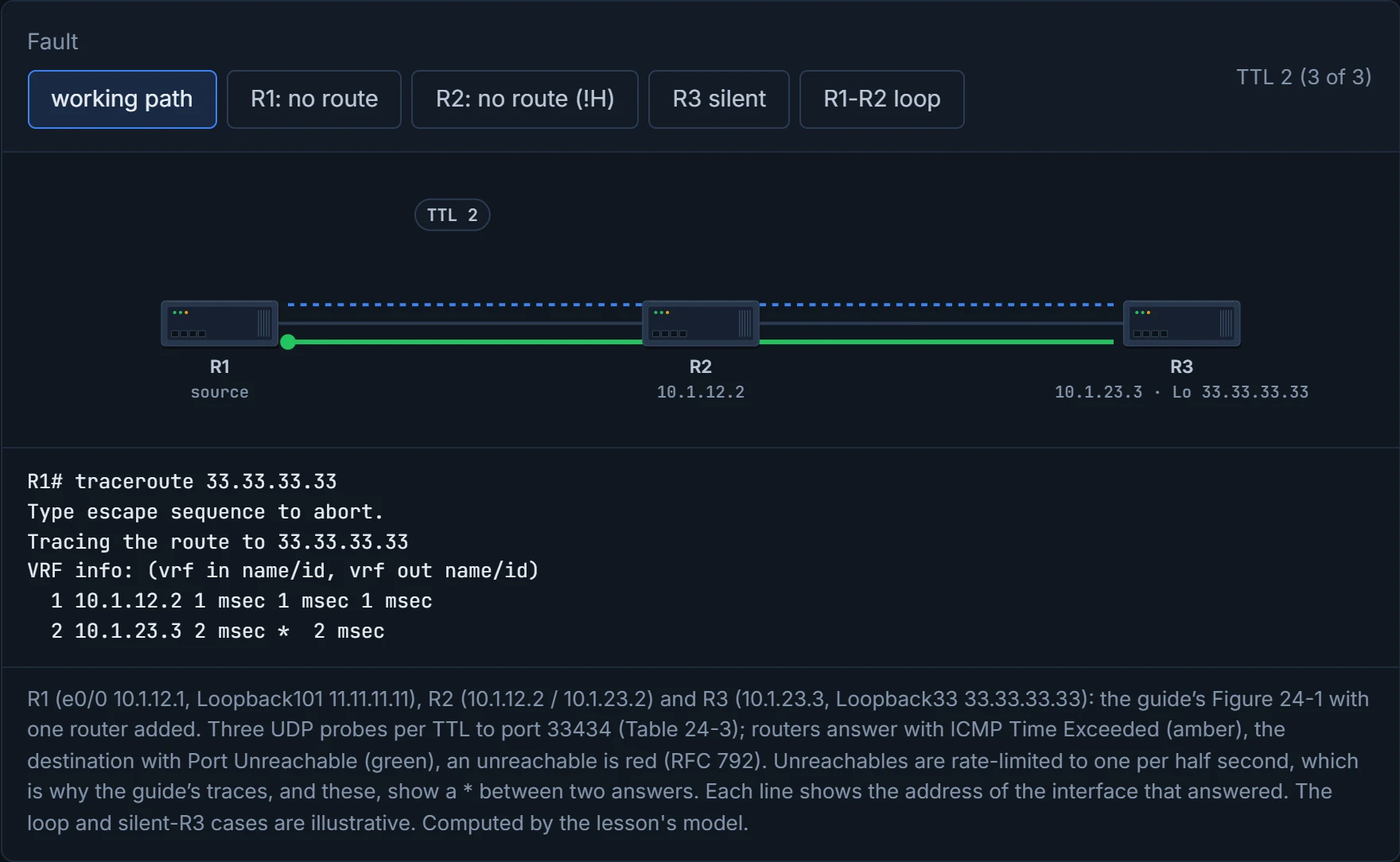
R2's address and !H: the probe reached R2, R2 had nowhere to send it and said so. The loop looks different: the same two addresses alternating down the page, the signature of two routers pointing at each other. And the silent R3: stars from hop 2 on don't prove R3 is down, only that nothing answered.
Thirty lines of asterisks is traceroute's way of reporting that it walked into the dark and kept counting.
Both tools work for IPv6 with ICMPv6. The IPv6 ping is ping ipv6, with the same defaults: five 100-byte echoes and a 2-second timeout. The echo request and reply are ICMPv6 types 128 and 129. You can think of it as the same knock on the door in a different accent: the words changed, the meaning didn't.
The trace does the same job with the hop limit in place of the TTL: a router that decrements it to zero must drop the packet and send an ICMPv6 Time Exceeded, type 3 code 0, to the source; the destination's port unreachable is ICMPv6 type 1 code 4. It's a bit like the same postal system with new envelopes: the address format changes, and the rules for returned post don't.
MTU is where IPv6 really differs. A router that can't forward a packet because it's larger than the next link's MTU sends a Packet Too Big message, ICMPv6 type 2, rather than fragmenting it. So there's no DF bit to set and no "turn DF off and it fragments on the way" trick: in IPv6 a too-big packet is refused in transit, full stop.
ICMPv6 reshuffled the numbers, so type 3 means Destination Unreachable in IPv4 and Time Exceeded in IPv6: reading a capture from memory is a quick way to chase the wrong fault.
Continue the lesson
The whole lesson, with its drawings and its questions. The rest of this section and 9 more after it.