
Fabric and cloud in enterprise design
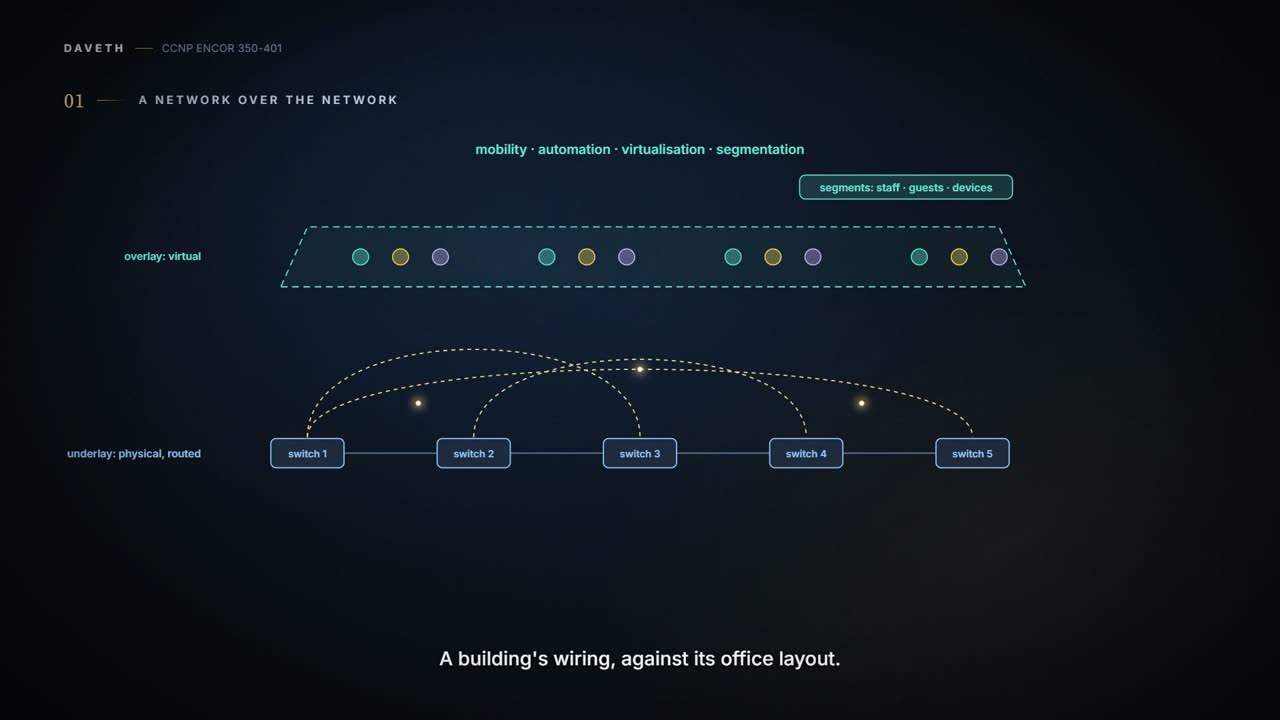
A fabric is an overlay network built over an underlay using tunnelling such as VXLAN: the underlay carries packets between the edges, and users, segments and policies live in the overlay. SD-Access is the campus fabric, VXLAN with LISP. Cloud deployments are private, for one organisation; community; public, for the general public; or hybrid.
By Arif, founder of Daveth · Updated
The full 9 min walkthrough is in Daveth Pro (Network). See what the plan opens
What this page answers
What are the cloud deployment models?
Private, for one organisation, on or off its premises; community, for organisations with shared concerns; public, for the general public, on the provider's premises; and hybrid, two or more distinct clouds bound together. Read it in “4.1 A fabric: a network laid over the network”
What is a network fabric?
An overlay network built over an underlay network using tunnelling such as VXLAN. The underlay only carries packets between the fabric's edges; users, segments and policies live in the overlay. Read it in “4.1 A fabric: a network laid over the network”
4.1 A fabric: a network laid over the network
The guide's definition is one sentence: a fabric is an overlay network (virtual) built over an underlay network (physical) using tunnelling such as VXLAN. The underlay's job is simple: carry packets between the fabric's edges. The overlay is where users, segments and policies live. Fabrics give you host mobility, automation, network virtualisation and segmentation, and the guide calls them more manageable, flexible, secure (by encryption) and scalable than traditional networks. You can think of it as the difference between a building's wiring and its office layout: the electrician runs the same cables whatever the tenants do, and the tenants move walls without calling the electrician.
For the campus, the guide's design option is SD-Access, one of the six campus architecture options it lists next to two-tier and three-tier. It's built on the principles of Cisco's Digital Network Architecture (Cisco DNA), and it's the campus fabric design combined with the Digital Network Architecture Center (DNA Center, now Catalyst Center, v1.2's blueprint item 4.5 and lesson 07-8). It adds fabric capabilities through automation, and gives automated end-to-end segmentation of user, device and application traffic without requiring a network redesign, plus host mobility and enhanced security on top of normal switching and routing. (Cisco calls it "the industry's first intent-based networking solution for the enterprise"; that's the vendor's claim, not a technical one.) It's built for campus and branch networks, not data centre, service provider or WAN. How it works, roles, planes and all, is 06-4's. It works like a hotel's key-card system: the corridors are the same for every guest, and the card, not the corridor, decides which doors open.
A fabric is what happens when networkers decide the physical network is too important to be trusted with the users.
A fabric isn't one product: the idea turns up in more than one part of the enterprise. In the campus and the data centre it's VXLAN, which defines only a data plane; Cisco supports four ways to run it (multicast underlay, static unicast tunnels, MP-BGP EVPN and LISP; 04-6 sorts out which of those are really control planes). The guide's rule of thumb is that MP-BGP EVPN and multicast are the most popular in data centre and private cloud (section 4.5) environments, while for campuses VXLAN with a LISP control plane is preferred; SD-Access is VXLAN with LISP. So the same trick, a VXLAN tunnel over a simple routed underlay, is sold twice. That's a bit like the same flat-pack panels sold as a kitchen and as an office: same panels, different instructions.
In the design, that gives three fabrics; only the first and last are VXLAN in the guide's pages:
- Campus and branch: SD-Access.
- WAN: SD-WAN, a WAN overlay fabric the guide calls a cloud-based WAN solution; its planes are 06-6's.
- Data centre: the leaf-spine design for east-west traffic (06-1). Data centre VXLAN most often runs with EVPN or multicast; separately, Figures 22-8 and 22-12 draw the data centre block as Cisco ACI.
Each fabric is chosen for its part of the network; the guide lists SD-Access as a campus option in its own right, and in every case the fabric still needs a routed underlay to ride on. Think about the last time you went through a big airport: the terminal, the airside trains and the baggage system each run their own way, and they all meet at the same central concourse.
Ask the campus, WAN and data centre teams what "the fabric" is and you'll get three answers, all correct, and a fourth team asking for a fabric of fabrics.
"Cloud" gets used for everything, so it's worth having a definition. NIST's is the standard one: cloud computing is "a model for enabling ubiquitous, convenient, on-demand network access to a shared pool of configurable computing resources ... that can be rapidly provisioned and released with minimal management effort or service provider interaction", made of five essential characteristics, three service models and four deployment models. If you've ever hired a car from an app instead of buying one, you've used most of the definition already.
The five characteristics:
- On-demand self-service: the consumer provisions capacity without a human at the provider.
- Broad network access: reachable over the network from phones, tablets, laptops and workstations.
- Resource pooling: a multi-tenant pool; you generally don't know exactly where your resources are, though you may pick a country, state or data centre.
- Rapid elasticity: scale out and back in with demand; capacity often looks unlimited.
- Measured service: usage is metered, monitored and reported to both sides.
Which is why a server room in the basement with a web portal isn't a cloud by that definition unless it pools, scales and meters. Pooling is the one a network designer feels first: your workload shares hardware with other consumers (strangers, in a public cloud; other business units, in a private one), somewhere you may be able to pin down to a country, state or data centre, and sometimes not at all. That works like a shared office floor with hot desks: you get a desk when you need one, but not the same desk twice.
"The cloud is just someone else's computer" is half right. NIST adds that it's also someone else's billing system.
Predict before reading on: with IaaS, who patches the operating system?
The three service models differ in one thing: where the line falls between what the provider manages and what you do:
- Software as a Service (SaaS): you use the provider's application. You don't manage the network, servers, operating systems, storage, or even the application's capabilities, with the possible exception of limited user-specific settings. The guide's examples are Office 365 and Salesforce.
- Platform as a Service (PaaS): you deploy your own or acquired applications onto the provider's platform. The network, servers, operating systems and storage are theirs; you control the applications and possibly some settings of the hosting environment.
- Infrastructure as a Service (IaaS): you provision processing, storage, networks and other resources, and run whatever software you like, operating systems included. The underlying infrastructure is theirs; you control the operating systems, storage and applications, and possibly a little networking, such as host firewalls. The guide's examples are AWS, Google Compute Engine and Microsoft Azure.
It's a bit like renting a flat: unfurnished is IaaS, where you bring the furniture and fix it yourself; furnished is PaaS, where you bring your clothes; a hotel room is SaaS, where you bring a toothbrush.
D1
You do. IaaS gives you processing, storage and networks and then leaves them alone, like a landlord who hands over the keys to an empty flat. NIST says you control the operating systems; that the patching and hardening are therefore yours, and possibly the host firewall, is the course's reading of it. The line only moves up as you go from on premises to IaaS, PaaS and SaaS; everything under it is the provider's problem, and everything over it is yours.
Moving a server to IaaS doesn't retire its patching schedule. It just gives the schedule a better view.
NIST's four deployment models are about who the infrastructure is for, and where it is:
| Model | For | Run by | Where |
|---|---|---|---|
| Private | one organisation (e.g. its business units) | the organisation, a third party, or both | on or off premises |
| Community | a community of organisations with shared concerns | one or more of them, a third party, or both | on or off premises |
| Public | the general public | a business, academic or government organisation, or a combination | the provider's premises |
| Hybrid | two or more distinct clouds that remain unique entities, bound together for data and application portability, e.g. cloud bursting | each its own | wherever its parts are |
Notice what "private" doesn't mean: not "in our basement". A private cloud may be off premises and run by a third party; what makes it private is that it's for one organisation. It's a bit like a private dining room in a restaurant: nobody else eats there, whether your own chef cooks or the restaurant's does.
The guide adds a word NIST doesn't use. Multicloud, it says, is now the norm: some workloads stay in the private data centres, others are hosted in public clouds such as AWS and Microsoft Azure, which gives the most flexibility in consuming compute. By NIST's definitions, that's a hybrid cloud only if two things hold: the private data centre is itself a cloud (it pools, scales and meters, section 4.3), and the two are bound together for data and application portability. Otherwise it's a private data centre plus a public cloud. So the words overlap without being the same. Have you ever noticed how "hybrid" and "multicloud" get used in the same meeting for the same diagram? That's why.
Continue the lesson
The whole lesson, with its drawings and its questions. The rest of this section and 9 more after it.