
Policy-based routing, and the matching tools it's built from
Normal routing looks only at the destination. Policy-based routing puts packets arriving on an interface through a route map first, and the route map decides which next hop each matching packet takes. Match with ACLs or packet length, set the next hop with set ip next-hop, and apply it with ip policy route-map on the incoming interface.
By Arif, founder of Daveth · Updated
The full 8 min walkthrough is in Daveth Pro (Network). See what the plan opens
What this page answers
How do you configure policy-based routing?
Write a route map whose statements match packets, with match ip address and an ACL or match length, and set a next hop with set ip next-hop. Apply it to the incoming interface with ip policy route-map map-tag. Read it in “4.1 Routing by something other than the destination”
What is policy-based routing used for?
Routing by something other than the destination: by source, by protocol, interactive traffic differently from batch, or over dedicated links, such as sending stock records over a fast link while routine email takes the cheap one. Read it in “4.1 Routing by something other than the destination”
4.1 Routing by something other than the destination
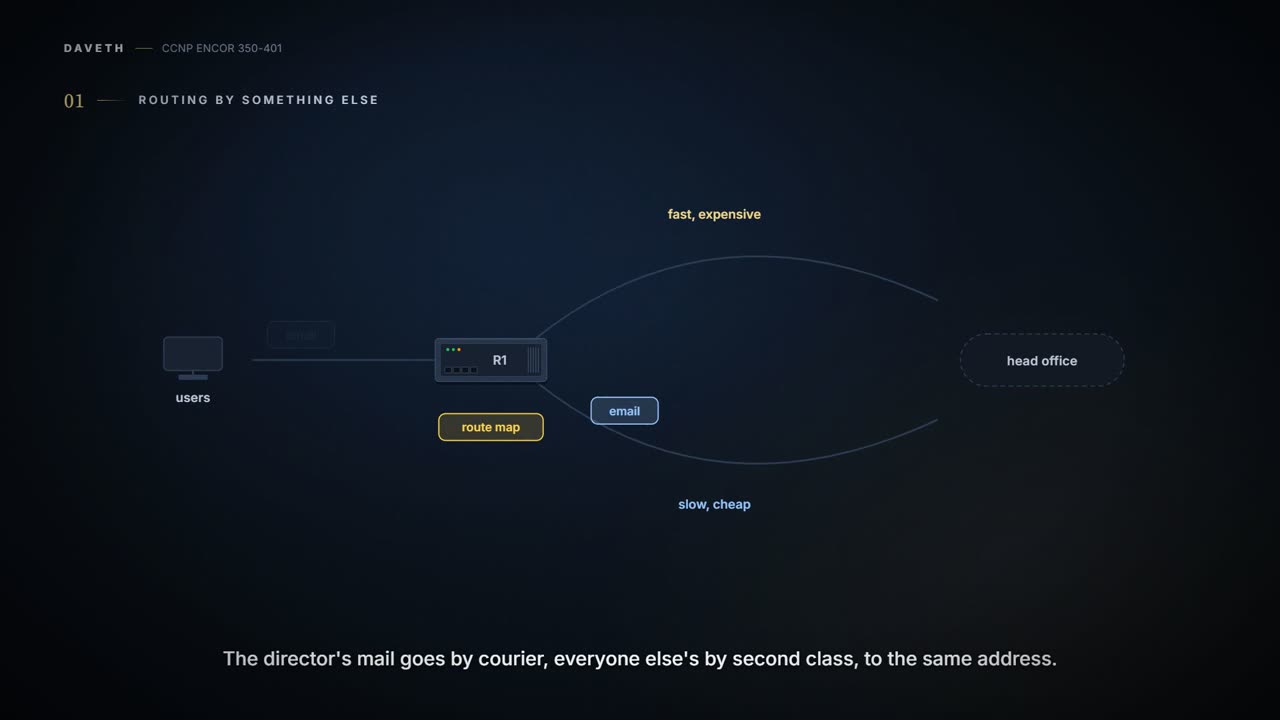
Normal routing looks at one thing: the destination address. Policy-based routing (PBR) puts packets through a route map before routing them, and the route map decides which device each packet goes to next. Cisco lists the uses: equal access, protocol-sensitive routing, source-sensitive routing, routing interactive traffic differently from batch, and routing over dedicated links. Its example sends stock records to head office over a fast, expensive link while routine email takes the slow, cheap one. It's basically like a post room that sorts by who sent the letter as well as where it's going: the director's mail goes by courier, everyone else's by second class, to the same address.
PBR works on packets arriving on an interface. For IPv4 you classify them with ACLs (match ip address) or by packet length (match length); a statement with no match line takes every packet. The route map on that interface sends matching packets to a chosen next hop. The interface command is ip policy route-map map-tag. If you've ever been waved into a separate queue at airport check-in because of the ticket you're holding, not the flight you're taking, you've been policy routed.
PBR is the router's version of "I know the satnav says left, but we're going right".
The memory hook for the whole lesson: match picks, permit steers, and a deny or no match just means "route it the normal way".
Chapter 12 opens with the tools for conditional matching, because changing everything from a neighbour at once is too blunt: ACLs, prefix lists, regular expressions and AS path ACLs. ACLs started as packet filters and now classify traffic for all sorts of features, QoS and routing among them (ACLs as interface packet filters, and PACL/VACL/RACL, are 08-3's). An ACL is a list of access control entries (ACEs), each a permit or deny with its match. They're read from the top (lowest sequence) down, the first match decides and processing stops, and every ACL ends with an implicit deny. So order matters: an ACE in the wrong place changes what the list does. Think about the last time you checked a shop's opening hours: you stop at the first line for today, and a day that isn't listed means closed.
Every ACL ends in an invisible deny: the most reliable line in networking, because nobody can see it to delete it.
There are two kinds:
| Standard | Extended | |
|---|---|---|
| Matches on | source only | source, destination, protocol, port (the guide stays with source, destination, protocol) |
| Numbers | 1-99, 1300-1999 | 100-199, 2000-2699 |
| Or | named (preferred, since the name says what it's for) | named |
A standard ACL: ip access-list standard {number | name}, then [sequence] {permit | deny} source source-wildcard, where any stands for every address and host for a single /32 (Table 12-2: permit any, permit 172.16.0.0 0.0.255.255, permit host 192.168.1.1). An extended ACL: ip access-list extended {number | name}, then [sequence] {permit | deny} protocol source source-wildcard destination destination-wildcard.
Extended ACLs change meaning when they select routes instead of packets. For an IGP, the source fields are the network and the destination fields the smallest prefix length allowed: permit ip host 172.16.0.0 host 255.240.0.0 covers 172.16.0.0/12, while the same line with host 255.255.0.0 covers only 172.16.0.0/16 (Table 12-3). For BGP, the source fields match the network and the destination fields the mask (Figure 12-5): permit ip 10.0.0.0 0.0.255.0 255.255.255.0 0.0.0.0 matches any 10.0.x.0/24, and a wildcard on the mask gives a range of lengths: 255.255.255.0 0.0.0.255 means /24 to /32 (Table 12-4). Before prefix lists, this was BGP's only match tool. It works like a form with a box that means something different depending on which office you hand it to. For PBR, an ACL is always the packet kind: source, destination and protocol of the packet itself.
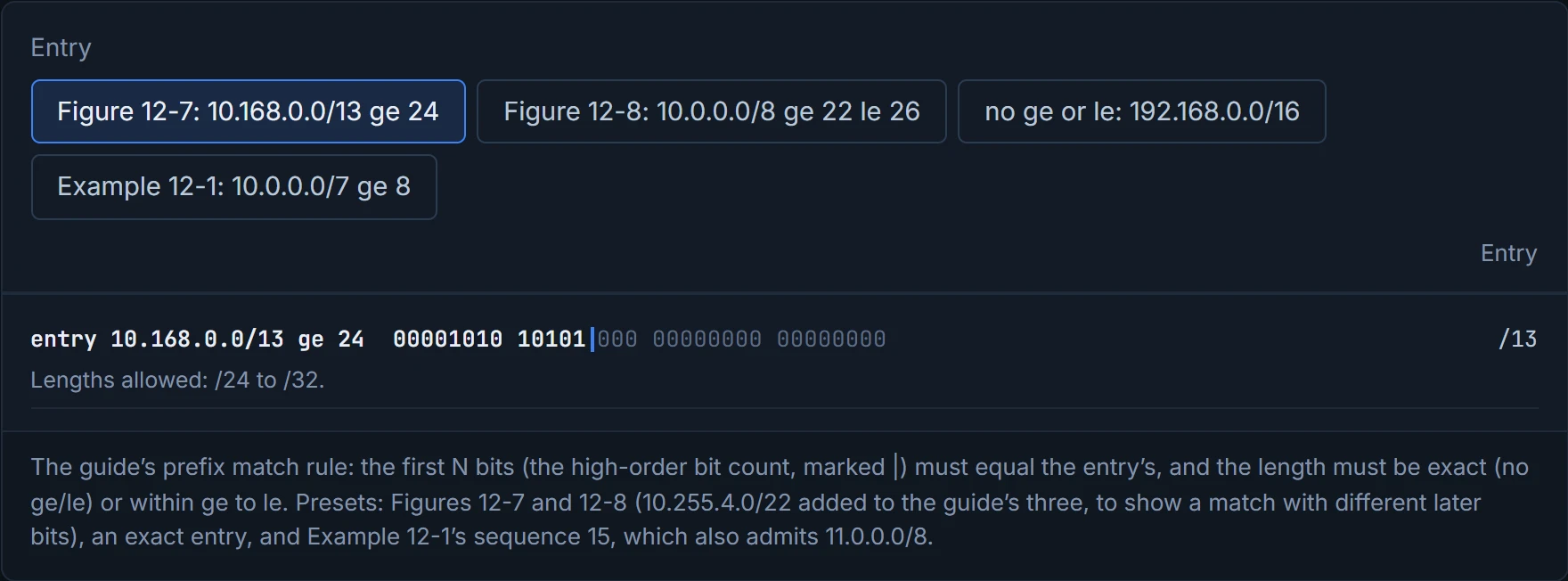
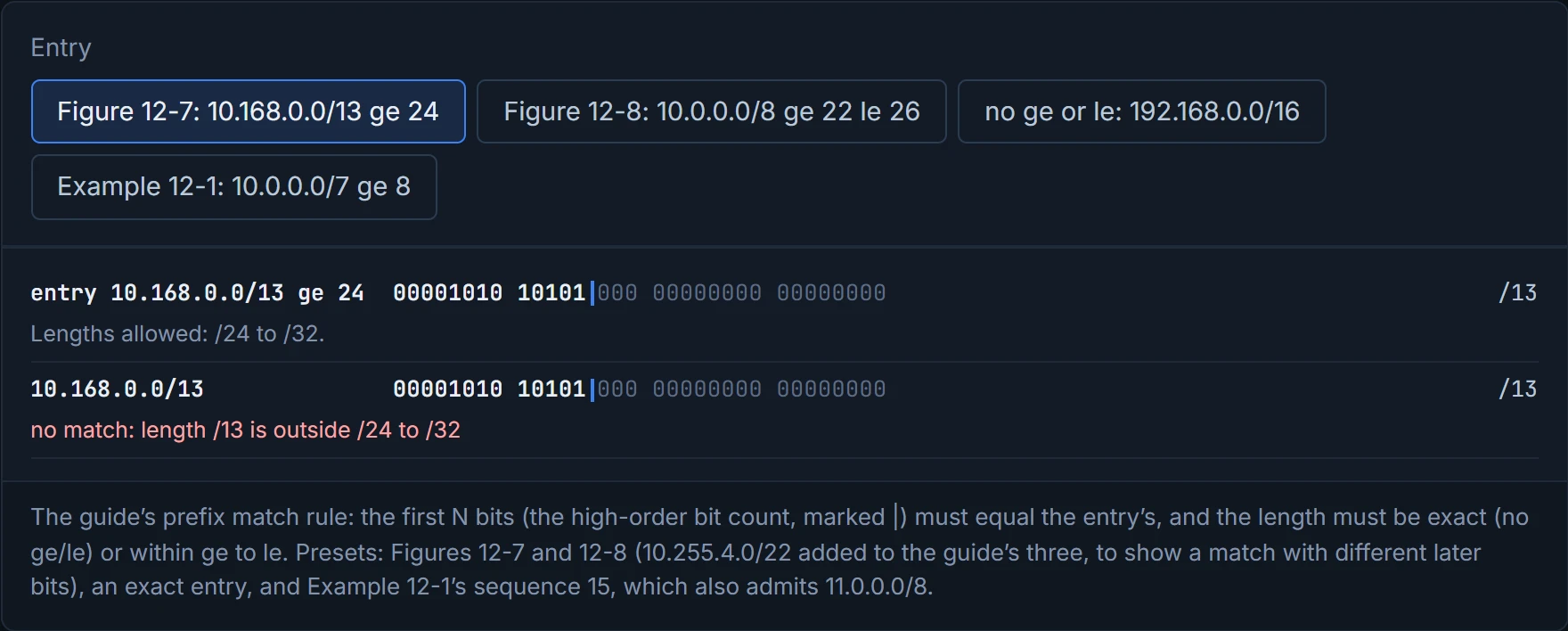
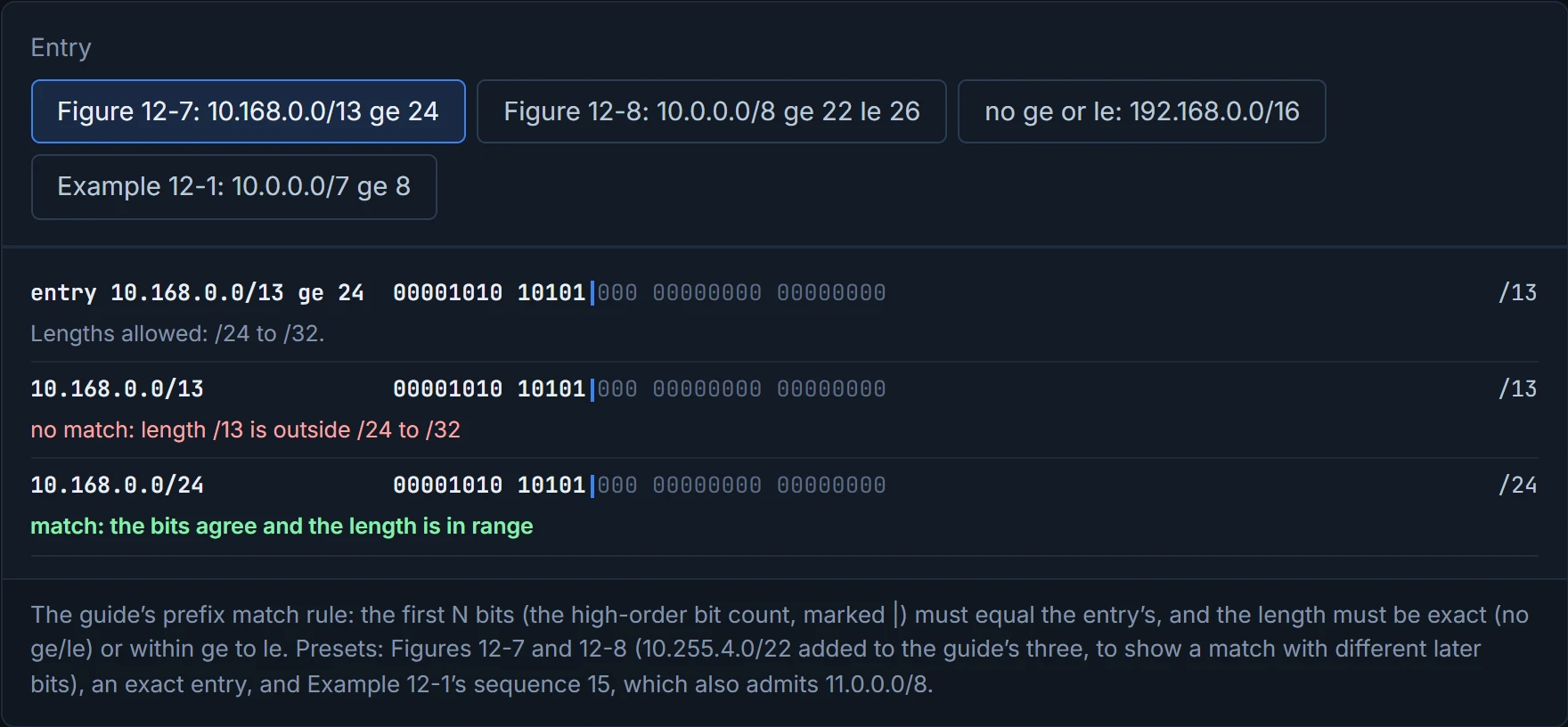
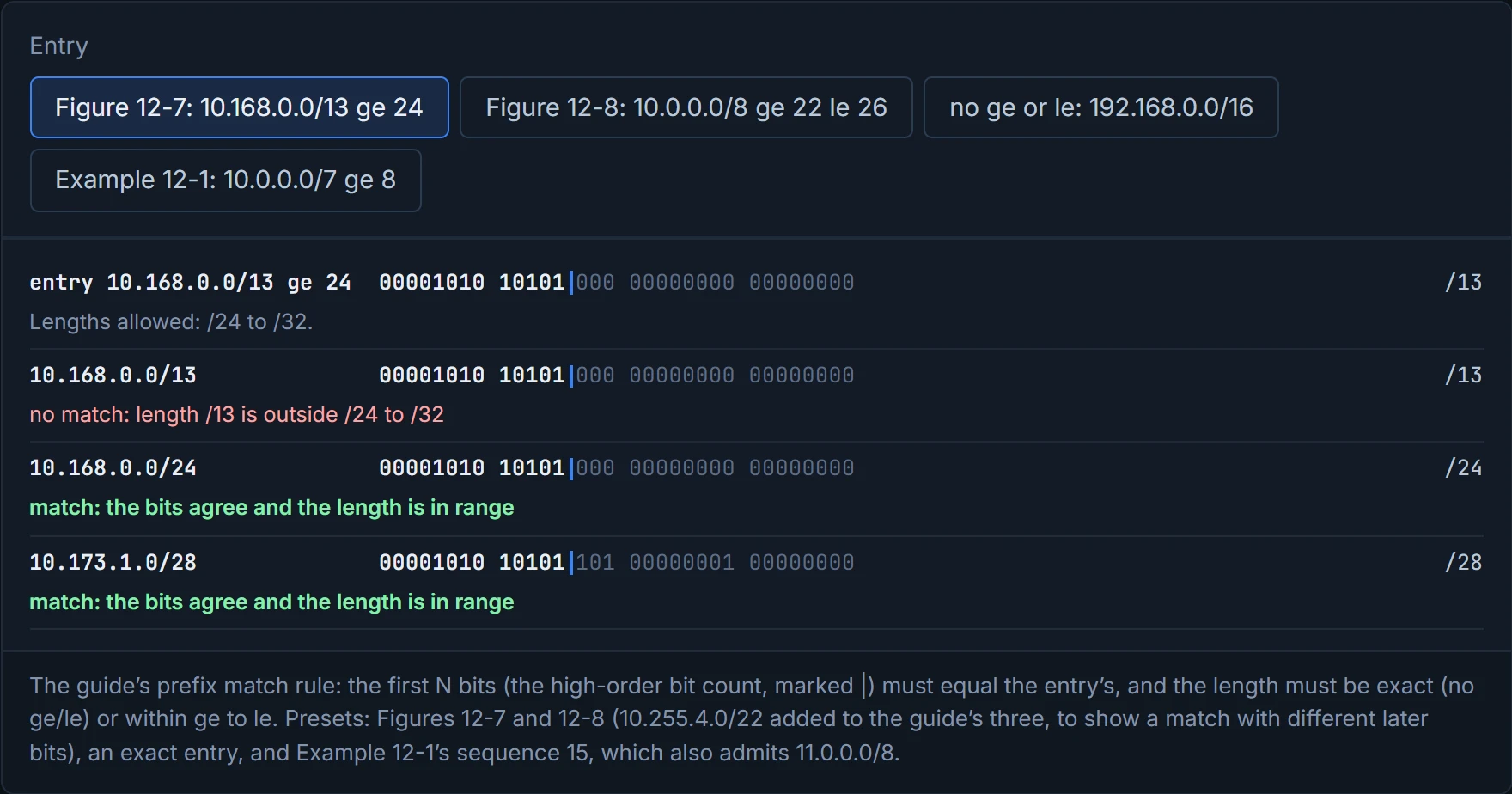
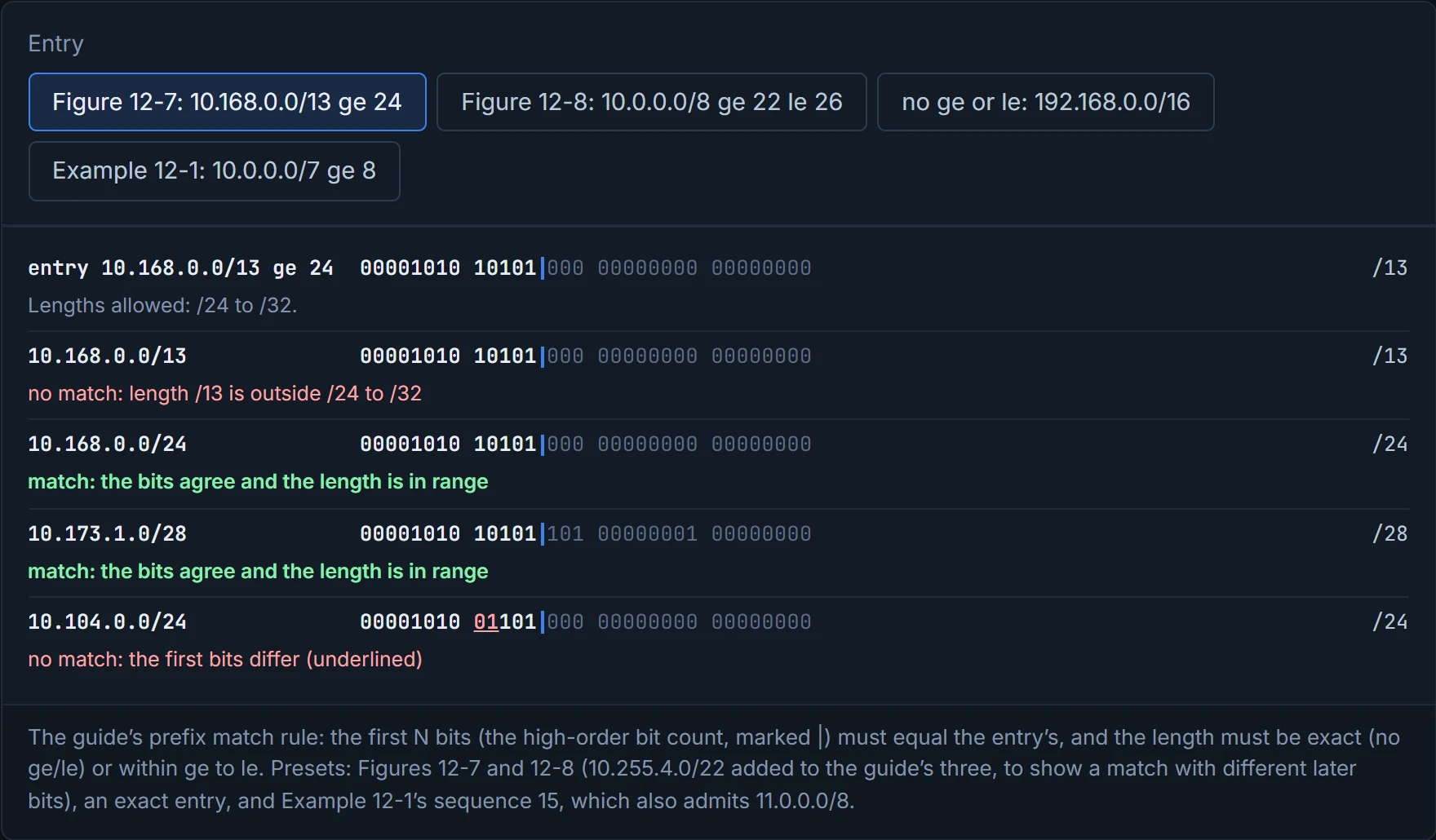
A prefix match specification has a high-order bit pattern (the network) and a high-order bit count (the length). With nothing else, the count is an exact match: 192.168.0.0/16 matches 192.168.0.0/16 and nothing longer (Figure 12-6). Add a ge (greater than or equal) or le (less than or equal) and it matches a range of lengths, as long as the first count bits agree. In Figure 12-7, 10.168.0.0/13 ge 24 matches 10.168.0.0/24 and 10.173.1.0/28 (their first 13 bits are 10.168's), but not 10.168.0.0/13 (too short) or 10.104.0.0/24 (the bits differ). In Figure 12-8, 10.0.0.0/8 ge 22 le 26 takes 10.0.0.0/24 but neither the /8 nor the /30. Consider it your funfair ride sign: you must be from the right town (the bits) and between these two heights (ge and le) to get on.
To match one specific length longer than the count, set ge and le to the same value, like a sign that says "exactly 1.2 m, no taller and no shorter", which no funfair has ever put up, and which prefix lists need all the time.
A prefix list is a sequence of these, each permit or deny, read top down with the first match deciding: ip prefix-list name [seq n] {permit | deny} pattern/count [ge ge-value] [le le-value]. Sequences start at 5 and go up in 5s if you don't give one; you delete an entry by its sequence, and entries can't be renumbered later, so leave gaps. IOS requires count < ge <= le. IPv6 prefix lists work the same way, written in hex: ipv6 prefix-list name ... (Example 12-2 permits the documentation range, 2001:db8::/32 ge 32). As printed, that ge 32 equals the count, which the rule above forbids; the guide shows both, and which one IOS XE enforces is unconfirmed.
Prefix lists step in fives and route maps in tens, so IOS can't even agree with itself on how big a step is.
The guide's Example 12-1 shows why order matters: sequence 5 permits /32s in 192.168.0.0/13, sequence 10 denies every other /32 (0.0.0.0/0 ge 32), and 15 to 25 permit the private ranges, so /32s survive only in the first range. It's worth a second look in binary, though. 10.0.0.0/7 ge 8 is meant to be RFC 1918's 10.0.0.0/8, but the first 7 bits of 10 and 11 are the same, so it also admits 11.0.0.0/8; the /11, /13 and /15 lines do the same to 172.0.0.0/12, 192.168-192.175 and 192.169.0.0/16. D2 lines prefixes up against an entry the way Figures 12-7 and 12-8 do.
D2
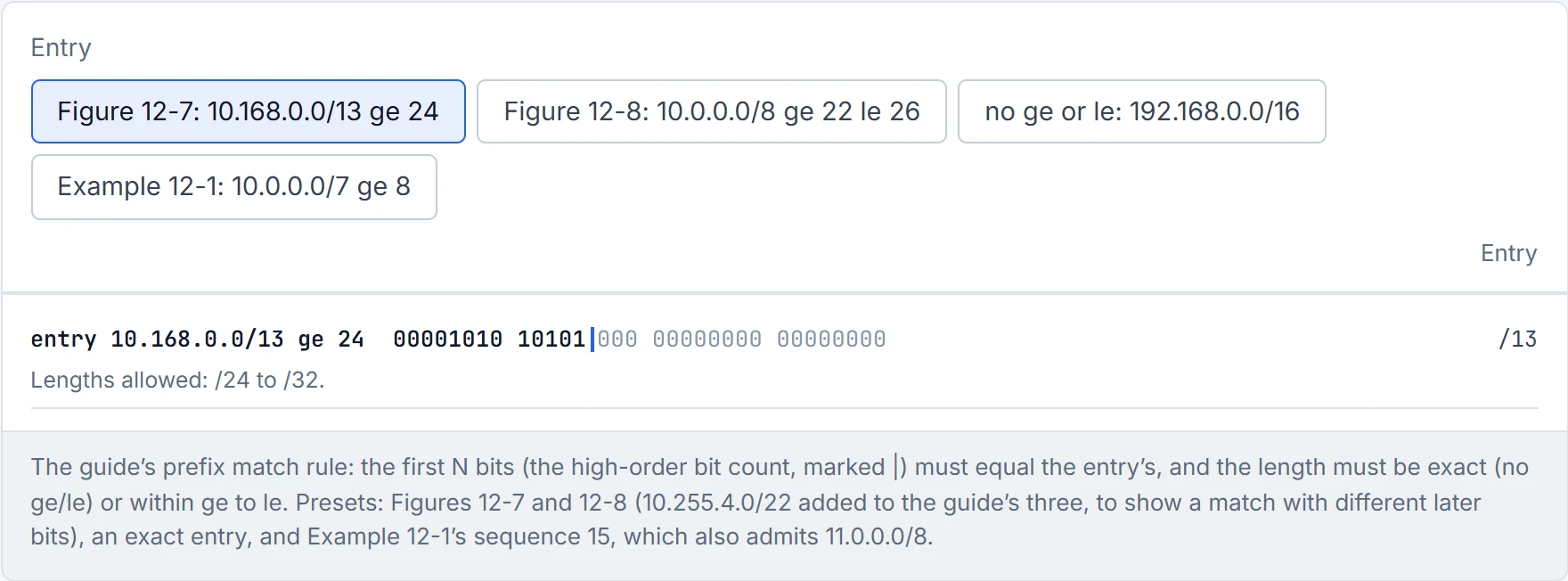
Step 1 of 5 The entry, in binary.
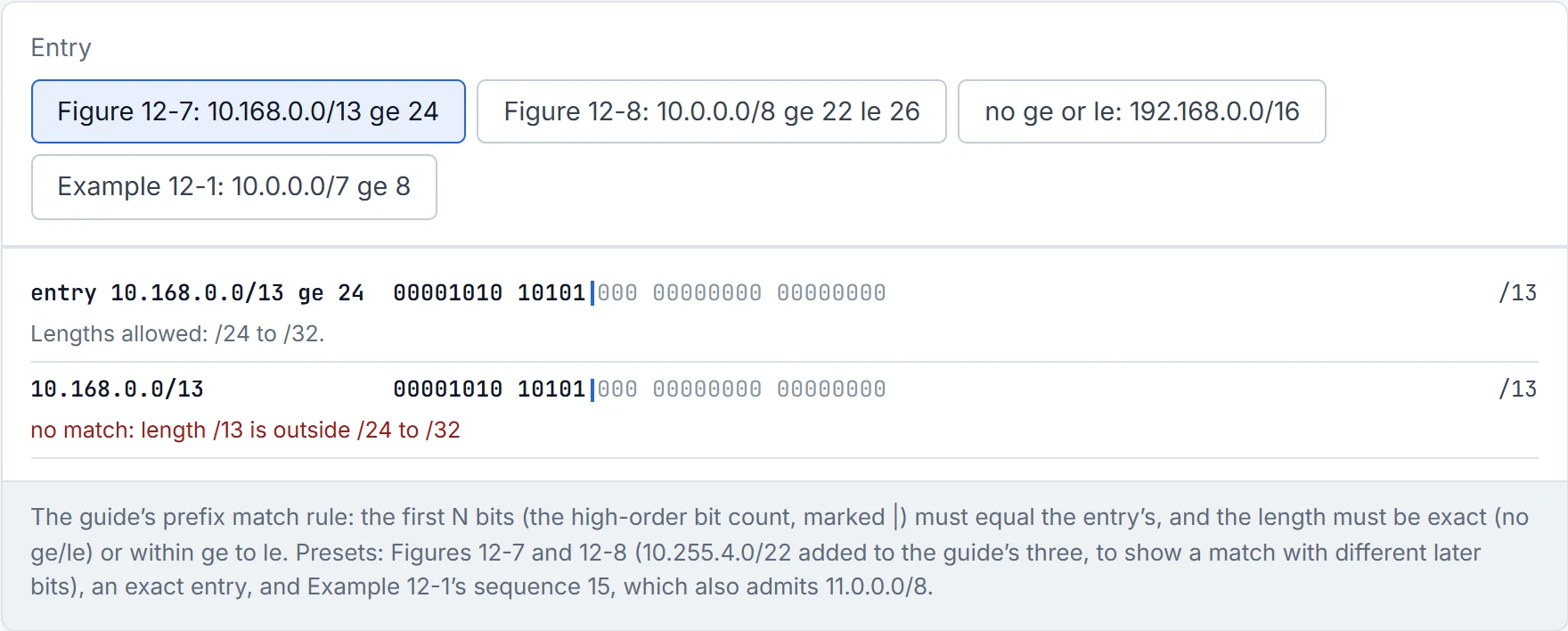
Step 2 of 5 No match: length /13 is outside /24 to /32.
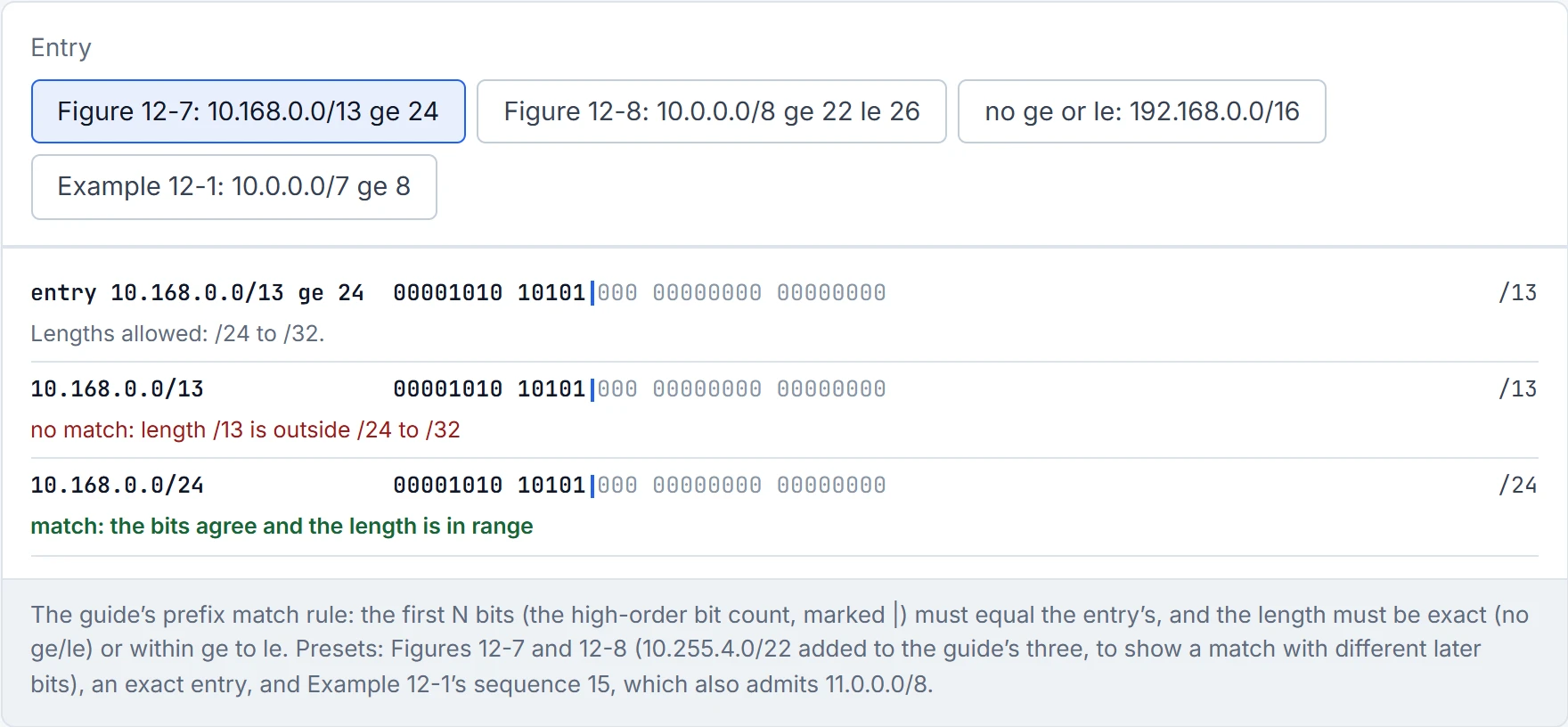
Step 3 of 5 Match: the bits agree and the length is in range.
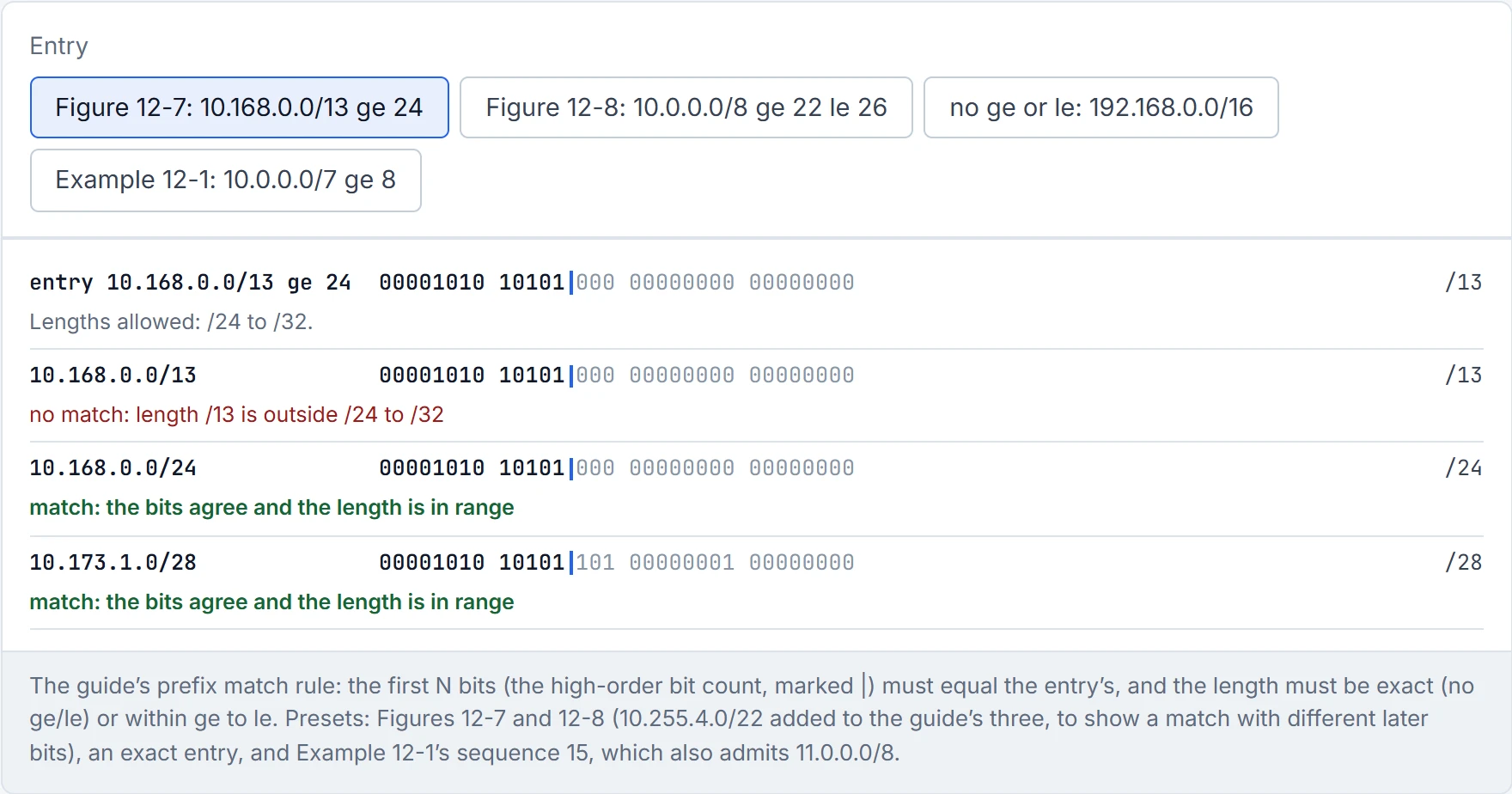
Step 4 of 5 Match: the bits agree and the length is in range.
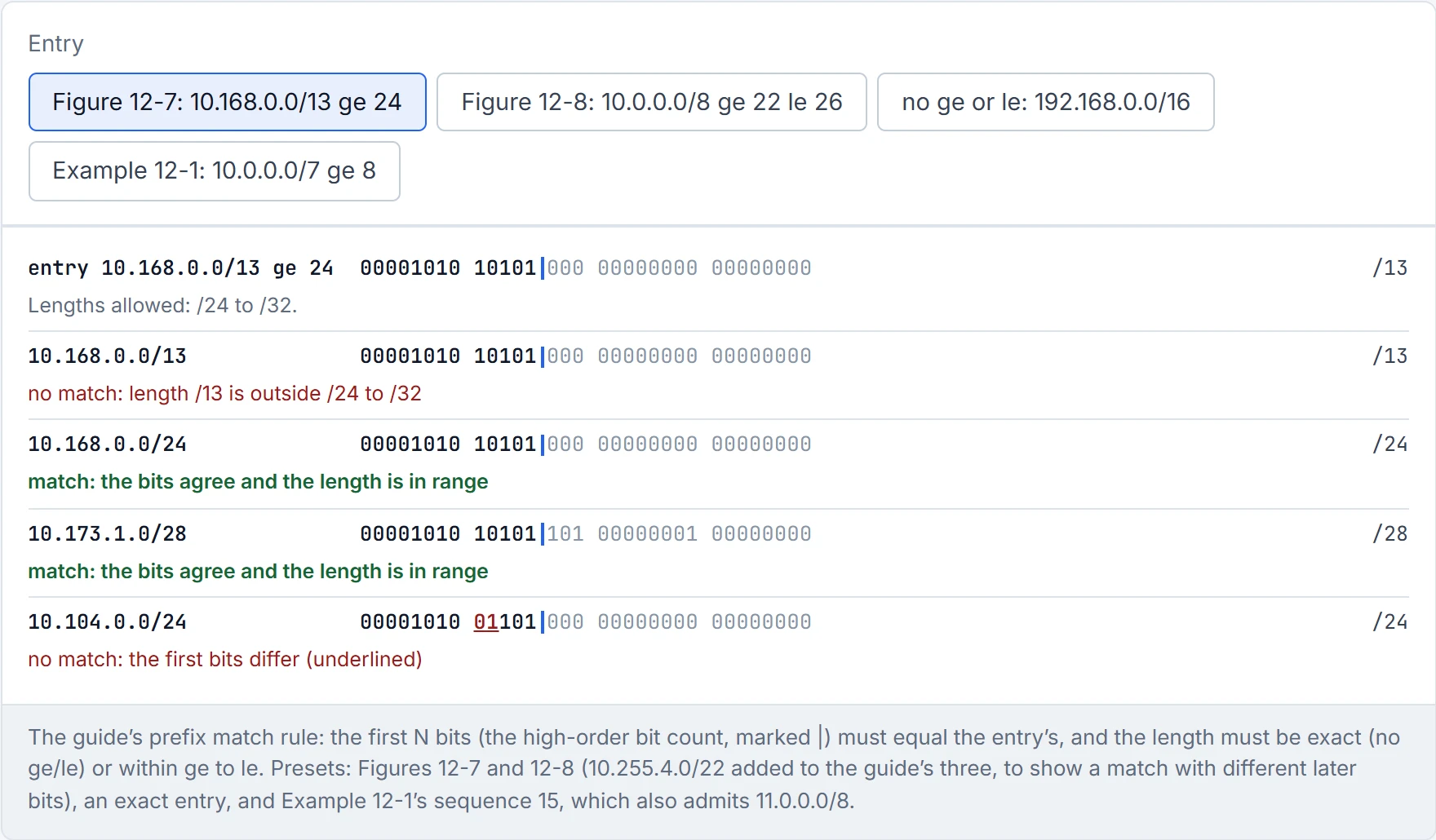
Step 5 of 5 No match: the first bits differ (underlined).
When you want every route from one organisation rather than a list of prefixes, match the AS_Path with a regular expression, and try it on the BGP table with show bgp afi safi regexp regex-pattern. The four you'll use most (Table 12-6):
| Pattern | Matches |
|---|---|
^$ | routes originated locally (an empty path) |
^200_ | routes from neighbour AS 200 (the first AS in the path) |
_200$ | routes originated in AS 200 (the last AS) |
_200_ | routes that passed through AS 200 anywhere |
Imagine if every parcel carried the list of depots it passed through: ^200_ asks which depot handed it to you, _200$ which one it started from. The building blocks (Table 12-5): _ matches a space, ^ the start, $ the end, [ ] one character from a set, - a range inside it, [^ ] anything not in it, ( ) grouping, | or, . any one character, * zero or more, + one or more, ? zero or one. (Read literally, "a space" wouldn't let _200$ match a path that is just "200". The guide's own Example 12-18 settles it: R1's ip as-path access-list 1 permit _65200$ matches routes whose whole path is 65200 and gives them weight 65200, so _ also matches the start of the path. 02-11 section 4.7 reads that example.)
^$ matches an empty AS path, which makes it the one regex that's looking for routes with no travel history at all: your own.
Handle the guide's last pattern with care. ^[0-9]+ [0-9]+ [0-9]+?, described as "three or fewer AS_Path entries", needs two literal spaces after the start, so it matches paths of three or more ASes, the opposite of its label. Regex works like a supermarket's search box: type too little and you get far more than you wanted. A route map uses these patterns through an AS path ACL (match as-path, ACLs 1 to 500); that's route filtering, not PBR, which matches packets.
A route map can filter like an ACL and can also change what it passes, which is why BGP policy is built from them; a routing protocol has to reference it to use it. Each statement has four parts: a sequence number (the order), match criteria, a processing action (permit or deny) and optional set actions. The rules:
- no action given means permit;
- no sequence given: it's incremented by 10 automatically;
- no match line means every prefix matches;
- processing stops at the first statement that matches, once its set actions have run;
- a route map ends in an implicit deny (Example 12-3's comments).
And when you delete one statement, give its sequence number, or the whole map goes. It acts kind of like a hospital triage desk: each patient is checked against the rules in order, and the first rule that fits decides which ward they go to.
The match options (Table 12-7): match as-path (an AS path ACL), match ip address {acl}, match ip address prefix-list, match local-preference, match metric (exact, or within a +/- deviation), match tag. For route maps that filter routes, the guide's rule is: several values on one match line are an OR (match ip address ACL-ONE ACL-TWO: either will do, Example 12-4, where the closing deny statement is redundant because of the implicit deny), and several match lines are an AND (Example 12-5: in ACL-ONE and with a metric of 500 to 600). Hold that thought for section 4.6: Cisco's 9300 PBR page says something different for packets.
A route-map statement with no match line matches everything: the most agreeable statement in the configuration.
The trap is a deny inside the matched list. In Example 12-6, ACL-ONE denies 172.16.1.0/24 and permits the rest of 172.16.0.0/16; sequence 10 (permit) and 20 (deny) both match on ACL-ONE, and 30 permits everything with set metric 20. 172.16.1.0/24 is denied by the ACL, so it simply doesn't match 10 or 20, and it passes at 30 with metric 20; 172.16.2.0/24 matches and passes at 10. Have you ever noticed how "not on this list" and "on the list marked no" are different things? An ACL deny takes a route off the list for that statement only; a deny statement is the list marked no, which for route filtering means the route is dropped. The evaluation order is always sequence, match, processing action, then set.
The set actions (Table 12-8): set as-path prepend, set ip next-hop, set local-preference, set metric, set origin, set tag, set weight, the tools that set 02-11's attributes. One of them crosses over: in BGP, set ip next-hop changes a route's next-hop attribute; in PBR, the same words send packets to that next hop.
A PBR route map is built from the same parts, applied to packets on an interface. D1's branch router:
ip access-list extended GUEST
 deny   ip 10.30.0.0 0.0.255.255 host 10.50.0.53
 permit ip 10.30.0.0 0.0.255.255 any
ip access-list extended VOICE
 permit udp 10.20.0.0 0.0.255.255 172.16.0.0 0.0.255.255
ip access-list extended LAB
 permit ip 10.20.0.0 0.0.255.255 172.16.0.0 0.0.255.255
ip access-list extended DR
 permit ip 10.20.0.0 0.0.255.255 198.51.100.0 0.0.0.255
route-map BRANCH-PBR permit 10
 match ip address GUEST
 set ip next-hop 10.2.2.2
route-map BRANCH-PBR deny 20
 match ip address VOICE
route-map BRANCH-PBR permit 30
 match ip address LAB
 set ip next-hop 10.2.2.2
route-map BRANCH-PBR permit 40
 match ip address DR
 set ip default next-hop 10.2.2.2
interface GigabitEthernet0/1
 ip policy route-map BRANCH-PBR
Before reading on, predict: a guest sends a DNS query to 10.50.0.53 at HQ. Does sequence 10, written for guests, catch it? D1 lets you check.
(The first GUEST line exempts all guest traffic to 10.50.0.53, the DNS server; an exception for DNS alone would match UDP port 53.) What happens to a packet:
- It meets the statements in sequence order. If the statement's ACL doesn't permit it (including an ACL deny line), the statement doesn't match and the next one is read.
- It matches a permit statement: it's policy routed by that statement's set clause. A permit statement with no set clause just routes it normally.
- It matches a deny statement: it's not policy routed, no later statement is read, and it's routed normally.
- It matches nothing: normal destination-based routing.
That's roughly equivalent to a hotel's special-requests desk: if your request is on their list, they handle it their way; if it's on the "we don't do that" list, or on no list, you get the normal service, not the door. Nothing is dropped by a PBR deny. And here the 9300's page describes several match commands in one statement as an OR, not the guide's AND for route filtering; how routers treat several match ip address lines in PBR is unconfirmed, so D1 keeps one match per statement.
Two set clauses, and the difference matters. set ip next-hop uses the policy first and the routing table second: the packet goes to the policy next hop even if the routing table has a route. set ip default next-hop uses the routing table first and the policy next hop only if there's "no explicit route for this destination"; whether a default route counts as an explicit route is unconfirmed, which is why D1's router has none. The next hop must be directly connected, and what happens if it goes down isn't in these sources (unconfirmed). You can think of it as the difference between "take the scenic route" and "take the scenic route if the satnav can't find one".
Continue the lesson
The whole lesson, with its drawings and its questions. The rest of this section and 9 more after it.