
OSPFv3: the same protocol, rebuilt for IPv6
OSPFv3 carries both IPv6 and IPv4, is not backward compatible with OSPFv2, and keeps the same neighbours, LSAs, areas and SPF. Addresses move out of the topology LSAs, neighbours use link-local addresses and are identified by router ID on every network type, and authentication moves to IPsec. Configure it with router ospfv3 and enable it per interface.
By Arif, founder of Daveth · Updated
The full 9 min walkthrough is in Daveth Pro (Network). See what the plan opens
What this page answers
How do you configure OSPFv3 for IPv6?
ipv6 unicast-routing, then router ospfv3 with a process ID and a 32-bit router ID, then on each interface ospfv3 process-id ipv6 area area-id. Older IOS used ipv6 router ospf, now legacy. Read it in “4.1 What changed, and what didn't”
What is the difference between OSPFv2 and OSPFv3?
OSPFv3 carries IPv6 and IPv4, runs over IPv6, keeps addresses out of the topology LSAs, uses link-local neighbour addresses, identifies neighbours by router ID on every network type, and leaves authentication to IPsec. Read it in “4.1 What changed, and what didn't”
4.1 What changed, and what didn't
OSPFv3 is the newest version of OSPF. It carries both IPv4 and IPv6, it isn't backward compatible with OSPFv2, and yet the mechanisms from Chapters 8 and 9, neighbours, LSAs, areas, SPF, are essentially the same. It's basically like a house after a renovation: same rooms, same stairs, but the wiring's been redone and the sockets are in new places.
What changed:
| OSPFv2 | OSPFv3 | |
|---|---|---|
| Address families | IPv4 | IPv4 and IPv6 |
| Addresses in packets and topology LSAs | yes | no: carried as LSA payload, making the protocol "essentially address family independent, much like IS-IS"; "link" instead of "network", because the tree is computed per link |
| Flooding scope | implied by the LSA type | coded in the LS type field itself, together with what to do with an unknown type |
| Runs over | IPv4, protocol 89 | IPv6, protocol 89, with a smaller header |
| Neighbours identified by | RID on point-to-point links and virtual links; interface address on broadcast, NBMA and point-to-multipoint links | RID, on every network type |
| Authentication | in OSPF | removed from OSPF; IPsec extension headers (IPsec: 04-3) |
| Neighbour addresses | the interface's primary address, a common subnet required (02-2) | link-local; NBMA neighbours configured by link-local address; several subnets allowed on one interface, and no common subnet needed |
| Several instances on one segment | - | an instance ID field decides who forms adjacencies |
The one that surprises people is the neighbour row: two OSPFv3 routers on the same wire become neighbours even if they share no global subnet, because they talk link-local. Think about the last time you talked to a neighbour over the garden fence: you didn't need to know each other's postcodes, just that you were standing either side of the same fence.
RFC 5340 took authentication out of OSPF's own packets and handed it to IPsec in the IPv6 header, which is a very IPv6 way of saying "not my department".
The flooding row deserves a second look, because in OSPFv2 you had to remember which type went how far. In OSPFv3 the LS type number says it: the top three bits of the 16-bit type are U, S2 and S1, and S2/S1 give the scope. So 0x0008 (link) stays on its link, the 0x2 types (router, network, both interarea types, intra-area prefix) flood one area, and 0x4005 (AS external) floods the whole domain. That's roughly equivalent to a note on the office kitchen fridge, an email to your department, and an announcement to the whole company: how far it goes is written on the outside. A router that meets a type it doesn't recognise reads the U bit: 1 means store and flood it at its stated scope anyway, 0 means treat it as link-scoped.
Open an OSPFv3 router LSA and you won't find an address in it. It still describes the router's interfaces, but only their type (point-to-point, broadcast, NBMA, point-to-multipoint, virtual link) and their cost. Two renames while we're here: the network summary LSA is now the interarea prefix LSA, and the ASBR summary the interarea router LSA.
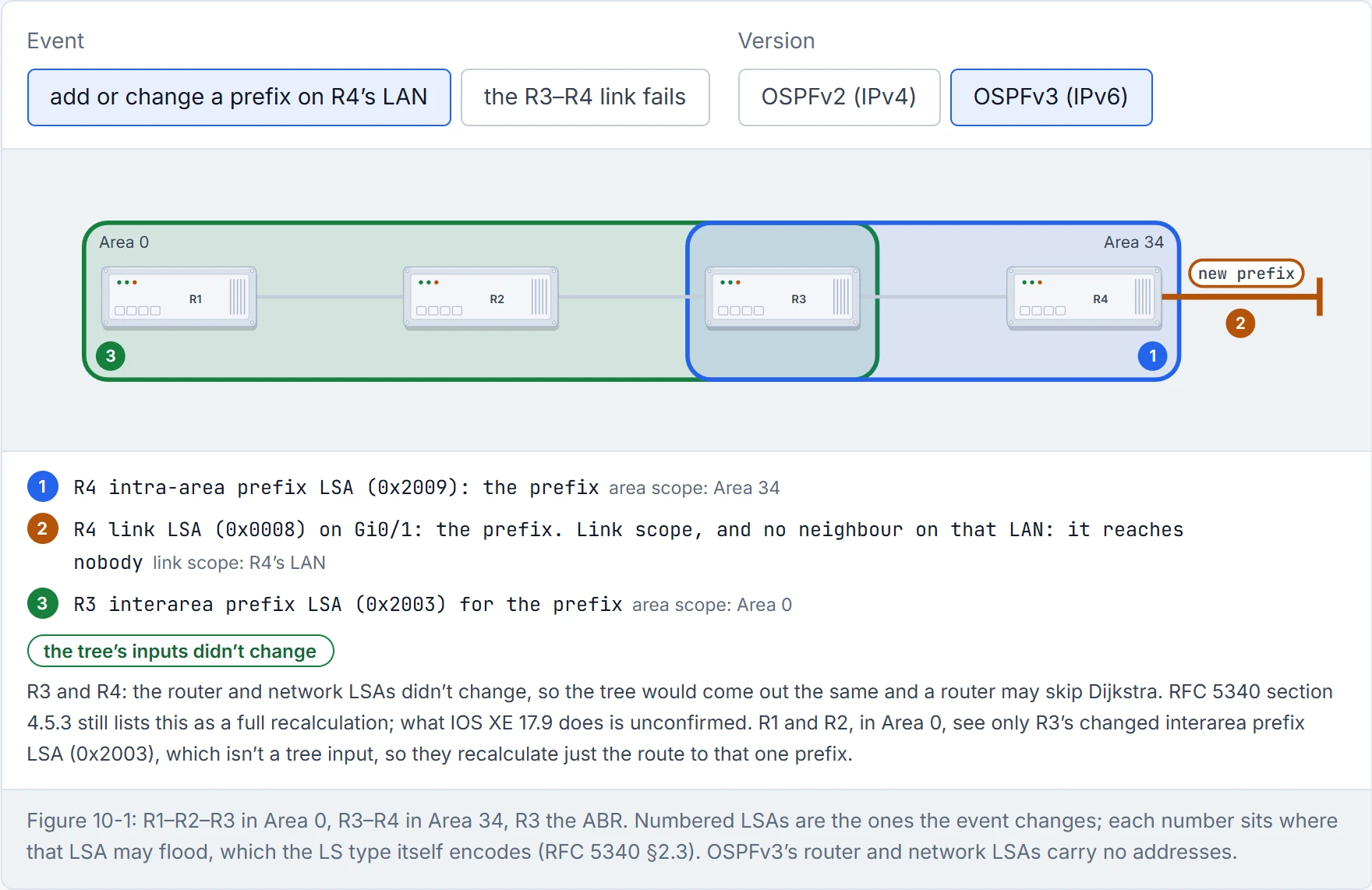
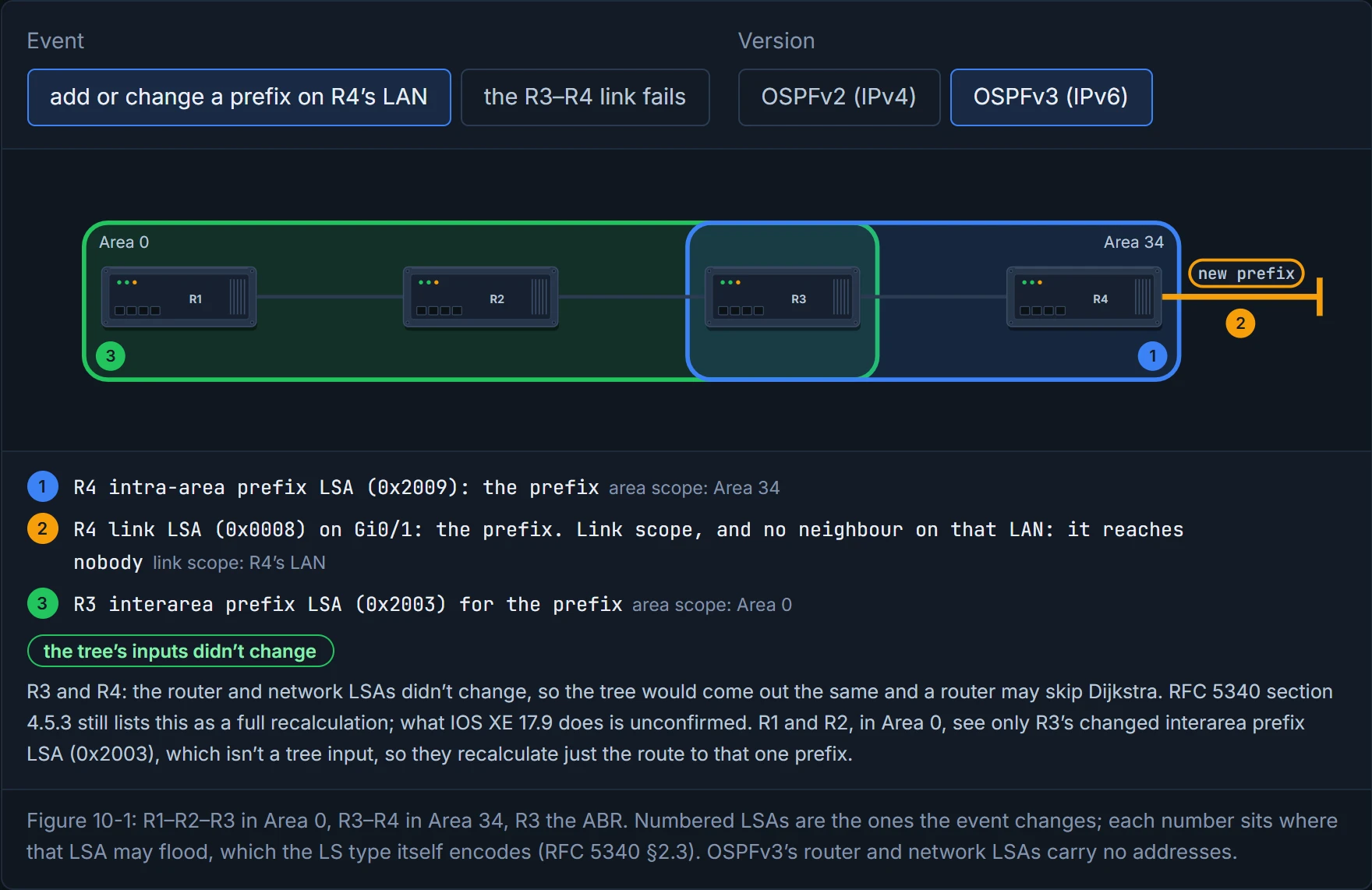
The addresses moved into two new LSAs, the intra-area prefix LSA and the link LSA. Dijkstra reads only the router and network LSAs, so adding or changing a prefix on an interface doesn't touch the tree's inputs. The guide puts the benefit this way: it "eliminates the need for OSPF to perform full shortest path first (SPF) tree calculations every time a new address prefix is added or changed on an interface". The tree is built from links, not networks. You can think of it as drawing the street map without the house numbers and keeping the numbers in a separate directory: when a family moves, you update the directory, and nobody has to redraw the roads.
OSPFv3 finally separated the map from the address book. It only took one entire IP version.
Read the guide's sentence as what the design allows, not as what the standard requires. RFC 5340's install rule still lists intra-area prefix and link LSAs among the changes after which "The entire routing table is recalculated, starting with the shortest-path calculation for each area", the same rule RFC 2328 gives for an OSPFv2 router LSA. What the split buys is certainty: from the LSA type alone, a router knows the tree will come out exactly as before, so an implementation can skip Dijkstra and just reattach the prefixes. Whether IOS XE 17.9 does that for a 0x2009 or 0x0008 change is unconfirmed: the guide doesn't say, and no Cisco source was reachable when this was written.
The full set:
| LS type | Name | Scope | Carries |
|---|---|---|---|
| 0x2001 | Router | area | each router's interfaces to the area: type and cost |
| 0x2002 | Network | area | from the DR: every router attached to the link |
| 0x2003 | Interarea prefix | area | from ABRs: IPv6 prefixes in other areas |
| 0x2004 | Interarea router | area | from ABRs: where ASBRs in other areas are |
| 0x4005 | AS external | AS | from ASBRs: redistributed routes and defaults |
| 0x2007 | NSSA | area | from ASBRs in an NSSA (02-5) |
| 0x0008 | Link | link | an interface's global prefixes and its link-local address; shared only with neighbours on that link |
| 0x2009 | Intra-area prefix | area | IPv6 prefixes on a router, stub or transit segment |
Link-local addresses appear only in link LSAs, never in the others. It works behind the scenes just like a building's intercom list: flat numbers matter only to the people in that building, so they never go in the city phone book. And a link LSA on a stub LAN, like R4's Gi0/1 in Figure 10-1, has nobody to reach at all: there's no OSPF neighbour on that link.
D1
OSPFv3 packets leave from the interface's link-local address (virtual links, which 02-4 excluded, are the exception: they use a global address). They go to a neighbour's link-local address or to one of two link-scoped multicast groups: FF02::5, AllSPFRouters, and FF02::6, AllDRouters. Hellos go to FF02::5 on each link, finding neighbours and noticing when one dies.
Table 10-3 gives most packets two rows, and the split is the thing to learn: unicast between link-local addresses while an adjacency is forming, multicast once the routers are flooding. A database description, a request, and the update and acknowledgement that answer it all go router to router. A flooded update or acknowledgement goes from the DR to FF02::5 and from everyone else to FF02::6. It acts kind of like a new starter's first week: the handover happens one to one at a desk, and after that they're on the team mailing list with everyone else. (The table names only the DR as sending to FF02::5; RFC 2328 gives the rule as DR or Backup, and OSPFv3 keeps OSPFv2's flooding.)
| Type | Packet | While forming (link-local to link-local) | While flooding |
|---|---|---|---|
| 1 | Hello | an immediate hello to a new neighbour | to FF02::5: find and keep neighbours |
| 2 | Database description | summarise the LSDB | - |
| 3 | Link-state request | ask for LSAs | - |
| 4 | Link-state update | answer a request | DR to FF02::5; others to FF02::6 |
| 5 | Link-state ack | acknowledge an update | DR to FF02::5; others to FF02::6 |
These are 02-2's addresses with a new prefix: 224.0.0.5 became FF02::5, and 224.0.0.6 became FF02::6. That's roughly equivalent to a radio station moving frequency: same presenters, same schedule, and you retune once.
FF02::5 and FF02::6 are two IPv6 addresses you can remember without writing them down. Treasure them; there won't be many more.
Before the steps, a prediction. A brand-new router has IPv6 addresses on every interface and no IPv4 at all. You type router ospfv3 1 and enable it on the interfaces. Neighbours or not? Decide, then read step 2.
ipv6 unicast-routing, thenrouter ospfv3 [process-id].router-id <router-id>: 32 bits, any value unique in the OSPF domain; it needn't match an IPv4 address. OSPFv3 finds a RID the same way OSPFv2 does, from IPv4 addresses, so a router with none gets 0.0.0.0, and no adjacency forms. (RFC 5340 reserves 0.0.0.0.)- Optionally,
address-family {ipv6 | ipv4} unicastunder the process; it's enabled automatically when you enable OSPFv3 on an interface for that family. - On each interface:
ospfv3 process-id ipv6 area area-id.
A router with no IPv4 address runs OSPFv3 with router ID 0.0.0.0, which is OSPF's way of saying "and you are?"
The guide's topology (Figure 10-1, Example 10-1): R1, R2 and R3 in Area 0, R3 and R4 in Area 34, R3 the ABR; RIDs 192.168.1.1 to 192.168.4.4. Each interface's link-local address is set by hand to FE80::n, like a name tag at a small meeting: FE80::3 on R3 is far easier to read in an output than an address built from the MAC. Older IOS used ipv6 router ospf and ipv6 ospf process-id area area-id; those are legacy now.
The show commands mirror OSPFv2's, just like when you swap to a newer car of the same make: the controls are where you expect, with a few new labels. The guide's rule of thumb is "replace ip ospf with ospfv3 ipv6". It works for the neighbour table and not everywhere: the interface command has no ipv6 in it.
show ospfv3 ipv6 neighbor(Example 10-2): R3 sees 192.168.2.2FULL/DRon Gi0/2 and 192.168.4.4FULL/BDRon Gi0/4. Where OSPFv2 had the neighbour's address, there's an Interface ID column: the neighbour's interface ID (5 on both).show ospfv3 interface [id](Example 10-3, R1's Gi0/2): the identity line readsLink Local Address FE80::1, Interface ID 3, with no global address or subnet. The next line showsInstance ID 0, inside the IPv6 range you'll meet in section 4.6. R1 is DR and R2 BDR, each shown by RID and link-local address; the timers are OSPFv2's 10/40/40/5.show ospfv3 interface brief(Example 10-4): an extra AF column, and 02-2's Nbrs F/C counts; R3 is BDR on Gi0/2 in Area 0 and DR on Gi0/4 in Area 34.show ipv6 route ospf(Example 10-5):Ofor intra-area,OIfor interarea, and for IPv6 the next hop is the neighbour's link-local address:via FE80::2.
Passive interfaces work as in 02-2: the prefix is still advertised, but no hellos go out, a bit like a shop window you can look into where nobody comes out to talk. Put passive-interface interface-id, passive-interface default or no passive-interface interface-id under the process (it applies to both families) or under one address family. show ospfv3 interface gigabitEthernet 0/1 | include Passive shows No Hellos (Passive interface) (Examples 10-6, 10-7). Look at R4 in Example 10-6: the moment passive-interface default goes in, the log shows its adjacency to R3 on Gi0/3 going from FULL to DOWN, and that's why the next line re-enables Gi0/3.
Summarisation matters at least as much in IPv6, since hardware tables are finite. The guide's warning: don't read hex as decimal. 2001::1/128 isn't "20 and 1"; its first byte 0x20 is 32, and the next, 0x01, is 1. If you scaled that down to everyday money, it's reading a price in euros as if it were pounds: the digits look the same and the value isn't. OSPFv3 summarises internal routes by 02-6's rules, on ABRs, with area area-id range prefix/prefix-length under the address family. R3 summarises the three Area 0 loopbacks as area 0 range 2001:db8:0:0::/65, and R4 then sees OI 2001:DB8::/65 in place of three /128s (Examples 10-9, 10-10).
The most common IPv6 summarisation mistake is doing hex in decimal, which is how 2001 becomes a year.
Filtering is 02-6's three tools again, moved under the address family, and the guide stops before it: Chapter 10 has no filtering, so this part comes from Cisco's OSPF configuration guide. Same rules, same places. In a way, it's just the same three locks fitted to a new door: the keys changed shape, the doors they guard didn't.
- A range that says nothing.
area area-id range ipv6-prefix/prefix-length not-advertiseon the ABR: "The Type 3 summary LSA is suppressed, and the component networks remain hidden from other networks". On R3,area 0 range 2001:DB8::/65 not-advertisewould take the three Area 0 loopbacks out of Area 34 altogether, where the plain range above gave R4 oneOI 2001:DB8::/65. - A filter at the border.
area area-id filter-list prefix prefix-list-name {in | out}under the address family, on an ABR: it filters "type 3 link-state advertisements (LSAs) that are sent between different OSPFv3 areas", and "Only type 3 LSAs that originate from an ABR are filtered". In OSPFv3 a type 3 is the inter-area prefix LSA (Table 10-2).inandoutname the area, as 02-6 taught:infilters what's sent into it,outwhat leaves it for the others; the guide's own case is R3 filtering a prefix "as it leaves Area 0". (Cisco's configuration guide wordsoutdifferently, "the inter-area prefix LSAs generated for the specified area"; this lesson follows the guide.) - A filter on one router's table.
distribute-list prefix-list name inunder the address family keeps routes out of that router's routing table, and "This feature has no effect on link-state advertisement (LSA) flooding": the LSA stays in every LSDB, as in 02-6. On an ABR, 02-6's ordering rule applies too: a type 3 for another area is written from an intra-area route before the list runs, so it still goes out, while a backbone type 3 that the ABR would regenerate into another area is stopped (unconfirmed). That's why the per-router tool is cleanest on a router that isn't an ABR.
One interaction to hold on to: a filter-list only meets the type 3s the ABR actually writes. With the range above on R3, Area 34 gets one OI 2001:DB8::/65 and no /128s, so a filter naming 2001:DB8::1/128 never meets anything, and R4 still reaches R1's loopback through the summary. Filter the summary itself, or a prefix the range doesn't cover.
So take one the range doesn't cover. R1's LAN, 2001:DB8:0:1::/64, sits outside 2001:DB8::/65 (its fourth group is 1), and R4 learns it as OI 2001:DB8:0:1::/64 (Example 10-10). If R4 must not reach it while R2 and R3 still do, the border filter on R3 is the tool:
ipv6 prefix-list NO-R1-LAN seq 5 deny 2001:DB8:0:1::/64
ipv6 prefix-list NO-R1-LAN seq 10 permit ::/0 le 128
!
router ospfv3 1
 address-family ipv6 unicast
  area 34 filter-list prefix NO-R1-LAN in
The second line is the IPv6 form of 02-6's permit 0.0.0.0/0 le 32: every prefix of any length, so only the one denied line bites (unconfirmed). Leave it out and the list's implicit deny stops every inter-area prefix going into Area 34. Cisco's own example for this command is a single deny line in an IPv6 prefix list, which is that exact mistake written down; picture yourself copying it into production and wondering why Area 34 went quiet. For the IPv4 family it's the same command under address-family ipv4 unicast with an ip prefix-list; in the guide's IPv4 family R4 learns R1's loopback as O IA 192.168.1.1 (Example 10-15).
Continue the lesson
The whole lesson, with its drawings and its questions. The rest of this section and 9 more after it.