
OSPF areas and LSAs: what each router knows, and how it picks a path
One big OSPF area means every flap triggers a full SPF everywhere and the database keeps growing. Areas keep each database small: a change inside an area causes a full SPF there only. Every area connects to area 0, the backbone, through area border routers, which on Cisco must be in area 0 and pass routes between areas as type 3 LSAs.
By Arif, founder of Daveth · Updated
The full 10 min walkthrough is in Daveth Pro (Network). See what the plan opens
What this page answers
Why does OSPF use areas?
To keep each link-state database a manageable size: a change inside an area triggers a full SPF in that area only, routers elsewhere do at most a partial calculation, and less flooding happens when something flaps. Read it in “4.1 Why split OSPF into areas”
What is an OSPF area border router (ABR)?
A router connected to area 0 and at least one other area, which takes routes from one area and injects them into another. On Cisco it must be in area 0 or it passes nothing, and it runs an SPF tree for each area it is in. Read it in “4.1 Why split OSPF into areas”
How do you configure multi-area OSPF?
Area membership is set per interface: each interface belongs to exactly one area, and every area must connect to area 0, the backbone, through an ABR. The lesson builds the guide's three-area example. Read it in “4.1 Why split OSPF into areas”
4.1 Why split OSPF into areas
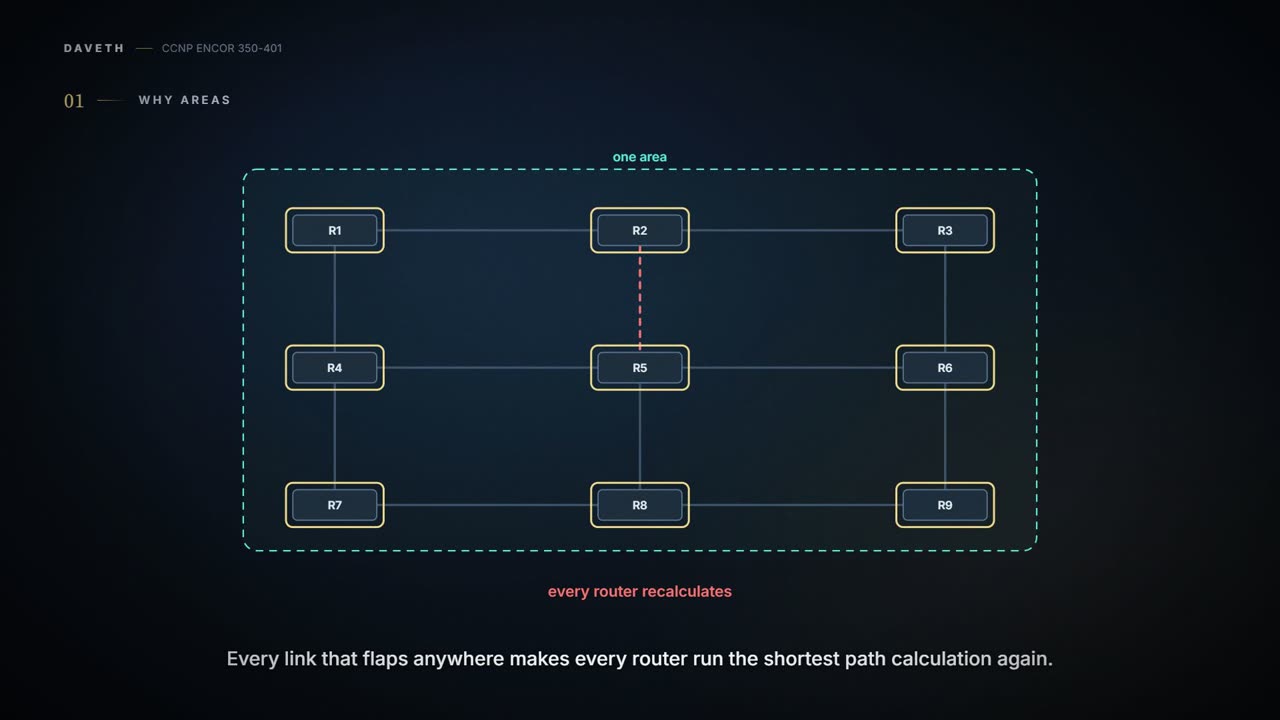
An OSPF area is a group of router interfaces. Membership is set per interface, the area ID travels in every hello, an interface belongs to exactly one area, and every router in an area holds an identical LSDB. One big area is simple, but it costs you. It's basically like running a whole office tower off one giant floor plan: a desk moves on the tenth floor and everyone in the building redraws their map. Every link that flaps anywhere triggers a full SPF run everywhere; the LSDB keeps growing until it's unmanageable, eating memory and stretching every SPF calculation; and nothing gets summarised (02-6).
So you split it. Several areas keep each LSDB a manageable size, and an area should be sized for the smallest, slowest router in it. A router with interfaces in several areas keeps one LSDB per area. The detail of an area is invisible from outside: a change inside triggers a full SPF in that area only, while routers elsewhere do a partial calculation, and only if a metric changes or a prefix disappears. You can think of it as giving each floor its own detailed plan and posting only a list of room numbers downstairs, so a desk moving on one floor changes nobody else's plan. Areas hide topology but keep networks reachable: smaller LSDBs, faster SPF, less flooding when something flaps.
Here's the first surprise. A router with one interface in Area 1 and another in Area 2 does not pass routes between them (Figure 9-1; quiz Q1). Areas only exchange routes through Area 0, the backbone. Every area must connect to it; OSPF expects each area to inject its routes into the backbone, and the backbone to advertise them into the others. The guide calls that design "crucial to preventing routing loops". Consider it your building's lobby: every trip from one floor to another passes through it, and a staircase that joins two floors directly doesn't count.
Putting a router in two areas and expecting them to share routes is like standing in a doorway between two parties and expecting the guests to mingle through you.
The routers that do the passing are area border routers (ABRs): routers connected to Area 0 and at least one other area, by Cisco's definition and RFC 3509's. An ABR takes routes from one area and injects them into another; on Cisco it must be in Area 0 or it passes nothing, and it runs an SPF tree for each area it's in. (RFC 2328's original definition was any router attached to more than one area, which would pass its intra-area routes; Cisco follows RFC 3509.) If the backbone is the lobby, the ABR is the receptionist at the desk where a floor meets it. In Figure 9-2, R1 is in Areas 0, 1 and 2: Area 1's and Area 2's routes go into Area 0, and Area 0's routes, now including those, go into Areas 1 and 2.
The rest of this lesson uses the guide's Figure 9-3: R1, R2, R3 and R4 in Area 1234; R4 and R5 in Area 0; R5 and R6 in Area 56; R4 and R5 are the ABRs. R4 puts 10.24.1.0/29 in Area 1234 and 10.45.1.0/24 in Area 0; R5 puts 10.45.1.0/24 in Area 0 and 10.56.1.0/24 in Area 56 (Example 9-1). show ip ospf interface brief shows each interface's Area column, its Cost (R4's serial link to R2 at 64), its State (P2P on the serial link, DR or BDR on Ethernet) and its Nbrs F/C (Example 9-2).
An area ID is one 32-bit number, written in decimal (0 to 4,294,967,295) or dotted decimal (0.0.0.0 to 255.255.255.255). One router can use one format and its neighbour the other and they still form an adjacency: the guide notes the hello advertises it in dotted-decimal form, and either way it's the same 32 bits. Just like when you write a date as 25/09 on one form and 25 September on another: different spelling, same day. Area 1234 and area 0.0.4.210 are the same area.
Routes learned from routers in the same area are intra-area and show as O. Routes learned from another area, through an ABR, are interarea and show as O IA. Have you ever noticed how an airport's arrivals board marks each flight as domestic or international? The code in front of a route is that marker: O for "from our own area", O IA for "came in through another area's border". In Figure 9-3, 10.24.1.0/29 is intra-area to R1 and 10.45.1.0/24 is interarea.
The routing tables prove it (Examples 9-3 to 9-5): R1 shows Area 1234's networks as O and everything from Areas 0 and 56 as O IA; R4 shows Areas 1234 and 0 as O or connected and Area 56 as O IA; R5 and R6 show only O IA, since everything intra-area to them is directly connected. Notice how the metrics jump once a path crosses the 64-cost serial link. (Example 9-3's own numbers fit Ethernet costs of 10; every other example and the p207 walkthrough use 1, and so does this lesson.)
O IA is OSPF's way of saying "I've never seen where this network lives, but a colleague on another floor swears it's there".
External routes are a third kind: learned outside OSPF and injected by redistribution. The guide leaves them out of the ENCOR exam's scope.
When neighbours become adjacent, their LSDBs synchronise. After that, whenever a router adds or removes a connected link, it floods an LSA out of every OSPF interface, and that LSA lists all the networks the router advertises. There are six kinds for IPv4:
| Type | Name | Carries |
|---|---|---|
| 1 | Router | a router's own links, inside its area |
| 2 | Network | a multi-access segment with a DR |
| 3 | Summary | networks from another area |
| 4 | ASBR summary | how to reach a router that redistributes |
| 5 | AS external | redistributed routes |
| 7 | NSSA external | redistributed routes inside an NSSA (02-5) |
Types 1, 2 and 3 build intra-area and interarea routes, and they're this lesson (quiz Q3: six types). The guide's packet capture (Figure 9-4) shows the header every LSA carries: its type, its age, its sequence number and its advertising router; for a type 1 LSA the link IDs follow, each with the attached network and its cost.
Two header fields keep everyone's copy current. The sequence number exists "to overcome problems caused by delays in LSA propagation": it's a 32-bit version number, and it works just like the version number on a shared document: the originating router bumps it with each new version, a receiver processes an LSA whose number is greater than the copy it holds, and one whose number is lower is old news and discarded. (The first version is 0x80000001; the capture's 0x80000007, from a different topology, is a later version.)
The age counts up by one every second. When a router's own LSA reaches 1800 seconds, 30 minutes, it floods a fresh copy at age 0; each router that forwards an LSA adds a small delay for the link; and an LSA that reaches 3600 seconds is invalid and purged from the LSDB (quiz Q4). That repeated refresh is a safety net that keeps every LSDB in the area consistent. That's roughly equivalent to a best-before date the maker keeps renewing: every half hour a fresh copy goes out, and any copy that reaches an hour old without being replaced goes in the bin.
An LSA lives an hour at most, unless its maker keeps it fresh every half hour. Most change requests should be so well looked after.
All routers in an area hold the same set of LSAs for that area; an ABR keeps a separate set per area, and most of the LSAs in one area differ from those in another. show ip ospf database lists them.
Type 1, the router LSA. Every OSPF router advertises one, and it's the basic building block of the LSDB: one entry for every OSPF-enabled link, with its attached network. It never leaves its area, which is exactly why an area's internal topology is invisible from outside (the guide's Figure 9-5). See them with show ip ospf database router. Every area has them (quiz Q5).
Each type 1 LSA carries the advertising router's RID, the age, the sequence number and a link count, then one entry per link: its type, something identifying what's on the other end, and the metric. That "other end" is usually the neighbour's RID, except on a multi-access segment with a DR, where it's the DR's interface address. The RFC's table makes both fields exact:
| Link type | Link ID | Link Data | Example in Area 1234 |
|---|---|---|---|
| Point-to-point | the neighbour's RID | this router's interface address | R2 → 192.168.4.4 via 10.24.1.2; R4 → 192.168.2.2 via 10.24.1.4 |
| Transit (a DR segment) | the DR's interface address | this router's interface address | R1, R2 and R3 → 10.123.1.3 (R3 is DR) |
| Stub | the network number | the network mask | R3 → 10.3.3.0 / 255.255.255.0; R2 and R4 → 10.24.1.0 / 255.255.255.248 |
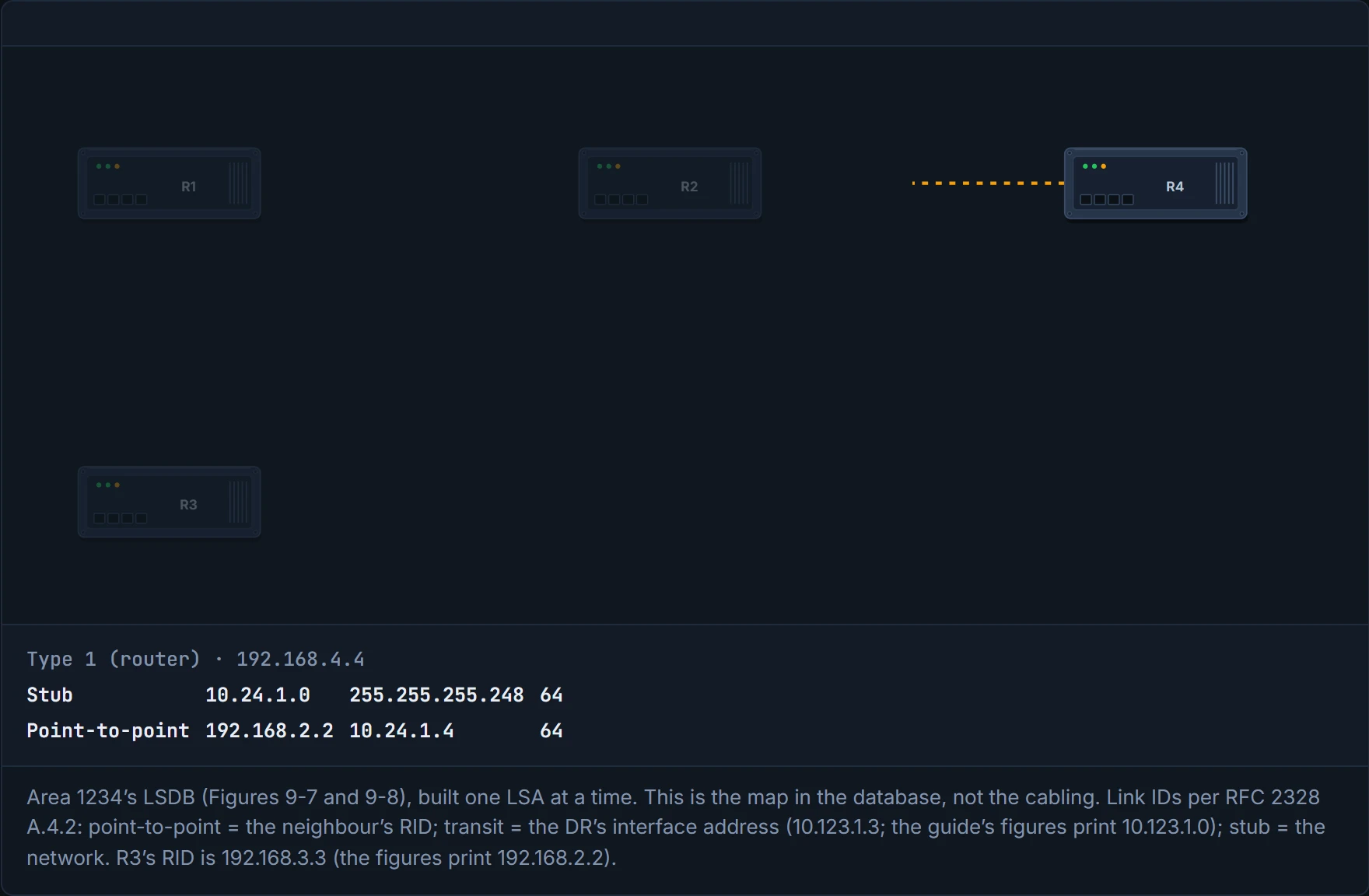
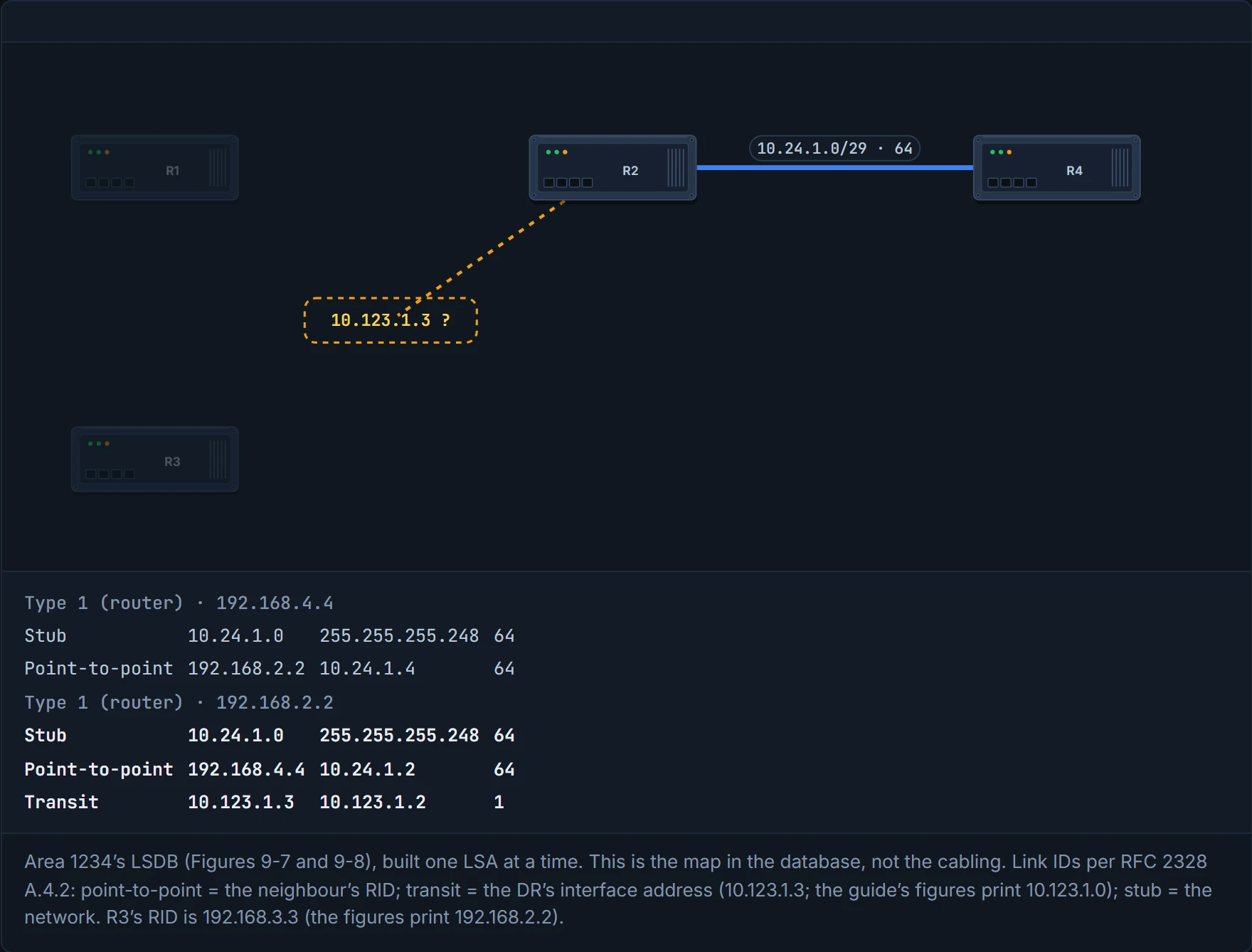
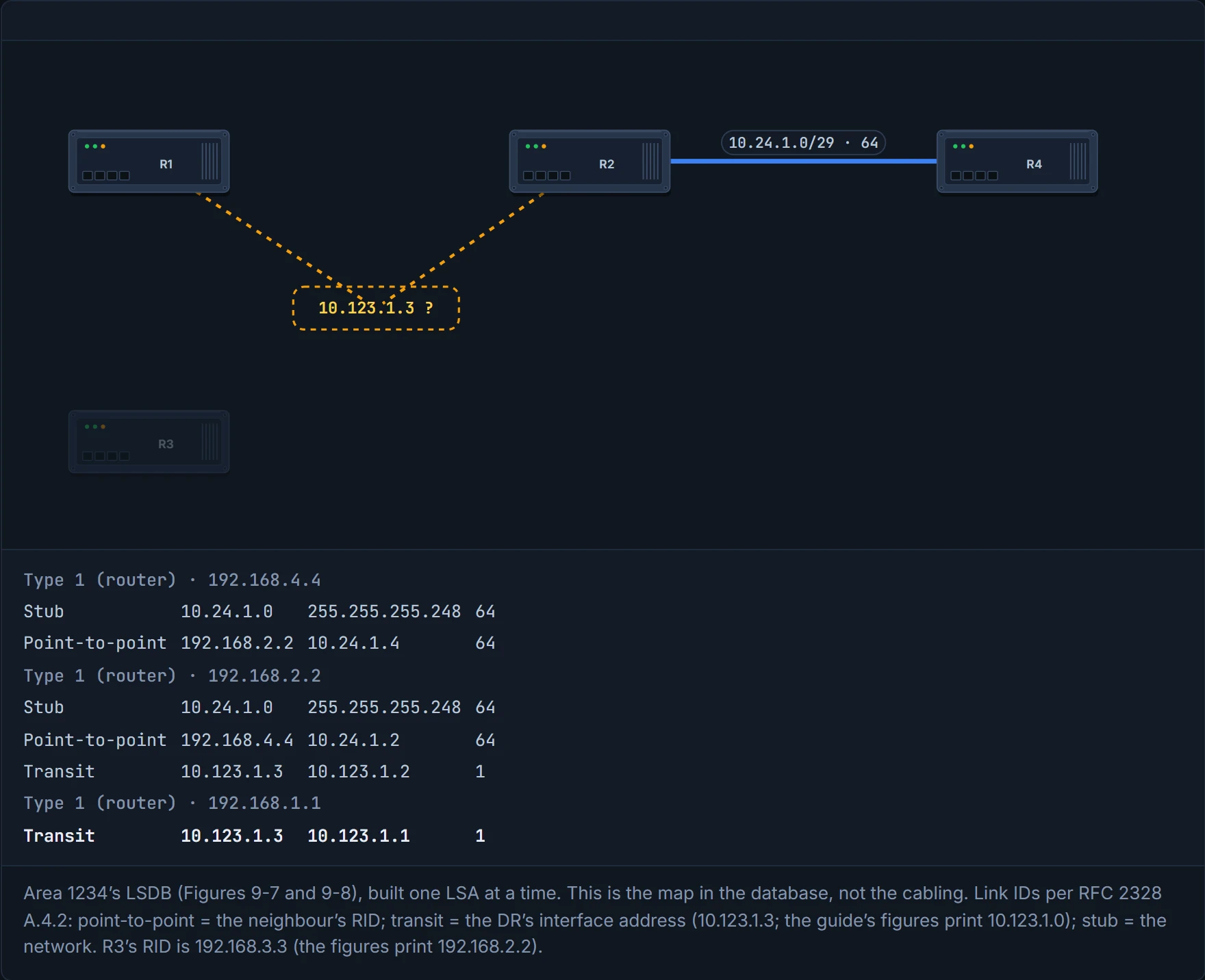
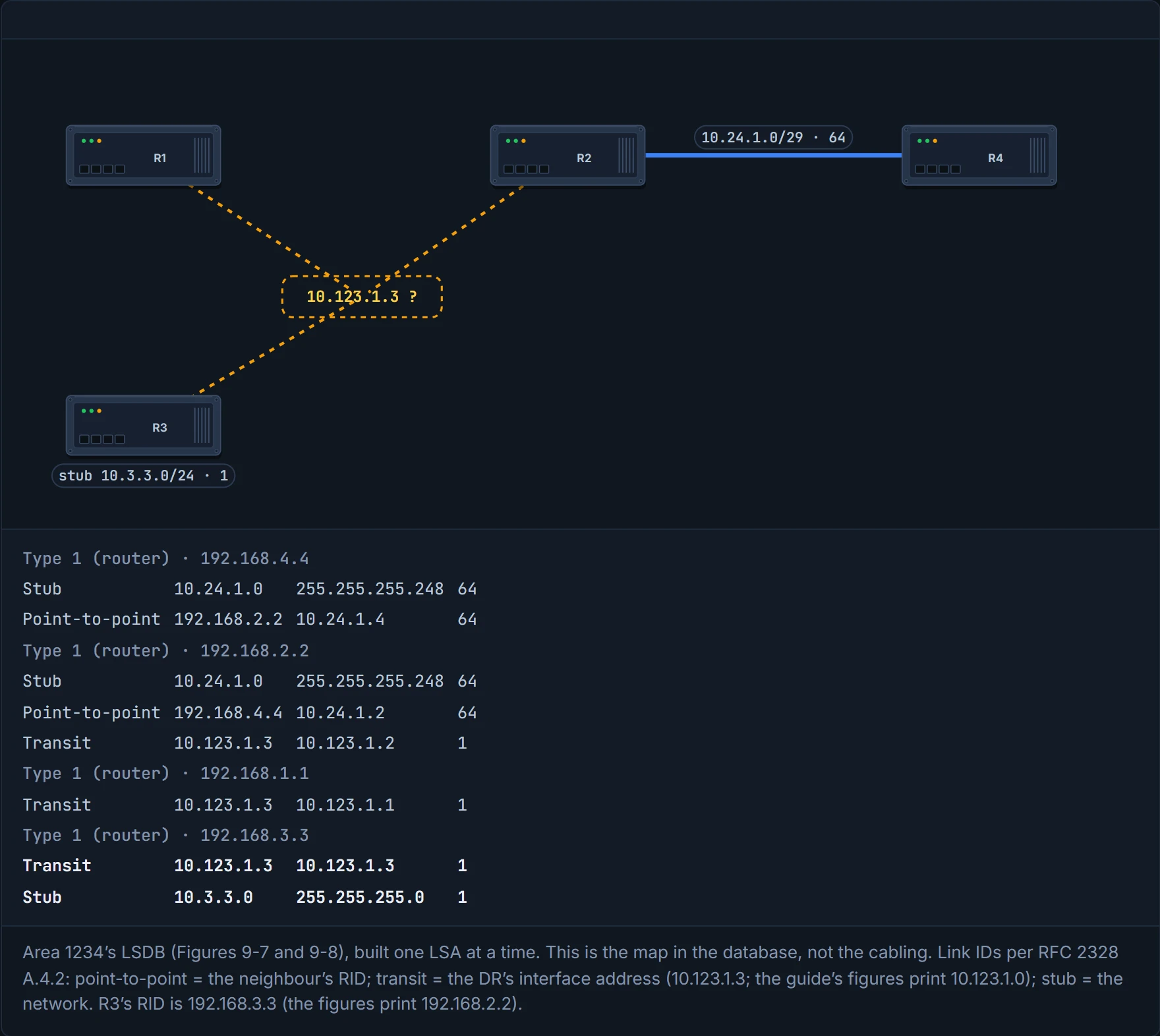
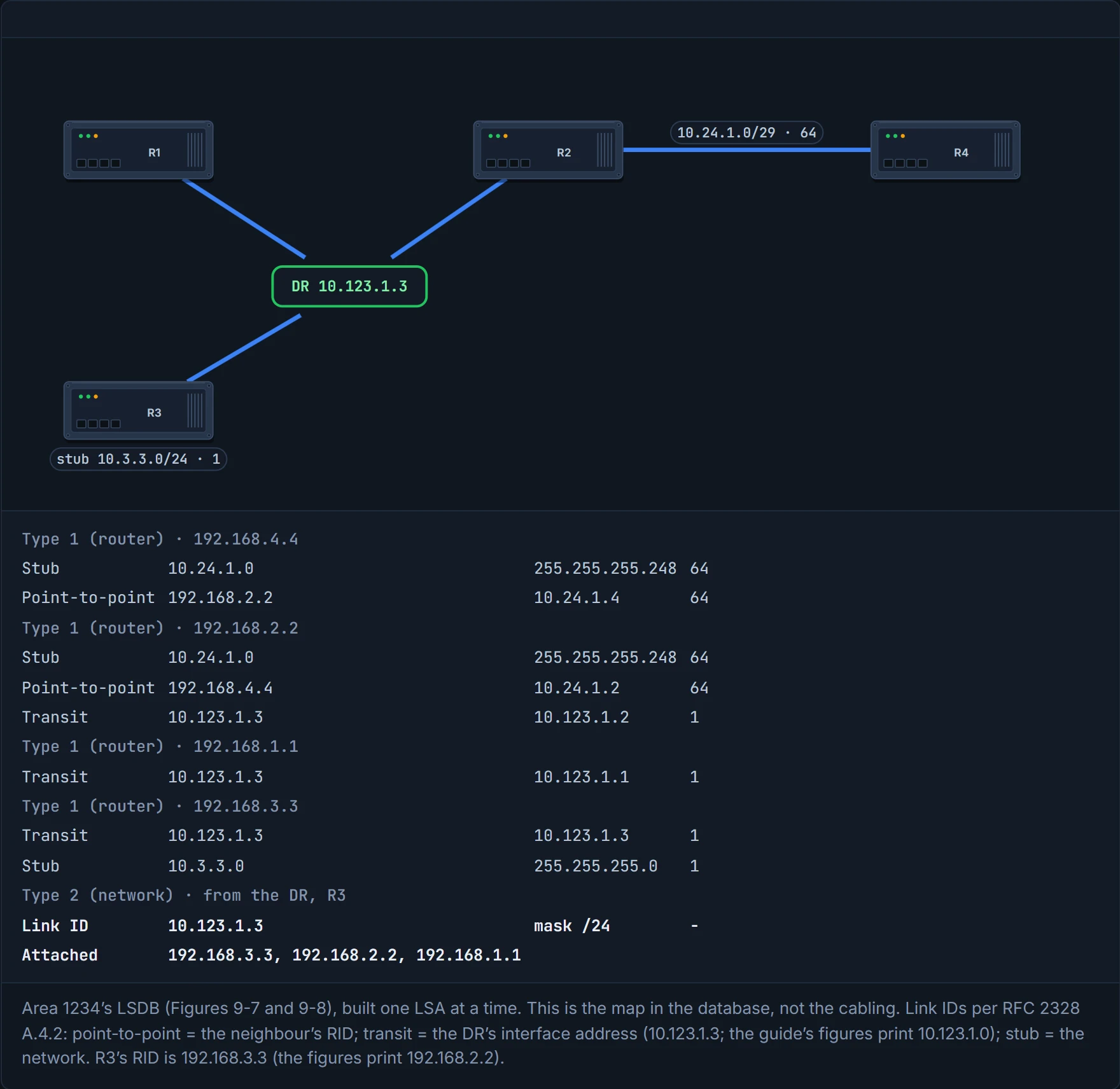
You can think of it as each router tearing a ticket in half and posting its half: R2's half says "my other half is 192.168.4.4", R4's says "my other half is 192.168.2.2", and only when both halves are in the LSDB, naming each other, does the R2–R4 link join the map. Put only the type 1 LSAs together and that's exactly what happens. But R1, R2 and R3 all post halves saying "transit, via 10.123.1.3", and nothing yet describes 10.123.1.3 itself, so the LAN is still loose ends (Figure 9-7).
Type 2, the network LSA. A type 2 represents a multi-access segment that has a DR. The DR originates it and lists the routers fully adjacent to it on the segment, itself included, and like type 1 it never leaves its area (quiz Q6). On 10.123.1.0/24, R3 won DR and R2 BDR on their RIDs. Have you ever noticed how a group chat's member list, kept by its admin, is the only place that says who's actually in it? That's the type 2: the DR's list ties the three loose ends together. show ip ospf database network shows it, and with it the map of Area 1234 is complete (Figure 9-8).
The guide says that with no DR elected there's no type 2 and the link is described as a stub. The exact rule is a little narrower: a router alone on a LAN still makes itself DR (02-2 showed R1's Gi0/2 as DR 0/0), but it originates a type 2 only once it's fully adjacent with at least one other router. That's why R3's 10.3.3.0/24, with no neighbour on it, appears only as a stub in R3's type 1. And because the type 2 belongs to the DR, a new DR means a new type 2, and SPF runs again across the whole area.
R1, R2 and R3 each tell the LSDB "I'm on the network run by 10.123.1.3", and until the DR's type 2 describes that network, it's three signatures on a guest list nobody has written yet.
D1
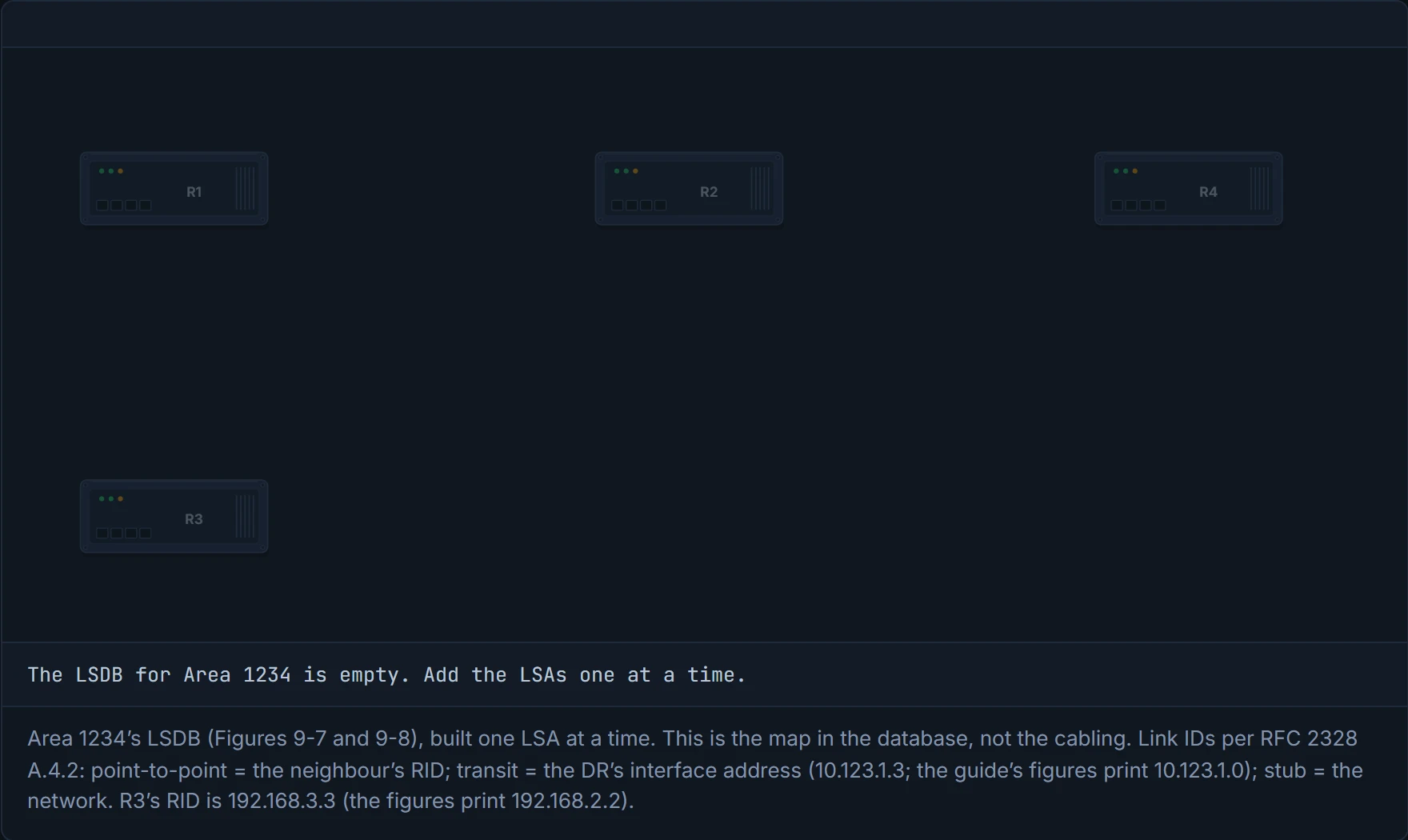
Step 1 of 6 An empty LSDB: nothing is known yet. Each step adds one LSA, exactly as it sits in the database.
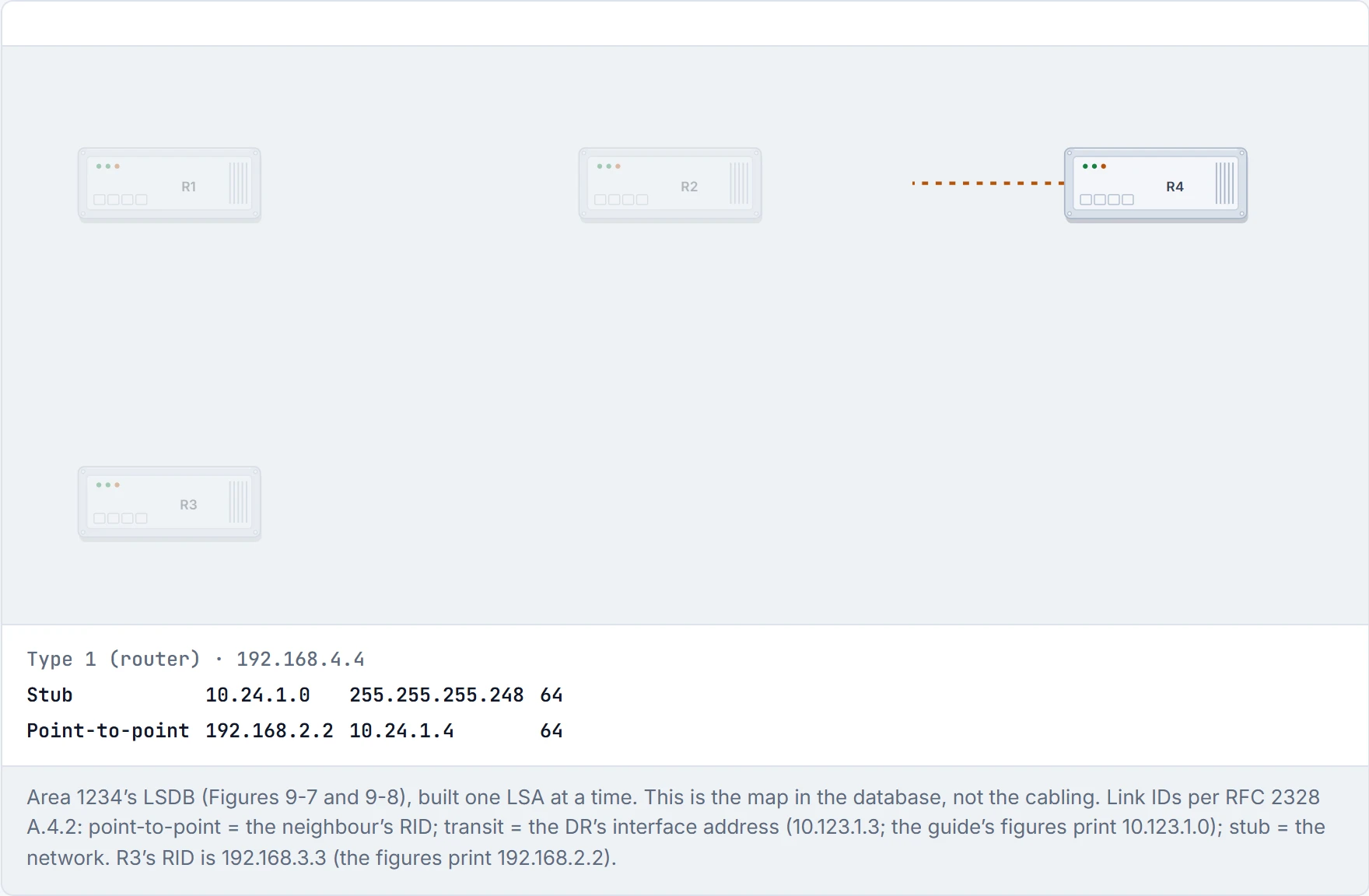
Step 2 of 6 R4’s type 1: a stub for the serial network, and a point-to-point link naming 192.168.2.2. Nothing describes 192.168.2.2 yet, so the link dangles.
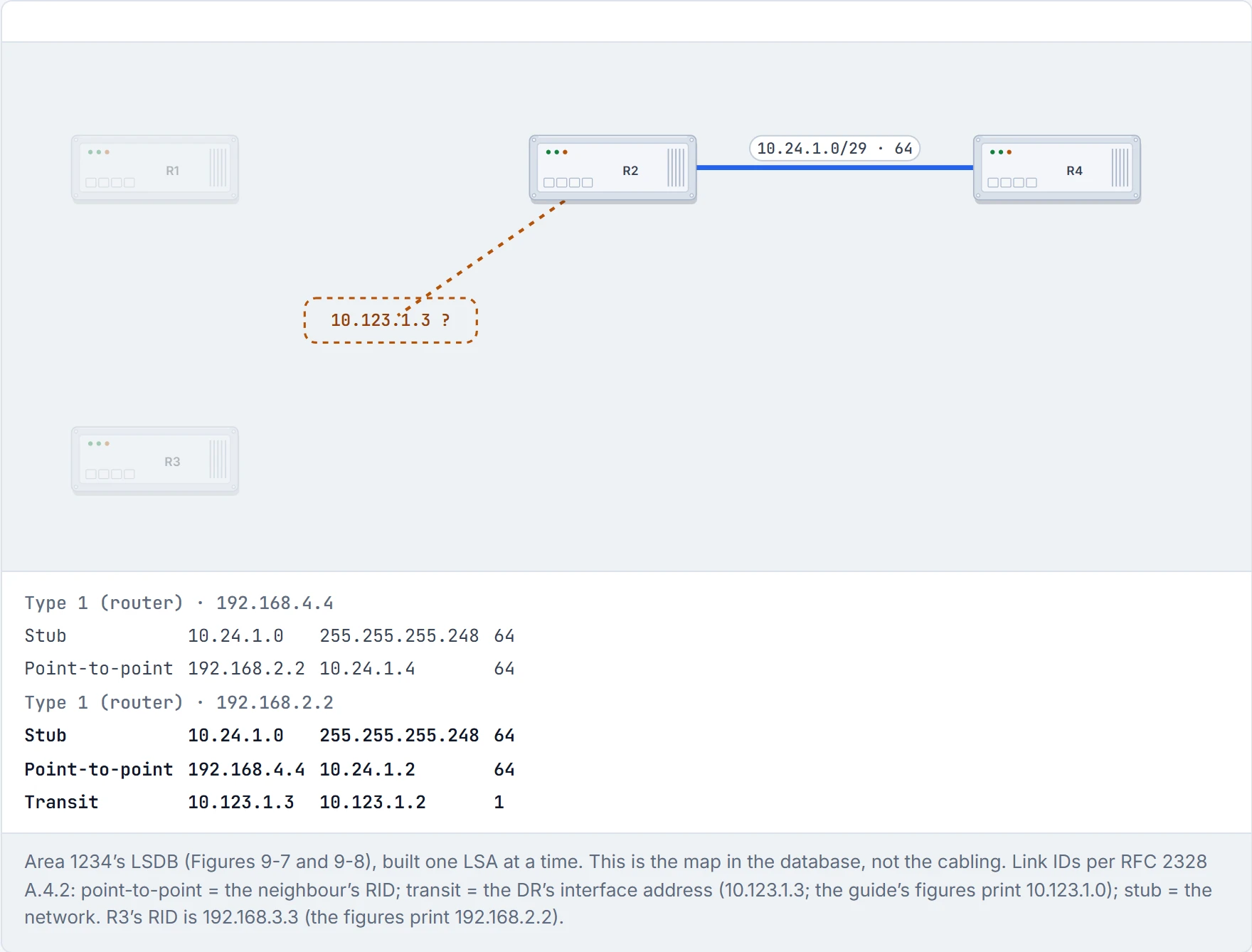
Step 3 of 6 R2’s type 1 names 192.168.4.4 on its point-to-point link. The two names match, and R2–R4 joins. R2 also says “transit, via 10.123.1.3”: a DR nobody has described.
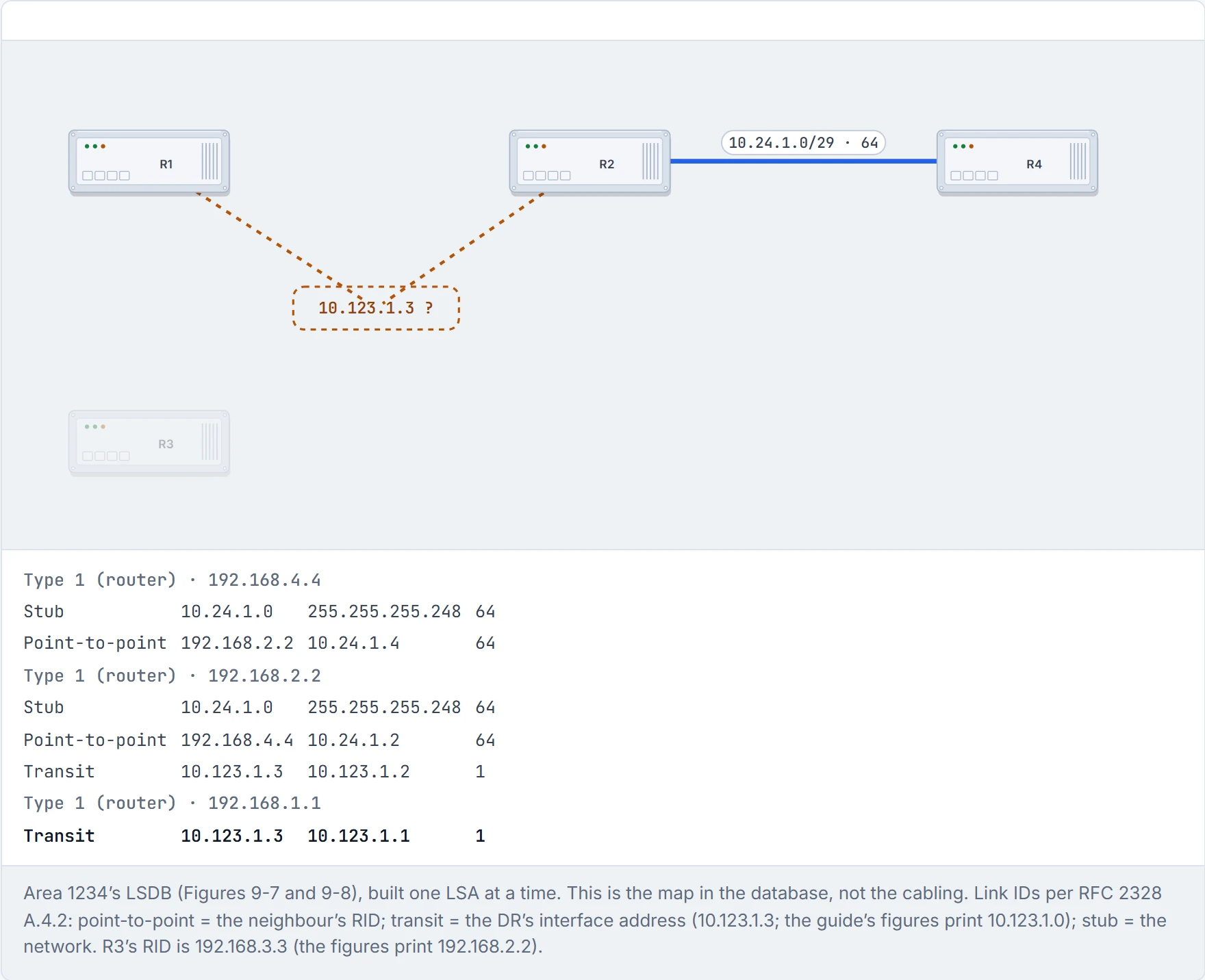
Step 4 of 6 R1’s type 1: one transit link to 10.123.1.3. Two loose ends now point at the same unknown address.
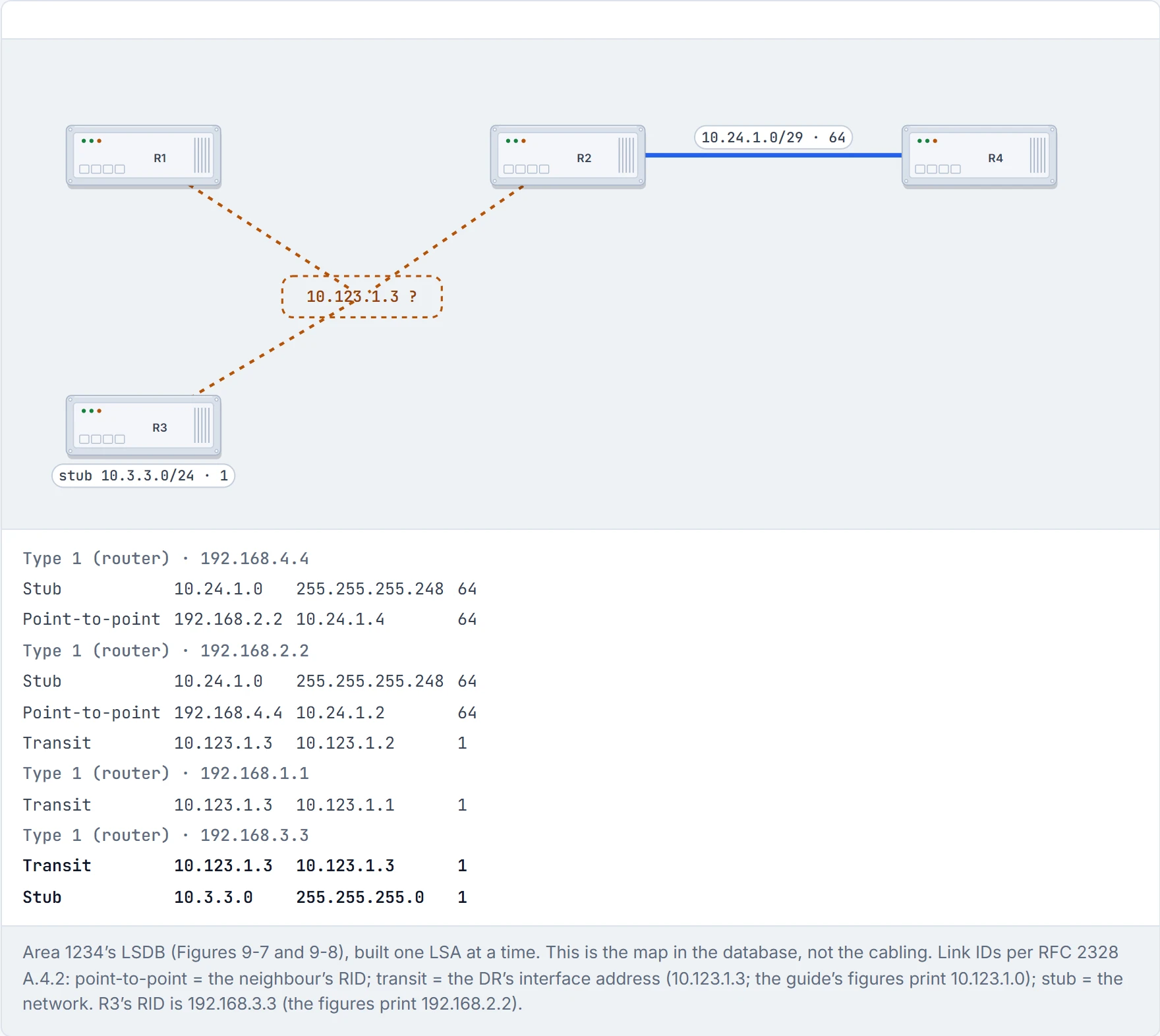
Step 5 of 6 R3’s type 1: a transit link to 10.123.1.3 (its own address; it’s the DR) and a stub for 10.3.3.0/24, where it has no neighbour. Still three loose ends.
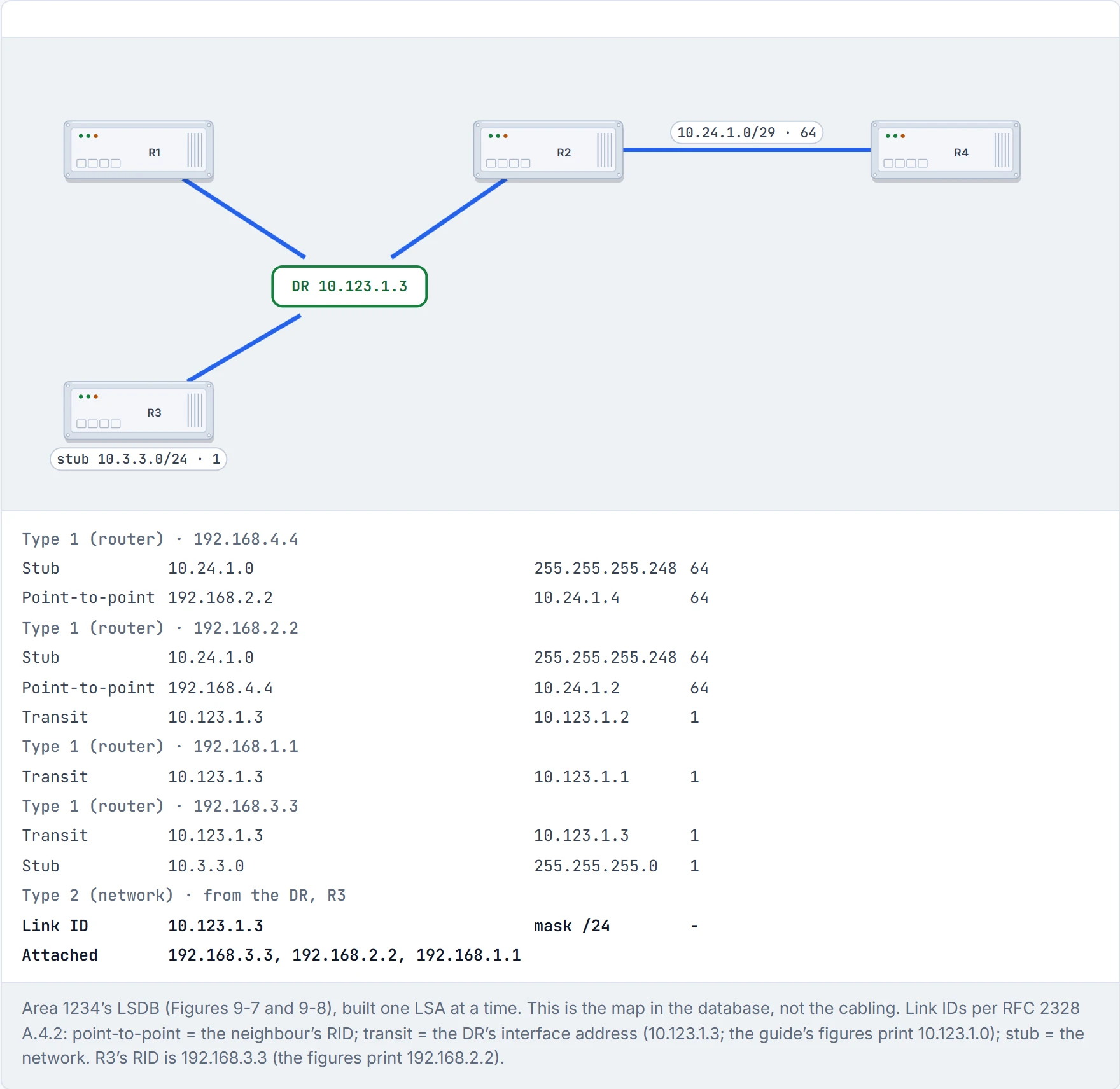
Step 6 of 6 R3, as DR, originates the type 2: Link ID 10.123.1.3, attached routers 3.3, 2.2 and 1.1. The pseudonode appears and every transit link snaps to it. The map of Area 1234 is complete (Figure 9-8).
Type 3, the summary LSA, carries networks from other areas. ABRs never forward type 1 or type 2 LSAs into another area. Instead, from each network in its areas (with a type 2 supplying a multi-access network's mask) the ABR writes a fresh type 3 and advertises that. And when an ABR receives a type 3 from Area 0, it writes a new one for its non-backbone area, listing itself as the advertising router and adding its own cost (Figure 9-9). It's basically like the internal post between departments: nobody sends another department their floor plan, only a note saying "room 10.123.1.0 is reachable through me, about 65 steps".
So type 3 LSAs exist per area. On R4, the type 3 for 10.56.1.0 sits in both Area 0 and Area 1234; on R5 it's only in Area 0, because in Area 56 that network is a type 1. show ip ospf database summary, optionally with a prefix, shows them.
The advertising router of a type 3 is the last ABR to advertise it. Its metric is the ABR's own routing-table cost to that network: for a network from one of its areas, the full path cost from the ABR; for a type 3 it learned from Area 0, its cost to the previous ABR plus that LSA's metric. (The guide words the first case as the metric "to reach the originating router"; its own example shows the network's cost, 65, not the 64 to R2.)
Before D2, predict: R4 advertises 10.123.1.0/24 into Area 0. What metric does R6, two areas away, end up with?
D2
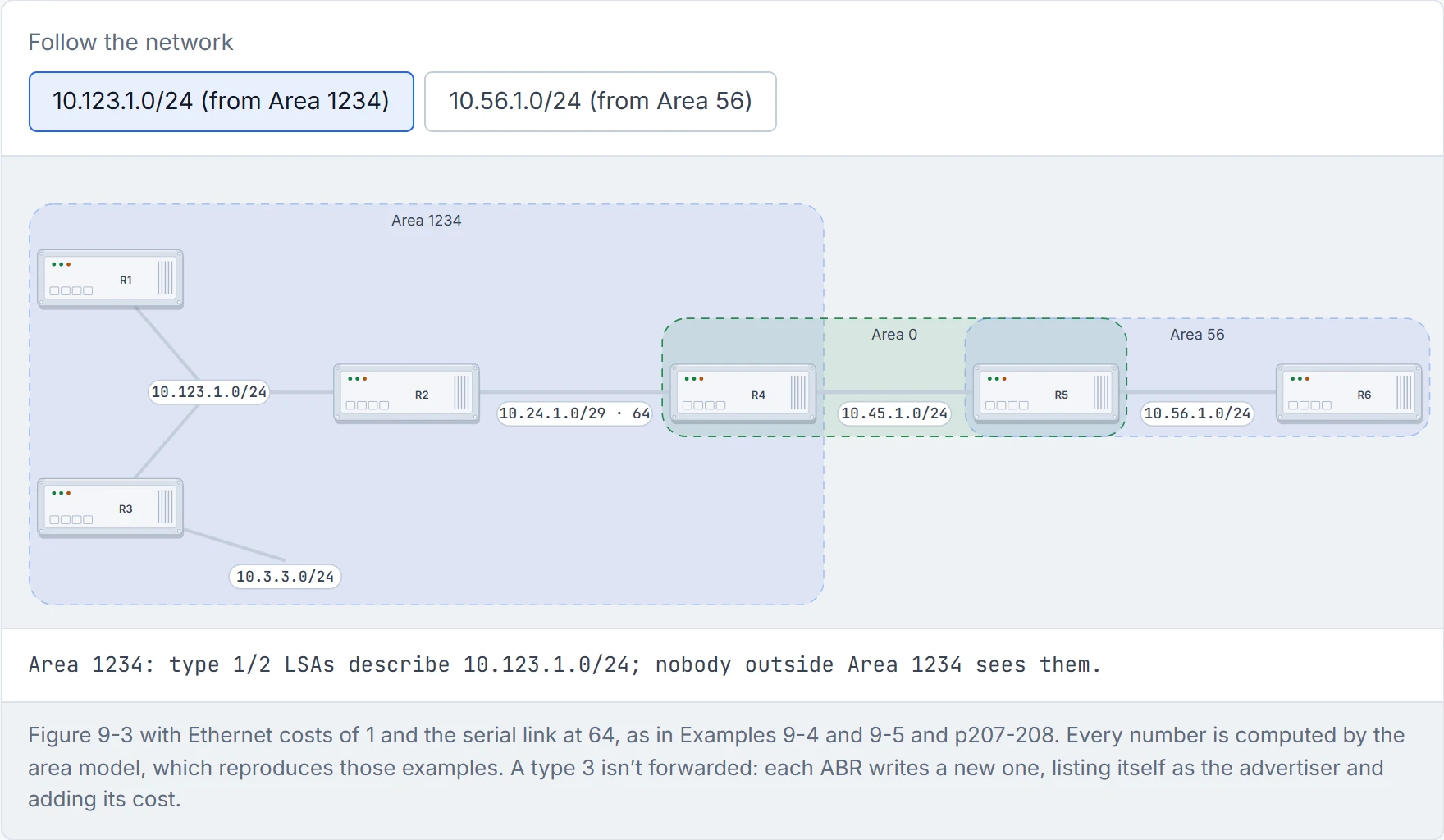
Step 1 of 4 10.123.1.0/24 is R1, R2 and R3’s LAN. Inside Area 1234 it’s described by type 1 LSAs and R3’s type 2. Those never leave the area.
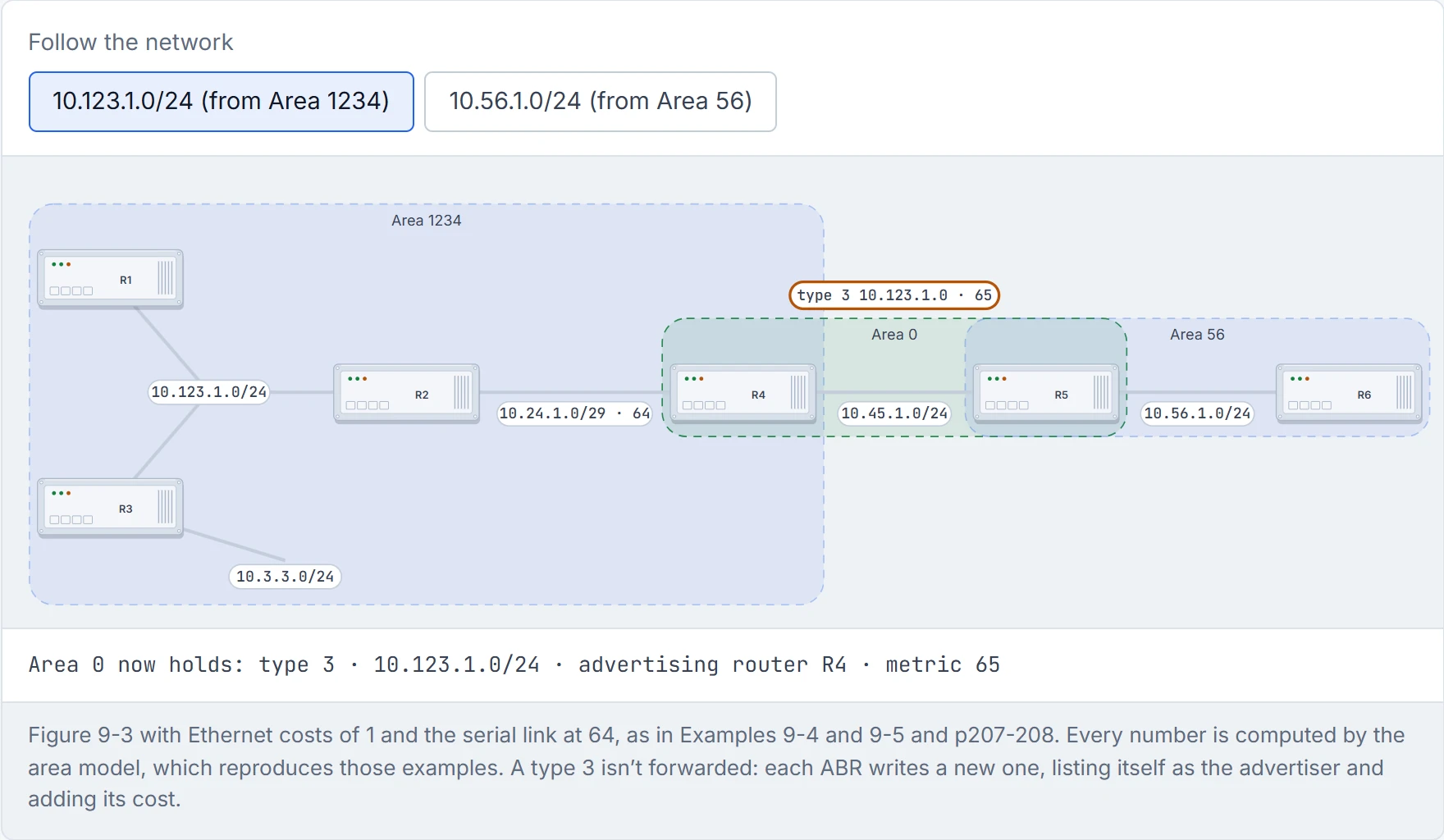
Step 2 of 4 R4, the ABR, doesn’t forward the type 1s. It writes a type 3 into Area 0: “10.123.1.0/24 through me, metric 65”: R2’s LAN cost 1 plus the serial link’s 64.
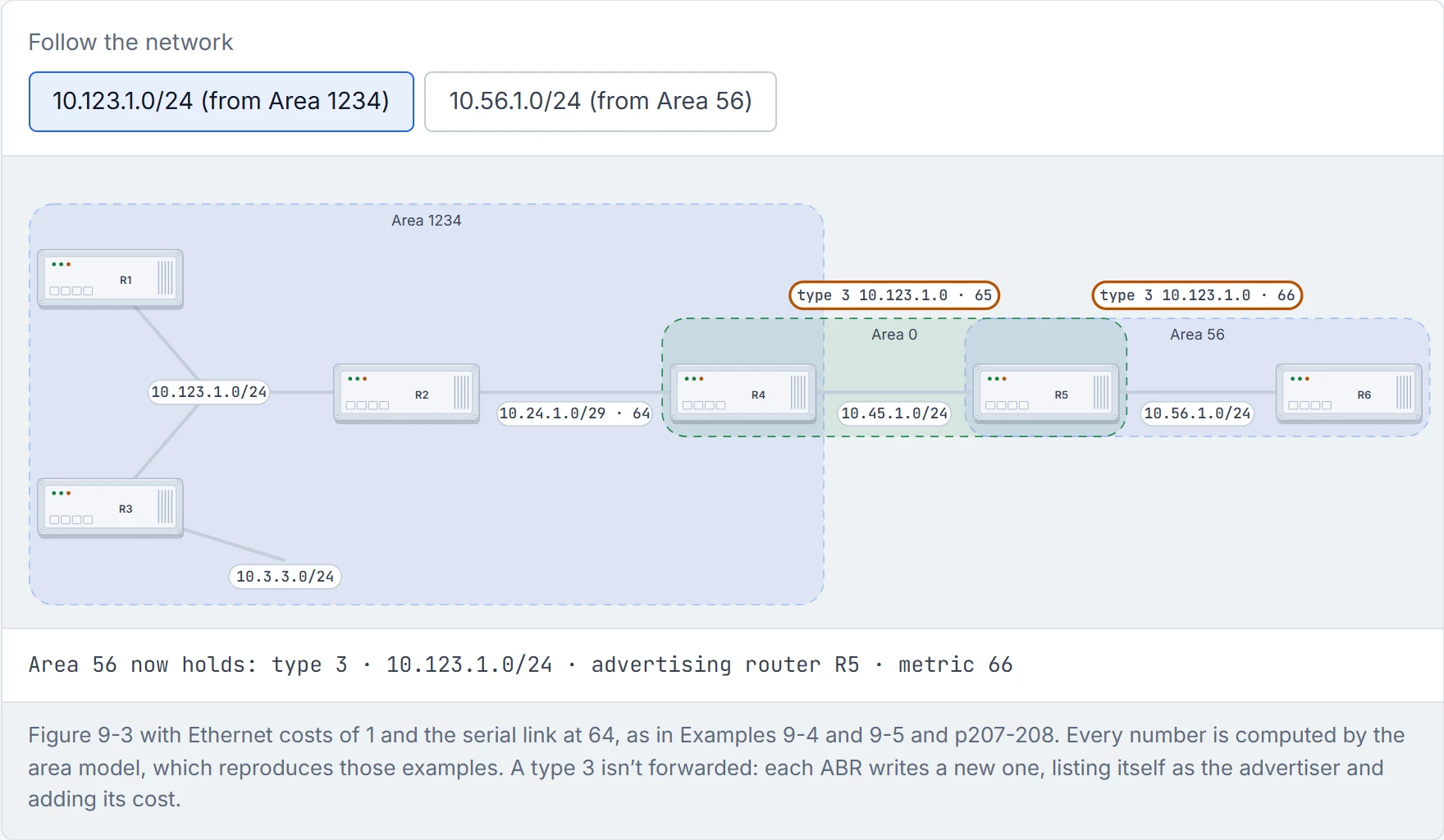
Step 3 of 4 R5 receives that type 3 from Area 0 and writes a new one for Area 56, listing itself and adding its 1: metric 66. The note was rewritten, not passed on, so nobody beyond R5 ever learns about R4’s side.
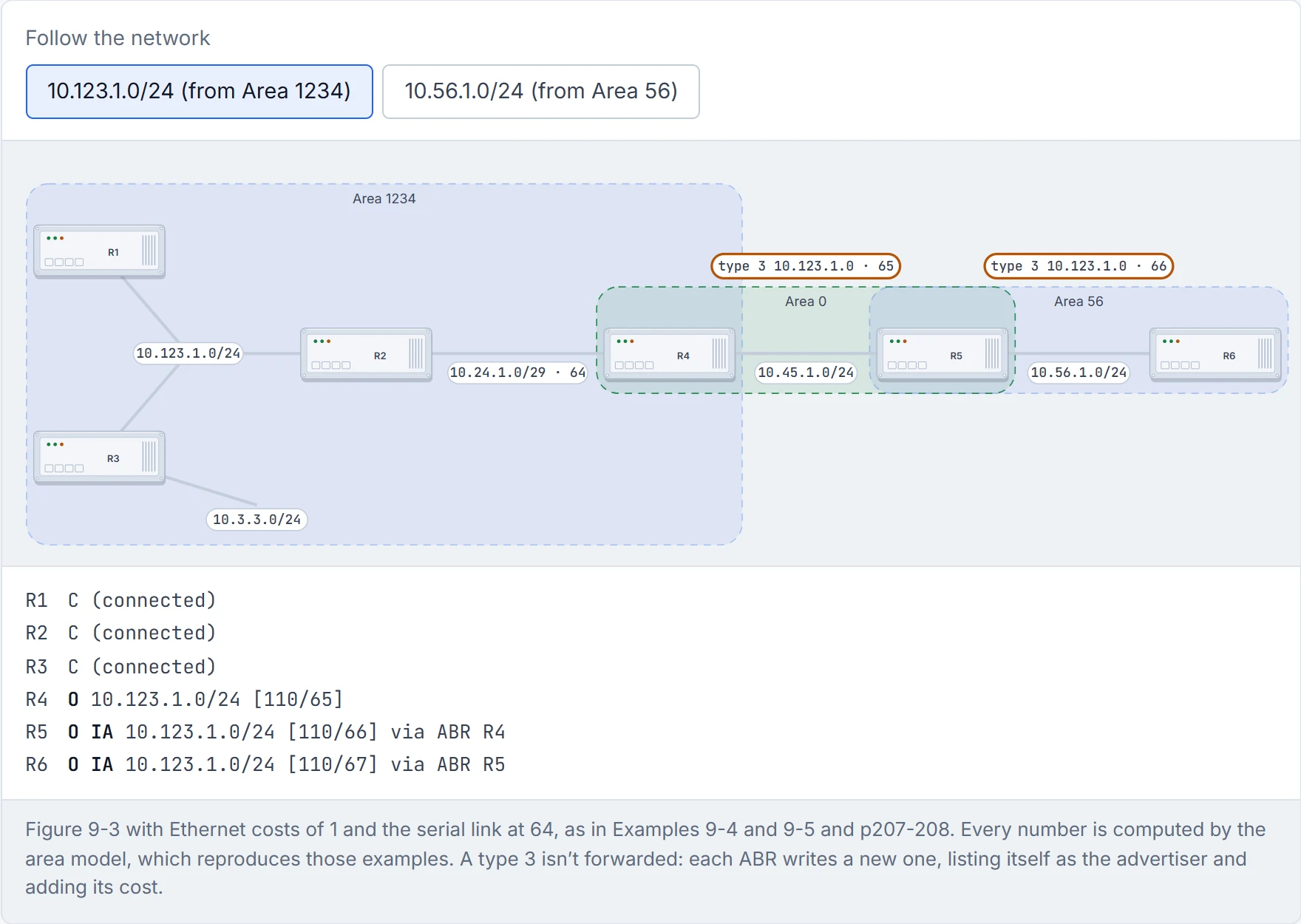
Step 4 of 4 Every router’s view of 10.123.1.0/24: connected, intra-area (O) at R4, and O IA beyond. R6 adds its 1 to reach R5 to the note’s 66: 67.
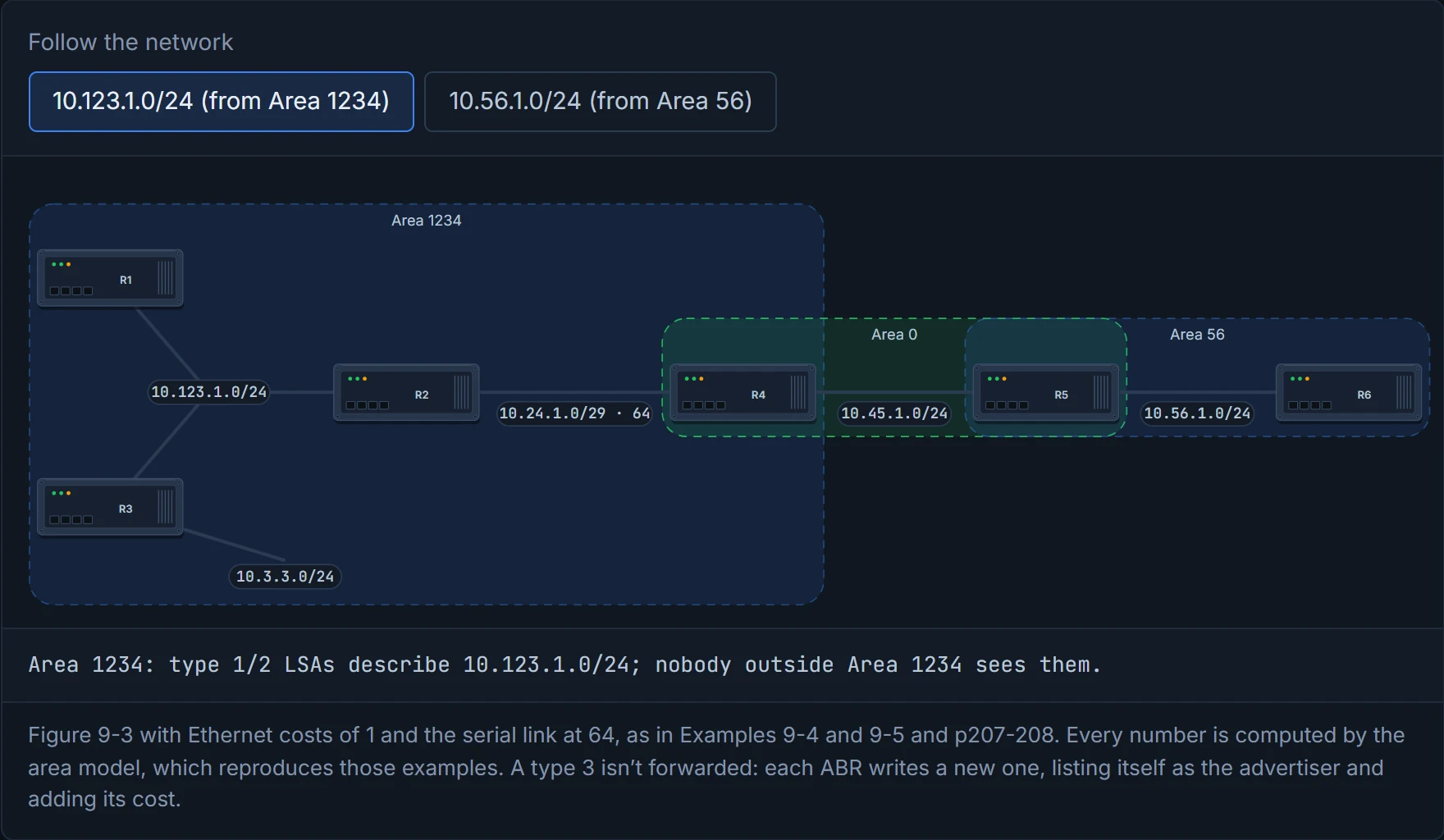
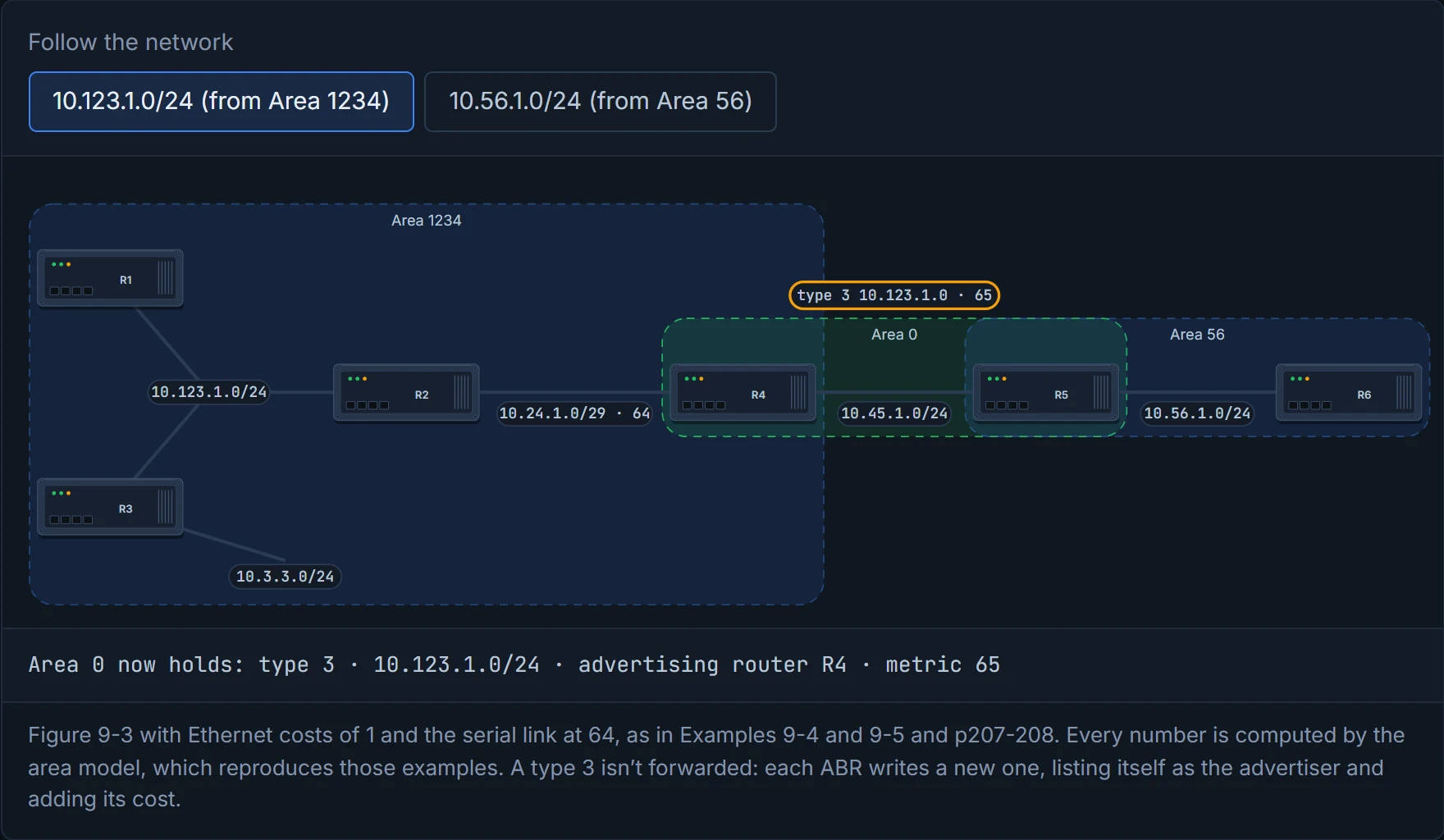
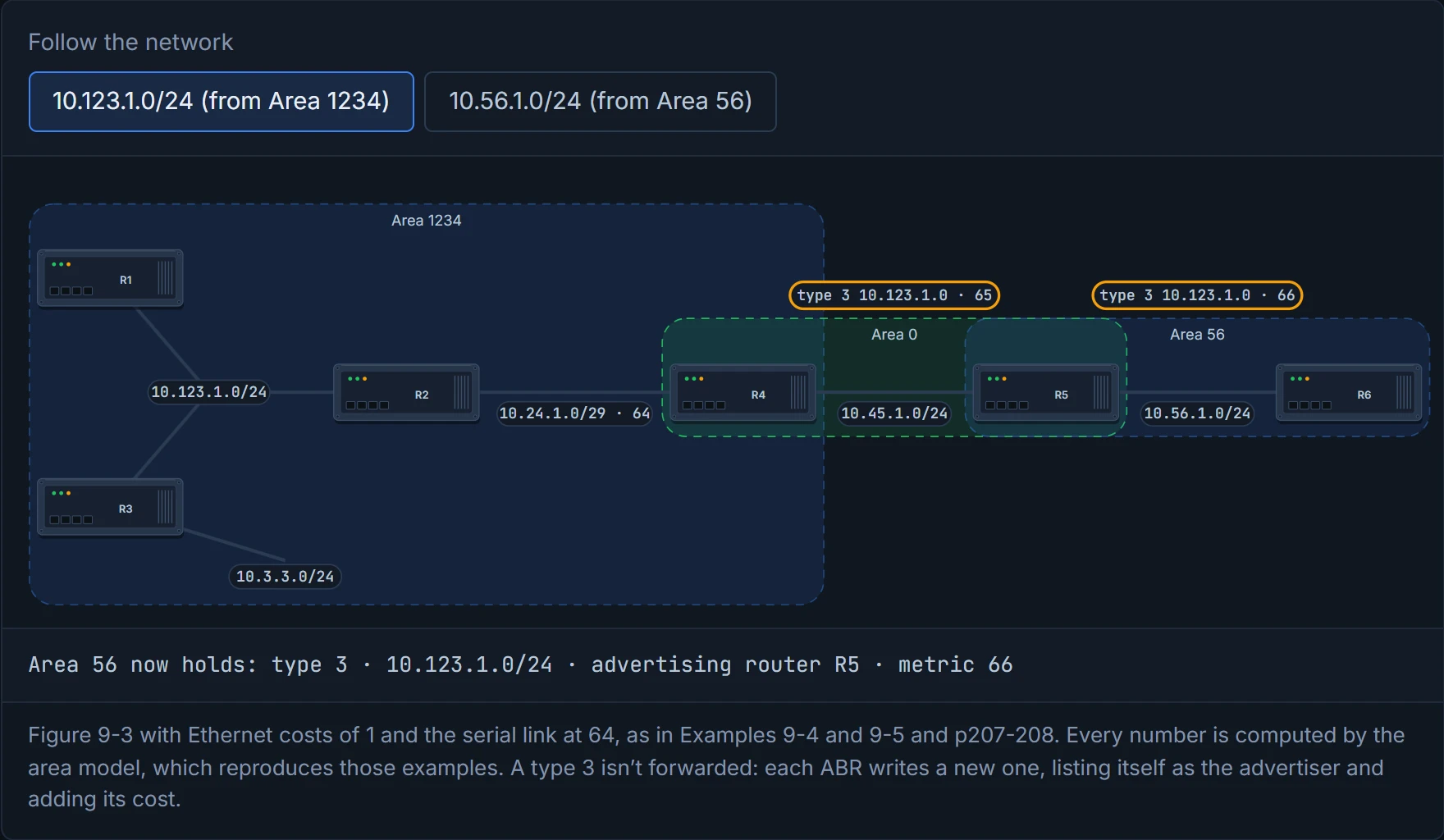
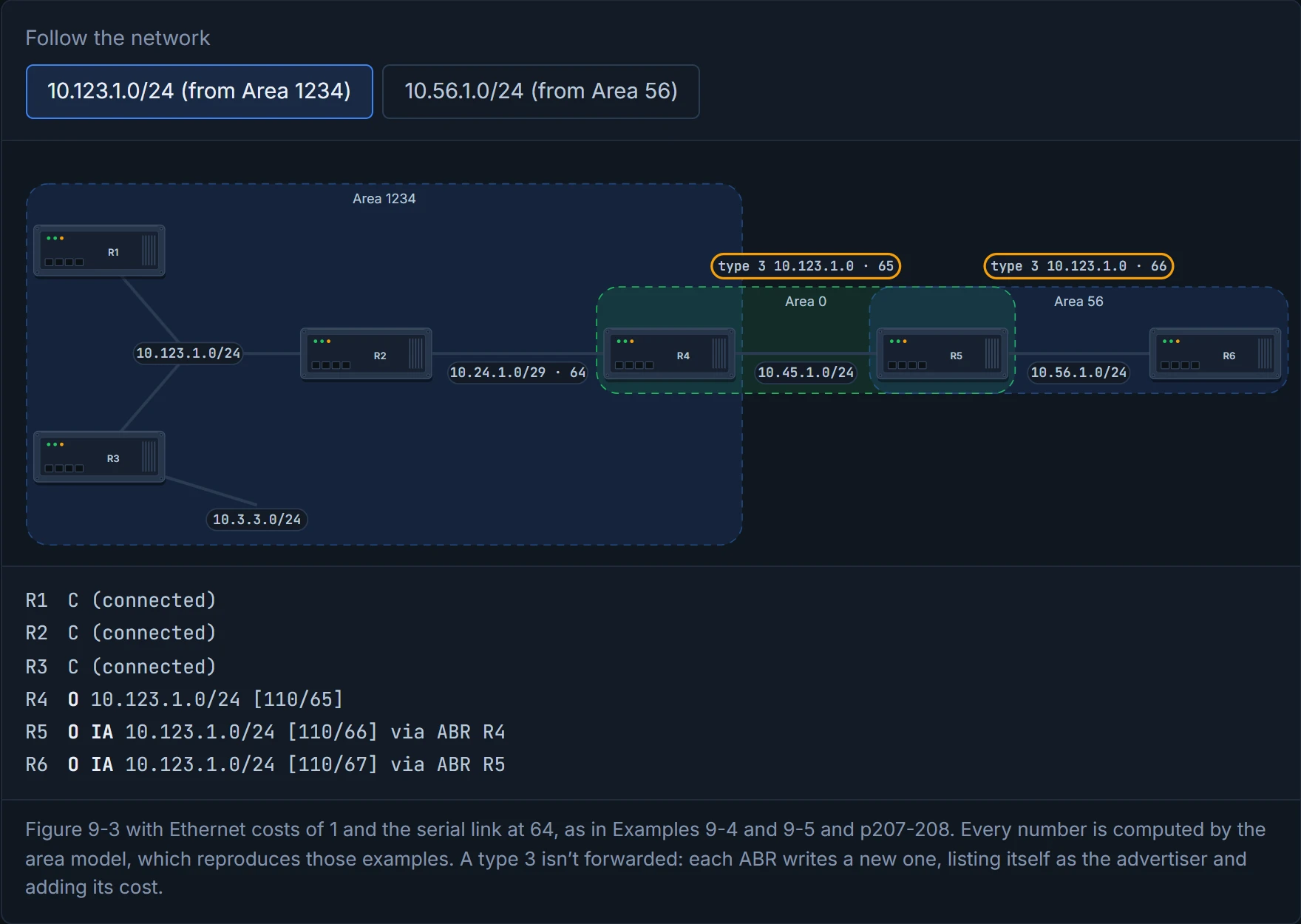
Follow 10.123.1.0/24: R4 advertises a type 3 into Area 0 at 65 (the serial link at 64 plus R2's LAN interface at 1); R5 turns that into a type 3 for Area 56 at 66; and R6 adds its 1 to reach R5 and installs it at 67.
A type 3 holds just the network, its mask, the advertising ABR's router ID and the metric. The router reading it has no idea whether the network sits right on the ABR or ten hops behind it. If you've ever been quoted a delivery time by a shop that uses a courier you've never heard of, you know the feeling: you get a number, not the route. Take one network behind the ABR R5: R4 knows only "R5, 1 away, says 1": total 2 (the guide's Figure 9-10). R3 knows only "R4, 65 away, says 2": total 65 + 2 = 67 (Figure 9-11). And an ABR advertises just one type 3 per prefix, the one with its best metric, however many paths it knows. (The guide's Figure 9-16 makes the saving concrete: 10.123.1.0/24's three type 1 LSAs and one type 2 become a single type 3 outside Area 1234. That's why quiz Q9 calls splitting into areas "a form of summarization": fewer type 1 and type 2 LSAs, the same prefixes. Summarising further is 02-6's.)
A type 3 LSA is a note from the ABR saying "trust me, it's about 65 away". OSPF, famous for wanting the whole map, takes its word for it.
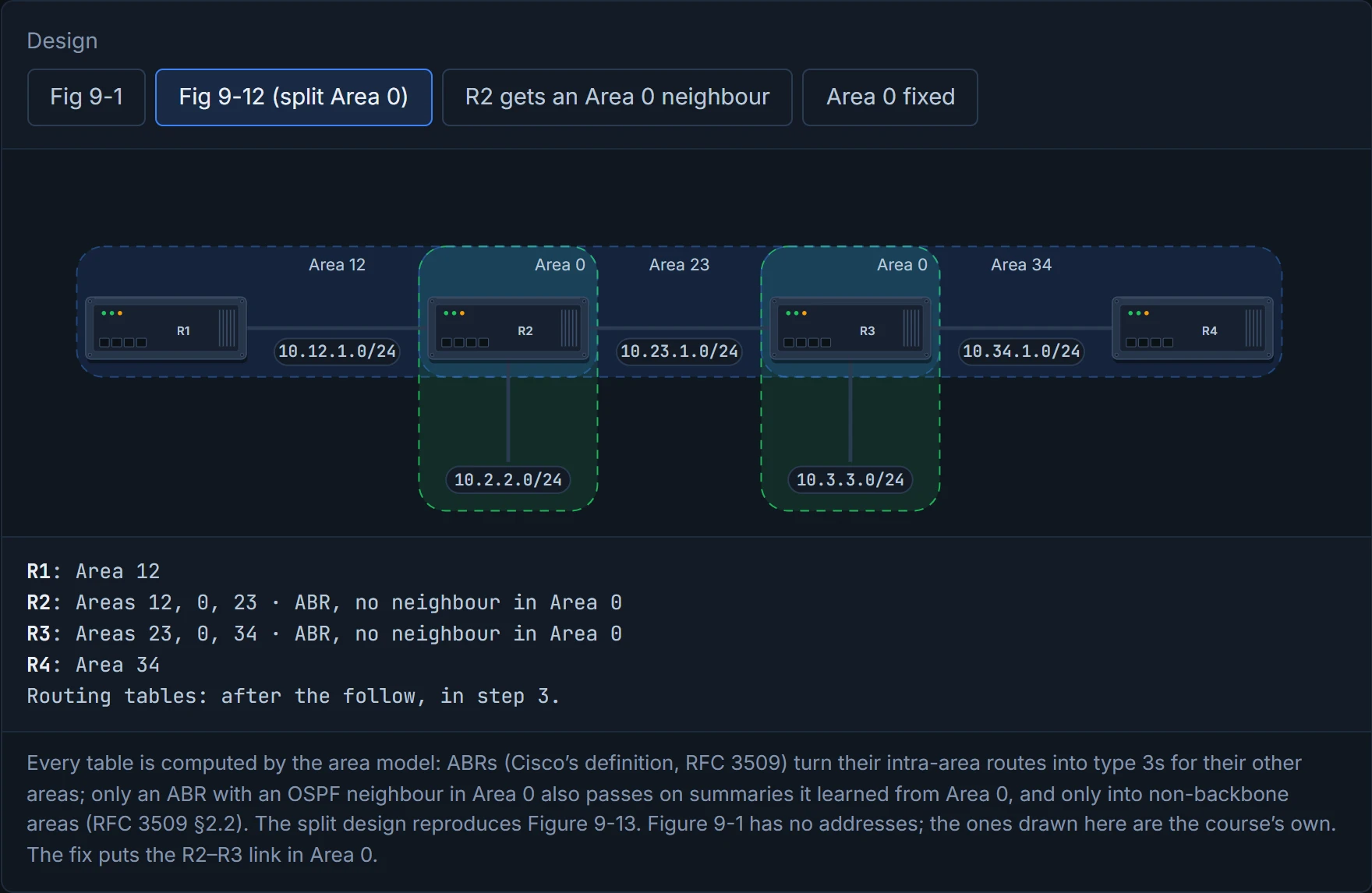
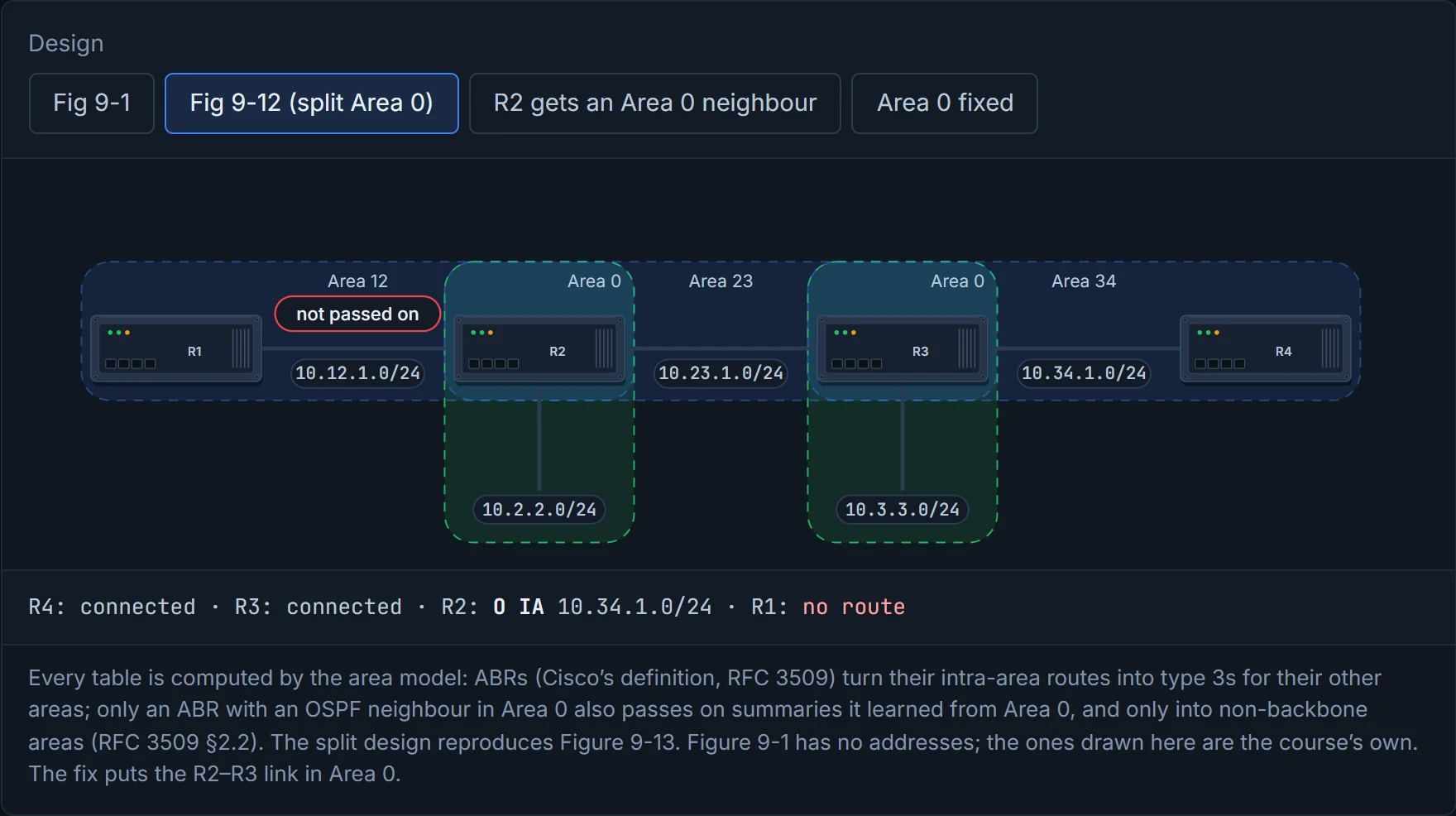
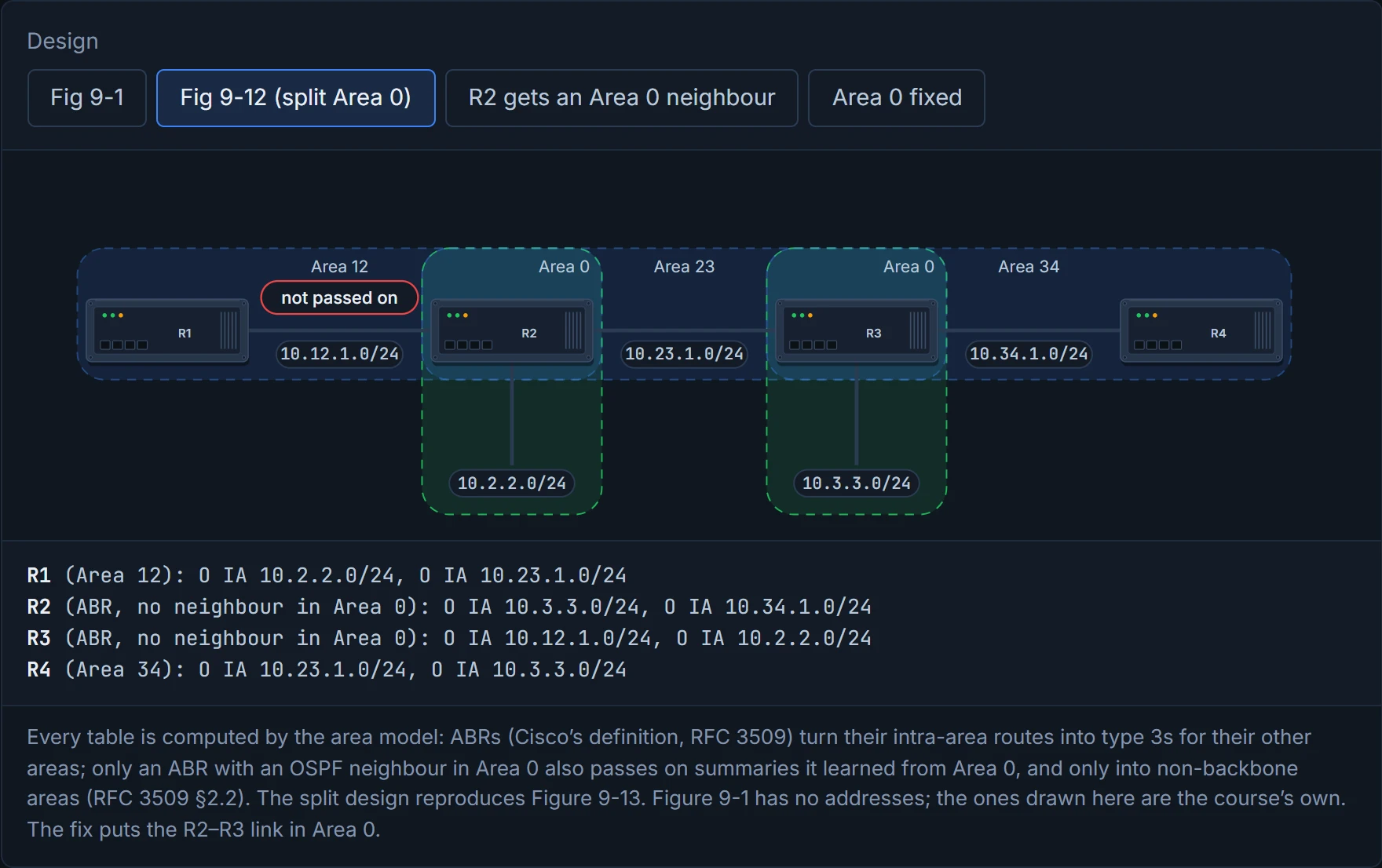
Take the guide's Figure 9-12, rebuilt as D3 below: Area 12 (R1–R2), Area 23 (R2–R3), Area 34 (R3–R4), and Area 0 in two pieces, one on R2 (10.2.2.0/24) and one on R3 (10.3.3.0/24). Traffic from Area 12 to Area 34 would have to cross Area 23, a non-backbone area. That's a discontiguous network. Think about the last time you saw a road closure split a town in two: both halves still have their own streets, but the only road between them runs through somebody's farm. At first glance it seems to work: R3 turns Area 34's 10.34.1.0/24 into type 3s for its Area 0 and its Area 23, and R2 installs 10.34.1.0/24 from Area 23 (Figure 9-13). (The guide says R3 builds Area 23's type 3 from its Area 0 type 3; an ABR builds it from its own intra-area route.)
Before D3, predict: R2 has 10.34.1.0/24 in its own routing table. Will R1, in Area 12, learn it?
D3
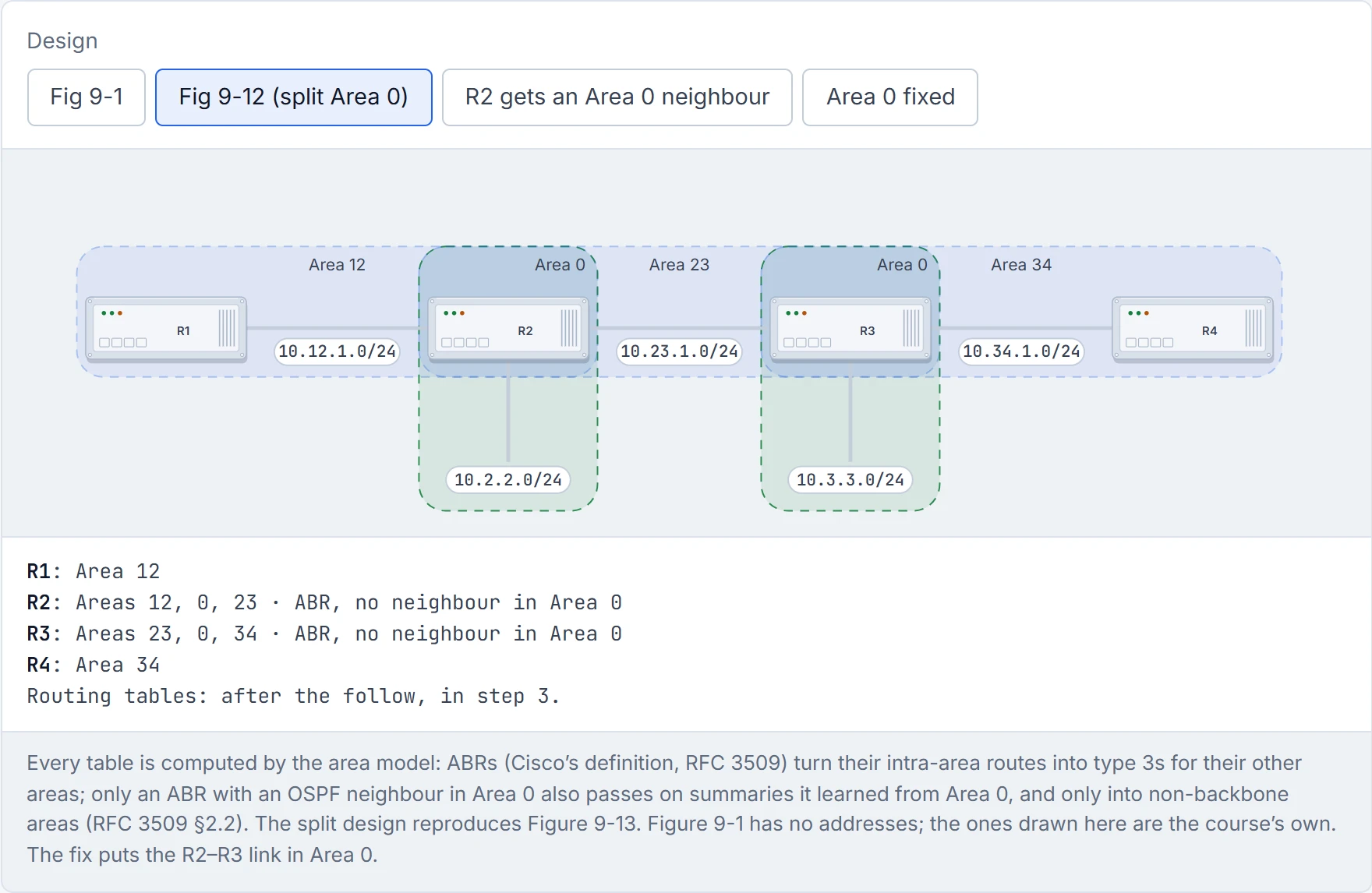
Step 1 of 3 Figure 9-12: Area 0 in two pieces, with R2 and R3 as ABRs. The next steps follow 10.34.1.0/24 from R4 towards R1.
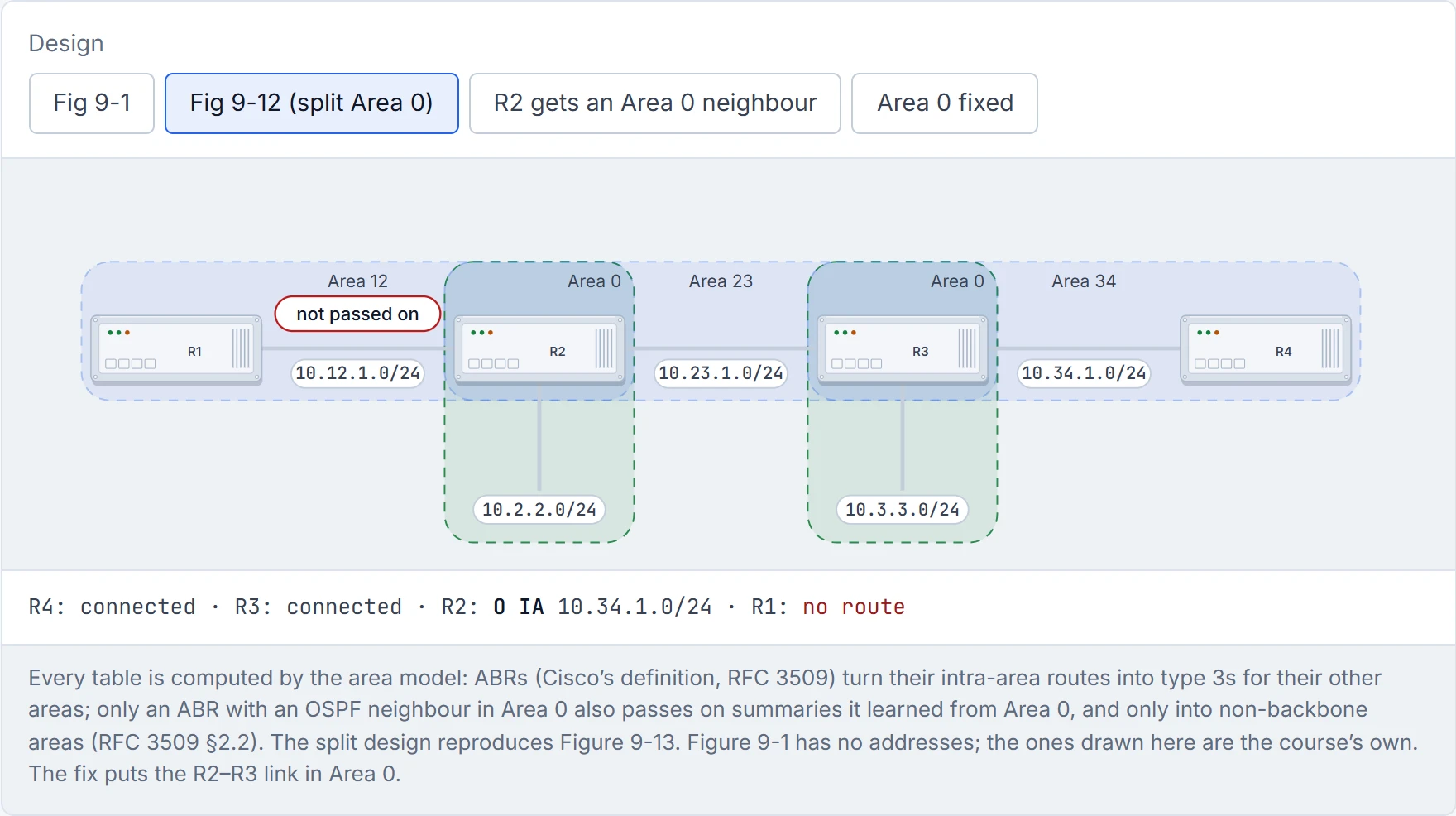
Step 2 of 3 10.34.1.0/24 gets as far as R2. R2 installs it from Area 23’s type 3, but that summary came from a non-backbone area, and R2 has no fully adjacent OSPF neighbour in its piece of Area 0, so it announces only its own intra-area routes (rule 3; RFC 3509). R1 never hears of 10.34.1.0/24.
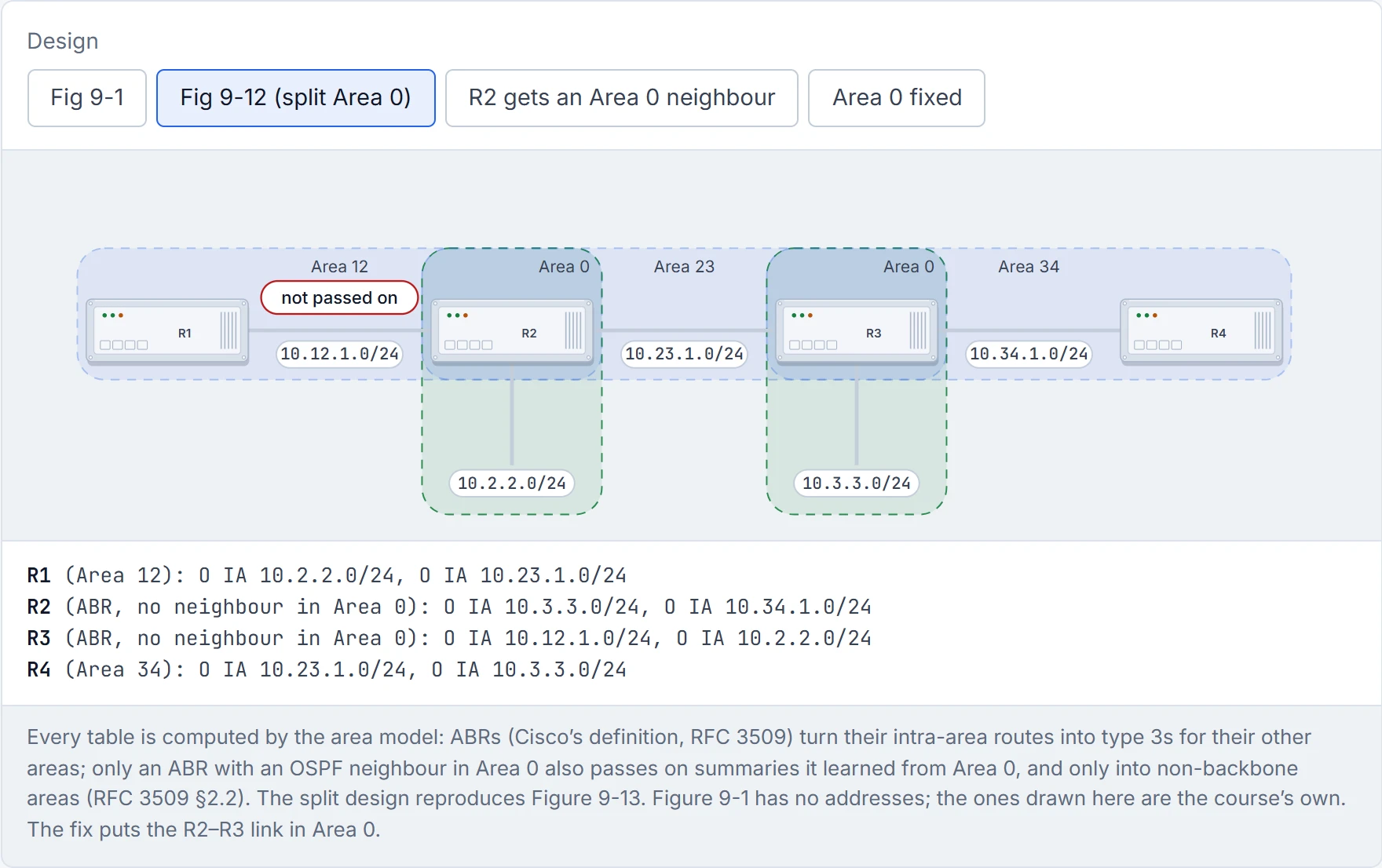
Step 3 of 3 Every OSPF table, as Figure 9-13 draws them: each side sees the middle, never the far side.
Most people would say yes, and D3 says no. ABRs follow three rules:
- Type 1 LSAs from an area become type 3 LSAs into the backbone and into non-backbone areas.
- Type 3 LSAs received from Area 0 become type 3 LSAs into the non-backbone areas.
- Type 3 LSAs received from a non-backbone area stay in that area's LSDB. The ABR doesn't create type 3s from them for any other area, including a segmented piece of Area 0 (quiz Q7).
RFC 3509 gives the reason in R2's terms. R2's piece of Area 0 has no fully adjacent OSPF neighbour, so R2 has no active backbone connection. An ABR in that state uses summaries from all its areas for its own table, which is why R2 has the route at all, and announces only its intra-area routes, which is why it never passes 10.34.1.0/24 on. It acts kind of like a receptionist who overhears about a meeting room in another building: happy to walk you there herself, but it isn't on her official list, so she never posts it to the other floors. Give R2 a real Area 0 neighbour and the picture flips the other way: now it reads only backbone summaries, and 10.34.1.0/24 disappears from R2's own table too. Figure 9-13's R2 table is that Cisco behaviour (RFC 3509); under the original RFC 2328 rule, R2 wouldn't have the route either.
Continue the lesson
The whole lesson, with its drawings and its questions. The rest of this section and 9 more after it.