
OSPF summarization and filtering
Summarisation happens between areas, on the ABR: area range advertises one type 3 LSA for a block and suppresses the more specific ones, so a flap inside the area no longer makes the backbone recalculate. Adding not-advertise hides the routes from other areas altogether. Filtering goes further with area filter-lists at the border and distribute lists on one router.
By Arif, founder of Daveth · Updated
The full 8 min walkthrough is in Daveth Pro (Network). See what the plan opens
What this page answers
How do you configure OSPF summarization?
On the ABR, area area-id range network subnet-mask, optionally with a cost. When type 1 networks from that area fall inside the range, the ABR advertises one type 3 for the range and suppresses the more specific ones. Read it in “4.1 Why summarise”
How do you hide a route from other OSPF areas?
area area-id range network subnet-mask not-advertise on the ABR: it creates no type 3 at all for anything inside the range, so those routes stay visible only in the area where they started. Read it in “4.1 Why summarise”
How do you filter OSPF routes?
At the area border with area filter-lists on the ABR, which stop type 3 LSAs entering or leaving an area, or on one router with a distribute list, which keeps routes out of that router's routing table. The lesson compares them. Read it in the lesson
4.1 Why summarise
Splitting a domain into areas already shrank each LSDB: the routers and networks stay the same, but outside an area its detailed type 1 and type 2 LSAs are replaced by simpler type 3s. For 10.123.1.0/24 in 02-4, four LSAs became one (Figure 9-16). Summarisation shrinks it further. It matters because every router in an area holds the same LSDB, so the area has to suit its smallest, slowest router. And a smaller LSDB means a faster SPF: a router with 10,000 entries takes longer than one with 500. Since the routers inside an area must keep identical LSDBs, summarisation happens between areas, on the ABRs. You can think of it as giving the rest of the country your postcode instead of every street name in it: the sorting office elsewhere only needs to know which van to put the letter on.
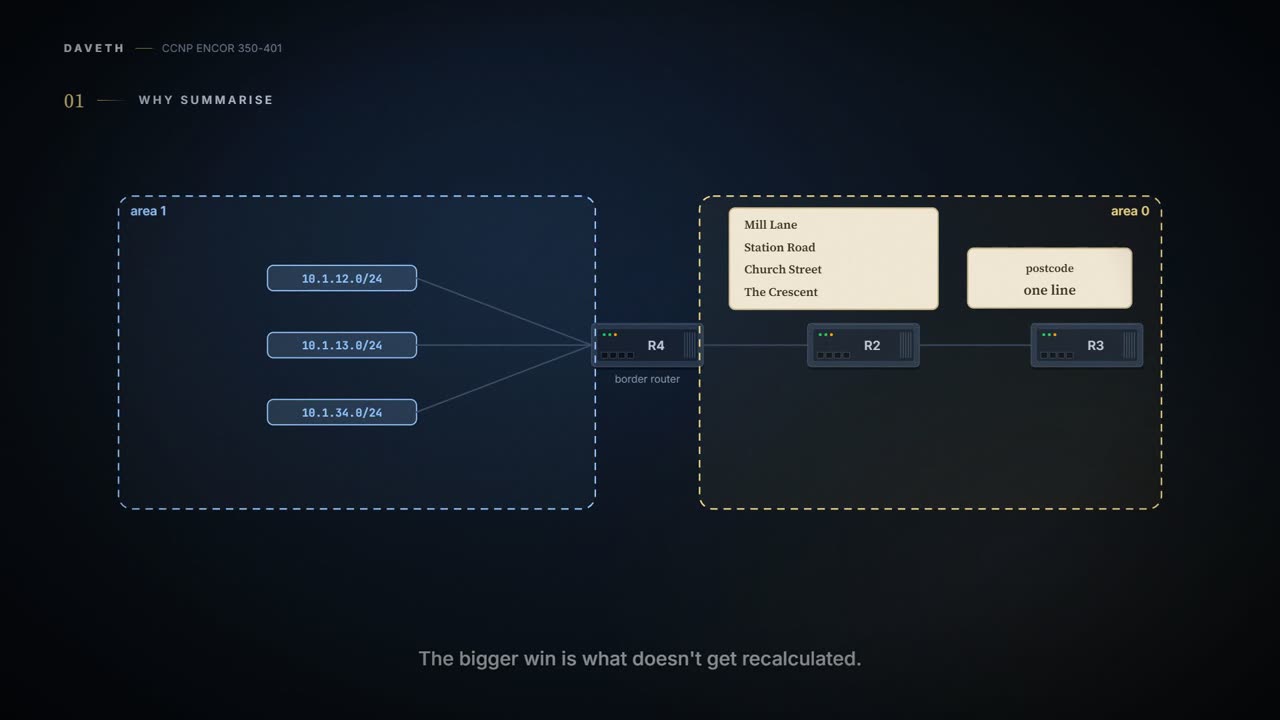
The bigger win is what doesn't get recalculated. In Figure 9-17, if the 10.1.12.0/24 link in Area 1 fails, R4 has to update the type 3s for 10.1.13.0/24 and 10.1.34.0/24, and every router in Area 0 re-runs its calculation for those two prefixes. With Area 1 summarised as 10.1.0.0/18 (Figure 9-18), Area 1 still runs SPF, but Area 0 isn't affected: the smaller prefixes aren't known outside Area 1. It's basically like a road closure inside a housing estate: the residents re-plan their walk to the shop, but the national road atlas, which only shows the estate's entrance, doesn't change at all. It works best with an addressing scheme planned so that each area's networks sit inside a neat block.
Summarisation is the only time OSPF, famous for wanting every detail, agrees to be deliberately vague.
Interarea summarisation reduces the type 3 LSAs an ABR advertises. A summary range belongs to a source area: when type 1 networks from that area fall inside the range, the ABR advertises one type 3 for the range and suppresses the more specific ones. The source area's own type 1 LSAs are untouched (Figure 9-19: fifteen /24s from 172.16.1.0 to 172.16.15.0 become one 172.16.0.0/20). The guide says it works on type 1 LSAs only (the ABR condenses the area's intra-area routes, with type 2s supplying masks, as 02-4 showed), and it's normally set up so the summary happens as routes enter the backbone from a non-backbone area.
What metric does the summary carry? The guide: by default, the smallest metric among the components, unless you set one. That's RFC 1583's rule; RFC 2328 changed it to the largest cost of any component. Which one IOS XE applies by default wasn't checkable when this was written (unconfirmed), so on the exam, answer with the guide's. If you scaled that down to telling friends when your family will arrive, RFC 2328 quotes the slowest member, so nobody turns up early to meet a late arrival; the guide's rule quotes the fastest. Either way, when a component is added or removed, the ABR re-checks every prefix in the range and re-advertises the summary with the new metric, just as EIGRP does (02-8).
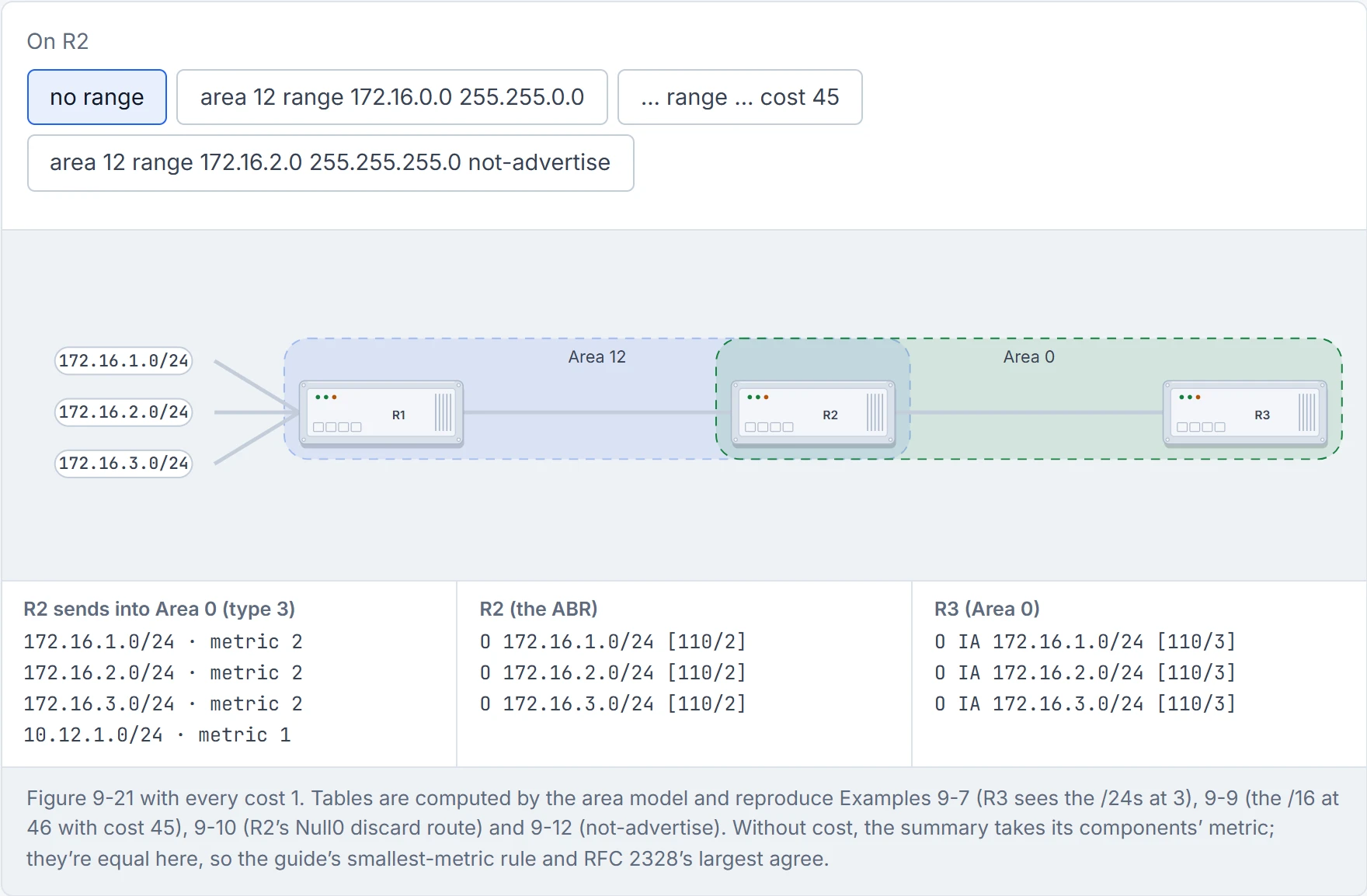
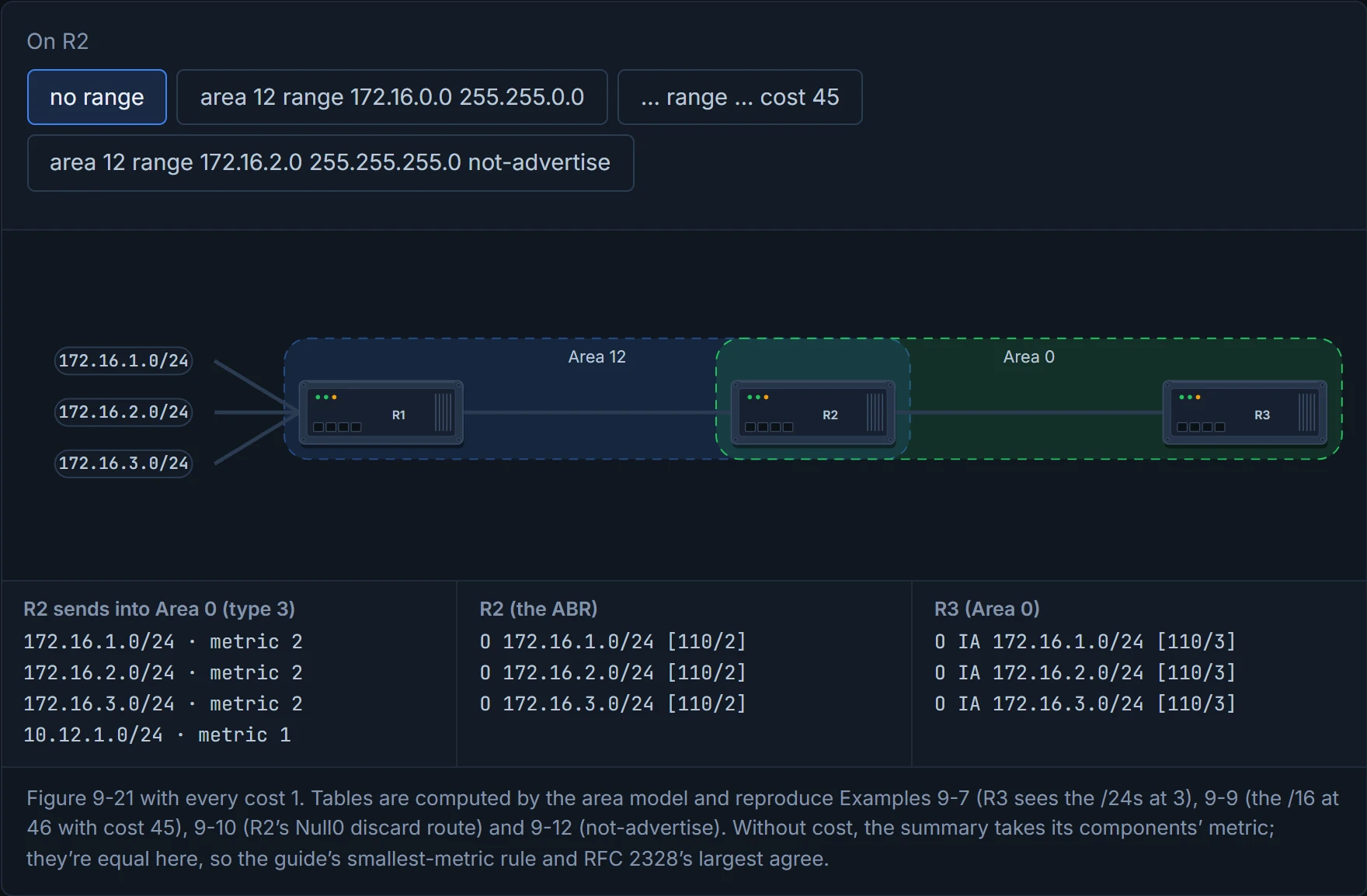
The command, on the ABR: area area-id range network subnet-mask [advertise | not-advertise] [cost metric]. Advertising is the default, so advertise isn't needed, and cost fixes the metric. In the guide's example (Figure 9-21), R1 advertises 172.16.1.0/24, 172.16.2.0/24 and 172.16.3.0/24 into Area 12. Before summarising, R3 in Area 0 sees all three at 3 (Example 9-7). R2 then configures area 12 range 172.16.0.0 255.255.0.0 cost 45, and R3 sees just O IA 172.16.0.0/16 [110/46]: the fixed 45 plus R3's 1 to reach R2. The guide's reason for the fixed cost: the summary's metric no longer changes, and so no longer needs re-advertising, when one of the three networks flaps. That's roughly equivalent to a fixed-price menu: the price on the board doesn't move every time one ingredient gets dearer.
The ABR also quietly installs a route for the whole range pointing to Null0, a discard route (O 172.16.0.0/16 is a summary, Null0, Example 9-10). It stops loops: traffic for a part of the range with no more specific route is dropped at the ABR instead of bouncing back and forth. Its AD is 110 for an internal summary and 254 for an external one. Consider it your shop's honest "we don't stock that" reply: better than sending the customer to another branch that sends them straight back.
Null0 is networking's shredder, and a summarising ABR installs one the moment it starts promising more than it can deliver.
Route filtering chooses which routes are advertised to, or accepted from, neighbours: to steer traffic, to save memory, or for security. A distance vector protocol filters as it advertises to the next router. OSPF can't work like that: every router in an area shares the same LSDB, so filtering generally happens where routes enter an area, on the ABR. Have you ever noticed how a shared family calendar only works if nobody secretly deletes entries from their own copy? OSPF protects the shared copy the same way: it filters what gets written into an area's calendar from outside, never one router's copy. There are three techniques.
The easiest is filtering with summarisation. Add not-advertise to a range and the ABR creates no type 3 at all for anything inside it, so those routes are visible only in the area where they started: area area-id range network subnet-mask not-advertise. In the guide's example, R2 adds area 12 range 172.16.2.0 255.255.255.0 not-advertise, and 172.16.2.0/24 disappears from Area 0 while 172.16.1.0 and 172.16.3.0 remain (Examples 9-11, 9-12); a wider range would hide more. It acts kind of like a "staff only" door: the room exists and the staff use it every day, but the visitors' map simply doesn't show it.
not-advertise suppresses a whole range and advertises nothing in its place, on purpose. It's the most honest thing in OSPF.
Before D1, work it out from section 4.2: with area 12 range 172.16.0.0 255.255.0.0 cost 45 on R2, what does R2 itself have for 172.16.0.0/16?
D1
Filtering with summarisation is blunt. In Figure 9-22, if 172.16.1.0/24 must stay in Area 0 but be removed from Area 34, a summary can't do it. So OSPF can filter at the moment a type 3 is generated. The original route stays in the source area's LSDB, and in the ABR's own routing table; only the note to the next area is held back. And it works in either direction on the ABR (Figure 9-23). That's roughly equivalent to a border post that stamps some parcels "not for export": the parcel stays in its home country, the border officer still knows it's there, it just never crosses.
The direction is the trap, so read it off Figure 9-24. R2 can filter routes as they leave Area 12 or as they enter Area 0; R3 can filter them as they leave Area 0 or enter Area 34; and the same logic applies to routes going the other way. in and out are relative to the area you name, not to the router. Just like when you put up "no dogs in the kitchen" and "no dogs out of the garden": the same dog, two different doors, and the sign names the room.
The command, on the ABR: area area-id filter-list prefix prefix-list-name {in | out}. The guide's example (Example 9-13): R2 denies 172.16.1.0/24 with area 0 filter-list prefix PREFIX-FILTER in, stopping it entering Area 0; R3 denies 172.16.2.0/24 with area 0 filter-list prefix PREFIX-FILTER out, stopping it leaving Area 0. Each prefix list ends with permit 0.0.0.0/0 le 32, which matches every prefix of any length, so everything the deny line doesn't name still goes through (why a prefix list needs that last line is 02-12's). The result (Example 9-14): R3 has 172.16.2.0 and 172.16.3.0 but not 172.16.1.0; R4 has only 172.16.3.0.
Many a "the filter didn't work" ticket is a filter working perfectly, on the other side of the door.
Sometimes a route has to go from one specific router's table, not from a whole area. But every router in an area must keep an identical LSDB, so the LSA can't go. What can go is the route: it stays in the LSDB and is kept out of that router's routing table. That's a distribute list (Figure 9-25). It's basically like keeping the whole restaurant menu on the table but crossing one dish off your own order: everyone else at the table can still have it.
On an ABR there's a subtlety. A distribute list doesn't stop a type 1 route becoming a type 3 for another area, because that happens before the distribute list is applied. But it does stop a type 3 from the backbone being regenerated into a non-backbone area, because regeneration happens after. So don't use one to filter between areas; the tools in section 4.3 and section 4.4 are the ones for that. (The guide says "the following section" has the better techniques; they're the preceding ones.)
Before reading on, predict: a distribute list on R2 denies 172.16.3.0/24. Does R3 still learn it? D2 lets you check.
The command, under the process: distribute-list {acl-number | acl-name | prefix prefix-list-name | route-map route-map-name} in. In the guide's example, R2 denies 172.16.3.0/24 with an access list (Example 9-15). The access list ends with permit any, the same job the prefix list's last line did in section 4.4 (ACLs: 08-3; route maps: 02-12). 172.16.3.0/24 is gone from R2's routing table, and R3 still has it at [110/3] (Example 9-16). Why does R3 keep it? Not just because the list is local: R2 is the ABR, and it wrote the type 3 for Area 0 before its distribute list was applied. The LSA is still in R2's LSDB and R2 still floods it on (Figure 9-25). If you've ever muted a group chat after the message had already been forwarded to three other groups, you know the order problem: muting your phone doesn't recall what's already gone out.
A router with a distribute list knows exactly where 172.16.3.0/24 is and refuses to go. OSPF calls it local policy; the rest of us call it a teenager.
The three tools side by side:
| Tool | Where | What goes | What stays |
|---|---|---|---|
area … range … not-advertise | ABR | the type 3s for the range, into every other area | the routes inside their own area, and on the ABR |
area … filter-list prefix … in/out | ABR | the type 3 into (in) or out of (out) the named area | the source area's LSDB and the ABR's own table |
distribute-list … in | any router | the route in that router's own table (on an ABR, also backbone type 3s it would regenerate) | the LSA in the LSDB, and everyone else's routes |
Continue the lesson
The whole lesson, with its drawings and its questions. The rest of this section and 9 more after it.