
How two routers become BGP peers
BGP does not discover neighbours: each peer is named with a neighbor statement, and the session runs over TCP port 179, so it can cross any number of hops. Four messages do the work, OPEN, UPDATE, NOTIFICATION and KEEPALIVE, and each peer moves through six states. In OpenSent, both OPENs are checked: version, source address, AS number and more.
By Arif, founder of Daveth · Updated
The full 14 min walkthrough is in Daveth Pro (Network). See what the plan opens
What this page answers
What are the BGP message types?
Four: OPEN sets up the adjacency; UPDATE advertises, updates or withdraws routes; NOTIFICATION tells the neighbour about an error; KEEPALIVE shows the neighbour is still alive. Read it in “Four messages, and the clock that keeps them honest”
What are the BGP neighbour states?
Six, in order: Idle, Connect, Active, OpenSent, OpenConfirm and Established. Read them in two halves: first TCP comes up, then the OPENs are checked and accepted. Read it in “Six states, in two halves”
Why does BGP not find its neighbours automatically?
BGP sends no hellos and cannot discover neighbours dynamically; each peer is configured by hand. Because it runs over TCP 179, a session can cross any number of hops. Read it in “You have to name it”
You have to name it
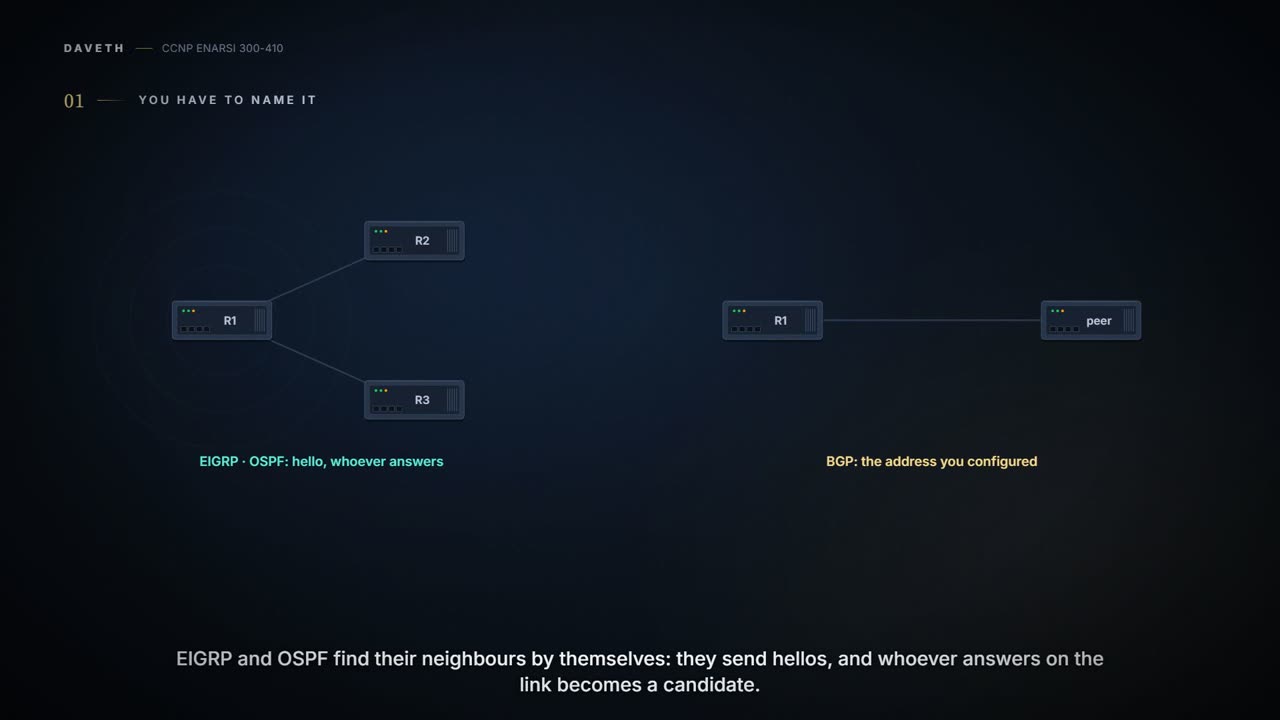
Two modules of habits, and BGP is about to break most of them. EIGRP and OSPF find their neighbors by themselves: they send hellos, and whoever answers on the link becomes a candidate. BGP doesn't. It doesn't use hello packets to discover neighbors, and two BGP routers can't discover each other dynamically the way OSPF routers can. BGP neighbors are defined by IP address. You tell the router, by address, exactly who its peers are.
Why would a protocol give that up? Because of what it's for. BGP was designed to route between autonomous systems, so neighbor adjacencies shouldn't change often, and they're coordinated. The two ends belong to different organisations, with a contract and a change window between them. Nobody wants a router in the next company picking up a neighbor because it happened to answer.
And the scale. BGP is the only protocol used to exchange networks on the Internet, which carries more than 940,000 IPv4 and more than 180,000 IPv6 prefixes. So BGP doesn't refresh its advertisements periodically the way OSPF and IS-IS do, and it prefers stability: a link flap could mean recomputing thousands of routes. A protocol like that wants its neighbors chosen on purpose.
The habit and the replacement, in one picture. An IGP router calls out in a room and talks to whoever calls back. A BGP router dials a number it was given. That also tells you where the picture stops, and it's the next section: the router can only dial a number its routing table knows how to reach.
So, prediction. You type the neighbor line for a router in another company. What does your router do in the next second, and is anything exchanged yet? And if the session then showed a state called Active for an hour, would you relax or worry? Hold both answers; the state machine below answers them.
A few words first, because the rest of the module uses them. From BGP's point of view, an autonomous system (AS) is a collection of routers under a single organization's control, using one or more IGPs and common metrics to route packets inside it. If it uses several IGPs or metrics, it still has to look consistent to other ASs in its routing policy. It doesn't even need an IGP; an AS could run BGP as its only routing protocol. A BGP session is an established adjacency between two BGP routers. If both routers are in the same AS, or take part in the same BGP confederation (a feature this exam leaves out), it's an internal BGP (iBGP) session; if they're in different ASs, it's external BGP (eBGP). What changes between the two is the next lesson's. Here every session is eBGP unless it says otherwise.
An organisation that wants to connect to the Internet needs an AS number (ASN). The ranges, and the 4-byte numbers, wait until the neighbor output gives you a reason to care.
Two things this rules out, plainly. Can both routers discover each other dynamically? No: BGP neighbors are statically defined. A feature exists that lets one side listen for peers in a range, and even then the other router still configures its peer statically; it belongs to a later lesson. Is a BGP session always one hop from its neighbor? No: BGP supports multi-hop neighbor adjacency. That's the next section.
Any number of hops away
BGP talks over TCP, port 179. TCP looks after the delivery: fragmentation, sequencing, and reliability, meaning acknowledgment and retransmission. Most recent BGP implementations set the do-not-fragment (DF) bit and rely on path MTU discovery instead.
Here's the bigger consequence. An IGP's hellos can't cross a network boundary, so IGP sessions are single-hop and follow the physical topology. TCP crosses network boundaries, so BGP is multi-hop capable. A BGP router can form an adjacency with a router on its own link, or with one several hops away.
Take four routers in a row, R1, R2, R3, R4, on 10.12.1.0/24, 10.23.1.0/24 and 10.34.1.0/24. R1 has a direct BGP session with R2, and R2 has one with R4, through R3. R1 and R2 find each other with a directly connected route. R2 reaches 10.34.1.0/24 with a static route, and R4 reaches 10.23.1.0/24 with one. Look at R3. The session's packets go through it, and R3 has no idea R2 and R4 have a BGP session.
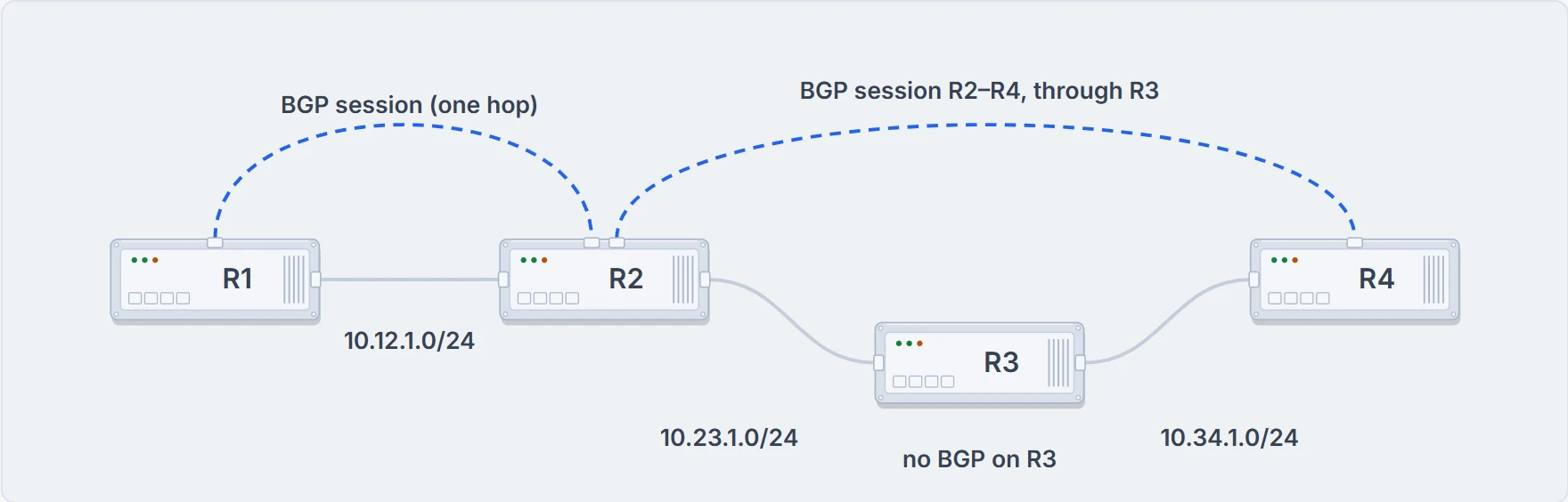
Two sessions: R1–R2 on the link they share, and R2–R4 straight through R3, which only forwards the packets.
So what does a multi-hop session need? A route. Multi-hop sessions need an underlying route installed in the RIB, static or from any routing protocol, to set up the TCP session to the far end. Neighbors on the same network use the ARP table to find the peer; multi-hop neighbors need routing table information. Between iBGP neighbors it's common to run a static route or an IGP just to give the session that path. And one trap: a default route isn't sufficient to establish a multi-hop BGP session. That's where the phone number stops being a phone number. A phone network connects any number you dial; a BGP router dials only an address its RIB has a route for, and for a multi-hop peer, "send it to the default gateway" doesn't count.
You can think of BGP as a control-plane routing protocol, or as an application, because it exchanges routes with a peer that may be several hops away. And the application needs the network underneath to work. R3 doesn't need a BGP session with R2 or R4, but it does need to know every route that will be forwarded through it. A session that's up says nothing about whether R3 can carry the traffic. The next lesson picks that thread up.
What R2 and R4 need to make that session work as eBGP or iBGP (ebgp-multihop, update-source, loopbacks) is the next lesson's too. Here, take the rule: the session is TCP, so it goes wherever the RIB says the address is.
Four messages, and the clock that keeps them honest
Once TCP is up, BGP uses four message types:
| Type | Name | What it does |
|---|---|---|
| 1 | OPEN | sets up and establishes the adjacency |
| 2 | UPDATE | advertises, updates or withdraws routes |
| 3 | NOTIFICATION | tells the neighbor about an error |
| 4 | KEEPALIVE | shows the neighbor is still alive |
OPEN. This is where the session is set up. Both sides negotiate the session's capabilities before peering is established. An OPEN carries the BGP version, the ASN of the router that sent it, a hold time, a BGP identifier, and optional parameters that set the session's capabilities. Two of those fields need a closer look.
The hold time field proposes a hold timer value, in seconds. Each router sends its own, and the session uses the smaller of the two. The value must be at least 3 seconds, or 0, which turns KEEPALIVE messages off. On Cisco routers the default is 180 seconds.
The BGP identifier is the router ID (RID): a 32-bit unique number that identifies the BGP router in the prefixes it advertises. Inside an AS the RID can be used to prevent loops for routes advertised within the AS. It's set manually or dynamically, and it has to be nonzero, or the routers won't become neighbors.
KEEPALIVE. BGP doesn't trust the TCP connection's state to tell it the neighbor is alive. It exchanges KEEPALIVEs every one-third of the hold time the two routers agreed, so Cisco's default hold time of 180 gives a keepalive every 60 seconds. A hold time of 0 means no KEEPALIVEs at all.
UPDATE. An UPDATE advertises feasible routes, withdraws routes advertised before, or does both. The prefixes ride in the NLRI path attribute, along with the other BGP path attributes. Prefixes being withdrawn go in the UPDATE's Withdrawn Routes field. An UPDATE also counts as a keepalive, which saves traffic.
That's the clock. Every UPDATE or KEEPALIVE received resets the hold timer to its starting value. If it reaches zero, the session is torn down, the routes from that neighbor are removed, and withdrawals for those prefixes go to the other BGP neighbors. The hold time is BGP's heartbeat.
NOTIFICATION. Sent when an error is detected on the session: the hold timer expiring, the neighbor's capabilities changing, a reset being requested. And it closes the BGP connection.
Now put numbers through the rule, with the configuration you'll meet later in this lesson:
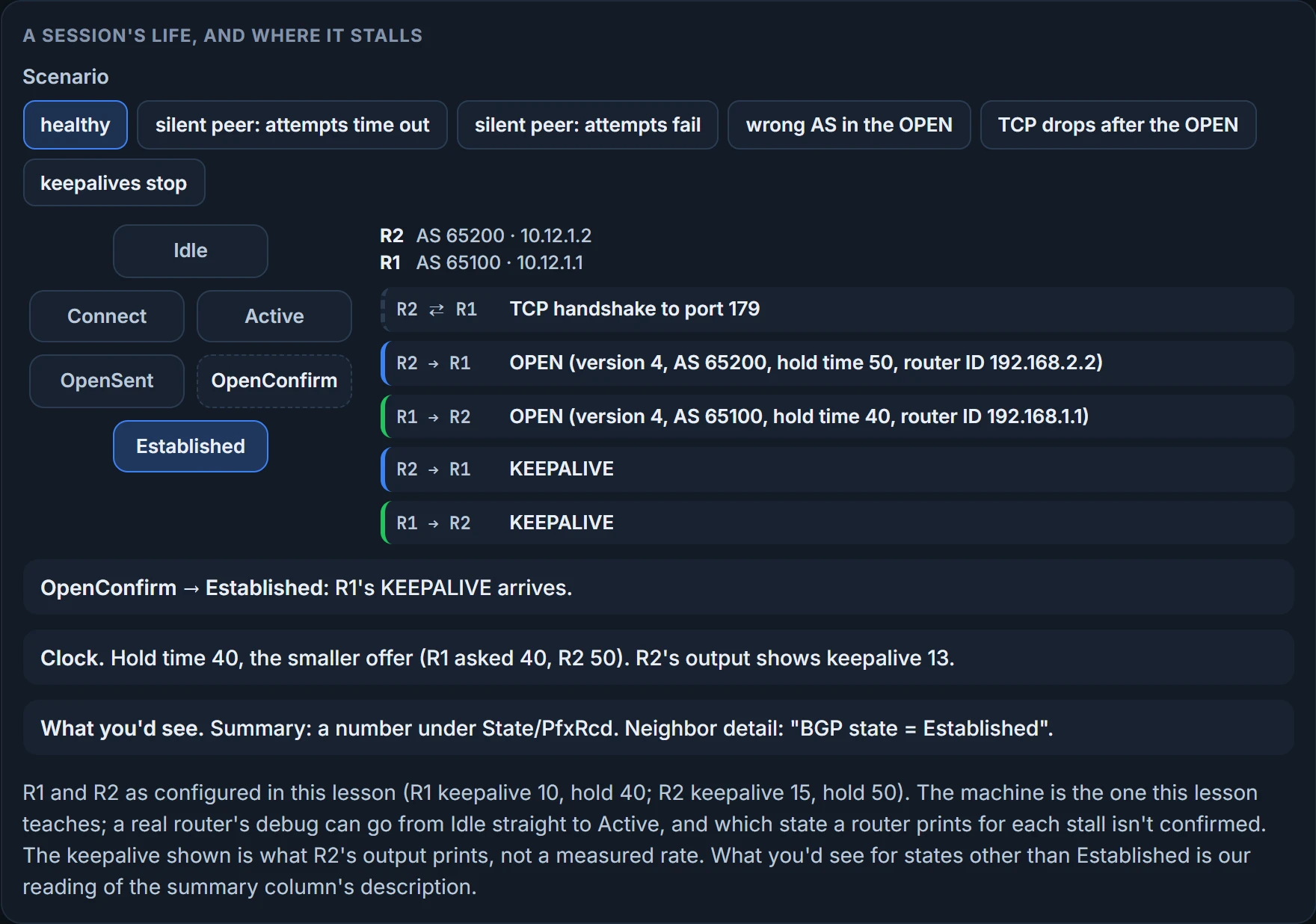
Hold 40, the smaller offer. And a keepalive every one-third of 40, which is 13 and a third. R2's neighbor detail prints its values as "hold is 40, keepalive is 13 seconds". R2 typed 15 and its output says 13: the keepalive it displays follows the agreed hold time, not what R2 typed. A looser version of the rule says BGP uses the lowest timers set between the two neighbors. If that meant the lowest keepalive, R2 would show 10, R1's; it shows 13. What R1 prints for its own keepalive, which it set to 10, isn't shown.
Hold that 13 loosely, though. It's one printed line, and the same outputs' message counters don't fit it: the instruments section does the count, and it comes out far slower than 13. If keepalives really do go every 13 seconds, the arithmetic gives you the margin: against 40, two can go missing and the third still lands in time; three missing, and the hold timer wins.
Six states, in two halves
BGP forms a TCP session with each neighbor router, which it calls a peer. A finite-state machine (FSM) keeps a table of all the peers and the state each one is in. There are six states, numbered 1 to 6 in this order: Idle, Connect, Active, OpenSent, OpenConfirm and Established.
Read them in two halves. In Connect and Active the router works on the TCP connection; in OpenSent and OpenConfirm, on the OPEN. Idle is where everything starts and where most failures go back to: an OPEN that fails inspection, a hold timer that runs out, an event nobody planned for. Not every failure goes there, as you're about to see. Established is the goal.
Start with a healthy session and walk it.
Idle is the first stage. BGP detects a start event, tries to open a TCP connection to the peer, and also listens for a connection from the peer.
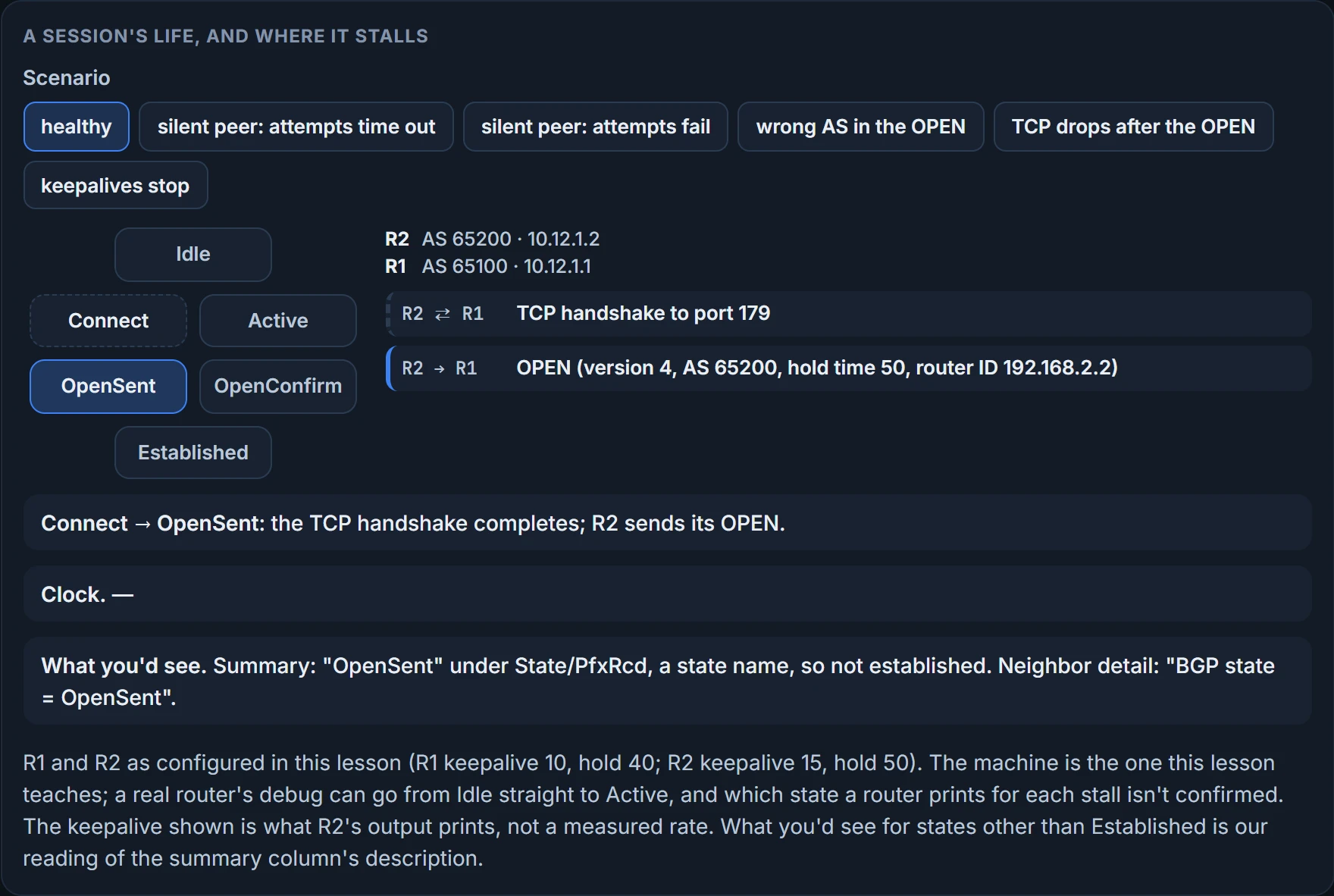
Connect. BGP starts the TCP connection. If the three-way handshake completes, BGP resets the ConnectRetry timer, sends its OPEN to the neighbor, and moves to OpenSent. Port 179 is used both ways: routers listen on 179 for incoming connections and connect to 179 on their peers. The router that opens the connection uses a random source port, with destination port 179. show tcp brief shows a session that's up:
R1# show tcp brief
TCB       Local Address      Foreign Address        (state)
F6F84258  10.12.1.1.179      10.12.1.2.59884        ESTAB
R2# show tcp brief
TCB       Local Address      Foreign Address        (state)
EF153B88  10.12.1.2.59884    10.12.1.1.179          ESTAB
R2's port is 59884 and R1's is 179, so R2 opened this connection. Hold on to that way of reading it; the neighbor detail uses it again.
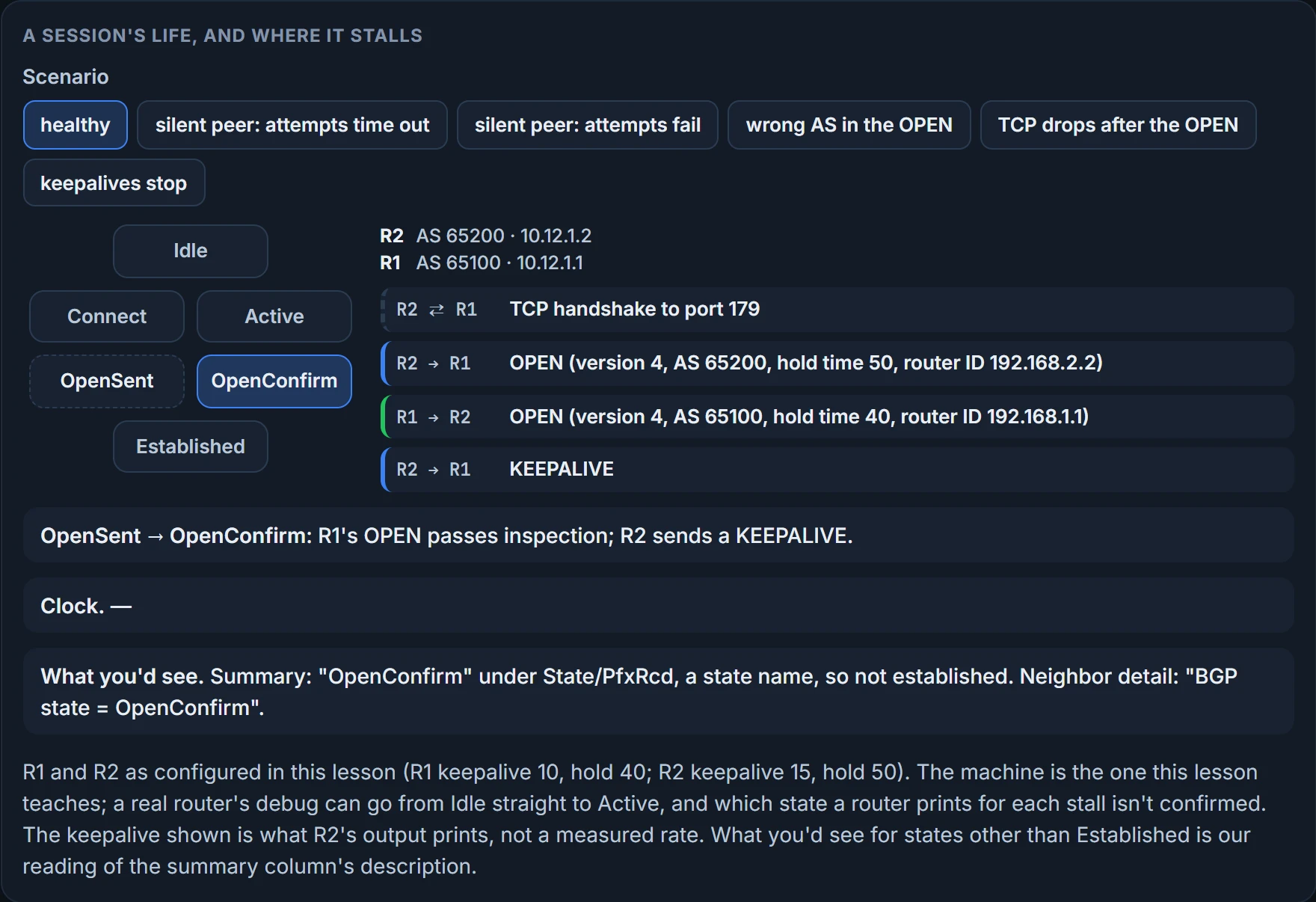
OpenSent, OpenConfirm, Established: an OPEN has gone out, the peer's OPEN arrives and passes inspection, each side sends a KEEPALIVE, and a KEEPALIVE from the neighbor moves the session to Established. The inspection is the next section. In Established, the neighbors exchange routes in UPDATE messages, and each UPDATE or KEEPALIVE received resets the hold timer. If the hold timer expires, or an error is detected, BGP sends the neighbor back to Idle.
Idle, Connect, OpenSent, OpenConfirm, Established. Notice what's missing from that walk: Active. (One captured debug, after the peer closed the session, goes from Idle straight to Active with no Connect at all. More on that below.)
Now the prediction. You configure R2's neighbor line, and the router at that address never answers on port 179: the packets simply don't arrive. Where does R2's session spend its time?
The Connect state answers it. If the ConnectRetry timer runs out before the handshake completes, BGP tries a new TCP connection, resets the timer, and stays in Connect. If the TCP connection fails, the state changes to Active. For any other event, it goes to Idle.
And in Active, BGP starts a new three-way TCP handshake. If the connection comes up, it sends an OPEN, sets the hold timer to 4 minutes, and moves to OpenSent. If this attempt fails, it goes back to Connect and resets the ConnectRetry timer.
So where does the silent peer leave you? Cisco's description doesn't say which event a silent peer produces, so this is a reading, and there are two. If every attempt simply runs out of time, ConnectRetry expires and the session stays in Connect, trying again. If an attempt counts as failed, the session goes to Active, tries again from there, and a failure there sends it back to Connect, so it goes back and forth between the two. Either way it never reaches OpenSent, and no BGP message is exchanged, because the OPEN goes only once TCP is up.
Now look at the ways into Active. A connection attempt in Connect fails. Or TCP was up, the OPEN went out, and the connection dropped in OpenSent. That second one matters: an OPEN may already have crossed before a session lands in Active. Cisco's BGP troubleshooting guidance goes further and puts Active after a completed handshake whose OPEN got no answer. So Active can't tell you how far the session got. What it does tell you, in every version: the session isn't up, and the router is still trying to bring it up.
That's the surprise. Active sounds like the healthy state, the busy one. It isn't. A neighbor that sits in Active has a problem somewhere between the two routers, and the healthy walk never needed it. So, the first section's question: an hour in Active is a reason to worry, not to relax.
If you came here straight from EIGRP, it's worse. EIGRP's active state meant a route was being computed, with queries out. Same word, opposite news: EIGRP's active is busy working; BGP's Active is a session that isn't up.
Three honest limits on "a problem". If the far end simply isn't configured yet, Active is exactly what you should expect; it means "not working yet", not "broken". A real router can pass through Active on its way up, too: debug output shows a session the peer closed going from Established to Idle, then from Idle straight to Active, and a last line, "open active delayed 30162ms", which we read as the router holding back its next attempt for about 30 seconds. So a moment in Active isn't a fault; a session that stays there is. And Cisco's troubleshooting guidance reads the summary's states this way: if you see Idle or Active, the neighbor relationship has a problem forming. It also reports a router with no route to its peer as Idle, because the TCP connection can't be made. Which cause lands in which state is the troubleshooting lesson's map. The first cut is yours already: Connect or Active means the session isn't up and the router is still working on it. Look at TCP first, and remember that an OPEN may already have crossed.
The RFC that defines BGP draws Active a little differently, as a state that's trying to acquire a peer "by listening for, and accepting, a TCP connection", and unless an optional delay timer is running, it sends a failed TCP connection in Connect or Active to Idle rather than between the two (RFC 4271, section 8.2.2). The version here is the one Cisco's description teaches. Either way, Active isn't up.
The OPEN inspection, and the retry clock
OpenSent. Your router has sent its OPEN and is waiting for the other router's. When that OPEN arrives, both are checked for errors:
- The BGP versions must match.
- The OPEN's source IP address must match the address configured for the neighbor.
- The AS number in the OPEN must match the one configured for the neighbor.
- The BGP identifiers (RIDs) must be unique, and a router with no RID fails this check.
- Security parameters, such as the password and the TTL, must be set correctly.
Pass, and the hold time is negotiated (the lower value), a KEEPALIVE goes out unless the hold time is 0, and the state moves to OpenConfirm. Fail, and the router sends a NOTIFICATION and goes back to Idle. If TCP is disconnected in the middle of this, BGP closes the connection, resets the ConnectRetry timer and goes to Active. Any other event sends it to Idle.
Look at the second check. It's why the neighbor is defined by address: the address in your neighbor line is the identity the OPEN has to match. Packets sourced from an address the far router doesn't have in its neighbor table can't be matched to a neighbor and are discarded. That one becomes the next lesson's loopback story.
OpenConfirm. BGP waits for a KEEPALIVE or a NOTIFICATION. A KEEPALIVE from the neighbor moves the session to Established. The hold timer expiring, a stop event, or a NOTIFICATION received sends it to Idle.
So the second half has its own stall. TCP comes up, OPENs cross, one fails inspection, a NOTIFICATION is sent, and the session drops to Idle. Then what? The retry clock. If an error sends BGP back to Idle a second time, the ConnectRetry timer is set to 60 seconds and has to count down to 0 before the router tries again. Every further failure to leave Idle doubles it. A wrong AS number therefore doesn't hammer the peer: from the second failure on, the router waits 60 seconds, then 120, then 240. Cisco's description gives no number for the wait after the first failure, or for the ConnectRetry timer in Connect, so neither gets one here.
Six scenarios, with the healthy session first. Each asks you to predict before it steps, and everything it asks was in the last three sections.
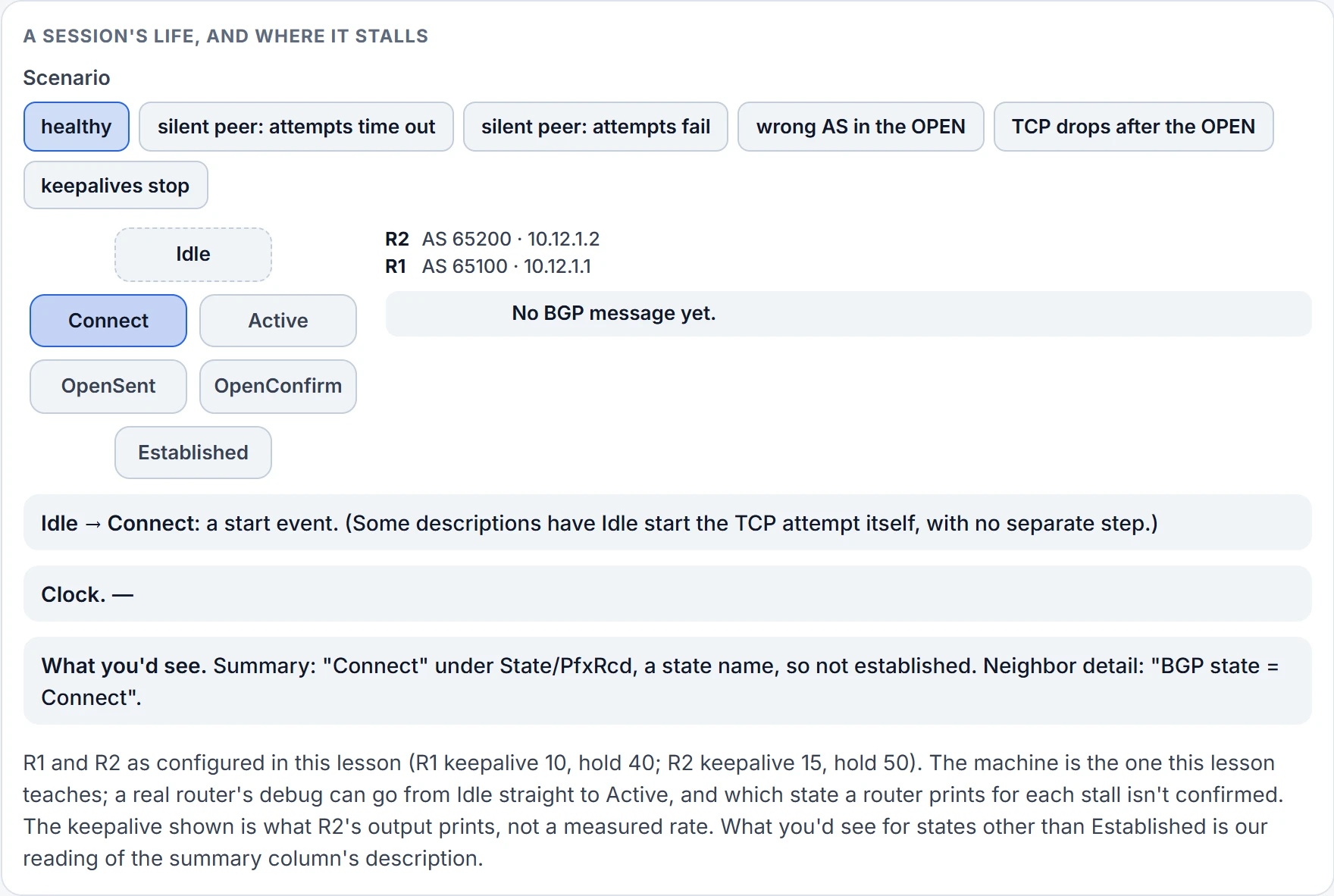
Step 1 of 4 Idle to Connect: a start event. No BGP message has been sent yet.
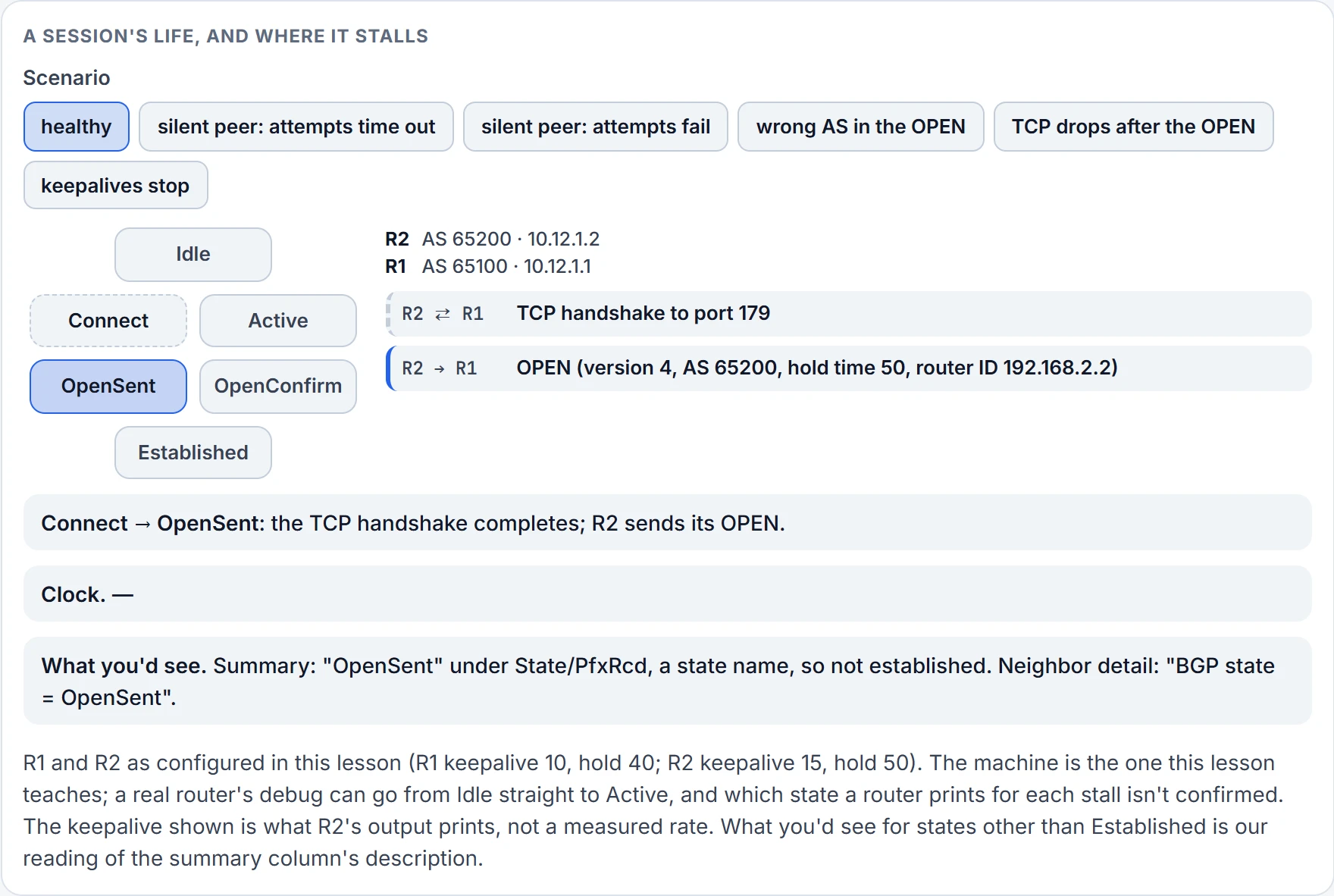
Step 2 of 4 Connect to OpenSent: the TCP handshake to port 179 completes and R2 sends its OPEN.
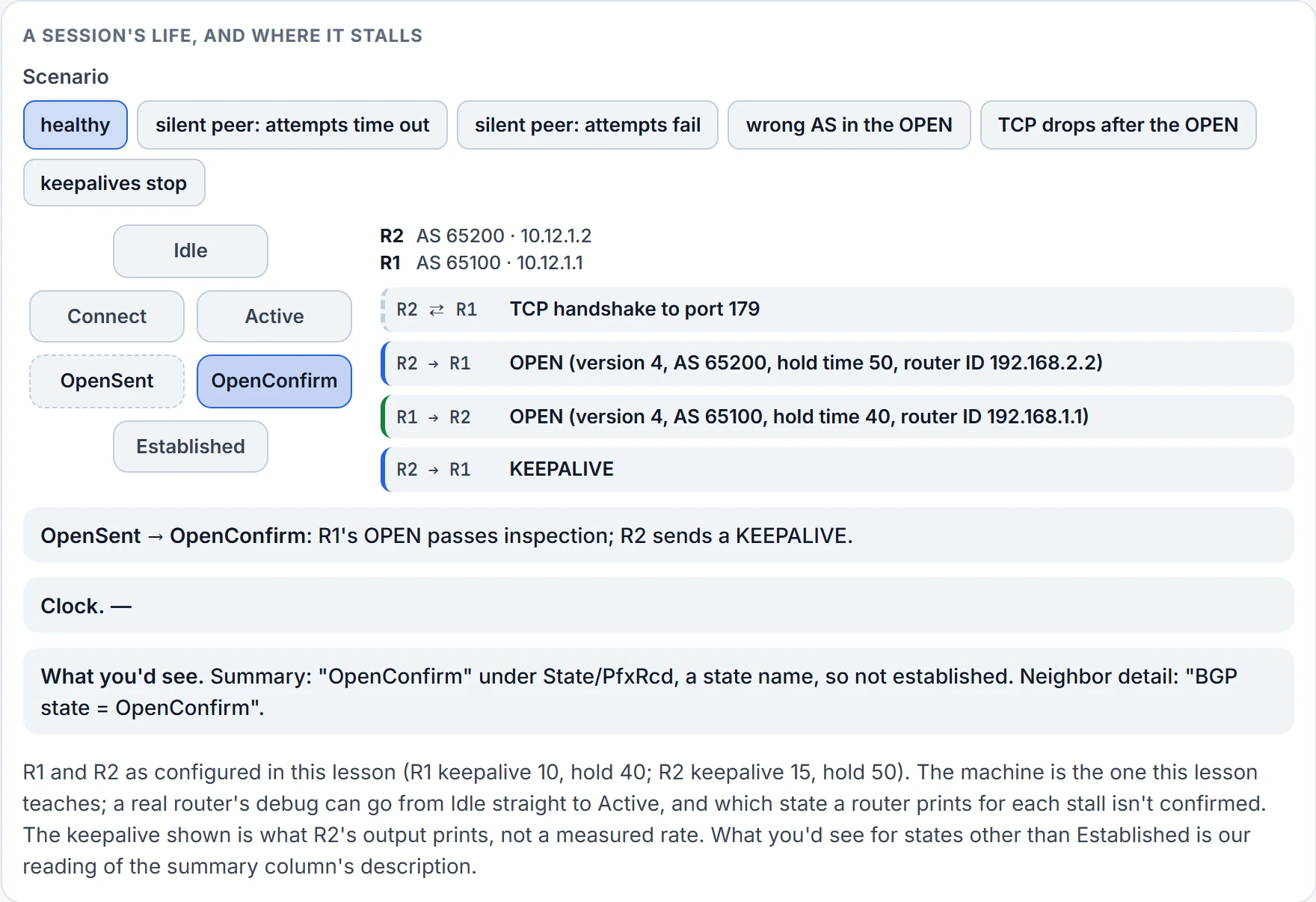
Step 3 of 4 OpenSent to OpenConfirm: R1's OPEN passes inspection, and R2 sends a KEEPALIVE.
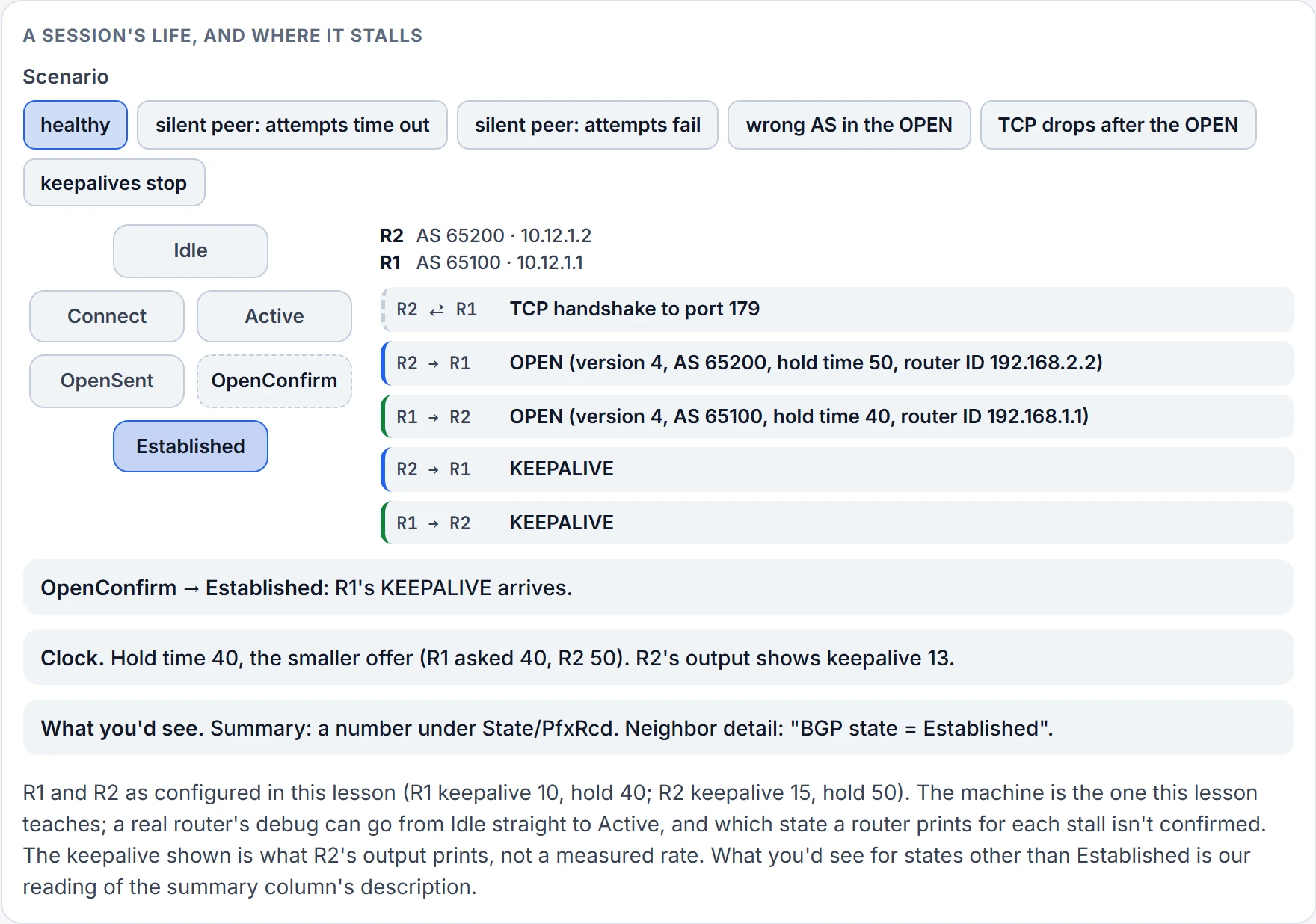
Step 4 of 4 OpenConfirm to Established: R1's KEEPALIVE arrives. The hold time is 40, the smaller of the two offers.
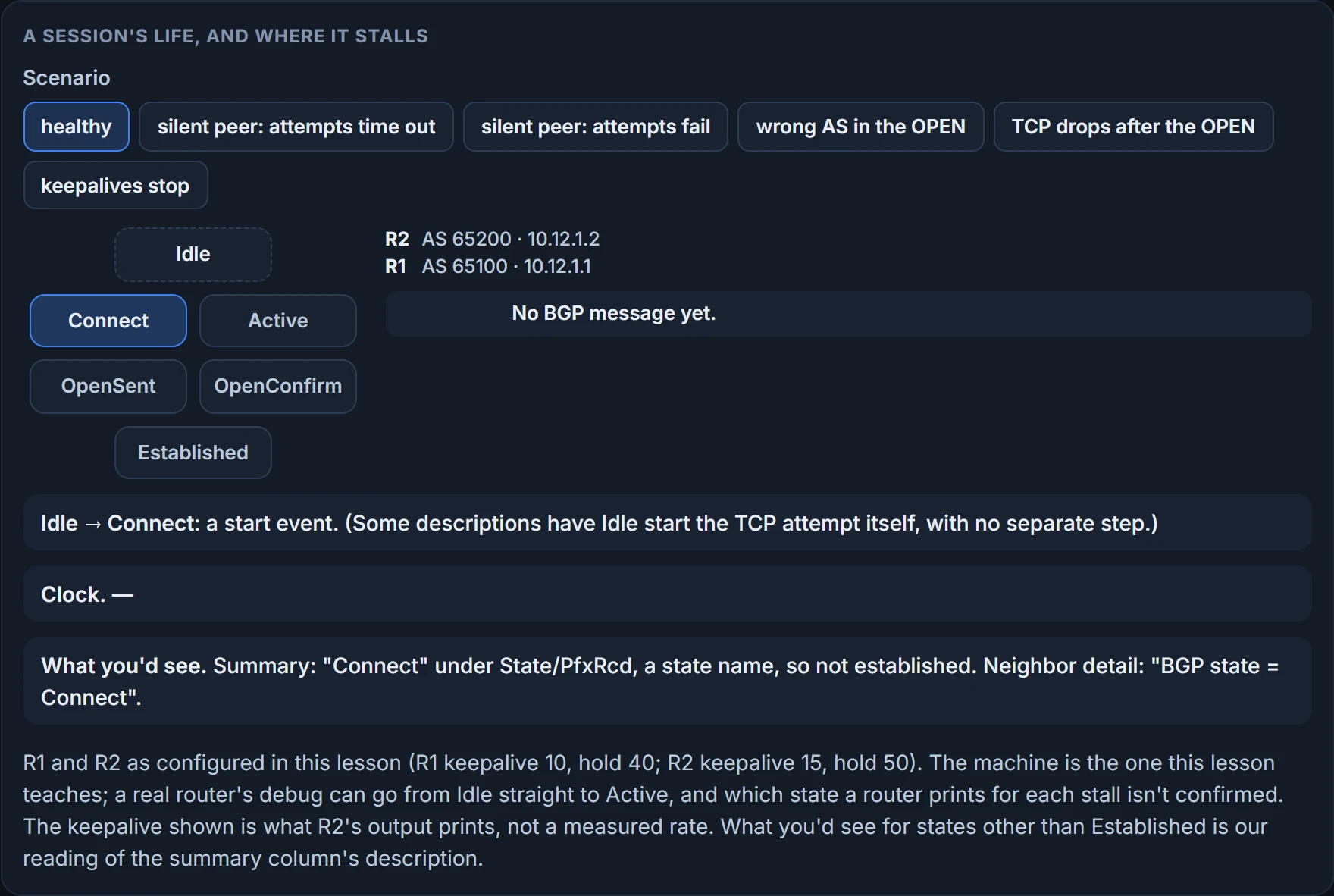
Three places a session can stop, then, and each is in a different part of the machine:
- TCP never comes up: Connect, retrying, or Connect and Active by turns, depending on the event. No BGP message has been exchanged.
- An OPEN fails inspection: OpenSent, a NOTIFICATION, Idle, and a retry clock that doubles.
- The heartbeat stops: Established until the hold timer reaches zero, then a NOTIFICATION, Idle, the neighbor's routes removed and withdrawals sent to everyone else.
What the session will carry
The session exists to carry routes, and the routes carry baggage. BGP attaches path attributes (PAs) to each network path, and they give BGP fine control of routing policy. Every PA is in one of four classes: well-known mandatory, well-known discretionary, optional transitive, optional non-transitive.
Read each name as two answers. The first word answers "must every BGP router recognize it?"; the second answers, for the well-known pair, "must every advertisement carry it?", and for the optional pair, "may it leave the AS?". Well-known attributes must be recognized by every BGP implementation; well-known mandatory ones must be in every prefix advertisement, and well-known discretionary ones may or may not be. Optional attributes don't have to be recognized by every implementation; optional transitive ones stay with the route from AS to AS, and optional non-transitive ones can't be passed from AS to AS. So the attribute every BGP implementation must recognize and include with every advertisement is well-known mandatory. Which attribute is which class, and what each one does to path selection, comes later in the module.
One attribute matters right now, because it's how BGP stays loop-free without a map. BGP is a path vector routing protocol: it doesn't hold a complete topology the way link-state protocols do. It behaves more like a distance vector protocol, making sure a path is loop free. The tool is AS_Path, a well-known mandatory attribute listing every ASN the advertisement has crossed since its source AS. If a BGP router receives a prefix with its own AS in the AS_Path, it discards it, because the advertisement looks like a loop.
And address families, which the configuration is built around. BGP started out carrying IPv4 prefixes between organisations; RFC 2858 added Multiprotocol BGP (MP-BGP) with the address family identifier (AFI). An address family maps to one network protocol, such as IPv4 or IPv6, and a subsequent address family identifier (SAFI), such as unicast or multicast, narrows it further. In BGP, the network layer reachability information (NLRI) is the prefix length and the prefix. MP-BGP keeps families apart with two path attributes, MP_REACH_NLRI and MP_UNREACH_NLRI, which ride inside UPDATE messages and carry reachability for the different address families. (MP-BGP and MBGP are the same thing; engineers use both names.)
Here's the part that shapes everything after it. Each address family keeps its own database and configuration, so the routing policy in one family can differ from another's, even over the same session with the same router. BGP tags every route advertisement with its AFI and SAFI to keep the databases apart. One TCP connection, several separate conversations inside it.
Continue the lesson
The whole lesson, with its drawings and its questions. 4 more sections after the ones above.