
iBGP and eBGP: loopbacks, multihop, next hop and the full mesh
BGP runs inside an AS when it carries transit traffic or several routing policies. iBGP peers do not prepend their AS, so they cannot use the AS_Path loop check; instead an iBGP-learned route is never passed to another iBGP peer, the BGP split-horizon rule, which is why iBGP needs a full mesh. Peering between loopbacks survives link failures.
By Arif, founder of Daveth · Updated
The full 12 min walkthrough is in Daveth Pro (Network). See what the plan opens
What this page answers
Why does iBGP need a full mesh?
Because of the BGP split-horizon rule: a route learned from an iBGP peer is not advertised to another iBGP peer, since iBGP does not prepend the AS for a loop check. So every iBGP router must peer with every other. Read it in “The rule iBGP won't break”
Why peer iBGP between loopbacks?
A session sourced from a link's address dies with that link. Peering between loopbacks, with update-source, keeps the session up over any remaining path. Read it in “Peering between loopbacks”
What is BGP next-hop-self?
An iBGP neighbour setting that makes a router advertise itself as the next hop, instead of passing on the external next hop unchanged, which other routers inside the AS may not be able to reach. Read it in the lesson
Valid, and going nowhere
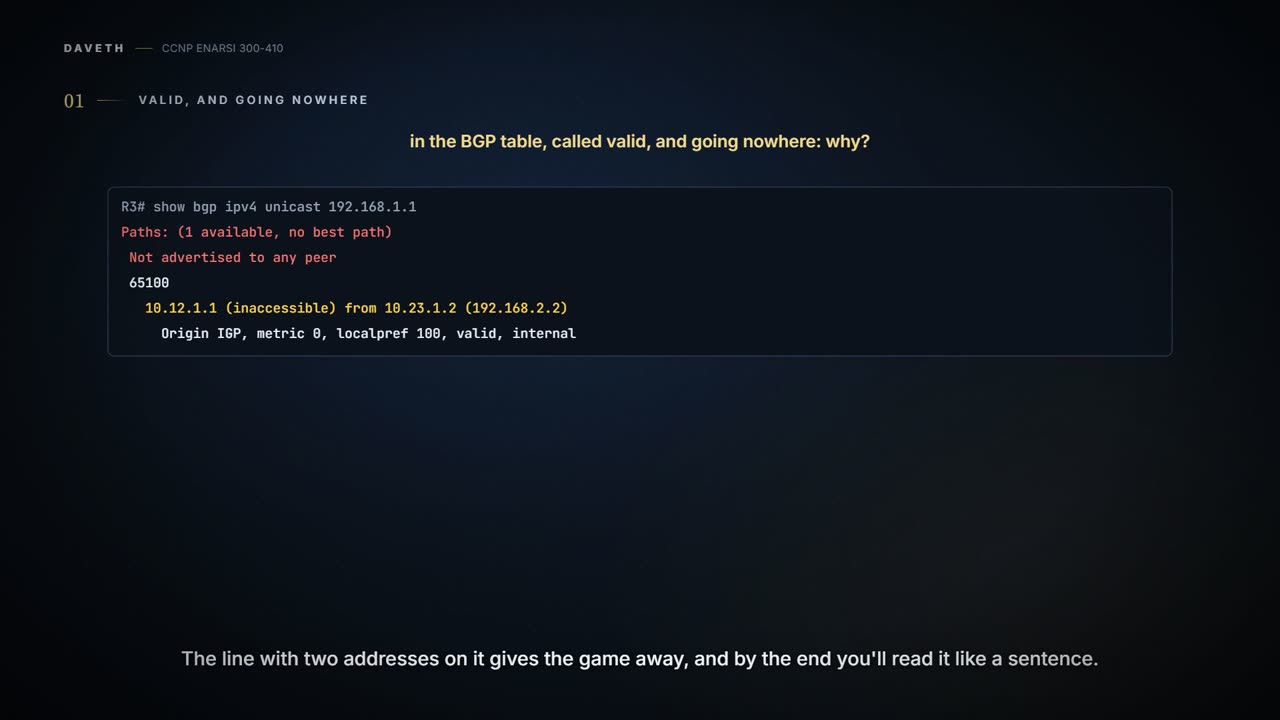
Here's a route on a router called R3. Don't worry yet about how it got there:
R3# show bgp ipv4 unicast 192.168.1.1
BGP routing table entry for 192.168.1.1/32, version 2
Paths: (1 available, no best path)
 Not advertised to any peer
 Refresh Epoch 1
 65100
   10.12.1.1 (inaccessible) from 10.23.1.2 (192.168.2.2)
     Origin IGP, metric 0, localpref 100, valid, internal
Read it the way you'd read it on a real router. One path to 192.168.1.1/32. No best path. Not advertised to any peer. And on the last line, "valid". BGP has this route, calls it valid, isn't using it, and isn't telling anyone about it.
So here's this lesson's question: the route is in the BGP table, so why won't the router use it? Before you read on, from what you know of sessions and the IGPs, what would you check first? Hold your answer. The line that gives the game away is the one with two addresses on it, and by the time you meet the next hop that doesn't move, you'll know exactly why it says what it says. First you need three things about the kind of session this route came in on.
BGP sessions are always point-to-point between two routers, and there are two types. An internal BGP (iBGP) session is with a router in the same AS, or in the same BGP confederation, which this exam leaves out. An external BGP (eBGP) session is with a router in a different AS. The last lesson named both; here's what the name changes.
First, trust. iBGP sessions are considered more secure, and some of BGP's security measures are lowered compared to eBGP sessions. You'll meet one at the border, the TTL, which the OPEN checks listed as a security parameter.
Second, administrative distance. iBGP prefixes go into the RIB with an AD of 200, and eBGP prefixes with an AD of 20. AD is a rating of the trustworthiness of a routing information source, and you know the rule: when the same prefix length comes from more than one routing protocol, AD is compared and the lower one wins. You can see the 20 in the routing table: a route from an eBGP session shows as B 192.168.2.2 [20/0] via 10.12.1.2, AD 20 and no metric.
Why is eBGP 20, better than every IGP? BGP exists to share routes between ASs, so when a route from another AS arrives by eBGP, iBGP or an IGP, you want the eBGP-learned one to win. A later lesson works through what happens when it doesn't.
Third, and this is the rest of the lesson: the two types also differ in how route advertisements work. That difference is what put 192.168.1.1/32 on R3 in that state.
Why BGP runs inside an AS at all
You need BGP inside an AS typically when you need several routing policies, or when the AS provides transit between other ASs. Take the transit case. Three companies: AS 65100 (R1), AS 65200 (R2, R3, R4) and AS 65300 (R5). AS 65200 carries traffic between the other two; AS 65100 connects at R2 and AS 65300 at R4.
A quick note before going on: that's a service provider's job. Service providers provide transit; an enterprise is a consumer and shouldn't provide transit between ASs across the Internet. Our network is an enterprise. Its design runs iBGP for the other reason: two providers, ISP-A at HQ-E1 and ISP-B at HQ-E2, and routing policy that has to know about both. For now only ISP-A is connected; ISP-B comes in with the lessons that choose between the two.
Now, R2 could form an iBGP session straight to R4. Here are the routing tables. R2 has its connected links, a static route to 10.34.1.0/24 via 10.23.1.3, and a BGP route to 10.45.1.0/24 via 10.34.1.4. R4 has its connected links, a static route to 10.23.1.0/24 via 10.34.1.3, and a BGP route to 10.12.1.0/24 via 10.23.1.2. R3 has its two connected links. Nothing else.
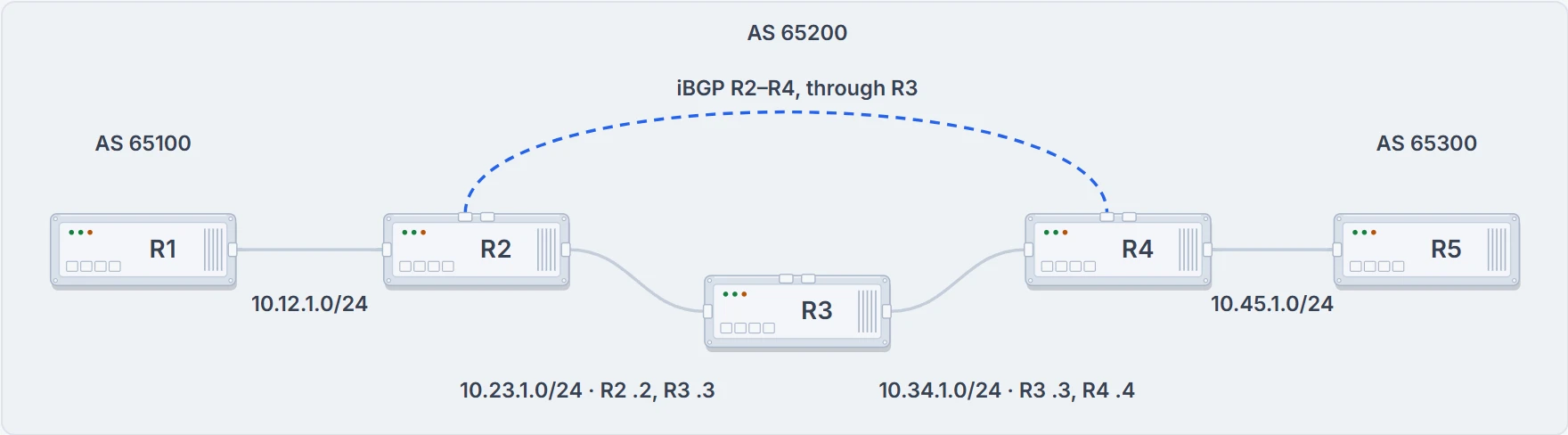
AS 65200 carries the other two companies' traffic. The dashed line is R2's iBGP session with R4; it has no cable of its own.
At R3. R2's BGP route says 10.34.1.4, its static route says that's through 10.23.1.3, so the packet goes to R3, and R3 has no route to 10.45.1.0/24. The session between R2 and R4 is fine. R3 just doesn't know where to forward traffic for the networks in AS 65100 or AS 65300, because it was never told.
So tell the IGP? You might assume redistributing the BGP table into the IGP fixes it. It isn't a viable solution, for three reasons:
- Scale. The Internet had more than 940,000 IPv4 prefixes when these figures were taken, and is still growing, and IGPs can't scale to that number of routes.
- Choice of path. IGPs choose by metric, always. BGP uses several steps and lets path attributes steer a prefix's path, and the path it picks could be longer, which an IGP would call suboptimal.
- The attributes themselves. An IGP can't carry BGP's path attributes. Only BGP keeps them with the prefix from one edge of the AS to the other.
The answer is iBGP sessions between all of R2, R3 and R4, a full mesh, so traffic between AS 65100 and AS 65300 forwards properly. R3 gets the routes from BGP itself. Why it has to be all of them, and not just a chain, is two sections on.
Hold a number from those tables: R4's route to 10.12.1.0/24 points at 10.23.1.2. That's R2's own address on the link toward R3, not anything near 10.12.1.0/24, and R4 reaches it through its static route to 10.23.1.0/24 via R3's 10.34.1.3. The next hop that doesn't move explains why it isn't 10.12.1.2.
What synchronization was
The redistribution idea you just rejected was once the normal design. In early iBGP deployments where the AS was a transit AS, prefixes were commonly redistributed into the IGP. To make sure the AS really had full connectivity, BGP used synchronization: checking that the BGP route existed in the IGP before advertising it to an eBGP peer. It's no longer a default, and it isn't commonly used. The exam still names it, so here's the problem it solved.
RFC 1772, "Application of the Border Gateway Protocol in the Internet" (March 1995), describes it. Inside a transit AS, BGP and the IGP change state at different speeds, so there can be a window between a border router learning a route over BGP from another border router and the IGP being able to carry traffic to that second router; during that window you can get incorrect routing or "black holes". Its rule: a border router shouldn't advertise such a route to its external peers until the interior routers are ready to route the traffic, which means interior routing has converged on the proper exit gateway first. Synchronization is that rule, checked by looking for the route in the IGP.
And the same appendix explains why you can switch it off. "If all routers in an AS are BGP speakers, then there is no need to have any interaction between BGP and an IGP". That's the full mesh: every router that forwards transit traffic hears the routes from BGP itself, so there's nothing to wait for. The rule that made BGP wait for the IGP to catch up was retired by not asking the IGP at all.
What you'll see. show ip protocols for a BGP process prints "IGP synchronization is disabled", as the redistribution lessons' outputs did.
The rule iBGP won't break
Remember the loop check: an eBGP router prepends its AS to the AS_Path, and a router that sees its own AS in a received AS_Path drops the route. That works for eBGP because the ASN is prepended on the way into each AS. Inside one AS it can't work. iBGP peers don't prepend their ASN, because the route would then fail the validity check and wouldn't be installed: the next router inside would find its own AS in the path and treat it as a loop.
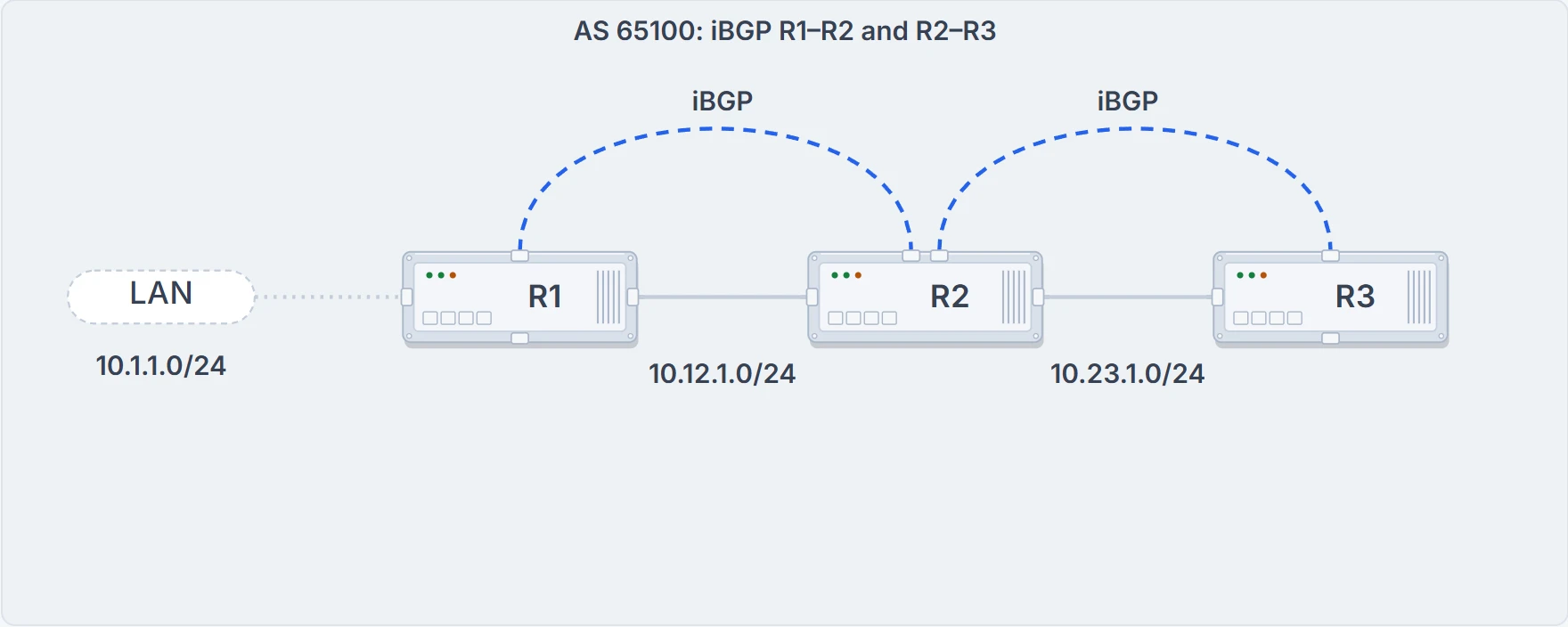
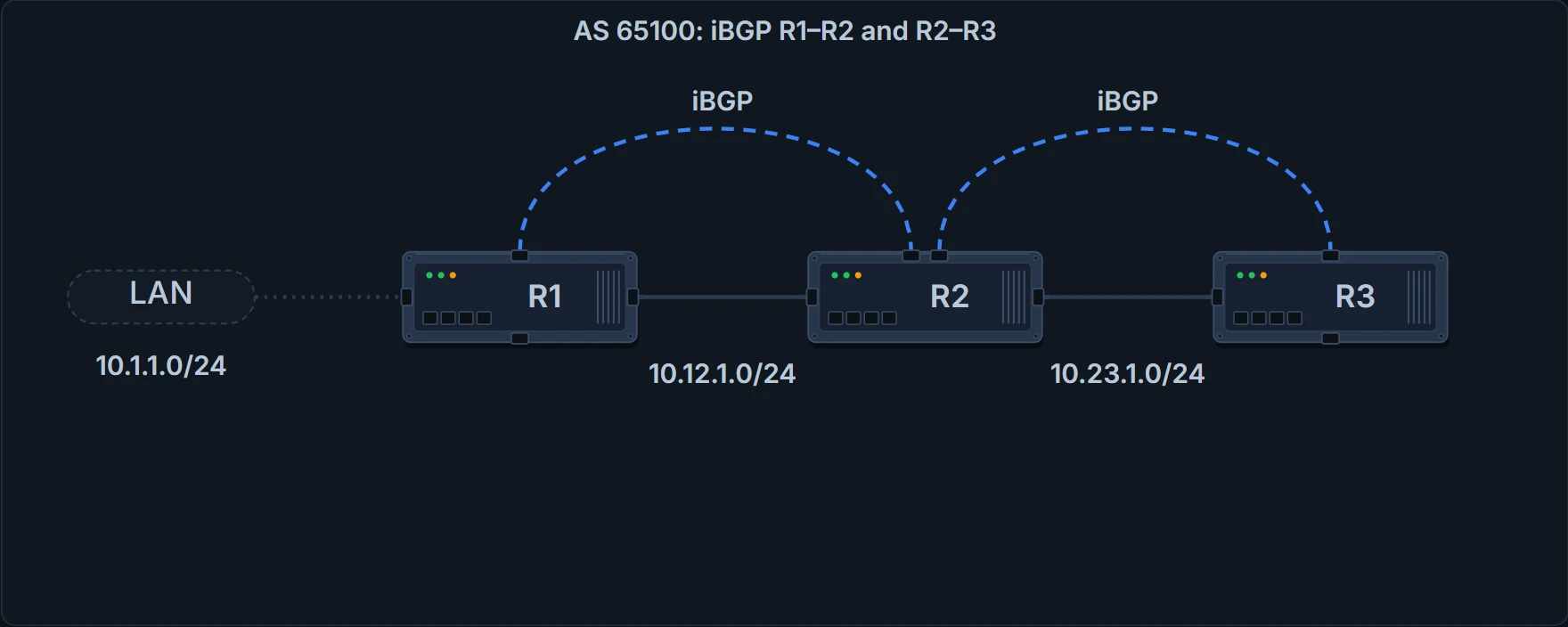
Two iBGP sessions in a row, and R1's network at the left end.
So there's no other way to detect a loop over iBGP sessions. RFC 4271's answer is a ban: a route received from an iBGP peer is never advertised to another iBGP peer. The usual reading is that every BGP router in the AS must be fully meshed, to give a complete loop-free routing table and to prevent traffic black-holing.
No. R2 takes it into its BGP table and stops, because it learned the route from an iBGP peer. That's the rule doing its job. So R3 peering with any router that has the route isn't enough; it has to peer with the router that learned it from outside, or originated it.
The fix is a third session. R1 forms a multi-hop iBGP session with R3: R1 connects to R3's 10.23.1.3 and R3 to R1's 10.12.1.1, and now 10.1.1.0/24 goes straight from R1 to R3. Neither address is on a link the other router is attached to, so the multi-hop rule applies: the session needs a route to the far address, and a default route won't do. So R1 and R3 need a static route to the remote peering link, or R2 has to advertise 10.12.1.0/24 and 10.23.1.0/24 into BGP.
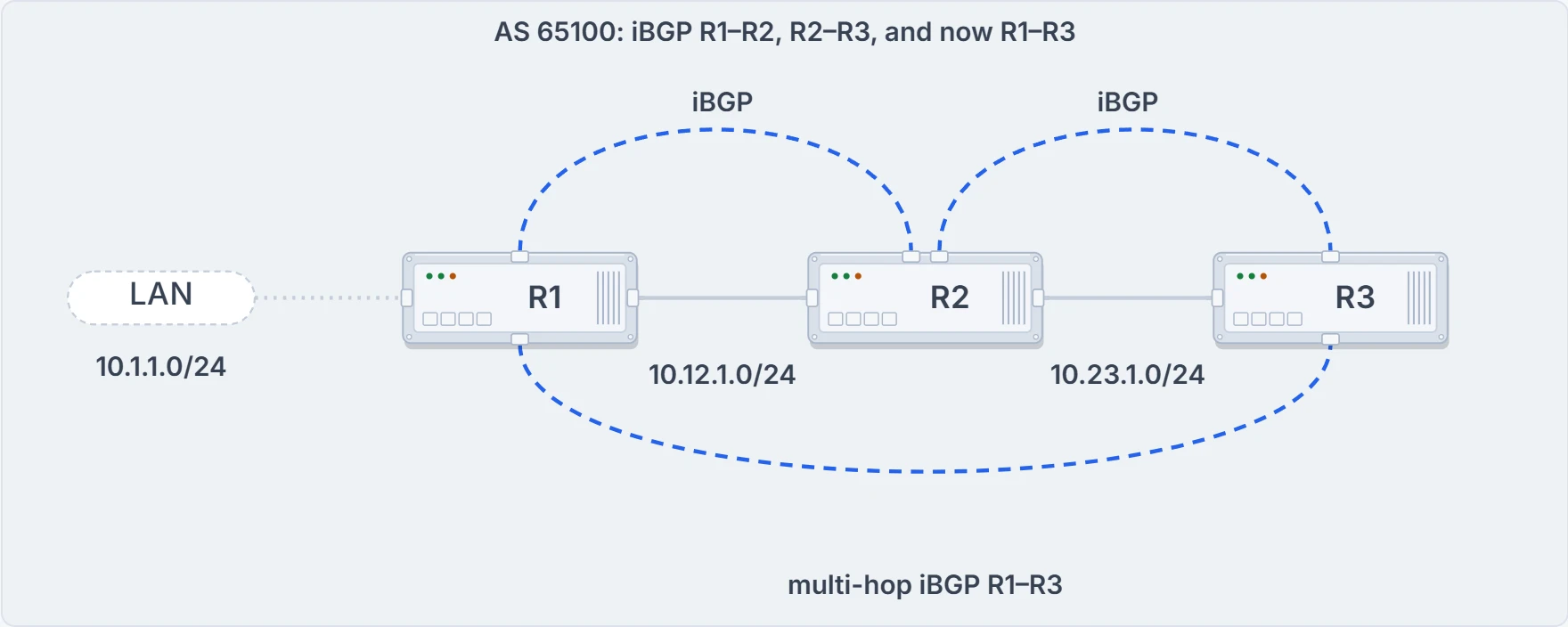
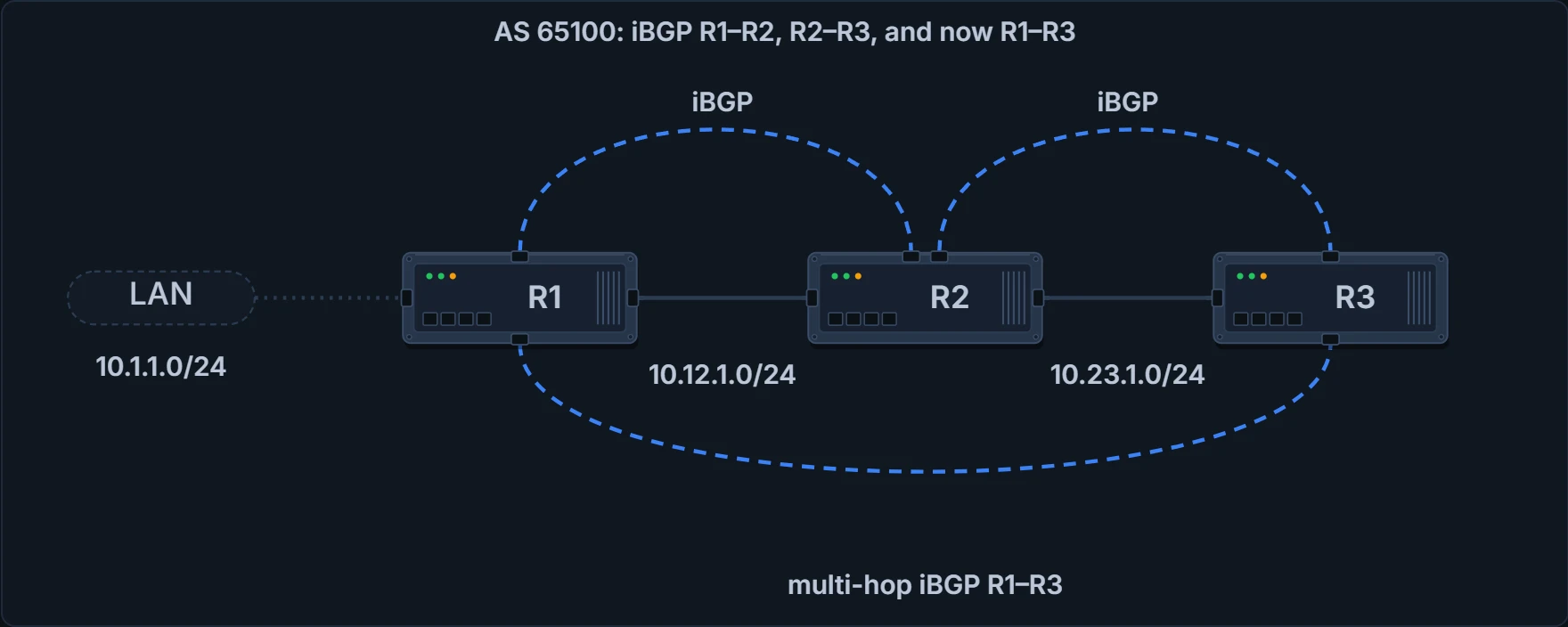
The third session runs from R1 to R3 directly, through R2.
Both halves, then. A route learned from an eBGP peer is advertised to an iBGP neighbor. A route learned from an iBGP peer isn't advertised to an iBGP neighbor: it's a loop-prevention mechanism, because an iBGP advertisement doesn't prepend the AS_Path. It's usually called the BGP split-horizon rule; how many sessions a full mesh costs you, and how to avoid paying, is a later lesson's.
Peering between loopbacks
By default a BGP session is sourced from the primary IP address of the outbound interface toward the peer. That's what every session so far has done. Here's what it costs: R1, R2 and R3 in a full mesh of iBGP sessions, each one peered across the link between the two routers (10.12.1.0/24, 10.13.1.0/24, 10.23.1.0/24), with 10.1.1.0/24 behind R1.
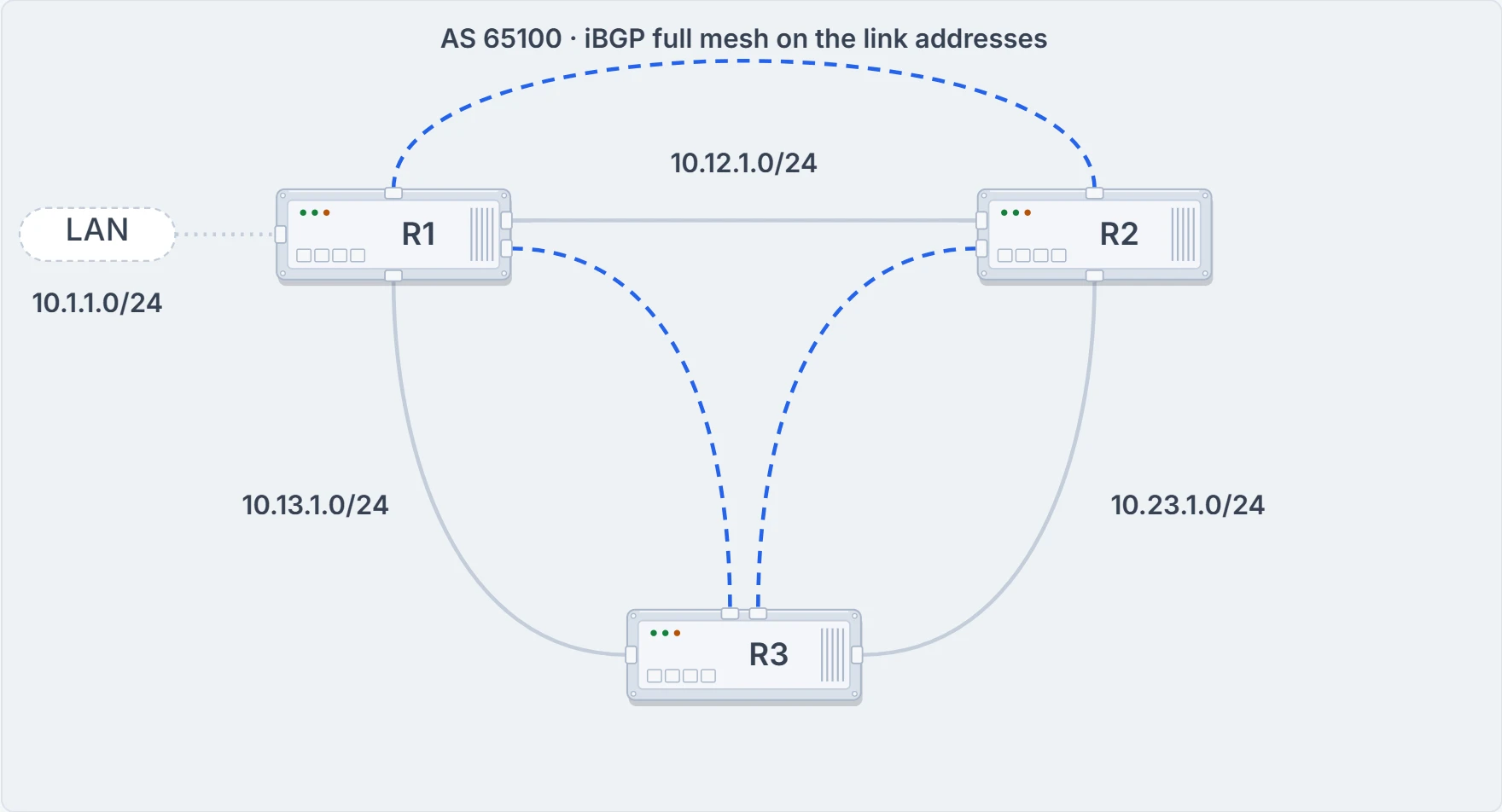
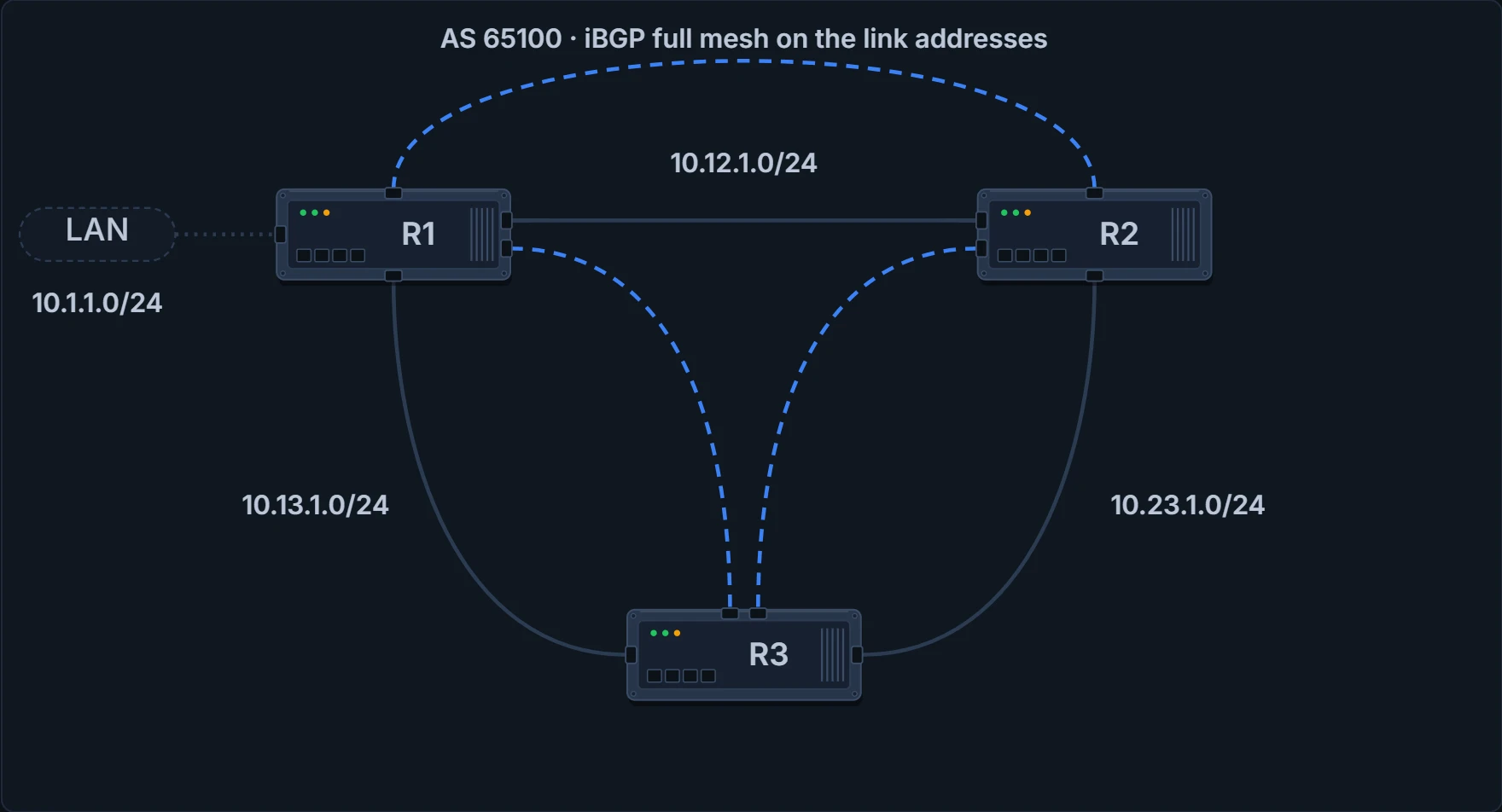
Before the failure: each session on the link between its two routers.
The 10.13.1.0/24 link fails. R3's session with R1 times out and closes: the hold timer runs down with nothing arriving. And R3 loses 10.1.1.0/24, even though R1 and R3 could still reach each other through R2. Two rules meet here. The session's addresses lived on the dead link, so no other path can carry it. And R2, which still has the route, won't pass it on, because iBGP doesn't advertise a route learned from another iBGP peer. That's the last section's rule, now costing you a route after a failure.
There are two ways out:
- a second link between each pair of routers, so three links become six, with two BGP sessions per pair;
- an IGP on the transit links, the loopback interfaces advertised into it, and the BGP sessions pointed at the remote router's loopback address.
The second is more efficient, and it's the one to use. A loopback is virtual, and it always stays up. When a link fails, the session stays where it is and the IGP finds another path to the loopback, which turns a single-hop iBGP session into a multi-hop one. Same triangle, after the 10.13.1.0/24 link fails: loopbacks 192.168.1.1, 192.168.2.2 and 192.168.3.3, OSPF area 0, and R1 and R3 keep their session, with OSPF's routes carrying the BGP traffic between the loopbacks through R2.
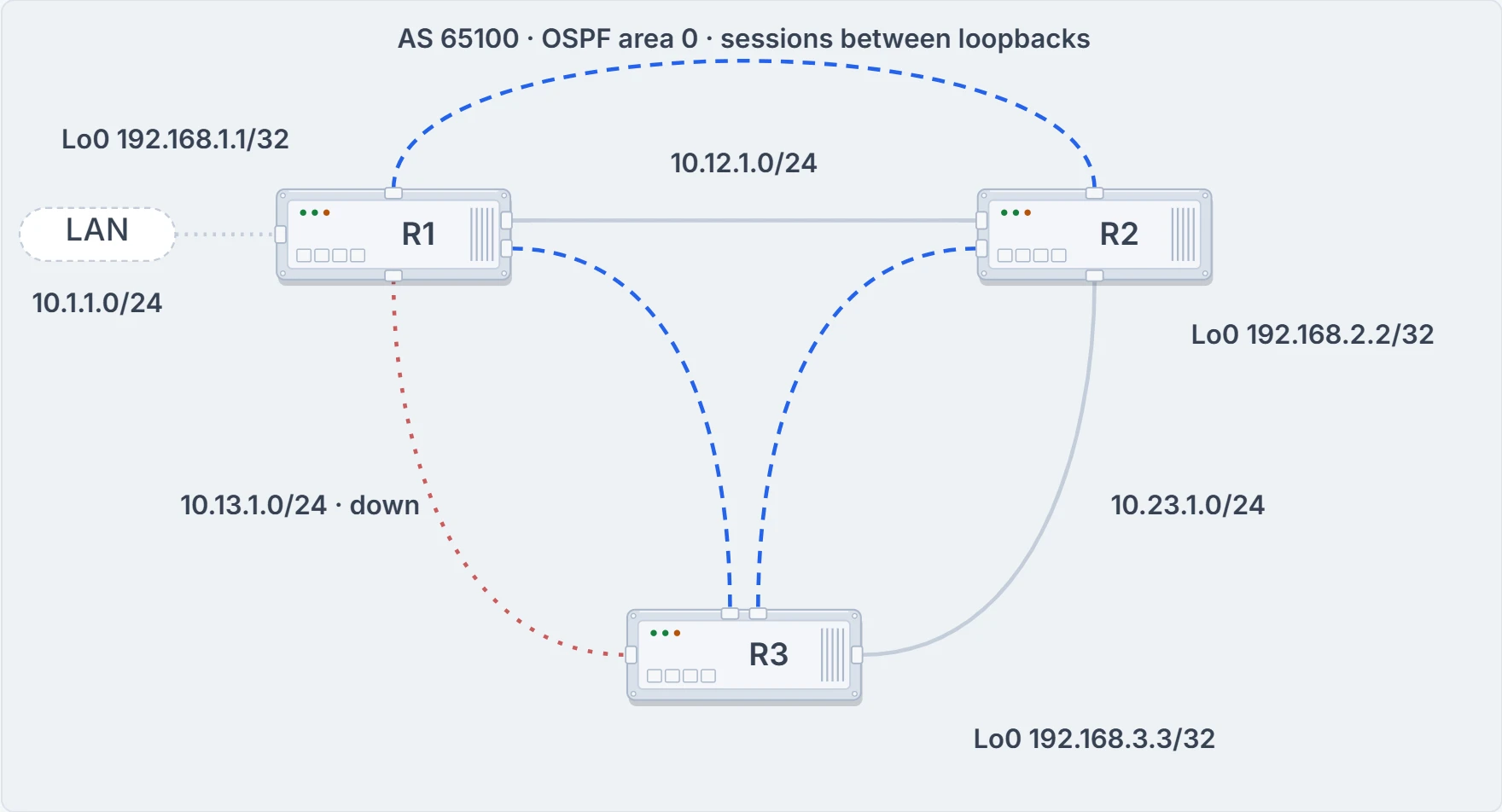
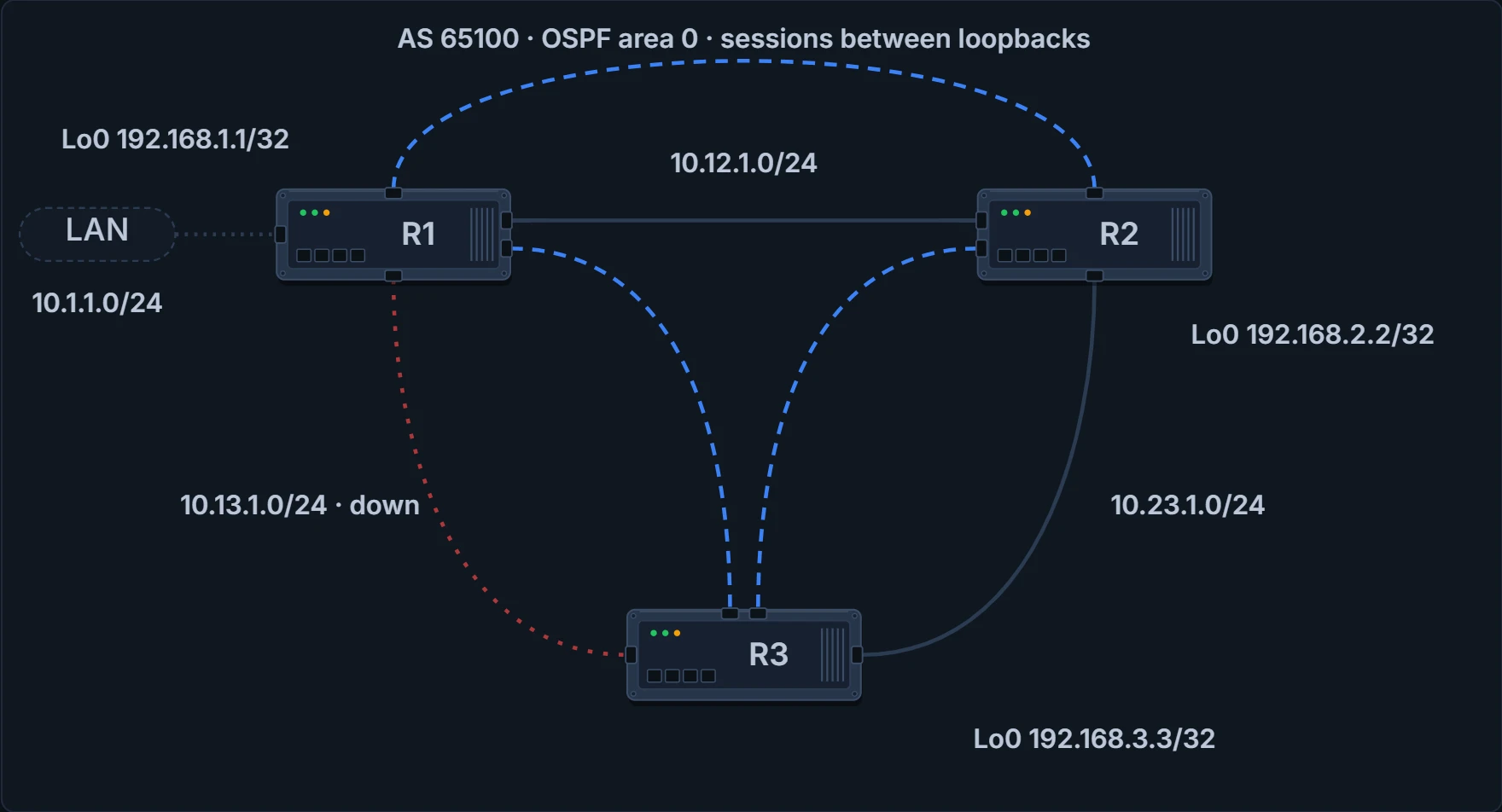
After the failure, with the sessions between loopbacks: OSPF carries R1 and R3's session through R2.
Now pull the link yourself, in three configurations: sessions on the link addresses, sessions on the loopbacks, and the loopback sessions with one more line you're about to meet. The rule for each: a session is up while each end can reach the address the other names and each end's packets come from the address the other names (by default, the outbound interface's); a session that loses its path times out after its hold time; and R3 has 10.1.1.0/24 only over its own session with R1.
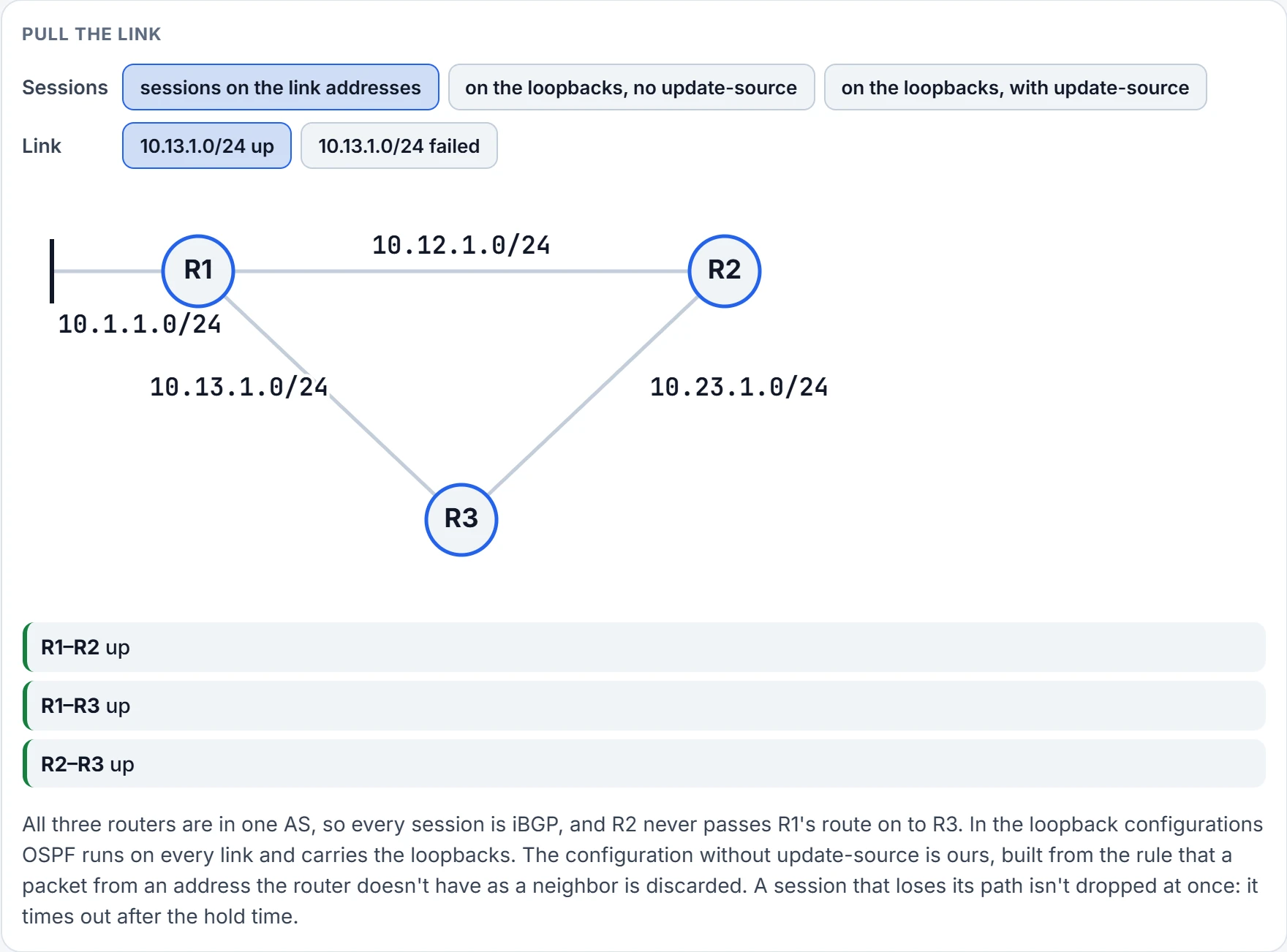
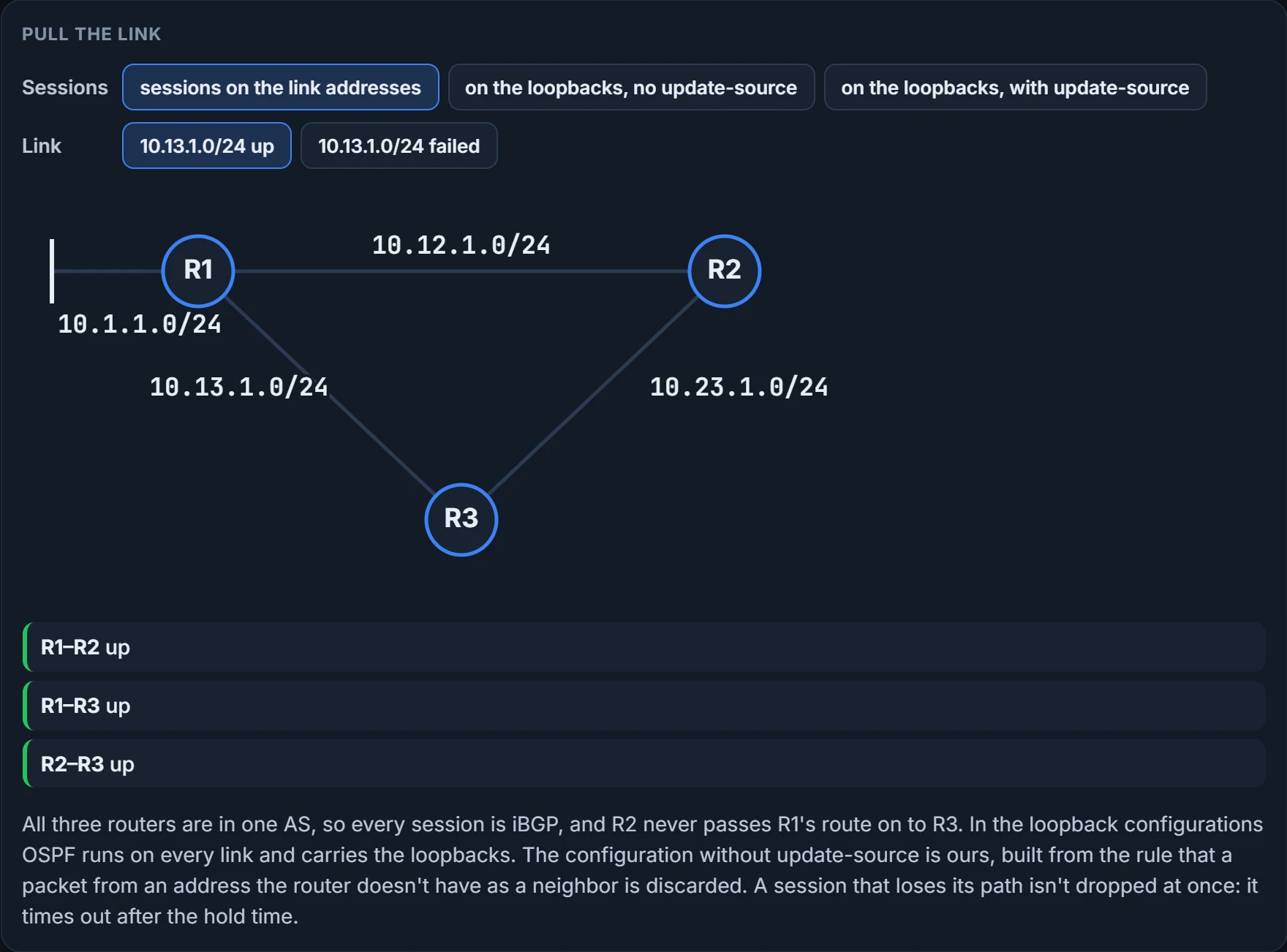
Here's the catch. Pointing the session at the remote router's loopback isn't enough, because the source address of the BGP packets is still the outbound interface's. When a BGP packet arrives, the router matches its source address against the neighbor table, and a packet whose source matches no entry can't be tied to a neighbor and is thrown away. You met this twice in the last lesson: as one of the OPEN checks, where the OPEN's source address must match the address configured for the neighbor, and as this same discard rule in the configuration steps. So R3, configured for 192.168.1.1, gets packets from R1's address on the link, and drops them. You set the source yourself, to an interface's primary address, with neighbor ip-address update-source interface-id.
Here are R1 and R2 configured that way, R1 with the default IPv4 address family left on and R2 with it turned off:
R1 (Default IPv4 Address Family Enabled)
router ospf 1
 network 10.12.0.0 0.0.255.255 area 0
 network 10.13.0.0 0.0.255.255 area 0
 network 192.168.1.1 0.0.0.0 area 0
!
router bgp 65100
 network 10.1.1.0 mask 255.255.255.0
 neighbor 192.168.2.2 remote-as 65100
 neighbor 192.168.2.2 update-source Loopback0
 neighbor 192.168.3.3 remote-as 65100
 neighbor 192.168.3.3 update-source Loopback0
 !
 address-family ipv4
  neighbor 192.168.2.2 activate
  neighbor 192.168.3.3 activate
R2 (Default IPv4 Address Family Disabled)
router ospf 1
 network 10.0.0.0 0.255.255.255 area 0
 network 192.168.2.2 0.0.0.0 area 0
!
router bgp 65100
 no bgp default ipv4-unicast
 neighbor 192.168.1.1 remote-as 65100
 neighbor 192.168.1.1 update-source Loopback0
 neighbor 192.168.3.3 remote-as 65100
 neighbor 192.168.3.3 update-source Loopback0
 !
 address-family ipv4
  neighbor 192.168.1.1 activate
  neighbor 192.168.3.3 activate
Look at the OSPF half first, because the BGP half depends on it. Each router puts its loopback into OSPF with a 0.0.0.0 wildcard, and its links with a wider one; R2's single network 10.0.0.0 0.255.255.255 covers both of its links. Without that, nobody has a route to anybody's loopback, and the sessions can't start. Then the BGP half: every neighbor named by its loopback, every neighbor given update-source Loopback0, and each one activated under the IPv4 family, the way the last lesson did it. R1's network line is what advertises 10.1.1.0/24; how it works is a later lesson's.
R3's BGP table once all three routers peer between loopbacks:
R3# show bgp ipv4 unicast
! Output omitted for brevity
    Network          Next Hop            Metric LocPrf Weight Path
*> 10.1.1.0/24      192.168.1.1              0    100      0 i
The next hop for R1's network is R1's loopback address, 192.168.1.1. Then Metric 0, LocPrf 100, Weight 0. So how does R3 forward to 10.1.1.0/24 through a next hop that isn't on any of its links? A recursive lookup: when R2 and R3 forward packets to 10.1.1.0/24, they look up 192.168.1.1 in turn to find the outbound interface. You can think of it as BGP saying where the way out is, and the IGP saying how to get there.
Two bonuses come with loopback peering. A peering link failing no longer means rerunning the BGP best-path algorithm, and if the IGP has several equal-cost paths to the loopback, you get load balancing for free.
What changes at the border
eBGP peerings are the core of BGP on the Internet: eBGP is how prefixes cross from one AS to another. The configuration hardly differs from iBGP. The only change is that the ASN on the remote-as line isn't the one on the router bgp line. The behaviour differs in four ways. Take them one at a time.
The TTL. BGP packets on an eBGP session go out with a time-to-live of 1, so if you try a multi-hop eBGP session, they drop in transit. On iBGP the TTL is 255, which is what lets every loopback session above be multi-hop. So an eBGP session between loopbacks is a multi-hop session, and the configuration that worked for iBGP won't bring it up on its own. The command that raises the TTL is neighbor ip-address ebgp-multihop [TTL], and the BGP troubleshooting lesson walks through it: two eBGP routers peering between loopbacks one hop apart sit in Idle, and a TTL of 2 would be enough. You can read the TTL a session uses in its neighbor detail: "Outgoing TTL 255" for an internal neighbor and "Outgoing TTL 1" for an external one. Yet the last lesson's eBGP neighbor detail, between directly connected routers, printed "Minimum incoming TTL 0, Outgoing TTL 255". The text and the outputs disagree, and which one a current router prints for a plain eBGP neighbor we haven't confirmed.
The next hop. The advertising router changes the BGP next hop to the IP address the BGP connection is sourced from. On a session between two directly connected routers, that's the sender's address on the shared link.
The AS_Path. The advertising router prepends its ASN to the AS_Path it received, and the receiving router checks that the AS_Path doesn't already contain its own ASN; if it does, the route fails the loop check and BGP throws it away. So a path learned by eBGP always has at least one ASN in it, and with several, the most recent is the one prepended, furthest left. To see every path to a prefix with its attributes, use show bgp ipv4 unicast network, the command behind the opening output.
For the three companies, that means eBGP between R1 and R2 and between R4 and R5, and iBGP between R2 and R3, R3 and R4, and R2 and R4. R2's session to R4 is there because of the rule iBGP won't break: without it, R3 would have to pass on routes it learned over iBGP, and it won't.
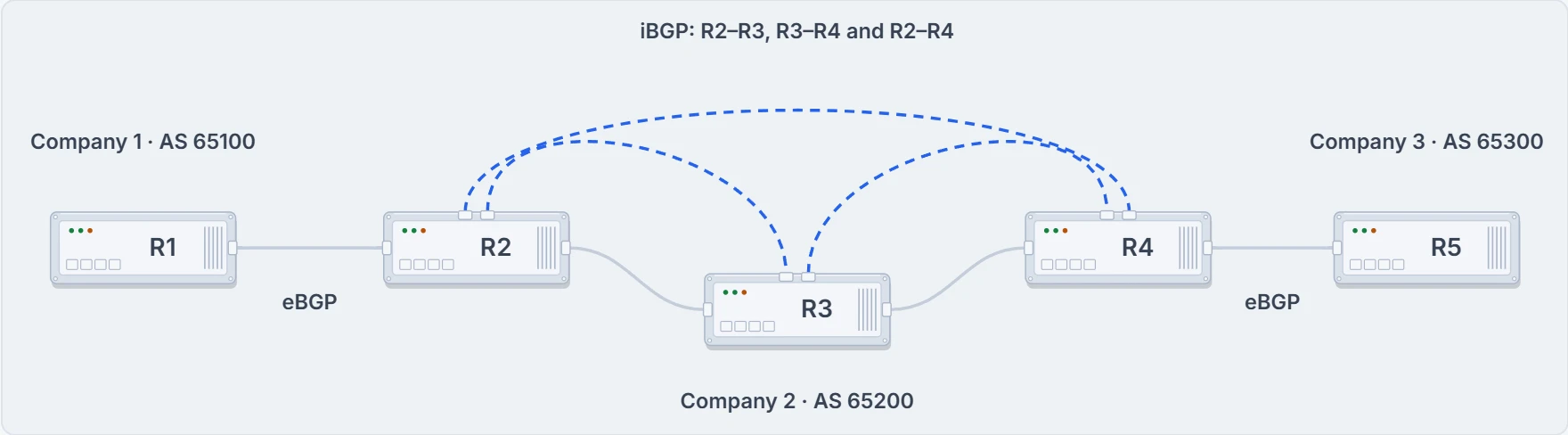
Every session the three companies need. Without R2–R4, R3 would have to relay iBGP routes, and it won't.
Now set up the question this lesson has been heading for. A chain: R1 in AS 65100, R2 and R3 in AS 65200, R4 in AS 65400. R1 and R2 have an eBGP session, R3 and R4 have one, and R2 and R3 have an iBGP session. The links are 10.12.1.0/24, 10.23.1.0/24 and 10.34.1.0/24, and each session runs between the two routers' addresses on their shared link.
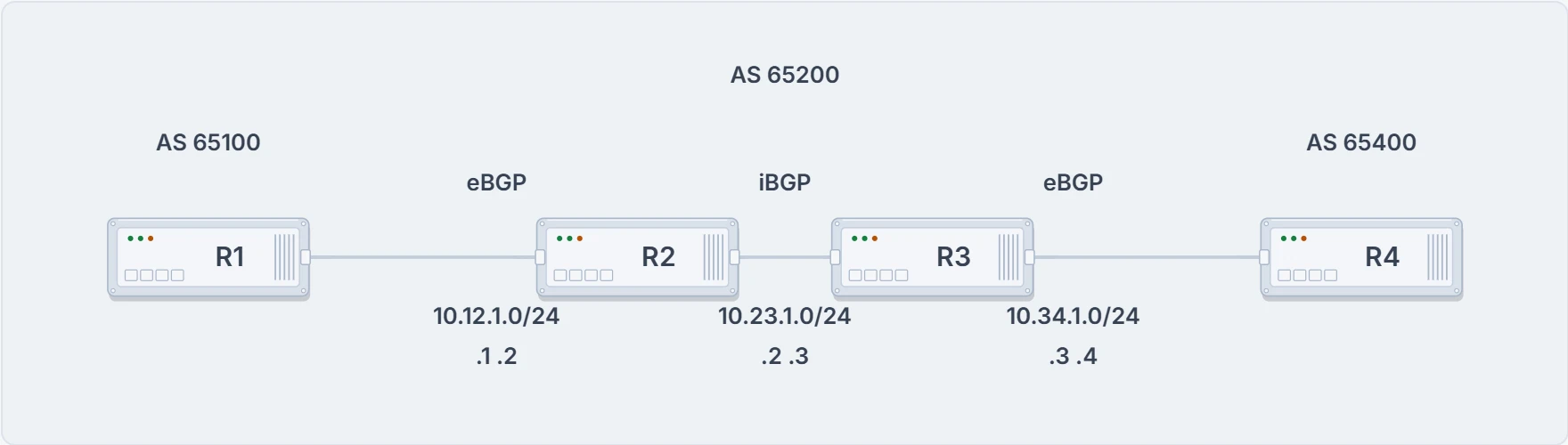
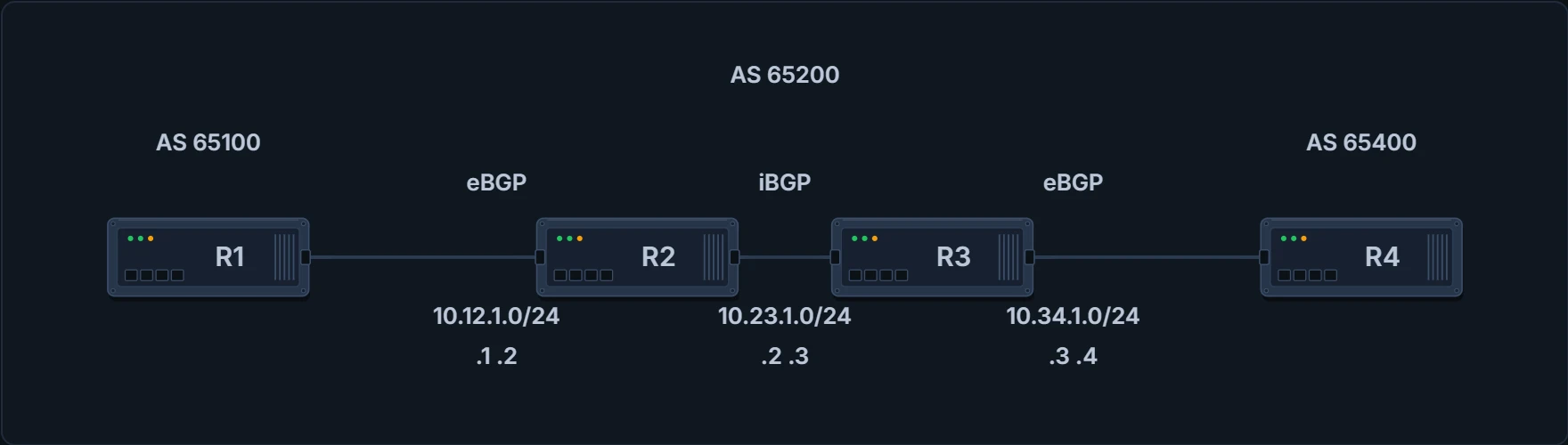
Each session runs between the two routers' addresses on their shared link.
Continue the lesson
The whole lesson, with its drawings and its questions. 4 more sections after the ones above.