
Troubleshooting BGP from symptom to cause (timed)
Three timed BGP tickets, none of which says which part of BGP is broken. A router's table shows what it chose, not what each neighbour sent, so ask each neighbour separately and walk the route back toward the cause. Sometimes the log had the answer all along. And when sessions are up and the table is full, check the policy steering the traffic.
By Arif, founder of Daveth · Updated
The full 12 min walkthrough is in Daveth Pro (Network). See what the plan opens
What this page answers
How do you troubleshoot BGP route advertisement?
Ask each neighbour separately what it sent, with show bgp ipv4 unicast neighbors address routes, compare them, and walk the route back session by session from the router with the symptom toward the router with the cause. Read it in “Walk it back, one session at a time”
Nothing is down. Find the fault.
Three tickets, one lab, and a clock. They're all BGP, and none of them tells you which part of BGP.
The tickets sit on ground the BGP lessons have already covered: sessions, routes, path choice, policy. They're there to show a process you can use when troubleshooting in the real world or in an exam, a structured troubleshooting process for solving a reported problem. And all of them run on the same topology.
R1 sits alone in AS 65501 with four LANs, 10.1.1.0/26, 10.1.1.64/26, 10.1.1.128/26 and 10.1.1.192/26, and loopback 1.1.1.1. R2, R3, R4 and R5 are AS 65502, loopbacks 2.2.2.2 to 5.5.5.5, with R5's LAN 10.1.5.0/24 at the far end. R1 has two eBGP sessions, to R2 and to R3; inside AS 65502 the iBGP sessions run R2-R3, R2-R4, R2-R5, R3-R4 and R3-R5, and there's none between R4 and R5.
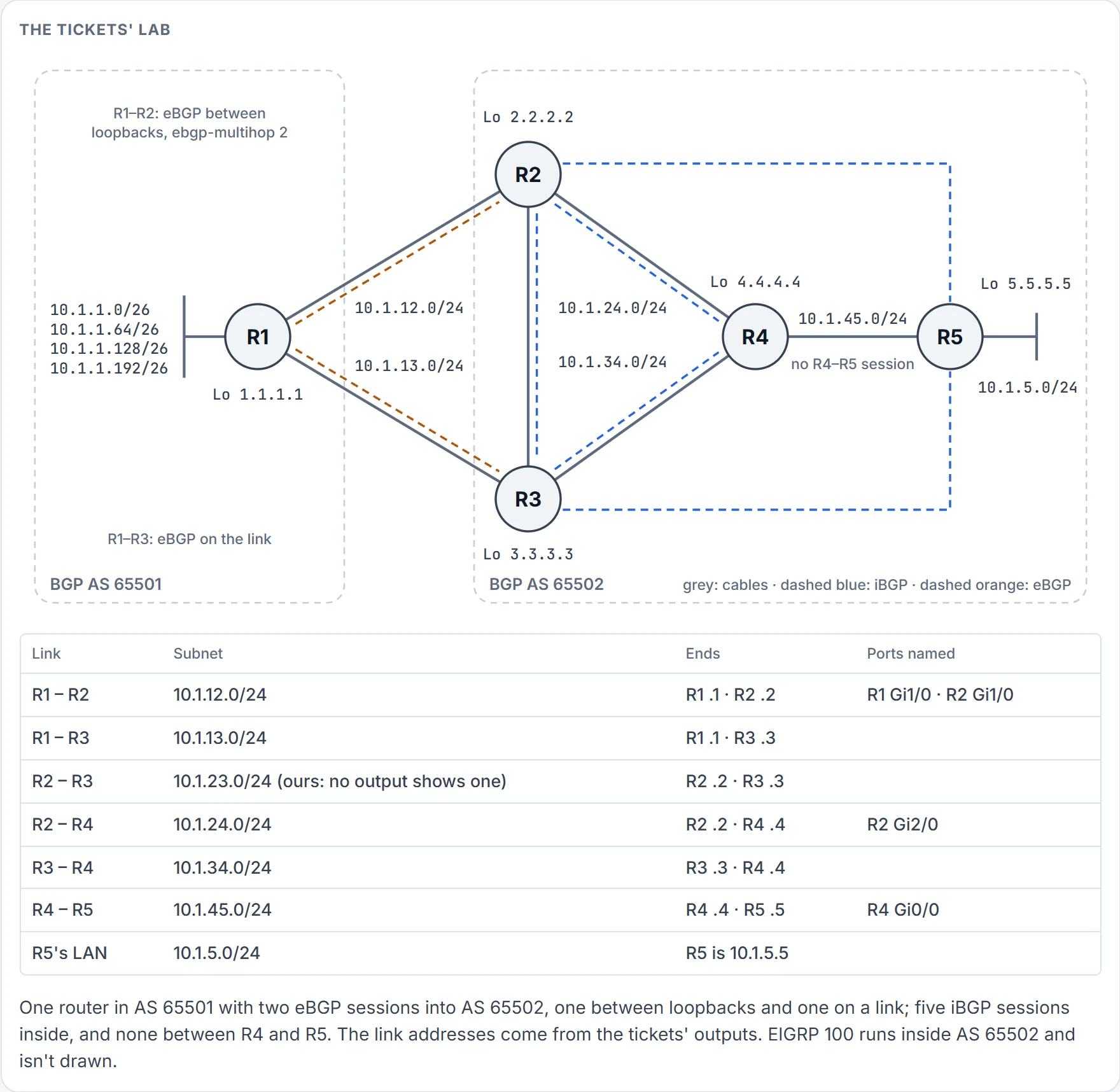
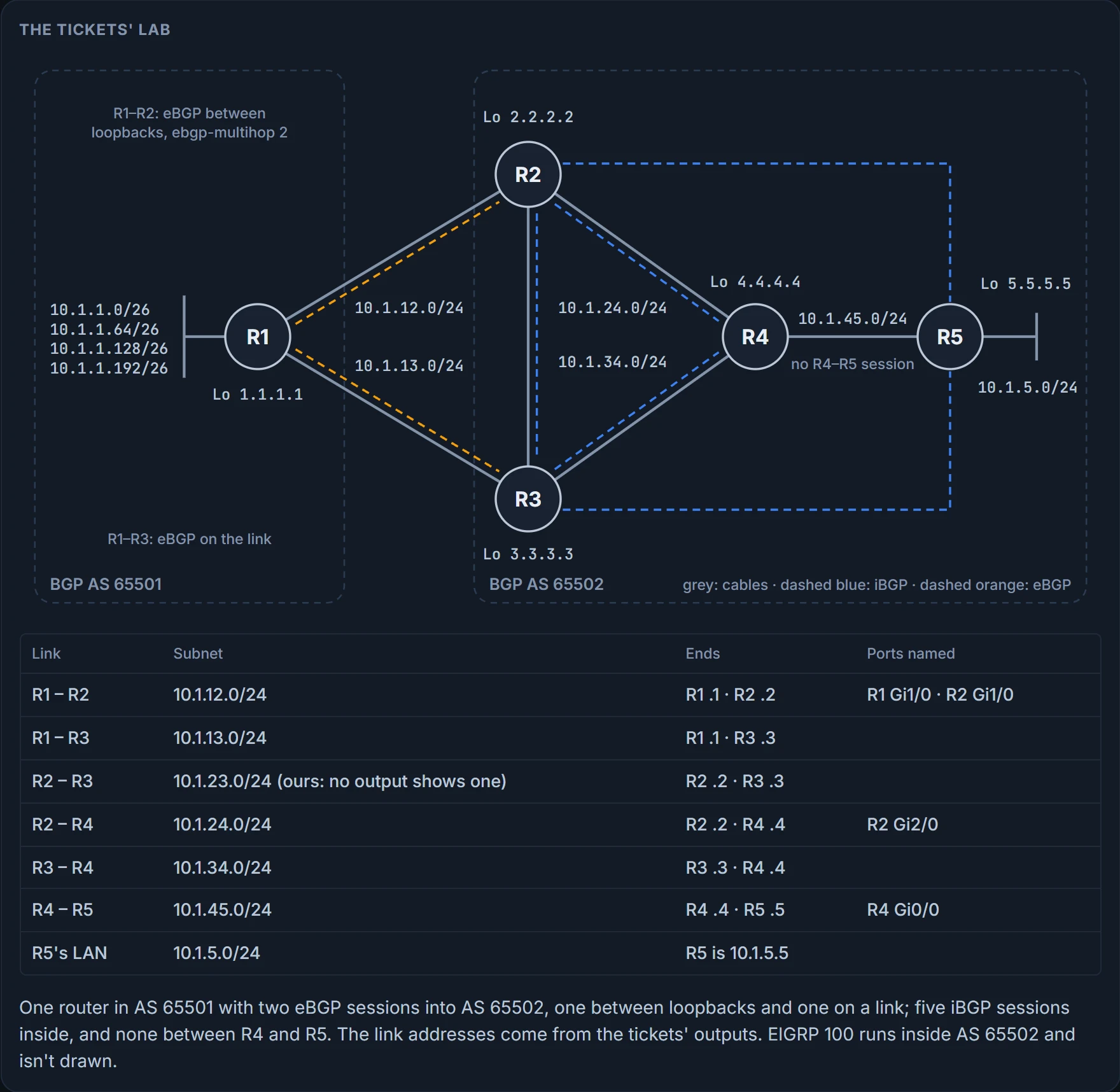
The link addresses come from the outputs: 10.1.12.0/24 between R1 and R2, 10.1.13.0/24 between R1 and R3, 10.1.24.0/24, 10.1.34.0/24 and 10.1.45.0/24 inside. R2 peers with R1 between loopbacks, with ebgp-multihop 2; R3 peers with R1 on the link; and R5 reaches 2.2.2.2 by EIGRP 100. One topology, not one history, though: each ticket brings its own documentation, and a later section shows they don't describe one design.
The first ticket. You run AS 65502, and you've been on holiday. While you were away, the R1-R2 link failed. When that link fails, the R1-R3 link is supposed to carry the traffic to AS 65501, and it didn't. A co-worker had to restore the R1-R2 link, and the users in 10.1.5.0/24 kept complaining that the 10.1.1.0/24 networks were down.
Now look at what you've got to work with. Connectivity is fine at the moment: a ping from a PC in 10.1.5.0/24 to 10.1.1.10 works, four replies and no loss. And it's the middle of the day, so you can't bring down the R1-R2 link to re-create the problem without hurting the users; you have to be creative.
In the tables, today. A backup isn't something BGP builds from nothing when the primary dies; it's a path that's already sitting in a table somewhere, waiting. In this design, that's R5's table. For R5 to know AS 65501's networks, they have to be advertised to it, and the best place to see whether R5 is learning them is R5's BGP table. Going by the topology, R5 should be learning them from R2 and from R3. So the question for R5's table is a count: two paths per prefix, or one?
R5# show bgp ipv4 unicast
! header lines omitted
     Network          Next Hop            Metric LocPrf Weight Path
 *>i 1.1.1.1/32       2.2.2.2                  0    100      0 65501 ?
 *>i 10.1.1.0/26      2.2.2.2                  0    100      0 65501 i
 *>i 10.1.1.64/26     2.2.2.2                  0    100      0 65501 i
 *>i 10.1.1.128/26    2.2.2.2                  0    100      0 65501 i
 *>i 10.1.1.192/26    2.2.2.2                  0    100      0 65501 i
 r>i 10.1.5.0/24      2.2.2.2               3328    100      0 i
 r i                  3.3.3.3               3328    100      0 i
 r>i 10.1.12.0/24     2.2.2.2                  0    100      0 65501 ?
 r>i 10.1.13.0/24     2.2.2.2                  0    100      0 65501 ?
Read the Next Hop column. Every valid route to the 10.1.1.x/26 networks goes through 2.2.2.2, R2, and nothing through R3 at 3.3.3.3 is there for them. One path where there should be two. (The r rows are R5's own LAN and the two links to R1, which R5 already holds from a better source: the routes lesson's RIB failure, not this ticket.)
Be exact about what that table settles. It proves which paths R5 holds and which it chose. It doesn't prove what any neighbor sent, or that the missing path was ever offered.
So the backup was broken before anyone needed it, and nobody complained, because nothing used it. That's the habit this lesson starts with. A broken BGP backup is silent: the network works and nobody complains until the primary fails, so you have to find the fault in a working network, from what's missing.
Silent to the users, though. Not to the router: the evidence was sitting on one of your own routers the whole time. The next section walks to it the long way, and the one after shows the short one.
Walk it back, one session at a time
R5's table says what R5 chose. It doesn't say what each neighbor sent. So R5 asks each neighbor separately: show bgp ipv4 unicast neighbors 2.2.2.2 routes and ... 3.3.3.3 routes, to see which routes are received and compare what R2 advertises against what R3 advertises. Eight prefixes from R2, and one from R3, 10.1.5.0/24, R5's own LAN:
R5# show bgp ipv4 unicast neighbors 3.3.3.3 routes
! header lines omitted
     Network          Next Hop            Metric LocPrf Weight Path
 r i 10.1.5.0/24      3.3.3.3               3328    100      0 i
Total number of prefixes 1
So R5 isn't receiving anything about the 10.1.1.x/26 networks from R3, and that's why connectivity went when the R1-R2 link went: R5 had no route information from R3. One caution from the routes lesson: routes proves what this router kept from that peer, after its own inbound policy. It doesn't prove everything the peer sent. Here the two readings meet, because R5 has no inbound policy (its configuration, shown in the third ticket, has none), so what R5 kept is what each neighbor advertised.
The session from R5 to R3 is up, and it carries one prefix. That session isn't broken; it's just not being given anything. So the next question belongs at the other end of it. On R3, show bgp ipv4 unicast neighbors 5.5.5.5 advertised-routes shows which routes, if any, R3 is sending R5, and none of them is a 10.1.1.x/26 network:
R3# show bgp ipv4 unicast neighbors 5.5.5.5 advertised-routes
! header lines omitted
     Network          Next Hop            Metric LocPrf Weight Path
 *>  10.1.5.0/24      10.1.34.4             3328         32768 i
Total number of prefixes 1
One prefix, and look at its next hop and weight: 10.1.34.4 and 32,768. R5 got the same prefix from R3 with 3.3.3.3 and weight 0. The listing shows R3's own table entry; the next hop changes as the route goes out, and weight never leaves the router. So advertised-routes proves which prefixes go to that neighbor, and doesn't prove the attributes that arrive. Same session, read from both ends, and both ends agree on the count: one.
So does R3 even know about the networks? show ip route 10.1.1.0 255.255.255.0 longer-prefixes on R3 says they're learned from BGP, four routes, each [200/0] via 2.2.2.2. And that's strange: 200 is the AD of iBGP-learned routes, and the next hop is R2. They should be 20, eBGP's, with R1's address as the next hop. R3, the backup, is reaching AS 65501 through the primary. The routing table proves which source and which next hop R3 forwards with; it doesn't prove why BGP chose that path.
R3's BGP table agrees: R2 and R4 are the only next hops in it, and R1 isn't the next hop for anything. The rows that matter:
R3# show bgp ipv4 unicast
! header lines omitted
     Network          Next Hop            Metric LocPrf Weight Path
 *>i 10.1.1.0/26      2.2.2.2                  0    100      0 65501 i
 *>i 10.1.1.64/26     2.2.2.2                  0    100      0 65501 i
 * i 10.1.5.0/24      2.2.2.2               3328    100      0 i
 *>                   10.1.34.4             3328         32768 i
! 1.1.1.1/32 the same with path 65501 ?; 10.1.1.128/26 and 10.1.1.192/26 like 10.1.1.0/26
! 10.1.12.0/24 and 10.1.13.0/24 r>i via 2.2.2.2, path 65501 ?
Now the iBGP lesson's rule says why R5 gets nothing from R3: R3's best paths for R1's networks are iBGP-learned, and a route received from an iBGP peer isn't advertised to another iBGP peer. The R3-R5 session is cleared. The walk crosses one more session, R3 to R1: show bgp ipv4 unicast neighbors 10.1.13.1 routes, and "Total number of prefixes 0". Nothing from R1 at all.
R1 isn't in your AS, so you can't log in to it; you'd have to call the AS 65501 administrator.
Not just yet. There are more things to check on R3: to learn BGP routes you need a BGP adjacency, so show bgp ipv4 unicast summary asks whether R3 and R1 are neighbors at all. They aren't: the state is Idle, and you think you've found it.
R3# show bgp ipv4 unicast summary
! header lines omitted
Neighbor        V           AS MsgRcvd MsgSent   TblVer  InQ OutQ Up/Down  State/PfxRcd
2.2.2.2         4        65502      34      34      108    0    0 00:24:29            9
4.4.4.4         4        65502      47      48      108    0    0 00:39:00            0
5.5.5.5         4        65502       5       6      108    0    0 00:00:18            0
10.1.13.1       4        65510       0       0        1    0    0 never    Idle
Put that beside the documentation, the lab's drawing: the AS for 10.1.13.1 says 65510, and it should be 65501. The sessions lesson said a wrong AS shows Idle and Active by turns; this capture caught it at Idle. Read the summary for exactly what it gives. It proves each session's state, and a count where it's up. It doesn't prove which cause a state name means: Idle alone doesn't say the AS is wrong, and the AS column against the documentation does.
The fix: take the wrong neighbor remote-as statement out and put the right one in, and the neighbor relationship comes up:
R3(config)# router bgp 65502
R3(config-router)# no neighbor 10.1.13.1 remote-as 65510
R3(config-router)# neighbor 10.1.13.1 remote-as 65501
%BGP-5-ADJCHANGE: neighbor 10.1.13.1 Up
Then prove it where the symptom was, not where the fix went. On R5, show bgp ipv4 unicast now lists the routes from R2 and from R3, and the issue is solved: every prefix twice, via 3.3.3.3 and via 2.2.2.2, with R2's path best. R1's five networks read * i and *>i; 10.1.5.0/24, 10.1.12.0/24 and 10.1.13.0/24 read r i and r>i, as they did before the fix.
Why R2's? The two paths carry the same weight, local preference, AS_Path, origin and metric, neither is R5's own, and both are internal: a tie through step 8 of the best-path order. Step 9 compares the IGP metric to each next hop, and the outputs show only one of the two (R5's route to 2.2.2.2, EIGRP metric 131072, 2 hops, in the third ticket; its route to 3.3.3.3 never appears), so we can't say which later step decided.
And the proof daylight wouldn't allow is booked: after hours you'll bring the R1-R2 link down and confirm traffic flows between R3 and R1.
The log had it all along
Count the commands. From the ping to R3's summary, that was nine. The walk followed the route, from the router with the symptom back toward the router with the cause, and it got there. But look at what R3 had been doing the whole time.
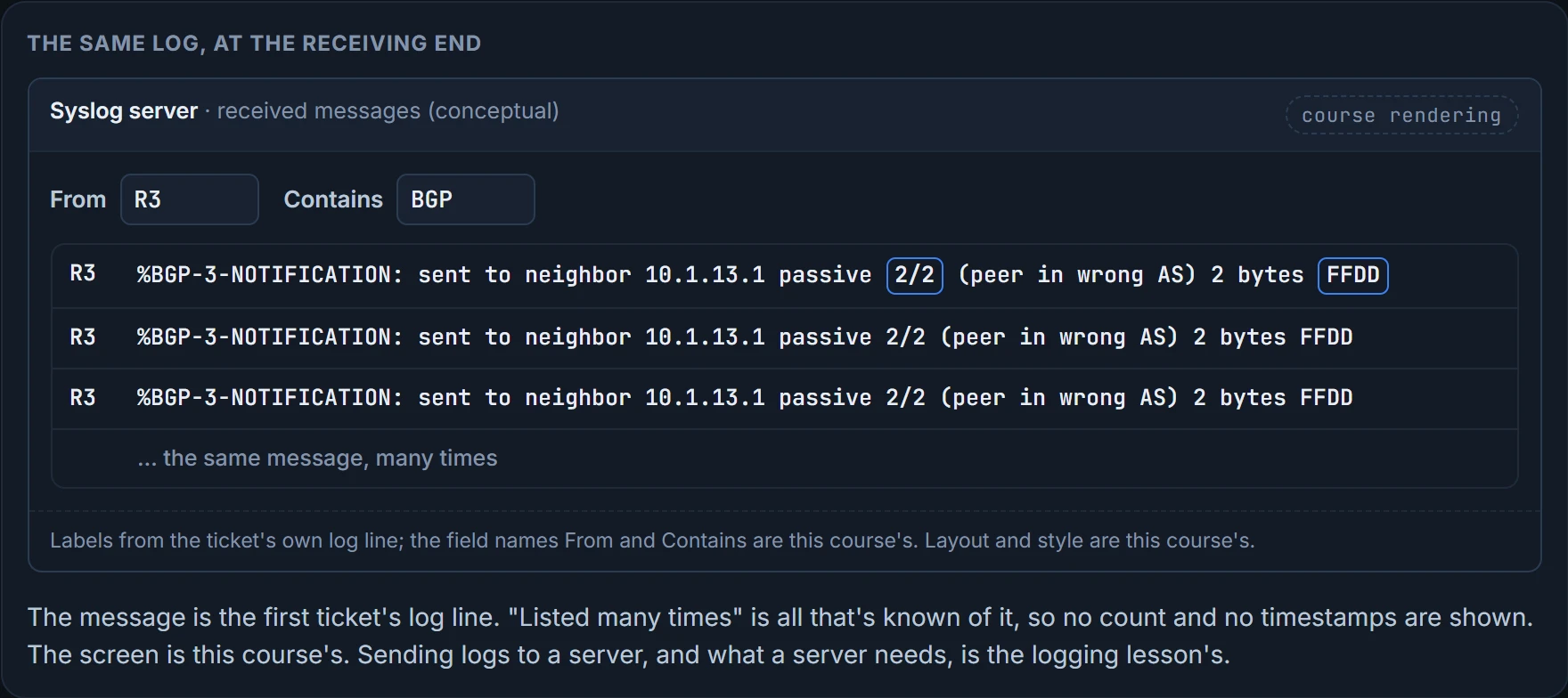
With some spare time on your hands, you read R3's old log files, and there's one BGP message, listed many times:
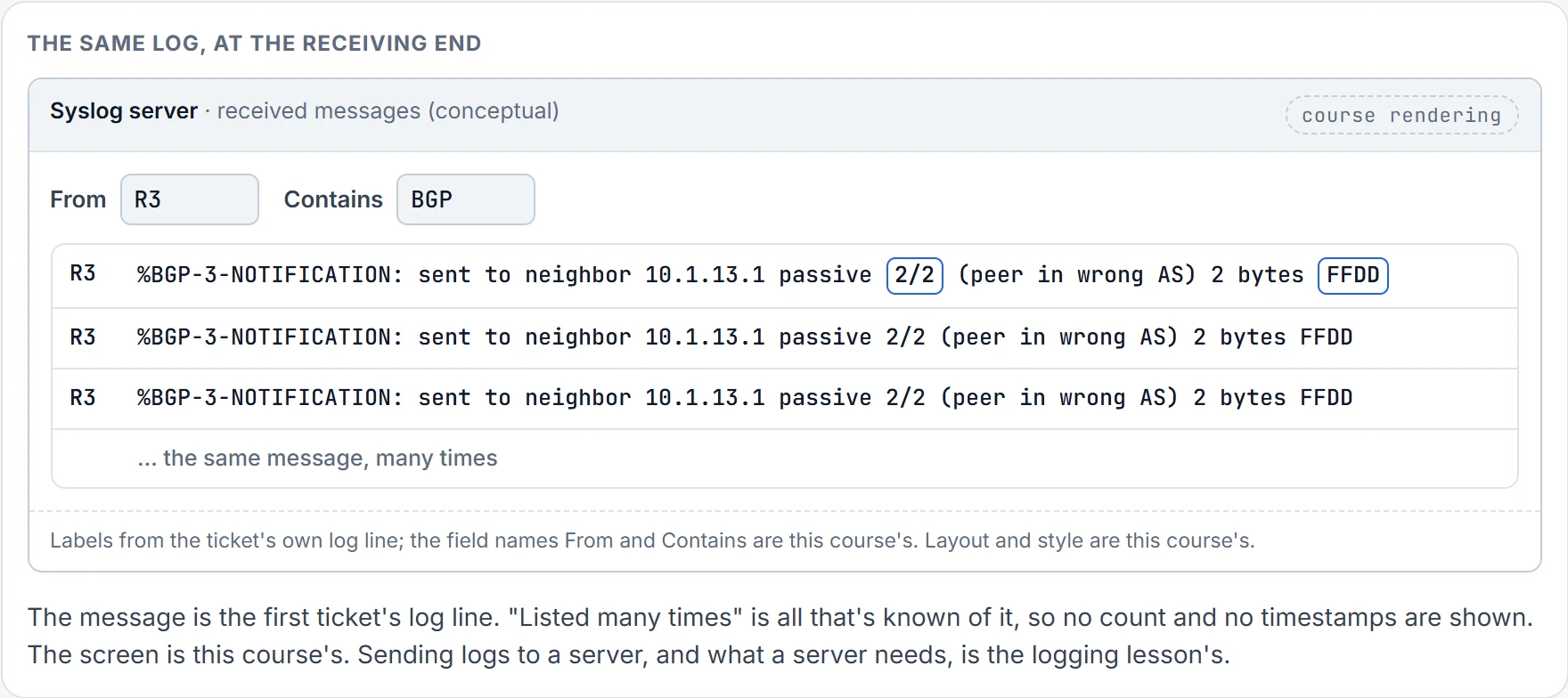
%BGP-3-NOTIFICATION: sent to neighbor 10.1.13.1 passive 2/2 (peer in wrong AS) 2 bytes FFDD
The syslog message says it plainly: the peer is in the wrong AS. The advice to take from it is short: never forget the log files when you troubleshoot; they can save you valuable time.
The sessions lesson decoded a NOTIFICATION that a router received. This one reads differently, so before the decoding:
2/2 is RFC 4271's numbering: error code 2, OPEN Message Error, subcode 2, Bad Peer AS, which the RFC sends when the AS field of a received OPEN is unacceptable. "Sent to" means R3 refused R1, not the other way round. passive we read as the connection R3 was the passive end of, so R1 dialled. And the two bytes: 0xFFDD is 65501, R1's real AS. RFC 4271 defines no data for Bad Peer AS, so reading those bytes as the AS R1 put in its OPEN is ours, and we haven't confirmed it. R3 had been writing the answer down for days, many times over, and it even gave the right number, in hex.
That's the turn in this lesson's opening line. The users heard nothing, but R3 had plenty to say: R3's summary showed the R1 session Idle when you looked, and R3's old logs held the refusal, listed many times. So the cheapest evidence was one command on the first router you'd suspect from the ticket. The ticket says the R1-R3 link should have carried the traffic; R3 is that link's router in your AS; its summary or its log names the cause. The route walk is the slow, sure path. The session and the log are the shortcuts, and they're worth a look the moment a router is a suspect.
What a NOTIFICATION line proves: who refused whom, by "sent to" and "received from", and why, by the RFC's code. What it doesn't prove: when the refusals started, unless the log reaches back that far.
Where do old log lines live? If you only had R3's buffer, maybe nowhere: by default it's 8,192 bytes, and when it fills, the older entries are overwritten. Lines that have to survive a holiday belong on a syslog server, and that's the logging lesson's subject. Here's what R3's complaint would look like when it arrives there.
The ping that can't come back
The second ticket, and you've changed sides. You run AS 65501 now. Users in 10.1.1.0/26 and 10.1.1.64/26 can't reach the resources at 10.1.5.5, though they can reach local ones. You ping 10.1.5.5 from R1, twice, sourced from 10.1.1.1 and from 10.1.1.65, and both fail, 0 out of 5 each.
show ip route 10.1.5.5 on R1 shows a route through R2, learned from BGP: known via "bgp 65501", distance 20, metric 3328, Tag 65502, type external, via 2.2.2.2, AS Hops 1, Route tag 65502 (the tag is the path's only AS). Then an extended traceroute to see how far the packets get, and it looks as if they fail at the next-hop router, R2:
R1# traceroute 10.1.5.5 source 10.1.1.1
Type escape sequence to abort.
Tracing the route to 10.1.5.5
VRF info: (vrf in name/id, vrf out name/id)
  1 10.1.12.2 40 msec 44 msec 28 msec
  2 * * *
  3 * * *
  4 * * *
...output omitted...
The trace from 10.1.1.65 reads the same.
Sit back and review. R1 knows 10.1.5.5 from R2, so R1 can route packets toward it; the trace fails at R2. Could R2 not know how to reach 10.1.1.0/26 or 10.1.1.64/26, so it can't answer the trace? Could 10.1.5.5 not know them either, so it can't answer the ping? Focus on R2: it needs those routes to answer, so R1 needs to be advertising them with its network mask statements. That's the sessions lesson's sourced ping seen from the other side: the replies need a route too, and the route they need here is AS 65502's knowledge of your networks.
Look at that trace once more, though. Hop 1 is 10.1.12.2, which is R2 answering. So R2 had some way back to 10.1.1.1 that no output shows, and the routers that couldn't answer are the ones from hop 2 on. The conclusion is the same either way: the return direction is broken, and it starts with what R1 advertises. That's the limit of both tools. A ping or a trace from the users' address proves whether the round trip works, and how far an answer comes back from. It doesn't prove which direction failed: a silent hop can be a router with no way back.
So R1's side. show bgp ipv4 unicast: 10.1.1.0/26 and 10.1.1.64/26 are there, valid and best, so they can be advertised.
R1# show bgp ipv4 unicast
! header lines omitted
     Network          Next Hop            Metric LocPrf Weight Path
 *> 1.1.1.1/32        0.0.0.0                  0         32768 ?
 *> 10.1.1.0/26       0.0.0.0                  0         32768 i
 *> 10.1.1.64/26      0.0.0.0                  0         32768 i
 *> 10.1.1.128/26     0.0.0.0                  0         32768 i
 *> 10.1.1.192/26     0.0.0.0                  0         32768 i
 *  10.1.5.0/24       10.1.13.3             3328             0 65502 i
 *>                   2.2.2.2               3328             0 65502 i
 *> 10.1.12.0/24      0.0.0.0                  0         32768 ?
 *> 10.1.13.0/24      0.0.0.0                  0         32768 ?
The sessions? show bgp ipv4 unicast summary: R2 and R3 are neighbors, because there's a number in the PfxRcd column, 1 from each. So the session part is cleared, read from R1's end, the only end AS 65501 can log in to. Then the per-neighbor question: ... neighbors 2.2.2.2 advertised-routes and ... neighbors 10.1.13.3 advertised-routes, and nothing is being advertised to either, "Total number of prefixes 0" twice.
Valid, best, and sent to nobody. What stops a route that's valid and best from going to an eBGP neighbor? A filter? show ip protocols says no filter is applied: the outgoing and incoming update filter lists aren't set, IGP synchronization is disabled, the neighbor table under it shows 2.2.2.2 and 10.1.13.3 with nothing in the filter columns, and it lists "Unicast Aggregate Generation: 10.1.1.0/24". Its last line is "Distance: external 20 internal 200 local 200": the administrative distances this process gives what it learns from eBGP (20) and iBGP (200), the two you met on R3.
But the routes lesson warned you about this: a prefix list doesn't show up in show ip protocols, only in the BGP neighbor output. So show ip protocols proves a process-wide filter, and per neighbor a filter list or a route map. It doesn't prove there's no prefix list on a neighbor. So show bgp ipv4 unicast neighbors | i prefix, and there it is, the same prefix list, BGP_FILTER, applied twice, outbound:
R1# show bgp ipv4 unicast neighbors | i prefix
 Outgoing update prefix filter list is BGP_FILTER
   prefix-list                               27           0
 Outgoing update prefix filter list is BGP_FILTER
   prefix-list                               27           0
This form has its own blind spot, and it matters on our network later: it proves the prefix lists on each neighbor, by direction; it doesn't prove there's no filter list or route map, because their lines have no "prefix" in them.
The running configuration shows BGP_FILTER on both neighbors, 2.2.2.2 and 10.1.13.3, outbound: neighbor 2.2.2.2 prefix-list BGP_FILTER out and neighbor 10.1.13.3 prefix-list BGP_FILTER out, under a process that also has network statements for the four /26s, aggregate-address 10.1.1.0 255.255.255.0 and redistribute connected. And the list itself denies 10.1.1.128/26 and 10.1.1.192/26, so they aren't sent to R2 or R3; your documentation states those two shouldn't reach AS 65502, and the list does that:
R1# show ip prefix-list BGP_FILTER
ip prefix-list BGP_FILTER: 2 entries
   seq 5 deny 10.1.1.128/26
   seq 10 deny 10.1.1.192/26
Then it hits you: the implicit deny all at the end of the list is denying every other route. The list did exactly what it said: two lines of deny, and a third nobody typed. show ip prefix-list proves the entries in order, with their sequence numbers. It doesn't prove where the list is applied, and it never prints the implicit deny.
The fix: add ip prefix-list BGP_FILTER permit 0.0.0.0/0 le 32 to permit everything else, here 10.1.1.0/26 and 10.1.1.64/26, and check it with show ip prefix-list BGP_FILTER. It lands as seq 15 permit 0.0.0.0/0 le 32, the third of three entries. Then clear bgp ipv4 unicast * soft out forces a refresh of what R1 sends, and the two advertised-routes commands confirm the routes are going out: 10.1.1.0/26 and 10.1.1.64/26 are now advertised, each listed with next hop 0.0.0.0 and weight 32,768 beside 1.1.1.1/32, R1's own entries, as the routes lesson said the listing shows them.
Still not done. Can the users reach 10.1.5.5? Ping again from 10.1.1.1 and 10.1.1.65: five out of five, both times, and the problem is solved.
Notice where the cause was. The symptom was a ping; the cause was a route that never left, on the very router you started on. The command that settled it wasn't the ping or the trace. It was the count: valid, best, and zero advertised.
Sessions up, table full, traffic wrong
Where do you start when sessions are up, the table is full and the traffic is wrong? The third ticket is the closest thing to that question. All it reports is that the traffic leaves through R3 and across the backup link.
You run AS 65502 again. Traffic reports say all traffic leaving the AS is going through R3 and across the backup link, which is fine only if the R2-R1 link fails. A traceroute from R5 confirms it: the trace to 10.1.1.1 and 10.1.1.65 goes through R3 to AS 65501:
R5# traceroute 10.1.1.1 source 10.1.5.5
Type escape sequence to abort.
Tracing the route to 10.1.1.1
VRF info: (vrf in name/id, vrf out name/id)
  1 10.1.45.4 48 msec 40 msec 28 msec
  2 10.1.34.3 64 msec 32 msec 60 msec
  3 10.1.13.1 [AS 65501] 72 msec 52 msec 48 msec
R4, then R3, then R1's address on the R1-R3 link. Careful what that proves: the forwarding path. It doesn't prove which router chose it. Every hop forwards by its own table, so hop 2 is R4's decision as much as R5's, and R4 is a member of R2's peer group too. Start with the first choice on the path, the router the trace started from: R5. show ip route 10.1.1.1 and show ip route 10.1.1.65 on R5: learned by iBGP, through 3.3.3.3, R3, each known via "bgp 65502", distance 200, metric 0, Tag 65501, type internal, AS Hops 1, Route tag 65501 (again the path's only AS).
Is R5 learning them from R2 as well? show bgp ipv4 unicast. Yes: 10.1.1.0/26 and 10.1.1.64/26 come from R2 too, so why does R5 prefer R3? That's best path between the next hops 2.2.2.2 and 3.3.3.3.
Check the gate before the steps. Can R5 reach both next hops? 3.3.3.3, obviously, because R5 is using it; show ip route 2.2.2.2 confirms 2.2.2.2 is reachable too, by EIGRP 100, distance 90, metric 131072, via 10.1.45.4, 2 hops. That matters, because a path can never be used if its next hop isn't reachable. Then weight: 0 on both. A tie, so the next attribute, local preference: 50 on the path via 2.2.2.2, 100 on the path via 3.3.3.3. The default is 100 and higher is better, so 3.3.3.3 wins on local preference.
R5# show bgp ipv4 unicast
! header lines omitted
     Network          Next Hop            Metric LocPrf Weight Path
 *>i 1.1.1.1/32       3.3.3.3                  0    100      0 65501 ?
 * i                  2.2.2.2                  0     50      0 65501 ?
 *>i 10.1.1.0/26      3.3.3.3                  0    100      0 65501 i
 * i                  2.2.2.2                  0     50      0 65501 i
 *>i 10.1.1.64/26     3.3.3.3                  0    100      0 65501 i
 * i                  2.2.2.2                  0     50      0 65501 i
 r>i 10.1.5.0/24      3.3.3.3               3328    100      0 i
 r i                  2.2.2.2               3328     50      0 i
! 10.1.12.0/24 and 10.1.13.0/24 the same: r>i via 3.3.3.3 at 100, r i via 2.2.2.2 at 50
Here's the next question, and it's the one that moves you off this router.
Somebody wrote 50. Where? There are two places: when R2 advertised the path, or when R5 received it. Local preference travels with a path between iBGP neighbors, so a value written at R2's end arrives on R5 as written. Two places means two configurations, and the cheap one is here. R5's shows nothing touching local preference; if something did, you'd see a route map on the neighbor statement for 2.2.2.2:
R5# show run | section router bgp
router bgp 65502
 bgp log-neighbor-changes
 neighbor 2.2.2.2 remote-as 65502
 neighbor 2.2.2.2 update-source Loopback0
 neighbor 3.3.3.3 remote-as 65502
 neighbor 3.3.3.3 update-source Loopback0
Two neighbors, each with its remote-as and its update-source, and nothing else. So R2. show run | section router bgp, and straight away: a route map called ENARSI_BGP_FILTER, outbound, on the peer group ENARSI_IBGP_NEIGHBORS. R5 is a member of the group, so the route map applies to R5:
R2# show run | section router bgp
router bgp 65502
 bgp log-neighbor-changes
 network 10.1.5.0 mask 255.255.255.0
 neighbor ENARSI_IBGP_NEIGHBORS peer-group
 neighbor ENARSI_IBGP_NEIGHBORS transport connection-mode passive
 neighbor ENARSI_IBGP_NEIGHBORS update-source Loopback0
 neighbor ENARSI_IBGP_NEIGHBORS next-hop-self
 neighbor ENARSI_IBGP_NEIGHBORS route-map ENARSI_BGP_FILTER out
 neighbor 1.1.1.1 remote-as 65501
 neighbor 1.1.1.1 password CISCO
 neighbor 1.1.1.1 ebgp-multihop 2
 neighbor 1.1.1.1 update-source Loopback0
 neighbor 3.3.3.3 remote-as 65502
 neighbor 3.3.3.3 peer-group ENARSI_IBGP_NEIGHBORS
 neighbor 4.4.4.4 remote-as 65502
 neighbor 4.4.4.4 peer-group ENARSI_IBGP_NEIGHBORS
 neighbor 5.5.5.5 remote-as 65502
 neighbor 5.5.5.5 peer-group ENARSI_IBGP_NEIGHBORS
You've met this group. The sessions lesson read it member by member and noticed all three members get ENARSI_BGP_FILTER outbound: a peer-group culprit, waiting to happen. Here it happened. The running configuration proves which policy is configured where, groups included; it doesn't prove what the policy does. show route-map ENARSI_BGP_FILTER shows it setting local preference to 50, and the network documentation wants 150:
R2# show route-map ENARSI_BGP_FILTER
route-map ENARSI_BGP_FILTER, permit, sequence 10
 Match clauses:
 Set clauses:
  local-preference 50
 Policy routing matches: 0 packets, 0 bytes
show route-map proves the map's sequences, matches and sets. It doesn't prove which neighbors use it; the running configuration did that. The fix is on R2: route-map ENARSI_BGP_FILTER 10, then set local-preference 150, and show route-map ENARSI_BGP_FILTER confirms 150:
R2(config)# route-map ENARSI_BGP_FILTER 10
R2(config-route-map)# set local-preference 150
R2(config-route-map)# end
%SYS-5-CONFIG_I: Configured from console by console
R2# show route-map ENARSI_BGP_FILTER
route-map ENARSI_BGP_FILTER, permit, sequence 10
 Match clauses:
 Set clauses:
  local-preference 150
 Policy routing matches: 0 packets, 0 bytes
To speed up the BGP changes, clear bgp ipv4 unicast * soft out. Back on R5, the trace now goes through R2: 10.1.45.4, 10.1.24.2, then 10.1.12.1 [AS 65501].
So, where do you start when sessions are up, the table is full and the traffic is wrong? On a router whose choice you can read, with the decision itself: which step chose this path. R5 here; R4, which made hop 2, would have told the same story, since it hears the same 50 from the same group. Then, when the value that decided is wrong, the question isn't "what's wrong with this router?" but "who could have written this value?" The answer here was one session upstream, in another router's policy, and the router that showed the 50 had nothing to do with it.
Continue the lesson
The whole lesson, with its drawings and its questions. 5 more sections after the ones above.