
Troubleshooting BGP neighbors, and peer groups
BGP neighbours are configured by hand on both ends, so most faults are typing. There are eleven reasons a session will not form: a down interface, broken Layer 3 reachability, a path only through the default route, no route back, a wrong neighbor address or AS, a mismatched source address, an ACL blocking TCP 179, an eBGP TTL too small, a password mismatch and more.
By Arif, founder of Daveth · Updated
The full 12 min walkthrough is in Daveth Pro (Network). See what the plan opens
What this page answers
Why is a BGP neighbour stuck in Idle or Active?
Idle often means no usable route to the neighbour, only a default route, no route back, an ACL dropping port 179, an eBGP TTL too small or a password mismatch. Active means the TCP handshake completed and an OPEN got no answer. Read it in “Eleven suspects, and a column that says less than you'd hope”
Why does an eBGP session between loopbacks not come up?
eBGP packets leave with a TTL of 1, because eBGP peers are expected to be directly connected. Peering between loopbacks puts the neighbour more than one hop away, so the TTL has to be raised. Read it in “Too far for eBGP: the TTL”
Eleven suspects, and a column that says less than you'd hope
The configuration looks right on both ends. Why won't the session come up? That's this lesson's question, and it has eleven answers. Most of them are typing.
Here's why. With BGP you set up neighbor adjacencies by hand. EIGRP and OSPF form theirs dynamically once you enable the process on an interface. So BGP configuration is more prone to human error, and troubleshooting it often takes more effort. And there are two flavors, iBGP and eBGP, so you have to know how they differ and recognise the issues each one brings. The last two lessons built both. This one breaks them. (BGP exchanges routing information between autonomous systems, so it's classed as an Exterior Gateway Protocol, and it's a path vector protocol whose decisions rest on attributes.)
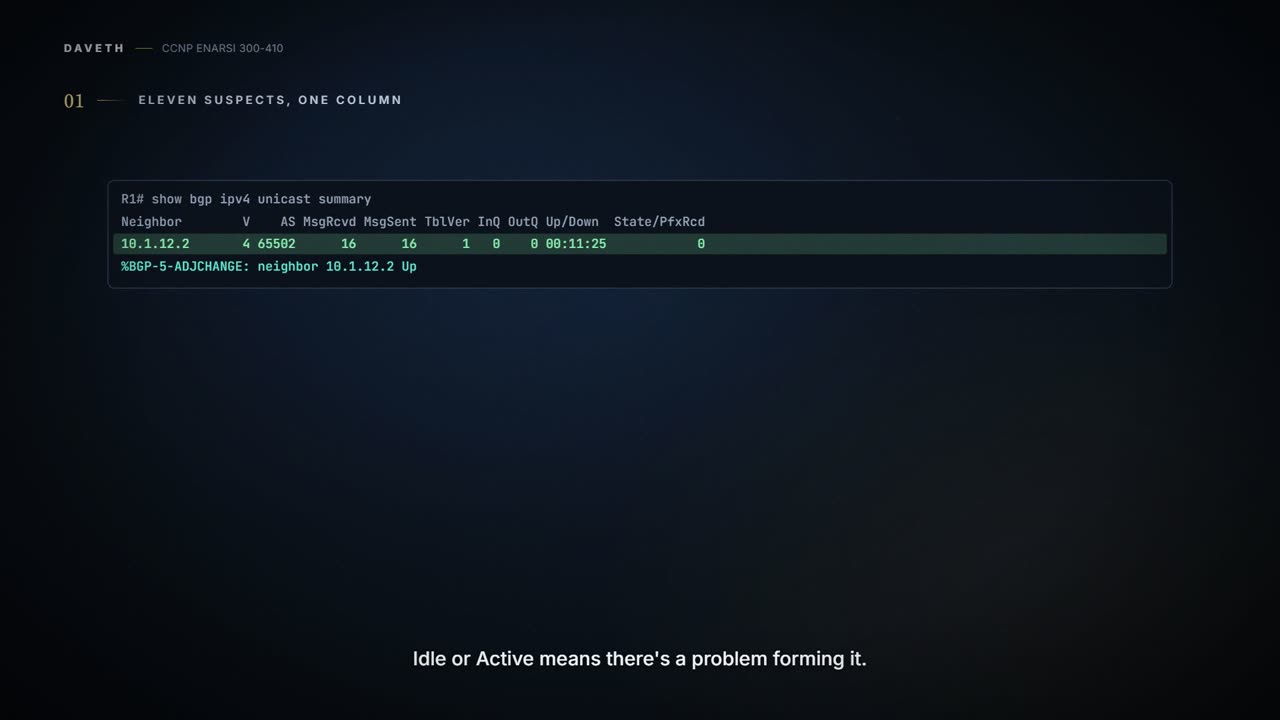
Two commands do the looking. show bgp ipv4 unicast summary, which works the same way as the old show ip bgp summary, and show bgp ipv4 unicast neighbors, the old show ip bgp neighbors. Start with the summary: it's condensed, and the neighbor detail is very verbose and not needed for a first look.
A healthy one first. R1 has two BGP neighbors, 10.1.12.2 and 10.1.13.3, and both are eBGP because their AS numbers don't match R1's own:
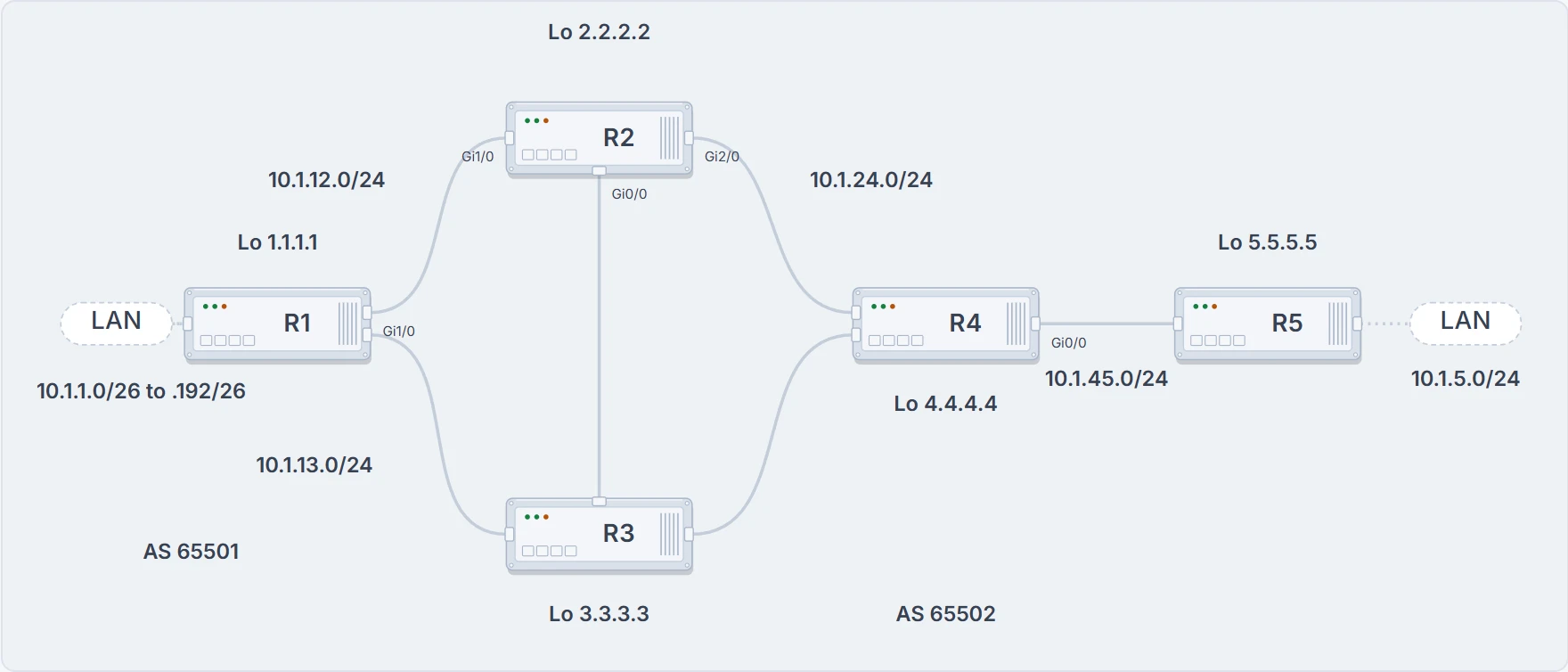
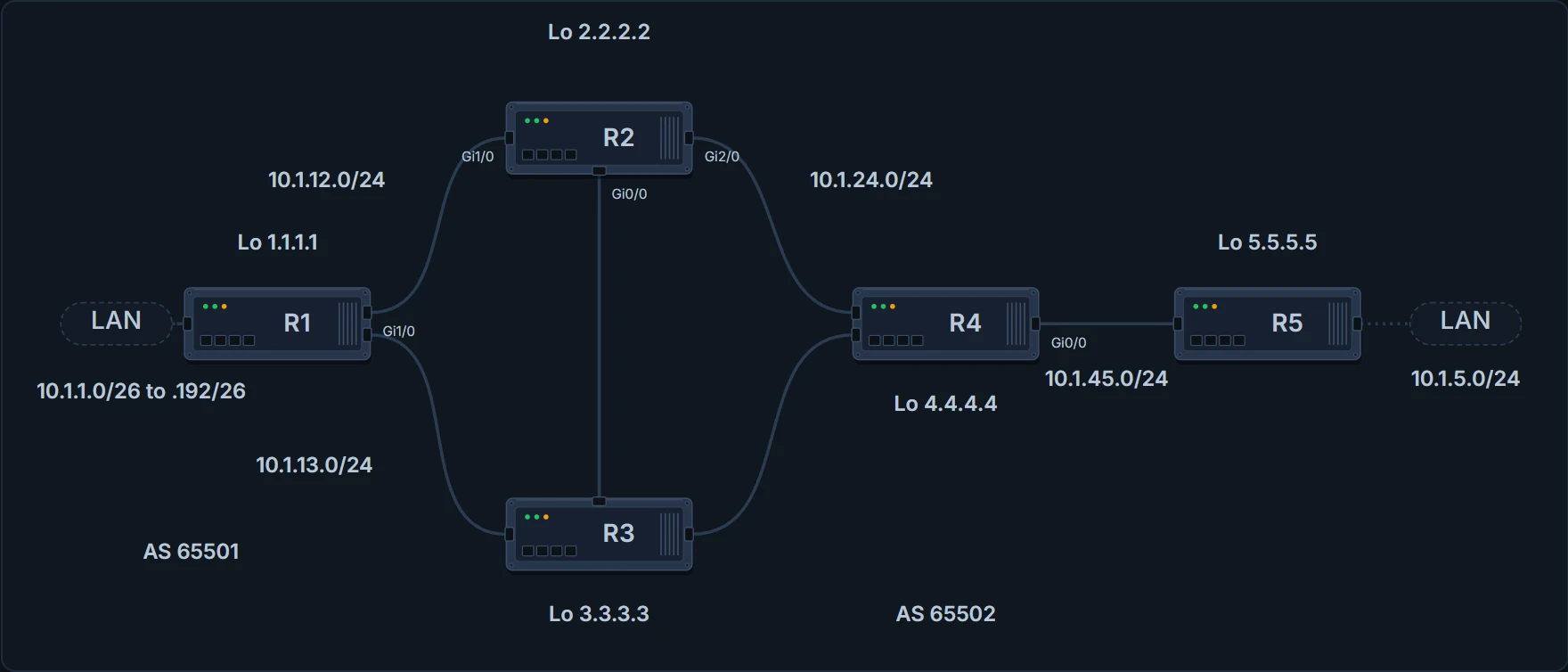
The lab every capture on this page comes from. The sessions change from section to section; the cables don't.
R1# show bgp ipv4 unicast summary
BGP router identifier 10.1.13.1, local AS number 65501
BGP table version is 1, main routing table version 1
Neighbor        V           AS MsgRcvd MsgSent   TblVer  InQ OutQ Up/Down  State/PfxRcd
10.1.12.2       4        65502      16      16        1    0    0 00:11:25            0
10.1.13.3       4        65502      15      12        1    0    0 00:09:51            0
Look at the last column. A number there means the neighbor relationship is established. Idle or Active means there's a problem forming it. And when a relationship does form, the router logs it, with a syslog message like %BGP-5-ADJCHANGE: neighbor 10.1.12.2 Up. Both neighbors here show 0: established, and nothing received yet.
Now the suspects. The reasons a BGP neighbor relationship might not form:
- Interface is down: the interface must be up/up.
- Layer 3 connectivity is broken: you have to be able to reach the address you're forming the adjacency with.
- The path to the neighbor is through the default route: you have to reach it by a route other than the default.
- The neighbor has no route to the local router: the two routers need routes to each other.
- Incorrect neighbor statement: the address and the AS in
neighbor ip_address remote-as as_numbermust be accurate. - ACLs: an access control list or a firewall may be blocking TCP port 179.
- Packets sourced from the wrong address: the source address of an inbound BGP packet must match the local neighbor statement.
- The TTL expires: the peer may be further away than is permitted.
- Mismatched authentication: the two routers must agree on the authentication parameters.
- A misconfigured peer group: done carelessly, it can stop a neighbor relationship forming or stop routes being learned.
- Timers: they don't have to match, but the minimum holddown from the neighbor, if it's set, could prevent an adjacency.
So where do you start? The obvious place is the column. It's the first thing on the screen, and it has a name in it. Here's what this lesson's captures and descriptions give there, cause by cause:
- Idle: no route to the neighbor; only a default route; the neighbor has no route back; a neighbor statement naming an address with no route; an ACL dropping port 179; an eBGP TTL too small; a password mismatch.
- Active: a route was found, the TCP handshake completed, an OPEN went out and got no answer.
- Idle and Active by turns: an AS that doesn't match the peer's.
- No capture of the state: the interface down, the wrong source address, a peer group, the minimum hold time.
Seven of the eleven reasons can print Idle, and one of those seven, the neighbor statement, can print Active or a toggle instead. If a TCP session can't be formed, the state is Idle. And one more you'll meet later: a neighbor that sent more prefixes than its configured maximum is shut down and shows Idle (PfxCt), and by default it isn't brought back automatically.
Two lessons back, that list would have bothered you. The state machine there sends a TCP connection that fails to Active, and a neighbor sitting in Active had a problem between the two routers. Here the same failure prints Idle. RFC 4271, which defines BGP, sides with Idle: a TCP connection that fails in Connect goes to Idle unless an optional delay timer is running, and one that fails in Active goes to Idle. And a real router's debug goes from Idle straight to Active on its way back up. This lesson uses the states its captures print. Which names a current router prints for each cause, we haven't confirmed.
So take this away from the column. Idle or Active says the session isn't up. Idle doesn't say why: seven different causes print it. The column narrows the field to "something on the list". It doesn't convict anybody.
A ping, from the address you'll peer from
The interface. The interface whose address you use to form the neighbor relationship has to be up/up, and that can be a physical interface or a logical one. Sourcing BGP from a loopback is popular when there are redundant paths between neighbors: if one local physical interface goes down, the relationship carries on through another, because the loopback is the source and destination of the packets. That cuts both ways. Source from Loopback 0 and the loopback has to be up/up, and so does a physical interface that gets you to the neighbor's address. show ip interface brief shows you both.
Layer 3. You don't need to be directly connected or in the same subnet to form a BGP neighbor relationship. You do need Layer 3 connectivity. You check it with a ping: if the ping works, you have Layer 3 connectivity. And for that, the router needs a route in its routing table pointing the right way. No route to the neighbor, no neighbor relationship.
Look at R5. It's trying to peer with 2.2.2.2, R2's loopback, and the state is Idle, which here means the local router can't make a TCP connection with the neighbor:
R5# show bgp ipv4 unicast summary
BGP router identifier 10.1.45.5, local AS number 65502
BGP table version is 1, main routing table version 1
Neighbor        V           AS MsgRcvd MsgSent   TblVer  InQ OutQ Up/Down  State/PfxRcd
2.2.2.2         4        65502       0       0        1    0    0 never    Idle
The Up/Down column says never and the state Idle. Then two commands, and together they prove there's no Layer 3 connectivity:
R5# show ip route 2.2.2.2 255.255.255.255
% Network not in table
R5# ping 2.2.2.2 source 5.5.5.5
Type escape sequence to abort.
Sending 5, 100-byte ICMP Echos to 2.2.2.2, timeout is 2 seconds:
.....
Success rate is 0 percent (0/5)
No route to 2.2.2.2, and no ping replies. Notice the source 5.5.5.5. It's a good idea to give the ping a source, and the source is the local address you plan to peer from. Here's why that matters more than it looks. An echo reply has to come back to the address you sent from, so a ping sourced from 5.5.5.5 tests the route out and the far router's route back to 5.5.5.5. An unsourced ping leaves from the outbound interface, and it can succeed while the address your session uses is unreachable from the other end.
The route back. Which brings in the next suspect. Idle doesn't only appear on a router with no route to its neighbor. It also appears on a router whose neighbor has no route back to it. Here R2, which is trying to peer with R5, shows Idle too, even though it has a route to 5.5.5.5, and it's Idle because the routers can't form the TCP session:
R2# show bgp ipv4 unicast summary
BGP router identifier 2.2.2.2, local AS number 65502
BGP table version is 1, main routing table version 1
Neighbor        V           AS MsgRcvd MsgSent   TblVer  InQ OutQ Up/Down  State/PfxRcd
5.5.5.5         4        65502       0       0        1    0    0 00:00:13 Idle
10.1.12.1       4        65501       2       2        1    0    0 00:00:12            0
R2# show ip route 5.5.5.5 255.255.255.255
Routing entry for 5.5.5.5/32
  Known via "eigrp 100", distance 90, metric 131072, type internal
  Redistributing via eigrp 100
  Last update from 10.1.24.4 on GigabitEthernet2/0, 00:23:58 ago
  Routing Descriptor Blocks:
  * 10.1.24.4, from 10.1.24.4, 00:23:58 ago, via GigabitEthernet2/0
! remaining lines omitted
R2's neighbor 5.5.5.5 sits in Idle while 10.1.12.1 shows a number, and R2's route to 5.5.5.5 is EIGRP's, learned from 10.1.24.4. So the same missing route shows up on both routers: R5 can't reach R2, and R2 can't get an answer from R5. Which router do you fix? The one without the route. R2's configuration and R2's table are both fine.
What has a sourced ping that works cleared? The interface (a down source interface can't send it), and the case where there's no route at all, out or back: the echo needs some route each way. It hasn't cleared the route itself. If it fails, you've found your area. If it succeeds, keep reading, because the next section has a ping that succeeded over a route BGP won't use.
When the ping says yes and BGP says no
Same R5, a little later. There's still no route to 2.2.2.2, but now the ping works:
R5# show ip route 2.2.2.2 255.255.255.255
% Network not in table
R5# ping 2.2.2.2 source 5.5.5.5
Type escape sequence to abort.
Sending 5, 100-byte ICMP Echos to 2.2.2.2, timeout is 2 seconds:
Packet sent with a source address of 5.5.5.5
!!!!!
Success rate is 100 percent (5/5), round-trip min/avg/max = 84/91/104 ms
Five out of five, sourced from 5.5.5.5, with no specific route to 2.2.2.2. Here's the route it rode on:
R5# show ip route
...output omitted...
Gateway of last resort is 10.1.45.4 to network 0.0.0.0
D*EX  0.0.0.0/0 [170/3328] via 10.1.45.4, 00:08:37, GigabitEthernet1/0
      3.0.0.0/32 is subnetted, 1 subnets
D        3.3.3.3 [90/131072] via 10.1.45.4, 00:53:34, GigabitEthernet1/0
      4.0.0.0/32 is subnetted, 1 subnets
D        4.4.4.4 [90/130816] via 10.1.45.4, 00:53:19, GigabitEthernet1/0
...output omitted...
The gateway of last resort is 10.1.45.4, through an EIGRP external default, D*EX 0.0.0.0/0 [170/3328]. You can reach the neighbor through it. BGP doesn't consider it a valid route for forming an adjacency. R5's summary still says Idle, never, the same line as before the ping started working. Two lessons back you met the rule as "a default route isn't sufficient to establish a multi-hop BGP session"; here it is on a router.
So the ping isn't your second test. The route is. show ip route 2.2.2.2 255.255.255.255 gives you a yes or a no that the ping can't: a ping that succeeds tells you a packet got there, and nothing about which route took it. And the same trick works on the route back: a router that answers your ping through its default route has no route BGP will use.
Now the question you were asked. A sourced ping catches three of the eleven: the interface, the route out and the route back. It's fooled by a fourth, the default route, at either end, unless you read the routes as well, on both routers. The other seven can all pass a ping, because none of them stops ICMP on its own: a wrong neighbor line (unless the typo names an address with no route, which fails the ping too and prints Idle like any missing route), a wrong source, an ACL on port 179, a TTL that's too small for BGP, a password, a peer group, a minimum hold time. Did you have the default route on your list? It's the one that looks like proof.
Read both neighbor lines
Everything from here passes a ping, so the evidence moves into the configurations.
The neighbor statement. A BGP peering is formed with neighbor ip_address remote-as as_number in BGP configuration mode. Here's R2's. neighbor 5.5.5.5 remote-as 65502 forms an iBGP peering, because 65502 matches the AS on router bgp 65502; neighbor 10.1.12.1 remote-as 65501 forms an eBGP peering, because 65501 doesn't:
R2# show run | s router bgp
router bgp 65502
 bgp log-neighbor-changes
 neighbor 5.5.5.5 remote-as 65502
 neighbor 5.5.5.5 update-source Loopback0
 neighbor 10.1.12.1 remote-as 65501
Two parts of that command matter most: the address of the peer, and the AS it's in. Get either wrong and you see Active or Idle. Which one depends on how far the session got. No route to the address you typed, and the state is Idle. A route, a completed three-way TCP handshake, an OPEN sent, and no response to it: Active. An AS that doesn't match the peer's: the state toggles between Idle and Active. That last one is the case where watching the column over time tells you something a single reading can't.
A router listening for BGP waits on port 179; the one that opens the connection picks a random port of its own. To see the TCP session underneath, show tcp brief all. R2 has an established TCP session with 5.5.5.5 and another with 10.1.12.1:
R2# show tcp brief all
TCB       Local Address               Foreign Address             (state)
68DD357C  10.1.12.2.179               10.1.12.1.35780             ESTAB
68DD24DC  2.2.2.2.179                 5.5.5.5.45723               ESTAB
Both times, the other router. R2's local port is 179 on both lines, so 10.1.12.1 and 5.5.5.5 each opened their connection from a random port to R2's 179. Hold that. Port 179 is the next section.
The source address. Now the subtle one, because the configuration can be right on both ends and still wrong at the moment it matters. In a redundant topology a BGP router has several active addresses on its interfaces. Take two ASs: R1 in AS 65501, and R2, R3, R4 and R5 in AS 65502. R1 joins R2 and R3; R2 and R3 are linked; R2's Gi2/0 goes straight to R4 and R2's Gi0/0 to R3; R3 also links to R4; R4's Gi0/0 goes to R5 and R5's LAN, 10.1.5.0/24. R2, R3 and R4 could peer with each other using any physical interface, because there are several paths; R2 could reach R4 over their direct link, or through R3.
When you type neighbor ip_address remote-as as_number, that address is what the router uses to decide whether a BGP OPEN came from a router it should peer with. The OPEN has a source address, and that's compared with the address in the neighbor statement. They match, and a peering forms; they don't, and it doesn't. By default the source is the exit interface of the router sending the OPEN. So if R2 sends its OPEN to R4 out of Gi2/0, R4 needs a neighbor statement with R2's Gi2/0 address. Then the R2-R4 link fails. The two can still reach each other through R3, but R2's OPEN now leaves from Gi0/0, and R4's neighbor statement still names R2's Gi2/0 address: no peering, because the packets come from the wrong address. The last lesson called this the discard rule. Here it is costing you a session after a failure, with every line of configuration exactly as it was.
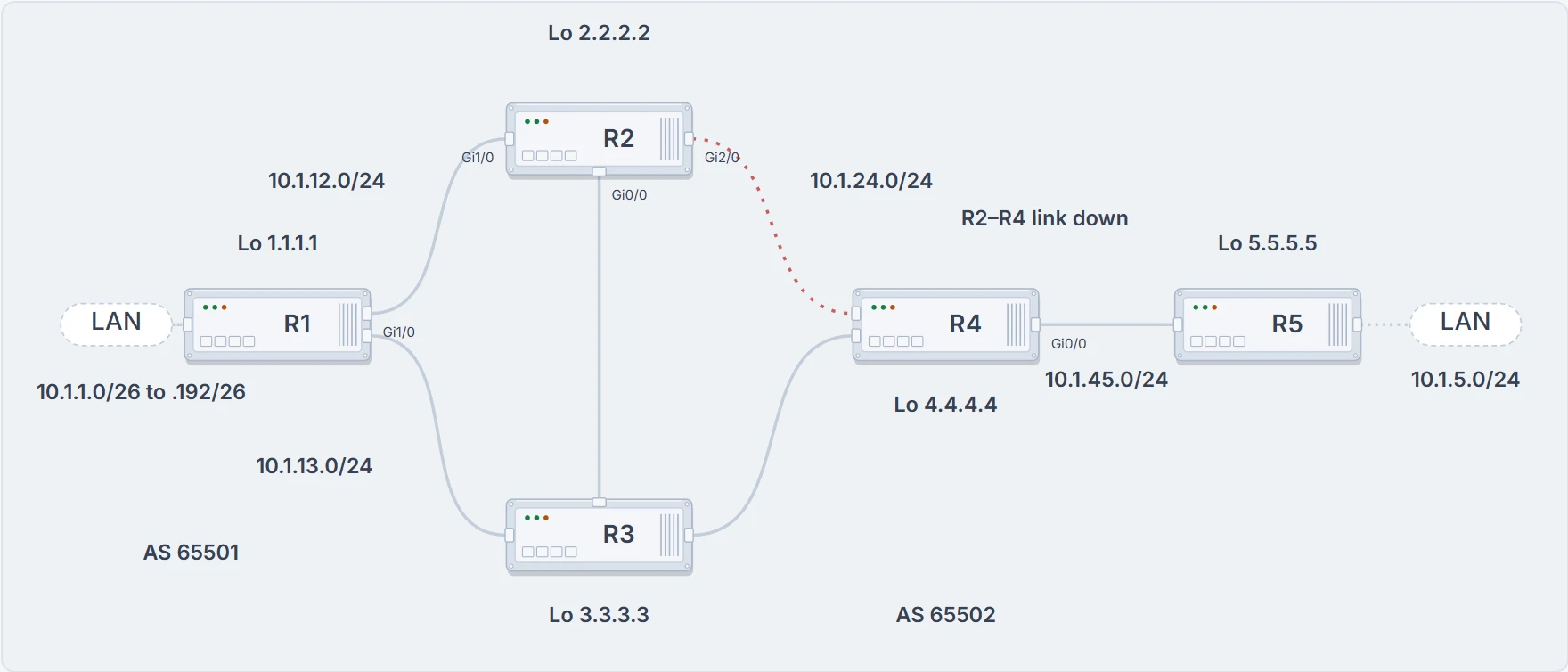
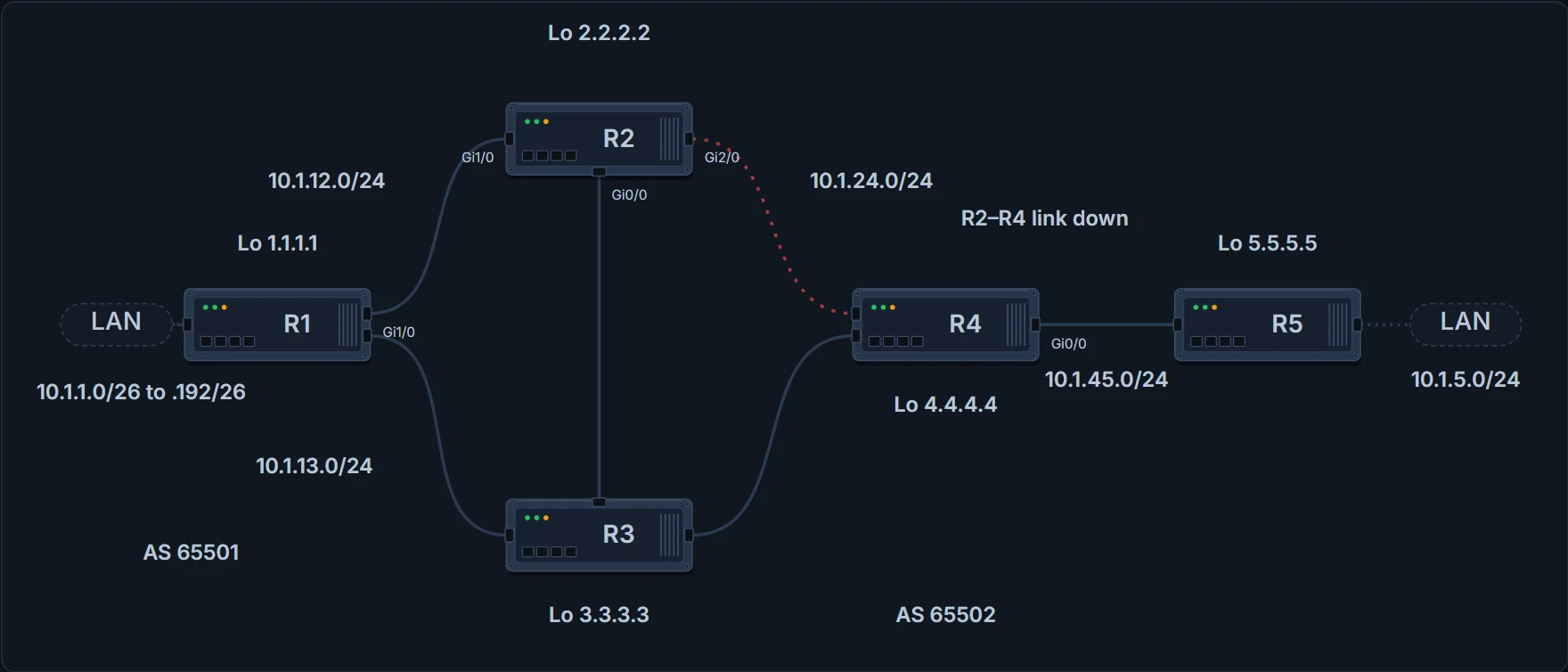
After the failure: R2 and R4 can still reach each other through R3, but R2's packets to R4 now leave from Gi0/0.
The control is neighbor ip_address update-source interface_type interface_number. Here R2 peers with R4 at 4.4.4.4, R4's loopback, and every BGP message it sends there comes from Loopback 0, 2.2.2.2:
R2# show run | section router bgp
router bgp 65502
 bgp log-neighbor-changes
 neighbor 4.4.4.4 remote-as 65502
 neighbor 4.4.4.4 update-source Loopback0
 neighbor 10.1.12.1 remote-as 65501
R2# show ip interface brief | include Loopback
Loopback0      2.2.2.2       YES        manual up         up
And R4 has to match it: a neighbor statement naming R2's 2.2.2.2, and update-source to control what it sends to R2. R4's half is the mirror image: neighbor 2.2.2.2 remote-as 65502, neighbor 2.2.2.2 update-source Loopback0, and Loopback0 4.4.4.4 up/up.
Notice what you don't get here: a state. There's no capture of the summary for the wrong-source case. And one question stays open: if only one end sources from the wrong address, can the other end's own connection still bring the session up? In R2 and R4's case nobody can, because the address R4 names is on the failed link. Elsewhere, we haven't confirmed it.
What has reading both lines cleared? The address, the AS and the source: three suspects, and the reading cost nothing but care.
Something on the path drops port 179
BGP uses TCP port 179 to set up its TCP sessions, and the TCP session is what the peering is built on. So an ACL blocking TCP 179 anywhere on the path between the two routers stops the peering. Here R4, between R2 and R5, has ACL 100 on Gig0/0, denying packets sourced from or destined to port 179, and that makes a peering between R2 and R5 impossible. R5's state is Idle, because it can't establish the TCP session with 2.2.2.2 while R4 denies the traffic:
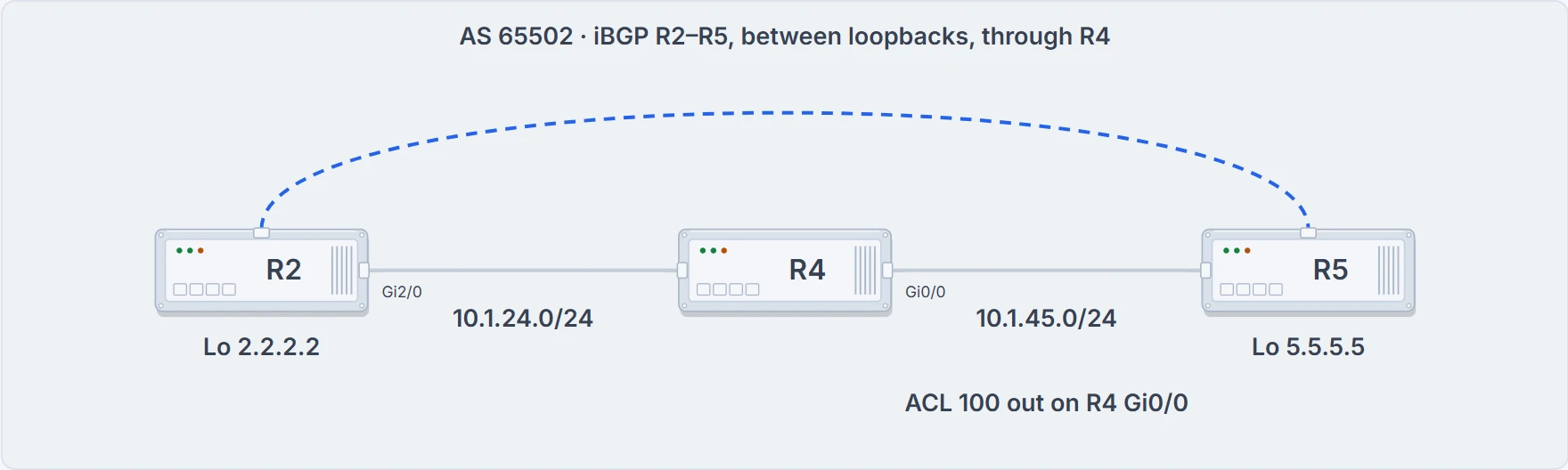
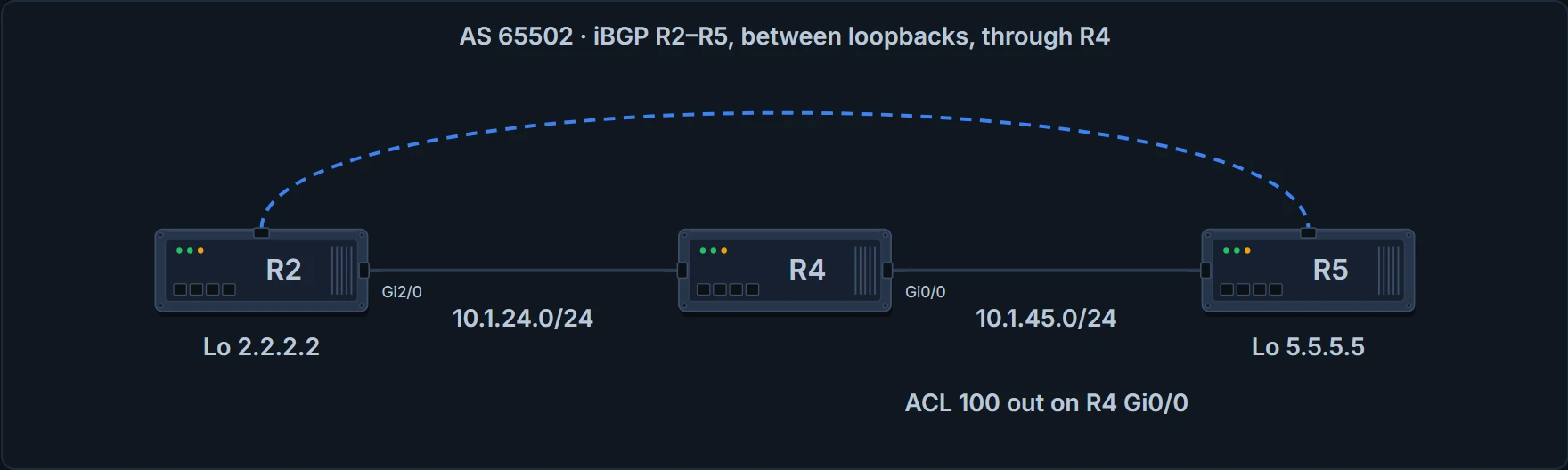
R4 sits between R2 and R5, and its ACL is outbound on the interface facing R5.
R4# show access-lists
Extended IP access list 100
    10 deny tcp any any eq bgp
    20 deny tcp any eq bgp any
    30 permit ip any any
R4# show ip interface gigabitEthernet 0/0 | include access list
  Outgoing access list is 100
  Inbound access list is not set
R5# show bgp ipv4 unicast summary
BGP router identifier 10.1.45.5, local AS number 65502
BGP table version is 1, main routing table version 1
Neighbor        V           AS MsgRcvd MsgSent   TblVer  InQ OutQ Up/Down  State/PfxRcd
2.2.2.2         4        65502       0       0        1    0    0 00:02:24 Idle
Line 30 lets everything else through, so a ping between R5 and R2 would still work. (How ACLs are built and applied is a later lesson's; here you only have to read one.)
Now a smaller ACL. What if the entry were only deny tcp any any eq bgp, still outbound on Gig0/0? Then only packets destined to port 179, going out of Gig0/0, are blocked. Packets sourced from 179 going out would get through, and if you could control which router is the server and which the client, you could still form the session.
Server and client? Yes. A BGP session is a server/client relationship: one router uses port 179, the server, and the other uses an ephemeral port, the client. And by default both routers try to set up the TCP session: each sends a SYN from an ephemeral port to port 179, each answers with a SYN/ACK from 179, each sends the ACK, and you end up with two BGP sessions between two routers where there can only be one. That's a BGP connection collision, and BGP sorts it out by itself. You'll often read that the router with the higher router ID becomes the server. Hold that rule loosely. RFC 4271 keeps the connection that the router with the higher BGP identifier opened, which makes the higher ID the client, not the server. Which one a current router does, we haven't confirmed.
Two lessons back, a BGP router was a phone that dials the number it was given. Here's that picture with one more person in it. By default both routers dial each other at the same moment; passive is the one who waits by the phone. Where the picture stops working: two people dialling each other get two engaged tones and nobody talks, while two routers can end up with two complete connections and have to close one.
If you'd rather not have collisions, decide the roles from the start with neighbor ip_address transport connection-mode {active | passive}. Active means the router initiates the TCP session itself: active is the client. Passive means it waits for the other router to initiate: passive is the server. Set passive on both ends and the two routers will wait for each other with perfect patience. Neither will ever dial.
To see who's which, the neighbor detail shows the local and remote ports. Local port 179 and an ephemeral remote port: the local router is the server. Remote port 179 and an ephemeral local port: the client. Filtered down to the lines that matter, R2 is the client for its sessions with R1 (1.1.1.1), R4 (4.4.4.4) and R5 (5.5.5.5), and the server for its session with R3:
R2# show bgp ipv4 unicast neighbors | i ^BGP neighbor|Local port|Foreign port
BGP neighbor is 1.1.1.1, remote AS 65501, external link
Local host: 2.2.2.2, Local port: 23938
Foreign host: 1.1.1.1, Foreign port: 179
BGP neighbor is 3.3.3.3, remote AS 65502, internal link
Local host: 2.2.2.2, Local port: 179
Foreign host: 3.3.3.3, Foreign port: 45936
BGP neighbor is 4.4.4.4, remote AS 65502, internal link
Local host: 2.2.2.2, Local port: 34532
Foreign host: 4.4.4.4, Foreign port: 179
BGP neighbor is 5.5.5.5, remote AS 65502, internal link
Local host: 2.2.2.2, Local port: 49564
Foreign host: 5.5.5.5, Foreign port: 179
Now put that beside the show tcp brief all from the last section. There, R2's local port toward 5.5.5.5 was 179: 5.5.5.5 dialled. Here it's 49564: R2 dialled. Same pair of routers, roles swapped between two captures. So the role you see is whichever connection carried the session that time; the configuration you read doesn't print it.
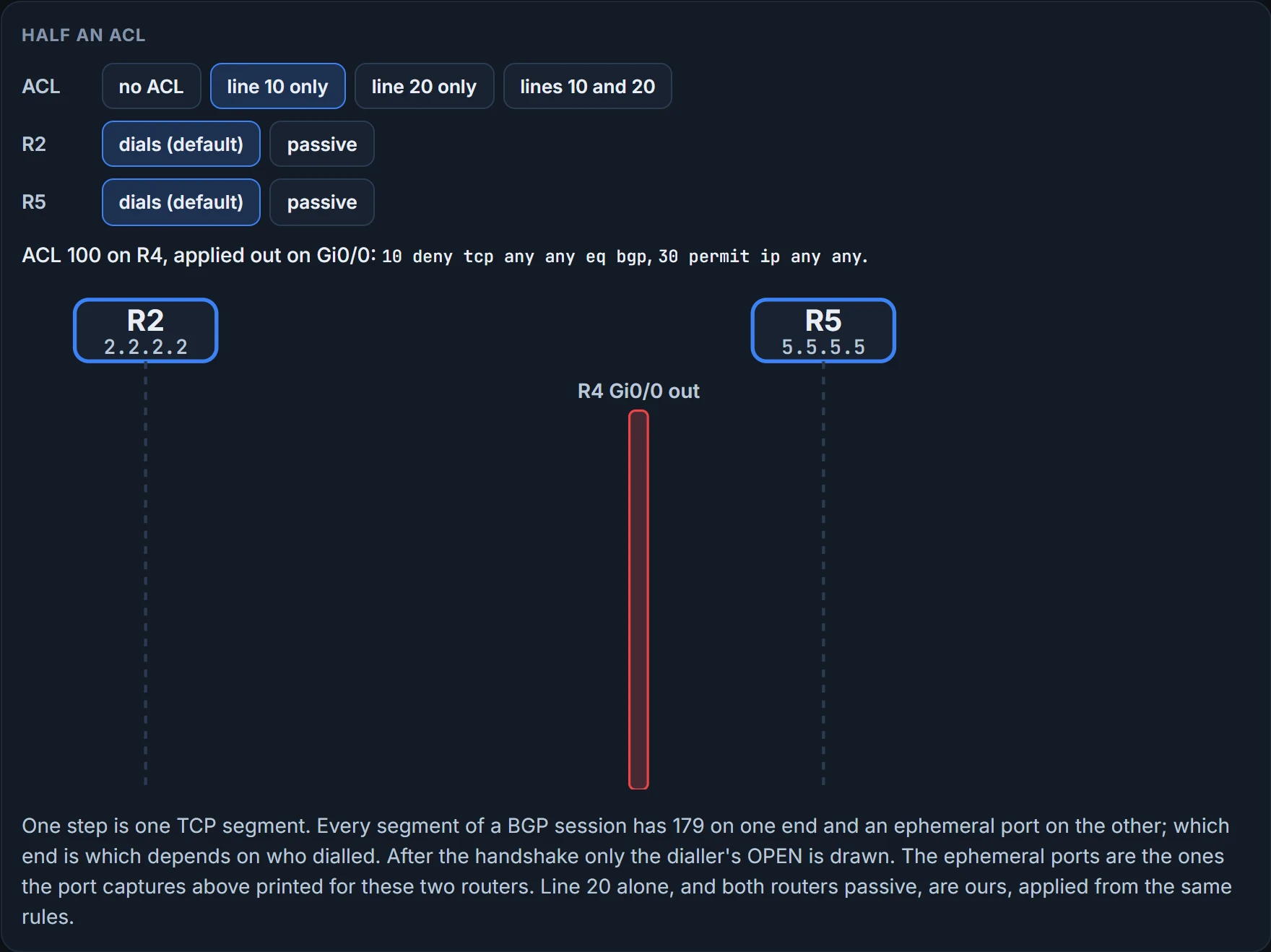
Now back to the smaller ACL, ports in hand. The step rule first: one step is one TCP segment crossing R4, drawn from lifeline to lifeline with its source and destination ports; the ACL is checked only on segments leaving R4 by Gi0/0, the interface that faces R5, the way R4 applies it above; a dropped segment stops that connection.
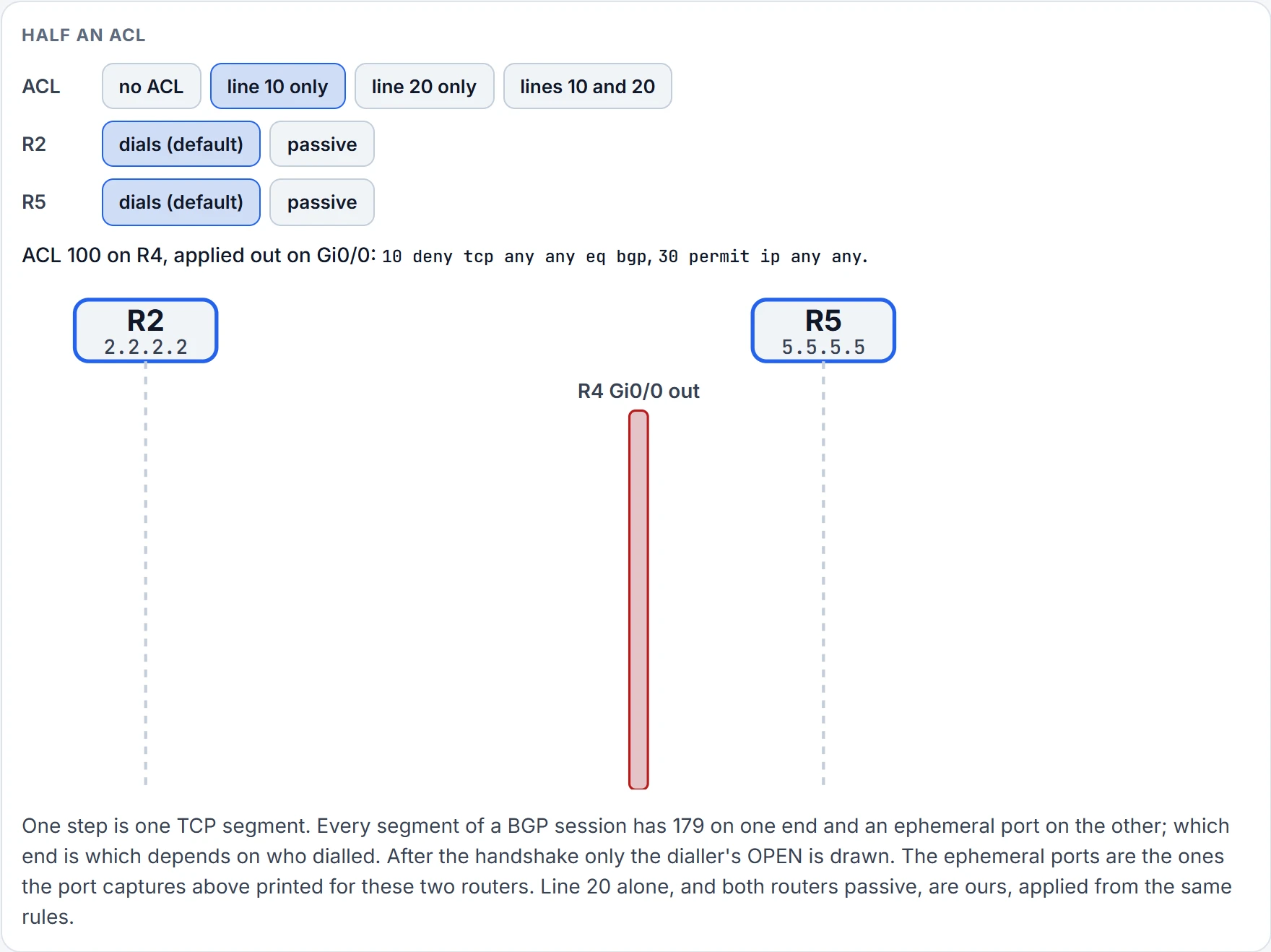
Step 1 of 6 Nothing sent yet.
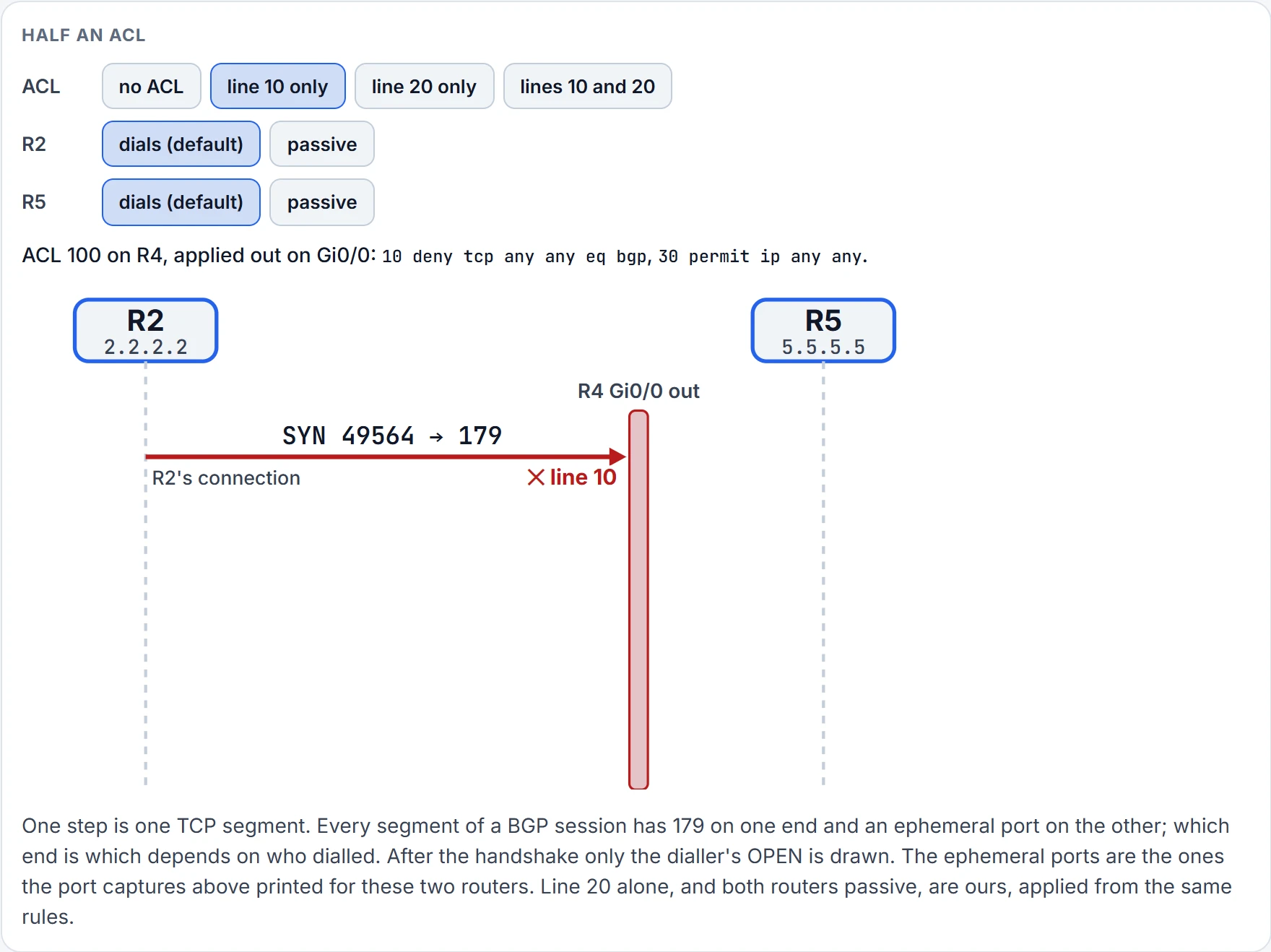
Step 2 of 6 R2 dials. R2 sends SYN from port 49564 to R5's port 179. It leaves R4 by Gi0/0, toward R5, and line 10 matches destination port 179: dropped, and this connection stops.
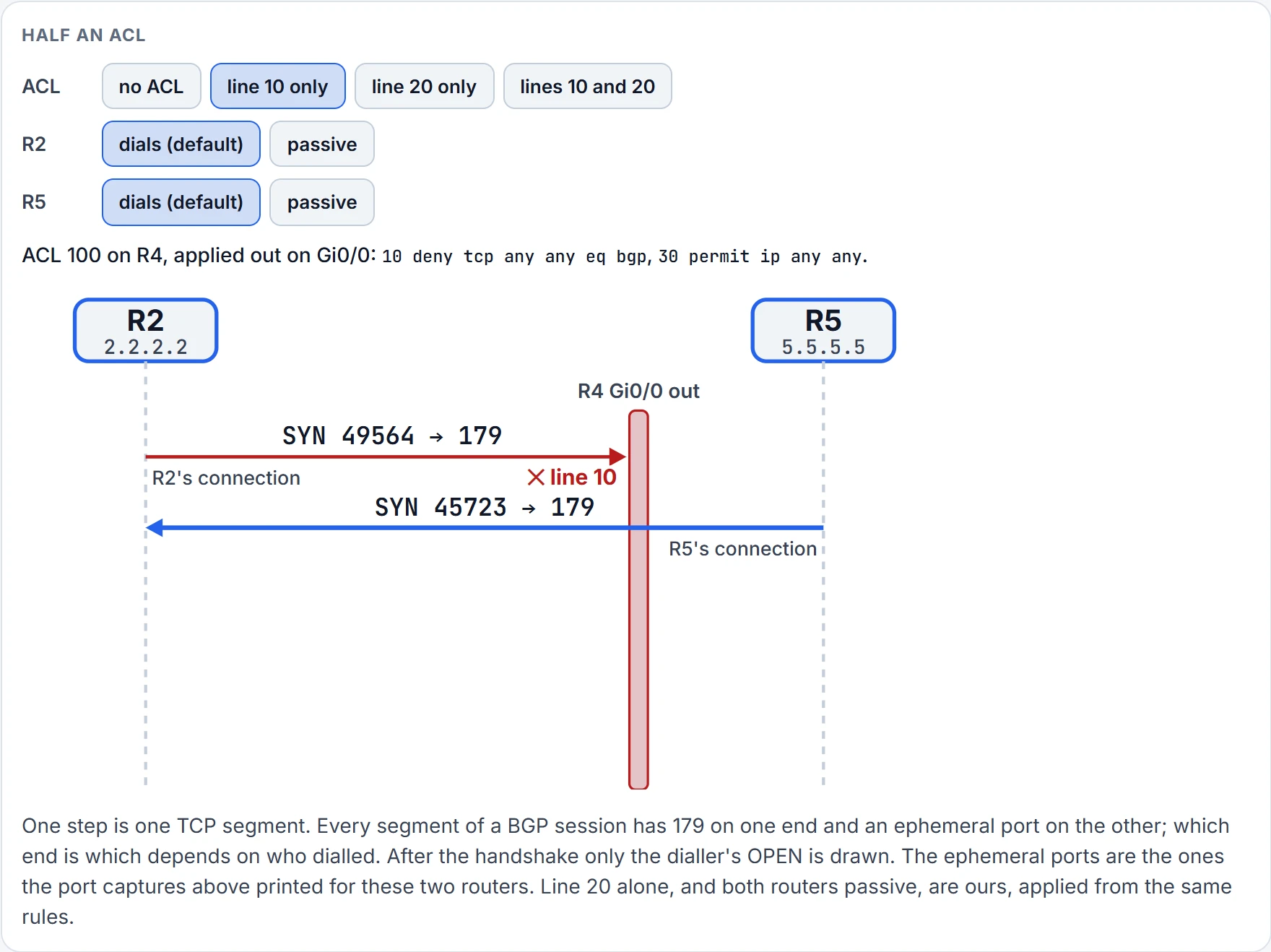
Step 3 of 6 R5 dials. R5 sends SYN from port 45723 to R2's port 179. It enters R4 by Gi0/0, and an outbound ACL doesn't check what comes in: through.
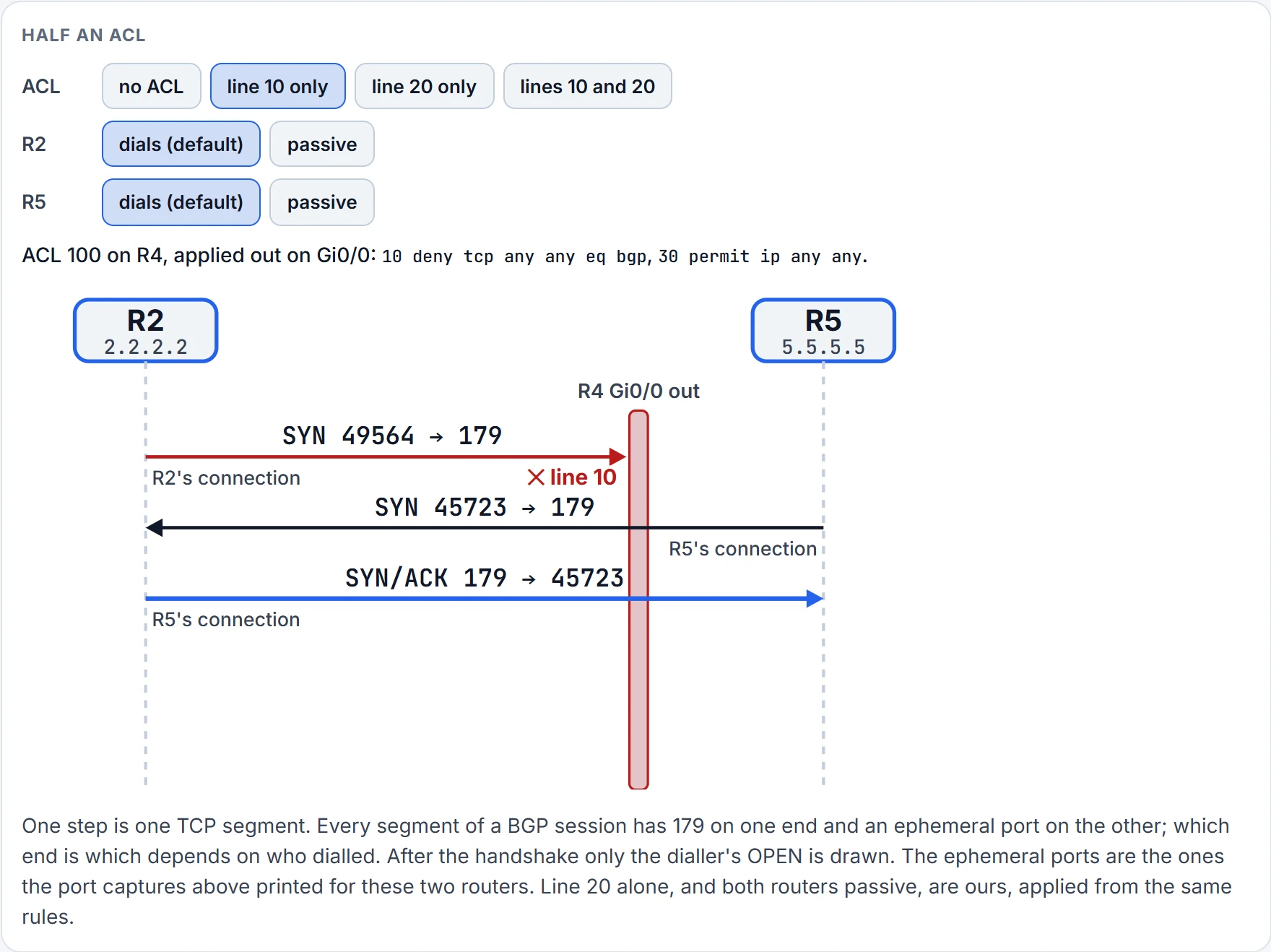
Step 4 of 6 R5 dials. R2 sends SYN/ACK from port 179 to R5's port 45723. It leaves R4 by Gi0/0 and nothing in the ACL matches it: through.
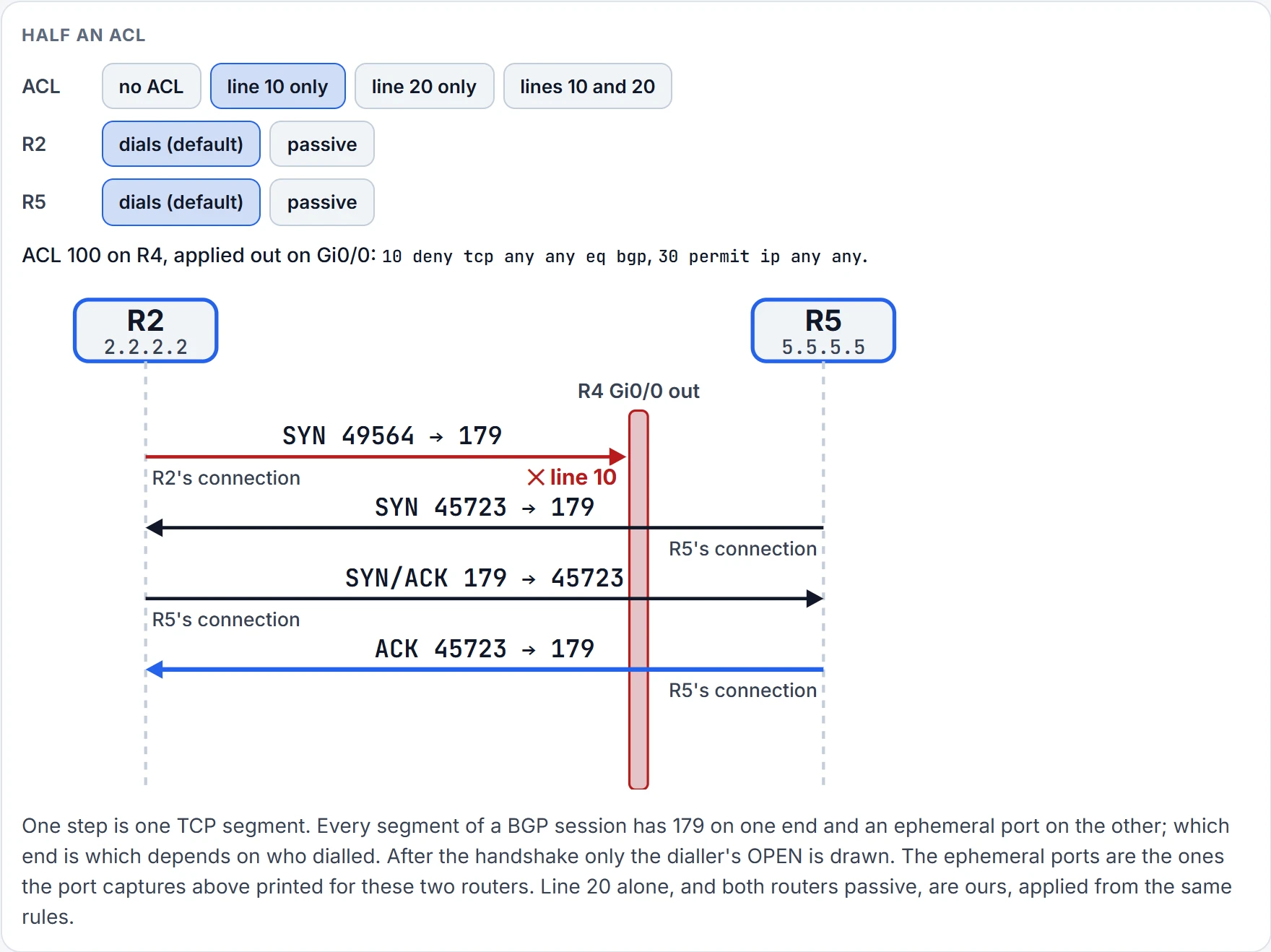
Step 5 of 6 R5 dials. R5 sends ACK from port 45723 to R2's port 179. It enters R4 by Gi0/0, and an outbound ACL doesn't check what comes in: through.
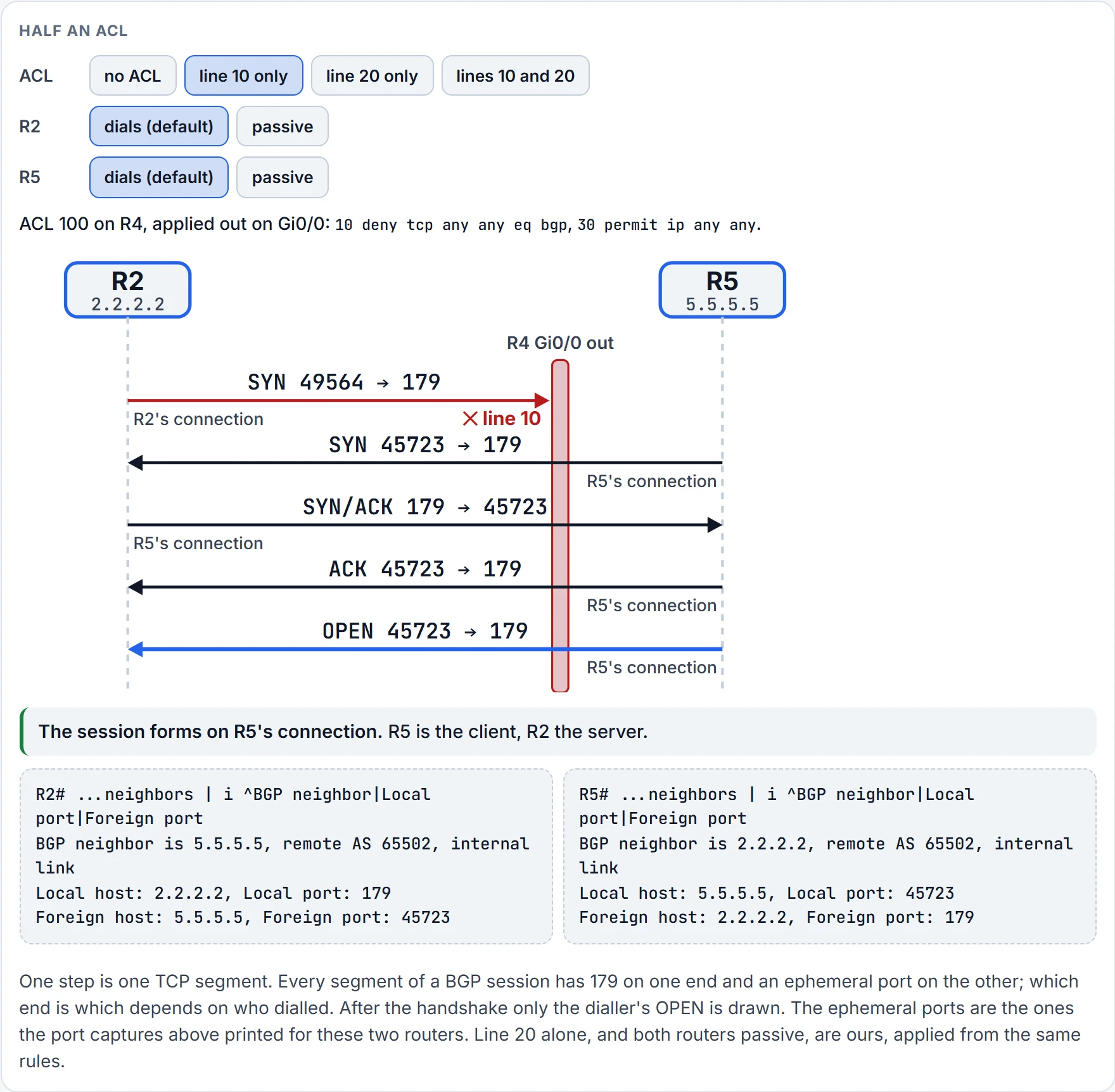
Step 6 of 6 R5 dials. R5 sends OPEN from port 45723 to R2's port 179. It enters R4 by Gi0/0, and an outbound ACL doesn't check what comes in: through.
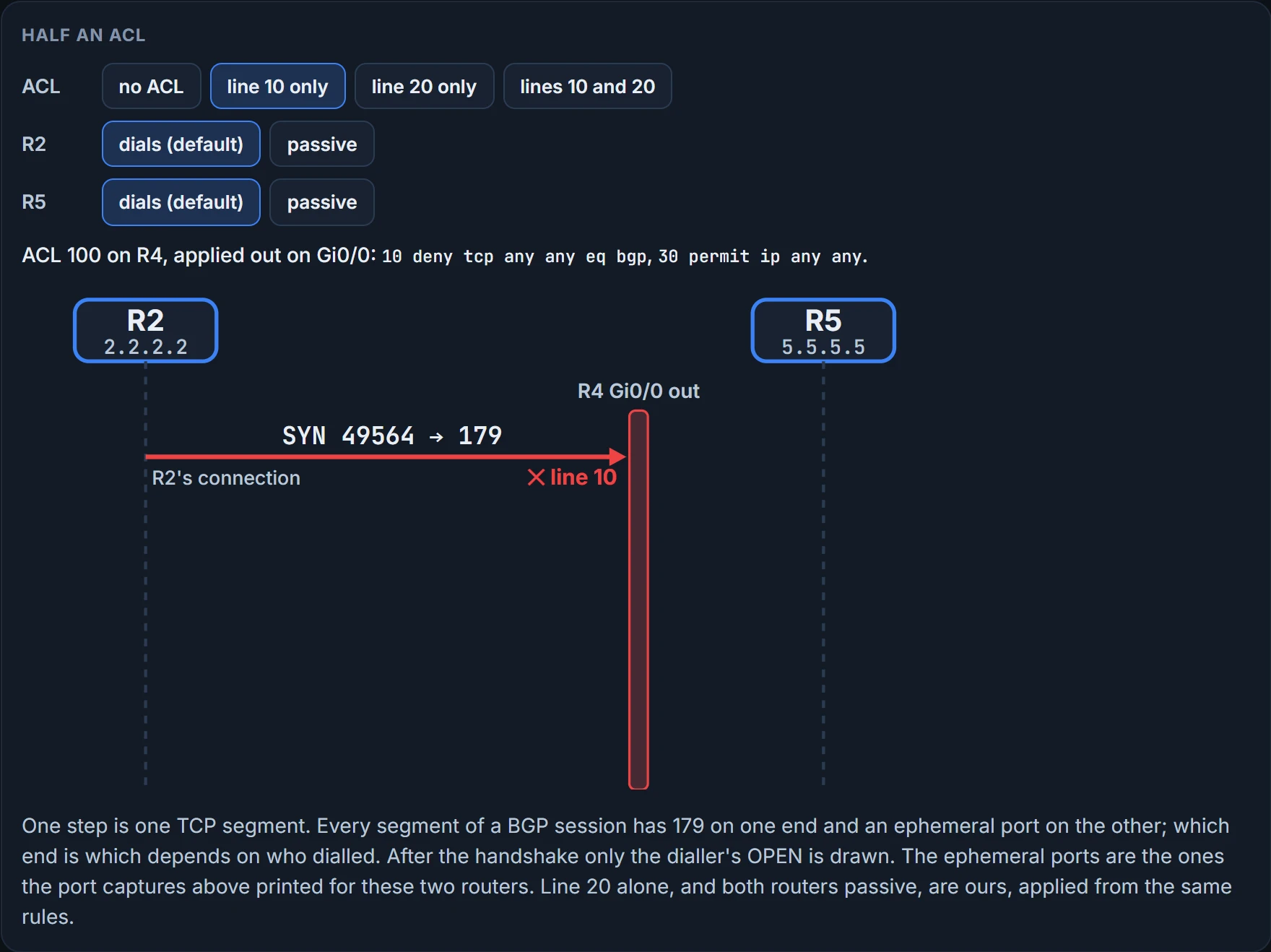
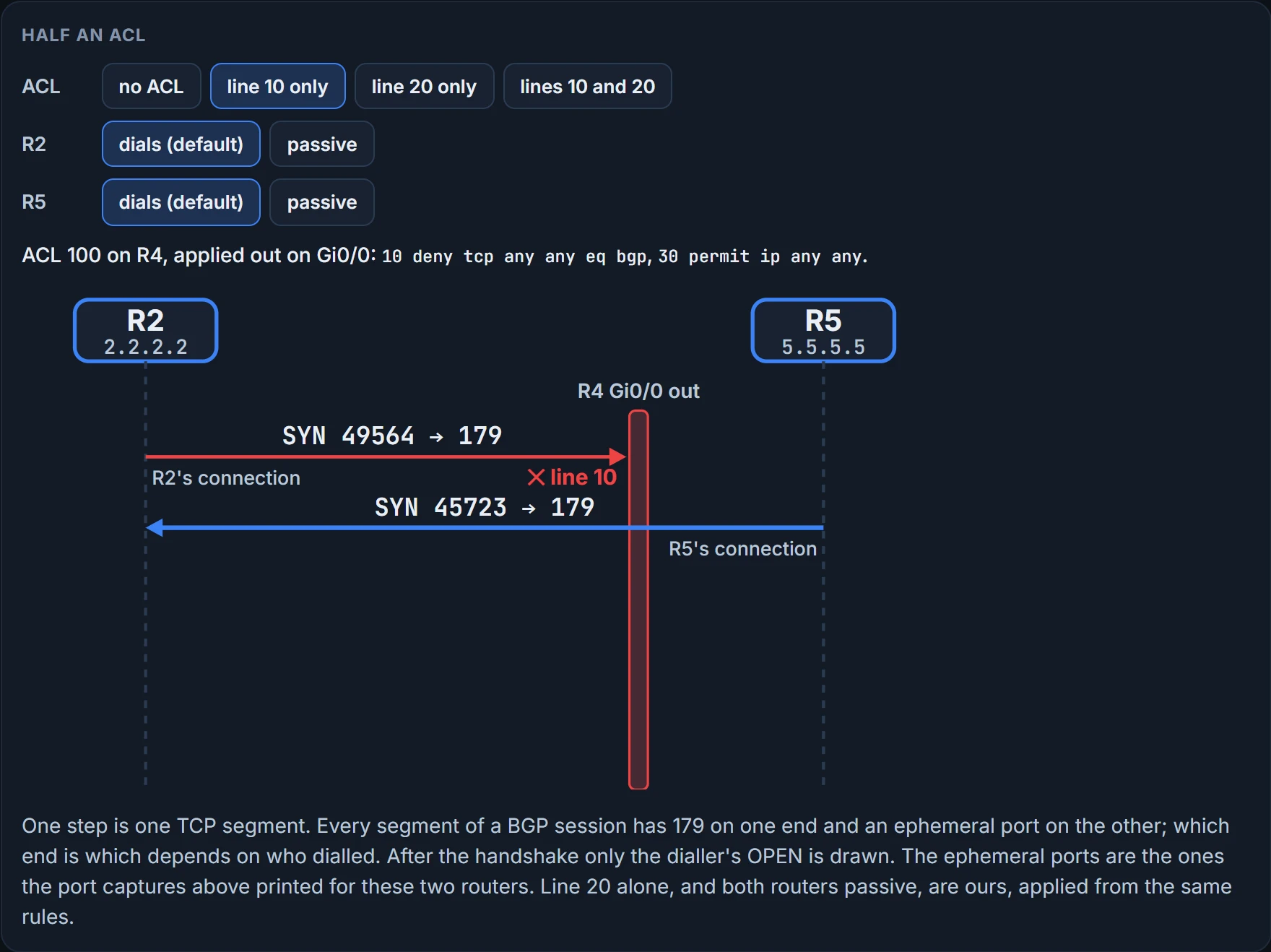
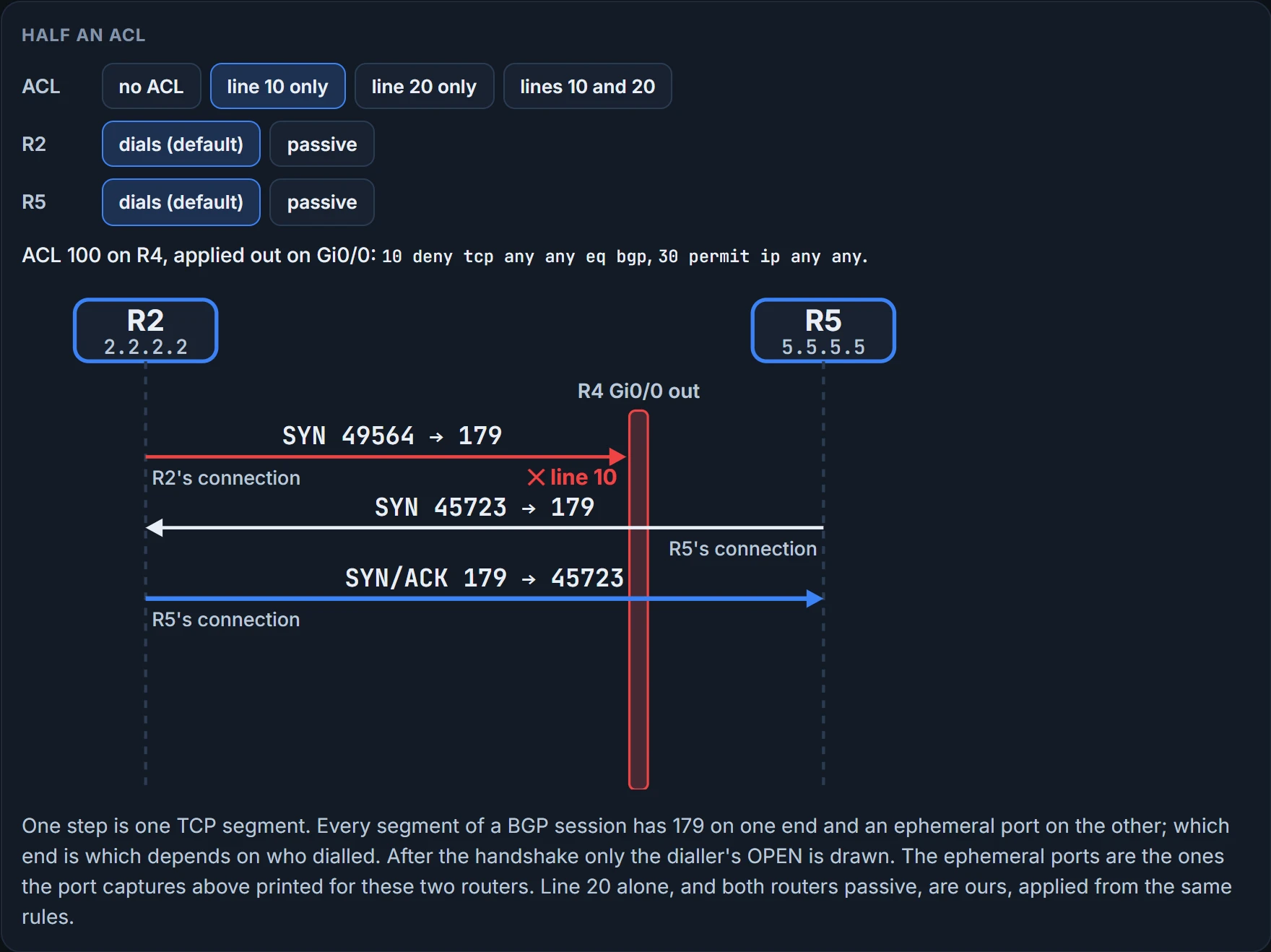
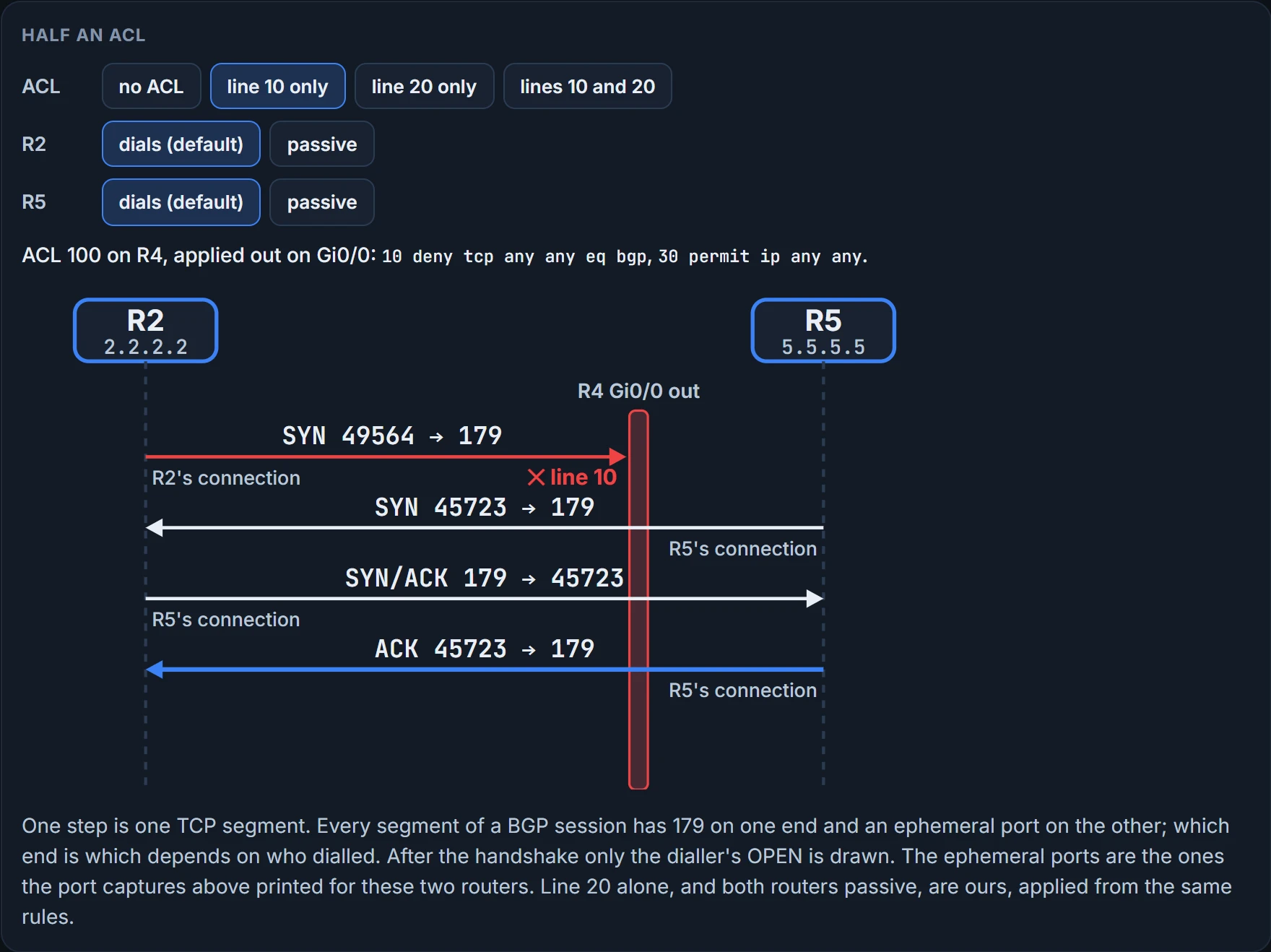
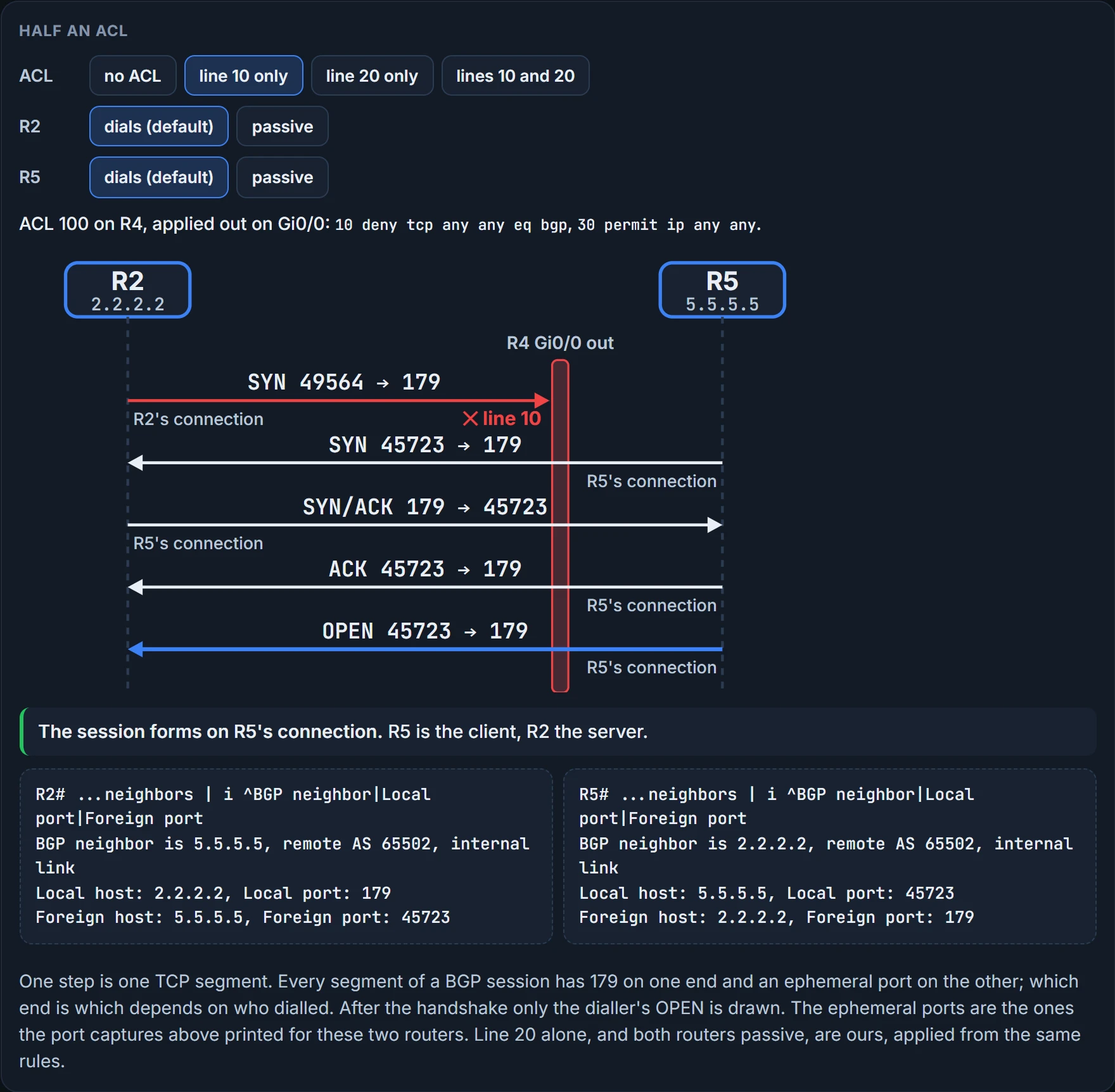
Here's the reading. R2's attempts die at R4 every time: R2's SYN to port 179 leaves R4 by Gig0/0, toward R5, and line 10 matches it. R5's attempts get through: R5's SYN enters R4 by Gig0/0, which an outbound ACL doesn't check, and everything R2 sends back leaves from port 179, which line 10 doesn't match. And by default both routers try to set up the session, so R5 does dial, and the session forms on R5's connection. The condition, controlling who's server and who's client, is met here by the default, for as long as R5 keeps dialling. That's the trap. Make R5 passive and it only waits, R2's attempts keep dying at R4, and the session never forms. Make R2 passive instead and the one connection left is the one the ACL allows, by design rather than by default.
Too far for eBGP: the TTL
The last lesson gave you the reason: eBGP packets leave with a TTL of 1. Here's the fault it causes. By default an eBGP peering is between directly connected routers, so the two are expected to be within one router hop of each other. An iBGP peering can be up to 255 router hops away and still form. Filter the neighbor detail down to the TTL lines: the eBGP neighbor 10.1.12.1 has to be reachable in one router hop, the iBGP neighbor 5.5.5.5 can be up to 255 hops away:
R2# show bgp ipv4 unicast neighbors | include BGP neighbor|TTL
BGP neighbor is 5.5.5.5, remote AS 65502, internal link
Minimum incoming TTL 0, Outgoing TTL 255
BGP neighbor is 10.1.12.1, remote AS 65501, external link
Minimum incoming TTL 0, Outgoing TTL 1
If the neighbor isn't reachable in the number of hops listed, the BGP packet expires and no neighbor relationship forms. In BGP the TTL is the lifetime of a BGP message in router hops, 1 by default for eBGP peers and 255 for iBGP. (One capture two lessons back printed "Outgoing TTL 255" for an eBGP neighbor. The captures disagree, and we haven't settled which a current router prints.)
When the TTL isn't large enough for the distance, the packet is discarded. Try it: an eBGP peering between R1 and R2 using their loopbacks, 1.1.1.1 and 2.2.2.2, over a single link, R1's Gi1/0 to R2's Gi1/0. Layer 3 connectivity is tested by a ping that works, and not over a default route. R1 peers with 2.2.2.2, sourced from Loopback 0 (1.1.1.1), and R2 peers with 1.1.1.1, sourced from Loopback 0 (2.2.2.2). The loopbacks aren't directly connected, they're one hop away, and it's eBGP, so expect the peering to fail:
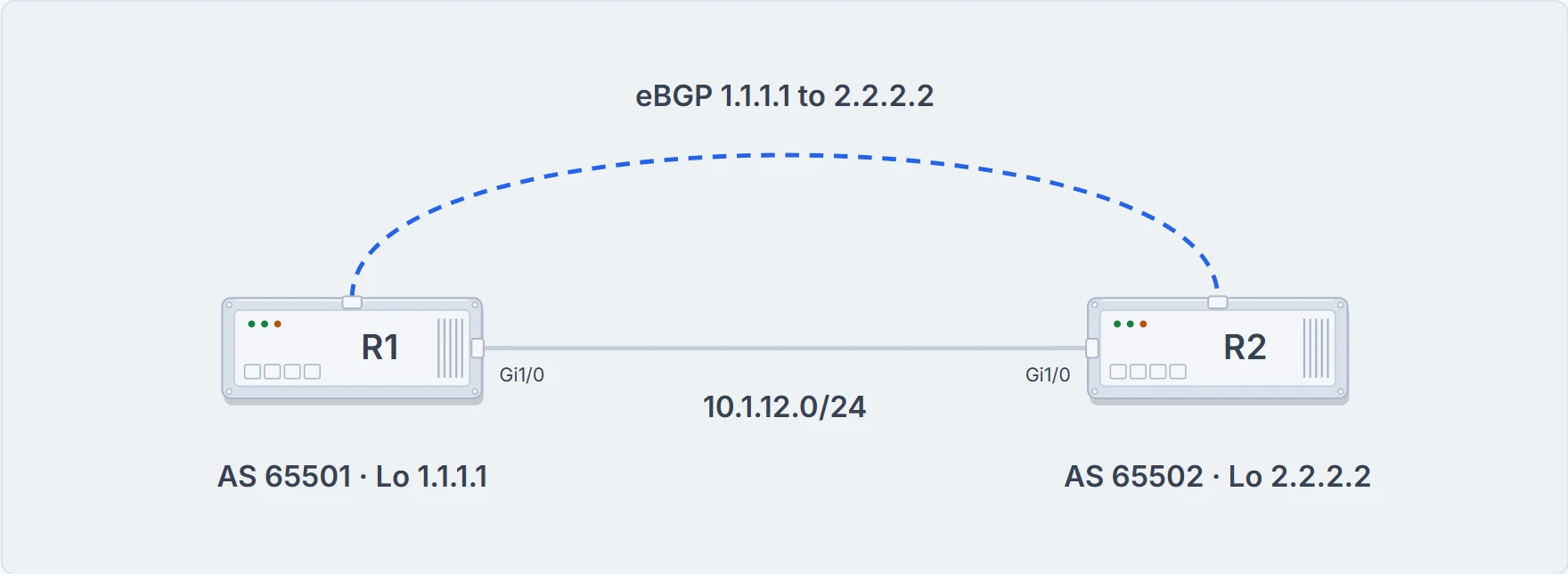
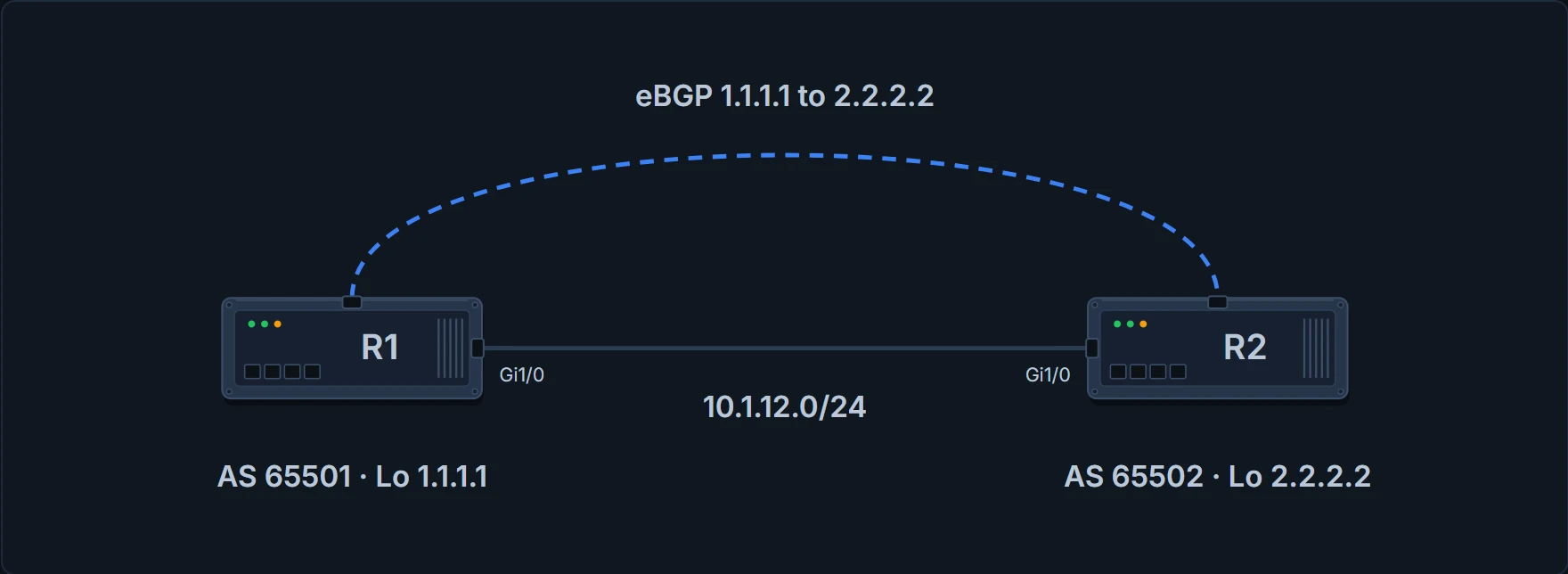
The loopbacks are one router hop apart: each sits behind the other end of the link.
R1# show run | s router bgp
router bgp 65501
 bgp log-neighbor-changes
 neighbor 2.2.2.2 remote-as 65502
 neighbor 2.2.2.2 update-source Loopback0
 neighbor 10.1.13.3 remote-as 65502
R2# show run | s router bgp
router bgp 65502
 bgp log-neighbor-changes
 neighbor 1.1.1.1 remote-as 65501
 neighbor 1.1.1.1 update-source Loopback0
 neighbor 5.5.5.5 remote-as 65502
 neighbor 5.5.5.5 update-source Loopback0
R1's half and R2's. Every line is right. And both routers sit in Idle, because the eBGP peers' addresses aren't directly connected:
R1# show bgp ipv4 unicast summary
! header lines omitted
Neighbor        V           AS MsgRcvd MsgSent   TblVer  InQ OutQ Up/Down  State/PfxRcd
2.2.2.2         4        65502       0       0        1    0    0 never    Idle
10.1.13.3       4        65502      36      35        1    0    0 00:29:49            0
R2# show bgp ipv4 unicast summary
! header lines omitted
Neighbor        V           AS MsgRcvd MsgSent   TblVer  InQ OutQ Up/Down  State/PfxRcd
1.1.1.1         4        65501       0       0        1    0    0 never    Idle
5.5.5.5         4        65502      27      26        1    0    0 00:20:52            0
The fix raises the TTL of eBGP packets: neighbor ip_address ebgp-multihop [TTL]. Here 2 would be enough, so R1 gets neighbor 2.2.2.2 ebgp-multihop 2 and R2 gets neighbor 1.1.1.1 ebgp-multihop 2. Then R2's neighbor 1.1.1.1 may be up to two hops away, and the peering is established:
R2# show bgp ipv4 unicast neighbors | include BGP neighbor|TTL
BGP neighbor is 1.1.1.1, remote AS 65501, external link
 External BGP neighbor may be up to 2 hops away.
BGP neighbor is 5.5.5.5, remote AS 65502, internal link
Minimum incoming TTL 0, Outgoing TTL 255
R2# show bgp ipv4 unicast summary
! header lines omitted
Neighbor        V           AS MsgRcvd MsgSent   TblVer  InQ OutQ Up/Down  State/PfxRcd
1.1.1.1         4        65501       2       4        1    0    0 00:00:04            0
5.5.5.5         4        65502      38      37        1    0    0 00:30:57            0
Look at the external neighbor's line: once multihop is set, it no longer prints a TTL line, it prints "External BGP neighbor may be up to 2 hops away". How many hops to ask for? Traceroute tells you, as long as an ACL isn't blocking it.
One thing that isn't settled. The two loopbacks are one link apart. Whether a router refuses that at TTL 1 because the TTL really runs out, or because of a separate check that the neighbor is directly connected, we haven't confirmed. The fix brings the session up either way.
Notice the ping in this story worked. A ping sets its own TTL; BGP sets eBGP's to 1. That's why the TTL was on the list of suspects a ping can't see.
Continue the lesson
The whole lesson, with its drawings and its questions. 6 more sections after the ones above.