
MP-BGP for IPv6
IPv6 BGP is not a separate protocol: multiprotocol BGP, RFC 4760, carries reachability for several families. Three things you set together in IPv4 are separate: the session's address, which families a neighbour is activated in, and the next hop each route carries. The IPv6 family does not exist by default, so each neighbour must be activated under address-family ipv6.
By Arif, founder of Daveth · Updated
The full 11 min walkthrough is in Daveth Pro (Network). See what the plan opens
What this page answers
How do you configure MP-BGP for IPv6?
Configure the neighbour with remote-as, then under address-family ipv6 activate it with neighbor address activate and advertise prefixes with network statements. The IPv6 family does not exist by default. Read it in “Which families a neighbor gets”
Can IPv6 routes be carried over an IPv4 BGP session?
Yes: activate the IPv4 neighbour in the IPv6 address family. The routes then arrive with an IPv4-mapped next hop, which usually needs a route map to set a usable IPv6 next hop. Read it in “IPv6 routes on an IPv4 session”
One protocol, a second family
Is IPv6 BGP a separate protocol? No. Here's the evidence, and it's short.
Multiprotocol BGP, MP-BGP, is what lets BGP carry network layer reachability information for more than one protocol: IPv4, IPv6, MPLS Layer 3 VPN. RFC 4760 defines it with two new path attributes, each carrying an address family identifier (AFI): multiprotocol reachable NLRI, which carries IPv6 route information here, and multiprotocol unreachable NLRI, which withdraws an IPv6 route from service. Both are optional and non-transitive, so an older router that doesn't understand them can just ignore them. You met both in the session lesson: they ride inside UPDATE messages, and every family keeps its own database.
One detail from the RFC itself, because the rest of the lesson hangs on it. BGP-4 had exactly three IPv4-specific pieces: the NEXT_HOP attribute, the AGGREGATOR attribute and the NLRI, and RFC 4760 groups each family's reachable prefixes with the next hop to use for them, inside MP_REACH_NLRI. The next hop's address type is identified by the family the AFI and SAFI name. Hold that: an IPv6 route carries an IPv6 next hop. The section on IPv4 sessions is what happens when the sender hasn't got one to give.
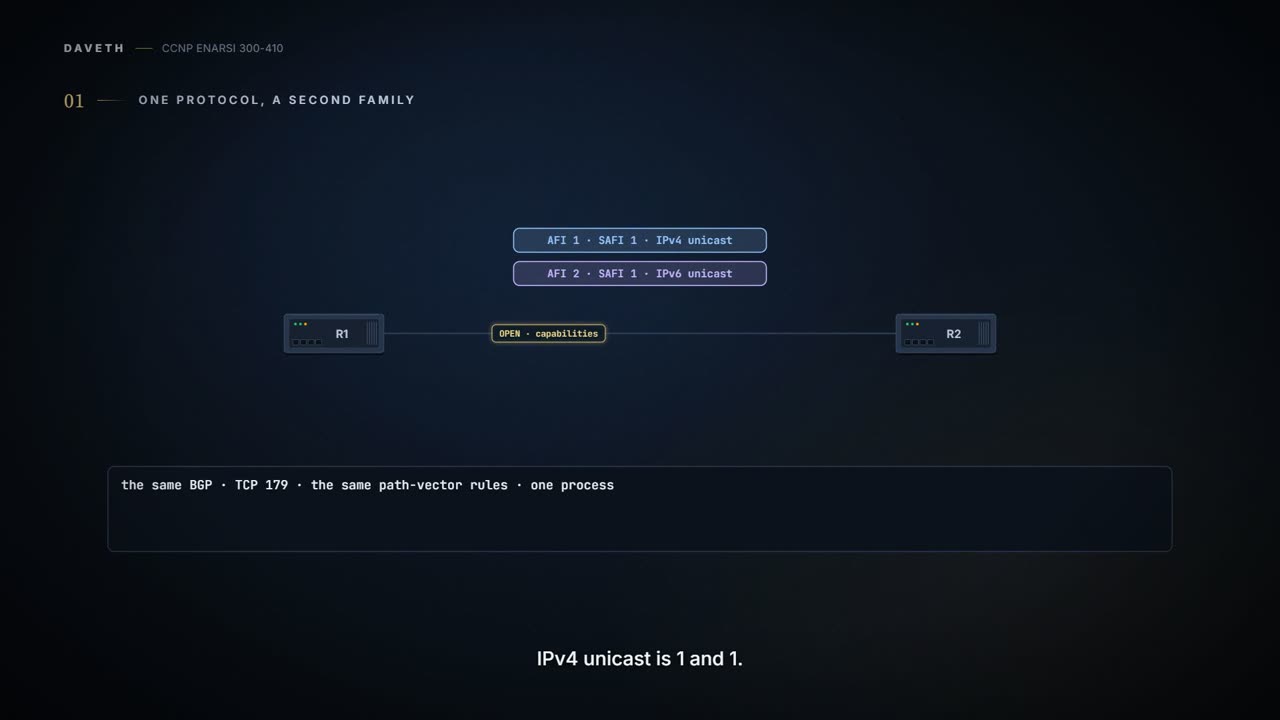
Everything else carries over. All the same IPv4 path vector features and rules apply to MP-BGP for IPv6. It uses the same well-known TCP port, 179. During the OPEN, the two routers exchange capabilities, and that's where the families are agreed: the AFI names the protocol, and the subsequent address family identifier (SAFI) says whether the prefixes are for the unicast or the multicast routing table. IPv4 unicast is AFI 1, SAFI 1; IPv6 unicast is AFI 2, SAFI 1. One process, one port, one set of rules. A second family.
Now a prediction, and the OSPFv3 lesson gave you everything you need.
Not until you set one by hand. Routers with only IPv6 addressing must set the BGP router ID statically to allow sessions to form. It's the OSPFv3 answer again: the ID is a 32-bit number, and with no IPv4 address there's nowhere to take one from. RFC 6286, which updates BGP's base specification, defines the BGP Identifier as a 4-octet, unsigned, non-zero integer, unique within an AS, and names an IPv6-only network as the case it was written for. Our routers all have a 10.255.0.n loopback and a bgp router-id already, so this one never bites us.
The session is a separate choice
The lab for most of this lesson: three routers in three ASs, R1 in AS 65100, R2 in AS 65200 and R3 in AS 65300, with R2 running eBGP to the other two. The links are 2001:db8:0:12::/64 and 2001:db8:0:23::/64, each router has a loopback 2001:db8::n/128, and R1 and R3 each have a LAN, 2001:db8:0:1::/64 and 2001:db8:0:3::/64. The link-local addresses are set by hand, from the link-local range FE80::/10, so they're easy to read: every link of R1's is FE80::1, R2's FE80::2, R3's FE80::3.
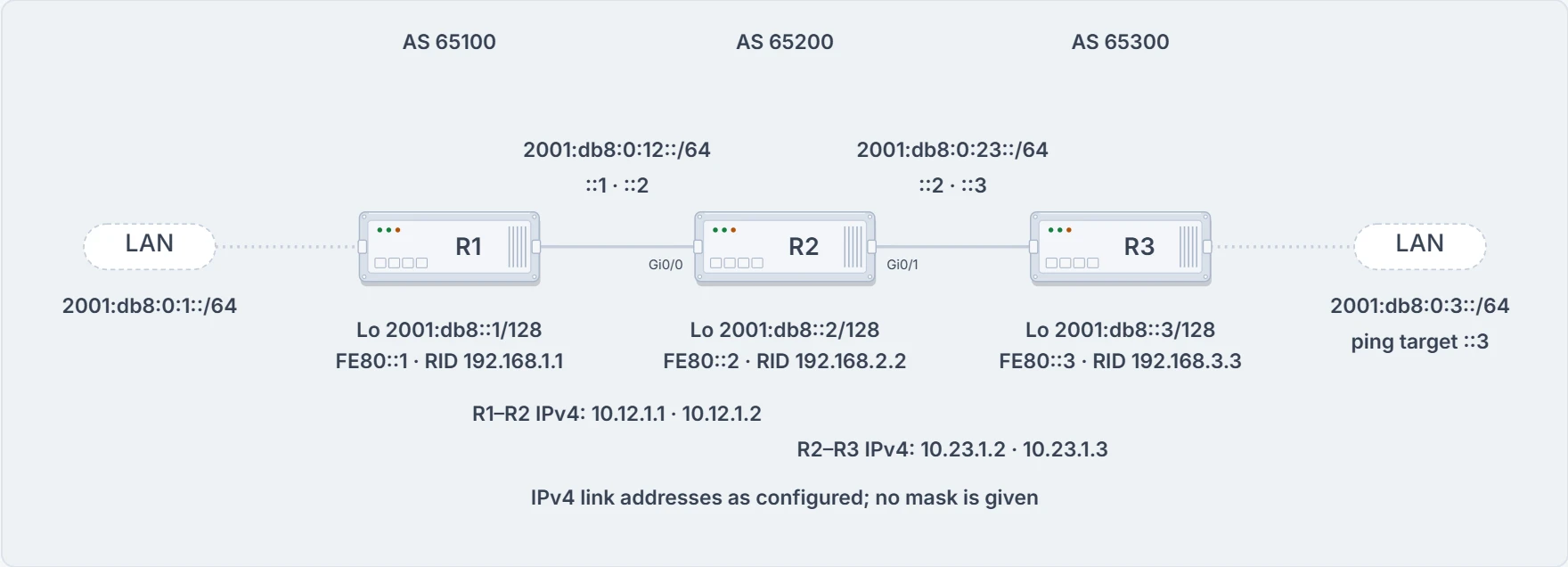
The lab, with the IPv4 link addresses the IPv4-session section needs.
All the BGP configuration rules you know apply with IPv6, with one addition: the IPv6 address family has to be initialized, and the neighbor activated in it. This lab peers on global unicast addresses, sets each router ID in the IPv4 loopback format, and advertises R1's networks by redistribution and R2's and R3's with network statements for every connected network. R1 and R2:
R1
router bgp 65100
 bgp router-id 192.168.1.1
 no bgp default ipv4-unicast
 neighbor 2001:DB8:0:12::2 remote-as 65200
 !
 address-family ipv6
  neighbor 2001:DB8:0:12::2 activate
  redistribute connected
R2
router bgp 65200
 bgp router-id 192.168.2.2
 no bgp default ipv4-unicast
 neighbor 2001:DB8:0:12::1 remote-as 65100
 neighbor 2001:DB8:0:23::3 remote-as 65300
 !
 address-family ipv6
  neighbor 2001:DB8:0:12::1 activate
  neighbor 2001:DB8:0:23::3 activate
  network 2001:DB8::2/128
  network 2001:DB8:0:12::/64
  network 2001:DB8:0:23::/64
(R3's is the same shape: router ID 192.168.3.3, its one neighbor 2001:DB8:0:23::2, and network statements for its loopback, its LAN and the link.) The session lesson's three modules are all there: the session parameters under router bgp, the family, and the activation.
Now look at the neighbor lines and ask what the IPv6 address in them decides. Just one thing: the TCP session. The protocol used to establish the BGP session is independent of the AFI/SAFI route advertisements. TCP is a Layer 4 protocol, and BGP's session can use an IPv4 or an IPv6 address to form the session and exchange routes. So BGP can exchange routes over either kind of session. In a typical deployment, IPv4 routes go over a dedicated IPv4 session and IPv6 routes over a dedicated IPv6 session. But it's possible to carry IPv6 routes over an IPv4 session, or IPv4 routes over an IPv6 session, and it's possible to carry both families on one session.
Three things you've always set together are separate:
- the session: the address in the
neighborline, IPv4 or IPv6; - the families: which address families that neighbor is activated in;
- the next hop: which address each route arrives with: the iBGP lesson's rules, a route map, and, for IPv6 routes on an IPv4 session, a mapped address (the IPv4-session section).
RFC 2545, the one that defines how BGP carries IPv6, gives the dedicated IPv6 session a practical edge: running the session over IPv6 confirms explicitly that IPv6 works between the two peers. An IPv4 session proves nothing about IPv6.
One note before the families. Unique global unicast addresses are the recommendation for peering, to avoid operational complexity. Peering on a link-local address is a risk if the address wasn't set by hand: a hardware failure or a cable move changes the MAC address, stateless autoconfiguration generates a new link-local address, and the session fails. Our routers peer on loopbacks and global addresses throughout.
Which families a neighbor gets
The session lesson taught you the IPv4 default: the router activates the IPv4 address family by default, and no bgp default ipv4-unicast switches that off, after which every family has to be activated by hand. The IPv6 side is the opposite: the IPv6 address family doesn't exist by default on IOS-based devices, so nothing moves in IPv6 until it's initialized.
That leaves one question open, and here it is as a prediction.
IPv4 unicast routing capability is advertised by default unless the neighbor is specifically shut down in the IPv4 address family, or the default is switched off for the whole process with no bgp default ipv4-unicast. That rule doesn't set aside neighbors named by IPv6 addresses, so the router still offers yours IPv4 unicast. The IPv6 half is plain: the IPv6 family has to be initialized and the neighbor activated in it, and you did neither. Name a neighbor by its IPv6 address and the router still offers it IPv4 unicast by default, and doesn't put it in IPv6 until you activate it there: the one family you meant is the one it doesn't get.
The configurations agree, four times. Each one names an IPv6 neighbor, keeps the IPv4 default, and carries a no neighbor ... activate line for it under address-family ipv4: the route-advertisement lesson's IPv6 aggregation lab has no neighbor 2001:DB8:0:12::1 activate and no neighbor 2001:DB8:0:23::3 activate there; the redistribution troubleshooting lab has no neighbor 2001:DB8:0:A::A activate; and you're about to see the same line twice more below. What the line means is stated, that the neighbor isn't activated in that family, and why each configuration needs it never is; our reading is that it turns off the IPv4 unicast offered by default. No configuration here leaves an IPv6-named neighbor on the default, so whether a current router counts it as activated in IPv4, writes the no line by itself, and lists it in show bgp ipv4 unicast summary, we haven't confirmed.
Both ends have a say in a family. The routers exchange AFI capabilities while the session is being negotiated, and show bgp ipv6 unicast neighbors ip-address [detail] shows whether the IPv6 capability was negotiated. R1's neighbor detail for R2: remote AS 65200, an external link, remote router ID 192.168.2.2, Established, and among the neighbor capabilities "Address family IPv6 Unicast: advertised and received", beside the route refresh, four-octet ASN and enhanced refresh lines the session lesson read. "Advertised and received" is both ends. RFC 4760 puts it as a requirement for a bi-directional exchange of a family's routes: each speaker must advertise that family's capability to the other.
Four configurations of one neighbor named by an IPv6 address:
| On this router | IPv4 unicast | IPv6 unicast |
|---|---|---|
neighbor line only, default left on | offered by default; counted as activated? we haven't confirmed | not active |
neighbor line, no neighbor ... activate under address-family ipv4 | not active | not active |
the same, plus neighbor ... activate under address-family ipv6 | not active | active |
no bgp default ipv4-unicast, IPv6 activated | not active | active |
The second row is a neighbor that's configured and active in no family at all. Hold it. It's the ticket further down. And a session where one end activated a family and the other didn't? RFC 4760 asks both ends to advertise the family for a bi-directional exchange and says no more; what a current router does and shows for it, we haven't confirmed.
Reading an IPv6 session
Same instruments as the session lesson, read for the family. The neighbor detail's per-family block, "For address family: IPv6 Unicast", counts prefixes current: R1 has sent 3 and received 5, and Prefixes Total reads 6 and 10. That's the IPv6 family's own count; the IPv4 family, if it were active, would have a block of its own.
show bgp ipv6 unicast summary gives a status summary of the sessions, including how many prefixes have been exchanged and how long each session has been up. On R2, both neighbors have been up for about 25 minutes, and each is advertising three prefixes. The header reads BGP router identifier 192.168.2.2, local AS number 65200, and then the two neighbor lines, 2001:DB8:0:12::1 in AS 65100 and 2001:DB8:0:23::3 in AS 65300, each ending in 3. A number there means Established and prefixes received, exactly as the session lesson read it for IPv4.
The three IPv6 tables have one new thing to read. Some prefixes have the unspecified address, ::, as the next hop, and that means the local router generated the prefix for its BGP table. It plays the part 0.0.0.0 plays in IPv4. The weight of 32,768 says the same: locally originated. R1's table:
R1# show bgp ipv6 unicast
! status, origin and RPKI code lines left out
     Network            Next Hop          Metric LocPrf Weight Path
 *>  2001:DB8::1/128    ::                     0         32768 ?
 *>  2001:DB8::2/128    2001:DB8:0:12::2       0             0 65200 i
 *>  2001:DB8::3/128    2001:DB8:0:12::2                     0 65200 65300 i
 *>  2001:DB8:0:1::/64  ::                     0         32768 ?
 *>  2001:DB8:0:3::/64  2001:DB8:0:12::2                     0 65200 65300 i
 *   2001:DB8:0:12::/64 2001:DB8:0:12::2       0             0 65200 i
 *>                     ::                     0         32768 ?
 *>  2001:DB8:0:23::/64 2001:DB8:0:12::2                     0 65200 65300 i
Everything R1 learned has next hop 2001:DB8:0:12::2, R2's address on their link, because over eBGP the advertising router changes the next hop to the address sourcing the connection, as the iBGP lesson taught. R2's table has R1's routes via 2001:DB8:0:12::1 and R3's via 2001:DB8:0:23::3, and R3's has everything from the other two via 2001:DB8:0:23::2.
The Path column ends with each route's origin code: i for IGP, e for EGP and ? for incomplete. R1's own routes end in ? and R2's and R3's in i, and the route-advertisement lesson gave the reason: routes from a network statement are IGP, redistributed ones incomplete. R1 redistributes; R2 and R3 use network statements.
To see every path of one IPv6 prefix with its attributes, the command is show bgp ipv6 unicast prefix/prefix-length. R3 looking at R1's loopback, and the AS_Path, the origin and the local preference read exactly as they do for IPv4:
R3# show bgp ipv6 unicast 2001:DB8::1/128
BGP routing table entry for 2001:DB8::1/128, version 9
Paths: (1 available, best #1, table default)
  Not advertised to any peer
  Refresh Epoch 2
  65200 65100
    2001:DB8:0:23::2 (FE80::2) from 2001:DB8:0:23::2 (192.168.2.2)
      Origin incomplete, localpref 100, valid, external, best
Look at the fifth line. The next hop is 2001:DB8:0:23::2, R2's global address, and beside it, in brackets, FE80::2: R2's link-local address.
Two more lines to read. "Origin incomplete" is the ? again, in words: this is R1's loopback, which R1 redistributed. And "Not advertised to any peer" means just that: the path wasn't advertised to any BGP peer. R3 has one BGP peer, R2, and R2 is where the route came from. Why R3 keeps it to itself isn't stated; our reading: a route isn't sent back to the peer it came from, and R2 would discard it anyway, because its own AS, 65200, is already in the AS_Path.
Now predict.
Not that address. The next hop in the routing table is the link-local address of the next-hop forwarding address, which is resolved through a recursive lookup. R2's BGP routes:
R2# show ipv6 route bgp
! codes left out
B   2001:DB8::1/128 [20/0]
     via FE80::1, GigabitEthernet0/0
B   2001:DB8::3/128 [20/0]
     via FE80::3, GigabitEthernet0/1
B   2001:DB8:0:1::/64 [20/0]
     via FE80::1, GigabitEthernet0/0
B   2001:DB8:0:3::/64 [20/0]
     via FE80::3, GigabitEthernet0/1
One route, two next hops, and both are the same router: the BGP table names R1's global address, the routing table names R1's link-local address and the interface it's on. [20/0] is eBGP's administrative distance, 20, and a metric of 0, as the iBGP lesson read it. A link-local address is for use on a single link, and in this lab every one of R1's links is FE80::1, so the address alone can't say which link: the interface comes with it.
Why would IPv6 do that? RFC 2545 gives the reason. IPv6 expects a router to have a link-local next hop for routes through a neighbor on a shared subnet, and link-local addresses don't suit BGP's next-hop rules, so BGP sometimes announces a next hop that's a global address followed by a link-local one; the link-local is included only when the sender shares a subnet with that next hop and with the peer. R3's "(FE80::2)" fits an update that carried both. How a current router fills in the routing table's link-local, and what it shows when the next hop isn't on a shared link (an iBGP route, say), we haven't confirmed.
What each instrument proves here, briefly. The capability line proves the family was negotiated both ways, not that a single route arrived. The summary's number proves prefixes arrived, not that any of them can be used: that's the next section. The table's *> proves a best path, not a route in the routing table (the route-advertisement lesson's r). show ipv6 route bgp is the one that proves BGP's route is being used.
IPv6 routes on an IPv4 session
Now carry IPv6 routes over IPv4 sessions on the same three routers: the neighbors are the IPv4 link addresses, and you still have to activate them in the IPv6 family and put the routes into BGP under it. R1:
R1
router bgp 65100
 bgp router-id 192.168.1.1
 no bgp default ipv4-unicast
 neighbor 10.12.1.2 remote-as 65200
 !
 address-family ipv6 unicast
  redistribute connected
  neighbor 10.12.1.2 activate
R2 has neighbors 10.12.1.1 and 10.23.1.3, both activated under address-family ipv6 unicast, with network 2001:DB8::2/128, network 2001:DB8:0:12::/64 and aggregate-address 2001:DB8::/62 summary-only (the route-advertisement lesson's aggregate, which holds back the components inside it). R3 has neighbor 10.23.1.2, activated the same way, and its three network statements.
The iBGP lesson already warned you what the next hop will look like. So here's a sharper question.
Check the sessions first: show bgp ipv6 unicast summary on each router. R1's IPv6 summary lists neighbor 10.12.1.2 in AS 65200; R2's lists 10.12.1.1 in AS 65100 and 10.23.1.3 in AS 65300; R3's lists 10.23.1.2. IPv4 addresses, in the IPv6 summary: the session is IPv4, the family is IPv6, and the summary is listed by family. R1 has received 2 prefixes, R2 3 from each neighbor, R3 2. All sessions up, prefixes arriving.
The tables verify that the routes have been successfully advertised. They have. Look at what arrived. IPv6 routes advertised over an IPv4 session are given an IPv4-mapped IPv6 next hop, ::FFFF:xx.xx.xx.xx, where xx.xx.xx.xx is the IPv4 address of the BGP peering. That isn't a valid forwarding address, so the IPv6 route doesn't populate the RIB. That's the rule as it stands, with no conditions attached. R1:
R1# show bgp ipv6 unicast | begin Network
    Network           Next Hop            Metric LocPrf Weight Path
 *  2001:DB8::/62      ::FFFF:10.12.1.2         0             0 65200 i
 *> 2001:DB8::1/128    ::                       0         32768 ?
 *> 2001:DB8:0:1::/64  ::                       0         32768 ?
 *  2001:DB8:0:12::/64 ::FFFF:10.12.1.2         0             0 65200 i
 *>                    ::                       0         32768 ?
The format is a real IPv6 address type: 80 zero bits, then 16 one bits, then the 32-bit IPv4 address, used to represent an IPv4 node's address as an IPv6 address. An IPv6 route can't point at an IPv4 address, so BGP wraps one up in IPv6 clothes. You can't forward to it.
Now the answer to the question: no, R1 never hears about 2001:DB8:0:23::/64. Look at R1's table: two prefixes from R2, both R2's own (its aggregate and the link), both with the mapped next hop, and nothing of R3's. R2's table:
R2# show bgp ipv6 unicast | begin Network
    Network           Next Hop          Metric LocPrf Weight Path
 *> 2001:DB8::/62      ::                               32768 i
 S  2001:DB8::1/128    ::FFFF:10.12.1.1      0             0 65100 ?
 s> 2001:DB8::2/128    ::                    0         32768 i
 s  2001:DB8::3/128    ::FFFF:10.23.1.3      0             0 65300 i
 s  2001:DB8:0:1::/64  ::FFFF:10.12.1.1      0             0 65100 ?
 s  2001:DB8:0:3::/64  ::FFFF:10.23.1.3      0             0 65300 i
 *  2001:DB8:0:12::/64 ::FFFF:10.12.1.1      0             0 65100 ?
 *>                    ::                    0         32768 i
 *  2001:DB8:0:23::/64 ::FFFF:10.23.1.3      0             0 65300 i
(The capital S on the second row is the Stale code; every other component prints a small s, suppressed. Read it as a misprint.) R2 holds R3's routes, every one with ::FFFF:10.23.1.3, none with a >. The route-advertisement lesson's rule decides the rest: BGP advertises only the best path, and a path whose next hop isn't usable never becomes best. So R2 passes R3's routes to nobody. R3's LAN and loopback sit inside the /62, so summary-only would have held them back anyway. 2001:DB8:0:23::/64 doesn't, and it stops at R2 just the same: that's the mapped next hop's doing alone. The route doesn't fail where you'd look for it, on R1. It stops one router earlier, on R2, where it's held and passed on to no one. R3's table is the mirror: R2's /62 and link with ::FFFF:10.23.1.2, no >, and its own three routes.
And the connectivity check confirms that connectivity can't be maintained. ping 2001:DB8:0:3::3 from R1 answers "% No valid route for destination", success rate 0 percent (0/1), and traceroute gets nothing back at hops 1, 2 and 3. "No valid route": R1's routing table has nothing for it, although BGP holds a /62 that covers it, R1's /62 row, mapped, with no >.
The same mistake on a pair of routers says why it happens. BGP for IPv4 and IPv6 is configured in one BGP configuration mode, called MP-BGP, and running both on one router means address families and activating neighbors in them. Two routers, R1 in AS 65501 and R2 in AS 65502, each with a LAN, and an "IPv4 or IPv6" eBGP neighborship between them. There are two ways to exchange IPv6 routes: over an IPv4 TCP session or over an IPv6 one.
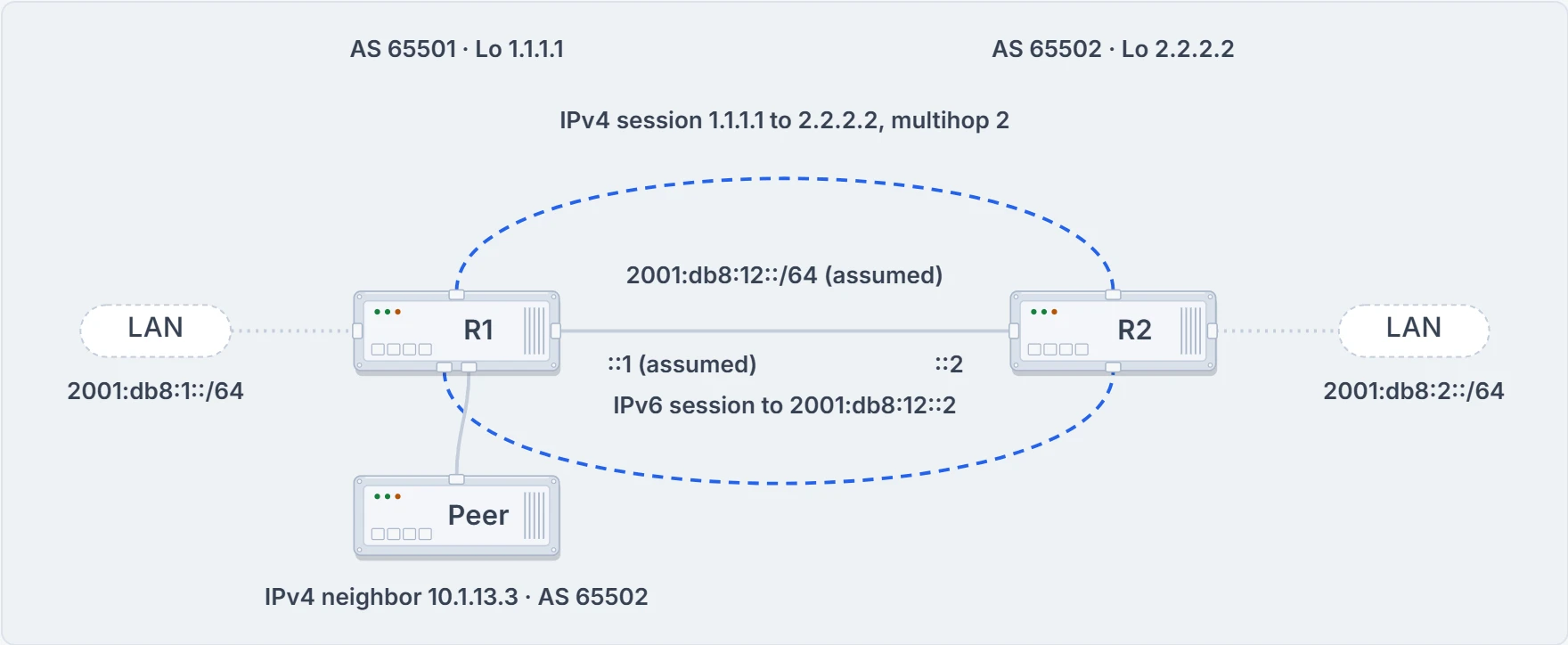
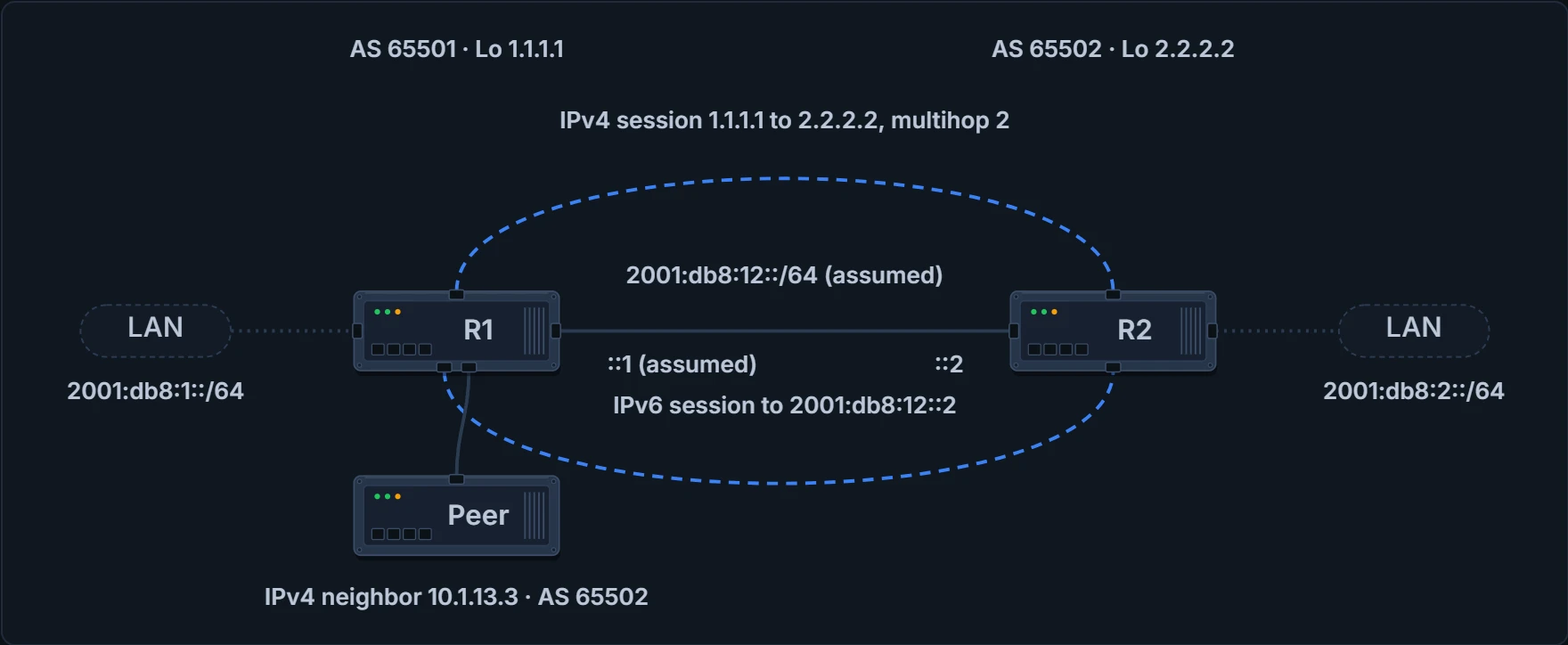
One pair, two possible sessions: IPv4 between the loopbacks, or IPv6 on the link.
Over IPv4 first. Two address families; the neighbor and its remote AS are configured outside the families and activated inside each with neighbor ip_address activate. The IPv6 family uses an IPv4 neighbor address, so the TCP session is IPv4. The neighbor is R2's loopback, 2.2.2.2, with ebgp-multihop 2, the password CISCO and update-source Loopback0, and the IPv4 family carries R1's four /26s, its aggregate and its connected routes; the IPv6 family carries network 2001:DB8:1::/64 and the same neighbor, activated. show bgp ipv6 unicast summary shows an IPv6 unicast adjacency with 2.2.2.2, formed with an IPv4 address, and one IPv6 prefix learned: router identifier 1.1.1.1, local AS 65501, neighbor 2.2.2.2 in AS 65502, and 1 in the last column.
show bgp ipv6 unicast is how you see the IPv6 routes learned from every neighbor:
R1# show bgp ipv6 unicast
! status, origin and RPKI code lines left out
     Network          Next Hop            Metric LocPrf Weight Path
 *>  2001:DB8:1::/64  ::                       0         32768 i
 *   2001:DB8:2::/64  ::FFFF:2.2.2.2           0             0 65502 i
R1's own 2001:db8:1::/64 is local, next hop ::. R2's 2001:db8:2::/64 isn't installed in the routing table, because the next hop isn't reachable. Put plainly: ::FFFF:2.2.2.2 is generated dynamically to replace the original next hop, 2.2.2.2, because an IPv6 route can't have an IPv4 next-hop address, and the next hop is IPv4 because the adjacency for the IPv6 family is an IPv4 adjacency. (You'll see *> read as "in the routing table" and its absence as "not installed". It isn't quite: > means best, and on the second row the asterisk is there and only the > is missing.)
Where does a mapped next hop appear, then? Take the rule at its word: IPv6 routes advertised over an IPv4 BGP session get one, because the adjacency for the IPv6 family is an IPv4 adjacency. The sentence has no conditions, and that's how this lesson uses it. Every example on this page is eBGP, where the advertising router changes the next hop to the address sourcing the BGP connection anyway.
There's a narrower reading, and it's ours. Over iBGP the next hop is left alone unless it's 0.0.0.0, or unless next-hop-self sets external prefixes' next hop to the address sourcing the session. So perhaps the mapped address appears only where a router writes its own address into an IPv6 route over an IPv4 session, and an iBGP router that passes a route on unchanged passes on the IPv6 next hop it received. Nothing printed contradicts that, and nothing settles it. What would: an iBGP session over IPv4 without next-hop-self, carrying an eBGP-learned IPv6 route, read on the receiver. Until then nothing in this lesson rests on it: no fix, and no answer to a check.
An IPv6 prefix doesn't need an IPv6 session, then: BGP is a routing application, and it can exchange IPv6 prefixes over a different session protocol, such as IPv4. What arrives just can't be used without help.
Continue the lesson
The whole lesson, with its drawings and its questions. 3 more sections after the ones above.