
BGP policies: filtering and path manipulation
You control your own way out of an AS, not how the world comes in. Filter routes on a session by prefix, with distribute lists or prefix lists, or by path, with regular expressions in AS_Path ACLs that can pick everything from one organisation. A route map does both and more: it filters and changes path attributes in one pass, per neighbour and direction.
By Arif, founder of Daveth · Updated
The full 12 min walkthrough is in Daveth Pro (Network). See what the plan opens
What this page answers
How do you filter BGP routes by AS path?
With an AS_Path access list: regular expressions matched against the AS_Path, read top-down with an implicit deny, applied to a neighbour. Anchors and the underscore make the expression match whole AS numbers. Read it in “AS_Path ACLs: the transit filter”
How do you apply a route map to a BGP neighbour?
neighbor ip-address route-map name in or out under the address family, a different map per direction if you like. It can filter routes and change their path attributes in the same pass. Read it in “Route maps: filter and stamp in one pass”
What you control
Here's the question this lesson starts from, the way it gets asked: how do you make the whole world send your traffic in through the link you choose? Answer it before you read on.
You don't make anyone do anything. Weight and local preference choose your way out, and they stop at your border; for the way in, prepending and MED are things you send, and the neighbor's own policy can ignore them. The best-path lesson measured exactly that. So the honest version of the question is narrower, and it's this lesson: what do you control? Three things. What you accept from a neighbor. What you send to a neighbor. And what you write on the routes you send. Hold on to that last one: writing a tag on a route and getting the next router to see it turn out to be two separate jobs.
The name for it is conditional route selection: picking out the prefixes that are advertised to or received from peers, so the chosen routes can be changed or removed to steer traffic, use less memory, or improve security. The complete BGP route processing logic has route policies at two places: as routes arrive, and as routes are advertised. You've seen that drawing before, in the route-advertisement lesson: routes from a peer land in the Adj-RIB-In, pass the inbound route policies into the Loc-RIB (where a network statement's route enters through the RIB check), then the next-hop and validity check and the best path, which goes to the global RIB and through the outbound route policies to the Adj-RIB-Out and the peer. Every tool in this lesson plugs into one of those two boxes.
There are four ways to filter routes inbound or outbound for a specific BGP peer, and you can use each alone or several together:
- A distribute list filters prefixes with a standard or extended ACL; any prefix not permitted is implicitly denied.
- A prefix list permits or denies prefixes top-down with prefix-matching specifications, much like an ACL; any prefix not permitted is implicitly denied.
- An AS_Path ACL permits or denies a prefix with a list of regular expressions run against its current AS_Path; any prefix not permitted is implicitly denied.
- A route map matches on a variety of prefix attributes and takes a variety of actions, from a plain permit or deny to changing BGP path attributes; any prefix not permitted is implicitly denied.
Four tools, four implicit denies. Remember that the next time a filter "removed everything".
One combination is refused: a BGP neighbor can't use a distribute list and a prefix list at the same time in the same direction. Everything else combines, so an AS_Path ACL and a prefix list can be applied to one neighbor together. In what order several filters on one session run, we haven't confirmed.
The neighbor-troubleshooting lesson showed you how to find a filter that's already there, with show ip protocols and show bgp ipv4 unicast neighbors ip-address | include prefix|filter|Route map. This lesson writes them.
Matching the prefix: distribute lists and prefix lists
One lab for most of this lesson. R1, in AS 65100, has a single eBGP session to R2 in AS 65200, which may peer with other ASs such as AS 65300. Every route R1 learns comes over that one session.
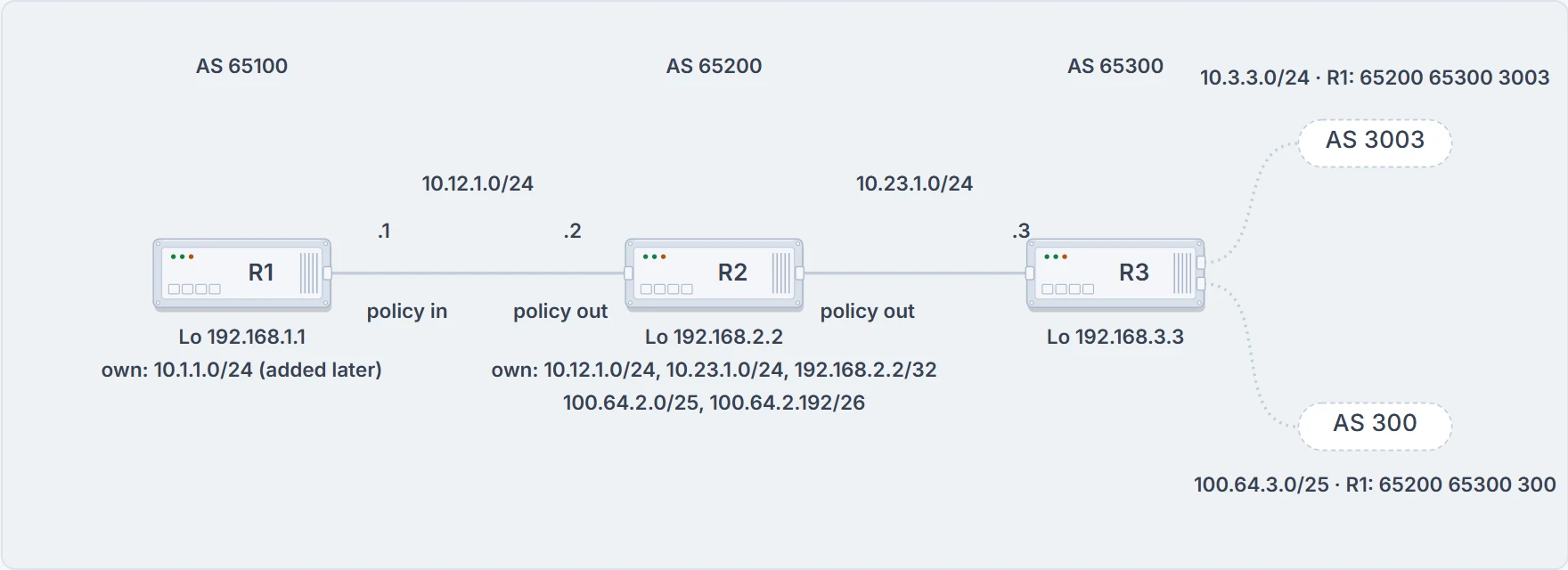
Every filter on R1 in this lesson sits on its one session, inbound. R2's own filters sit on both of its sessions, outbound.
R1's table, read for prefix and AS_Path, with every Path column whole:
R1# show bgp ipv4 unicast | begin Network
    Network          Next Hop            Metric LocPrf Weight Path
*>  10.3.3.0/24      10.12.1.2               33             0 65200 65300 3003 ?
*   10.12.1.0/24     10.12.1.2               22             0 65200 ?
*>                   0.0.0.0                  0         32768 ?
*>  10.23.1.0/24     10.12.1.2              333             0 65200 ?
*>  100.64.2.0/25    10.12.1.2               22             0 65200 ?
*>  100.64.2.192/26  10.12.1.2               22             0 65200 ?
*>  100.64.3.0/25    10.12.1.2               22             0 65200 65300 300 ?
*>  192.168.1.1/32   0.0.0.0                  0         32768 ?
*>  192.168.2.2/32   10.12.1.2               22             0 65200 ?
*>  192.168.3.3/32   10.12.1.2             3333             0 65200 65300 ?
Ten rows: 10.3.3.0/24 from AS 3003 behind 65300, 10.12.1.0/24 both learned from R2 and R1's own, 10.23.1.0/24, three 100.64 prefixes (100.64.2.0/25, 100.64.2.192/26, and 100.64.3.0/25 from AS 300), R1's own 192.168.1.1/32, and R2's and R3's loopbacks 192.168.2.2/32 and 192.168.3.3/32.
The distribute list. It filters prefixes neighbor by neighbor with a standard or extended ACL, attached under the address family with neighbor ip-address distribute-list {acl-number | acl-name} {in | out}. And the ACL lesson's rule comes back here: an extended ACL used for BGP matches the network portion with its source fields and the network mask with its destination fields.
Requirement: from R2, accept only /32 networks in 192.168.0.0/16, and only /25 networks of the form 100.64.x.0. An extended ACL named ACL-ALLOW does it, two entries, the first for any network from 192.168.0.0 to 192.168.255.255 with a length of /32 only, the second for the 100.64.x.0 pattern with a length of /25, attached to R2's session:
R1
ip access-list extended ACL-ALLOW
 permit ip 192.168.0.0 0.0.255.255 host 255.255.255.255
 permit ip 100.64.0.0 0.0.255.0 host 255.255.255.128
!
router bgp 65100
 neighbor 10.12.1.2 remote-as 65200
 address-family ipv4
  neighbor 10.12.1.2 distribute-list ACL-ALLOW in
Before you read on: which of R2's eight rows survive, and why does 100.64.2.192/26 fail?
Six rows are left, and two of them are R1's. R1 still injects its own 10.12.1.0/24 and 192.168.1.1/32, since an inbound filter on R2's session never sees them; the two loopbacks from R2 and R3 pass the first entry, and 100.64.2.0/25 and 100.64.3.0/25 are accepted. So R1 keeps its own 10.12.1.0/24, 100.64.2.0/25, 100.64.3.0/25, 192.168.1.1/32, 192.168.2.2/32 and 192.168.3.3/32, and nothing else. You'll read that 100.64.2.192/26 is rejected because its prefix length doesn't match the second entry. True, and only half the story: its address fails that entry too, because the wildcard 0.0.255.0 wants a fourth octet of 0 and this one is 192. Two fields, two reasons. The same two fields write any 172.16.x.x network from /24 to /32: permit ip 172.16.0.0 0.0.255.255 255.255.255.0 0.0.0.255.
The prefix list. It filters prefixes neighbor by neighbor with a prefix list, attached with neighbor ip-address prefix-list prefix-list-name {in | out} under the address family. Requirement: accept only RFC 1918 space from R2. Same starting table, a prefix list called RFC1918, applied inbound on R1 toward R2:
R1(config)# ip prefix-list RFC1918 seq 10 permit 10.0.0.0/8 le 32
R1(config)# ip prefix-list RFC1918 seq 20 permit 172.16.0.0/12 le 32
R1(config)# ip prefix-list RFC1918 seq 30 permit 192.168.0.0/16 le 32
R1(config)# router bgp 65100
R1(config-router)# address-family ipv4 unicast
R1(config-router-af)# neighbor 10.12.1.2 prefix-list RFC1918 in
The prefix-list lesson's rules read it for you: each line covers its block at every length from its own up to /32, and the implicit deny takes the rest. So the three 100.64 prefixes, 100.64.2.0/25, 100.64.2.192/26 and 100.64.3.0/25, are filtered, being outside the prefix list's criteria, and everything in 10/8 and 192.168/16 stays.
For IPv6 the prefix list is the one to reach for: the list is written {ip | ipv6} prefix-list, and the neighbor command repeats under address-family ipv6. Whether a distribute list exists for IPv6 BGP neighbors, and the IPv6 forms themselves, we haven't confirmed; the session that carries them is the MP-BGP lesson's.
Matching the path: anchors and the underscore
Now a requirement no prefix filter can write: "everything that passed through AS 100", or "only what AS 300 itself sent us". The prefixes don't say that. The AS_PATH does.
When matching prefixes gets too complicated and you'd rather pick every route from one organization, you select on the AS_Path, with an AS_Path ACL that uses regular expressions. With ASNs running up to 4,294,967,295, regular expressions are how you parse them. A regex is built from query modifiers that pick out the content you want. Three to start:
| Modifier | Definition |
|---|---|
_ underscore | matches a space |
^ caret | the start of the string |
$ dollar sign | the end of the string |
Two more facts before you touch a router. The characters .^$*+()[]? are special and need a backslash to be matched literally: to match an asterisk in the output, you write \*. And you can test any regex against the live table with show bgp afi safi regexp regex-pattern. That command is a dry run. Use it every time.
The lab for the regexes: R1 in AS 100 with five 192.168 prefixes, R2 in AS 200, R3 in AS 300 with five 172.16 prefixes. Here's R2's table, every path whole:
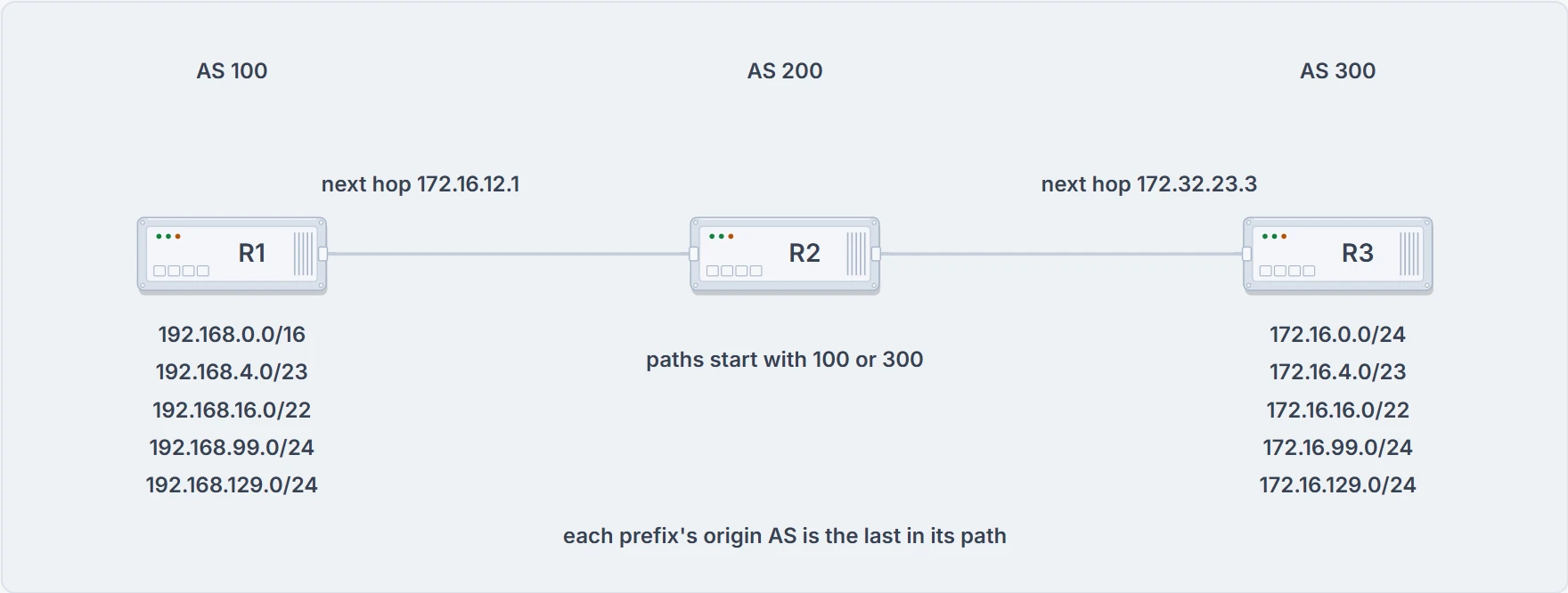
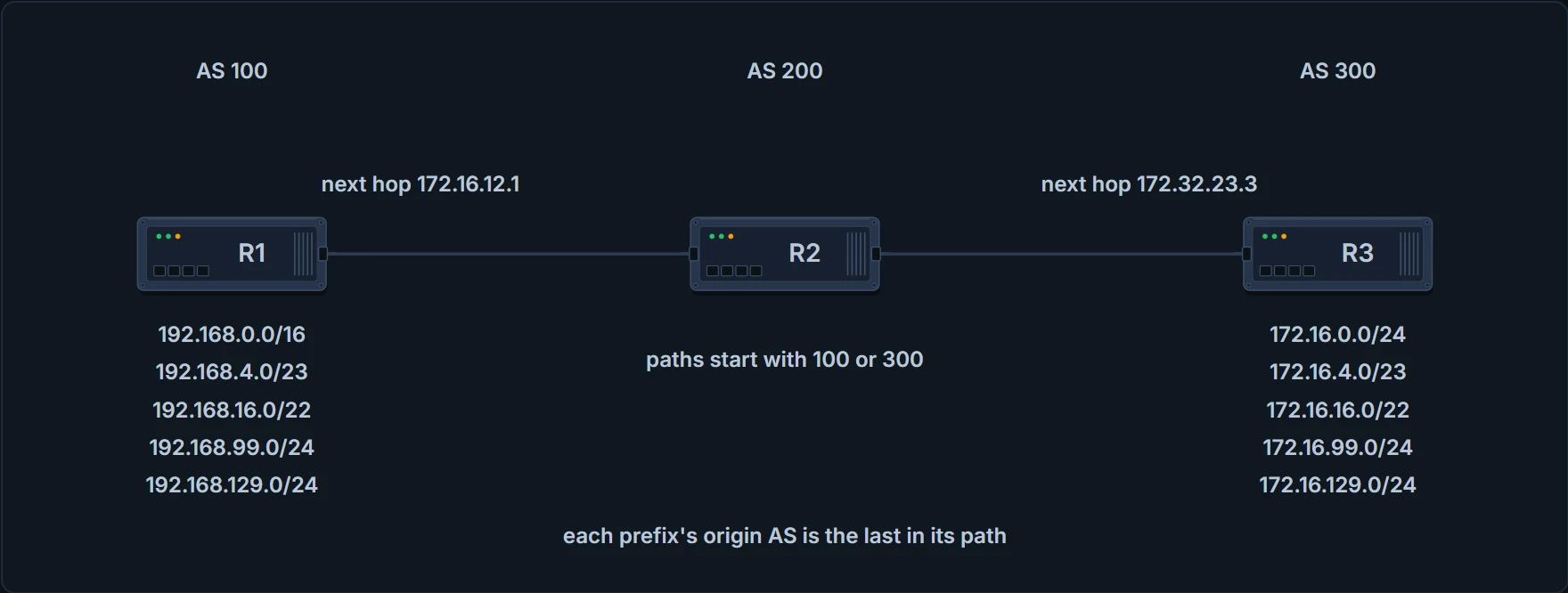
R2 sits between AS 100 and AS 300, so the first AS of every path is the neighbor the route came from, and the last is where it started.
R2# show bgp ipv4 unicast
! Output omitted for brevity
   Network          Next Hop     Metric LocPrf Weight Path
*> 172.16.0.0/24    172.32.23.3       0             0 300 80 90 21003 2100 i
*> 172.16.4.0/23    172.32.23.3       0             0 300 878 1190 1100 1010 i
*> 172.16.16.0/22   172.32.23.3       0             0 300 779 21234 45 i
*> 172.16.99.0/24   172.32.23.3       0             0 300 145 40 i
*> 172.16.129.0/24  172.32.23.3       0             0 300 10010 300 1010 40 50 i
*> 192.168.0.0/16   172.16.12.1       0             0 100 80 90 21003 2100 i
*> 192.168.4.0/23   172.16.12.1       0             0 100 878 1190 1100 1010 i
*> 192.168.16.0/22  172.16.12.1       0             0 100 779 21234 45 i
*> 192.168.99.0/24  172.16.12.1       0             0 100 145 40 i
*> 192.168.129.0/24 172.16.12.1       0             0 100 10010 300 1010 40 50 i
Read it as text, because that's how the regex reads it. Each 172.16 path starts with 300, each 192.168 path with 100, and the rest is the same five paths twice: 80 90 21003 2100, 878 1190 1100 1010, 779 21234 45, 145 40, and 10010 300 1010 40 50. The i at the end is the origin code, not part of the path the regex reads: the $ examples below only work if the path ends at the last AS. One oddity is on purpose: 172.16.129.0/24 carries AS 300 twice, apart, which you'd never see in real life because it means a routing loop. It's there to make the regex work harder.
Draft one. Requirement: the prefixes that passed through AS 100.
Eight. regexp 100 drags in four ASNs you didn't want: 1100, 2100, 21003 and 10010. So it returns the three 172.16 prefixes whose paths hold one of them (0.0/24, 4.0/23, 129.0/24) and all five 192.168 prefixes.
Draft two. Put an underscore before the number, _100, so a space has to sit left of 100. That removes every unwanted ASN except 10010, and leaves 172.16.129.0/24 and the five 192.168 prefixes.
Draft three. An underscore on both sides, _100_, finishes the query for routes that pass through AS 100. It returns the five 192.168 prefixes and nothing else.
Now look hard at that result, because the definition just failed. Take 192.168.0.0/16: its path is 100 80 90 21003 2100. If _ "matches a space", what space sits in front of that first 100? None. The path starts there. And yet _100_ matched it. The same happens in four more of the printed results: _100 and _300_ keep paths that start with the AS, _40_ and [4-8]0_ keep paths that end with it. So, on the printed outputs, _ matches a space or the start or the end of the path. That's what makes _100_ mean "AS 100, the whole number, anywhere". Whether _ matches anything else, such as a comma or the braces of an AS_SET, we haven't confirmed.
The caret. Requirement: only the prefixes AS 300 advertised. _300_ looks fine and isn't: it also brings back 192.168.129.0/24, and 172.16.129.0/24 matches twice. AS 300 is directly connected, so what you want is 300 as the first AS: ^300_ returns exactly the five 172.16 prefixes.
The dollar sign. Requirement: only the prefixes that originated in AS 40. Try _40_. It also includes routes that originated in AS 50, because 40 50 has 40 in the middle. Anchor it to the end: _40$ returns 172.16.99.0/24 and 192.168.99.0/24.
Three drafts, three tightenings. Each first draft matched more than the requirement said, and each fix was one character. That's the habit to keep: draft, run regexp against the table, read every row that came back, tighten.
Matching the path: classes, groups and repeats
The rest of the modifiers:
| Modifier | Definition |
|---|---|
[] brackets | matches a single character or nesting within a range |
- hyphen | a range of numbers in brackets |
[^] caret in brackets | excludes the characters listed in brackets |
() parentheses | nesting of search patterns |
| pipe | "or" functionality |
. period | a single character, including a space |
* asterisk | zero or more characters or patterns |
+ plus sign | one or more instances of the character or pattern |
? question mark | one or no instances of the character or pattern |
So brackets match a single character, from a list or a range given with a hyphen, and a caret inside the brackets excludes the characters listed; parentheses nest a pattern and the pipe gives "or"; the period is any single character, a space included, the asterisk is zero or more, the plus one or more, and the question mark one or none. Read the last three the way the plus and the question mark are described: they repeat "the character or pattern" just before them, so . followed by an asterisk is "any characters at all".
Hold on to two words in that table: "single character". They decide the next three examples.
Brackets. Requirement: an AS containing 11 or 14. 1[14] is a 1 followed by one character, 1 or 4. It returns 172.16.4.0/23 (1190) and 172.16.99.0/24 (145), and their 192.168 twins.
Hyphen. Requirement: an AS whose last two digits are 40, 50, 60, 70 or 80. [4-8]0_ is one character from 4 to 8, then a 0, then a delimiter; it returns 172.16.0.0/24, 172.16.99.0/24, 172.16.129.0/24 and their twins. Notice what the hyphen didn't do. [4-8]0 is not "the numbers 40 to 80"; it's the characters 4, 5, 6, 7 or 8 followed by 0, which is why 45 isn't caught. A bracket always matches exactly one character.
Caret in brackets. Requirement: the second AS after AS 100 or AS 300 doesn't start with 3 to 8. Build it in two parts: ^[13]00_ pins the first AS to 100 or 300, and _[^3-8] filters out an AS starting with 3 through 8; together ^[13]00_[^3-8]. It returns the 99.0/24 and 129.0/24 rows, in both ranges, whose second AS starts with 1 (145, 10010).
Parentheses and pipe. Requirement: paths that end with AS 40 or 45. _4(5|0)$ returns the 16.0/22 and 99.0/24 rows in both ranges.
Period. It matches a single character, a space included. The requirement it's usually given is "originating AS 1 through 99", with _..$: a delimiter, then any two characters, spaces included, at the end; it returns the 16.0/22, 99.0/24 and 129.0/24 rows in both ranges. The rows are right. The sentence isn't quite: two characters after the last delimiter means an origin from 10 to 99, and a one-digit origin like 300 5 can never match.
Plus sign. Requirement: at least one 10 in the path, but not the pattern 100. The standard build is (10)+ for "one or more 10s", with [^(100)] added as the restriction: (10)+[^(100)]. The printed output for it lists four rows, 172.16.4.0/23, 172.16.129.0/24 and their twins.
Before you read on, run it yourself with the table's own rule: brackets match a single character. What does [^(100)] exclude, and does 172.16.4.0/23's path, 300 878 1190 1100 1010, match?
It excludes four characters: an opening parenthesis, a 1, a 0 and a closing parenthesis. One character, never the string "100". And that path has no "10" followed by a character outside those four: in 1100 the 10 is followed by 0, in 1010 by 1 and then by the end of the path. On R2's table the regex keeps only the 129.0/24 rows, where 10010 has a 10 followed by a space. The two 4.0/23 rows are reproduced exactly by a different table, in which that prefix's path is 300 1080 1090 1100 1110, where 1080 has a 10 followed by an 8. Don't settle on that too fast, though. The same printed output shows its 4.0/23 rows with R2's path, 300 878 1190 1100 1010, so "it was run against the other table" can't be the whole story either. Whichever happened, the lesson is the same: the regex and the table have to be read together, and here they don't agree. What a current router prints for it, we haven't confirmed.
That other table is a second capture of the same lab: the same ten prefixes behind the same first AS, with different paths after it. Its five paths, each behind 300 for the 172.16 prefixes and behind 100 for their 192.168 twins:
172.16.0.0/24    300 80 90 21003 2100
172.16.4.0/23    300 1080 1090 1100 1110
172.16.16.0/22   300 11234 21234 31234
172.16.99.0/24   300 40
172.16.129.0/24  300 10010 300 30010 30050
! the 192.168 twins: the same five paths behind 100
Question mark. Requirement: prefixes from the neighboring AS or the AS directly behind it, two ASs away at most. [0-9]+ is one AS; then a space and an optional second AS; the ? limits the match to one or two ASs. At the CLI, type Ctrl+V before the ?. Why isn't stated anywhere we've read; our reading is that a bare ? would ask the CLI for help instead of going into the regex. The printed output for ^[0-9]+ ([0-9]+)?$ lists 172.16.99.0/24 with path 300 40 and 192.168.99.0/24 with 100 40. (The prompt reads R1; the paths are the other table's, below.)
Look at those paths. Neither is in R2's table, where 99.0/24 is 300 145 40, and on that table this regex matches nothing, since every path there has three ASs or more. They're the other table again. And one more catch, in the pattern itself: it has a literal space after the first AS, so a path of exactly one AS can't match, though the requirement says one or two. ^[0-9]+(_[0-9]+)?$ takes both.
Asterisk. Zero or more characters or patterns. The scenario, all prefixes from any AS, sounds useless, and it isn't: it can be a valid requirement in an AS_Path access list, as the last line that permits whatever the lines above didn't deny. regexp .* on R1 lists every prefix, again printed with the other table's paths (300 108..., 300 40).
One requirement, four candidate answers, and the wrong ones teach more than the right one. Requirement: the prefixes that originate from AS 40 or AS 45. Run all four on R2's table:
- a,
_40|45$: the pipe splits the whole pattern, so it's_40or45$, and_40also catches the40 50in both 129.0/24 rows: two rows too many; - b,
^40|45:^40or "45 anywhere", and on this table it returns exactly the right rows, by accident, because 145 contains 45; on a path like300 4500 10it would be wrong; - c,
_4(0|5)$: the two origins, nothing else, and the right answer; - d,
_[40,45]$: one character from 4, 0, comma or 5 at the end, which matches nothing here.
Option b is the warning: a table can pass a wrong regex. Test against rows that should fail, too.
The lesson's bench holds R2's table, a box for the regex, and a switch for how _ is read: a space only, as the definition words it, or a space, the start or the end, as the printed outputs need. The step rule is this section's: brackets and the period are one character each, +, ? and the asterisk repeat what's before them, the pipe splits the whole pattern unless parentheses hold it, ^ and $ pin the ends. Use the step rule as a check: work out which rows a pattern keeps, and test it against rows that should fail too.
AS_Path ACLs: the transit filter
A regex on its own only shows you rows. To filter with one, you need an AS_Path access list: selecting a neighbor's routes by AS_Path requires one. It's read top-down, the first line that matches decides permit or deny, and there's an implicit deny at the end. Up to 500 of them are supported; you write lines with ip as-path access-list acl-number {deny | permit} regex-query and attach the list with neighbor ip-address filter-list acl-number {in | out}. The same list can do direct filtering or conditional matching inside a route map, which the next section uses.
The iBGP lesson left you a promise: an enterprise with two providers shouldn't pass one provider's routes to the other. Here's the lab's version. R2, in AS 65200, advertises eight prefixes to R1: five of its own and three it learned from R3, 10.3.3.0/24 (65300 3003), 100.64.3.0/25 (65300 300) and 192.168.3.3/32 (65300). R2 is giving transit between two ASs. If this is an Internet connection and R2 is an enterprise, it doesn't want to advertise routes learned from other ASs, and the recommendation is an AS_Path ACL that lets out only AS 65200's own routes.
Requirement: advertise only what this AS originated. Before you read on: what does that look like as a regex?
An empty path. ^$, the start of the string followed at once by its end, allows only locally originated routes, and it's applied outbound on every eBGP session for completeness:
R2
ip as-path access-list 1 permit ^$
!
router bgp 65200
 address-family ipv4 unicast
  neighbor 10.12.1.1 filter-list 1 out
  neighbor 10.23.1.3 filter-list 1 out
Check it on R2, in what it advertises to R1, with show bgp ipv4 unicast neighbors 10.12.1.1 advertised-routes: no route listed has an AS_Path at all, so only locally originated routes go out. Five prefixes, 10.12.1.0/24, 10.23.1.0/24, 100.64.2.0/25, 100.64.2.192/26 and 192.168.2.2/32, and "Total number of prefixes 5" against the 8 before. None of them has an AS_Path.
Notice what that proves about where the filter sits. R2 adds its own AS to every route it sends over eBGP, so if the filter saw the path after that, ^$ would match nothing and R2 would advertise nothing. It advertised its own five, so an outbound filter list reads the path before the local AS goes on. Inbound it's the other way round: every route from an eBGP neighbor already carries that neighbor's AS, which is why ^300_ is how you say "learned from AS 300 directly".
On our network that's the filter the iBGP lesson promised, and it isn't on yet. Here's its form: ip as-path access-list 1 permit ^$ on HQ-E1 and HQ-E2, applied out toward ISP-A (198.51.100.1, 2001:db8:f000:1::1) and ISP-B (198.51.100.5, 2001:db8:f000:2::1), once under each address family.
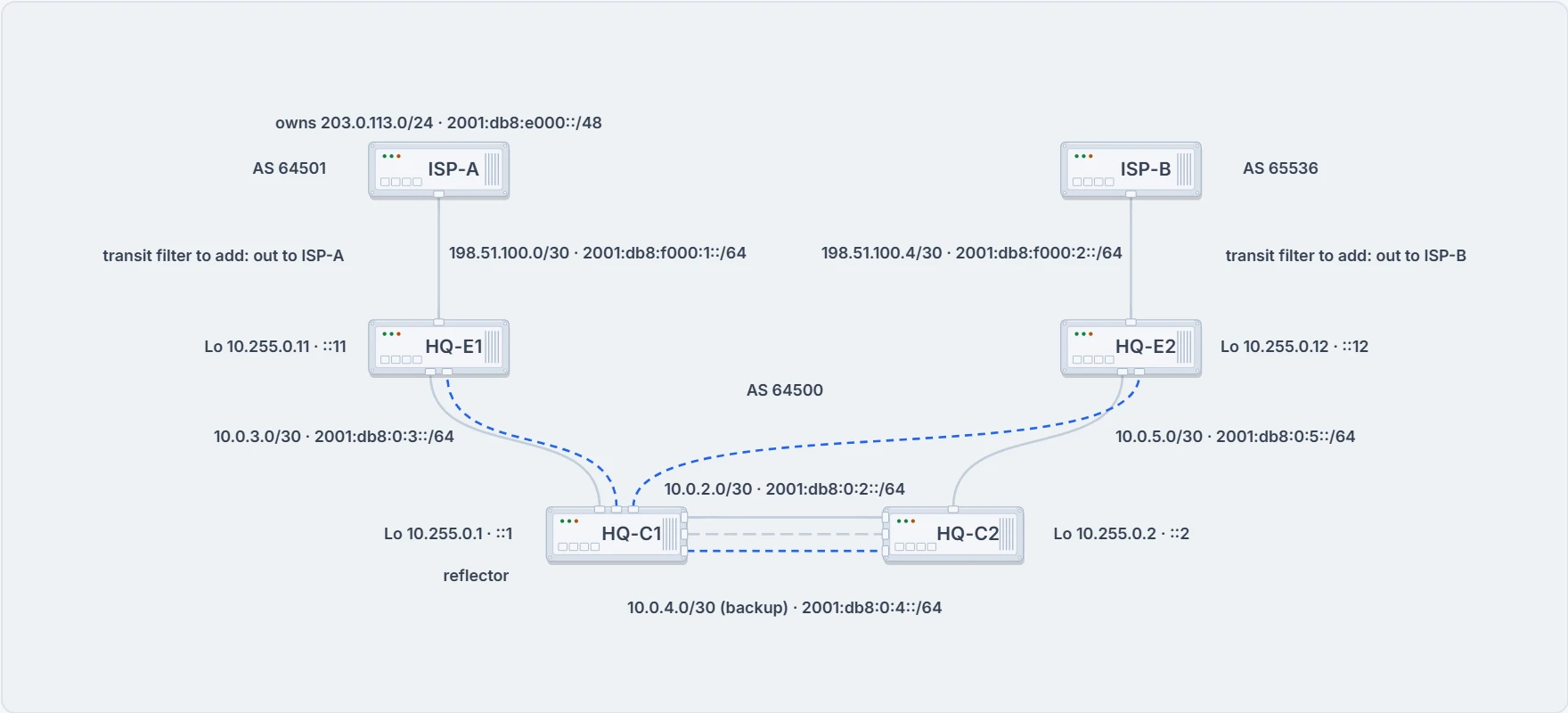
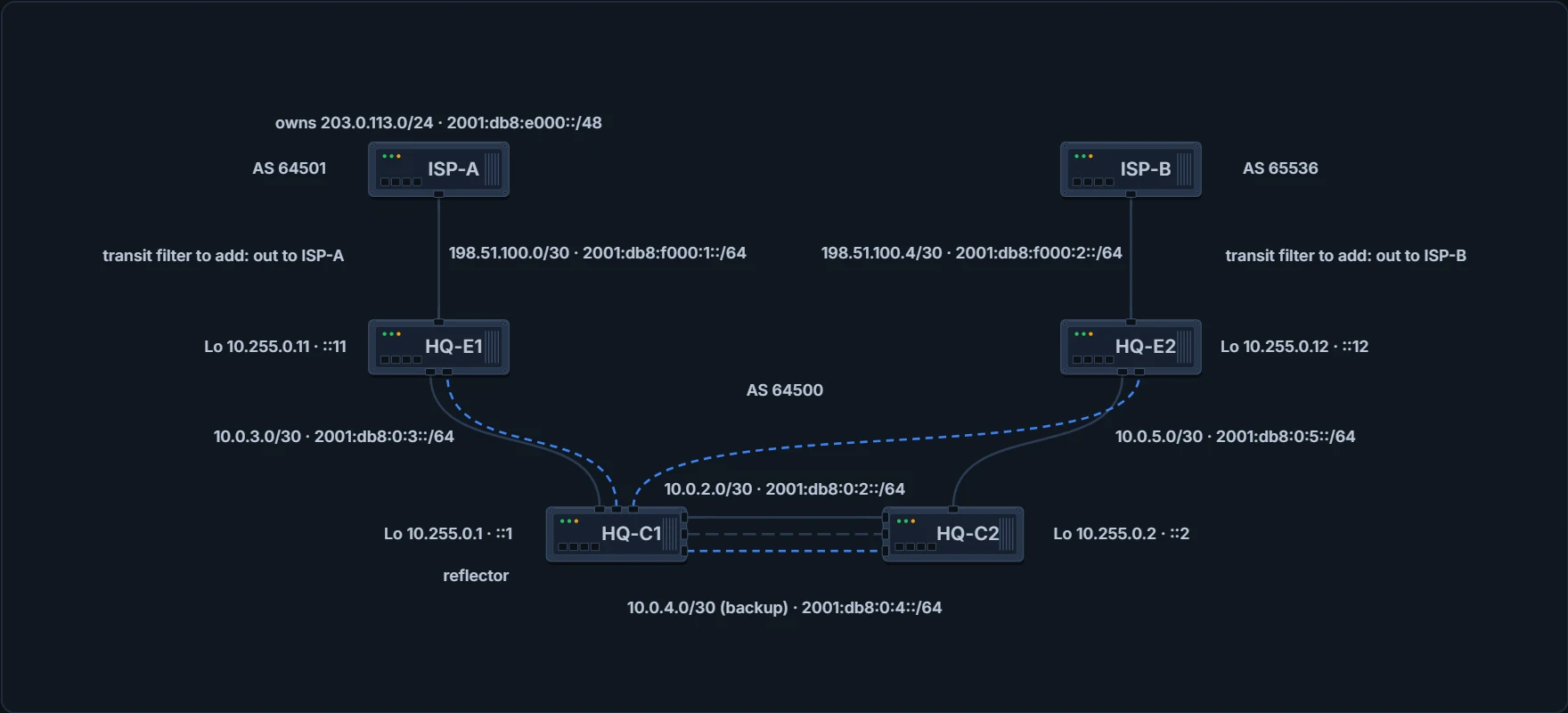
Our network: ISP-A's routes reach HQ-E2 only through the reflector, HQ-C1. The transit filter would go on the two eBGP sessions, in both families.
Once it's on, HQ's own aggregate arrives at HQ-E2 over iBGP with an empty path and passes; ISP-A's 203.0.113.0/24 arrives there with 64501 and doesn't. Until then, the only thing keeping ISP-A's routes away from ISP-B is a tag. The last section is about what that's worth.
One more trap, from our network. ISP-B is AS 65536, and the session lesson showed that asdot writes it as 1.0. By default a Cisco router both prints and matches 4-byte AS numbers in asplain, so the regex is written with 65536; bgp asnotation dot changes the display and the regular-expression match to asdot together. On a router set that way, a regex written as ^1.0_ has a period in it, and the period matches any character: 100 and 110 match too. The escape note says what to do: ^1\.0_.
Route maps: filter and stamp in one pass
A route map does more than filter: it can change path attributes as well. It's applied per neighbor to routes received or advertised, a different map for each direction if you like, with neighbor ip-address route-map route-map-name {in | out} under the address family. The route-map lesson taught the map itself: sequences in order, the first sequence that matches decides, several match lines in one sequence must all match, a sequence with no match line matches everything, and an implicit deny at the end.
Back to R1's table, now with R1's own 10.1.1.0/24 as well. The requirement, in four steps: deny anything in 192.168.0.0/16 with a prefix list; routes that originated in AS 65200 and sit inside 100.64.0.0/10 get local preference 222; other routes that originated in AS 65200 get weight 65200; everything else passes:
R1
ip prefix-list FIRST-RFC1918 permit  192.168.0.0/16 le 32
ip as-path access-list 1 permit _65200$
ip prefix-list SECOND-CGNAT permit 100.64.0.0/10 le 32
!
route-map AS65200IN deny 10
 description Deny any RFC1918 networks via Prefix List Matching
 match ip address prefix-list FIRST-RFC1918
route-map AS65200IN permit 20
 description Change local preference for AS65200 originate route in 100.64.x.x/10
 match ip address prefix-list SECOND-CGNAT
 match as-path 1
 set local-preference 222
route-map AS65200IN permit 30
 description Change the weight for AS65200 originate routes
 match as-path 1
 set weight 65200
route-map AS65200IN permit 40
 description Permit all other routes un-modified
!
router bgp 65100
 neighbor 10.12.1.2 remote-as 65200
 address-family ipv4 unicast
  neighbor 10.12.1.2 route-map AS65200IN in
Read it as the router does. Two prefix lists, FIRST-RFC1918 with 192.168.0.0/16 le 32 and SECOND-CGNAT with 100.64.0.0/10 le 32, the AS_Path list _65200$ ("originated in AS 65200"), and sequence 10 denying whatever FIRST-RFC1918 matches. Sequence 20 needs SECOND-CGNAT and as-path 1 together and sets local preference 222; sequence 30 needs as-path 1 and sets weight 65200; sequence 40 has no match line, so it takes everything left; and the map goes inbound on 10.12.1.2. One more thing in that list: R2's own routes arrive with the path 65200 alone, and _65200$ only matches them because _ matches the start of the path as well as a space. That's a sixth printed case for the wide reading, and the one that runs inside a working filter.
Through sequence 40, unchanged: its path ends in 3003, not 65200. Here's the whole result:
- 192.168.2.2/32 and 192.168.3.3/32 are gone; 192.168.1.1/32 is R1's own, so the inbound map never saw it;
- 100.64.2.0/25 and 100.64.2.192/26 carry local preference 222, because they originated in AS 65200 and sit in 100.64.0.0/10;
- 10.12.1.0/24 and 10.23.1.0/24 from R2 carry the locally significant weight 65,200;
- everything else came in unmodified: 10.3.3.0/24 and 100.64.3.0/25, whose paths end in 3003 and 300, not 65200.
And the table itself:
R1# show bgp ipv4 unicast | b Network
    Network          Next Hop            Metric LocPrf Weight Path
*>  10.1.1.0/24      0.0.0.0                  0         32768 ?
*>  10.3.3.0/24      10.12.1.2               33             0 65200 65300 3003 ?
r>  10.12.1.0/24     10.12.1.2               22         65200 65200 ?
r                    0.0.0.0                  0         32768 ?
*>  10.23.1.0/24     10.12.1.2              333         65200 65200 ?
*>  100.64.2.0/25    10.12.1.2               22    222      0 65200 ?
*>  100.64.2.192/26  10.12.1.2               22    222      0 65200 ?
*>  100.64.3.0/25    10.12.1.2               22             0 65200 65300 300 ?
*>  192.168.1.1/32   0.0.0.0                  0         32768 ?
Look at 10.12.1.0/24. R2's path now has weight 65200 against R1's own 32768, so it's best at step 1, and the r is the RIB failure from the route-advertisement lesson: R1's connected route keeps the routing table. A weight on the wrong prefix just moved R1's own link onto a path through R2, in BGP's table at least. That's the price of "every route that originated in 65200" when one of them is your shared link.
Now the description lines. Sequence 10 says "Deny any RFC1918 networks". Its prefix list holds one entry, 192.168.0.0/16, and 10.3.3.0/24 and 10.23.1.0/24, both RFC 1918, walked straight past it. The router doesn't read descriptions. Only the match lines decide.
Best practice ends it: use a different route map for inbound and for outbound prefixes for each BGP neighbor. One map per session per direction keeps each policy readable on its own.
Back to the opening question. Route maps are also where you set the attributes the best-path lesson measured, and the reach it found decides which ones work for which direction:
| You want | Set it with | Where | Who obeys |
|---|---|---|---|
| this router to prefer an exit | set weight | inbound, on that router | that router only |
| the whole AS to prefer an exit | set local-preference | inbound, on the edge | every router in the AS |
| a neighbor to prefer another way in | set as-path prepend | outbound, toward it | the neighbor, if its policy lets length decide |
| one neighboring AS to pick your link | set metric (MED) | outbound, toward it | that AS, if it compares MED |
| a path to rank lower on origin | set origin {igp | incomplete} | either | whoever reaches step 6 |
The last two columns are the honest answer to the opening question: the top two rows tell, the middle two ask. One cell is more ours than anyone's printed advice: the common MED example sets set metric in an inbound route map, on its own edge routers; sending it outbound, to ask a neighbor, is our reading of MED's purpose, to influence traffic flows inbound from a different AS.
For our network, the best-path lesson's transfer case left the configuration to this one: to put the whole AS back on ISP-A for ISP-A's prefixes, the edge sets local preference on the way in, and iBGP carries it to every router:
! HQ-E1 (expected form; the IPv6 lines not confirmed on a current router)
route-map ISPA-IN permit 10
 set local-preference 200
router bgp 64500
 address-family ipv4
  neighbor 198.51.100.1 route-map ISPA-IN in
 address-family ipv6
  neighbor 2001:db8:f000:1::1 route-map ISPA-IN in
Depending on the change, the session may need to be refreshed before the new policy takes effect; for an inbound change that's the soft refresh from the route-advertisement lesson, clear bgp ipv4 unicast 198.51.100.1 soft in, and the IPv6 twin. Whether a current router needs it for this map, we haven't confirmed.
Continue the lesson
The whole lesson, with its drawings and its questions. 5 more sections after the ones above.