
Getting routes in and out: network, aggregate, refresh
A BGP network statement copies a route already in the routing table, with an exact match of prefix and mask; aggregate-address creates one. Not every route in the BGP table is advertised: it must be valid, with a next hop that resolves. eBGP routes have an AD of 20 and iBGP routes 200, so a better source can keep a BGP route out of the RIB.
By Arif, founder of Daveth · Updated
The full 16 min walkthrough is in Daveth Pro (Network). See what the plan opens
What this page answers
Why is a BGP route not advertised?
It must be valid, with a next hop that resolves in the routing table, and pass the outbound policy for that neighbour. A route whose next hop does not resolve stays in the BGP table and goes no further. Read it in “Counting out”
Why do eBGP and iBGP have different administrative distances?
eBGP routes have an AD of 20 and iBGP routes 200, because BGP exists to share routes between ASs: a route from another AS learned by eBGP should beat the same route by an IGP, while iBGP routes should not. Read it in “Best, and still not in the routing table”
What is the difference between the BGP network command and aggregate-address?
network copies a route that already exists in the routing table into BGP, matching prefix and mask exactly. aggregate-address creates a summary route inside BGP from more specific routes BGP already holds. Read it in “It copies, it doesn't create”
Nobody touched BGP
Our network. Last night's change was a tidy-up. Week one's static routes, the ones that got HQ to ISP-A's test servers before any dynamic routing existed, came off HQ-E1, because EIGRP reaches the edge now and carries the HQ routes there. One of them was HQ-E1's route back to HQ, 10.1.0.0/16 toward HQ-C1, and its IPv6 twin for 2001:db8:1::/48. The change record says, in capitals, NO BGP CHANGES.
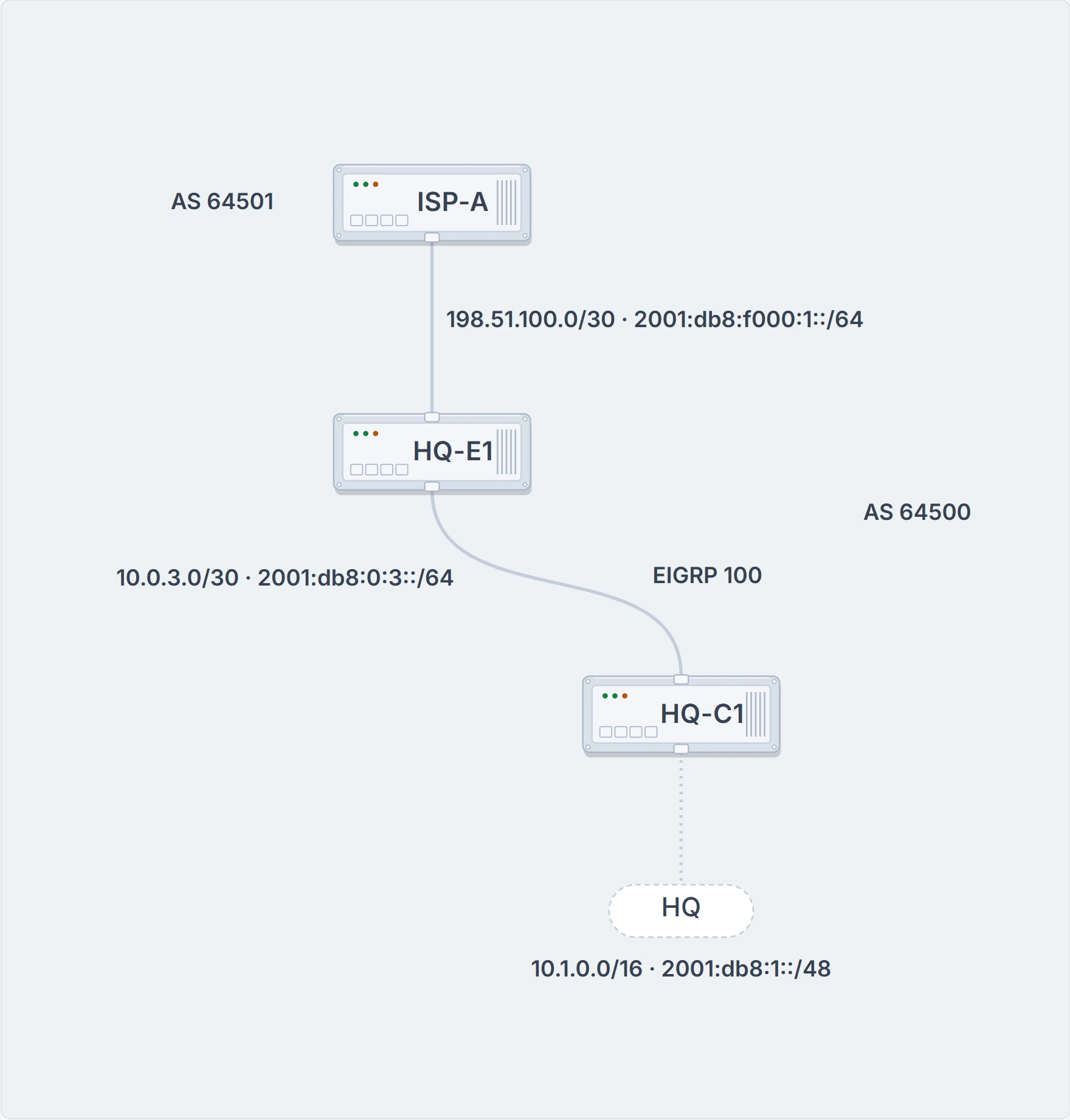
The part of our network this lesson needs: the edge, the core behind it, and the block HQ-E1 announces to ISP-A.
This morning ISP-A's support desk calls. Your announcements of 10.1.0.0/16 and 2001:db8:1::/48 disappeared overnight. The sessions are up in both families. HQ-E1's BGP configuration is byte-for-byte last week's backup:
! HQ-E1: the address-family part, as the backup has it (expected form)
router bgp 64500
 address-family ipv4
  network 10.1.0.0 mask 255.255.0.0
  neighbor 198.51.100.1 activate
 address-family ipv6
  network 2001:db8:1::/48
  neighbor 2001:db8:f000:1::1 activate
Nobody touched BGP, and a static route went away. Why would that matter to an advertisement? Hold your answer; the next section settles it.
To answer it properly you need to know where BGP keeps routes, because "is the route in BGP?" turns out to be several questions. BGP uses three tables to maintain the paths for a prefix and their path attributes:
- Adj-RIB-in holds routes in their original form, before inbound policies are processed, and it's purged once they've been processed, to save memory.
- Loc-RIB holds every route that was originated locally or received from a peer. Once a route passes the validity and next-hop reachability check, the best-path algorithm picks the best one for each prefix, and the Loc-RIB is the table used to present routes to the IP routing table.
- Adj-RIB-out holds routes after the outbound policies have been processed.
So BGP stores prefixes in three tables: Adj-RIB-in, Loc-RIB and Adj-RIB-out. And there's a fourth place every route on the router competes for, the RIB, the routing table itself. So this lesson is a stocktake. At each stage: how many routes are here, how many made it to the next one, which command counts them, and which rule explains the difference.
It copies, it doesn't create
You put a prefix into the Loc-RIB with network network mask subnet-mask [route-map route-map-name], under the address family. The optional route map sets BGP attributes as the prefix goes in; route maps you've already met.
Now drop a habit. In EIGRP and OSPF, a network statement picked interfaces, and the protocol advertised whatever those interfaces were connected to. BGP's network statement doesn't enable BGP on any interface. It names a specific prefix to install in the Loc-RIB.
Here's what happens when you type it. BGP searches the global RIB for an exact match. The match can be a connected network, a secondary connected network, or any route from a routing protocol. Static routes count too. Only once it finds that match does the prefix go into the Loc-RIB.
Put more bluntly: this command is extremely picky. Two requirements. The prefix must already be in the routing table from some other source: connected, static, or another routing protocol. And the command must match the prefix in the routing table perfectly. Miss either and the prefix isn't advertised.
Try it on a router called R1. It has four connected /26s: 10.1.1.0/26, 10.1.1.64/26, 10.1.1.128/26 and 10.1.1.192/26. First someone types network 10.1.1.0 mask 255.255.255.192. Then, on the same R1, network 10.1.1.0 mask 255.255.255.0. Your IGP habit has an opinion about the second: /24 covers all four.
The first is advertised: 10.1.1.0/26 is in the routing table, an exact match. The second advertises nothing. As a summary, 10.1.1.0/24 would include all four /26s, but the statement says "advertise this network", the /24 itself, and 10.1.1.0/24 isn't in the routing table.
So say it plainly. The network command doesn't create a route: it copies one that already sits in the routing table with exactly that mask into BGP's table, and nothing more. The copy isn't word for word, since BGP writes its own attributes on it, but nothing new appears in the routing table, and whether the copy is best, or reaches a peer, is decided by the stages after it. That's network. The other way in, aggregate-address, does create a route, and it gets its own section below.
Now go back to HQ-E1. Last week its routing table held exactly one 10.1.0.0/16: week one's static route toward HQ-C1. That was the match network 10.1.0.0 mask 255.255.0.0 had been finding all along. Last night the static went, and what's left is EIGRP's /24s, 10.1.10.0/24 and 10.1.30.0/24 (and their IPv6 twins, 2001:db8:1:10::/64 and 2001:db8:1:30::/64), neither of them an exact match. The statement didn't change; the thing it was copying did. The IPv6 statement lost its /48 the same way, since the IPv4 rules carry over to IPv6. Nobody touched BGP. BGP noticed anyway. (That the copy goes when its RIB route goes, and the advertisement with it, is our reading: the requirement is stated, the withdrawal isn't, and nor is how quickly. We haven't confirmed it on a current router.)
The advice for a route a router should be learning and isn't: trace it back to its source, and there check two things, the network mask command and a matching route in the routing table. On HQ-E1 the first is present and the second is gone.
There are two ways to put a /16 back. Give the routing table an exact /16 again: a static route counts as a source. Or build the /16 inside BGP from the /24s, which is what aggregate-address does. The ticket's requirement decides which, and the aggregate section makes the choice.
For IPv6 the statement takes the prefix-and-length form under the IPv6 address family: network 2001:DB8::2/128, for instance.
What the table writes down
When the match is found and the prefix goes in, the attributes BGP sets depend on the kind of RIB route it matched:
- A connected network: next hop 0.0.0.0, origin
ifor IGP, weight 32,768. - A static route or a routing protocol's route: next hop set to the next hop in the RIB, origin
i, weight 32,768, and the multi-exit discriminator (MED) set to the IGP metric.
Here's a lab. R1, in AS 65100, has an eBGP session with R2 in AS 65200, and routes from three other sources: R3's loopback 192.168.3.3 through EIGRP, R4's loopback 192.168.4.4 by a static route, and R5's loopback 192.168.5.5 through OSPF. Every route in R1's routing table can be advertised into BGP, whatever protocol it came from. R1 uses network statements for the loopbacks of R1, R3 and R4, and brings R5's in by redistributing OSPF into BGP, since listing every prefix can get tedious:
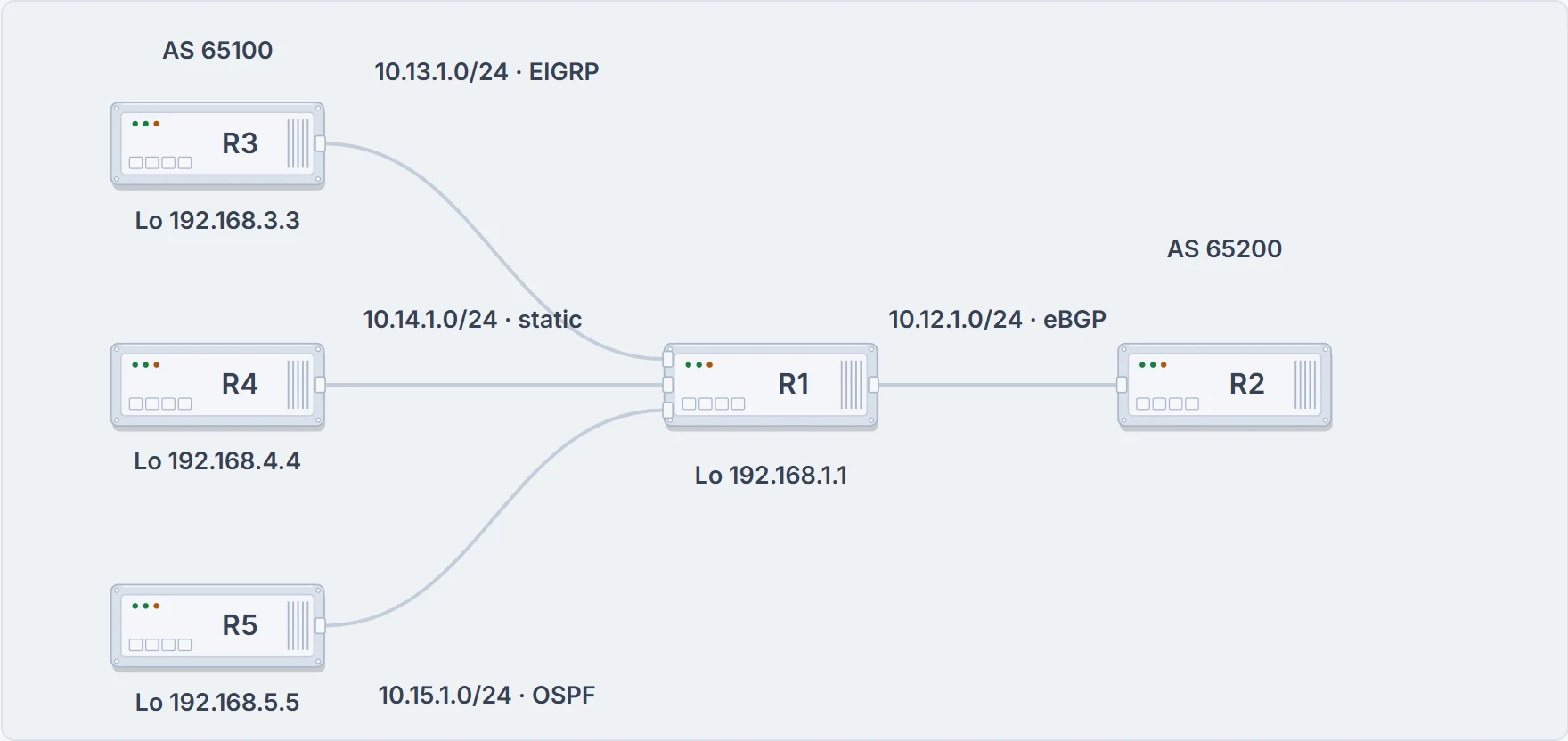
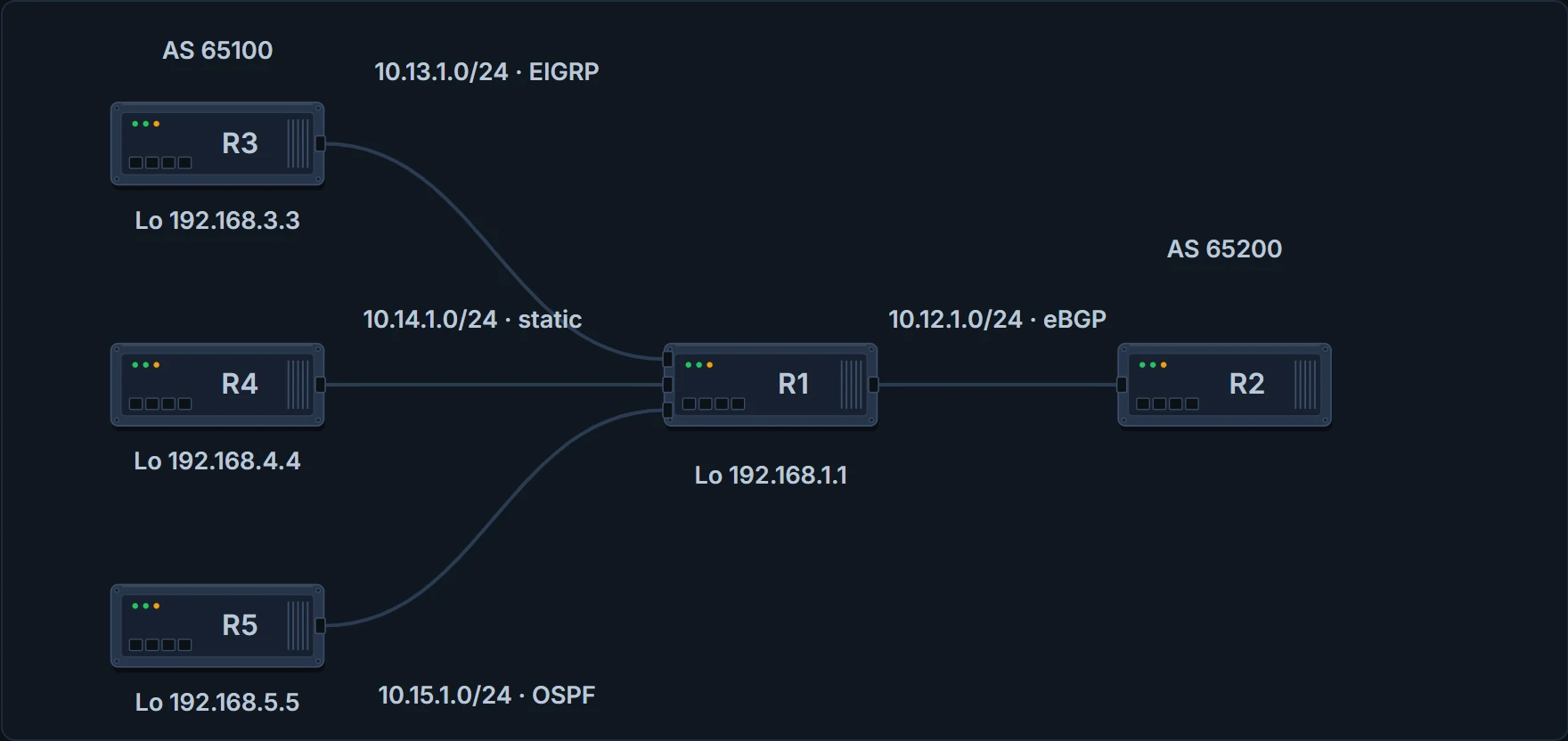
R1 knows its neighbors' loopbacks four different ways. BGP only cares that each is in R1's routing table.
R1
router bgp 65100
 neighbor 10.12.1.2 remote-as 65200
 network 10.12.1.0 mask 255.255.255.0
 network 192.168.1.1 mask 255.255.255.255
 network 192.168.3.3 mask 255.255.255.255
 network 192.168.4.4 mask 255.255.255.255
 redistribute ospf 1
R2
router bgp 65200
 neighbor 10.12.1.1 remote-as 65100
 address-family ipv4 unicast
  neighbor 10.12.1.1 activate
  network 10.12.1.0 mask 255.255.255.0
  network 192.168.2.2 mask 255.255.255.255
R2's lines sit under address-family ipv4 unicast because R2 has the default IPv4 unicast family switched off; the line that switches it off isn't in the capture.
A note, because you'll be tempted the other way one day: redistributing an IGP's routes into BGP is completely safe, but redistributing BGP's into an IGP needs caution. BGP is built to carry a table the size of the Internet, more than 940,000 prefixes, where IGPs can have stability problems with fewer than 20,000 routes. (The redistribution lessons showed what redistribution writes: origin incomplete and weight 32,768.)
Here's R1's table, header included this once:
R1# show bgp ipv4 unicast
BGP table version is 9, local router ID is 192.168.1.1
Status codes: s suppressed, d damped, h history, * valid, > best, i - internal,
              r RIB-failure, S Stale, m multipath, b backup-path, f RT-Filter,
              x best-external, a additional-path, c RIB-compressed,
Origin codes: i - IGP, e - EGP, ? - incomplete
RPKI validation codes: V valid, I invalid, N Not found
    Network          Next Hop            Metric LocPrf Weight Path
*>  10.12.1.0/24     0.0.0.0                  0         32768 i
*                    10.12.1.2                0             0 65200 i
*>  10.15.1.0/24     0.0.0.0                  0         32768 ?
*>  192.168.1.1/32   0.0.0.0                  0         32768 i
*>  192.168.2.2/32   10.12.1.2                0             0 65200 i
*>  192.168.3.3/32   10.13.1.3             3584         32768 i
*>  192.168.4.4/32   10.14.1.4                0         32768 i
*>  192.168.5.5/32   10.15.1.5               11         32768 ?
The header is the only place the codes are spelled out; every other box on this page leaves it out. The status codes fill the first columns: an asterisk for valid, > for best, r for RIB failure, s for suppressed, and i for internal, a path learned over iBGP. The origin codes end the Path column: i for IGP, e for EGP, ? for incomplete. So i means two different things, depending on where it sits. The RPKI validation codes aren't used here.
Read it against the rules. On R1 the next hop of each local route is the next hop R1's routing table had, the AS_Path is blank, and the origin is IGP for the network statements and incomplete for the redistributed ones. The metric is carried over from R3's EIGRP and R5's OSPF and shows up as the MED: 3584 and 11. R2 learns these strictly over eBGP, so it sees only the MED and the origin codes, and in R2's table every one of R1's routes has next hop 10.12.1.1, with 3584 and 11 still in the metric column.
The columns. Where one prefix has several paths, only the first row prints the prefix; the others leave the space blank. An asterisk marks a valid path, and an angle bracket (>) marks the path selected as best. Next Hop is a well-known mandatory attribute, the next-hop address for that path. Metric is the MED, optional and non-transitive, used in the best-path algorithm. LocPrf is local preference, well-known discretionary. Weight is locally significant and Cisco-defined. Path holds the AS_Path, well-known mandatory, used for loop prevention and best path, and the Origin, also well-known mandatory: i for IGP, e for EGP, ? for a route redistributed into BGP. What those attributes do to the choice of path is the best-path lesson's.
The other half is why a route is in the table at all. show bgp ipv4 unicast is the same as the old show ip bgp; it's where you verify the IPv4 BGP routes learned from all your BGP neighbors, and a route appears in it because another BGP router advertised it, because a network mask command matched a route in the local routing table, because a redistribute command imported it, or because aggregate-address created it as a summary. Telling those apart from the table alone isn't easy; the running configuration beside the table gives the most accurate answer.
Now a common shortcut. It says a next hop other than 0.0.0.0 means the router learned the route from a peer, and 0.0.0.0 means it originated the route itself. Apply that to R1's table above.
By the shortcut: 10.12.1.0/24, 10.15.1.0/24 and 192.168.1.1/32. But 192.168.3.3/32, 192.168.4.4/32 and 192.168.5.5/32 are R1's too: two network statements and a redistribution, each carrying the RIB's next hop, exactly as the rules say they should. The next hop doesn't tell you who originated a route. In this table the weight is the better clue: 32,768 on every route R1 put in itself, 0 on the one it learned from R2. A clue, not a rule: 32,768 is the default a router writes on its own routes, and a route map can give a learned path any weight, as the policy lesson will. The proof is the running configuration beside the table. The other shortcut holds up better: a Path ending in ? means the route was redistributed into BGP somewhere along the way (except an as-set aggregate, which can inherit the ?), and one ending in i came from a network mask command or aggregate-address. The aggregate case, back on the other lab's R1, the one with the four /26s, in AS 65501: with four /26 network statements and aggregate-address 10.1.1.0 255.255.255.0, R1's 10.1.1.0/24 sits in its own table with next hop 0.0.0.0 and no metric, beside the four /26s, and two paths for 10.1.5.0/24, via 10.1.13.3 and via 2.2.2.2.
And that /24 goes somewhere. That lab's R2, in AS 65502, has show ip route bgp showing gateway of last resort 10.1.12.1, and B routes for 10.1.1.0/24, the four /26s and 10.1.13.0/24, all [20/0] via 1.1.1.1. So the 10.1.1.0/24 that the network statement couldn't originate is installed on R2 anyway, from R1's aggregate.
Counting out
Not every route in the Loc-RIB is advertised to a peer. Each one goes through this:
- The route has to be valid, with a next hop that resolves in the RIB. If the next-hop check fails, the route stays where it is but goes no further.
- Any outbound policy for that neighbor is processed. If the policy doesn't deny the route, it's kept in the Adj-RIB-Out for later reference.
- The route is advertised. If its next hop is 0.0.0.0, the next hop is changed to the IP address of the BGP session.
In order, then: the network statement, the RIB check, the Loc-RIB, the validity check, the outbound policies, the Adj-RIB-Out, and the routes to the peer. And one rule underneath it all: by default BGP advertises only the best path to its peers, however many paths the Loc-RIB holds for that prefix.
The Adj-RIB-Out is kept separately for each peer, and it lets you see the routes advertised to one specific router. The command is show bgp afi safi neighbors ip-address advertised-routes, and one detail in it catches people: the next hop shown is the one in the local router's own table, which is changed as the route is advertised. R1's view toward R2, and R2's toward R1:
R1# show bgp ipv4 unicast neighbors 10.12.1.2 advertised-routes
! Output omitted for brevity
    Network          Next Hop            Metric LocPrf Weight Path
*>  10.12.1.0/24     0.0.0.0                  0         32768 i
*>  10.15.1.0/24     0.0.0.0                  0         32768 ?
*>  192.168.1.1/32   0.0.0.0                  0         32768 i
*>  192.168.3.3/32   10.13.1.3             3584         32768 i
*>  192.168.4.4/32   10.14.1.4                0         32768 i
*>  192.168.5.5/32   10.15.1.5               11         32768 ?
Total number of prefixes 6
R2# show bgp ipv4 unicast neighbors 10.12.1.1 advertised-routes
! Output omitted for brevity
    Network          Next Hop            Metric LocPrf Weight Path
*>  10.12.1.0/24     0.0.0.0                  0         32768 i
*>  192.168.2.2/32   0.0.0.0                  0         32768 i
Total number of prefixes 2
Now the stocktake. R1's table had 7 prefixes. Its Adj-RIB-Out toward R2 has 6.
192.168.2.2/32, the one R1 learned from R2. Why it isn't listed isn't stated. What we can say: if R1 sent it, R2 would find its own AS in the path and throw it away (the loop check from the session lesson), so nothing is lost either way; whether a current router leaves it out or sends it, we haven't confirmed. And 10.12.1.0/24 goes out once, R1's own best path, not R2's copy: best only. Notice the next hops too: 0.0.0.0 and 10.13.1.3 in the listing, while R2's table shows every one as 10.12.1.1. The 0.0.0.0 rows are step 3; 10.13.1.3 changes because R1 sends it over eBGP, which puts R1's own address on it. Either way the listing shows the next hop before it's changed.
The other direction, counted from R1's side, is the summary's last column. The summary is also how you check that routes were exchanged, and R1's line for 10.12.1.2 ends in 2:
R1# show bgp ipv4 unicast summary
! Output omitted for brevity
Neighbor        V        AS MsgRcvd MsgSent   TblVer  InQ OutQ Up/Down  State/PfxRcd
10.12.1.2       4        65200   11      10        9    0    0 00:04:56            2
You've read that column before: a number means Established, and the number is prefixes received from the peer. R2 advertised two; R1 received two. Whether the count is taken before or after R1's inbound policy isn't stated, and we haven't confirmed it; the difference matters when a filter is in play.
Counting in
Now from the receiving side. Not every prefix is advertised to a peer or installed in the RIB when it's received; BGP processes each one in five steps:
- Store the route in the Adj-RIB-In as it arrived, and apply the inbound policy for the neighbor it came from.
- Update the Loc-RIB with the latest entry, and clear the Adj-RIB-In to save memory.
- The validity check: the route has to be valid and its next hop has to resolve in the RIB. A route that fails stays in the Loc-RIB and goes no further.
- Identify the best path, and pass only the best path and its attributes to step 5. How it's chosen is the best-path lesson's.
- Install the best path into the RIB, process the outbound policy, store whatever isn't discarded in the Adj-RIB-Out, and advertise to the peers.
Put both directions together: routes from a peer through the Adj-RIB-In and the inbound policies, the network statement through the RIB check, both into the Loc-RIB, then the next-hop and validity check, the best path, and from there two exits, into the global RIB and out through the outbound policies to the Adj-RIB-Out. Step 5 lists the RIB install and the outbound policy in one breath, but they're two exits leaving the best path side by side, and neither waits for the other. Hold that: you'll meet a route that fails one exit and takes the other, and a figure below draws the two exits.
show bgp afi safi displays the Loc-RIB. Every entry has at least one path and may have several for the same prefix. To see every path for one prefix with its attributes, use show bgp afi safi network. R1's 10.12.1.0/24:
R1# show bgp ipv4 unicast 10.12.1.0
BGP routing table entry for 10.12.1.0/24, version 2
Paths: (2 available, best #2, table default)
 Advertised to update-groups:
    2
 Refresh Epoch 1
 65200
   10.12.1.2 from 10.12.1.2 (192.168.2.2)
     Origin IGP, metric 0, localpref 100, valid, external
     rx pathid: 0, tx pathid: 0
 Refresh Epoch 1
 Local
   0.0.0.0 from 0.0.0.0 (192.168.1.1)
     Origin IGP, metric 0, localpref 100, weight 32768, valid, sourced, local, best
     rx pathid: 0, tx pathid: 0x0
Reading it: "Paths" counts the paths in the Loc-RIB and names the best. "Advertised to update-groups" says whether the path was advertised; neighbors are grouped into update groups, and a path that wasn't advertised prints "Not advertised to any peer" instead. Then each path: its AS_Path as received, or "Local" for a prefix this router advertised; the next hop, then "from" with the address of the router that advertised it, which can differ when an external path is learned from an iBGP peer, and the BGP identifier, the router ID, in parentheses; the origin, the mechanism that advertised the path, with the MED as "metric" and the local preference; "valid", the path's validity, and internal, external or local, how it was learned. (show bgp afi safi detail prints the whole table in this form.) One caveat on all of it: some of the BGP path attributes may change, depending on the BGP features used.
Now the second count. R1 received 2 prefixes from R2. show ip route bgp is how you see the BGP routes in the routing table; every BGP route in it starts with the code B. On R1 it shows exactly one:
R1# show ip route bgp | begin Gateway
Gateway of last resort is not set
     192.168.2.0/32 is subnetted, 1 subnets
B        192.168.2.2 [20/0] via 10.12.1.2, 00:06:12
Two in, one installed. Where's the other one? It's 10.12.1.0/24, and you've just read why. R2's path is valid and external, and it isn't best: best #2 is R1's own, "sourced, local". Why R1's path wins is the best-path lesson's; the weight of 32,768 is its first clue. And R1's own path isn't a B route either: R1 copied it from the connected 10.12.1.0/24, which already holds the routing table. Every number on R1 now balances:
| Stage | R1's count | Command |
|---|---|---|
| Sources configured | 4 network statements and 1 redistribute | show running-config |
| Loc-RIB | 7 prefixes, 8 paths | show bgp ipv4 unicast |
| Adj-RIB-Out toward R2 | 6 prefixes | ... neighbors 10.12.1.2 advertised-routes |
| Received from R2 | 2 prefixes | ... summary, State/PfxRcd |
| BGP routes in the RIB | 1 | show ip route bgp |
No next hop, no best path
After the session is up, routers exchange routes, and for various reasons a route can be missing from the BGP table or from the routing table. Peers come first: no peers, no BGP routes. The common reasons for the rest: a missing or bad network mask command (above); a next hop that isn't reachable (here); the BGP split-horizon rule, iBGP never passing an iBGP-learned route to another iBGP peer, which the route-reflector lesson takes further; a better source of the same network (next section); and route filtering (the one after).
The next hop first. If routes are in the BGP table and not in the routing table, the router may not be able to reach the next hop, and to install a BGP route it must be able to. A new lab: R1 in AS 65501 has eBGP sessions to R2 and R3 in AS 65502, R2 has an iBGP session to R5, and R5's LAN is 10.1.5.0/24. Here's R5:
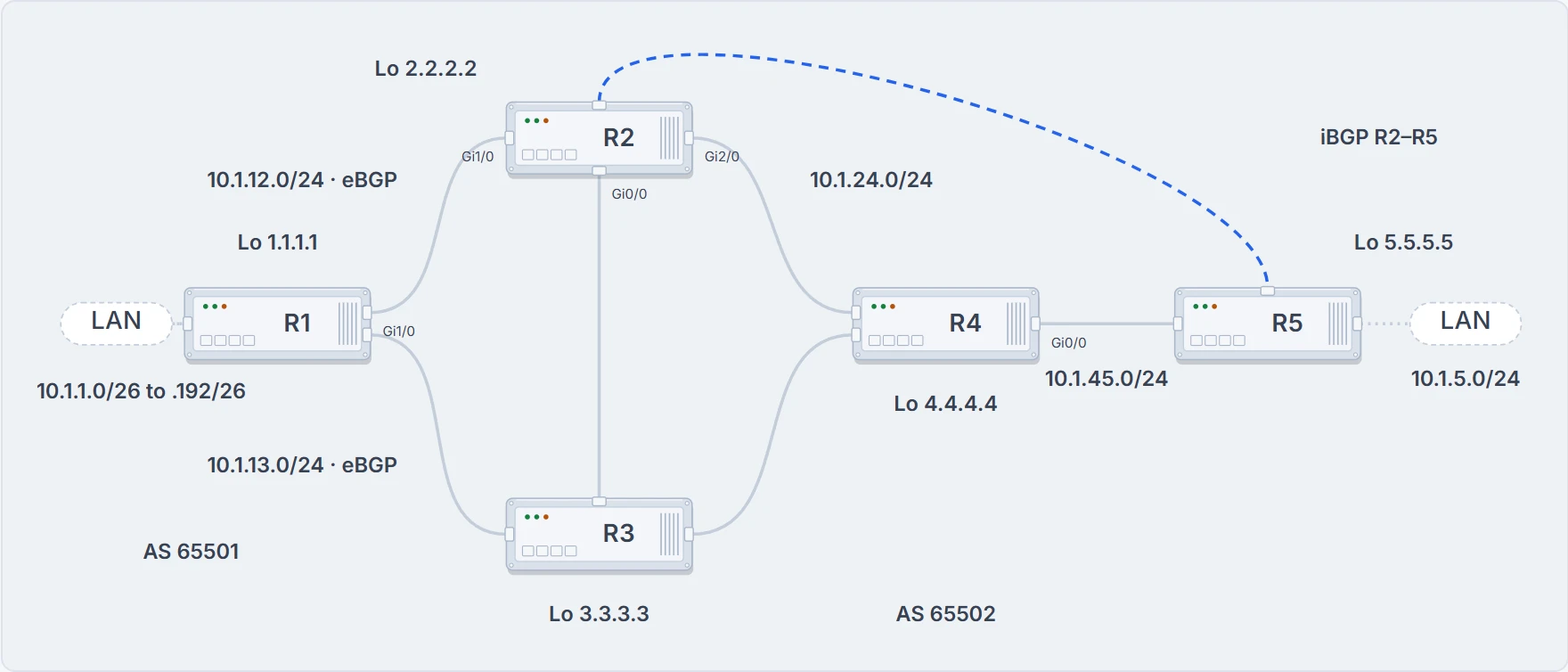
eBGP from R1 to R2 and R3; R2 passes what it learns to R5 over iBGP.
R5# show bgp ipv4 unicast
! status and origin code lines left out
      Network        Next Hop            Metric LocPrf Weight Path
* i 1.1.1.1/32       1.1.1.1                  0    100      0 65501 ?
* i 10.1.1.0/26      1.1.1.1                  0    100      0 65501 i
* i 10.1.1.0/24      1.1.1.1                  0    100      0 65501 i
* i 10.1.1.64/26     1.1.1.1                  0    100      0 65501 i
* i 10.1.1.128/26    1.1.1.1                  0    100      0 65501 i
* i 10.1.1.192/26    1.1.1.1                  0    100      0 65501 i
r>i 10.1.5.0/24      10.1.24.4             3328    100      0 i
* i 10.1.12.0/24     1.1.1.1                  0    100      0 65501 ?
* i 10.1.13.0/24     1.1.1.1                  0    100      0 65501 ?
Look at 10.1.1.0/26: an asterisk and no > after it. One reading calls that path valid but not the best, and so not placed in the routing table. You've met this argument before: whether a path with an unresolvable next hop counts as valid is described both ways, so don't rest anything on the word. Rest it on what every reading agrees on: no >, no best path, not in the routing table.
Why not? Because R5 can't reach 1.1.1.1; a ping 1.1.1.1 from R5 fails, which is the usual proof. (It proves no reply came back. It doesn't prove the routing table lacks a route: an ACL would give the same five dots. And a ping that works, from the edge router, proves nothing about R5.) The iBGP rule explains the rest. The next hop for routes from outside the AS is the address of the router that advertised them into this AS, and R2 doesn't change it by default, because BGP is based on AS-by-AS hops, not router-by-router hops.
The fix is to teach R5 how to reach the next hop, and there are several ways: a static default route on R2 and R3 advertised into the IGP; a static default route on R5; a static route on R5; or advertising the next-hop address into the IGP. (Two of those rely on a default route resolving a BGP next hop. A default route isn't enough to bring up a multi-hop session; a next hop is a different check, and whether a current router accepts a default for it, we haven't confirmed.) Or BGP's built-in option, next-hop-self: R2 changes the next hop to its own address before advertising, and neighbor 5.5.5.5 next-hop-self makes it 2.2.2.2:
R5# show bgp ipv4 unicast
! status and origin code lines left out
     Network         Next Hop            Metric LocPrf Weig
*>i 10.1.1.0/26      2.2.2.2                  0    100
*>i 10.1.1.0/24      2.2.2.2                  0    100
*>i 10.1.1.64/26     2.2.2.2                  0    100
*>i 10.1.1.128/26    2.2.2.2                  0    100
*>i 10.1.1.192/26    2.2.2.2                  0    100
r>i 10.1.5.0/24      2.2.2.2               3328    100
r>i 10.1.12.0/24     2.2.2.2                  0    100
r>i 10.1.13.0/24     2.2.2.2                  0    100
10.1.1.0/26 now has next hop 2.2.2.2 and a >: it's the best path, and installed in the routing table. Look at the last three rows, though. 10.1.12.0/24 and 10.1.13.0/24 had an asterisk and no > before; now they're best, and their status reads r>. 10.1.5.0/24 was r> all along, even with its old next hop 10.1.24.4. So the next hop isn't what's keeping these three out of the routing table. That's the next section.
(One thing in the first table is worth a second look. 10.1.5.0/24 reached R5 with next hop 10.1.24.4, an address inside AS 65502, and no AS in its path. R2 originated it from an EIGRP route, so its next hop was the RIB's, and R2 passed it to its iBGP peer unchanged: R2's own advertised-routes, below, shows the same next hop with weight 32,768.)
Best, and still not in the routing table
Routes learned from eBGP peers have an AD of 20, routes from iBGP peers 200. Why is the difference so big? Because BGP exists to share routes between ASs: if a route from another AS reaches you by eBGP, by iBGP and by EIGRP, you want the eBGP-learned one to be the best source over every other dynamic protocol. Say R1 advertises 10.1.1.0/26 to R2 and R3 over eBGP; R3 passes it to R2 over iBGP; and R3 also redistributes it into EIGRP. R2 now knows it three ways: eBGP at 20, iBGP at 200, EIGRP at 170 (external EIGRP's AD, which fits a route R3 redistributed; that pairing is ours). eBGP wins, and without that low AD, R2 would send traffic to R3 first instead of straight to R1. So: 20 for eBGP, 200 for iBGP, and the lower AD wins the routing table.
Now R5 after the next-hop fix, with both paths for each prefix:
R5# show bgp ipv4 unicast
! status lines, and 10.1.1.0/24 to 10.1.1.192/26 (each like 10.1.1.0/26), left out
     Network          Next Hop            Metric LocPrf Weight Path
* i 1.1.1.1/32        3.3.3.3                  0    100      0 65501 ?
*>i                   2.2.2.2                  0    100      0 65501 ?
* i 10.1.1.0/26       3.3.3.3                  0    100      0 65501 i
*>i                   2.2.2.2                  0    100      0 65501 i
r i 10.1.5.0/24       3.3.3.3               3328    100      0 i
r>i                   2.2.2.2               3328    100      0 i
r i 10.1.12.0/24      3.3.3.3                  0    100      0 65501 ?
r>i                   2.2.2.2                  0    100      0 65501 ?
r i 10.1.13.0/24      3.3.3.3                  0    100      0 65501 ?
r>i                   2.2.2.2                  0    100      0 65501 ?
Three prefixes have a best path, the >, and an r. The r is a RIB failure: the BGP route couldn't be installed in the routing table. The r doesn't say why. In this case the route in the routing table is from a better source, and a command further down checks the reason on any router. Here's the wrong assumption's twin. Don't read it this way: calling those three "best (installed in routing table)" and saying you can see they're in the routing table "because of the > symbol". The > means best. It says nothing about the routing table, and on these three rows the r says the opposite. The routing table has something for each prefix, but it isn't BGP's route.
Ask the routing table, then:
R5# show ip route 10.1.5.0 255.255.255.0
Routing entry for 10.1.5.0/24
  Known via "connected", distance 0, metric 0 (connected, via interface)
...output omitted...
R5# show ip route 10.1.12.0 255.255.255.0
Routing entry for 10.1.12.0/24
  Known via "eigrp 100", distance 90, metric 3328, type internal
...output omitted...
10.1.5.0/24 is connected, and 10.1.12.0/24 is EIGRP. A connected source is always the most trustworthy, so it's always used over any other routing information. And 10.1.12.0/24 came from R2 and R3 over iBGP, AD 200, much higher than EIGRP's. The prefix's entry shows the RIB failure inside it: "Paths: (2 available, best #2, table default, RIB-failure(17))", then "Not advertised to any peer", and each next hop with "(metric 131072)" beside it, which we read as the IGP metric to reach that next hop. (What the 17 counts isn't stated, and we haven't confirmed it.) Don't pin "Not advertised" on the r, though. R5's only peers are R2 and R3, both iBGP, and these paths came from them, so the iBGP rule keeps them home whatever the RIB did. And there's a command for the reason itself: show bgp ipv4 unicast rib-failure. All three read "Higher admin distance". (Its last column, RIB-NH Matches, reads n/a on all three rows; what it reports, we haven't confirmed.)
So the route lost the routing table. Does it still go out?
R2 advertised it anyway, and here's the proof, R2's advertised-routes toward R5:
R2# show bgp ipv4 unicast neighbors 5.5.5.5 advertised-routes
! status and origin code lines left out
    Network          Next Hop            Metric LocPrf Weight Path
r>  1.1.1.1/32       1.1.1.1                  0             0 65501 ?
*>  10.1.1.0/26      1.1.1.1                  0             0 65501 i
*>  10.1.1.0/24      1.1.1.1                  0             0 65501 i
*>  10.1.1.64/26     1.1.1.1                  0             0 65501 i
*>  10.1.1.128/26    1.1.1.1                  0             0 65501 i
*>  10.1.1.192/26    1.1.1.1                  0             0 65501 i
*>  10.1.5.0/24      10.1.24.4             3328         32768 i
r>  10.1.12.0/24     1.1.1.1                  0             0 65501 ?
*>  10.1.13.0/24     1.1.1.1                  0             0 65501 ?
Total number of prefixes 9
r> on 1.1.1.1/32 and on 10.1.12.0/24, and both are in the list; R3's list toward R5 has r> on 10.1.13.0/24. And R5 takes R2's two: they're under neighbors 2.2.2.2 routes on R5, 10.1.12.0/24 as r>i. That's the two exits doing what they're drawn to do. The best path goes to the RIB, where AD can refuse it, and to the outbound policy, which doesn't ask what the RIB did. A RIB failure costs the router BGP's entry in its own routing table; on these routers it didn't stop the advertisement. (R3's 10.1.13.0/24 goes out too, and R5's inbound filter takes it: next section.)
You'll see one of these again in the policy lesson. There R1 gives R2's paths a weight of 65,200 with a route map; on R1, 10.12.1.0/24 from R2 then becomes best, and the table prints r> for it and r for R1's own 0.0.0.0 path, because R1's connected 10.12.1.0/24 holds the routing table. (R5's table above marks the losing paths with r too. Whether a current router does, we haven't confirmed.)
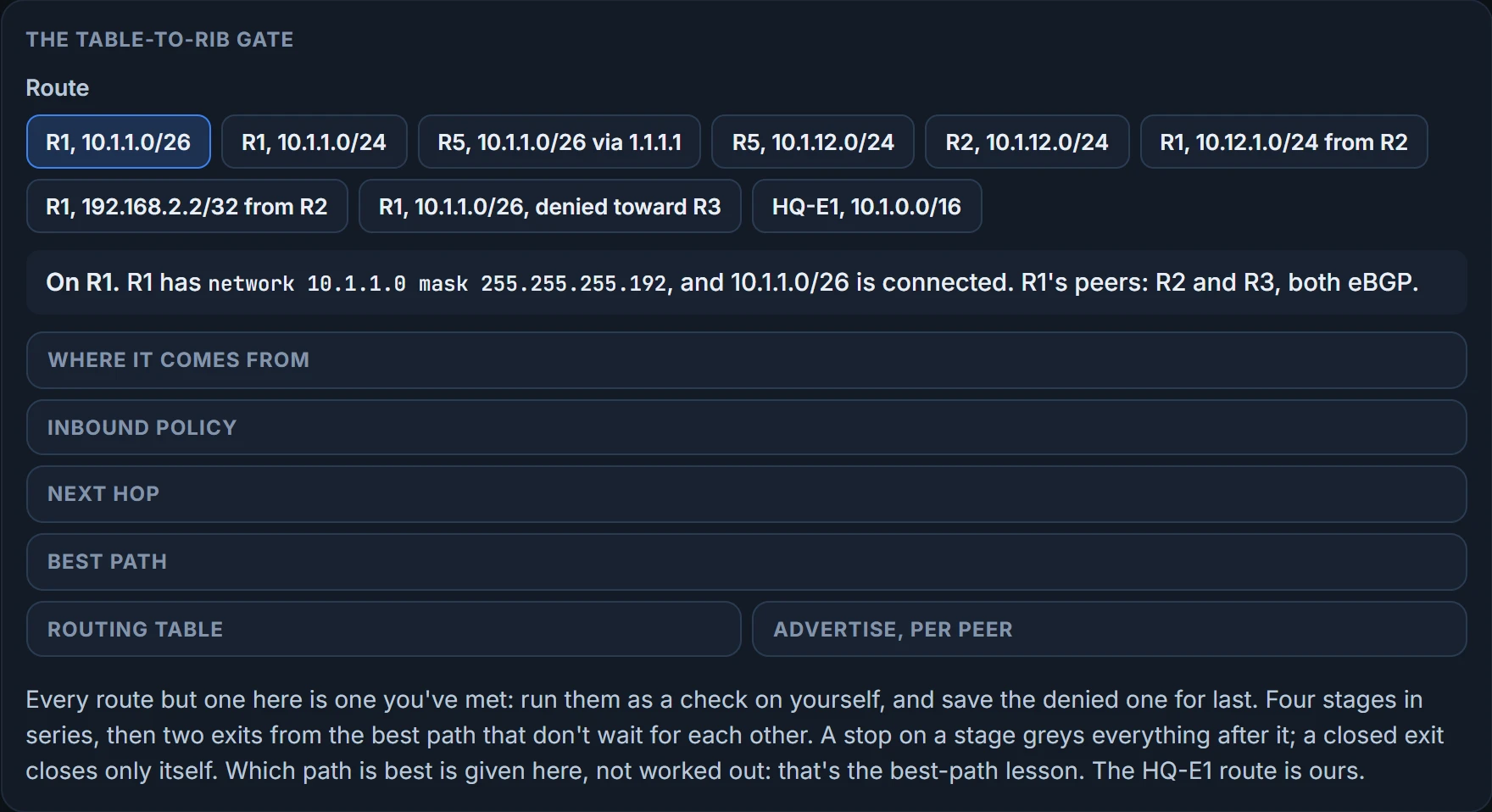
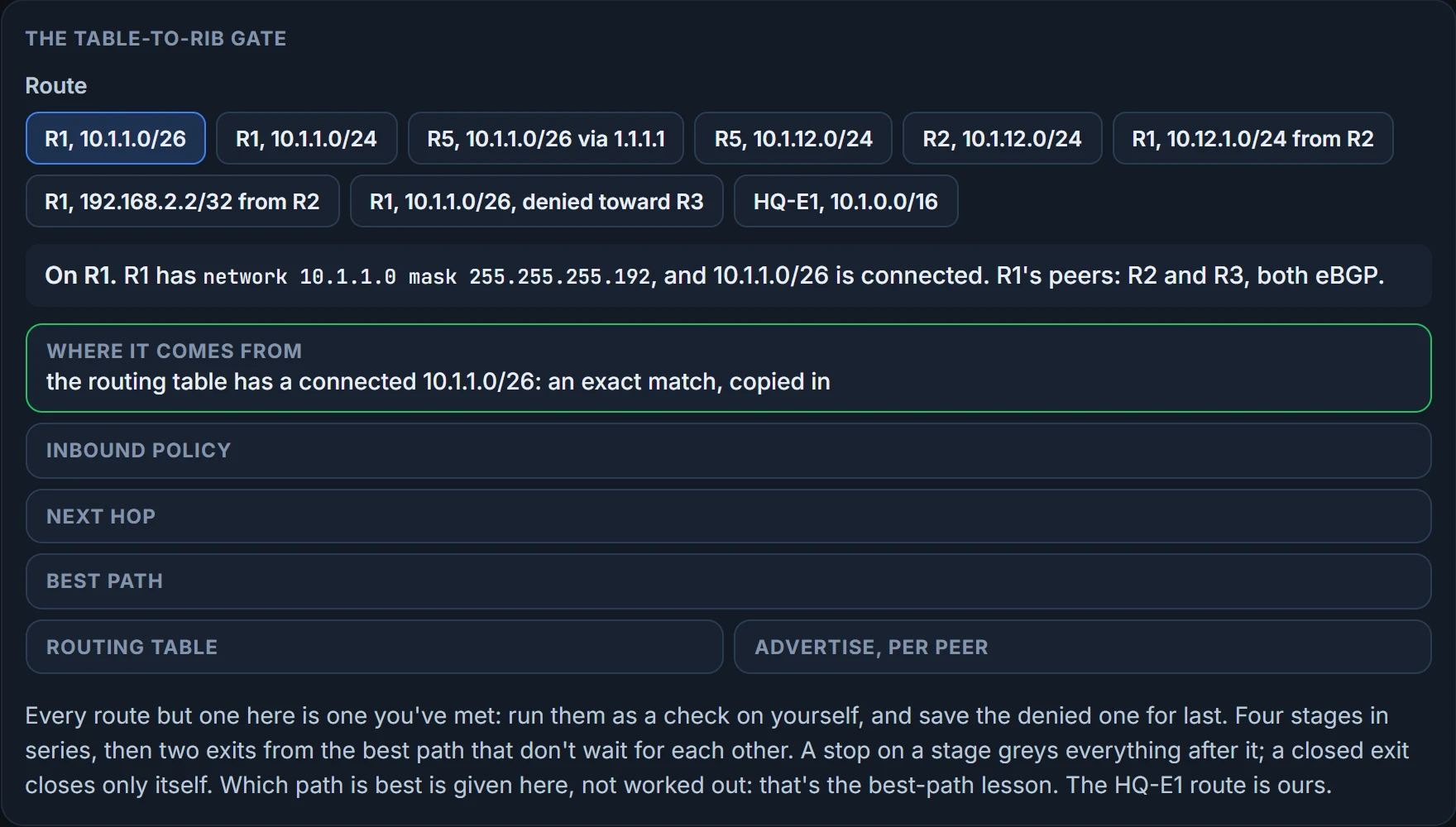
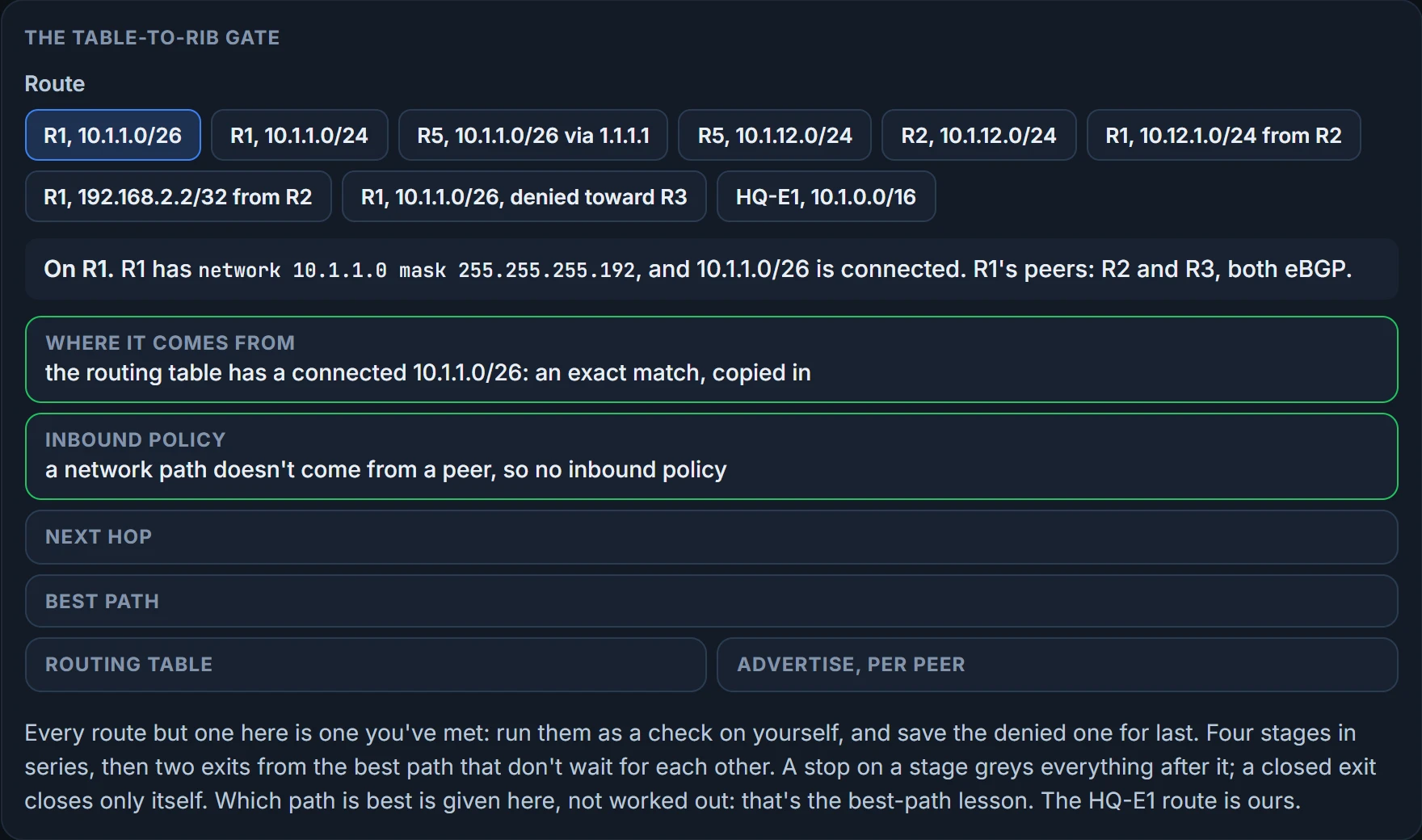
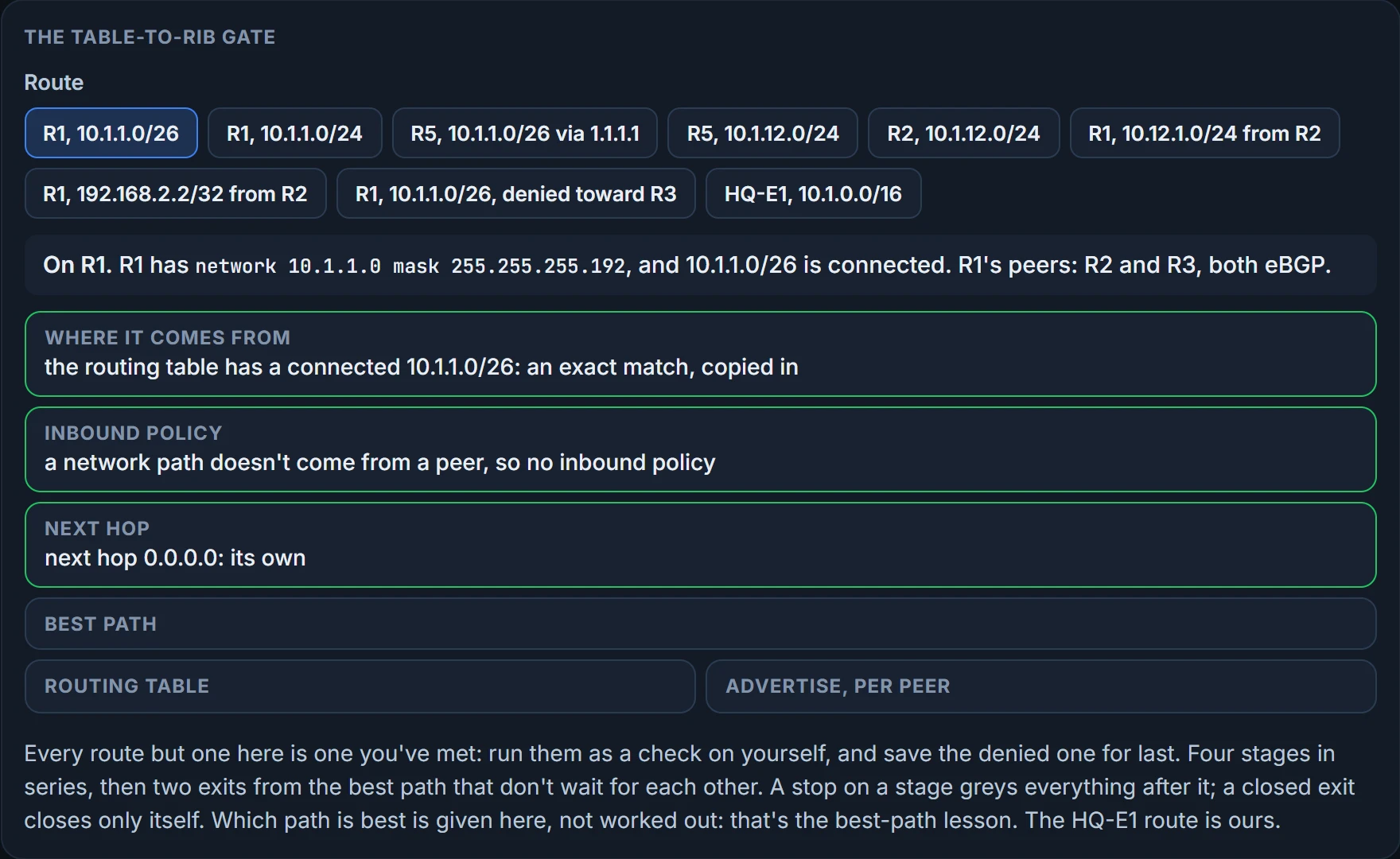
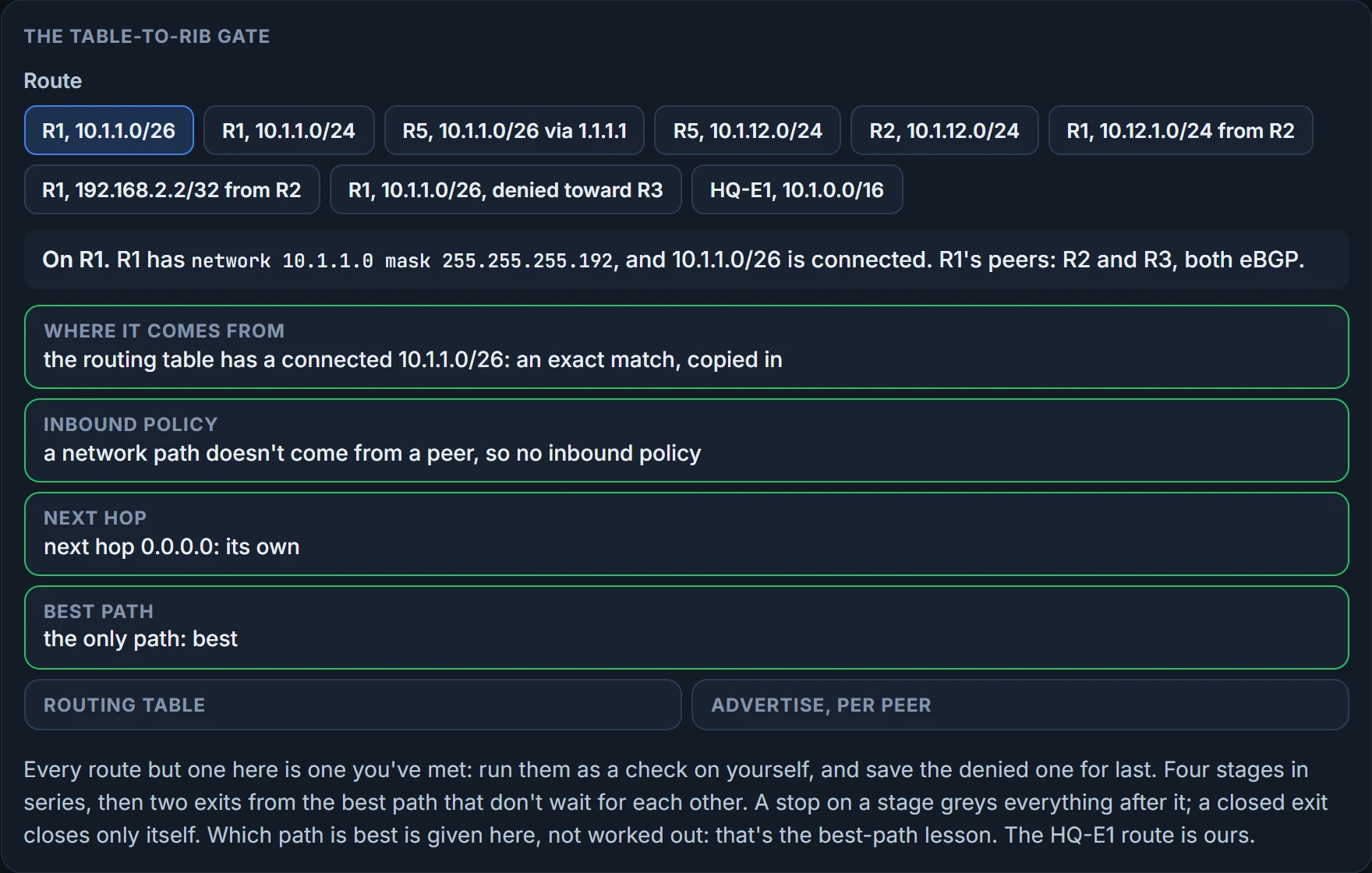
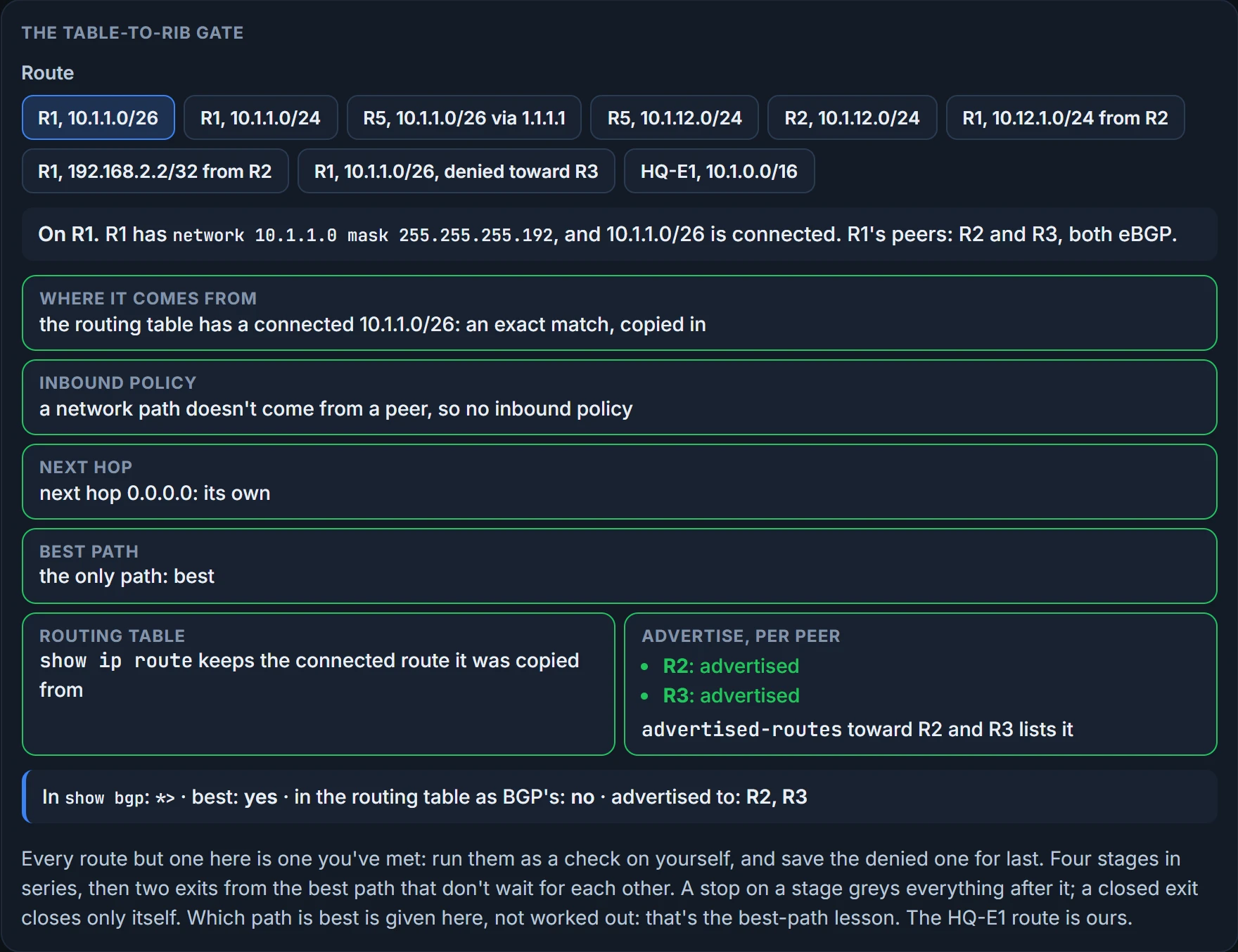
Now put the whole route's trip together, one prefix, one stage per step: where it comes from, the inbound policy, the next-hop check and the best path, and then the two exits, the routing table and the way out to each peer. The step rule: up to the best path, the route either passes each stage or stops there; once it's best, each exit is checked on its own, and closing one doesn't close the other. At every stop the figure shows what the commands would print at that moment. For each route, say where it stops, what show bgp prints for it, and whether it goes out.
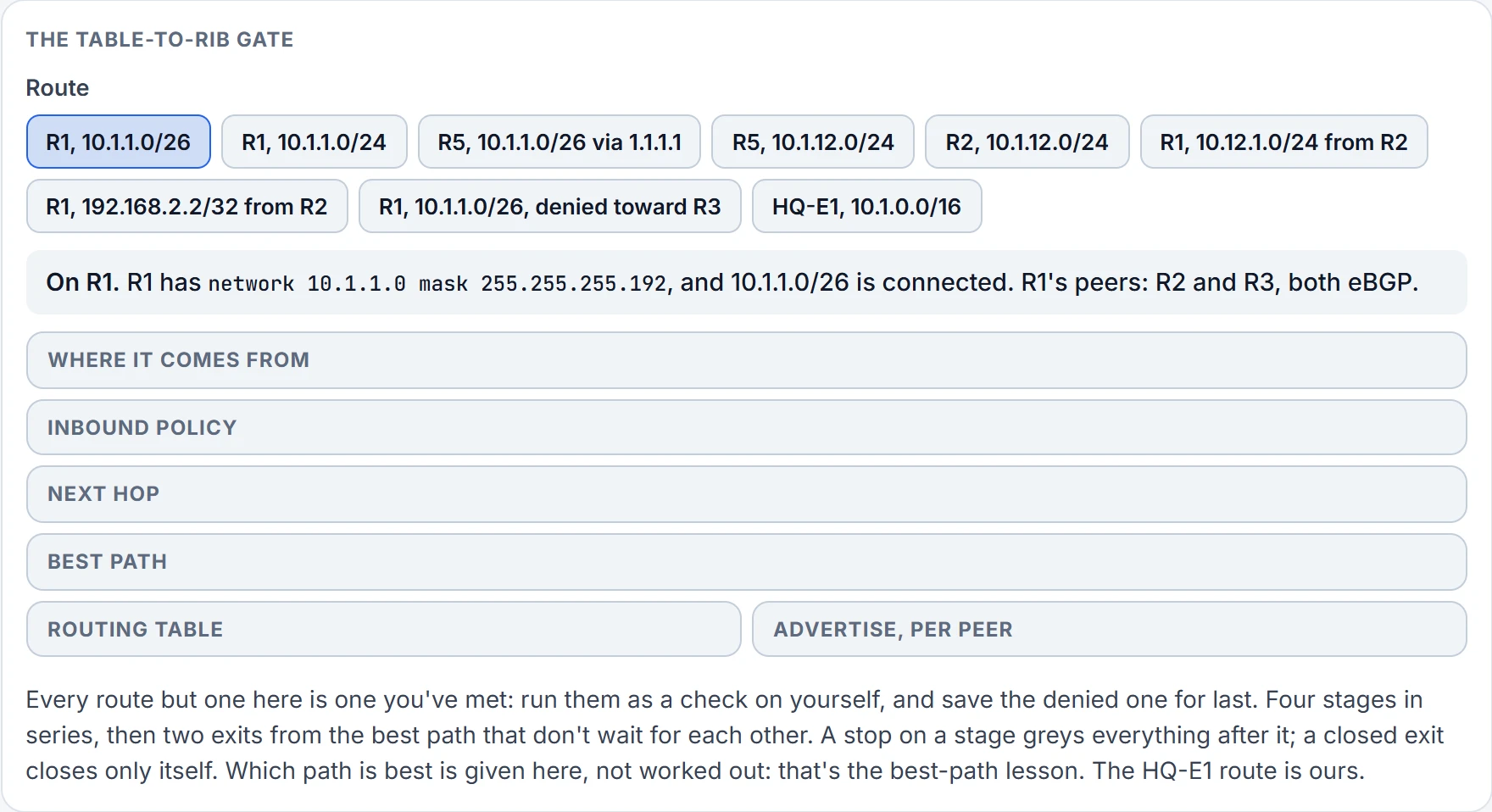
Step 1 of 6 On R1: network 10.1.1.0 mask 255.255.255.192, with 10.1.1.0/26 connected. The route meets four stages in series, then two exits.
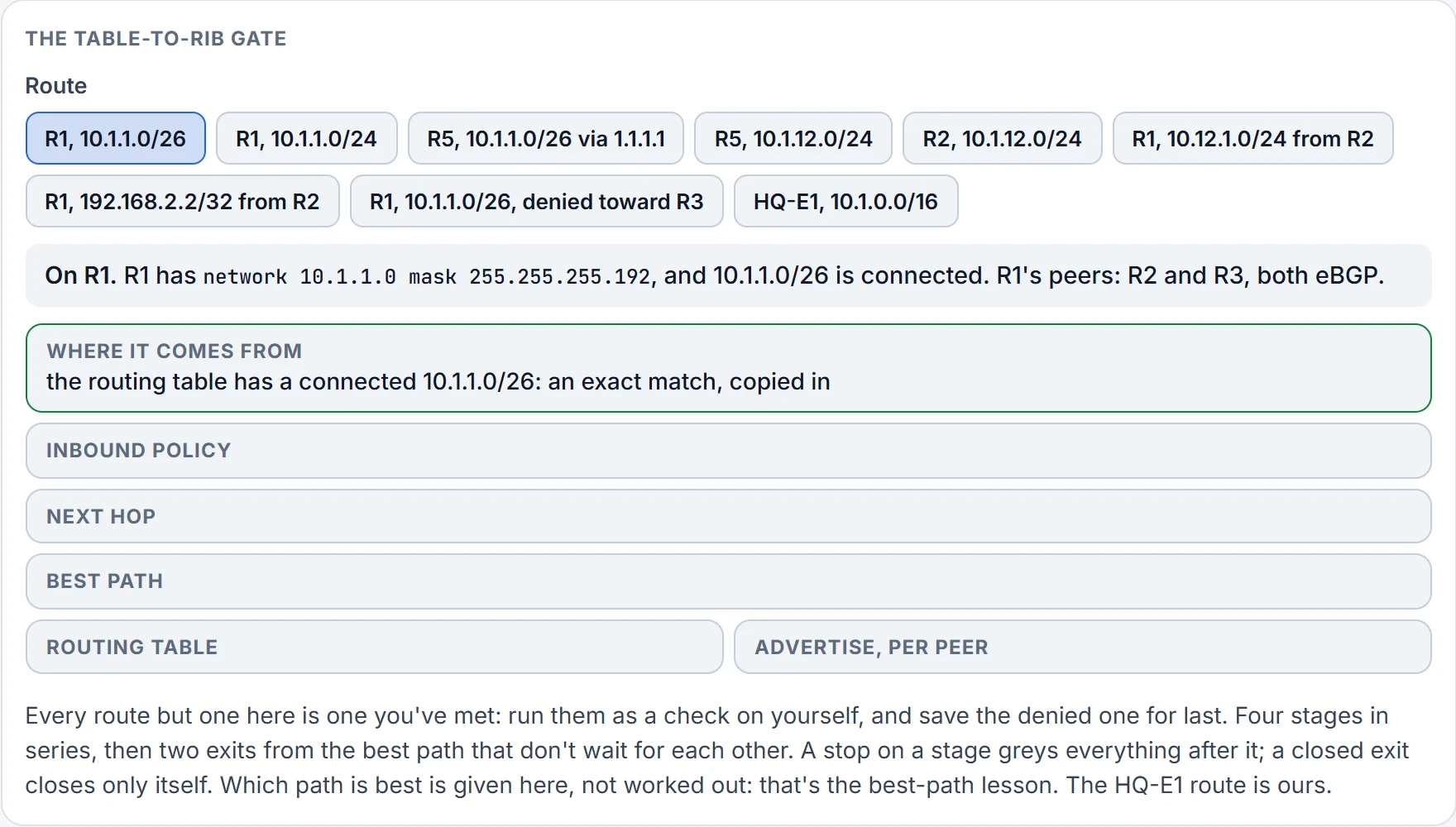
Step 2 of 6 Where it comes from: the routing table has a connected 10.1.1.0/26, an exact match, so network copies it in.
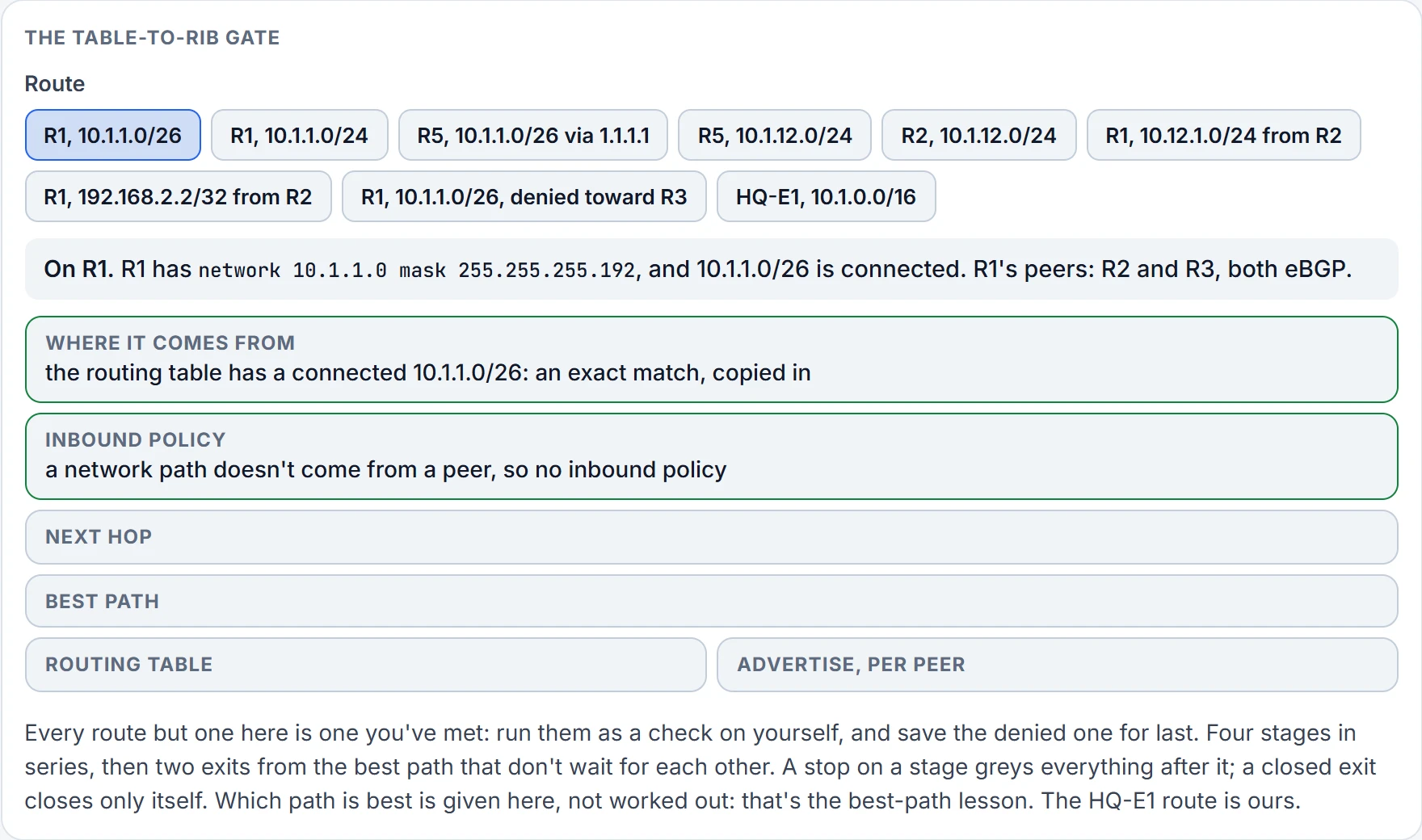
Step 3 of 6 Inbound policy: a network path doesn't come from a peer, so no inbound policy applies.
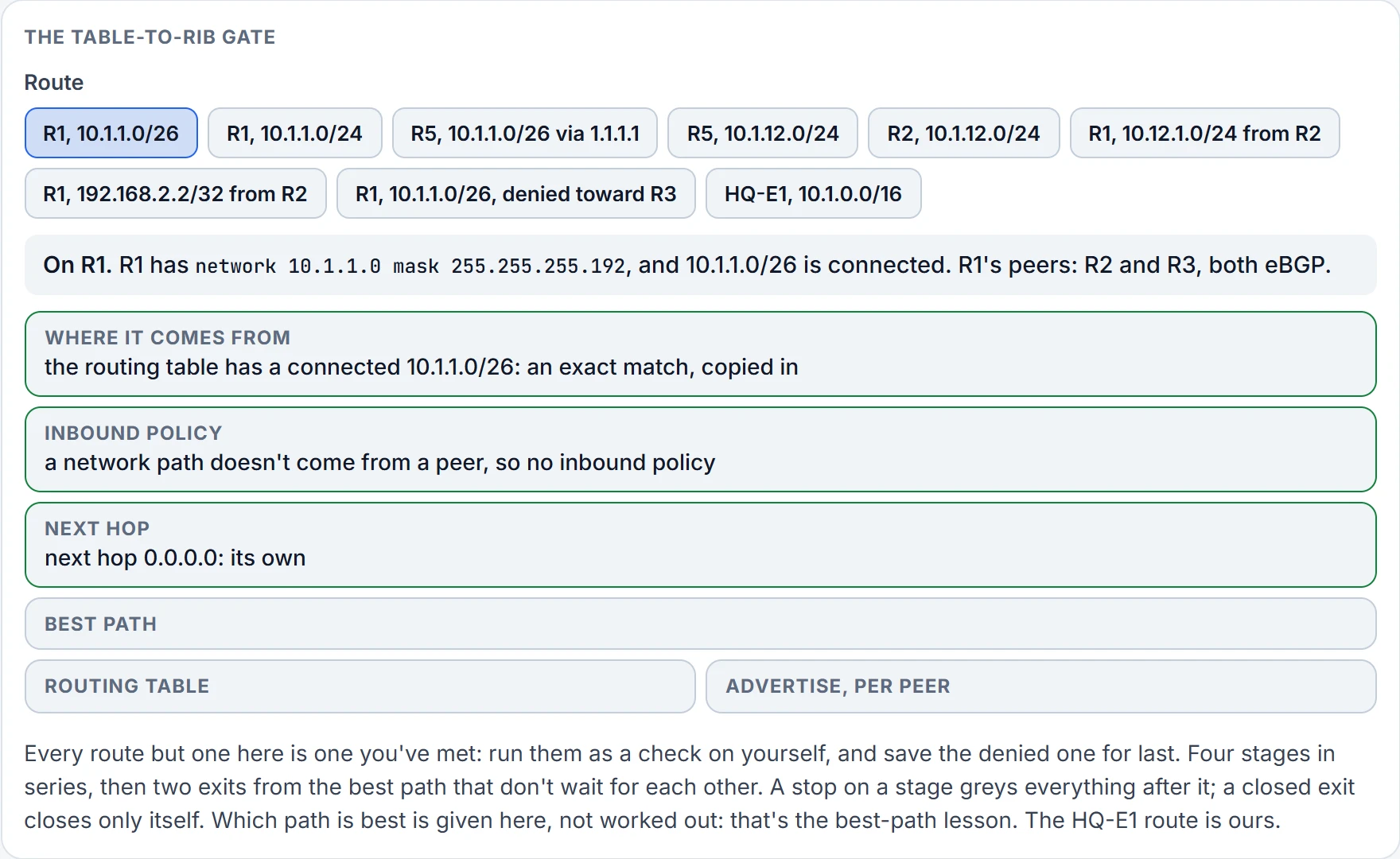
Step 4 of 6 Next hop: 0.0.0.0, the router's own.
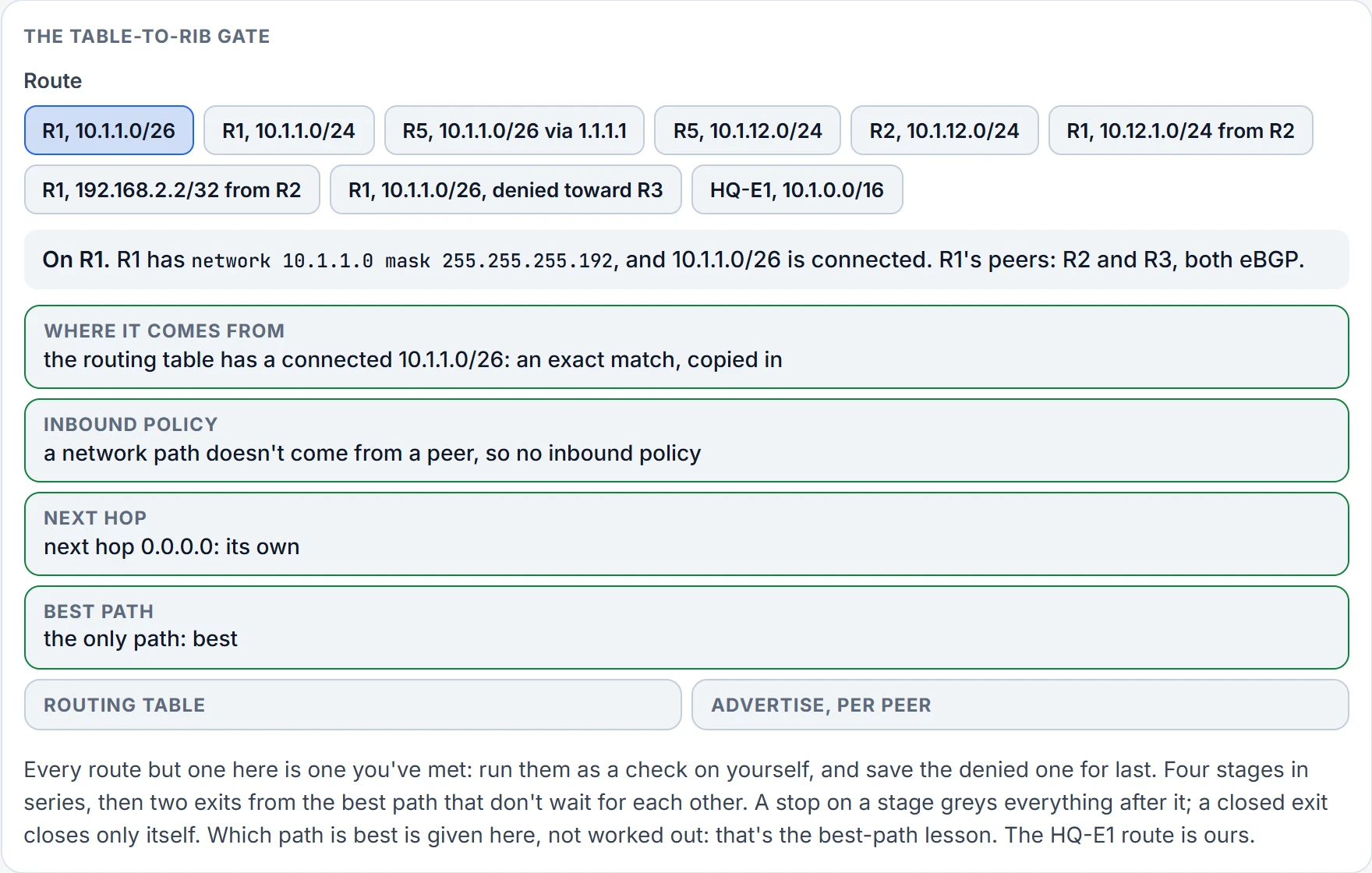
Step 5 of 6 Best path: the only path, so it is best.
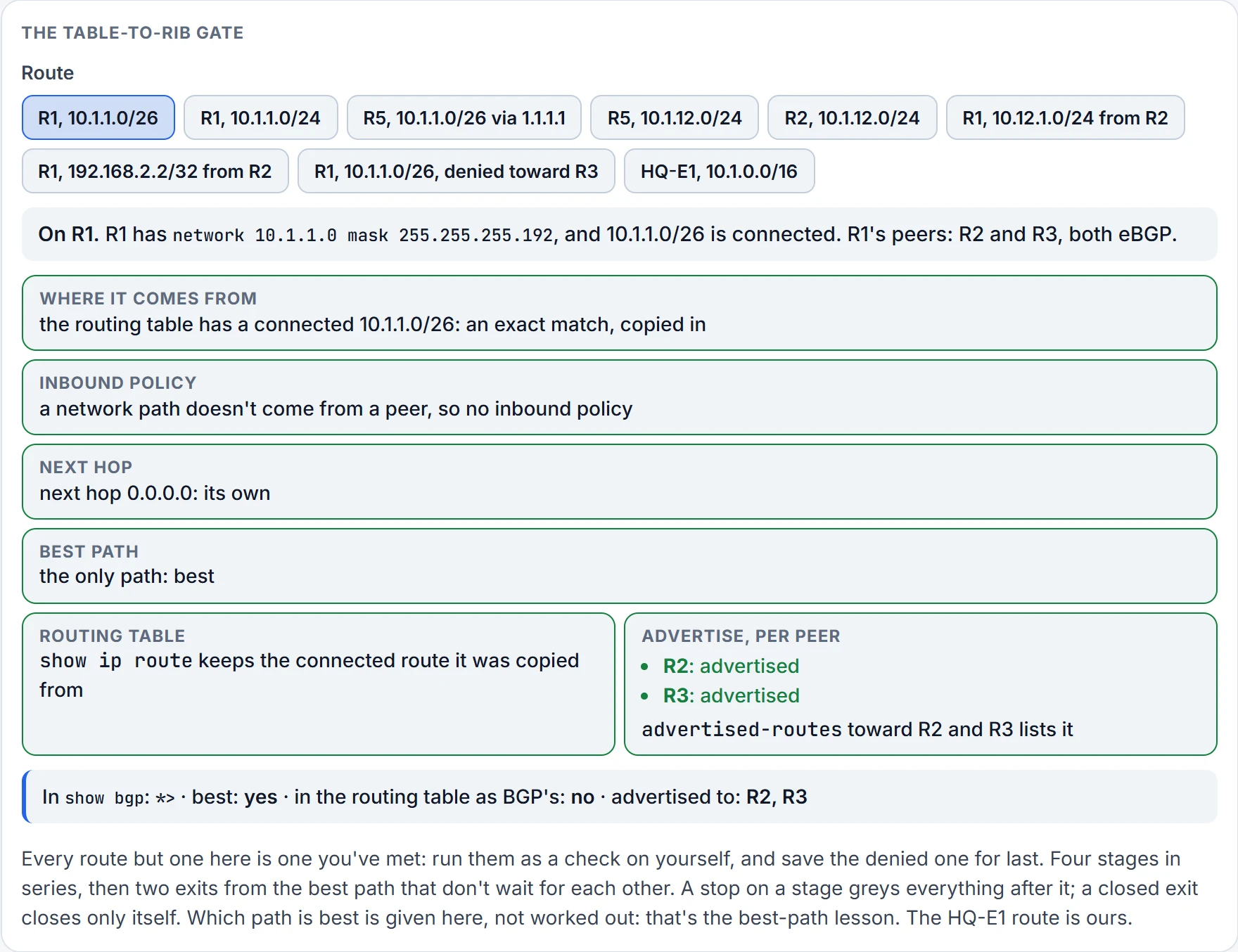
Step 6 of 6 The two exits: the routing table keeps the connected route the path was copied from, and the path is advertised to R2 and R3.
Continue the lesson
The whole lesson, with its drawings and its questions. 6 more sections after the ones above.