
Troubleshooting OSPF from symptom to cause (timed)
Sometimes OSPF's fault is the adjacency; sometimes every neighbour is FULL, the LSDB is full, and the route still is not in the table. One command halves the search: if the LSA is in the LSDB, the problem is getting it into the routing table; if not, it was never advertised. Six timed tickets work each cause.
By Arif, founder of Daveth · Updated
The full 15 min walkthrough is in Daveth Pro (Network). See what the plan opens
What this page answers
Why is an OSPF route in the database but not the routing table?
Either another source with a lower administrative distance offers the same prefix, since OSPF's AD is 110, or a distribute list on the OSPF process is keeping it out of the routing table. Read it in “In the LSDB, beaten at the table: a better source”
What does a distribute list do in OSPF?
It controls which routes are installed from the LSDB into that router's routing table; it never filters what neighbours receive, because every router in an area must hold the same LSDB. In EIGRP a distribute list filters routes to and from neighbours. Read it in “A distribute list: OSPF filters the table, never the neighbors”
Six tickets, one clock
Sometimes it's the adjacency. Sometimes every neighbor is FULL, the LSDB is full, and the route still isn't there. This lesson works both, against a clock.
You've met OSPF's faults one lesson at a time: the neighbor that won't reach FULL, the network type and the DR, the LSAs, the area types, path preference and the default, summaries and virtual links, OSPFv3. On the exam they don't arrive labelled. A lab item says "users in 10.1.1.0/24 can't reach 192.168.1.0/24", and the exam's timer keeps running while you read.
How long have you got? The first lesson gave you the number: experienced candidates put sims, simlets and testlets at roughly 6 to 8 minutes each, and the pacing check from that lesson counts one minute for every question answered, plus 7 for each of those. That's experience, not a Cisco rule. So every ticket here carries a budget, ours, between four and seven minutes. When it runs out, write down your best hypothesis and move on.
Six OSPF tickets follow, three for OSPFv2 and three for OSPFv3, and the point of them is a method: one that works on a live network and in the exam room alike. Their walks are thorough. Thorough isn't the same as fast, so each ticket ends with the clock's verdict: which commands carried the answer, and which only confirmed what you already knew.
One rule for every ticket. Before you read the walk, commit to a first look: which router you log in to, which command you type, and what answer would send you somewhere else. Write it down. Then read on and compare.
Ticket 1: the network nobody told R2 about 7 min
This is the network for all three OSPFv2 tickets. R1 sits in area 1 with the users' LAN, 10.1.1.0/24, on Gi0/0 and 10.1.12.0/24 towards R2. R2 is the ABR; its Gi1/0 is on 10.1.23.0/24 in area 0. R3 is in area 0 with 10.1.3.0/24, a link to R4, and Gi2/0 towards the internet. R4 is in area 0 with 192.168.1.0/24. The RIDs run 1.1.1.1 to 4.4.4.4.
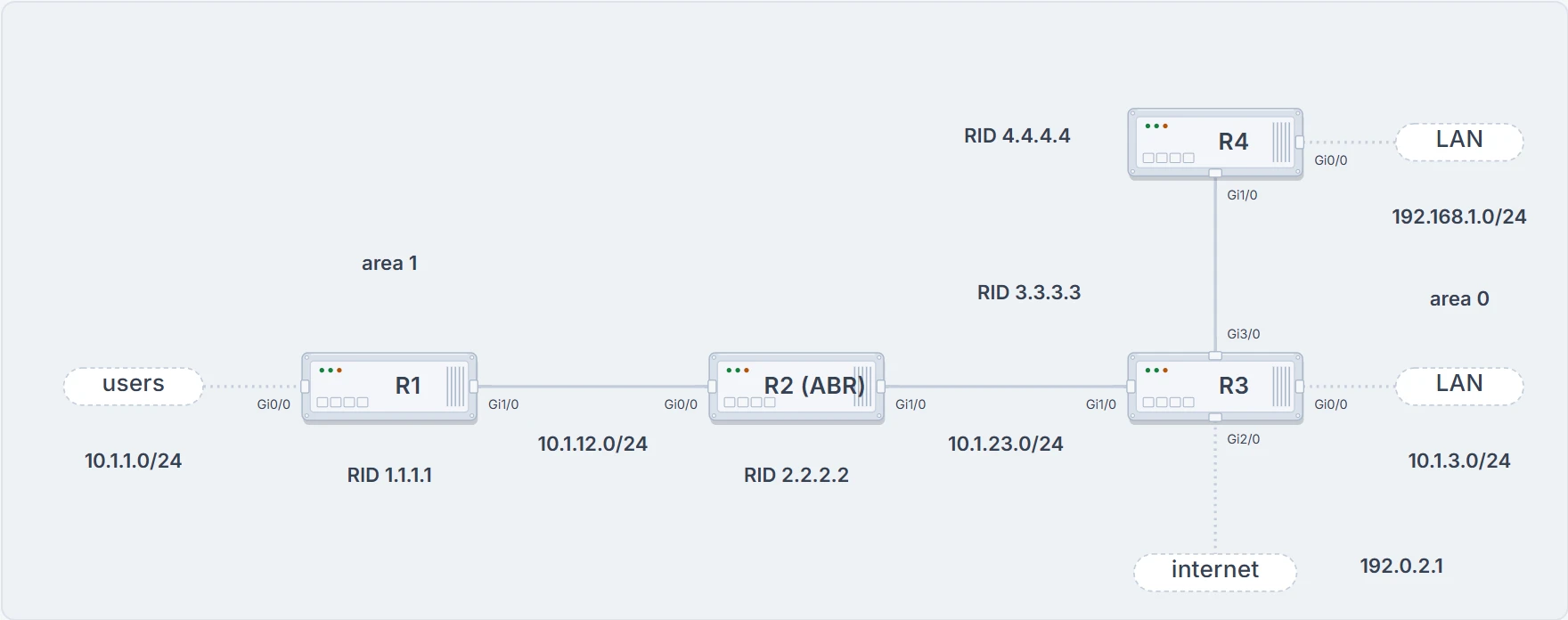
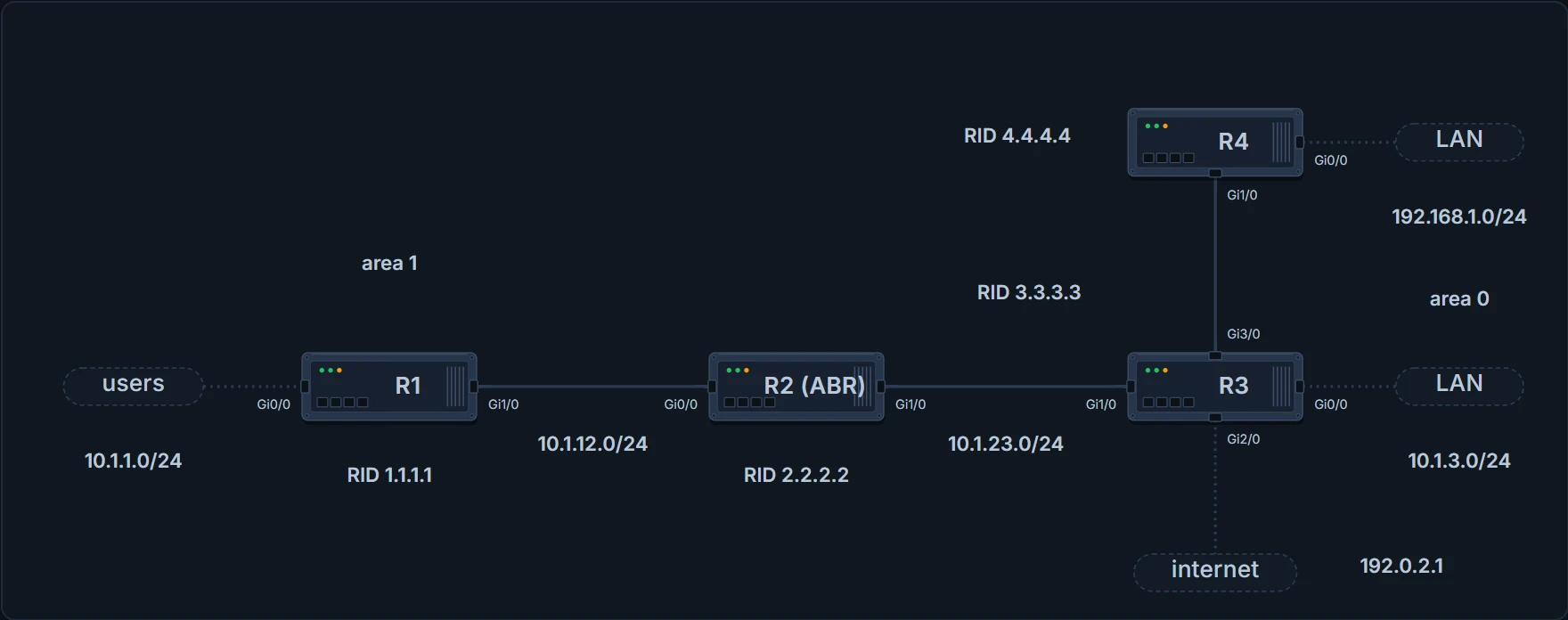
The network for the three OSPFv2 tickets. R2 is the ABR between area 1 and area 0; router IDs run 1.1.1.1 to 4.4.4.4. Every output in those tickets comes from these routers.
The ticket: users in 10.1.1.0/24 can't reach resources in 192.168.1.0/24. Budget: seven minutes. Your first look?
Step one never changes: verify the problem. A PC in 10.1.1.0/24 pings 192.168.1.10:
C:\>ping 192.168.1.10
Pinging 192.168.1.10 with 32 bytes of data;
Reply from 10.1.1.1: Destination host unreachable.
! three more identical replies
Packets: Sent = 4, Received = 4, lost = 0 (0% loss),
Zero percent loss, and nothing reached 192.168.1.10. Every reply came from the default gateway, 10.1.1.1, saying Destination host unreachable, so the ping didn't succeed at all. Read who answered, not the loss line. And that one command told you two things: the PC can reach its gateway, and the gateway doesn't know how to get to 192.168.1.0/24. So the hunt starts on R1.
On R1 the same ping fails, 0 of 5, and the routing table holds connected routes only. R1 isn't learning any routes from R2:
R1# show ip route
...output omitted...
Gateway of last resort is not set
10.0.0.0/8 is variably subnetted, 4 subnets, 2 masks
C 10.1.1.0/24 is directly connected, GigabitEthernet0/0
L 10.1.1.1/32 is directly connected, GigabitEthernet0/0
C 10.1.12.0/24 is directly connected, GigabitEthernet1/0
L 10.1.12.1/32 is directly connected, GigabitEthernet1/0
show ip protocols confirms OSPF process 1 is running on R1, and show ip ospf neighbor shows R2, 2.2.2.2, FULL/DR:
R1# show ip ospf neighbor
Neighbor ID     Pri   State       Dead Time   Address         Interf…
2.2.2.2          1    FULL/DR     00:00:36    10.1.12.2       Gigabi…
Here's the move that saves the ticket. You could start working through R1's features and parameters. Don't. 192.168.1.0/24 is in a different area. Who's responsible for telling R1 about it? Not R4. R2 is, with a type 3 into area 1. So if R2 doesn't know about 192.168.1.0/24, you can stop troubleshooting on R1: understanding how the LSAs flow saves you time. The type 3, the ABR's signpost, tells you which router to log in to.
R2 doesn't know about 192.168.1.0/24 either. In fact it hasn't learned any network in area 0:
R2# show ip route
...output omitted...
Gateway of last resort is not set
10.0.0.0/8 is variably subnetted, 6 subnets, 3 masks
O 10.1.0.0/16 is a summary, 15:15:33, Null0
O 10.1.1.0/24 [110/2] via 10.1.12.1, 01:33:14, GigabitEthernet0/0
C 10.1.12.0/24 is directly connected, GigabitEthernet0/0
L 10.1.12.2/32 is directly connected, GigabitEthernet0/0
C 10.1.23.0/24 is directly connected, GigabitEthernet1/0
L 10.1.23.2/32 is directly connected, GigabitEthernet1/0
That first line is R2 summarizing area 1 as 10.1.0.0/16, a summary's Null0 route. It's R2's own summary, and it isn't the fault. Under a clock, a line you can explain is a line you skip.
Now stop yourself. With OSPF, a distribute list decides what goes from the LSDB into the routing table, so R2 might be learning the routes and just not installing them. One command settles it. R2's LSDB has no area 0 type 1 router LSAs from 3.3.3.3 or 4.4.4.4, so R2 has never been told about the missing networks:
R2# show ip ospf database
       OSPF Router with ID (2.2.2.2) (Process ID 1)
           Router Link States (Area 0)
Link ID     ADV Router Age   Seq#       Checksum Link count
2.2.2.2     2.2.2.2    316   0x80000025 0x003B9F 1
           Summary Net Link States (Area 0)
Link ID     ADV Router Age   Seq#       Checksum
10.1.0.0    2.2.2.2    1339  0x8000001C 0x00927B
! the area 1 sections are omitted here
Area 0 holds one router LSA, R2's own. To receive LSAs, a router needs interfaces in the OSPF process and neighbors on them. show cdp neighbors puts R3 on R2's Gi1/0, and show ip ospf interface brief with show ip ospf neighbor shows Gi1/0 in the process, in area 0, with no neighbor on it:
R2# show ip ospf interface brief
Interface    PID   Area          IP Address/Mask    Cost  State Nbrs
Gi1/0         1    0               10.1.23.2/24       1     DR     0
Gi0/0         1    1               10.1.12.2/24       1     DR     1
So it's an adjacency problem between R2 and R3, the adjacency lesson's ground. Most of those causes live on the interface, so compare show ip ospf interface gigabitEthernet 1/0 on both routers, spot the difference. R2's says Hello 11, Dead 44; R3's says Hello 10, Dead 40:
R2# show ip ospf interface gigabitEthernet 1/0
! lines before the timers are omitted here
Timer intervals configured, Hello 11, Dead 44, Wait 44, Retransmit…
! lines between are omitted here
Message digest authentication enabled
Youngest key id is 1
R3# show ip ospf interface gigabitEthernet 1/0
GigabitEthernet1/0 is up, line protocol is up
Internet Address 10.1.23.3/24, Area 0, Attached via Network Stateme…
Process ID 1, Router ID 3.3.3.3, Network Type BROADCAST, Cost: 1
! lines before the timers are omitted here
Timer intervals configured, Hello 10, Dead 40, Wait 40, Retransmit…
! lines between are omitted here
Message digest authentication enabled
Youngest key id is 1
Run the checklist against the pair. Interfaces up, same subnet, same area, unique RIDs: yes to all four. Compatible network types: yes. Hello and dead timers: no. Authentication: enabled on both, key ID 1 on both, but you can't see the key string without the running configuration. Two suspects, and the outputs have already convicted one. show run interface gigabitEthernet 1/0 on R2 names it: ip ospf hello-interval 11. Take it off with no ip ospf hello-interval 11, and R2 logs neighbor 3.3.3.3 going from LOADING to FULL:
%OSPF-5-ADJCHG: Process 1, Nbr 3.3.3.3 on GigabitEthernet1/0 from
LOADING to FULL, Loading Done
The proof runs back down the path to the user. R2 now has O 192.168.1.0/24 [110/3] via 10.1.23.3 and a default, O*E2 0.0.0.0/0 [110/1] via 10.1.23.3. R1 has O IA 192.168.1.0/24 [110/4] via 10.1.12.2. And the PC's ping is answered by 192.168.1.10 itself.
The clock's verdict. The full walk types thirteen commands before the fix. Five of them moved you: R1's neighbor table (FULL, so R1's adjacency isn't it), R2's LSDB (never told), R2's interface brief (no neighbor on Gi1/0), and the two interface outputs side by side. And one question moved you further than any of them: who's responsible? R1's show ip protocols and R2's show cdp neighbors confirmed what the next command would have shown anyway. The minutes are saved by the jump from R1 to R2 without opening R1's configuration.
One command halves the search
Name what you just did, because you'll do it in every ticket.
OSPF routers receive LSAs from every router in their area, so they learn routes straight from the source. The LSAs have to be flooded through the whole area, because every router in an area must hold exactly the same LSDB. That's why missing OSPF routes are harder to troubleshoot than distance-vector ones: it's harder to follow the path, especially across several areas. In EIGRP you walked the route router by router. OSPF makes that walk harder.
What it gives you instead is a cut. A missing route is either missing from the router's LSDB, or it's in the LSDB and didn't make it into the routing table. The LSDB decides which, and half the suspects go home.
Neighbors come first, as always: no neighbors, no routes. Past that, here are the common reasons an OSPF route goes missing from the LSDB or the routing table. Sort them as you read.
Never reached the LSDB:
- The interface isn't running the OSPF process, so its network is never injected into OSPF or advertised to neighbors.
- The interface is shut down; it has to be up/up for its network to be advertised.
- The wrong router is DR in a hub-and-spoke network, so routes aren't exchanged properly.
- The wrong type of stub area, so you might be getting a default route instead of the actual route.
In the LSDB, lost at the routing table:
- A better source of information: the same network learned from a more reliable source is used instead.
- Route filtering: a filter can stop a route being installed in the routing table.
And one that breaks the cut:
- Duplicate RIDs: two or more routers share a RID.
Tracking LSAs through the network, route summarization, discontiguous areas, load balancing and default routes belong here too, and earlier lessons taught them; two of them belong with the first list (a summary that hides the prefix, an area that never reaches area 0), and they get one line each when a ticket needs them.
The network that never went in
Before anything clever, the plain causes. The outputs in the next three sections come from a second small lab, with the same router names but different router IDs: R1 is 10.1.12.1, and its ABR is 10.1.23.2.
OSPF is switched on per interface, with network ip_address wildcard_mask area area_id or ip ospf process_id area area_id, and OSPF then injects that interface's network into the LSDB so it can be advertised. So even an interface with no neighbors on it, a users' LAN, has to be in the OSPF process or its network isn't advertised.
show ip protocols shows both ways in: the network statements and the interfaces configured explicitly. Read this one carefully, because one heading misleads people:
R1# show ip protocols
! the first lines are omitted here
Routing for Networks:
  10.1.1.1 0.0.0.0 area 1
Routing on Interfaces Configured Explicitly (Area 1):
  GigabitEthernet1/0
Passive Interface(s):
  Ethernet0/0
  GigabitEthernet0/0
"Routing for Networks" isn't a list of the networks you route for. 10.1.1.1 0.0.0.0 area 1 means enable OSPF on the interface whose address is 10.1.1.1, and put it in area 1. Gi1/0 is listed as explicitly configured, so OSPF routes for its network too. The networks themselves come from the interfaces' addresses: show ip interface gi0/0 | i Internet gives 10.1.1.1/24 and Gi1/0 gives 10.1.12.1/24, so the networks R1 routes for are 10.1.1.0/24 and 10.1.12.0/24. Gi0/0 is passive as well. That's fine: a passive interface's network still goes into the LSDB.
Then the interface itself. When OSPF is enabled on an interface, the network it injects is that interface's directly connected entry in the routing table. Shut the interface and that entry is gone, so the network doesn't exist and nothing is injected. The interface must be up/up for its routes to be advertised, and for neighbors to form. show ip ospf interface brief and show ip interface brief are the quick checks.
In the LSDB, beaten at the table: a better source
Now the other half of the cut.
For an OSPF route to be installed in the routing table, OSPF has to be the most believable source for it, and believability is administrative distance. OSPF's AD is 110 for everything it learns: intra-area, inter-area and external. If another source tells the router about exactly the same network with a better AD, that source's information is the one installed.
This example looks like a fault and isn't. R1's show ip route ospf has no OSPF entry for 10.1.1.0/24 or 10.1.12.0/24. Why not? Ask for the prefix:
R1# show ip route 10.1.1.0 255.255.255.0
Routing entry for 10.1.1.0/24
Known via "connected", distance 0, metric 0 (connected, via interfa…
Routing Descriptor Blocks:
* directly connected, via GigabitEthernet0/0
Route metric is 0, traffic share count is 1
Connected, distance 0. A connected network has an AD of 0 and an OSPF route has 110, so the connected route is the one installed. Remember that command: show ip route <prefix> <mask> names the source that won and its distance, in one line.
So is 10.1.1.0/24 in the LSDB? It should be: an interface in the process puts its network into the LSDB as part of the router's type 1 LSA. Plain show ip ospf database won't show it, because that's only a summary of the LSAs; to see what's inside, open the router's own LSA with show ip ospf database router 10.1.12.1. There it is, so it's in the LSDB and can be advertised:
R1# show ip ospf database router 10.1.12.1
! the LSA header and the transit link are omitted here
  Link connected to: a Stub Network
   (Link ID) Network/subnet number: 10.1.1.0
   (Link Data) Network Mask: 255.255.255.0
     Number of MTID metrics: 0
      TOS 0 Metrics: 1
A stub network, 10.1.1.0, mask 255.255.255.0, metric 1.
The version that hurts is the quiet one. A suboptimal source may not produce a single complaint, because users can probably still reach what they need, and the network still routes badly. Picture two routers joined by one 10-Gig OSPF link, and also by an EIGRP path of four 1-Gig links through three more routers. Traffic to 10.1.1.0/24 takes the longer EIGRP path. The OSPF path is quicker, and EIGRP wins anyway, on its lower AD. The ticket you eventually get says "the network is slow", and recognising which source should be used, and which shouldn't, is how you stop getting it. The fix is to raise EIGRP's AD or lower OSPF's. OSPF's side is distance ospf {external | inter-area | intra-area} ad; choosing the values belongs to the redistribution lessons.
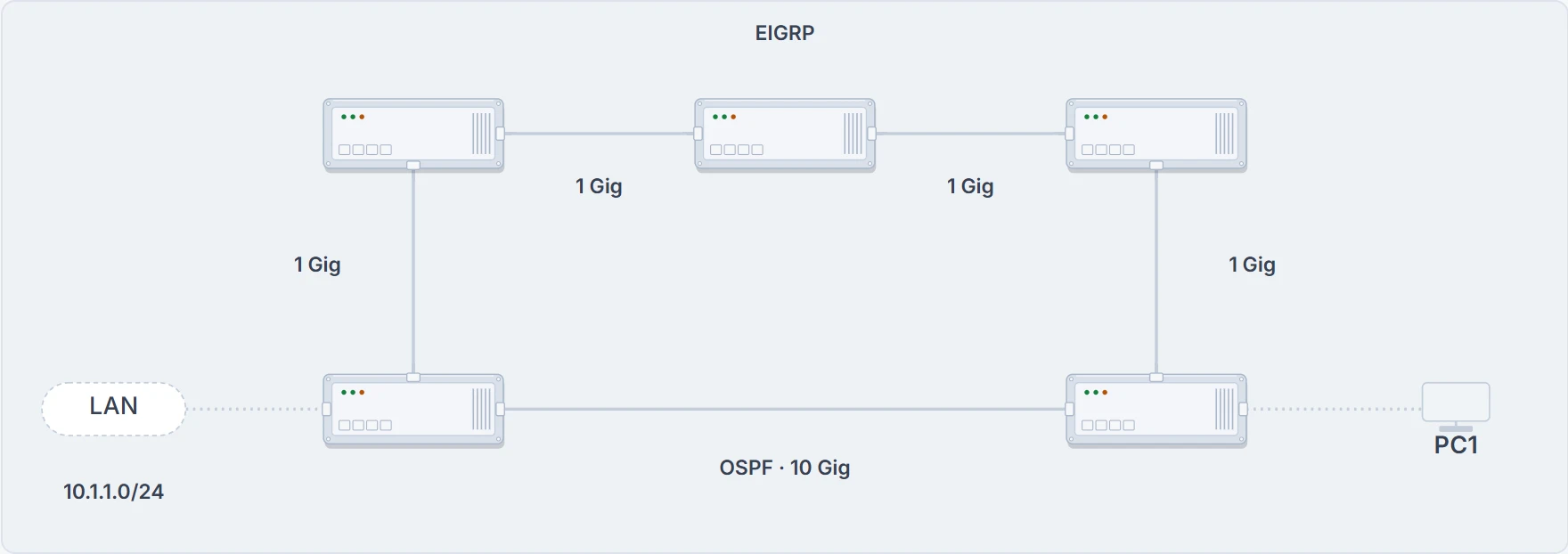
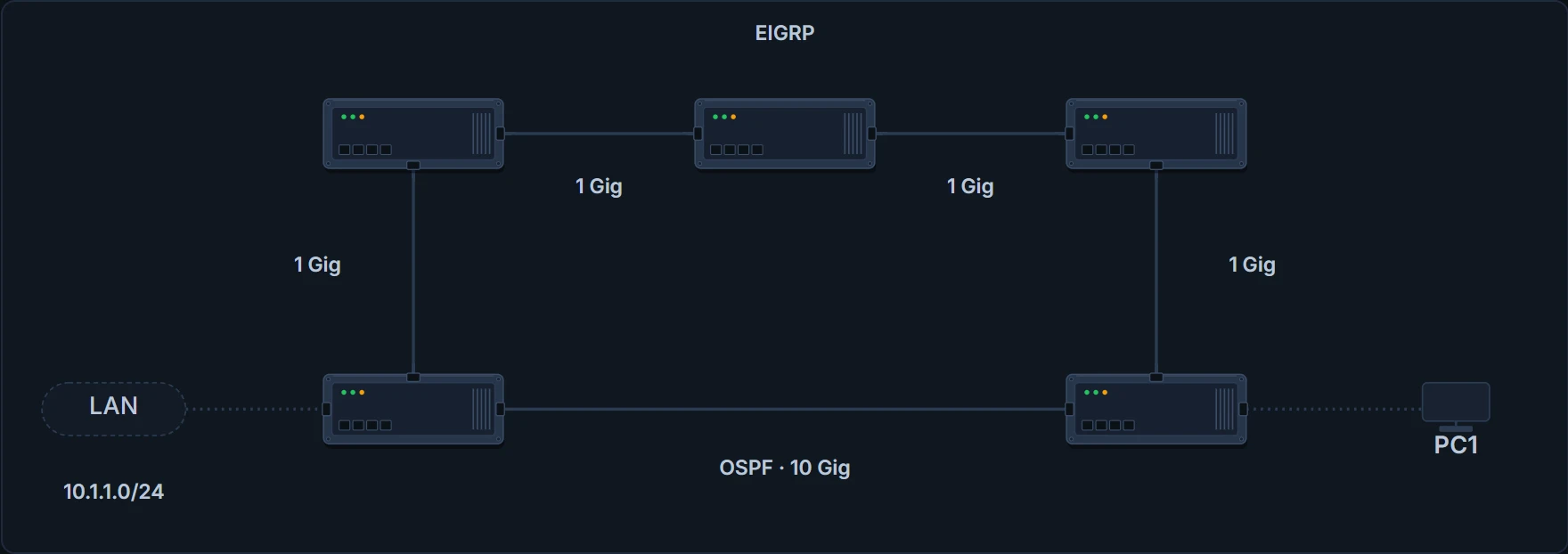
One 10-Gig OSPF link, and a longer EIGRP path of 1-Gig links, between the same two routers.
A distribute list: OSPF filters the table, never the neighbors
If you came here from EIGRP, this is the one to re-learn. A distribute list applied to an OSPF process controls which routes are installed into the routing table from the LSDB. In EIGRP it controls the routes sent to and received from neighbors. Why the difference? All OSPF routers in an area must have the same LSDB. If you could filter what neighbors send and receive, the LSDBs in the area wouldn't match, and that isn't permitted.
So the distribute list goes on in OSPF configuration mode, inbound, meaning into the routing table, and the routes it lets in are controlled by an ACL, a prefix list or a route map. The checks:
- Is the distribute list applied in the right direction?
- If it uses an ACL, is the ACL right? A prefix list, the prefix list? A route map, the route map?
show ip protocols tells you whether one is applied. Here there's no outbound filter, and an inbound one that references the prefix list TEST:
R1# show ip protocols
*** IP Routing is NSF aware ***
Routing Protocol is "ospf 1"
Outgoing update filter list for all interfaces is not set
Incoming update filter list for all interfaces is (prefix-list) TES…
Then read the list itself: show ip prefix-list TEST, or show access-list for an ACL, or show route-map for a route map. TEST has two entries, seq 5 deny 10.1.23.0/24 and seq 10 permit 0.0.0.0/0 le 32, and the running configuration has distribute-list prefix TEST in under router ospf 1. (What le 32 makes that second line match is the prefix-list lesson's.)
Here's the signature. The LSDB still lists 10.1.23.0/24, and the routing table doesn't have it, because the distribute list denies it from being installed:
R1# show ip ospf database
! the router and network LSAs are omitted here
               Summary Net Link States (Area 1)
Link ID         ADV Router      Age         Seq#        Checksum
10.1.3.0        10.1.23.2       16          0x80000002  0x00DB2C
10.1.23.0       10.1.23.2       16          0x80000002  0x00F4FF
203.0.113.0     10.1.23.2       16          0x80000002  0x005286
R1# show ip route
! the codes, the default and the connected routes are omitted here
O IA 10.1.3.0/24 [110/3] via 10.1.12.2, 00:00:02, GigabitEthernet1/0
O IA 203.0.113.0/24 [110/3] via 10.1.12.2, 00:00:02, GigabitEthernet…
The type 3 for 10.1.23.0 is there, advertised by 10.1.23.2; 10.1.3.0/24 and 203.0.113.0/24 are installed, and 10.1.23.0/24 isn't. In the LSDB, not in the table: the cut sends you straight to the filters and the better sources.
One consequence follows by reasoning: R1's neighbors still hold the LSA, because nothing was filtered between neighbors; only R1's own routing table lost the route. So one router can be missing a route every other router has, and traffic that crosses that router goes wherever its remaining routes send it.
Two routers with one name
The RID uniquely identifies each router in the OSPF domain. It's used when neighbor relationships form, and it's how OSPF knows which router advertised an LSA, so the RIDs in a domain have to be unique.
You've met one duplicate already. Two routers with the same RID won't form a neighbor relationship, and you get a syslog message saying so. That one is loud. The hello catches it.
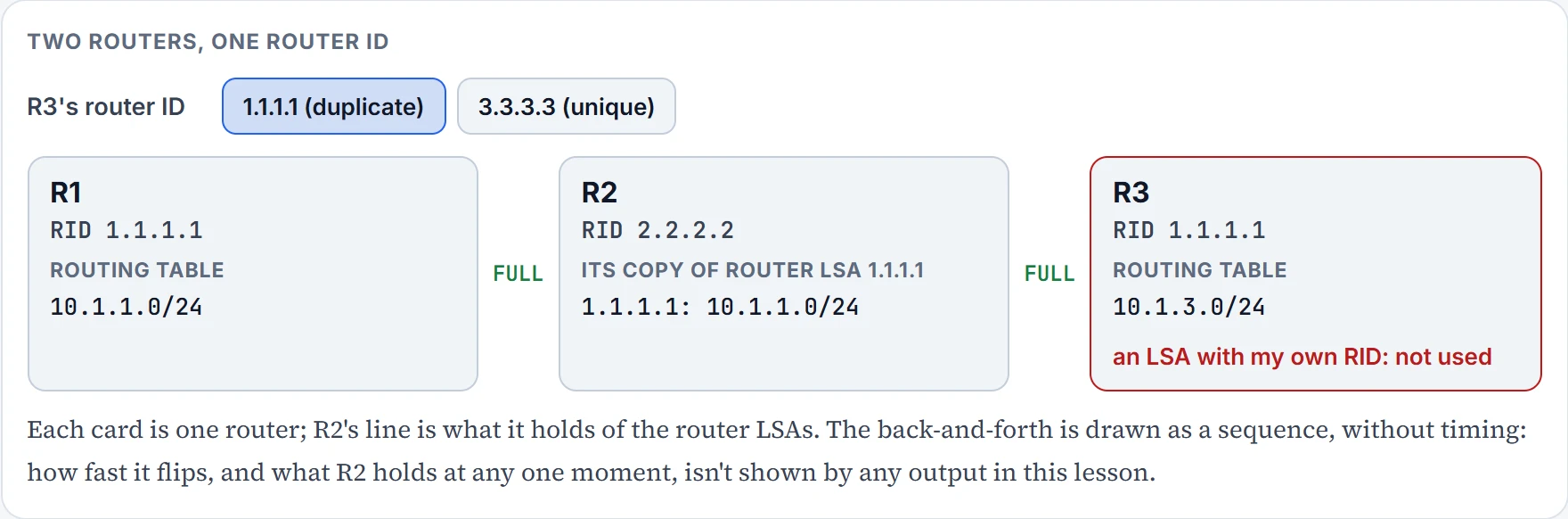
Now the quiet one. R1, R2 and R3 in a row in area 0. R1 has 10.1.1.0/24 and RID 1.1.1.1; R2 sits in the middle with RID 2.2.2.2; R3 has 10.1.3.0/24, and someone gave it RID 1.1.1.1 as well.
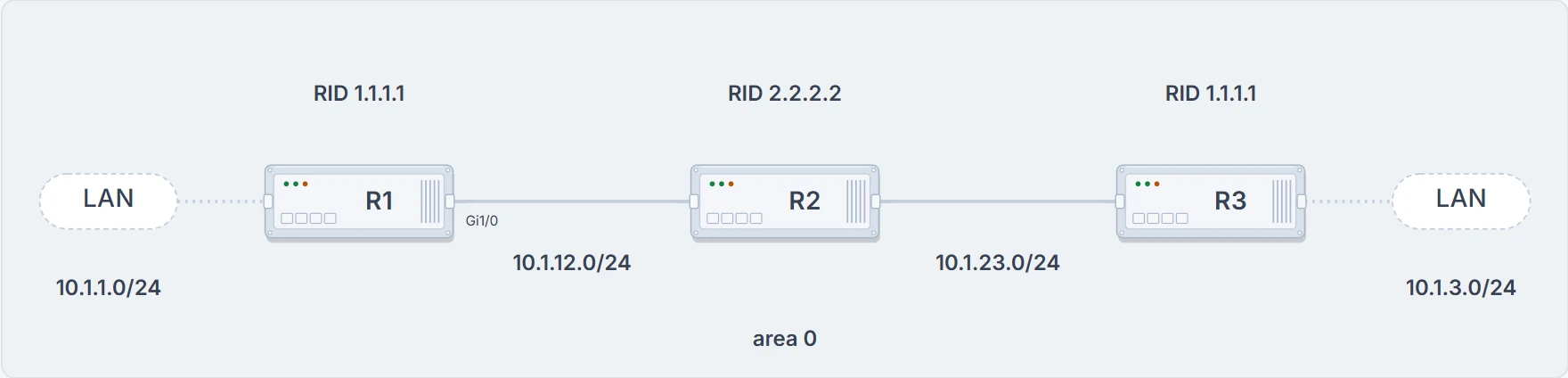
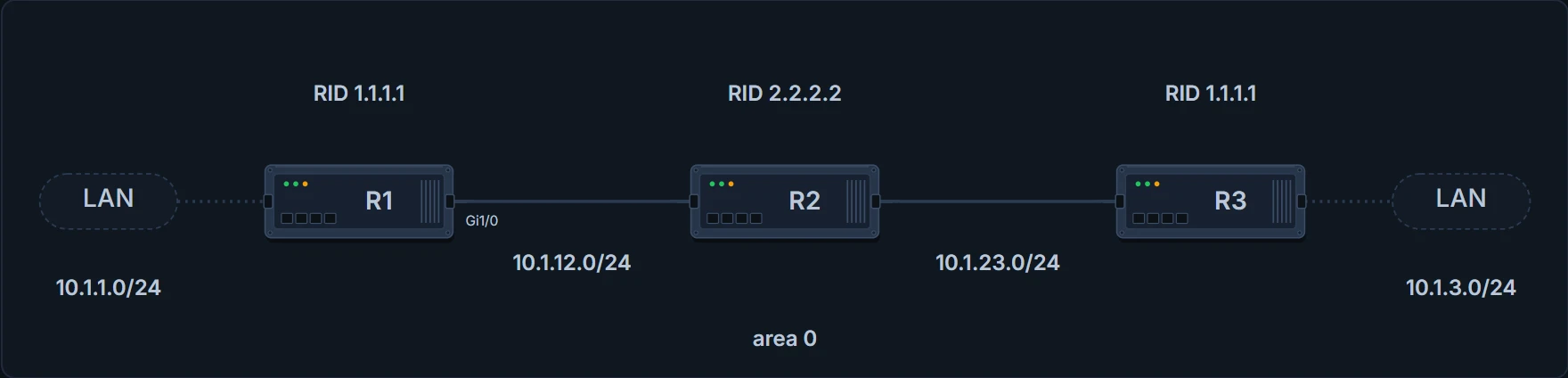
R1 and R3 share router ID 1.1.1.1; R2 sits between them with its own.
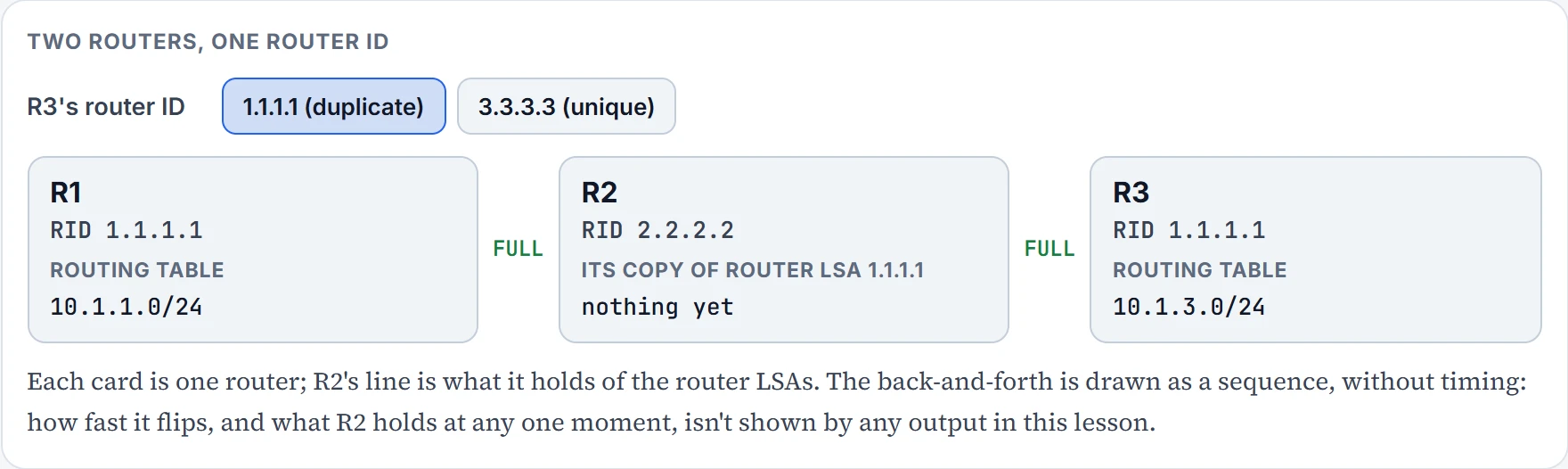
Step 1 of 4 Both adjacencies come up. R1 and R2 are FULL; R2 and R3 are FULL. No hello ever compares R1 with R3, so nothing in the neighbor tables looks wrong.
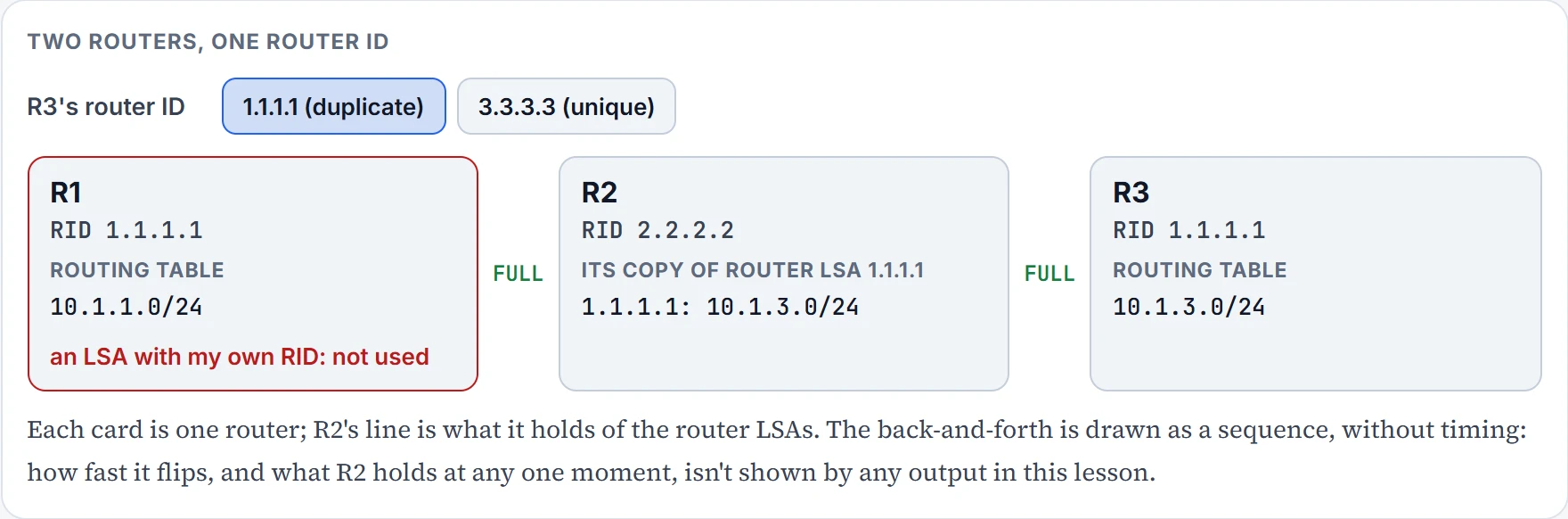
Step 2 of 4 R1's router LSA floods. R1 describes 10.1.1.0/24 in its router LSA, 1.1.1.1. R2 stores it and floods it on. R3 receives an LSA carrying its own router ID, and a router doesn't use the information in an LSA that carries its own RID.
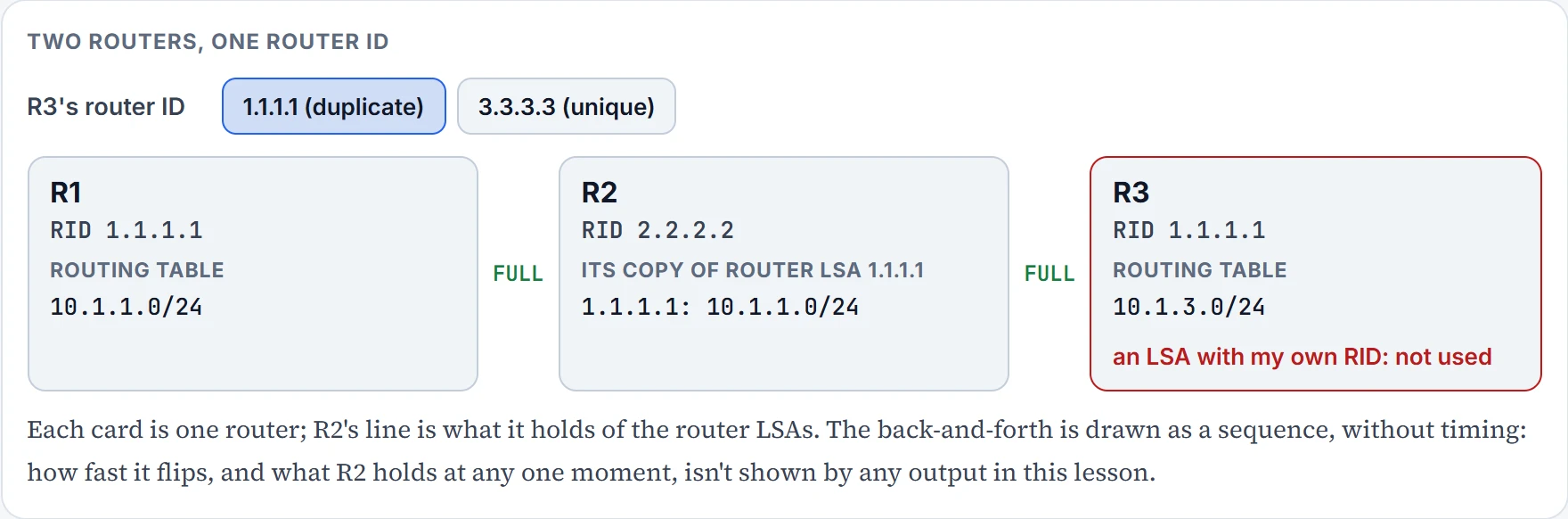
Step 3 of 4 R3 answers with its own version. R3 sends its own router LSA under 1.1.1.1, describing 10.1.3.0/24. R2 replaces its copy. R1 receives an LSA with its own RID and doesn't use it either.
Step 4 of 4 And again. R1 re-sends its version; R2's copy flips back. This can go on over and over: a flood war. Neither routing table ever gains the other router's network.
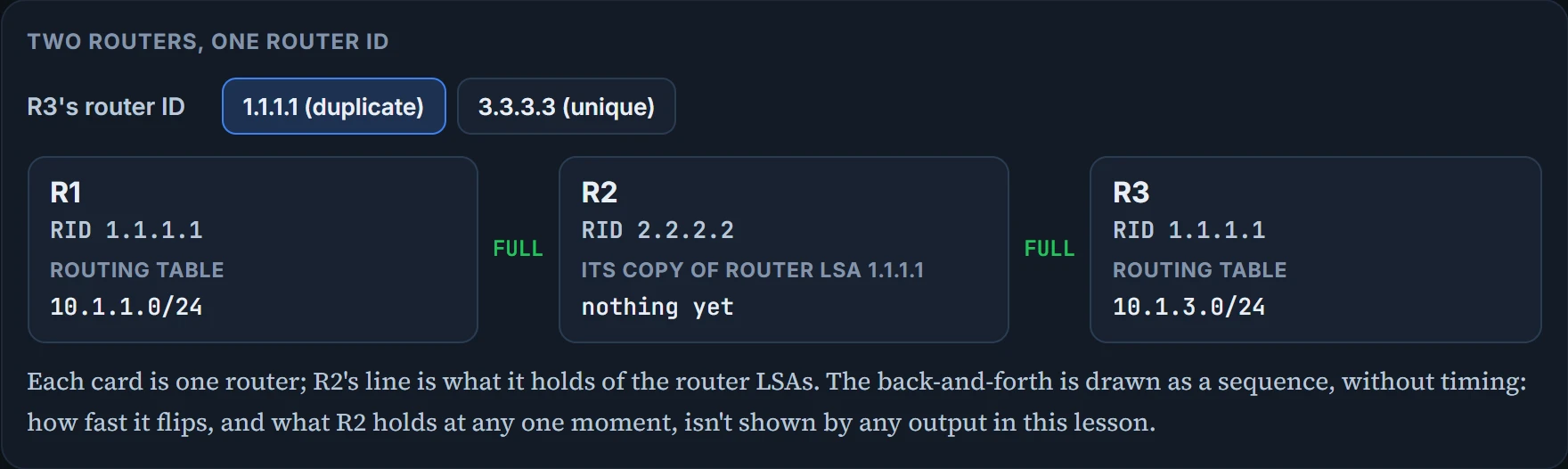
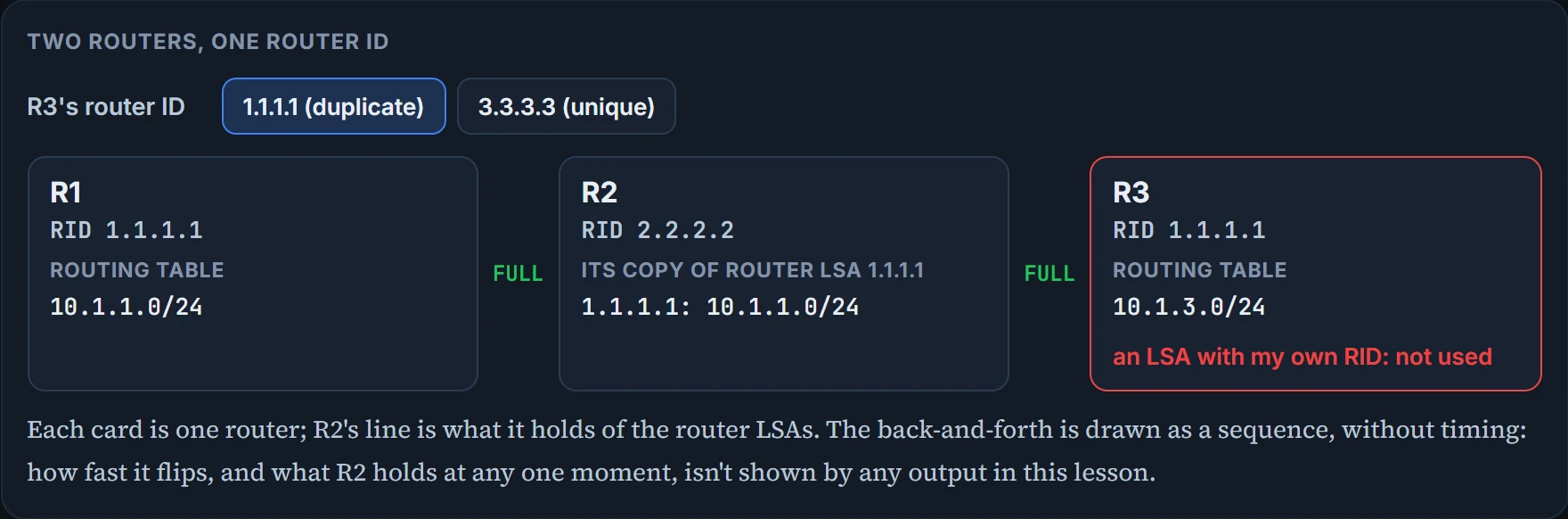
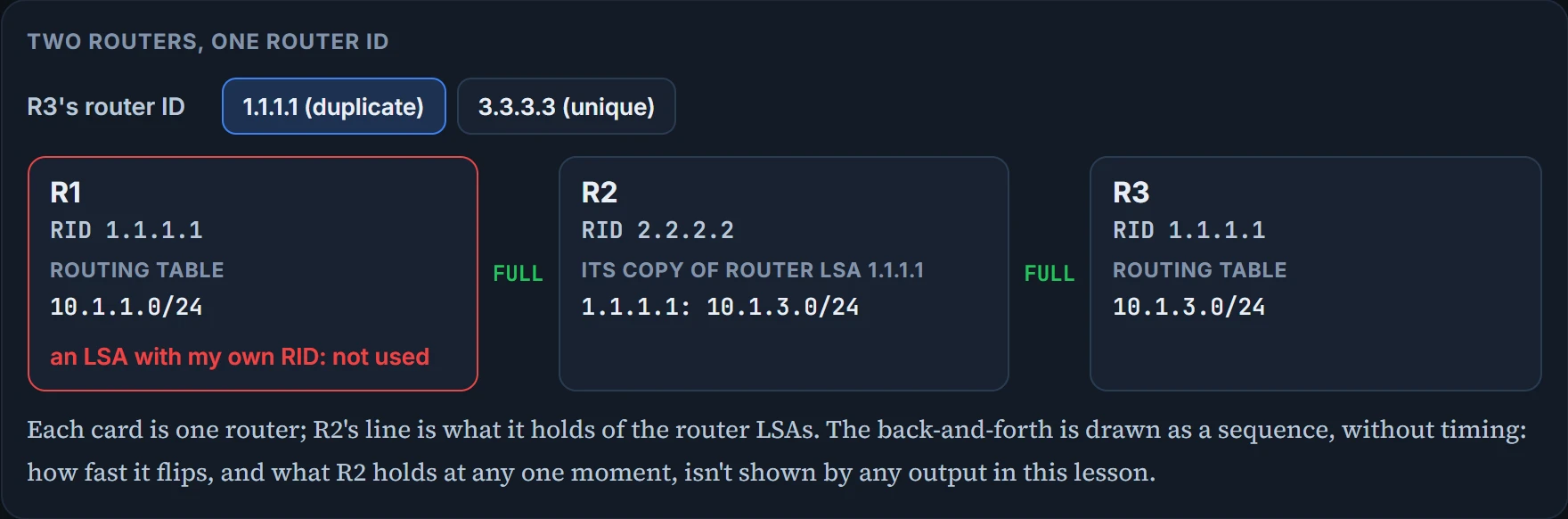
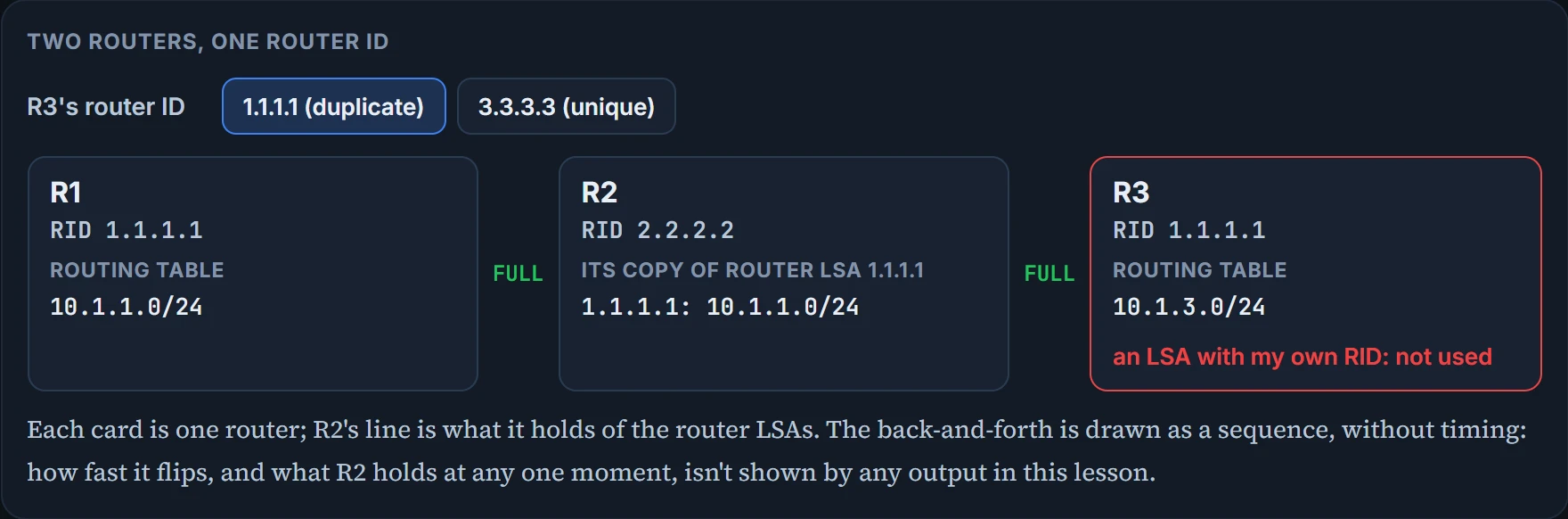
No hello sees it: each pair of neighbors has two different RIDs, so both adjacencies can come up. And R1 doesn't learn 10.1.3.0/24. In one area, a router receives a type 1 router LSA describing networks it doesn't know, from a RID that's the same as its own. It concludes it generated that LSA itself, and a router doesn't use the information in an LSA it receives with its own RID. The LSA isn't really its own; it just carries the same RID. The result is missing routes on various routers in the domain. With duplicate RIDs, the network issues can vary.
Ask it from the other side: neighborships are up across the whole domain, so what could still leave a router missing routes? Duplicate RIDs, and a spoke as DR in a hub-and-spoke network. And its companion from the distribute-list section: an inbound ACL can stop a neighborship forming; a distribute list, in either direction, can't.
Two areas, a different shape. R1 in area 1 and R4 in area 0 both have RID 1.1.1.1. R2, the ABR between them, sees a router with that RID in area 0 and in area 1: to R2 it's technically one router, and physically it's two. That makes the topology SPF works on different from the physical one, and some routes may not be passed between areas, so LSDBs and routing tables come out incomplete.
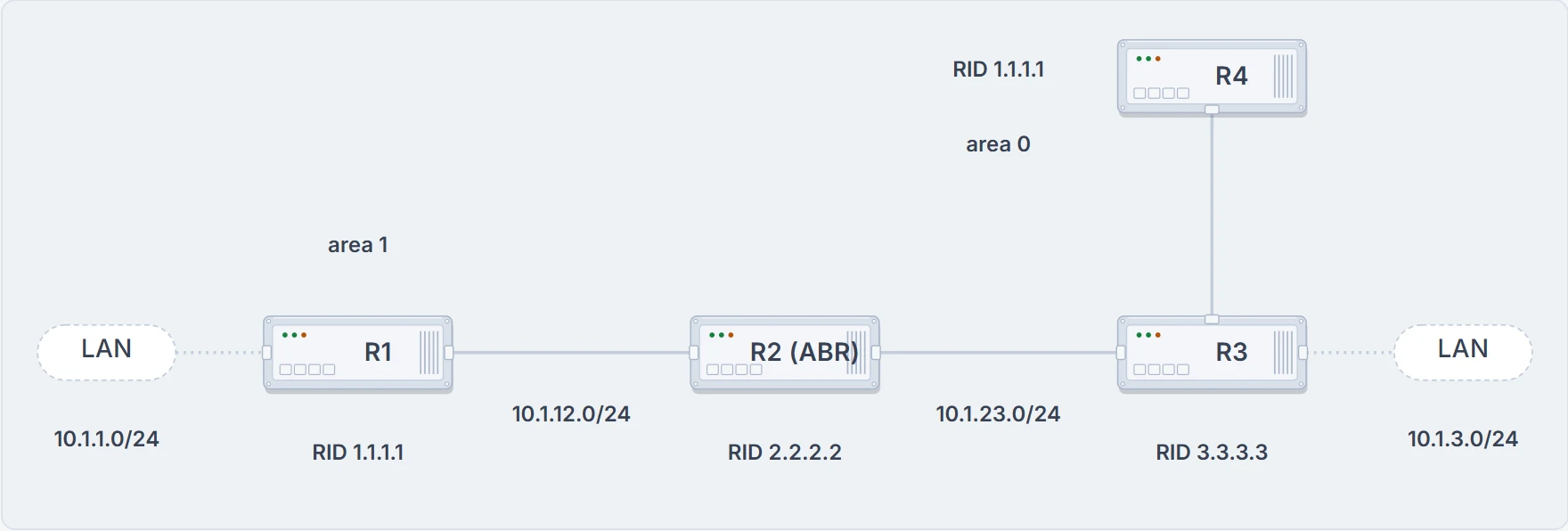
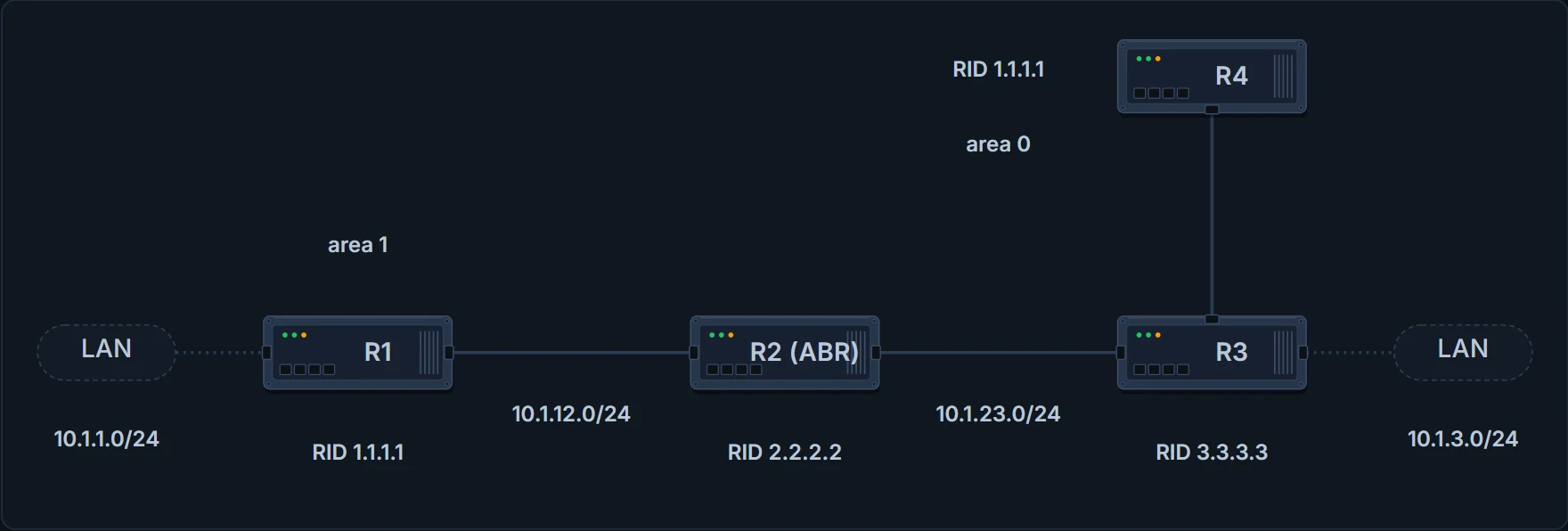
R1 in area 1 and R4 in area 0 share router ID 1.1.1.1. R2, the ABR, sees that ID in both areas.
In both cases you may get an OSPF flood war, and syslog messages saying so. A router receives LSAs under its own RID, listing networks it doesn't own; the other router with the duplicate RID owns them. So the router corrects the record: it sends out an LSA with its RID and the networks it does own. The other router receives that, doesn't agree, and sends out an LSA with its own networks. Over and over again, until you make the RIDs unique. Two routers, one name, and each is sure the other is the impostor.
That's the trap. Every neighbor FULL. The LSDB isn't empty: there's a router LSA for 1.1.1.1 in it, and we'd expect which router's version you see to depend on when you look. And still routes are missing. The cut doesn't catch this. So once you've exhausted every other reason a route might be missing from the LSDB or the routing table, look at the routers' RIDs with show ip protocols:
R1# show ip protocols
*** IP Routing is NSF aware ***
Routing Protocol is "ospf 1"
Outgoing update filter list for all interfaces is not set
Incoming update filter list for all interfaces is not set
Router ID 1.1.1.1
! the remaining lines are omitted here
show ip ospf neighbor won't show you this duplicate, because the two routers aren't neighbors. You compare the "Router ID" lines across routers. In the LSDB, the clue we'd look for is a router LSA whose ADV Router is your own RID but whose links aren't yours.
Continue the lesson
The whole lesson, with its drawings and its questions. 7 more sections after the ones above.