
The LSDB: LSA types and router types
A router learns about a network two areas away from LSAs. Inside an area, every router describes itself with a type 1 router LSA, and each DR describes its segment with a type 2; neither leaves the area. An ABR describes other areas' networks with type 3 summary LSAs, signs them itself and regenerates them at every border. Externals come as types 5 and 7.
By Arif, founder of Daveth · Updated
The full 16 min walkthrough is in Daveth Pro (Network). See what the plan opens
What this page answers
What are the OSPF LSA types?
Type 1, router LSA: each router describes its links, within the area. Type 2, network LSA: the DR describes a multi-access segment. Type 3, summary LSA: an ABR describes networks from other areas. Type 4 locates an ASBR; types 5 and 7 carry external routes. Read it in “The label every LSA carries”
What is an OSPF type 3 summary LSA?
The LSA an ABR uses to describe networks from other areas, signed with its own router ID. ABRs do not forward type 1 or 2 LSAs; each ABR regenerates the type 3 for the next area with itself as advertising router. Read it in “The first border: R5 writes a summary (type 3)”
What are the OSPF router types?
Internal routers, with every OSPF interface in one area; area border routers, connected to area 0 and another area; backbone routers, in area 0; and ASBRs, which redistribute external routes into OSPF. Read it in “Who's who on the route”
A route to a network R1 has never seen
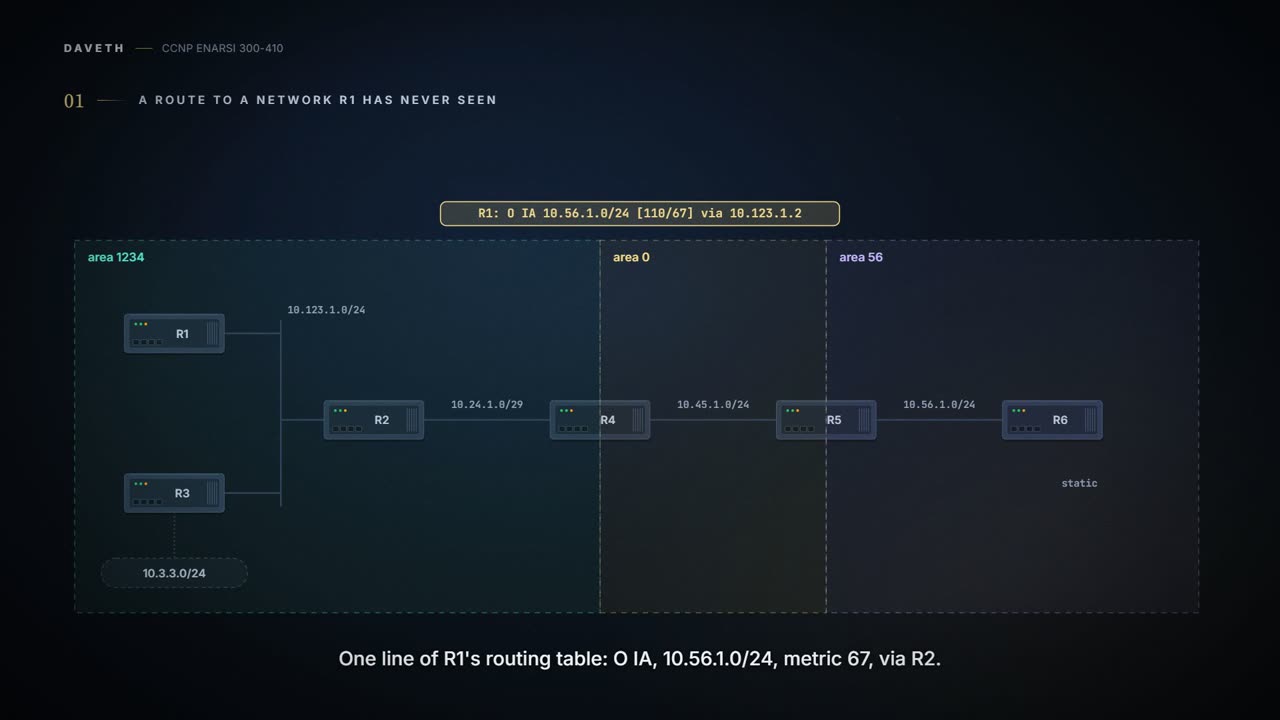
Here's the network for this whole lesson. R1, R2 and R3 share a LAN in area 1234, R2 has a serial link to R4, R4 and R5 make up area 0, and R5 and R6 sit in area 56.
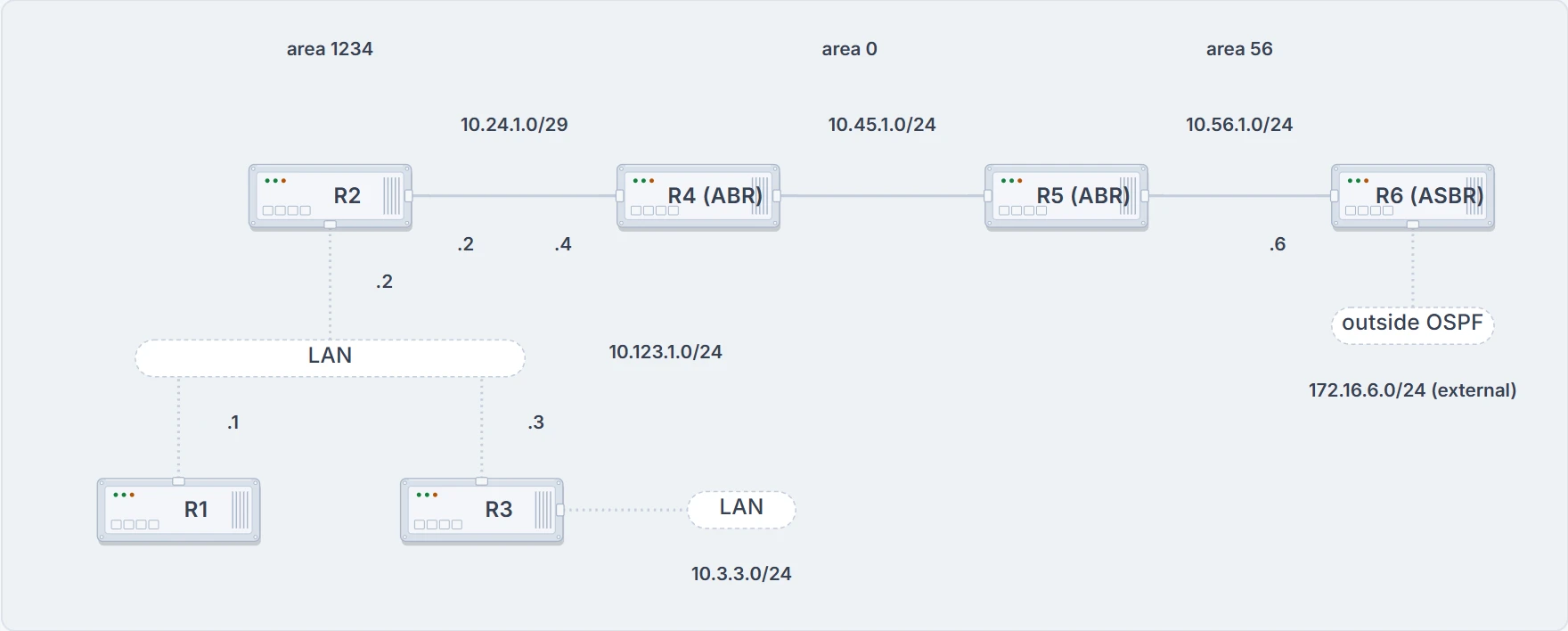
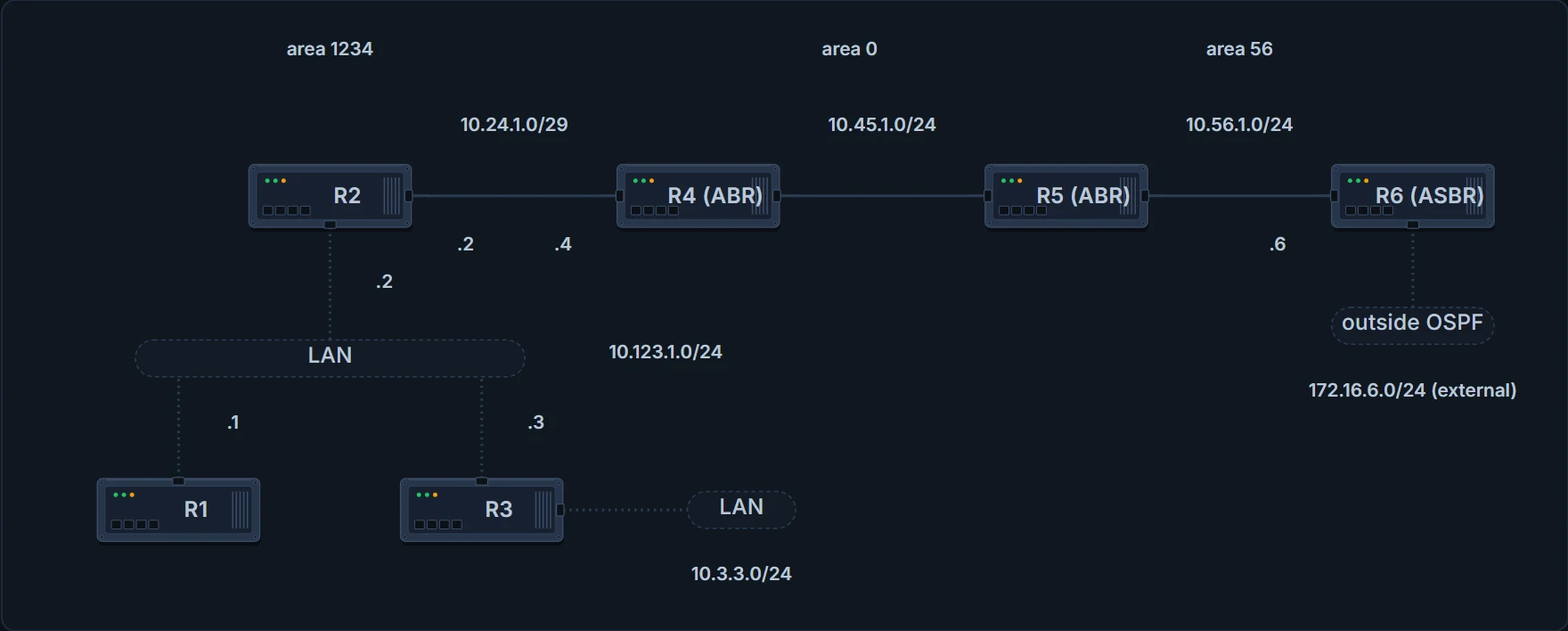
Three areas, six routers. R4 and R5 are the area border routers; R6 redistributes 172.16.6.0/24. Router IDs are 192.168.N.N. Every output quoted on this page comes from these routers, unless it says otherwise.
Now one line of R1's routing table:
R1# show ip route ospf
! Output omitted for brevity
O IA     10.56.1.0/24 [110/67] via 10.123.1.2, 00:11:54, Gig…
10.56.1.0/24 is the R5–R6 link, two areas away. So what does R1 actually know about that network? Make a guess and hold it; you'll check it against area 1234's database once the advertisement has crossed both borders.
Start with what every router stores. An LSA carries the link state and the link metric to a neighboring router. Received LSAs go into a local database, the link-state database or LSDB, and they're passed on to neighbors exactly as the original advertising router advertised them, which is how an LSA floods through the domain. All the routers in one area keep a synchronized, identical copy of the LSDB for that area.
The LSDB is the topology: a complete map of the network. Every router runs Dijkstra's shortest path first algorithm on it to build a loop-free set of shortest paths. OSPF detects topology changes and works out new loop-free paths in a short time with little routing traffic.
Same map, different trees, though. Each router puts itself at the root of its own SPF tree, so the trees differ from router to router while the LSDB they're built from is identical, and when the topology changes the tree is rebuilt.
Where does the map come from? When two neighbors become adjacent, their LSDBs synchronize: that's the Exchange and Loading states. After that, a router that adds or removes a directly connected link floods an LSA out all its active OSPF interfaces, and that LSA lists every network the router advertises.
OSPF uses six LSA types for IPv4. Just the names for now, because each one gets its own stop:
- Type 1, router: prefixes within an area.
- Type 2, network: the routers attached to a broadcast segment within an area.
- Type 3, summary: prefixes that originate in a different area.
- Type 4, ASBR summary: how to locate the ASBR from a different area.
- Type 5, AS external: prefixes redistributed into OSPF.
- Type 7, NSSA external: external prefixes redistributed inside a local not-so-stubby area (NSSA), an area type the next lesson builds.
Types 1, 2 and 3 build the SPF tree for intra-area and inter-area routes; types 4, 5 and 7 are about external routes, the ones redistributed into OSPF. (OSPFv3 has further LSAs for IPv6; they get their own lesson.) So here's the plan: follow advertisements from the router that writes them to the far side of the network, and at every border ask one question: what does the next area get to see?
Who's who on the route
The blueprint names four kinds of OSPF router. Area membership is set per interface, so a router's type follows from where its interfaces sit and what it injects.
- Internal router. R1, R2 and R3 are the member, or internal, routers of area 1234: every OSPF interface in one area. A member router holds the LSDBs only of the areas it's in.
- Area border router (ABR). A router connected to area 0 and another area. ABRs advertise routes from one area into another, every ABR has to take part in area 0 to do it, and an ABR runs a separate SPF tree for each area it's in. R4 and R5 are the ABRs here.
- Backbone router. A router in area 0. Read that literally, a router with at least one interface in area 0, and every ABR is a backbone router too; this page uses it that way.
- Autonomous system boundary router (ASBR). A router that redistributes prefixes into the OSPF domain. Any OSPF router can be an ASBR, and the job has nothing to do with being an ABR: a domain can have an ASBR and no ABR at all, and one router can be an ASBR and an ABR at once. R6 is the ASBR here.
The labels overlap: R4 is an ABR and also a backbone router. A router with interfaces in several areas has several LSDBs, one per area, and the inside of one area is invisible from outside it. A change inside an area makes every router in that area run the full SPF again; routers outside run only a partial calculation, if a metric changed or a prefix was removed. So an area hides its topology from the other areas while its networks stay visible in them, and splitting a domain into areas shrinks each area's LSDB, speeds up SPF and cuts the flooding when a link flaps.
Here's the trap with ABRs. A router that touches two areas isn't automatically a border for their routes. Picture a router in area 1 and area 2 only: neither area's routes reach the other. OSPF is a two-tier hierarchy: every area connects to area 0, every area injects its routing information into area 0, and area 0 advertises it into the others. Put that router in area 0 as well and area 1's routes go into area 0, area 2's go into area 0, and area 0's routes, including what it learned from areas 1 and 2, go out to both. So a router with no interface in area 0 isn't an ABR, because the requirement is one interface in area 0 and one or more in other areas.
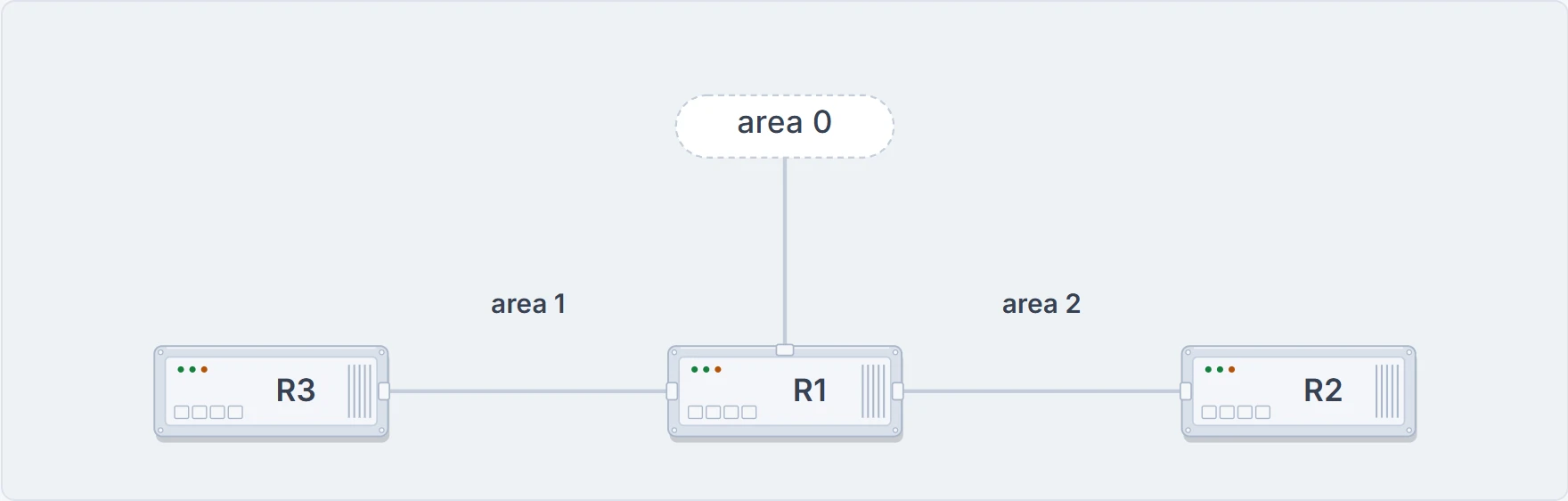
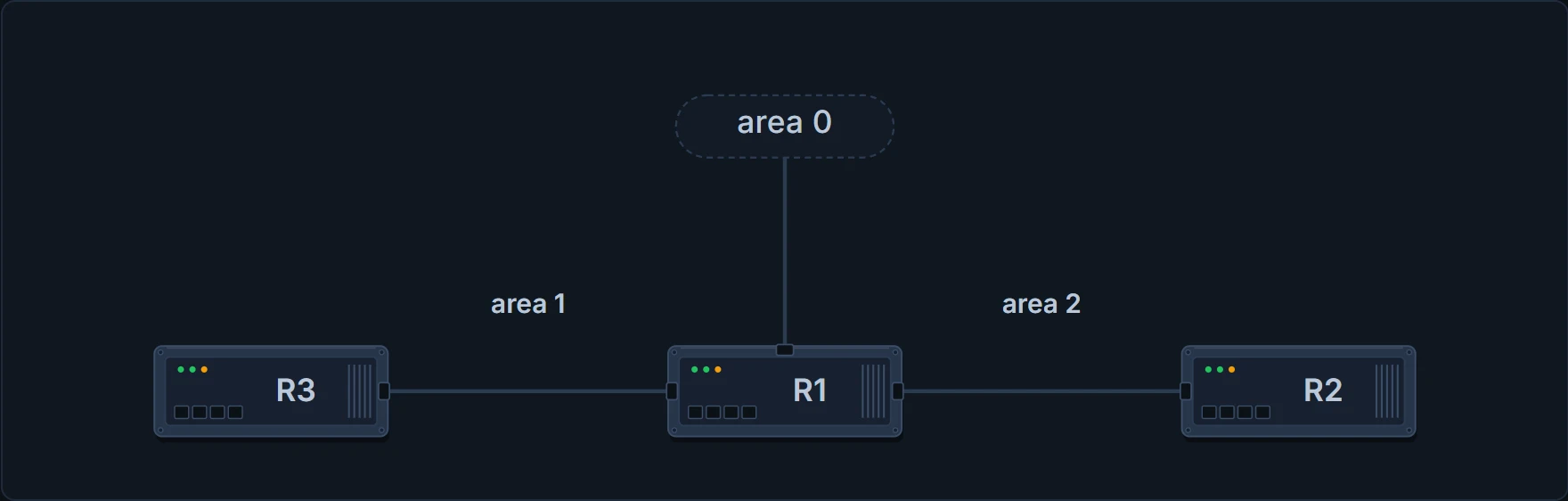
A separate three-router example, not this lesson's routers. R1 sits in area 1 and area 2, and it passes routes between them only because it also has an interface in area 0.
How does a router tell you what it is? Two places. Its own router LSA carries the flag (you'll see R4's in a moment), and show ip ospf prints "It is an area border router".
The label every LSA carries
Before the first stop, look at what's printed on every LSA. Capture one on the wire and the fields that matter are the LSA type, the age, the sequence number and the advertising router. For a type 1, the link IDs list the attached networks with each interface's cost. Two of those numbers keep every database honest.
R2's router LSA, caught leaving R2 and opened field by field. The four labelled fields are on every LSA; the link lines are what make this one a type 1.
The sequence number. LSAs can be delayed on the way, so they might arrive out of order. The sequence number deals with that: it's a 32-bit number used for versioning, and the originating router increments it each time it sends the LSA out. A router that receives an LSA with a greater sequence number than the copy in its LSDB processes it; a lower one is old, and it's discarded.
The age. In the LSDB, an LSA's age goes up by 1 every second. Once the originating router's own LSA passes 1800 seconds, 30 minutes, the router advertises a new copy with the age set back to 0. Each router that floods it on adds a small calculated delay for the link. If the age ever reaches 3600, the LSA is invalid and it's purged from the LSDB. That half-hourly reflooding is a second safety net that keeps every LSDB in the area consistent.
The advertising router. The RID of the router that created the LSA. A router won't use an LSA that carries its own RID, because it assumes it wrote it; that's how duplicate router IDs make routes disappear.
Now the summary view. show ip ospf database gives the generic listing of a router's LSAs. All routers in one area hold the same set; an ABR holds a separate set for each of its areas, and most LSAs in one area are different from those in another. Here's R1's router-LSA section:
R1# show ip ospf database
           OSPF Router with ID (192.168.1.1) (Process ID 1)
               Router Link States (Area 1234)
Link ID         ADV Router      Age         Seq#       Check…
192.168.1.1     192.168.1.1     14          0x80000006 0x009…
192.168.2.2     192.168.2.2     2020        0x80000006 0x00A…
192.168.3.3     192.168.3.3     6           0x80000006 0x005…
192.168.4.4     192.168.4.4     61          0x80000005 0x007…
Four routers in area 1234, four router LSAs, and in this section each Link ID is the router's own RID. (The outputs on this page were taken at different moments, so the same LSA can show a different age and sequence number from one view to the next.) The columns:
- Link ID: identifies what the link connects to, which can be a neighbor's RID, the IP address of the DR's interface, or a network address. Which one depends on the LSA type, so each stop below says what it is.
- ADV Router: the OSPF router ID for this LSA: the router that created it.
- Age: the LSA's age on the router you're asking; a value over 1800 is expected to refresh soon.
- Seq# guards against out-of-order LSAs, and Checksum verifies the LSA's integrity during flooding.
- Link count: the number of links this router lists in its type 1 (cut off in the print above).
Stop one: each router describes itself (type 1)
Every OSPF router advertises a type 1, the router LSA. They're the building blocks of the LSDB. A type 1 has an entry for each OSPF-enabled link: an interface and the networks attached to it. And it stays home: R1's, R2's, R3's and R4's type 1s cross area 1234 and stop at the area 0 border, which is what keeps an area's topology invisible to the other areas. The summary view lists them under Router Link States: that's the output above.
To read one, open it with show ip ospf database router. In area 1234 there's an entry for each of the four routers. Here are R2's and R4's:
R1# show ip ospf database router
! Output omitted for brevity
 LS Type: Router Links
 Link State ID: 192.168.2.2
 Advertising Router: 192.168.2.2
 LS Seq Number: 80000015
 Length: 60
Number of Links: 3
   Link connected to: another Router (point-to-point)
    (Link ID) Neighboring Router ID: 192.168.4.4
    (Link Data) Router Interface address: 10.24.1.2
      TOS 0 Metrics: 64
   Link connected to: a Stub Network
    (Link ID) Network/subnet number: 10.24.1.0
    (Link Data) Network Mask: 255.255.255.248
      TOS 0 Metrics: 64
   Link connected to: a Transit Network
    (Link ID) Designated Router address: 10.123.1.3
    (Link Data) Router Interface address: 10.123.1.2
      TOS 0 Metrics: 1
 LS Type: Router Links
 Link State ID: 192.168.4.4
 Advertising Router: 192.168.4.4
 LS Seq Number: 80000013
 Length: 48
 Area Border Router
 Number of Links: 2
   Link connected to: another Router (point-to-point)
    (Link ID) Neighboring Router ID: 192.168.2.2
    (Link Data) Router Interface address: 10.24.1.4
      TOS 0 Metrics: 64
   Link connected to: a Stub Network
    (Link ID) Network/subnet number: 10.24.1.0
    (Link Data) Network Mask: 255.255.255.248
      TOS 0 Metrics: 64
Every link comes out in the same order: the link type after "Link connected to:", then the link ID, then the link data where there is one, then the metric. What the ID and the data mean depends on the link type:
| Link type | Link ID | Link data |
|---|---|---|
| 1, point-to-point | the neighbor's RID | the interface IP address; with IP unnumbered, the MIB-II IfIndex value |
| 2, transit | the DR's interface address | the interface IP address |
| 3, stub | the network address | the subnet mask |
| 4, virtual link | the neighbor's RID | the interface IP address |
(Virtual links come in a later lesson; the row is here so you can read one when you meet it.) Which type a link gets depends on what happened on it:
- Transit: an adjacency formed on that link and a DR was elected.
- Point-to-point: an adjacency formed on a network type that doesn't use a DR. An interface of the point-to-point network type advertises two links: a point-to-point link naming the neighbor's RID, and a stub link that carries the subnet's mask.
- Stub: no adjacency formed on that link. A point-to-point or transit link that hasn't become adjacent is listed as stub, and the type changes once the adjacency forms. Secondary addresses are always stub links, because an adjacency can never form on them.
Now read R2's: three links from two interfaces. The serial interface, a point-to-point type, advertises two links (the point-to-point and the stub), and the LAN advertises the transit link. The point-to-point link names R4, 192.168.4.4, at metric 64; the stub gives the serial subnet 10.24.1.0 with mask 255.255.255.248; the transit link points at the DR's address, 10.123.1.3, at metric 1. R1's has just one link: transit, Link ID 10.123.1.3, Link Data its own 10.123.1.1, metric 1. R3's has two: a stub, 10.3.3.0 with mask 255.255.255.0, and the same transit link to 10.123.1.3.
Why is R3's 10.3.3.0 a stub? R3 is the DR on 10.3.3.0/24, alone, after the wait. Alone means no adjacency, and no adjacency means a stub link.
And R4's, with one extra line. "Area Border Router" sits between Length and Number of Links, and it lists two links: point-to-point to 192.168.2.2, and the stub 10.24.1.0. When a router is an ABR, an ASBR or a virtual-link endpoint, that function is listed exactly there. Notice what's missing: R4's area 0 link. This is R4's router LSA for area 1234, so it lists R4's area 1234 links only; area 0 gets a separate router LSA from R4.
Now put the four router LSAs together. R2 and R4 join up: each names the other's RID in a point-to-point link. But R1, R2 and R3 each point at 10.123.1.3.
Nothing in any router LSA says what 10.123.1.3 is, so those three links aren't joined yet. Something's missing from the map.
The LAN speaks through its DR (type 2)
A type 2, the network LSA, stands for a multi-access segment that uses a DR. The DR always advertises it, and it names every router attached to the segment. No DR elected, no type 2: the matching link in the router LSA is a stub instead of transit. And like a type 1, a type 2 isn't flooded outside the area it started in. The summary view lists type 2s under Net Link States:
R1# show ip ospf database
! Output omitted for brevity
               Net Link States (Area 1234)
Link ID        ADV Router        Age         Seq#       Chec…
10.123.1.3     192.168.3.3       1752        0x80000012 0x00…
One entry. Area 1234 has only one DR segment, the one joining R1, R2 and R3, because R3 hasn't formed an adjacency on 10.3.3.0/24; on 10.123.1.0/24, R3 is the DR and R2 the BDR, on their RIDs. Open it with show ip ospf database network: R3's type 2, link-state ID 10.123.1.3, attached to R1, R2 and R3, listed by RID at the bottom, with the subnet's mask in the LSA:
R1# show ip ospf database network
           OSPF Router with ID (192.168.1.1) (Process ID 1)
               Net Link States (Area 1234)
 LS age: 356
 Options: (No TOS-capability, DC)
 LS Type: Network Links
 Link State ID: 10.123.1.3 (address of Designated Router)
 Advertising Router: 192.168.3.3
 LS Seq Number: 80000014
 Checksum: 0x4DD
 Length: 36
 Network Mask: /24
       Attached Router: 192.168.3.3
       Attached Router: 192.168.1.1
       Attached Router: 192.168.2.2
Read it from the top. The link-state ID is 10.123.1.3, the address of the DR's interface: exactly the address every transit link pointed at. The advertising router is the DR's RID, 192.168.3.3. The mask, /24, is where the LAN's prefix length lives. Three attached routers, by RID. That's the missing piece: with the type 2 in place, every link in area 1234 connects. It's the pseudonode, the virtual router from the DR lesson, written into the database.
One consequence worth remembering: when the DR for a segment changes, a new type 2 is created, and SPF runs again within the area. A DR change isn't free.
So the DR sends a type 2 only if the network contains at least two routers, and type 2s appear only on the broadcast segments that have established adjacencies: here 10.123.1.0/24, 10.45.1.0/24 and 10.56.1.0/24. R3's lonely 10.3.3.0/24 has a DR and still no type 2. The adjacency is what counts.
The first border: R5 writes a summary (type 3)
A new network to follow. 10.56.1.0/24 lives in area 56, between R5 and R6. Inside area 56 it's described by a type 1 (and, on a segment with a DR, a type 2), the way 10.123.1.0/24 is in area 1234. Predict before reading on: when it reaches area 0, which LSA type will carry it, and whose RID will be on it?
A type 3, signed by R5. ABRs don't forward type 1 or type 2 LSAs into other areas. Type 3s, the summary LSAs, stand for networks from other areas. That's the ABR's job: sit in several areas and make sure the networks described by type 1s are reachable in the areas where they didn't originate. When an ABR receives a type 1, it creates a type 3 for the network in it, using the type 2 for a multi-access network's mask, and advertises that type 3 into its other areas. So type 1s exist only in the area they started in, and they turn into type 3s as they cross R4 and R5.
The summary view lists type 3s under Summary Net Link States, in the section of each area where they exist. Here are R4's area 0 section and R5's area 56 section:
R4# show ip ospf database
! Output omitted for brevity
               Summary Net Link States (Area 0)
Link ID         ADV Router      Age         Seq#       Check…
10.3.3.0        192.168.4.4     813         0x80000013 0x00F…
10.24.1.0       192.168.4.4     813         0x80000013 0x00C…
10.56.1.0       192.168.5.5     591         0x80000013 0x00F…
10.123.1.0      192.168.4.4     813         0x80000013 0x005…
R5# show ip ospf database
! Output omitted for brevity
               Summary Net Link States (Area 56)
Link ID         ADV Router      Age         Seq#       Check…
10.3.3.0        192.168.5.5     668         0x80000013 0x00F…
10.24.1.0       192.168.5.5     668         0x80000013 0x00C…
10.45.1.0       192.168.5.5     668         0x80000013 0x007…
10.123.1.0      192.168.5.5     668         0x80000013 0x005…
Look at R4's area 0 section. 10.56.1.0 is signed by R5, built from area 56's type 1. The other three are R4's own, built from area 1234. Now R5's area 56 section: no 10.56.1.0 at all. That network already has a type 1 in area 56, so it gets no summary there; 10.56.1.0 exists as a type 3 only in area 0 and area 1234.
The second border: R4 signs it again
Next border. Predict again: what does area 1234 get for 10.56.1.0, and who signs it?
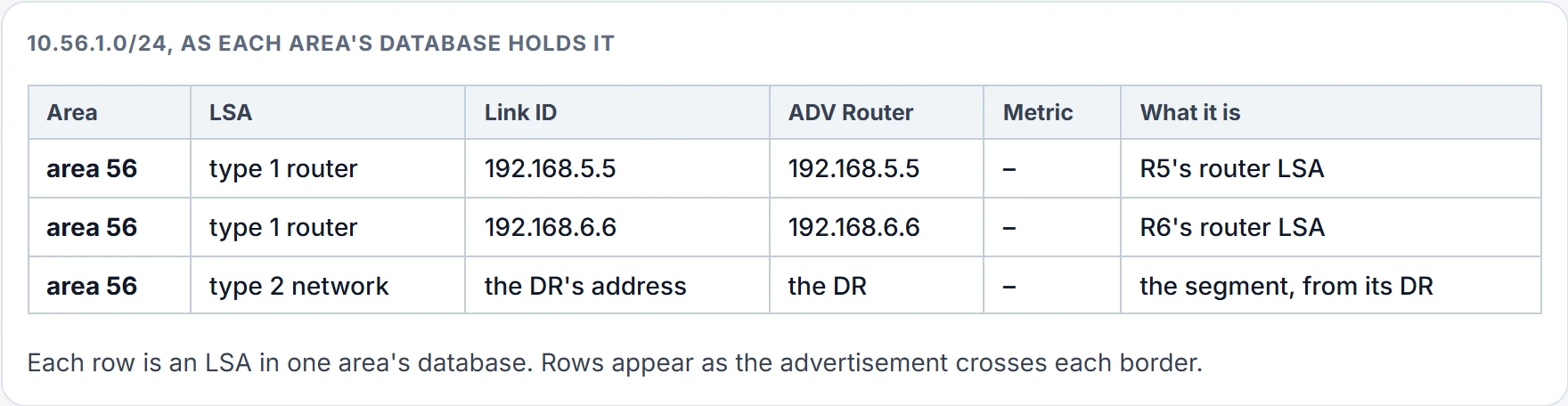
Step 1 of 3 Area 56: where it lives. Inside area 56, 10.56.1.0/24 is described by the router LSAs of R5 and R6, and by the type 2 for the segment. Every router in area 56 holds that detail.
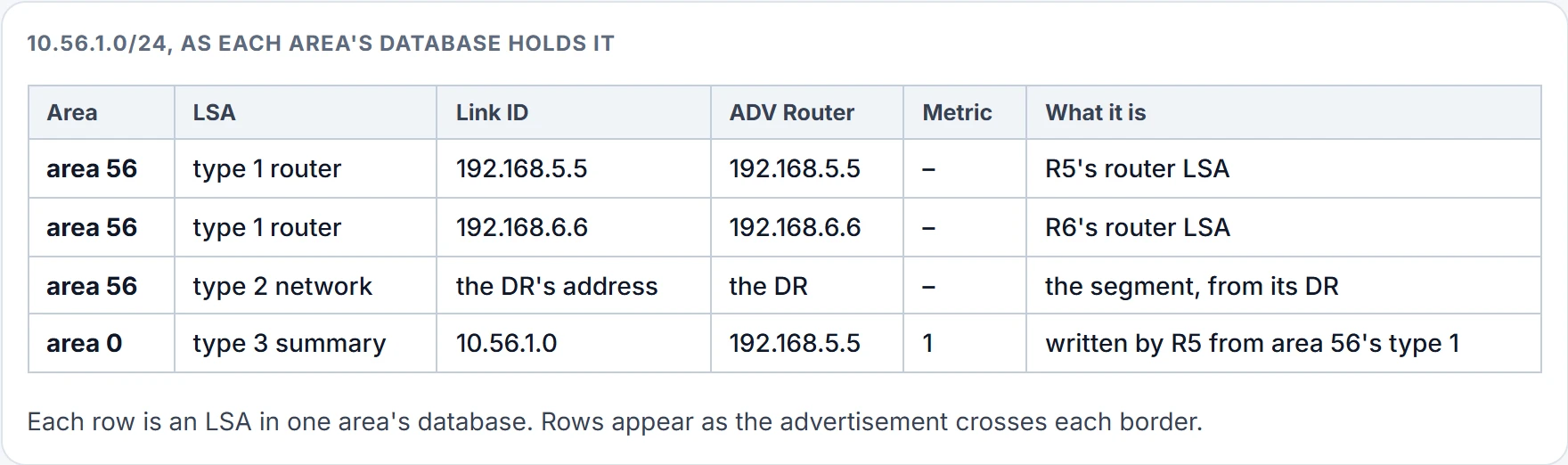
Step 2 of 3 The first border: R5. Type 1s and 2s don't cross. R5 writes a type 3 into area 0, in its own name, with its own metric to the network: 1.
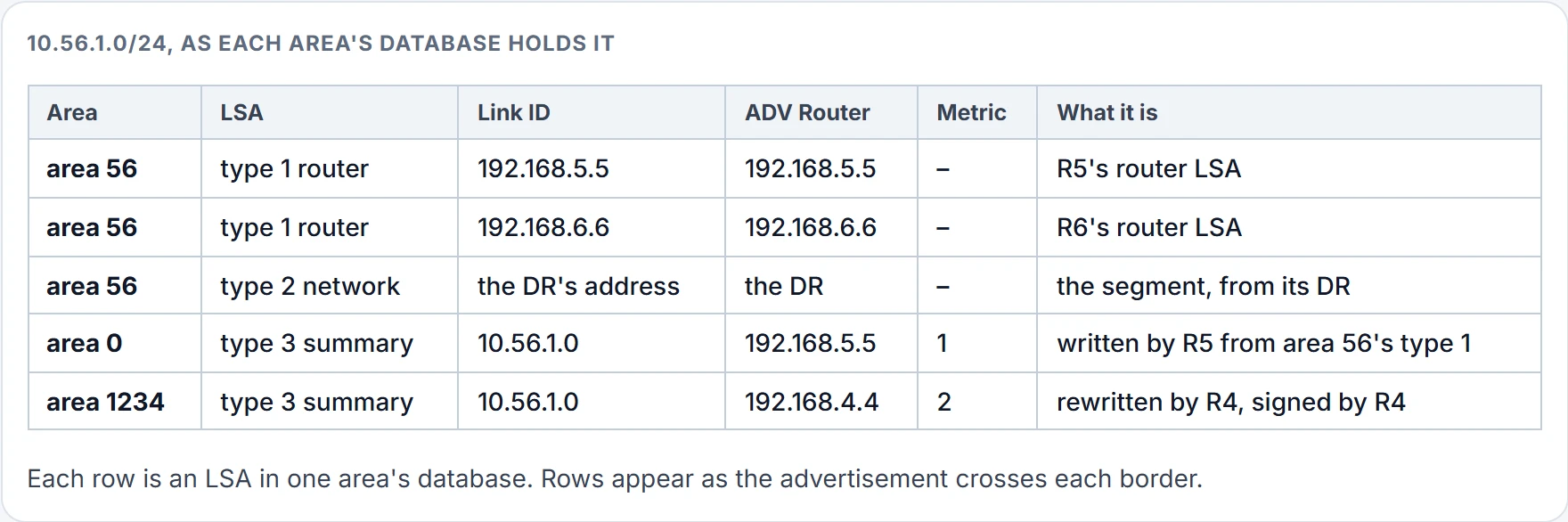
Step 3 of 3 The second border: R4. R4 doesn't pass R5's type 3 on. It writes a new one for area 1234, signed by R4, with its cost to R5 added: 2. From area 1234, R1 adds its own cost to R4, 65, and gets 67.
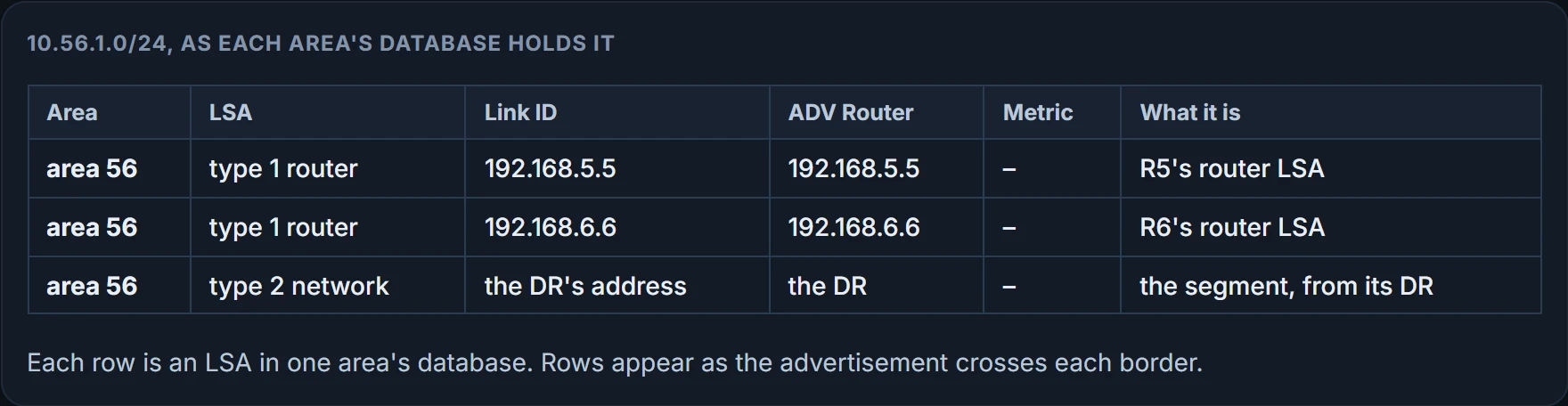
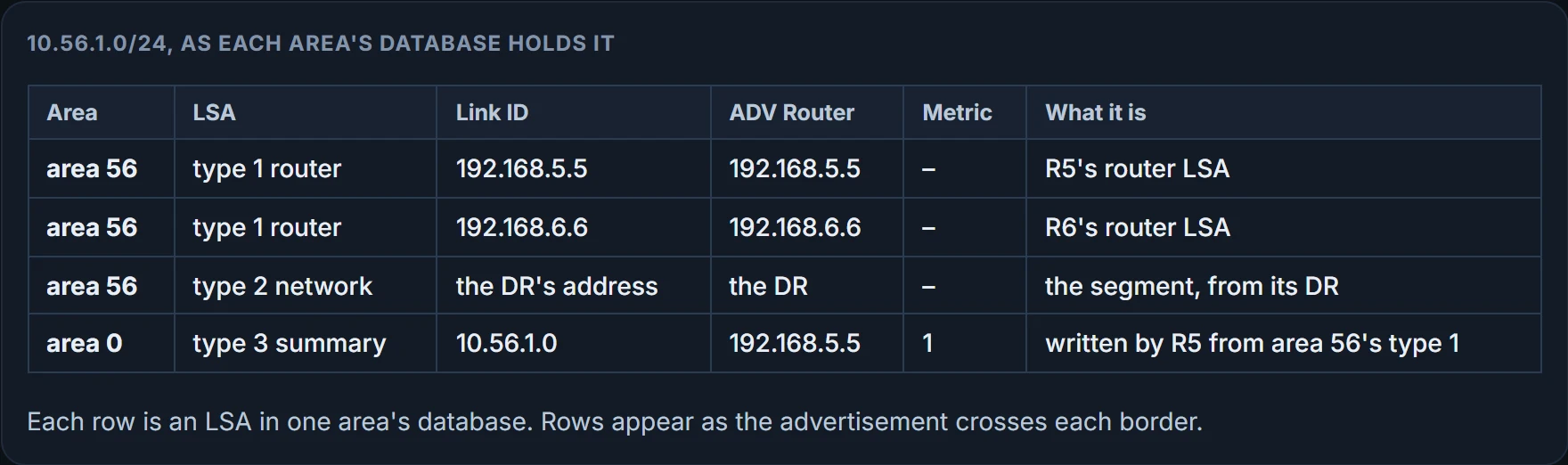
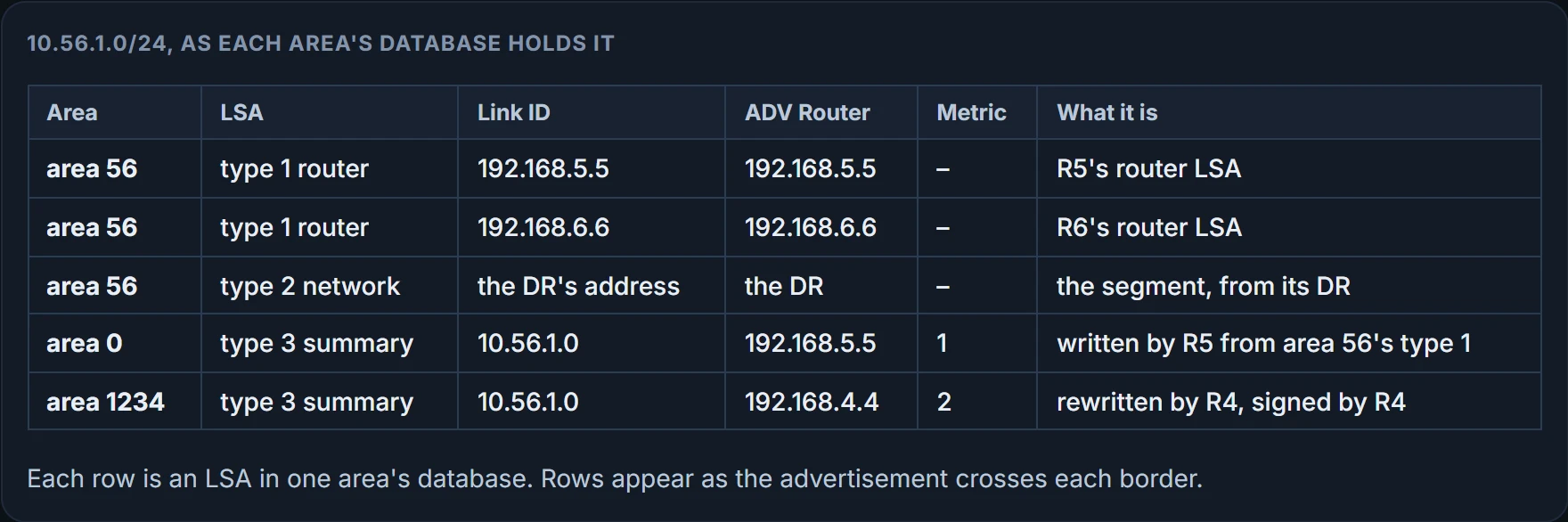
When an ABR receives a type 3 from area 0, it regenerates a new type 3 for the nonbackbone area, lists itself as the advertising router, and adds its cost. Here's R4's area 1234 section, which every router in area 1234 holds too, R1 included:
R4# show ip ospf database
! Output omitted for brevity
               Summary Net Link States (Area 1234)
Link ID         ADV Router      Age         Seq#       Check…
10.45.1.0       192.168.4.4     813         0x80000013 0x008…
10.56.1.0       192.168.4.4     813         0x80000013 0x000…
10.56.1.0, ADV Router 192.168.4.4. R4 has never been anywhere near 10.56.1.0/24, and its RID is on the summary. OSPF calls this a summary; in an office it would be called taking credit. The advertising router of a type 3 is the last ABR that advertised the prefix. The metric follows two rules:
- built from a type 1, it's the total path metric to reach the router that originated that type 1;
- built from an area 0 type 3, it's the path metric to the ABR that sent it, plus the metric already in that type 3.
For the detail, add the keyword and, if you like, the prefix: show ip ospf database summary 10.56.1.0. On R4 it prints both copies, area 0's and area 1234's, and the metric goes up in area 1234's:
R4# show ip ospf database summary 10.56.1.0
           OSPF Router with ID (192.168.4.4) (Process ID 1)
               Summary Net Link States (Area 0)
 LS age: 754
 Options: (No TOS-capability, DC, Upward)
 LS Type: Summary Links(Network)
 Link State ID: 10.56.1.0 (summary Network Number)
 Advertising Router: 192.168.5.5
 LS Seq Number: 80000013
 Checksum: 0xF181
 Length: 28
 Network Mask: /24
       MTID: 0         Metric: 1
               Summary Net Link States (Area 1234)
 LS age: 977
 Options: (No TOS-capability, DC, Upward)
 LS Type: Summary Links(Network)
 Link State ID: 10.56.1.0 (summary Network Number)
 Advertising Router: 192.168.4.4
 LS Seq Number: 80000013
 Checksum: 0x96B
 Length: 28
 Network Mask: /24
       MTID: 0         Metric: 2
Area 0's copy: R5's, metric 1. Area 1234's copy: R4's, metric 2, same /24 mask. The fields: the link ID is the network number, the advertising router is the RID of the ABR advertising the route, the mask is the prefix length, and the metric is the LSA's metric.
Here's the part that matters. Take R4's view. R4's cost to R5 is 1, and R5's type 3 already says 1, so R4's total to 10.56.1.0/24 is 2. Whether that network is directly attached to R5 or several hops behind it, R4 can't tell. One area further on, the routers of area 1234 get the same deal from R4.
It behaves like distance vector. A destination, a cost, and a router to send it to; you trust the claim and you never see the topology behind it. Inside an area, OSPF is link state: you hold the map. From another area you get a signpost: "10.56.1.0/24, distance 2, this way to R4". And each ABR takes the old sign down and puts up its own, with the distance measured from where it stands.
One more rule: an ABR advertises only one type 3 for a prefix, even when it knows several paths to it, from inside its area or from outside, and the type 3 carries the best path's metric. And summaries travel only between area 0 and a nonbackbone area, never straight from one nonbackbone area to another.
Back to the start. What does R1 know about 10.56.1.0/24? A prefix, a /24 mask, a metric of 2, and R4's RID, plus its own map of area 1234 to reach R4: 1 across the LAN, 64 across the serial, 2 from the summary, 67. That's an inter-area route. The routing table marks intra-area routes O and inter-area routes O IA, and R5 and R6 hold nothing but O IA routes, because their own area's networks are directly connected. Which kind wins when both exist is a later lesson's.
Continue the lesson
The whole lesson, with its drawings and its questions. 6 more sections after the ones above.