
Summarization, discontiguous areas and virtual links
An ABR can send one type 3 for a block instead of one per network: area range, configured for the source area, built from that area's type 1 LSAs. The summary takes the lowest component metric by default, and the ABR installs a Null0 discard route for it. External routes are summarized on the ASBR with summary-address. A split area 0 needs a virtual link.
By Arif, founder of Daveth · Updated
The full 13 min walkthrough is in Daveth Pro (Network). See what the plan opens
What this page answers
How do you configure an OSPF virtual link?
Between the two ABRs of a transit area, naming each other's router ID: area 234 virtual-link 192.168.4.4 on one, and the mirror on the other. It joins a disconnected part of area 0, or an area cut off from it, back to the backbone through that area. Read it in “The silence nobody configured”
What metric does an OSPF summary route carry?
By default, the lowest metric among its component routes, following RFC 1583: of components at 32, 45 and 16, the summary carries 16. area range with cost sets a fixed metric instead. Read it in “What metric does one route carry?”
Why does an OSPF ABR install a Null0 route for a summary?
A summary is a promise to accept anything in the range. The ABR installs a discard route to Null0 matching the summary, so packets for addresses inside it that no component covers are dropped instead of looping. Read it in “The promise, and the Null0 route that keeps it”
One route for many, and only at the border
The last lesson ended on a question. R-ABR1 hands area 0 a type 3 for every network in area 10, and every router in area 0 runs its rulebook on each one. Could R-ABR1 send one route instead? Yes. First, though, notice that areas already do half the job.
Route scalability matters most to the IGPs that service providers run, because there can be thousands of routers in one network. Splitting the OSPF domain into areas shrinks each area's LSDB. The routers and networks are all still there; the detailed type 1 and type 2 LSAs are exchanged for simpler type 3s. One LAN in area 1234, say 10.123.1.0/24 with three routers and a DR, takes three type 1 LSAs and one type 2; outside the area those four become one type 3, signed by the ABR, R4 (192.168.4.4), at metric 2: the signpost from the LSDB lesson. That's why areas count as a form of summarization: the number of prefixes may stay the same, but the type 1 and type 2 LSAs are reduced.
Summarization goes further: it shrinks the LSDB by summarizing the network prefixes themselves. Why bother, when routers have more memory than they used to? Because all routers in an area hold an identical copy of the LSDB, so the area has to fit its smallest and slowest router. And because SPF runs faster on fewer routes: a router with 10,000 network routes takes longer than one with 500.
So where can you summarize? You met the answer with the area types: you can't manipulate the LSAs inside an area, only the ones flowing between areas. Summaries follow the same rule. Because every router in an area must keep an identical LSDB, summarization happens between areas, on the ABRs. Not inside an area: only at its edge, where routes enter or leave it. (And on an ASBR, for externals, later on this page.)
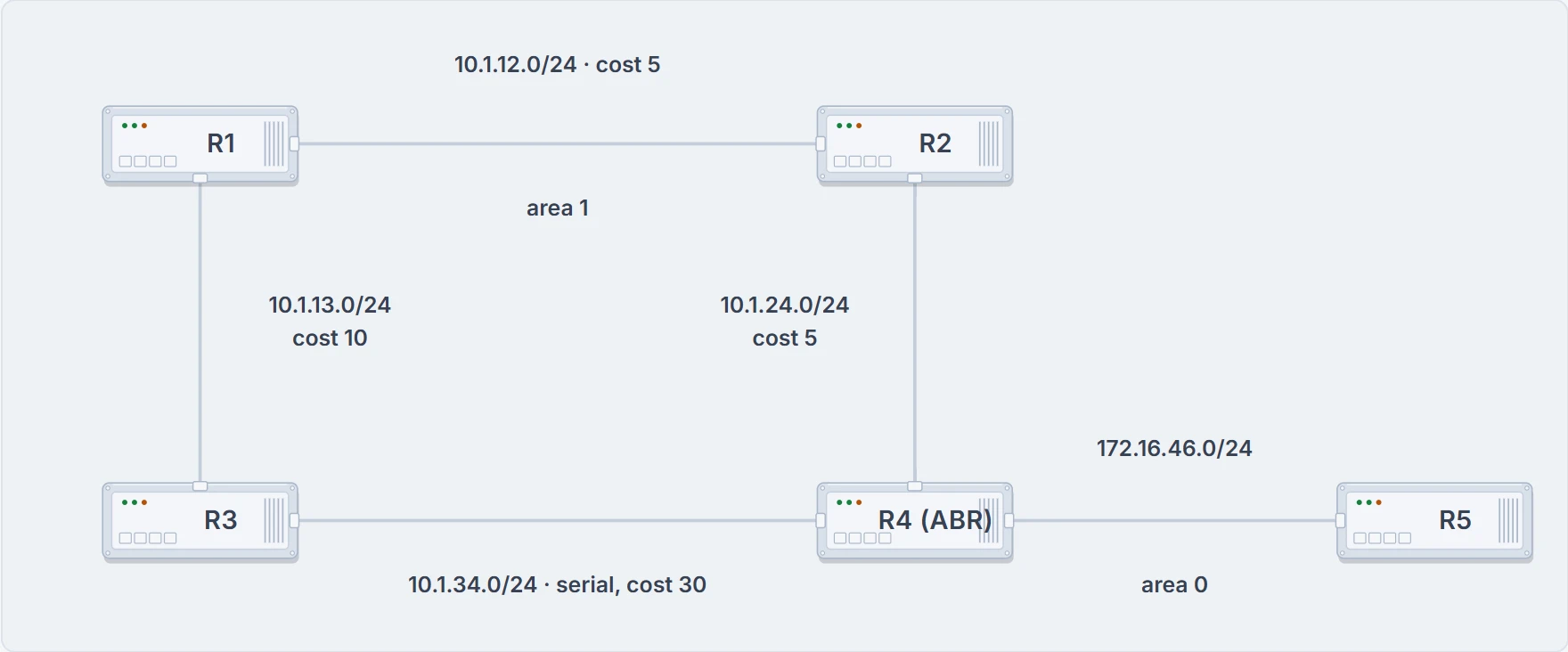
A different network, with its own R1 to R5: area 1 and its link costs, and R4 the ABR between area 1 and area 0.
Here's what that buys, on a different network with its own R1 to R5. Area 1 holds R1, R2 and R3; R4 joins it to area 0, where R5 sits on 172.16.46.0/24. R1 to R2 (10.1.12.0/24) and R2 to R4 cost 5 each, R1 to R3 (10.1.13.0/24) costs 10, and the serial link from R3 to R4 (10.1.34.0/24) costs 30, so traffic to 172.16.46.0/24 goes through R2. Before you read on: the 10.1.12.0/24 link between R1 and R2 fails. Which routers run SPF?
Every router in area 1 does. And the type 3s for the area 1 networks whose paths changed get new metrics and go into area 0, where the routers run SPF on just those prefixes.
Now give R4 one line: summarize area 1 as 10.1.0.0/18. Same failure. Area 1 still runs SPF, but the routers in area 0 aren't affected at all, because 10.1.13.0/24 and 10.1.34.0/24 aren't known outside area 1. That's the general rule: summarization can eliminate the SPF calculation outside the area for the summarized prefixes, because the smaller prefixes are hidden.
One condition. This pays off in networks with carefully developed IP addressing schemes and proper summarization. If area 1's addresses were scattered across the address space, there'd be no /18 to write.
What the ABR builds the summary from
Inter-area summarization reduces the number of type 3 LSAs an ABR advertises into an area when it receives type 1 LSAs. Read that slowly: the raw material is type 1s.
The range you configure belongs to one source area, the area whose type 1s it covers. When a type 1 LSA inside the range reaches the ABR from that source area, the ABR creates one type 3 for the whole range, and it suppresses the more specific type 3s it would otherwise have generated and advertised. Inside the source area nothing changes: inter-area summarization doesn't touch the type 1s there. The routers in the source area still see every network; only the other side of the ABR sees one.
Picture it with three networks: 172.16.1.0/24, 172.16.2.0/24 and 172.16.3.0/24 arrive at the ABR as type 1s from area 1, and one type 3 goes out into area 0 as 172.16.0.0/20.
Two more rules. Summarization works only on type 1 LSAs, so externals will need a different command. And it's normally configured, or designed, so the summary happens as routes enter the backbone from nonbackbone areas.
What metric does one route carry?
Give those three networks different metrics: 172.16.1.0/24 at 32, 172.16.2.0/24 at 45, 172.16.3.0/24 at 16. One type 3 can carry one metric. Which?
By default, the summary takes the lowest metric among its components, following RFC 1583's guidelines. So 172.16.3.0/24 has the lowest metric, and its metric is the summary's: 16.
Now take 172.16.3.0/24 away. What does area 0 hear? OSPF behaves like EIGRP here: every time a matching type 1 is added or removed, it checks every prefix in the range. If a lower metric appears, the summary is advertised again with it; if the lowest one is removed, the next higher metric is found and a new summary goes out with that. So area 0 gets a fresh type 3 at 32. One component flapping, and the summary flaps its metric with it.
The way out is to set the summary's metric yourself, statically, in the configuration. Then the components can come and go, and the summary's metric doesn't move.
Configuring area range
The command goes under the OSPF process:
area <area-id> range <network> <subnet-mask> [advertise | not-advertise] [cost <metric>]
The area-id is the source area, the one whose type 1s you're summarizing, not the area the summary goes into. Advertising the summary is the default, so you never need to type advertise. Add cost <metric> and you set the summary's metric statically. (The other keyword, not-advertise, isn't used here.)
This network: R1 sits in area 12 with three networks, 172.16.1.0/24, 172.16.2.0/24 and 172.16.3.0/24; R2 joins area 12 to area 0, and R3 sits in area 0.
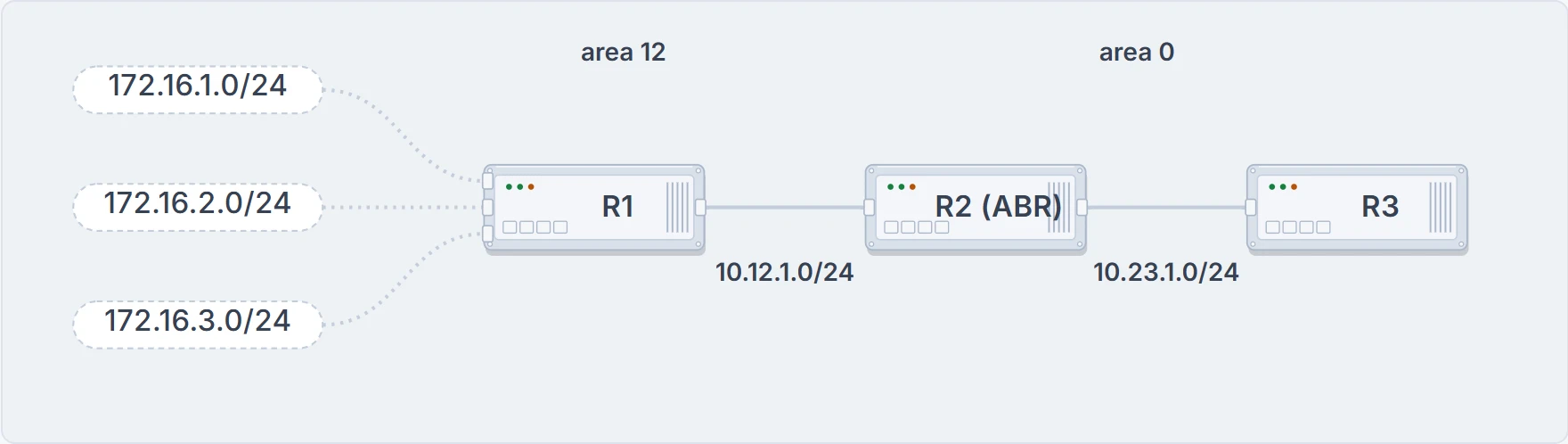
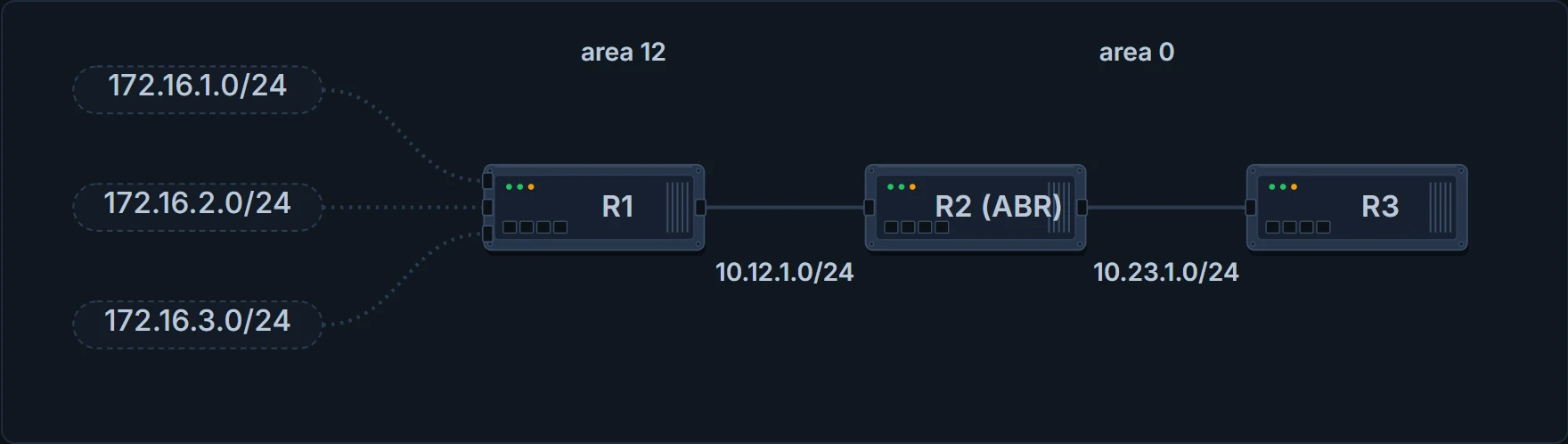
R2 is the ABR between area 12 and area 0. The terminals in this section come from these three routers.
Here's R3 before any summary:
R3# show ip route ospf | begin Gateway
Gateway of last resort is not set

! subnet header lines omitted
O IA     10.12.1.0 [110/2] via 10.23.1.2, 00:01:30, GigabitEthernet0/2
O IA     172.16.1.0 [110/3] via 10.23.1.2, 00:01:30, GigabitEthernet0/2
O IA     172.16.2.0 [110/3] via 10.23.1.2, 00:01:30, GigabitEthernet0/2
O IA     172.16.3.0 [110/3] via 10.23.1.2, 00:01:30, GigabitEthernet0/2
! the three /24s, all at 3
R3#
As they're advertised into area 0, R2 summarizes them into one, 172.16.0.0/16, with a static cost of 45. Area 12 in the command, because that's where the type 1s come from:
R2# show running-config | section router ospf
router ospf 1
 router-id 192.168.2.2
 area 12 range 172.16.0.0 255.255.0.0 cost 45
 ! source area 12, static cost 45
 network 10.12.1.0 0.0.0.255 area 12
 network 10.23.1.0 0.0.0.255 area 0
R2#
The static cost is there to reduce CPU load if any of the three networks flaps. It's the "static" that does that, not the 45: with a fixed metric, a component coming or going doesn't send the summary out again at a new metric. Before you look: what will R3 show now, and at what metric?
R3# show ip route ospf | begin Gateway
Gateway of last resort is not set

! subnet header lines omitted
O IA     10.12.1.0 [110/2] via 10.23.1.2, 00:01:30, GigabitEthernet0/2
O IA  172.16.0.0/16 [110/46] via 10.23.1.2, 00:01:30, GigabitEthernet0/2
! one route for three: 45 + 1
R3#
The three /24s are suppressed, and one summary stands in for them. Its path metric is 46, where 172.16.1.0/24 used to be 3: the 45 you set plus R3's own cost of 1 to R2. Here the summary costs more than any component did. Whatever you put after cost is what every router downstream adds its own distance to.
The promise, and the Null0 route that keeps it
A summary is a claim. R2 has just told area 0 "send me anything in 172.16.0.0/16", and R2 knows three /24s inside it. What does R2 do with a packet for 172.16.99.1?
The ABR that does the inter-area summarizing installs discard routes, routes to the Null0 interface that match the summary. R2's table:
R2# show ip route ospf | begin Gateway
Gateway of last resort is not set

      172.16.0.0/16 is variably subnetted, 4 subnets, 2 mask…
O        172.16.0.0/16 is a summary, 00:03:11, Null…
O        172.16.1.0/24 [110/2] via 10.12.1.1, 00:01:26, Giga…
O        172.16.2.0/24 [110/2] via 10.12.1.1, 00:01:26, Giga…
O        172.16.3.0/24 [110/2] via 10.12.1.1, 00:01:26, Giga…
The /24s still win by longest match. Everything else in the /16 hits the summary, and the summary points at Null0. The packet for 172.16.99.1 is dropped.
Why is that good? Because the alternative is a loop. Discard routes prevent routing loops where parts of the summary have no more specific route in the RIB. Without the Null0 route, and with a default route on the router, the router sends the packet out its default route; the next-hop router sends it straight back, because it's using the summary; the first router sends it out the default again; and round it goes. So the route to Null0 has to be there: a packet for an address inside the summary that the router doesn't really know how to reach, with no longer match, gets dropped.
The other side of the promise: make your summaries accurate. If a router advertises addresses in its summary that it doesn't truly know how to reach, it may receive packets for them, and the Null0 route drops them. A /16 written for three /24s attracts traffic for 253 networks that don't exist there.
Now the AD. OSPF's summary discard route has AD 110 for internal networks, and 254 for external ones. Unlike EIGRP's discard route at AD 5, 110 doesn't make it more believable than most other sources, so a better routing source could end up forwarding the traffic for networks inside the summary instead of Null0. On another network, a /16 summary shows its 110:
R2# show ip route 10.1.0.0 255.255.0.0
Routing entry for 10.1.0.0/16
Known via "ospf 1", distance 110, metric 1, type intra area
Routing Descriptor Blocks:
* directly connected, via Null0
Route metric is 1, traffic share count is 1
The quick check for the discard route is show ip route | include Null, which there prints O 10.1.0.0/16 is a summary, 00:16:07, Null0.
At the ASBR: summary-address
During redistribution, external routes come into the OSPF domain as type 5 LSAs, or type 7 in an NSSA. They aren't type 1s, so area range can't summarize them. Externals need their own command, on the router that creates them. External summarization reduces the number of external LSAs in the domain. It's configured on the ASBR: a component route inside the range doesn't generate its own type 5 or type 7; one type 5 or type 7 is created for the summary, and the components are suppressed.
Over to a network with an ASBR: R6, in area 56, a normal area, is redistributing fifteen networks, 172.16.1.0/24 to 172.16.15.0/24, from EIGRP. With the summary range 172.16.0.0/20 on R6, it creates one type 5 or type 7 in area 56. R5, across area 56, before the summary (cut short):
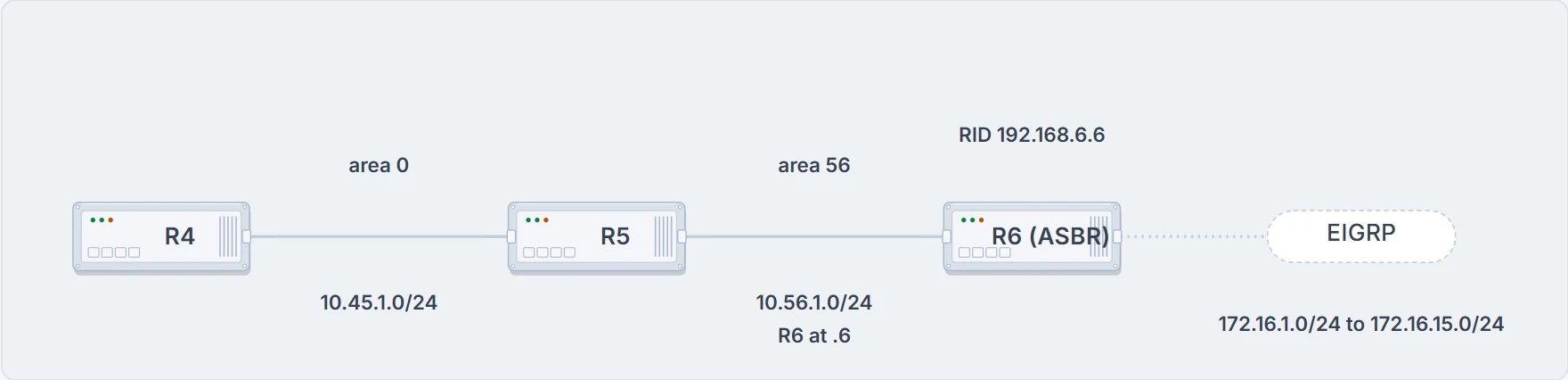
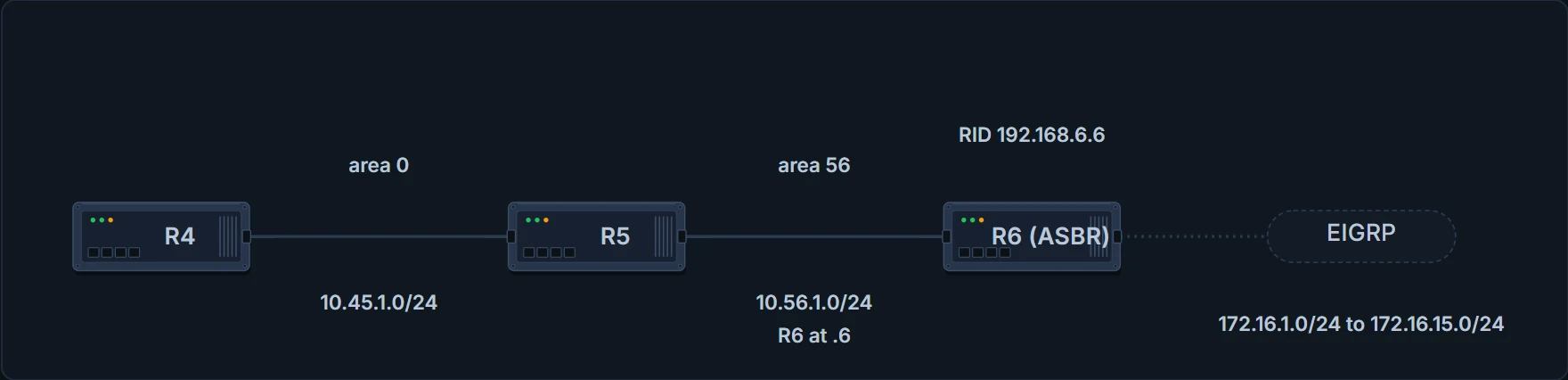
R6, the ASBR, redistributes fifteen EIGRP networks into area 56. R5 sits across area 56 from it.
R5# show ip route ospf | begin Gateway
! Output omitted for brevity
     172.16.0.0/24 is subnetted, 15 subnets
O E2     172.16.1.0 [110/20] via 10.56.1.6, 00:01:00, Gigabi…
O E2     172.16.2.0 [110/20] via 10.56.1.6, 00:00:43, Gigabi…
O E2     172.16.15.0 [110/20] via 10.56.1.6, 00:00:15, Gigab…
Fifteen O E2s. The command is summary-address <network> <subnet-mask> under the OSPF process, and on R6 it sits next to the redistribution (which is another lesson's):
R6
router ospf 1
 router-id 192.168.6.6
 summary-address 172.16.0.0 255.255.240.0
 redistribute eigrp 1 subnets
 network 10.56.1.0 0.0.0.255 area 56
And R5 afterwards:
R5# show ip route ospf | begin Gateway
! the gateway line and the O IA lines are omitted here
     172.16.0.0/20 is subnetted, 1 subnets
O E2     172.16.0.0 [110/20] via 10.56.1.6, 00:00:02, Gigabi…
R5# show ip route 172.16.0.0 255.255.240.0
Routing entry for 172.16.0.0/20
 Known via "ospf 1", distance 110, metric 20, type extern 2
 Last update from 10.56.1.6 on GigabitEthernet0/1, 00:02:14
 Routing Descriptor Blocks:
 * 10.56.1.6, from 192.168.6.6, 00:02:14 ago, via GigabitEt…
     Route metric is 20, traffic share count is 1
One O E2 for the /20, metric 20, "from 192.168.6.6": the ASBR that summarized it. Every component was at 20, so this output can't tell you what metric a mixed set would give the summary.
Same promise, same protection: the summarizing ASBR installs a discard route to Null0 matching the summary, for loop prevention. R6:
R6# show ip route ospf | begin Gateway
! the O IA lines are omitted here
O        172.16.0.0/20 is a summary, 00:03:52, Null0
That's the external discard route, the AD 254 one. One exception to "on the ASBR": an NSSA's ABR acts as an ASBR when it converts a type 7 into a type 5, and that's the only case where an ABR can do external summarization. The external summary is configured under the OSPF process, not on an interface.
The silence nobody configured
Everything so far was a silence you asked for. Here's one nobody asked for.
Five routers in a row. R1 sits in area 12, joined to R2. R2, R3 and R4 make up area 234. R4 joins area 45, where R5 sits. And R2 and R4 each have an interface in area 0: R2 on 10.2.2.0/24, R4 on 10.4.4.0/24. Traffic from area 12 has to cross area 234 to reach area 45.
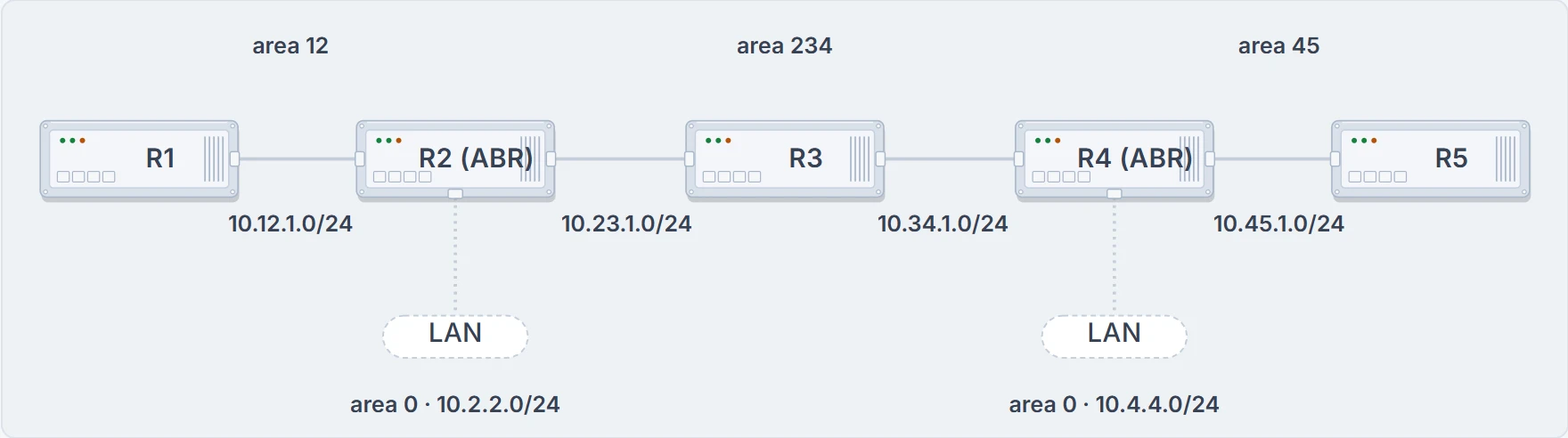
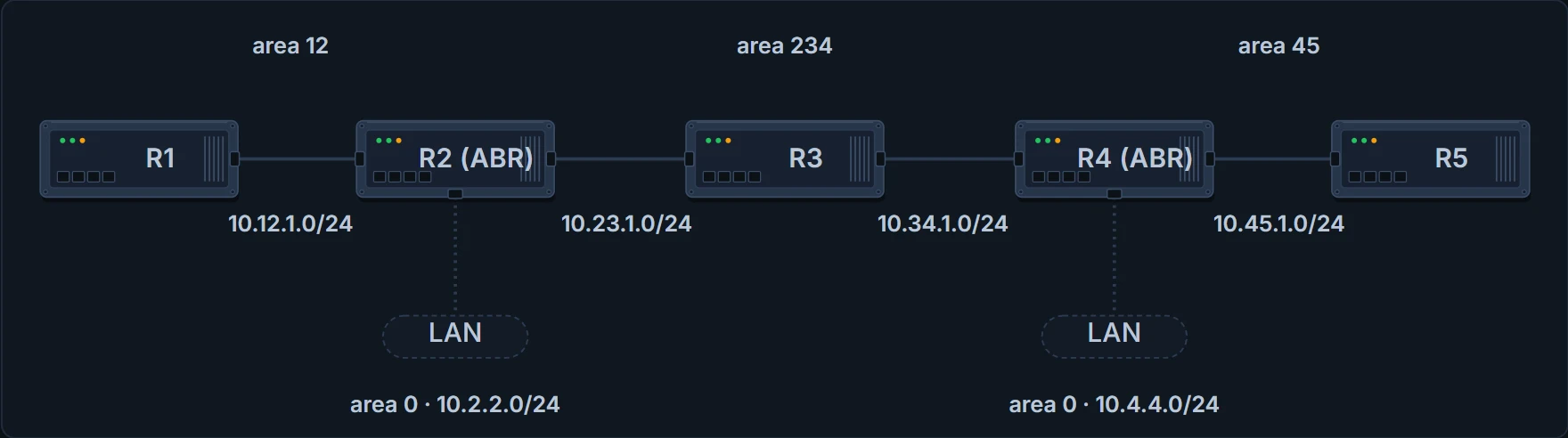
R2 and R4 are both ABRs, each with its own LAN in area 0. The terminals in these sections come from these five routers.
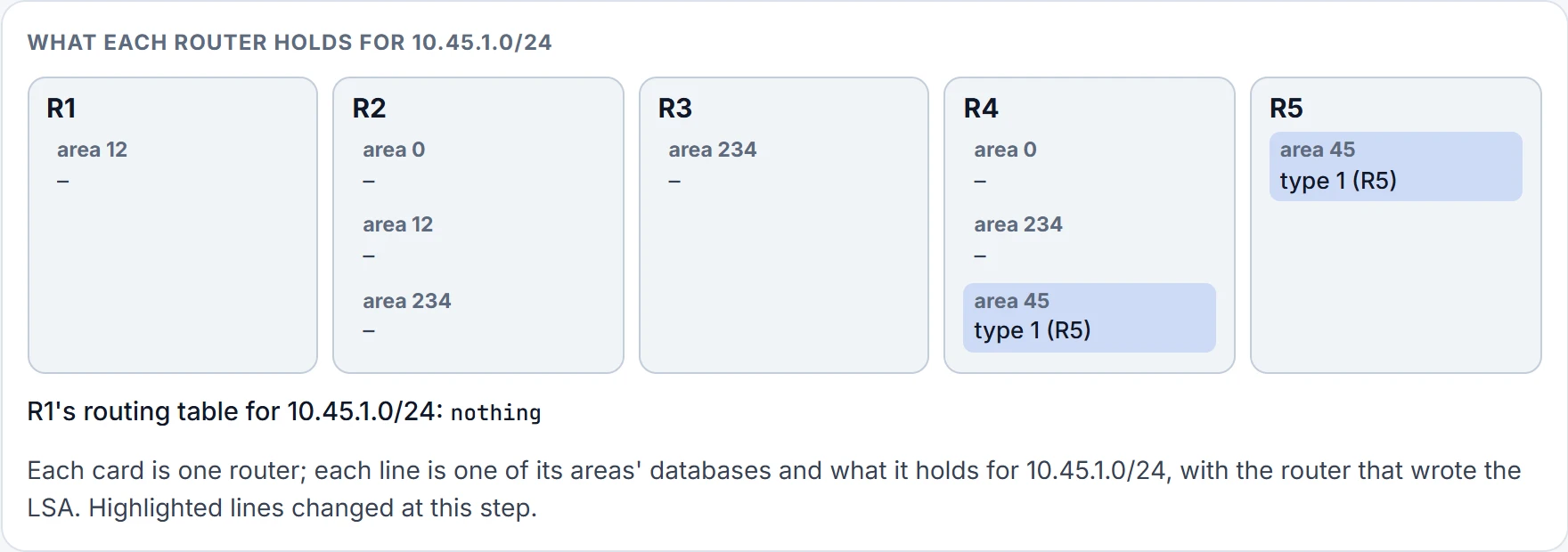
Step 1 of 3 Area 45. 10.45.1.0/24 is R5's network. Its type 1 floods area 45, so R4 has it too.
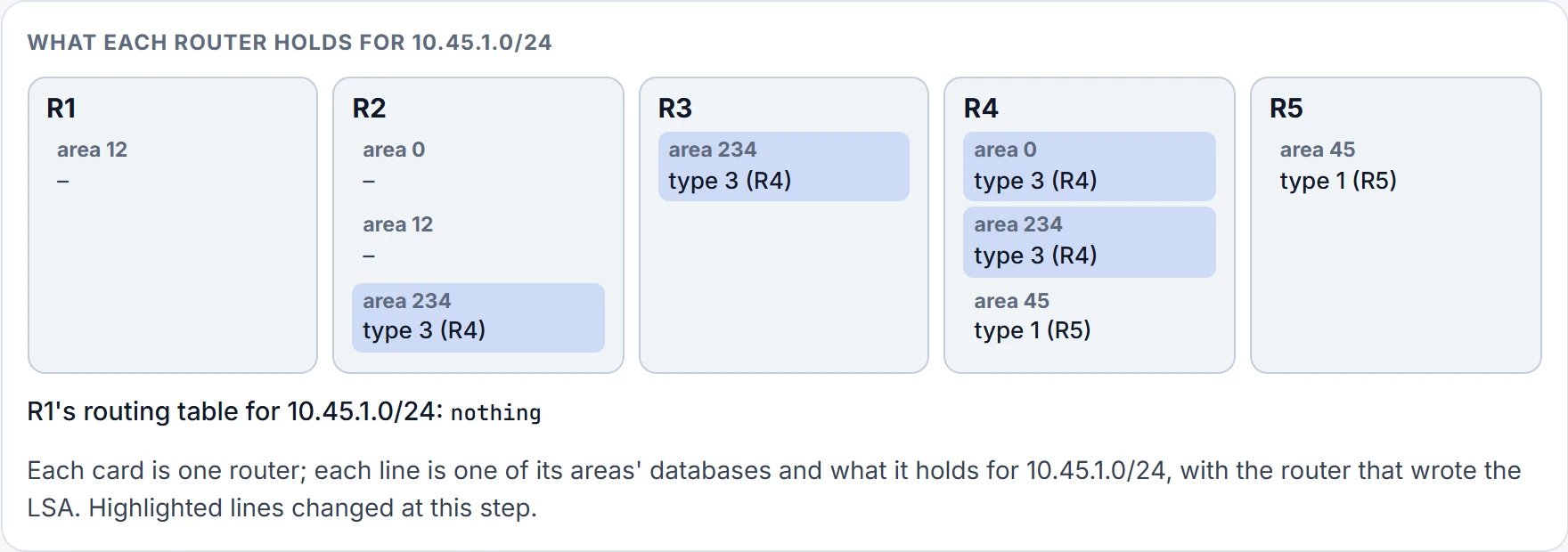
Step 2 of 3 Rule 1 at R4. A type 1 from an area makes type 3s into the backbone and into the nonbackbone areas. R4 writes one into its piece of area 0 and one into area 234, which floods to R3 and R2.
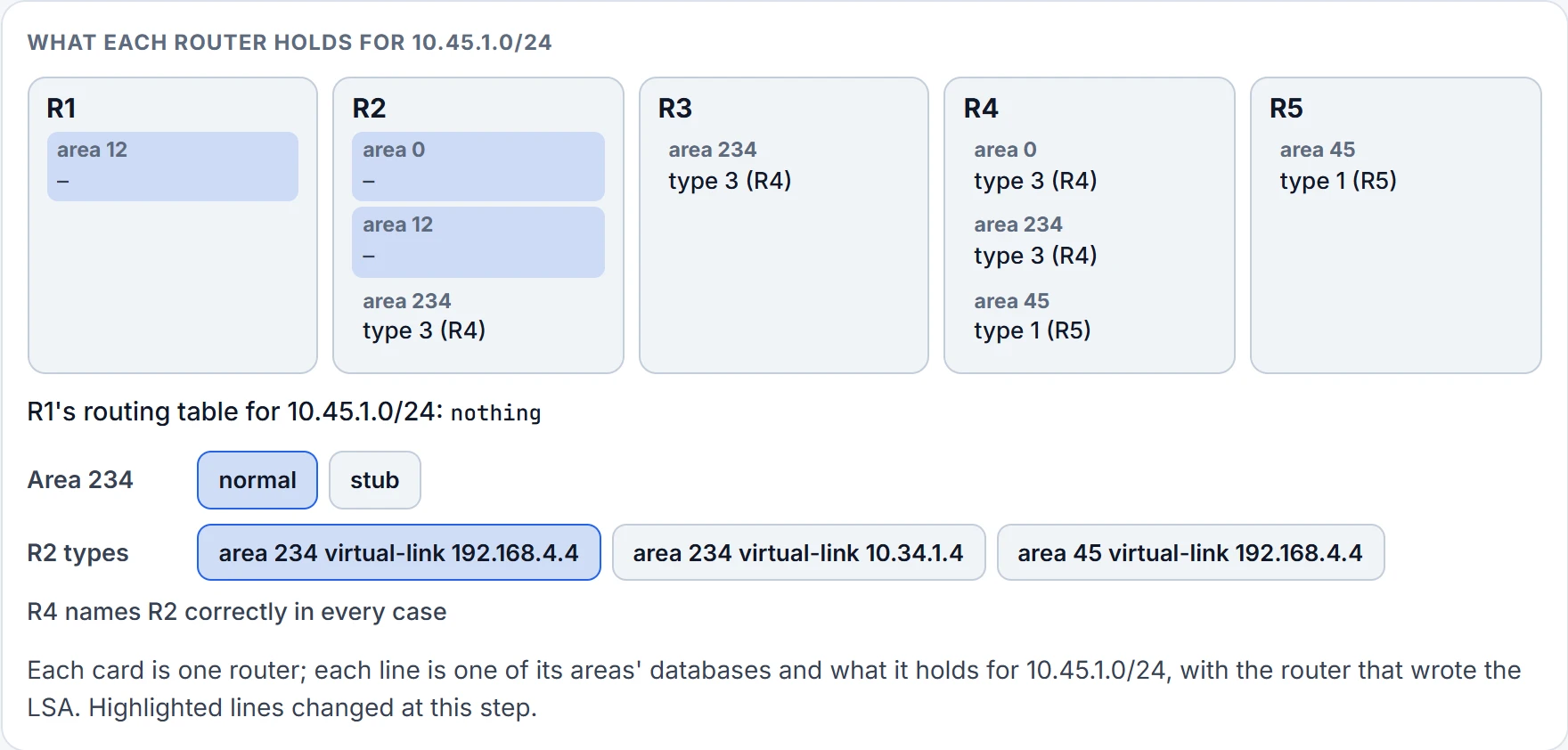
Step 3 of 3 Rule 3 at R2. R2 heard the type 3 in area 234, a nonbackbone area. A type 3 from a nonbackbone area stays in that area's database: R2 builds nothing from it for area 12, and nothing for its own piece of area 0. R1 never hears of 10.45.1.0/24.
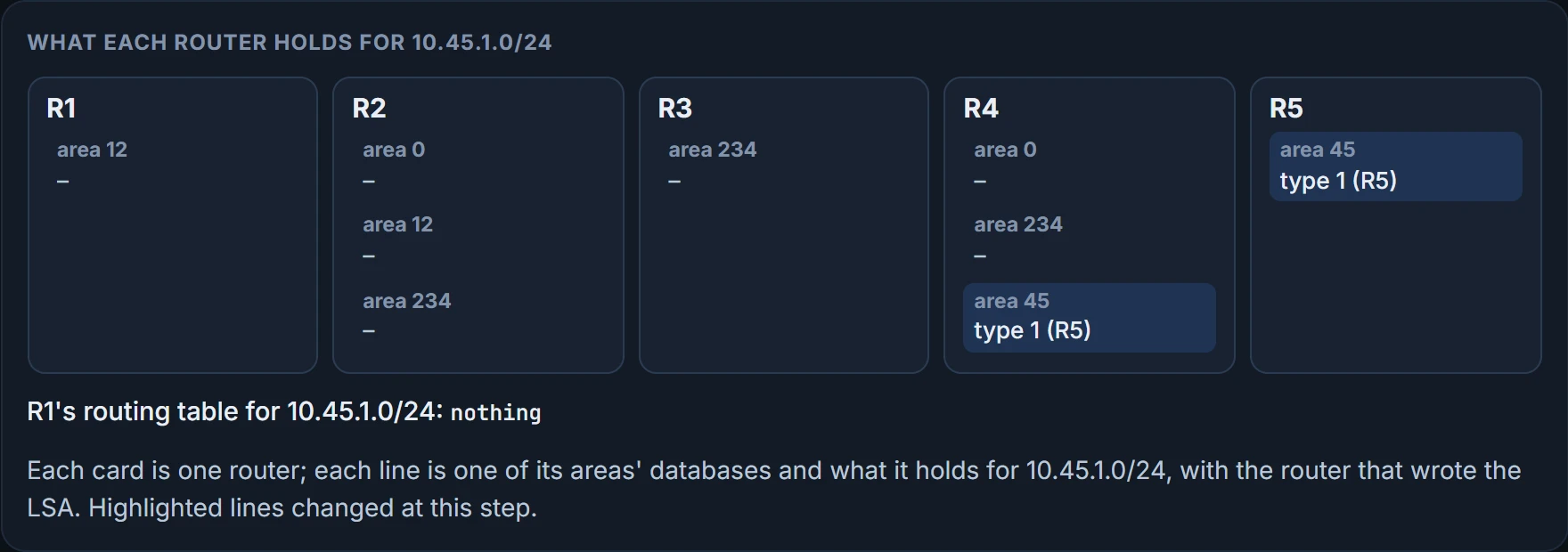
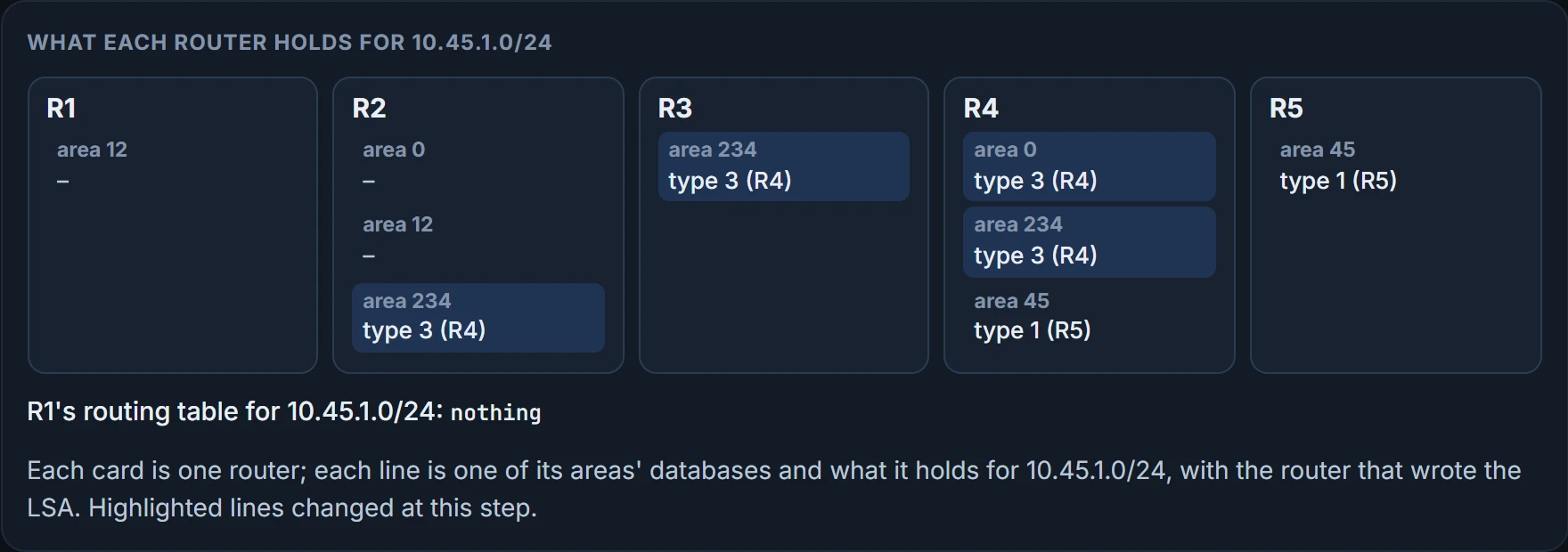
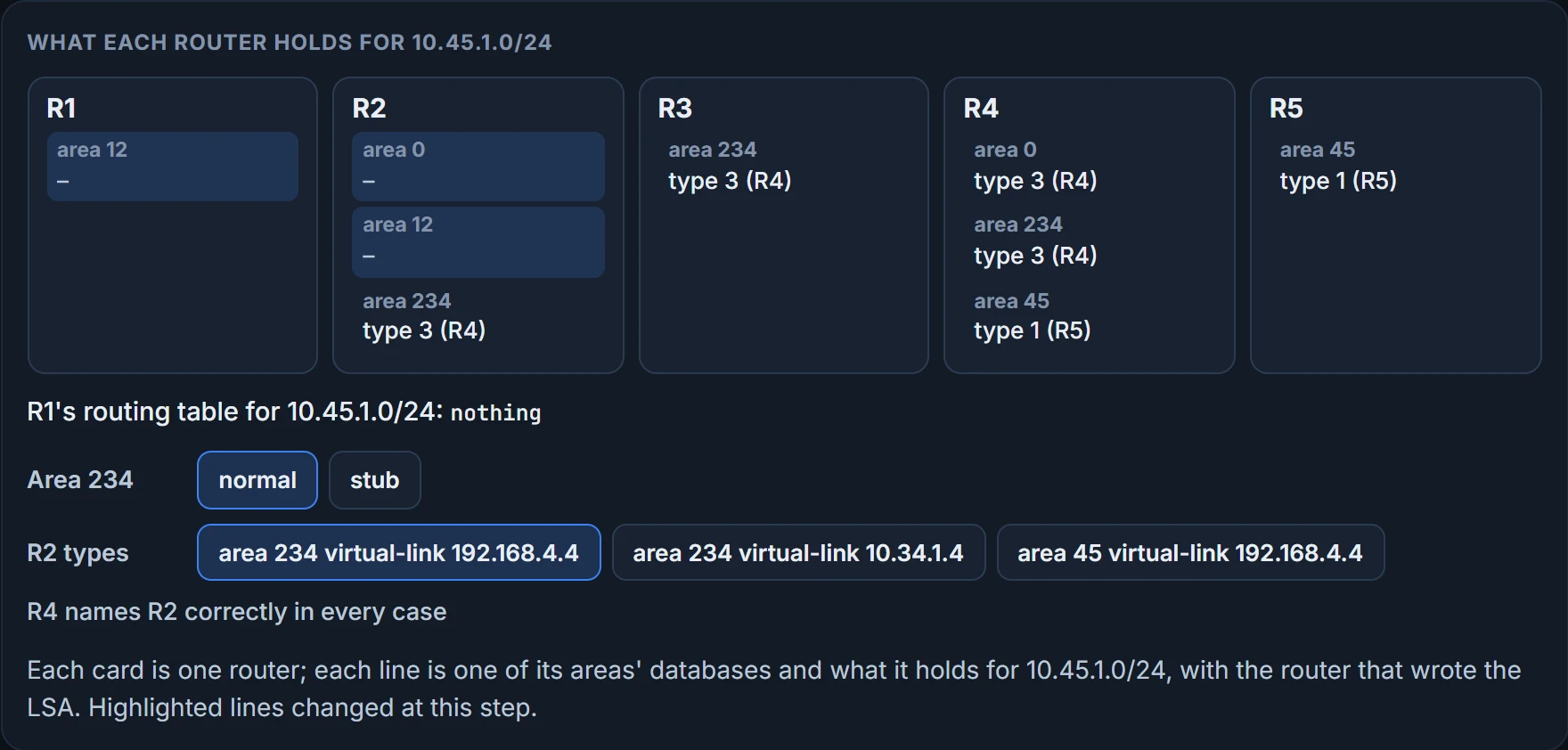
R4 is an ABR, so you'd expect R1 to learn it. It doesn't. Here are R1 and R5:
R1# show ip route ospf | begin Gateway
Gateway of last resort is not set

! subnet header lines omitted
O IA     10.2.2.0 [110/2] via 10.12.1.2, 00:01:30, GigabitEthernet0/1
O IA     10.23.1.0 [110/2] via 10.12.1.2, 00:01:30, GigabitEthernet0/1
O IA     10.34.1.0 [110/3] via 10.12.1.2, 00:01:30, GigabitEthernet0/1
! nothing from beyond R4
R1#
R5# show ip route ospf | begin Gateway
Gateway of last resort is not set

! subnet header lines omitted
O IA     10.4.4.0 [110/2] via 10.45.1.4, 00:01:30, GigabitEthernet0/4
O IA     10.23.1.0 [110/3] via 10.45.1.4, 00:01:30, GigabitEthernet0/4
O IA     10.34.1.0 [110/2] via 10.45.1.4, 00:01:30, GigabitEthernet0/4
! nothing from beyond R2
R5#
R1 has three O IA routes, all via 10.12.1.2, and nothing from beyond R4: no 10.4.4.0/24, no 10.45.1.0/24. R5 is the mirror image, with nothing from beyond R2. R3, in the middle of area 234, has all four outside networks:
R3# show ip route ospf | begin Gateway
Gateway of last resort is not set

! subnet header lines omitted
O IA     10.2.2.0 [110/2] via 10.23.1.2, 00:01:30, GigabitEthernet0/2
O IA     10.4.4.0 [110/2] via 10.34.1.4, 00:01:30, GigabitEthernet0/3
O IA     10.12.1.0 [110/2] via 10.23.1.2, 00:01:30, GigabitEthernet0/2
O IA     10.45.1.0 [110/2] via 10.34.1.4, 00:01:30, GigabitEthernet0/3
! R3 has it
R3#
A design like this is a discontiguous network: inter-area traffic is trying to cross a nonbackbone area. At first glance routes seem to cross area 234. They don't. R4 receives 10.45.1.0/24, injects it into its own piece of area 0, and re-advertises it into area 234, where R2 installs it too: R2 holds 10.45.1.0/24 and 10.4.4.0/24, via R3, 10.23.1.3. So R2 has the route. Why doesn't R1? ABRs follow three rules for creating type 3 LSAs:
- Type 1 LSAs received from an area create type 3s into the backbone and into the nonbackbone areas.
- Type 3s received from area 0 create type 3s for the nonbackbone areas.
- Type 3s received from a nonbackbone area are only inserted into the LSDB for that source area. The ABR doesn't create a type 3 for any other area, and that includes a segmented area 0.
That's the figure's third step. When a type 3 is received in a nonbackbone area, the ABR installs it for only the area it was received in. The area-type lesson met the same rule from the stub side: a type 3 can't be advertised from a nonbackbone area into the backbone. Two pieces of area 0 don't make a backbone; to an ABR they're two different areas. That's what a discontiguous network means in OSPF: area 0 isn't contiguous, and routes don't get advertised everywhere.
Two fixes. The simplest is to make area 0 contiguous: put R2's, R3's and R4's interfaces on 10.23.1.0/24 and 10.34.1.0/24 into area 0. The other is a virtual link.
Continue the lesson
The whole lesson, with its drawings and its questions. 5 more sections after the ones above.