
OSPF adjacency: why two routers do or don't reach FULL
Start with show ip ospf neighbor, and know which question it answers: is the neighbour there at all, and if so, how far did the two routers get? Neighbourship needs matching hello contents, area, subnet, timers, authentication and more. The neighbour's state, from Down through Init and 2-Way to FULL, points at what to check.
By Arif, founder of Daveth · Updated
The full 15 min walkthrough is in Daveth Pro (Network). See what the plan opens
What this page answers
Why are two OSPF routers not becoming neighbours?
Check what must match, starting with unique router IDs, a common subnet, the same area, matching hello and dead intervals and authentication. If the neighbour is listed at all, its state shows how far the two routers got. Read it in “The hello, and the list that has to match”
What are the OSPF neighbour states?
Eight: Down, Attempt, Init, 2-Way, ExStart, Exchange, Loading and Full. Init means a hello arrived without your own router ID in it; a long stay in any state points at a different fault. Read it in “From Down to FULL: eight states, and where each one stalls”
What are the OSPF packet types?
Five: hello, to find and keep neighbours; database description; link-state request; link-state update; and link-state acknowledgement. OSPF runs over IP protocol 89 and uses 224.0.0.5 and 224.0.0.6. Read it in “How two OSPF routers talk”
How do you enable OSPF on an interface?
With network ip-address wildcard area id under router ospf, which matches interfaces by their primary address, or with ip ospf process-id area id on the interface itself, which also adds its secondary networks unless you say secondaries none. Read it in “Which interfaces speak OSPF at all”
Missing, or stuck?
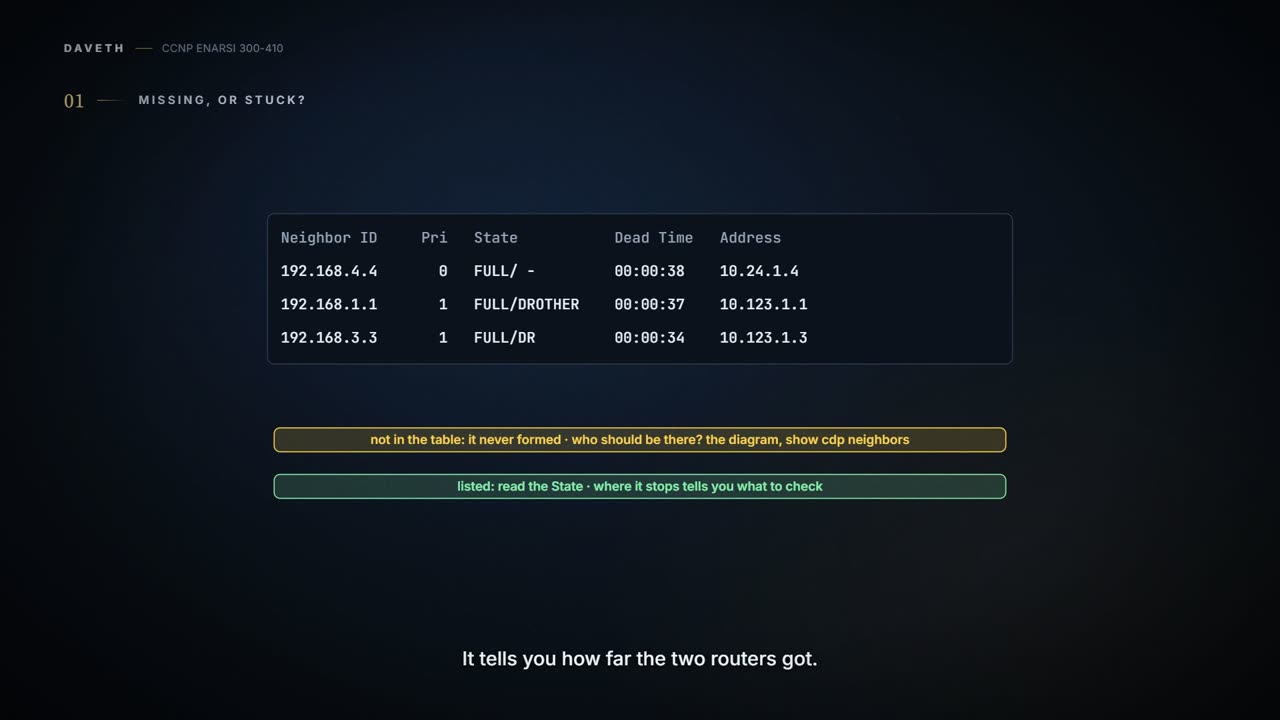
Your first look is always show ip ospf neighbor. It answers two different questions, so know which one you've got: is the neighbor there at all, and if it is, how far did the two routers get? When a neighbor relationship doesn't form, the neighbor isn't in the table. And the table can't tell you who should be there: for that you need an accurate diagram and show cdp neighbors. If the neighbor is listed, read the State column. It tells you how far the two routers got. That's this whole lesson in one line: where the neighbor stops tells you what to check.
Here's the link you'll be working on, healthy:
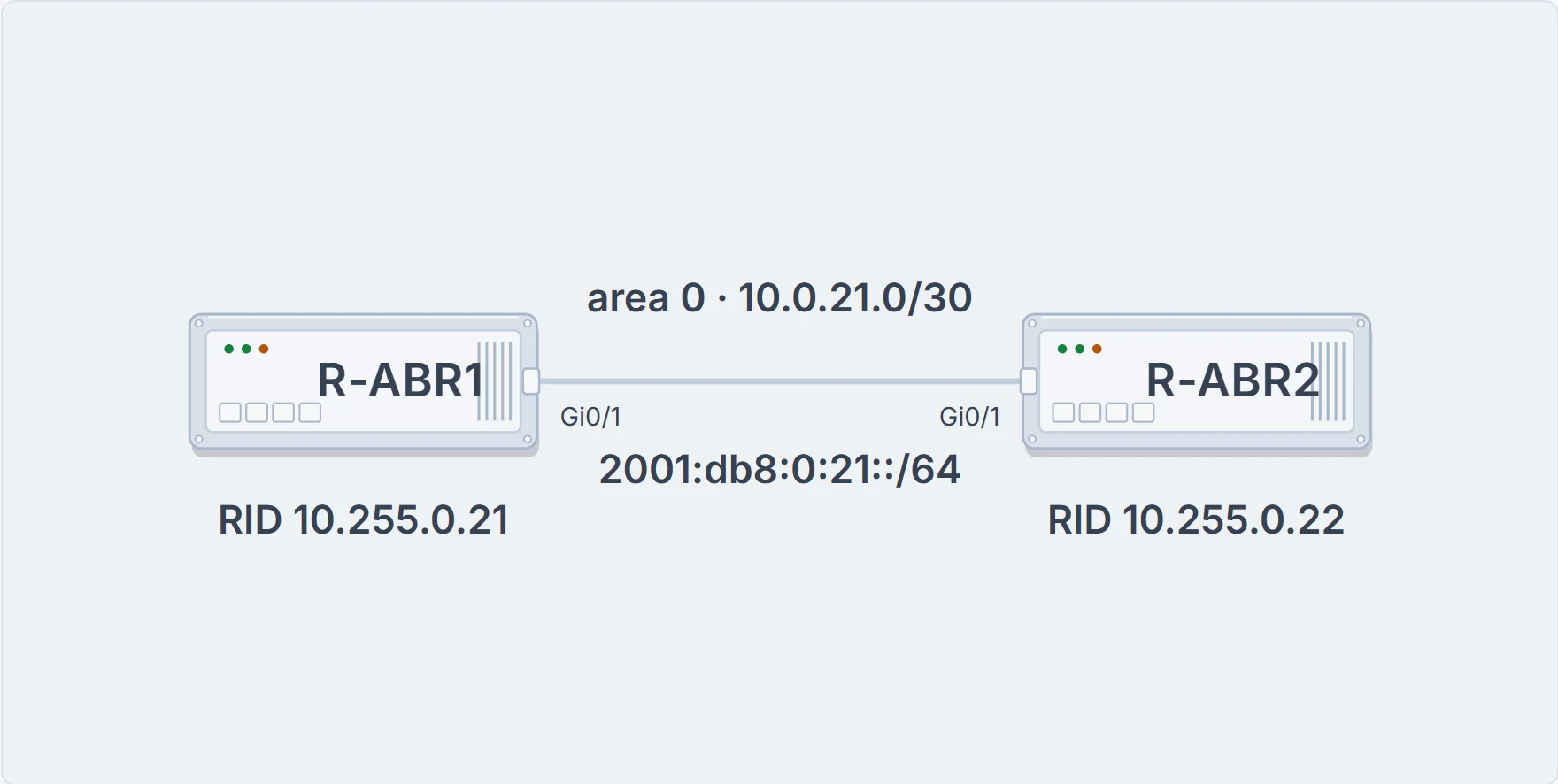
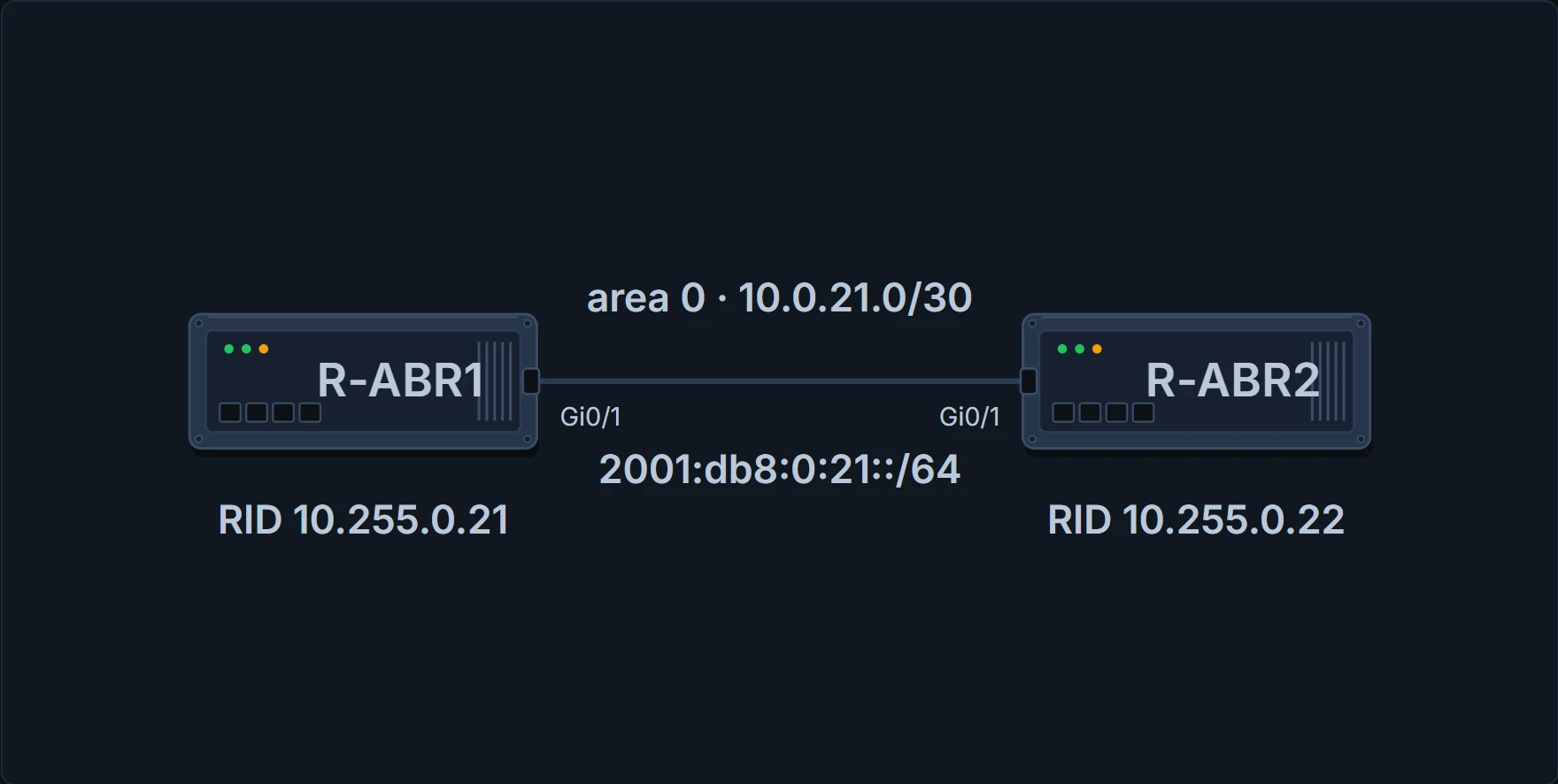
The link this lesson breaks and fixes. Both routers run OSPFv2 process 1, area 0, with their loopbacks as router IDs.
R-ABR1# show ip ospf neighbor
Neighbor ID     Pri State           Dead Time  Address         Interface
10.255.0.22     1   FULL/DR         00:00:35   10.0.21.2       GigabitEthernet0/1
! the neighbor state, then its role
R-ABR1#
Read it left to right:
- Neighbor ID is the neighbor's router ID, not an interface address.
- Pri is the neighbor's interface priority, used in DR elections.
- State has two parts. Before the slash is the neighbor state, the one this lesson is about. After it is the neighbor's role, DR, BDR or DROTHER, on links that need a DR, and just a hyphen on links that don't: a point-to-point neighbor shows "FULL/ -", because no DR exists on a point-to-point link.
- Dead Time is how long is left before this router declares the neighbor unreachable.
- Address is the neighbor's primary IP address, and Interface is your interface to it.
Why does FULL matter so much? OSPF routers flood LSAs to each other, every router in an area keeps an identical copy of the link-state database, and each one runs SPF on that copy to work out loop-free paths. A neighbor that never reaches FULL never synchronizes that database with you. Two words get used carefully here. A neighbor is a router you share an OSPF-enabled link with, found through hellos. An adjacent neighbor is one whose database is synchronized with yours.
One more thing before the details. FULL proves the database exchange finished. It doesn't prove a single route got installed. Routes show up in show ip route ospf, where [110/2] means administrative distance 110, OSPF's default, and a metric of 2:
R-ABR1# show ip route ospf | begin Gateway
Gateway of last resort is not set

      10.0.0.0/32 is subnetted, 1 subnets
O        10.255.0.22 [110/2] via 10.0.21.2, 00:01:00, GigabitEthernet0/1
! AD 110, metric 2
R-ABR1#
Healthy neighbors with a missing route is a later lesson's problem, not this one.
How two OSPF routers talk
OSPF runs straight over IPv4 as protocol 89. It uses multicast where it can: 224.0.0.5 (AllSPFRouters, MAC 01:00:5E:00:00:05) is the one every OSPF router should receive, and 224.0.0.6 (AllDRouters, 01:00:5E:00:00:06) is for talking to designated routers, which is the next lesson's.
That "IPv4" matters on a dual-stack link like this one. OSPFv2 carries IPv4; OSPFv3 changed the structure to support IPv6, and it gets its own lesson. OSPFv2 doesn't carry the link's 2001:db8:0:21::/64 addresses; that's OSPFv3's job.
Five packet types do all the work:
- Hello: sent periodically on every OSPF interface, to find new neighbors and check the known ones are still there.
- Database description (DBD, also written DDP): swapped while an adjacency is first forming. Each one describes the contents of the sender's database.
- Link-state request (LSR): asks a neighbor for part of its database when this router thinks its own copy is stale.
- Link-state update (LSU): carries the LSAs, normally in direct answer to an LSR.
- Link-state acknowledgment: answers flooded LSAs, which makes flooding reliable.
Every router needs a name. The router ID (RID) is a 32-bit number that identifies one OSPF router; some outputs call it the neighbor ID. It must be unique for each OSPF process in the domain, and unique between the OSPF processes on one router.
- How it's chosen: by default, the highest IP address on any up loopback. With no loopback up, the highest IP address on an active up physical interface. It's picked when the process starts and doesn't change until the process restarts, so adding a higher loopback changes it only after a restart.
- Set it yourself with
router-id <a.b.c.d>under the process. That helps troubleshooting, and it cuts LSAs when a RID would otherwise change. After changing it you reset the process withclear ip ospf processfor it to take effect. The routers here userouter-id 10.255.0.21and10.255.0.22, their loopback addresses.
And the process number? It's locally significant: process 1 on one router and process 1234 on the other can become neighbors. People still keep it the same everywhere, for operational consistency.
The hello, and the list that has to match
Hellos find neighbors and keep them; most of the time a router sends them to 224.0.0.5. Look at what one carries:
- the sender's router ID;
- the authentication options (none, plaintext or MD5);
- the area ID of the interface;
- the network mask of the interface's primary address;
- the interface priority, for DR elections;
- the hello interval and the dead interval, in seconds;
- the DR and BDR addresses for the link;
- the active neighbors: the routers this one has heard a hello from within the dead interval.
Now the list of what must match for a neighborship:
- Router IDs unique between the two. They should be unique across the whole domain, to prevent errors.
- A common subnet. OSPF sends hellos from the interface's primary IP address, and the receiver uses the mask in the hello to work out the network ID.
- The same MTU, because OSPF doesn't support fragmentation.
- The same area ID on that link.
- The same hello and dead timers on that link.
- The same authentication type and credentials, if any.
- The same need for a DR, and the same area-type flags (stub, NSSA and so on). Those belong to later lessons; here you only need to know they're on the list.
Areas need one more sentence. An area is a logical grouping of routers or, more specifically, of router interfaces. Membership is set per interface, the area ID travels in the hello, and an interface belongs to exactly one area. The ID is a 32-bit number you can write in decimal (0 to 4294967295) or dotted decimal (0.0.0.0 to 255.255.255.255). One router can say area 0 and its neighbor area 0.0.0.0, and they'll still form an adjacency.
Now put the two lists side by side. Most of what must match is right there in the hello. The MTU isn't among the hello fields above, though, and that's where this lesson's nastiest fault hides.
From Down to FULL: eight states, and where each one stalls
Adjacencies don't form the moment a hello arrives. The neighbor walks through a series of states, eight of them, and a long stay in any one points somewhere:
| State | What's happened | Stuck here for long? |
|---|---|---|
| Down | No hellos received from this neighbor. | It isn't in the table at all. |
| Attempt | Relevant to nonbroadcast networks that need neighbors configured by hand: this router sent a unicast hello and has heard nothing back yet. | That's a network type, the next lesson's. |
| Init | A hello arrived, but your own RID isn't in it. | Something is probably preventing hellos from being received correctly. Which way? A hello lists the routers its sender has heard from, and yours isn't on it: so it's your hellos that aren't reaching the other side. |
| 2-Way | Both routers saw their own RID in the other's hello. A DR election, if the link needs one, happens here. | Normal between two DROTHERs on an Ethernet LAN: the next lesson. |
| ExStart | The two decide who sends first. The higher RID becomes the primary and sends first. On a multi-access network the DR and BDR are settled before this, and the DR needn't be the primary, because the choice is per neighbor. | There could be an MTU mismatch, or a duplicate RID might exist. |
| Exchange | They swap DBD packets describing their databases, and each compares what it receives with its own to find what it's missing. | There could be an MTU mismatch. |
| Loading | Each requests the entries it found missing, with LSRs. | Possibly a corrupted packet, a memory problem, or again an MTU mismatch. |
| Full | The databases are synchronized; the routers are fully adjacent. | That's the goal. |
Look at the right-hand column. It's a short list per state, and that's your first filter. Init deserves a second look: it's a one-sided phone call. You hear the other end perfectly, and nothing they've said yet shows they can hear you. The only proof that they can is your own RID in their hello.
A healthy run, in order: hellos until each router sees its own RID in the other's (Init, then 2-Way), a DR election if the link needs one, ExStart, Exchange with DBDs, Loading with LSRs, LSUs and acknowledgments, then Full. Now break it.
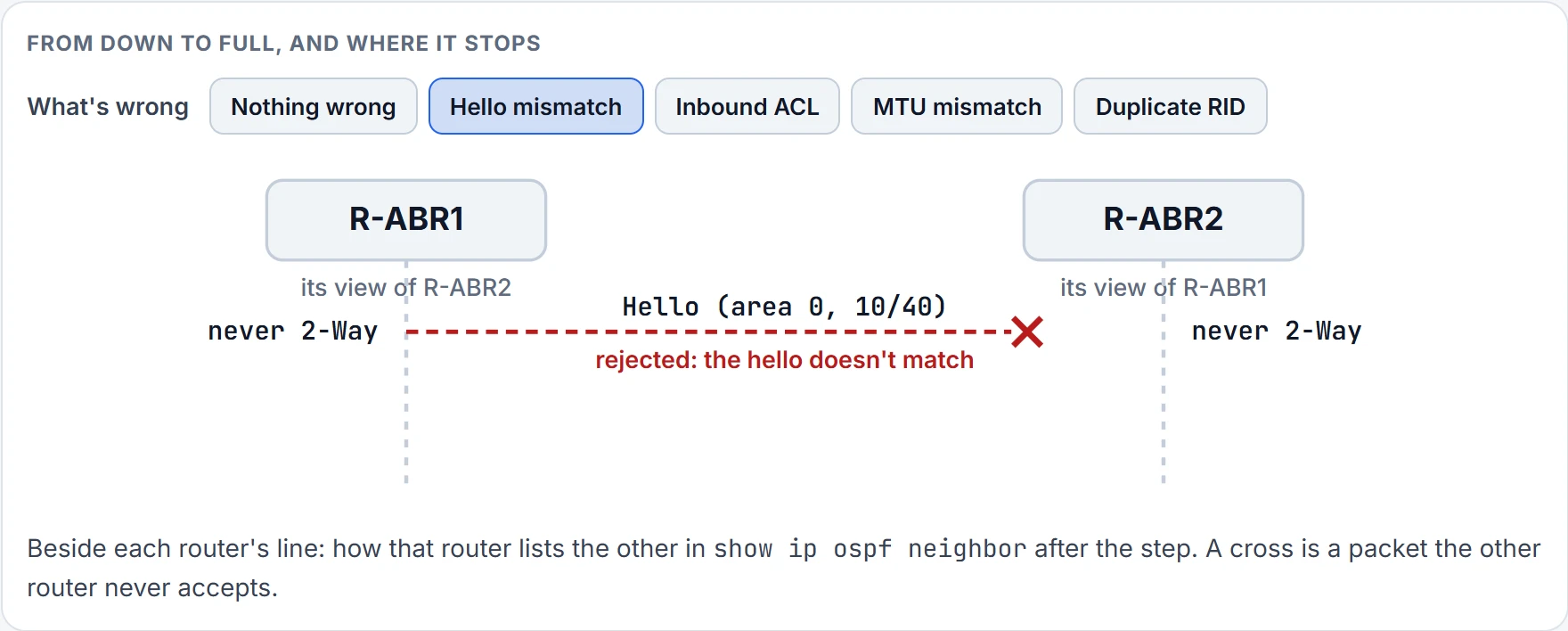
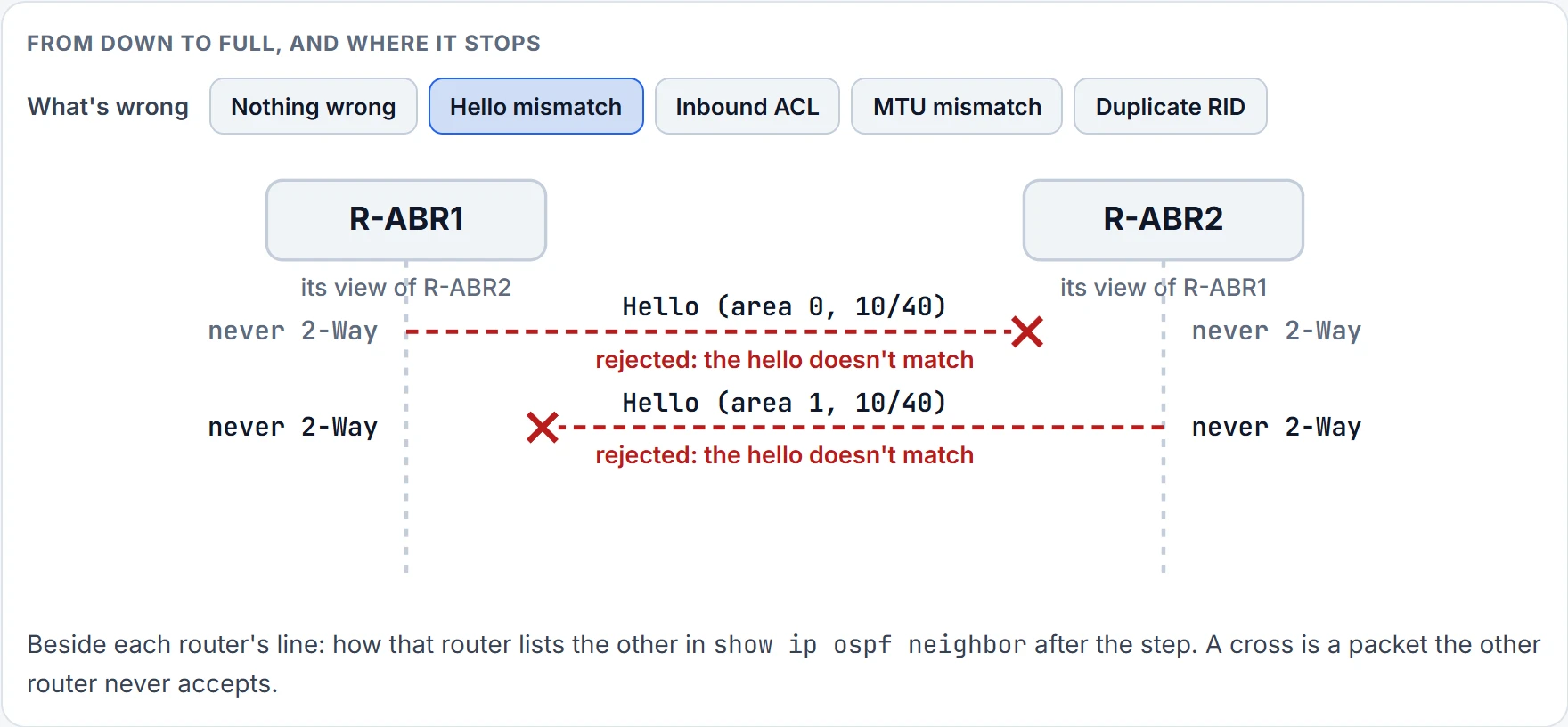
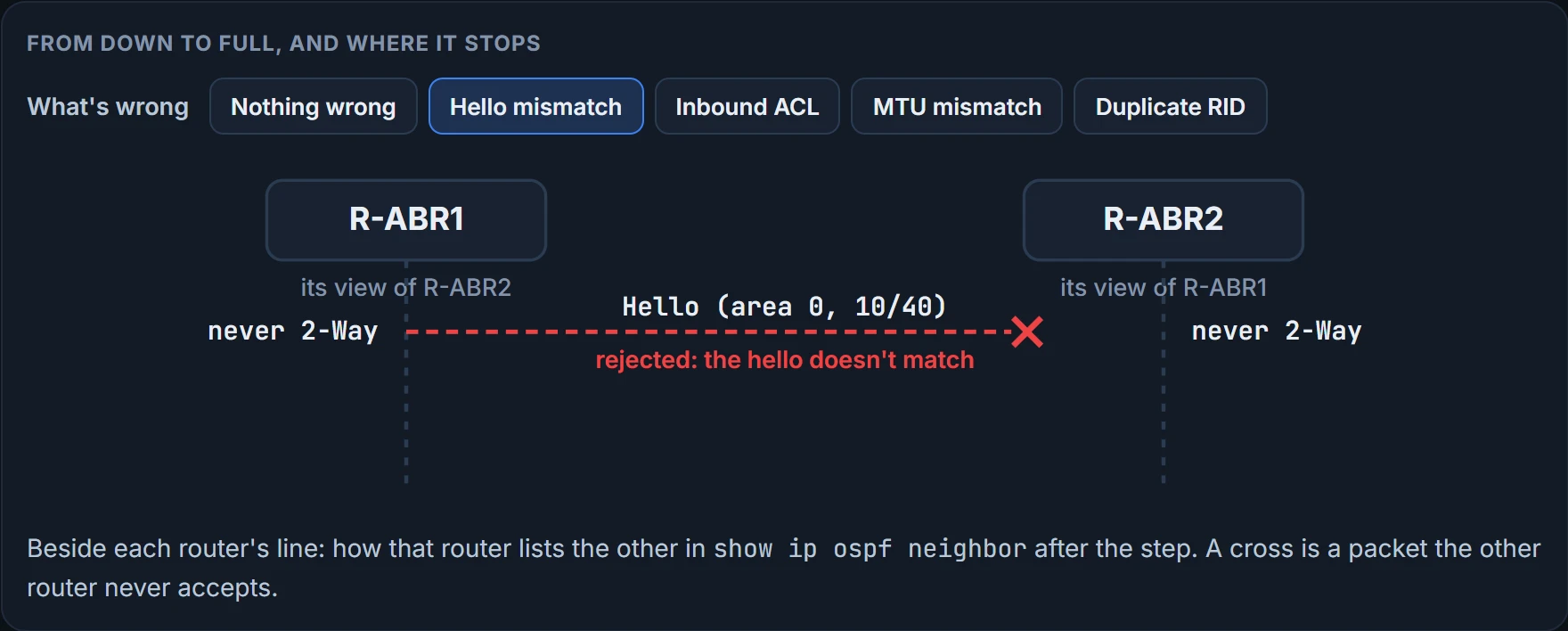
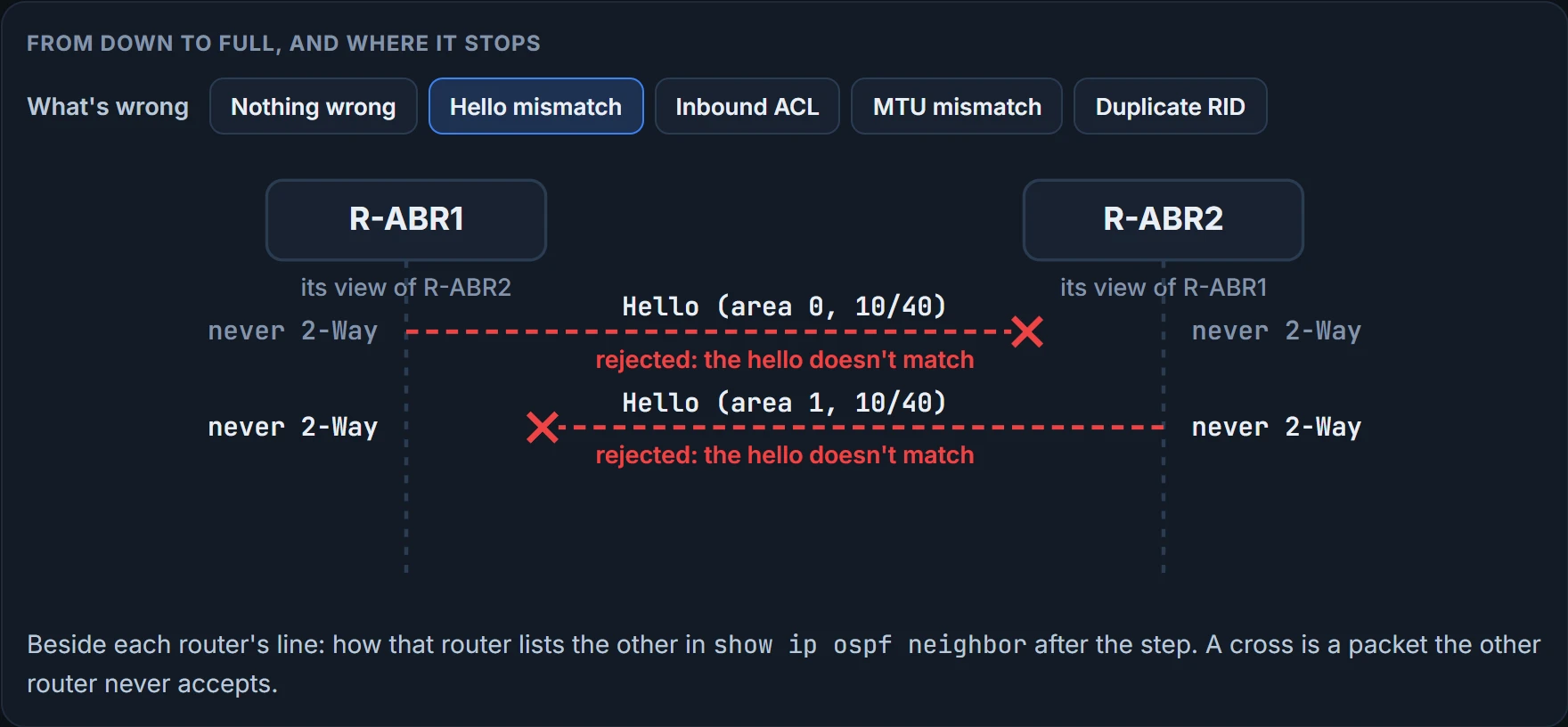
Step 1 of 2 R-ABR2 receives R-ABR1's hello and rejects it: a different area, hello or dead interval, or authentication. debug ip ospf hello or debug ip ospf adj on R-ABR2 says which.
Step 2 of 2 The same check fails the other way. Neither router accepts the other's hello, so neither ever reaches 2-Way.
You can watch the healthy run with debug ip ospf adj. It shows each step, from "2 Way Communication" through the DBDs, "Exchange Done", the LS request and update, and finally the %OSPF-5-ADJCHG syslog line, "from LOADING to FULL, Loading Done". Look at a DBD the router received:
OSPF: Rcv DBD from 192.168.2.2 on GigabitEthe…
opt 0x52 flag 0x7 len 32 mtu 1500 state 2WAY
There it is: mtu 1500, in a database description, not a hello. (That debug comes from another network, which is why the neighbor is 192.168.2.2.)
Which interfaces speak OSPF at all
No hellos leave an interface that isn't in the OSPF process. Most OSPF configuration sits under the process, some goes on the interface, and there are two ways to put an interface into OSPF:
- The network statement.
router ospf <process-id>starts the process. Thennetwork <ip-address> <wildcard-mask> area <area-id>matches interfaces by their primary IPv4 address and mask, and puts every match in that area. Sonetwork 10.1.1.0 0.0.0.255 area 0enables every interface from 10.1.1.0 to 10.1.1.255. This link usesnetwork 10.0.21.0 0.0.0.3 area 0. - The interface command.
ip ospf <process-id> area <area-id> [secondaries none], on the interface. It also adds the interface's secondary networks to the database unless you saysecondaries none. It's explicit, but it isn't centralized, so it gets harder to follow as interfaces multiply. For example,ip ospf 1 area 51.
Here's the misconception to drop: the network statement doesn't advertise networks. It selects interfaces and enables OSPF on them, and the interface is then advertised in an LSA. Real configurations mix the styles. On one six-router example network, one router enables everything with network 0.0.0.0 255.255.255.255 area 1234; another names each interface address with a 0.0.0.0 wildcard; another uses ip ospf 1 area on each interface. One mixes a specific statement with a catch-all: network 10.45.1.0 0.0.0.255 area 0 and network 0.0.0.0 255.255.255.255 area 56 put the 10.45.1.0/24 interfaces in area 0 and every other interface in area 56.
When both are present, the interface command wins, so the statement you're reading may not be the one deciding. Statements go wrong in two ways. A misconfigured statement can leave out interfaces that should run OSPF, and switch it on where it shouldn't. A statement that's right except for the area puts the interface in OSPF but in the wrong area, and that stops the neighborship just as surely. So check both places before you decide OSPF isn't enabled on an interface.
Passive is the deliberate version of "don't speak". A passive interface sends no hellos and doesn't process any OSPF packet it receives, but its network still goes into the database. The commands are passive-interface <interface> under the process, passive-interface default for all of them, and no passive-interface <interface> to let one speak again. It cuts OSPF traffic and it improves security, because a rogue router plugged into that LAN has nobody to form an adjacency with. The catch: make the wrong interface passive and a legitimate neighbor never forms. A real design uses it on purpose: a router makes its LAN interface passive, to prevent forming an adjacency there. Here's the link, with R-ABR1's side made passive by mistake:
R-ABR1# configure terminal
R-ABR1(config)# router ospf 1
R-ABR1(config-router)# passive-interface GigabitEthernet0/1
R-ABR1(config-router)# end
R-ABR1#
R-ABR1# show ip ospf neighbor
Neighbor ID     Pri State           Dead Time  Address         Interface
R-ABR1#
Undo it with no passive-interface GigabitEthernet0/1, and the link is healthy again for the outputs below. How to prove which interfaces are in:
show ip ospf interface [brief | <interface>]lists the OSPF interfaces with their addresses, the DR and BDR, and the timers. The full version ends with "Neighbor Count is 1, Adjacent neighbor count is 1".- The brief version's columns are Interface, PID, Area, IP Address/Mask, Cost, State, and Nbrs F/C: F counts the neighbors that are fully adjacent, C the ones detected and in 2-Way. The State column shows DR, BDR or DROTHER, P2P, LOOP or Down. Mind one thing: passive interfaces appear in this output too.
show ip protocolslists your network statements under "Routing for Networks". Those are the statements, not the networks you're routing for:10.1.1.1 0.0.0.0 area 1really means "find the interface with this address and put it in area 1". The interfaces enabled withip ospf … areaappear under "Routing on Interfaces Configured Explicitly".- The same command shows a "Passive Interface(s):" section, and only when there's at least one passive interface.
R-ABR1# show ip ospf interface GigabitEthernet0/1
GigabitEthernet0/1 is up, line protocol is up
  Internet Address 10.0.21.1/30, Area 0, Attached via Network Statement
  Process ID 1, Router ID 10.255.0.21, Network Type BROADCAST, Cost: 1
  Topology-MTID    Cost    Disabled    Shutdown      Topology Name
        0           1         no          no            Base
  Transmit Delay is 1 sec, State BDR, Priority 1
  Designated Router (ID) 10.255.0.22, Interface address 10.0.21.2
  Backup Designated router (ID) 10.255.0.21, Interface address 10.0.21.1
  Timer intervals configured, Hello 10, Dead 40, Wait 40, Retransmit 5
  ! the timers, next; Wait belongs to the DR election, the next lesson
  Neighbor Count is 1, Adjacent neighbor count is 1
  ! one neighbor, and it's adjacent
    Adjacent with neighbor 10.255.0.22  (Designated Router)
  Suppress hello for 0 neighbor(s)

R-ABR1#
R-ABR1# show ip ospf interface brief Interface PID Area IP Address/Mask Cost State Nbrs F/C Gi0/1 1 0 10.0.21.1/30 1 BDR 1/1 ! Nbrs F/C 1/1 Lo0 1 0 10.255.0.21/32 1 LOOP 0/0 R-ABR1#
Continue the lesson
The whole lesson, with its drawings and its questions. 5 more sections after the ones above.