
Matching prefixes: ACLs and prefix lists as selectors
To change routes you first pick them out, with an ACL or a prefix list. Both are read from the top until an entry matches, with an implicit deny at the end. A standard ACL sees only the route's address; an extended ACL gives its second address a new job. A prefix list matches a bit pattern and a length, and ge and le open a window of lengths.
By Arif, founder of Daveth · Updated
The full 13 min walkthrough is in Daveth Pro (Network). See what the plan opens
What this page answers
How do you configure a prefix list?
ip prefix-list name seq number permit or deny network/length, optionally with ge and le to match a range of prefix lengths. Entries are read from the top and an implicit deny ends the list. Read it in “The prefix match: bits, then a count”
How do ge and le work in a prefix list?
After the network bits match, ge and le test the prefix length: le is less than or equal to, ge greater than or equal to, and together they open a window, so one entry can match many networks of different lengths. Read it in “Opening the window: ge and le”
What does a standard ACL match when used for routes?
Only the route's address, compared bit by bit through the wildcard, where a 0 bit must match; it never sees the prefix length. Read it in “A standard ACL sees the address and nothing else”
A route is two numbers
Here's the question for the whole lesson. How do you point at exactly the routes you mean, and no others?
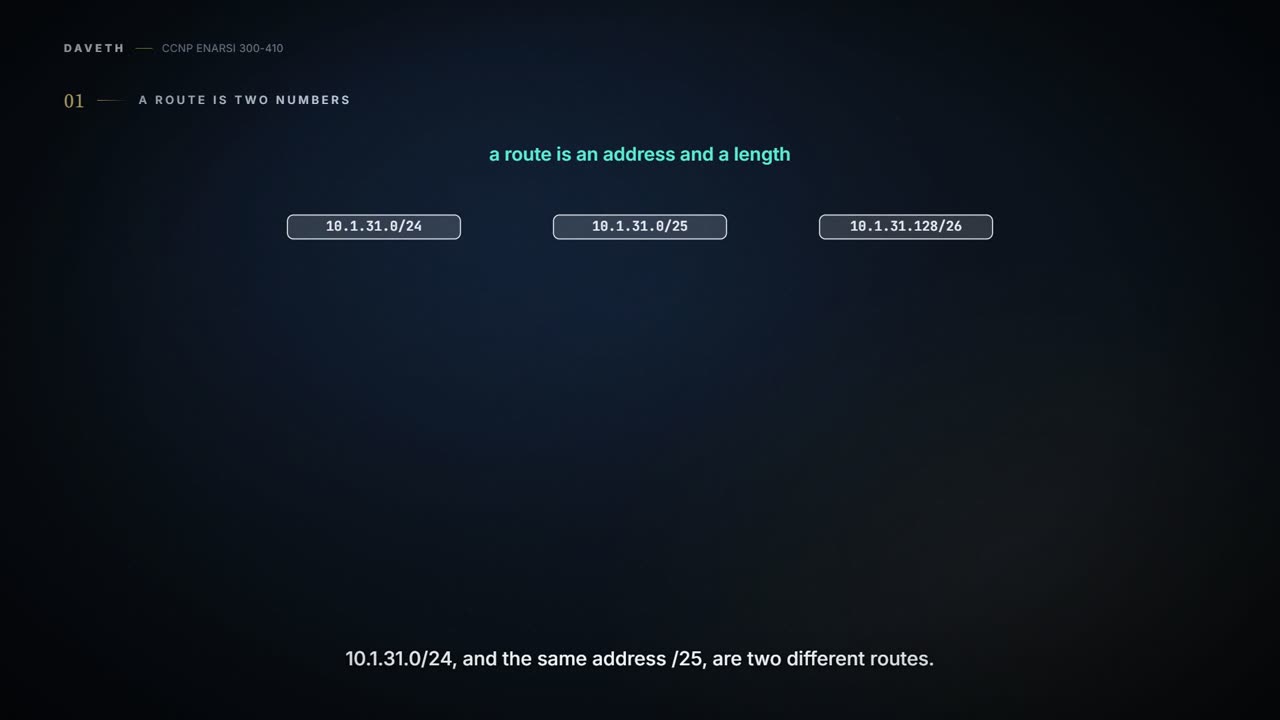
Changing every route at once doesn't let you tune a network. You need to pick routes out first, and there are two tools for that: ACLs and prefix lists. Before either, look at what you're picking. A route isn't an address. It's an address and a length: 10.1.31.0/24 and 10.1.31.0/25 start at the same address and are two different routes.
Before you read on. Here are two lines, and three routes that HQ-C1, a core router in the course network, might hold:
access-list 10 permit 10.1.31.0 0.0.0.255ip prefix-list SRV permit 10.1.31.0/24- 10.1.31.0/24, 10.1.31.0/25, 10.1.31.128/26
Which routes does each line catch? Write it down. Both answers come in this lesson, and they're not the same.
ACLs didn't start here. They were built to filter packets going into or out of an interface, much like a basic firewall. Today they classify packets for features such as QoS, and they also identify networks inside routing protocols. That second job is this lesson's. A tool built for packets is about to be pointed at routes, and the fit isn't perfect.
How every list is read
An ACL is a list of access control entries, ACEs. Each one names an action, permit or deny, and what it matches. The router starts at the top, the lowest sequence number, and works down until something matches. Then it takes that entry's action and stops reading. At the end of every ACL sits an implicit deny, which denies everything that didn't match earlier. You won't see it in the configuration. It's there anyway.
So order matters. Put an entry in the wrong place and you get consequences you didn't ask for. Hold that thought. Prefix lists follow the same three rules, top down, first match wins, implicit deny at the end, and that's where it bites hardest. One slight error in an ACL or a prefix list changes its meaning, and with it what the feature relying on the list does with the route.
Two kinds of ACL. A standard ACL defines what it matches by the source network alone. An extended ACL can use source, destination, protocol, port, or a mix; for routes, this lesson keeps to source, destination and protocol. Numbers tell you which is which: standard ACLs use 1-99 or 1300-1999, extended ones 100-199 or 2000-2699, and either can be named instead. Names say what the list is for, work with both kinds, and are generally preferred.
Sequence numbers. Leave one out and the router picks the highest number so far plus 10; the first entry is 10. Sequence numbers are what let you delete one ACE, or slot a new one in while the list is in use. Numbering in fives or tens leaves room for that.
One note on the older form. Some engineers call access-list <number> {permit | deny} <source> <wildcard> a legacy command, because you can't delete one ACE with it: put no in front of any version of it and the whole ACL goes. On an interface, that can cost you your access to the router. Our advice is to write ACLs with ip access-list.
A standard ACL sees the address and nothing else
The standard ACL first. ip access-list standard {acl-number | acl-name} puts you in ACL configuration mode. Each entry is [sequence] {permit | deny} source source-wildcard. Two shortcuts: any stands for 0.0.0.0 255.255.255.255, and host means a single /32 address, so you leave the wildcard off.
Read the wildcard bit by bit. A 0 bit says "this bit of the address must match"; a 1 bit says "don't care". You met the same reading on EIGRP's network statement, where 0.0.0.255 selected a /24's worth of interfaces. Three entries:
permit anypermits all networks.permit 172.16.0.0 0.0.255.255permits every network from 172.16.0.0 to 172.16.255.255.permit host 192.168.1.1permits only the 192.168.1.1/32 network.
Now look at what's missing from that syntax. There's no field for a mask. An ACL can give you extremely fine control of traffic, but a standard ACL doesn't help you pick routes by their subnet mask, so for route filtering it isn't granular. The route's address goes in, its length never does.
So, back to the opening lines. access-list 10 permit 10.1.31.0 0.0.0.255 catches all three: 10.1.31.0/24, 10.1.31.0/25 and 10.1.31.128/26 each have an address inside 10.1.31.0-10.1.31.255, and nobody asks about the length. The line that looks like it names one /24 names a range of addresses, at any length.
Extended ACLs: the second address changes its job
An extended ACL is built the same way: ip access-list extended {acl-number | acl-name}, then entries of the form [sequence] {permit | deny} protocol source source-wildcard destination destination-wildcard. For packets, the destination is where the packet's going. For routes there's no destination, so the second address gets a new job, and which job depends on the protocol: an IGP (EIGRP, OSPF or IS-IS) or BGP.
BGP first, because it's the clear case. The source fields match the network part of the route, and the destination fields match the network mask. Two numbers, two fields. Until prefix lists arrived, extended ACLs were the only way BGP could match routes.
Four lines, read as BGP reads them:
permit ip 10.0.0.0 0.0.0.0 255.255.0.0 0.0.0.0permits only the 10.0.0.0/16 network.permit ip 10.0.0.0 0.0.255.0 255.255.255.0 0.0.0.0permits any 10.0.x.0 network with a /24 length, and 10.1.5.0/24 isn't one: the second octet isn't wildcarded.permit ip 172.16.0.0 0.0.255.255 255.255.255.0 0.0.0.255permits any 172.16.x.x network from /24 through /32. Read as fields, the destination pair takes any mask whose first three octets are 255; its wildcard 0.0.0.255 would also pass a last octet that isn't a contiguous mask, 255.255.255.5 say, which no real route carries.permit ip 172.16.0.0 0.0.255.255 255.255.255.128 0.0.0.127permits any 172.16.x.x network from /25 to /32. Read as fields, the last octet of the mask must have its top bit set: 128 or more.
BGP's own filters come later in the course. The reading is yours now.
Now the IGPs. An extended ACL used to match routes behaves differently for an IGP than for BGP, and accounts disagree on how. One says that for an IGP the source fields identify the network and the destination fields identify the smallest prefix length allowed; another says an IGP's filter can't test the length at all. So for IGP routes, use a prefix list. Many engineers prefer a prefix list over ACL network selection anyway.
The prefix match: bits, then a count
Prefix lists are the other way to identify networks in a routing protocol. One prefix list can name a specific address, a network or a range of networks, and pick out many networks of many lengths with a single prefix match specification.
That specification has two parts: a high-order bit pattern, and a high-order bit count that says how many of the pattern's leading bits must match. You'll also see them called the address or network, and the length or mask length. In 192.168.0.0/16 the pattern is 192.168.0.0 and the count is 16. With nothing after it, no ge and no le, the count is an exact match: the route's first 16 bits must be 11000000 10101000, and its length must be 16.
Read that last part again, because it's the surprise. An ACL entry never looks at the length; a bare prefix-list entry insists on it. With no ge or le, an entry is read as an address and a subnet mask, and only that network matches: 10.1.1.0/26 matches 10.1.1.0/26 and nothing else.
Back to the opening's other line. ip prefix-list SRV permit 10.1.31.0/24 catches 10.1.31.0/24, and that's all. Not the /25, not the /26. The ACL line caught every length; the prefix-list line caught one route.
So a prefix list selects routes by binary patterns: a bit pattern, a bit count, and, optionally, a window of lengths.
10.0.0.0/8 in a prefix list isn't "the 10 network". It's one route, and there's a fair chance it isn't in your table.
The default route is the classic case. Which entry matches only the default? permit 0.0.0.0/0, with nothing after it: no ge or le, so it's an exact match for 0.0.0.0/0, the default route, and as a filter it lets the default through and nothing else.
Opening the window: ge and le
Here's where the power comes from: matching length parameters, which pick many networks with specific lengths in one statement. There are three options. le is less than or equal to; ge is greater than or equal to; and you can use both together.
So an entry now runs two tests, in order. Do the first count bits match the pattern? Is the route's length inside the window ge and le describe? The pattern test is the same as before. Only the length test moved.
Take 10.168.0.0/13 ge 24 and four routes: 10.168.0.0/13, 10.168.0.0/24, 10.173.1.0/28, 10.104.0.0/24. Which match? Decide, then read on.
The first fails the window: its length, 13, is under the minimum of 24. 10.168.0.0/24 meets it. 10.173.1.0/28 qualifies too: its first 13 bits match the pattern and 28 is inside the window. 10.104.0.0/24 doesn't: its first 13 bits don't match. Two matches, the second and third. Look at why 10.173 gets in: 173 is 10101101 and 168 is 10101000. The first five bits of the second octet agree, and a /13 only looks at five bits of it.
Now close the window from both sides: 10.0.0.0/8 ge 22 le 26. 10.0.0.0/8 doesn't match, its length is too short; 10.0.0.0/24 qualifies, pattern right and length between 22 and 26. 10.0.0.0/30 doesn't match either. Its bits are fine; what's too long is its length, 30 against a top of 26. Anything that starts with 10 and has a length from 22 to 26 matches.
One special case. To match exactly one length longer than the count, set ge and le to the same value: 10.0.0.0/8 ge 24 le 24 is every /24 in 10.0.0.0/8.
Defaults, because you'll mostly type one keyword. With ge alone, the window runs from ge up to 32 (128 for IPv6): the 10.168.0.0/13 ge 24 above covers lengths 24 to 32. With le alone there are two readings. One says the length can be anything up to le, "0 to 32" for le 32. The other starts the window at the entry's own length. We haven't confirmed which the router uses. For every list in this lesson, the two readings give the same answer.
And the rule the router enforces. It requires ge to be greater than the count, and le to be greater than or equal to ge: count < ge <= le. Break it and the entry isn't accepted.
Continue the lesson
The whole lesson, with its drawings and its questions. 4 more sections after the ones above.