
Troubleshooting EIGRP from symptom to cause (timed)
Start from the symptom, proved from where the user sits, not from the configuration. A route travels as a relay: the router that owns the LAN takes it into EIGRP, and each router learns it, installs it and passes it on. It can stop in three places: never advertised, filtered or held back on the way, or no neighbour to carry it.
By Arif, founder of Daveth · Updated
The full 15 min walkthrough is in Daveth Pro (Network). See what the plan opens
What this page answers
How do you troubleshoot a missing EIGRP route?
Follow the relay: is the network in EIGRP at the router that owns it, is each neighbour up, and does each router's topology table and routing table hold it? If your neighbour has it and you do not, suspect an inbound filter, an outbound filter, or a stub. Read it in “Three places a route can stop”
Why is a LAN not advertised by EIGRP?
Because no network statement matches the interface, so EIGRP never adds its network, even with no neighbour on that LAN. A passive interface is different: it forms no neighbours, but its network is still advertised. Read it in “No neighbor, no route”
Prove the symptom first
Troubleshooting starts with the symptom, proved from where the user sits. Not with the configuration, and not with a guess.
The ticket arrives in capitals: SRV1 DOWN. It's from Lee on the service desk, whose tickets name the thing people are angry at rather than the thing that's broken. The detail underneath says accounts can't open the file share; everybody else can. Here's the part of HQ the ticket is about:
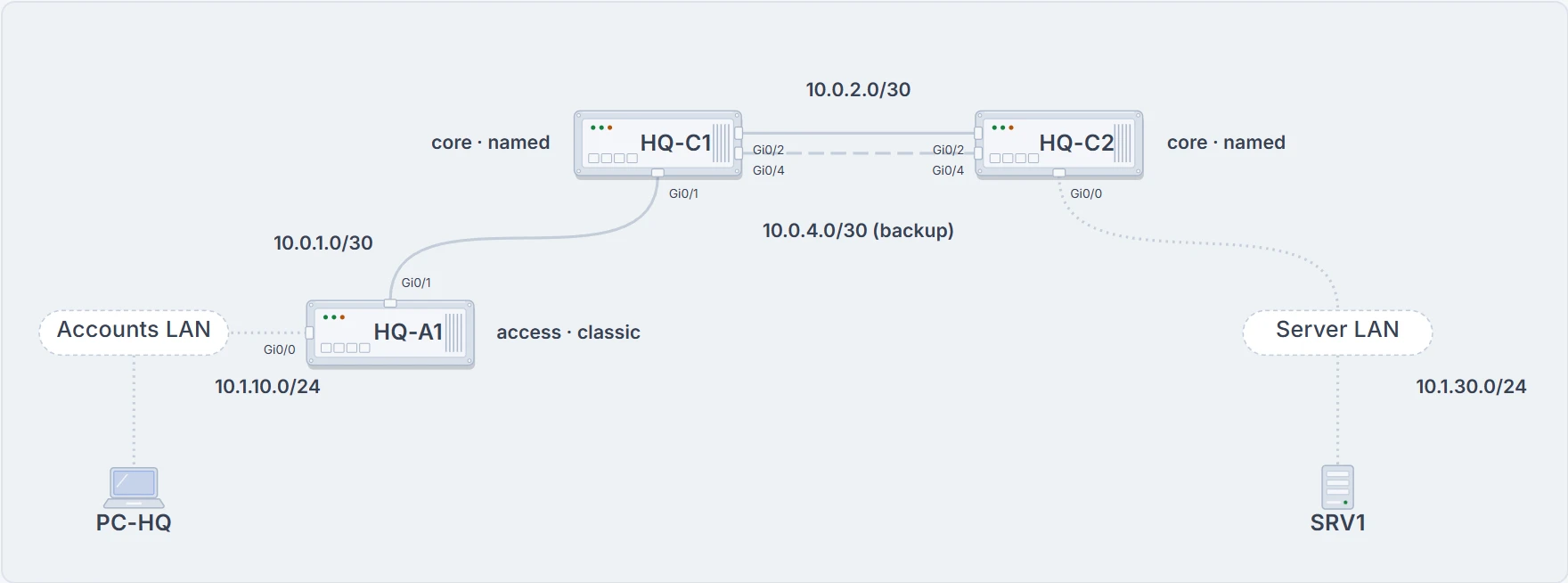
HQ on Monday morning: the part of the network the ticket is about.
Start at an accounts desk and ping SRV1:
C:\> ping 10.1.30.10

Pinging 10.1.30.10 with 32 bytes of data:
Reply from 10.1.10.1: Destination host unreachable.
Reply from 10.1.10.1: Destination host unreachable.
Reply from 10.1.10.1: Destination host unreachable.
Reply from 10.1.10.1: Destination host unreachable.

Ping statistics for 10.1.30.10:
    Packets: Sent = 4, Received = 4, Lost = 0 (0% loss),
C:\>
It says 0% loss, and it failed. Every reply comes from 10.1.10.1, the PC's own gateway, and says Destination host unreachable. That tells you two things: the PC reaches its gateway, and the gateway, HQ-A1, has no route to SRV1's network. So start on HQ-A1:
HQ-A1# show ip route 10.1.30.0 255.255.255.0
% Subnet not in table
HQ-A1#
EIGRP learns only from directly connected neighbors, so a missing route can be followed hop by hop: if HQ-A1 lacks it, ask HQ-C1; if HQ-C1 lacks it too, ask HQ-C2. What you're after is the last router that has the route. The fault sits between that router and the first one that doesn't.
Three places a route can stop
After two routers become neighbors, they do one full exchange of routes and then send only updates. Everything a router learns goes into its topology table. The best source for each prefix goes into its routing table, and only that table moves traffic.
So a route travels as a relay. The router that owns the LAN takes it into EIGRP, and each router along the way learns it, installs it and passes it on. Here it is, step by step. The lesson adds what-ifs, and each one breaks a different leg.
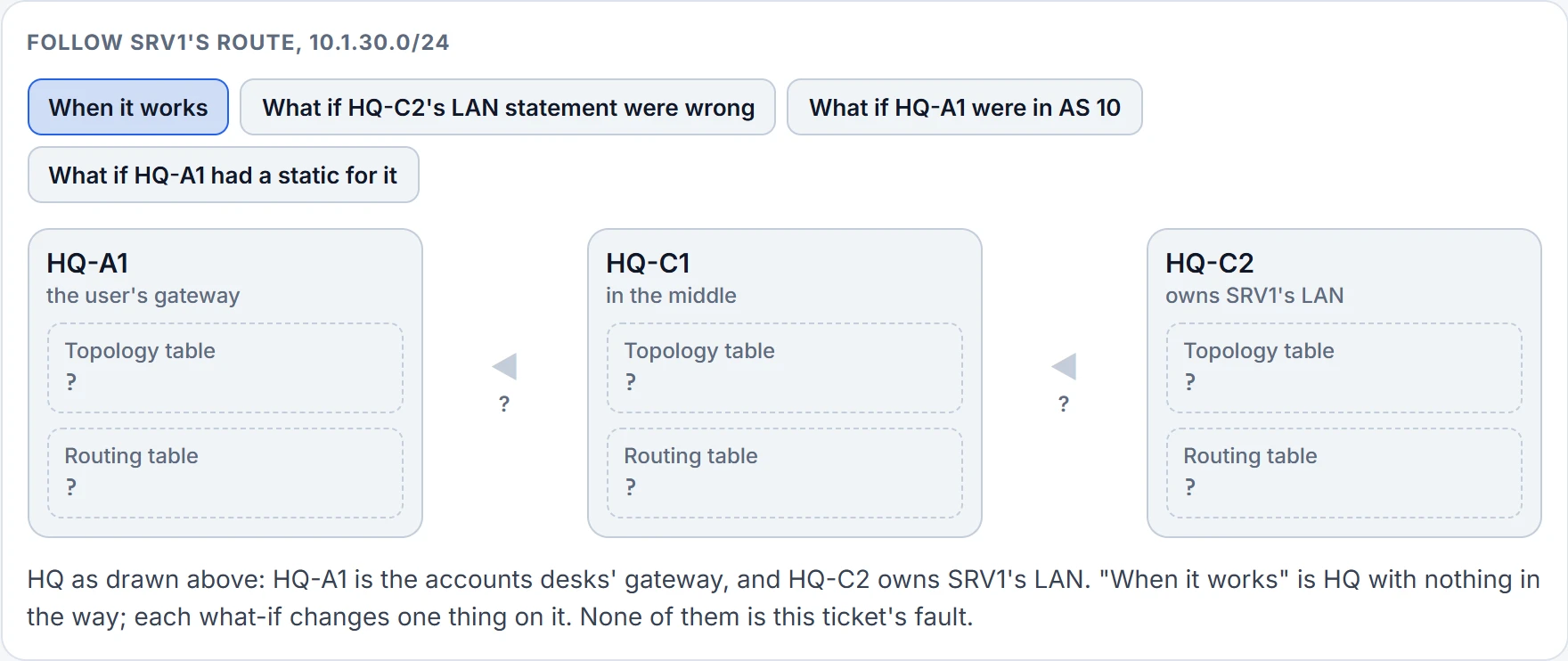
Step 1 of 9 SRV1's LAN starts at HQ-C2.
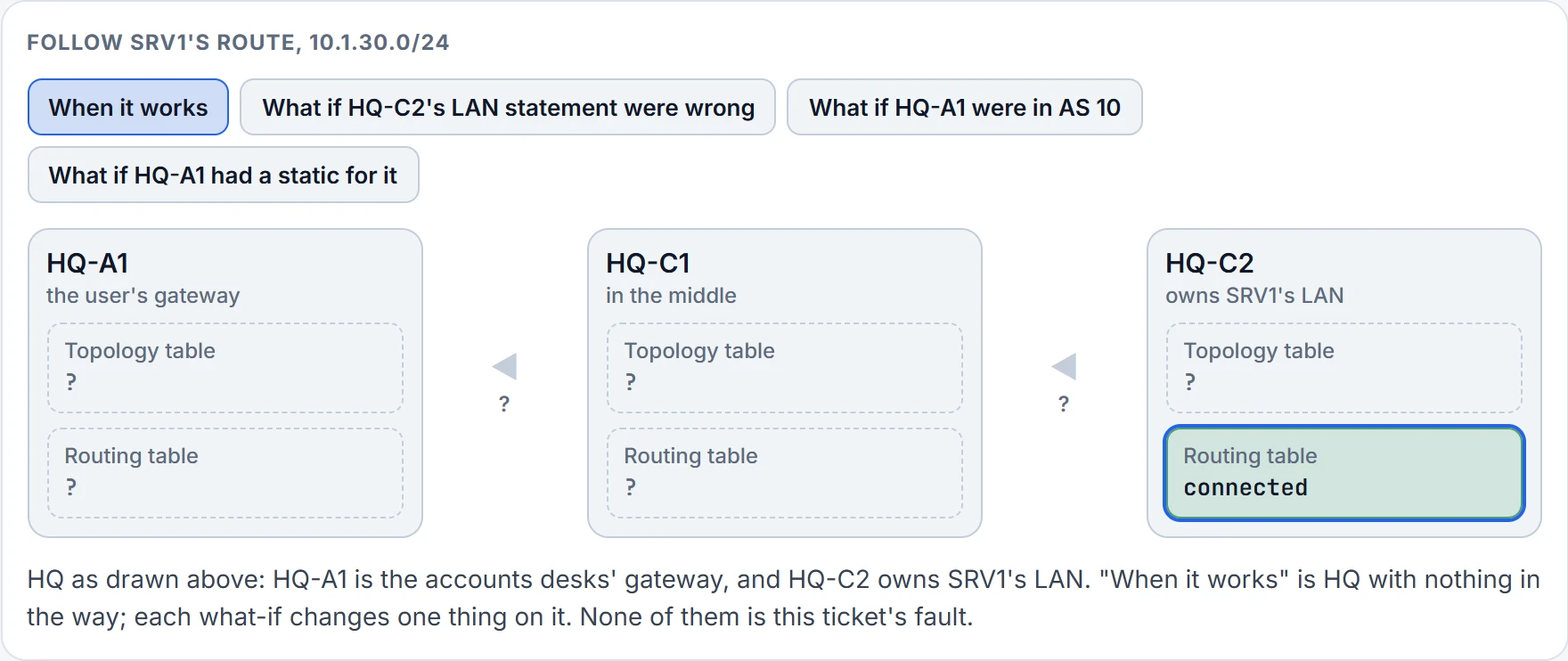
Step 2 of 9 HQ-C2's routing table has 10.1.30.0/24 as a connected network: it's HQ-C2's own LAN, on Gi0/0. That's true whatever EIGRP is doing.
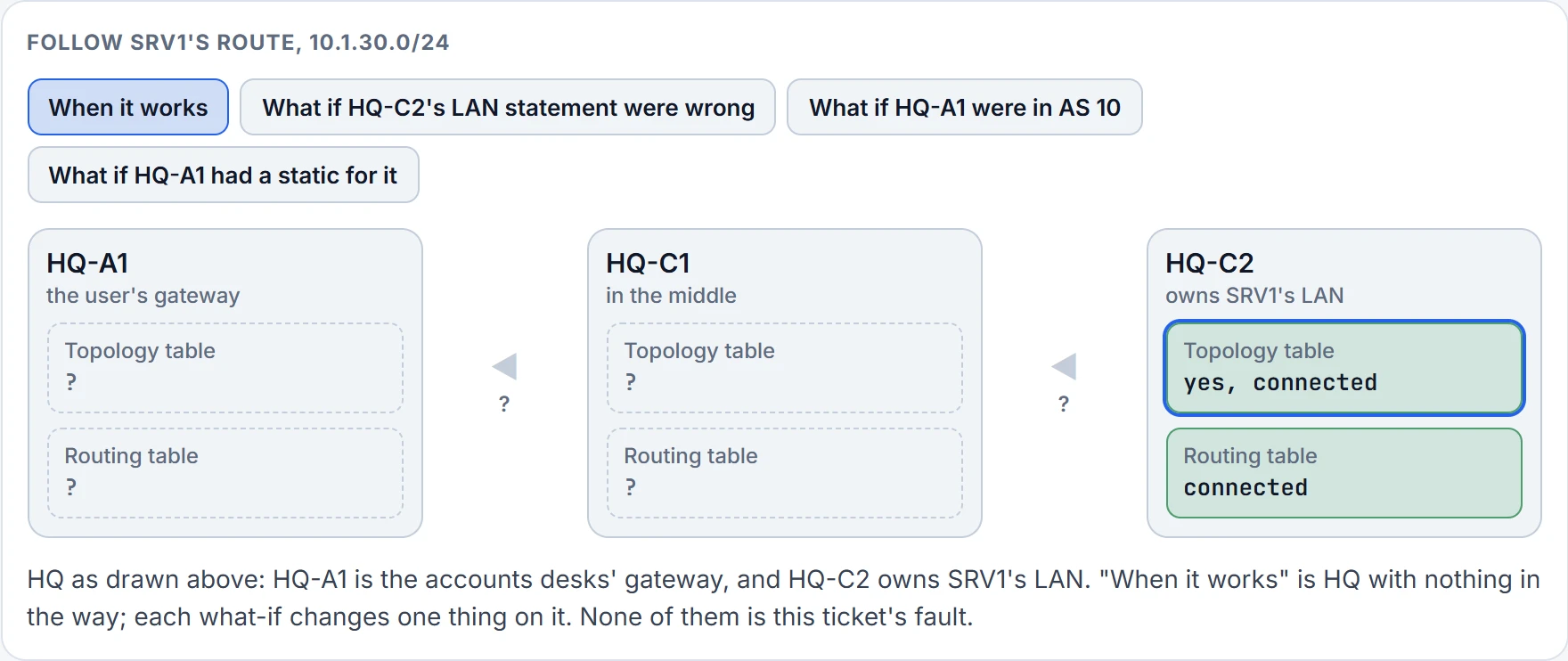
Step 3 of 9 HQ-C2's topology table has it too: a network statement matches Gi0/0's address, so EIGRP takes the LAN in and can announce it.
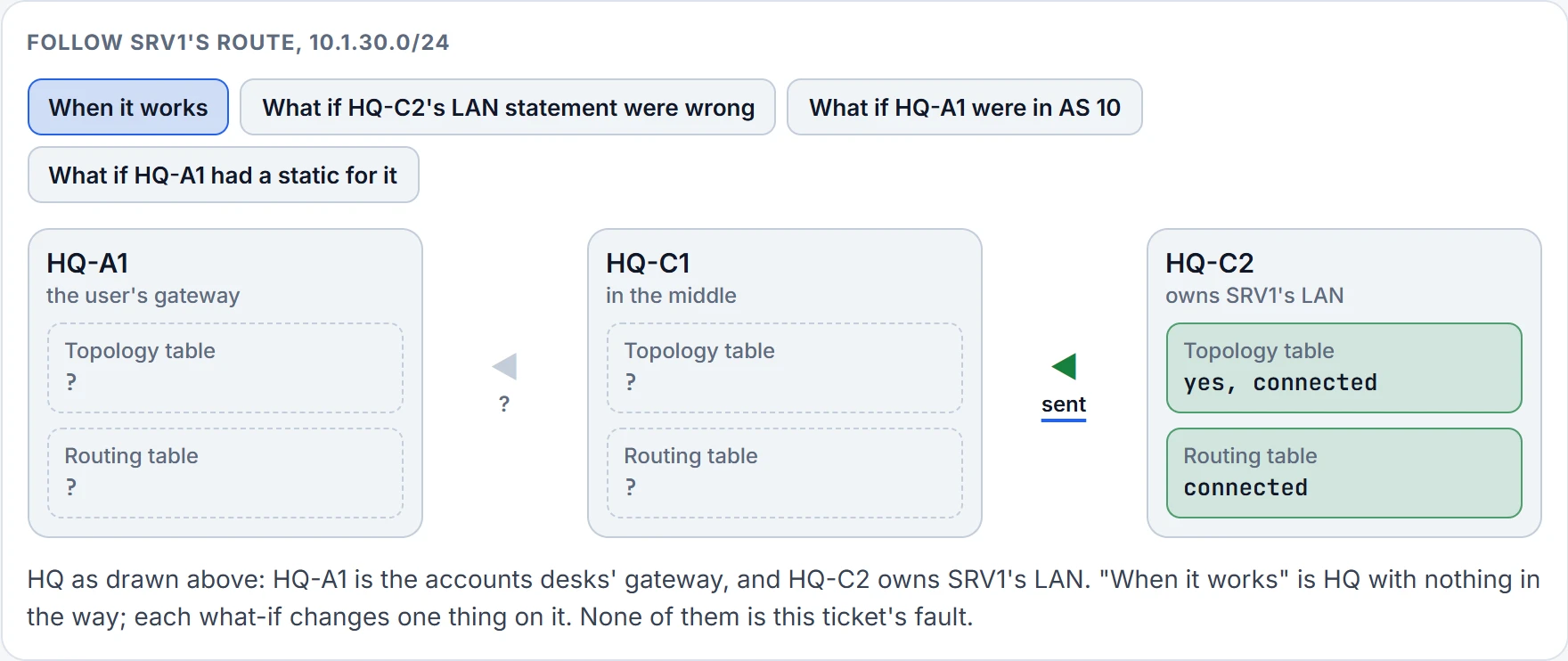
Step 4 of 9 HQ-C2 and HQ-C1 are neighbors, and HQ-C2 sends the route on.
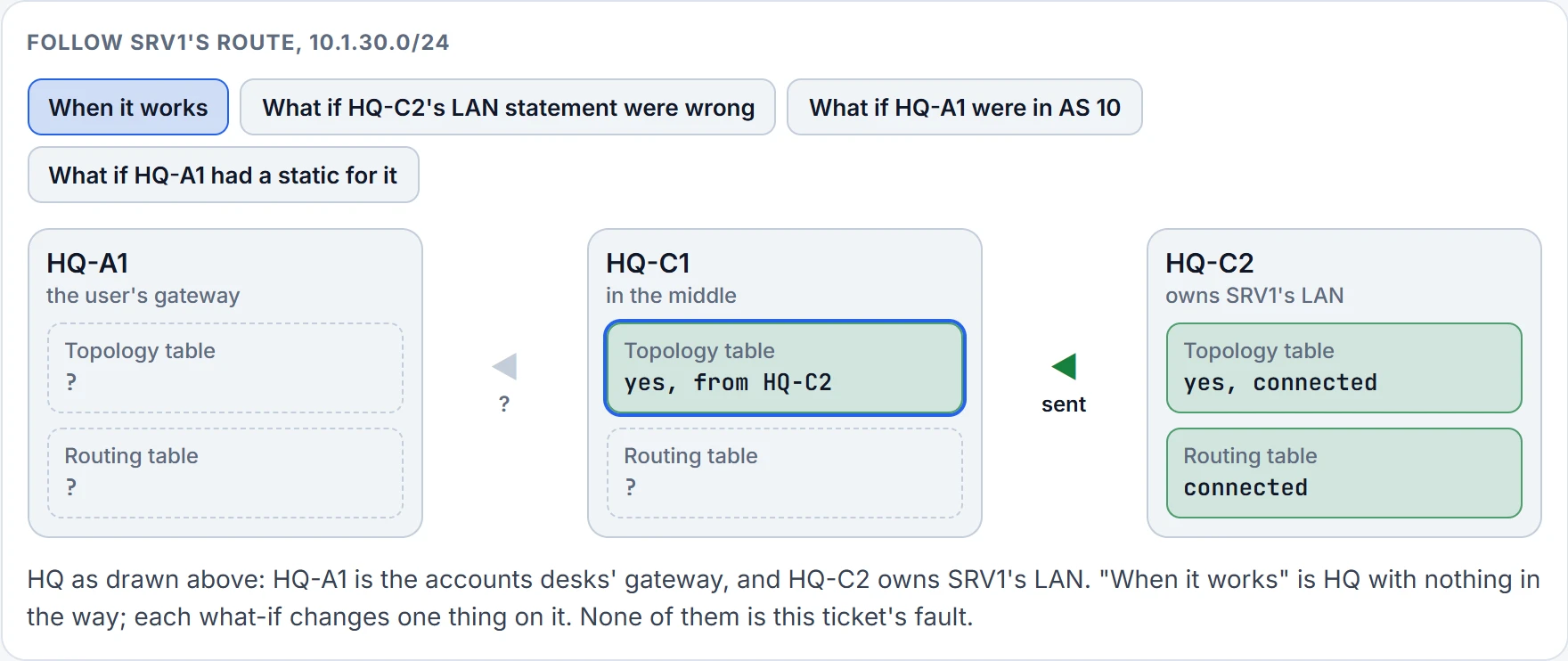
Step 5 of 9 HQ-C1's topology table takes it in, learned from HQ-C2.
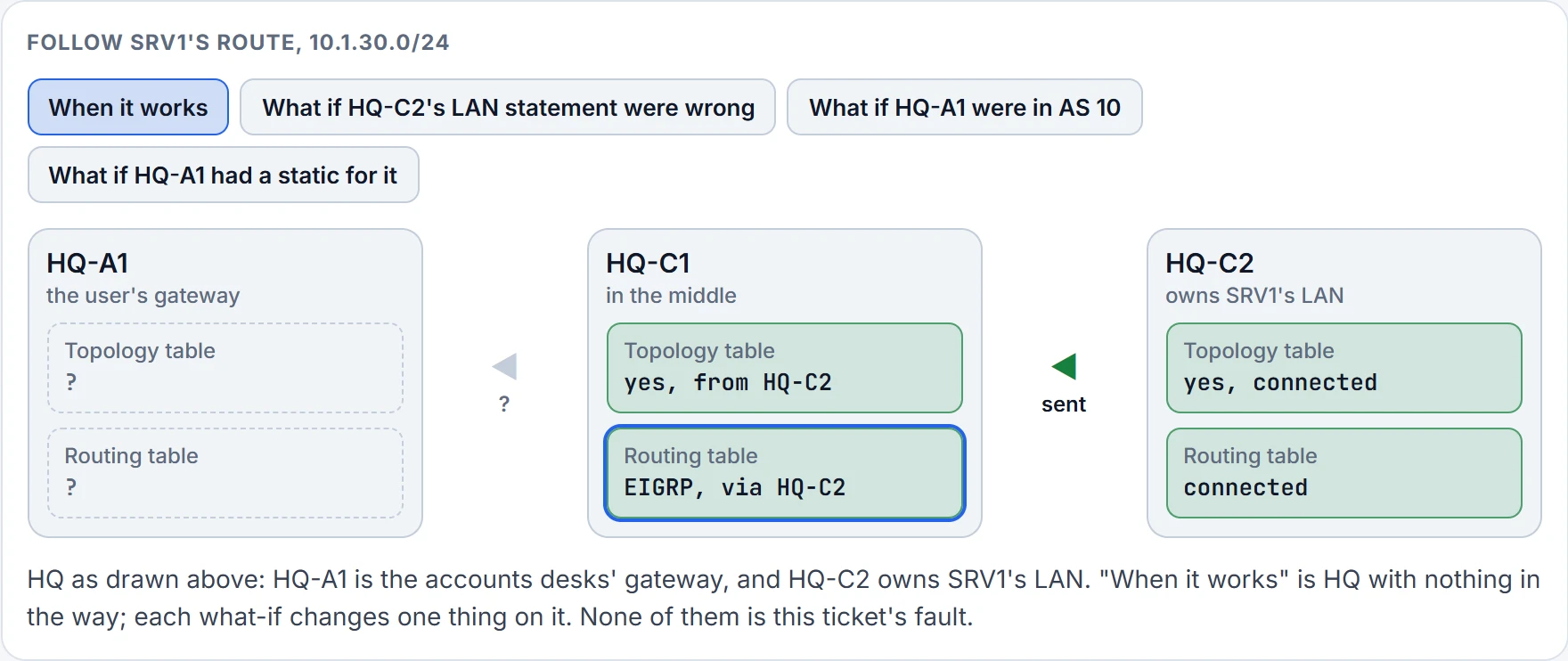
Step 6 of 9 HQ-C1's routing table installs it: nothing more trusted has the same prefix.
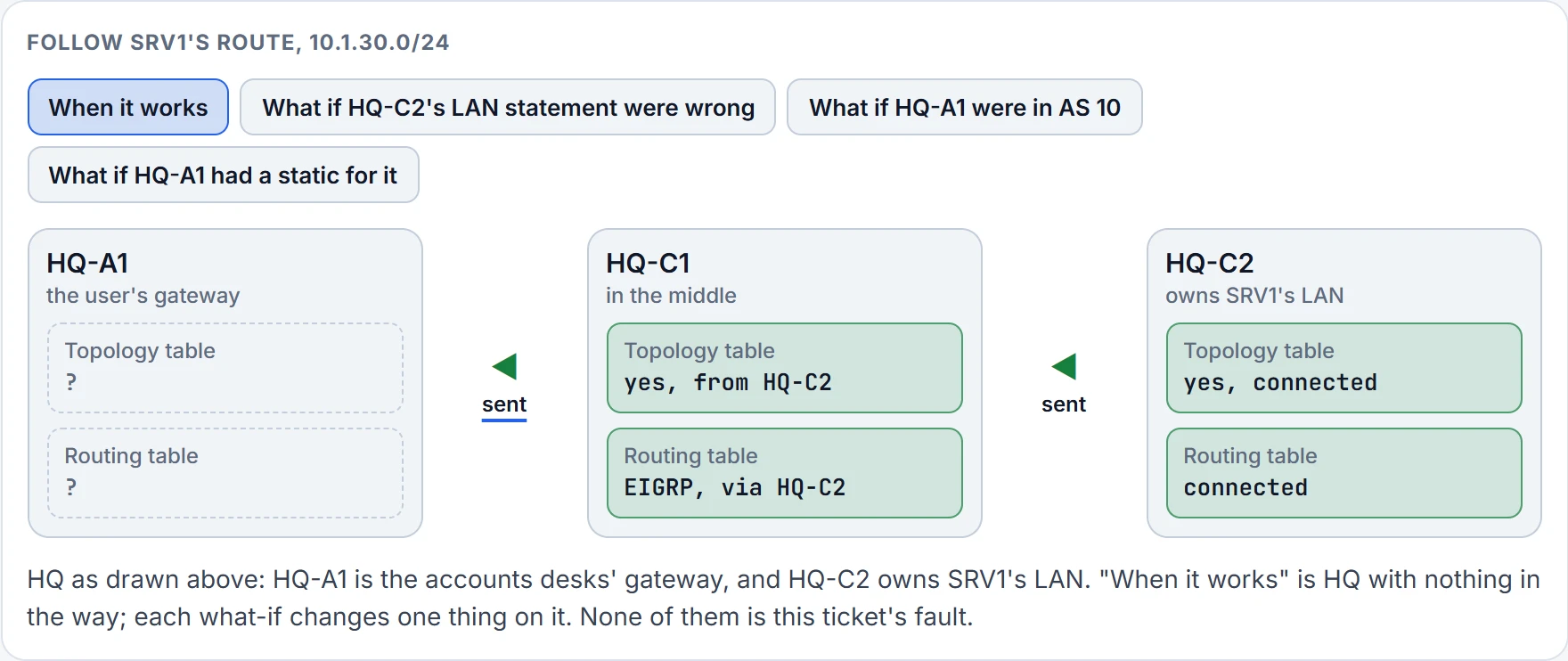
Step 7 of 9 HQ-C1 and HQ-A1 are neighbors, and HQ-C1 sends the route on.
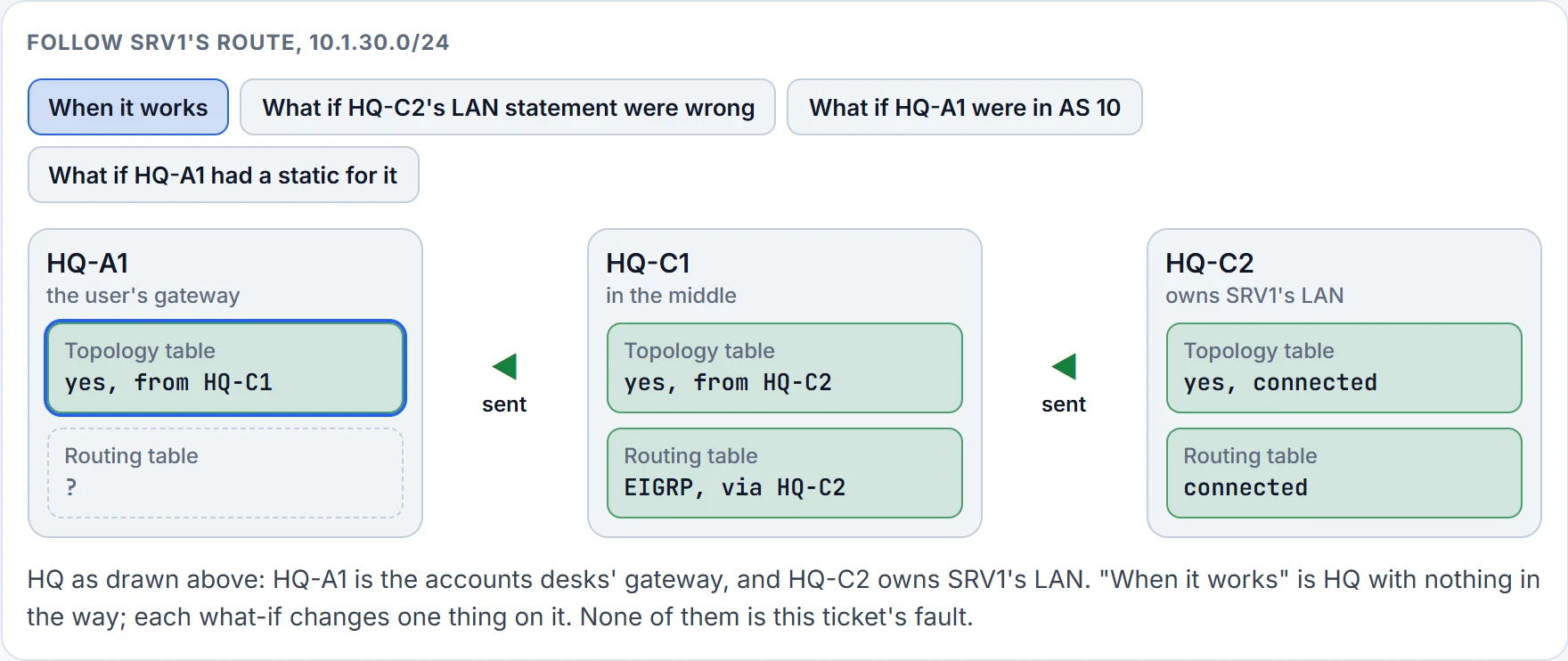
Step 8 of 9 HQ-A1's topology table takes it in, learned from HQ-C1.
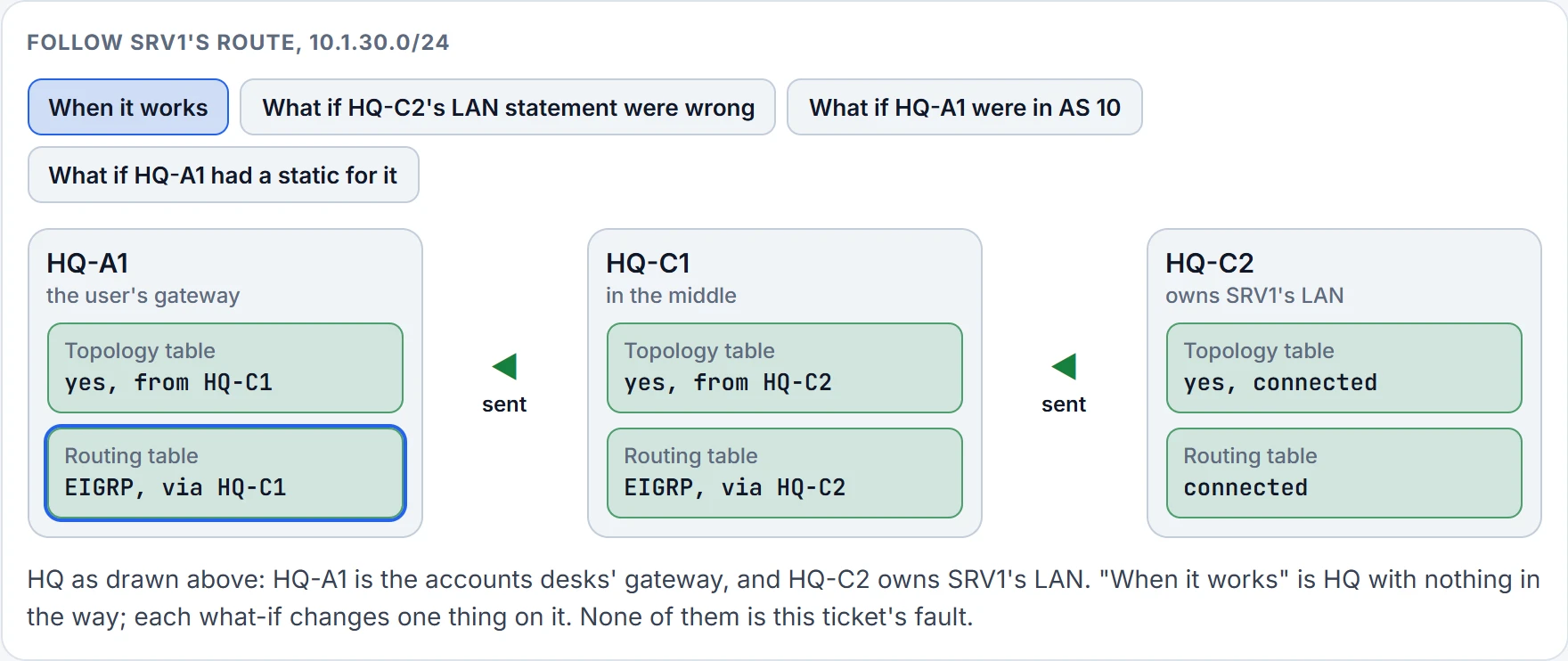
Step 9 of 9 HQ-A1's routing table installs it: nothing more trusted has the same prefix. The route has reached HQ-A1, the gateway on the user's side. Every router along the way has it in both tables.
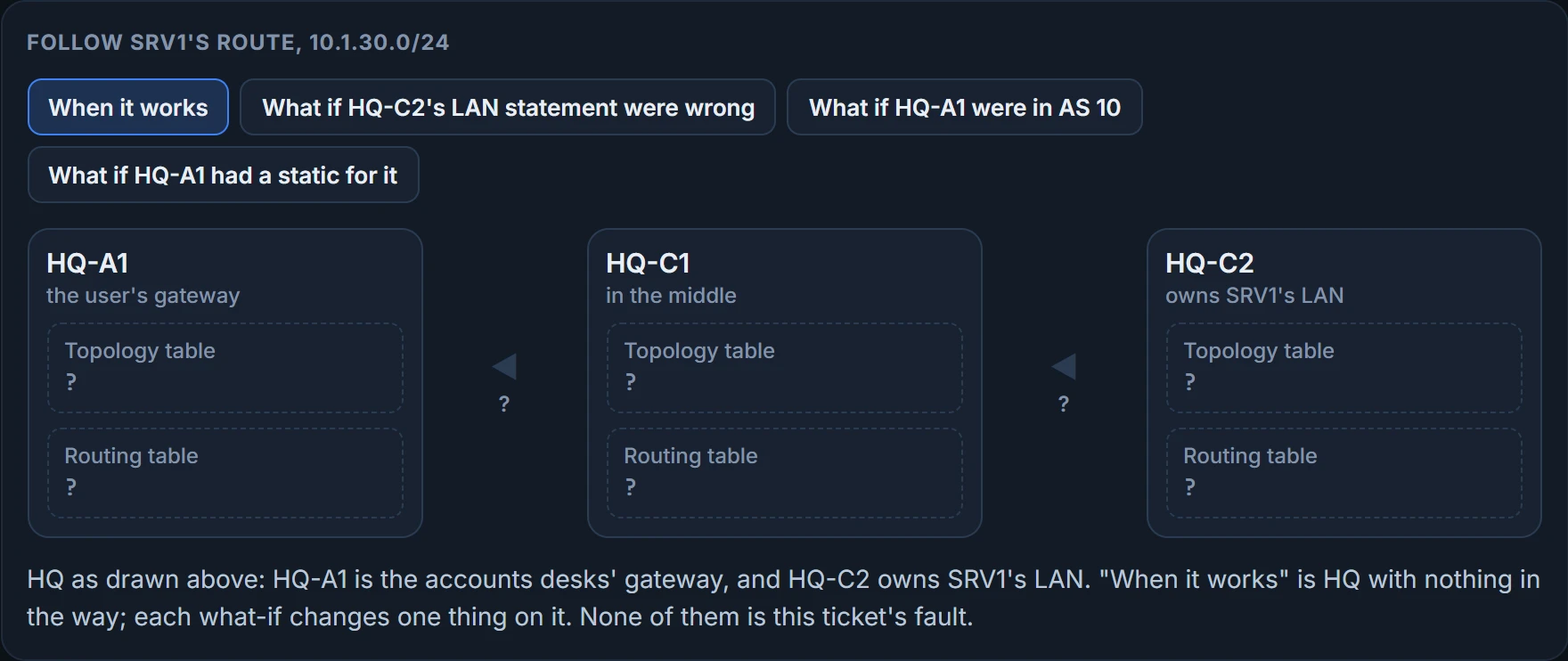
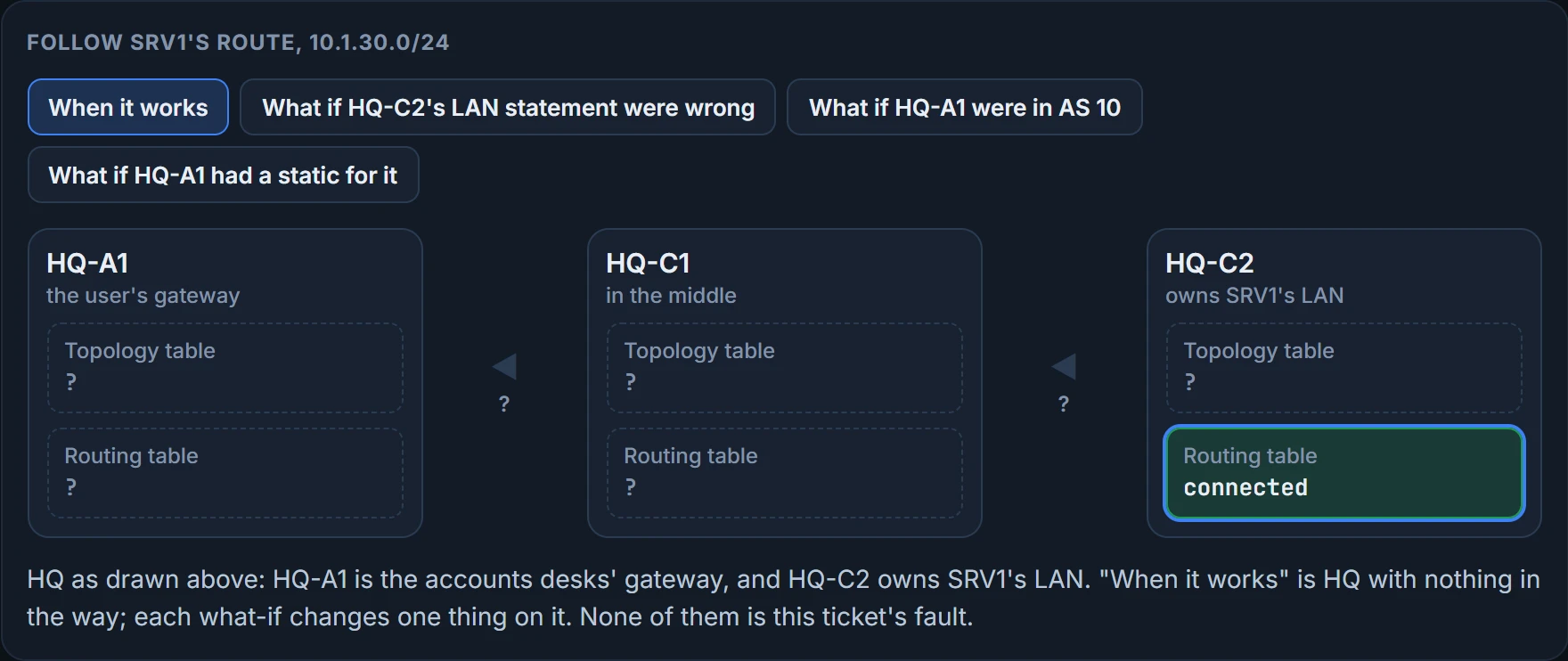
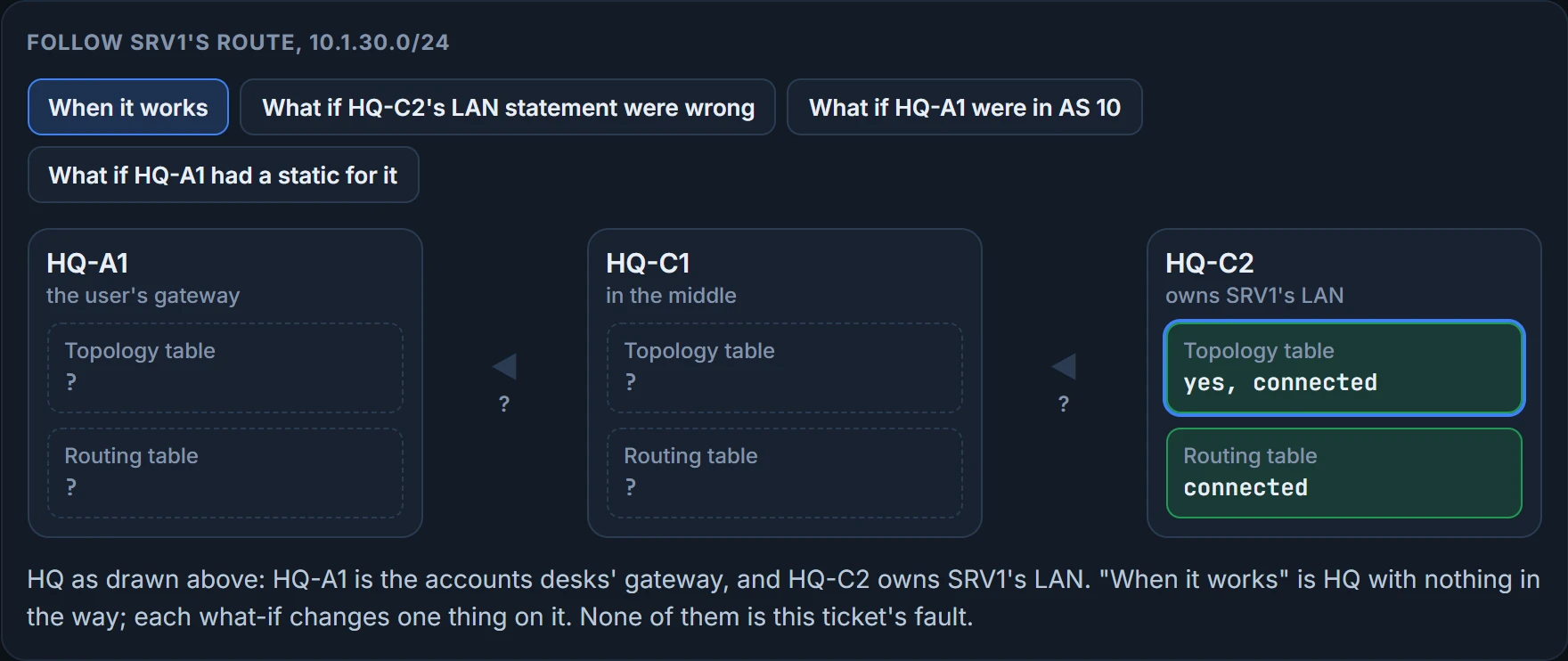
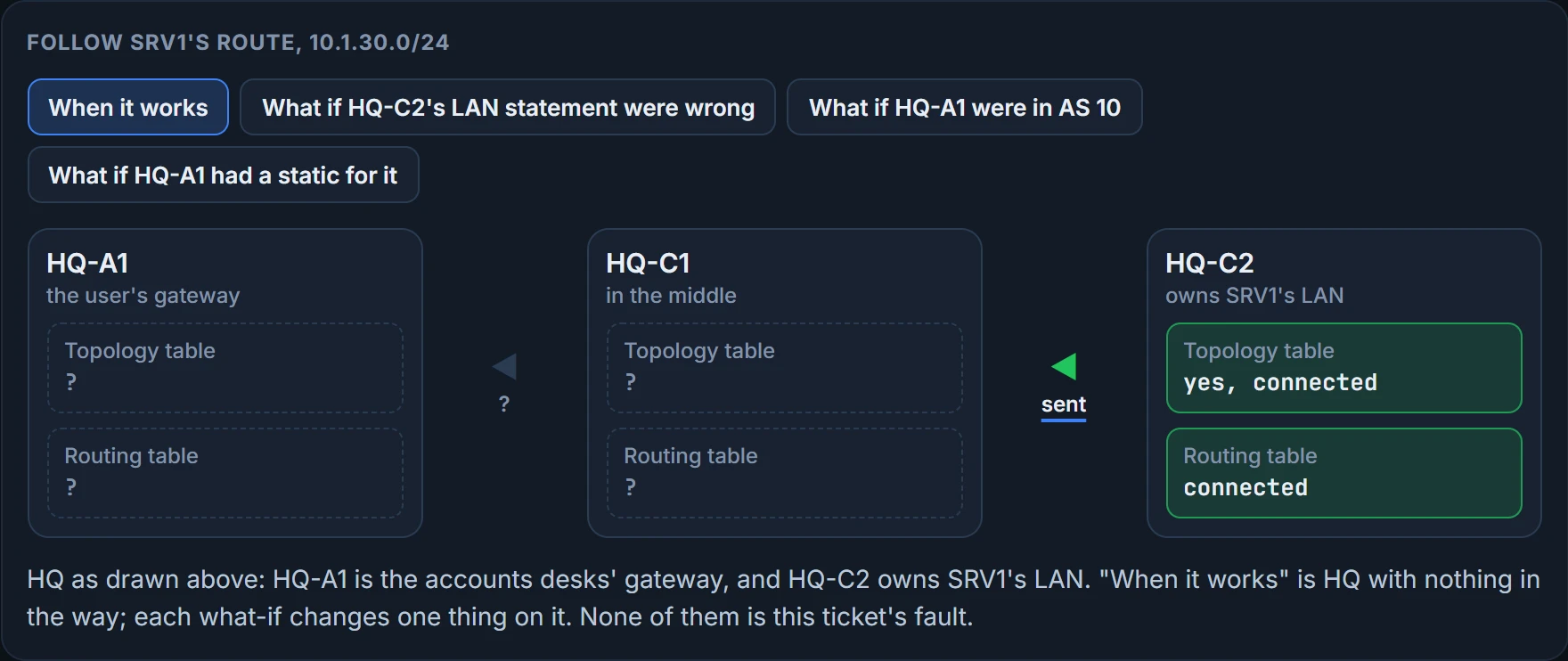
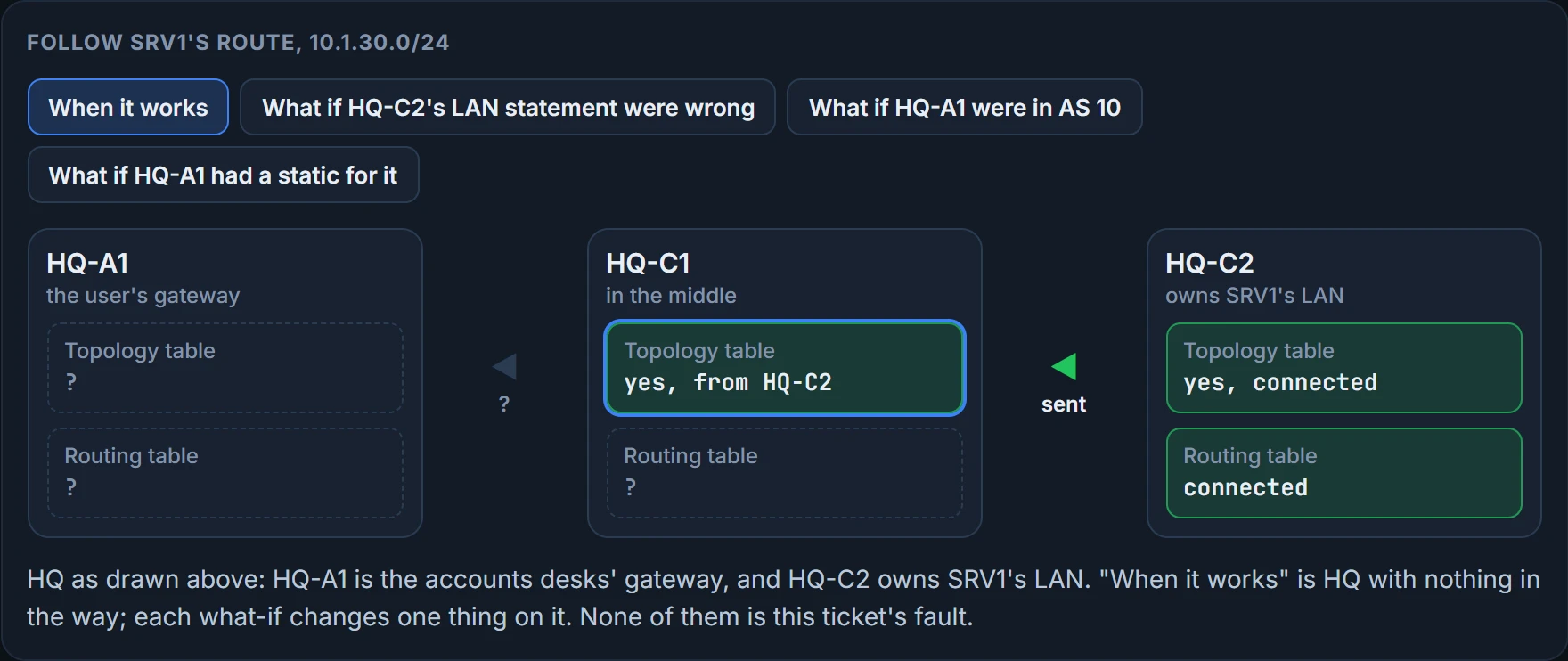
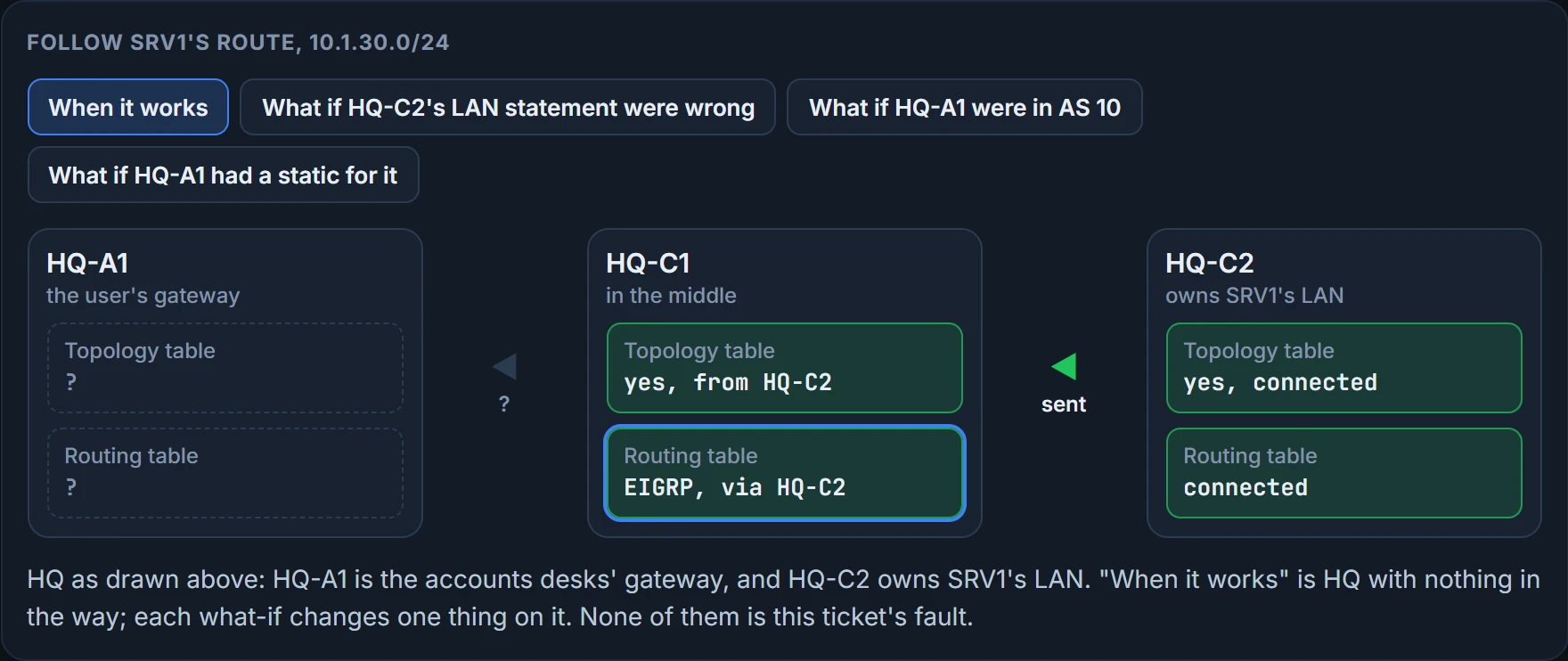
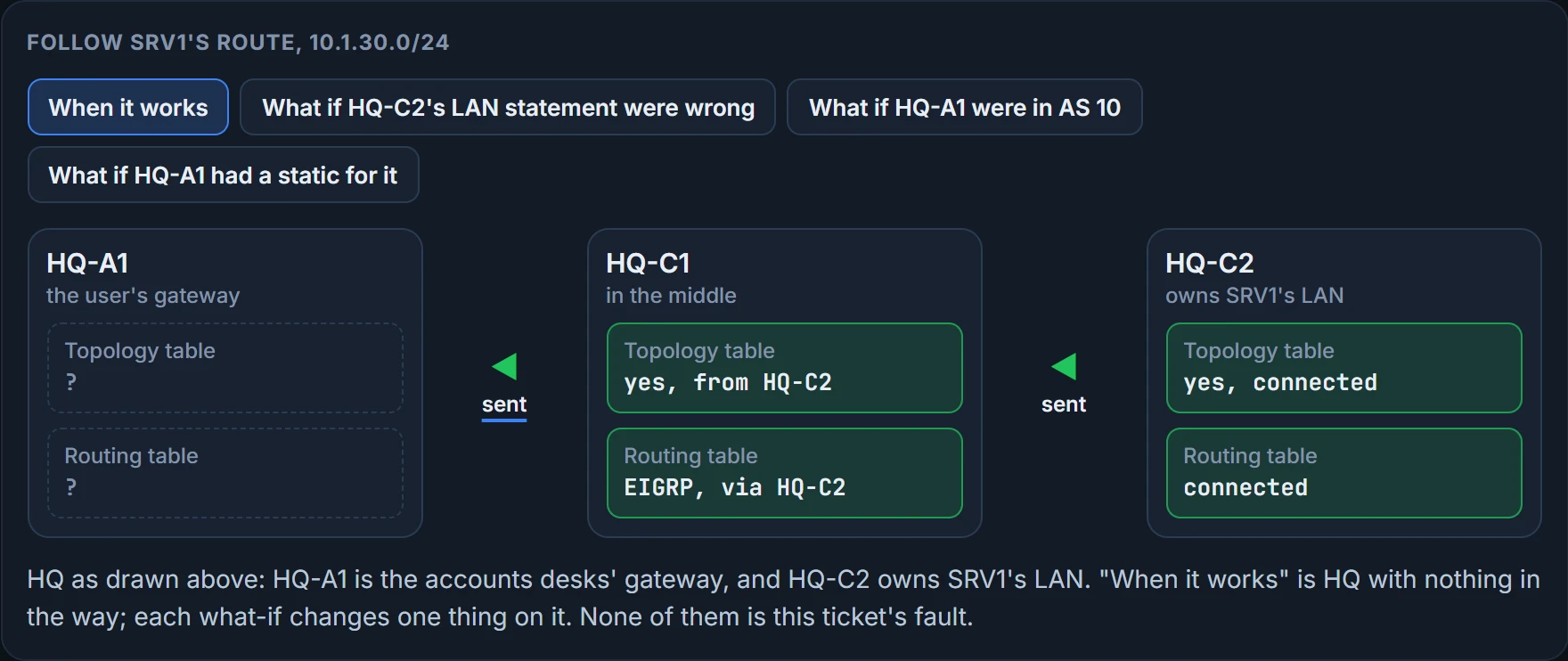
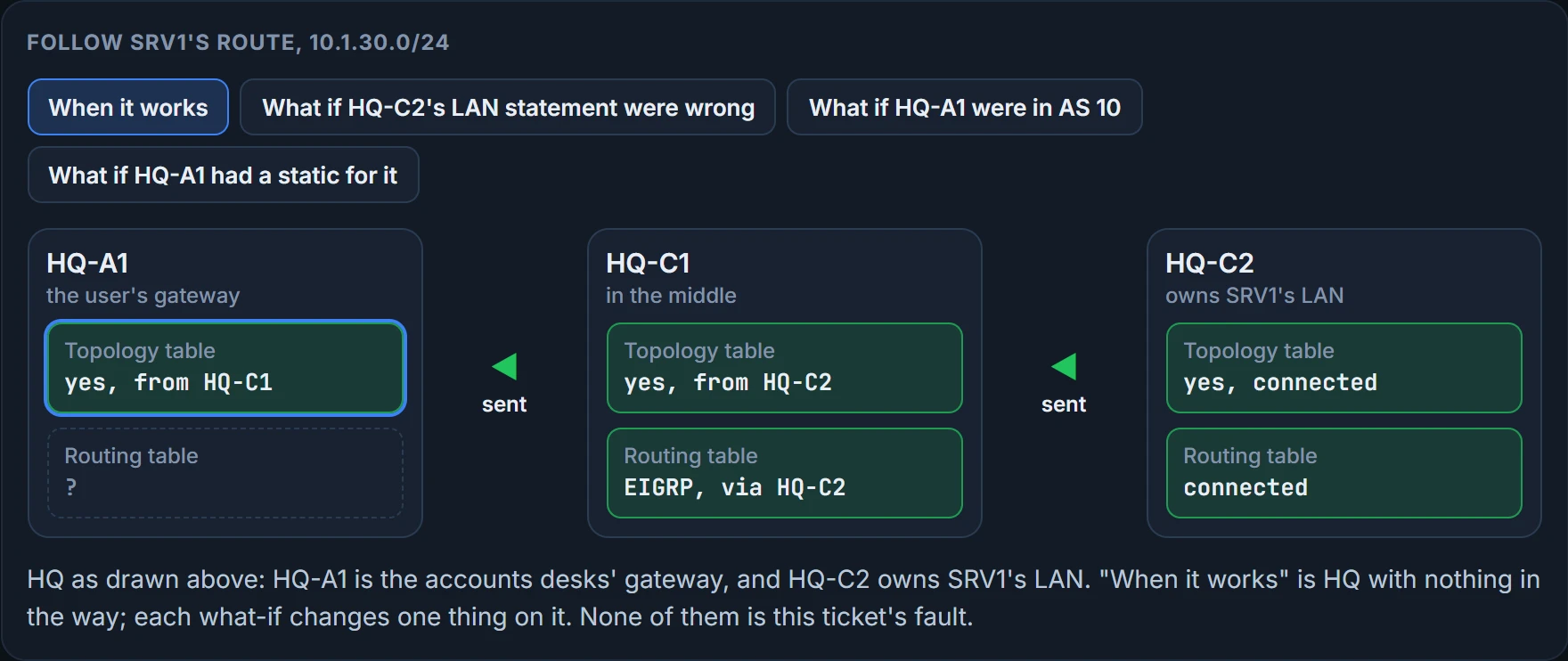
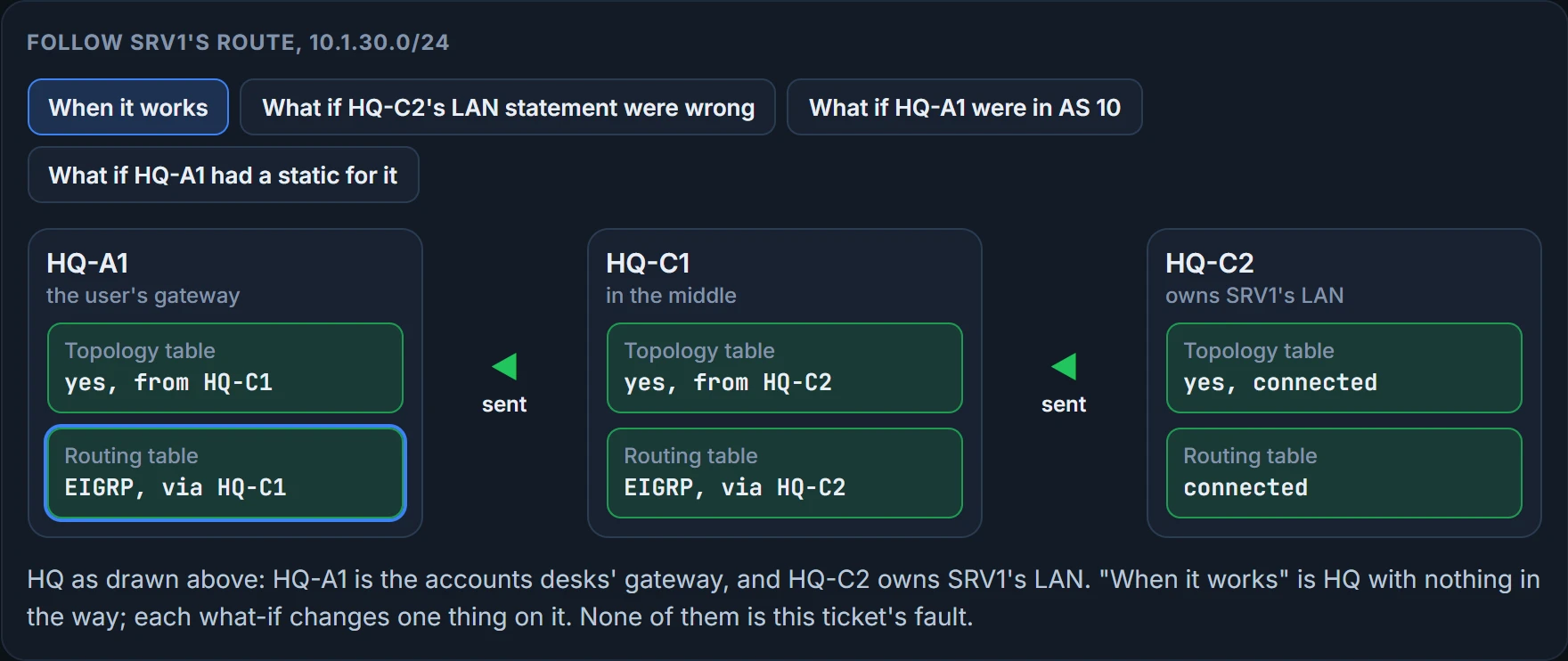
When it works
HQ-C2's routing table has 10.1.30.0/24 as a connected network: it's HQ-C2's own LAN, on Gi0/0. That's true whatever EIGRP is doing. HQ-C2's topology table has it too: a network statement matches Gi0/0's address, so EIGRP takes the LAN in and can announce it. HQ-C2 and HQ-C1 are neighbors, and HQ-C2 sends the route on. HQ-C1's topology table takes it in, learned from HQ-C2. HQ-C1's routing table installs it: nothing more trusted has the same prefix. HQ-C1 and HQ-A1 are neighbors, and HQ-C1 sends the route on. HQ-A1's topology table takes it in, learned from HQ-C1. HQ-A1's routing table installs it: nothing more trusted has the same prefix. The route has reached HQ-A1, the gateway on the user's side.
What if HQ-C2's LAN statement were wrong
HQ-C2's routing table has 10.1.30.0/24 as a connected network: it's HQ-C2's own LAN, on Gi0/0. That's true whatever EIGRP is doing. Never injected. No network statement on HQ-C2 matches Gi0/0's address, 10.1.30.1, so EIGRP never takes the LAN in. There's nothing to announce, so every router past HQ-C2 goes without.
What if HQ-A1 were in AS 10
HQ-C2's routing table has 10.1.30.0/24 as a connected network: it's HQ-C2's own LAN, on Gi0/0. That's true whatever EIGRP is doing. HQ-C2's topology table has it too: a network statement matches Gi0/0's address, so EIGRP takes the LAN in and can announce it. HQ-C2 and HQ-C1 are neighbors, and HQ-C2 sends the route on. HQ-C1's topology table takes it in, learned from HQ-C2. HQ-C1's routing table installs it: nothing more trusted has the same prefix. Not passed on. HQ-C1 and HQ-A1 aren't neighbors: HQ-A1 runs AS 10 and HQ-C1 runs AS 100, and neighbors need the same AS number.
What if HQ-A1 had a static for it
HQ-C2's routing table has 10.1.30.0/24 as a connected network: it's HQ-C2's own LAN, on Gi0/0. That's true whatever EIGRP is doing. HQ-C2's topology table has it too: a network statement matches Gi0/0's address, so EIGRP takes the LAN in and can announce it. HQ-C2 and HQ-C1 are neighbors, and HQ-C2 sends the route on. HQ-C1's topology table takes it in, learned from HQ-C2. HQ-C1's routing table installs it: nothing more trusted has the same prefix. HQ-C1 and HQ-A1 are neighbors, and HQ-C1 sends the route on. HQ-A1's topology table takes it in, learned from HQ-C1. Learned, but not installed. HQ-A1 has the EIGRP route, but a static route for exactly the same prefix, distance 1, beats EIGRP's 90. Traffic follows the static, to 10.1.10.254.
Three different stops, and each one has its own short list of suspects:
| Where it's missing | The place | Suspects |
|---|---|---|
| In no router's topology table, not even the one that should announce it | never injected | a network statement that matches nothing; an interface that isn't up/up |
| In your topology table, not your routing table | learned, but not installed | a more trusted source for the same prefix |
| In your neighbor's table, not yours | not passed on | no adjacency; a filter; a stub; split horizon at a hub |
That's the point of naming the place first: once you know which one it is, you only suspect what can cause it.
One more kind of "not passed on" lives at a hub. At a DMVPN hub, split horizon stops a route learned from one spoke from going back out the same tunnel interface to the others. show ip eigrp interfaces detail says whether split horizon is on for EIGRP, and no ip split-horizon eigrp 100 on the hub's tunnel turns it off. For IPv6 the check is show ipv6 eigrp interfaces detail, and the hub's tunnel needs the same change, so routes learned from the spokes go back out to the other spokes. (An earlier lesson in this module has the details.)
Back to the ticket. Collect two more facts before touching anything: is HQ-A1 talking to HQ-C1, and is HQ-C1 using an EIGRP route to SRV1's LAN?
HQ-A1# show ip eigrp neighbors
EIGRP-IPv4 Neighbors for AS(100)
H   Address                 Interface              Hold Uptime   SRTT   RTO  Q  Seq
                                                   (sec)         (ms)       Cnt Num
0   10.0.1.2                Gi0/1
! hold, uptime, SRTT, RTO, Q and Seq left out: they change from moment to moment
HQ-A1# ping 10.0.2.2
Type escape sequence to abort.
Sending 5, 100-byte ICMP Echos to 10.0.2.2, timeout is 2 seconds:
!!!!!
Success rate is 100 percent (5/5)
! round-trip times left out: they change from moment to moment
HQ-A1# show running-config | include ip route
ip route 203.0.113.0 255.255.255.0 10.0.1.2
HQ-A1#
HQ-C1# show ip cef 10.1.30.10 10.1.30.0/24, cached adjacency 10.0.2.2 ! version, epoch, packet counters and dependencies omitted via 10.0.2.2, GigabitEthernet0/2 next hop 10.0.2.2, GigabitEthernet0/2 valid cached adjacency HQ-C1#
HQ-C1 is HQ-A1's neighbor, and HQ-A1 reaches 10.0.2.2, HQ-C2's end of the core link, a network HQ-A1 isn't connected to. HQ-A1's only IPv4 static route is the one fixed in the first routing lesson, for ISP-A's test servers (the last command on HQ-A1), so its path to 10.0.2.2 was learned from EIGRP: routes are arriving. HQ-C1 forwards SRV1's traffic to 10.0.2.2, HQ-C2, over the core link. That's EIGRP's route. A ping from HQ-C1 wouldn't have told you so: since that lesson, HQ-C1 also has a floating static for this LAN at 95, over the old link, so a ping succeeds whether EIGRP has the route or not. CEF shows which one is in use.
Your neighbor has it, and you don't
With the adjacency up and routes arriving, three suspects are left: an inbound filter on HQ-A1, an outbound filter on HQ-C1, or HQ-C1 holding the route back as a stub. You're already on HQ-A1, so its inbound filters come first. HQ-C1 is next if they're clean.
A filter like this acts on the prefixes its list names and lets the rest through, so everything else about the neighbor looks normal. And a route dropped by an inbound filter never reaches the topology table, so on the receiving side there's nothing to find except the filter itself.
For a filter, work through the checklist: is it applied in the right direction, on the right interface, and is the ACL, prefix list or route map it uses correct? Which way, where, and what does the list really match? show ip protocols shows whether a filter applies to all interfaces or to one:
HQ-A1# show ip protocols
*** IP Routing is NSF aware ***
Routing Protocol is "eigrp 100"
  Outgoing update filter list for all interfaces is not set
  Incoming update filter list for all interfaces is not set
    GigabitEthernet0/1 filtered by (prefix-list) DENY_SRV1
    ! inbound, on the link to HQ-C1
    default is not set
  EIGRP-IPv4 Protocol for AS(100)
    Metric weight K1=1, K2=0, K3=1, K4=0, K5=0
    Router-ID: 10.1.10.1
    ! lines omitted
  Routing for Networks:
    10.1.10.1/32
    10.0.1.1/32
  Passive Interface(s):
    GigabitEthernet0/0
  ! routing information sources and distances omitted
HQ-A1# show ip prefix-list
ip prefix-list DENY_SRV1: 2 entries
   seq 5 deny 10.1.30.0/24   ! SRV1's LAN, exactly
   seq 10 permit 0.0.0.0/0 le 32
HQ-A1#
show ip eigrp neighbors: the adjacency is upshow ip protocols: which filters apply, inbound and outbound, and on which interfaces
- that any particular route crosses the adjacency
- what the filter matches: read the list itself with
show ip prefix-list,show access-listsorshow route-map
An inbound filter on Gi0/1 uses a prefix list whose first line denies exactly 10.1.30.0/24. Its name is DENY_SRV1. In the notes left by Frank, who ran HQ's network before, it has a comment: ! temp - during the SRV1 move. The move finished in the spring. Read a filter's name and its comments before its lines: here they tell the whole story.
Some faults hide. This one wears a name badge.
There are two ways to fix it: change the prefix list, or remove the distribute list. Which is right depends on what the business needs, so ask before you change anything. Priya, the operations manager, says nobody needs SRV1 hidden, so the distribute list goes: that's the line distribute-list prefix DENY_SRV1 in GigabitEthernet0/1 under router eigrp 100, which show ip protocols reports as "filtered by (prefix-list)". Removing it makes HQ-A1 resync with HQ-C1: the two exchange their routes again, so SRV1's LAN arrives straight away.
HQ-A1# configure terminal
Enter configuration commands, one per line.  End with CNTL/Z.
HQ-A1(config)# router eigrp 100
HQ-A1(config-router)# no distribute-list prefix DENY_SRV1 in GigabitEthernet0/1
HQ-A1(config-router)# end
HQ-A1#
Then re-test from the same accounts desk:
C:\> ping 10.1.30.10

Pinging 10.1.30.10 with 32 bytes of data:
! time= and TTL= left out: they change every run
Reply from 10.1.30.10: bytes=32
Reply from 10.1.30.10: bytes=32
Reply from 10.1.30.10: bytes=32
Reply from 10.1.30.10: bytes=32

Ping statistics for 10.1.30.10:
    Packets: Sent = 4, Received = 4, Lost = 0 (0% loss),
C:\>
This time the replies come from SRV1 itself.
Priya's follow-up is the harder question: "Is it fixed, and will it stay fixed?" The second half is about Frank's folder, changes_final_v2. There are six more changes in it, written for HQ and never applied, each one "for when things calm down". None of them goes near production untested: you rewrite each one for the staging rack and load it there. The rack is three spare routers in the comms room, chained like HQ-A1, HQ-C1 and HQ-C2 (the port numbers differ; the drawing has them), with their own link addresses and classic EIGRP for IPv4 and IPv6 (ipv6 eigrp 100 on every interface). Each change starts from a clean copy.


The staging rack: three spare routers chained like HQ-A1, HQ-C1 and HQ-C2, with their own ports and addresses. It never connects to production.
No neighbor, no route
The network command switches EIGRP on for the interfaces its address and wildcard match, and puts their networks into EIGRP. An interface with no neighbor, like a LAN, still needs it: without it, that LAN is never advertised. An interface that isn't up/up has no connected network to put in, and it can't form neighbors either. A passive interface is different: it forms no neighbors, and its network is still advertised.
Frank's first two changes came as a pair. The first tidies HQ-C1's statements; the second moves HQ-C2 into "its own AS for testing". Here they are, adapted for the rack:
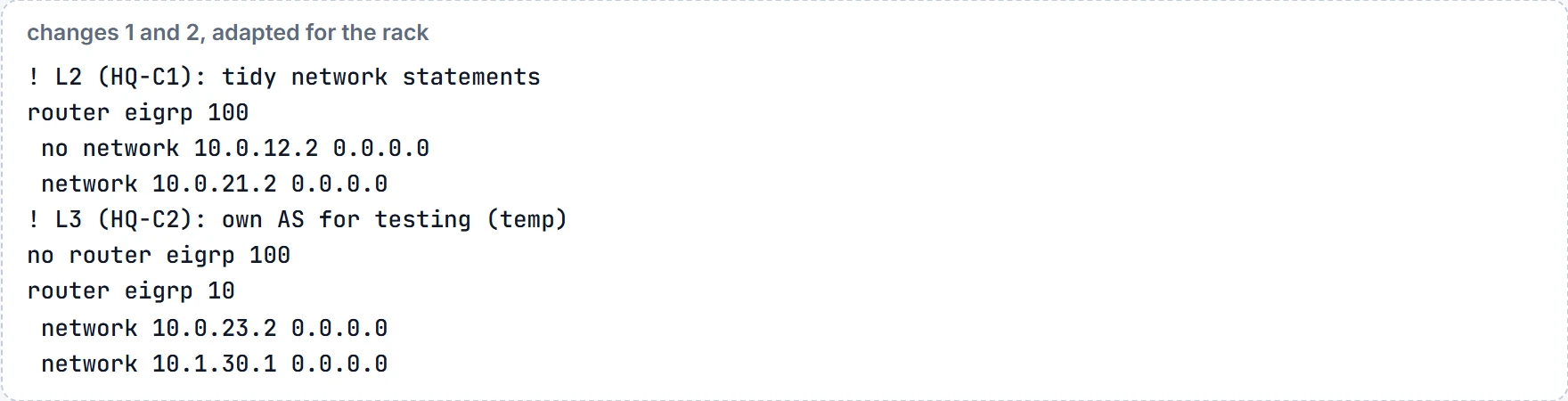
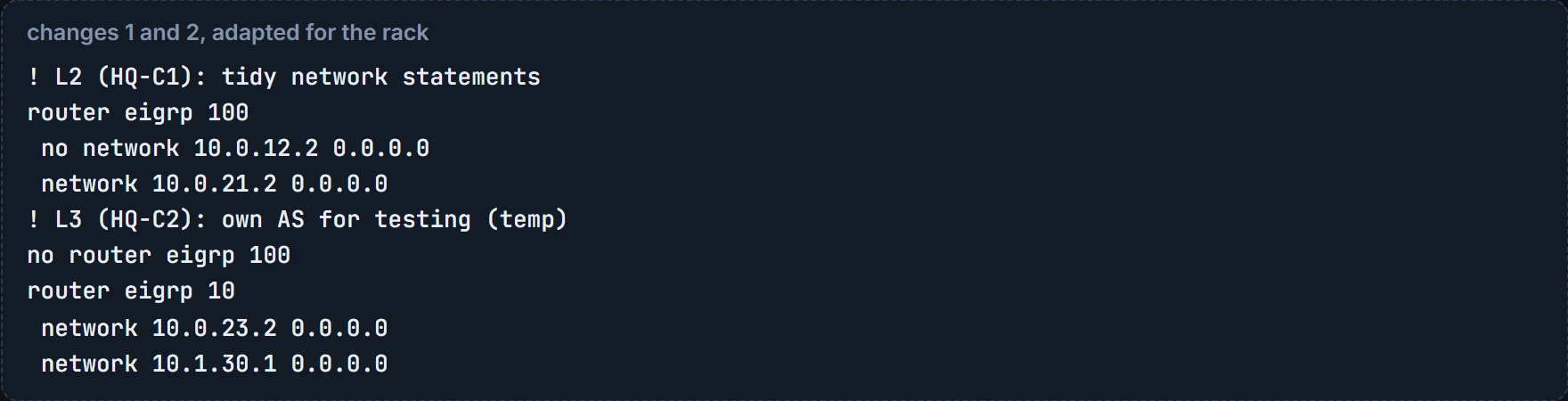
Load both, then go to L1, where accounts would sit:
L1# show ip route 10.1.30.0 255.255.255.0
% Subnet not in table
L1# show ip eigrp neighbors
EIGRP-IPv4 Neighbors for AS(100)
L1#
No route and no neighbors at all. The header says AS(100), so L1's own process is the right one; it just has nobody to talk to. The drawing says L1 should see L2 on Gi0/1. (Without a drawing, show cdp neighbors tells you which interface faces which router.) So check the far side:
L2# show ip eigrp interfaces
EIGRP-IPv4 Interfaces for AS(100)
                       Xmit Queue   Mean   Pacing Time
Interface       Peers  Un/Reliable  SRTT   Un/Reliable
Gi0/1           0      0/0
! the columns after Xmit Queue left out: they change from moment to moment
L2# show running-config | section router eigrp
router eigrp 100
 network 10.0.23.1 0.0.0.0
 network 10.0.21.2 0.0.0.0
L2#
Only Gi0/1 is running EIGRP. The statement says 10.0.21.2; Gi0/0 is 10.0.12.2. A network ... 0.0.0.0 statement matches one address exactly, so this one matches nothing on the router. Fix it, and the adjacency with L1 comes up.
L2# configure terminal
Enter configuration commands, one per line.  End with CNTL/Z.
L2(config)# router eigrp 100
L2(config-router)# no network 10.0.21.2 0.0.0.0
L2(config-router)# network 10.0.12.2 0.0.0.0
L2(config-router)# end
L2# show ip eigrp neighbors
EIGRP-IPv4 Neighbors for AS(100)
H   Address                 Interface              Hold Uptime   SRTT   RTO  Q  Seq
                                                   (sec)         (ms)       Cnt Num
0   10.0.12.1               Gi0/0
! hold, uptime, SRTT, RTO, Q and Seq left out: they change from moment to moment
L2#
Now re-test from where accounts would sit, because a neighbor proves the neighbor, not the route:
L1# show ip route 10.1.30.0 255.255.255.0
% Subnet not in table
L1#
Still missing, so there's a second fault. L2 has only L1 as a neighbor, and L2's Gi0/1 was already running EIGRP in the output above, so look at L3:
L3# show ip eigrp interfaces
EIGRP-IPv4 Interfaces for AS(10)   ! L2 runs AS 100
                       Xmit Queue   Mean   Pacing Time
Interface       Peers  Un/Reliable  SRTT   Un/Reliable
Gi0/0           0      0/0
Gi0/1           0      0/0
! the columns after Xmit Queue left out: they change from moment to moment
L3#
The header gives it away: AS(10). Two routers become neighbors only if their AS numbers match, and nothing in L2's neighbor table even hints that an AS 10 exists next door. Put L3 back into AS 100 with its statements, and test from L1 again:
L3# configure terminal
Enter configuration commands, one per line.  End with CNTL/Z.
L3(config)# no router eigrp 10
L3(config)# router eigrp 100
L3(config-router)# network 10.0.23.2 0.0.0.0
L3(config-router)# network 10.1.30.1 0.0.0.0
L3(config-router)# end
L3#
L1# show ip route 10.1.30.0 255.255.255.0
Routing entry for 10.1.30.0/24
  Known via "eigrp 100", distance 90, metric 3328, type internal
  Redistributing via eigrp 100
  Routing Descriptor Blocks:
  * 10.0.12.2, from 10.0.12.2, via GigabitEthernet0/1
      Route metric is 3328, traffic share count is 1
      Total delay is 30 microseconds, minimum bandwidth is 1000000 Kbit
      ! reliability, load, MTU and hop lines omitted
L1#
There it is: EIGRP, distance 90, metric 3328, two gigabit hops away. The first fix was real. It just wasn't the last, and only the test from L1 said so.
The statement that matches nobody
Change 3 "corrects" HQ-C2's LAN statement to the network address. On the rack that's network 10.1.30.0 0.0.0.0 on L3. After loading it, L1 has no route again, and L3 shows this:
L3# show ip eigrp interfaces
EIGRP-IPv4 Interfaces for AS(100)
                       Xmit Queue   Mean   Pacing Time
Interface       Peers  Un/Reliable  SRTT   Un/Reliable
Gi0/0           1      0/0
! the columns after Xmit Queue left out: they change from moment to moment
L3#
L3# show ip protocols
*** IP Routing is NSF aware ***
Routing Protocol is "eigrp 100"
Outgoing update filter list for all interfaces is not set
Incoming update filter list for all interfaces is not set
EIGRP-IPv4 Protocol for AS(100)
Metric weight K1=1, K2=0, K3=1, K4=0, K5=0
Router-ID: 10.1.30.1
! lines omitted
Routing for Networks:
10.0.23.2/32
10.1.30.0/32
! routing information sources and distances omitted
L3# show ip interface brief
Interface IP-Address OK? Method Status Protocol
GigabitEthernet0/0 10.0.23.2 YES manual up up
GigabitEthernet0/1 10.1.30.1 YES manual up up
L3#No passive interfaces are listed, so Gi0/1 really is out of EIGRP, and the statements say why. Routing for Networks lists the network statements, not the networks being routed, so 10.1.30.0/32 means network 10.1.30.0 0.0.0.0: the one address 10.1.30.0. No interface has that address; Gi0/1 is 10.1.30.1. So the server LAN never enters EIGRP at all.
network 10.1.30.0 0.0.0.0 is a very precise instruction to run EIGRP on an address nobody owns.
show ip eigrp interfaces: the interfaces sending and receiving EIGRP, and their neighbor countsshow ip protocols: the network statements, and the passive interfaces by name
- that a missing interface isn't in EIGRP: passive ones are left out of the first list
- which networks are routed: "Routing for Networks" lists statements
So which networks does a router really route for? The subnets of the interfaces EIGRP runs on: read the addresses with show ip interface brief (or show ip interface), and confirm the interfaces with show ip eigrp interfaces. The fix is the statement Frank replaced: network 10.1.30.1 0.0.0.0, the interface's own address. L1 has the route again.
L3# configure terminal
Enter configuration commands, one per line.  End with CNTL/Z.
L3(config)# router eigrp 100
L3(config-router)# no network 10.1.30.0 0.0.0.0
L3(config-router)# network 10.1.30.1 0.0.0.0
L3(config-router)# end
L3#
L1# show ip route 10.1.30.0 255.255.255.0
Routing entry for 10.1.30.0/24
  Known via "eigrp 100", distance 90, metric 3328, type internal
  Redistributing via eigrp 100
  Routing Descriptor Blocks:
  * 10.0.12.2, from 10.0.12.2, via GigabitEthernet0/1
      Route metric is 3328, traffic share count is 1
      Total delay is 30 microseconds, minimum bandwidth is 1000000 Kbit
      ! reliability, load, MTU and hop lines omitted
L1#
Continue the lesson
The whole lesson, with its drawings and its questions. 5 more sections after the ones above.