
EIGRP metrics and load balancing
EIGRP's metric uses bandwidth and delay by default: bandwidth is the slowest link in the path, scaled against 10 Gbps, and delay is the total along the path. On classic metrics, links faster than 10 Gbps all come out the same; wide metrics change the scale to 65,536 to cover links up to 655 Tbps. To steer EIGRP without touching OSPF, change delay, not bandwidth.
By Arif, founder of Daveth · Updated

The full 8 min walkthrough is in Daveth Pro (Network). See what the plan opens
What this page answers
How is the EIGRP metric calculated?
By default from bandwidth and delay: the slowest link's bandwidth in the path, as 10^7 divided by its Kbps, plus the total delay in tens of microseconds, the sum multiplied by 256. Load and reliability can be added with the K values. Read it in “Why the long way round wins”
What are EIGRP wide metrics?
A change of scale for fast links: classic metrics make 11 Gbps and 20 Gbps links tie at 256. Wide metrics scale by 65,536, cover links up to 655 Tbps, and add a K6 for extended attributes. Read it in “When the ruler runs out”
How do you change the EIGRP path without affecting OSPF?
Change the interface delay, which only feeds EIGRP, with delay in tens of microseconds on both ends of the link. Changing bandwidth would also change OSPF's cost. Read it in “Moving traffic without moving OSPF”
Why the long way round wins
Back on the DUAL lesson's network, R1 reaches 10.4.4.0/24 through R3 and R4: three links. There's a direct link to R4 sitting right there. Every link is 1 Gbps, so what makes the longer path better?
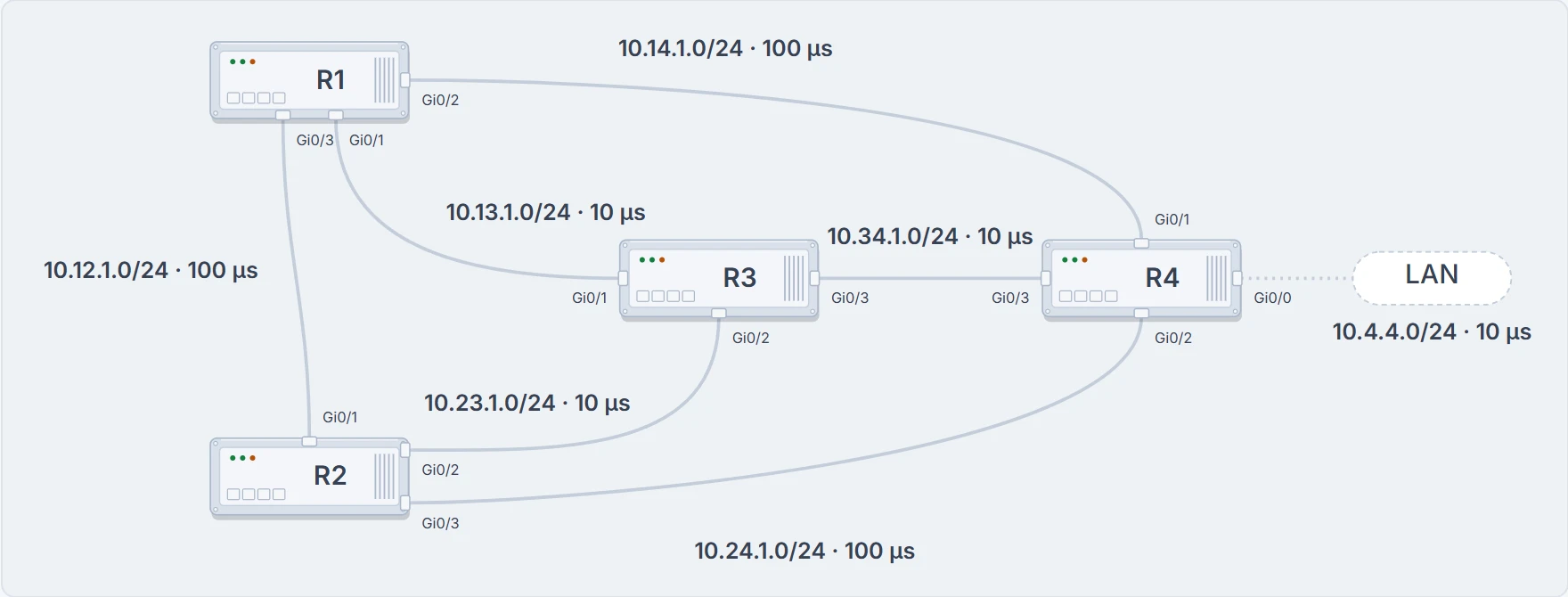
The DUAL lesson's sample network. Every link is 1 Gbps; each shows its subnet and its delay.
EIGRP's metric uses bandwidth and delay by default; it can include load and reliability too. And the two it uses are measured differently:
- Bandwidth is the slowest link in the path: the configured interface bandwidth in Kbps, scaled against a 10 Gbps link (10^7). One number for the whole path.
- Delay is the total along the path: every link adds its share. The formula counts it in tens of microseconds, so the microseconds you read in
showoutput get divided by 10.
With the default K values, K1 = K3 = 1 and K2 = K4 = K5 = 0, the formula collapses to:
metric = 256 × (10^7 / minimum bandwidth + total delay / 10)
The K values decide which factors count and how much, but they don't map one to one onto the factors: K1 and K2 both involve bandwidth, for example. With the defaults plugged into the full formula, its reliability term becomes 0/(0 + reliability), which would zero the whole metric. RFC 7868 treats that term as 1 when K5 = 0, so it doesn't.
Now R1's numbers. Both paths have the same slowest link, 1 Gbps, so they tie on bandwidth: 10^7 / 1,000,000 = 10. Delay is where they split. Through R3 it's three fast links, 10 µs each, 30 µs in total:
256 × (10^7 / 1,000,000 + 30 / 10) = 256 × (10 + 3) = 3328
The direct link to R4 is one hop, but it's one of the high-delay links: 100 µs, plus 10 µs for R4's LAN. 256 × (10 + 11) = 5376. Fewer hops, more delay, a bigger metric. You don't have to trust the arithmetic; show ip eigrp topology gives you every input:
R1# show ip eigrp topology 10.4.4.0 255.255.255.0
EIGRP-IPv4 Topology Entry for AS(100)/ID(10.14.1.1) for 10.4.4.0/24
State is Passive, Query origin flag is 1, 1 Successor(s), FD is 3328
  Descriptor Blocks:
  10.13.1.3 (GigabitEthernet0/1), from 10.13.1.3, Send flag is 0x0
      Composite metric is (3328/3072), route is Internal
      ! 256 × (10 + 3)
      Vector metric:
        Minimum bandwidth is 1000000 Kbit
        Total delay is 30 microseconds   ! via R3: 30 / 10 = 3
        Reliability is 255/255
        Load is 1/255
        Minimum MTU is 1500
        Hop count is 2
        Originating router is 10.34.1.4
  10.14.1.4 (GigabitEthernet0/2), from 10.14.1.4, Send flag is 0x0
      Composite metric is (5376/2816), route is Internal
      Vector metric:
        Minimum bandwidth is 1000000 Kbit
        Total delay is 110 microseconds   ! via R4: 110 / 10 = 11
        Reliability is 255/255
        Load is 1/255
        Minimum MTU is 1500
        Hop count is 1
        Originating router is 10.34.1.4
R1#
The same output carries the prefix's state (Passive), the number of successors and any feasible-successor paths, with the minimum bandwidth, total delay, reliability, load, MTU and hop count for each path. Every input to the formula is right there.
Those inputs travel. Each update carries the path's attributes, which can include hop count, cumulative delay, minimum bandwidth and the RD, and each router updates them as the route passes through, so each one finds the shortest path on its own. Follow one prefix down a chain of three routers and, with every hop, the hop count goes up, the minimum bandwidth goes down, the total delay goes up, and the RD changes. A 100 Mbps LAN (100 µs), then a 10 Mbps link (1000 µs), then a 100 Mbps link (100 µs): at the third router the prefix has 10 Mbps as its minimum and 1200 µs of delay, an FD of 256 × (1000 + 120) = 286,720.
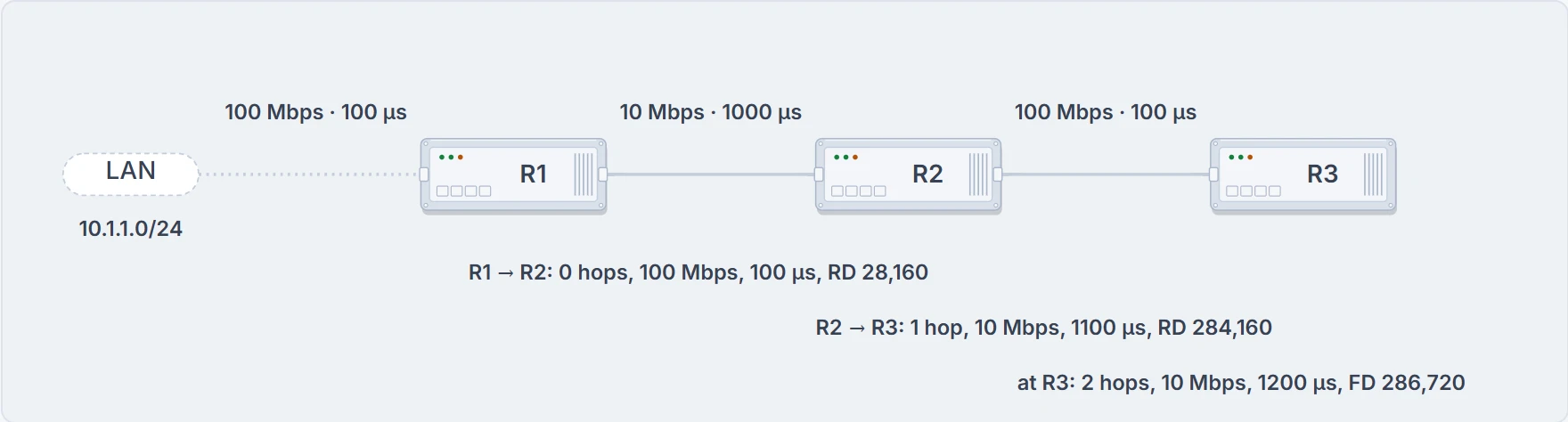
The chain, with what each router passes on: the hop count and total delay grow, and the minimum bandwidth never rises.
For a single link of each common type, with its default delay, the numbers come out like this:
| Interface | Link speed (Kbps) | Delay | Metric |
|---|---|---|---|
| Serial | 64 | 20,000 µs | 40,512,000 |
| Ethernet | 10,000 | 1000 µs | 281,600 |
| FastEthernet | 100,000 | 100 µs | 28,160 |
| GigabitEthernet | 1,000,000 | 10 µs | 2816 |
| TenGigabitEthernet | 10,000,000 | 10 µs | 512 |
Use the table for single links only. For a path, take the slowest speed once and add the delays:
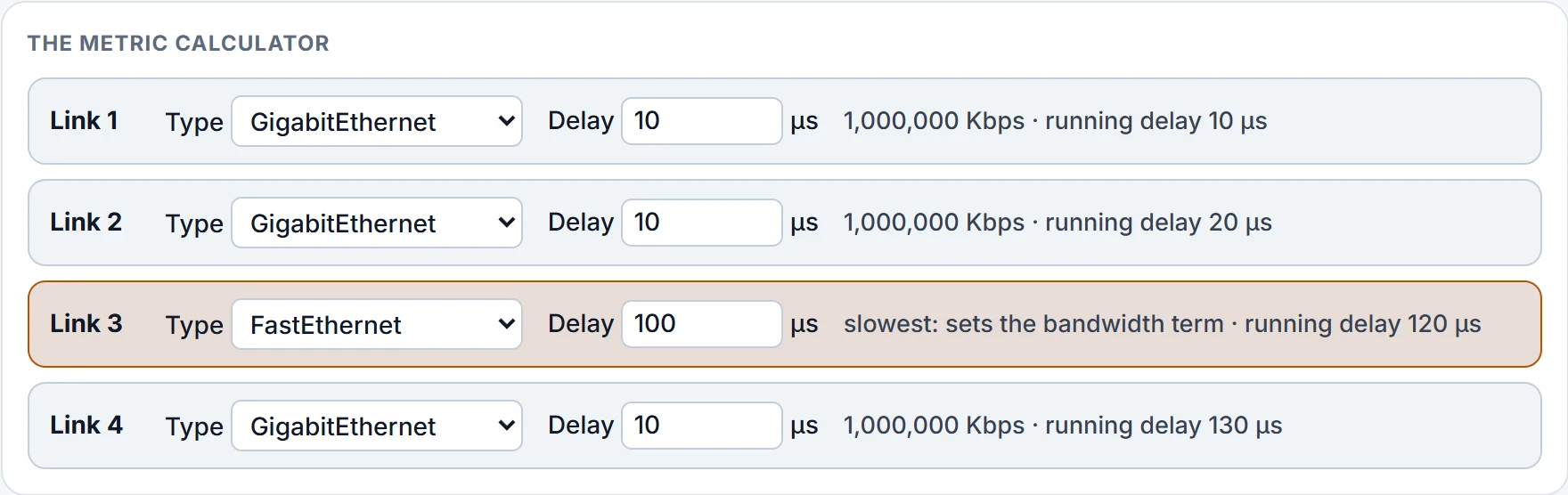
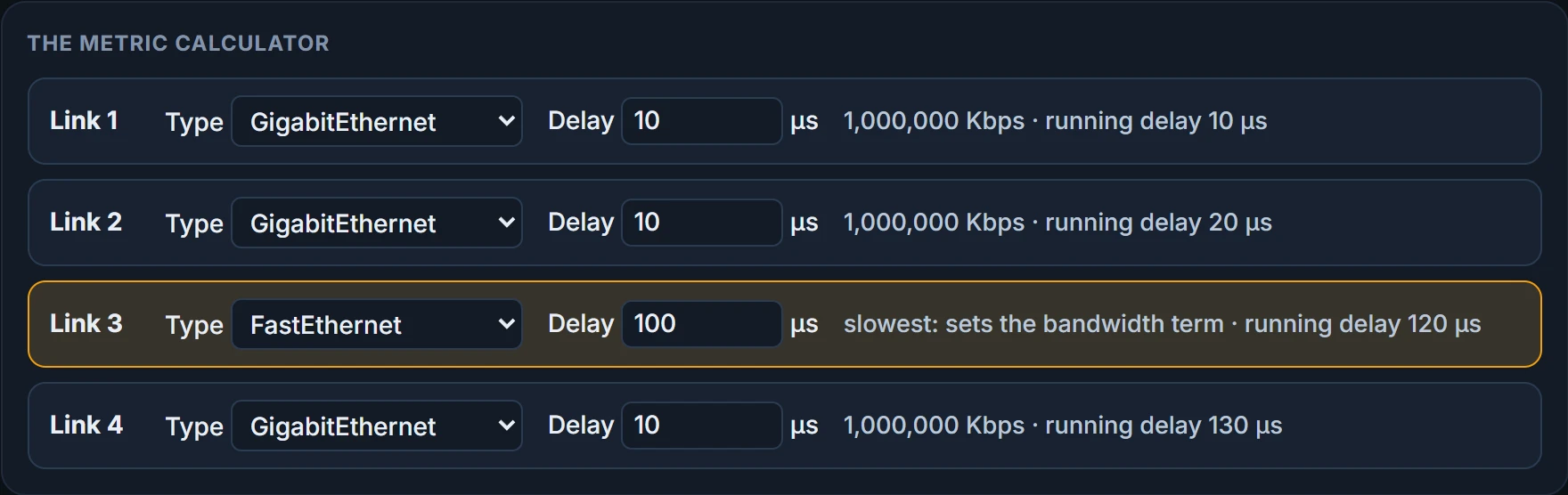
show ip eigrp topology <prefix>: each path's minimum bandwidth, total delay, load, reliability, MTU and hops, and its (FD/RD)show interfaces: one interface's BW and DLY
- why a path is missing: one that fails the feasibility condition needs
all-links - what the routing table installed: check
show ip route
When the ruler runs out
Try the formula on fast links. A 10 Gbps link: 10^7 / 10,000,000 = 1, plus 10 / 10 = 1, so 256 × 2 = 512. An 11 Gbps link: 10^7 / 11,000,000 is less than one, a whole number of 0, so 256 × (0 + 1) = 256. A 20 Gbps link? Also 256. 11 Gbps and 20 Gbps both come out at 256, and delay doesn't help: in the table, GigabitEthernet and TenGigabitEthernet both have 10 µs.
Wide metrics change the ruler:
- The scale is 65,536, just as classic EIGRP scaled by 256 to accommodate IGRP. That covers links up to 655 Tbps.
- A new K6 joins the formula, an extended attribute to measure jitter, energy or other future attributes.
- Latency is measured in picoseconds, and where an interface's delay comes from depends on what's configured.
The four rules for that delay, in order:
- Delay set on the interface: converted to picoseconds (tens of µs × 10^7).
- Only bandwidth set: the classic default delay, converted. The configured bandwidth isn't considered.
- 1 Gbps or less, nothing set: the classic default delay, converted.
- Over 1 Gbps, nothing set: 10^13 / interface bandwidth.
With default K values the wide formula is 65,536 × (10^7 / minimum bandwidth + latency in picoseconds / 10^6), and that last term works out to the delay in microseconds rather than tens of them. Turn R1 into a named-mode router and look at the same path. (Its neighbors stay classic. That's fine for reading the numbers; the end of this section says why it isn't fine to leave.)
R1# configure terminal
R1(config)# no router eigrp 100
R1(config)# router eigrp ENTERPRISE
R1(config-router)# address-family ipv4 unicast autonomous-system 100
R1(config-router-af)# network 10.0.0.0
R1(config-router-af)# end
R1#
R1# show ip eigrp topology 10.4.4.0 255.255.255.0
EIGRP-IPv4 VR(ENTERPRISE) Topology Entry for AS(100)/ID(10.14.1.1) for 10.4.4.0/24
  State is Passive, Query origin flag is 1, 1 Successor(s), FD is 2621440, RIB is 20480
  ! 65,536 × (10 + 30)
  Descriptor Blocks:
  10.13.1.3 (GigabitEthernet0/1), from 10.13.1.3, Send flag is 0x0
      Composite metric is (2621440/1966080), route is Internal
      Vector metric:
        Minimum bandwidth is 1000000 Kbit
        Total delay is 30000000 picoseconds   ! 30 µs in picoseconds
        Reliability is 255/255
        Load is 1/255
        Minimum MTU is 1500
        Hop count is 2
        Originating router is 10.34.1.4
  10.14.1.4 (GigabitEthernet0/2), from 10.14.1.4, Send flag is 0x0
      Composite metric is (7864320/1310720), route is Internal
      Vector metric:
        Minimum bandwidth is 1000000 Kbit
        Total delay is 110000000 picoseconds
        Reliability is 255/255
        Load is 1/255
        Minimum MTU is 1500
        Hop count is 1
        Originating router is 10.34.1.4
R1#
Look at the end of the state line too: "RIB is 20480", the same number show ip route prints. Named mode's show ip protocols prints a "Metric rib-scale 128" line: 2,621,440 / 128 = 20,480.
R1# show ip route 10.4.4.0
Routing entry for 10.4.4.0/24
  Known via "eigrp 100", distance 90, metric 20480
  ! the RIB's copy of the metric
  Last update from 10.13.1.3 on GigabitEthernet0/1, 00:00:00 ago
  Routing Descriptor Blocks:
  * 10.13.1.3, from 10.13.1.3, 00:00:00 ago, via GigabitEthernet0/1
      Route metric is 20480, traffic share count is 1
R1#
Which style is a router using? Classic metrics exist only in classic mode, and wide metrics only in named mode. If show ip protocols shows a K6, the router is using wide metrics. Here's classic R1, before the change:
R1# show ip protocols | include AS|K
  EIGRP-IPv4 Protocol for AS(100)
    Metric weight K1=1, K2=0, K3=1, K4=0, K5=0
    ! no K6: classic metrics
R1#
Can the two styles share an AS? Wide mode keeps K1 = K3 = 1 and the rest at 0, so the K values match classic ones. As long as K1 to K5 are the same and K6 isn't set, a classic router and a wide one become neighbors. EIGRP even detects a classic-metric peer and unscales the metric to compare them.
That conversion is where it goes wrong. Paths learned from wide-metric peers always look better than paths from classic peers, and the mixture could lead to suboptimal routing. Keep every router in the AS on one style. R1 goes back to classic mode for the rest of this page.
Moving traffic without moving OSPF
Say you want R1 off the R3 path. You could lower the bandwidth, but bandwidth has a similar effect on the formula and it can impact other protocols, such as OSPF, at the same time. Delay only feeds EIGRP. show interfaces shows the current delay after DLY, in microseconds:
R1# show interfaces GigabitEthernet0/1 | include DLY
  MTU 1500 bytes, BW 1000000 Kbit/sec, DLY 10 usec,
R1# show interfaces GigabitEthernet0/2 | include DLY
  MTU 1500 bytes, BW 1000000 Kbit/sec, DLY 100 usec,
  ! the link to R4: 100 µs, configured as delay 10
R1#
You configure it with delay <tens-of-microseconds> under the interface. Delay is set per interface, so change it on both ends of the link to keep routing consistent. Here, delay 20 on R1's Gi0/1 and on R3's end of the same link:
R1# configure terminal
R1(config)# interface GigabitEthernet0/1
R1(config-if)# delay 20
R1(config-if)# end
R1#
R1# show interfaces GigabitEthernet0/1 | include DLY
  MTU 1500 bytes, BW 1000000 Kbit/sec, DLY 200 usec,   ! 20 tens of µs
R1#
R1# show ip eigrp topology 10.4.4.0 255.255.255.0
EIGRP-IPv4 Topology Entry for AS(100)/ID(10.14.1.1) for 10.4.4.0/24
State is Passive, Query origin flag is 1, 1 Successor(s), FD is 5376
  Descriptor Blocks:
  10.14.1.4 (GigabitEthernet0/2), from 10.14.1.4, Send flag is 0x0
      Composite metric is (5376/2816), route is Internal
      ! R4 is the successor now
      Vector metric:
        Minimum bandwidth is 1000000 Kbit
        Total delay is 110 microseconds
        Reliability is 255/255
        Load is 1/255
        Minimum MTU is 1500
        Hop count is 1
        Originating router is 10.34.1.4
  10.12.1.2 (GigabitEthernet0/3), from 10.12.1.2, Send flag is 0x0
      Composite metric is (5888/3328), route is Internal
      Vector metric:
        Minimum bandwidth is 1000000 Kbit
        Total delay is 130 microseconds
        Reliability is 255/255
        Load is 1/255
        Minimum MTU is 1500
        Hop count is 3
        Originating router is 10.34.1.4
  10.13.1.3 (GigabitEthernet0/1), from 10.13.1.3, Send flag is 0x0
      Composite metric is (8192/3072), route is Internal
      ! 256 × (10 + 22)
      Vector metric:
        Minimum bandwidth is 1000000 Kbit
        Total delay is 220 microseconds   ! 200 + 10 + 10
        Reliability is 255/255
        Load is 1/255
        Minimum MTU is 1500
        Hop count is 2
        Originating router is 10.34.1.4
R1#
Continue the lesson
The whole lesson, with its drawings and its questions. The rest of this section and 2 more after it.