
Stubs, summarization, filtering and split horizon
EIGRP queries a neighbour when a route has no feasible successor, so the question is who gets asked. A stub router announces itself in its hellos and is never queried, and it also stops a branch becoming a transit path between two data centres. Summaries shrink routing tables and create a query boundary, so queries stay short and stuck-in-active gets rarer.
By Arif, founder of Daveth · Updated
The full 15 min walkthrough is in Daveth Pro (Network). See what the plan opens
What this page answers
What is an EIGRP stub router?
A router that announces itself as a stub in its hellos, so its neighbours stop sending it queries; it can never offer another way to a lost route. It also stops a branch with two uplinks becoming a transit path when a data-centre link fails. Read it in “The router you never need to ask”
How do you configure EIGRP summarization?
Per interface: in classic mode ip summary-address eigrp AS network mask. The component routes are suppressed, and the summary is advertised only while at least one of them exists. It also creates a query boundary. Read it in “Saying less on purpose: summaries”
Why summarize in EIGRP?
A summary shrinks everyone's routing table and creates a query boundary, so the query domain shrinks and stuck-in-active gets rarer. It needs a hierarchical addressing plan to summarize on. Read it in “Saying less on purpose: summaries”
The router you never need to ask
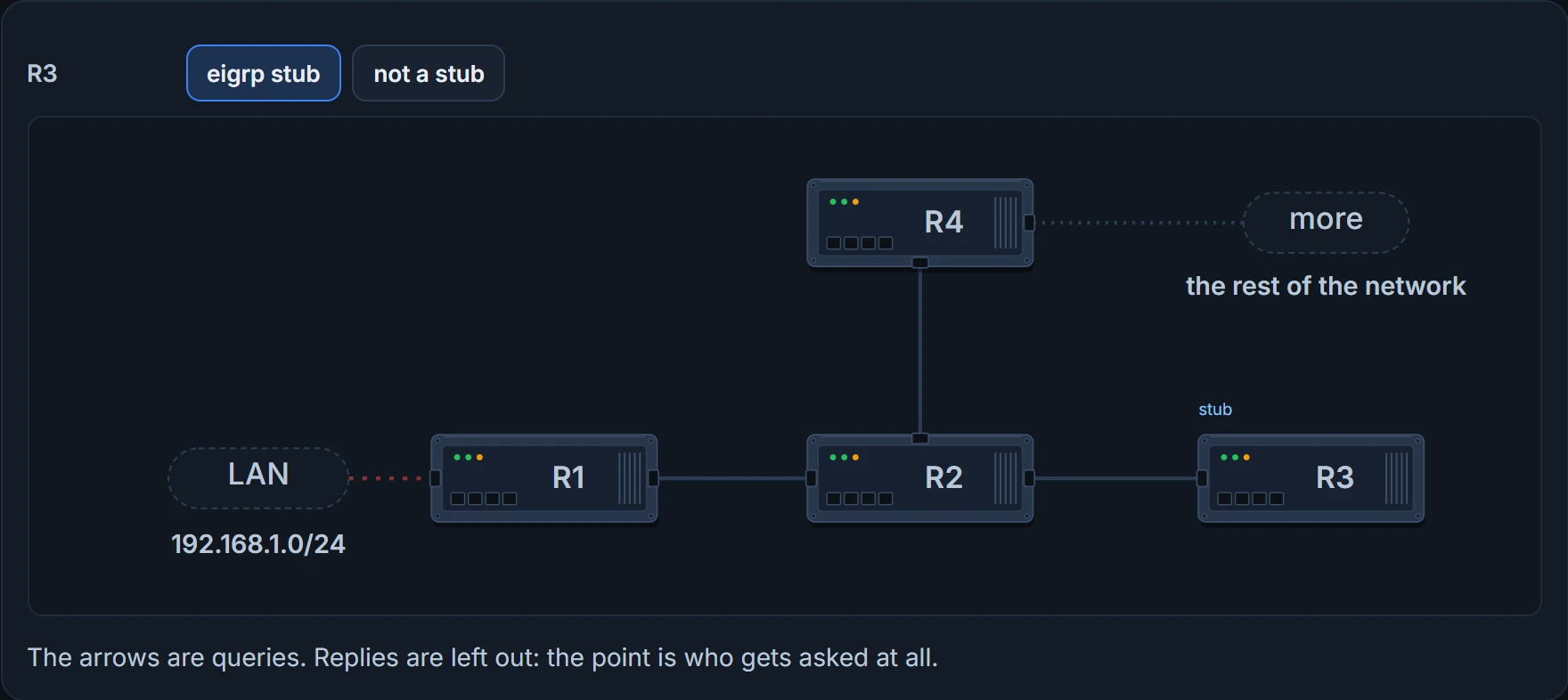
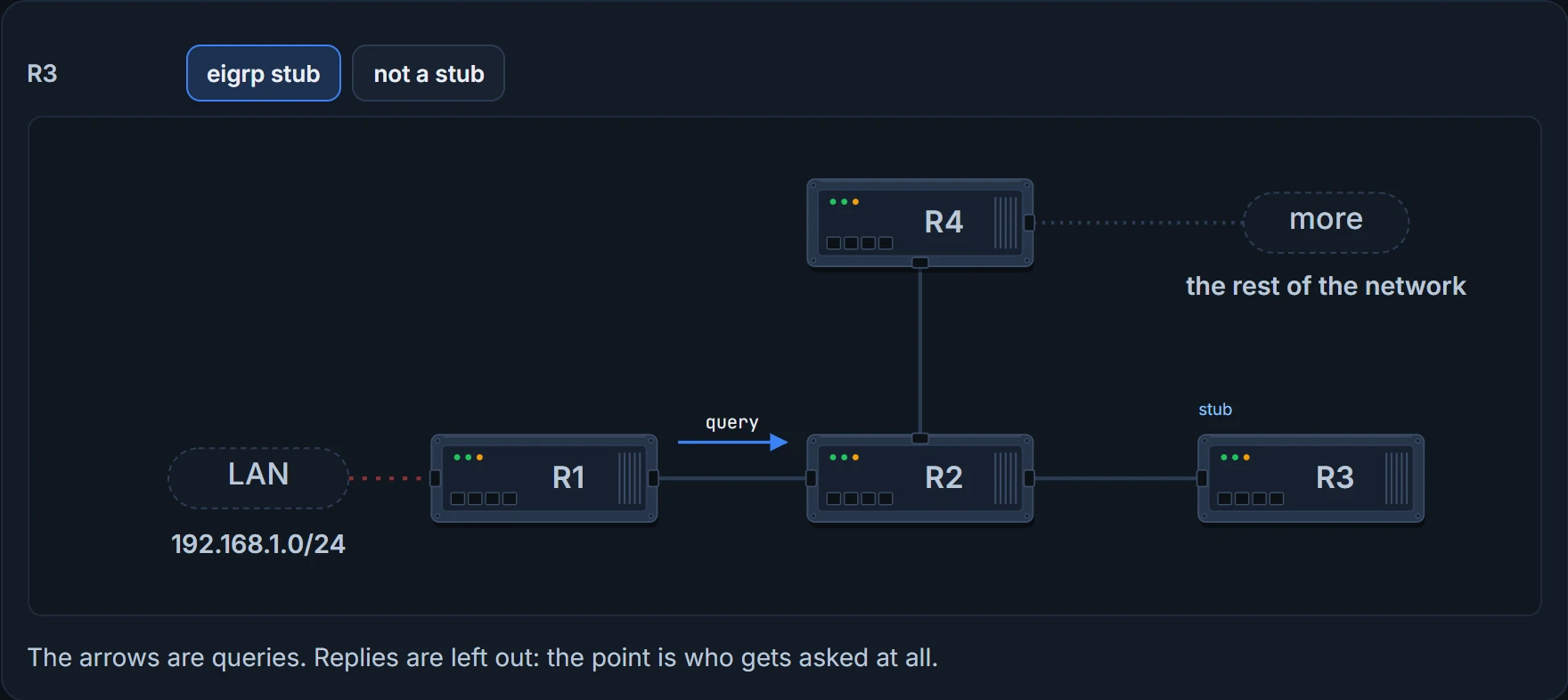
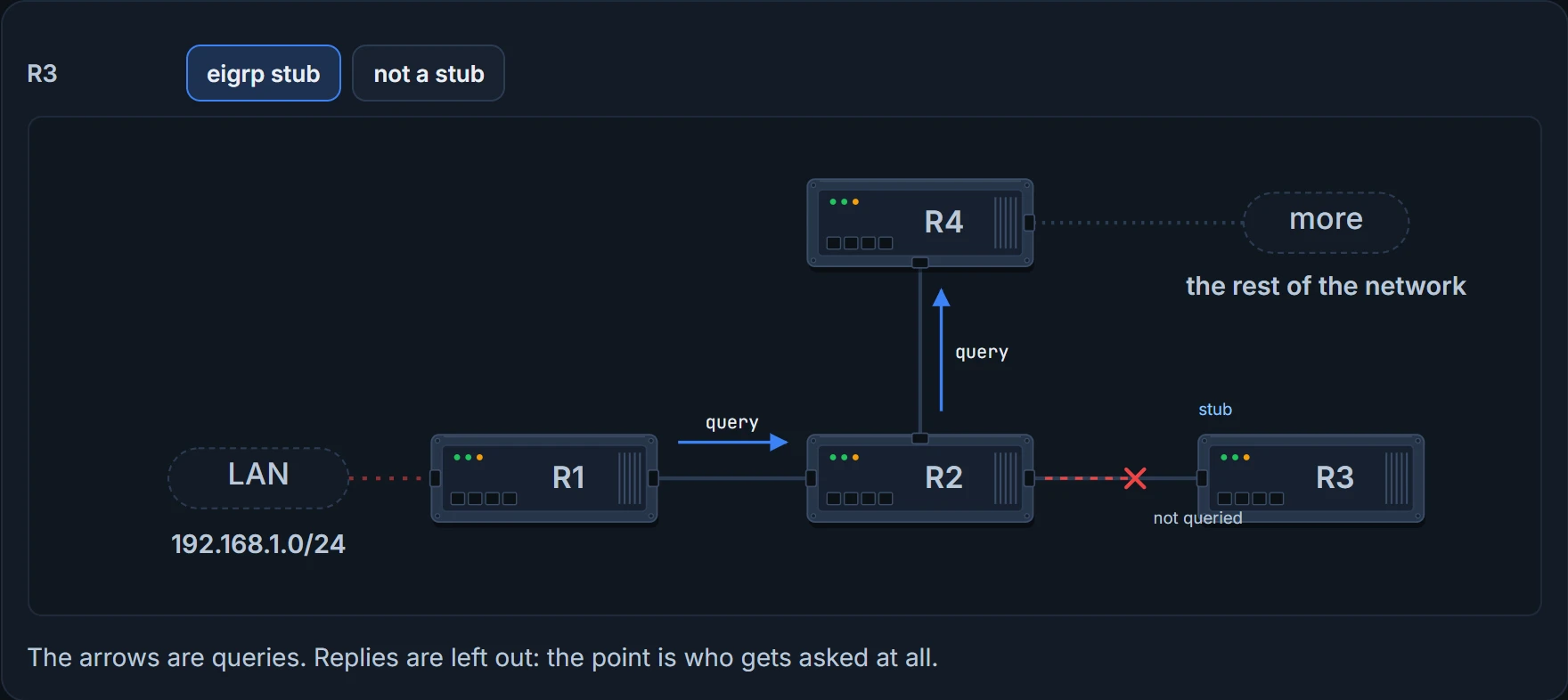
Queries come from the DUAL lesson: a route with no feasible successor goes active, and the router queries its neighbors and waits for every reply. So the question here is who gets asked. Take a small example network, with its own R1 to R4 (not the routers in the next section). R1 loses 192.168.1.0/24 and queries R2, and R2 queries R3 and R4. But R3 is a dead end. It will never have another way to 192.168.1.0/24, so querying it only wastes resources and slows convergence.
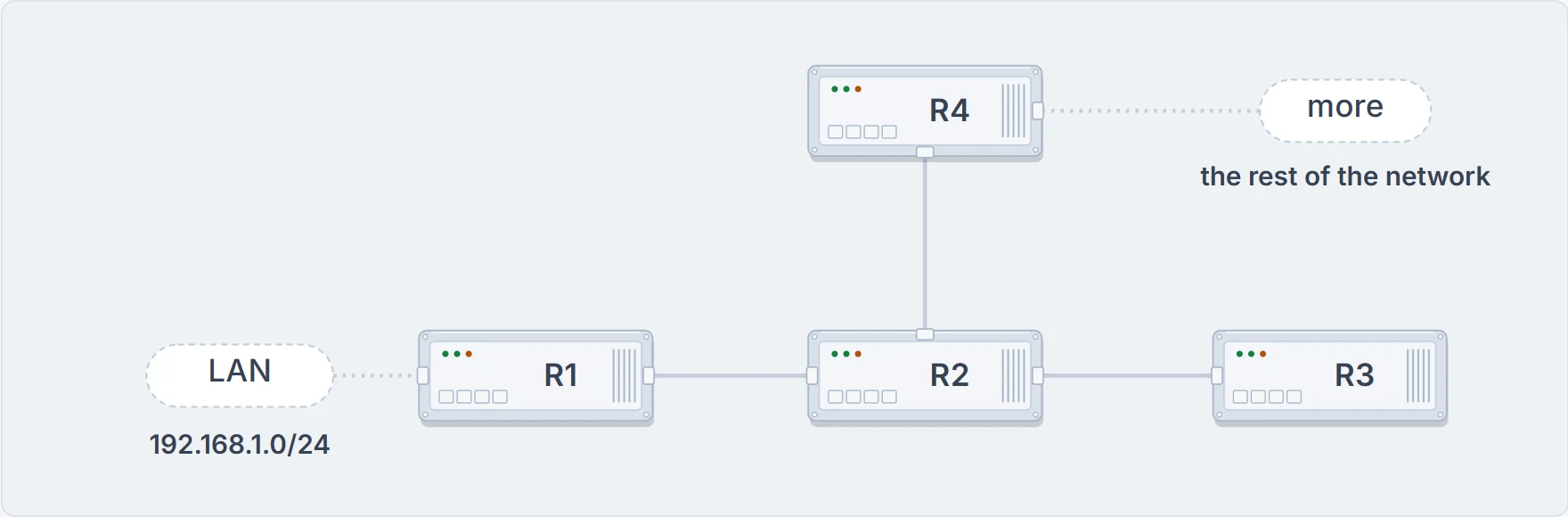
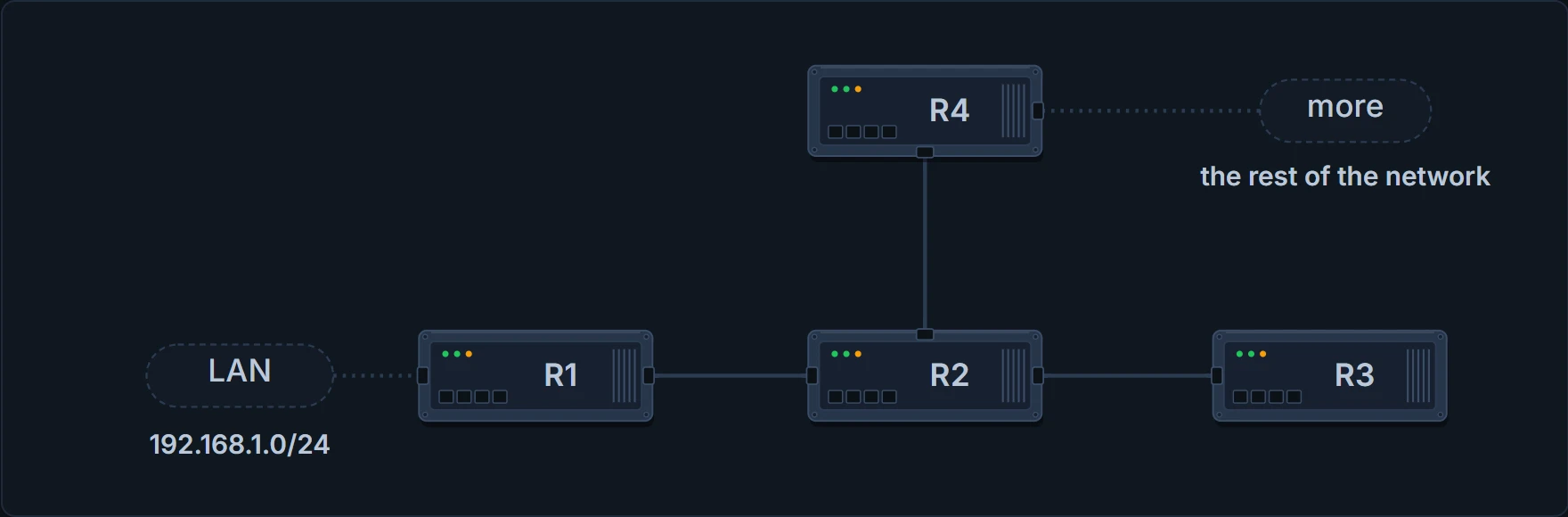
The query example. R1 owns 192.168.1.0/24; R4 has more network behind it, and R3 has nothing.
A stub router announces itself as a stub in its hellos, and its neighbors stop sending it queries. That shrinks the query domain, so convergence is faster.
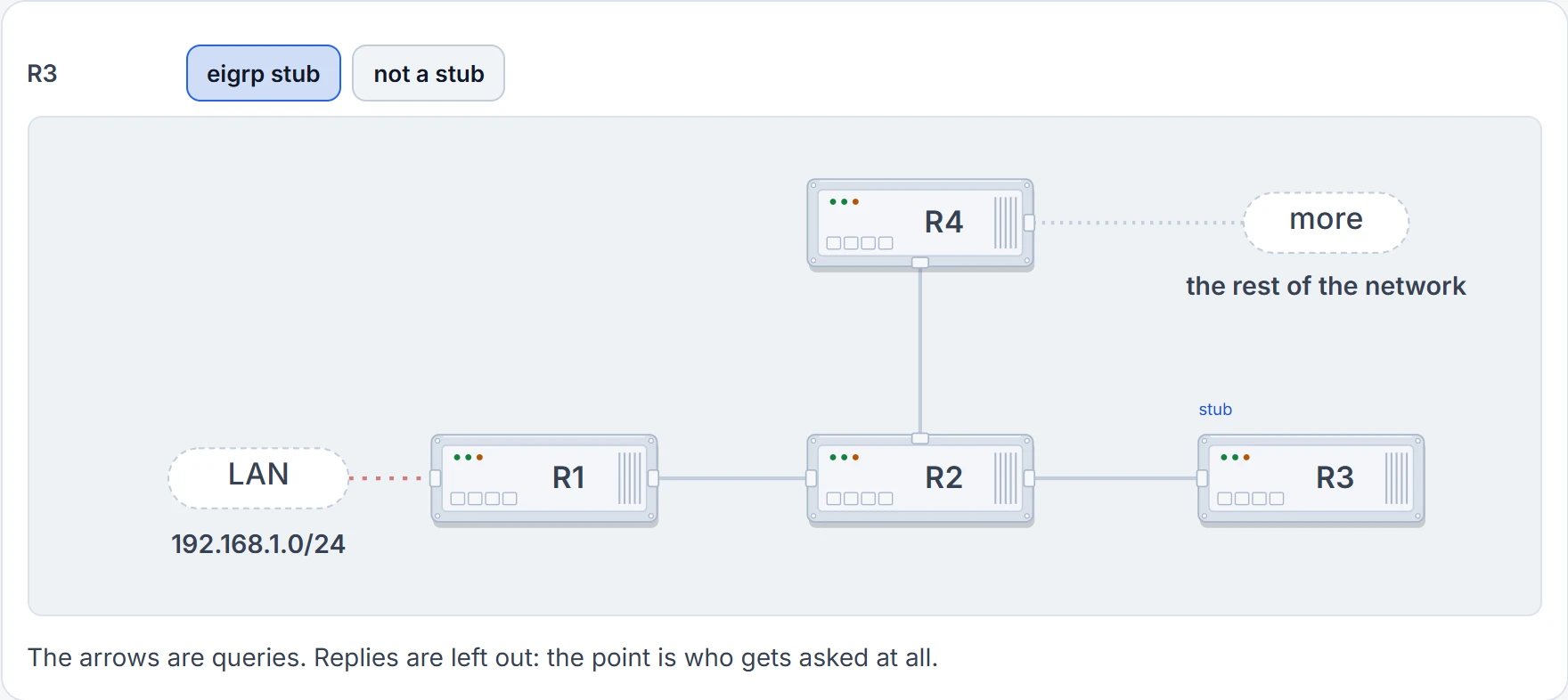
Step 1 of 3 The network fails. R1 loses 192.168.1.0/24, and nothing else in its table can replace it.
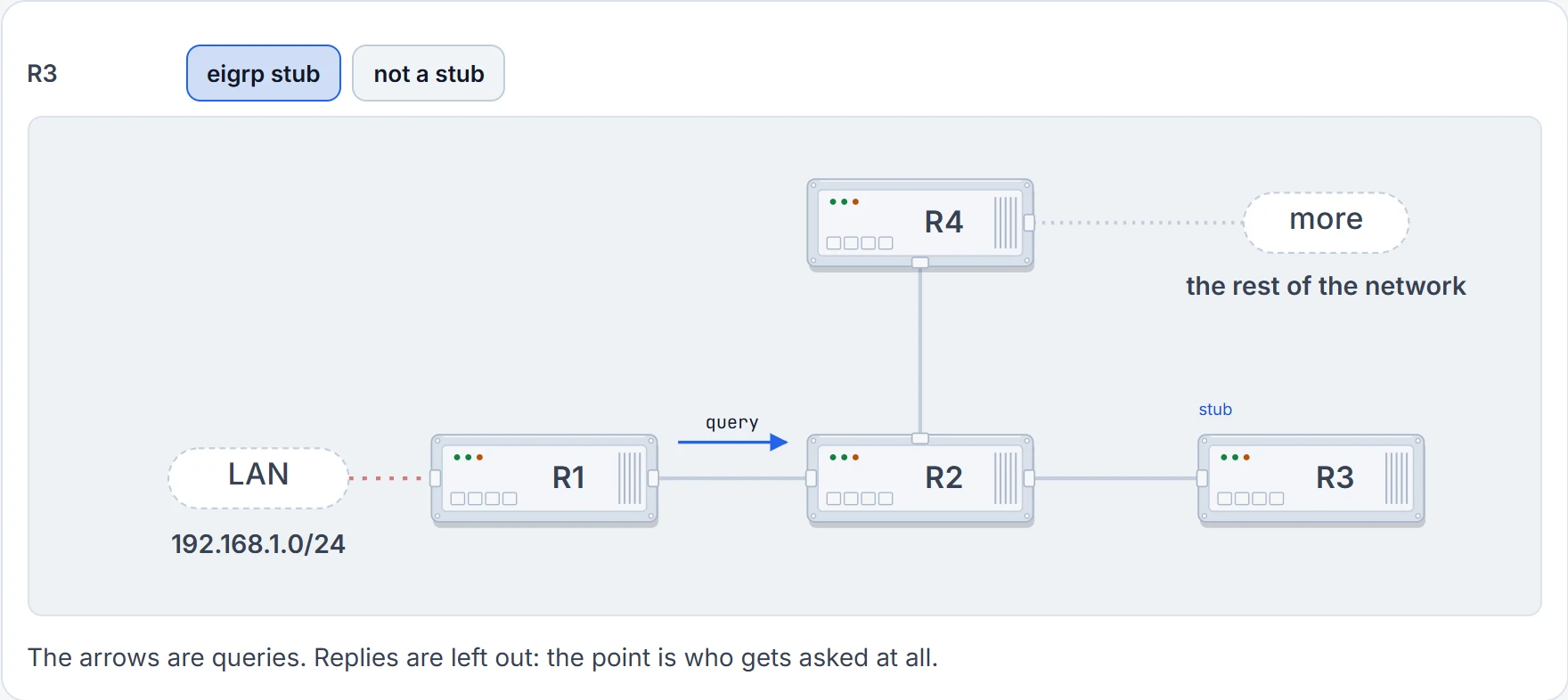
Step 2 of 3 R1 asks its neighbor. R1 sends a query to R2.
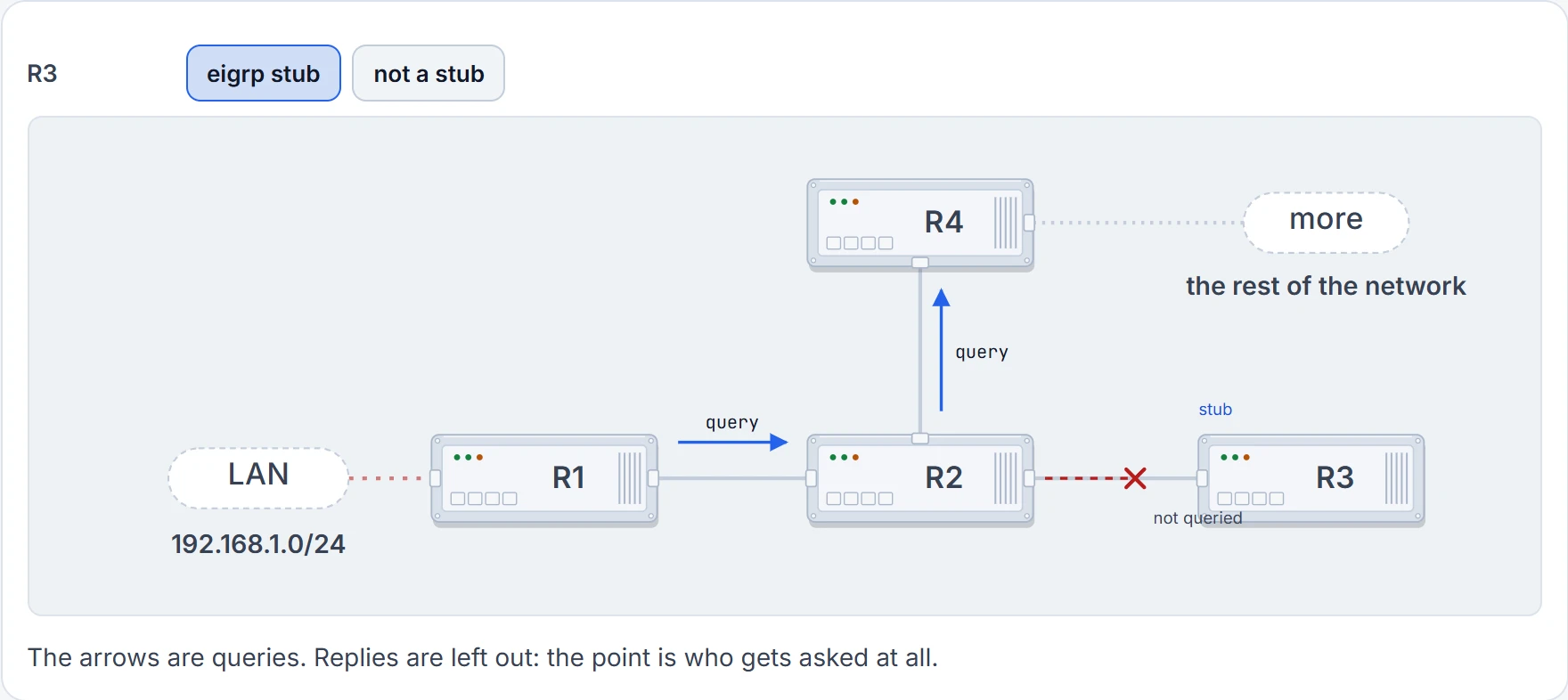
Step 3 of 3 R2 asks onward, but not R3. R2 queries R4. R3 told R2 in its hellos that it's a stub, so R2 never queries it.
Over slow hub-and-spoke WAN links it matters twice. The stub feature stops the hub querying the spokes, which cuts EIGRP traffic on the thin links and the chance of a route getting stuck in active. Stuck in active happens when a query gets no reply. Over a WAN, congestion can cause it, and it can end with neighbor relationships being re-established, which means more convergence and even more EIGRP traffic. If you don't query the spokes, that chain never starts.
To prove a neighbor is a stub, ask the router next to it. show ip eigrp neighbors detail adds two lines under the stub peer: which route types it advertises, and that queries to it are suppressed. They look like this:
  Stub Peer Advertising (CONNECTED SUMMARY ) Routes
  Suppressing queries
The branch that turns into a shortcut
A stub has a second job, and it shows up the day something breaks. Here's a network with two data-center routers, R1 and R2, and a branch, R3, connected to both. R4 sits behind R3.
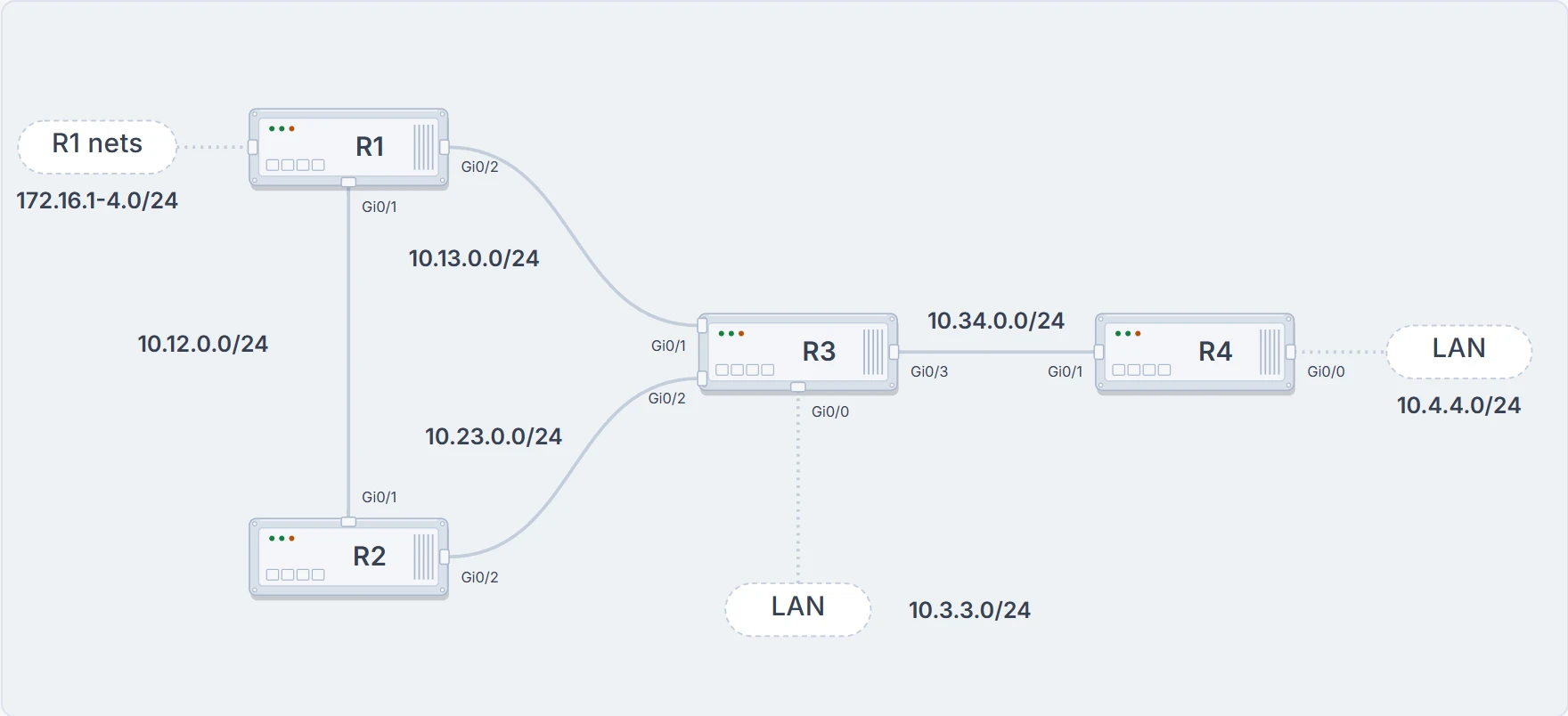
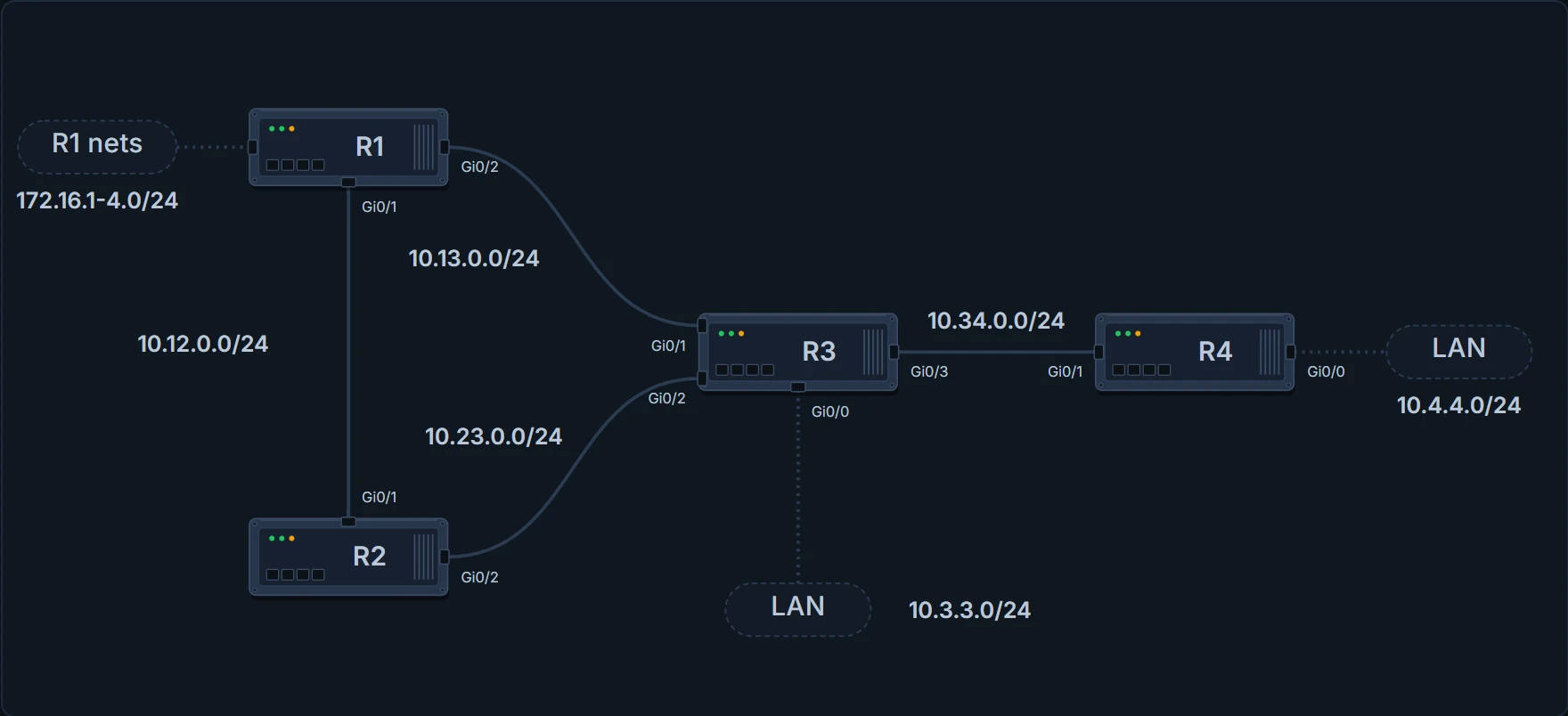
The branch network. Every link is 1 Gbps. R1 and R2 are the data-center routers; R3 is the branch, and R4 sits behind it.
Redundancy is how a design like this starts: more routers at a site, redundant circuits (possibly from different providers), different routing protocols, or a VPN over the Internet as a backup. R2 reaches R1's networks, 172.16.1.0/24 to 172.16.4.0/24, across the 10.12.0.0/24 link between them. Now cut that link:
R1# configure terminal
R1(config)# interface GigabitEthernet0/1
R1(config-if)# shutdown
R1(config-if)# end
R1#
R2# show ip route 172.16.1.0
Routing entry for 172.16.1.0/24
  Known via "eigrp 100", distance 90, metric 131072
  Last update from 10.23.0.3 on GigabitEthernet0/2, 00:00:30 ago
  Routing Descriptor Blocks:
  * 10.23.0.3, from 10.23.0.3, 00:00:30 ago, via GigabitEthernet0/2
  ! through the branch
      Route metric is 131072, traffic share count is 1
R2#
R2 still reaches R1's networks, through R3. The branch, built for a branch's traffic, has just become the data centers' interconnect. Add a backup VPN between the data centers, with a static route for 172.16.0.0/16 across it, and it's worse than it looks: the /24s R3 passes on are a longer match than the static 172.16.0.0/16, so the traffic prefers the branch over the tunnel built for it.
A stub router doesn't advertise routes it learned from other EIGRP peers. By default it advertises only its connected and summary routes, and it also gets to conserve its own resources. Make R3 a stub and cut the same link:
R3# configure terminal
R3(config)# router eigrp 100
R3(config-router)# eigrp stub
R3(config-router)# end
R3#
R2# show ip route 172.16.1.0
% Network not in table   ! no shortcut through R3
R2#
R3 now advertises only its own connected networks, so R2 has nothing for 172.16.1.0/24 through it. With that backup VPN and its static 172.16.0.0/16, the tunnel is now the path R2 would take.
The command is eigrp stub {connected | receive-only | redistributed | static | summary}, under the process in classic mode or under the address family in named mode. receive-only advertises nothing at all, so it can't be combined with the other options, and you have to plan how return traffic reaches that site. Here's R1 with R3 set to receive-only instead (each change on this page starts again from the network as drawn: every link up, no stub, no summary):
R1# show ip route eigrp | begin Gateway
Gateway of last resort is not set

      10.0.0.0/24 is subnetted, 1 subnets
D        10.23.0.0 [90/3072] via 10.12.0.2, 00:00:30, GigabitEthernet0/1
! the only EIGRP route left, and it's from R2
R1#
On the stub itself, show ip protocols shows the setting, for example "Stub, connected, summary". Now the trap.
R1# show ip route 10.4.4.0
% Network not in table   ! R4's LAN, gone
R1#
R4# show ip route eigrp | begin Gateway
Gateway of last resort is not set

      10.0.0.0/24 is subnetted, 3 subnets
D        10.3.3.0 [90/3072] via 10.34.0.3, 00:00:30, GigabitEthernet0/1
D        10.13.0.0 [90/3072] via 10.34.0.3, 00:00:30, GigabitEthernet0/1
D        10.23.0.0 [90/3072] via 10.34.0.3, 00:00:30, GigabitEthernet0/1
R4#
It cuts both ways. R1 loses R4's 10.4.4.0/24, and R4 loses R1's networks: no 172.16.x, and no 10.12.0.0/24 either. R4 only has what R3 itself is connected to. The wrong stub option does the same kind of damage, and so does making the wrong router the stub. Make a hub the stub and it never fully shares the routes it knows with its other neighbors, so routes go missing across the whole topology.
A stub site fixes the branch with a router behind it. It's a named-mode feature:
- The router acts as a stub only toward its WAN interfaces, and exchanges routes normally on the LAN side.
- Routes received on a WAN interface are tagged with the stub-site identifier, and are never advertised out a WAN interface.
- You configure
stub-site wan-interfaceunder each WANaf-interface, andeigrp stub-site 100:1under the address family, with the same identifier on every router in the site. Associating an interface resets that neighbor. - Downstream, the tag shows in
show ip eigrp topologyas "Extended Community: StubSite:100:1". A site with several edge routers stays non-transit as long as they share the identifier. - It isn't required on every branch router, but configuring it on all of them keeps the configs consistent and lets you add routers to the site later without disruption. The same identifier can be used for all of the site's WAN interfaces, because those networks are never advertised to other stub sites; tunnels and backdoor links are the stated exception.
Saying less on purpose: summaries
The other way to keep queries short is to hide detail. As an EIGRP autonomous system grows, convergence may take longer, and summarization is what lets it scale. A summary shrinks everyone's routing table, and it also creates a query boundary, so the query domain shrinks and stuck-in-active gets rarer. Summarizing at every layer of a large network needs a hierarchical addressing plan to summarize on.
- A summary is set per interface. The routes inside it, the component routes, are suppressed. The summary itself isn't advertised until at least one component route exists. You can do it in any part of the topology, not only at a core boundary.
- Classic mode:
ip summary-address eigrp 100 172.16.0.0 255.255.0.0 [leak-map NAME]on the interface. Named mode:summary-addressunderaf-interface. Summaries are always advertised based on the outgoing interface, andaf-interface defaultcan't carrysummary-address: it needs a specific interface.
R1's four networks are the components here. They're loopbacks, which report 8 Gbps of bandwidth, and Loopback2, 172.16.2.0/24, was given a smaller delay than the others, so its metric is the lowest:
R1# show ip eigrp topology | include 172.16
EIGRP-IPv4 Topology Table for AS(100)/ID(172.16.4.1)
P 172.16.1.0/24, 1 successors, FD is 128256
P 172.16.2.0/24, 1 successors, FD is 25856
! the lowest component metric
P 172.16.3.0/24, 1 successors, FD is 128256
P 172.16.4.0/24, 1 successors, FD is 128256
R1#
Summarize them on both of R1's links, toward R2 and toward R3:
R1# configure terminal
R1(config)# interface GigabitEthernet0/1
R1(config-if)# ip summary-address eigrp 100 172.16.0.0 255.255.0.0
R1(config-if)# interface GigabitEthernet0/2
R1(config-if)# ip summary-address eigrp 100 172.16.0.0 255.255.0.0
R1(config-if)# end
R1#
R3# show ip route eigrp | begin Gateway
Gateway of last resort is not set

      10.0.0.0/24 is subnetted, 2 subnets
D        10.4.4.0 [90/3072] via 10.34.0.4, 00:00:30, GigabitEthernet0/3
D        10.12.0.0 [90/3072] via 10.13.0.1, 00:00:30, GigabitEthernet0/1
                   [90/3072] via 10.23.0.2, 00:00:30, GigabitEthernet0/2
D     172.16.0.0/16 [90/28416] via 10.13.0.1, 00:00:30, GigabitEthernet0/1
! four routes became one
R3#
R3 sees one 172.16.0.0/16 where it had four /24s, which cuts its CPU and memory use. A leak map advertises chosen more-specific routes along with the summary, so longest match can still steer traffic. Here it lets 172.16.4.0/24 through:
R1# configure terminal
R1(config)# access-list 10 permit 172.16.4.0
R1(config)# route-map LEAK permit 10
R1(config-route-map)# match ip address 10
R1(config-route-map)# exit
R1(config)# interface GigabitEthernet0/1
R1(config-if)# ip summary-address eigrp 100 172.16.0.0 255.255.0.0 leak-map LEAK
R1(config-if)# interface GigabitEthernet0/2
R1(config-if)# ip summary-address eigrp 100 172.16.0.0 255.255.0.0 leak-map LEAK
R1(config-if)# end
R1#
R3# show ip route eigrp | begin Gateway
Gateway of last resort is not set

      10.0.0.0/24 is subnetted, 2 subnets
D        10.4.4.0 [90/3072] via 10.34.0.4, 00:00:30, GigabitEthernet0/3
D        10.12.0.0 [90/3072] via 10.13.0.1, 00:00:30, GigabitEthernet0/1
                   [90/3072] via 10.23.0.2, 00:00:30, GigabitEthernet0/2
      172.16.0.0/16 is variably subnetted, 2 subnets, 2 masks
D        172.16.0.0/16 [90/28416] via 10.13.0.1, 00:00:30, GigabitEthernet0/1
D        172.16.4.0/24 [90/130816] via 10.13.0.1, 00:00:30, GigabitEthernet0/1
! leaked alongside the summary
R3#
The route to nowhere. The router that makes a summary installs a discard route: the summary prefix pointing to Null0, with administrative distance 5. show ip route | include Null lists it:
R1# show ip route | include Null
D        172.16.0.0/16 is a summary, 00:00:30, Null0
! the discard route
R1#
R1# show ip route 172.16.0.0
Routing entry for 172.16.0.0/16
  Known via "eigrp 100", distance 5, metric 25856   ! AD 5
  Routing Descriptor Blocks:
  * directly connected, via Null0
  ! packets that match nothing more specific are dropped
      Route metric is 25856, traffic share count is 1
R1#
Why have it? Say a packet arrives for part of the summary that doesn't exist, and the router has a default route.
The only thing that displaces the Null0 route is a source with a lower AD. A static route for the same prefix pointing to a next hop does that, and brings the loop back. And build summaries accurately: a summary that covers networks the router can't actually reach attracts that traffic, and Null0 drops it.
The summary's metric is the lowest metric among its components, carried with that path's attributes so downstream routers can compute their own metric:
R1# show ip eigrp topology 172.16.0.0/16
EIGRP-IPv4 Topology Entry for AS(100)/ID(172.16.4.1) for 172.16.0.0/16
State is Passive, Query origin flag is 1, 1 Successor(s), FD is 25856
! 172.16.2.0/24's metric, the lowest
  Descriptor Blocks:
  0.0.0.0 (Null0), from 0.0.0.0, Send flag is 0x0
      Composite metric is (25856/0), route is Internal
      Vector metric:
        Minimum bandwidth is 8000000 Kbit
        Total delay is 1000 microseconds
        Reliability is 255/255
        Load is 1/255
        Minimum MTU is 1500
        Hop count is 0
        Originating router is 172.16.4.1
R1#
Each time a component route is added or removed, EIGRP checks that the summary still carries the lowest-metric path's attributes. If it doesn't, a new summary goes out and downstream routers run DUAL again: the summary hides the prefixes, not the churn. summary-metric pins the metric. Its units: bandwidth in Kbps, delay in tens of microseconds, reliability and load from 1 to 255, and the interface MTU. And when the last component goes, so does the summary. Shut all four of R1's networks:
R3# show ip route 172.16.0.0
% Network not in table   ! no components, no summary
R3#
A default route uses the same command with 0.0.0.0 0.0.0.0:
R1# configure terminal
R1(config)# interface GigabitEthernet0/2
R1(config-if)# ip summary-address eigrp 100 0.0.0.0 0.0.0.0
R1(config-if)# end
R1#
R3# show ip route 0.0.0.0
Routing entry for 0.0.0.0/0
  Known via "eigrp 100", distance 90, metric 3072
  ! a default, learned as an EIGRP summary
  Last update from 10.13.0.1 on GigabitEthernet0/1, 00:00:30 ago
  Routing Descriptor Blocks:
  * 10.13.0.1, from 10.13.0.1, 00:00:30 ago, via GigabitEthernet0/1
      Route metric is 3072, traffic share count is 1
R3#
IPv6 has no classful boundary, so there's no auto-summary; manual summaries follow the IPv4 rules. The command is ipv6 summary-address eigrp 100 2001:db8:1::/48 on the interface in classic mode, or summary-address 2001:db8:1::/48 under af-interface in named mode. On R1 and R3 only, over their direct link (R2 doesn't run IPv6 here), R1's four IPv6 networks, before and after:
R3# show ipv6 route eigrp | include 2001
D   2001:DB8:1:1::/64 [90/130816]
D   2001:DB8:1:2::/64 [90/28416]
D   2001:DB8:1:3::/64 [90/130816]
D   2001:DB8:1:4::/64 [90/130816]
R3#
R1# configure terminal
R1(config)# interface GigabitEthernet0/2
R1(config-if)# ipv6 summary-address eigrp 100 2001:db8:1::/48
R1(config-if)# end
R1#
R3# show ipv6 route eigrp | include 2001
D   2001:DB8:1::/48 [90/28416]   ! one /48
R3#
A ::/0 summary is the IPv6 default: it advertises a default route, and it suppresses every other prefix out that interface.
Auto-summary summarizes at classful boundaries. EIGRP supports VLSM, so it never needed to; but before IOS 15.0 auto-summary was on by default anyway. From 15.0 onward it's off, and current releases keep it off. auto-summary turns it on (under the process in classic mode, under topology base in named mode), and no auto-summary turns it off.
Continue the lesson
The whole lesson, with its drawings and its questions. The rest of this section and 3 more after it.