
EIGRP's two styles, both families, global and VRF
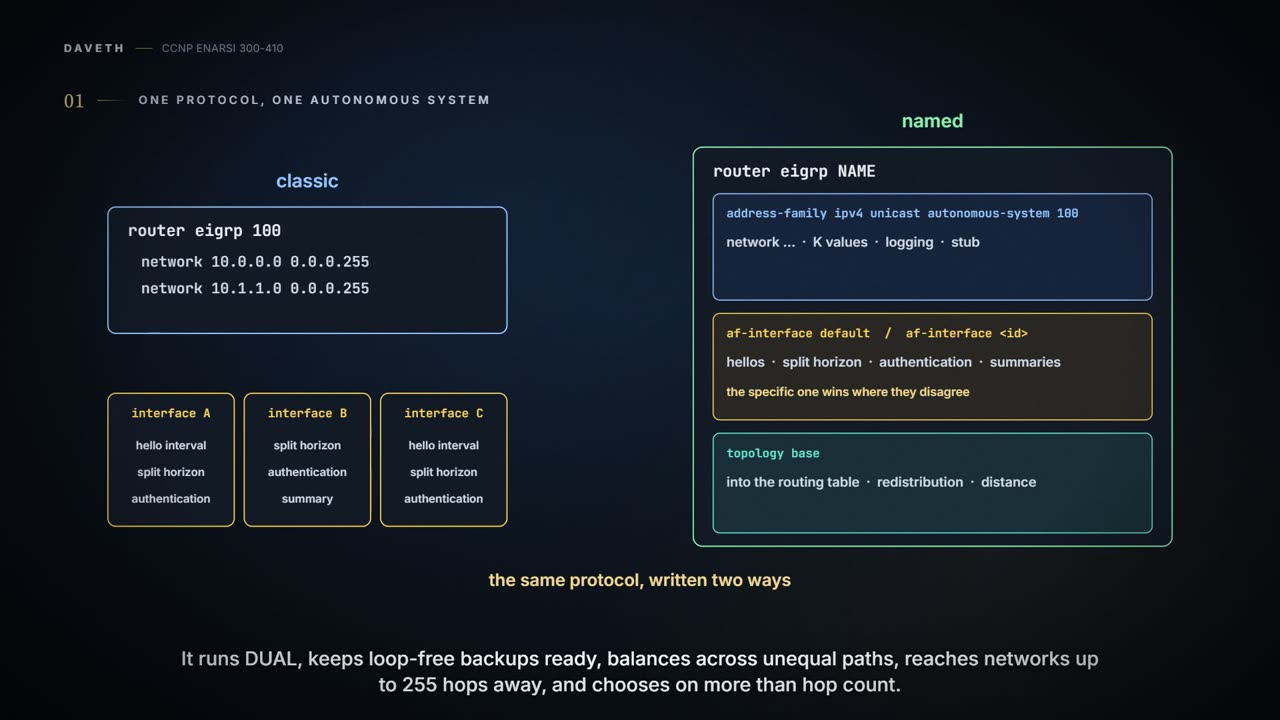
EIGRP can be configured two ways. Classic mode starts with router eigrp and an AS number and keeps settings split between the process and the interfaces. Named mode puts everything in one place, with three submodes, address family, interface and topology, and supports IPv6 and VRFs. In both, the network statement selects interfaces; it does not put a prefix into EIGRP.
By Arif, founder of Daveth · Updated
The full 11 min walkthrough is in Daveth Pro (Network). See what the plan opens
What this page answers
What is the difference between EIGRP classic and named mode?
Classic mode, router eigrp with an AS number, keeps some settings in the process and others on each interface. Named mode, router eigrp with a name, puts all of it in one place under address-family, af-interface and topology submodes, and supports IPv6 and VRFs. Read it in “Named mode: one place, three rooms”
What does the EIGRP network command do?
It selects interfaces with a wildcard, and EIGRP adds each selected interface's connected network. It does not put a prefix into EIGRP, and a secondary address is not added at all. Read it in “Classic mode: the settings live in two places”
How do you configure EIGRP for IPv6?
In named mode: router eigrp name, then address-family ipv6 unicast autonomous-system as-number. Named mode supports several address families, VRFs included. Read it in “Named mode: one place, three rooms”
One autonomous system, two ways to write it
Start with what's the same everywhere in HQ: one routing protocol, EIGRP, in one autonomous system, AS 100.
EIGRP is a distance vector protocol with better habits. It runs DUAL, keeps loop-free backups ready, balances across unequal paths, supports networks up to 255 hops away (the default limit is lower: you'll see Maximum hopcount 100 further down), and uses more than hop count to choose a path. Every EIGRP process belongs to an autonomous system: routers in one AS use the same metric formula, and they exchange routes only with members of the same AS. It has nothing to do with a BGP AS.
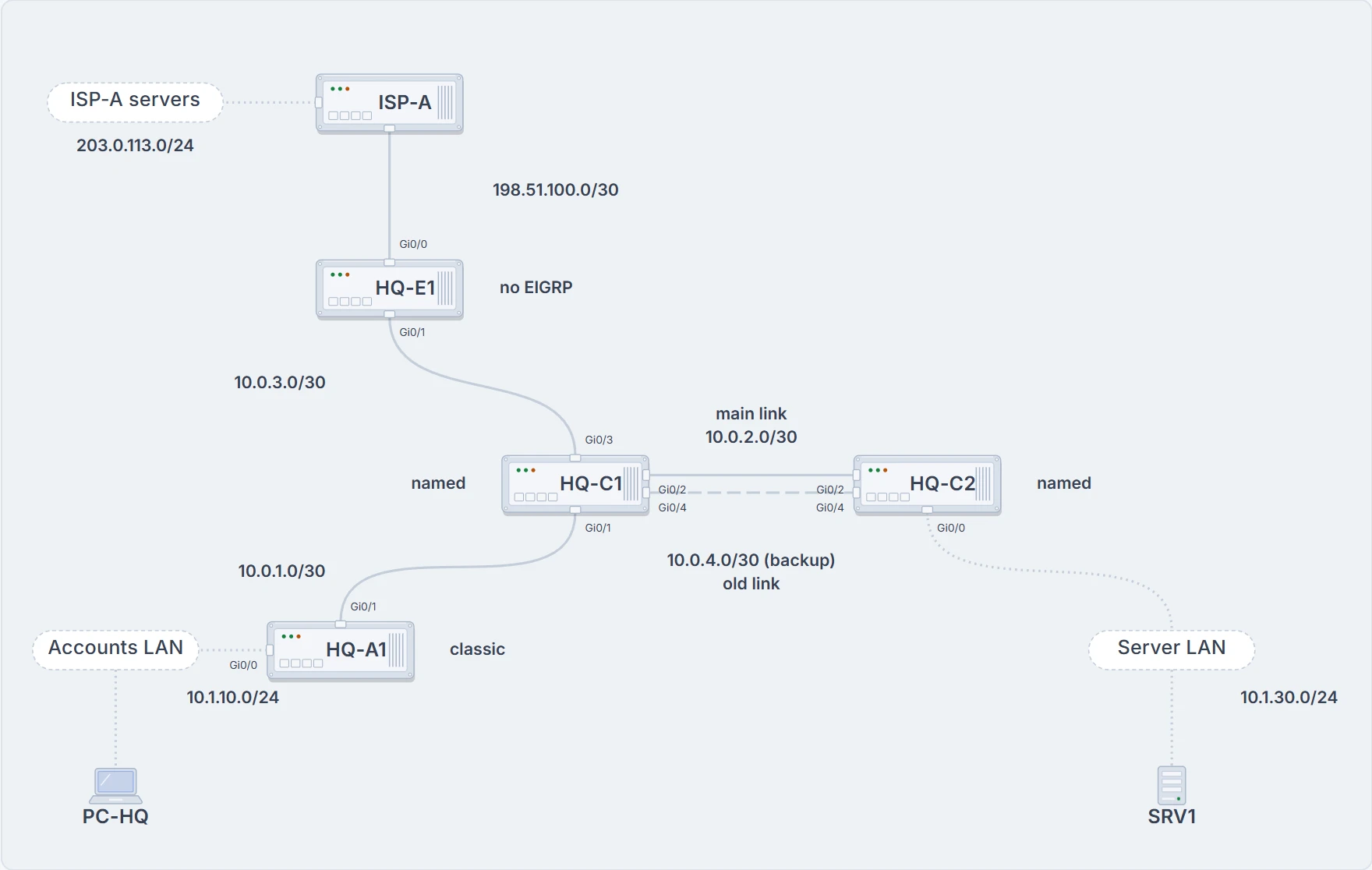
HQ in week two: one autonomous system, AS 100. HQ-A1 is configured in classic mode, HQ-C1 and HQ-C2 in named mode. HQ-E1 runs no EIGRP.
Now open HQ-A1 and HQ-C1 side by side:
HQ-A1# show running-config | section router eigrp
router eigrp 100
 network 10.1.10.1 0.0.0.0
 network 10.0.1.1 0.0.0.0
 passive-interface GigabitEthernet0/0
 ! the accounts LAN: more on this below
HQ-A1#
HQ-C1# show running-config | section router eigrp
router eigrp ENTERPRISE   ! a name, not the AS
 !
 address-family ipv4 unicast autonomous-system 100
  !
  af-interface default   ! every interface starts here
   passive-interface
  exit-af-interface
  !
  af-interface GigabitEthernet0/1
   no passive-interface
  exit-af-interface
  !
  af-interface GigabitEthernet0/2
   no passive-interface
  exit-af-interface
  !
  topology base
  exit-af-topology
  network 10.0.1.2 0.0.0.0
  network 10.0.2.1 0.0.0.0
 exit-address-family
HQ-C1#
Same protocol, same AS, and you'd struggle to tell that from the text. HQ-A1 is written in classic mode, HQ-C1 in named mode. The two styles are independent: classic commands don't change a named configuration.
Classic mode: the settings live in two places
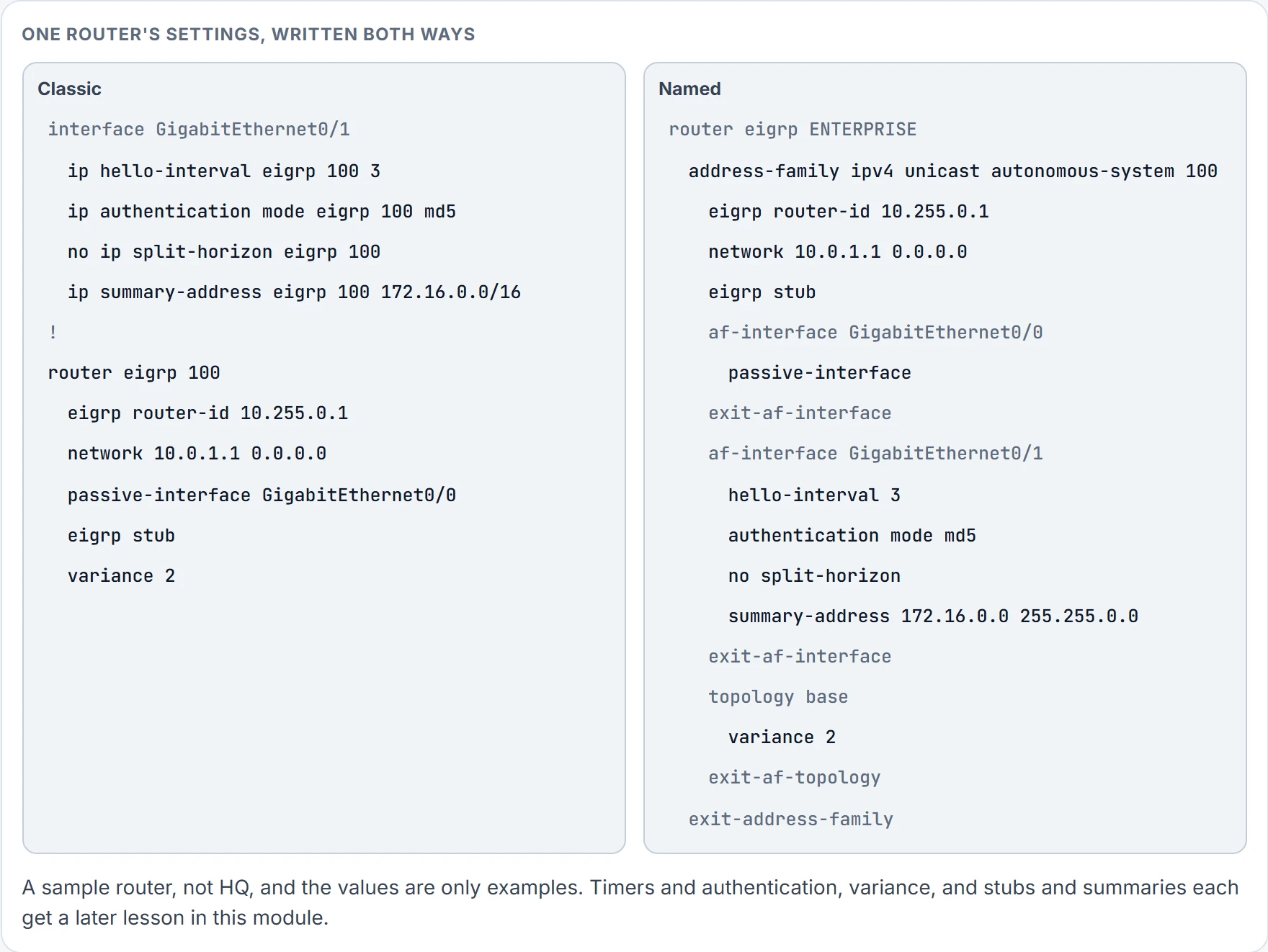
Classic mode starts the process with router eigrp <as-number> and picks interfaces with network statements. Plenty of settings don't live there, though. The hello interval, split horizon, authentication and summary routes are set on the interfaces, so understanding one router means scrolling back and forth between the process and every interface.
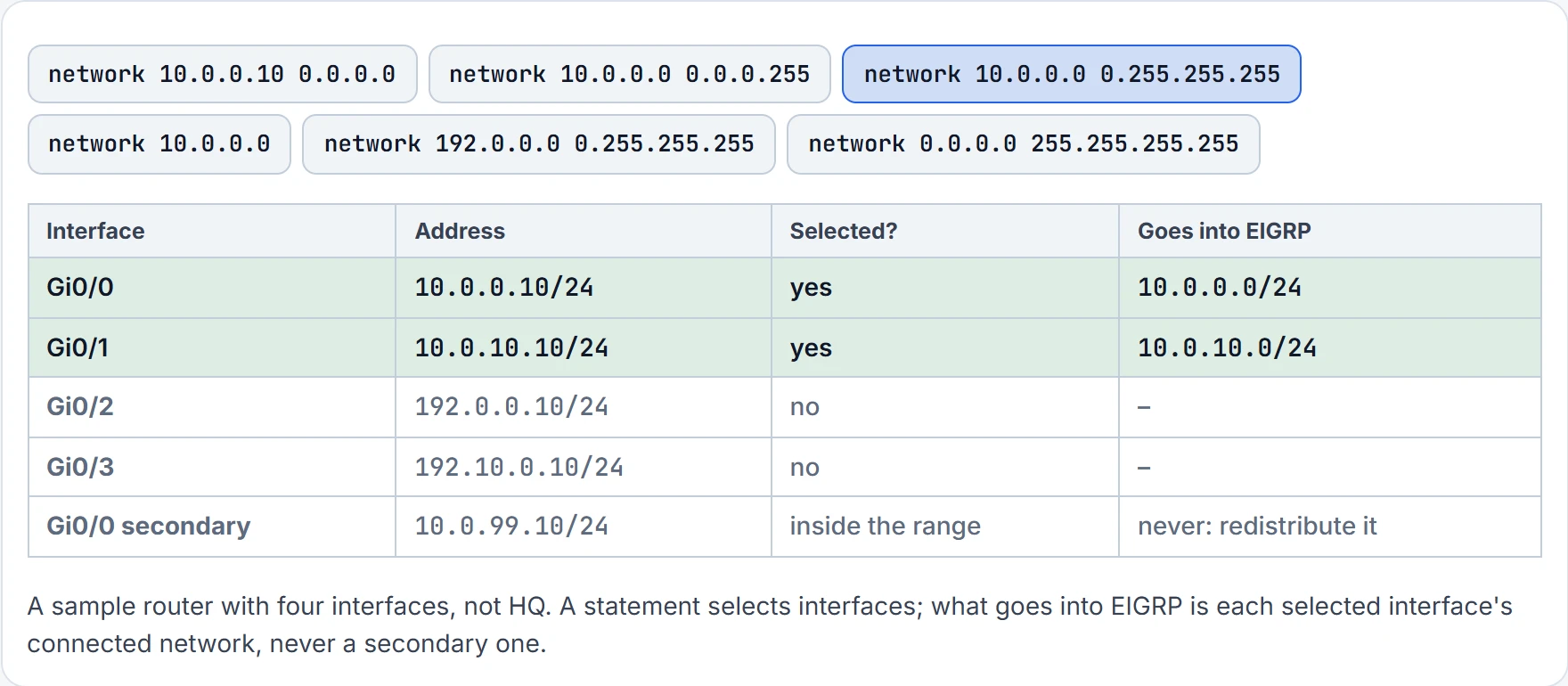
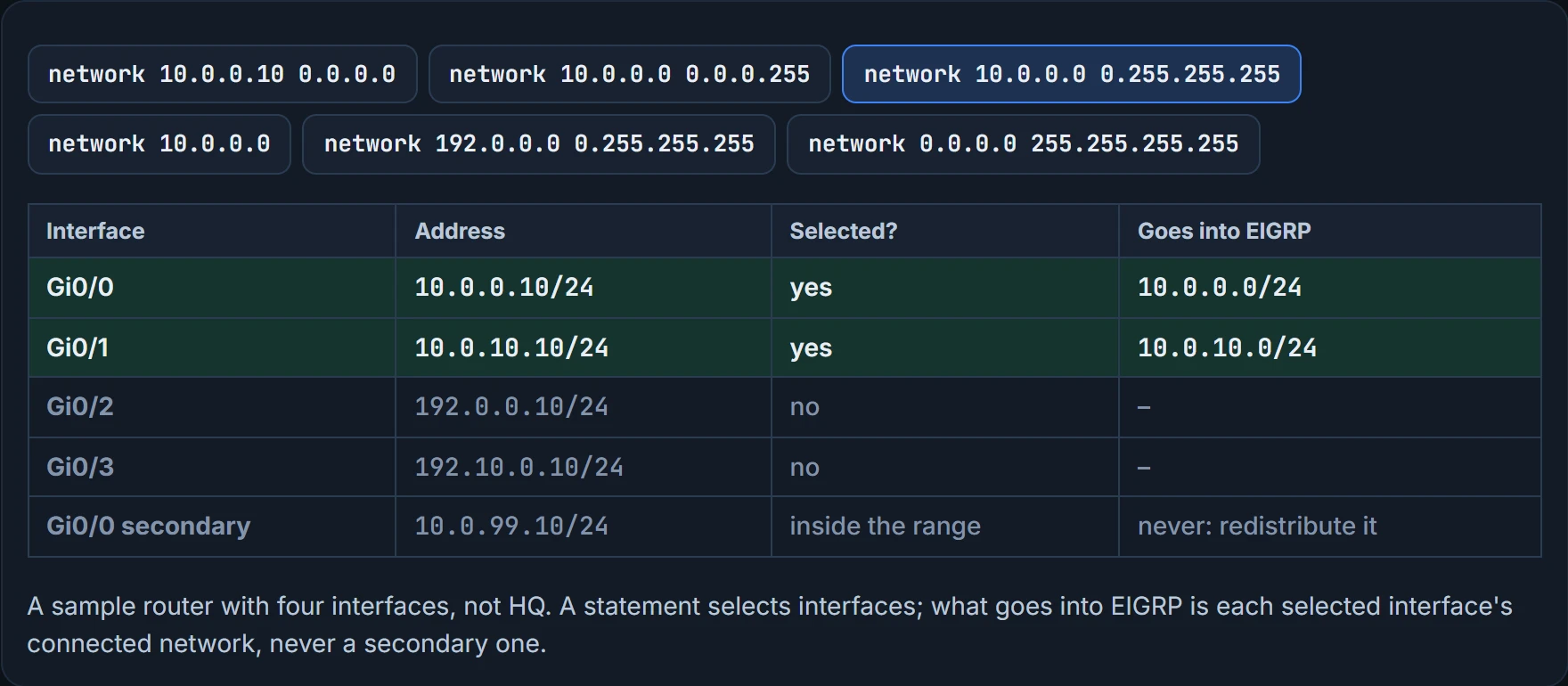
Now the misconception almost everyone brings. The network statement does not put a prefix into EIGRP. It selects interfaces, using a wildcard, and EIGRP then adds each selected interface's connected network. Leave out the wildcard and it matches the whole classful range. A secondary address on an interface isn't added at all: you'd have to redistribute it.
It works like the zone switches for underfloor heating: you choose zones, and what's in a chosen zone gets warm. A zone is an interface, and what gets warm is its connected network. The one place that picture needs adjusting is the secondary address: it sits in the zone and stays cold.
The wildcard reads the way an ACL wildcard does.
network 10.0.0.10 0.0.0.0selects the one interface with that address. That's HQ-A1's style: one exact statement per interface.network 10.0.0.0 0.0.0.255selects any interface in that /24.network 10.0.0.0 0.255.255.255selects any interface in 10.0.0.0/8.network 0.0.0.0 255.255.255.255selects every interface.
Wide ranges are quicker to type, and they can switch EIGRP on where you never meant it to run.
The network statement is the most misnamed command in EIGRP. It should have been called "interfaces, please".
Named mode: one place, three rooms
Named mode puts all of EIGRP's configuration in one place. It supports current EIGRP features and future developments, and several address families, VRFs included, which is why it's also called multi-address family configuration mode. Every command's scope is obvious from where it sits. There are three submodes, three rooms:
- Address family: which interfaces run EIGRP (the
networkstatements), the K values, logging and stub settings. - Interface (
af-interface): the hello interval, split horizon, authentication and summary routes.af-interface defaultapplies to every EIGRP interface; a specificaf-interfacewins where the two disagree. - Topology (
topology base): how routes are presented to the routing table, redistribution, and administrative distance.
The steps are router eigrp <name>, then address-family {ipv4 | ipv6} {unicast | vrf <name>} autonomous-system <as-number>, then network. Look at which of those carries the AS.
The AS is the one in the address-family line. A number used as the process name is just a name, so HQ-C1's ENTERPRISE could as well be 100, or 7. Back on HQ-C1, two more things to read. First, its stored configuration has lines nobody typed: topology base and exit-af-topology are created for you, the family closes with exit-address-family, and every interface section closes with exit-af-interface. A named router enabled with network 0.0.0.0 255.255.255.255 stores it as plain network 0.0.0.0. Second, HQ-C1 uses both kinds of interface section: af-interface default makes every interface passive, and the two specific sections switch that off for its links to HQ-A1 and HQ-C2. Where they disagree, the specific one wins.
Proving what's running
Configuration says what someone intended. These commands say what's happening. Start with the interfaces EIGRP is actually running on:
HQ-A1# show ip eigrp interfaces
EIGRP-IPv4 Interfaces for AS(100)
                Xmit Queue   PeerQ        Mean   Pacing Time
Interface Peers  Un/Reliable  Un/Reliable  SRTT   Un/Reliable
Gi0/1     1      0/0          0/0
! SRTT and pacing times left out, and the Multicast Flow Timer and Pending Routes columns to their right
HQ-A1#
HQ-C1# show ip eigrp interfaces
EIGRP-IPv4 VR(ENTERPRISE) Address-Family Interfaces for AS(100)
Xmit Queue PeerQ Mean Pacing Time
Interface Peers Un/Reliable Un/Reliable SRTT Un/Reliable
Gi0/1 1 0/0 0/0
Gi0/2 1 0/0 0/0
! SRTT and pacing times left out, and the Multicast Flow Timer and Pending Routes columns to their right
HQ-C1#Read the first line of each. Classic says EIGRP-IPv4 Interfaces for AS(100); named says EIGRP-IPv4 VR(ENTERPRISE) Address-Family Interfaces for AS(100). That header is the quickest way to tell the styles apart from output alone.
show ip eigrp interfaces [id] [detail] lists the interfaces running EIGRP, and detail adds the hello and hold timers, split horizon, authentication and packet counts. Its columns: peers; the transmit queue (zero is an indication of a stable network); mean SRTT, the average time for a packet to reach a neighbor and its reply to come back, in milliseconds; the multicast flow timer, the longest time the router spent sending multicast; and pending routes, still waiting in the transmit queue.
Next, who EIGRP is actually talking to. EIGRP advertises no prefixes until a neighbor forms:
HQ-C1# show ip eigrp neighbors
EIGRP-IPv4 VR(ENTERPRISE) Address-Family Neighbors for AS(100)
H   Address                 Interface              Hold Uptime   SRTT   RTO  Q  Seq
                                                   (sec)         (ms)       Cnt Num
0   10.0.1.1                Gi0/1
1   10.0.2.2                Gi0/2
! hold, uptime, SRTT, RTO, Q and Seq left out: they change from moment to moment
HQ-C1#
The columns you'd see on a live router: Hold, the time left to hear from the neighbor before it's declared dead; SRTT; RTO, how long to wait for an acknowledgement before retransmitting; Q Cnt, the update, query and reply packets waiting to go; and Seq Num, the last sequence number received from that neighbor.
show ip eigrp interfaces: which interfaces run EIGRP and send hellos, and how many peers each hasshow ip eigrp neighbors: which neighbors have formed, on which interface
- that a missing interface is missing from EIGRP: some running interfaces are left out of the first list, as the next section shows
- that any particular route has arrived: a neighbor proves the neighbor
show ip route eigrp marks internal routes D, at administrative distance 90, and external ones D EX, at 170; the higher external distance is itself a loop-prevention measure. On HQ-A1, the route to the core link reads D 10.0.2.0 [90/3072] via 10.0.1.2: in the brackets the metric is the second number. Expect that number to look very different on a named router: named mode uses wide metrics by default. A later lesson in this module explains them.
And the command that gathers it all, the AS, the K values, the router ID, the networks, the distances, the passive interfaces and the information sources:
HQ-A1# show ip protocols
! Output omitted for brevity
Routing Protocol is "eigrp 100"
 Outgoing update filter list for all interfaces is not set
 Incoming update filter list for all interfaces is not set
 Default networks flagged in outgoing updates
 Default networks accepted from incoming updates
 EIGRP-IPv4 Protocol for AS(100)
   Metric weight K1=1, K2=0, K3=1, K4=0, K5=0
   Soft SIA disabled
   NSF-aware route hold timer is 240
   Router-ID: 10.1.10.1
   Topology : 0 (base)
     Active Timer: 3 min
     Distance: internal 90 external 170
     Maximum path: 4
     Maximum hopcount 100
     Maximum metric variance 1
 Automatic Summarization: disabled
 Maximum path: 4
 Routing for Networks:
   10.1.10.1/32
   10.0.1.1/32
 Passive Interface(s):
   GigabitEthernet0/0
 ! routing information sources omitted
HQ-A1#
On a named router the first line still reads eigrp 100, and three lines are added: K6=0, Metric rib-scale 128 and Metric version 64bit. Both styles show Maximum path 4, Maximum hopcount 100, variance 1 and automatic summarization disabled. The classic router lists its exact statements as /32 entries.
HQ-C1# show ip protocols
! Output omitted for brevity
Routing Protocol is "eigrp 100"
 Outgoing update filter list for all interfaces is not set
 Incoming update filter list for all interfaces is not set
 Default networks flagged in outgoing updates
 Default networks accepted from incoming updates
 EIGRP-IPv4 VR(ENTERPRISE) Address-Family Protocol for AS(100)
   Metric weight K1=1, K2=0, K3=1, K4=0, K5=0 K6=0
   Metric rib-scale 128
   Metric version 64bit
   Soft SIA disabled
   NSF-aware route hold timer is 240
   Router-ID: 10.0.4.1
   Topology : 0 (base)
     Active Timer: 3 min
     Distance: internal 90 external 170
     Maximum path: 4
     Maximum hopcount 100
     Maximum metric variance 1
 Automatic Summarization: disabled
 Maximum path: 4
 ! Routing for Networks: omitted (the statements are in the running configuration)
 ! routing information sources omitted
HQ-C1#
Named mode has its own set too: show eigrp address-family ipv4 or ipv6, followed by interfaces, neighbors or topology.
Continue the lesson
The whole lesson, with its drawings and its questions. 4 more sections after the ones above.