
Which route wins, and where the packet really goes
A router picks a route in order: the longest matching prefix wins, whatever taught it; only when two sources offer the identical prefix does administrative distance decide which fills the routing table. The routing table and ARP cache are the control plane; CEF builds the FIB and adjacency table from them, and forwarding uses those in the data plane.
By Arif, founder of Daveth · Updated
The full 12 min walkthrough is in Daveth Pro (Network). See what the plan opens
What this page answers
How does a router choose between overlapping routes?
By longest match first: of 10.0.0.0/8, 10.1.30.0/24 and 10.1.30.0/26, a packet for 10.1.30.10 takes the /26. The router does not ask which protocol taught each route at that step. Read it in “Longest match first”
What is the difference between show ip route and show ip cef?
show ip route with an address shows the control plane's view: source, distance, metric and next hop. show ip cef shows what the FIB will forward with: the next hop and interface, and no routing-protocol details. Read it in “The evidence: which command proves what”
What is proxy ARP?
A router answering an ARP request with its own MAC address when it has a route to the address asked about. It is on by default, and it is why a static route out an exit interface can work beyond the link. Read it in “Static routes: next hop or exit interface”
One packet, hop by hop
When two hosts can't reach each other, the network layer is often the right place to start, and a ping tests it. If the ping works, everything up to Layer 3 works, and the problem is higher up. If it fails, look at Layers 1 to 3. That's divide and conquer.
Dana's first ticket comes from Lee on the service desk, in capitals: INTERNET DOWN. Underneath, it says one new starter in accounts can't open ISP-A's test web server, at 203.0.113.5. The desk next to theirs can. Here's the part of HQ this page's faults live in:
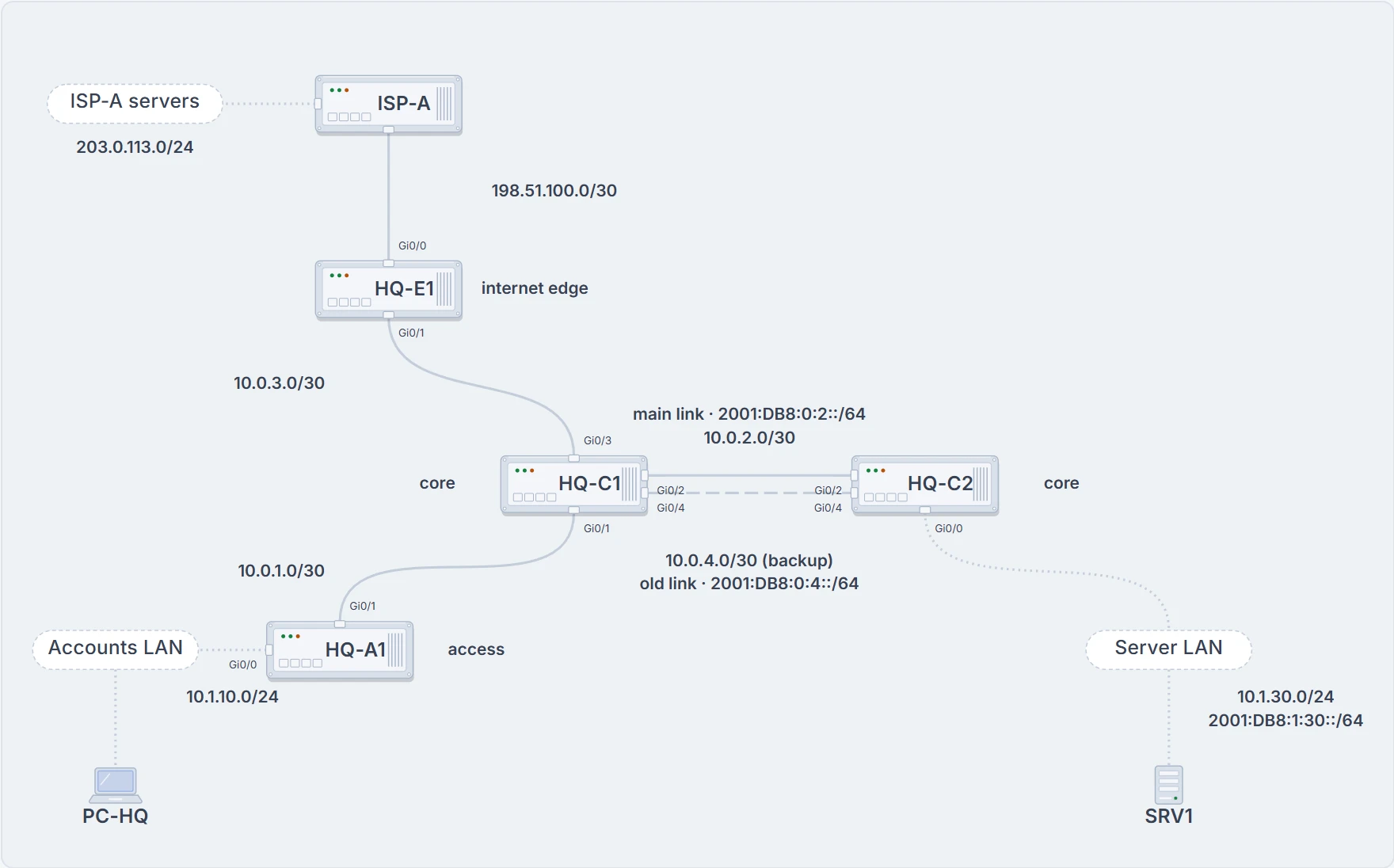
HQ in week one: the part of the network this page's tickets touch. HQ-C1 and HQ-C2 are joined twice; only the main link runs EIGRP.
Start where the user sits. Ping the web server from the new starter's PC, PC-HQ, then its gateway, HQ-A1:
C:\> ping 203.0.113.5

Pinging 203.0.113.5 with 32 bytes of data:
Request timed out.
Request timed out.
Request timed out.
Request timed out.

Ping statistics for 203.0.113.5:
    Packets: Sent = 4, Received = 0, Lost = 4 (100% loss),
C:\> ping 10.1.10.1

Pinging 10.1.10.1 with 32 bytes of data:
! time= and TTL= left out: they change every run
Reply from 10.1.10.1: bytes=32
Reply from 10.1.10.1: bytes=32
Reply from 10.1.10.1: bytes=32
Reply from 10.1.10.1: bytes=32

Ping statistics for 10.1.10.1:
    Packets: Sent = 4, Received = 4, Lost = 0 (0% loss),
C:\>
The gateway answers, so PC-HQ's link and its own address are fine. It's tempting to suspect an access list on one of HQ-A1's interfaces, or address translation that isn't working for the new PC. Before going down that path, review the basics: what does the PC do with a packet for somewhere else?
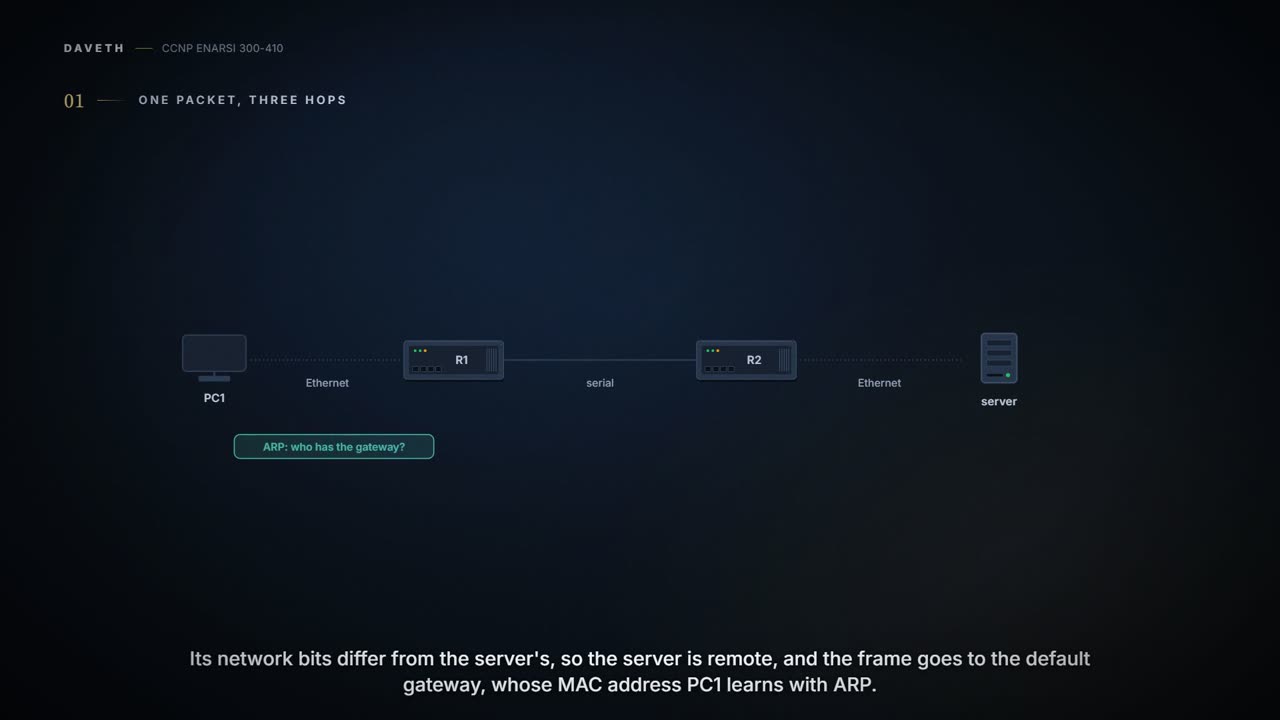
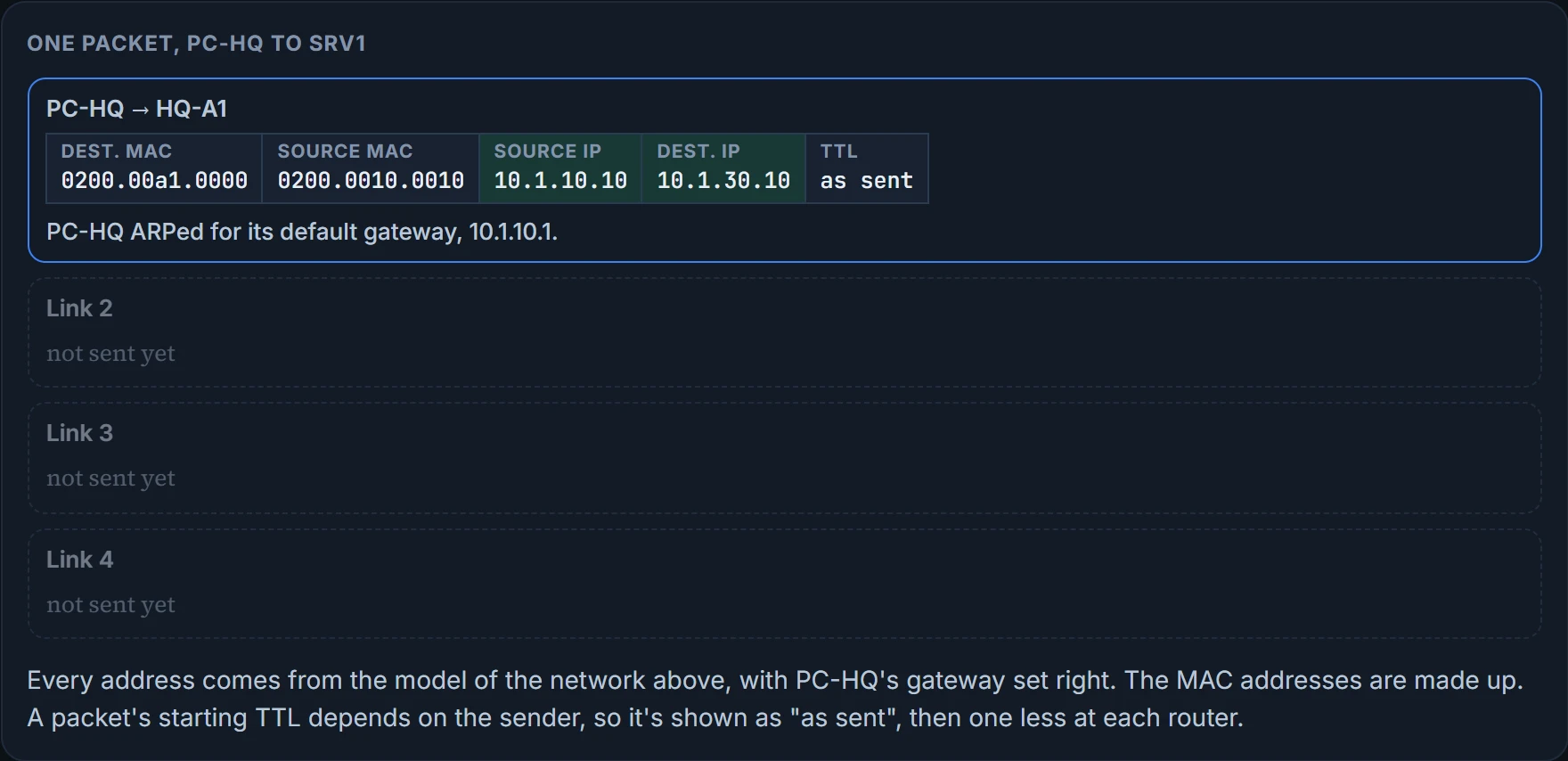
A host compares its own network bits with the destination's. If they match, the destination is on its own subnet and it sends straight there. If not, the packet goes to its default gateway, set by hand or learned from DHCP. The host needs the gateway's MAC address for the frame, and learns it with ARP if it isn't already in its ARP cache.
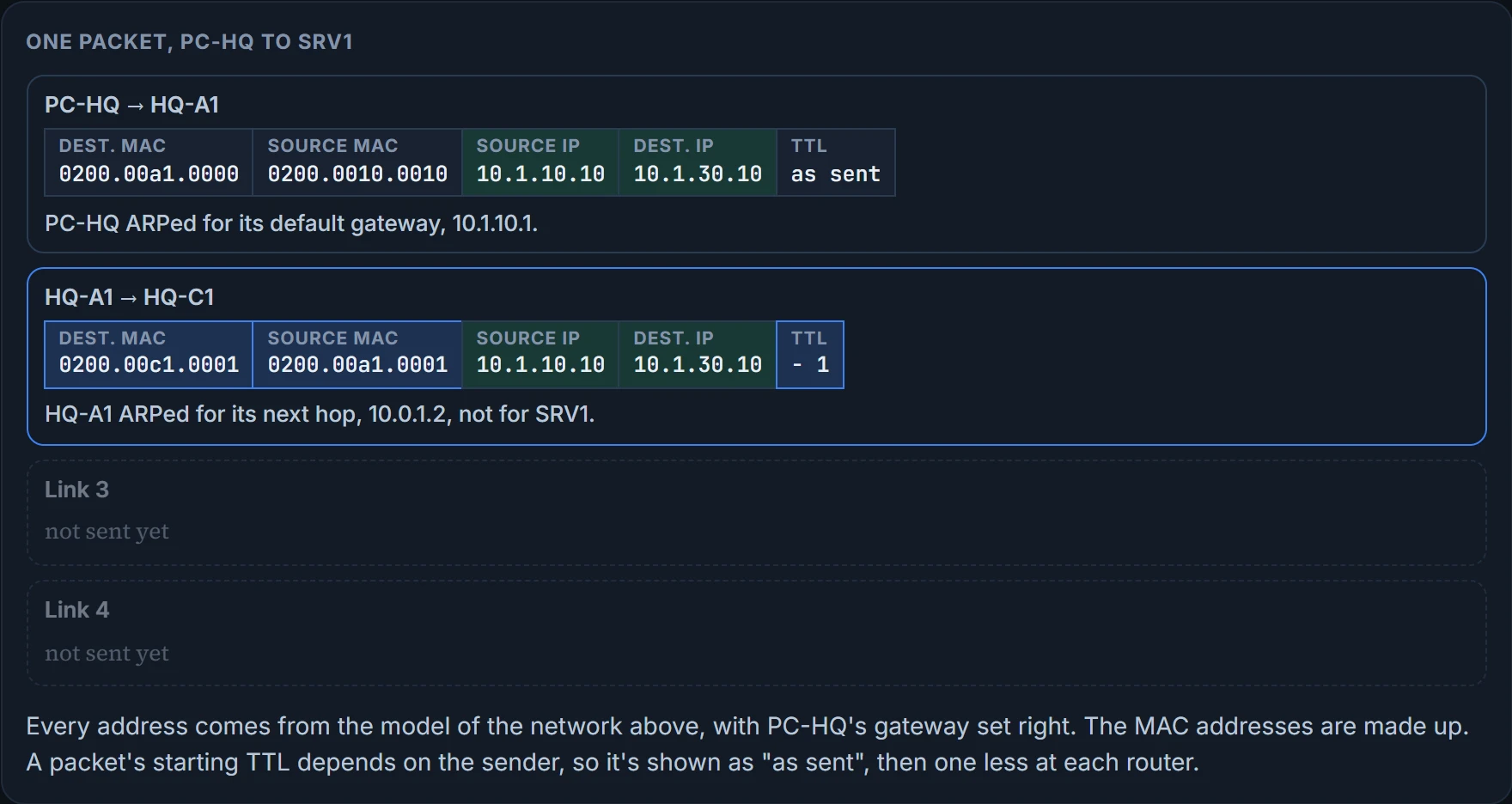
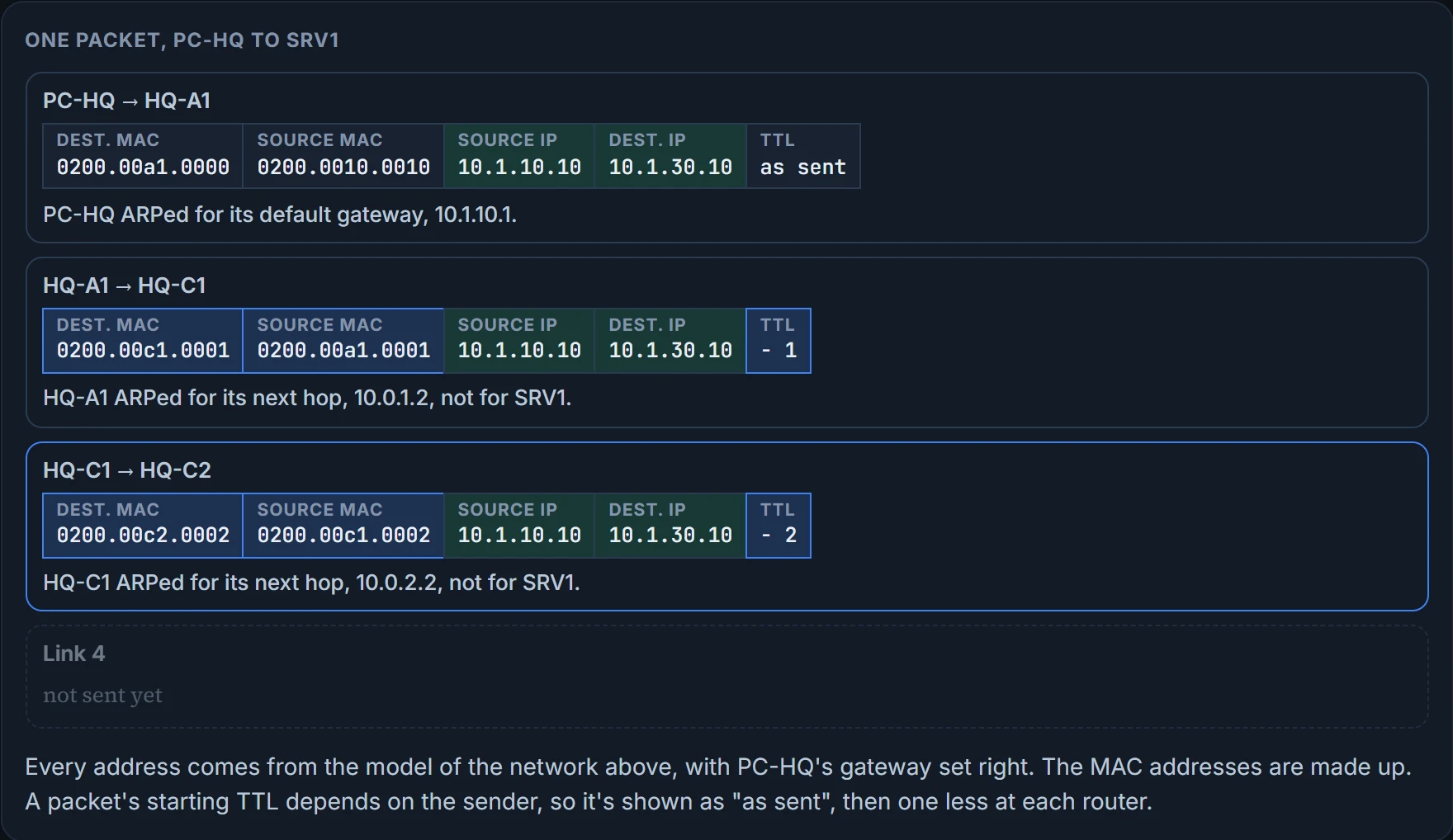
Then each router does the same few things. It sees a frame addressed to its own MAC, strips the Layer 2 header off, and takes one off the packet's TTL. If the TTL reaches zero, the router discards the packet and sends an ICMP time-exceeded message back to the source. Otherwise it looks up the destination and builds a new frame for the next link. The last router ARPs for the destination host itself. (On a serial link there's no ARP at all: no MAC address to learn.)
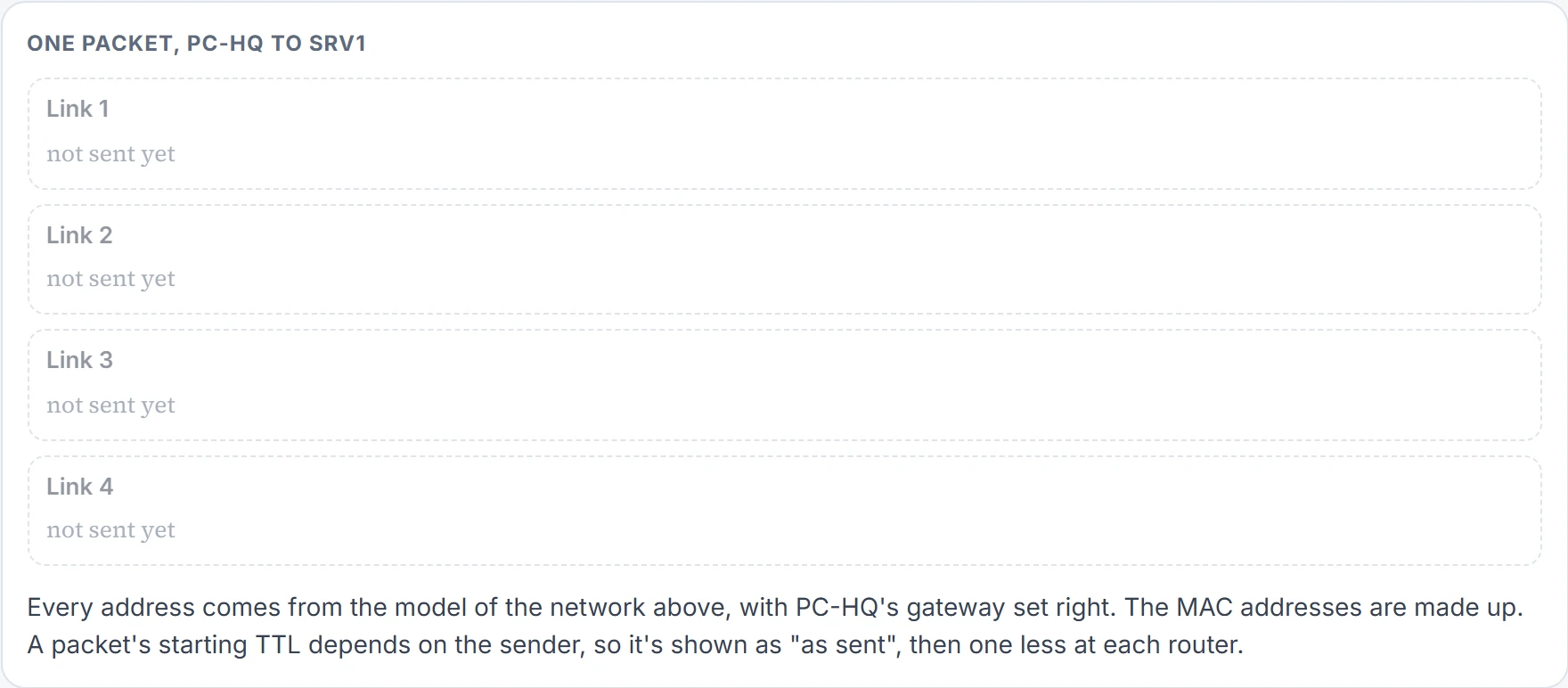
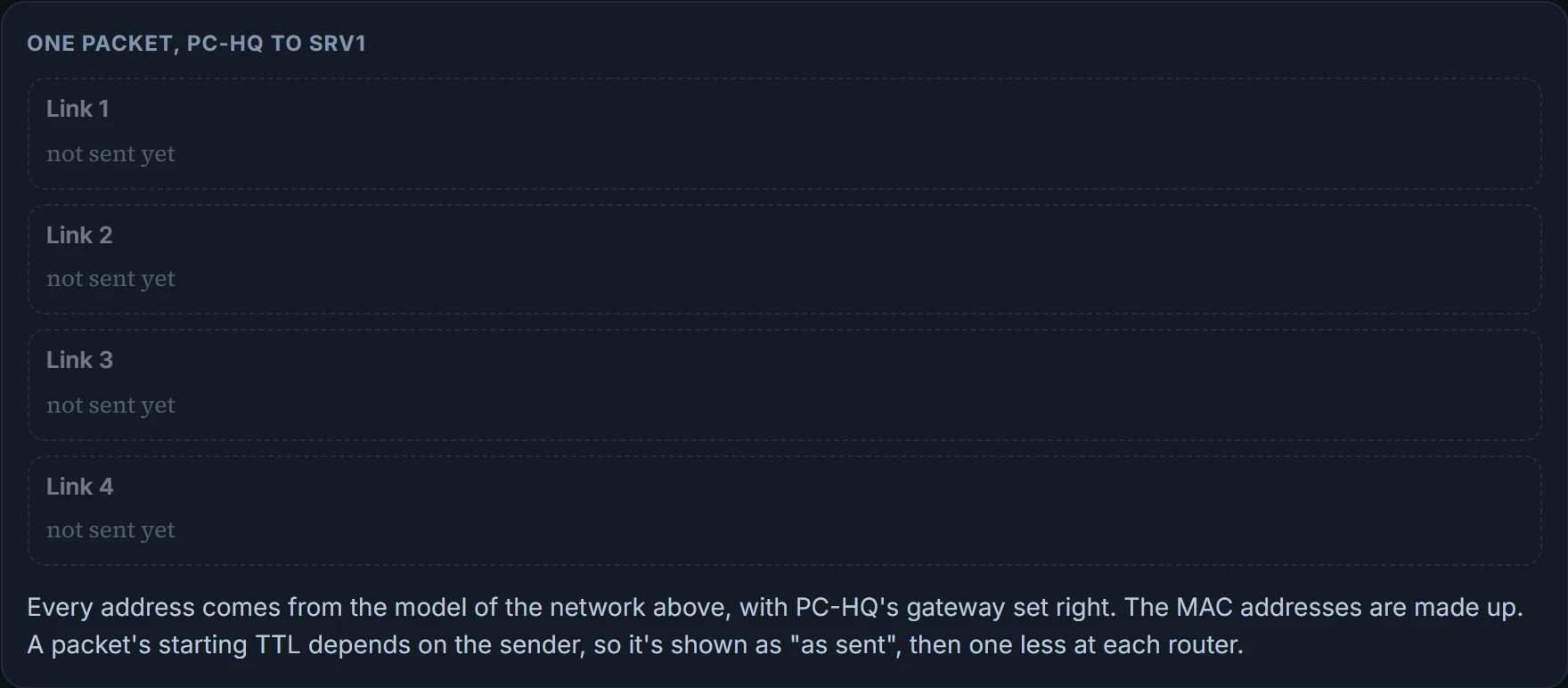
Step 1 of 5 One packet from PC-HQ to SRV1, before it leaves: four links to cross.
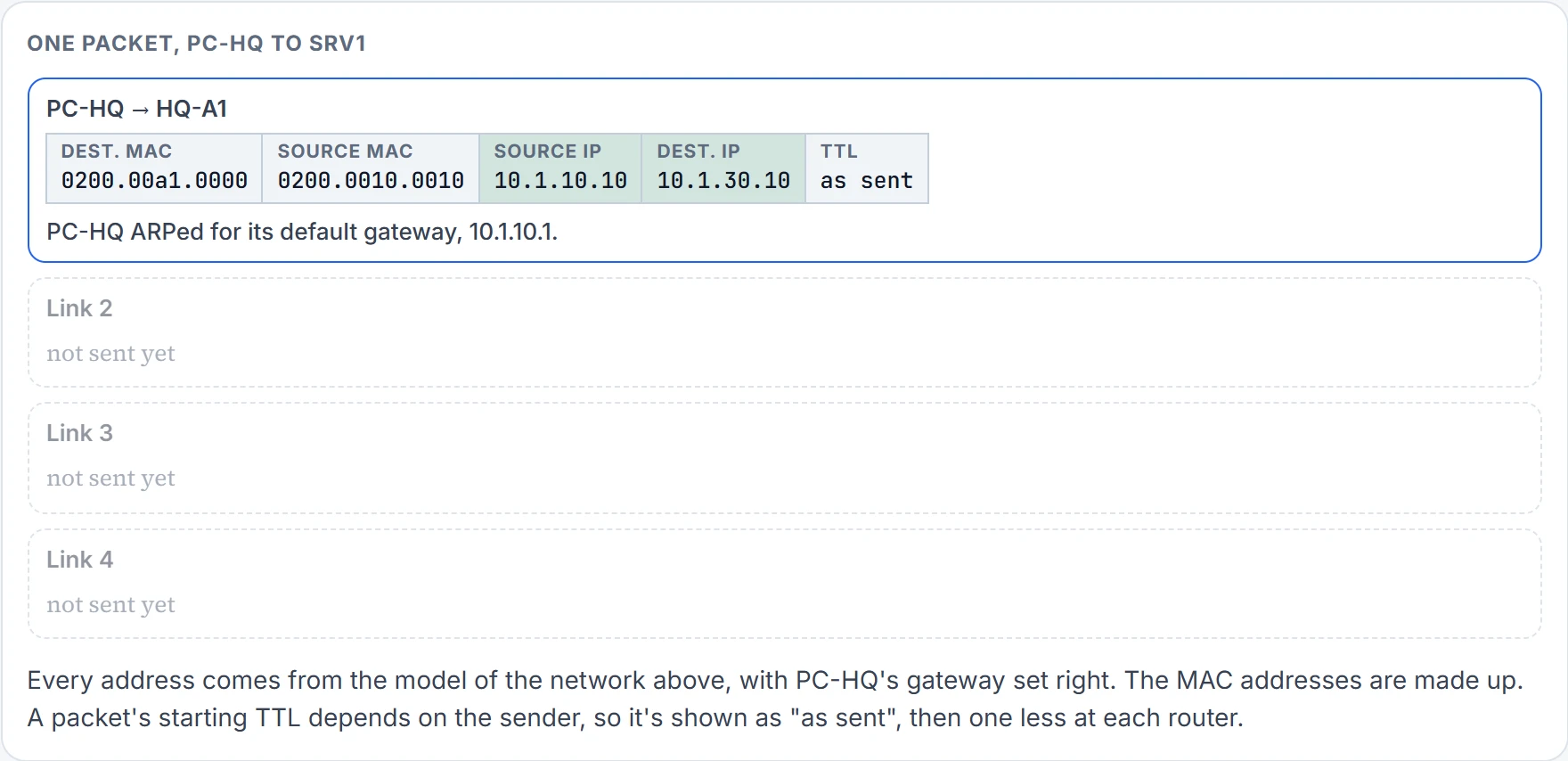
Step 2 of 5 Link 1: PC-HQ to HQ-A1. The destination MAC is its default gateway's; the IP addresses are PC-HQ's and SRV1's.
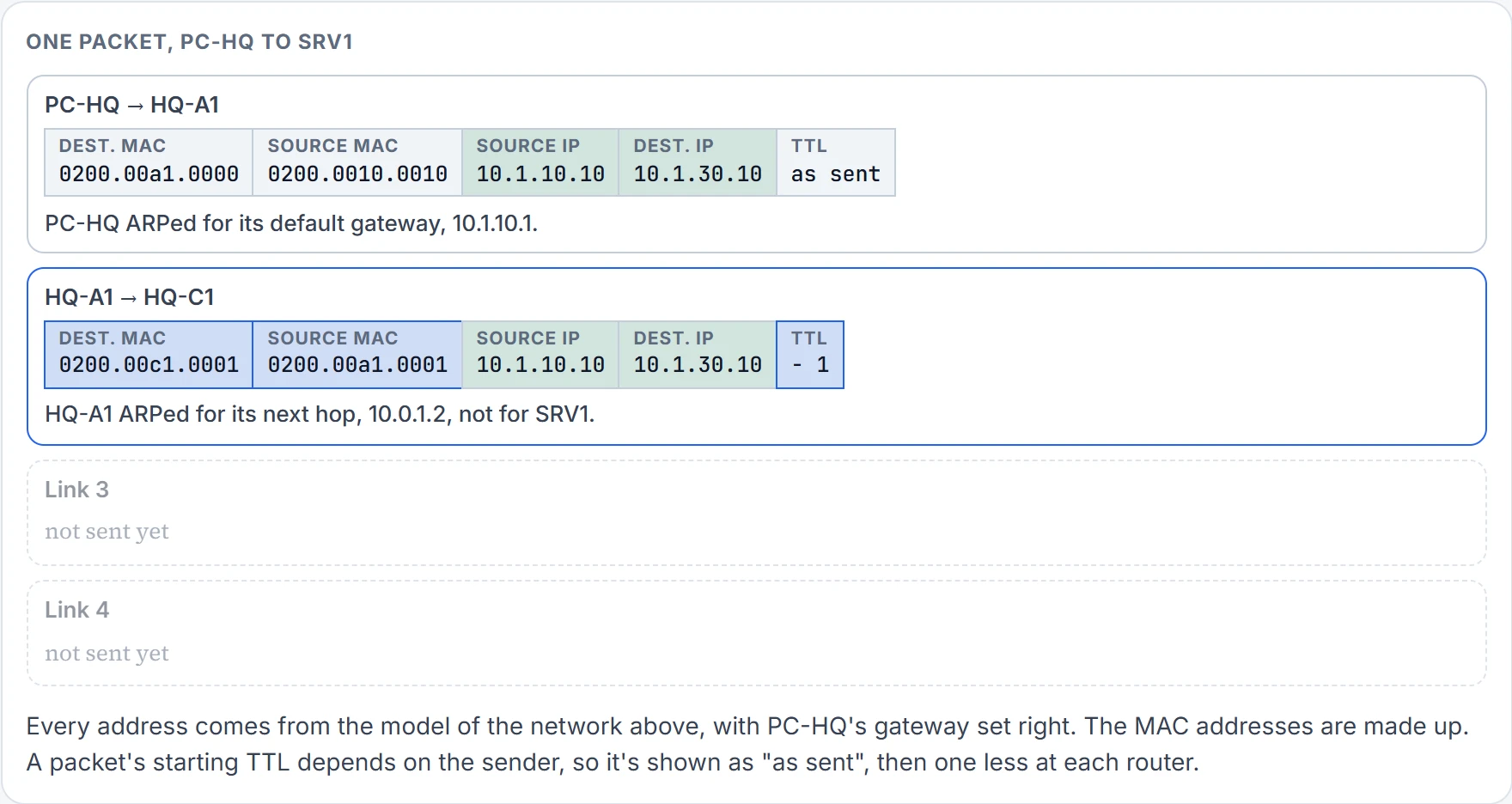
Step 3 of 5 Link 2: HQ-A1 to HQ-C1. New MAC addresses for the new link; the IP addresses are unchanged and the TTL is one less.
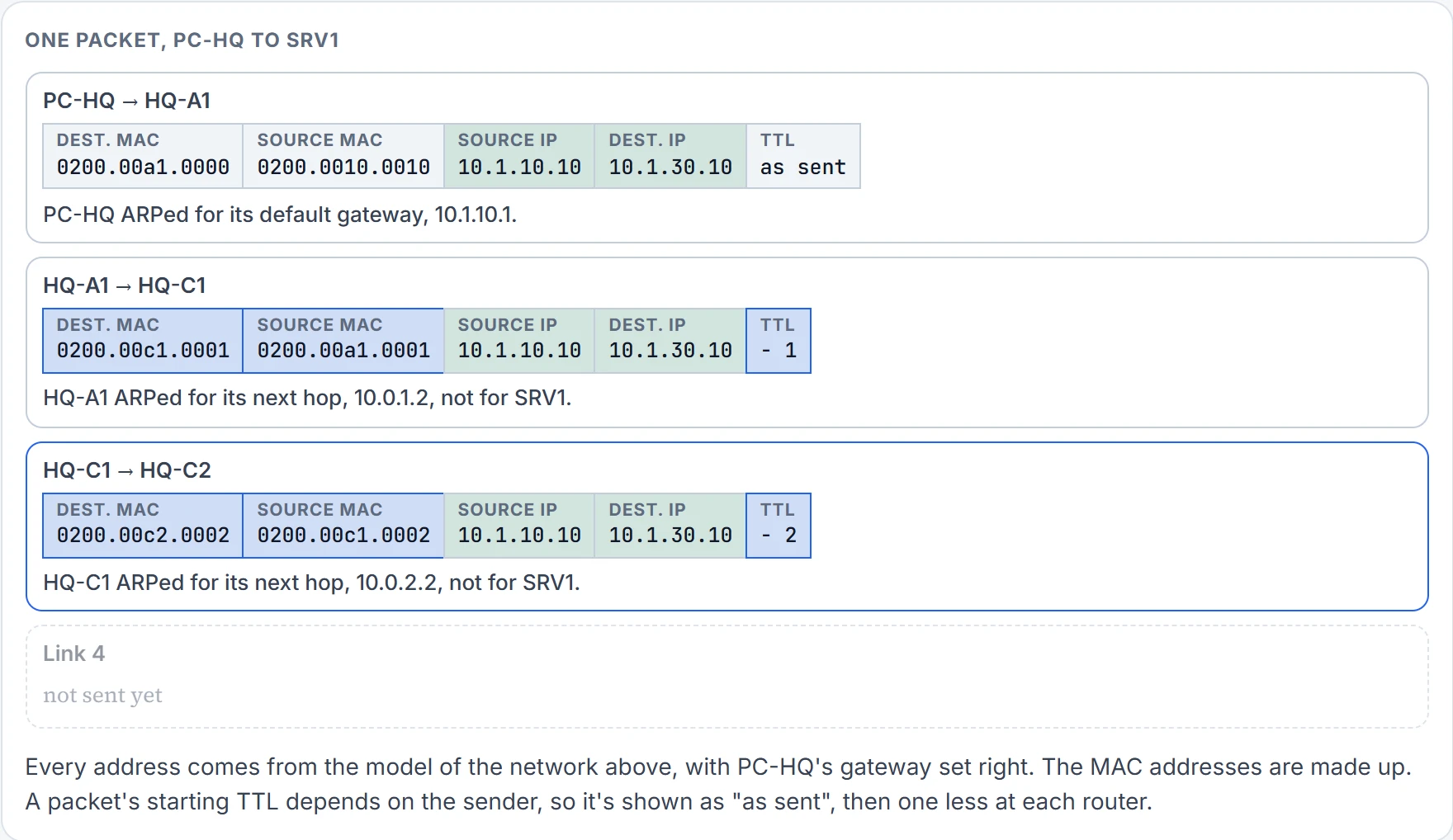
Step 4 of 5 Link 3: HQ-C1 to HQ-C2. Again new MAC addresses, the same IP addresses, the TTL one less again.
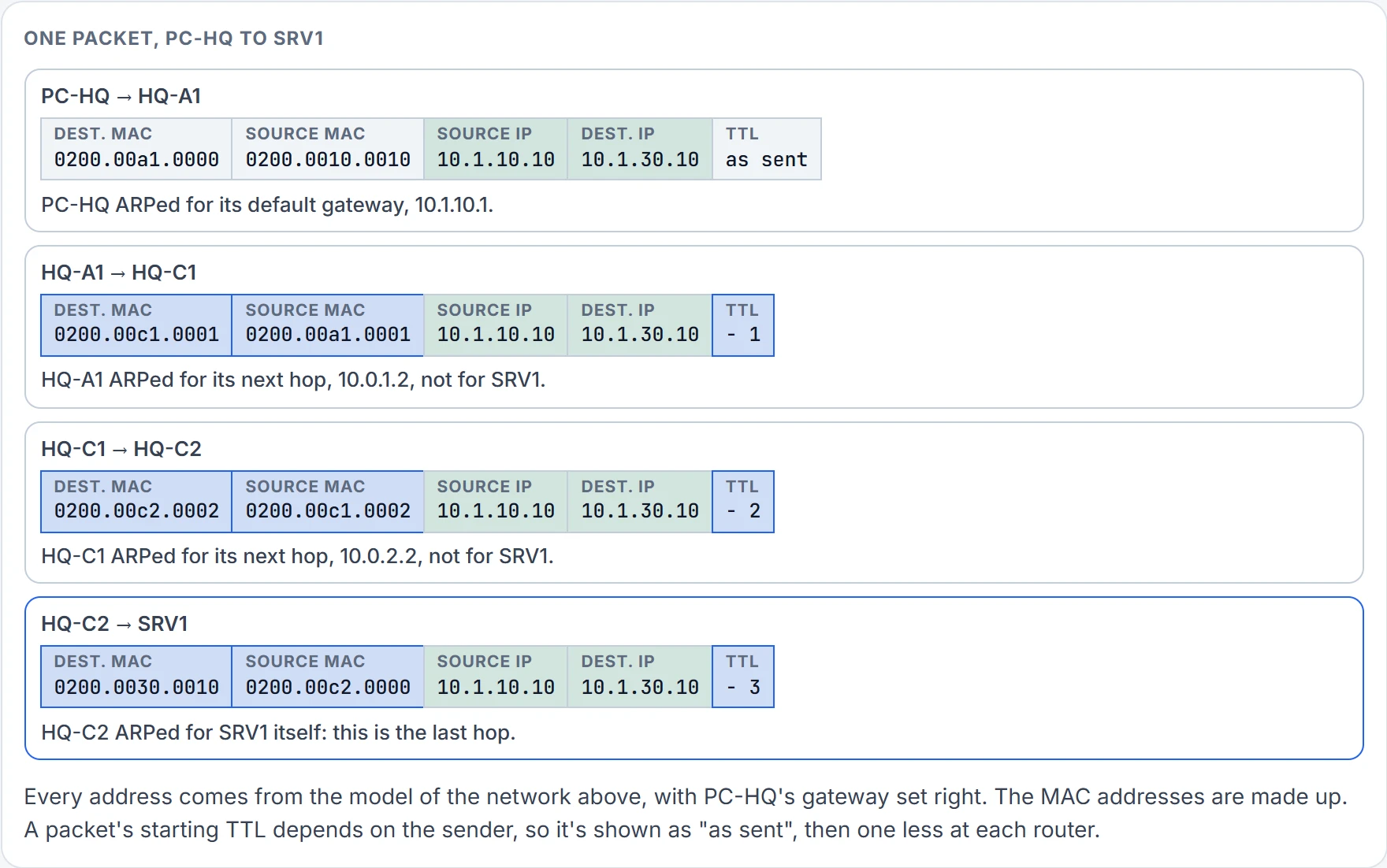
Step 5 of 5 Link 4: HQ-C2 to SRV1, the last hop. Every link changed the MAC addresses; the IP addresses never changed.
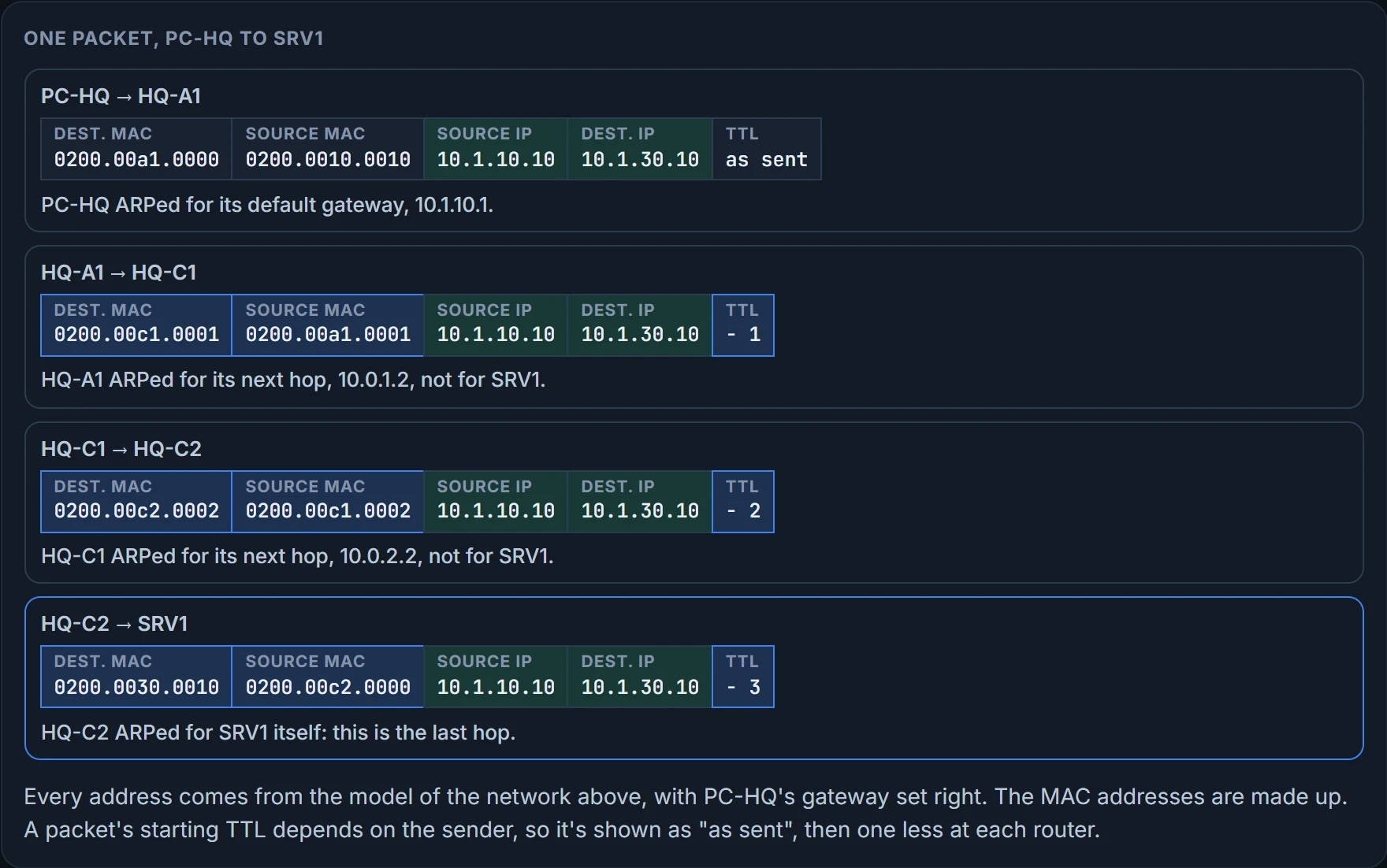
A parcel crossing the country behaves the same way. The address label on the box never changes, but it rides in a different van from each depot, with a new sticker saying which van: the IP header being the label and the frame being the van's sticker. Where that picture slips is the TTL: every router changes it, so the label isn't quite untouched.
So what is PC-HQ handing its packets to? Ask it:
C:\> ipconfig
Windows IP Configuration

Ethernet adapter Local Area Connection:
   Connection-specific DNS Suffix . :
   IP Address. . . . . . . . . . . .: 10.1.10.10
   Subnet Mask . . . . . . . . . . .: 255.255.255.0
   Default Gateway . . . . . . . . .: 10.1.10.100
   ! not HQ-A1, which is 10.1.10.1
C:\>
The default gateway is 10.1.10.100. HQ-A1 is 10.1.10.1. PC-HQ has been asking a device that doesn't exist to forward its packets, so nothing leaves the LAN. It's the new starter's PC, set up by hand on their first day. Correct the gateway and test again:
C:\> ping 203.0.113.5

Pinging 203.0.113.5 with 32 bytes of data:
! time= and TTL= left out: they change every run
Reply from 203.0.113.5: bytes=32
Reply from 203.0.113.5: bytes=32
Reply from 203.0.113.5: bytes=32
Reply from 203.0.113.5: bytes=32

Ping statistics for 203.0.113.5:
    Packets: Sent = 4, Received = 4, Lost = 0 (0% loss),
C:\>
So the first fault had no routing in it at all. The packet never reached a router. That's worth keeping in the order you check things: the host's own decision comes before any router's.
Longest match first
A router's routing table can hold several routes that all contain the same address. Say it has 10.0.0.0/8, 10.1.30.0/24 and 10.1.30.0/26, and a packet arrives for 10.1.30.10. All three contain it. The router picks the /26, because the best match is the route with the longest prefix: the one that matches the most bits.
Notice what the router didn't look at: which protocol taught it each route. It doesn't ask at this step. That question comes next, and only when two routes have the identical prefix.
Which source does the router believe?
A router can hear about routes from several sources at once: its connected interfaces, static routes, EIGRP, OSPF, BGP. Routes to different destinations are no problem: each one goes into the table for its own network. But when two sources offer exactly the same route, only one of them can fill the routing table.
Where do the candidates come from? A routing protocol keeps its own table, fed by its neighbors' updates, by routes redistributed into it, and by the networks of the interfaces enabled for it. From that table the protocol picks its best route by its own metric. That best route is only a candidate: it goes into the routing table only if its source wins. Connected networks and static routes are candidates too.
The router settles it with administrative distance: how believable each source is, and lower wins. If RIP (120) and OSPF (110) both offer 10.1.1.0/24, OSPF's route goes in. The defaults:
| Source of the route | Administrative distance |
|---|---|
| Connected interface | 0 |
| Static route | 1 |
| EIGRP summary route | 5 |
| eBGP (external BGP) | 20 |
| EIGRP (internal) | 90 |
| OSPF | 110 |
| IS-IS | 115 |
| RIP | 120 |
| ODR (On-Demand Routing) | 160 |
| EIGRP (external) | 170 |
| iBGP (internal BGP) | 200 |
| Unknown (not believable) | 255 |
So a route can be missing from the table, or traffic can take a worse path, simply because another source with a lower distance offers the same prefix. Most routes show their numbers in brackets, read as [distance/metric], so [110/2] is OSPF with a metric of 2. (Connected routes show none, and neither does a static pointed at an interface, which is listed as directly connected.) show ip route with an address spells it out, as "Known via ..., distance ...". And if you never want a source believed, set the distance of its routes, some or all of them, to 255: "do not believe".
The tempting reading of that table is "the router uses the most trusted protocol's route." It does, but only between routes for the same prefix. Test it on the contest below before you look at the answer.
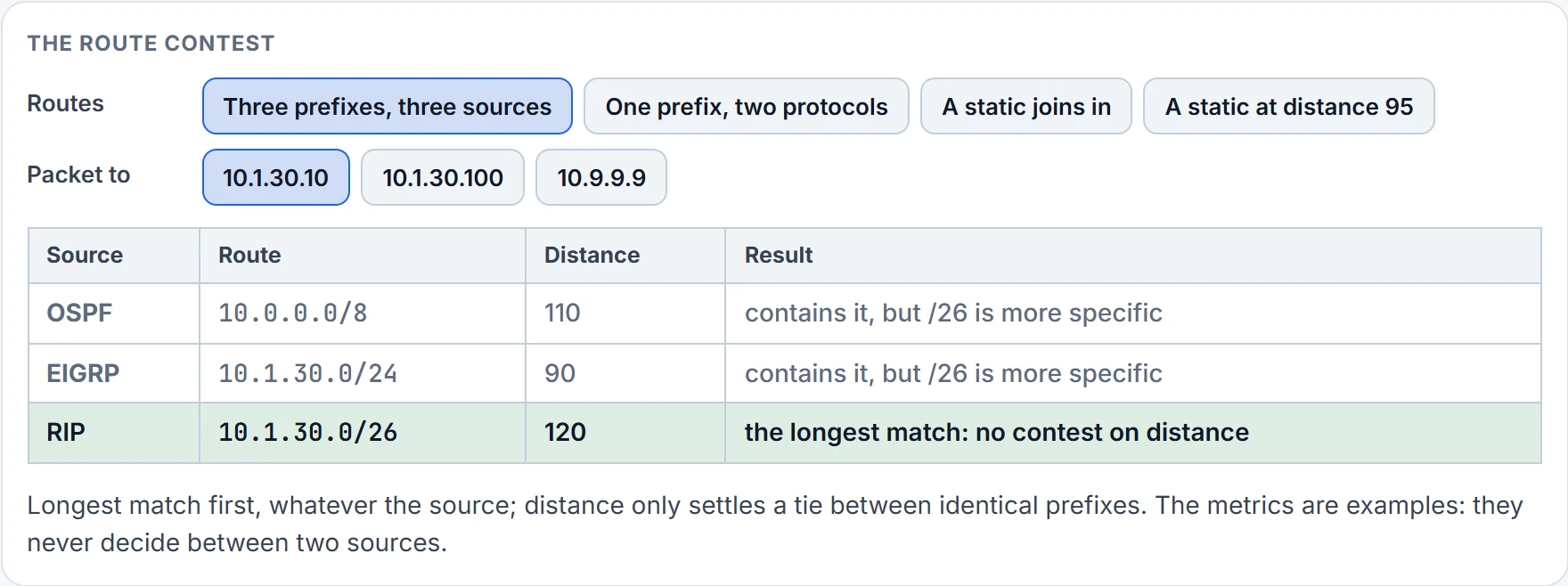
Two planes: where the decision is made, and where it's used
So far "the routing table" has done everything. It doesn't forward the packets. The router works in two planes. The control plane is where it works out the way: two tables sit there, the IP routing table and the Layer 3-to-Layer 2 mapping table, which is the ARP cache on Ethernet (multipoint Frame Relay and DMVPN have similar tables of their own; a point-to-point link needs none, since there's only one device at the other end). The data plane is where packets actually move.
Looking both up for every packet would be less than efficient. So CEF, Cisco Express Forwarding, gleans what it needs from both, and forwarding reads CEF's own structures, kept in hardware, in the data plane: the FIB, with the routing table's Layer 3 information plus multicast routes and directly connected hosts, and the adjacency table, with a ready-made frame header for each next hop (the egress interface and the next hop's MAC on Ethernet; just the interface on a point-to-point link).
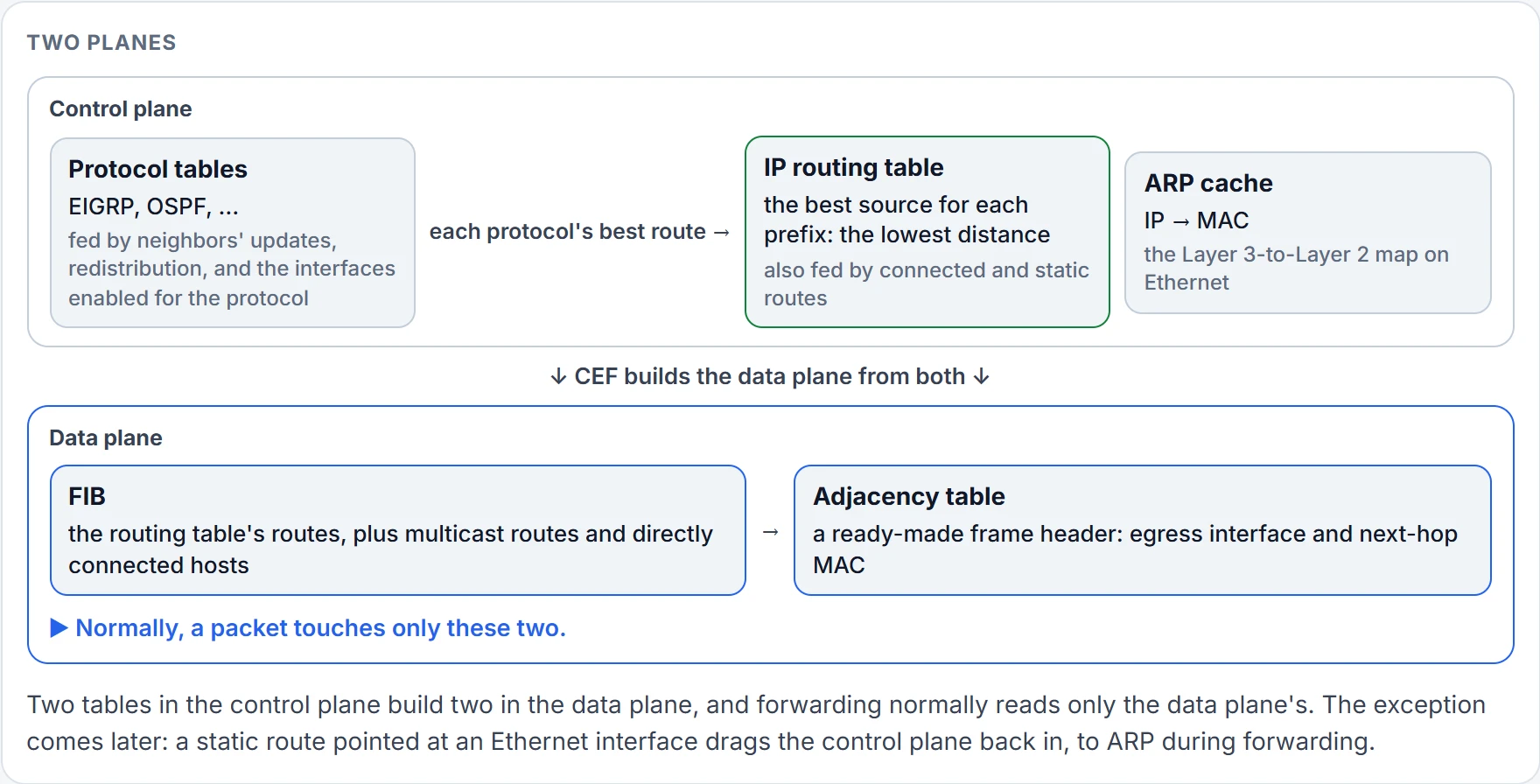
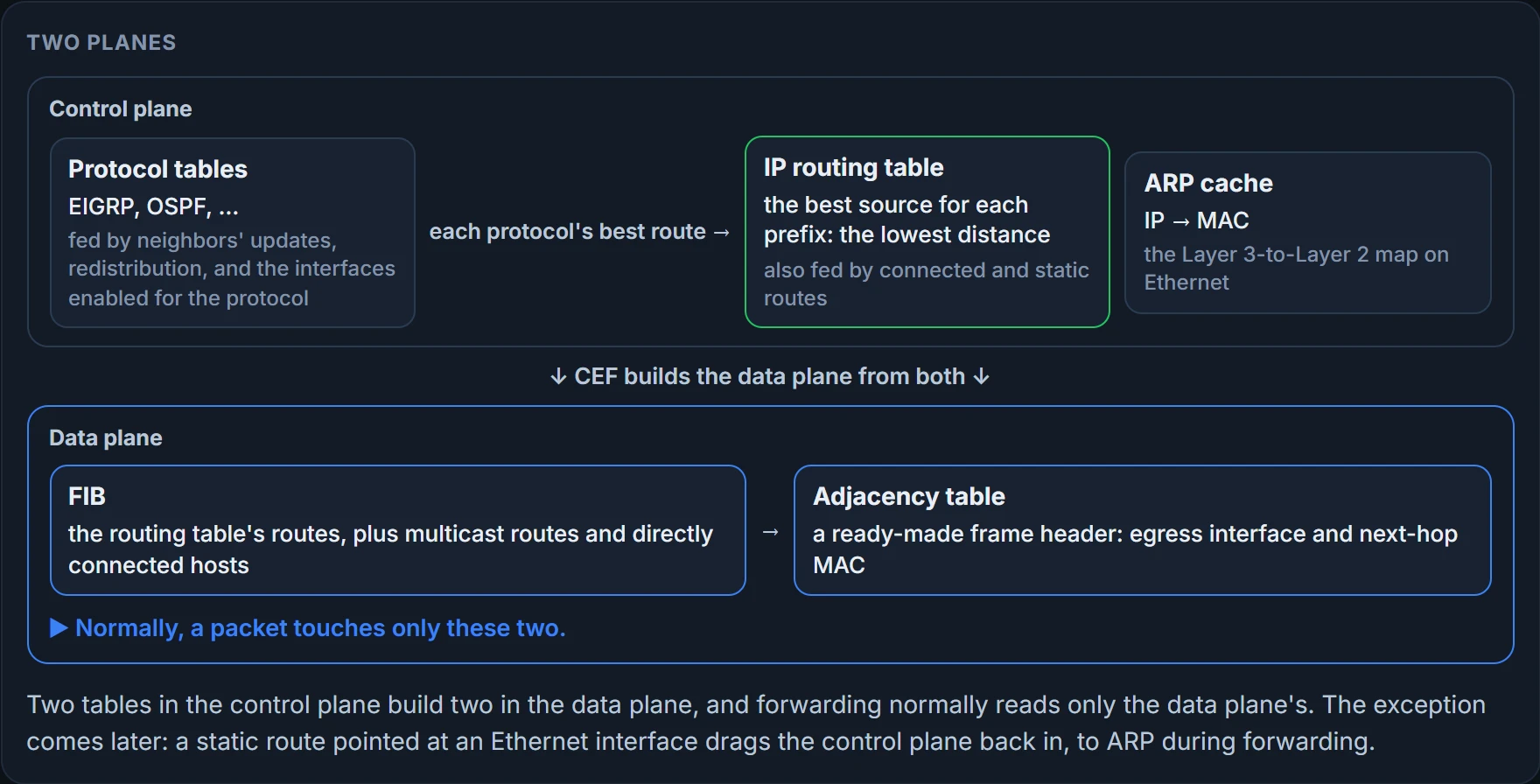
So when traffic doesn't do what the routing table says, don't argue with the routing table. Look at what the data plane is actually using: the FIB and the adjacency table.
The evidence: which command proves what
Each command answers one question. While you're on HQ-A1, ask it about the web server's address both ways:
HQ-A1# show ip route 203.0.113.5
Routing entry for 203.0.113.0/29   ! a /29: .0 to .7, and nothing higher
  Known via "static", distance 1, metric 0
  Routing Descriptor Blocks:
  * 10.0.1.2
      Route metric is 0, traffic share count is 1
HQ-A1# show ip cef 203.0.113.5
203.0.113.0/29, cached adjacency 10.0.1.2
! what forwarding will use: it agrees with the route
! version, epoch, packet counters and dependencies omitted
  via 10.0.1.2, GigabitEthernet0/1
  next hop 10.0.1.2, GigabitEthernet0/1
  valid cached adjacency
HQ-A1#
show ip route with an address gives the route a packet to that address matches: its source, distance, metric and next hop. That's the control plane's view. show ip cef with the same address gives what the FIB will use: the next hop and interface, and no routing-protocol details at all, because CEF doesn't care who taught it. Here they agree, via 10.0.1.2. The route is a static for 203.0.113.0/29, left by Frank, the engineer before Dana, and nothing is complaining about it. Remember the mask anyway. (show ip cef also takes a mask, for one exact prefix.)
show ip route <address>: which route the control plane matched, from which source, at what distanceshow ip cef <address>: the next hop and interface forwarding will use
- that forwarding uses what the routing table says: check CEF
- why CEF chose it: it shows no routing protocol
- that the next hop answers: ping through it
Give show ip route a mask as well, and it shows that exact route and nothing else; a prefix that isn't in the table gets "% Subnet not in table". Add longer-prefixes to the same command, and it lists every route inside that prefix instead:
HQ-A1# show ip route 203.0.113.0 255.255.255.0
% Subnet not in table
HQ-A1# show ip route 203.0.113.0 255.255.255.0 longer-prefixes
! the codes legend is omitted
Gateway of last resort is not set
      203.0.113.0/29 is subnetted, 1 subnets
S        203.0.113.0 [1/0] via 10.0.1.2
HQ-A1#
show ip cef exact-route gives the adjacency one particular flow, from one source to one destination, will take. It's most useful when several paths are installed, because different flows can take different ones:
HQ-A1# show ip cef exact-route 10.1.10.10 203.0.113.5
10.1.10.10 -> 203.0.113.5 : GigabitEthernet0/1 (next hop 10.0.1.2)
HQ-A1#
show ip arp is the ARP cache, a control-plane table: the MAC addresses learned for each IP address. show adjacency detail is the frame header CEF has ready for each next hop: in the long string, the first 12 hex digits are the destination MAC, the next 12 the source MAC, and 0800 means IPv4.
HQ-A1# show ip arp
Protocol  Address          Age (min)  Hardware Addr   Type   Interface
Internet  10.0.1.1         -          0200.00a1.0001  ARPA   GigabitEthernet0/1
Internet  10.0.1.2                    0200.00c1.0001  ARPA   GigabitEthernet0/1
Internet  10.1.10.1        -          0200.00a1.0000  ARPA   GigabitEthernet0/0
Internet  10.1.10.10                  0200.0010.0010  ARPA   GigabitEthernet0/0
! ages left out: they change minute to minute
HQ-A1# show adjacency detail
Protocol Interface                 Address
IP       GigabitEthernet0/1         10.0.1.2
                                   ! counters and epochs omitted
                                   Encap length 14
                                   020000C10001020000A100010800
                                   Link-type after encap: ip
                                   ARP
IP       GigabitEthernet0/0         10.1.10.10
                                   ! counters and epochs omitted
                                   Encap length 14
                                   020000100010020000A100000800
                                   Link-type after encap: ip
                                   ARP
HQ-A1#
DMVPN adds one more mapping table, NHRP's, read with show ip nhrp: which underlay address reaches each tunnel next hop. A later lesson covers it.
Static routes: next hop or exit interface
A static route is the one source you control completely, and by default the second most trusted, at distance 1. The syntax is ip route prefix mask {next-hop | interface} [distance]. On HQ-C1, ip route 10.1.30.0 255.255.255.0 10.0.2.2 8 would show up as S 10.1.30.0/24 [8/0] via 10.0.2.2: distance 8, and a metric of 0, because a static route has no idea how far away the network really is.
What goes wrong with them: a wrong network or mask, so the packets you meant don't match, and might be dropped, or might follow the default route, which may point the wrong way; a static that includes networks it shouldn't, which sends their packets the wrong way; and two statics pointing at each other, which bounce a packet back and forth until its TTL runs out.
The next hop matters most. Given a next hop, the router looks that address up in its own routing table (a recursive lookup), finds the exit interface, and ARPs once, for the next hop's MAC. Every later packet to that next hop just reads the cache.
An exit interface instead is right on a pure point-to-point link, like serial or DSL. Ethernet is multiaccess (more devices could share it) even when only two routers sit on it. Point a static at an Ethernet interface and the route looks directly connected, so the router ARPs for the destination of every packet. For destinations beyond the link, it works only because the next router answers those requests with proxy ARP, which is on by default: a router answers an ARP request with its own MAC if it has a route to the address asked about.
HQ-C1 has one of these, towards the test servers. Nobody has complained about it, because it works.
Continue the lesson
The whole lesson, with its drawings and its questions. The rest of this section and 3 more after it.