
systemd for model servers: service units, cgroup limits, timers, the journal and restart policies
At boot systemd starts everything at once unless a unit says it must wait. A model server that needs a network share must say so, or it starts before the share is mounted, crashes, and restarts until systemd gives up. Ordering with After= and requirement with Requires= or Wants= are different instructions, and you usually need both.
What this page answers
Why does my systemd service fail at boot but work by hand?
Nothing told systemd the service needs its model folder, so it started the server before the network share was mounted. The server found an empty folder, crashed, and was restarted five times in a few seconds. Read it in “Fails at boot, works by hand”
What is the difference between After= and Requires= in systemd?
After= is ordering: if both are starting, start me after that one. Requires=, or the softer Wants=, is requirement: I need that one running. You almost always need both. Read it in “What systemd actually manages”
Fails at boot, works by hand
You've made your vLLM model server a systemd service, so it starts at boot. The models live on a network share mounted at /models. After every reboot the service is dead, yet sudo systemctl start llm by hand works perfectly. The status and the log:
$ systemctl status llm.service
× llm.service - vLLM model server
     Loaded: loaded (/etc/systemd/system/llm.service; enabled; preset: enabled)
     Active: failed (Result: start-limit-hit) since Sat 2026-10-24 06:12:09 UTC; 2h ago
$ journalctl -u llm -b | tail -5
Oct 24 06:12:08 gpu-box python[1931]: FileNotFoundError: [Errno 2] No such file or directory: '/models/qwen2.5-7b/config.json'
Oct 24 06:12:08 gpu-box systemd[1]: llm.service: Main process exited, code=exited, status=1/FAILURE
Oct 24 06:12:09 gpu-box systemd[1]: llm.service: Start request repeated too quickly.
Oct 24 06:12:09 gpu-box systemd[1]: llm.service: Failed with result 'start-limit-hit'.
Oct 24 06:12:09 gpu-box systemd[1]: Failed to start llm.service - vLLM model server.
Outputs on this page are realistic examples. Unit directives, defaults and commands are real (systemd 255, as on Ubuntu 24.04).
The model files are fine, and by the time you log in they're there. What went wrong at boot?
- The model files were corrupted, then fixed themselves
- It started before /models was mounted, crashed fast, and systemd gave up
- The GPU driver wasn't loaded yet
Answer. At boot, systemd starts many things at once, as early as each one is allowed to start. Nothing told it that this service needs /models, so it started the server before the network share was mounted. The server found an empty folder and crashed in a second. The service was set to restart on failure, so systemd restarted it, and it crashed again, five times in a few seconds. Then a safety rule kicked in: more than 5 starts within 10 seconds means “something is badly wrong, stop trying”. That's start-limit-hit. A minute later the share was mounted, but nobody tried again.
The fix is one line in the unit file: RequiresMountsFor=/models. It tells systemd that this service needs that path mounted, so wait for it, and don't start without it. The next section shows how systemd thinks about order, and the mechanism section lets you watch restart policies play out second by second.
What systemd actually manages
systemd manages units. A unit can be a service (a program to keep running), a mount (a disk or share), a timer (a schedule), and more. Targets are named milestones that group units, like “the network is fully up” (network-online.target) or “network shares are mounted” (remote-fs.target). At boot, systemd starts everything at once, except where a unit says it must wait.
Two different kinds of instruction matter, and mixing them up causes the hook. Ordering (After=) says “if both are starting, start me after that one”. Requirement (Requires=, or the softer Wants=) says “I need that one running”. You almost always need both. The diagram shows the boot order for our model server.
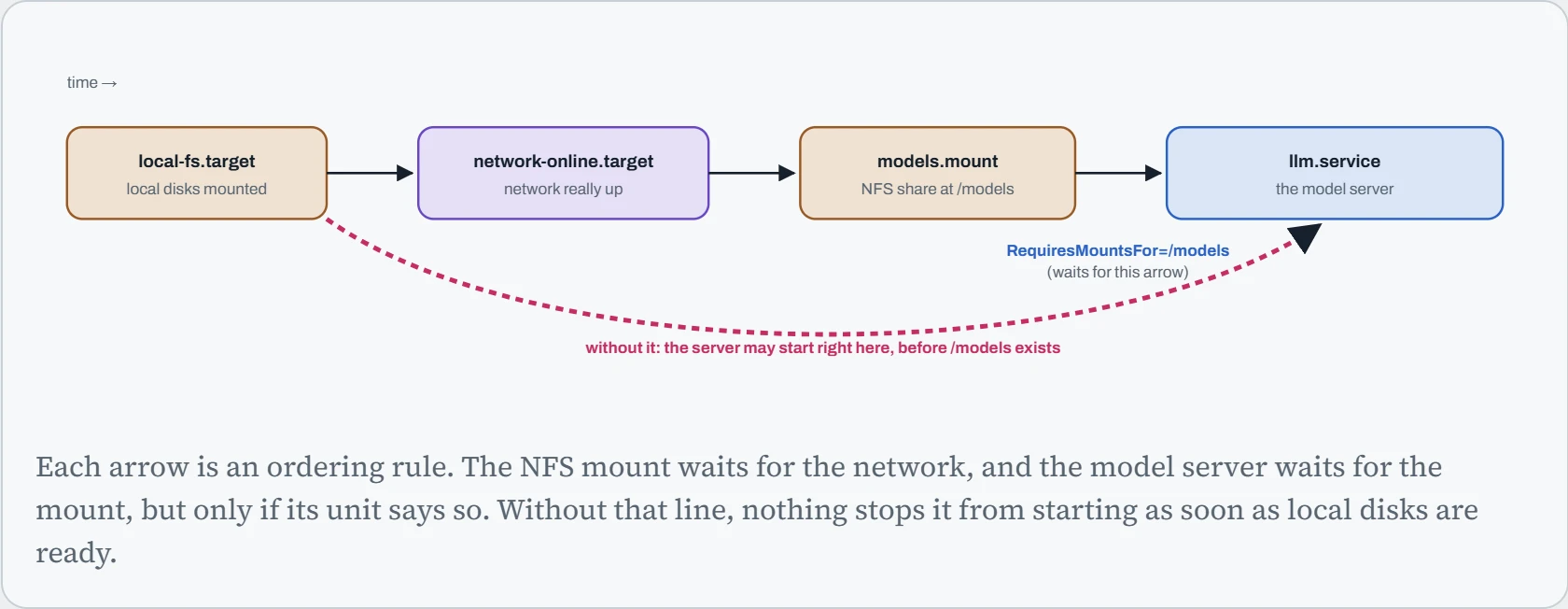
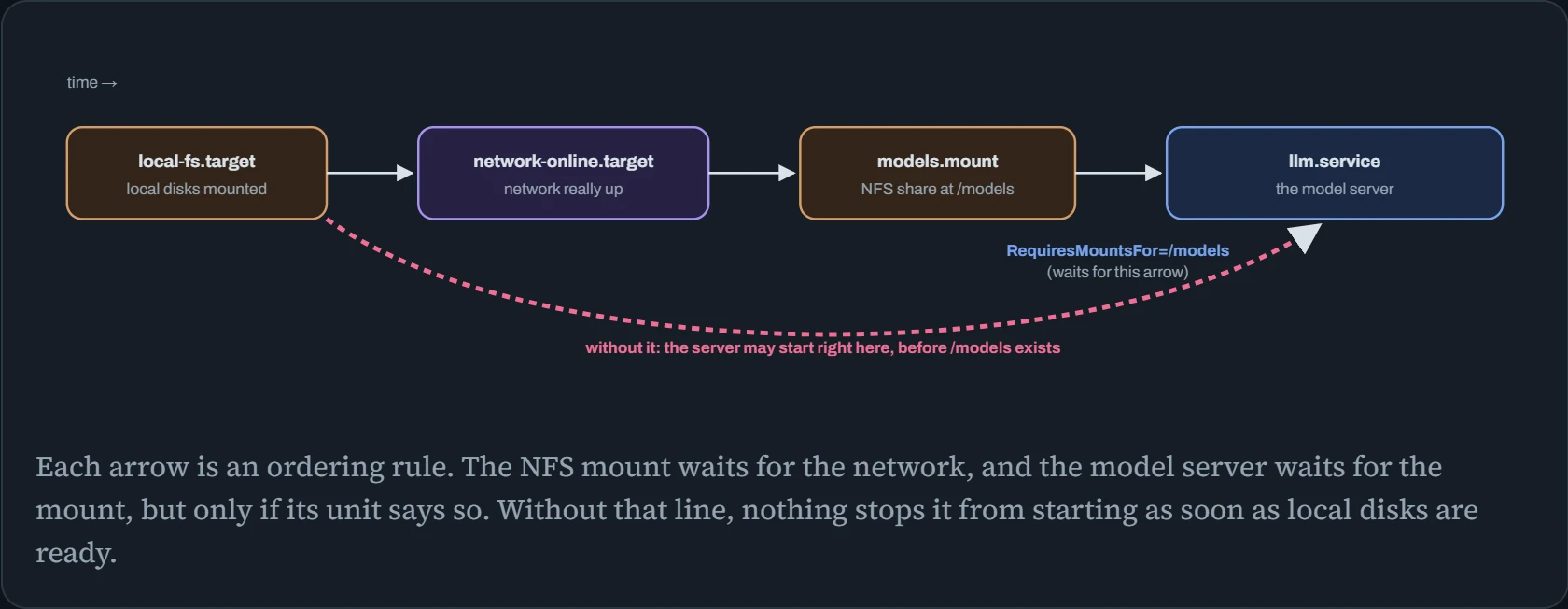
The dashed pink path is what happened in the hook. To systemd, the model server only needed the basics, so it started early, racing the network share and losing. RequiresMountsFor=/models adds both the requirement and the ordering for the mount that holds /models. For services that call out over the network, the matching pair is Wants=network-online.target plus After=network-online.target. systemctl list-dependencies llm and systemd-analyze critical-chain llm.service show the actual tree and timing.
A model server as a service
Here's a complete, hardened unit file for the hook's model server. Every line earns its place. Read it top to bottom: what it needs, how it runs, how it restarts, and what it's not allowed to touch.
# /etc/systemd/system/llm.service
[Unit]
Description=vLLM model server
Wants=network-online.target
After=network-online.target nvidia-persistenced.service
RequiresMountsFor=/models                     # wait for the share; never start without it
StartLimitIntervalSec=600
StartLimitBurst=10                            # give up only after 10 failed starts in 10 minutes

[Service]
User=llm
EnvironmentFile=/etc/llm/llm.env              # HF_TOKEN etc., readable only by root and llm
ExecStart=/opt/llm/.venv/bin/vllm serve /models/qwen2.5-7b --host 127.0.0.1 --port 8000
Restart=on-failure
RestartSec=10
TimeoutStopSec=60
NoNewPrivileges=yes
ProtectSystem=strict                          # the whole OS is read-only to this service…
ReadWritePaths=/var/cache/llm                 # …except its own cache folder
ProtectHome=yes
PrivateTmp=yes
MemoryMax=96G

[Install]
WantedBy=multi-user.target
After saving it: sudo systemctl daemon-reload (systemd re-reads unit files), then sudo systemctl enable --now llm (start now, and at every boot). systemd-analyze security llm.service scores how exposed it is, and suggests more locks.
One hardening option needs a warning on GPU machines: PrivateDevices=yes. It hides every device file, including /dev/nvidia*, so the service suddenly sees no GPU. Leave it off for GPU services, or allow the GPU devices explicitly. And note --host 127.0.0.1 in ExecStart: the service is reachable only from this machine, behind a proxy or tunnel (Down the Tunnel).
Keeping jobs in their lane
Every service systemd starts gets its own cgroup (control group): a box the kernel can measure and limit. That lets you say “this data preprocessing job may use 8 cores and 64 GB, and no more”, so a runaway script can't starve the model server running next to it. Three settings do most of the work. CPUQuota= caps CPU time (200% means two full cores). MemoryHigh= is a soft limit: above it, the kernel squeezes the job's memory hard, which slows it down. MemoryMax= is the hard limit: above it, the job is killed. Only that job, not the machine.
You can apply the same limits to a one-off command with systemd-run, without writing a unit. The bars compare what the job wants with what it's allowed: yellow dashes mark MemoryHigh, and pink dashes mark MemoryMax and the CPU cap.
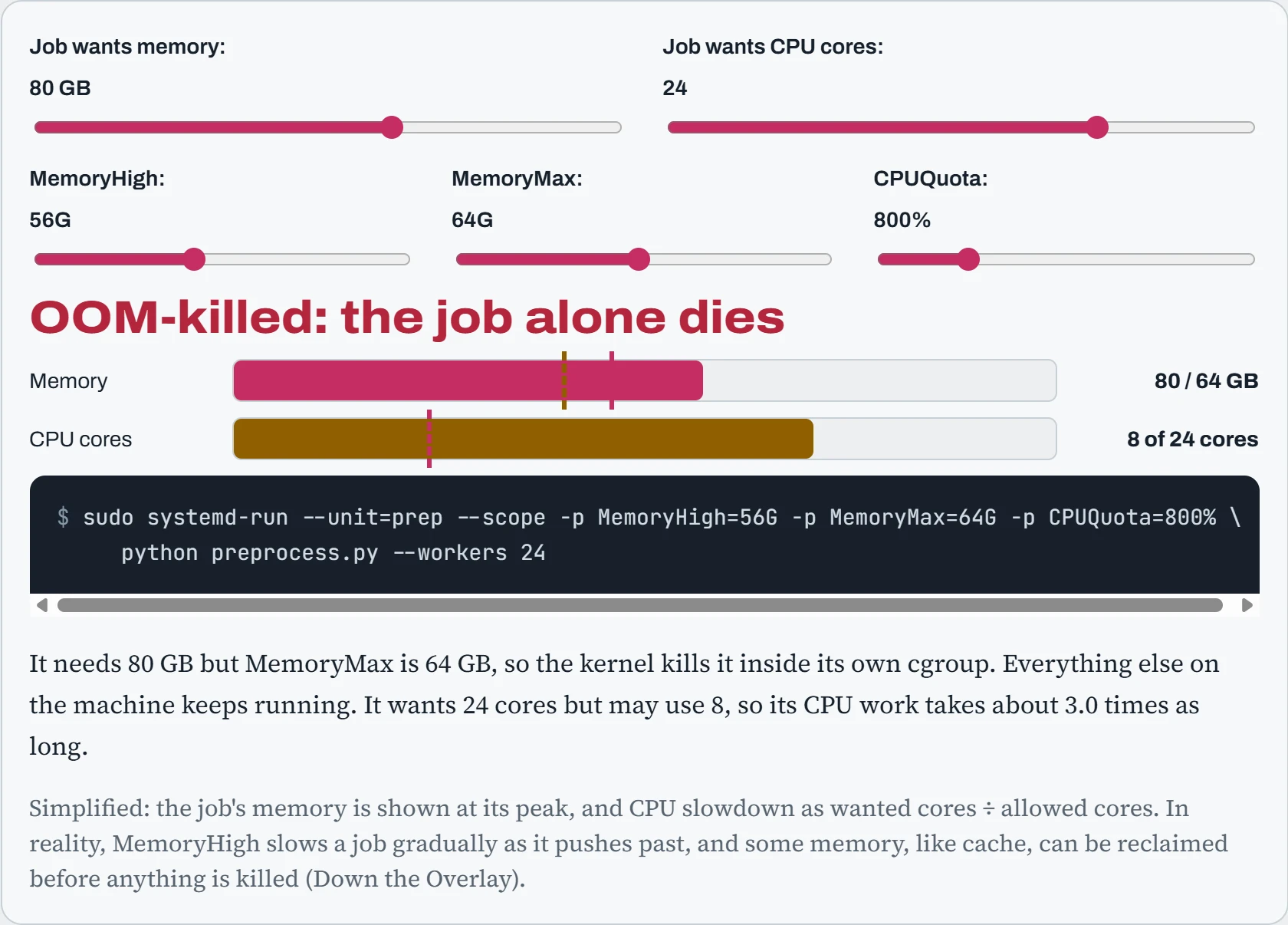
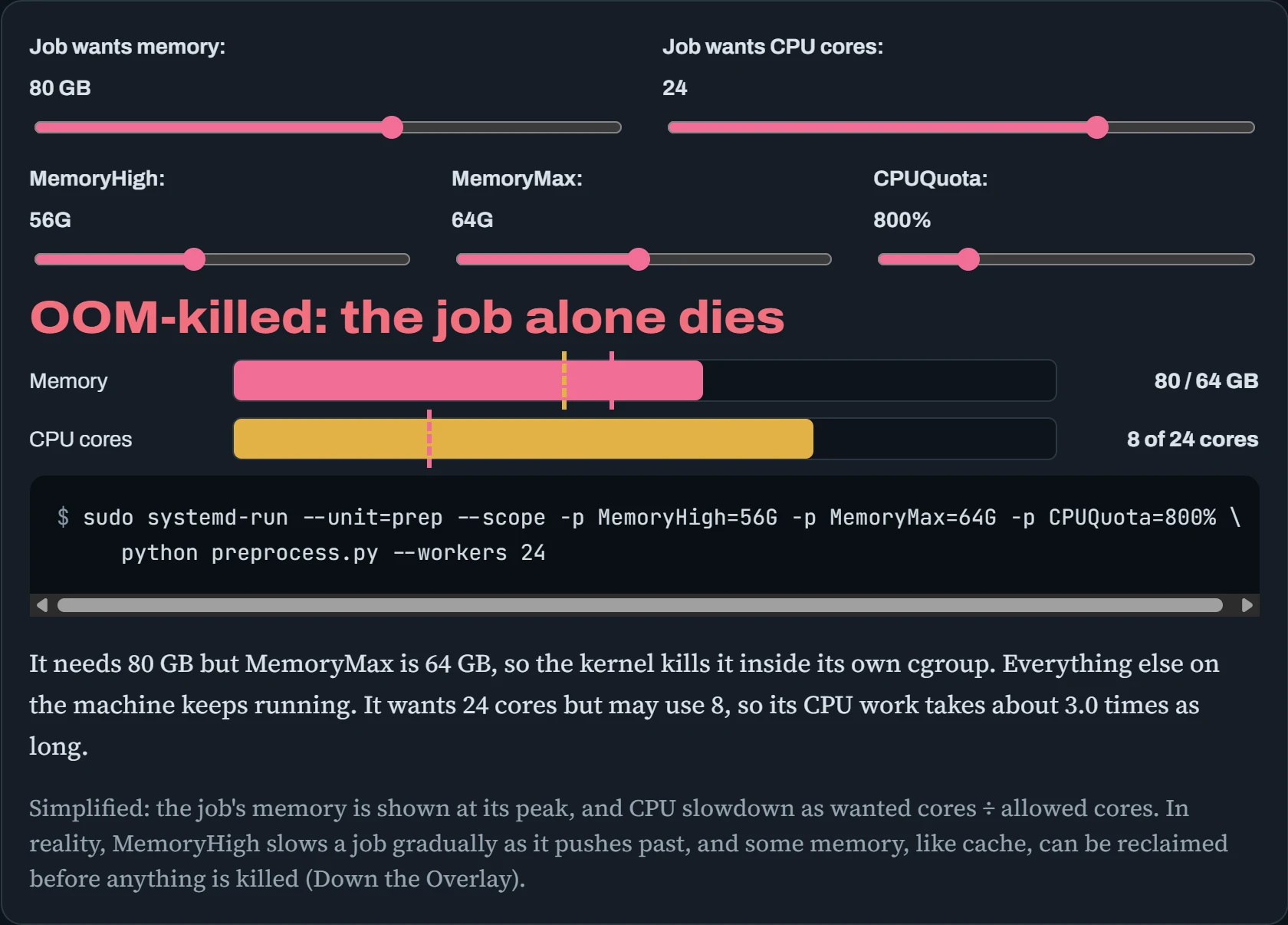
With the defaults, the job wants 80 GB but is capped at 64, so it's killed, and only it. The model server next to it never notices. Raise MemoryMax above 80, and it survives, but it's pushed past MemoryHigh, so it runs slowly while the kernel squeezes it. Its 24 cores' worth of work runs on 8, so it takes three times as long. Limits turn “one bad job takes down the GPU server” into “one bad job is slow, or dies alone”. systemd-cgtop shows every cgroup's live usage, like top for services.
Timers and user services
For scheduled jobs, like syncing models every night, pruning old checkpoints, or refreshing an index, systemd timers can replace cron, with real advantages. Each run is a normal service, so it gets logs in the journal, resource limits, and a clear success or failure. And Persistent=true runs a job that was missed while the machine was off, as soon as it's back:
# /etc/systemd/system/model-sync.timer         (pairs with model-sync.service)
[Timer]
OnCalendar=*-*-* 03:00:00
RandomizedDelaySec=15min                       # don't hit the mirror at exactly 03:00 from every node
Persistent=true
[Install]
WantedBy=timers.target
$ sudo systemctl enable --now model-sync.timer
$ systemctl list-timers model-sync
NEXT                        LEFT     LAST                        PASSED  UNIT              ACTIVATES
Sun 2026-10-25 03:07:12 UTC 14h left Sat 2026-10-24 03:11:40 UTC 9h ago  model-sync.timer  model-sync.service
Not every service needs root. User services live in ~/.config/systemd/user/, and are controlled with systemctl --user. That's handy for a personal JupyterLab or a notebook kernel on a shared server. By default they stop when you log out. sudo loginctl enable-linger <user> keeps them running, which is exactly what you want for a long training job you started over SSH.
Predict. The model-sync timer is set for 03:00 with Persistent=true. The server is switched off from Friday evening until Monday at 08:00. How many times does the sync run on Monday morning?
Answer. Once, soon after boot (plus up to the 15-minute random delay). Persistent=true remembers when the timer last ran. At boot, systemd sees that at least one 03:00 was missed, and runs the job one time to catch up. It doesn't replay every missed night.
That's usually exactly right for syncs and clean-ups, where one run brings everything up to date. Without Persistent=true, the machine would simply wait for the next 03:00, and the models would stay stale all of Monday.
Continue the lesson
The whole lesson, with its drawings and its questions. 4 more sections after the ones above.