
VRF: one router, several routing tables
A VRF creates separate virtual routers on one physical router: its interfaces, routing table and forwarding table are isolated, so traffic in one VRF cannot be forwarded into another, and the same addresses can exist in several VRFs at once. Every interface starts in the global table until it is put in a VRF.
By Arif, founder of Daveth · Updated
The full 7 min walkthrough is in Daveth Pro (Network). See what the plan opens
What this page answers
How do you configure a VRF?
vrf definition name; turn on each address family you need, ipv4 and ipv6; enter the interface; put it in the VRF with vrf forwarding name; only then give it its addresses. show ip route vrf name shows its table. Read it in “4.1 One router, several routing tables”
What is a VRF?
Virtual routing and forwarding: separate virtual routers on one physical router, each with isolated interfaces, routing table and forwarding table, so the same prefix can exist in several VRFs without clashing. Read it in “4.1 One router, several routing tables”
4.1 One router, several routing tables
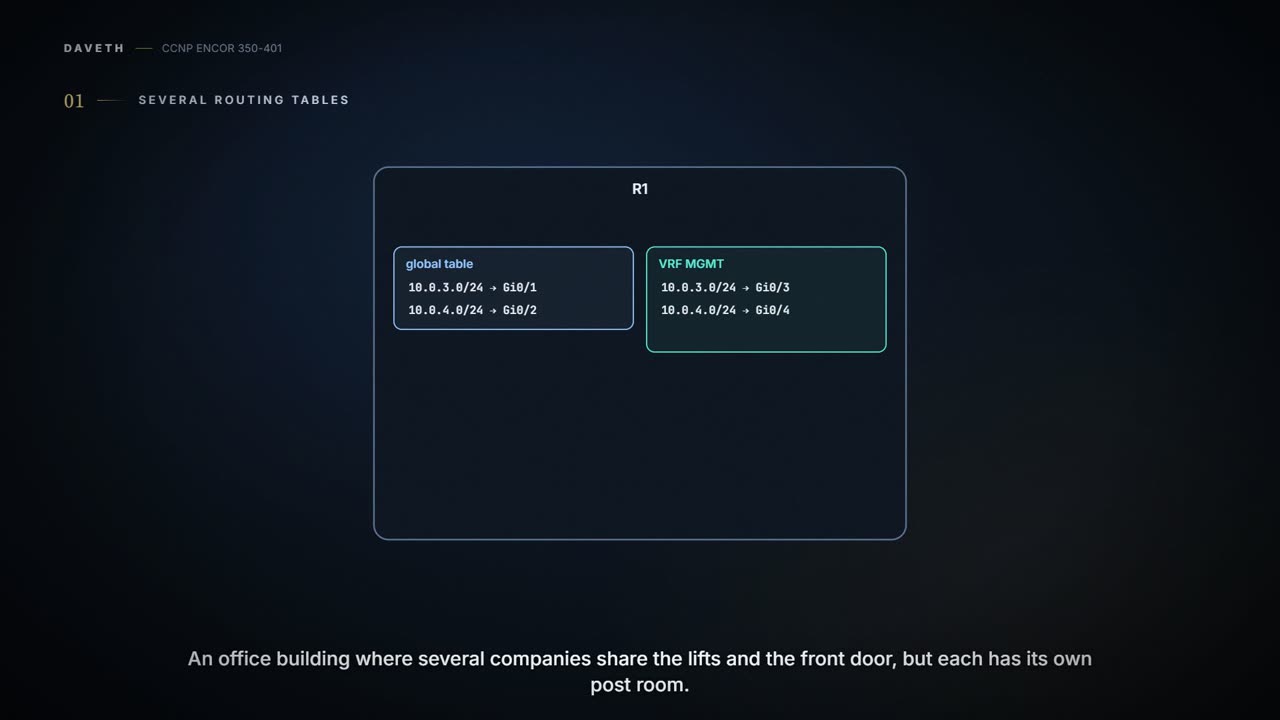
Virtual routing and forwarding (VRF) "creates separate virtual routers on a physical router": interfaces, routing tables and forwarding tables are isolated, so traffic in one VRF can't be forwarded into another. Every interface starts in the global VRF, which is just the ordinary routing table a router without VRFs has, until you assign it to a VRF of your own. It's like an office building where several companies share the lifts and the front door, but each has its own post room: a letter dropped into one company's post room is sorted by that company's list of rooms and never leaves for another company's.
The global table is the only routing table that got its name by doing nothing: every interface lives there until someone moves it out.
Because each VRF keeps its own table, the same addresses can exist in several at once. The guide's R1 has 10.0.3.1/24 and 10.0.4.1/24 twice, on Gi0/1-Gi0/2 in the global table and on Gi0/3-Gi0/4 in a VRF called MGMT, "but there is no conflict because they are in a different routing table" (Table 6-5, Figure 6-14). This lesson names a host on each: A on Gi0/1 and B on Gi0/2 in the global table, C on Gi0/3 and D on Gi0/4 in MGMT. B and D have the same address, 10.0.4.10. VRF segments interfaces and subinterfaces as well as addresses and tables, and the separation gives isolated paths, more security, and privacy between VRFs without encrypting anything. And it's a Layer 3 feature that's multiprotocol: quiz Q10's answer is that VRFs support "IPv4 and IPv6", and its MAC distractor is wrong because a VRF holds routing tables, not MAC addresses. Think of it as flat numbers in two separate buildings on the same street: Flat 4 in one never gets Flat 4's post in the other, because the letter never leaves the building it was posted in. The packet itself carries no hint of which building; the door it came in by decides.
In a VRF design, having the same IP address twice is the plan, not the outage.
The rule that makes it work: a VRF uses input interfaces to tell routes apart, "associating one or more Layer 3 interfaces with each VRF", and an interface can belong to only one VRF at a time. So a packet is looked up in the table of the VRF its incoming interface belongs to, by the usual longest match (02-1), and only in that table; if that table has no route, the packet is dropped even if another VRF has one. It acts kind of like a hotel with two reception desks: which desk you walk up to decides whose guest list they check.
Traffic the router sends itself follows the same logic from the other side. A plain ping or traceroute uses the global table, so a plain ping 10.0.4.10 that succeeds has reached B and proves nothing about MGMT; to test inside a VRF you name it, ping vrf MGMT 10.0.4.10 or traceroute vrf MGMT .... ARP is kept per VRF too, and show ip arp vrf MGMT shows that VRF's entries. If you've ever called the wrong branch of a company because you dialled the main number, you know this fault: the router answered, just from the wrong table. The memory hook: the door you came in by decides the table.
Before running D1, predict: C, on Gi0/3 in VRF MGMT, sends to 10.0.4.10, the same address as B. Who gets it? And what happens when A, in the global table, sends to the NMS that only MGMT has a route to?
D1
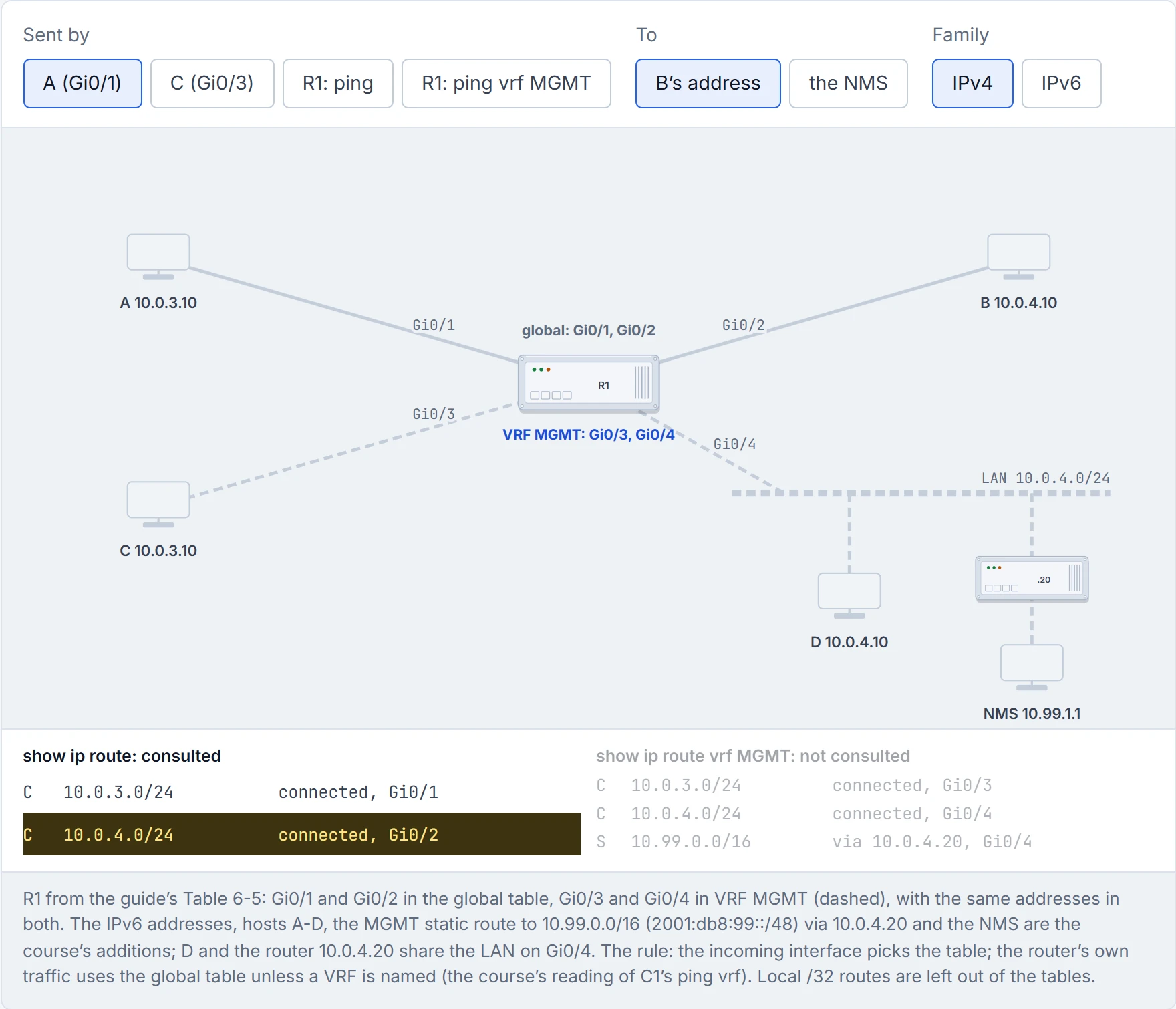
ping without vrf is the router's way of saying "I only checked my own diary".
The guide's five steps:
- Create the VRF:
vrf definition vrf-name. - Turn on each address family you need:
address-family ipv4and/oraddress-family ipv6. - Enter the interface:
interface interface-id. - Put it in the VRF:
vrf forwarding vrf-name. - Only then give it its addresses:
ip address ...andipv6 address ....
Step 5 has to come after step 4, and Cisco says why: "When the interface is bound to a VRF, previously configured IPv4 and IPv6 addresses are removed, and they must be reconfigured". Put an interface that's already up into a VRF and it goes quiet until you readdress it. The other trap is step 2: the guide's own Example 6-20 turns on only address-family ipv4, so an IPv6 address in that VRF has no IPv6 table to live in until address-family ipv6 is added (the exact error is unconfirmed). It's a bit like moving a desk to another company's floor: the old nameplate comes off, and you have to put a new one on.
A dual-stack version of the guide's MGMT VRF, in the form Cisco's own 17.9 example uses:
vrf definition MGMT
 address-family ipv4
 exit-address-family
 address-family ipv6
 exit-address-family
!
interface GigabitEthernet0/3
 vrf forwarding MGMT
 ip address 10.0.3.1 255.255.255.0
 ipv6 address 2001:db8:3::1/64
On a routed switch port, no switchport comes first, since VRF interfaces must be Layer 3. IPv6 routing still has to be on (ipv6 unicast-routing, 02-1). The guide's example has no route distinguisher and its MGMT table works; Cisco's own examples add one (rd 65001:11 in C2, rd 100:2 in C1's legacy procedure), and the command reference says "The rd command creates the routing and forwarding tables". Whether 17.9 needs an RD for a VRF used only on one router is unconfirmed; RDs are essential once VRFs are carried across an MPLS VPN. You'll also meet the older single-protocol form, ip vrf name with ip vrf forwarding name, IPv4 only, which Cisco's own switch chapter still uses; vrf definition is the multiprotocol one, and Cisco's vrf upgrade-cli command converts the old form (its options are unconfirmed). Consider it your building's newer lease: the old one only covered the IPv4 tenants.
vrf forwarding (and its older cousin ip vrf forwarding) fixes your routing by deleting your IP address first.
The guide's Example 6-21 is show ip route on R1: the connected 10.0.3.0/24 and 10.0.4.0/24 and the local /32s on Gi0/1 and Gi0/2, the global table. Example 6-22, show ip route vrf MGMT, shows the same four routes on Gi0/3 and Gi0/4. Each proves what one table holds. Neither proves anything about the other table, or that a host behind the interface answers. It's like reading one company's post-room log: it tells you nothing about the other company's.
The rest of the toolkit:
show vrf(Cisco's pages printshow vrf counterandshow vrf definition [brief | detail | interfaces], andshow ip vrf interfacesfor the legacy form; the exact 17.9 keywords are unconfirmed): which VRFs exist and which interfaces are in them;show ip route vrf nameandshow ipv6 route vrf name: that VRF's IPv4 and IPv6 tables;show ip protocols vrf name: the routing protocols running in it;ping vrf name addressfor IPv4 or IPv6 (C4 showsping vrf vrf-name ipv6-host), andtraceroute vrf name address;show ip arp vrf name: that VRF's ARP entries (the IPv6 equivalent,show ipv6 neighbors vrf name, is unconfirmed).
Verification and troubleshooting gives what each proves and what it doesn't.
In a way, it's just adding "which company?" to every question you ask the router.
Half of VRF troubleshooting is typing vrf MGMT into a command you've already typed without it.
A VRF's table fills the same ways the global one does: connected routes, static routes, and routing protocols run per VRF. OSPF gets a process per VRF, router ospf 1 vrf MGMT; BGP uses address-family ipv4 vrf MGMT inside the process; Cisco's 17.9 VRF example runs router ospf 2 vrf 6VPE-1. For IPv6, OSPFv3 takes the VRF in its address family, address-family ipv6 [unicast] [vrf vrf-name] under router ospfv3. (EIGRP's named mode has a VRF address family too, but its syntax isn't in this lesson's sources: unconfirmed.) Static routes take the VRF as well: ip route vrf MGMT 10.99.0.0 255.255.0.0 10.0.4.20 and ipv6 route vrf MGMT 2001:db8:99::/48 2001:db8:4::20 (unconfirmed). The guide's point about why this beats Layer 2 separation: VRFs segment with Layer 3 routing protocols, so you get their convergence, load sharing, and ping and traceroute, rather than spanning tree. That's roughly equivalent to giving each tenant their own switchboard instead of one long corridor with doors.
Services the router itself runs are VRF-aware too: Cisco's chapter has sections for SNMP (07-3), NTP (03-1), syslog (07-4), FTP and TFTP, traceroute and uRPF. On a Catalyst 9300 running 17.9, "To use multi-VRF CE, you must have the Network Advantage license enabled", the switch supports one global table and up to 256 VRFs, VRF interfaces must be Layer 3 (routed ports or SVIs), and it does this without MPLS. Have you ever noticed how a shared office still gives each company its own mailbox, phone line and alarm code? That's the VRF-aware services list.
Continue the lesson
The whole lesson, with its drawings and its questions. The rest of this section and 9 more after it.