
REST API security
Every API call answers four questions, in order: am I talking privately to the real server, who is calling, is this caller allowed to do this, and is it asking too often. HTTPS answers the first only when the certificate is checked; tokens, JWTs, certificates or OAuth 2.0 answer the second; 401 and 403 the third; and 429 the fourth.
By Arif, founder of Daveth · Updated
The full 12 min walkthrough is in Daveth Pro (Network). See what the plan opens
What this page answers
How do REST APIs authenticate?
With a password exchanged for a token, a JWT, a client certificate, or OAuth 2.0, which lets another program act for you without your password. Every call should go over HTTPS with the server's certificate checked. Read it in “4.1 Four questions every call has to answer”
Is HTTPS with certificate verification turned off safe?
No. The password crosses the network inside TLS, but without checking the certificate the script cannot tell the real server from an impostor, so it may hand its credentials to the wrong one. Read it in “4.1 Four questions every call has to answer”
4.1 Four questions every call has to answer
A script logs in to Catalyst Center over HTTPS with verify=False, exactly as the guide's own example script does. The password crosses the network inside TLS. Safe? Hold that thought: the answer, and the reason for it, is the whole lesson.
Forget the phrase "API security" for a minute. Before a controller does anything with a request, four questions get answered, typically in this order. Am I talking privately to the real server? Who is calling? Is this caller allowed to do this? Is this caller asking too often? Think about the last time you collected a parcel at a post office counter: you're at a real post office, not a stall outside it; you show ID; the parcel has to be addressed to you; and there's a queue. Four checks, and passing one doesn't excuse you from the next. The guide says little on the topic directly: that "Best practices suggest that the traffic should be encrypted using TLS between the software and the controller", and, in its status-code table, what 401 and 403 mean.
The answer a script gets back tells you which question stopped it, which is why the order matters. If the channel fails, there's no HTTP status at all: the client gives up during the TLS handshake and raises an error. If the server doesn't know who you are, 401. If it knows you and says no, 403. If you're asking too fast, 429. You can think of it as a corridor with four doors, each with its own guard: when you're turned back, the door you were standing at tells you where the problem is. The order isn't a law, though. Some APIs throttle by source address before anyone logs in, or throttle the login itself; the course's toy API limits per token, so its limit can only come after authentication. And one controller breaks the status rule: SD-WAN Manager's session login signals a wrong password with an HTML login page in the body, not a 401.
Set D1 to HTTPS with verify=False and an impostor on the path before you read on, and predict what the script gets back.
D1
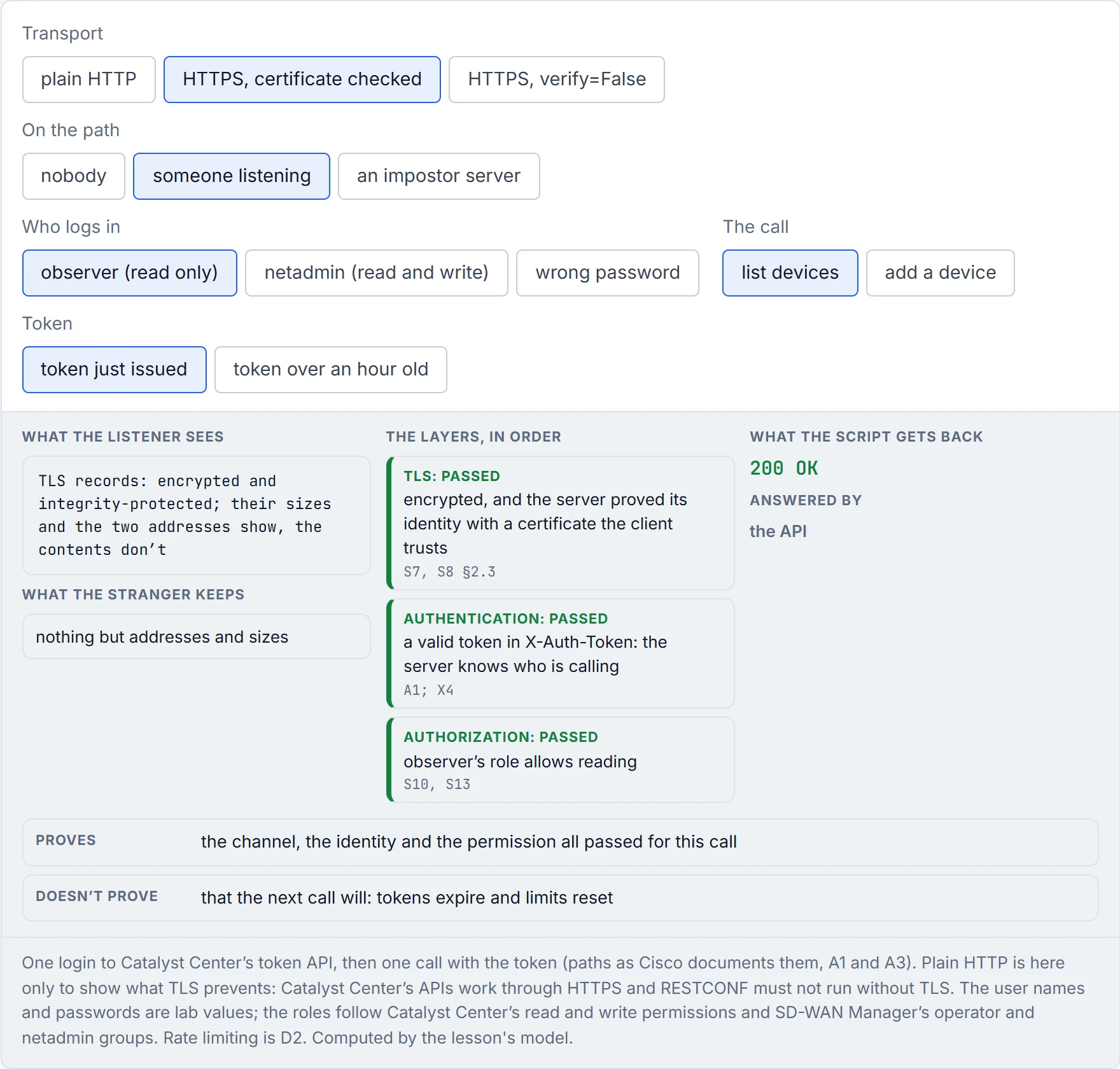
A 200 OK from a script with verify=False is honest about one thing only: somebody was very happy to receive your request.
TLS promises three things. The server "is always authenticated"; data "is only visible to the endpoints"; and data "cannot be modified by attackers without detection". If you've ever sent a postcard, you know the postman can read every word of it: plain HTTP is a postcard, and a Basic header on it is readable by anyone on the path. HTTPS puts the same words in a sealed envelope. One honest caveat from the same RFC: TLS "does not hide the length of the data it transmits, though endpoints are able to pad TLS records in order to obscure lengths", and the addresses on the envelope still show.
The envelope isn't the important part, though. The first promise is: the server proves who it is with a certificate, and the client checks it. It acts kind of like a courier's ID badge. A sealed envelope handed to someone in a convincing hi-vis vest is still handed to the wrong person. That's what verify=False does: requests "will accept any TLS certificate presented by the server, and will ignore hostname mismatches and/or expired certificates, which will make your application vulnerable to man-in-the-middle (MitM) attacks". The conversation is still encrypted, only now it's encrypted to whoever answered. In one of the course's experiments, a local toy server was refused by default, accepted when its certificate was trusted explicitly, and accepted with any identity at all once verification was off, with a warning the guide's script switches off. curl's -k, which Cisco's own example for RESTCONF (the device's own REST API, 09-6) uses, is the same switch: it "tells curl to skip the verification step".
Why is the habit everywhere? Because devices ship with certificates nobody's CA signed. With no CA trustpoint, IOS XE generates "either a temporary or a persistent self-signed certificate" when the HTTPS server starts, and a self-signed certificate fails the default check: "certificate verify failed: self-signed certificate". The fix is to trust the right certificate, not to trust every certificate: give the device a certificate from a CA the scripts trust, with ip http secure-trustpoint, and give requests that CA's bundle (verify=<path>, or REQUESTS_CA_BUNDLE). RFC 8040 also allows pinning a certificate "obtained by a trusted mechanism", but requests' verify= still checks the name, so a pinned certificate must name the address too. For RESTCONF this isn't advice: its standard makes TLS, the certificate check and the identity check mandatory; 09-6 sets it up.
That identity check is the part people forget: the certificate has to name the address or name you connect to. X3's certificate named localhost and 127.0.0.1; the same server reached at ::1 failed with "IP address mismatch, certificate is not valid for '::1'". On a dual-stack network, a certificate issued for the IPv4 address only makes the IPv6 path look like an attack. Which names and addresses IOS XE's own self-signed certificate carries isn't in the pages read (unconfirmed); if it doesn't name the address a script uses, trusting it won't help, and a CA-issued certificate that names every address is the way to keep verification on. X3's certificate was built to be trusted directly, so it isn't representative of a device's.
The guide's script turns off the certificate check and then silences the warning about it, which is taking the battery out of the smoke alarm because it keeps beeping.
Basic authentication sends "user-id/password pairs, encoded using Base64", and RFC 7617 is blunt: it's not secure "unless used in conjunction with some external secure system such as TLS", because the credentials are "passed over the network as cleartext". Encoded isn't encrypted. In a way, it's just a password written in a different alphabet: anyone with the alphabet reads it. The guide's own screenshots show it. Figure 28-9 left a greyed Authorization: Basic ZGV2bmV0dXNlcjpDaXNjbzEyMyE= row in place, and that decodes to devnetuser:Cisco123!, the public sandbox login the guide also prints in plain text. Any Base64 decoder reverses one: Python's base64.b64decode("YWRtaW46YWRtaW4=") gives admin:admin. Nothing leaked: the point is that the header is the password, reversibly. On Catalyst Center, Basic goes only to the token API, once per token, so hourly on a long job; TLS is what protects it.
A token is different in one way that matters: it's a bearer credential. RFC 6750 defines a bearer token as one where "any party in possession of the token (a "bearer") can use the token in any way that any other party in possession of it can". It's basically like a cinema ticket: the usher checks the ticket, not your face. So a stolen token works for the thief exactly as it works for you, until it expires. Catalyst Center's token "remains valid for 1 hour", and X5 shows the same token accepted, then refused once its life ran out, then a fresh one accepted. A short life is the limit on the damage. That's also why a token belongs in the same category as the password: never in a log file, never in a screenshot, and only ever over TLS, which RFC 6750 makes a MUST. It also says where a token goes: in a header or a protected body, never in the URL, because software "may not adequately secure URLs in the browser history, web server logs, and other data structures". Some APIs hand out a fixed API key instead of a token. It's the same kind of secret, one that never expires on its own, so the same rules apply: a header, not the query string, TLS, and rotation.
The guide's token is a JSON Web Token, and 09-1 decoded its middle part into readable claims, roles and an expiry. That's the second thing to know about JWTs: they're usually signed, not encrypted. RFC 7519 lets the claims be "digitally signed or integrity protected with a Message Authentication Code (MAC) and/or encrypted". A signed JWT is like a postcard with a wax seal: anyone can read it, but nobody can change it without breaking the seal. X2 read a signed token's claims without the key, then changed the role from "read" to "write" and kept the old signature: the check failed. So nothing secret goes in a JWT's claims, and decoding one isn't validating it; only someone holding the verification key can do that. For an HMAC-signed token like the guide's (its header says HS256), that key is a shared secret the server keeps; for a public-key signature, anyone with the public key can check it, and only signing needs the private key.
Two more ways to say who you are. SD-WAN Manager's session login returns a cookie, and POSTs need a second token, X-XSRF-TOKEN. That token defends against cross-site request forgery: a cookie is sent automatically with every request to the site, so a page elsewhere could make your logged-in browser send one; the header proves the request came from something that could read the token. Without it, "vManage rejects the request and returns the response code 403 (forbidden)", a 403 that has nothing to do with your role. And a client can present its own certificate during the TLS handshake. RFC 8040 prefers exactly that for RESTCONF (09-6): the server "SHOULD require authentication based on TLS client certificates", and HTTP authentication "MAY be used" when that isn't feasible. What a client certificate adds is that nothing reusable crosses the wire: the client proves it holds a private key without sending it. IOS XE can ask for one with ip http secure-client-auth, but that's a check at the TLS layer: the RESTCONF user is still the one AAA authenticates, and every HTTPS client, the web UI included, would then need a certificate.
Base64 keeps a password about as secret as writing it backwards on a sticky note: it looks scrambled right up until someone reads it.
OAuth 2.0 exists to fix one specific bad idea: giving a third-party program your password so it can act for you. RFC 6749 lists what goes wrong: the program has to "store the resource owner's credentials for future use, typically a password in clear-text", and it gets "overly broad access". Consider it your car's valet key. The valet key starts the car and opens the driver's door, but not the boot or the glovebox, and you can take it back without changing the locks. Your own key never leaves your pocket. The RFC's list includes exactly that problem: with a shared password, owners "cannot revoke access to an individual third party without revoking access to all third parties".
OAuth names four roles: the resource owner (who the data belongs to), the resource server (the API), the client (the program asking), and the authorization server (which issues tokens; it "may be the same server as the resource server or a separate entity"). What the client gets is an access token, and the two words that matter in its definition are scope and duration: "Tokens represent specific scopes and durations of access", and they can be "more restrictive than the authorization grant used to obtain them". The client then presents the token as a bearer token, so everything in section 4.3 about bearer tokens applies. Have you ever noticed how a hotel gives the cleaner a key card that opens the rooms on one floor for one shift, not a master key for the building? That's scope and duration.
For a script with no person in the loop, OAuth has the client credentials grant: the client asks for a token "using only its client credentials", for resources "under its control, or those of another resource owner that have been previously arranged with the authorization server", and the grant "MUST only be used by confidential clients", ones that can keep a secret. The other grants exist for a person approving access, and they're beyond this lesson. For the exam, know what OAuth is for and what its token carries. Note too that neither controller's login in this course is OAuth: Catalyst Center takes Basic auth to a token API, and SD-WAN Manager uses a session or a JWT login.
RFC 6749 opens by listing everything wrong with handing an app your password, which makes its introduction read like a list of lessons somebody learned the hard way.
Authentication answers "who are you"; authorization answers "what may you do". HTTP gives them different codes. A 401 means the request "lacks valid authentication credentials", and the server "MUST send a WWW-Authenticate header field" with a challenge. A 403 means "the server understood the request but refuses to fulfill it"; if credentials were sent, it "considers them insufficient", and the client "SHOULD NOT automatically repeat the request with the same credentials". That's roughly equivalent to the two ways a club's door staff say no: "I don't know you" against "I know exactly who you are, and you're not on this list." X4 shows both: no token or a bad password gets 401 with a WWW-Authenticate header; the read-only user adding a device gets 403; the read-write user gets 201. The guide's Table 28-5 says the same in fewer words: 401, "Client not authenticated"; 403, "Access not granted based on supplied credentials". Two wrinkles: a server may answer 404 instead of 403, to "hide" that the resource exists at all; and on SD-WAN Manager a POST's 403 often means the missing XSRF token, not the role.
Who may do what is set by roles. Catalyst Center's APIs "are governed by the Catalyst Center Role Based Access Control (RBAC) rules". The Platform app in the GUI, where the API catalog lives, is available to "a user with a SUPER-ADMIN-ROLE", and that user "can create a custom role with read, write, or deny permissions" to the platform's APIs, bundles, events and reports. It's like an office badge that opens the front door and your floor, but not the server room. SD-WAN Manager groups users instead: operator users "have permission only to view information", netadmin users "are permitted to perform all operations", and network_operations and security_operations split the policy work between them. The "basic" group, as Cisco's page reads, may "both view and modify information". The page read doesn't tie REST API calls to these groups in so many words (check for your release). It also notes the admin account can't be deleted, "but you can and should change the default password".
The device's own REST API starts blunt. RESTCONF, and NETCONF, its XML sibling, are 09-6's; here, only who may use them. On IOS XE, RESTCONF connections are authenticated with AAA, and "RADIUS or TACACS+ users defined with privilege level 15 access are allowed access into the system". Out of the box, a device with no NACM rules "will deny read, write, and execute access to all operations and data other than the users of privilege level 15", so by default a RESTCONF account is a full-administrator account. NACM is how that changes: NETCONF and RESTCONF on their own "do not provide any standard mechanisms to restrict" what each user may touch, and IOS XE's "NETCONF and RESTCONF interfaces implement the NETCONF Access Control Model (NACM)". Privilege levels map to NACM groups, PRIV00 to PRIV15, and a rule can give a lower group narrower access, such as read on the interfaces YANG model (09-5). Note that "Traditional IOS command authorization ... does not apply to NETCONF or RESTCONF". This matters because authorization is where APIs break: the OWASP API Top 10 puts object-level authorization first and function-level authorization fifth, noting that "an unclear separation between administrative and regular functions" tends "to lead to authorization flaws". Give a script the smallest role that does its job.
Logging in again after a 403 is showing the bouncer your ID a second time, slower, in case he misread it.
A controller serves everyone from one set of processors, so it rations requests. When a client exceeds the ration, the answer is 429: "the user has sent too many requests in a given amount of time". The reply "MAY include a Retry-After header indicating how long to wait", either as seconds or as a date. Just like when you take a numbered ticket at a deli counter: you're not refused, you're told to wait, and pulling more tickets doesn't get you served sooner. OWASP files the opposite failure, an API with no rations, as "Unrestricted Resource Consumption".
The numbers differ per controller. Catalyst Center's intent APIs "have a default API rate limit of 50 requests", and an API's own limit is on "the Features tab in the API details page". Neither release's page read gives the time window of that 50, so it isn't stated here (unconfirmed). Cisco's Python SDK catches rate-limit responses and handles them for you. SD-WAN Manager is specific: from 20.6, "Bulk API: 48 requests/minute" and "All other API: 100 requests/second"; the statistics bulk API allows "two concurrent requests at any given time"; and there's a limit of "250 concurrent sessions", where the authentication page says 100, so check your release. Neither page says what the reply looks like when a limit is hit.
Picture yourself in a situation where a script has 60 calls to make through that bulk API. D2 runs it five ways, in a model whose assumptions its caption lists. Before reading on: which finishes first, the script that paces itself at one request every 1.25 s, or the one that bursts, gets a refusal, and waits as told?
D2
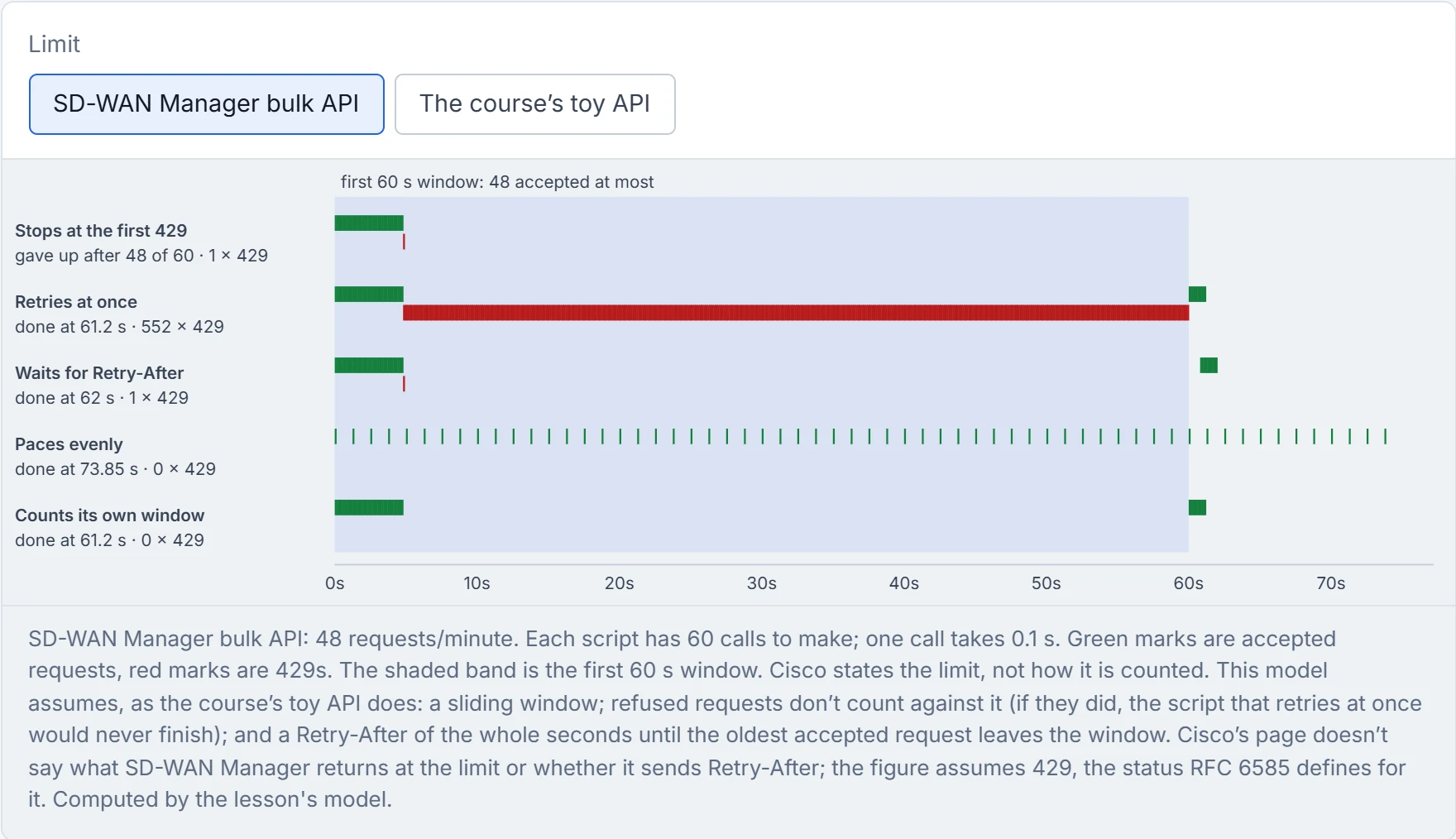
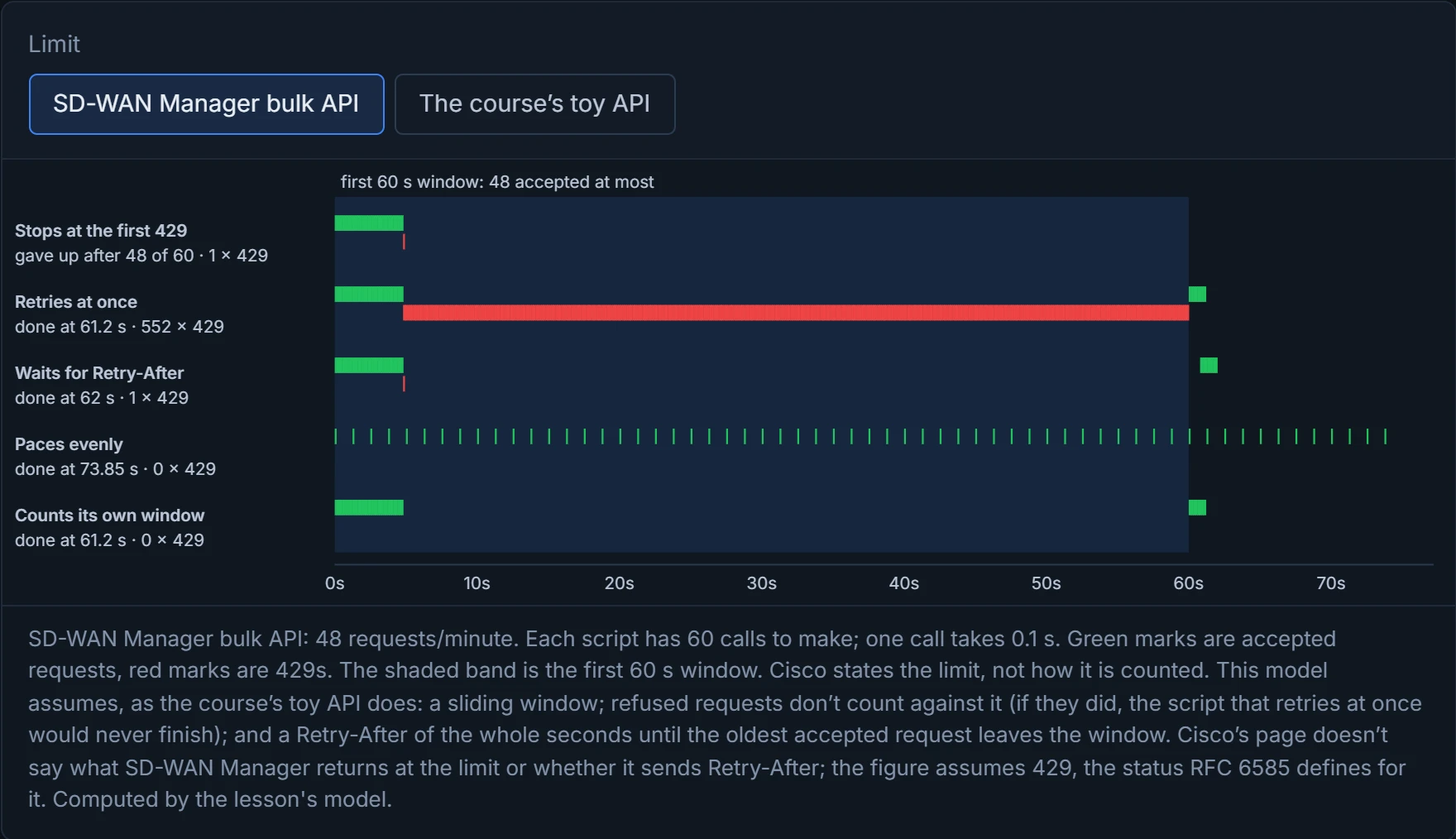
In D2's model, bursting then waiting wins that pair, 62 s against 73.85 s, with a single refusal. Pacing never meets a refusal, but spacing 60 requests 1.25 s apart takes 73.85 s. Switch D2 to the course's toy API and pacing wins instead, 6.7 s against 7.2 s, so neither is faster in general. The best row is the fifth: a script that counts its own requests and waits before the limit, without asking, finishes at 61.2 s with no refusals at all. The rude script, retrying at once, finishes at 61.2 s too, after 552 refused requests; its lead over waiting-as-told is an artefact of rounding Retry-After up to whole seconds, and if the server counted refused requests against the window, as some limiters do, it would never finish. The one that treats a refusal as fatal stops at 48 of 60. The toy API showed the same shapes when run for real: five accepted, then 429 with Retry-After: 3, then success after waiting.
The script that retries a 429 instantly is the deli customer who keeps pulling tickets, convinced the next one will say "1".
On the device, the HTTPS server is where the REST API lives, and IOS XE gives it the controls the earlier layers need. ip http secure-server "Enables the HTTPS server if it has been disabled", and "The HTTPS server is enabled by default", which is worth knowing before you decide nobody can reach it. ip http secure-trustpoint names the CA trustpoint whose certificate the server presents; ip http secure-client-auth asks clients for a certificate; and ip http access-class ipv4 <acl> and ip http access-class ipv6 <acl> set "an access list to use to allow access to the HTTP server", one per address family. The access class works behind the scenes just like the number-plate camera at a car park barrier: it doesn't care who's driving, only which car it is, and it decides before anyone gets out to show a pass. It filters by source address, before any login is tried. Both families need one; an IPv4-only list leaves the IPv6 door as open as before. The older ip http access-class <number> form, IPv4 only, "is going to be deprecated".
Continue the lesson
The whole lesson, with its drawings and its questions. The rest of this section and 9 more after it.