
Reading Python
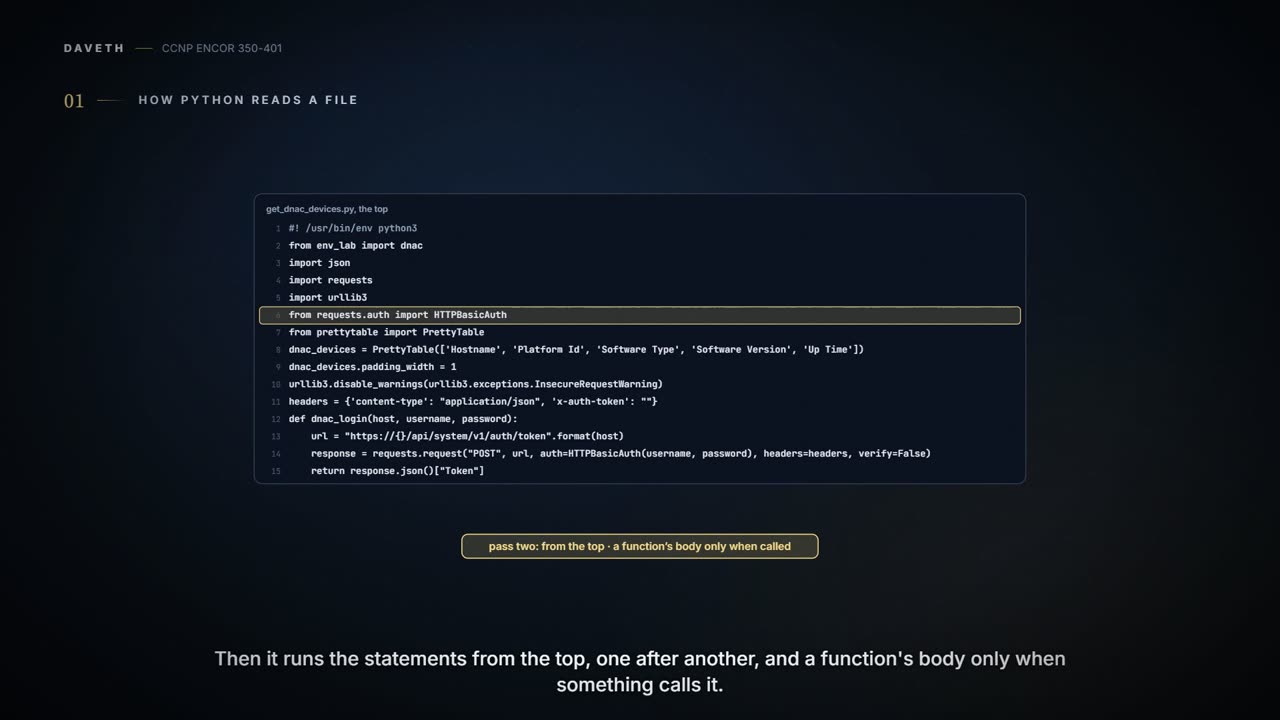
Python reads a file in two passes: first it checks the whole text is valid Python, so one bad indent stops everything; then it runs the statements from the top, and a function's body only when something calls it. A line starting with # is a comment. Reading a network script means following its calls and the data it takes from each API response.
By Arif, founder of Daveth · Updated
The full 8 min walkthrough is in Daveth Pro (Network). See what the plan opens
What this page answers
How do you read a Python script as a network engineer?
Remember Python checks the whole file first, then runs it from the top, entering a function only when it is called. Skip comments, follow each call and what it returns, and check the keys it reads from each JSON response. Read it in “4.1 How Python reads a file”
Are Python dictionary keys case-sensitive?
Yes: response.json()["Token"] and ["token"] are different keys, so only the one the API actually returns works. Read it in “4.1 How Python reads a file”
4.1 How Python reads a file
The guide prints the login function twice: once ending return response.json()["Token"], once ["token"]. Do both work? Hold that for section 4.2.
Python reads a file in two passes. First it checks the whole text is Python: a bad indent or a broken string anywhere and nothing runs, not even a print on line 1. Then it runs the statements from the top, one after another, and a function's body only when something calls it. It's a bit like a proofreader who reads the whole page for grammar before anyone acts on a word of it.
Some text is only for people. A line starting with # is a comment, and Python skips it. Three quotation marks in a row "begin and end a multiple-line string"; when that string comes first in a file, Python keeps it as the file's docstring, its built-in description. The first line of get_dnac_devices.py, #! /usr/bin/env python3, is the shebang: the operating system, or on Windows the py launcher, reads it to pick an interpreter, but only on the first line; to Python itself it's a comment. It works like the address on an envelope: it only helps where the postman looks, which is why the guide's annotated copy, with a comment above it, has moved it out of sight.
Example 28-17 puts a comment above the shebang, which moves the one line that has to be first into second place; Python doesn't mind, because to Python it was only ever a comment.
A name on the left of = gets the value on the right: ENVIRONMENT_IN_USE = "sandbox" makes a string. Quotes make a string; a bare number like 443 is an integer, which is why Example 28-13 writes "port": 443 without quotes. True, False and None are Python's own words, capitalised.
A dictionary holds key/value pairs inside curly braces: dnac = {"host": "sandboxdnac.cisco.com", "port": 443, ...}. Written on one line or spread over six, it's the same dictionary. You read a value by its key: dnac["host"]. It's like a chest of labelled drawers: you open a drawer by its exact label, and a drawer labelled "Token" isn't one labelled "token".
That's section 4.1's answer. Figure 28-8 shows the token API answering {"Token": "eyJ0eXAi..."}. Keys are matched letter for letter, so ["Token"] finds it and ["token"] stops the script with KeyError: 'token'; that holds with the real requests library as much as with a plain dictionary. Example 28-16 and the quiz use "Token"; Example 28-19 uses "token".
A list is an ordered row of values in square brackets, like a numbered queue at a deli counter, except that Python starts counting at 0: devices[0] is the first item. In the device reply, data['response'] is a list of dictionaries, one per device. And dots reach inside things: dnac_devices.add_row(...) calls a method of the table, dnac_devices.padding_width = 1 sets one of its attributes, and response.json() calls a method of the reply.
The guide's two login lines differ by one capital letter, which in Python is the difference between a token and a traceback.
if ENVIRONMENT_IN_USE == "sandbox": asks a question. == compares; = assigns, and = inside an if is a syntax error that Python spells out: "Maybe you meant '==' ...?". != means "not equal", in asks whether a value is in a list, and and/or combine answers; elif asks a second question when the first was False, and else catches the rest.
Indentation is the grammar here, not decoration. It's like the indented sub-items on a to-do list: they belong to the line above them, and only to that line. A for loop runs its indented body once for each item, and the loop name, item, holds each in turn. A for with nothing indented under it is refused before anything runs: IndentationError: expected an indented block after 'for' statement. Example 28-16 prints its loop body that way; Example 28-20 indents it. Typed as printed, 28-16 also breaks the string 'Software Version' across two lines, a SyntaxError.
A skipped block leaves no trace. The guide's Env_Lab.py lists three environments in its comments but, as printed, only builds dnac inside if ENVIRONMENT_IN_USE == "sandbox":. Set it to "express" and dnac never exists: use it in the same file and it's NameError; import it and it's ImportError: cannot import name 'dnac'. If you've ever reached for a coat you only meant to buy, you know the feeling.
Example 28-16's loop body sits flush with its for, so the loop has a job title and no job; Python notices before running a single line, even the ones above it.
def dnac_login(host, username, password): defines a function: a named block that runs only when it's called, with the values passed in bound to its parameters. return hands a value back, so login = dnac_login(...) stores the token. A function works like a recipe card: writing it cooks nothing, and you can use it whenever you need the dish. print comes with Python; dnac_login is one the author wrote. Inside a call, name=value means something else from = on its own: headers=headers, verify=False passes keyword arguments, labelling which value goes to which setting, and assigns no variable. Think of it as filling in labelled boxes on a form rather than listing values in order.
Names made inside a function are local to it: url and response exist while dnac_login runs and are gone when it returns; only the returned value survives, as login. A function can still change a global dictionary's contents: headers["x-auth-token"] = token changes the global headers, so every later request carries the token. That works because the function never assigns the name headers itself; a function that did, anywhere in its body, would make headers local throughout and fail with UnboundLocalError. Consider it your team's shared notebook: writing on its pages is fine, but bring a notebook of your own under the same name and the shared one is out of reach.
import requests runs a module and binds its name; from env_lab import dnac runs the whole of env_lab.py, then binds dnac in the script to the same dictionary, while ENVIRONMENT_IN_USE stays in env_lab. By default the module name must match the file name exactly, even on Windows: the guide's file is Env_Lab.py and its import is from env_lab import dnac, which fails with ModuleNotFoundError: No module named 'env_lab' (unless the PYTHONCASEOK variable is set). The same error means a package isn't installed at all, as prettytable isn't here.
Two details the guide's comments get slightly wrong. import json is there "so Python can understand the data format", but the script never uses the json name: response.json() is a method of the reply object that requests returns, a Response, and it gives back a dictionary. str.format fills each {} in order, which is how "https://{}/api/v1/network-device".format(dnac['host']) builds the URL.
The script imports json and never says its name, which is fine, because the reply object brings its own .json() method to the party.
Put together, get_dnac_devices.py imports (which runs env_lab.py), builds its table and headers, defines two functions, then does three things at the bottom: logs in, lists devices, prints. Picture yourself proofreading it with a finger on each line: what exists now, and what does this line change?
Work it out from section 4.2 and section 4.3 before D1: with the key "token", which line stops the script? And with the environment "express"?
D1
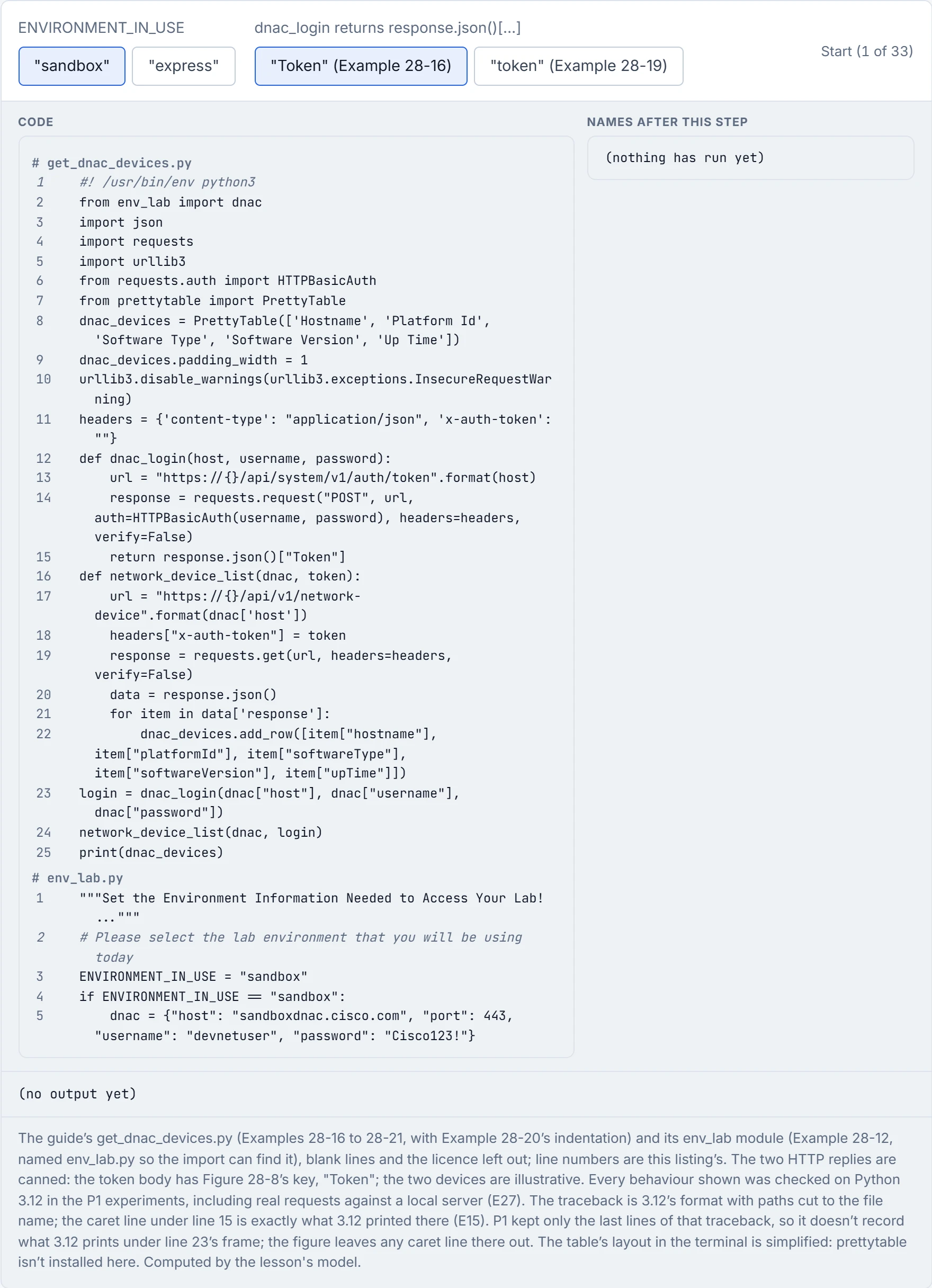
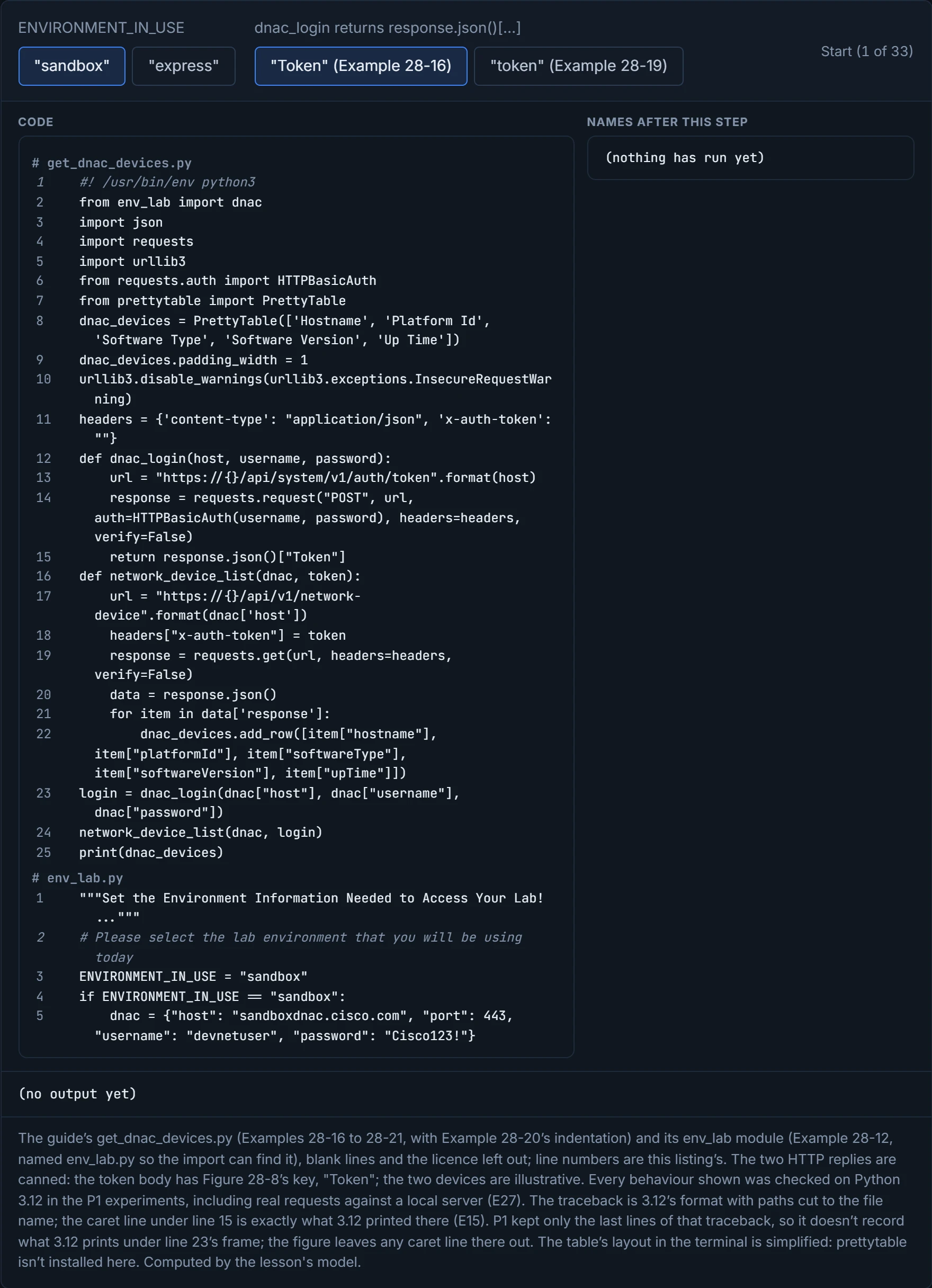
With "token", the return line inside dnac_login, with KeyError: 'token'; you need Figure 28-8's reply to predict that one, because the script alone doesn't say what the key is. With "express", the import line, the script's first statement, because the guide's printed env_lab.py has no branch for it. The shebang above it is only a comment, like a label on the outside of a box.
| What you see | Proves | Doesn't prove |
|---|---|---|
| the script prints a table | the calls returned data in the shape the code expected | that it's the whole inventory: the API takes limit and offset, and its default page size isn't in the sources read |
KeyError: 'token' | the dictionary has no key spelled exactly "token" | that the login failed: the token may be sitting under "Token" |
ModuleNotFoundError | no module file or package with that exact name was found | which: a wrong name or a package not installed |
IndentationError or SyntaxError | the file isn't valid Python, and none of it ran, not even the imports | anything about what it would do once fixed |
verify=False in a request | the script skips certificate checks (the guide silences the warning) | that it's talking to the real server: that's what the check was for |
Python reads exactly what you wrote, not what you meant.
urllib3.disable_warnings(...) is the script politely asking not to be told about the certificate it chose not to check.
Continue the lesson
The whole lesson, with its drawings and its questions. The rest of this section and 9 more after it.