
EEM applets
Embedded Event Manager automates tasks on the device itself, with no external scripting engine. An EEM policy defines an event and the actions to take when it occurs; it is either an applet, written in the CLI configuration, or a Tcl script. Event detectors include syslog, SNMP, timers, interfaces, the CLI and tracked objects, and actions run in label order.
By Arif, founder of Daveth · Updated
The full 7 min walkthrough is in Daveth Pro (Network). See what the plan opens
What this page answers
What is Embedded Event Manager (EEM)?
A feature that runs automation on the device itself: a policy defines an event, such as a syslog message, a timer, a CLI command or a tracked object changing, and the actions to take when it occurs. Policies are applets in the configuration or Tcl scripts. Read it in “4.1 An automation that lives on the box”
In what order does an EEM applet run its actions?
In label order: actions are sorted in ascending alphanumeric order by their label and run in that sequence. Labels are text, so 10 sorts before 9 unless they are padded, whatever order they were typed in. Read it in “4.1 An automation that lives on the box”
4.1 An automation that lives on the box
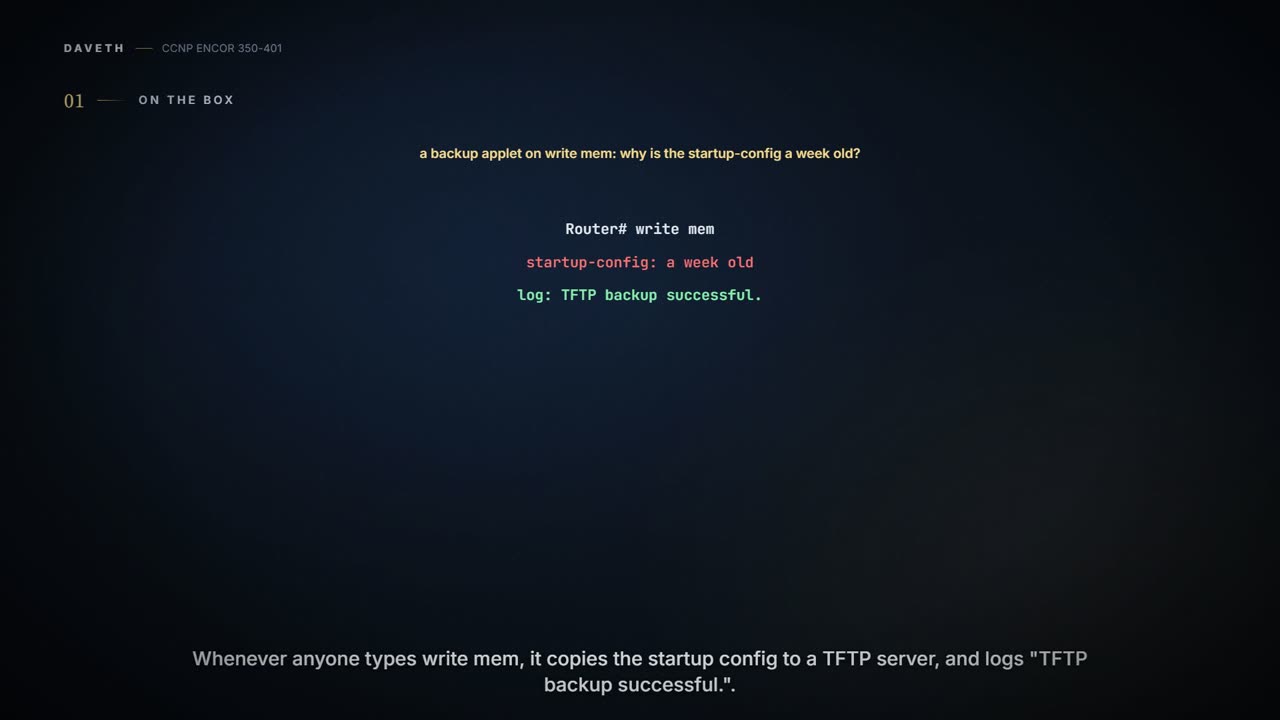
A colleague adds the guide's backup applet: whenever anyone types write mem, it copies the startup-config to a TFTP server and logs "TFTP backup successful." A week later the startup-config is a week old. How? Keep it for section 4.3.
Embedded Event Manager lets you build applets that automate tasks on the device itself, and "One of the main benefits of EEM is that it is all contained within the local device", with no external scripting engine or monitoring system needed in most cases. Cisco's definition: an EEM policy "defines an event and the actions to be taken when that event occurs", and a policy is either an applet, defined in the CLI configuration, or a script written in Tcl. It works like a smoke alarm wired to a sprinkler: the alarm doesn't phone anyone first, it acts where the fire is.
Events come from event detectors. Figure 29-1 shows them feeding the EEM server, and a policy director above it handing events to the applet and Tcl policies that subscribed to them: none, syslog, SNMP, timer, counter, interface, CLI, OIR, RF, IOSWDSYSMON, GOLD, APPL, process, WDSYSMON, SNMP notification, RPC and track. This lesson uses three: syslog, which screens log messages "for a regular expression pattern match"; CLI, which screens typed commands the same way; and none, for applets you run by hand. Two more are worth knowing for data collection and repair. The timer detector has four kinds: absolute time of day, countdown, a watchdog that "automatically resets itself to its initial value and starts to count down again", and CRON; enhanced object tracking "publishes an event when the status of a tracked object changes". Their exact event timer and event track syntax isn't in the sources read: check your release's command reference before writing one. The guide's summary puts the benefit plainly: the device reports when something is wrong, "instead of continually asking the devices if there is anything wrong", which can "reduce the load on the network". If you've ever had a neighbour who texts you when your gate is open instead of you phoning every hour to ask, that's the difference.
The guide's own example applet logs "I've fallen, and I can't get up!", which is the most honest status message IOS has ever produced.
An applet is an event and actions, and the guide reads it as if-then: if the event happens, the actions run. Example 29-1 watches the log for Loopback0 going down:
event manager applet LOOP0
 event syslog pattern "Interface Loopback0.* down" period 1
 action 1.0 cli command "enable"
 action 2.0 cli command "config terminal"
 action 3.0 cli command "interface loopback0"
 action 4.0 cli command "shutdown"
 action 5.0 cli command "no shutdown"
 action 5.5 cli command "show interface loopback0"
 action 6.0 syslog msg "I've fallen, and I can't get up!"
 action 7.0 mail server 10.0.0.25 to neteng@yourcompany.com
  from no-reply@yourcompany.com subject "Loopback0 Issues!"
  body "The Loopback0 interface was bounced. Please monitor
  accordingly. "$_cli_result"
The pattern is a regular expression, and period 1 sets the time window it's counted in: the syslog detector can require "a specific number of occurrences be logged within a specified time". $_cli_result carries "The result of the execution of the CLI command"; the guide says the mail includes "the output of any CLI commands that were issued in the applet". Cisco's pages don't say whether each action cli overwrites the variable, so read it right after the command you care about. And an applet takes one event: "Only one event configuration command is allowed within an applet configuration". Two more rules decide how the actions behave.
First, the applet's CLI session starts at the user prompt. Example 29-2's trace opens on Switch>, and the guide's note says to start with enable and configure terminal because "the applet assumes the user is in exec mode, not privileged exec or config mode". It's like a new employee who arrives without a key: the first job is always to get let in. If AAA command authorization is on, the guide adds event manager session cli username so the applet's commands are authorized (its command-reference entry didn't render in the pages read: check the syntax on your release).
Second, actions run in label order, and labels are text. Cisco: "Actions are sorted in ascending alphanumeric key sequence using the label argument as the sort key, and they are run using this sequence". The guide gives the trap: "labels are parsed as strings, which means 10.0 would come after 1.0, not 9.0". So decimal labels leave room to insert 1.5 between 1.0 and 2.0 later, and a tenth action labelled 10.0 lands second. Cisco's own fix: "use numbers such as 01.0, 02.0, and so on, or use an initial letter followed by numbers". Think of it as a library that shelves by the characters on the spine: "10" sits right after "1", long before "9".
| Labels as written | Order they run in |
|---|---|
| 1.0, 2.0, 5.0, 5.5, 6.0 | 1.0, 2.0, 5.0, 5.5, 6.0 |
| 1.0, 2.0, 9.0, 10.0 | 1.0, 10.0, 2.0, 9.0 |
| 1, 2, 10, 11 | 1, 10, 11, 2 |
That second rule exposes a slip in the guide. Example 29-2's trace runs show interface loopback0 straight after enable, before config terminal, and it shows the interface administratively down; but in Example 29-1 as printed, that command is 5.5, which sorts after 5.0 and runs after no shutdown. The trace doesn't match the applet as printed. (Where 5.5 falls, the session is still in interface configuration mode; whether IOS runs a show command there isn't in the sources read. The usual remedies are do show interface loopback0 (check on your release) or a label that places the show after an end.) Example 29-2 also shows the mail failing ("error in connecting to SMTP server") because the test had no SMTP server.
Label your tenth action 10.0 and EEM will run it second, which is the only time in networking that ten comes before two on purpose.
Example 29-3 backs up the configuration whenever someone saves it:
event manager environment filename Router.cfg
event manager environment tftpserver tftp://10.1.200.29/
event manager applet BACKUP-CONFIG
 event cli pattern "write mem.*" sync yes
 action 1.0 cli command "enable"
 action 2.0 cli command "configure terminal"
 action 3.0 cli command "file prompt quiet"
 action 4.0 cli command "end"
 action 5.0 cli command "copy start $tftpserver$filename"
 action 6.0 cli command "configure terminal"
 action 7.0 cli command "no file prompt quiet"
 action 8.0 syslog priority informational msg "Configuration File Changed!
   TFTP backup successful."
Predict before you read on, then check in D1: with the applet exactly as printed, does the write mem happen, and what does the TFTP file hold?
file prompt quiet stops the copy asking for confirmation. The part that matters is sync yes. Cisco: "Synchronous publishing of CLI events--The CLI command is not executed until the EEM policy exits, and the EEM policy can control whether the command is executed ... If _exit_status is 0, the command is skipped, if _exit_status is 1, the command is run". And the default: "If the policy exit status is zero--the policy ran successfully--the CLI command is not executed", with a caution in the command reference that "Failure to set the exit_status to 1 will cause the default action which is to skip executing the CLI command". It works like a bouncer told to check every coat: if nobody tells him to wave people through afterwards, he turns each one away at the door, and the next person gets the same treatment.
Now type write mem in D1, with the applet as printed, and see whether your prediction held.
D1
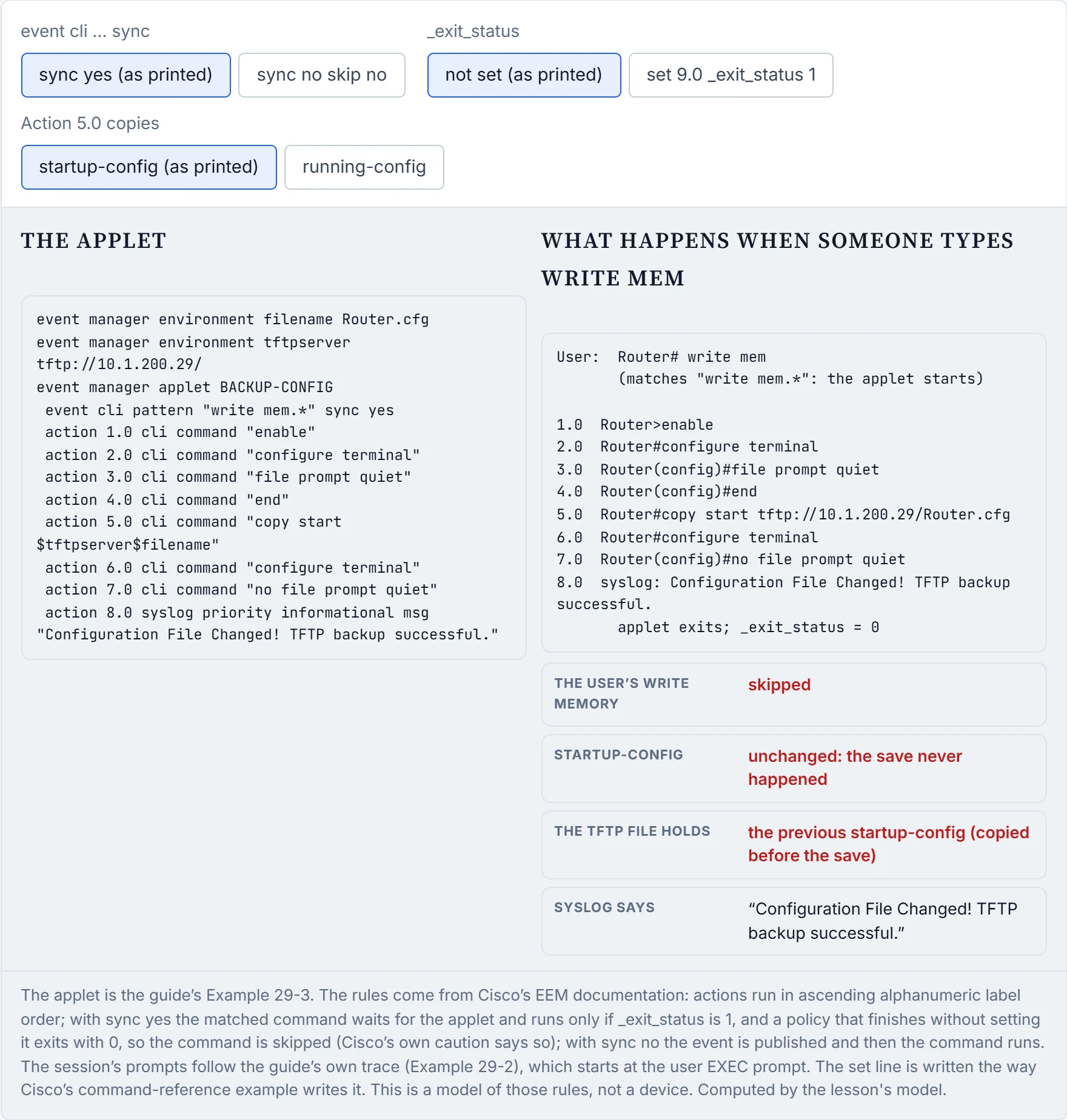
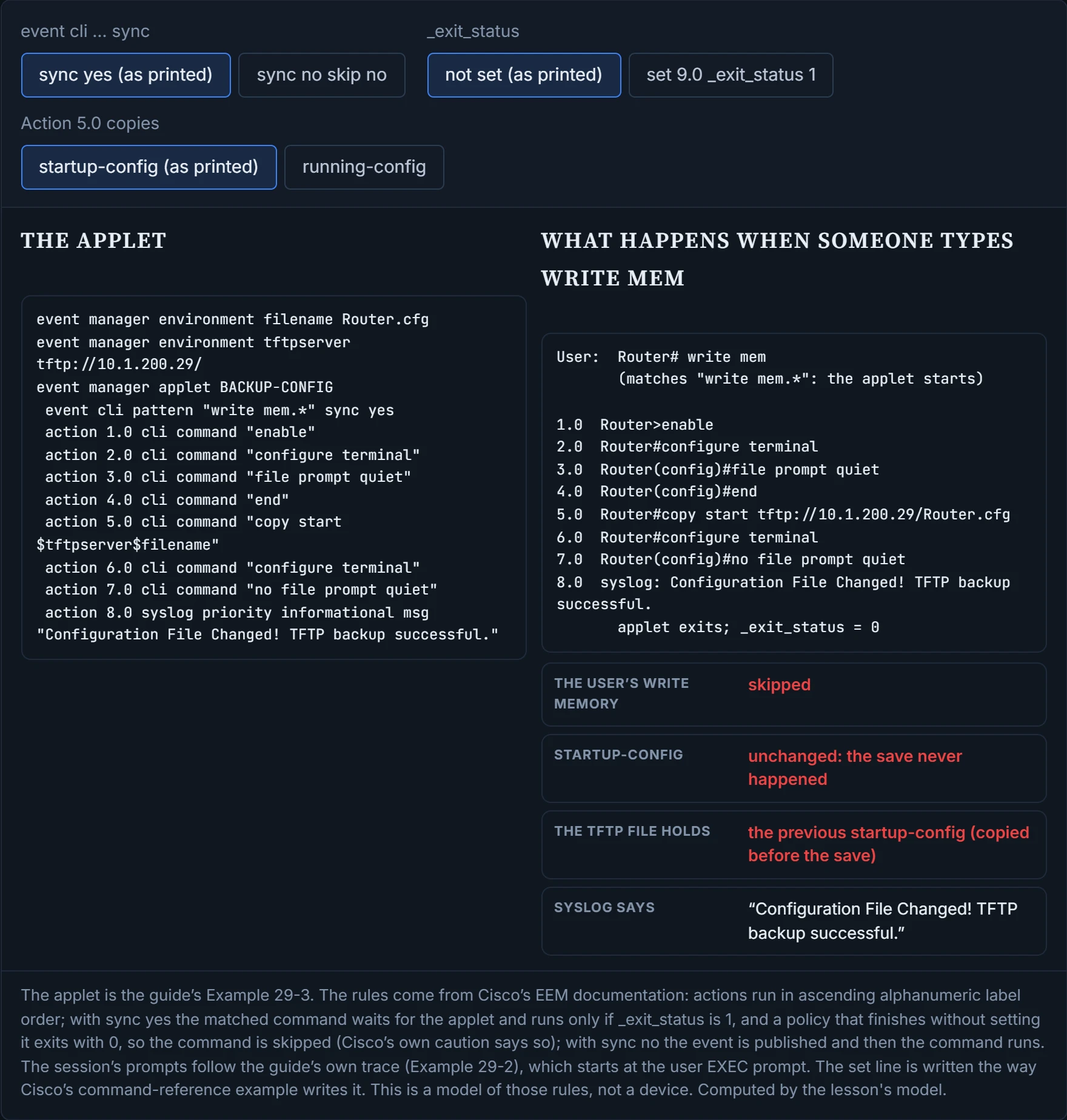
That answers section 4.1. As printed, the applet copies the startup-config, then exits with 0, so the save never runs: the TFTP file holds the previous startup-config, the startup-config itself is unchanged, and the syslog still says "TFTP backup successful". Two changes fix it. set 9.0 _exit_status 1 lets the save run after the applet; Cisco's own command-reference example writes the line that way. (Other sources write it as an action, action <label> set _exit_status 1; check that form on your release.) And because the copy runs before the save either way, copying the running-config instead backs up what the save is about to write. With sync no the save runs, but "The CLI event is published, and then the CLI command is executed" leaves no promise about which finishes first. sync no also needs skip no: skip "is required if the sync keyword is followed by the no keyword", and skip yes would suppress the command outright. _exit_status does nothing there; it's for "policies triggered from synchronous events". It's a bit like a coat check working while the cloakroom is being reorganised: you might get your coat back from before the swap or after it.
The as-printed applet blocks every save and then logs "TFTP backup successful", which is the most confident way to be wrong that a syslog message has ever managed.
Not every applet waits for an event. event none makes one you run yourself with event manager run; Cisco: "The event none command allows EEM to identify an EEM policy that can be manually triggered". Example 29-4 runs a Tcl script from flash that pings five addresses, and more flash:ping.tcl shows the script:
event manager applet Ping
 event none
 action 1.0 cli command "enable"
 action 1.1 cli command "tclsh flash:/ping.tcl"
!
Router# event manager run Ping
Environment variables keep values out of the actions, like a spare key left under a named plant pot: the actions say which pot, and you swap the key under it without rewriting them. Example 29-3's $tftpserver$filename expands to tftp://10.1.200.29/Router.cfg, and Table 29-2 lists the mail ones: _email_server, _email_to, _email_from and _email_cc. Every applet also has a time limit: "If the maxrun keyword is not specified, the default applet run time is 20 seconds". Keep that in mind for copies and mail, which wait on the network: in Example 29-2 the SMTP error came about twelve seconds after the applet opened its CLI session, inside the limit. And in a sync yes applet, a maxrun that expires before the set line would leave the command skipped (inferred from E3; unconfirmed).
| Command or output | Proves | Doesn't prove |
|---|---|---|
show event manager policy registered lists the applet | it's registered with its event | that the event has fired |
show event manager history events shows it | the event fired and a policy ran | that every action succeeded |
debug event manager action cli | each CLI command sent and what came back, with the prompt | anything about mail or syslog actions: use debug event manager all or action mail |
%HA_EM-3-FMPD_ERROR: Error executing applet LOOP0 statement 7.0 | that action failed | why: read the line before it (here, the SMTP error) |
| the applet's own syslog line | the applet reached that action | that the earlier actions did what you meant: the backup applet logs success while blocking the save (D1) |
event manager run Ping returns to the prompt | the applet was triggered | that the Tcl script did what you meant: read its output with debug event manager action cli |
more flash:ping.tcl | the script's contents | that the applet calls that file |
after write mem, show startup-config still shows the old change | the save didn't run: a sync yes applet may be skipping it | why: check _exit_status in the applet |
Continue the lesson
The whole lesson, with its drawings and its questions. The rest of this section and 9 more after it.