
Traffic filters: IPv4 ACLs and IPv6 traffic filters
An access control list only identifies traffic; it does nothing until something uses it. Filtering packets, it follows three rules: top-down processing, immediate action on the first match, and an implicit deny at the end. Apply it with ip access-group in or out. A time-range makes an entry active only at certain times, and IPv6 filters add implicit entries for neighbour discovery.
By Arif, founder of Daveth · Updated
The full 23 min walkthrough is in Daveth Pro (Network). See what the plan opens
What this page answers
How do you configure a time-based access list?
Create a named time-range with periodic or absolute times, then add time-range name to an ACL entry. show access-lists marks the entry active while the range applies. Read it in “A list with a clock”
How do you apply an IPv6 access list?
Build it with ipv6 access-list name and apply it to an interface with ipv6 traffic-filter name in or out. IPv6 lists also carry implicit entries that permit neighbour discovery before the final deny. Read it in “IPv6: the same walk, with one more step”
How do you apply an IPv4 ACL to an interface?
ip access-group number or name in or out in interface configuration mode. Pick the direction as you write the list: applied to the wrong interface or direction it filters the wrong traffic. Read it in “Putting it on an interface”
A list is only a description
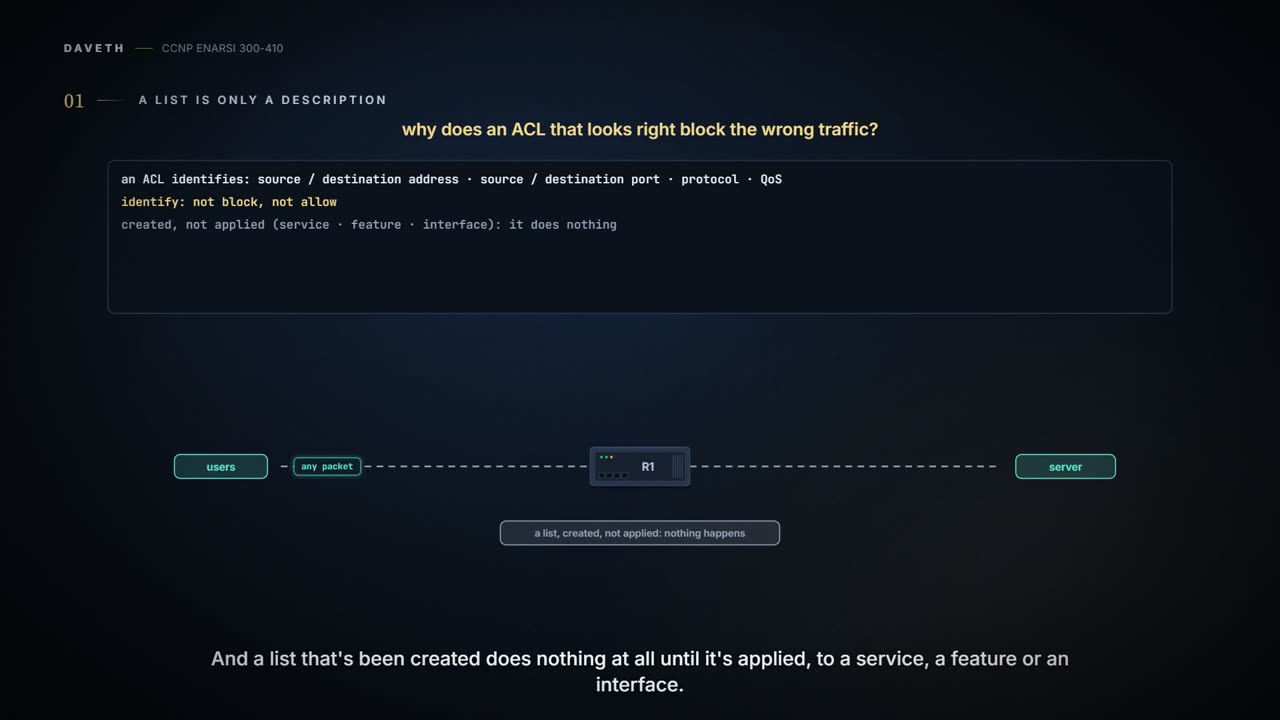
Start with what a list is. The purpose of an access control list is to identify traffic, by criteria such as source or destination IP address, source or destination port number, transport layer protocol and QoS markings. Identify. Not block, not allow. An ACL that has been created does nothing unless it is applied to a service, a feature or an interface.
You've already met lists doing other jobs. A list can pick the private addresses NAT and PAT will translate, the routes that get redistributed, the packets policy-based routing takes over, and the packets permitted or denied through the router. Distribute lists, route maps and policy-based routing each had a lesson of their own. This lesson is the last job on that list: packets through the router.
Whatever the job, the feature trusts the list. If you can't read one and decide whether it was created correctly, the service you applied it to won't produce the result you wanted. And reading isn't enough: knowing how a list functions matters even more than reading it, because that's what tells you why the thing in front of you is misbehaving.
Three rules, one packet
The route-filtering lesson gave you three steps for routes. Here they are for packets.
- Top-down processing. A list is made of entries, and they are processed from the top of the list to the bottom, in order.
- Immediate execution upon a match. The very first entry that matches the values being compared is the one that's used. It may be a permit or a deny, and it dictates how the packet is treated. Another matching entry further down doesn't matter; only the first one does.
- Implicit deny any. If no entry matches, the packet is denied by an invisible entry at the end of the list. So a list needs at least one permit entry, or everything is denied.
Here is a standard list: numbered 1, four entries, source IPv4 addresses only.
Router# show access-lists
Standard IP access list 1
 5 deny 10.1.1.5
 10 permit 10.1.1.0, wildcard bits 0.0.0.63 (1 match)
 20 deny 10.1.1.64, wildcard bits 0.0.0.63
 30 permit 10.1.1.0, wildcard bits 0.0.0.255
That's how the router prints one: the type and number, then each entry with its sequence number, the address, the words "wildcard bits" before the mask, and a match count on any entry that has been hit. The wildcard reads as it did for routes: a 0 bit must match, a 1 bit is ignored, so 0.0.0.63 after 10.1.1.0 is 10.1.1.0 through 10.1.1.63.
Now four packets, by source address: 10.1.1.5, 10.1.1.70, 10.1.1.200 and 192.168.2.1. For each, say which line takes it and what happens.
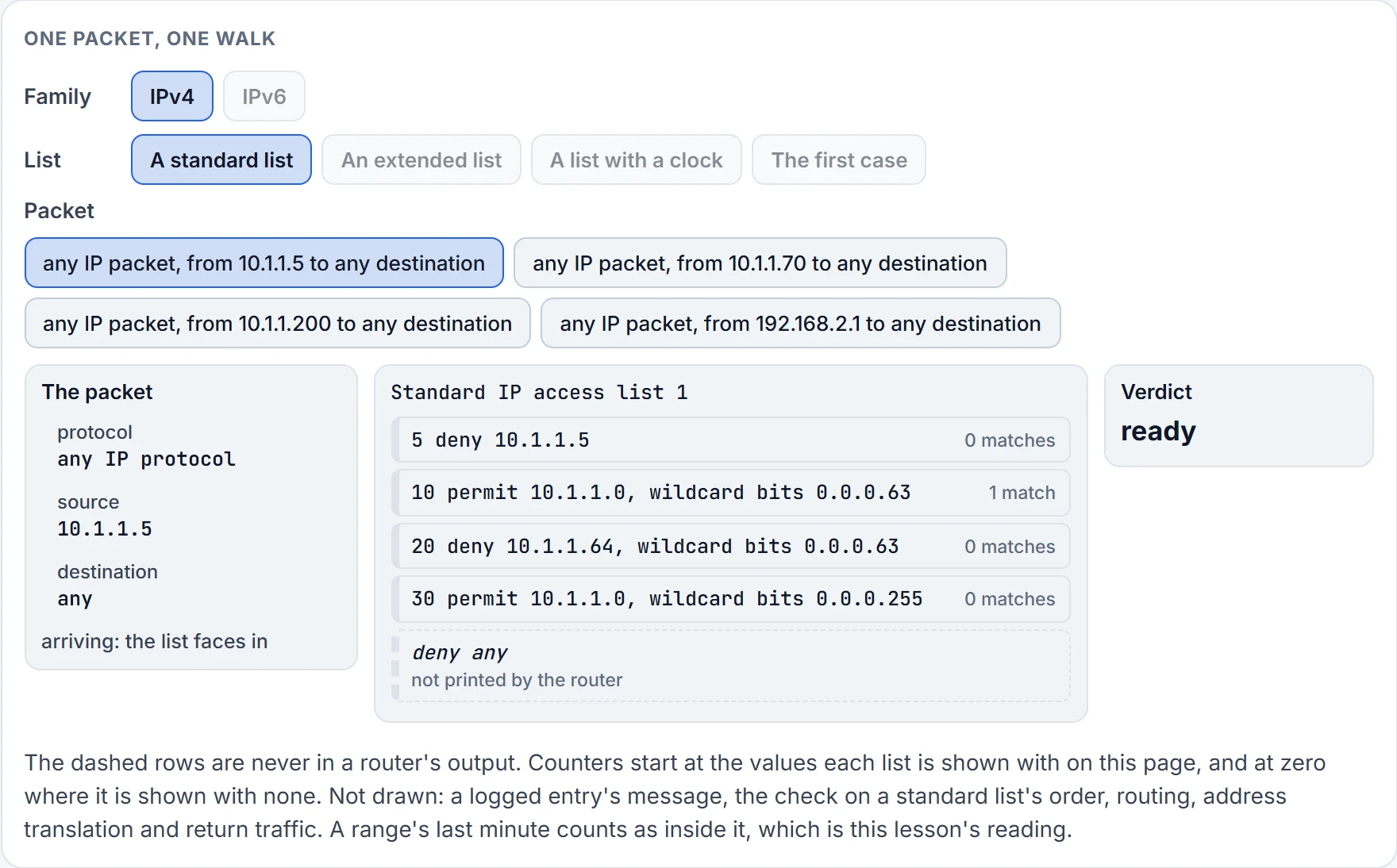
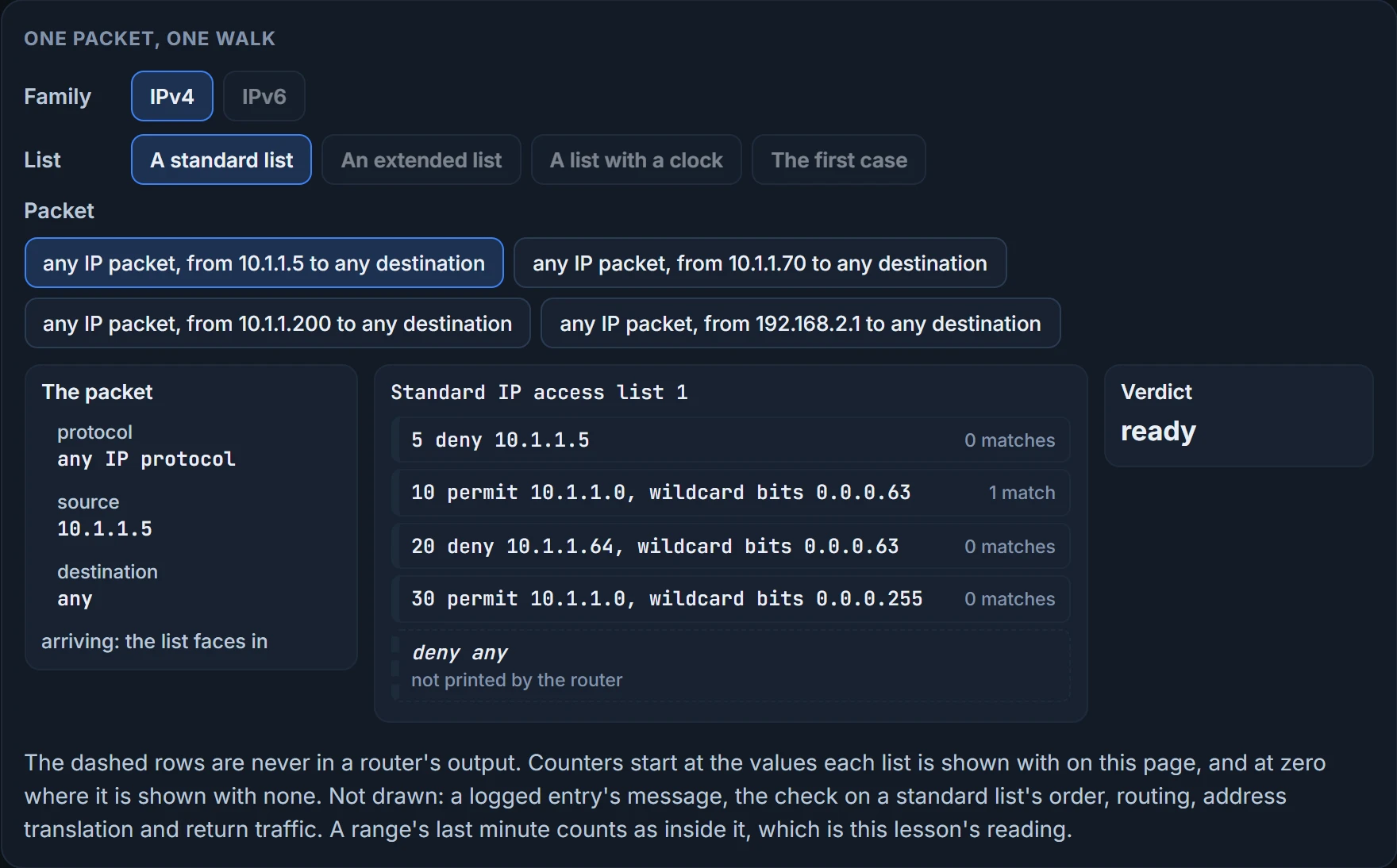
Step 1 of 2 Ready. any IP packet, from 10.1.1.5 to any destination: a standard list compares the source and nothing else. The list faces in.
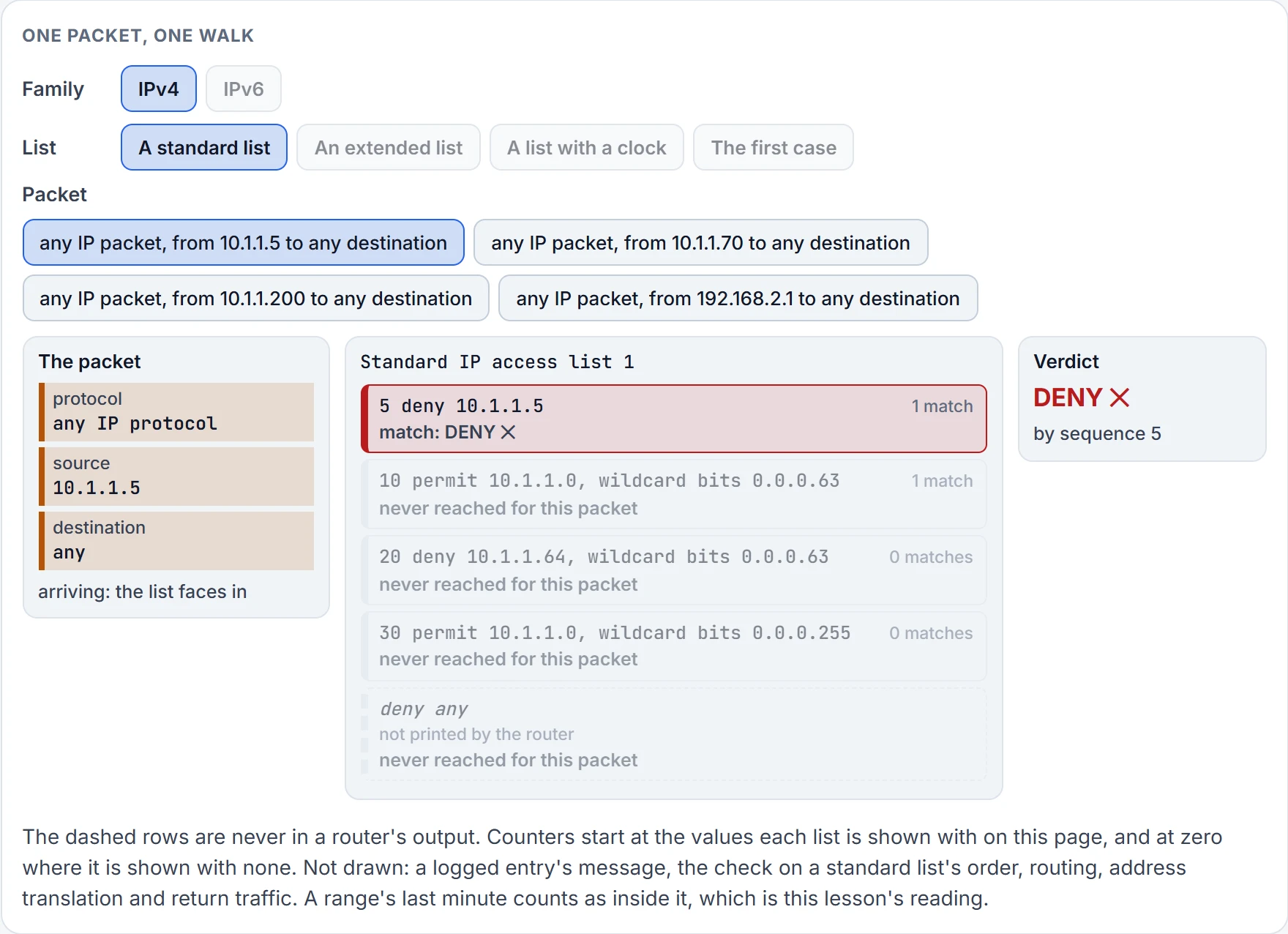
Step 2 of 2 Sequence 5 matches: deny. The walk stops here. Its counter goes up by one, and the rows below are never consulted for this packet.
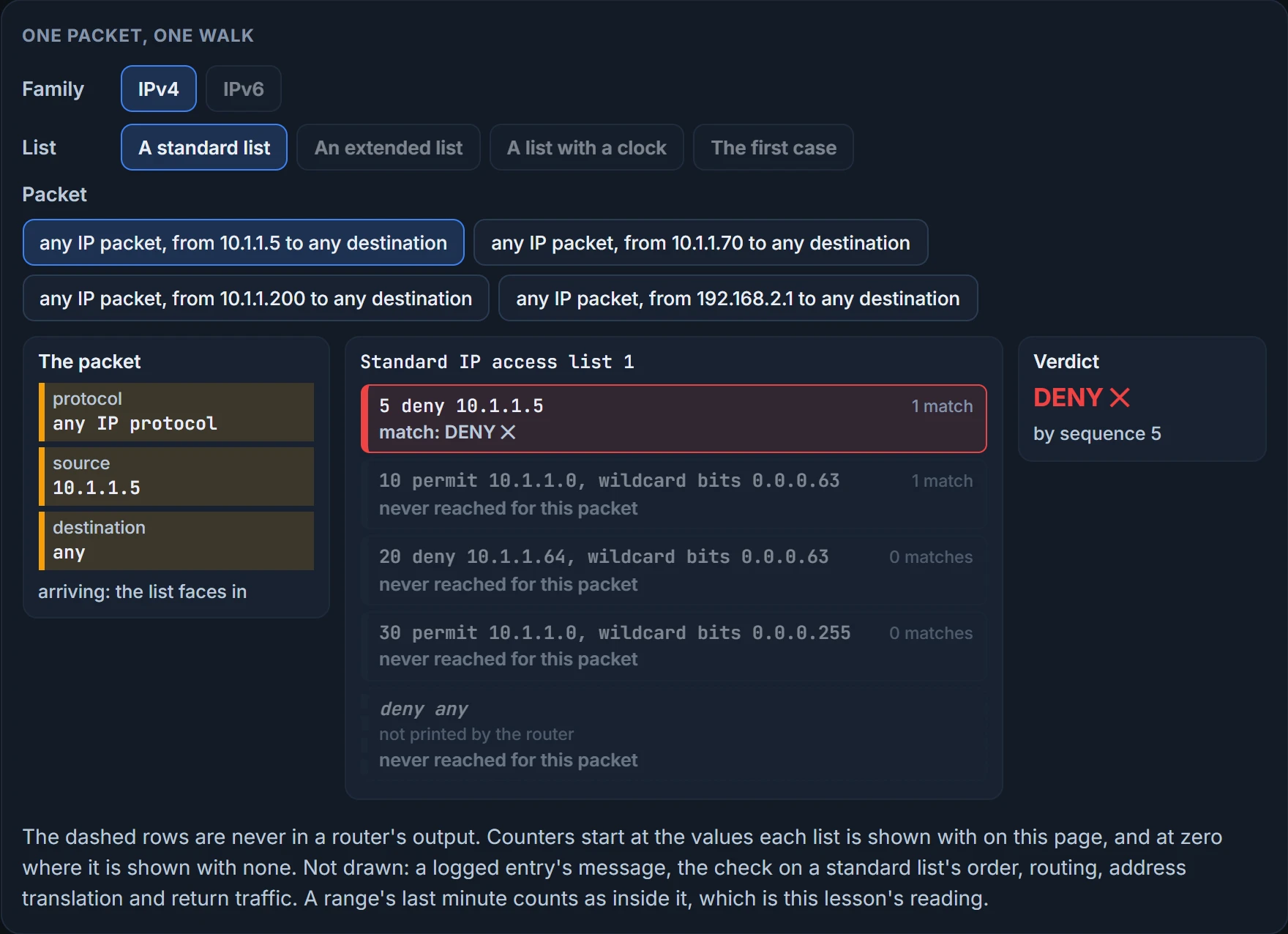
10.1.1.5 is denied in sequence 5. The very next entry, 10, would permit it, and it never gets there: top-down processing, then immediate execution upon a match. 10.1.1.70 is denied by sequence 20, which takes 10.1.1.64 through 10.1.1.127, even though sequence 30 permits everything from 10.1.1.0 through 10.1.1.255. 10.1.1.200 gets past 5, 10 and 20 and is permitted at 30. And 192.168.2.1 matches nothing, so it's denied by the implicit deny, the entry you cannot see.
That's the first answer to the question this lesson opened with. A list that looks right blocks the wrong traffic when an earlier line matched first.
Look at the order the list is written in: most specific first, least specific last. That isn't tidiness. With earlier software versions, if you didn't build a standard list that way, you ended up with generic entries early in the list that dropped or permitted traffic they shouldn't have. In newer versions the router refuses a standard entry that is more specific than one that already exists, with an error message. Don't lean on the router to catch a badly ordered list. Walk a packet.
What does show access-lists prove? The entries, their order, and that the entries with a count were reached by that many packets. It doesn't prove the list is applied anywhere, or in which direction. And it can't show you a count for the implicit deny: on most platforms the command displays the count of packets denied, and only packets denied by explicit deny statements are counted. Permits are counted, as sequence 10 shows; among denies, only the ones somebody typed. A list with no counts at all may be dropping everything.
We haven't confirmed on a router, for this section: which versions refuse a badly placed standard entry, and what the message says; and which platforms show no count for denied packets at all.
More fields, more ways to be wrong
A standard list lets you name a source address and nothing else. Extended lists are harder to read and to troubleshoot because they take more parameters: source and destination addresses, source and destination port numbers, protocols and others, which is what gives you granular control. Either kind can be named instead of numbered.
This is extended list 100. It has four entries, listed like the standard list's from most specific to least specific:
R1# show access-lists 100
Extended IP access list 100
 10 deny tcp host 10.1.1.5 host 192.0.2.1 eq www log-input
 20 permit tcp 10.1.1.0 0.0.0.63 host 192.0.2.1 eq telnet
 30 deny ip 10.1.1.64 0.0.0.63 host 192.0.2.1
 40 permit ip 10.1.1.0 0.0.0.255 any
Read an entry left to right as one sentence: action, protocol, from, to, port. The first address is always the source and the second the destination. eq www is port 80, and eq telnet is port 23.
The web request is denied in sequence 10: 10.1.1.5 may not reach TCP services on port 80 at 192.0.2.1. The Telnet session is permitted under sequence 20, and anything else 10.1.1.5 sends that gets as far as sequence 40 is permitted there, to any destination, on any port, with any protocol. One host, three outcomes, and each depends on the destination and the port as well as the source.
Now the end of sequence 10. log-input generates syslog messages saying that host 10.1.1.5 was denied when the entry is a match, and the "input" part adds the interface it happened on. Add plain log to a deny you care about, and the denied packets are logged for you.
Lines name applications by port, so the ports have to be in your head. Know these before the exam; you'll see them across many questions.
| Application | Protocol | Port |
|---|---|---|
| HTTP, HTTPS | TCP | 80, 443 |
| Telnet, SSH | TCP | 23, 22 |
| FTP | TCP | 20/21 |
| BGP | TCP | 179 |
| SMTP | TCP | 25 |
| DNS | TCP/UDP | 53 |
| NTP | UDP | 123 |
| SNMP | UDP | 161/162 |
| Syslog | UDP/TCP | 514/6514 |
| RIP | UDP | 520 |
| TFTP | UDP | 69 |
| BootP (DHCP) client, server | UDP | 68, 67 |
Four more have no port number to give. Ping is ICMP and traceroute is ICMP or UDP, and neither comes down to one port. EIGRP and OSPF aren't TCP or UDP at all: they are IP protocols 88 and 89, and have no port. So a line can't stop OSPF with a port number. It has to name the protocol.
We haven't confirmed on a router, for this section: what the logged message looks like for a denied packet, with log or with log-input.
Putting it on an interface
To filter packets, the list has to be applied to an interface: ip access-group {acl_number | acl_name} {in | out}, in interface configuration mode. The direction matters, and you have to think about it while you're writing the list. Apply it to the wrong interface, or in the wrong direction, and you won't get the result you wanted. That's the third answer to the opening question; the second is waiting in a case further down.
Why while writing? Because source and destination swap when a conversation turns around. A line that says "from the users to the server" describes packets arriving on the users' interface. The server's replies have the server as their source; on the users' interface they're going out, and the same line describes none of them.
Verify with show ip interface interface_type interface_number. Here list 100 is applied outbound and list 1 inbound on GigabitEthernet0/0, and the output, trimmed to the lines that matter, says so:
R1(config)# interface gigabitEthernet 0/0
R1(config-if)# ip access-group 100 out
R1(config-if)# ip access-group 1 in
R1(config-if)# end
R1# show ip interface gigabitEthernet 0/0
GigabitEthernet0/0 is up, line protocol is up
 Internet address is 10.1.1.1/24
 Outgoing access list is 100
 Inbound access list is 1
Two lists on one interface, one each way. That's the limit: only one access list per interface, per protocol and per direction. This output proves which list is named on this interface and which way it faces. It doesn't prove the list has the right lines. It doesn't even prove the list exists: if a list is referenced by a name, but the list doesn't exist, all packets pass. A typo in the name on the interface leaves you with a filter that filters nothing.
Three facts about direction decide real tickets.
An inbound list processes packets before they're routed; an outbound list processes them after they've been routed to the outbound interface. And an incoming list filters all traffic entering the device, transit traffic and traffic destined for the device itself. So an inbound list on a LAN port also decides who may ping, SSH to or form a neighbor with the router on that port.
Outbound is different. A list applied outbound on a router interface does not affect traffic the router itself generates and sends out of that interface. Apply an outbound list that denies ICMP or OSPF, and ICMP and OSPF messages the router generates will still be sent. A global command, ip access-list match-local-traffic, and its IPv6 twin, change that.
So the router's own ping is a poor test of an outbound list.
And lists aren't only for interfaces. To apply an IPv4 list to a vty line, the command is access-class acl_name {in | out}. Securing the lines themselves is a later lesson's job.
We haven't confirmed on a router, for this section: what a router does with a number that has no list behind it, and what either show command prints for a list that doesn't exist; whether a vty line takes a list by name or only by number; and whether the IPv4 form of match-local-traffic is there on your release.
A list with a clock
By default a list is active the whole time it's applied. That may not be what you want. You might block traffic to the internet after hours and allow it during open hours, or let a service back up files to a server from 9 p.m. to 1 a.m., Monday to Friday, and at no other time. That's a time-based ACL: an entry with the time-range option, tied to a named range.
List 100 again, with one change:
R1# show access-lists 100
Extended IP access list 100
 10 deny tcp host 10.1.1.5 host 192.0.2.1 eq www time-range AFTERHOURS (active)
 20 permit tcp 10.1.1.0 0.0.0.63 host 192.0.2.1 eq telnet
 30 deny ip 10.1.1.64 0.0.0.63 host 192.0.2.1
 40 permit ip 10.1.1.0 0.0.0.255 any
(active) means that right now the entry is doing its job: it is denying web traffic from 10.1.1.5 to 192.0.2.1. When the entry is outside its time range, the same place displays inactive.
Because the entry hangs on a range, you have to read the range's own configuration too, with show time-range:
R1# show time-range AFTERHOURS
time-range entry: AFTERHOURS (active)
 periodic weekdays 17:00 to 23:59
 periodic weekdays 0:00 to 8:59
 periodic weekend 0:00 to 23:59
 used in: IP ACL entry
Three periodic entries; the range is active, and it's used in an ACL. weekdays is Monday to Friday, weekend is the other two days, and a line's last minute is part of it: "0:00 to 8:59" is midnight to 9 a.m. A range is configured in two lines, time-range lunchtime, then periodic weekdays 12:00 to 13:00 for instance, and an IPv6 entry takes time-range the same way.
Both outputs say active. This is the router's clock at that moment:
R1# show clock
*10:53:50.067 UTC Sun May 25 2019
The weekend line: it's 10:53 on a Sunday, so the entry should be active, and it is. Read the range whole: two weekday entries, one from 5 p.m. to midnight and one from midnight to 9 a.m., and a weekend entry covering all day and all night.
Now move the clock, with one more rule in hand. An entry that is outside its time range takes no part in the walk: the packet goes on to the next entry as if the line weren't there.
On Monday at 10:53 no line covers the time. The range is inactive, sequence 10 is skipped, and the request carries on down the list to sequence 40 and is permitted. At 08:30 on Monday the second weekday line covers it, and the request is denied at 10 again. That's the intent behind this range: permit web traffic Monday to Friday, 9 a.m. to 5 p.m., and deny it at all other times.
So a time-based list gives you three things to troubleshoot, and the third is easy to forget: the list, the range, and time itself. A time-based ACL runs on the device's clock, and if the clock is wrong the entry is active or inactive at the wrong time. Are you sure the router's time is right? Are the clocks set by hand, and have they changed? Check against another time source; if you're using NTP, as you should be, check that the clocks are synchronized. And is that time UTC or local? Depending on the answer you may have daylight saving time to think about. A router twelve hours fast enforces after-hours rules at eleven on a Monday morning, and every line of the list is correct. Fourth answer: the clock disagrees with you.
show time-range proves the range's entries and whether the router considers it active at this moment. show clock proves what moment the router thinks it is. Neither proves that moment is the true one.
We haven't confirmed on a router, for this section: that an entry outside its range is skipped, which is how this lesson reads "inactive"; and that a line's last minute is inside it.
IPv6: the same walk, with one more step
IPv6 lists do the same jobs: they classify traffic, for policy-based routing for instance, or for filtering as it passes through the router. IPv6 traffic filtering is done interface by interface, with IPv6 access lists.
The steps are mostly the ones you know.
- Top-down processing, entry by entry, in order.
- Immediate execution upon a match: the first entry that matches is the one used.
- Implicit permit icmp nd. If the packet is an NA or NS message, permit it.
- Implicit deny any. No matching entry: the packet is denied by the invisible entry at the end.
Step 3 is new, and it's there for a reason. IPv6 relies on two Neighbor Discovery Protocol messages, the neighbor solicitation (NS) and the neighbor advertisement (NA), to determine the MAC address that goes with an IPv6 address. Without them a host can't even reach its own gateway. So every IPv6 list carries two implicit entries, added before the implicit deny so that those messages aren't denied:
permit icmp any any nd-na
permit icmp any any nd-ns
Two messages, NA and NS: that's all those two lines name. Put with the last step, every IPv6 ACL has implicit permit icmp any any nd-na, permit icmp any any nd-ns and deny ipv6 any any statements as its last match conditions. IPv4 never needed this. ARP, which does the same job there, uses a separate data link layer protocol, so an IPv4 list lets it through without being asked.
Now your IPv4 habit. Many engineers end a list with an explicit deny and log, to see what's being refused.
The neighbor solicitations and advertisements arriving on that port. The two permits are implicit, so every entry you type comes before them. Your deny is step 1 and 2 material; an NS or NA reaches it, matches "any any", and is denied before step 3 is ever consulted. Nothing has removed the two permits. They're still there, below your line, and no NS or NA gets far enough to meet them. Issue that command at the end of an IPv6 list, as you might be used to doing in IPv4, and you break the NDP process. Everything else you permitted is still permitted, on paper. In practice the hosts on that link can no longer find the router's MAC address, nor the router theirs, and nothing gets far enough to be permitted. So when you're troubleshooting NDP, keep in mind that an ACL might be the reason it isn't working.
The name for those two entries is the implicit permit: an invisible permanent statement in an IPv6 ACL that comes before the implicit deny to allow ND traffic. And that's the fifth answer to the opening question: in IPv6, your own last line got in ahead of two lines you never typed.
It holds for a list applied inbound, which walks what arrives on the port, packets addressed to the router among them, and the hosts' NS and NA arrive. Outbound is different. An outgoing IPv6 list applies only to transit traffic: traffic originating from the device bypasses an outgoing list by default and leaves unfiltered. The only NS and NA going out of that port are the router's own, because a router resolves its neighbors' addresses for itself and passes nobody else's solicitations along. So an outbound list that ends in deny ipv6 any any log never walks the router's NS and NA, and never sees the hosts', which come in. By those rules it doesn't break the link, unless the global command ipv6 access-list match-local-traffic has made outbound lists filter the router's own traffic too.
On one family of routers, IPv6 ACLs contain no implicit permit rules, and you must add entries to allow neighbor discovery packets to be sent and received. The exam's answer is the four steps above.
Three more differences, all smaller.
There's one type. IPv4 separates standard from extended; IPv6 has a single kind, similar to an IPv4 extended list, where an entry can give source and destination addresses, protocol, source and destination ports, QoS markings and more, as little or as much as you need. They're named, never numbered, and an IPv4 list and an IPv6 list can't share a name.
There are no wildcard masks. You give a prefix, and the prefix does the wildcard's work of defining a range. /128 is like the all-zeros wildcard, exactly this address; /0 is like the all-255s wildcard, no bits compared. /64 means the first 64 bits must match and the last 64 needn't, which takes in every interface ID on that network; /80 means the first 80 bits must match and the last 48 needn't.
And the sequence number is printed at the end of the line. The list ENARSI, on R1:
R1# show ipv6 access-list
IPv6 access list ENARSI
 permit tcp host 2001:DB8:A:A::20 host 2001:DB8:A:B::7 eq telnet sequence 10
 deny tcp any host 2001:DB8:A:B::7 eq telnet sequence 20
 permit tcp host 2001:DB8:A:A::20 host 2001:DB8:D::1 eq www sequence 30
 deny ipv6 2001:DB8:A:A::/80 any sequence 40
 permit ipv6 2001:DB8:A:A::/64 any sequence 50
You read it exactly as you read an IPv4 list. Sequence 20: Telnet over TCP from any device to 2001:DB8:A:B::7 is denied. Sequence 30: web traffic over TCP from 2001:DB8:A:A::20 to 2001:DB8:D::1 is permitted. And sequence 10 lets that one host Telnet to B::7 before sequence 20 stops everyone else.
Sequences 40 and 50 are the prefixes doing a wildcard's work. deny ipv6 2001:DB8:A:A::/80 any takes every source whose first 80 bits are 2001:DB8:A:A:0, and ::10 and ::20 are both inside it. permit ipv6 2001:DB8:A:A::/64 any then permits whatever else that /64 holds. So ::20 gets its Telnet at 10 and its web session at 30, and anything else it sends, a ping for one, stops at 40.
Send a neighbor solicitation down this list and its source address decides the result. From a link-local source, FE80::20 say, no typed line matches and the implicit permit takes it. From ::20's global address it's inside the /80 and is denied at 40; from any other global address in the /64 it's permitted at 50, by a line somebody typed. The implicit permits are the last thing tried, never the first.
Applying it has its own command: ipv6 traffic-filter acl_name {in | out}, in interface configuration mode. Direction is as significant as in IPv4: wrong interface or wrong direction, wrong result. Expect the exam to offer you IPv4's words here: access-group, bare or with ipv6 in front of it, and access-class. None is the IPv6 interface command; ipv6 traffic-filter ENARSI out is. Verify with show ipv6 interface interface_type interface_number; here ENARSI is applied inbound on Gig0/0, and the output is trimmed again:
R1(config)# interface gigabitEthernet 0/0
R1(config-if)# ipv6 traffic-filter ENARSI in
R1(config-if)# end
R1# show ipv6 interface gigabitEthernet 0/0
GigabitEthernet0/0 is up, line protocol is up
 IPv6 is enabled, link-local address is FE80::C808:3FF:FE78:8
 Global unicast address(es):
 2001:DB8:A:A::1, subnet is 2001:DB8:A:A::/64
 Input features: Access List
 Inbound access list ENARSI
Two lines to find: "Input features: Access List" and "Inbound access list ENARSI". The output goes on with the interface's ND settings, duplicate address detection, reachable time and router advertisements, and none of those say anything about the filter. It proves the list's name and direction on this interface. It doesn't prove what the list contains.
For a vty line the command is ipv6 access-class acl_name {in | out}.
We haven't confirmed on a router, for this section: which routers carry the two implicit permits and which don't; that every IPv6 list on a router ends in exactly those three statements; that the two families can't share a name; that an outbound list ending in that deny never meets the router's own NS and NA and so leaves the link working, which is reasoning from the rule and not a capture; which source address a host puts on a solicitation; and how show ipv6 interface words an outbound list.
Continue the lesson
The whole lesson, with its drawings and its questions. 4 more sections after the ones above.