
AAA with the local database, RADIUS and TACACS+
AAA secures the management plane with three questions: who are you, what may you do, and what did you do. Enable it with aaa new-model. Answers come from the local database, RADIUS servers on UDP or TACACS+ servers on TCP port 49, grouped and named in method lists tied to lines. No response or an error moves a list on to its next method; a rejection stops it.
By Arif, founder of Daveth · Updated
The full 20 min walkthrough is in Daveth Pro (Network). See what the plan opens
What this page answers
When does AAA fall back to the local database?
When the servers before it do not respond, or answer with an error. The router uses the first method listed and moves on only for those two; a server that rejects the login stops the list, and local is never tried. Read it in “Sending a login down the chain”
What ports do RADIUS and TACACS+ use?
TACACS+ uses TCP port 49. RADIUS uses UDP: 1812 or 1645 for authentication and 1813 or 1646 for accounting. A radius server entry with no ports uses 1645 and 1646, so a server on 1812 and 1813 must be named. Read it in “Where the answers live”
What is an AAA method list?
A named list defining which authentication methods are used, and in what order, such as aaa authentication login VTY_ACCESS group RADIUSMETHOD local. It does nothing until a line uses it with login authentication name. Read it in “The list, and the line it's tied to”
Three questions at the prompt
Keep the question this page opened with. By the end you'll answer it for any router by reading its configuration, and you'll use the answer backwards, as a test.
AAA is a framework that provides authentication, authorization and accounting when you're securing the management plane: the router's own prompt, not the traffic passing through it. Three jobs, three questions. Authentication asks who you are, and checks it against something you know, something you have or something you are. Authorization asks what you, now identified, are permitted to do. Accounting keeps the record: information collected for billing, auditing and reporting. This lesson is about the first two, because those are the two that lock you out.
The answers can live in three places: the router's own local database, a RADIUS server, or a TACACS+ server. One server can be either. The sample's one server, at 10.0.10.51, offers both.
None of it exists until you type one command. AAA is disabled by default on routers and switches, aaa new-model enables it, and the AAA commands aren't available until you have.
Now the part that catches people on the night of the change. The moment AAA is enabled, local authentication is applied to all lines except the console line. So if the local database doesn't hold at least one username and password, you can't reach the device remotely at all. The console is the exception: by default it can still be accessed with no username or password. Said the other way round: by default AAA uses the local username and password database, and if no username exists that can be used for remote access, authentication fails.
Apply that to a router before you read on. This is the whole configuration that matters:
R1# show run | i aaa|username
aaa new-model
username ENARSI password 0 EXAM
R1# show run | s vty
line vty 0 4
 password cisco
 transport input all
R1#
Where the answers live
The sample this lesson works from is AAA for management access on one router, R1: its console port and its vty lines. Here is the network that configuration describes.
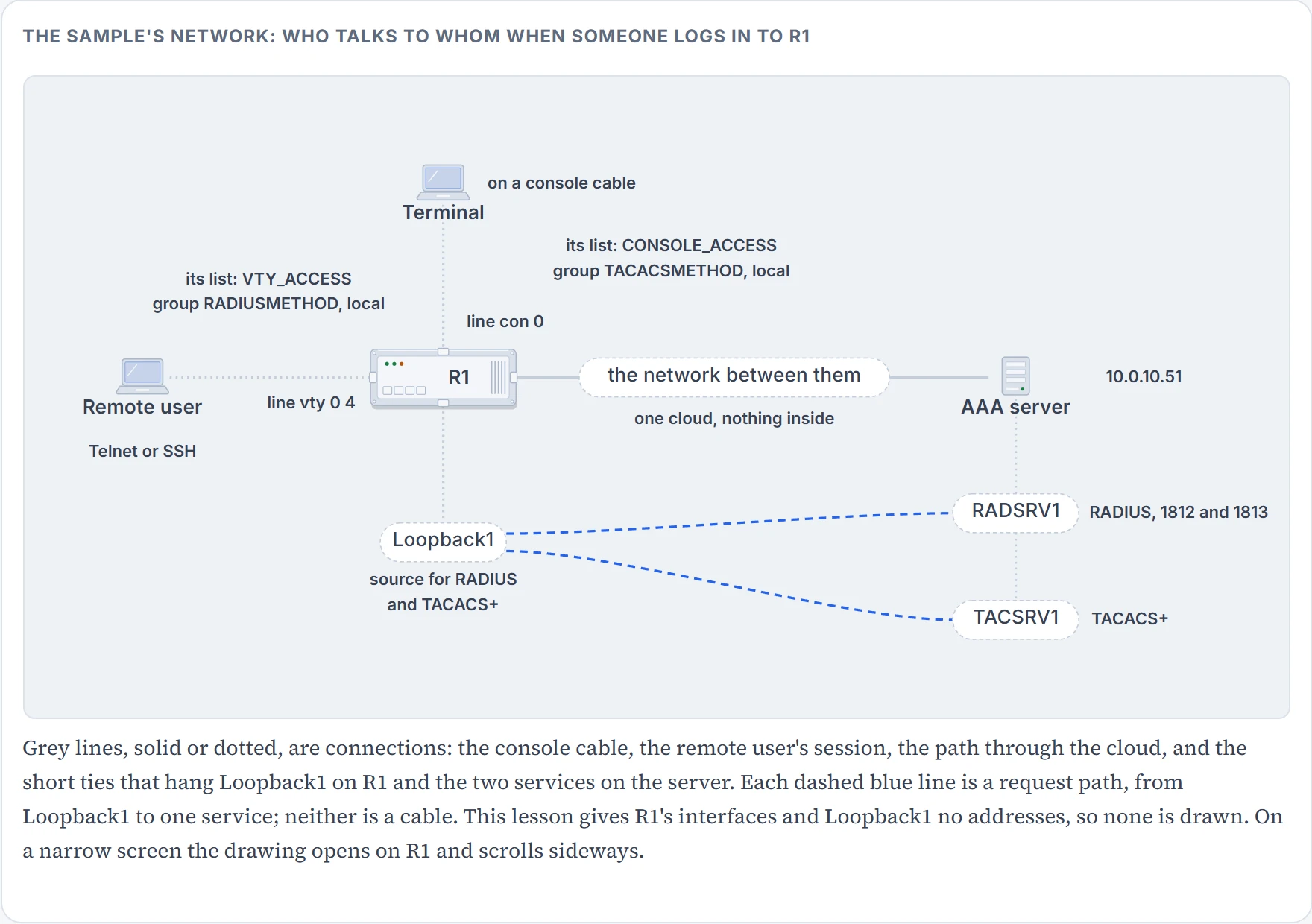
Read the configuration in three layers. This section is the first: the three places an answer can come from.
R1# show run | section username|aaa|line|radius|tacacs
aaa new-model
username admin password 0 letmein
tacacs server TACSRV1
 address ipv4 10.0.10.51
 key TACACSPASSWORD
radius server RADSRV1
 address ipv4 10.0.10.51 auth-port 1812 acct-port 1813
 key RADIUSPASSWORD
The local database. username admin password 0 letmein puts one account in the router's own username and password database. Its job in this sample is fallback: these are the credentials used if the AAA servers are not available. And yes, admin is a bad username and letmein is a bad password; they're for demonstration, and you should never use credentials that weak. Even with a server doing the real work, configure at least one local username and password for the day the server isn't available.
A TACACS+ server. tacacs server TACSRV1 opens a named block holding what the router needs to connect: here the server is at 10.0.10.51 and the pre-shared key is TACACSPASSWORD. TACACS+ uses port 49, a TCP port, and 49 is the default for connections to the server, which is why the block has no port in it. TACACS+ is a Cisco-proprietary protocol used to communicate with AAA servers.
A RADIUS server. radius server RADSRV1 is the same idea: the server's address, the authentication port 1812, the accounting port 1813, and the pre-shared key RADIUSPASSWORD. RADIUS is standards-based. Its ports are UDP ports.
Why does the RADIUS block spell out its ports when the TACACS+ block doesn't? Because RADIUS has two sets in use. RADIUS uses 1812 or 1645 for authentication and 1813 or 1646 for accounting, and 1645 and 1646 are the router's defaults. A radius server entry with no ports talks to 1645 and 1646. If your server listens on 1812 and 1813, you have to say so. Hold that; it comes back.
Two differences between the protocols matter to a troubleshooter. First, what's hidden on the wire: with RADIUS the username and an encrypted password are sent to the server, and with TACACS+ all protocol exchanges between the router and the server are encrypted. Second, how the three A's are packaged: TACACS+ provides authentication, authorization and accounting as separate services, each of which the server can provide independently, while a RADIUS answer to a login arrives bundled with the data used for authorization.
Both server blocks here use address ipv4. For a server reached over IPv6 the block takes address ipv6 instead. You'll meet older configurations that say radius-server host; that's the retired form, and an IPv4 or IPv6 RADIUS server is configured with radius server.
One more thing sits on the server and not in this output. The key has to be the same at both ends, and the server has to hold the usernames and passwords. You can't see either from R1. That's half of why AAA faults are awkward: the router's configuration is one witness, and the other witness is a machine you may not run. For RADIUS the key does more than prove who's talking: the device and the server use that text string to encrypt passwords and exchange responses. Sorting a refused login will need that.
We haven't confirmed on a router, for this section: that a router takes the IPv6 address line in exactly the form address ipv6.
Groups, and the address the router shows
The second layer of the sample:
aaa group server radius RADIUSMETHOD
 server name RADSRV1
 ip radius source-interface Loopback1
aaa group server tacacs+ TACACSMETHOD
 server name TACSRV1
 ip tacacs source-interface Loopback1
aaa group server radius RADIUSMETHOD groups one or more RADIUS servers that will be used together within a method, and holds any settings they share. RADSRV1 is in the group because of server name RADSRV1. The TACACS+ group, TACACSMETHOD with TACSRV1 in it, is built the same way. With more than one server in a group, they're tried in the order they're configured: the second is asked only if the first doesn't respond.
Now the line that causes real outages. ip radius source-interface Loopback1 makes every packet the router sends to the group's RADIUS servers leave with Loopback 1's address as its source; ip tacacs source-interface Loopback1 does the same for TACACS+.
Why should the source matter? Because the server keeps a list of its clients, and the client here is the router. When you configure a AAA server you must specify the client's IP address. A router sourcing a packet uses its exit interface's address, and if that isn't the address the server expects, the client can't use the server or its services. So the recommendation is a loopback's address for both jobs: as the source of the packets, set with one of these two commands, and as the client address entered on the server, so that the router shows the same address every time whichever way the packet leaves. With the loopback as the source, whatever interface the request leaves by, the server sees Loopback 1.
Two smaller options. A server listed with server name can be used by other groups as well. If you want a server used by this group only, list it with server-private. And if the group and its server belong to a VRF, a separate routing table on the same router, the group has to say which one, with ip vrf forwarding and the VRF's name.
We haven't confirmed on a router, for this section: the exact form of server-private (followed by a server's name, or by its address and a key of its own), and the exact form of the VRF line inside a group.
The list, and the line it's tied to
The third layer joins a line you log in on to a group you've built.
aaa authentication login VTY_ACCESS group RADIUSMETHOD local
aaa authentication login CONSOLE_ACCESS group TACACSMETHOD local
line con 0
 logging synchronous
 login authentication CONSOLE_ACCESS
line vty 0 4
 login authentication VTY_ACCESS
 transport input all
A method list defines which methods of authentication will be used, and in what order. Read the first one left to right. aaa authentication login says what the list is for. VTY_ACCESS is its name. Then the methods: group RADIUSMETHOD first, the servers in that group, and local second, the router's own database. CONSOLE_ACCESS has the same shape with the TACACS+ group in front.
A list does nothing until a line points at it. login authentication CONSOLE_ACCESS under line con 0 makes the console port use that list, and login authentication VTY_ACCESS under line vty 0 4 does it for vty access, such as Telnet and SSH connections. The general form is login authentication {default | list_name}. (Whether a connection reaches a vty line in the first place is the job of access-class, from the access-list lesson; this lesson starts once it has.)
Two lines in that output aren't AAA's: logging synchronous under the console and transport input all under the vty lines. They're settings of the lines themselves, and the lines get a lesson of their own later in the course.
Which list does a line use? Three cases, and you need all three.
- The line names a list: that list.
- The line names nothing, and a list called
defaultexists: the default list. The default list is automatically applied to all interfaces except those that have a named method list explicitly defined, and a defined list overrides the default one. For a login list, the interfaces are the lines. - No list at all: the vty lines use the local database, and the console asks for nothing, as the first section showed.
The word after authentication is the list's service, and it has to match where the list is used. A login list authenticates the console and the vty lines. A PPP list authenticates PPP sessions, and a dot1x list authenticates users connecting to a dot1x-enabled interface. Create a list for login and apply it to PPP interfaces, and it will not work; create one for dot1x and apply it to the vty lines, and it will not work. This lesson builds login lists only.
So the chain a login travels has five links: the line, the list that line uses, the method in that list, the group that method names, and the server in that group. Most of the troubleshooting ahead is a break in one of them. The next section sends a login down the chain.
Sending a login down the chain
The sample's vty list is group RADIUSMETHOD local, and here is what the second word is for. If the RADIUS servers are not available, the second method, the local database, is used. If the servers are not accessible, local authentication is the fallback.
Read the condition in those two sentences slowly, then commit to an answer.
It doesn't, and this is the rule the lesson hangs on. The router uses the first method listed. It attempts the next method only when there is no response from the previous one. If authentication fails at any point, meaning the security server or the local username database responds by denying the user access, the authentication process stops and no other methods are attempted. The condition was exact: a server that refuses you is available.
A method can come back with one of three things:
| The method returns | Meaning | What the list does |
|---|---|---|
| PASS | the user is authenticated | stops; the user is in |
| FAIL | the user hasn't met the criteria in that method's database | stops; the user is refused |
| ERROR | the method hasn't responded, so no authentication was attempted | moves to the next method |
That table's ERROR is a method that hasn't responded. A reply can be an ERROR as well: a TACACS+ server has an ERROR response of its own, which the next section lists, and if RADIUS returns an error, the user is authenticated using the local database. So two things move a list on, no response and an error reply, and one thing stops it: a rejection.
Set this beside the access-list lesson. An access list stops at the first line that matches. A method list stops at the first method that answers yes or no. In both, everything below the stopping point might as well not be written.
The figure below walks one login at a time, by these steps:
- Find the line's list: the three cases of the last section.
- Ask the first method. For a group, ask its servers in order; a server that says nothing passes the question to the next server, and a group in which no server answers is an ERROR.
- PASS or FAIL ends the walk. ERROR moves to the next method.
- For
local: a username and password that match an entry are a PASS. An empty database when it's checked is a FAIL, and so is a wrong password for a user it holds: that's the local username database denying the user access. A username it doesn't hold at all is a FAIL too (the model's reading, not confirmed); whenlocalis the last method the login is refused either way. - If the list runs out on an ERROR, the login is refused.
Now two logins the rule doesn't hand you. Same list, same server; the server has never heard of admin, and the router's local database holds admin and nothing else.
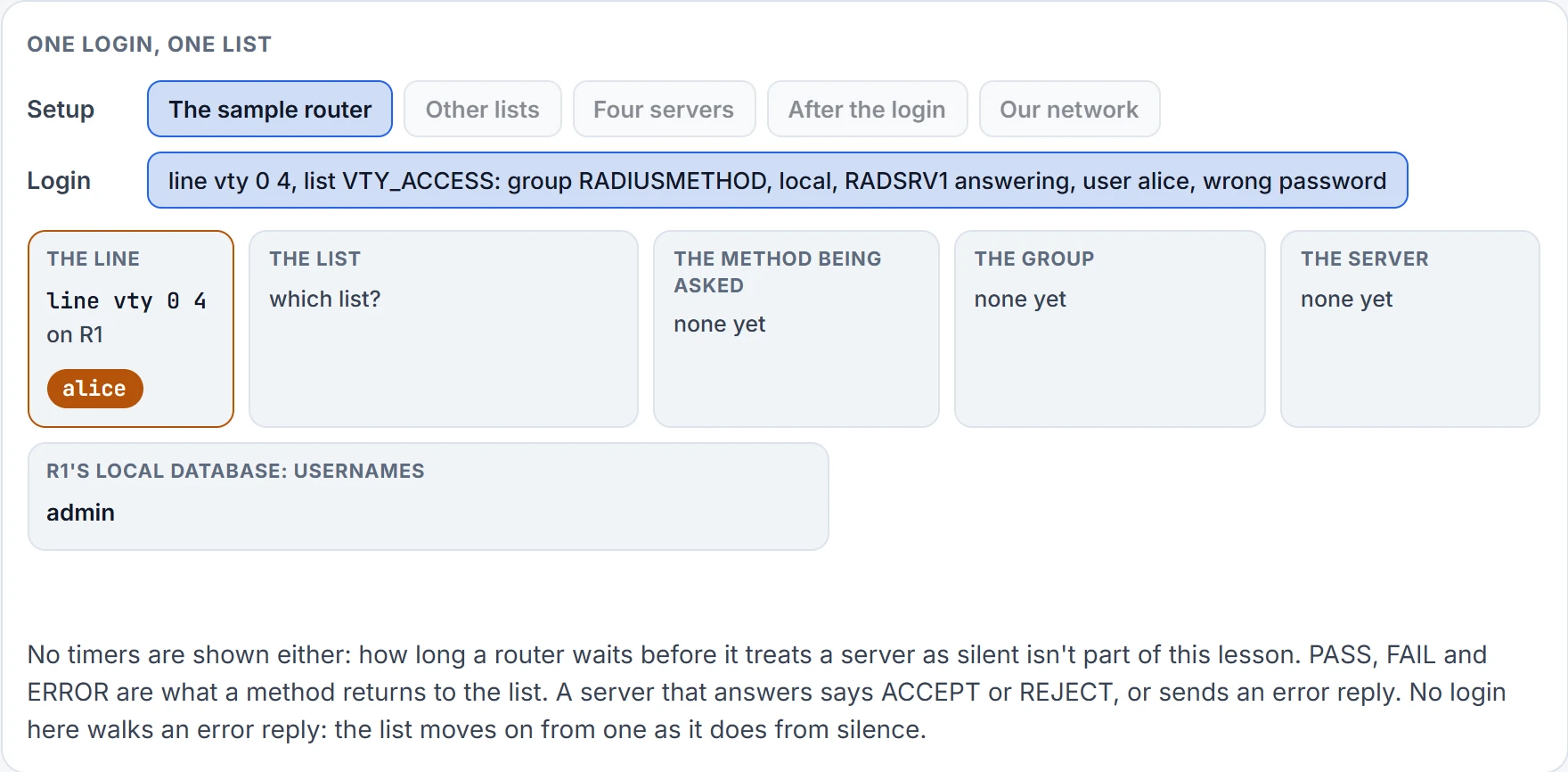
Step 1 of 6 Ready. alice arrives on line vty 0 4 of R1, wrong password. RADSRV1 is answering.
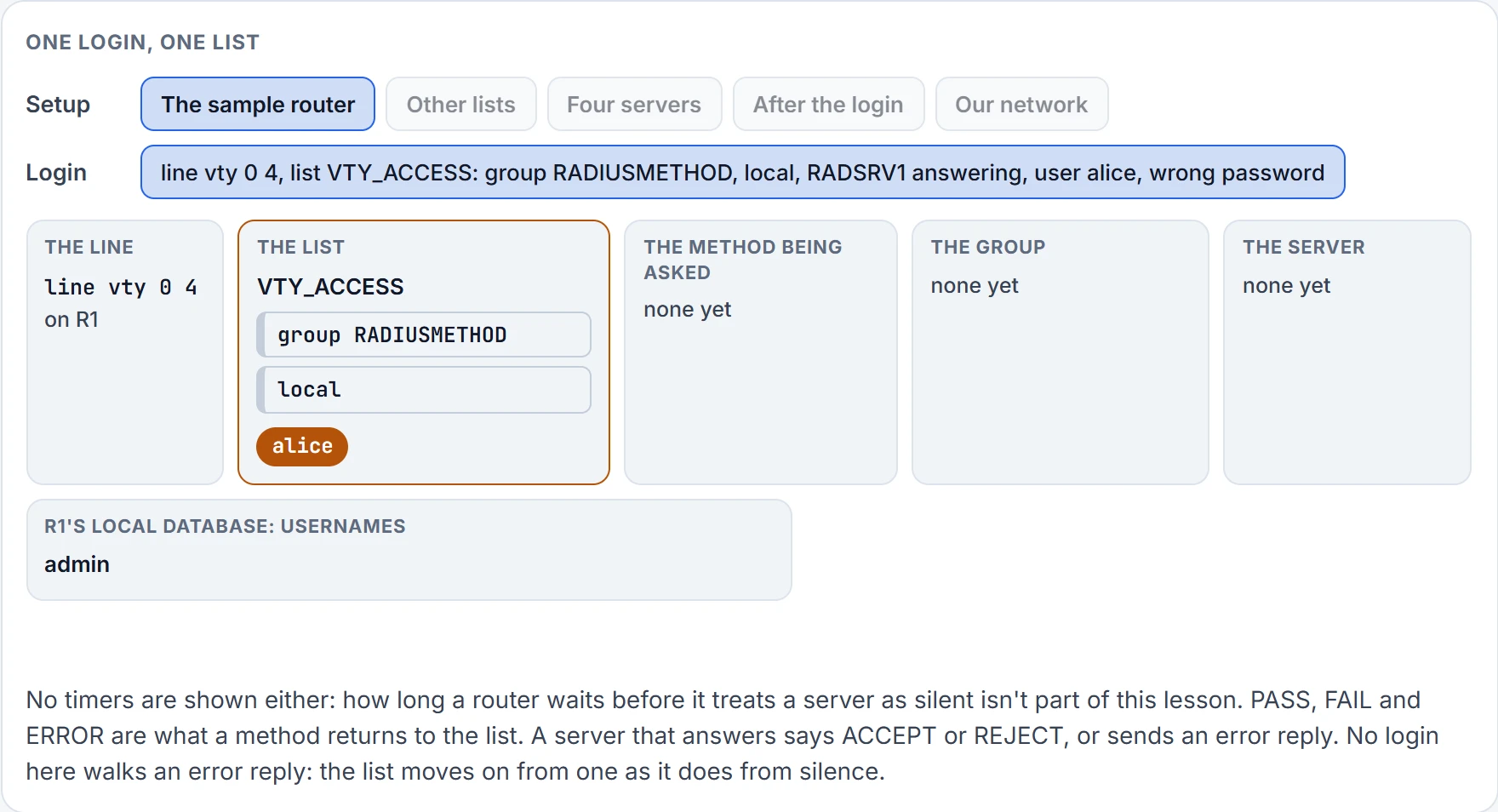
Step 2 of 6 line vty 0 4 names a list: VTY_ACCESS. Its methods, in order: group RADIUSMETHOD, then local.
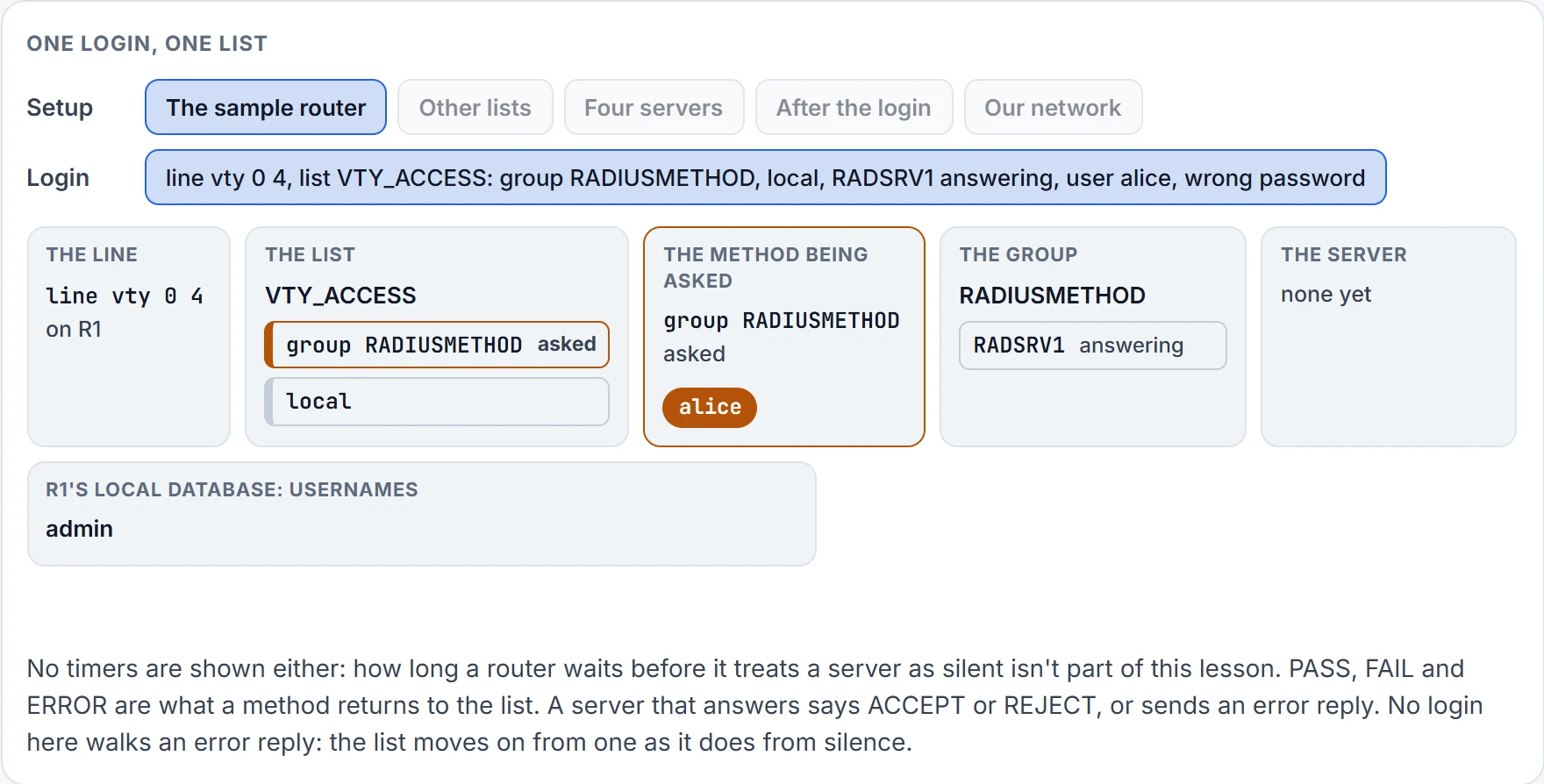
Step 3 of 6 The first method is group RADIUSMETHOD: its servers are asked in the order they're configured.
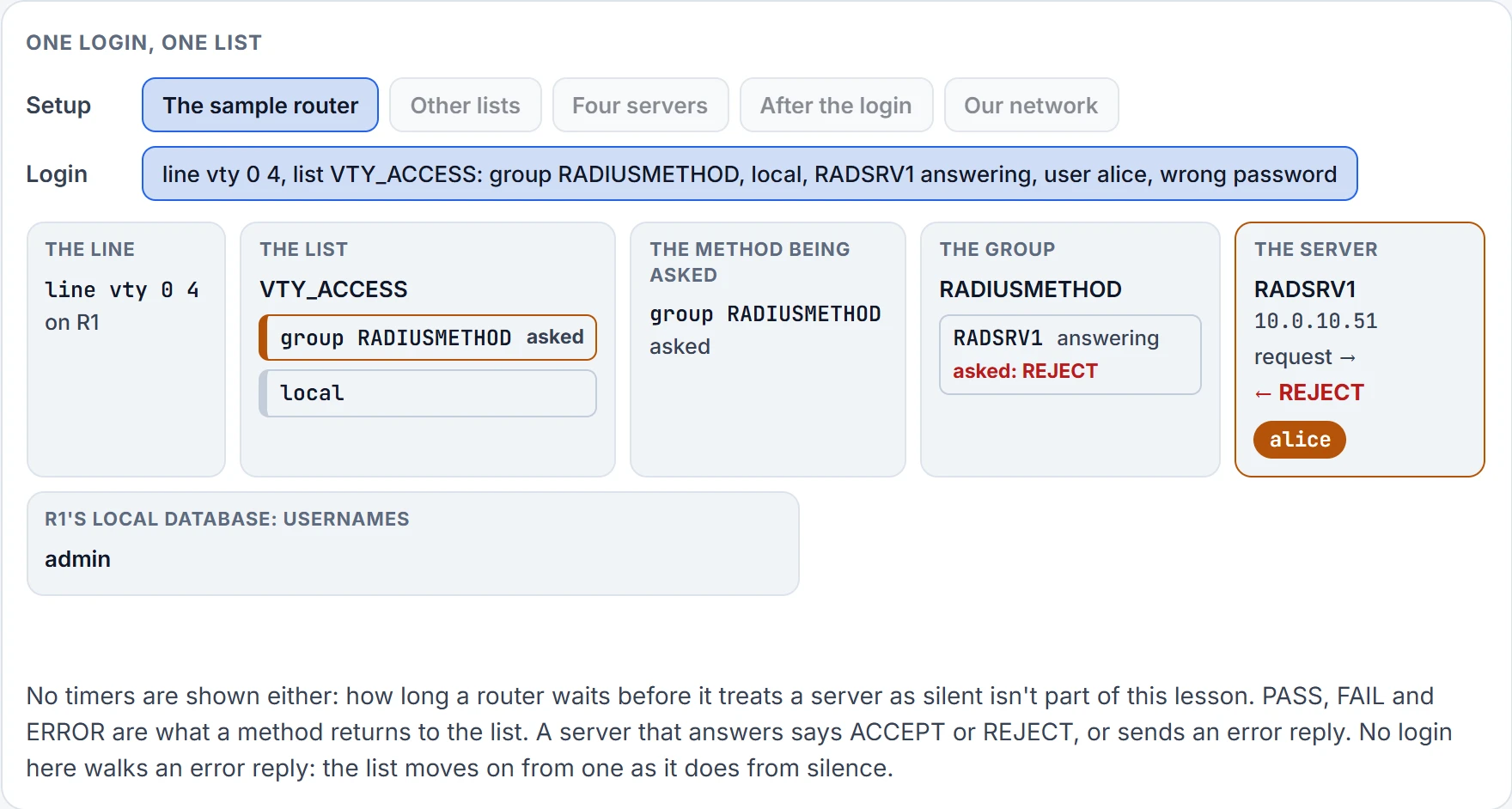
Step 4 of 6 RADSRV1 is sent the request, and answers REJECT: it holds alice, and that isn't the password.
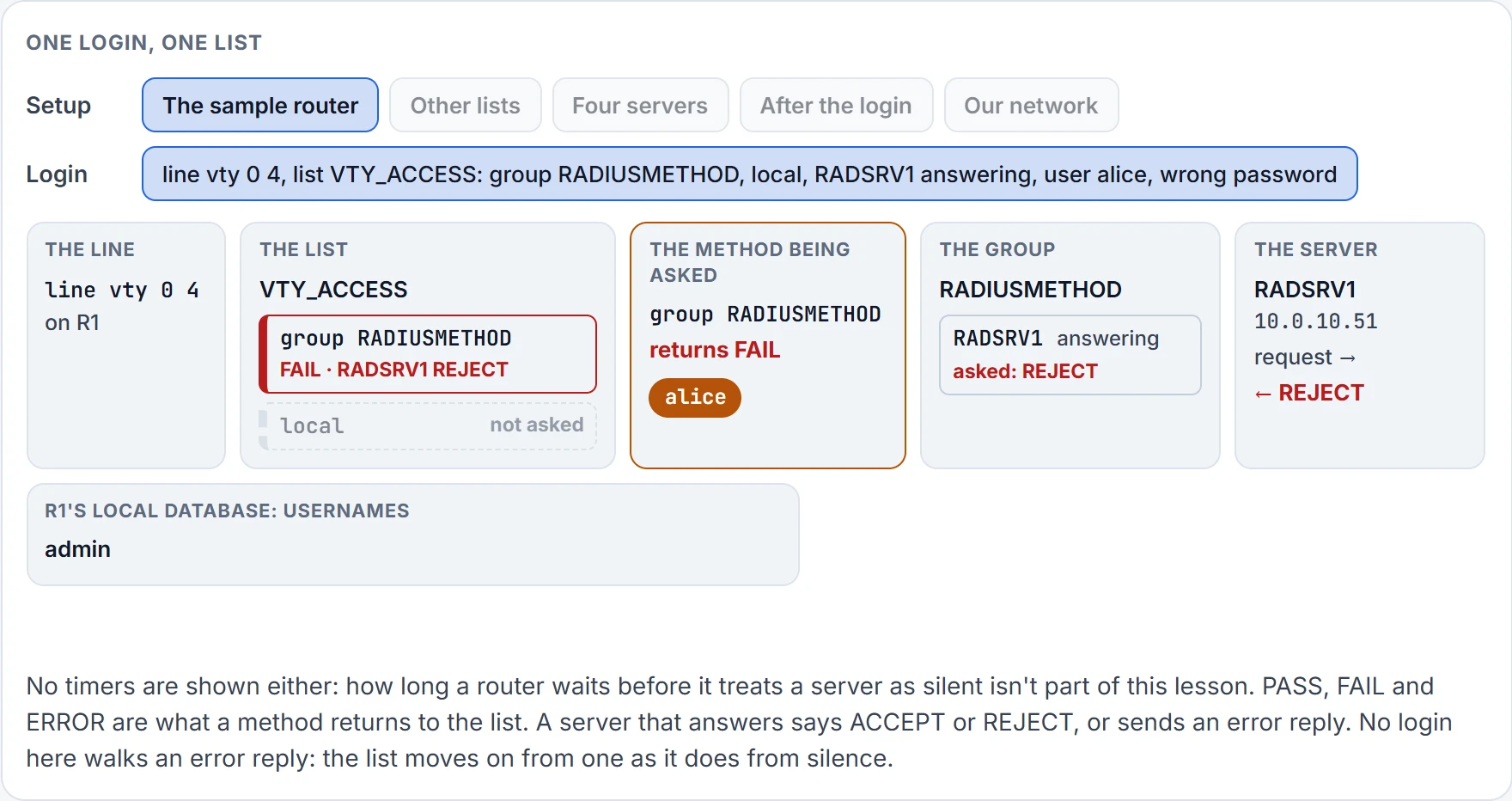
Step 5 of 6 group RADIUSMETHOD returns FAIL: a server answered, and the answer was no. An answer ends the list. Nothing after it in the list is asked.
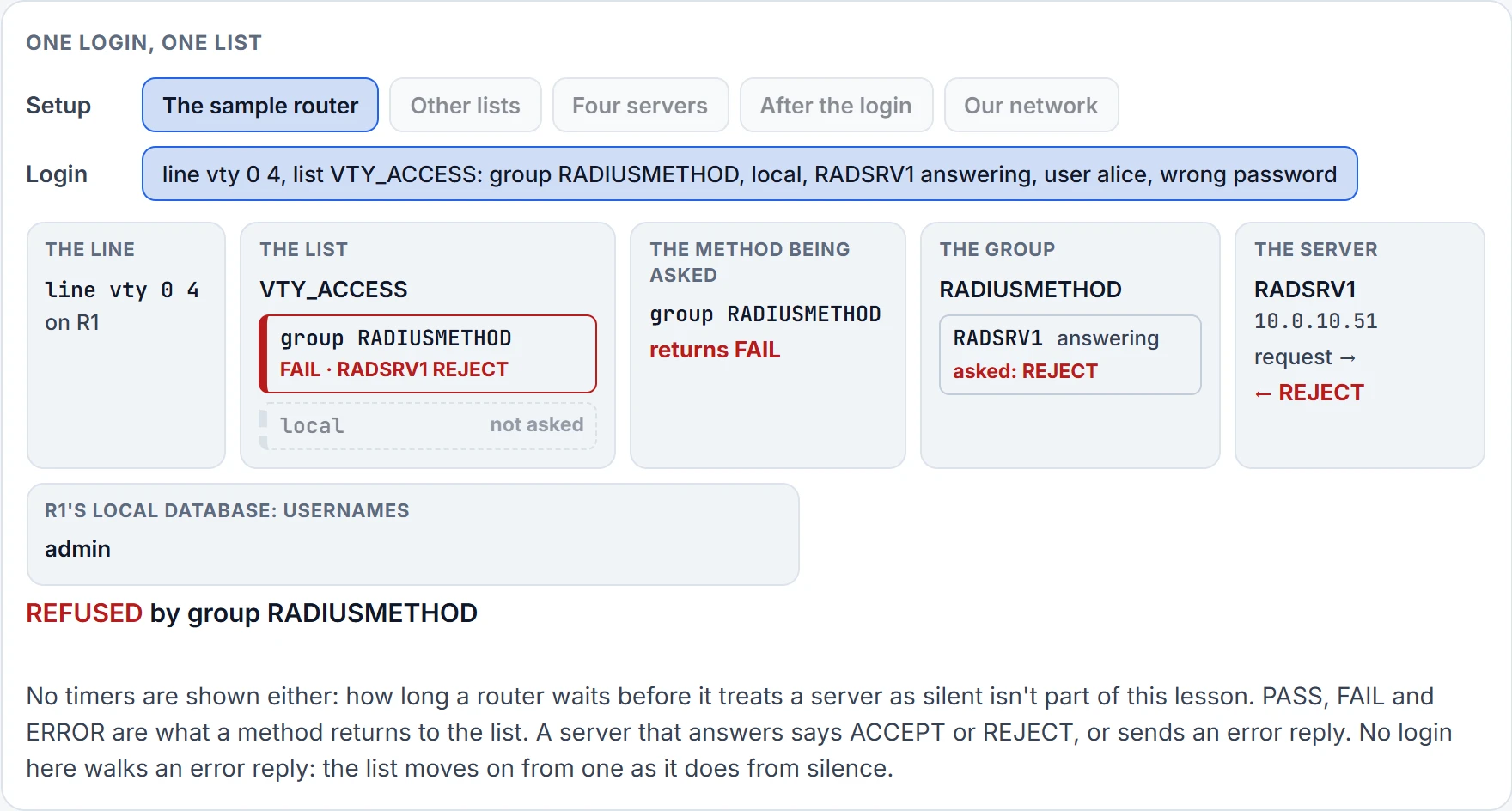
Step 6 of 6 Refused, by group RADIUSMETHOD.
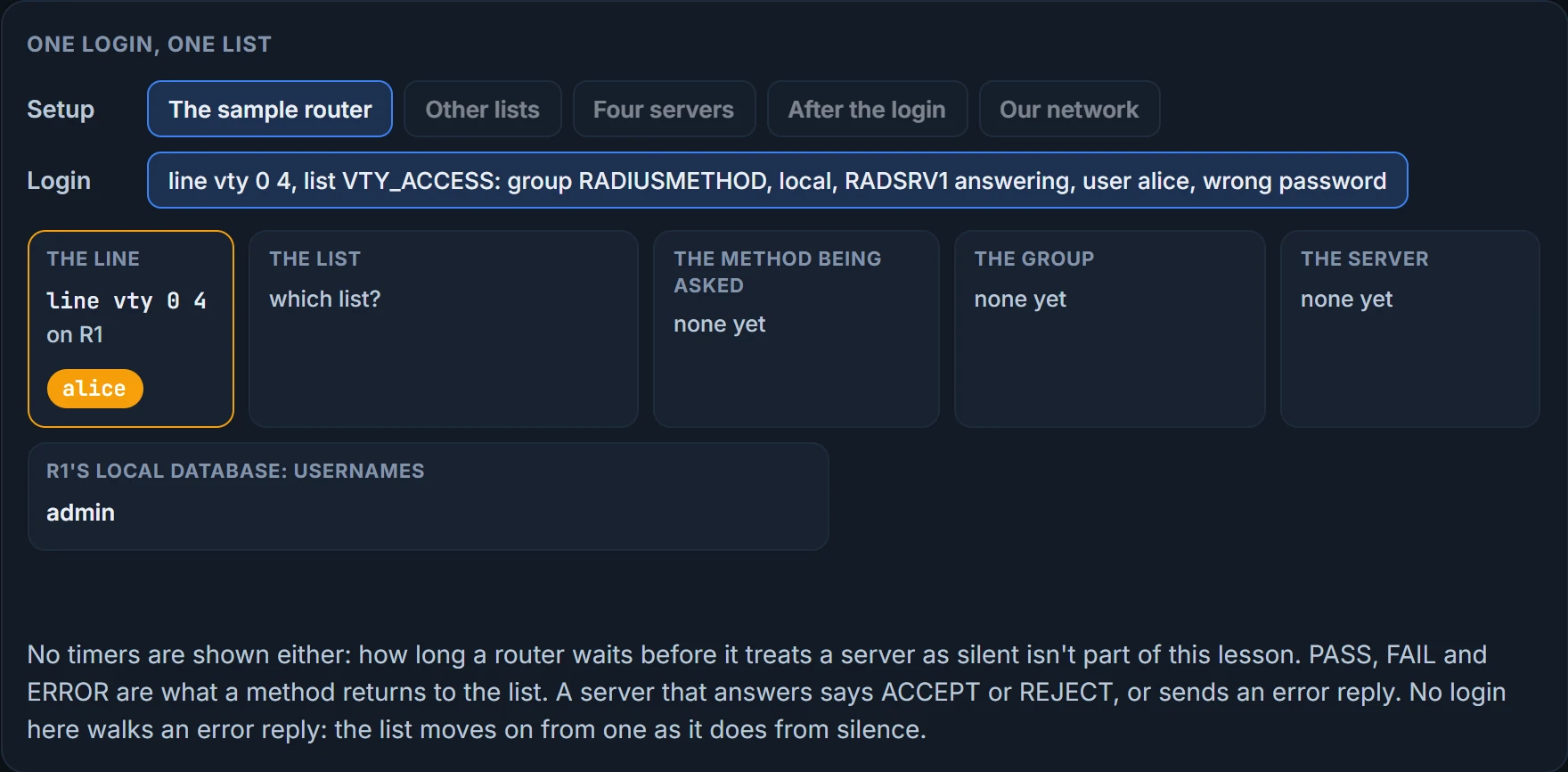
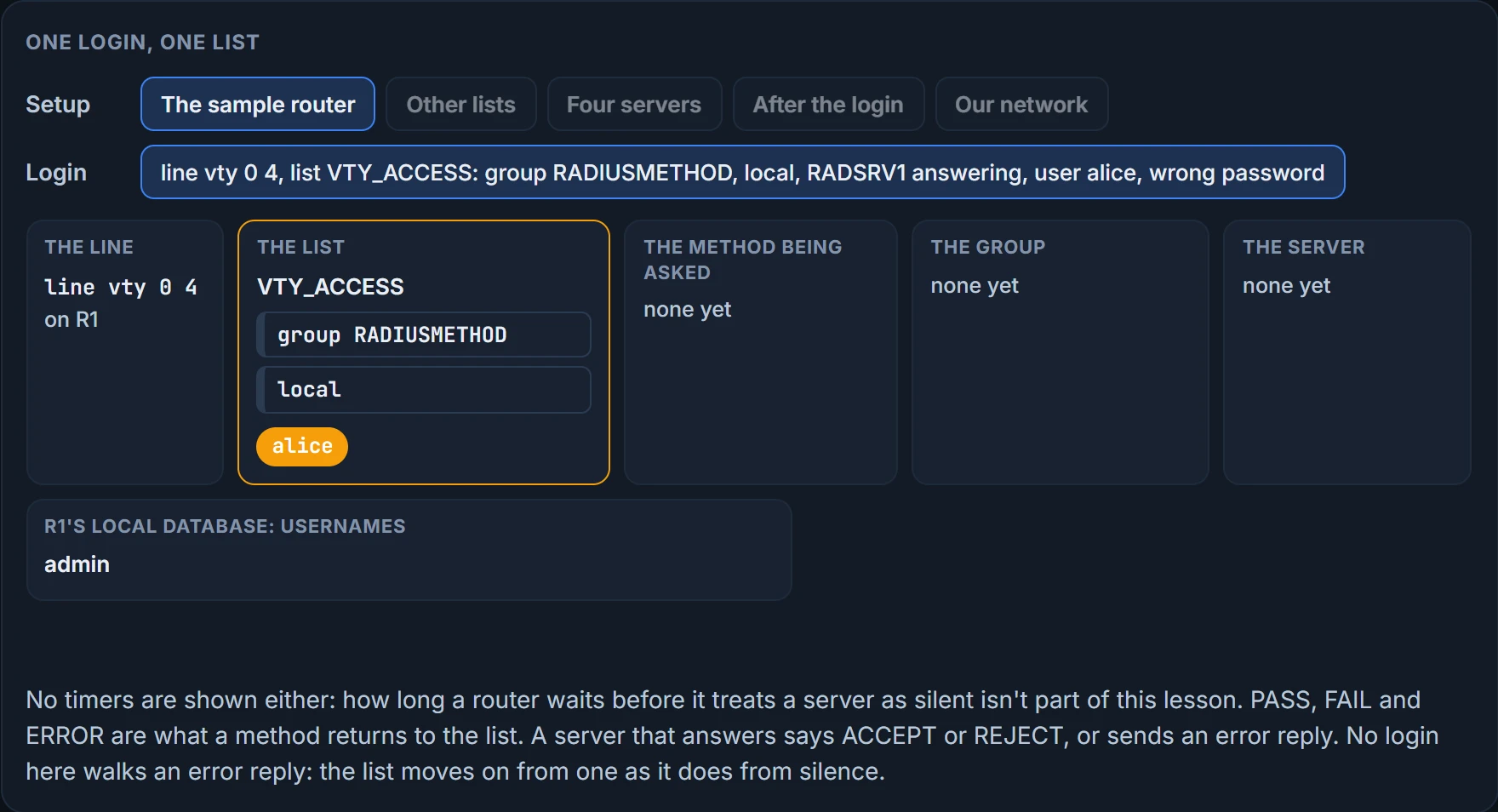
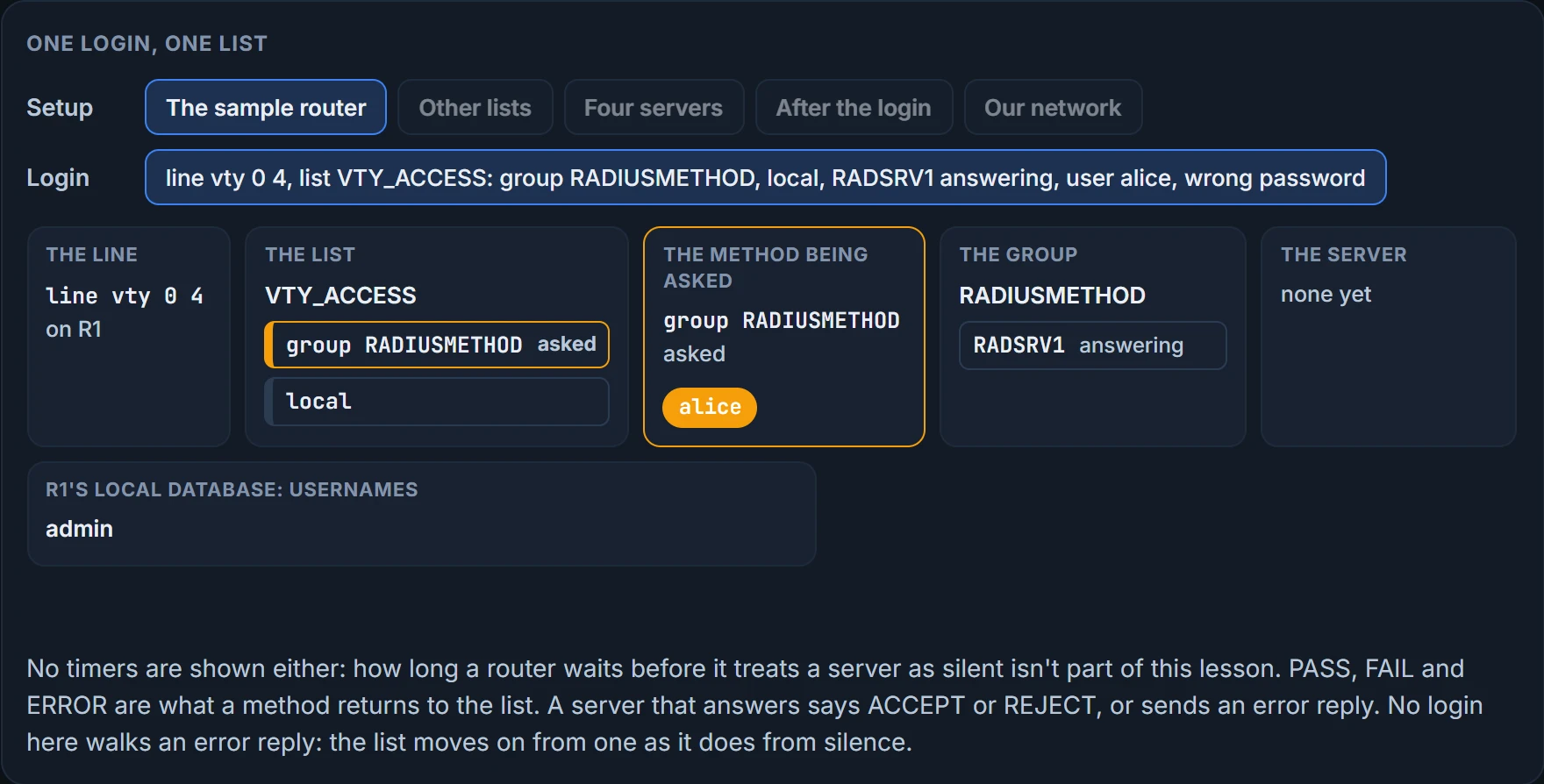
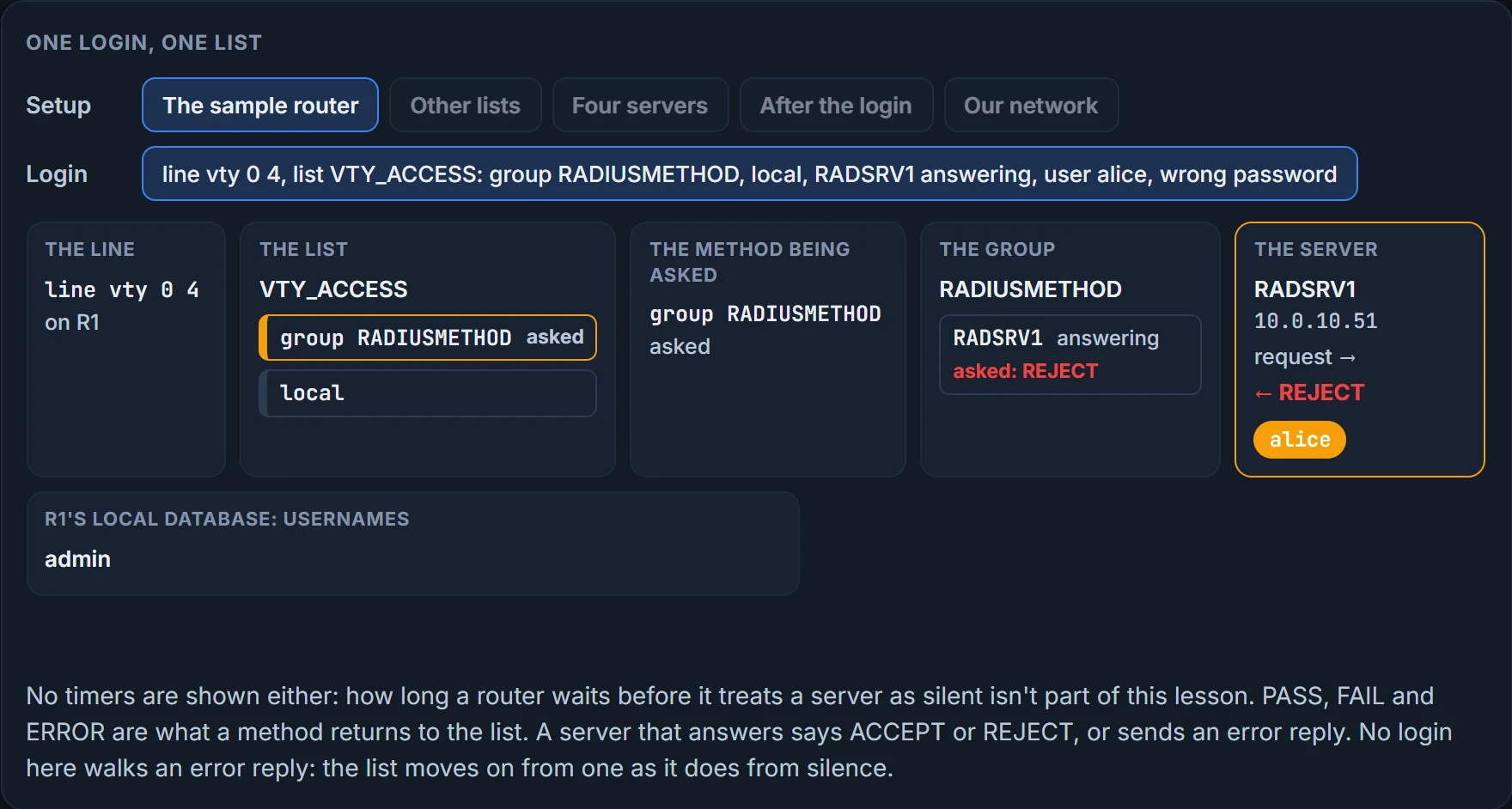
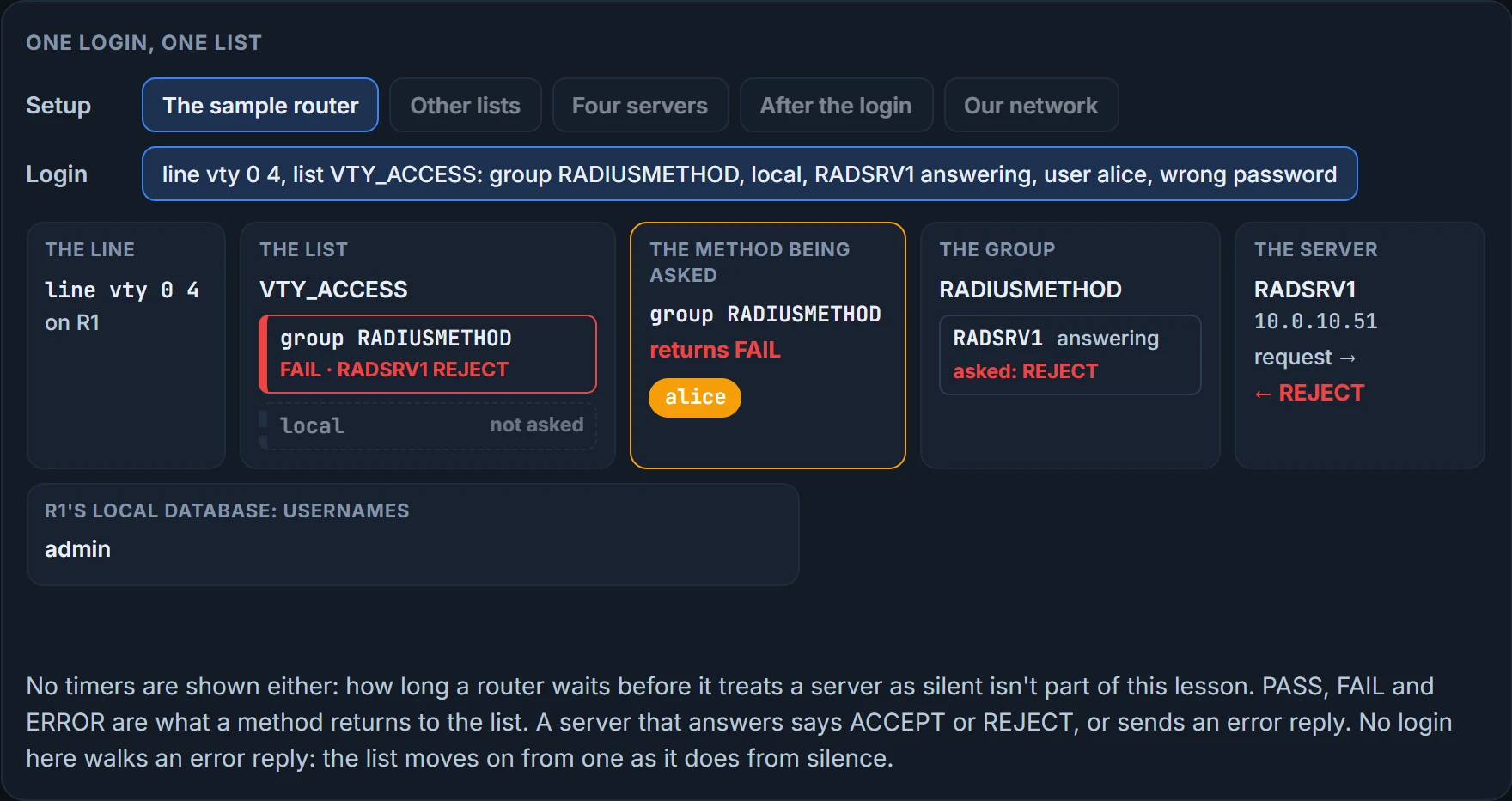
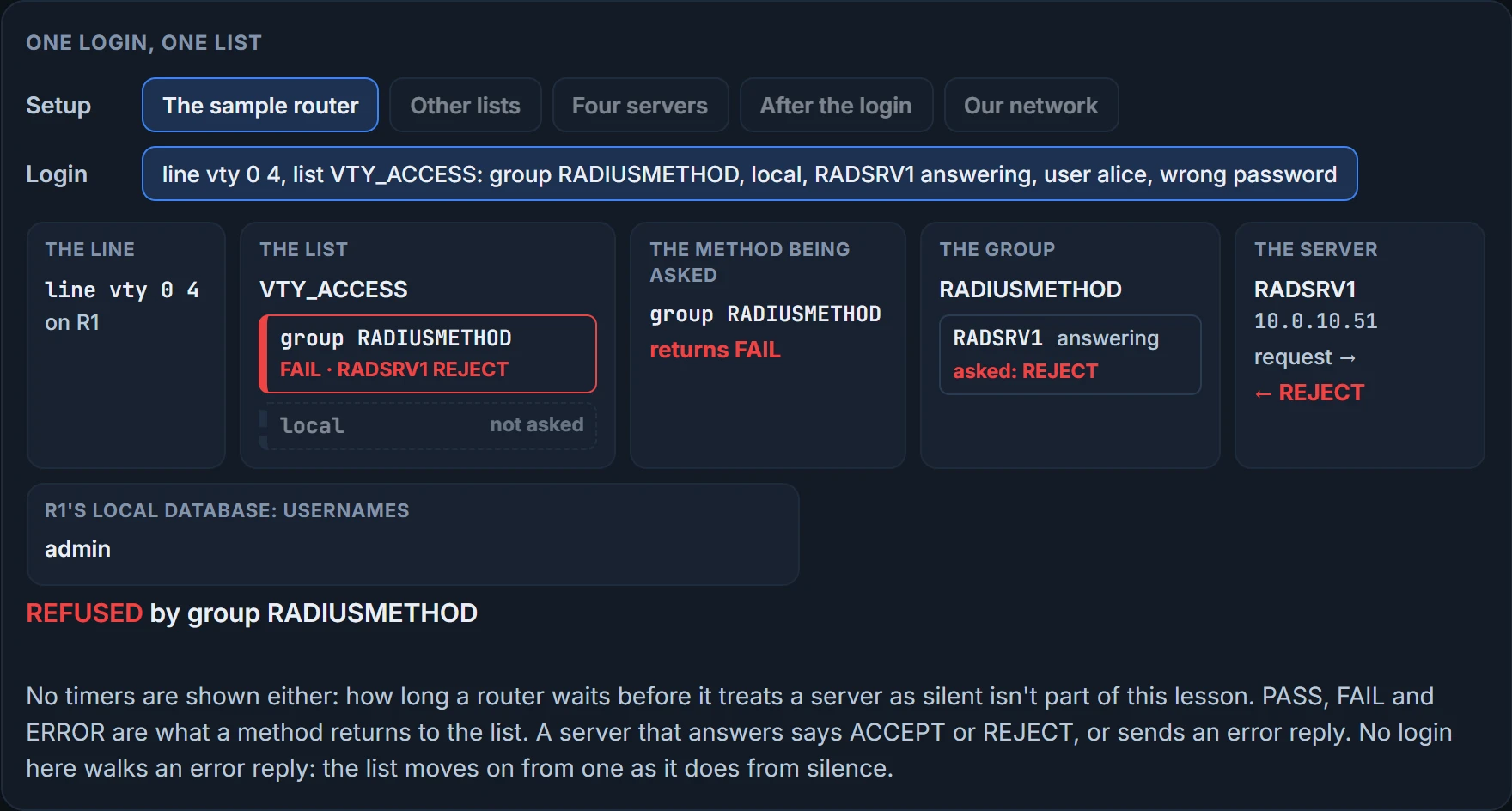
The answers, both the model's. With the server up, admin is refused. The server is asked first, doesn't know admin, and says FAIL. The local account is correct and irrelevant, because the list never gets to it. With the server unreachable, admin is in: the group returns ERROR, the list moves on, and the local database says PASS, exactly the fallback the two sentences described. alice is refused: local has no entry for her and nothing follows it. Her password was right and the server would have said so.
Read those two as a pair, because the closing case is built on them. The fallback account works only while the server is silent. On a healthy network it's refused every time.
Two edges of the rule.
The local database can be the method that fails you. With aaa authentication login default group radius local and a local database holding no username and password when it's checked, authentication fails. The same goes for the sample: empty its database, and a login fails on the day the servers are unavailable, because the list reaches local only then, and finds nothing there.
And order is the design. Write a login list four ways, named default or with a name of your own, with local before group radius or after it. Only aaa authentication login MANAGEMENT_ACCESS group radius local is a user-defined list that uses the device's own database if the external server is not available. A list named default isn't user-defined, and a list that puts local first asks the router's own database before any server, which is the opposite of what was wanted. For an account the router holds, that's settled: local answers, yes or no, and the server is never asked. For a username the router doesn't hold, the model has local answer FAIL and refuse: the model's reading, not confirmed.
One more word is allowed at the end of a list. none means authentication succeeds even if every method before it returned an error. Think about what that says: with group tacacs+ none, anyone who can make the server unreachable is let in. It should be used only as a backup method. The silence that falls through to local asks for a password. The silence that falls through to none checks nothing.
We haven't confirmed on a router, for this section: what local returns for a username it doesn't hold when another method follows it: a denial, as the model has it, or an error that passes the question on. This lesson's lab, where you build this on HQ-C1 and then break it on purpose, records what a router does.
Sorting a refusal
A login has been refused. There are a dozen things to consider, and twelve items is too many to carry, so sort them by a question you can answer: what did the server say? Three answers are possible: it was never asked, it was asked and said nothing, or it said no. One cause, a key that doesn't match, is identified by a message and not by which of those three it produces, so it gets a pile of its own. Four piles, and each one owns a different part of the list.
The server was never asked. The fault is on the router, before any packet leaves.
- AAA isn't enabled, or was enabled with no usable local account.
- The list isn't applied to the line you're using, so the line is using some other list or none.
- The list was made for a different service.
- The list's methods and their order aren't what you assumed. A method list defines the authentication methods, and with no list at all the vty lines use the local database.
localcomes first in the list and has answered already.
The server was asked and said nothing. The router sent a request and no answer came back. This is the ERROR of the last section.
- The router can't reach the server. Two checks: the
test aaacommand on the router, or Telnet to the server's authentication port. Telnet opens a TCP connection, so it can tell you about TACACS+'s port 49 and nothing about RADIUS's UDP ports. - The server group holds the wrong address for the server. In the sample's form that's two lines in two places: the group holds only a name,
server name RADSRV1, and the address sits on theaddress ipv4line of theradius server RADSRV1block the name points to. Check the name first, then the address. - The ports don't match. The router's RADIUS defaults are 1645 and 1646; a server on 1812 and 1813 needs them configured.
- The router's packets carry a source address the server doesn't have as a client, so the router can't use the server. The model treats that as no usable answer.
The keys don't match. The router and the server must be configured with the same pre-shared key. If the correct key isn't on the client, the router, or on the server, the debug output shows this message:
Invalid AUTHEN packet (check keys).
The same message can turn up on the router's console, and it reads the same way there: the router or the server is configured with the wrong pre-shared key.
The server answered no. This is the FAIL of the last section, and it's the only one of the four that's about the person.
- The username or password isn't on the server, or isn't what the user typed. Double-check the server's usernames and passwords.
Continue the lesson
The whole lesson, with its drawings and its questions. The rest of this section and 2 more after it.