
Protecting DMVPN with IPsec
DMVPN tunnels are not encrypted by default: routes, registrations and data cross somebody else's cables in the clear. IPsec protects them, with ESP in tunnel or transport mode and keys agreed by IKE. There is one IKE SA between two endpoints, and there can be several IPsec SAs. Four objects build it; one line on the tunnel applies them.
By Arif, founder of Daveth · Updated
The full 19 min walkthrough is in Daveth Pro (Network). See what the plan opens
What this page answers
How do you protect DMVPN with IPsec?
Build the IKE and IPsec objects and a profile, then apply them to the tunnel interface with tunnel protection. Until then everything on the DMVPN, routes, registrations and data, crosses the transport unencrypted. Read it in “Four objects and one line”
What is the difference between ESP tunnel mode and transport mode?
Tunnel mode encrypts the entire original packet and adds new IPsec headers; transport mode encrypts and authenticates only the payload, keeping the original IP header. Read it in “The packet on the wire”
Somebody else's cable
The last lesson ended with three clocks watching Tunnel100 and one sentence left hanging: every packet on it is still readable by anyone on the path.
So look at the path. A packet from PC-S1 to PC-HQ leaves SPOKE1's Gi0/0, crosses the branch's provider, crosses whatever INET is made of, arrives at ISP-A, and reaches HQ-E1. Not one metre of that is ours.
Does that matter? Most staff would say no: the company owns the network, so their data is safe on it. Across a WAN that isn't necessarily so. And what crosses is bank statements, credit card numbers and product designs: data whose arrival with the wrong party has repercussions for the company or for a user. A properly designed network provides data confidentiality, integrity and availability, and without them a business might lose potential customers who don't think their information is secure.
Three words, each with a definition:
| Term | What it is | What maintains it |
|---|---|---|
| Data confidentiality | Ensuring that data is viewable only by authorized users. | It's maintained through encryption. |
| Data integrity | Ensuring that data is modified only by authorized users. Information is valuable only if it is accurate: think of a product design that gets modified, a product that then doesn't work, and the cost of finding out why. | It's maintained by using an encrypted digital signature, which is typically a checksum. |
| Data availability | Ensuring that the network is always available, which allows for the secure transport of the data. | Redundancy and proper design ensure it. |
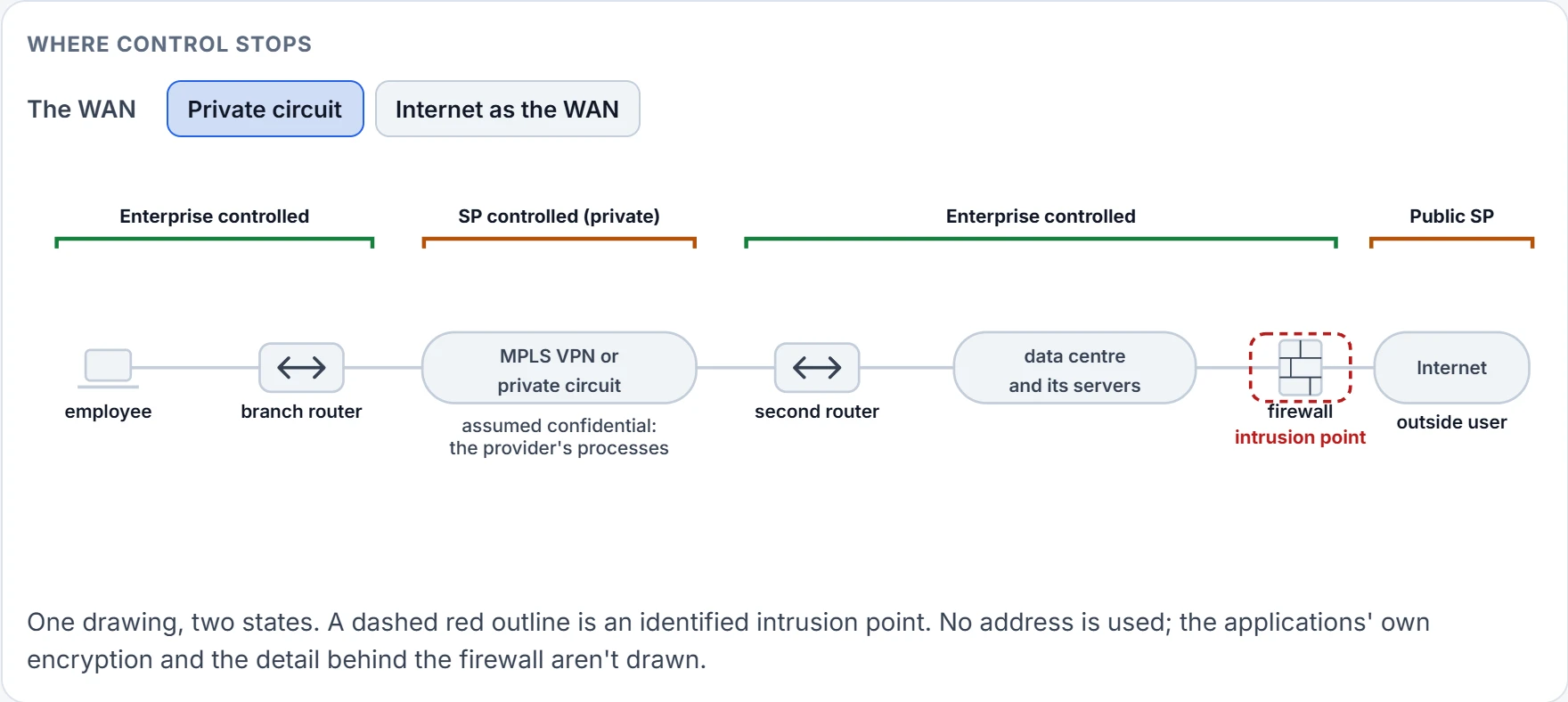
Why did nobody encrypt the WAN before? Because a WAN was bought as a trusted connection. The first circuits were point-to-point, and what you trusted was the provider's ability to control access to its infrastructure, and its assurances of privacy. Providers now run peer-to-peer networks, one infrastructure shared between many customers, and technologies such as MPLS VPNs give each customer a layer of logical segmentation on it. So what confidentiality a WAN has rests on the type of transport and on the limited access the provider's employees have, and engineers assume the provider's network is secure and doesn't require encryption on its circuits. Set that assumption against a fact: an MPLS Layer 3 VPN adds no encryption, and confidentiality on one is dependent on the provider's processes.
| Private circuit | Internet as the WAN | |
|---|---|---|
| Control | The entire controlled infrastructure, the enterprise's and the provider's, is assumed to be safe. | The internet does not provide controlled access and cannot guarantee data integrity or data confidentiality. |
| Intrusion points | The internet edge is the only identified intrusion point. It is protected by a firewall, which prevents outside users from accessing the network and the servers in the data center that hosts e-commerce applications. | They multiply: the branch WAN, the corporate WAN and the internet edge each become one. |
| Encryption | Traffic is encrypted only when it is exposed to the public internet. | Needed on the WAN itself: hackers, eavesdroppers and man-in-the-middle intrusions are common threats on public transports. |
The right-hand column is what a DMVPN over INET is.
Don't read that as "private circuits are fine". Provisioning systems occasionally fail, and data may be leaked into another customer's network; other times more blatant attempts to compromise confidentiality or integrity may occur in other geographic regions. And some organizations under stringent privacy regulations, healthcare, government and finance among them, often require all traffic to be encrypted across all WAN links regardless of the transport used.
The answer is one sentence. Data confidentiality and integrity are maintained by adding IPsec encryption to the DMVPN tunnel that uses the internet as a transport. IPsec is a set of industry standards, first gathered as RFC 2401, which RFC 4301 has since replaced. When IPsec protection is enabled on the tunnels, the trust boundary is moved from the provider to your own organization's control, and it can be deployed on any transport, with a pre-shared key or with a public key infrastructure. Adding it is a straightforward process that avoids the headaches of IPsec point-to-point tunnels.
So take a seat. For the rest of this page you're sitting where the eavesdropper sits: on the cable between SPOKE1 and INET, on the way to HQ-HUB, with a capture running. Three questions, every time something changes. What can you read? What could you change? What could you send again?
Today's answers are easy. You can read all of it. The outer header says 192.0.2.10 to 192.0.2.2, protocol 47. Behind it is the GRE header with tunnel key 100, and behind that the whole inner packet: PC-S1's address, PC-HQ's, the payload. EIGRP's updates go past, so you have the company's routes. NHRP's registrations go past, the messages each spoke uses to tell the hub its address, and each carries an authentication field that is transmitted in plaintext. HQDMVPN, on your screen. You could change any of it, and you could record a packet and send it again tomorrow.
The tunnel works. Is anybody reading it? Nothing on either router can tell you.
Six promises, three parts
DMVPN tunnels are not encrypted by default, but they can be encrypted by using IPsec. IPsec provides encryption through cryptographically based security and was designed with interoperability in mind. An encrypted DMVPN gives a secure overlay over any transport with six functions. Read each one from your seat on the wire, as something taken away from you.
| Function | From your seat | How |
|---|---|---|
| Origin authentication | You can't pretend to be SPOKE1. | It's accomplished by a pre-shared key, which is static, or through certificate-based authentication, which is dynamic. |
| Data confidentiality | You can't read. | A variety of encryption algorithms are used to preserve it. |
| Data integrity | You can't alter. | Hashing algorithms ensure that packets are not modified in transit. |
| Replay detection | You can't send it again. | IPsec provides protection against hackers trying to capture and insert network traffic. |
| Periodic rekey | A key you stole goes stale. | New security keys are created between endpoints every specified time interval or within a specific volume of traffic. |
| Perfect forward secrecy | And it doesn't help you get the next one. | Each session key is derived independently of the previous key, so a compromise of one key does not mean compromise of future keys. |
Those last two are easy to swap, and an exam will try it: asked which mechanism ensures that a hacker who gains access to a session key cannot maintain access to that session indefinitely, with periodic rekey among the choices, the answer is perfect forward secrecy.
The IPsec security architecture is composed of three independent components: security protocols, security associations and key management. One at a time.
Security protocols. IPsec uses two protocols to provide data integrity and confidentiality, and they can be applied individually or combined.
The IP authentication header, AH, provides data integrity, authentication and protection from hackers replaying packets. It ensures that the original data packet has not been modified during transport on the public network, by creating a digital signature similar to a checksum, and it uses protocol number 51 in the IP header. Notice which of the three words isn't in that list. An authentication header hides nothing: from your seat you'd read every byte.
The Encapsulating Security Payload, ESP, provides data confidentiality, authentication and protection from hackers replaying packets. One word needs care. Typically payload means the actual data minus any headers, but in the context of ESP the payload is the portion of the original packet that is encapsulated in the IPsec headers. ESP keeps that payload confidential by encrypting it and adding a new set of headers during transport across a public network, and it uses protocol number 50 in the IP header.
Key management. A critical part of secure encryption is the communication of the keys used to encrypt and decrypt the traffic carried over the insecure network. The process of generating, distributing and storing these keys is called key management, and IPsec uses the Internet Key Exchange protocol, IKE, by default. Its second iteration is IKEv2, first published as RFC 4306 and now RFC 7296, and it provides mutual authentication of the parties. IKEv2 introduced support of the Extensible Authentication Protocol, a reduction of bandwidth consumption, NAT traversal, and the ability to detect whether a tunnel is still alive. This lesson authenticates with a shared secret.
Security associations. SAs contain the security parameters that were agreed upon between the two endpoint devices. There are two types. The IKE SA is used for control plane functions like IPsec key management and the management of IPsec SAs. The IPsec SA is used for data plane functions, to secure the data transmitted between two sites. There is only one IKE SA between endpoint devices, but multiple IPsec SAs can be established between the same two. And one more fact: IPsec SAs are unidirectional, and at least two of them, one for inbound and one for outbound, are required to exchange traffic between two sites.
Three, and six: a pair under each spoke's IKE SA. A router prints the pair as "Active SAs: 2", further on.
The packet on the wire
ESP can wrap a packet in two ways, the two ESP modes of traditional IPsec:
- Tunnel mode encrypts the entire original packet and adds a new set of IPsec headers. These new headers are used to route the packet and also provide overlay functions.
- Transport mode encrypts and authenticates only the packet payload. It does not provide overlay functions, and it routes based on the original IP headers.
Now start from what's on your cable today. In unencrypted DMVPN packets, the original packets have GRE flags added to them, and then the new GRE IP header is added for routing the packets on the transport network. The GRE IP header adds 20 bytes of overhead and the GRE flags add 4, and these packets use the protocol field GRE, 47. One more thing, because our tunnel has tunnel key 100: if a tunnel key is specified, an additional 4 bytes are added to every packet, whether or not any encryption is selected. So ours carry 28.
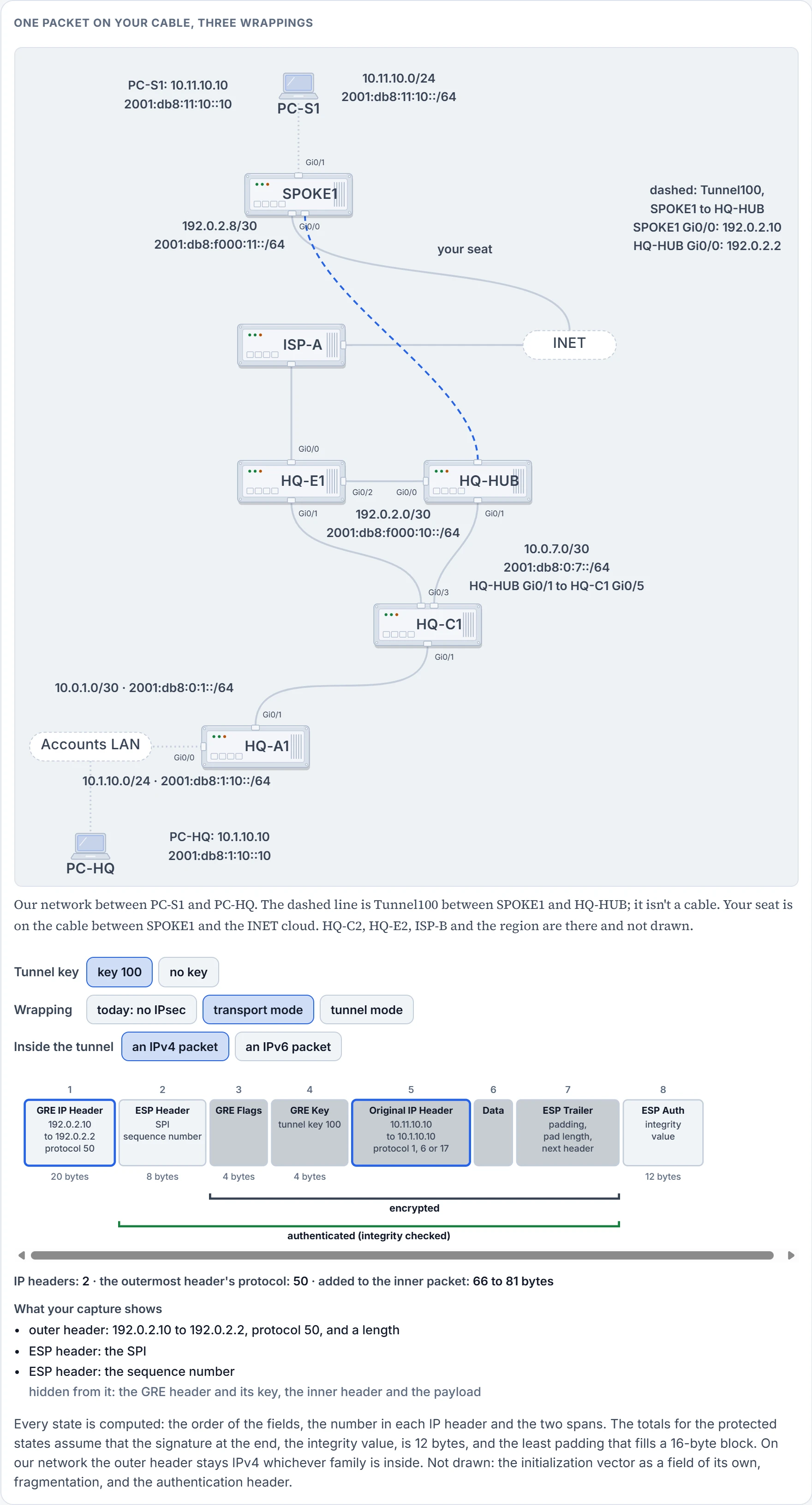
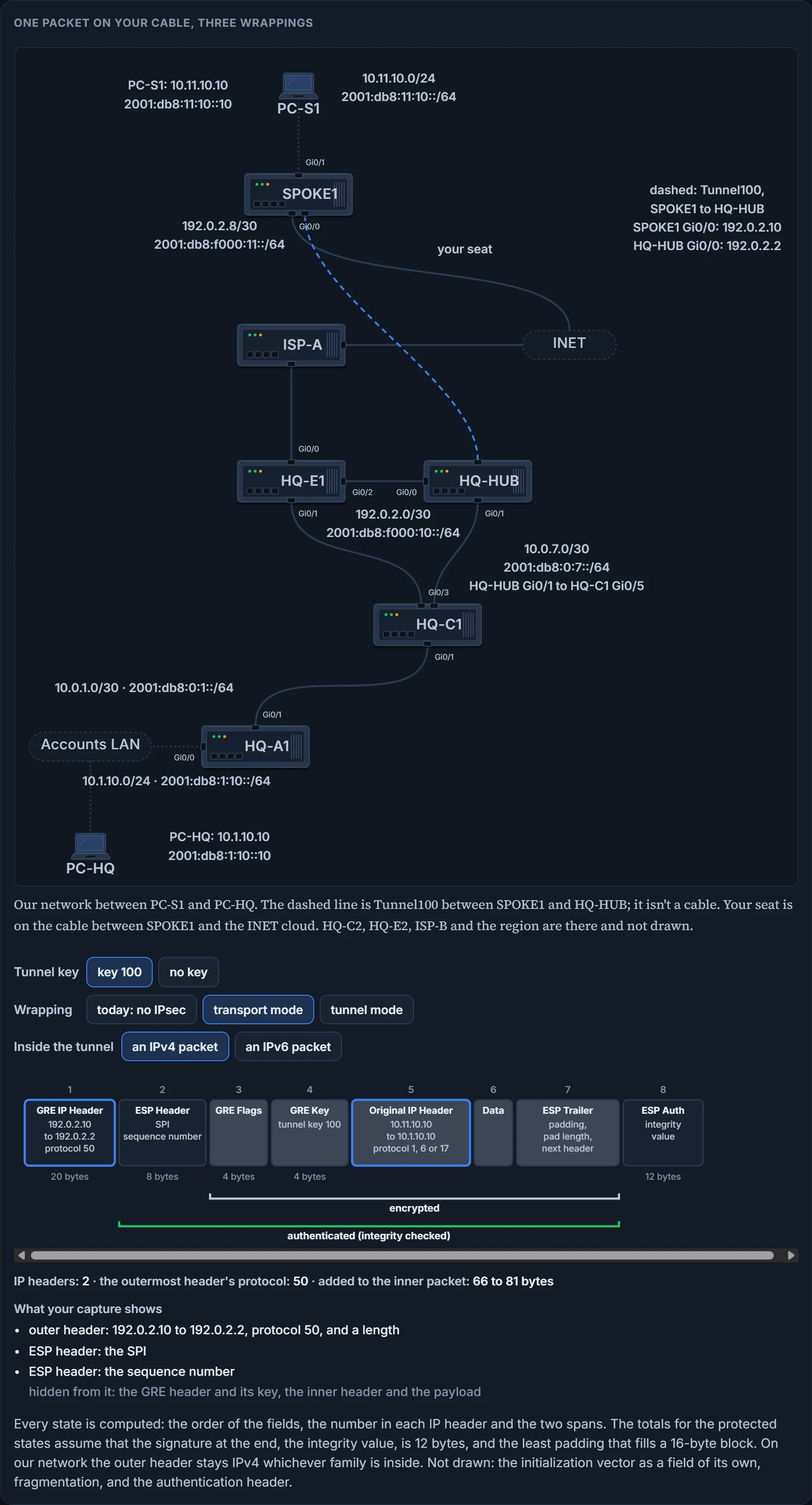
Two. The same two addresses, 192.0.2.10 and 192.0.2.2, and the protocol field says 50.
That's what "does not provide overlay functions" means. Transport mode builds nothing in front. Whatever IP header the packet arrived with is the one that gets it across, and the packet that arrives at IPsec here is a GRE packet, which already has one.
Six packets side by side, an ordinary one first and ours last. The outer protocol is the number in the outermost IP header.
| Packet | Fields, in order | Encrypted span | Authenticated span | Outer protocol | Bytes added |
|---|---|---|---|---|---|
| Ordinary packet | IP Header, Data | none | none | the payload's: 1 for ICMP, 6 for TCP, 17 for UDP | none |
| IPsec transport | IP Header, ESP Header, Data, ESP Trailer, ESP Auth | Data to the ESP trailer | the ESP header to the ESP trailer | ESP, 50 | the ESP fields |
| IPsec tunnel | IPsec IP Header, ESP Header, Original IP Header, Data, ESP Trailer, ESP Auth | the original IP header to the ESP trailer | the ESP header to the ESP trailer | ESP, 50 | the ESP fields and a new IP header |
| DMVPN, no IPsec | GRE IP Header, GRE Flags, Original IP Header, Data | none | none | GRE, 47 | 20 for the GRE IP header and 4 for the GRE flags |
| DMVPN transport | GRE IP Header, ESP Header, GRE Flags, Original IP Header, Data, ESP Trailer, ESP Auth | the GRE flags to the ESP trailer | the ESP header to the ESP trailer | ESP, 50 | the GRE IP header's 20, the GRE flags' 4, and a varying number of additional bytes for the encrypted signature, depending on the encryption mechanism |
| DMVPN tunnel | IPsec IP Header, ESP Header, GRE IP Header, GRE Flags, Original IP Header, Data, ESP Trailer, ESP Auth | the GRE IP header to the ESP trailer | the ESP header to the ESP trailer | ESP, 50 | 20 for the GRE IP header, 4 for the flags, 20 for the IPsec IP header, and the varying bytes for the signature |
The order things are added in matters. For encrypted DMVPN packets that use ESP transport mode, the original packets have the GRE flags added to them, and then that portion of the packets is encrypted. A signature for the encrypted payload is added, and then the GRE IP header is added for routing the packets on the transport network. For ESP tunnel mode, the original packets have the GRE flags added to them, and then the new GRE IP header is added. That portion of the packets is encrypted, a signature for the encrypted payload is added, and then a new IPsec IP header is added for routing the packets on the transport network.
Three things to read off the table. In transport mode the ESP header sits between the packet's IP header and its data. In every protected packet, the outermost IP header is outside the authenticated span as well as the encrypted one. And in the last row the 50 is the new header's number: the GRE IP header, now behind the ESP header, is followed by GRE as it was before any IPsec, so its own number is 47 again. The row named IPsec tunnel is what an IPsec point-to-point tunnel is, the kind tunnel protection saves you from.
So what did IPsec do to our packet? It didn't wrap it. It opened it behind its first header, slid an ESP header in, and encrypted everything from there back. The header in front is the one GRE made, and it is not encrypted: it's the only header there is to route by. The one change you'd notice in it is the protocol field, 47 before and 50 now, because what follows it is ESP.
Back in your seat, the figure's list is all you get, and its last two items are the ESP header. The packet begins with two 4-byte fields, a Security Parameters Index and a Sequence Number, and neither is encrypted: the SPI is how the receiver finds the SA an arriving packet belongs to, and the sequence number is a counter that goes up by one with every packet. Your capture adds the time each packet went by.
Why may IPsec do it this way? Transport mode is for a router protecting its own traffic, and a DMVPN router's GRE packets are exactly that: their source is the router's own transport address and their destination is its peer's.
Three IP headers. What would that extra one hide from you? The GRE IP header. And what's in the GRE IP header? The two addresses that are also on the new one in front. Tunnel mode here writes the same two addresses on a second envelope, and a real second envelope at least hides the first. This one hides a copy of itself.
Said without the stationery: the use of IPsec tunnel mode for DMVPN networks does not add any perceived value and adds 20 bytes of overhead, and transport mode should be used for encrypted DMVPN tunnels. Transport mode is the recommended IPsec mode for DMVPN networks, and the feature that lets spokes sit behind NAT requires it.
One setting from the earlier tunnel lessons belongs here. ip mtu 1400 on the tunnel ensures longer packets are fragmented before they are encrypted, because otherwise the receiving router would have to do the reassembly.
We haven't confirmed on a router, for this section: the figure's byte totals. They assume a 12-byte signature, which wasn't read off a router.
Before the first encrypted packet
ESP needs keys on both routers and neither has any. Getting them there is IKE's job, and two things have to come out of it: a secret that nobody on your cable can compute, and proof, for each router, of who the other one is. IKE works in exchanges, and every IKE exchange is one request and one reply, carried over UDP port 500.
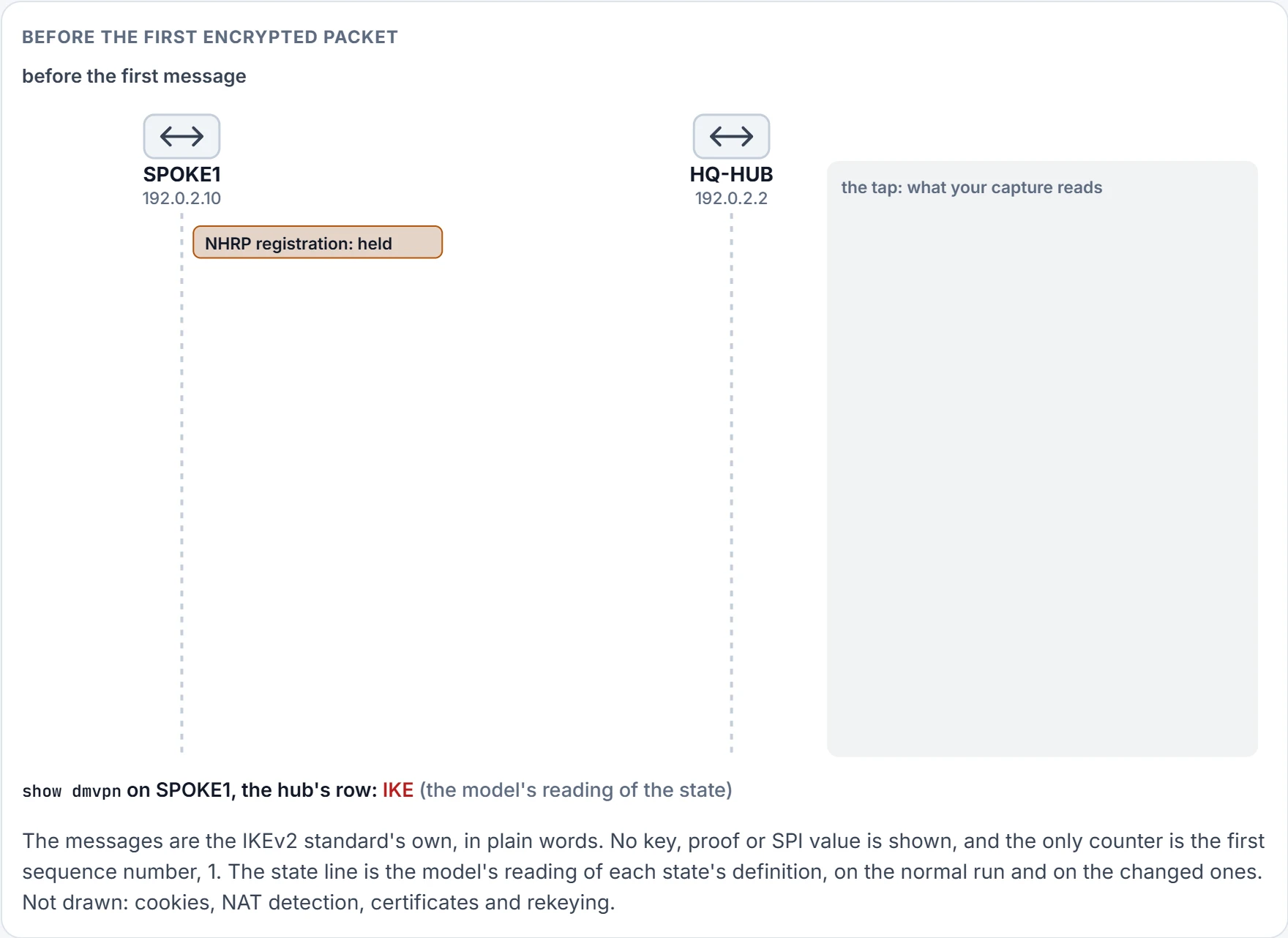
Step 1 of 7 SPOKE1 has a registration to send and no keys to protect it with, so it waits. Nothing has crossed your cable.
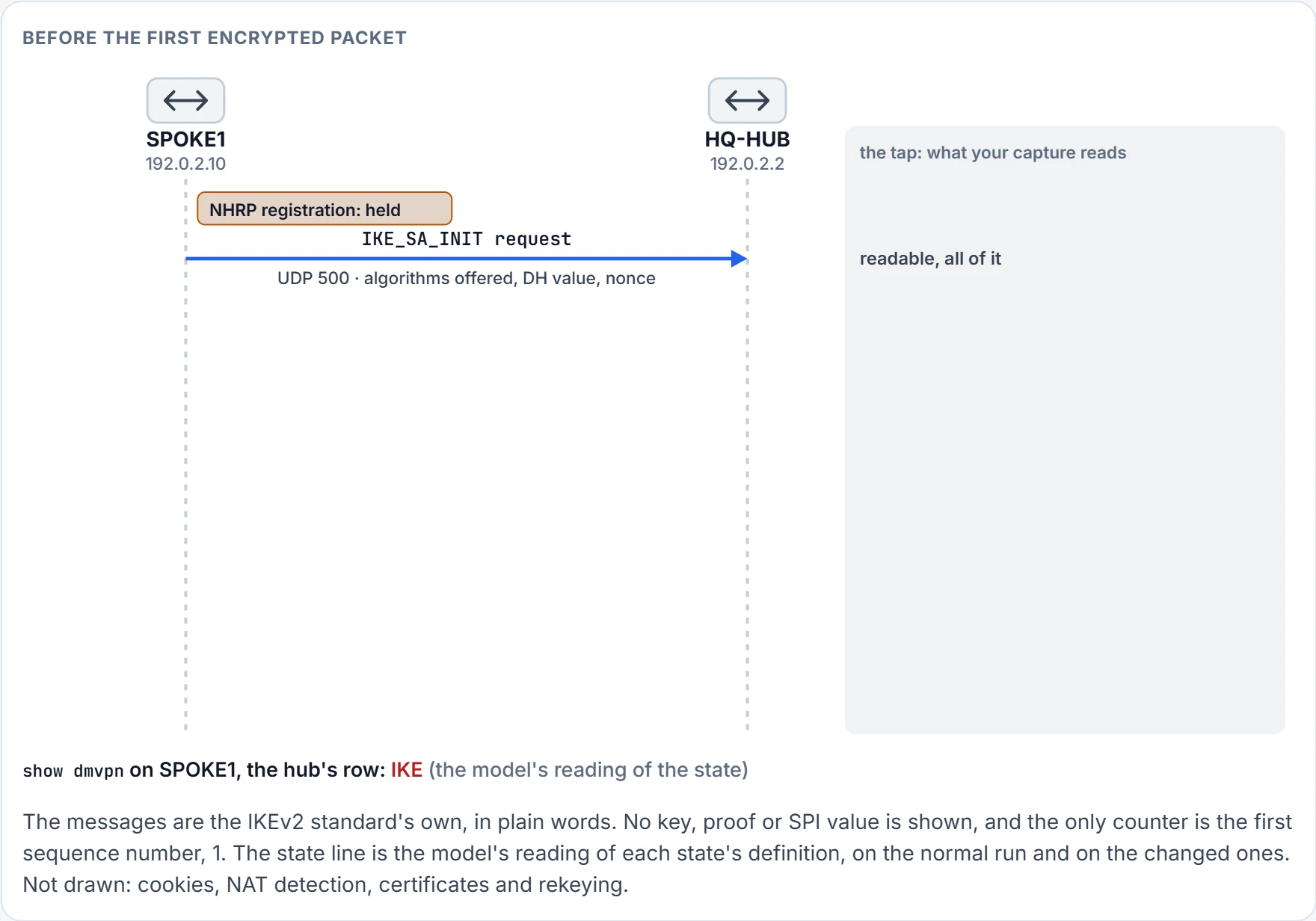
Step 2 of 7 SPOKE1 opens: the algorithms it supports for the IKE SA, a Diffie-Hellman value and a nonce, over UDP port 500. You read every byte.
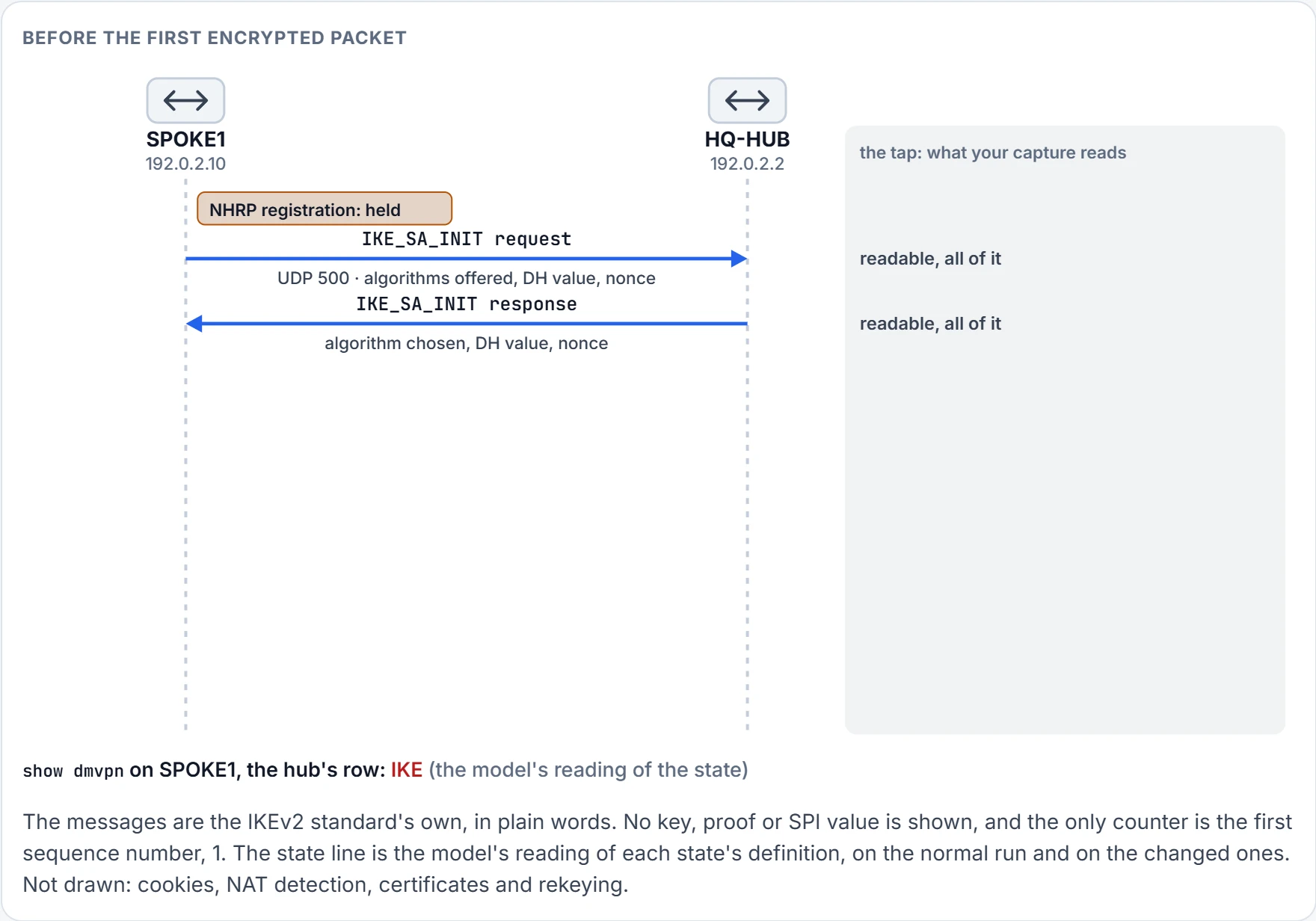
Step 3 of 7 HQ-HUB answers with its choice, its own Diffie-Hellman value and its own nonce. You read that too, and it does you no good: each router can now compute a secret that neither message contains.
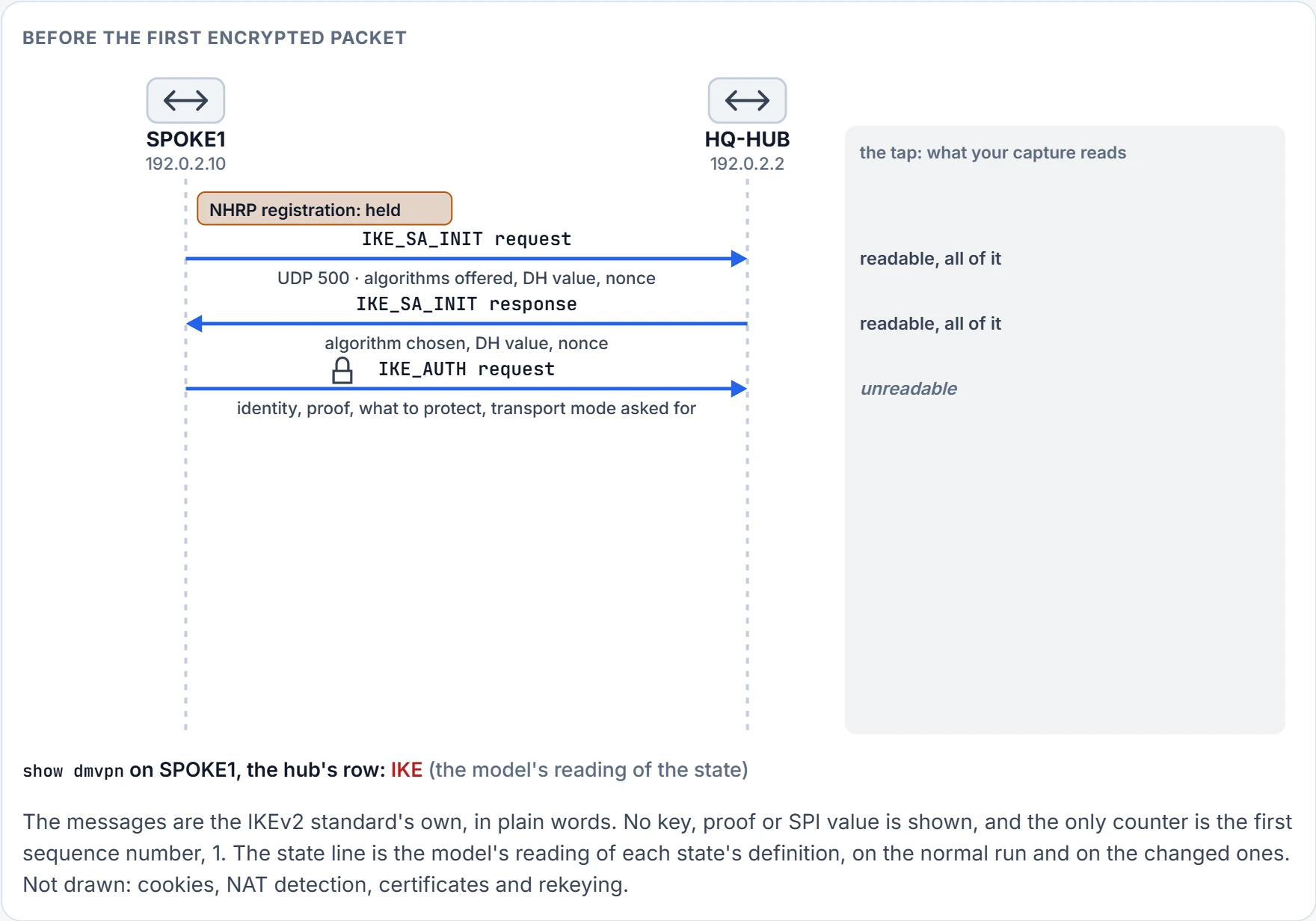
Step 4 of 7 From here on you read nothing. Under the new keys SPOKE1 sends its identity, a proof computed with the pre-shared key, what it wants protected (GRE between its transport address and the hub's) and a request for transport mode. The key itself isn't in the message.
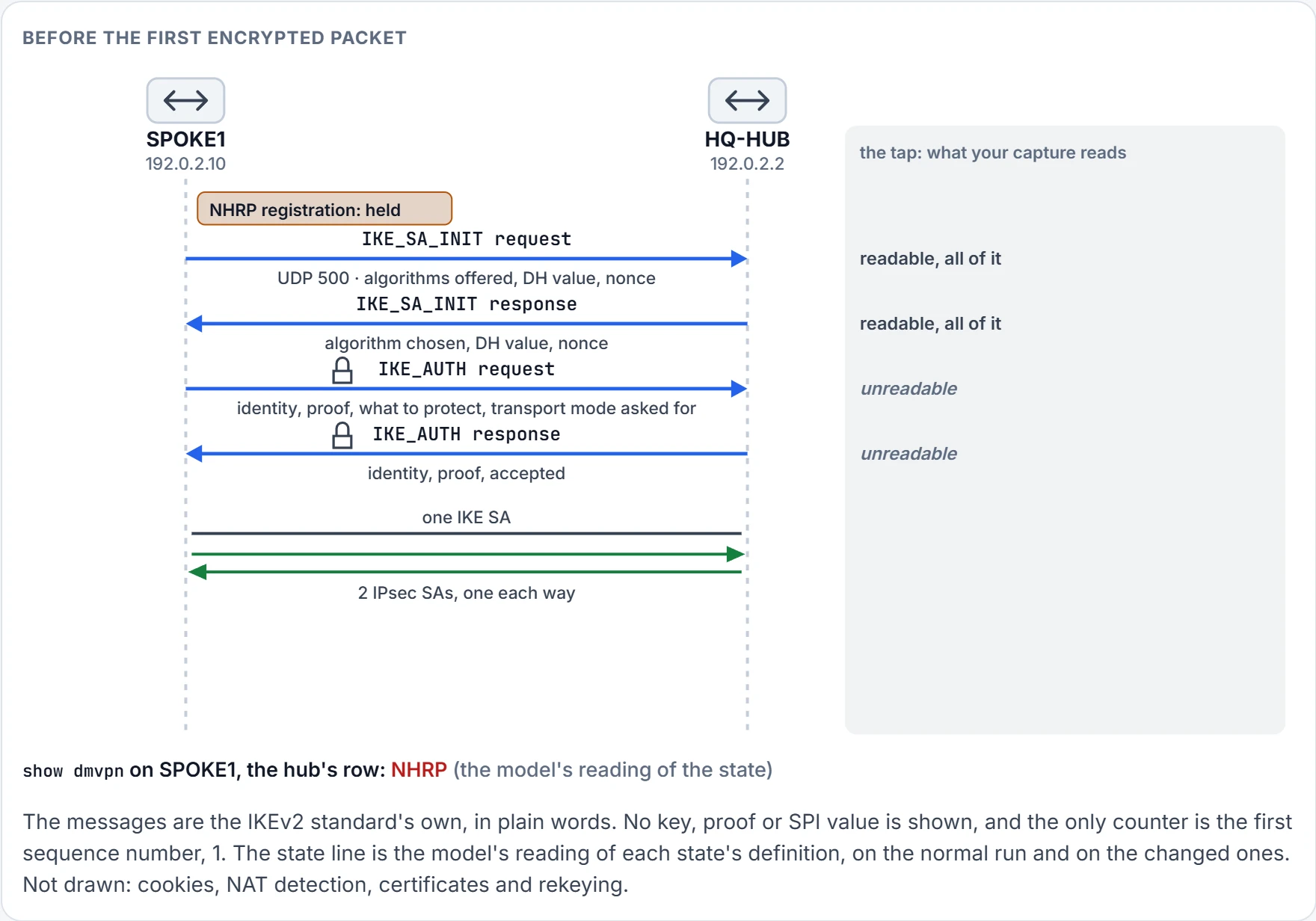
Step 5 of 7 HQ-HUB sends its own identity and its own proof, and accepts. No message carried the pre-shared key: only proofs crossed. One IKE SA now exists, and a pair of IPsec SAs for GRE between the two routers.
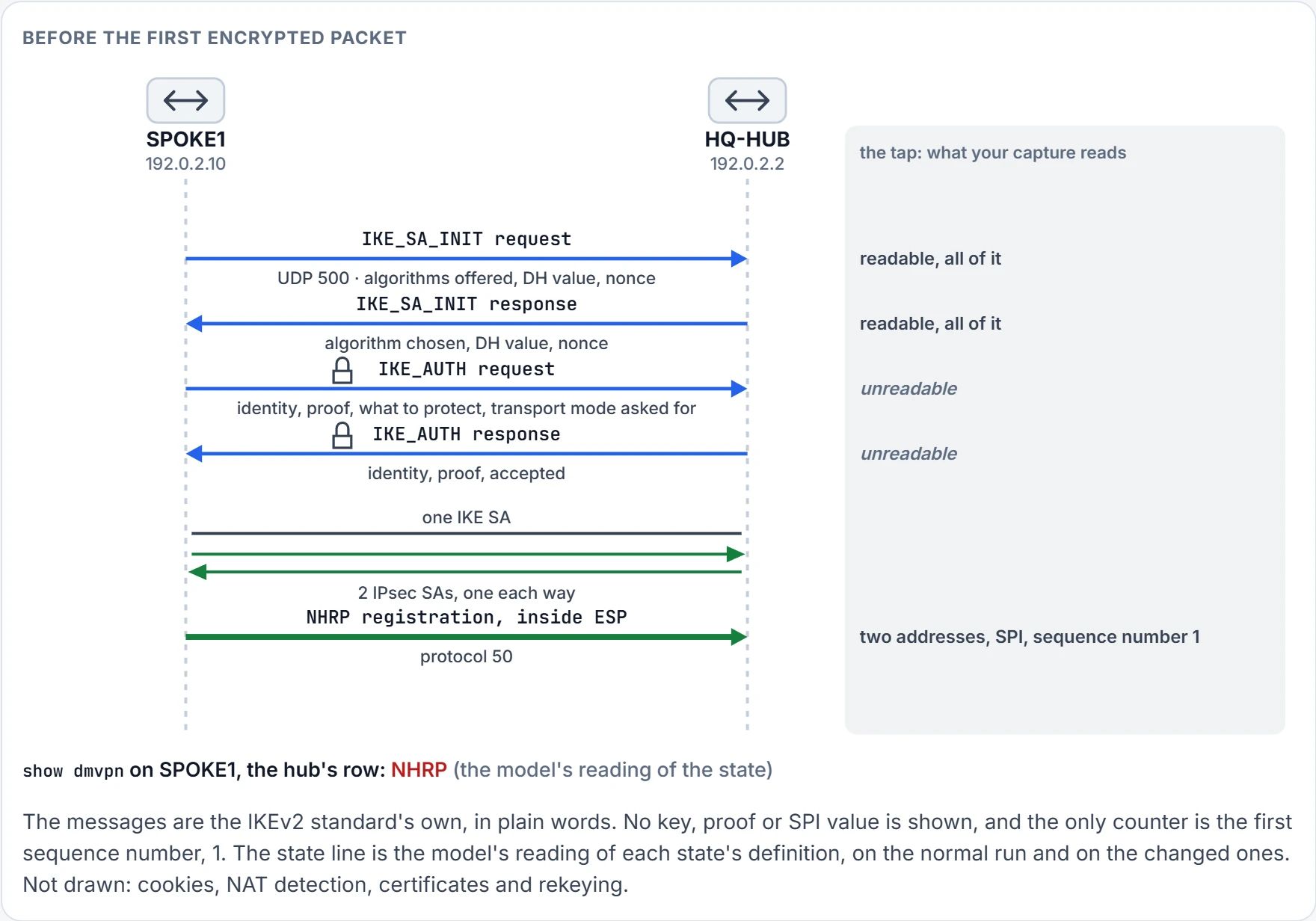
Step 6 of 7 Now the registration leaves, inside ESP. On your cable: protocol 50, two public addresses, an SPI, and sequence number 1, the first this SA has used.
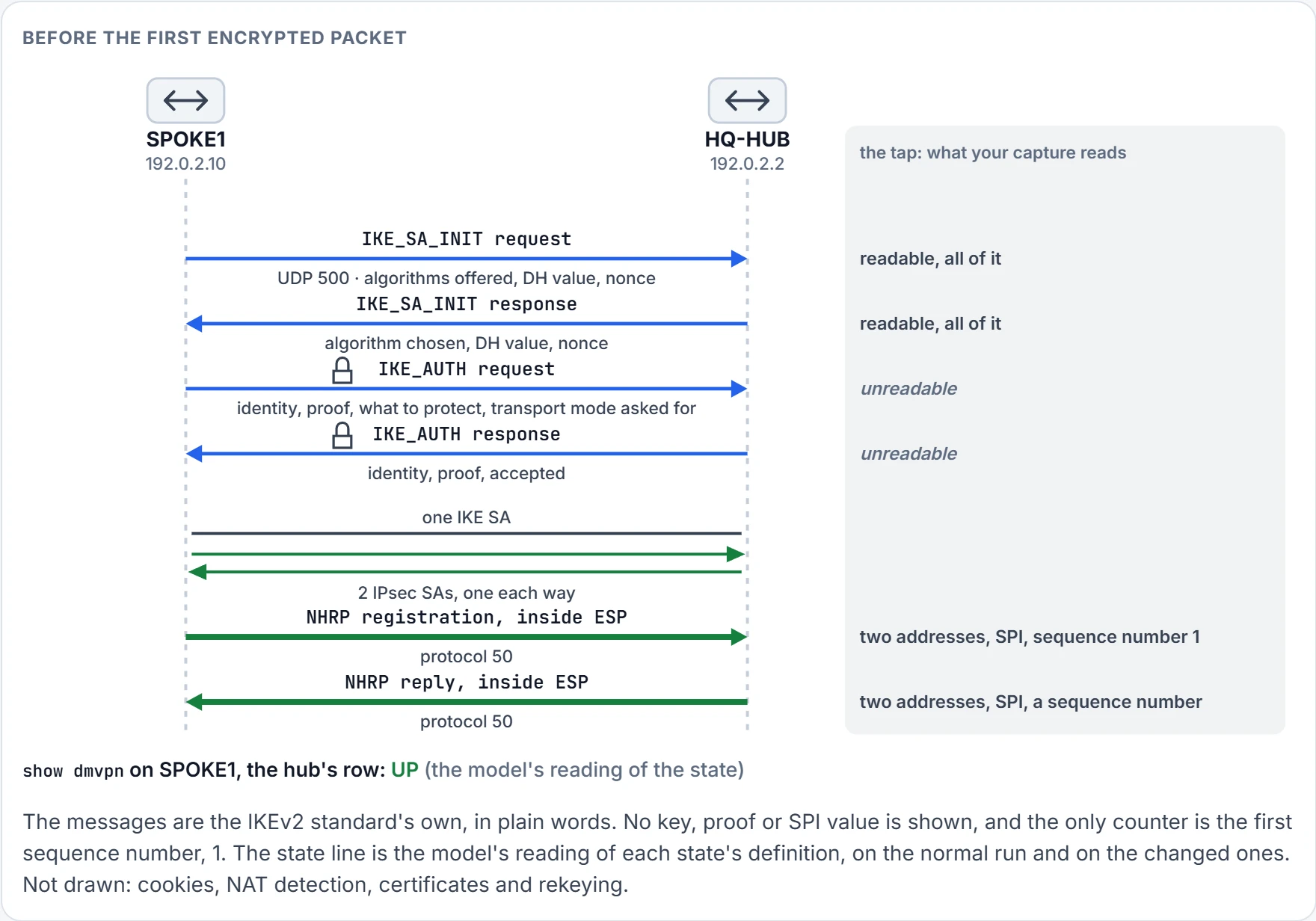
Step 7 of 7 The reply comes back the same way, through the SA for the other direction. SPOKE1 is registered.
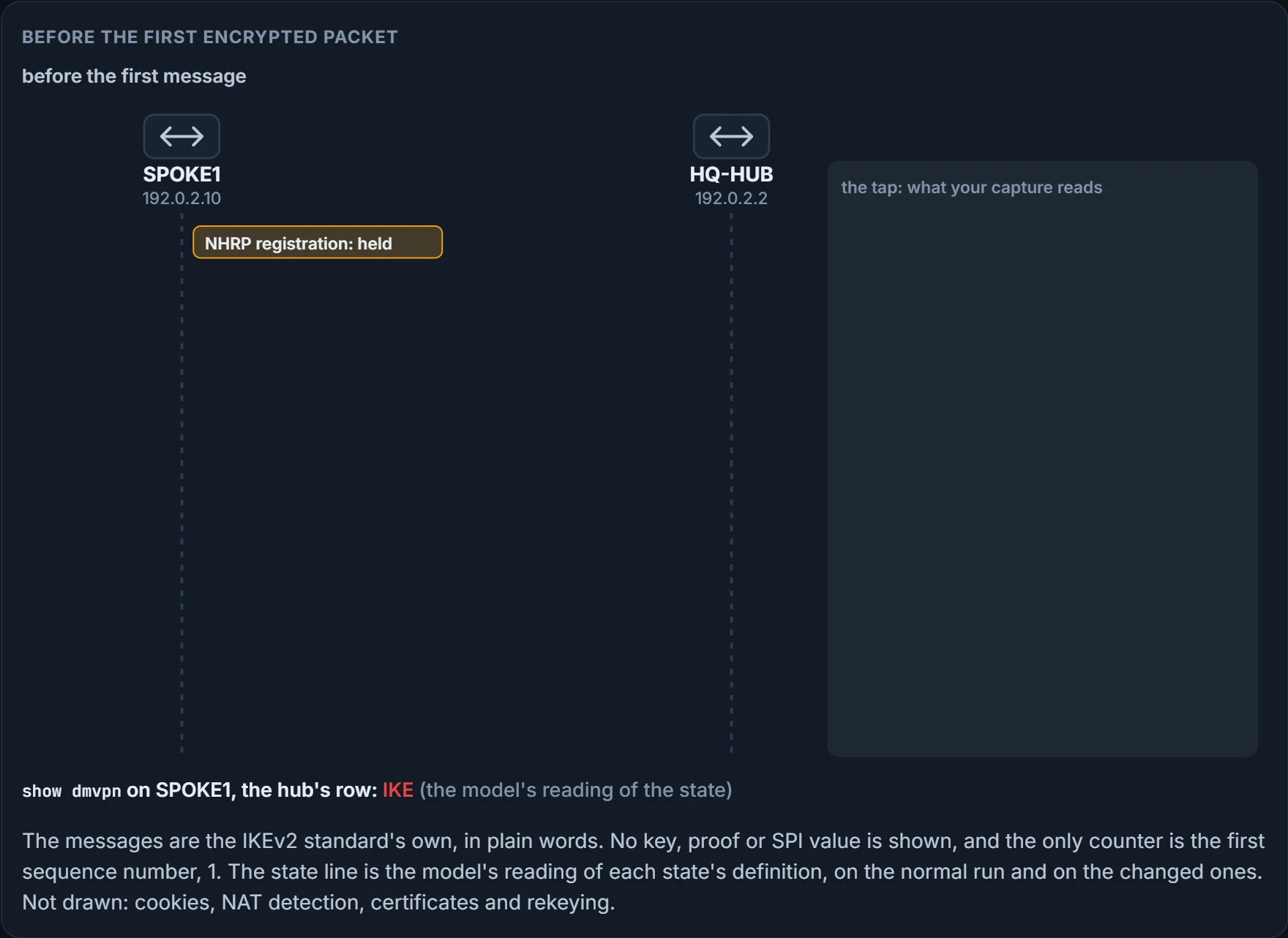
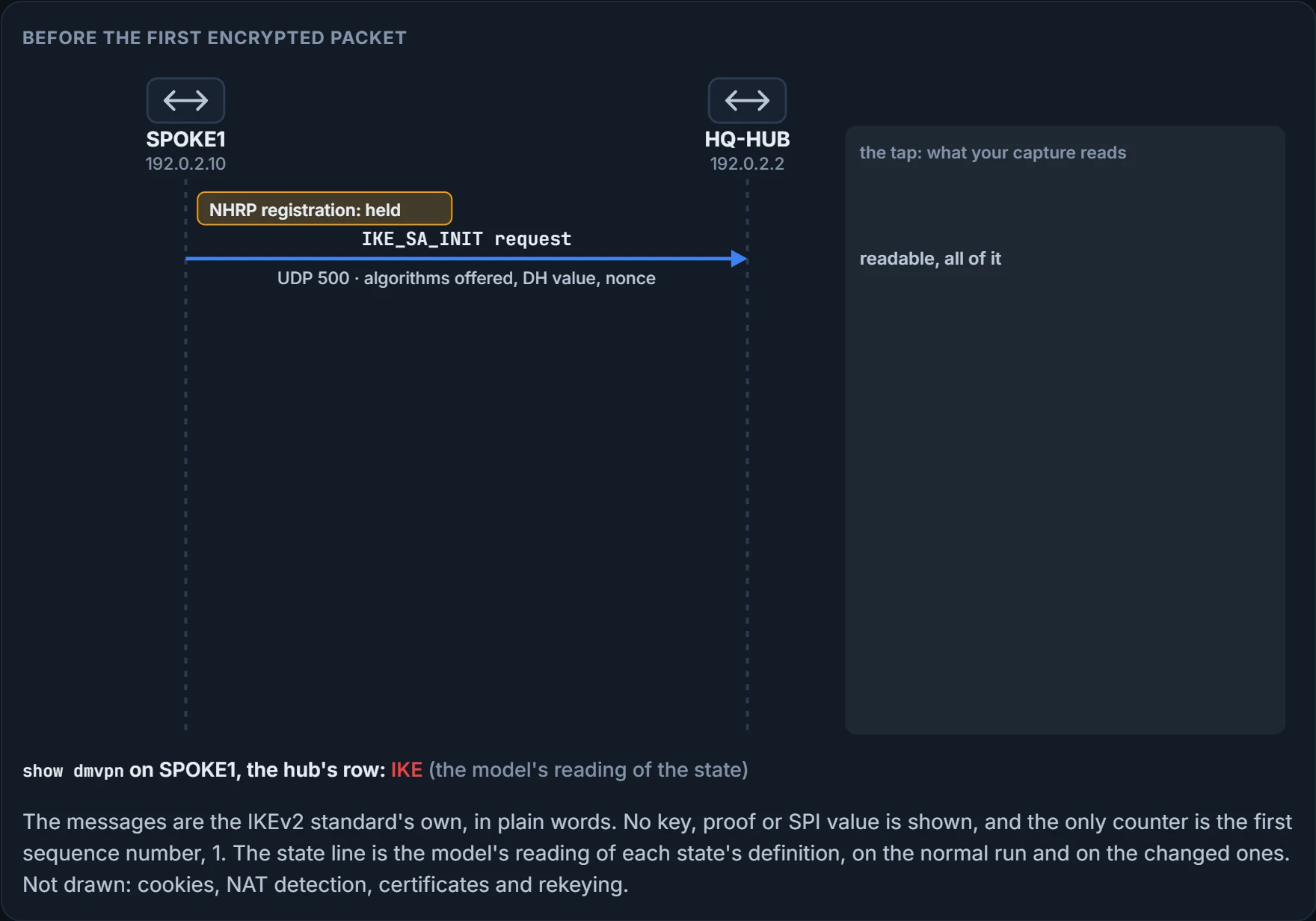
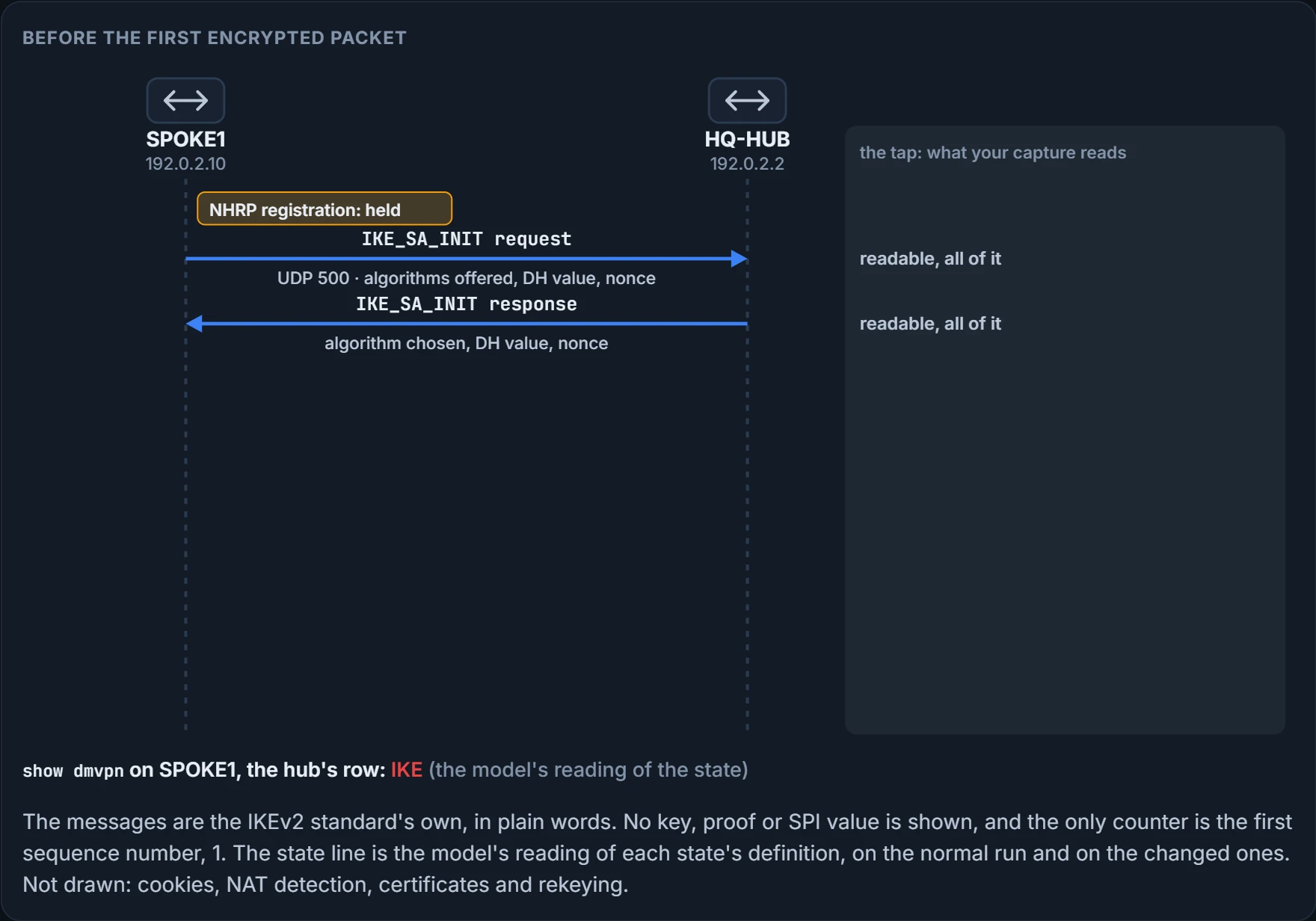
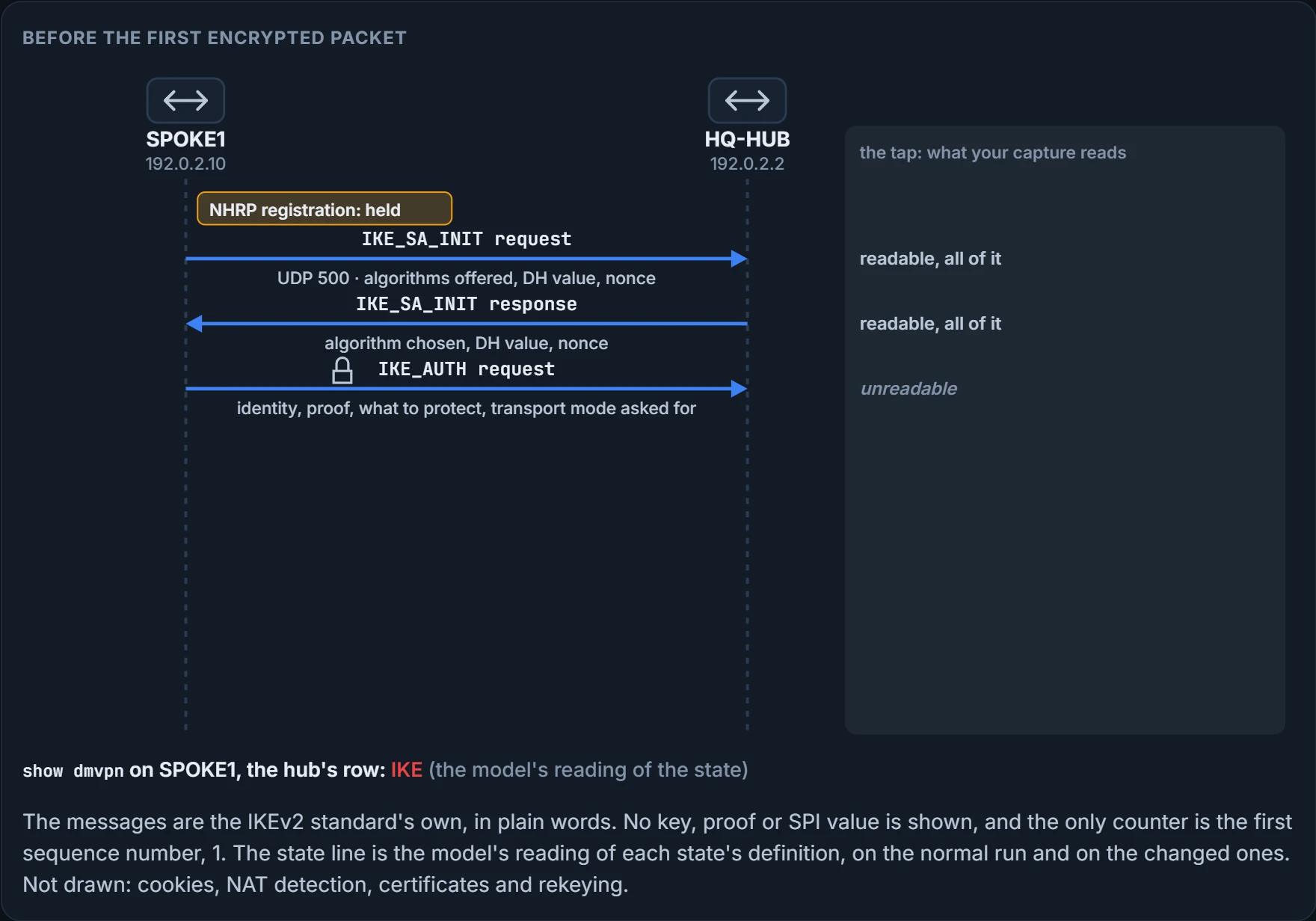
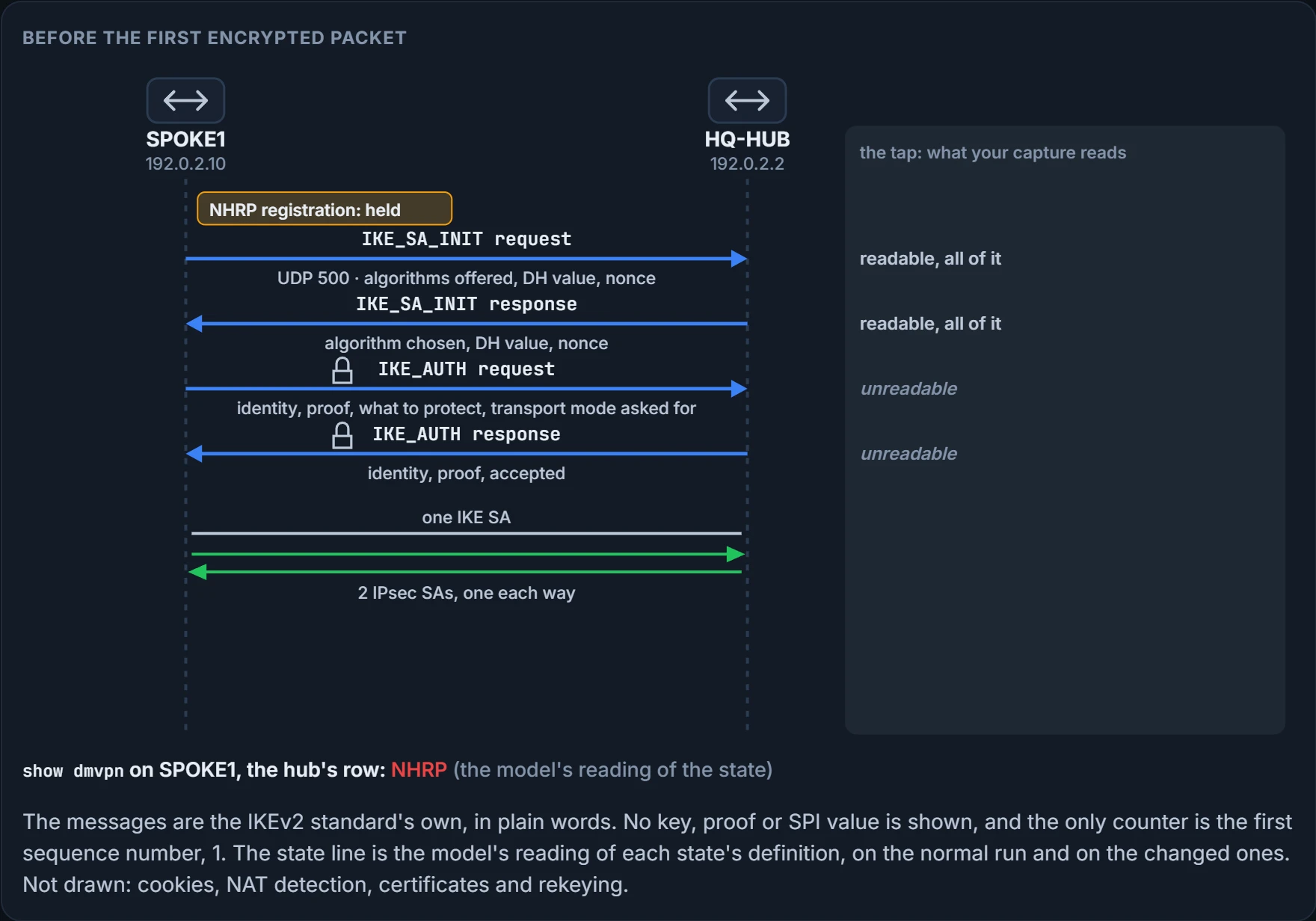
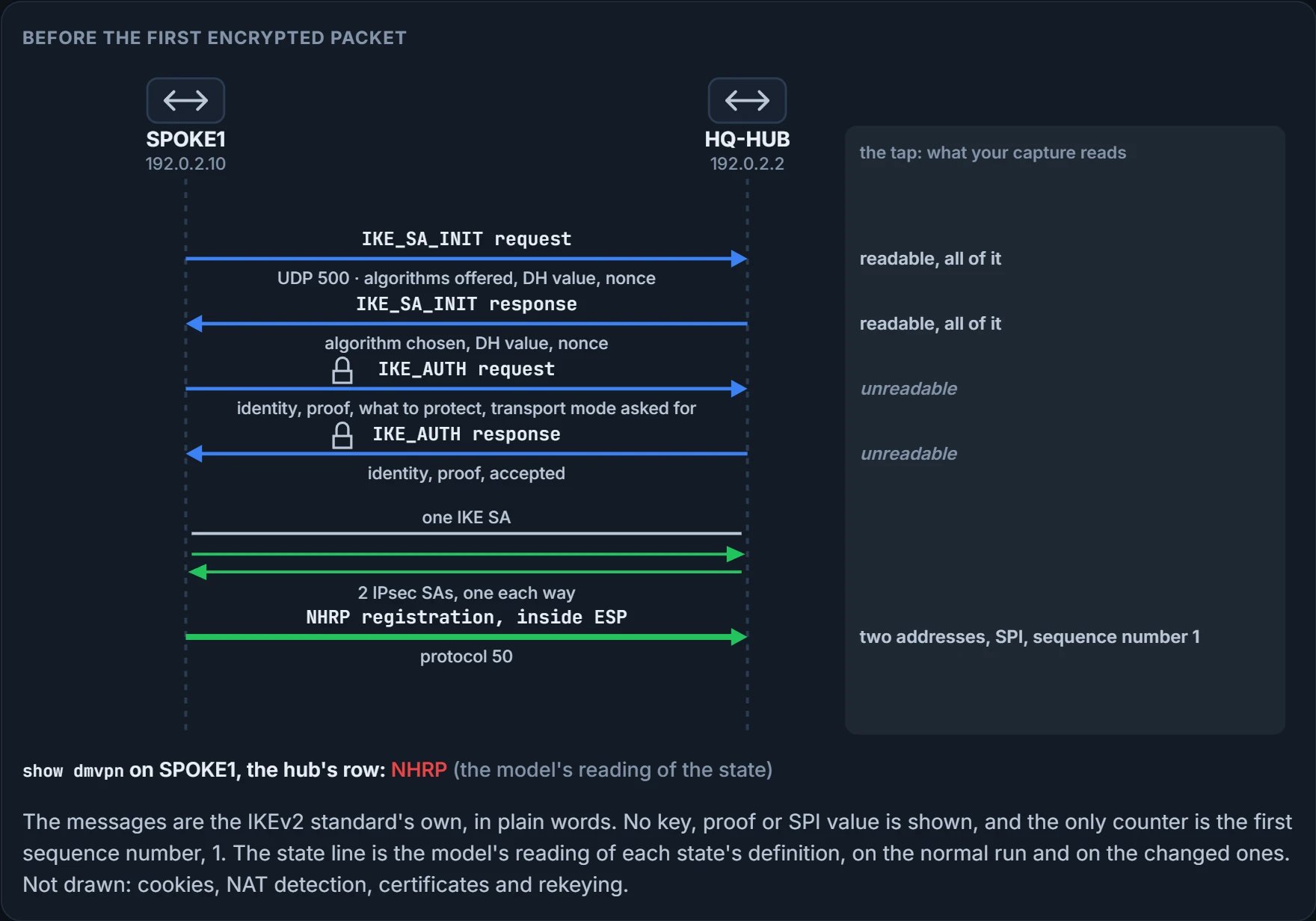
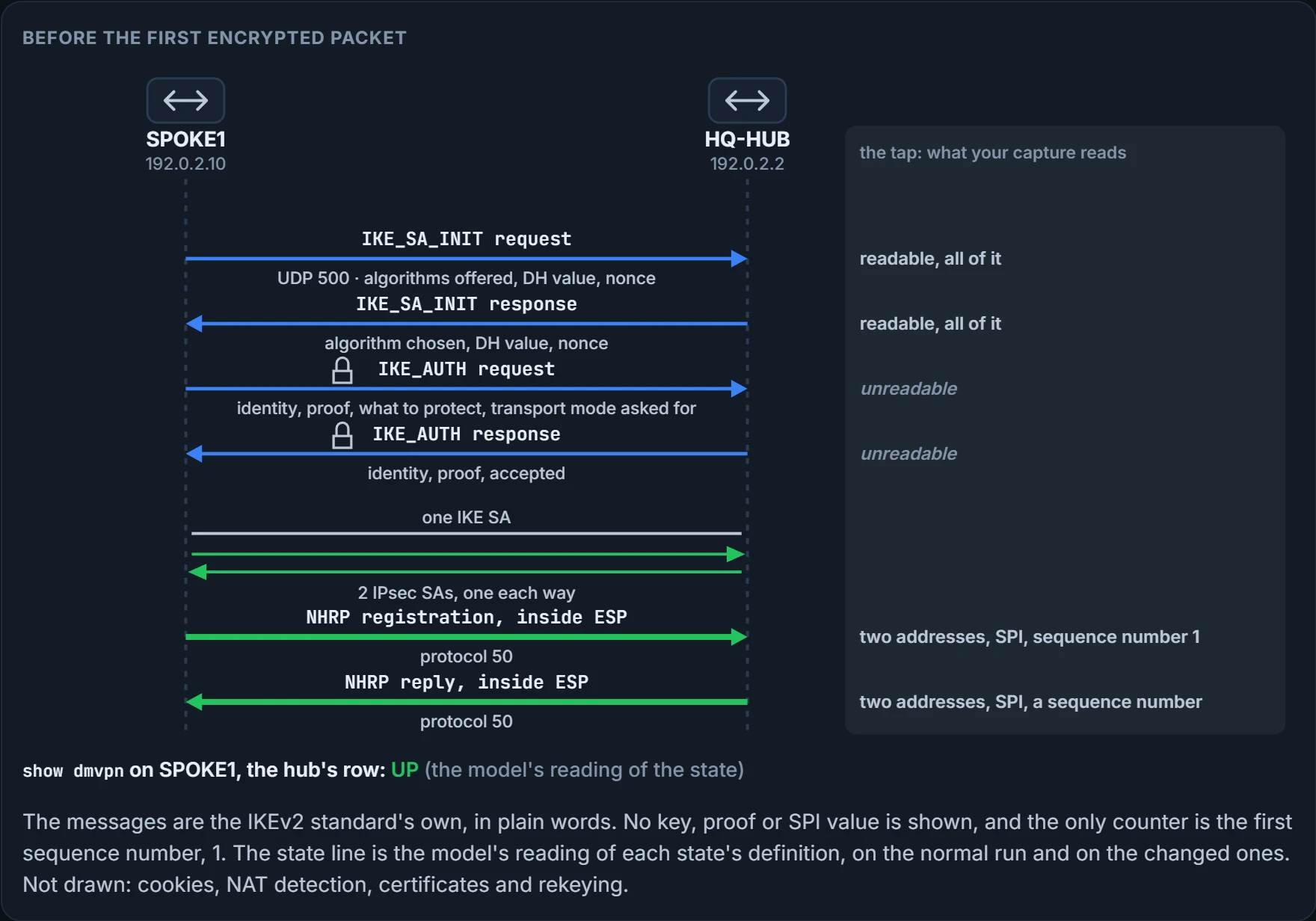
Four. And the third.
Two exchanges, one for each of those two things: a secret first, made in the open, and then the proofs, sent under it.
The first pair is called IKE_SA_INIT. SPOKE1 sends the algorithms it supports for the IKE SA, a Diffie-Hellman value, which is its public half of a key agreement, and a nonce, a random number used once; HQ-HUB answers with its choice, its own Diffie-Hellman value and its own nonce. You read all of it. And it does you no good: from those two messages each router can compute a secret that the messages themselves don't contain, and everything after them is encrypted and integrity protected with keys made from it.
The second pair is IKE_AUTH. Each router sends its identity and an authentication value that proves knowledge of the secret that goes with that identity, and in the same two messages they set up the first SA for ESP, which the standard calls a Child SA: what to encrypt with, and for which traffic. Two things to notice. The pre-shared key is never in any message. It's used to compute the proof, at both ends, and only the proof crosses. And the request for transport mode is a notification in these same messages; unless it's asked for and accepted, a Child SA uses tunnel mode.
So after four messages there is one IKE SA and one pair of IPsec SAs, and SPOKE1's registration leaves inside ESP. For a DMVPN the "which traffic" is always the same answer, and you'll see it printed: GRE, between this router's transport address and that one's.
When does all this start? IPsec is triggered immediately for a point-to-point GRE tunnel, or when the GRE peer address is resolved via NHRP for a multipoint tunnel. Each spoke has a permanent IPsec tunnel to the hub; two spokes dynamically create one between them when they need it, and after a period of inactivity on a spoke-to-spoke tunnel the router tears it down to save its security associations.
Two of the states show dmvpn prints for a peer belong to this lesson, in this order of establishment:
- IKE: DMVPN tunnels configured with IPsec have not yet successfully established an IKE session.
- IPsec: an IKE session has been established, but an IPsec security association has not yet been established.
Put those beside the exchange. IKE means the four messages didn't complete. IPsec means they completed and left no Child SA, which the standard allows: if creating the Child SA fails during IKE_AUTH, the IKE SA is still created as usual. The state proves how far establishment got. It doesn't prove why it stopped there.
One thing to carry forward. SPOKE2's outside port, Gi0/0, still carries the inbound access list the spoke-to-spoke lesson left there, INET-IN: it lets in GRE and ICMP addressed to 192.0.2.14 and drops everything else. Nobody has touched it since.
We haven't confirmed on a router, for this section: which cause puts a router in which of the two states. The reading above is the two definitions applied to the standard, and so are the changed endings in the figure.
Four objects and one line
One rule before any configuration, and it's blunt. Enabling IPsec protection on a DMVPN network requires that all devices have IPsec protection enabled. If some routers have it and others do not, devices with mismatched settings will not be able to establish connections on the tunnel interfaces. There is no "encrypt if the other side can". The closing case turns on it.
The first scenario is a static pre-shared key, and it involves creating four things: an IKEv2 keyring, an IKEv2 profile, an IPsec transform set and an IPsec profile. The lab is three routers attached to the internet: R12 at the top with site 1 behind it, R31 and R41 below with sites 3 and 4, transport networks 100.64.12.0/24, 100.64.31.0/24 and 100.64.41.0/24, and tunnel 200 on 192.168.200.0/24 across the middle.
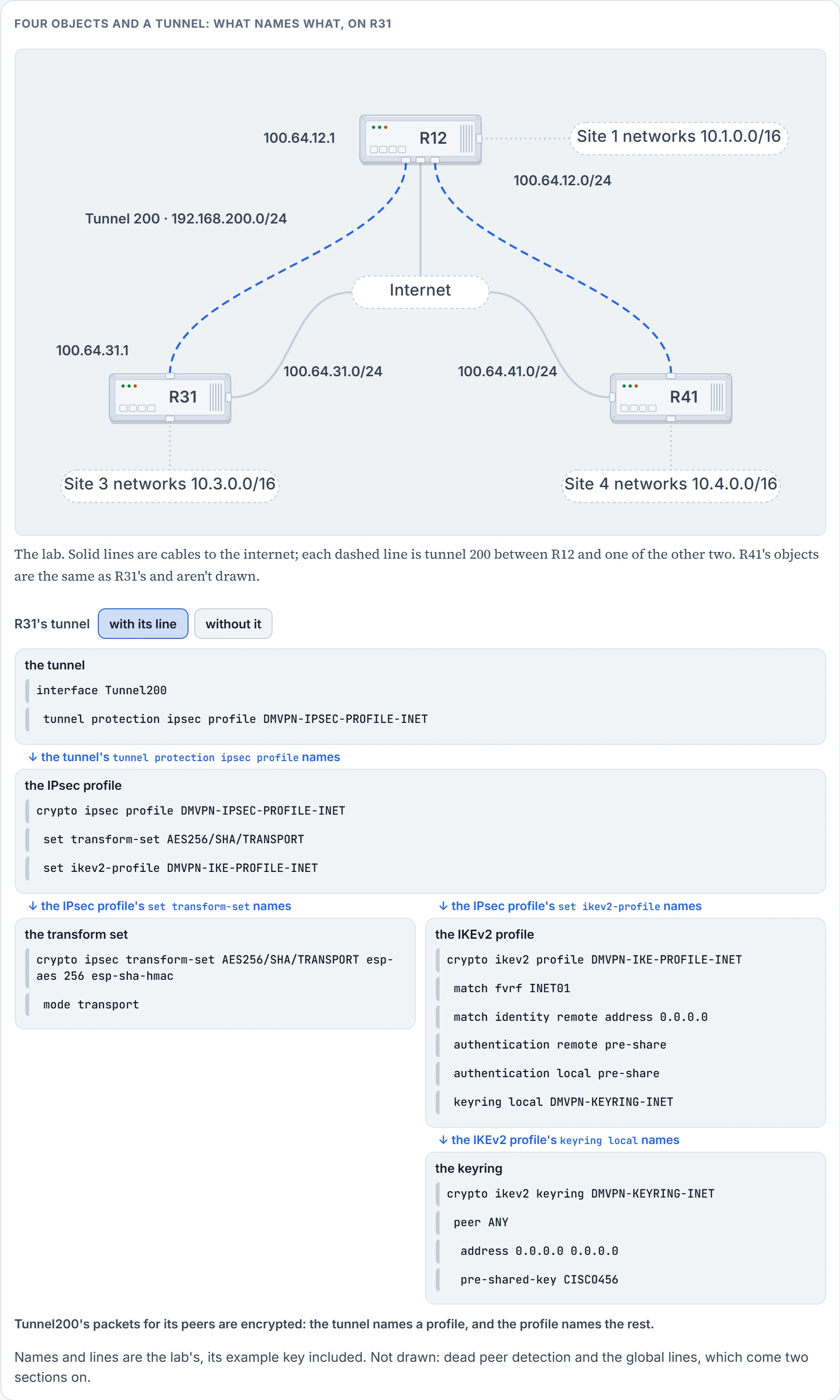
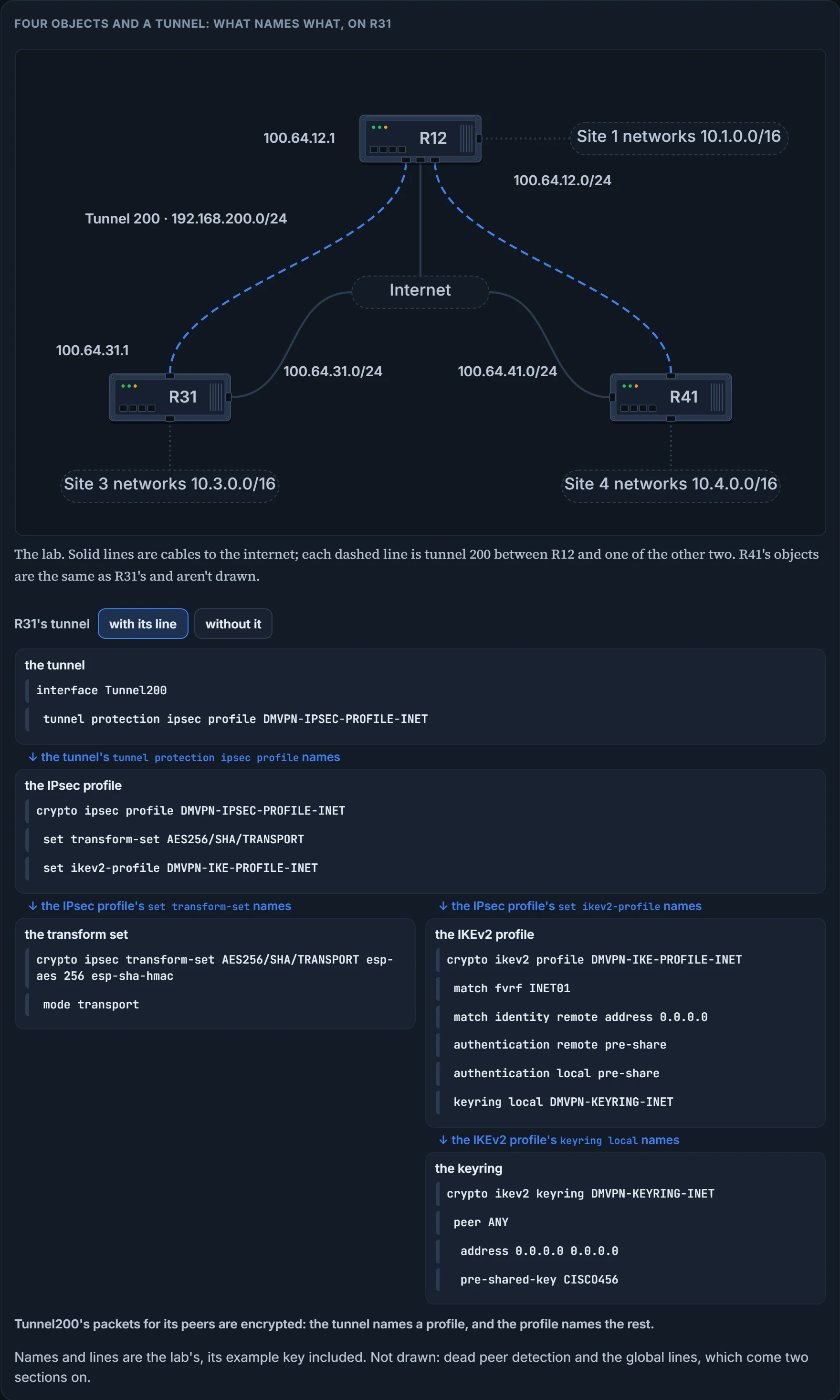
Read the cards as a chain. The tunnel names an IPsec profile. The IPsec profile names a transform set and an IKEv2 profile. The IKEv2 profile names a keyring. Four objects, and each exists to be named by the one before it.
The keyring. The IKEv2 keyring is a repository of the pre-shared keys. In a keyring it's possible to define which keys apply to which hosts, and the password is identified by the IP address of the remote router.
| Step | Line | What it does |
|---|---|---|
| 1 | crypto ikev2 keyring keyring-name | Creates the keyring. |
| 2 | peer peer-name | Creates a peer. One peer here, called ANY, for simplicity; multiple peers can exist in a keyring, each with a matching qualifier and its own password. |
| 3 | address network subnet-mask | Says which remote addresses this peer entry is for. The value 0.0.0.0 0.0.0.0 matches any peer, and an IPv6 transport can use ::/0 for any IPv6 peer. |
| 4 | pre-shared-key secure-key | Defines the key. Generally a long alphanumeric password is used for increased security. |
crypto ikev2 keyring DMVPN-KEYRING-INET
 peer ANY
  address 0.0.0.0 0.0.0.0
  pre-shared-key CISCO456
Can pre-shared keys be set on a neighbor-by-neighbor basis? They can: there can be multiple peers and associated IP addresses in it. When more than one peer entry matches an address, the key used is the best match, a host entry ahead of a prefix and a prefix ahead of the wildcard.
The IKEv2 profile. A collection of nonnegotiable security parameters used during the IKE security association, which is later associated with the IPsec profile. Within it, local and remote authentication methods must be defined, as well as a match statement: an identity, a certificate, and so on. As a rule, a profile must contain a match identity or a match certificate statement, or it is considered incomplete and is not used.
| Step | Line | What it does |
|---|---|---|
| 1 | crypto ikev2 profile ike-profile-name | Creates the profile. |
| 2 | match identity remote address ip-address | Defines the peer. The value 0.0.0.0 matches any peer; an IPv6 transport can use ::/0. |
| 3 | identity local address ip-address | Optional: this router's own identity. It isn't needed for pre-shared key authentication, but it is very helpful with a public key infrastructure, where the address should match the one used when registering the certificate; Loopback 0's is the recommended one. It can be skipped here because if the local authentication method is a preshared key, the default local identity is the IP address. |
| 4 | match fvrf {vrf-name | any} | If a front-door VRF is used on the DMVPN tunnel, associates it with the profile. The any keyword allows either FVRF instance to be selected. This is the last lesson's VRF, the separate routing table the transport port lives in and the one the IKE messages travel in; a profile carries a single match FVRF statement. |
| 5 | authentication local {pre-share | rsa-sig} | Only one local authentication can be selected. |
| 6 | authentication remote {pre-share | rsa-sig} | Multiple remote methods can be defined by repeating the command. In both, pre-share is for pre-shared static keys and rsa-sig for certificate-based authentication. |
| 7 | keyring local keyring-name | For pre-shared authentication, associates the keyring with the profile. |
Local is how this router proves itself; remote is what it will accept from the other end. In a profile with authentication local pre-share and authentication remote rsa-sig, the local node authenticates itself with a preshared key, and its peers authenticate with the RSA signature. One of the first, as many as you like of the second.
"Nonnegotiable" is exact: unlike IKEv1, the authentication method and SA lifetime are not negotiable in IKEv2.
The profile's settings are displayed with show crypto ikev2 profile: the authentication, the FVRF, the keyring and the identity address, along with the IKE lifetime. On the lab's hub, the lines that carry a setting:
R12-DC1-Hub2# show crypto ikev2 profile
IKEv2 profile: DMVPN-IKE-PROFILE-INET
 Ref Count: 1
 Match criteria:
  Fvrf: INET01
  Identities:
   address 0.0.0.0
 Local authentication method: pre-share
 Remote authentication method(s): pre-share
 Keyring: DMVPN-KEYRING-INET
 Lifetime: 86400 seconds
 DPD: disabled
 NAT-keepalive: disabled
Twenty-four hours for the IKE SA. The two disabled lines come back two sections on. This output proves the profile's match, methods, keyring and lifetime. It doesn't prove that any IKE SA exists.
No IKEv2 proposal and no IKEv2 policy is configured anywhere in this lab, so nothing here says which algorithms protect the IKE SA itself. Smart defaults fill the gap: if no proposal is configured and attached to an IKEv2 policy, the default proposal in the default IKEv2 policy is used in negotiation.
The transform set. It identifies the security protocols, such as ESP, for encrypting traffic, and it specifies the protocol, ESP or the authentication header, that is used to authenticate the data. The menu:
| Type | Transform | What it is |
|---|---|---|
| ESP encryption | esp-aes 128, esp-aes 192, esp-aes 256 | ESP with the 128-, 192- or 256-bit AES encryption algorithm |
| ESP encryption | esp-gcm 128, esp-gcm 192, esp-gcm 256 | ESP transform using the Galois Counter Mode cipher at that size; the 256-bit one is tagged next-generation encryption |
| ESP authentication | esp-sha-hmac | ESP with the Secure Hash Algorithm, HMAC variant |
| ESP authentication | esp-sha256-hmac, esp-sha384-hmac, esp-sha512-hmac | ESP with the 256-, 384- or 512-bit SHA2, HMAC variant |
| Authentication header | ah-md5-hmac, ah-sha-hmac | authentication header with MD5 or with SHA |
Two guidelines: select an ESP encryption transform for data confidentiality, and select an authentication header or ESP authentication transform to go with it. Two steps:
crypto ipsec transform-set transform-set-name [esp-encryption-name] [esp-authentication-name] [ah-authentication-name]creates the set and names its transforms in the one command. Only one can be selected for ESP encryption, for ESP authentication and for authentication header authentication: read it as one transform of each kind, which is what the command's three optional slots allow. Two combinations are suggested:esp-aes 256withesp-sha-hmac, oresp-aeswithesp-sha-hmac.mode {transport | tunnel}. ESP tunnel mode is the default; it provides no benefits and adds 20 bytes of overhead per packet. Use transport. That holds for any set you create yourself: the default mode for every transform set but its built-in default one is tunnel.
You verify it with show crypto ipsec transform-set, and two of its lines are the ones to read:
Transform set AES256/SHA/TRANSPORT: { esp-256-aes esp-sha-hmac }
  will negotiate = { Transport, },
"Will negotiate". It's an offer until an SA exists: this output proves what this router will offer, and it doesn't prove what was agreed. The line that says what was agreed is in the next section.
The IPsec profile. It combines the IPsec transform set and the IKEv2 profile. Three steps: crypto ipsec profile profile-name, which puts you in IPsec profile configuration submode; set transform-set transform-set-name; and set ikev2-profile ike-profile-name.
Look at what isn't in an IPsec profile. No peer address and no access list. An IPsec profile contains only IPsec information: you cannot specify the IPsec peer address or an access list to match the packets that are to be encrypted. So who decides what gets encrypted? The tunnel does. That's the line coming up.
show crypto ipsec profile displays the components:
R12-DC1-Hub2# show crypto ipsec profile
! Output omitted for brevity
IPSEC profile DMVPN-IPSEC-PROFILE-INET
        IKEv2 Profile: DMVPN-IKE-PROFILE-INET
        Security association lifetime: 4608000 kilobytes/3600 seconds
        Responder-Only (Y/N): N
        PFS (Y/N): N
        Mixed-mode : Disabled
        Transform sets={
                AES256/SHA/TRANSPORT: { esp-256-aes esp-sha-hmac } ,
Two of the six functions are on that screen. The lifetime line is periodic rekey: two limits, a volume of traffic and a time, 3600 seconds by default. And the PFS line says N: by default PFS is not requested. The command that asks for it is set pfs, in the IPsec profile, and this lesson goes no further than its name. This output proves which transform set and IKEv2 profile are tied together. It doesn't prove the profile is on any tunnel.
The line. When all the required components have been configured, the IPsec profile is associated to the DMVPN tunnel interface with tunnel protection ipsec profile profile-name [shared]:
interface Tunnel200
 tunnel protection ipsec profile DMVPN-IPSEC-PROFILE-INET
After the configuration is applied to R12, R31 and R41, the tunnels are protected.
Four objects, fifteen lines, and until that sixteenth not one packet is encrypted. The objects are definitions. Expect the false statement in an exam: that encryption is enabled by configuring the IKEv2 profile and associating it to a tunnel interface. It's false, because it's the IPsec profile that is associated to the tunnel.
The shared keyword is required for routers that terminate multiple encrypted DMVPN tunnels on the same transport interface. It shares the IPsec security association database among those tunnels, and because the database is shared, a unique tunnel key must be defined on each tunnel interface so that the decrypted traffic aligns to the proper tunnel. The lab has one protected tunnel on each transport port, so it needs neither the keyword nor the tunnel key, and neither does our network. One prerequisite our network already meets: with tunnel protection ipsec profile, the tunnel source must be given as an interface, not as an IP address.
We haven't confirmed on a router, for this section: what a profile with no match fvrf line does on a tunnel whose transport port is in a VRF; which algorithms the default proposal offers; and what a router says when esp-sha-hmac is typed.
Continue the lesson
The whole lesson, with its drawings and its questions. 4 more sections after the ones above.