
uRPF
Nothing in a packet proves who sent it. Unicast reverse path forwarding turns the packet around: it looks the source up in the CEF table and checks the packet arrived where a reply would leave. Strict mode needs the same interface, loose mode any interface other than a default route. It is configured per interface with ip verify unicast source reachable-via rx or any.
By Arif, founder of Daveth · Updated
The full 16 min walkthrough is in Daveth Pro (Network). See what the plan opens
What this page answers
What is the difference between uRPF strict mode and loose mode?
Strict mode forwards a packet only if the route back to its source, other than a default route, uses the interface it arrived on. Loose mode forwards it if any interface other than a default route can reach the source. Read it in “Loose mode: any interface will do”
Which uRPF mode do you use when traffic is asymmetric?
Loose mode: ip verify unicast source reachable-via any. With asymmetric flows the return path may leave by a different interface, and strict mode would discard valid packets. Read it in “Loose mode: any interface will do”
What does uRPF allow-default do?
By default a packet whose source matches only the default route is discarded. allow-default lets the check accept a return path chosen by the default route, as in ip verify unicast source reachable-via rx allow-default. Read it in “The default route, and allow-default”
A source address is only a claim
The destination decides where the packet goes. The source is whatever the sender wrote in the header. The last lesson ended there: a list drops what somebody described in advance, and nobody can describe every false source. So how can a router tell a spoofed source address from a real one?
It can't. Nothing in the packet proves who sent it. What a router can do is compare the claim with what it already knows about where that address lives, and that's uRPF, unicast reverse path forwarding: a security feature that helps limit or even eliminate spoofed IP packets on a network. It examines the source IP address of an ingress packet and determines whether it is valid. If it's valid, the packet is forwarded; if it isn't, the packet is discarded.
Be suspicious of "valid". It can't mean "true". It means the address fits this router's own picture of the network, and the next section says exactly which picture.
One requirement before anything else: CEF must be enabled on the device for uRPF to work.
Turn the packet around
Take a packet that has just arrived and turn it around: its source becomes a destination. Where would this router send a packet for that address?
That's a question the router answers all day, for destinations, and the answer lives in two places: the routing table is what the control plane chose, and CEF builds the FIB from it, the table the data plane forwards with. uRPF asks the forwarding question about the source. It is a reverse lookup in the CEF table, checking that the packet arrived on the best return path to its source. That's also why CEF is required: the ability to look backward relies on the FIB, which CEF generates as part of its operation.
So the name reads literally. Reverse path: the path back to the source. Forwarding: the ordinary forwarding lookup, pointed the other way.
It's an input function, applied only on the input interface. The command goes on an interface, and it judges packets arriving on that interface.
And it has a place in the queue. Where a port has both uRPF and access lists, the order for an arriving packet is: the input list first, then the reverse lookup, then the forwarding lookup, then the output list on the way out, then the packet is forwarded. If that order holds, a packet the inbound list denied never reaches the reverse lookup.
The rest of the lesson needs a router with more than one way out. This is our bench: router R1 with a LAN and two upstream routers, U1 and U2. H1 is a host on the LAN; H5 is a host on a remote network.
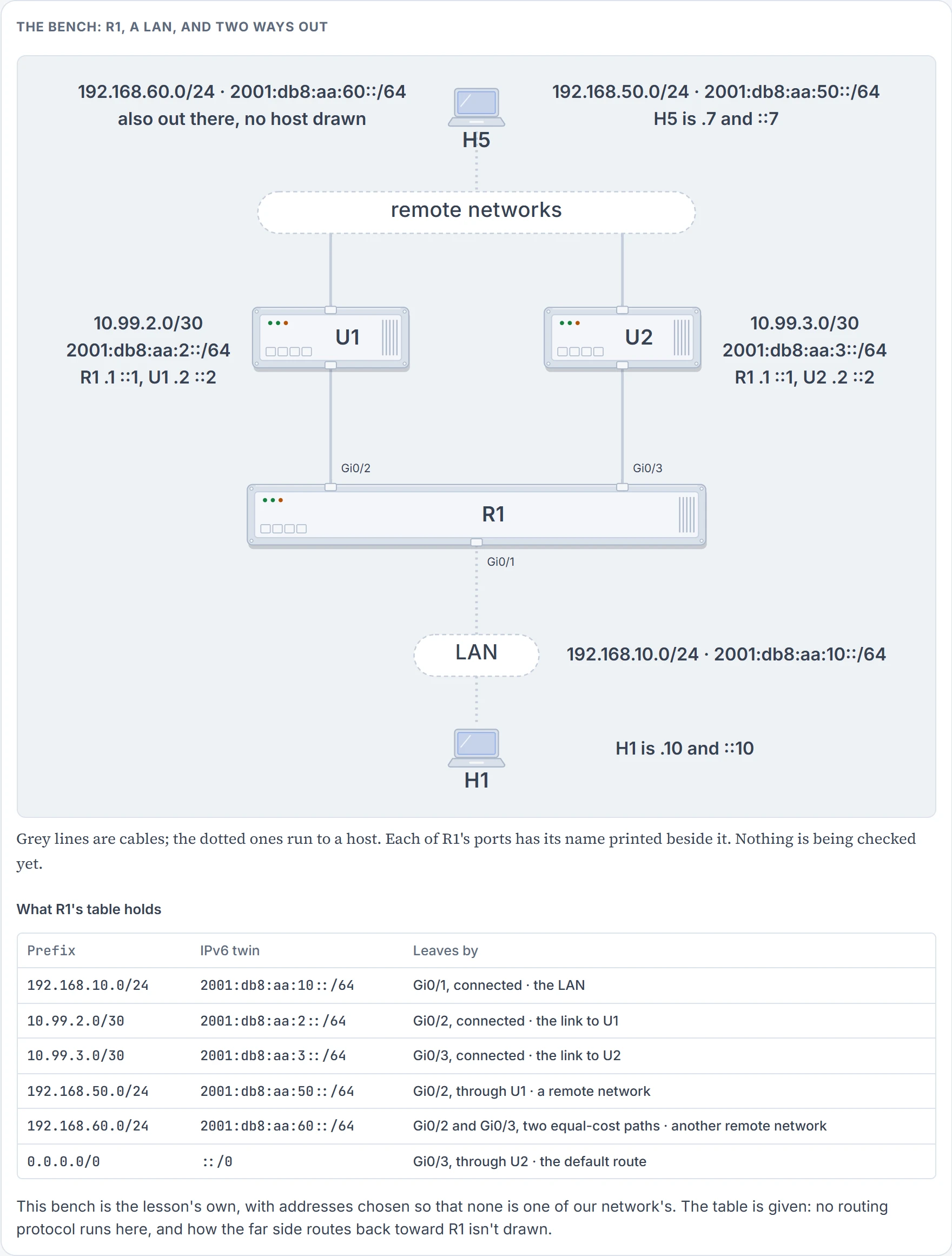
We haven't confirmed on a router, for this section: the order of those five stations.
Strict mode: the same interface, or nothing
uRPF can operate in three modes, strict, loose and VRF, and the mode you choose determines how a packet is identified as valid or not valid. Strict first.
In strict mode the router reviews the source IP address of the packet and notes the ingress interface. It then looks at the routing table to identify the interface, other than a default route, that would be used to reach that source address. If that interface is exactly the same interface the packet was received on, and it isn't the default route, the packet is valid and is forwarded. If it's a different interface, the packet is discarded. Hold "other than a default route" for two sections.
Walk two packets through R1, with strict mode on every port. Every verdict on this bench, here and in the next two sections, is worked from those definitions; no router printed it.
H1, 192.168.10.10, sends a packet that arrives on Gi0/1. Turn it around: R1 reaches 192.168.10.0/24 by Gi0/1. Same interface. Forwarded.
Now a packet with that same source, 192.168.10.10, arriving on Gi0/2 from U1. Turn it around: Gi0/1. It came in on Gi0/2. Discarded. That's the spoofed packet uRPF was built for: an inside address arriving from outside.
Now the third. H5, 192.168.50.7, is a real host on the remote network, sending to H1. Its packets arrive on Gi0/3, through U2, because that's the way the far side routes toward R1's LAN. Nothing in this packet is forged.
Discarded. R1 turned the packet around, got Gi0/2, compared it with Gi0/3, and that was the whole investigation.
The two situations have names. With symmetric routing, the same path is used for the source traffic and the return traffic. With asymmetric routing, a different path ends up being used for return traffic. And then the sentence this lesson turns on: "if you use strict mode when asymmetric routing occurs, the legitimate traffic is dropped". Put shortly: implement uRPF incorrectly and you could end up dropping legitimate packets.
Asymmetric routing isn't a fault. Every router chooses its own best path, one direction at a time, and nothing obliges the far side to choose the mirror image of yours. Both paths work. Strict mode is what turns that ordinary fact into an outage, and from R1's side the honest packet from H5 and the forged one before it are the same event: wrong interface.
One case where two interfaces are both right. With uRPF, all equal-cost best return paths are considered valid, as long as each is in the FIB. A packet from 192.168.60.9 passes strict mode on Gi0/2 and on Gi0/3 alike. The word doing the work is "best": a second-best path isn't in the FIB, so it can't vouch for anything.
We haven't confirmed on a router, for this section: that an IPv4 packet is treated that way across equal-cost paths.
Loose mode: any interface will do
In loose mode the router reviews only the source IP address of the packet. It then looks in the routing table to see whether there is any interface, other than a default route, that can be used to reach that source; if there is, and it's not the default route, the packet is valid and is forwarded. If not, the packet is discarded. The ingress interface has dropped out of the question.
The two modes are two keywords of one command. uRPF is configured interface by interface with ip verify unicast source reachable-via {rx | any} [allow-default] [allow-self-ping] [list], in interface configuration mode, and rx is for strict mode, any for loose mode. Read the command aloud and it defines itself: verify that the source is reachable via the interface the packet was received on, or via any. IPv6 has its own command, ipv6 verify unicast source reachable-via {rx | any} [allow-default], with the same reading: rx is for strict mode and any is for loose mode. So the rule here is a command per family, and every configuration in this lesson carries both. On R1's Gi0/3, strict:
interface GigabitEthernet0/3
 ip verify unicast source reachable-via rx
 ipv6 verify unicast source reachable-via rx
One exception, so that it doesn't surprise you: on one platform, enabling IPv4 uRPF also enables IPv6 uRPF. Don't plan on it. Type both.
Now the two packets strict mode discarded, under loose mode. Call them before anything runs.
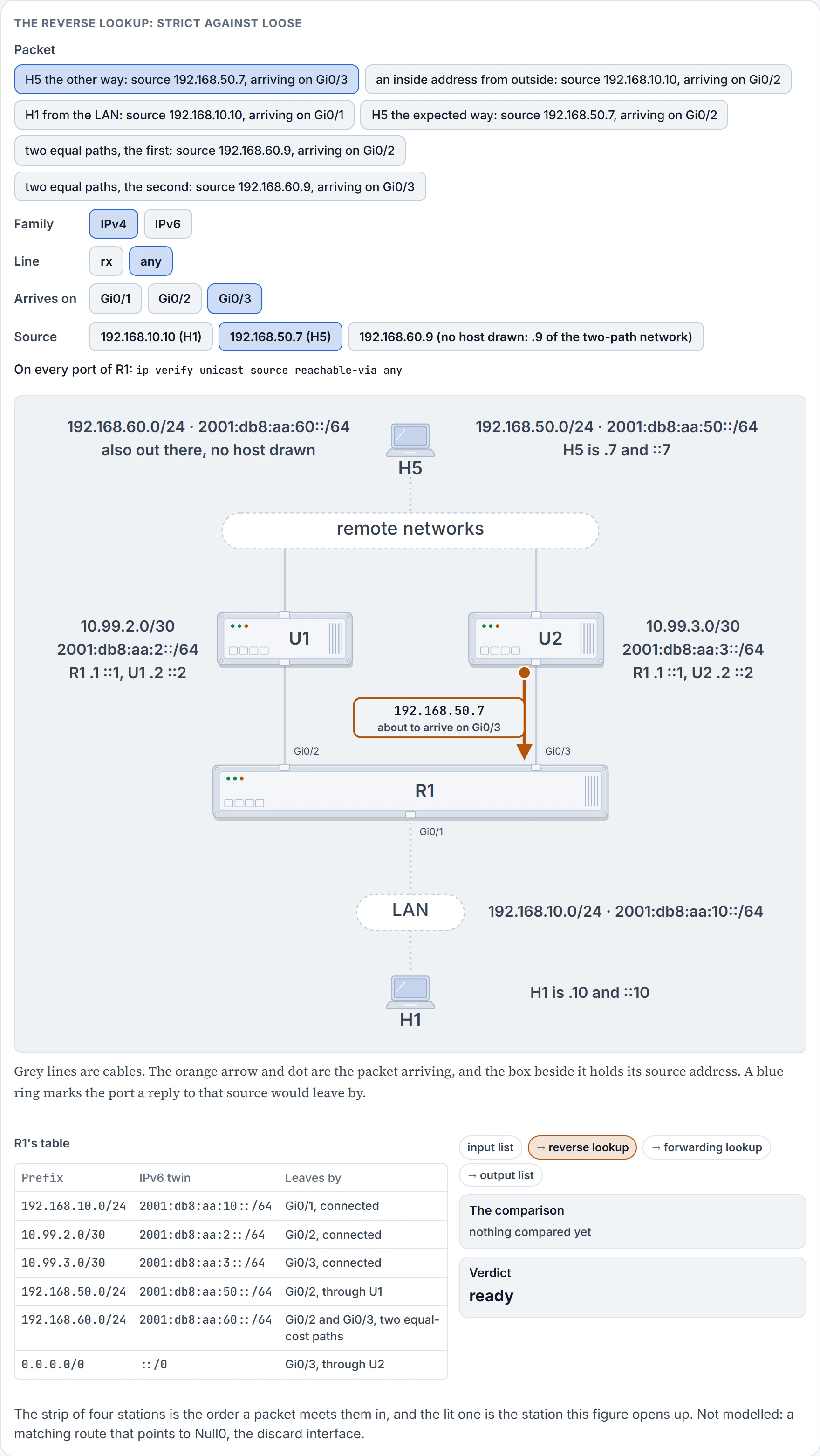
Step 1 of 6 Ready. A packet with source 192.168.50.7 is about to arrive on Gi0/3. Every port of R1 carries ip verify unicast source reachable-via any.
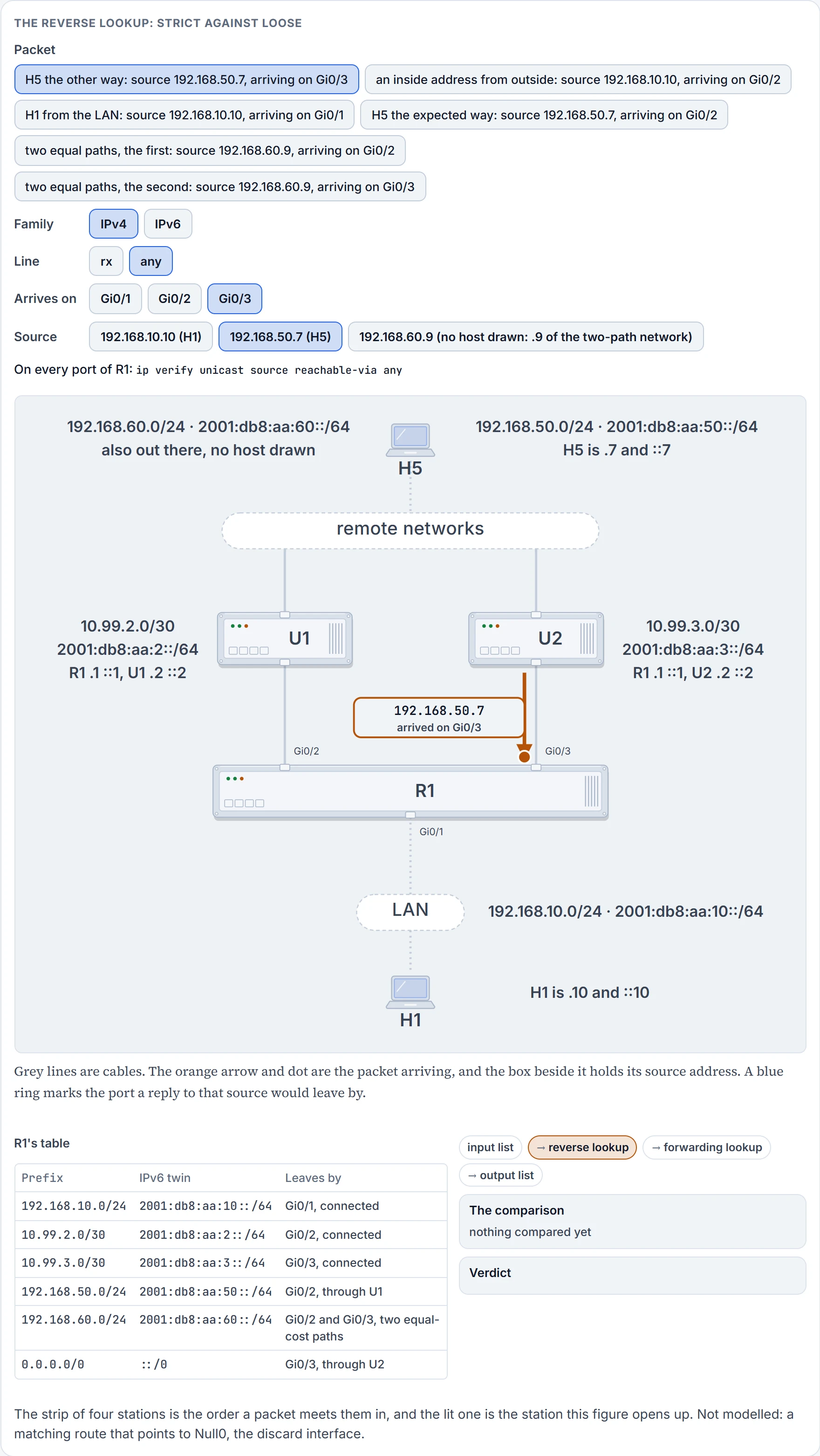
Step 2 of 6 It arrives on Gi0/3. Loose mode won't use even that.
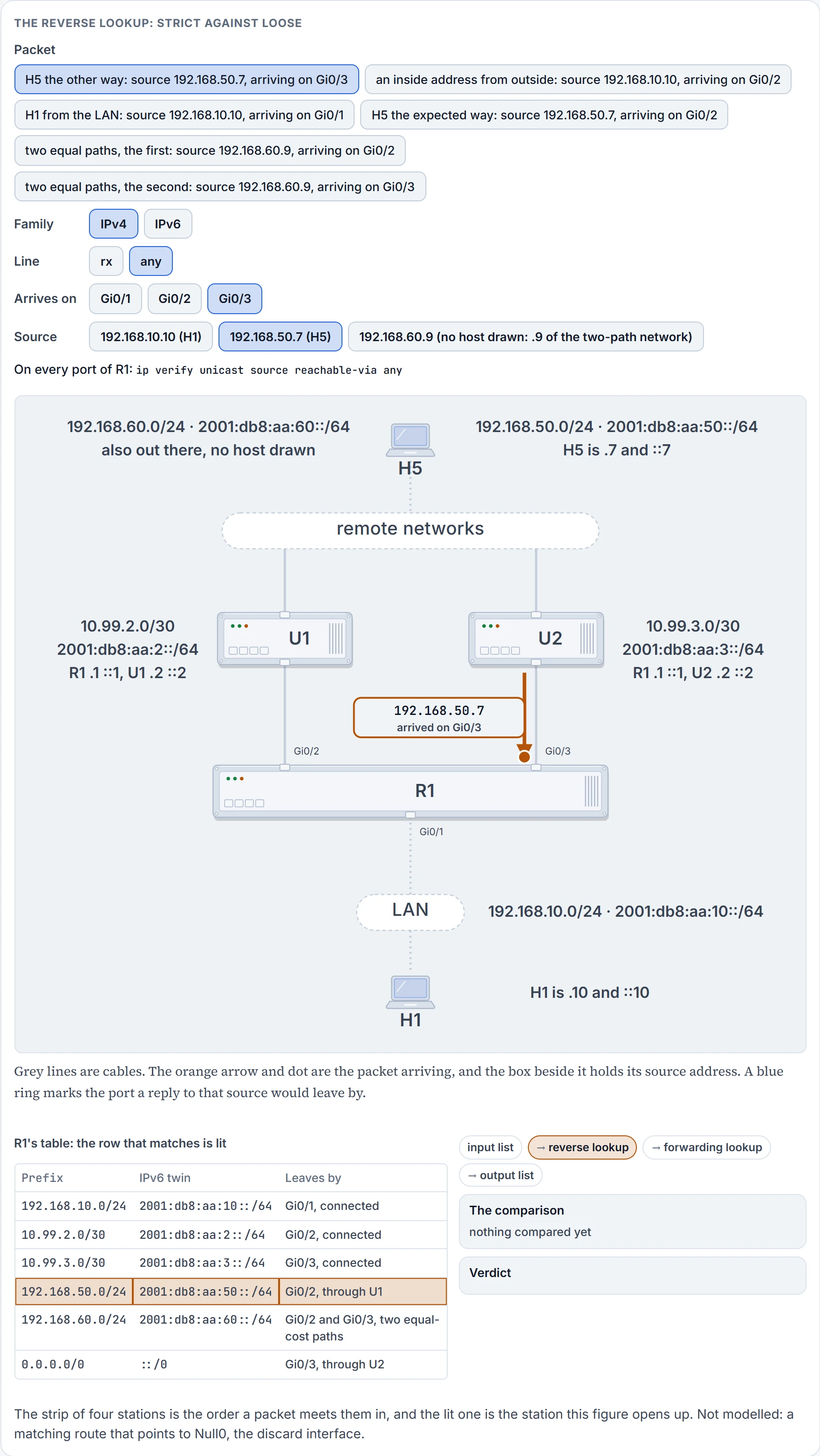
Step 3 of 6 Turned around: 192.168.50.7 becomes the destination of a reply. The longest match in R1's table is 192.168.50.0/24.
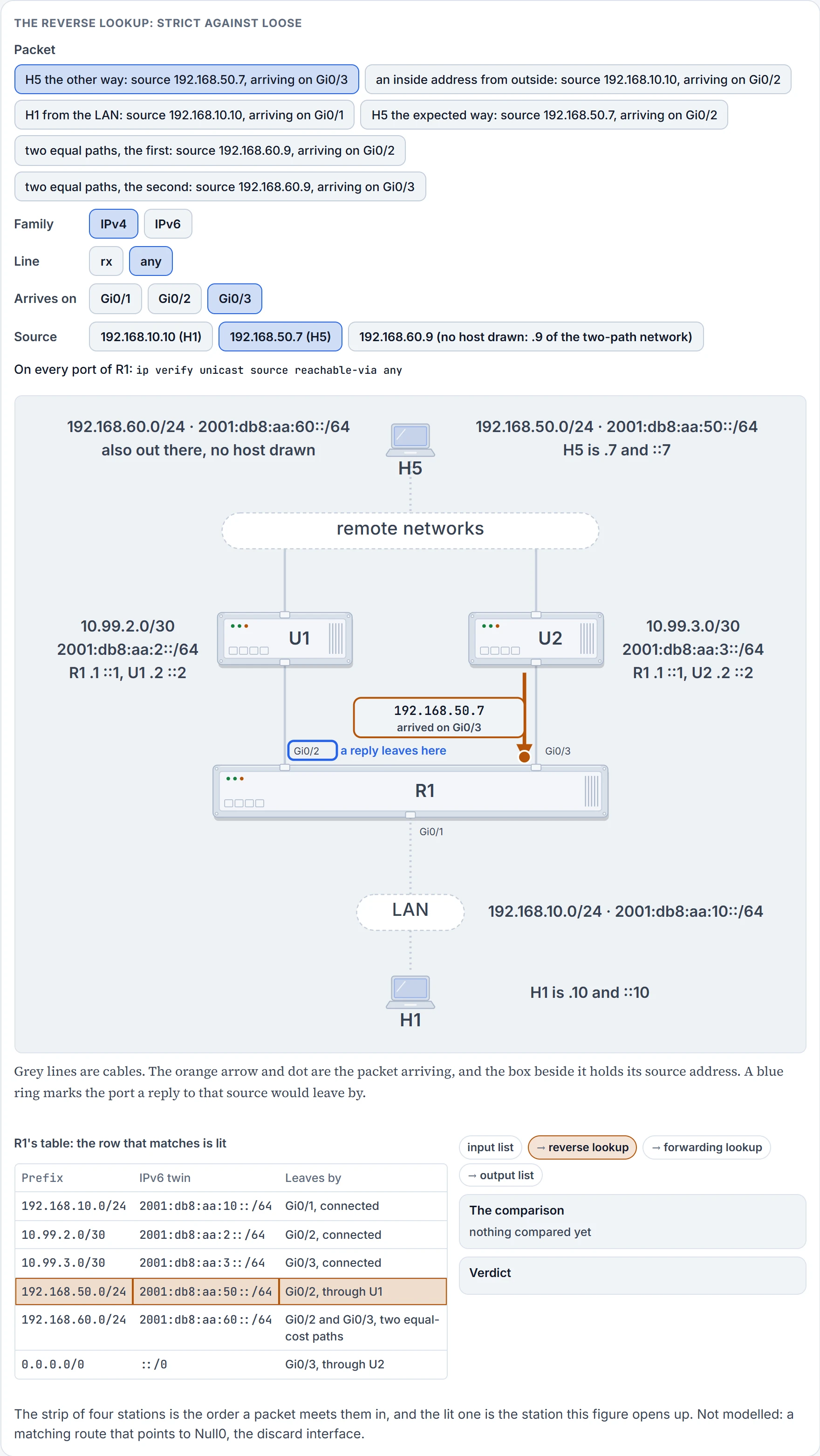
Step 4 of 6 That row leaves by Gi0/2. A reply to 192.168.50.7 would go out there.
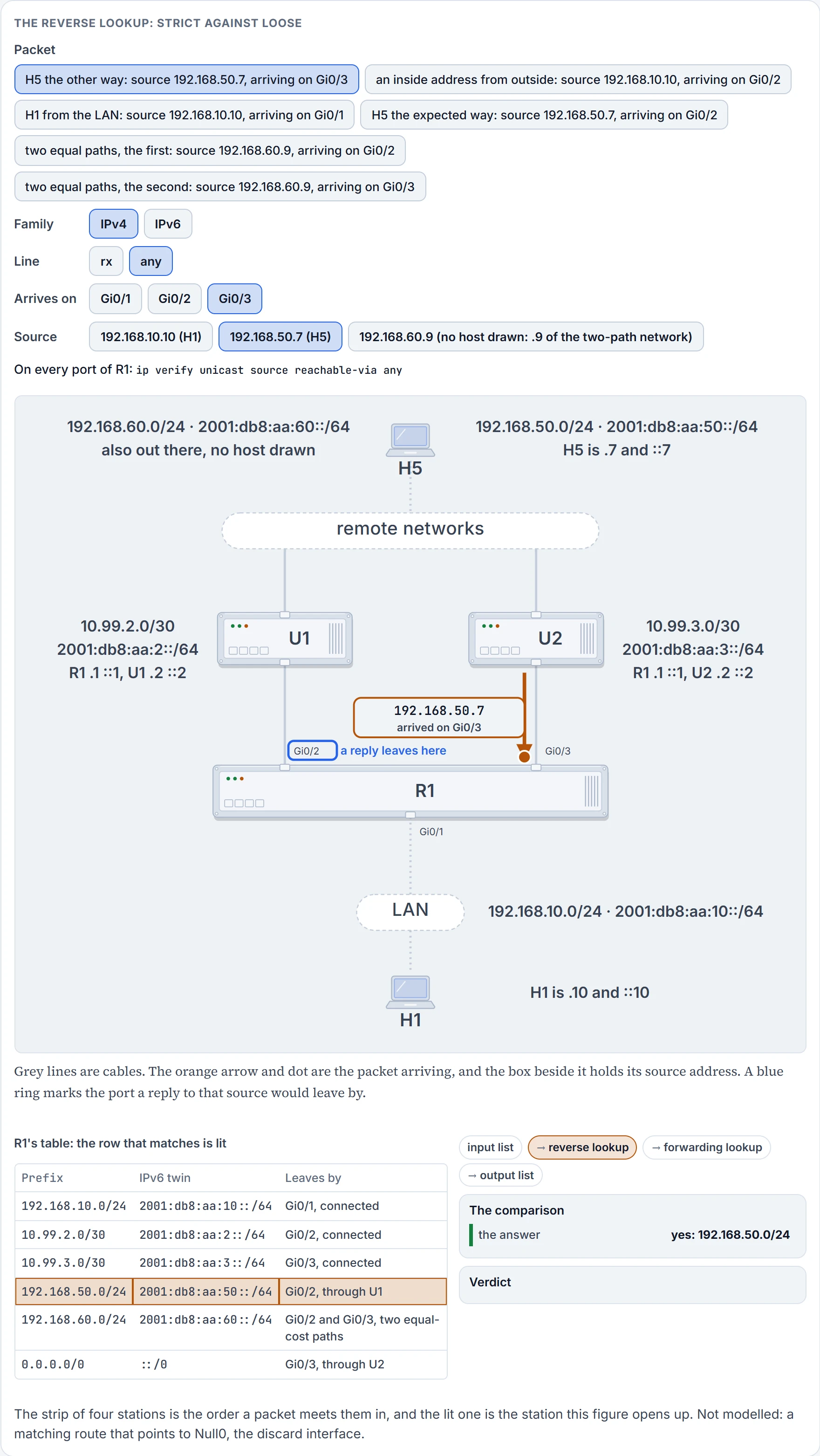
Step 5 of 6 Loose: any interface will do, so the arrival port isn't compared with anything. A route exists, and that is the whole test.
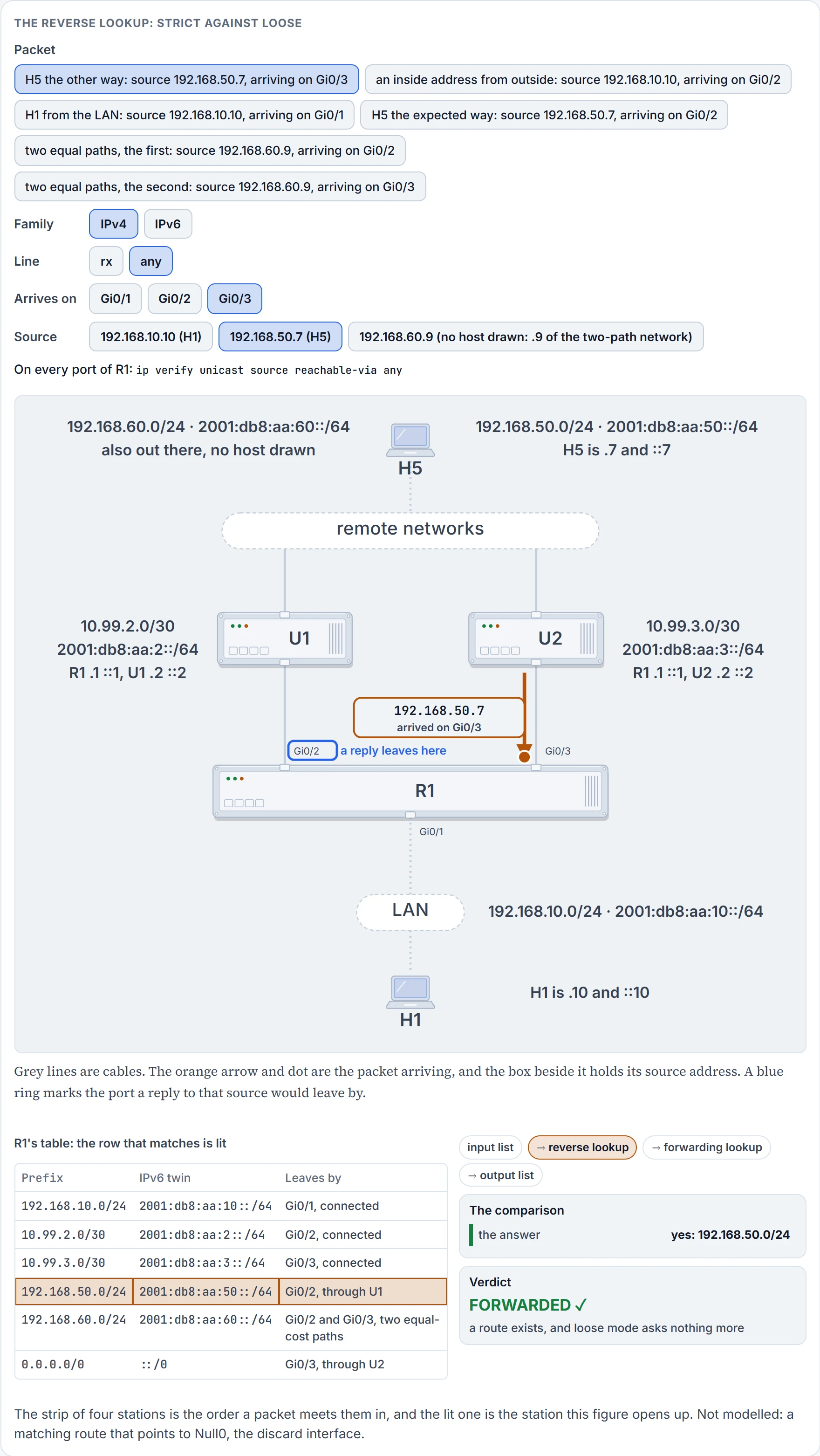
Step 6 of 6 Forwarded. From here the packet goes on to the ordinary forwarding lookup, on its destination.
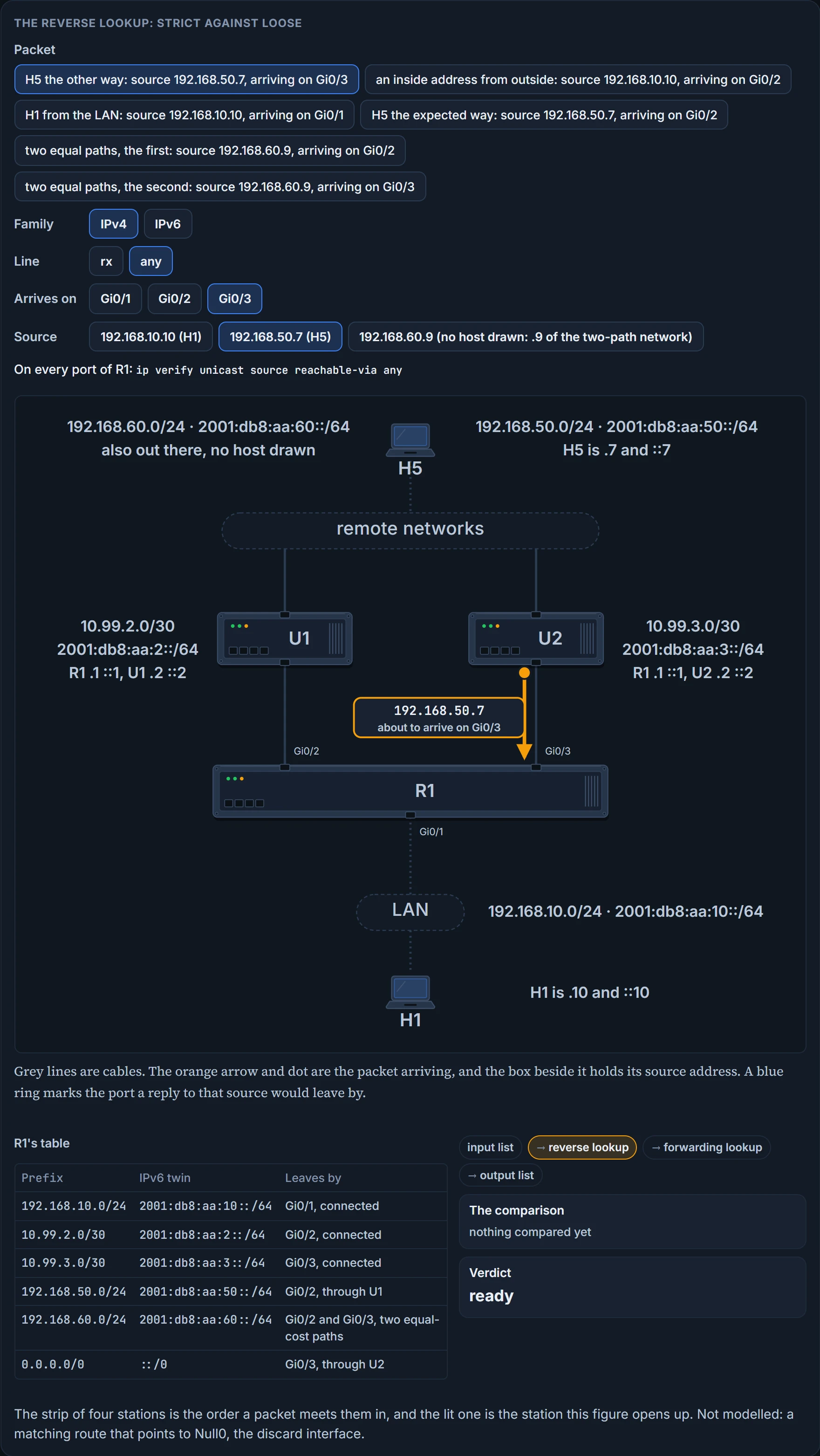
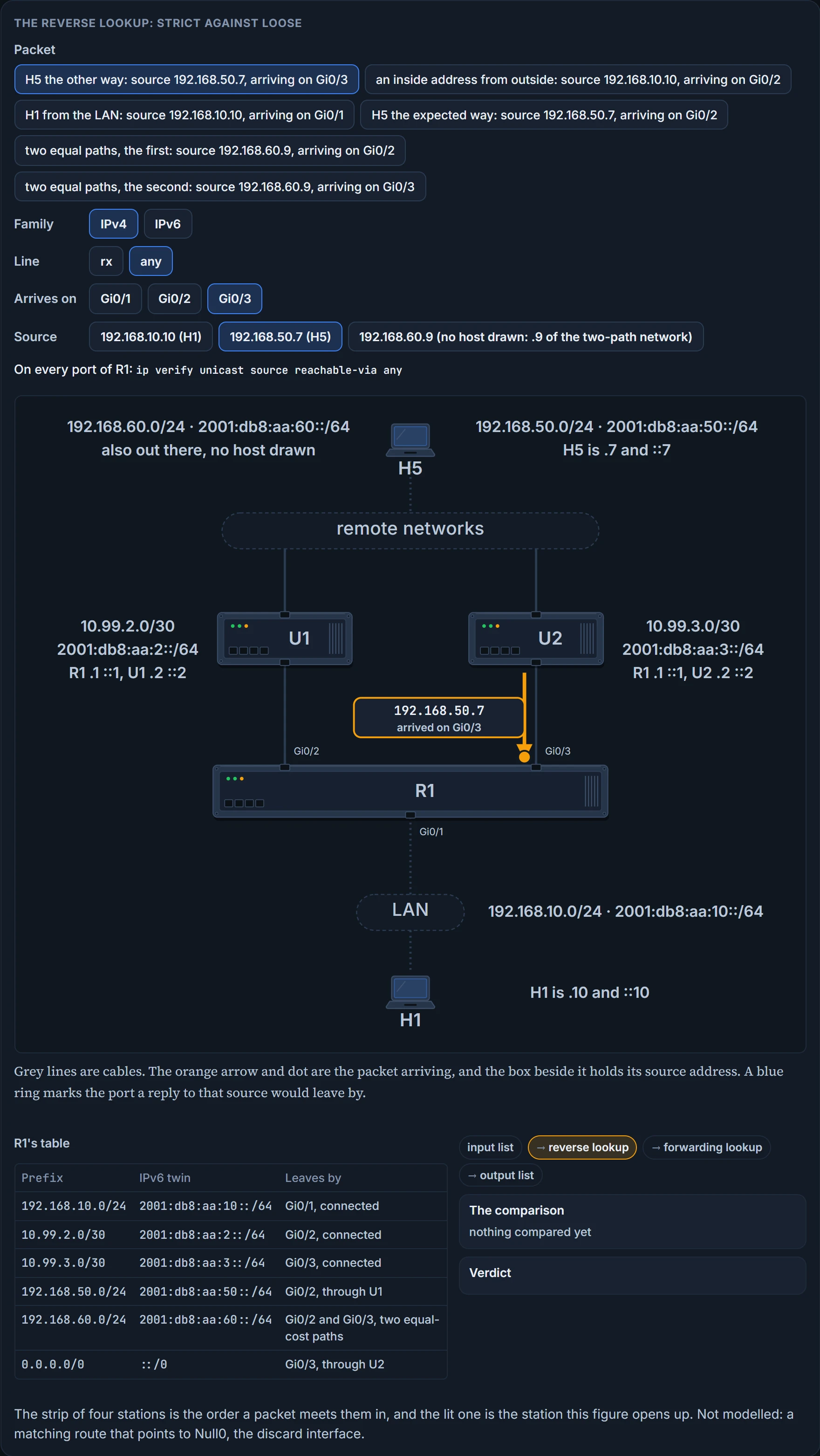
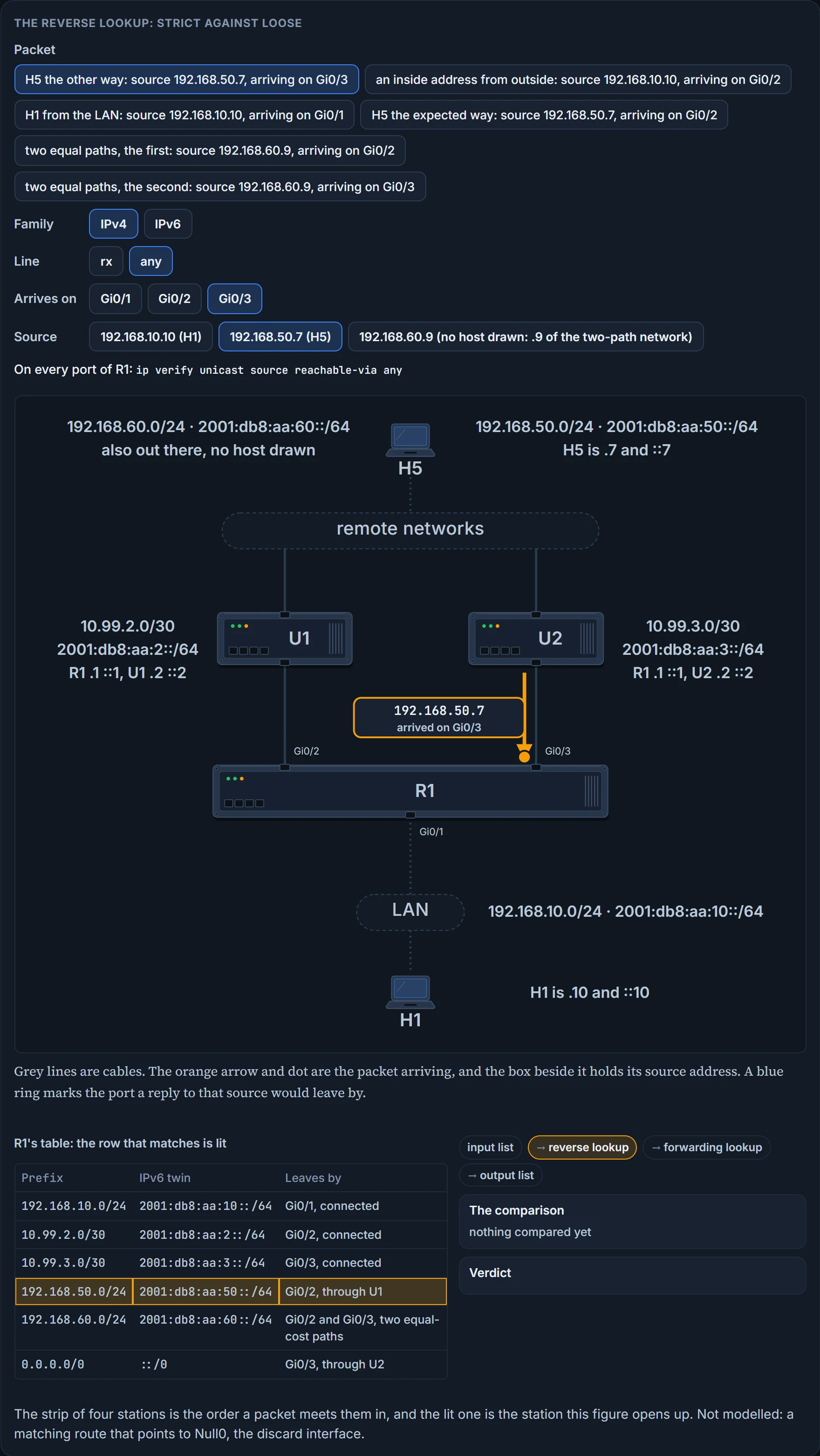
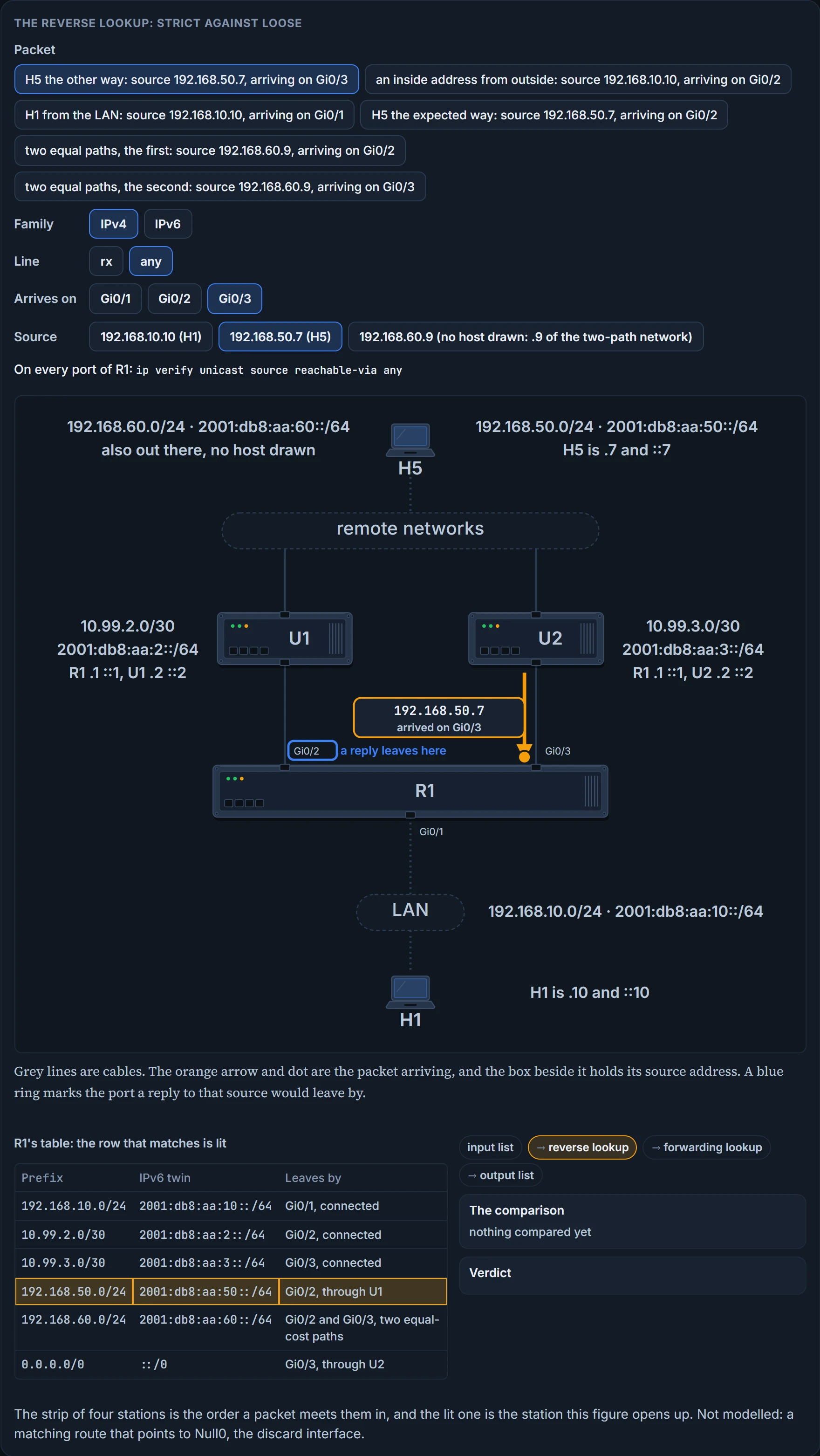
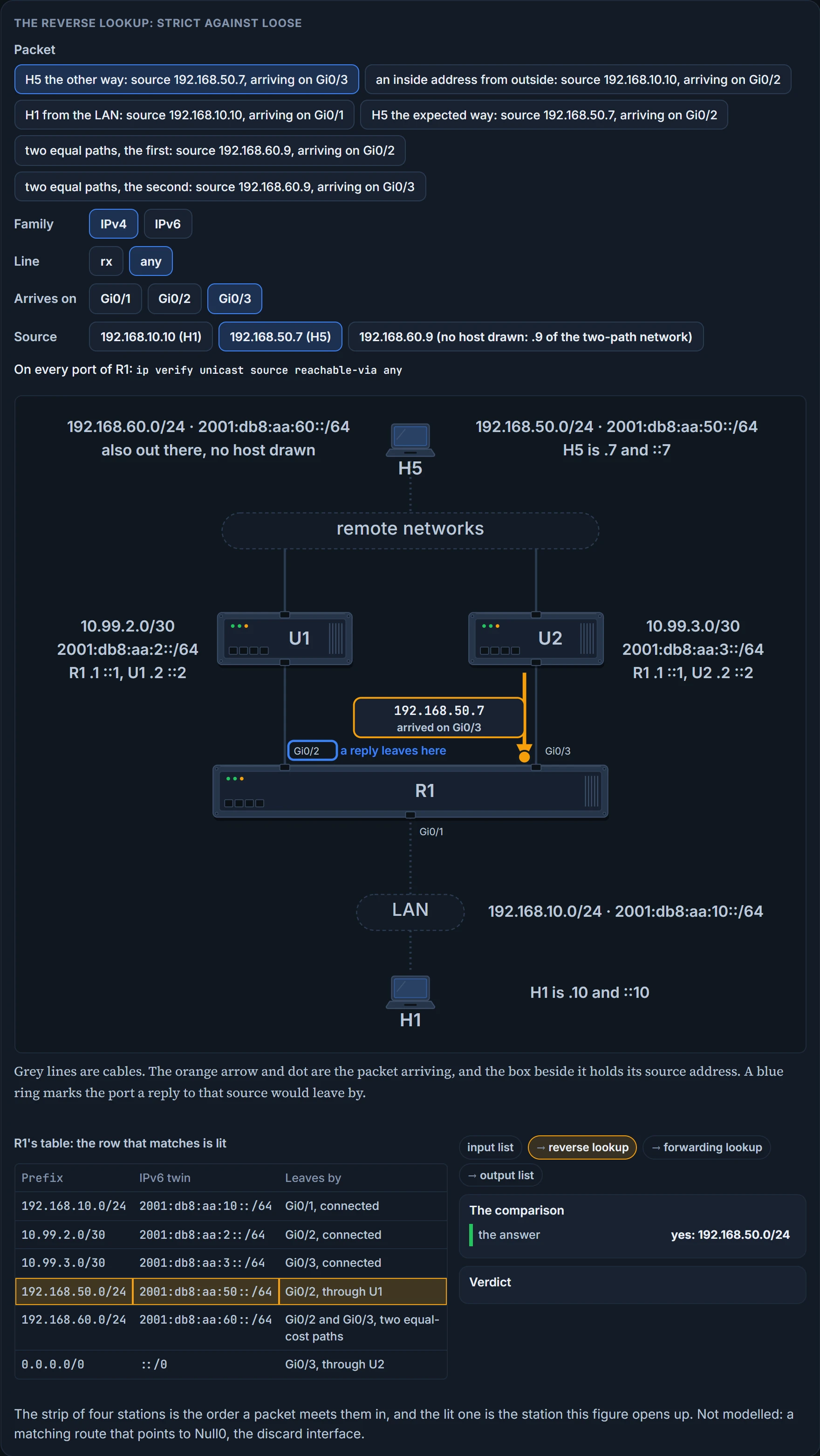
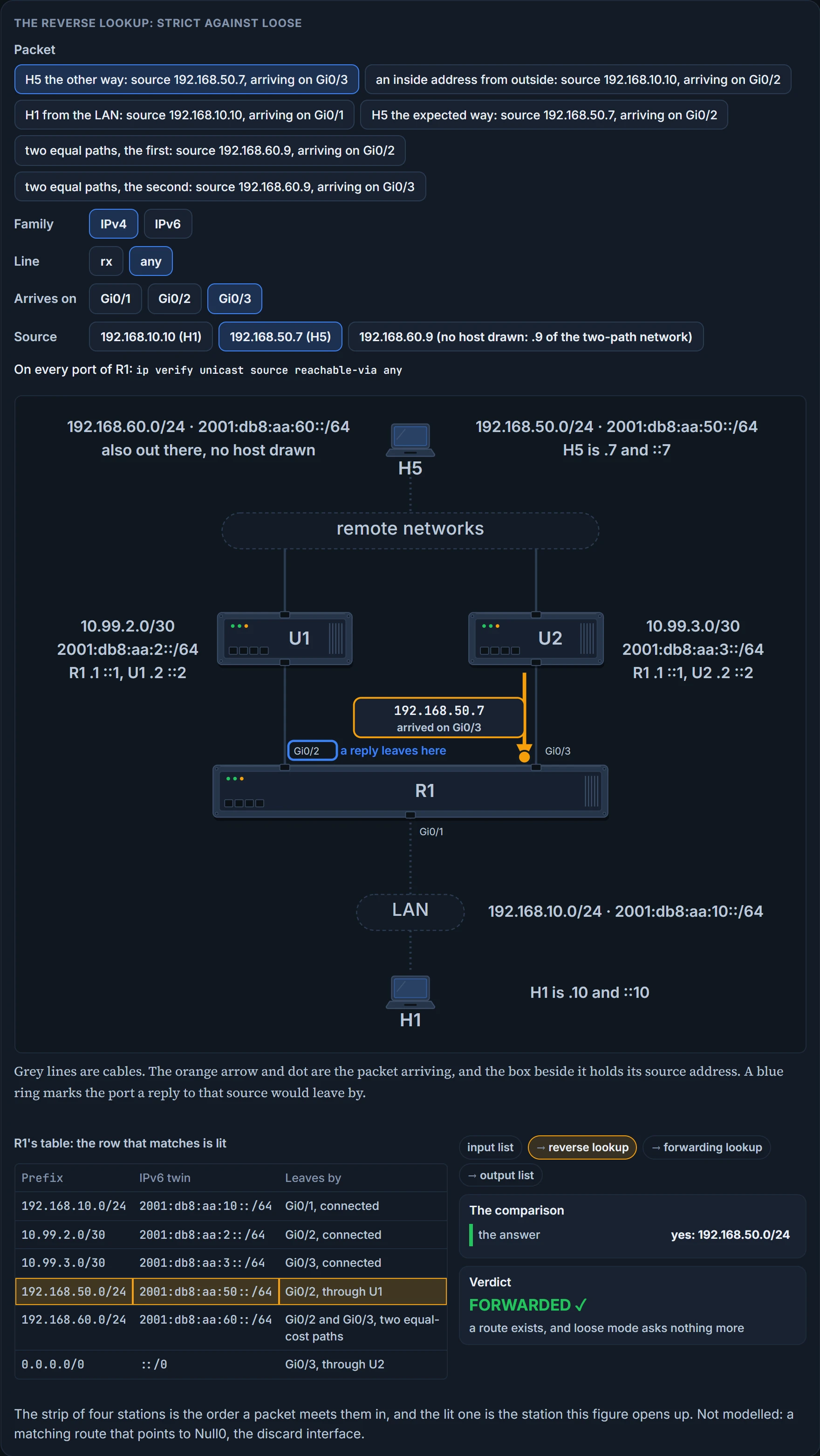
Both. H5's packet passes: R1 has a route to 192.168.50.0/24, and loose mode doesn't ask where it points. Expect the exam to ask for exactly this, the command to use when the traffic flow is asymmetric (you may see it worded as asynchronous): ip verify unicast source reachable-via any. And the forged packet passes for the same reason. R1 has a route to its own LAN, obviously, so an inside address arriving from outside is "reachable via any".
RFC 3704 is blunt about what's left. A loose check tests only for the existence of a route; it's a route presence check, and because it sacrifices directionality it loses the ability to limit an edge network's traffic to traffic legitimately sourced from that network. By the definition above, what loose mode still discards is a source this router has no route for at all, other than the default: martian addresses, reserved ranges that should never be a source on the internet, and addresses that aren't currently routed. Useful, and a different job from the one strict mode does.
So the choice is a trade. Choose the wrong mode and you may end up dropping valid packets because of symmetric versus asymmetric routing. In an enterprise network you use a combination: where asymmetric routing might occur you use loose, and where symmetric routing is guaranteed to occur you could use strict. On router interfaces that connect to subnets with end stations you typically use strict, and on uplinks you typically use loose. A LAN of end stations typically has one way in and one way out, so the return path has nothing else to choose; an uplink is one of several ways toward everything else.
The same line can be drawn from the other side: uRPF shouldn't be used on interfaces internal to the network, which are likely to have routing asymmetry, and belongs where there is natural or configured symmetry, at the edge.
The third mode. VRF mode is the same as loose mode, except that it only examines interfaces that are in the same VRF as the interface on which the packet was received. A VRF is a separate routing table on the same router, so this is the reverse lookup kept inside one of them. VRF mode has no keyword of its own on this command: uRPF can be configured on an interface assigned to a VRF, and the source lookup is then done in the VRF's table. And one caution covers all three: modes may not be supported by all devices, so check the product documentation for yours.
We haven't confirmed on a router, for this section: the IPv4 command's options and their order as typed above; whether any router ties the two families together the way that one platform does; and, for a router, that a port in a VRF is looked up in that VRF's table and takes the reachable-via command.
The default route, and allow-default
A packet arrives on Gi0/3 with source 192.168.99.9. R1 has no row for 192.168.99.0/24. The only entry that matches is the default route, and the default route points out Gi0/3, the very interface the packet arrived on.
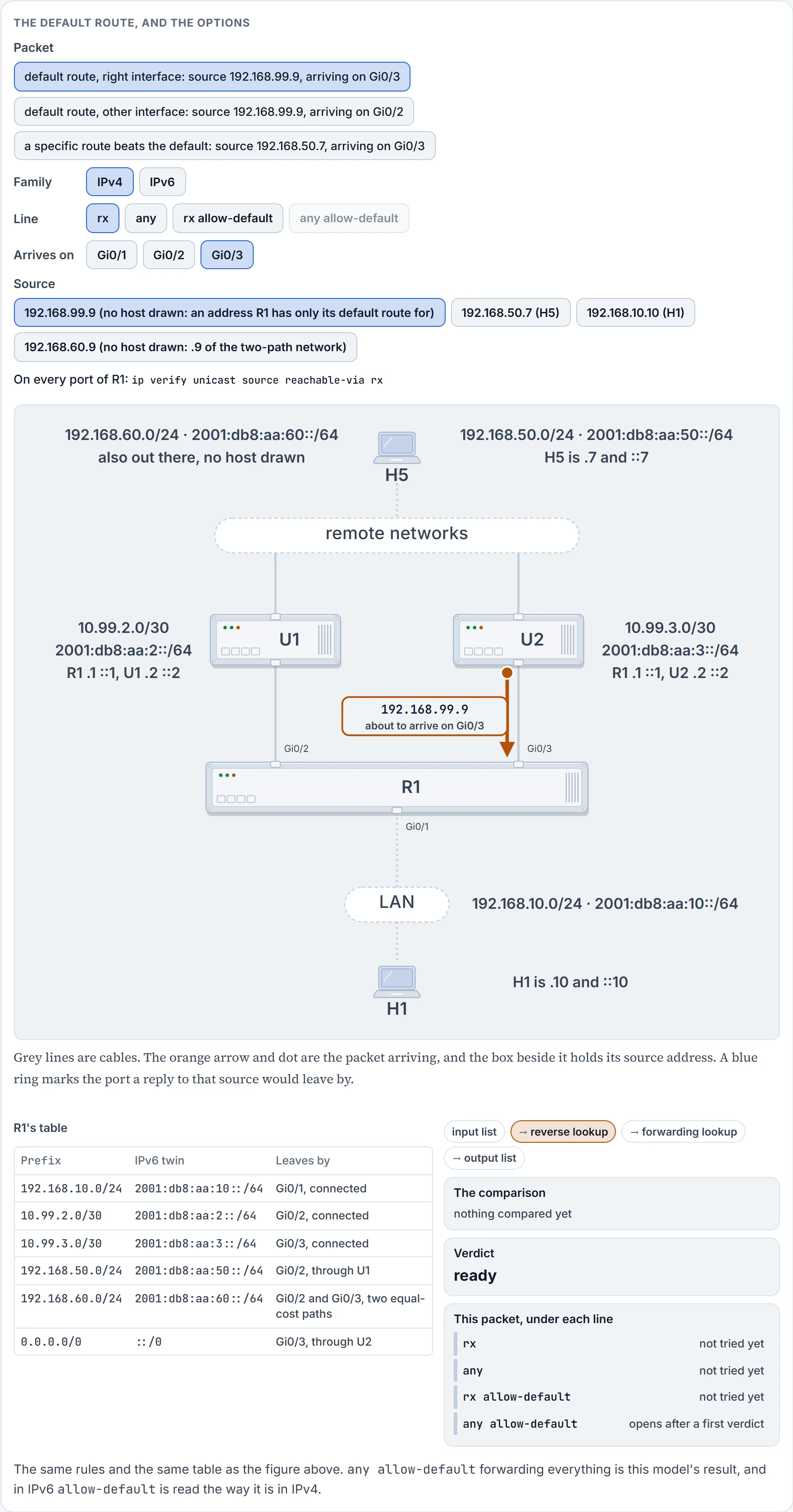
Step 1 of 6 Ready. A packet with source 192.168.99.9 is about to arrive on Gi0/3. Every port of R1 carries ip verify unicast source reachable-via rx.
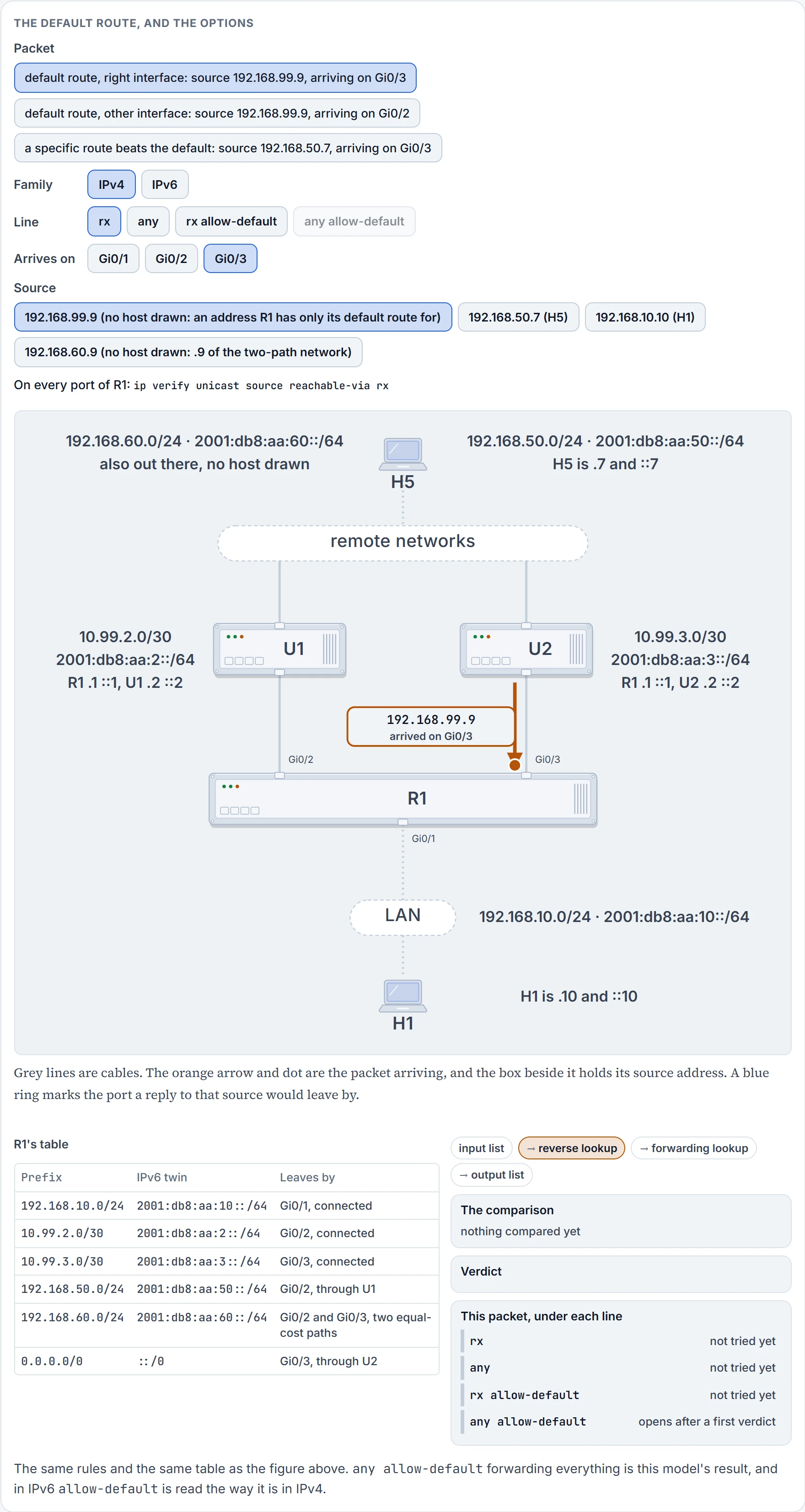
Step 2 of 6 It arrives on Gi0/3. That port is the only thing the router notes about the path it took.
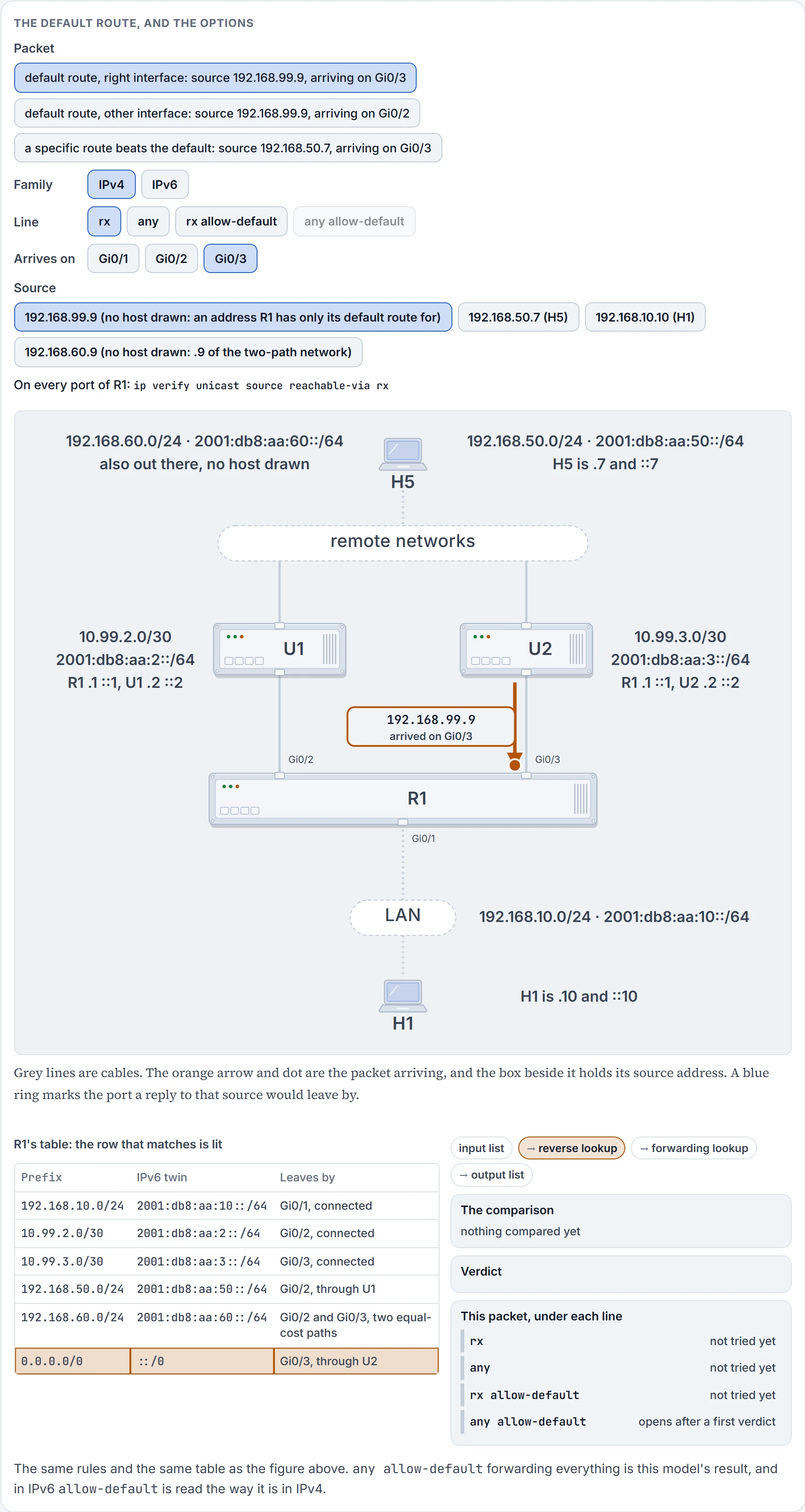
Step 3 of 6 Turned around: 192.168.99.9 becomes the destination of a reply. The longest match in R1's table is 0.0.0.0/0, the default route. Nothing more specific matches.
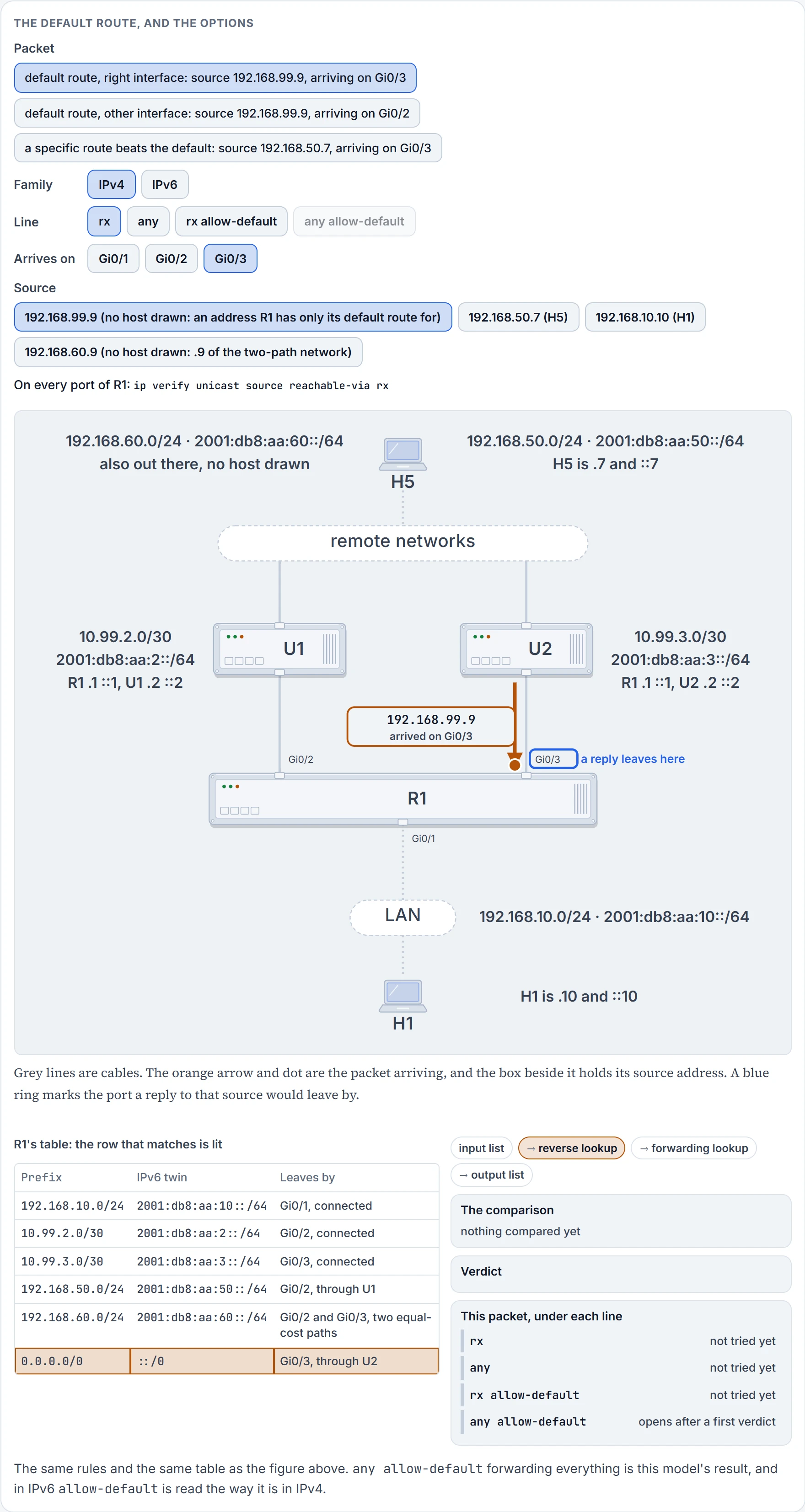
Step 4 of 6 That row leaves by Gi0/3. A reply to 192.168.99.9 would go out there.
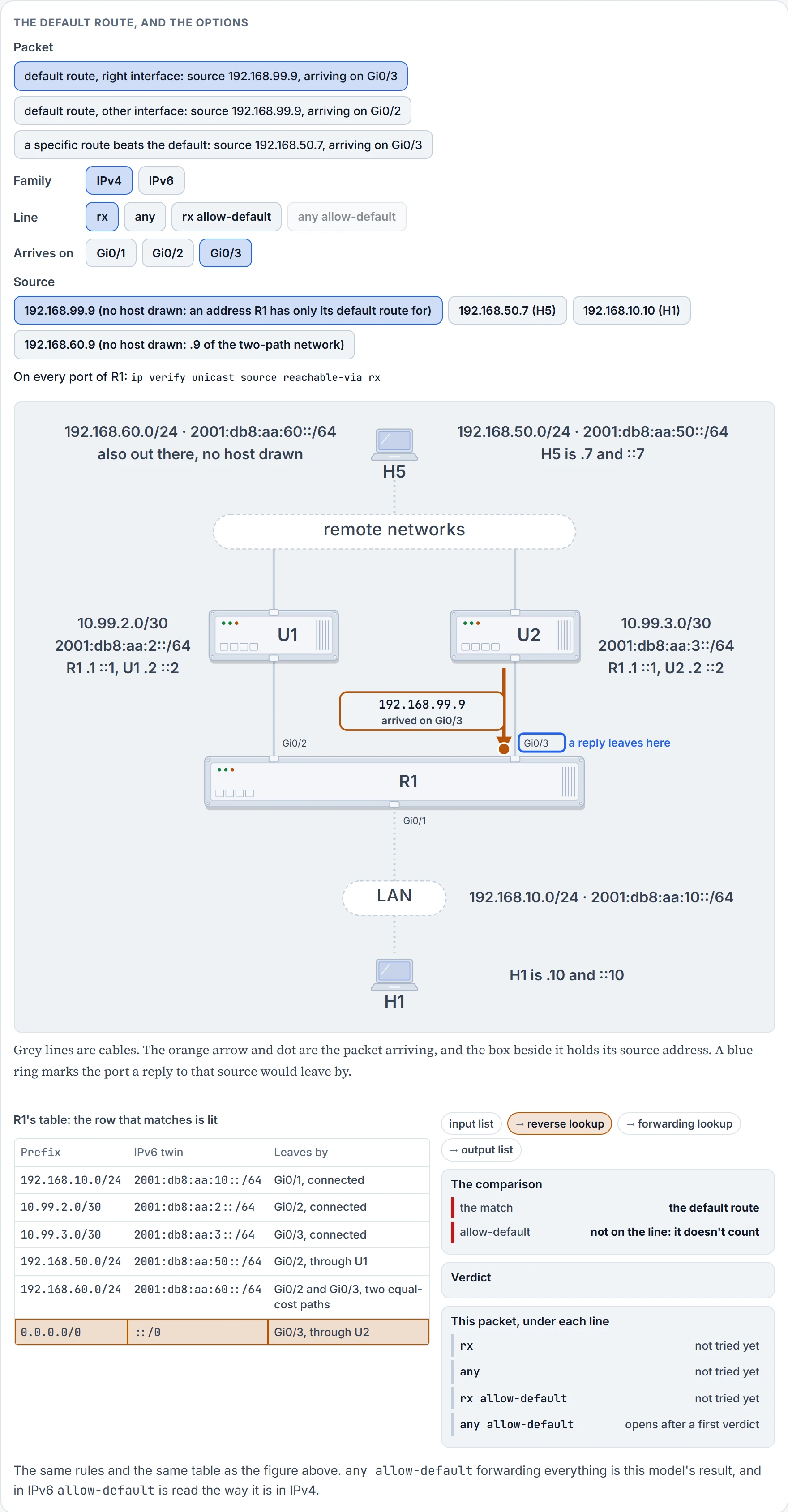
Step 5 of 6 The match is only the default route, and this line has no allow-default. A default route isn't an answer, in strict mode or in loose.
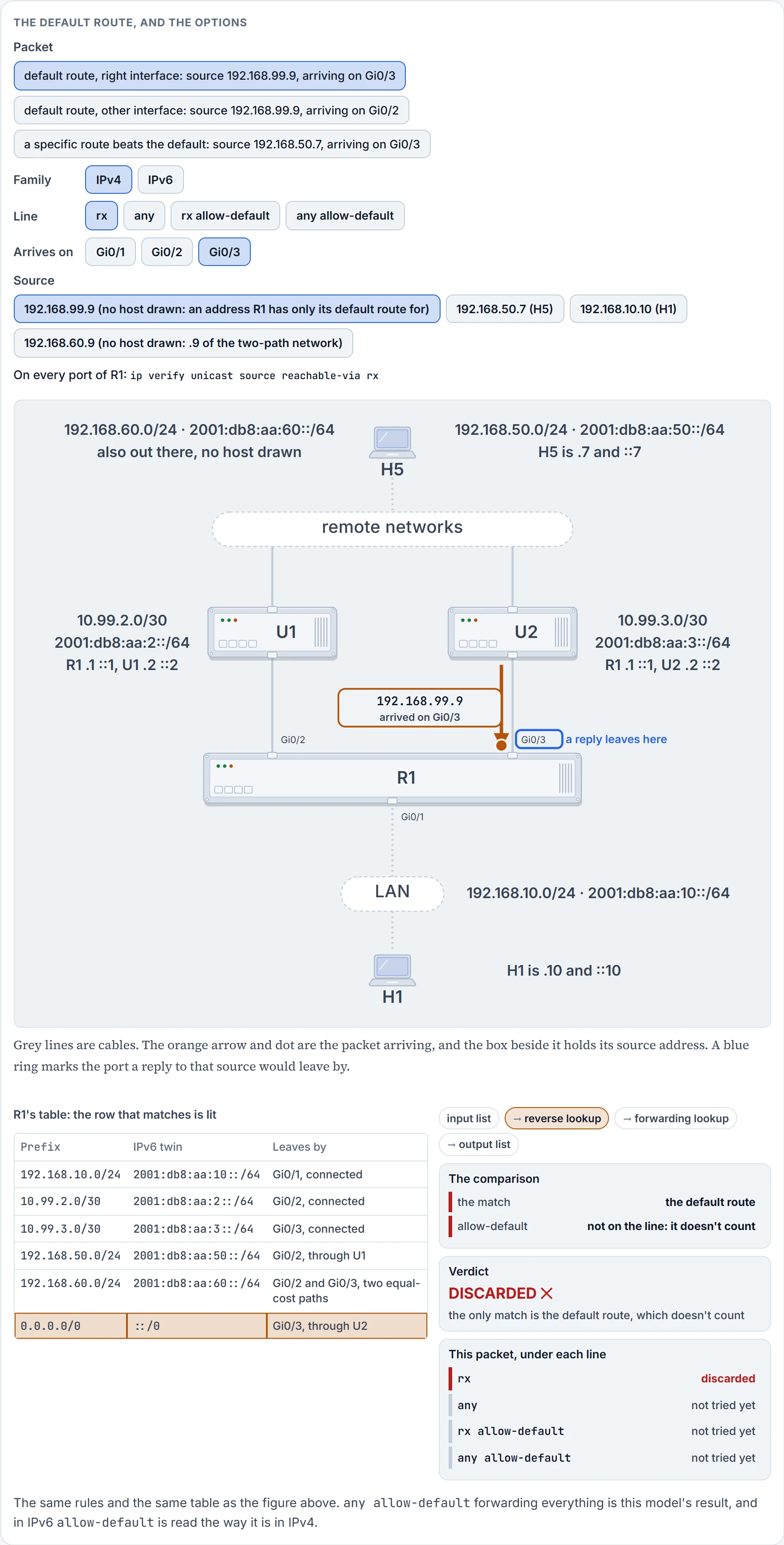
Step 6 of 6 Discarded. The packet never reaches the forwarding lookup, and the drop counter goes up by one.
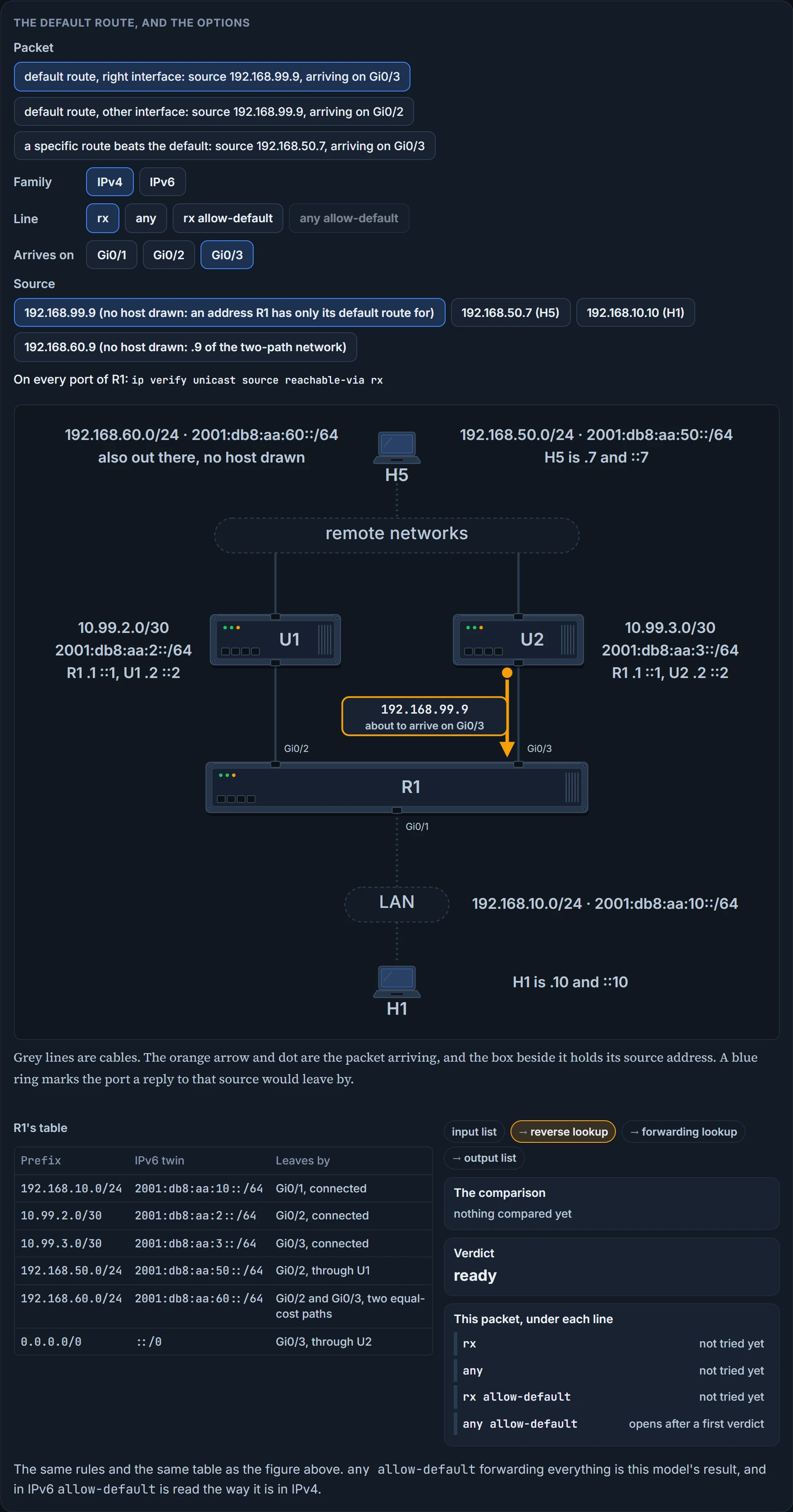
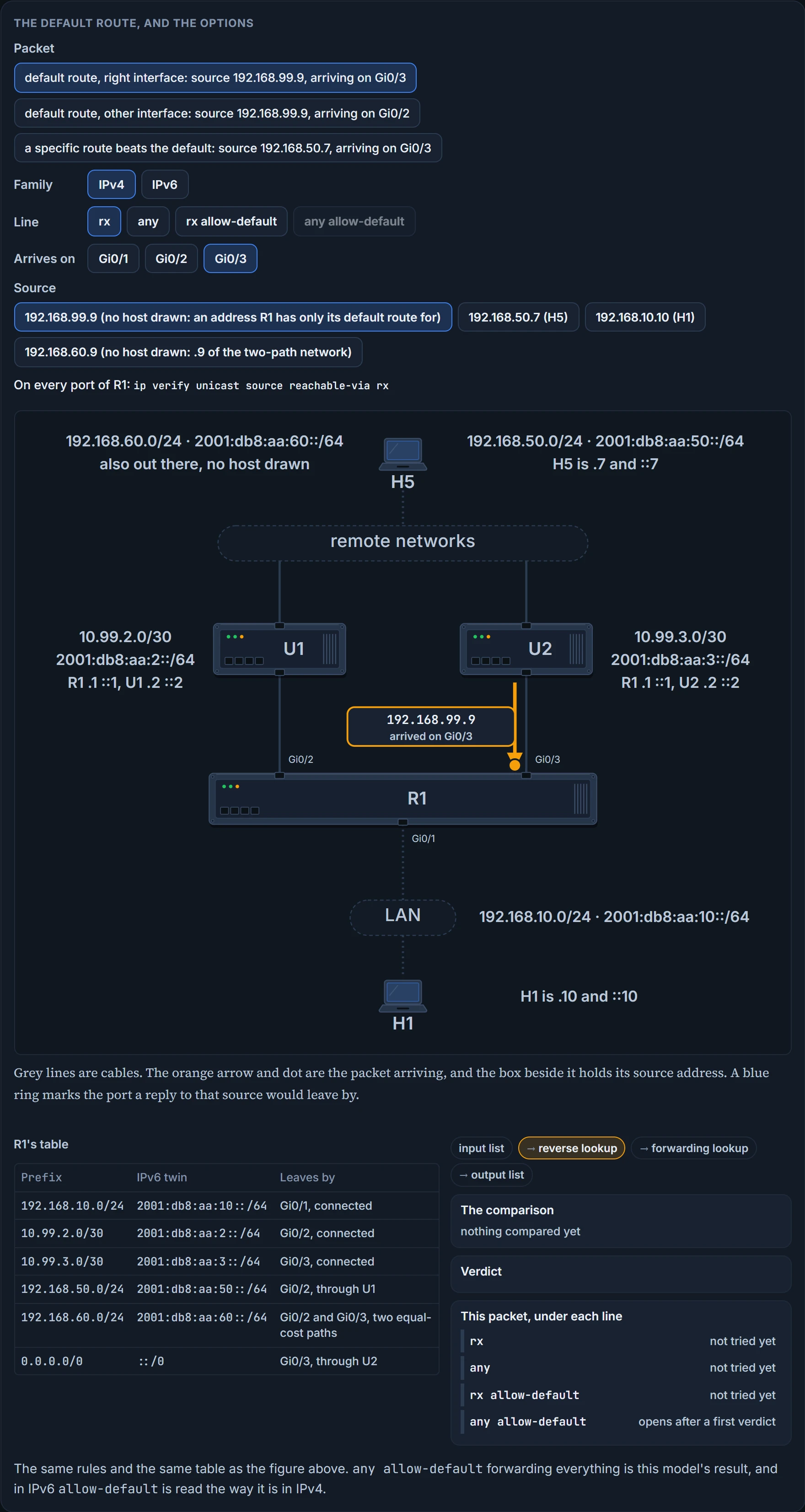
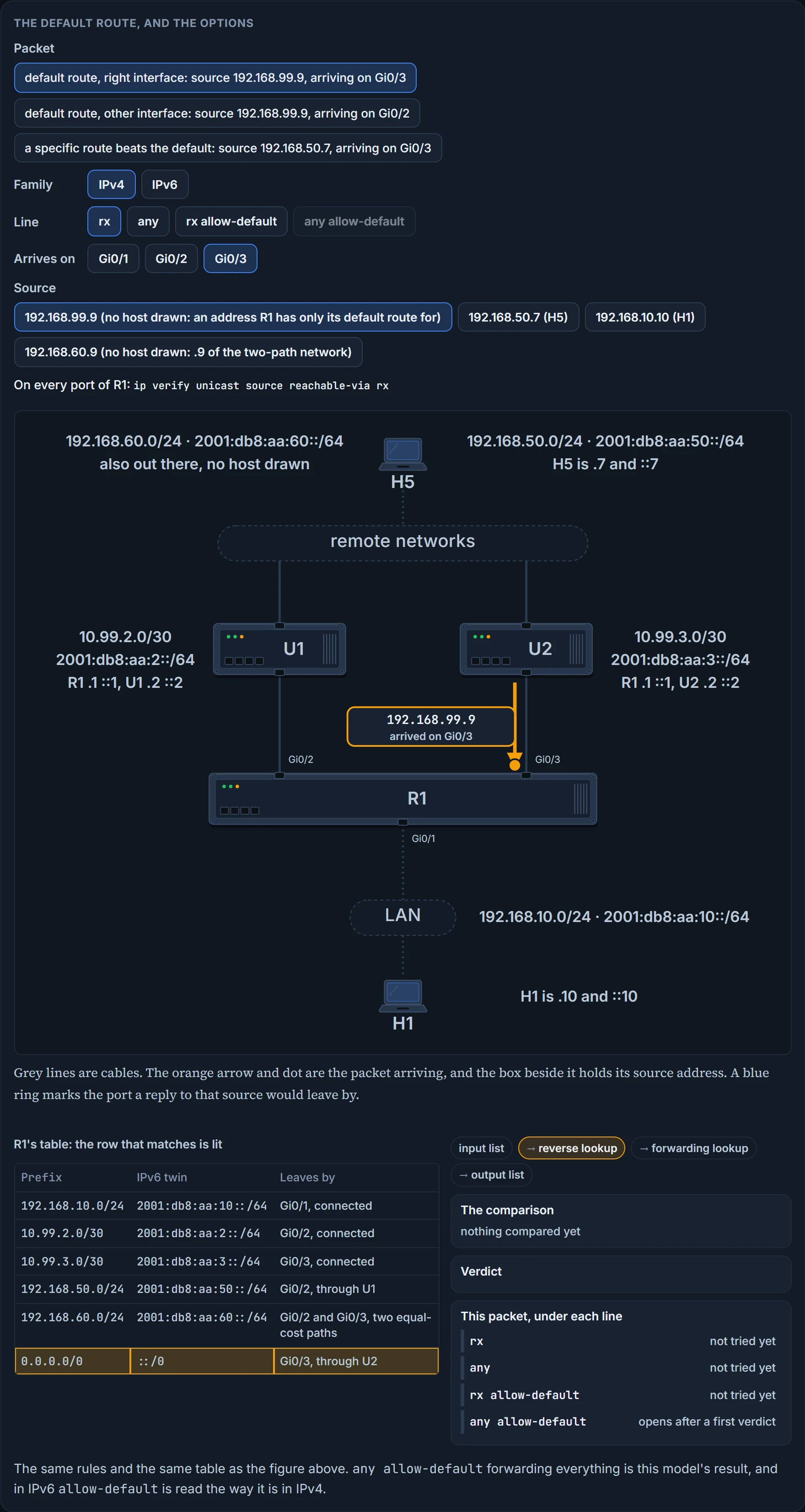
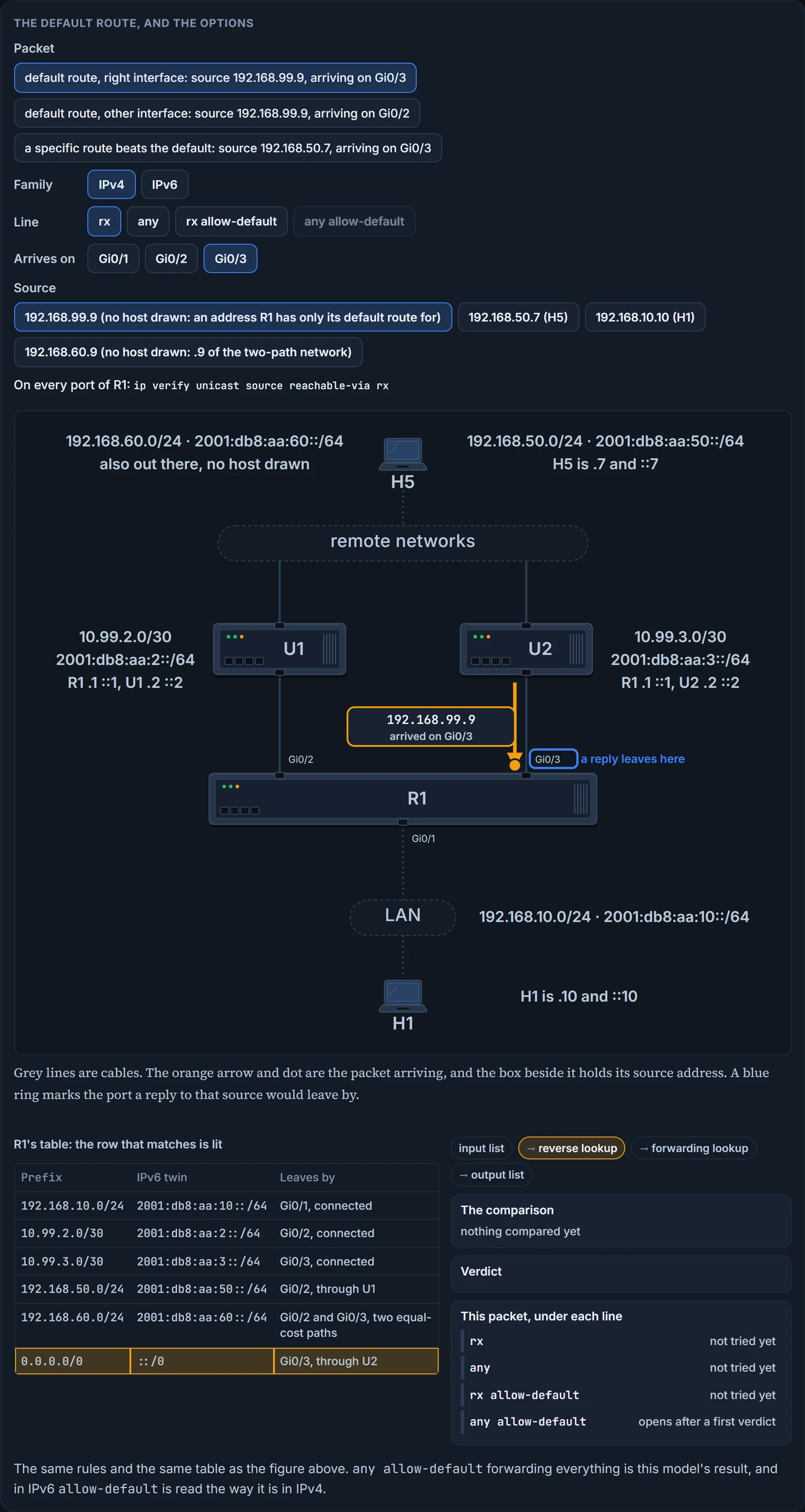
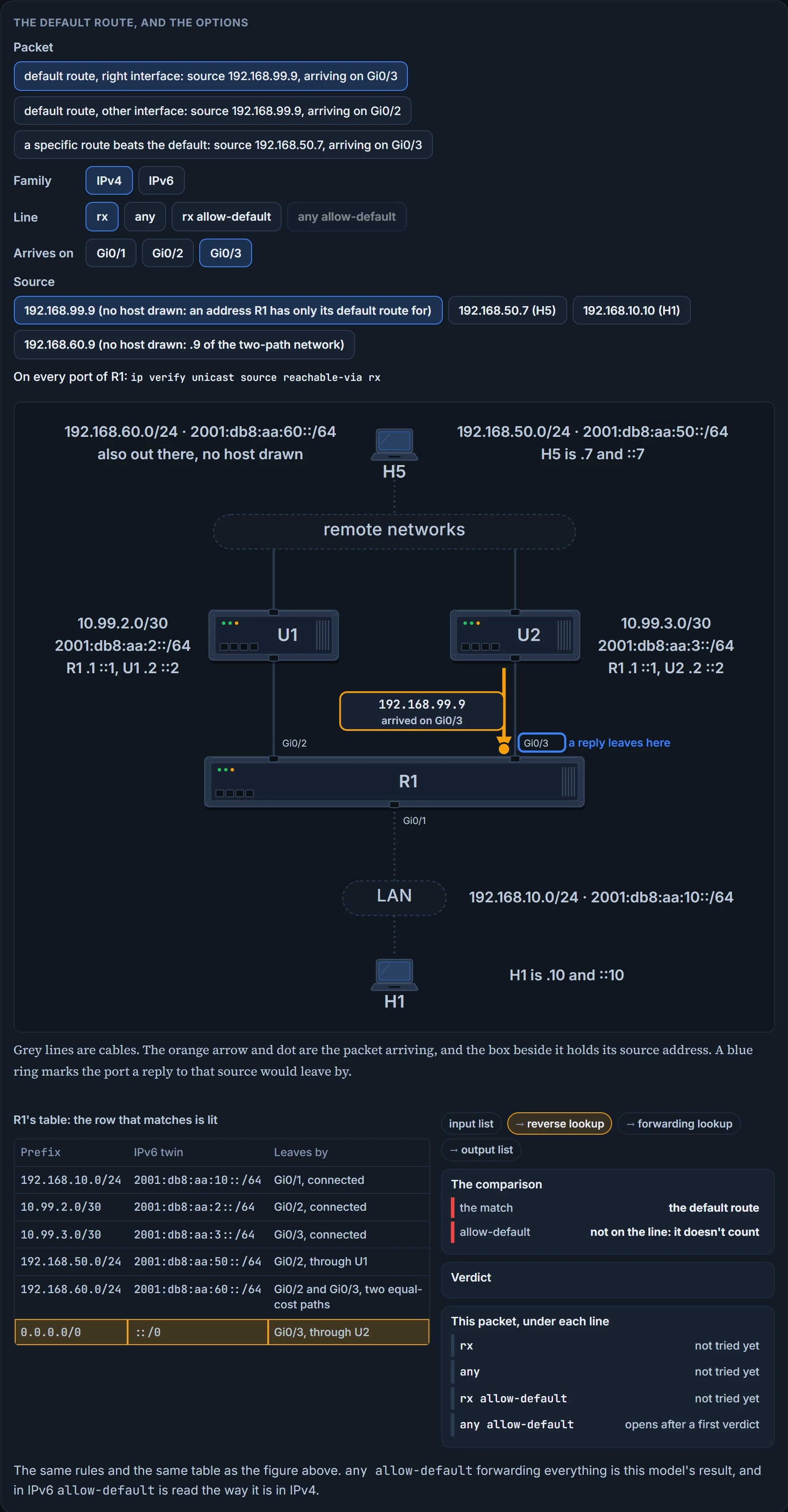
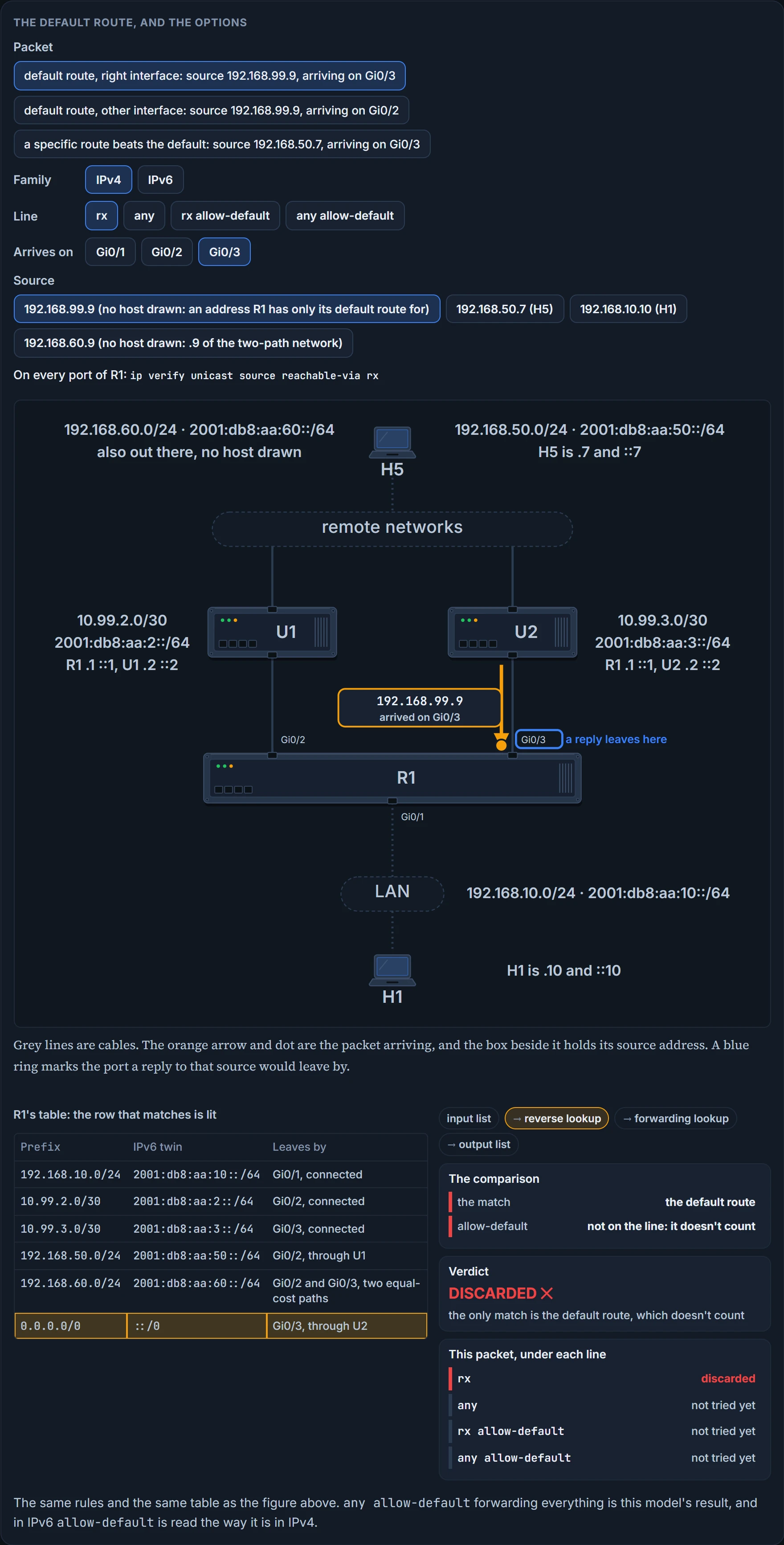
No: discarded. You use the allow-default option when the return path is associated with an interface that is chosen based on a default route. By default such a packet is discarded, and where you need to override that behaviour you put allow-default in the command.
The reason is in what a default route is. It matches every address there is, including every address anyone could forge. A check that accepted it as evidence would accept everything.
With rx allow-default on Gi0/3, the packet from 192.168.99.9 is forwarded: the default route points out Gi0/3 and that's where it arrived. The same source arriving on Gi0/2 is still discarded, because the default route's interface is Gi0/3. That pair is an exam answer worth having cold: to have uRPF match the return interface with the incoming interface and a default route, the command is ip verify unicast source reachable-via rx allow-default.
Longest match still decides which route is asked. With allow-default on, H5's packet arriving on Gi0/3 is still discarded in strict mode: 192.168.50.0/24 is the match, it points out Gi0/2, and the default route never gets a say.
Now put allow-default on a loose line. On this bench any allow-default forwards every source on every interface, for as long as a default route exists anywhere in the table. RFC 3704 describes the same end: unless an implementation checks where the default route points, the presence of a default route nullifies a loose check completely. It isn't a line to type from habit.
The IPv6 command takes allow-default too, with ::/0 in the default route's place.
We haven't confirmed on a router, for this section: whether a router checks where the default route points before any allow-default lets a packet through; and that allow-default means for IPv6 what it means for IPv4.
Two more options, an older command, and a notification
The list. The list option allows you to attach an ACL that identifies which packets are subject to a uRPF check and which ones are not. So if you're troubleshooting a case in which packets aren't being checked, it might be because of the ACL. The list is an access-list number, written last on the line, as in ip verify unicast source reachable-via rx 111.
Here is how a list behaves. It is consulted for a packet that has failed the check: if the list denies it, the packet is dropped at the interface; if the list permits it, the packet is forwarded anyway, and counted as a suppressed drop. For a permitted packet the two descriptions meet: it gets through whatever the lookup said, which is why it can look unchecked. Its purpose is one known asymmetric path: uRPF is advised against where routing can be asymmetric unless a list lets the device accept those packets, because a list permits the use of uRPF when packets arrive by specific, less-optimal asymmetric input paths. So a list is strict mode's own answer to it: keep rx, and exempt the prefix that arrives the other way.
Two limits. On one platform uRPF with access lists isn't supported at all. And remember the last lesson's implicit deny: a list that permits one prefix exempts that prefix and nothing else, and a list ending in permit any exempts everything.
Self-ping. With uRPF, by default the router isn't able to ping its own interface: packets generated by the router and destined to the router are discarded. If you need to self-ping, you use the allow-self-ping option. Use caution, because this could allow a DoS attack to be performed. A failed ping to your own address on a uRPF interface is the feature, not a fault.
The older command. In older software versions you may come across ip verify unicast reverse-path [allow-self-ping] access-list-number, which has no strict or loose option. Some platforms still take it, as ip verify unicast reverse-path list, for example ip verify unicast reverse-path 197, or with no list at all. An interface is given one form or the other, the older ip verify unicast reverse-path or ip verify unicast source reachable-via rx, and the older one turns on the check that matches the receiving interface.
The notification. You can enable SNMP traps for uRPF with snmp trap ip verify drop-rate in interface configuration mode. Also in interface configuration mode, ip verify notification threshold <0-4294967295> sets the drop rate, in packets per second, that will trigger the notification.
Four odd meetings. The BFD lesson left one here: BFD echo mode does not work with uRPF, and with both enabled the BFD sessions flap. A host asking for an address: uRPF allows packets with source 0.0.0.0 and destination 255.255.255.255 through, so that BOOTP and DHCP work: a stated exception. A tunnel: uRPF doesn't inspect the packet encapsulated inside a tunnel such as GRE; it sees that packet once the encapsulation is removed, so a check on the inner source belongs on the router that removes it. The tunnel packet itself arrives with an outer source address, and this lesson's model checks that like any other. And CEF itself: if CEF ever has to be disabled, disable uRPF first; the other order can cause a failure of HSRP, the first-hop redundancy protocol.
We haven't confirmed on a router, for this section: how a reachable-via line treats its list; why a router discards its own ping, and which of its addresses count as "its own interface"; whether the older command is still accepted, and how it is then stored; the two notification commands as typed; and the BFD, DHCP, tunnel and CEF-order statements.
Continue the lesson
The whole lesson, with its drawings and its questions. 2 more sections after the ones above.