
mGRE and NHRP: spokes registering with the hub
One point-to-point tunnel per branch does not scale. A multipoint GRE interface on the hub serves every spoke, and NHRP, a standard defined in RFC 2332, fills in the far ends: each spoke registers its tunnel address and its transport address with the hub, its next hop server. show dmvpn and show ip nhrp read the resulting cache.
By Arif, founder of Daveth · Updated
The full 17 min walkthrough is in Daveth Pro (Network). See what the plan opens
What this page answers
What is DMVPN?
Dynamic Multipoint VPN: hub-and-spoke tunnels built on one multipoint GRE interface per router, with NHRP mapping each spoke's tunnel address to its transport address, so adding a branch needs no new tunnel on the hub. Read it in “One interface, many far ends”
What is NHRP in DMVPN?
Next Hop Resolution Protocol, RFC 2332: an ARP-like method for NBMA networks. Each spoke, a next hop client, registers its tunnel and transport addresses with the hub, the next hop server, which keeps them in its NHRP cache. Read it in “The protocol that fills the table”
How do you configure a DMVPN hub?
A tunnel interface with a tunnel source, tunnel mode gre multipoint, an address and an NHRP network ID; optionally a tunnel key and ip nhrp map multicast dynamic. No line of it names a spoke: spokes register themselves. Read it in “Two configurations, and where the addresses go”
The third branch
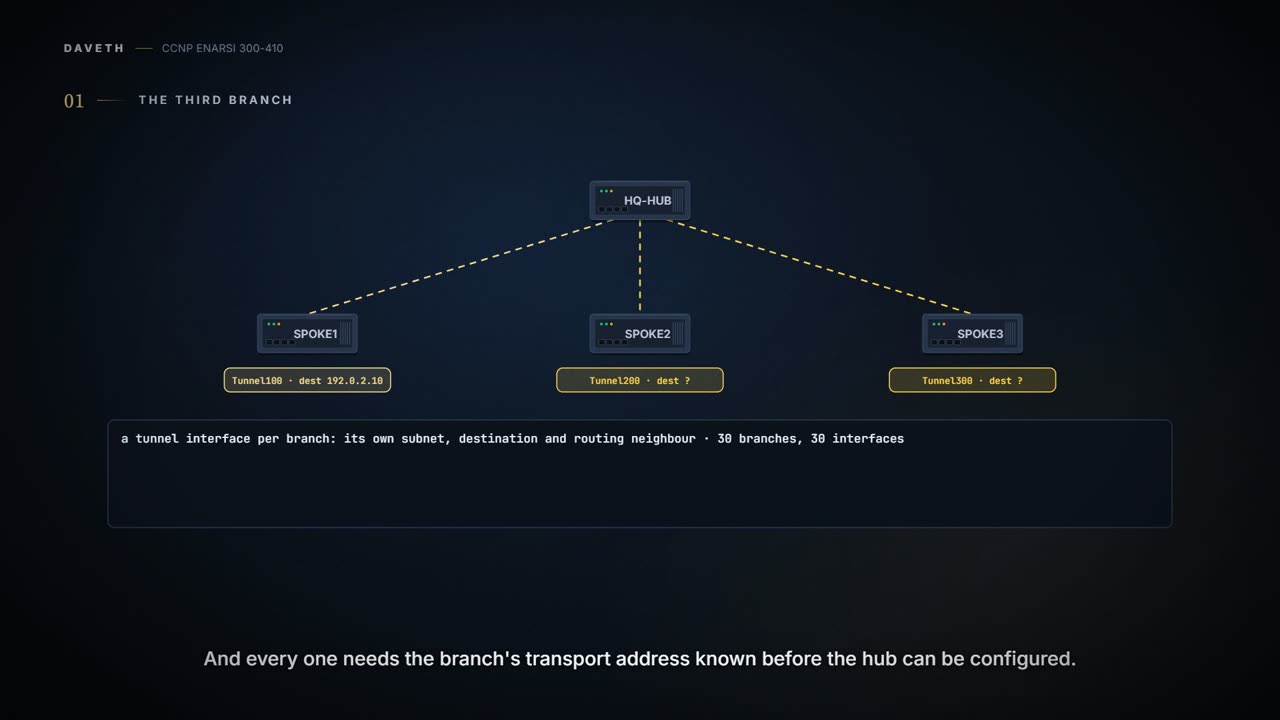
The last lesson left our network with one tunnel: HQ-HUB at one end, SPOKE1 at the other, each end's transport address typed into the other's tunnel destination line. It works. Now add SPOKE2 and SPOKE3.
With what you have, that's a second tunnel interface on HQ-HUB and then a third, each with its own subnet, its own tunnel destination and its own routing neighbor to look after. Thirty branches, thirty interfaces. And every one of them needs the branch's transport address to be known before the hub can be configured, because that address is what goes on the destination line. Plenty of branches can't promise one: a spoke's NBMA address, its address on the transport network, can be static or can be assigned via DHCP.
So here's the question for this lesson. How does the hub learn where a spoke lives if the spoke's address can change?
Two pieces answer it. One is a tunnel interface that isn't tied to a single far end. The other is a small protocol that tells that interface, router by router, where the far ends are. Take them in that order.
One interface, many far ends
The lab for this has three routers: R11 is the DMVPN hub, and R31 and R41 are the spokes. DMVPN is the name for the design you're about to build; it gets its definition once you've built it. (Spoke router and branch router mean the same thing on this page, and so do hub router and headquarters or data center router.) Between them is a provider's network, SP.
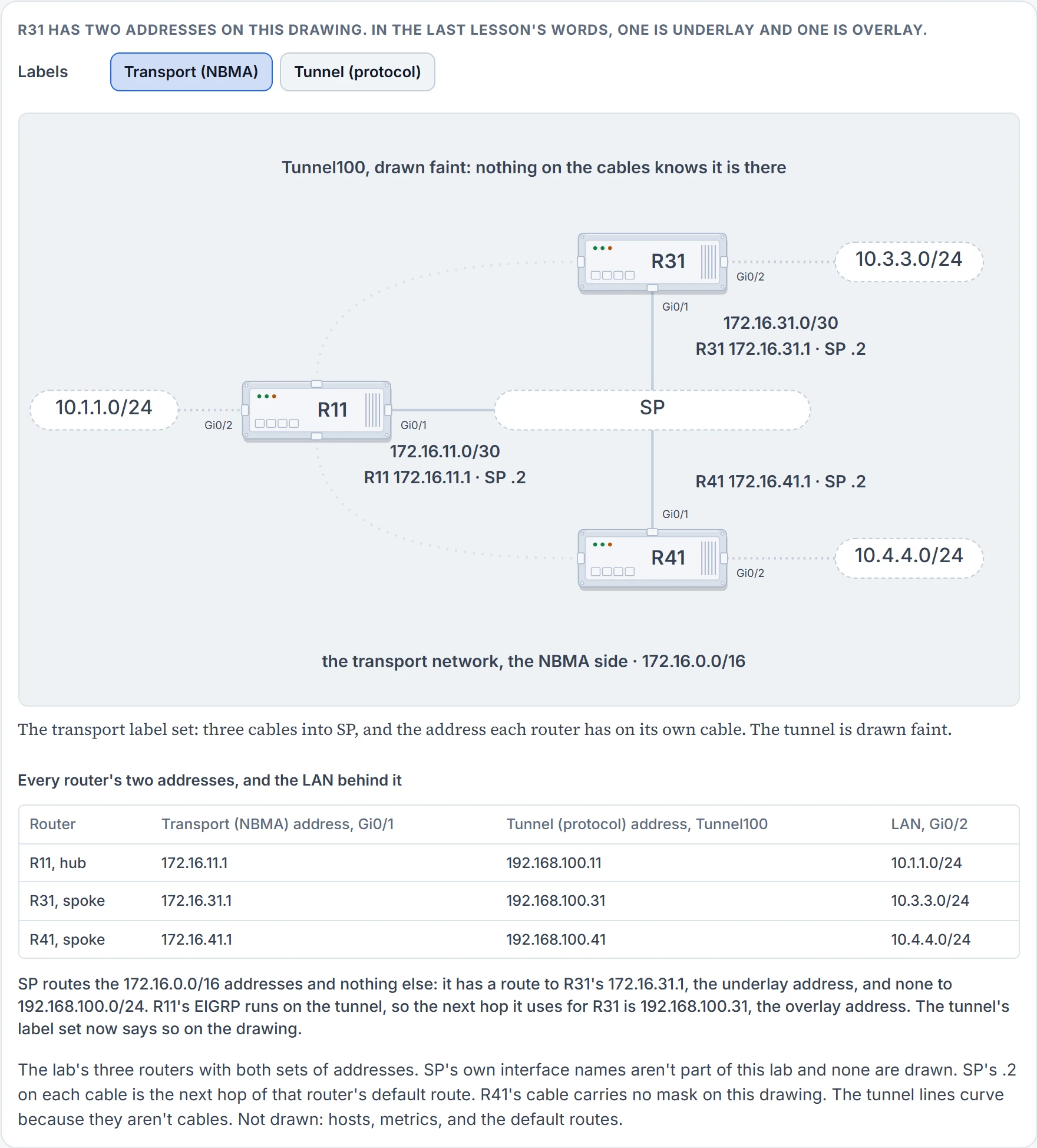
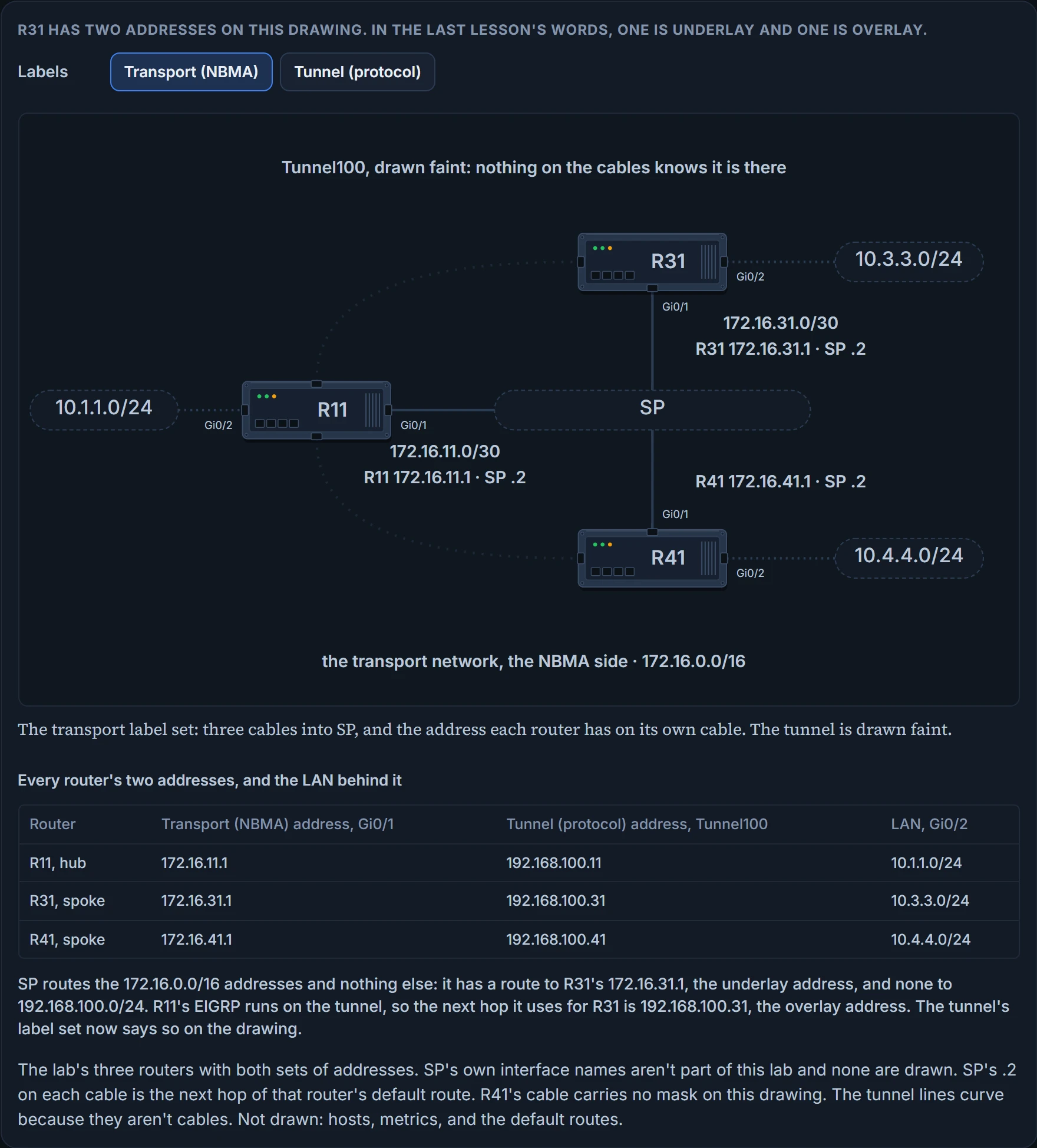
All three routers use a static default route to the SP router, which provides connectivity for the NBMA (transport) networks in the 172.16.0.0/16 range. EIGRP runs on the DMVPN tunnel and advertises the local LANs, with care taken to prevent recursive routing, the last lesson's subject.
Two words on that drawing need pinning down, because the rest of the page leans on them. The NBMA address is the transport network's address, the one the underlay routes. The protocol address is the address on the overlay: the tunnel IP address, or a network or host address behind it. R31's NBMA address is 172.16.31.1; its protocol address is 192.168.100.31. In the last lesson's words, underlay and overlay. NBMA stands for nonbroadcast multi-access, and you'll see why the name fits in a minute.
Now the interface. On R11 the tunnel gets one new line, tunnel mode gre multipoint, which configures the DMVPN tunnel as an mGRE tunnel, a multipoint GRE tunnel, and it loses a line: there is no tunnel destination. One multipoint tunnel interface can be connected to many neighboring routers, and it needs no tunnel destination configured.
Think about what that does to a packet. A tunnel with one destination wrote the outer header for you. Now the same interface reaches R31 and R41. A packet whose next hop is 192.168.100.31 needs the outer destination 172.16.31.1, and one for 192.168.100.41 needs 172.16.41.1, and nothing on the interface says so. Several tunnel endpoints sit behind the one interface, so it can't forward a packet until it has a mapping from each logical tunnel endpoint address to the physical one.
On Ethernet you'd never think about this, because ARP does it: a broadcast asks the whole segment who owns the next hop. The tunnel has many routers on one subnet, which is the multi-access part, and no way to shout at all of them, which is the nonbroadcast part. It needs its own way to build that table.
The protocol that fills the table
That's NHRP. Next Hop Resolution Protocol is defined in RFC 2332 as a method to provide address resolution for hosts or networks, with ARP-like capability, for NBMA networks such as Frame Relay and ATM. It isn't proprietary, and that's a fair exam question: NHRP is a standard. It gives devices a method to learn the protocol and NBMA network, so that they can communicate directly with each other.
NHRP is a client/server protocol that lets devices register themselves over directly connected or disparate networks. The servers are next-hop servers, NHSs: they are responsible for registering addresses or networks, maintaining an NHRP repository, and replying to any queries received by next-hop clients, NHCs. The two are transactional in nature: a client asks, a server answers, one exchange at a time. In DMVPN the roles map onto the routers you already have: the DMVPN hub is the NHRP NHS, and the DMVPN spoke is the NHRP NHC.
Here's the arrangement. DMVPN spokes are statically configured with the IP addresses of the hubs so that they can register their tunnel and NBMA (transport) IP addresses with the hubs. The hub's address is the one fixed thing in the design: the spokes should be preconfigured with the hub's static IP address. Keep that sentence in reach. You'll use it two sections on.
Every NHRP packet must include the source NBMA address, the source protocol address, the destination protocol address and the NHRP message type. So any NHRP packet already carries its sender's pair, tunnel address and transport address, which is the very thing the table is made of. One of the message types is this lesson's:
- Registration. Registration messages are sent by the NHC (the DMVPN spoke) toward the NHS (the DMVPN hub). Registration allows the hubs to know a spoke's NBMA information. The NHC also specifies the amount of time that the registration should be maintained by the NHS, along with other attributes.
The rest you should be able to name, and the next lesson puts them to work. Resolution messages locate and provide the address resolution information of the egress router toward a destination: a request during the query, and a reply carrying the tunnel IP address and the NBMA IP address of the remote spoke. Redirect messages are an essential component of DMVPN Phase 3. Purge messages are sent to remove a cached NHRP entry. Error messages notify the sender of an NHRP packet that an error has occurred. RFC 2332 numbers its packet types 1 to 7: resolution request and reply, registration request and reply, purge request and reply, and error indication. There's no redirect among them: NHRP message types have been added to those RFC 2332 defines, to provide some of the recent enhancements in DMVPN.
A message can carry more in its extension part. The common extensions: the responder address, used to determine the address of the responding node for reply messages; the forward and reverse transit NHS records, the lists of NHSs a request or a reply may have traversed; authentication, which conveys authentication information between NHRP speakers, is done pairwise on a hop-by-hop basis and is transmitted in plaintext; vendor private; and a NAT extension, by which DMVPN works when a hub or spoke sits behind a device performing NAT and the tunnel is encapsulated in IPsec. Authentication comes back three sections on. NAT isn't part of this course's DMVPN.
Two configurations, and where the addresses go
There are two types of DMVPN configuration, hub and spoke, and which one a router gets depends on its role. Start with the hub. Here is R11's tunnel:
interface Tunnel100
 bandwidth 4000
 ip address 192.168.100.11 255.255.255.0
 ip mtu 1400
 ip nhrp map multicast dynamic
 ip nhrp network-id 100
 ip tcp adjust-mss 1360
 tunnel source GigabitEthernet0/1
 tunnel mode gre multipoint
 tunnel key 100
It takes eleven steps, some of them optional. In order:
interface tunnel tunnel-number.tunnel source {ip-address | interface-id}.tunnel mode gre multipoint.ip address ip-address subnet-mask.ip nhrp network-id 1-4294967295.- Optionally,
tunnel key 0-4294967295. - Optionally,
ip nhrp map multicast dynamic. - For Phase 3,
ip nhrp redirect. That one is the next lesson's, and it isn't in this configuration. - Optionally,
bandwidth [1-10000000]. - Optionally,
ip mtu mtu. - Optionally,
ip tcp adjust-mss mss-size.
Steps 1 to 5 are required; 6, 7, 9, 10 and 11 are optional. R11 has all five of the optional ones typed.
Half of that you know from the last lesson: the interface, the source, the address, bandwidth, ip mtu. Bandwidth is measured in kilobits per second, from 1 to 10000000, and it is still the reference that routing protocols and QoS take from a virtual interface. A virtual interface has no latency of its own, so a routing protocol that picks its best path by bandwidth needs a reference figure typed in.
The address needs a little more thought than before: the subnet has to hold every router in the DMVPN tunnel. This lab's /24 accommodates 254 routers; on big enough hardware a DMVPN network can scale to 2000 or more devices. The rule underneath: all hubs and spokes in the same DMVPN network must be addressed in the same IP subnet. Typically an MTU of 1400 is used for DMVPN tunnels, to account for the additional encapsulation overhead. The TCP MSS is typically 1360, to accommodate IP, GRE and IPsec headers, and what that line does is edit: the TCP Adjust MSS feature ensures that the router will edit the payload of a TCP three-way handshake if the MSS exceeds the configured value. This module's last lesson adds the IPsec.
Three lines are new, and they're the lesson.
tunnel mode gre multipoint you've met.
ip nhrp network-id 100 enables NHRP on the tunnel interface, with a number from 1 to 4294967295. The ID is locally significant: it identifies a DMVPN cloud on this router, because multiple tunnel interfaces can belong to the same cloud, and the recommendation is that it match on all routers in the same DMVPN network. That's the answer for the exam. Recommendation is the right word, because of where the value lives: network IDs are locally significant and can be different on two routers, and the ID isn't transmitted in NHRP packets at all. You'll still hear it said that the IDs must match. There's no technical link between the network ID and the tunnel interface number either; keeping them the same just helps whoever supports it.
tunnel key 100 is optional. The key helps identify the DMVPN virtual tunnel interface when multiple tunnel interfaces use the same tunnel source interface; it runs from 0 to 4294967295 and adds 4 bytes to the DMVPN header, the optional Key field of the last lesson's GRE header. And, unlike the network ID: tunnel keys, if configured, must match for a DMVPN tunnel to be established between two routers. The reason is where each value lives. The tunnel key is carried in each GRE packet and is not carried in any NHRP message: it sorts packets before NHRP ever sees them.
One line is missing that the last lesson's tunnel had: keepalive. mGRE tunnels do not support the option of using a keepalive, and the restriction covers the spokes too: GRE tunnel keepalives are not supported on point-to-point or multipoint GRE tunnels in a DMVPN network. So keepalive 5 3 comes off both ends of our tunnel today, as that tunnel's change record said it would.
And ip nhrp map multicast dynamic? Hold it. The section on hellos is about that line.
Now a spoke. In Phase 1, the first DMVPN design, a spoke's configuration is similar to the hub's except in two ways: you do not use an mGRE tunnel and specify the tunnel destination instead, and the NHRP mapping points to at least one active NHS. R31:
interface Tunnel100
 bandwidth 4000
 ip address 192.168.100.31 255.255.255.0
 ip mtu 1400
 ip nhrp network-id 100
 ip nhrp nhs 192.168.100.11 nbma 172.16.11.1 multicast
 ip tcp adjust-mss 1360
 tunnel source GigabitEthernet0/1
 tunnel destination 172.16.11.1
 tunnel key 100
Ten steps this time:
interface tunnel tunnel-number.tunnel source {ip-address | interface-id}.tunnel destination ip-address.ip address {ip-address subnet-mask | dhcp}, oripv6 address ipv6-address/prefix-length.ip nhrp network-id 1-4294967295.- Optionally,
tunnel key 0-4294967295. ip nhrp nhs nhs-address nbma nbma-address [multicast], for one or more NHSs.- Optionally,
bandwidth [1-10000000]. - Optionally,
ip mtu mtu. - Optionally,
ip tcp adjust-mss mss-size.
On the spoke, steps 1 to 5 and step 7 are required; 6, 8, 9 and 10 are optional. Step 6 stops being a choice the moment the hub has a key, as you're about to read.
It's the point-to-point tunnel you already know, with three lines added. The tunnel destination is the DMVPN hub's NBMA address, the one the local router uses to establish the DMVPN tunnel. The key is there because of a rule: if the tunnel key is defined on the hub router, it must be defined on all the spoke routers. And the line that makes this router a client:
ip nhrp nhs 192.168.100.11 nbma 172.16.11.1 multicast specifies an NHS: its protocol address first, then its NBMA address. This one command is the simplest method of defining the NHRP configuration. Look at the two addresses and say which is which before reading on.
The NBMA address is the transport IP address, and the NHS address is the protocol address of the DMVPN hub. It's known as the hardest concept for most network engineers to remember. Tunnel address first, transport address after nbma. The line reads "my server is .11 on the overlay, and you reach it at 172.16.11.1 on the underlay".
R41 says the same thing in three commands, and it's worth seeing the two spokes side by side:
 ip nhrp map 192.168.100.11 172.16.11.1
 ip nhrp map multicast 172.16.11.1
 ip nhrp nhs 192.168.100.11
Those are the alternative commands: ip nhrp nhs nhs-address creates an NHS entry and assigns it to the tunnel IP address; ip nhrp map ip-address nbma-address maps the NBMA address to the tunnel IP address; ip nhrp map multicast [nbma-address | dynamic] maps NBMA addresses used as destinations for broadcast or multicast packets. They are needed only where a static unicast or multicast map is needed for a node that is not an NHS. You'll meet both forms in the field, and both in an exam exhibit.
One more option on the address line: a spoke's tunnel address may be typed, or taken with ip address dhcp. For IPv6, DHCP has not been supported for tunnel IPv6 address allocation.
We haven't confirmed on a router, for this section: what a router does when the two ends' network IDs differ, which on the description above is untidy and breaks nothing by itself; and whether DHCP for a tunnel's IPv6 address is still unsupported.
R31 boots
You have R11's whole tunnel configuration in front of you, and R31's. Both spokes are powered off. Three things to predict.
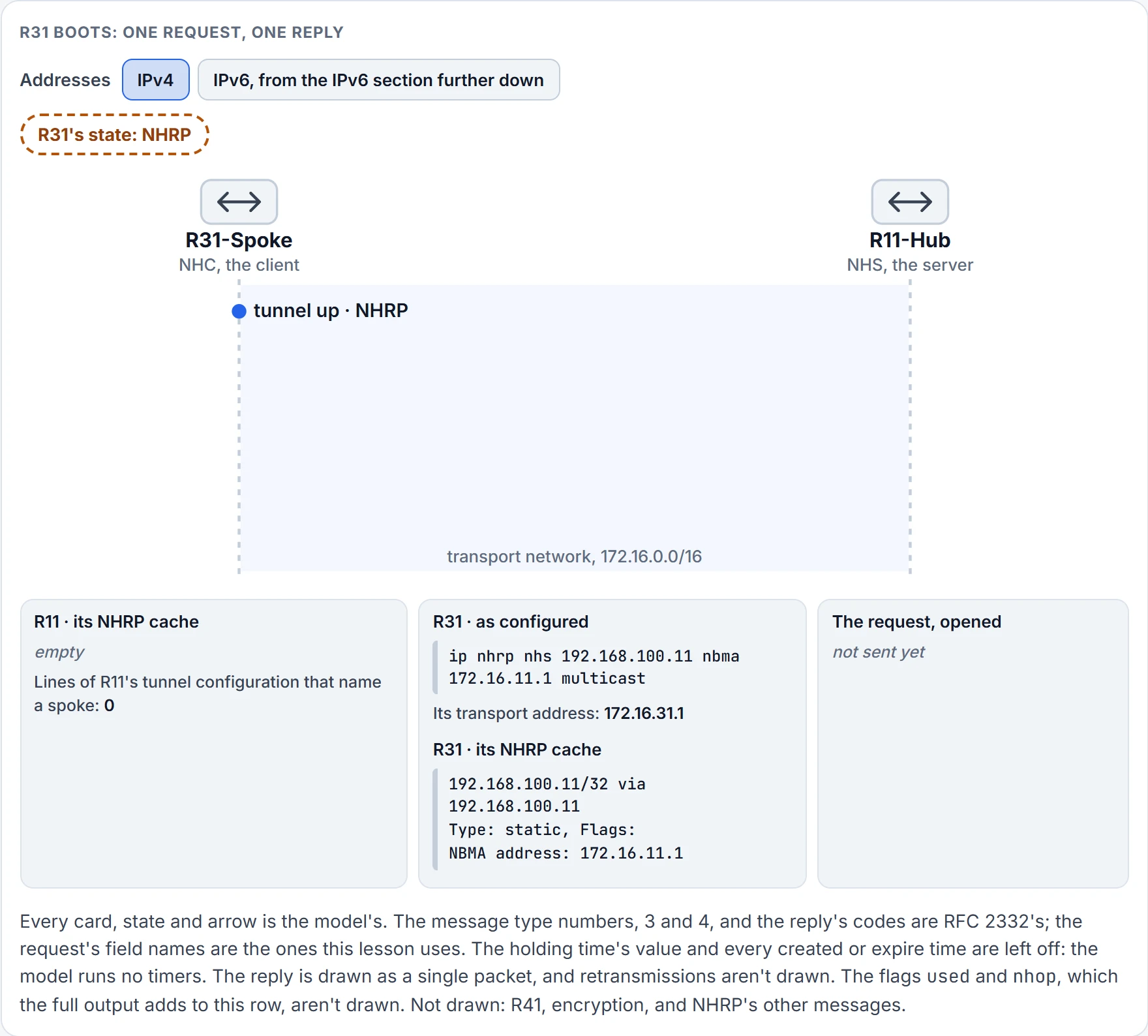
Step 1 of 5 R31's tunnel comes up. Its own cache already holds one row, static: the server it was configured with. Its state is NHRP, because it hasn't registered yet.
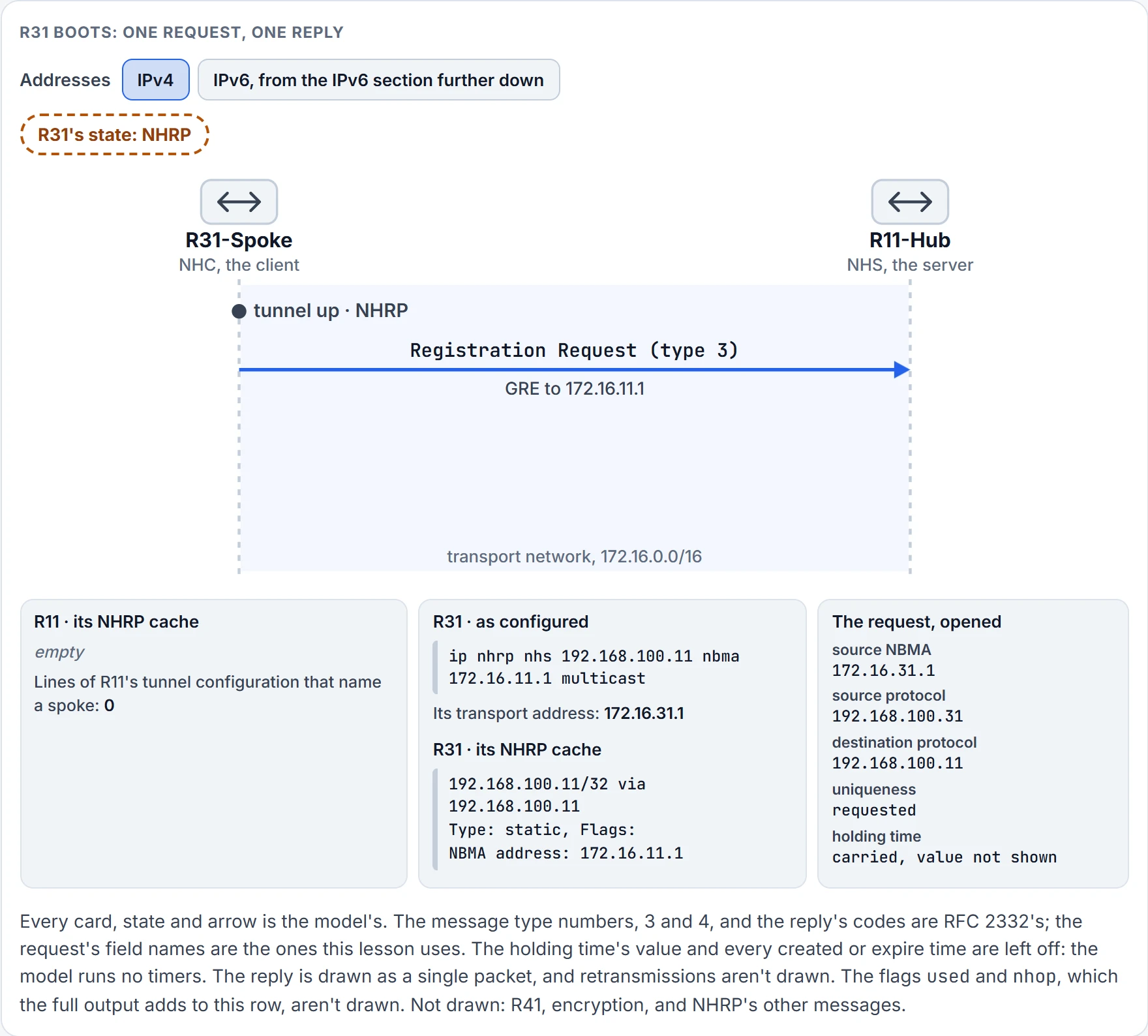
Step 2 of 5 R31 sends its two addresses to the server it was configured with: a registration request, carried in GRE to 172.16.11.1. It asks for the mapping to be kept unique.
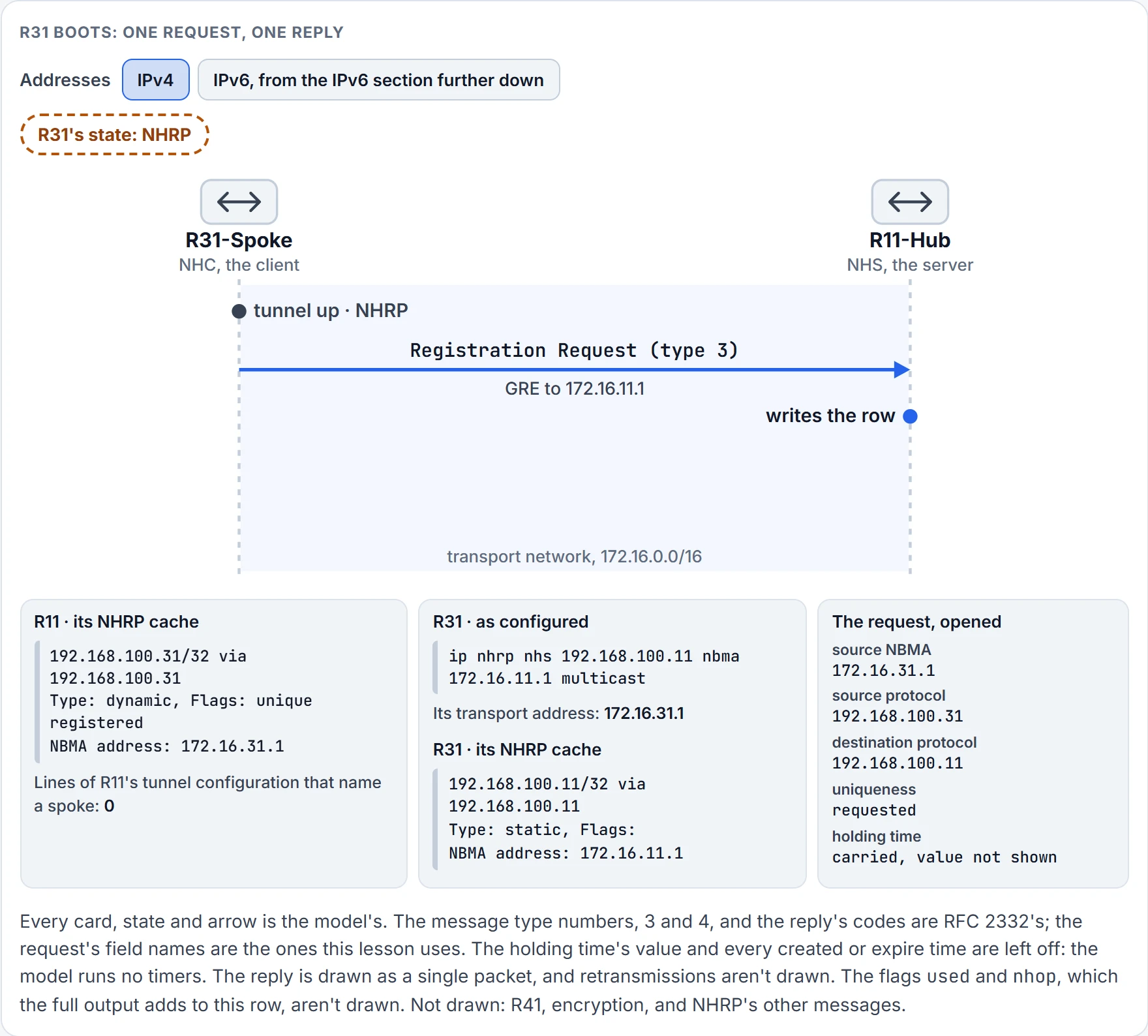
Step 3 of 5 R11 writes them down: one row, Type dynamic, made of the two addresses out of the request.
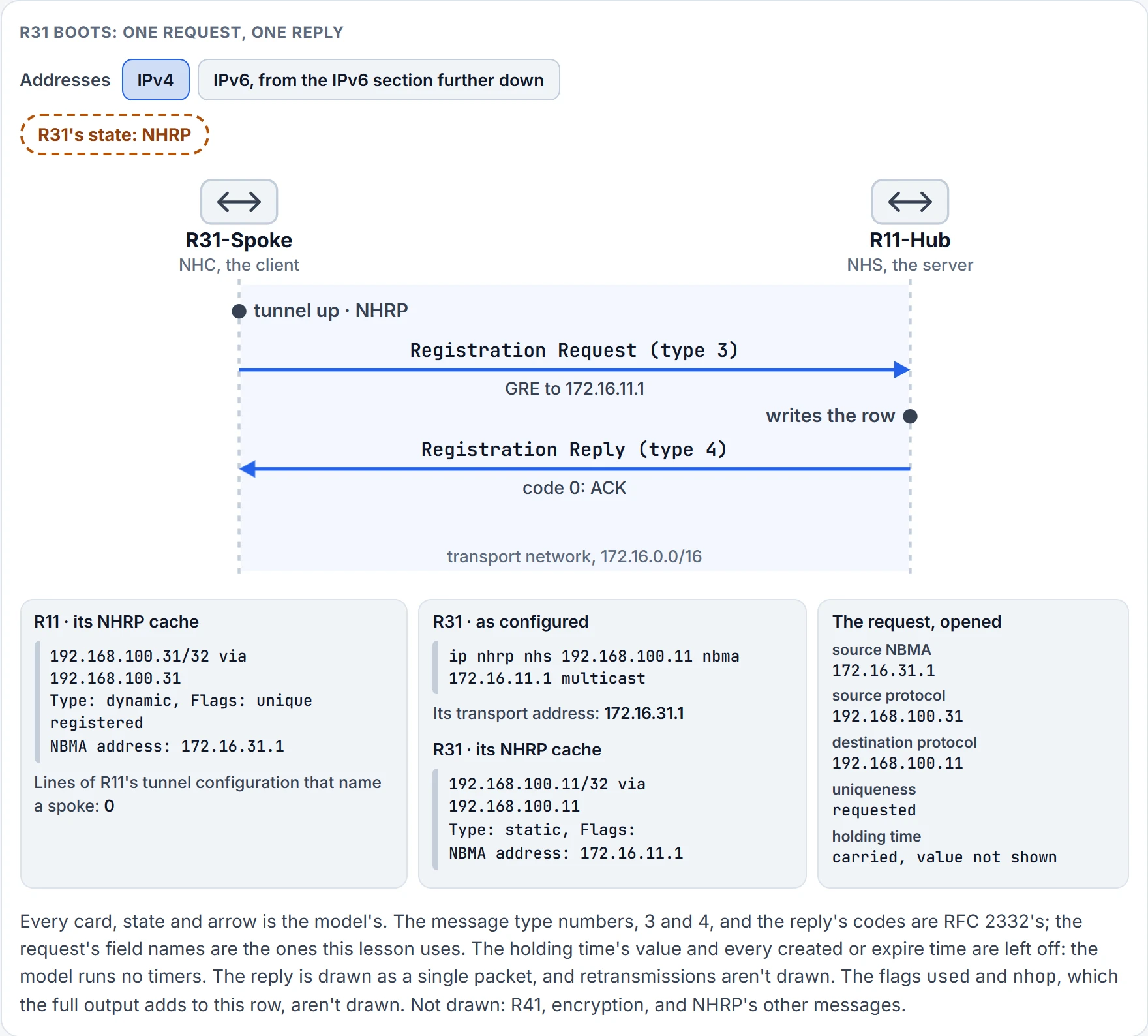
Step 4 of 5 R11 answers with a registration reply. Code 0: an ACK.
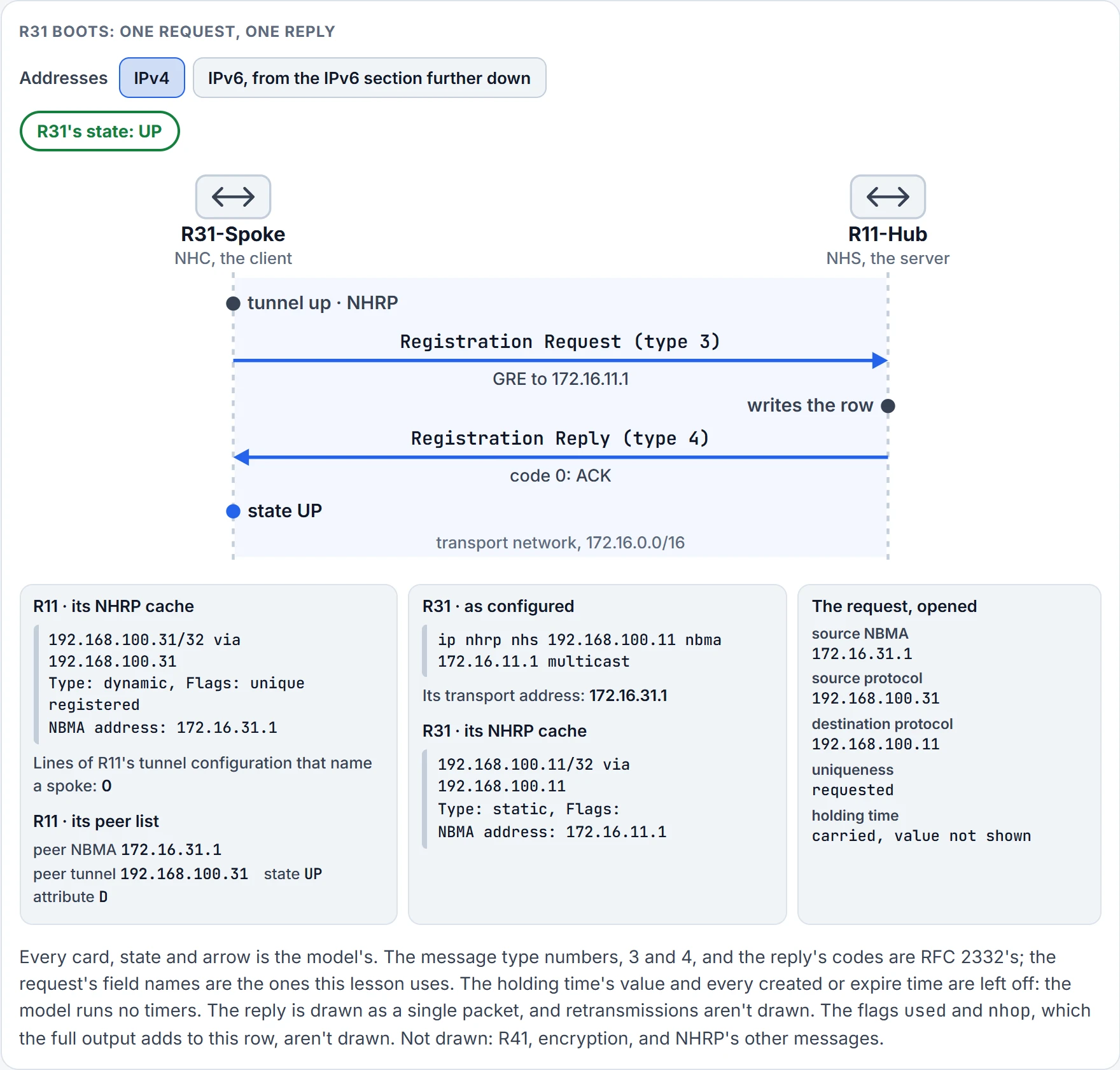
Step 5 of 5 Code 0 came back, so R31's state is UP. And R11 has a peer to list: attribute D, dynamic, because R31 announced it.
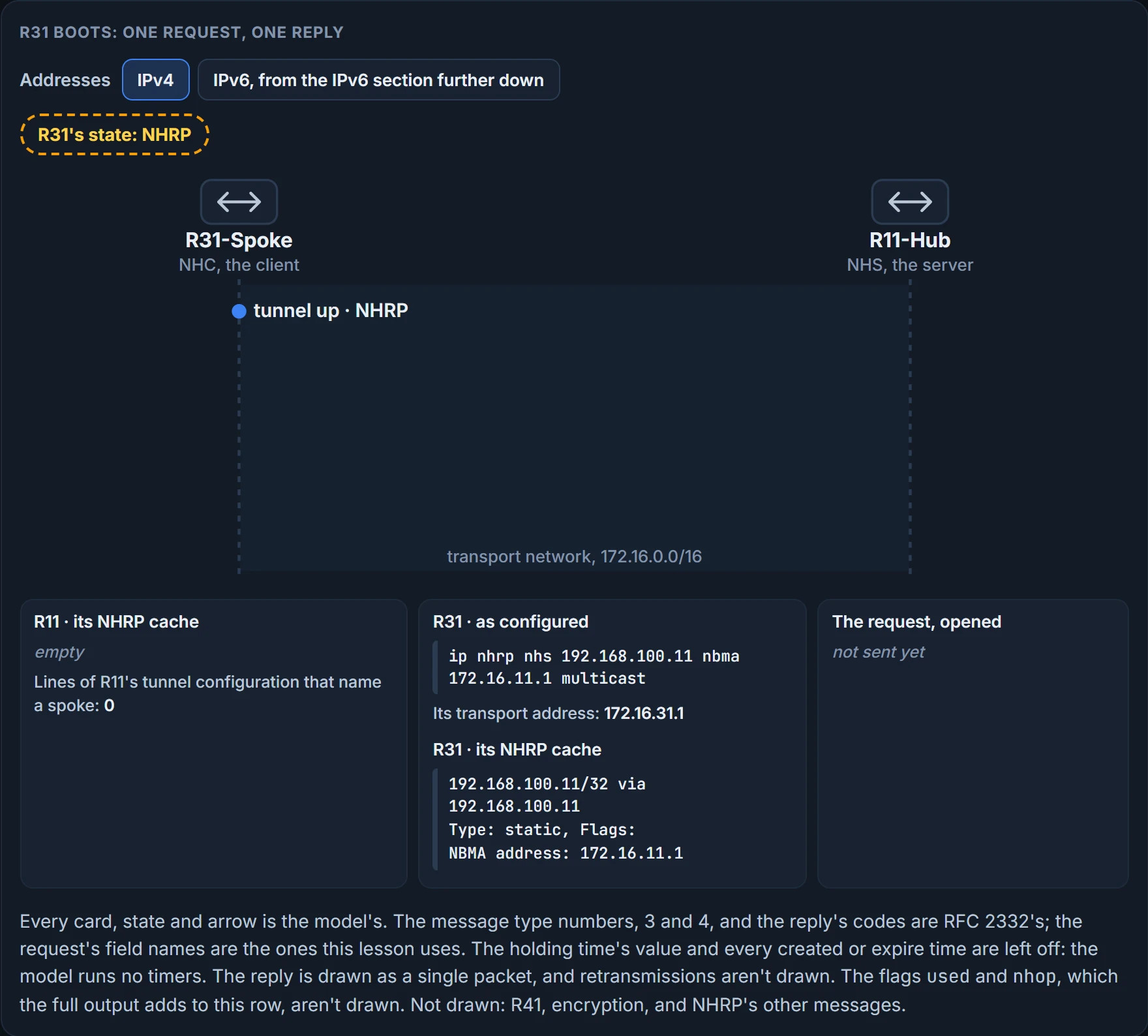
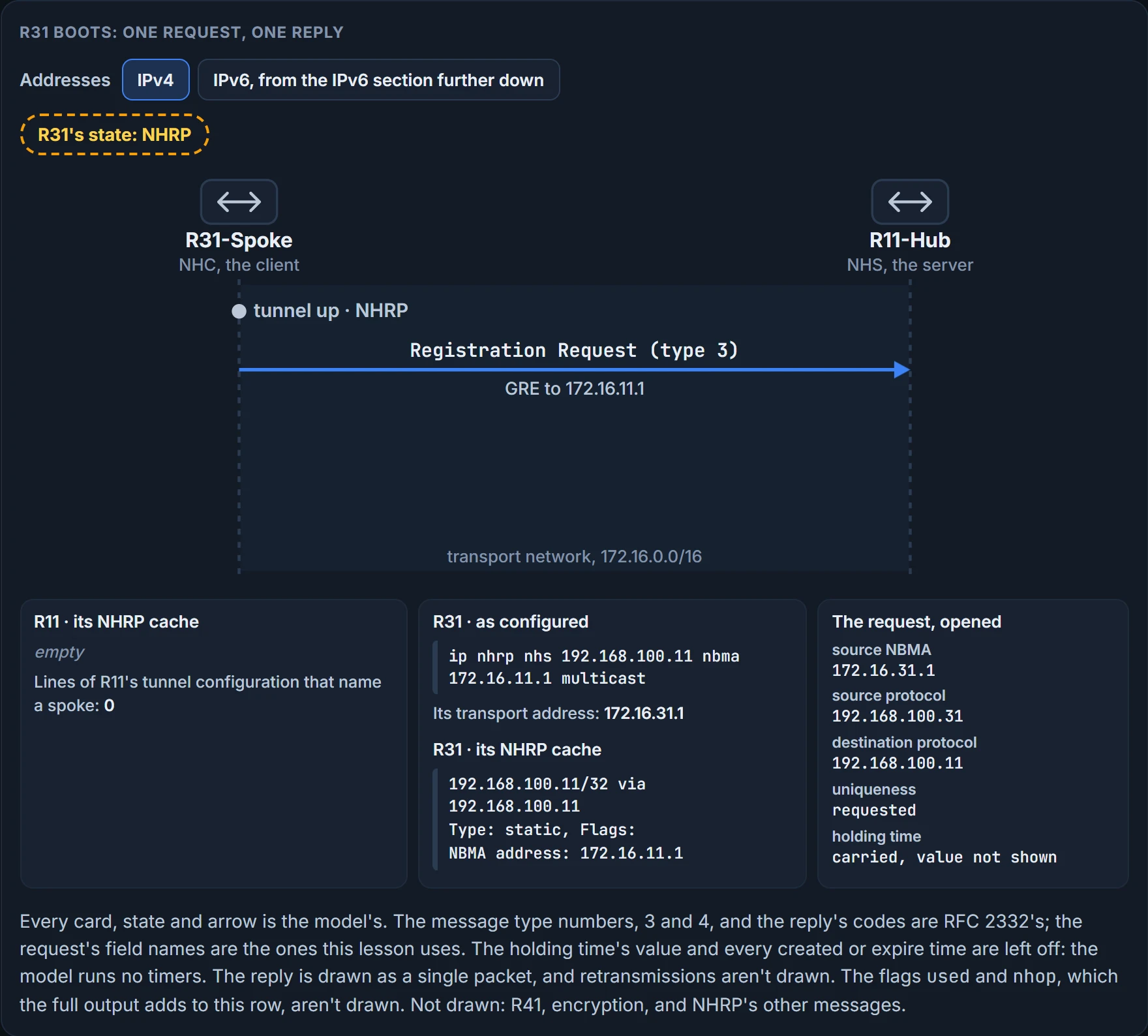
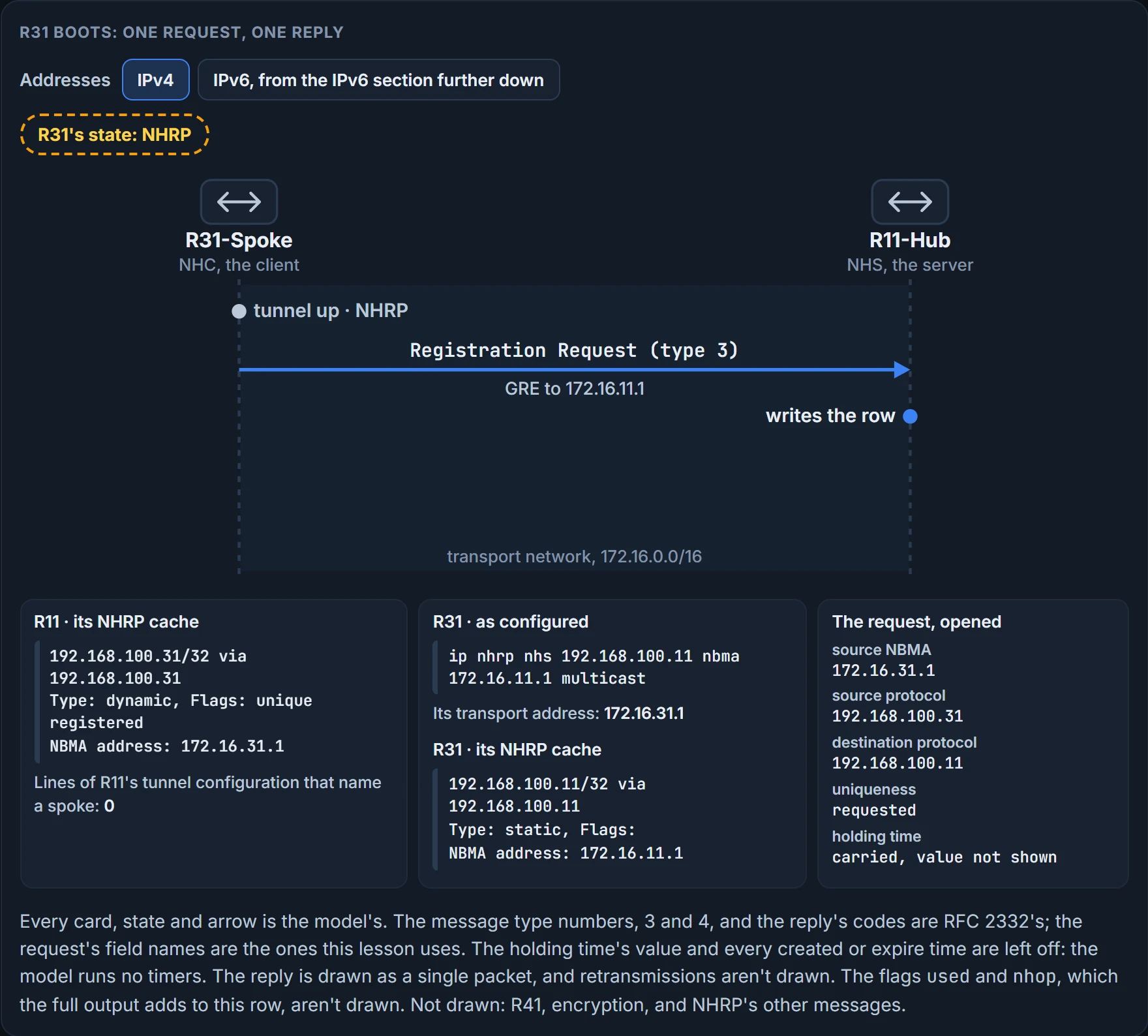
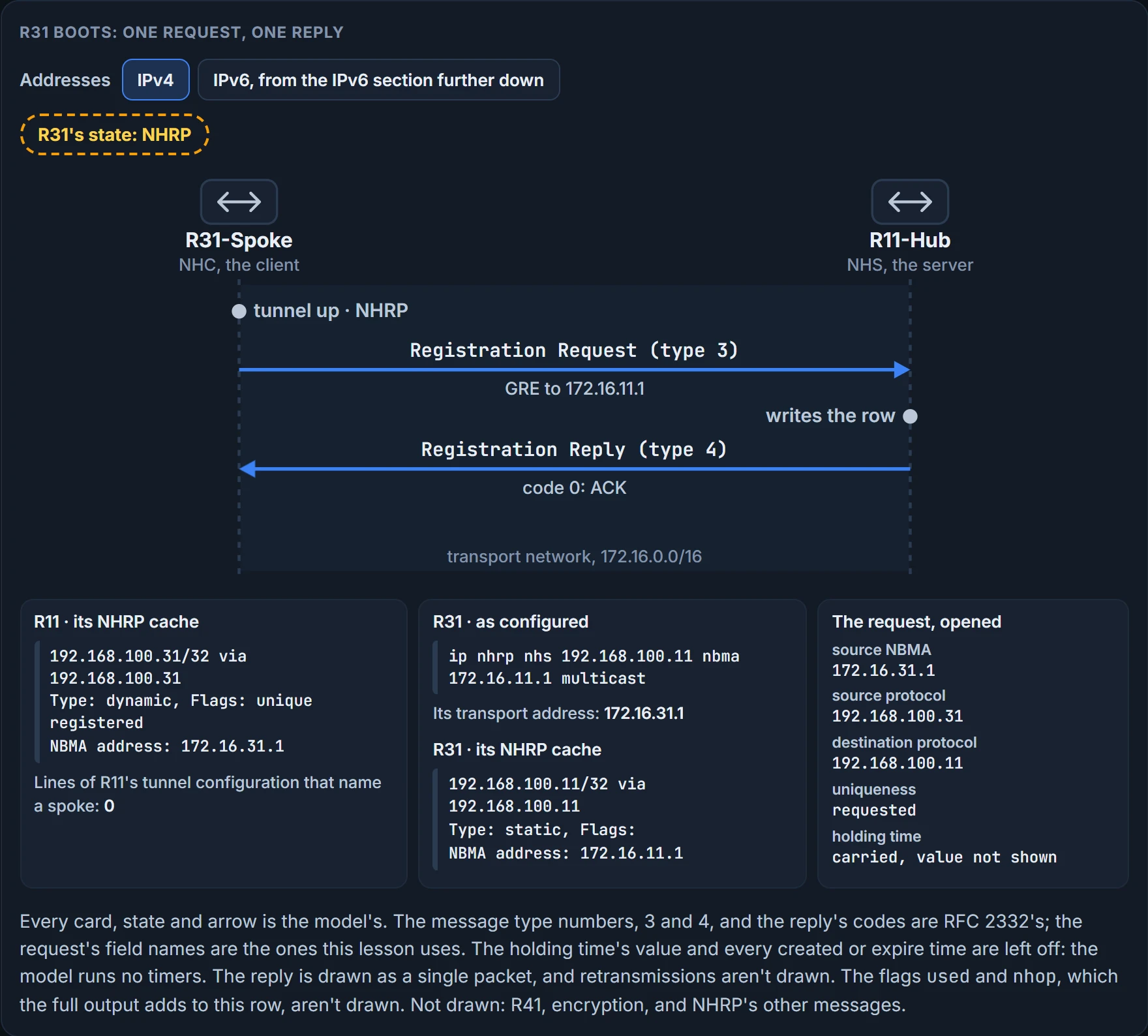
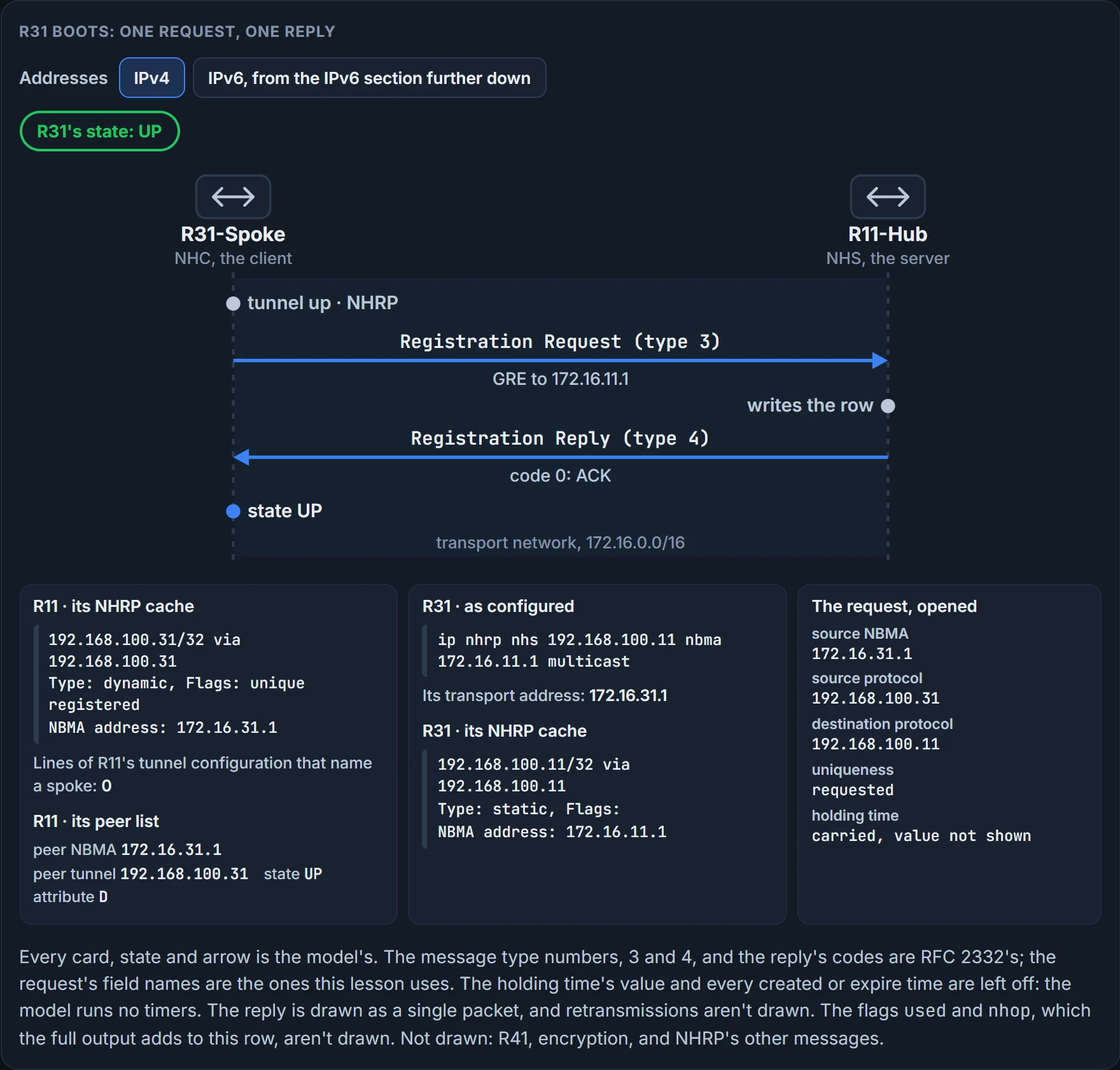
Empty, to begin with. R11's tunnel configuration names no transport address at all, only the interface it sources from. Then R31 comes up. It has an NHS line, so it sends a registration request to the hub's transport address, 172.16.11.1, saying: my protocol address is 192.168.100.31, my NBMA address is 172.16.31.1. RFC 2332's own sentence for the request: it is sent from a station to an NHS to notify the NHS of the station's NBMA information. R11 writes the pair down and answers with a registration reply. The reply carries a code: zero is an ACK, the information was successfully registered, and anything else is a NAK.
And the third answer: no line did. Count them: 0 of R11's ten lines mention R31, R41, 172.16.31.1 or 172.16.41.1. The row is there because R31 said so. That's the mechanism the whole module rests on, so say it plainly: the hub's table is written by the spokes.
Go back to the sentence you kept in reach: spokes are statically configured with the hubs' addresses so that they can register. The static part is on the spoke, and it's about the hub.
It works the way a conference registration desk does. The desk's location was printed on every invitation; nobody at the desk has a list of who is coming or which hotel they're in; each person walks up and says "I'm Dana, I'm at the Marriott", and the desk writes it down. From then on, a message for Dana goes to the Marriott. The comparison holds for one thing, who writes the list, and it fails at the first change of hotel, which is two sections away.
The command for watching this is show dmvpn [detail]. It provides the tunnel interface, the tunnel role, the tunnel state, and the tunnel peers with uptime. The state column moves through five values, in order of establishment:
- INTF: the line protocol of the DMVPN tunnel is down.
- IKE: DMVPN tunnels configured with IPsec have not yet successfully established an IKE session.
- IPsec: an IKE session has been established, but an IPsec security association has not yet been established.
- NHRP: the DMVPN spoke router has not yet successfully registered.
- UP: the DMVPN spoke router has registered with the DMVPN hub and received an ACK, a positive registration reply, from the hub.
The middle two are this module's last lesson's. The other three you can now read: INTF is the last lesson's line protocol, NHRP is "I asked and haven't been told yes", and UP is the reply with code zero. One more behaviour to keep: when the DMVPN tunnel interface is administratively shut down, there are no entries associated with that tunnel interface.
With both spokes up, on R11 and then on R31, with the legend and the spoke's column headings trimmed:
R11-Hub# show dmvpn
Interface: Tunnel100, IPv4 NHRP Details
Type:Hub, NHRP Peers:2,
 # Ent  Peer NBMA Addr Peer Tunnel Add State  UpDn Tm Attrb
 ----- --------------- --------------- ----- -------- -----
     1 172.16.31.1       192.168.100.31   UP 00:05:26     D
     1 172.16.41.1       192.168.100.41   UP 00:05:26     D
R31-Spoke# show dmvpn
Interface: Tunnel100, IPv4 NHRP Details
Type:Spoke, NHRP Peers:1,
     1 172.16.11.1       192.168.100.11    UP 00:05:26     S
Read the last column. On the spokes the entry is S, static, because of the static NHRP mappings in the tunnel interface; on R11 the two entries are D, learned dynamically when R31 and R41 registered. That one letter is the lesson in a column: S means somebody typed it, D means somebody announced it. Type says which role the router plays, and the peer count on a hub is the number of spokes that have registered, not the number that exist. Both routers must maintain an up NHRP state with each other for data traffic to flow successfully between them.
What a hub's row proves: that spoke's registration was accepted, and the hub has its NBMA address. What it doesn't prove: that the address is still current, or that any routing neighbor exists. A spoke's UP proves a positive registration reply came back from that server, and nothing about routes.
With detail, the same command adds the local tunnel and NBMA IP addresses, tunnel health monitoring and VRF contexts, and IPsec crypto information if configured. R11 and then R31 again, where R31's legend is trimmed and its last column is cut short:
R11-Hub# show dmvpn detail
Legend: Attrb --> S - Static, D - Dynamic, I - Incomplete
          N - NATed, L - Local, X - No Socket
          T1 - Route Installed, T2 - Nexthop-override
          C - CTS Capable
          # Ent --> Number of NHRP entries with same NBMA peer
          NHS Status: E --> Expecting Replies, R --> Responding, W --> Waiting
          UpDn Time --> Up or Down Time for a Tunnel
==========================================================================
Interface Tunnel100 is up/up, Addr. is 192.168.100.11, VRF ""
   Tunnel Src./Dest. addr: 172.16.11.1/MGRE, Tunnel VRF ""
   Protocol/Transport: "multi-GRE/IP", Protect ""
   Interface State Control: Disabled
   nhrp event-publisher : Disabled
Type:Hub, Total NBMA Peers (v4/v6): 2
# Ent  Peer NBMA Addr Peer Tunnel Add State  UpDn Tm Attrb    Target Network
----- --------------- --------------- ----- -------- ----- -----------------
   1 172.16.31.1        192.168.100.31    UP 00:01:05     D  192.168.100.31/32
   1 172.16.41.1        192.168.100.41    UP 00:01:06     D  192.168.100.41/32
R31-Spoke# show dmvpn detail
Interface Tunnel100 is up/up, Addr. is 192.168.100.31, VRF ""
 Tunnel Src./Dest. addr: 172.16.31.1/172.16.11.1, Tunnel VRF ""
 Protocol/Transport: "GRE/IP", Protect ""
 Interface State Control: Disabled
 nhrp event-publisher : Disabled
IPv4 NHS:
192.168.100.11 RE NBMA Address: 172.16.11.1 priority = 0 cluster = 0
Type:Spoke, Total NBMA Peers (v4/v6): 1
# Ent  Peer NBMA Addr Peer Tunnel Add State  UpDn Tm Attrb    Target Ne
----- --------------- --------------- ----- -------- ----- ------------
   1 172.16.11.1        192.168.100.11    UP 00:00:28     S  192.168.100
Start with the legend. Attrb: S and D are this lesson's. # Ent is the number of NHRP entries with the same NBMA peer: the 1 that has started every row so far. NHS Status has three letters: E for Expecting Replies, R for Responding, W for Waiting. The rest in one sentence: I, L, T1 and T2 wait for the next lesson and X for the IPsec lesson, where something produces them; N and C aren't taught in this course; and UpDn Time is the up or down time for a tunnel.
Now find the things detail adds, on R11's lines. The local tunnel address is on the first line, after Addr. is, and the local NBMA address is the first half of Tunnel Src./Dest. addr. Where a point-to-point tunnel prints its destination, the hub prints MGRE: it has none. The VRF contexts are the two fields that print "" here, VRF on the first line and Tunnel VRF on the second; the second is filled in on a tunnel configured with tunnel vrf, a front-door VRF: a routing table of its own for the transport side, built later in this module. Tunnel health monitoring is the Interface State Control line: Disabled here. This lesson uses neither nhrp event-publisher nor Protect "". And the count line now reads Total NBMA Peers (v4/v6): 2 where the plain form read NHRP Peers:2.
The rows gain a Target Network column, 192.168.100.31/32 on the hub's first row: a host entry, the spoke's own tunnel address.
R31's block differs where you'd now expect it to. Its own destination follows the slash, the protocol is "GRE/IP", and there's a section the hub doesn't have, IPv4 NHS:, listing its server. The letters after the server's address are the legend's NHS Status: R, Responding, and E, Expecting Replies. The line ends priority = 0 cluster = 0; this lesson uses neither field.
We haven't confirmed on a router, for this section: that tunnel health monitoring is the Interface State Control line. The display has three additions and three candidate lines, and the pairing is this lesson's.
Reading a row
show dmvpn is the summary. The table itself is the NHRP cache, and it carries weight: DMVPN doesn't operate without the information NHRP provides, and every router maintains a cache of requests that it receives or is processing. show ip nhrp [brief | detail] displays the local cache, and each entry holds:
- a network entry, for a host (IPv4 /32 or IPv6 /128) or for a network, and the tunnel IP address mapped to the NBMA (transport) IP address;
- the interface, how long the entry has existed and when it will expire, in hours, minutes and seconds. Only dynamic entries expire;
- the mapping entry type, and its flags.
R11 and then R31:
R11-Hub# show ip nhrp
192.168.100.31/32 via 192.168.100.31
  Tunnel100 created 23:04:04, expire 01:37:26
  Type: dynamic, Flags: unique registered used nhop
  NBMA address: 172.16.31.1
192.168.100.41/32 via 192.168.100.41
  Tunnel100 created 23:04:00, expire 01:37:42
  Type: dynamic, Flags: unique registered used nhop
  NBMA address: 172.16.41.1
R31-Spoke# show ip nhrp
192.168.100.11/32 via 192.168.100.11
  Tunnel100 created 23:02:53, never expire
  Type: static, Flags:
  NBMA address: 172.16.11.1
Take R11's first entry a line at a time. The first line is the protocol side: 192.168.100.31/32. The last line is the NBMA side: 172.16.31.1. Those two lines are the mapping a multipoint interface can't forward without. The middle is the entry's history and its character.
Type. static: an entry created statically on a DMVPN interface. dynamic: an entry created dynamically; in DMVPN Phase 1, it is an entry created from a spoke that registered with an NHS with an NHRP registration request. Three more types exist and belong to the next lesson and the IPsec lesson, where something produces them: incomplete, a temporary entry placed locally while an NHRP resolution request is processing; local, local mapping information; and (no-socket), mapping entries that have no associated IPsec sockets and where encryption is not triggered. The NBMA address is the transport IP address where the entry was received.
Flags specify attributes of the cache entry or of the peer it was created for. On R11's rows there are four. unique: this mapping entry must be unique, and cannot be overwritten with a mapping entry that has the same tunnel IP address but a different NBMA address; keep that sentence for the next section. registered: the entry was created by an NHRP registration request. used: the entry was used to forward data packets within the past 60 seconds. nhop: an entry for a remote next-hop address, for example a remote tunnel interface, and its associated NBMA address. The other flags, implicit, router, rib and nho, mark entries that resolution and shortcuts create: the next lesson's.
So read R11's cache this way: R11 contains only dynamic registrations for R31 and R41; the flags indicate that both registered successfully with the unique registration and that traffic has recently been forwarded to both. And the dynamic part has a consequence: if R31 and R41 cannot maintain connectivity to R11's transport IP address, eventually the tunnel mapping is removed on R11. The row stays only while somebody keeps announcing it. How long "eventually" is, and how often a spoke re-announces, are timer values, and they wait for the routing lesson later in this module.
What the hub's entry proves: which NBMA address the hub will use for that tunnel address, and that it came from a registration. What it doesn't prove: that the spoke is still there now, since the entry lives until it expires.
Now R31's entry. Static, never expires, no flags printed. That's the NHS line showing up as a cache entry: the spoke's one typed fact. It proves what was typed on that line. It doesn't prove the hub accepted anything.
Two keyword forms. detail adds a list of routers that submitted NHRP resolution requests, and their request IDs. brief prints the type and flags as letters and omits some information, the used and nhop flags among them. R11's part of it:
R11-Hub# show ip nhrp brief
****************************************************************************
   NOTE: Link-Local, No-socket and Incomplete entries are not displayed
****************************************************************************
Legend: Type --> S - Static, D - Dynamic
        Flags --> u - unique, r - registered, e - temporary, c - claimed
        a - authoritative, t - route
============================================================================
Intf     NextHop Address                                    NBMA Address
        Target Network                              T/Flag
-------- ------------------------------------------- ------ ----------------
Tu100    192.168.100.31                                     172.16.31.1
        192.168.100.31/32                           D/ur
Tu100    192.168.100.41                                     172.16.41.1
        192.168.100.41/32                           D/ur
Each entry takes two lines: the interface, the next-hop address and the NBMA address, then the target network and, under T/Flag, the type and the flags. R11's two entries read D/ur, and each spoke's one entry, for 192.168.100.11 at 172.16.11.1, reads S/. The legend has four more flag letters, e for temporary, c for claimed, a for authoritative and t for route; this lesson uses none of them. And read the banner once, because it comes back in the IPv6 section: link-local, no-socket and incomplete entries are not displayed in this form.
A branch gets a new address
When an NHC registers with an NHS, it provides its protocol (tunnel IP) address and its NBMA (transport IP) address. By default, an NHC requests that the NHS keep the NBMA address assigned to the protocol address unique. The NHS keeps that request with the entry, and it's what the unique flag on the NHS shows. Ask R11 for the one entry by address, show ip nhrp 192.168.100.31, and it's the entry you just read: Flags: unique registered used nhop.
So predict. You have the flag's definition from the last section.
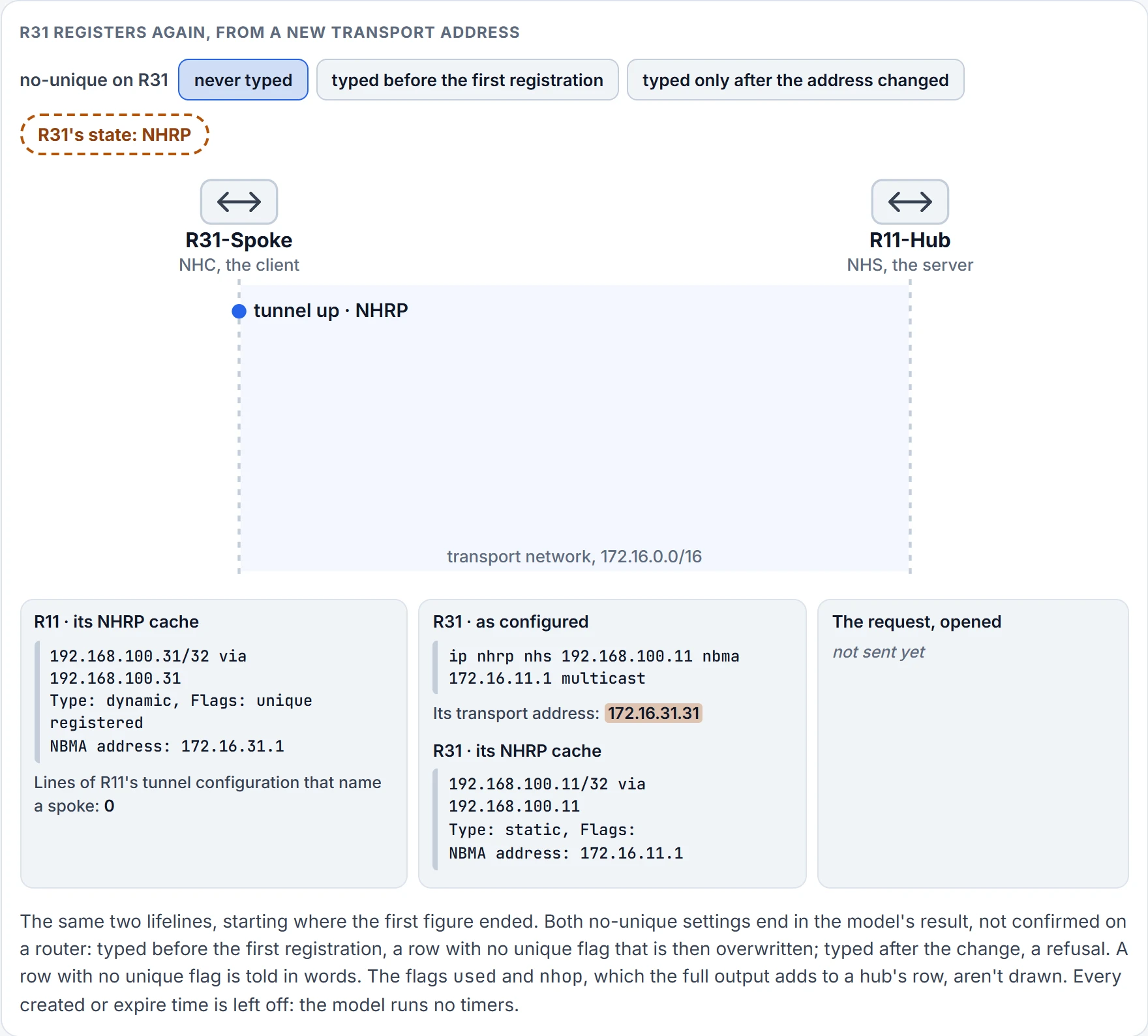
Step 1 of 5 R31's provider has changed its transport address to 172.16.31.31. The tunnel is back up and R31 has to register again. R11 still holds the row from the first time.
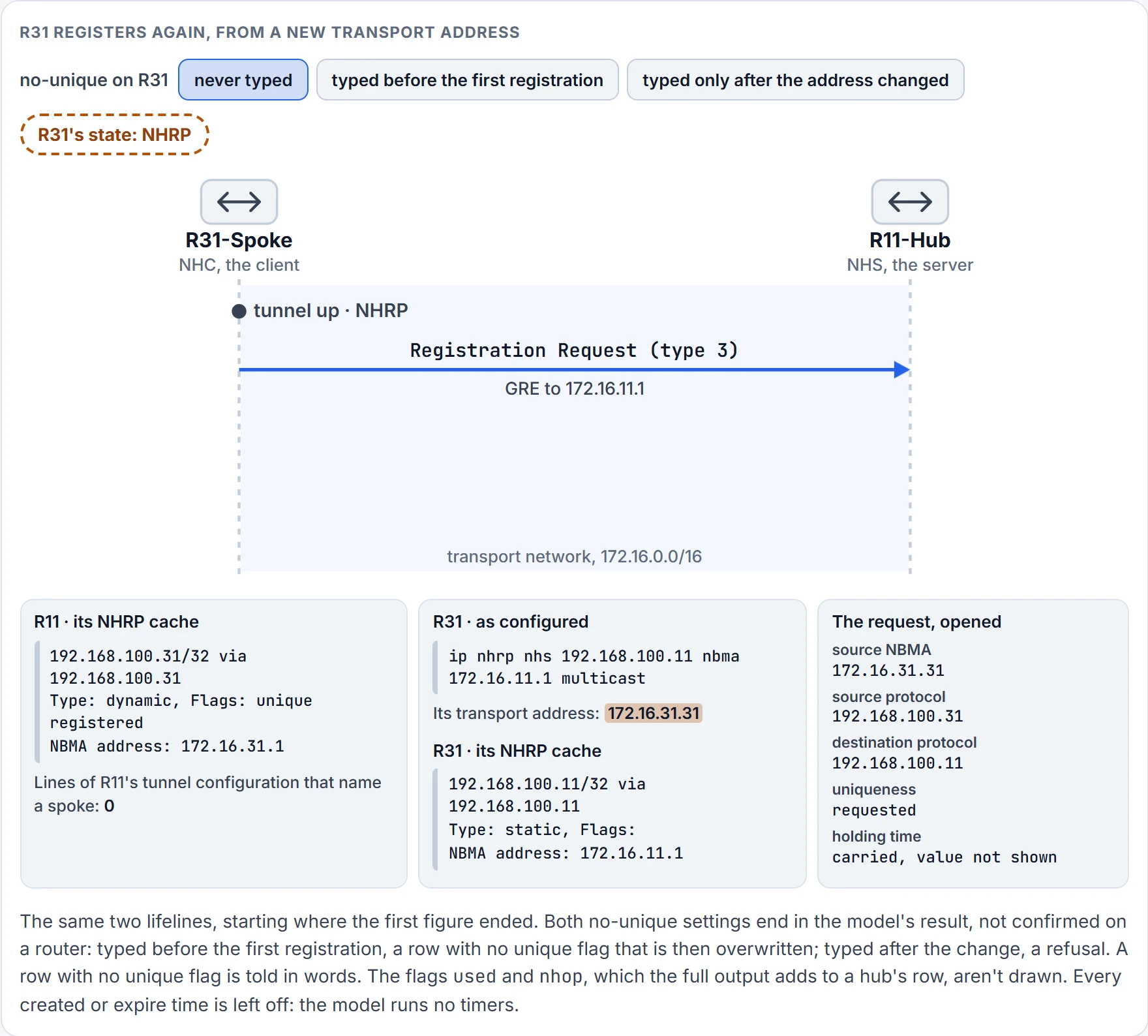
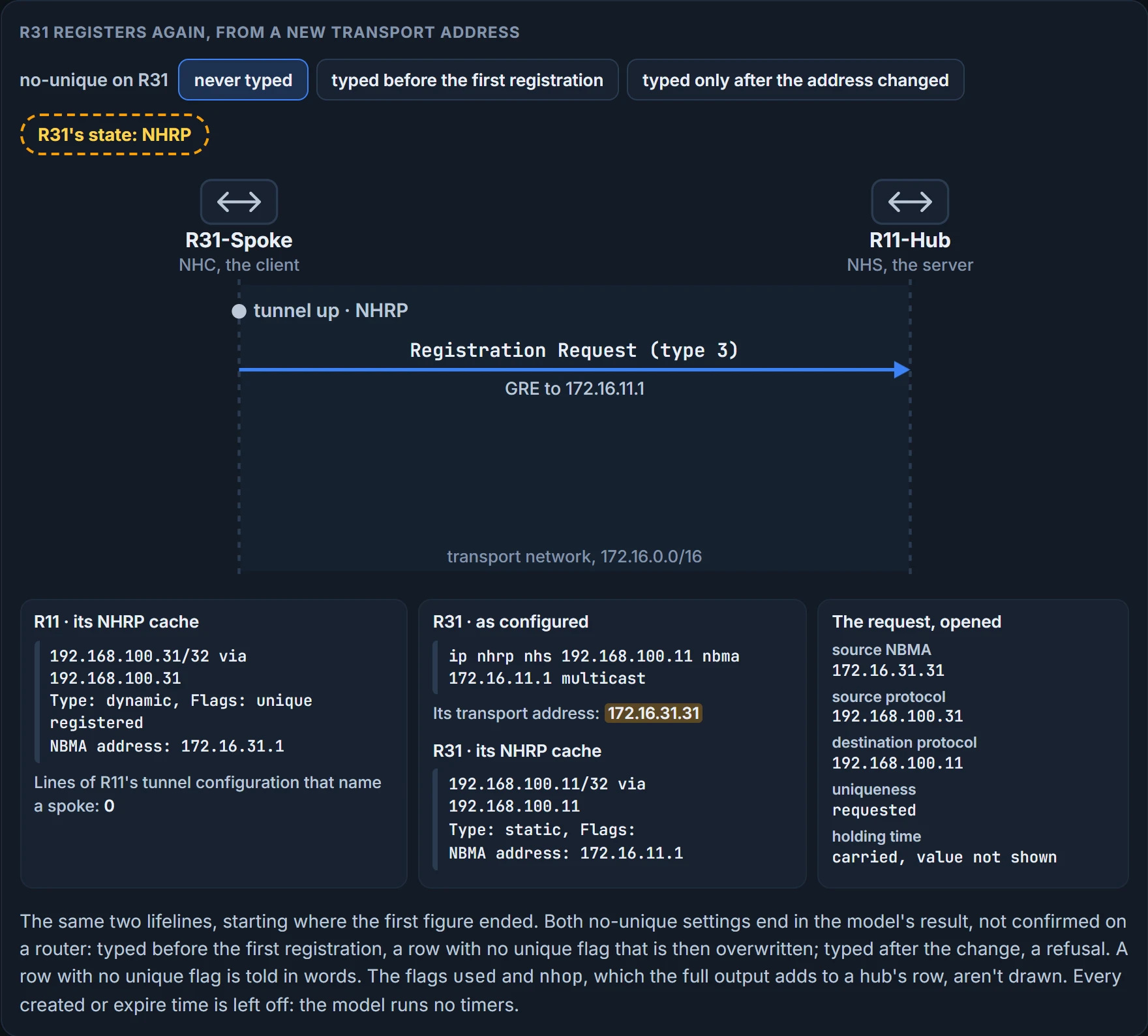
Step 2 of 5 R31 sends its two addresses to the server it was configured with: a registration request, carried in GRE to 172.16.11.1. It asks for the mapping to be kept unique.
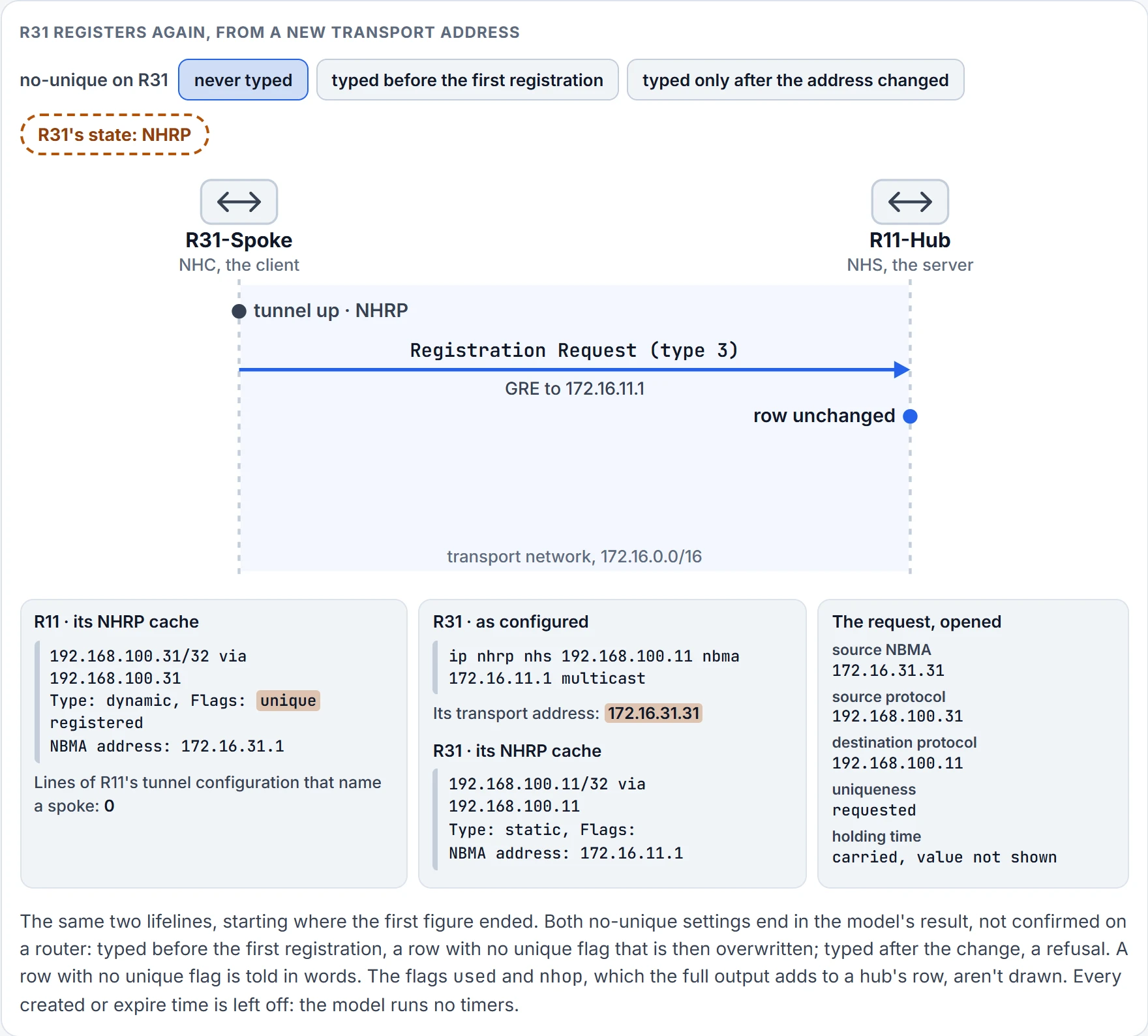
Step 3 of 5 R11 already holds 192.168.100.31 with the unique flag and a different NBMA address, 172.16.31.1. The row doesn't change.
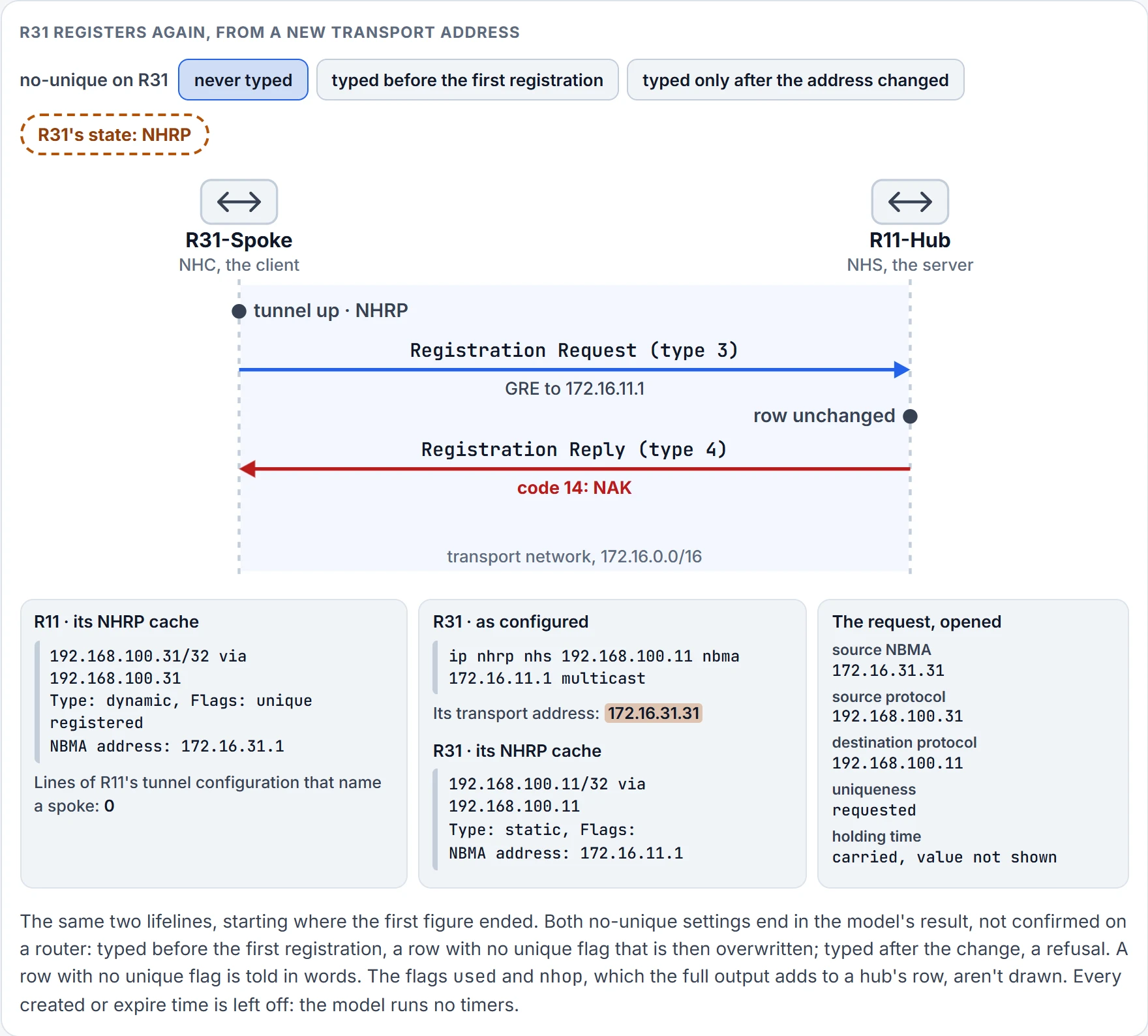
Step 4 of 5 R11 answers with a registration reply. Code 14: a NAK. The protocol address is registered to a different NBMA address, so the registration is denied.
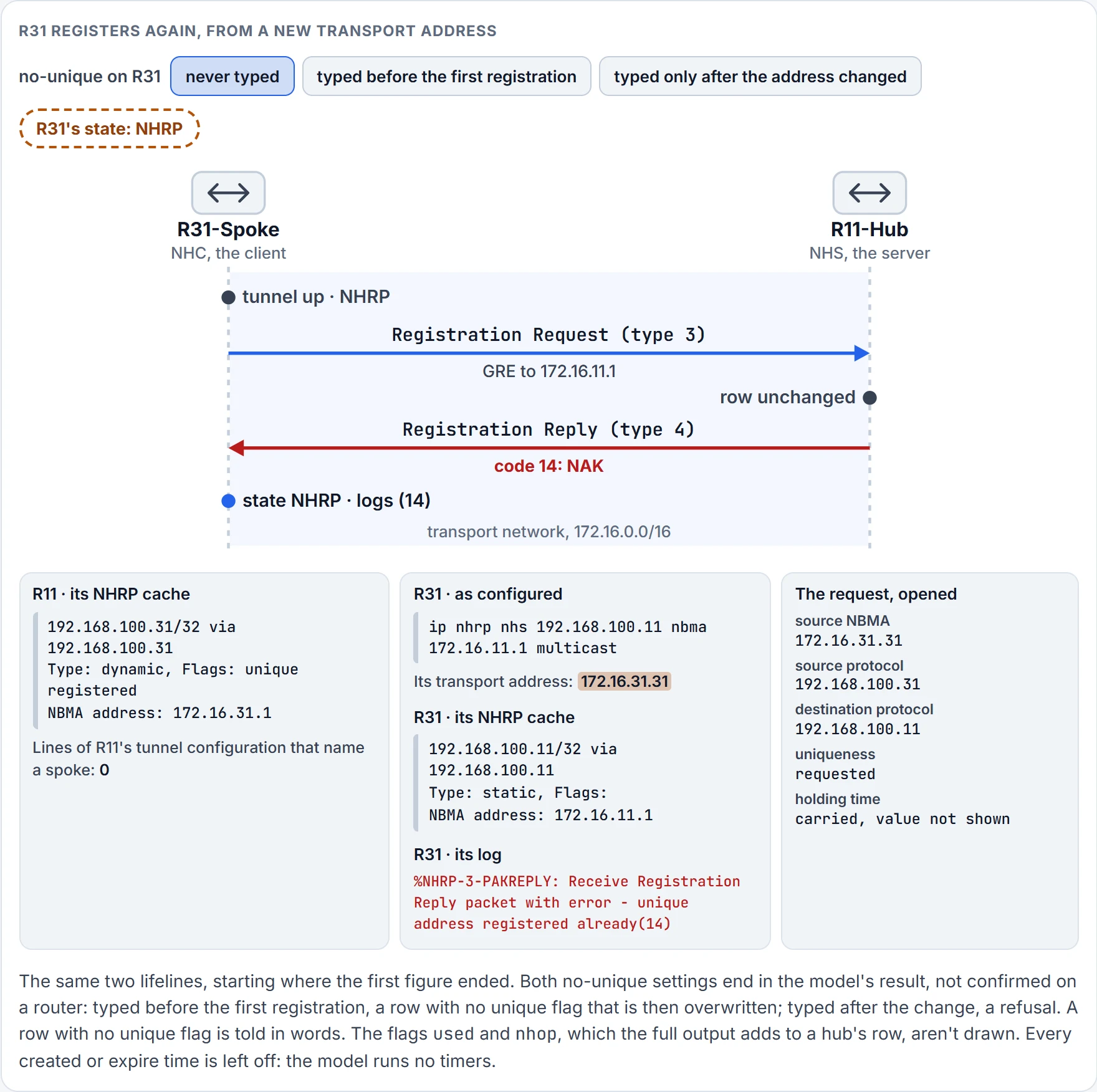
Step 5 of 5 R31 logs the reply's error and stays in the NHRP state: not registered.
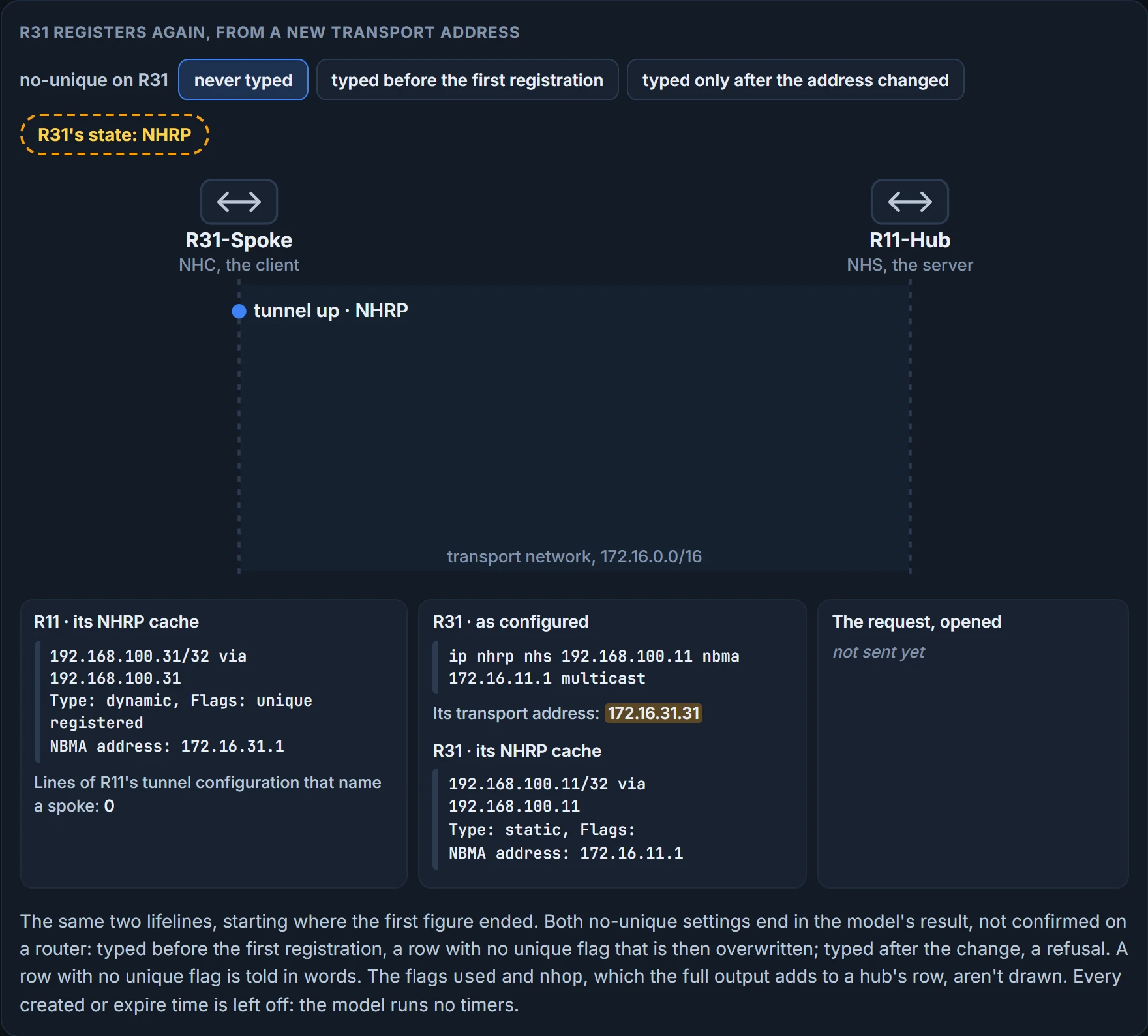
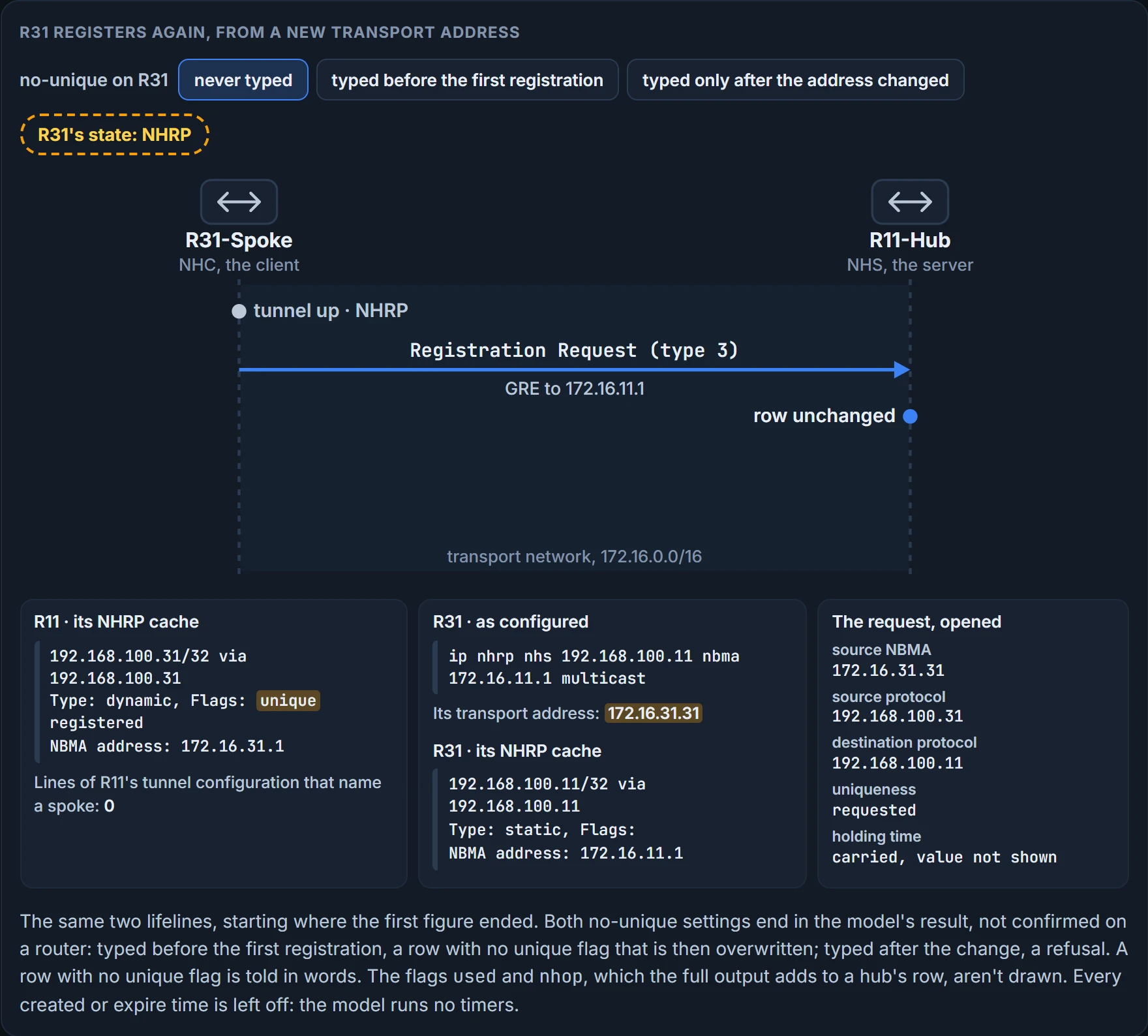
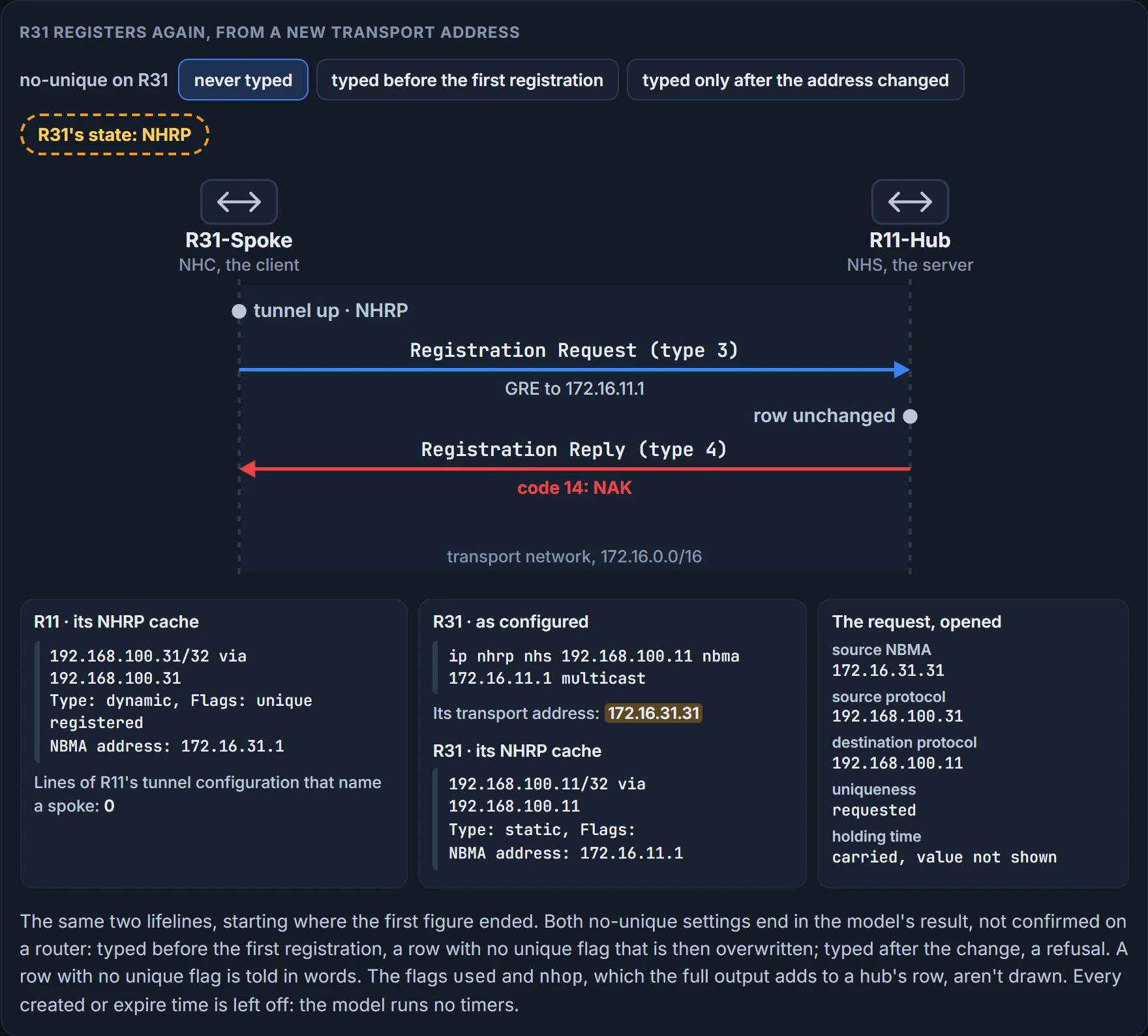
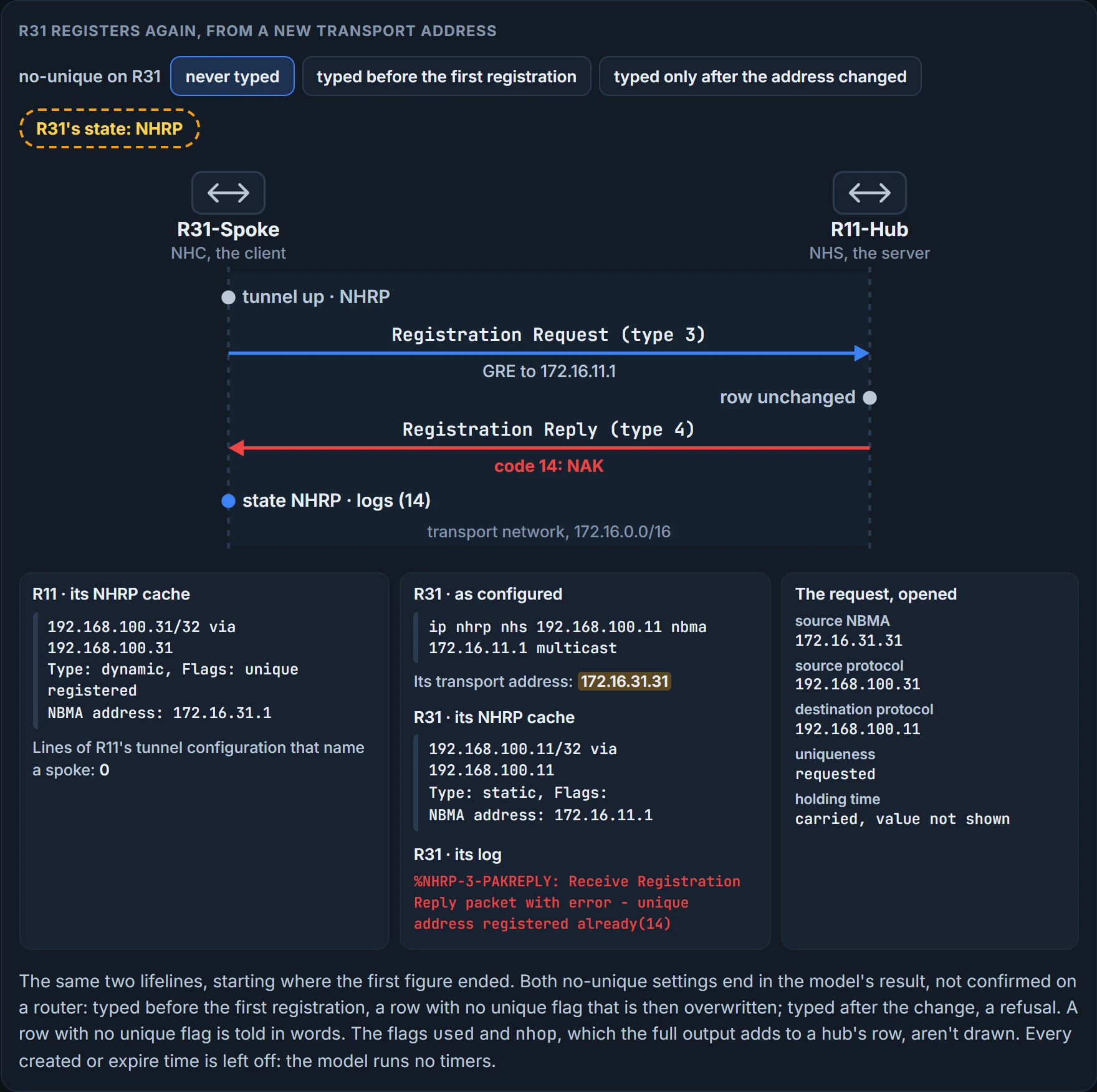
It refuses. If an NHC attempts to register with the NHS using a different NBMA address, the registration process fails. That's the other half of the default: unique, so that the NBMA address cannot be overwritten with a different IP address. Here it is done by shutting R31's tunnel, renumbering its transport interface with ip address 172.16.31.31 255.255.255.0 (the link gets a /24 mask in the same step, so the new address fits it), and bringing the tunnel back:
R31-Spoke(config-if)# interface tunnel 100
R31-Spoke(config-if)# no shutdown
00:18:21.011: %NHRP-3-PAKREPLY: Receive Registration Reply packet with error -
   unique address registered already(14)
00:18:22.010: %LINEPROTO-5-UPDOWN: Line protocol on Interface Tunnel100, changed
   state to up
Read both lines. The second says the tunnel's line protocol is up, which is the last lesson's rule and nothing more. The first is the hub's answer: the hub denies the registration because the protocol address is registered to a different NBMA address. And the 14 in brackets isn't decoration. It's the code in the reply: RFC 2332 gives 14 to the case where a client registers a binding with the uniqueness bit on and the protocol address already exists in the NHS's cache with the uniqueness bit on. And this is where the registration desk stops being a fair picture: a clerk would cross out Marriott and write the new hotel. This desk has Dana at the Marriott, in ink.
What that log line proves: the hub holds this tunnel address, flagged unique, against another NBMA address. What it doesn't prove: whose address is the stale one. A changed address and a duplicated tunnel address print the same line.
Who gets hurt: sites whose transport interfaces connect using DHCP, where they could be assigned different IP addresses before the NHRP cache times out. If a router loses connectivity and is assigned a different IP address, it cannot register with the NHS router until that router's entry is flushed from the NHRP cache. Which is the first question of this lesson, turned round: the design that lets a spoke's address be unknown in advance, by default, won't let it change.
The switch is on the spoke. ip nhrp registration no-unique stops routers from placing the unique flag in the registration request packets they send to the NHS, which allows clients to reconnect to the NHS even if the NBMA address changes. It should be enabled on all DHCP-enabled spoke interfaces, and placing it on all spoke tunnel interfaces keeps the configuration consistent and simplifies verification. One catch: the spoke has to register for the change to take effect on the NHS, which happens during the normal NHRP expiration timers, or sooner if the tunnel interface on the spoke is reset before its transport IP address changes. Typing the command after the address has already changed doesn't rewrite the hub's row (that is the model's result, not confirmed on a router). The uniqueness is a property of the entry the hub is holding, and the hub got it from the registration that created the entry.
Authentication is the other per-cloud setting. NHRP includes an authentication capability, and it is weak, because the password is stored in plaintext; most network administrators use it as a method to ensure that two different tunnels do not accidentally form. The command is ip nhrp authentication password, and the string must be set to the same value on all hubs and spokes in the same DMVPN network. It's a label that keeps clouds apart. It isn't a lock.
We haven't confirmed on a router, for this section: that a client asks for uniqueness by default. It's the exam's answer, and every output in this lesson shows the unique flag on a registered entry, but the default is also described the other way round. Nor which flags a hub prints for an entry registered with no-unique, nor what a hub does with either no-unique registration in the figure: both outcomes there are the model's.
The hello problem
There's a second thing a nonbroadcast network can't do, and you've met it without the tunnel: EIGRP's hellos go to a multicast address, and OSPF's do too. On Ethernet a multicast frame reaches everybody. A multipoint tunnel has no "everybody". It has the table.
So NHRP is asked to do the job twice. It provides a mapping service of the protocol address to the NBMA address for multicast packets too. On the hub, that's the line held back earlier: to support multicast, or routing protocols that use multicast, you enable it on DMVPN hub routers with ip nhrp map multicast dynamic. The word doing the work is dynamic: it allows NHRP to automatically add spoke routers to the multicast NHRP mappings. Every spoke that registers is added to a second list, and a multicast packet out of the tunnel goes to the NBMA addresses on that list.
Predict before the figure runs.
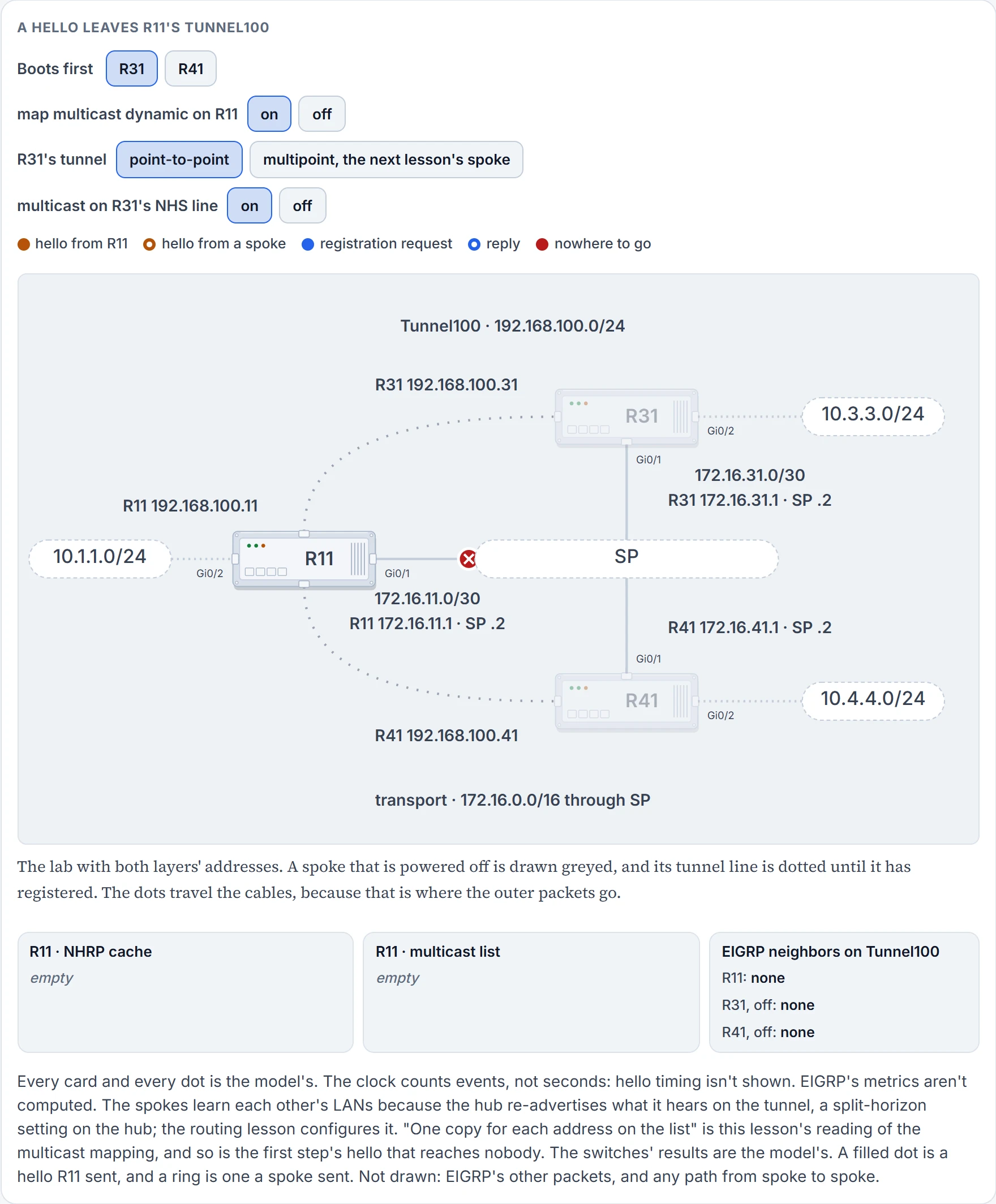
Step 1 of 6 Both spokes are off. R11's cache, its multicast list and its neighbor table are all empty. A hello leaves R11's EIGRP process for Tunnel100, and there's no address to send it to.
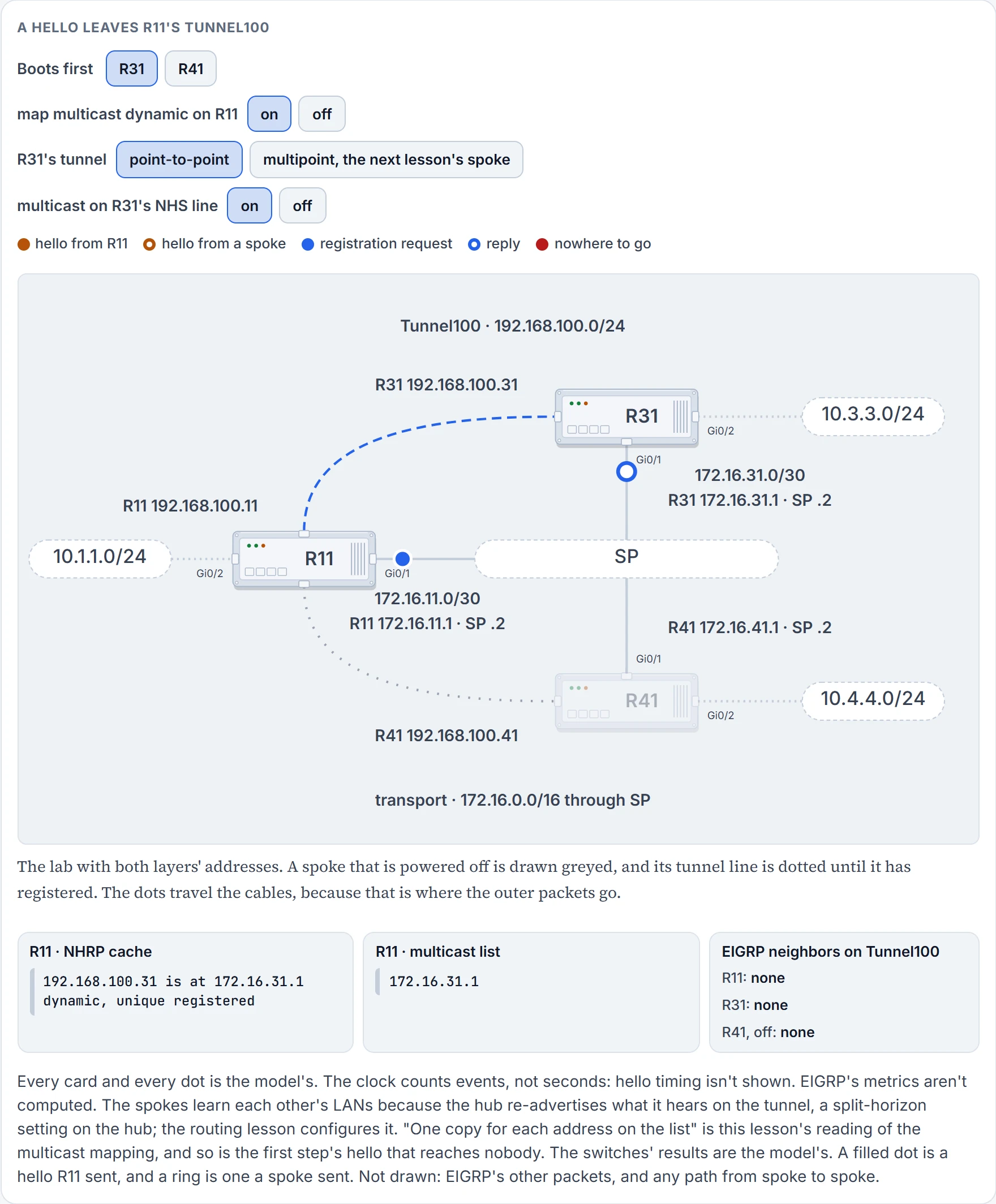
Step 2 of 6 R31 boots and registers: one request, one reply. R11's cache gains a row. And R31's NBMA address, 172.16.31.1, goes on the multicast list.
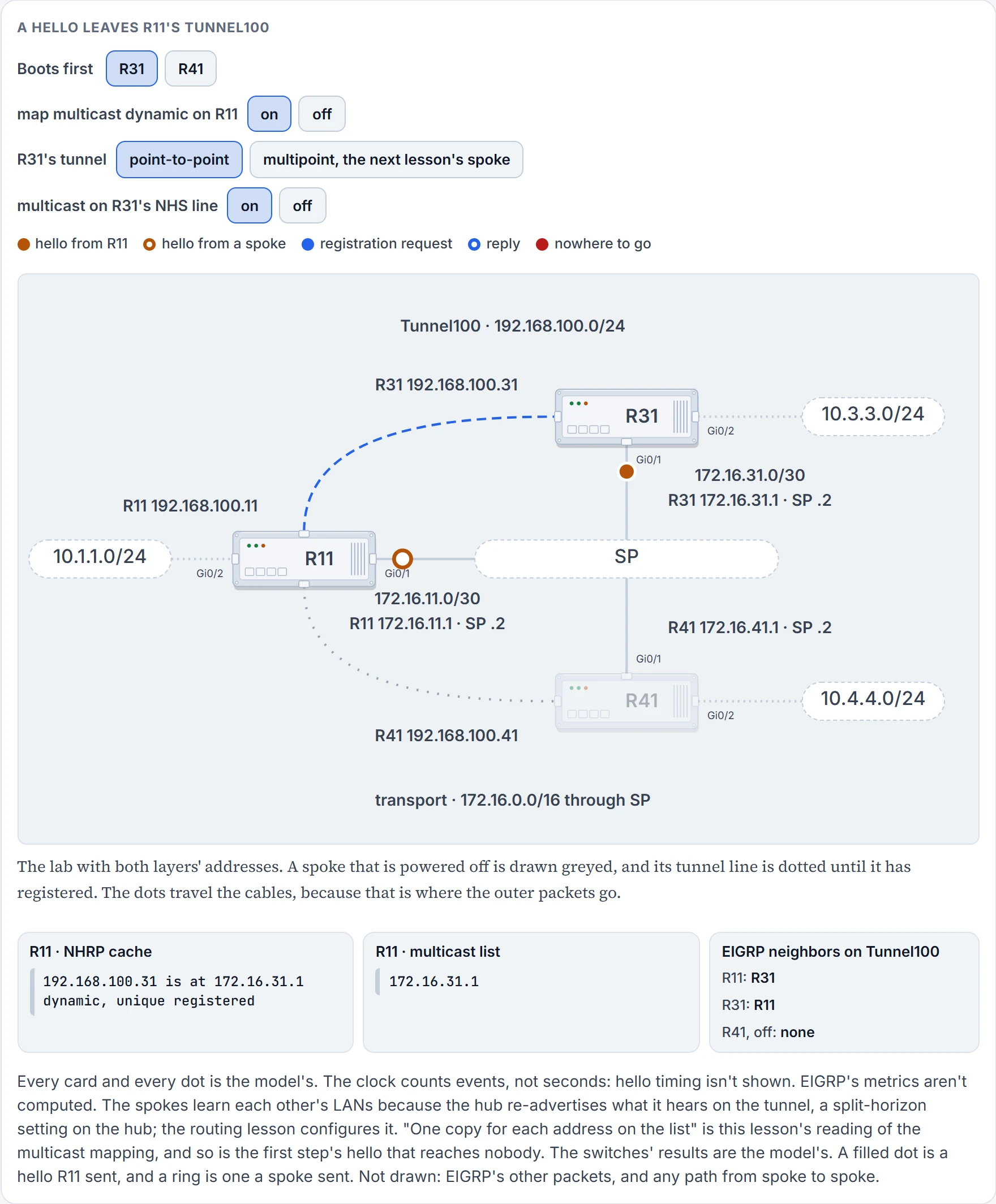
Step 3 of 6 R11's hello goes out as one copy, to R31: one for each address on the list. R31's hello goes to R11: a point-to-point tunnel sends everything to its one destination. R11 and R31 are neighbors.
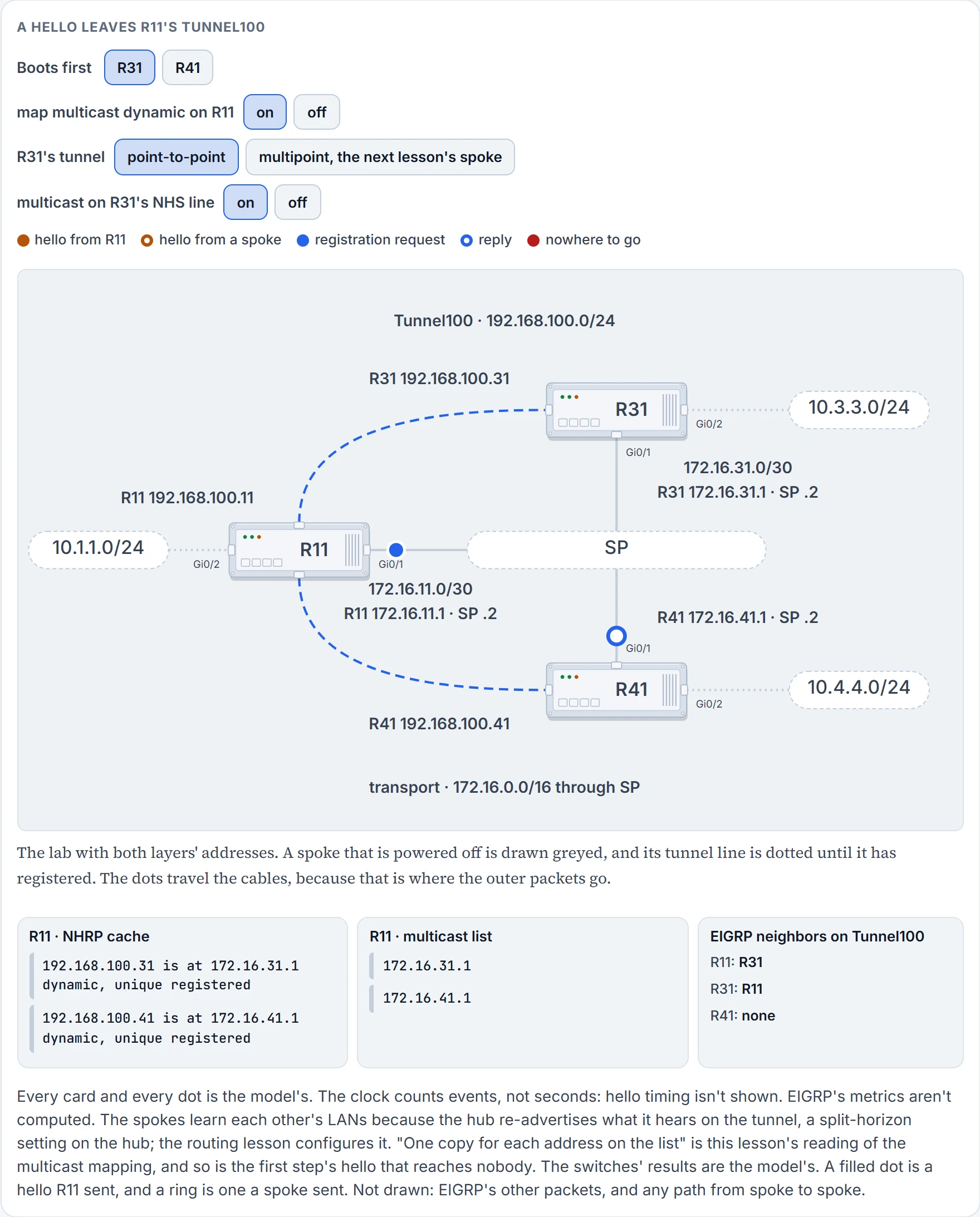
Step 4 of 6 R41 boots and registers: one request, one reply. R11's cache gains a row. And R41's NBMA address, 172.16.41.1, goes on the multicast list.
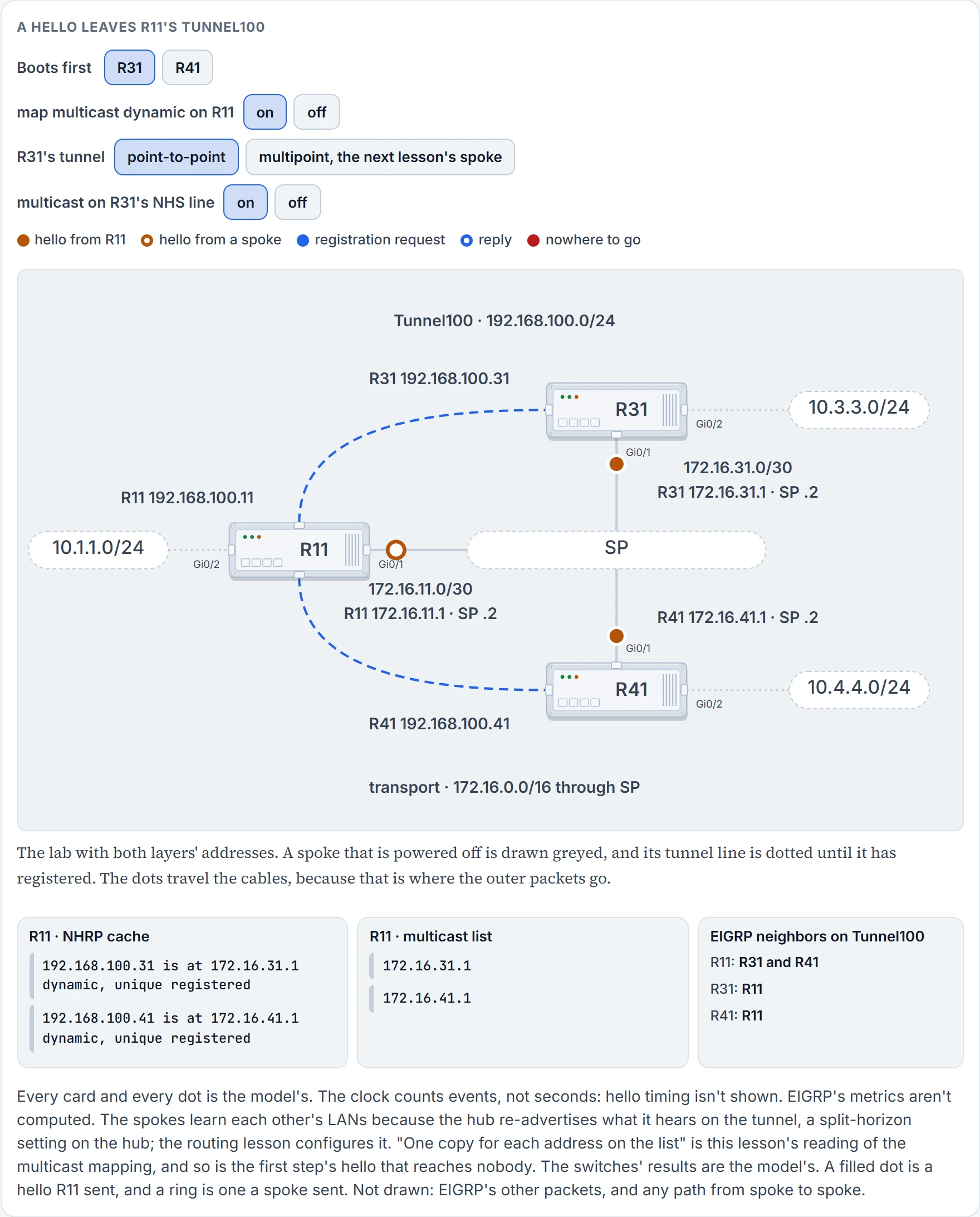
Step 5 of 6 R11's hello goes out as two copies, to R31 and R41: one for each address on the list. R41's hello goes to R11: a point-to-point tunnel sends everything to its one destination. R11 and R41 are neighbors.
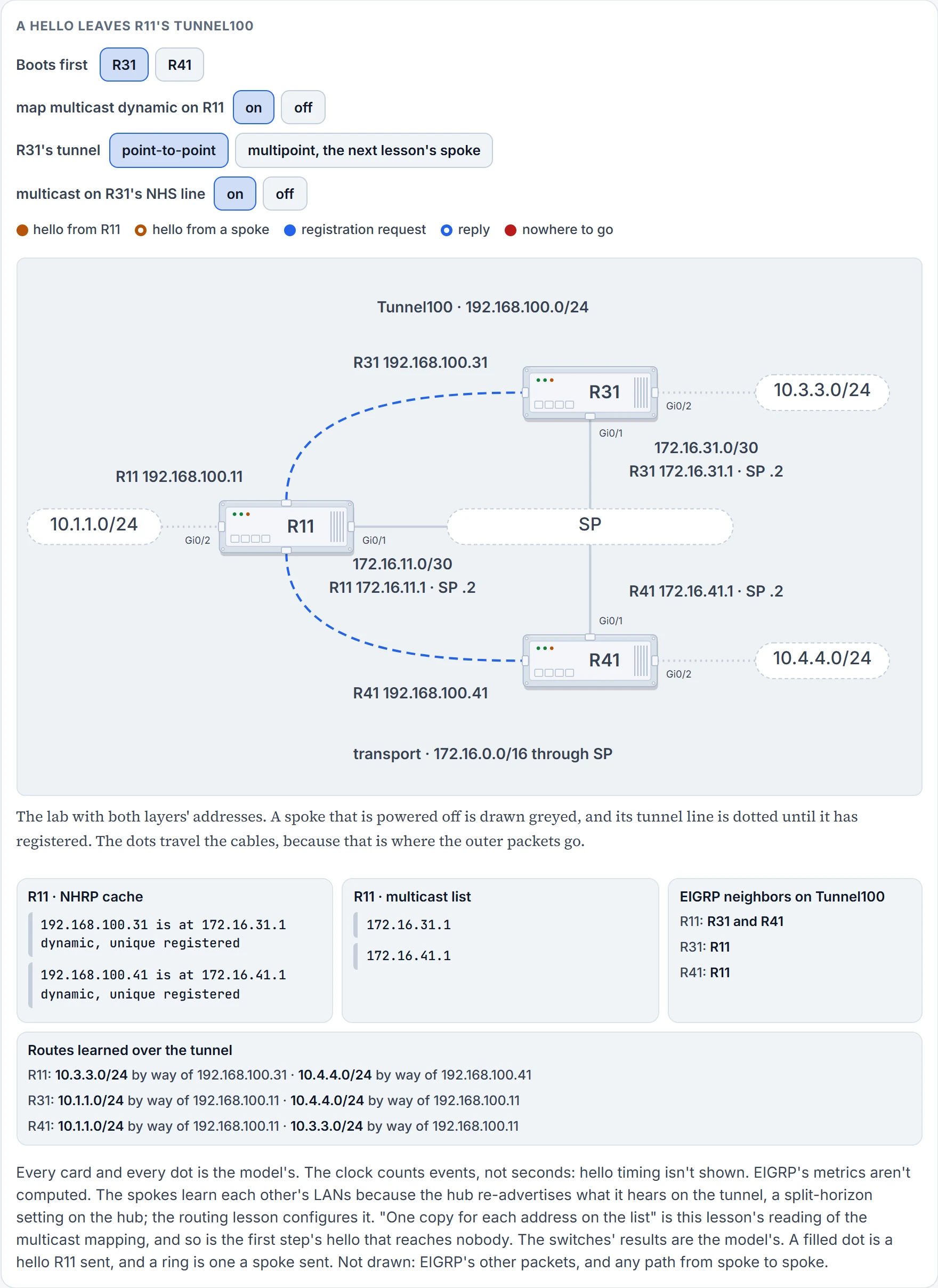
Step 6 of 6 With both neighbors up, the routes follow. R11 reaches each spoke's LAN by that spoke's tunnel address, and each spoke reaches the other's LAN by R11's.
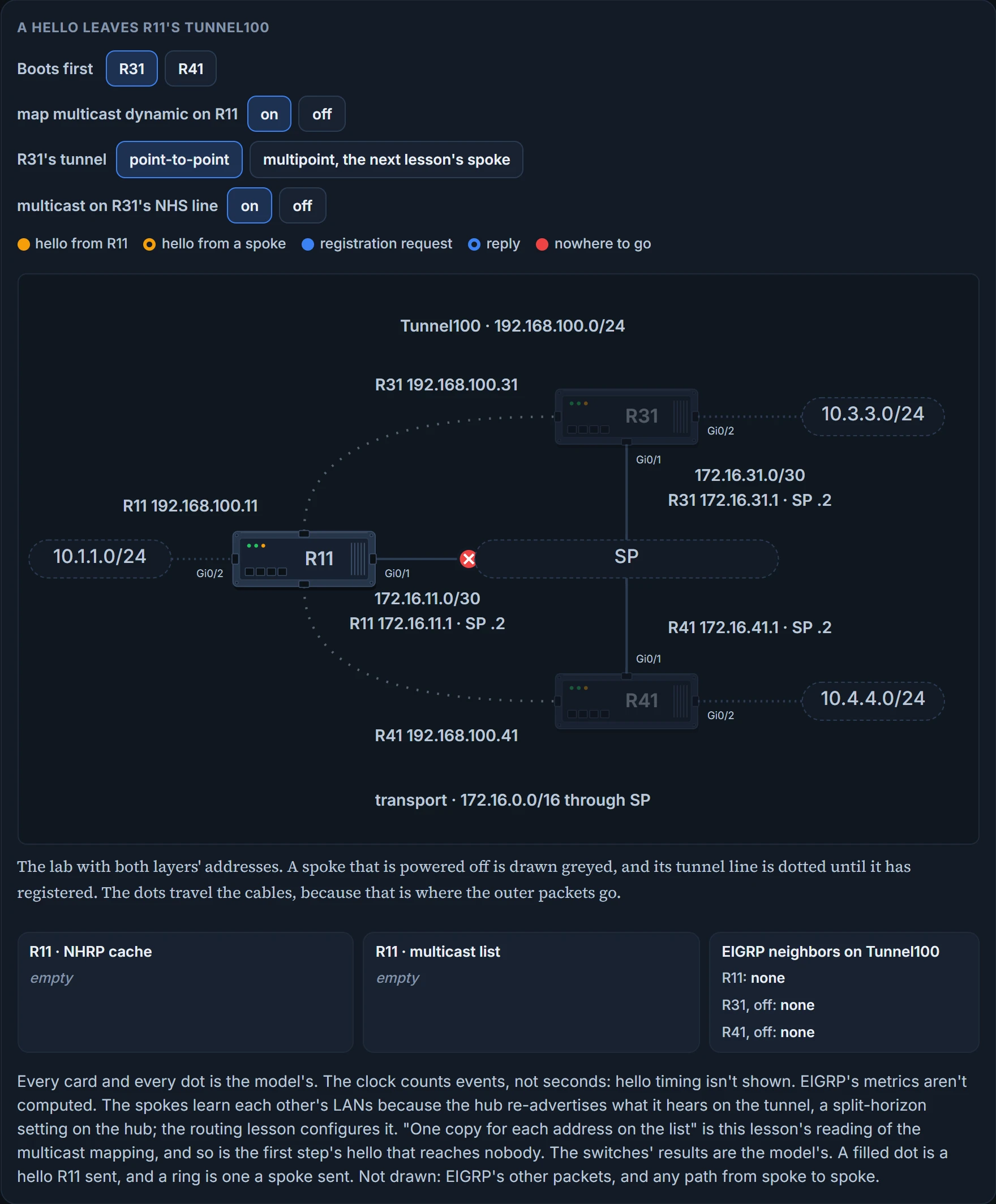
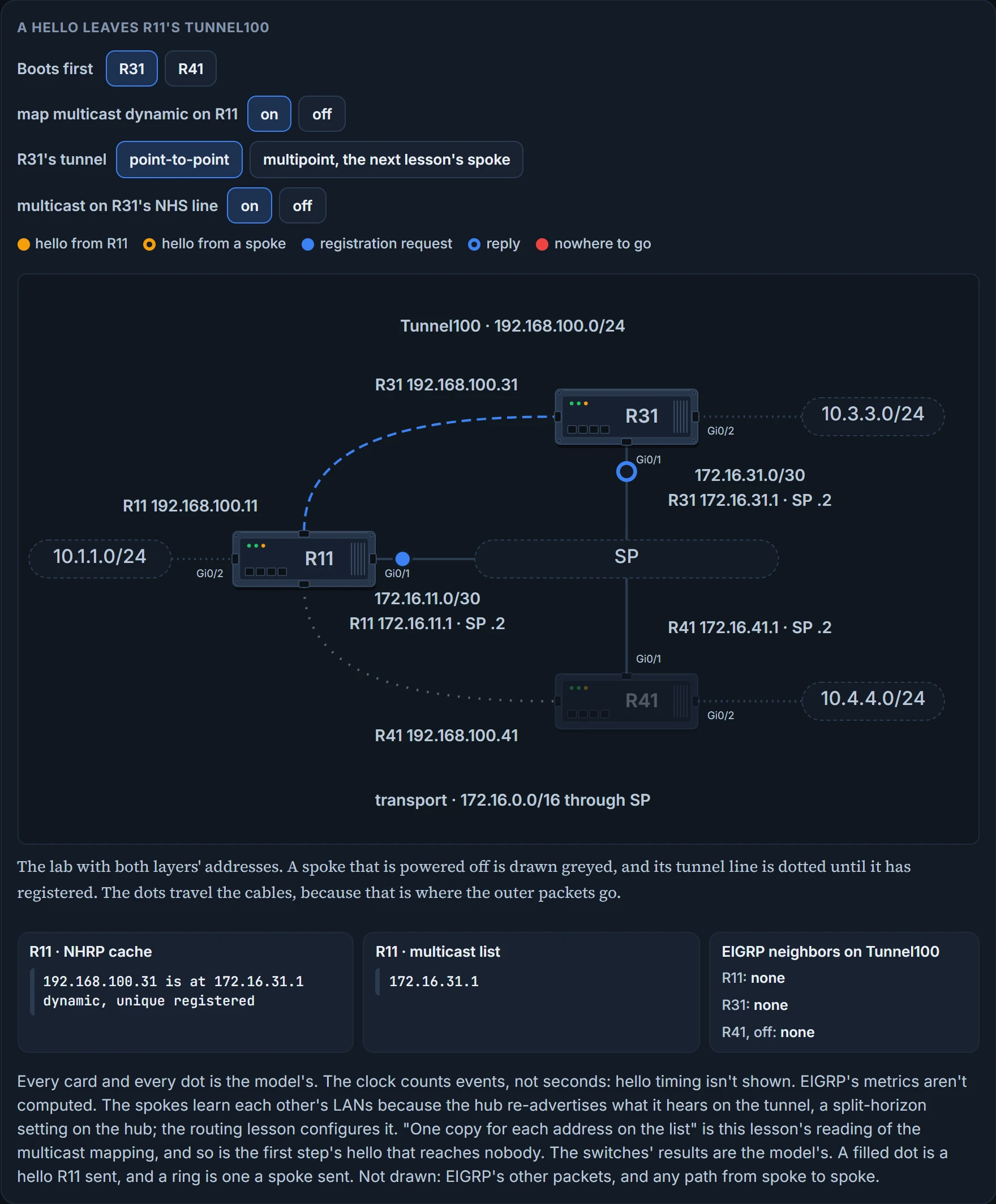
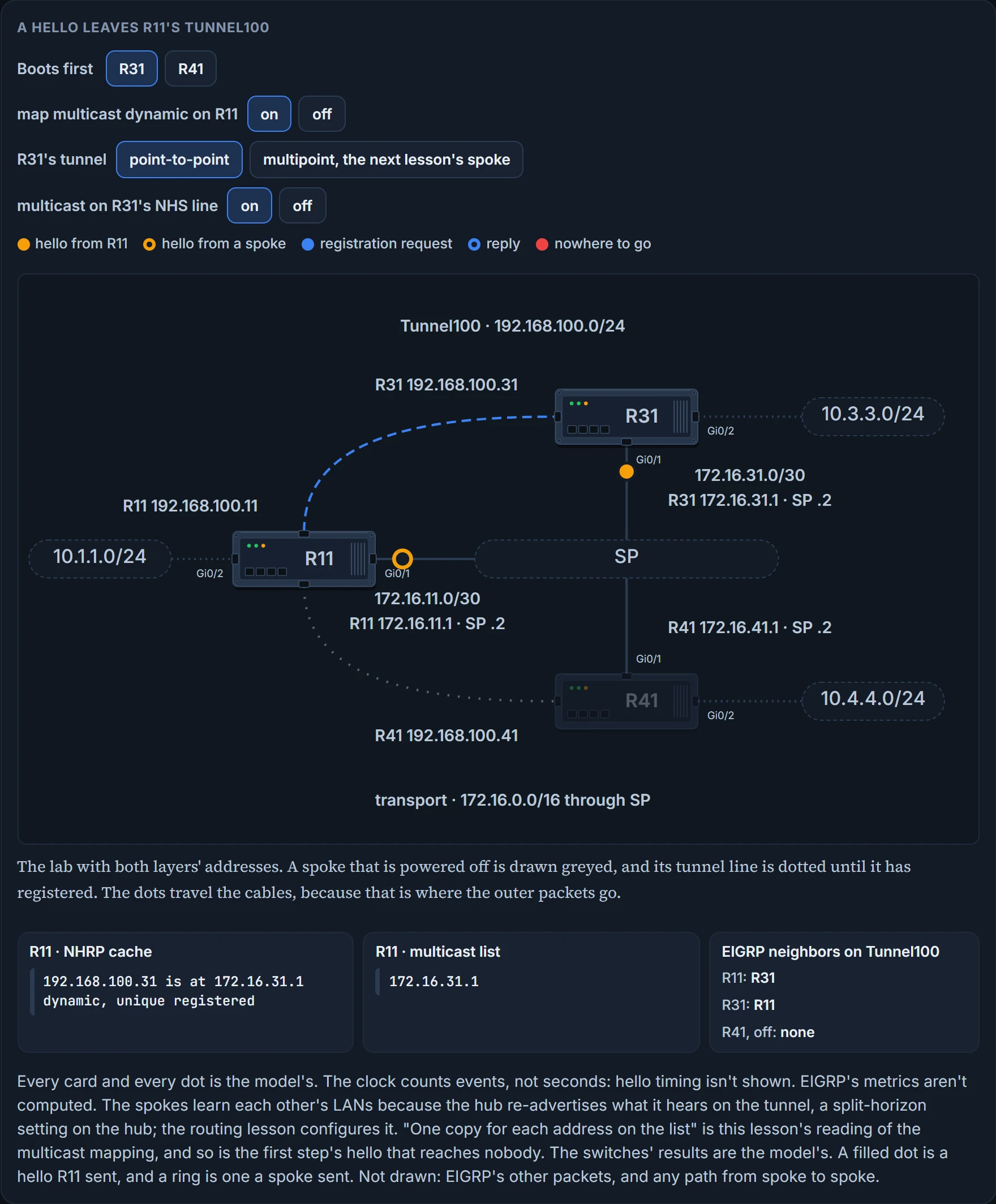
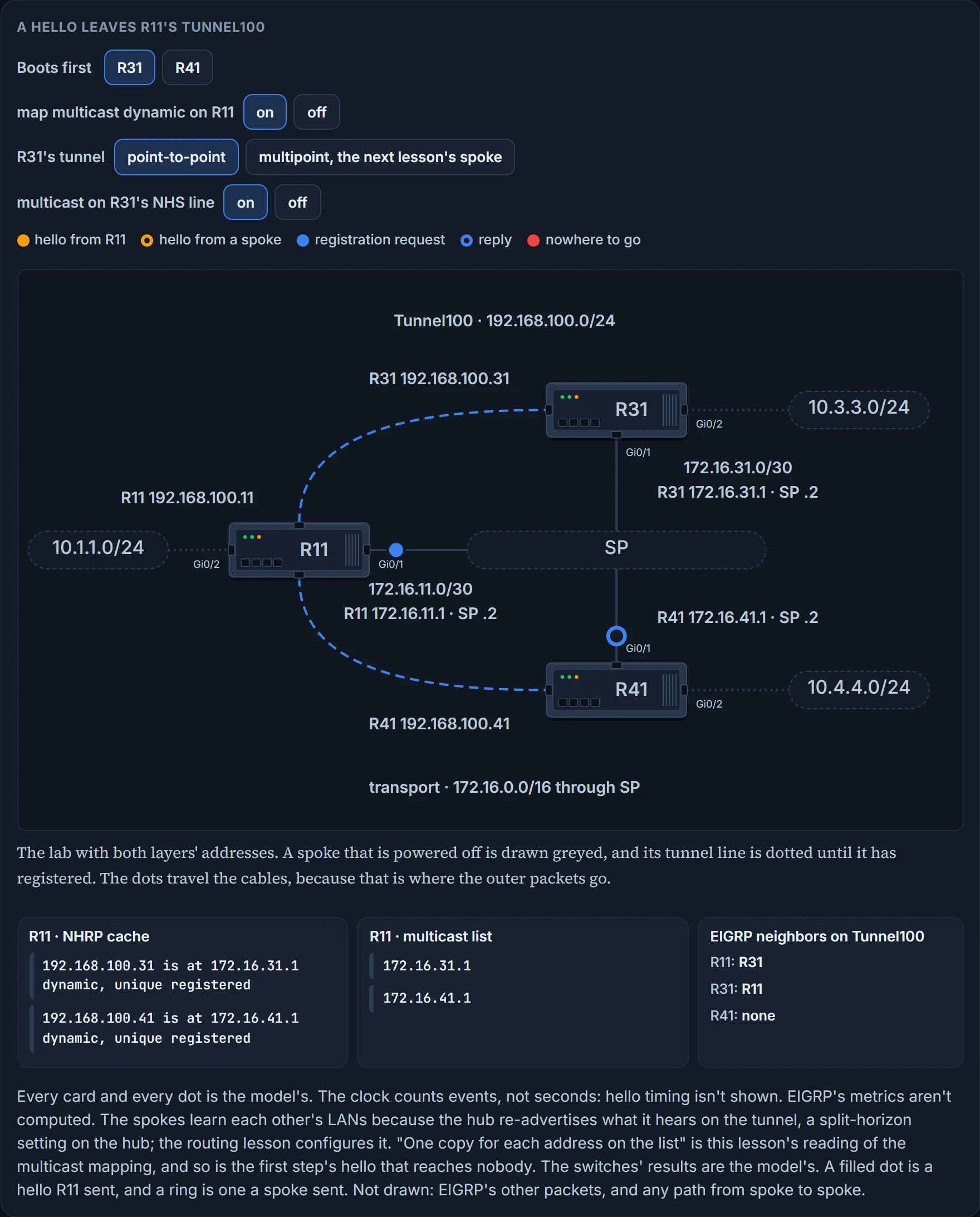
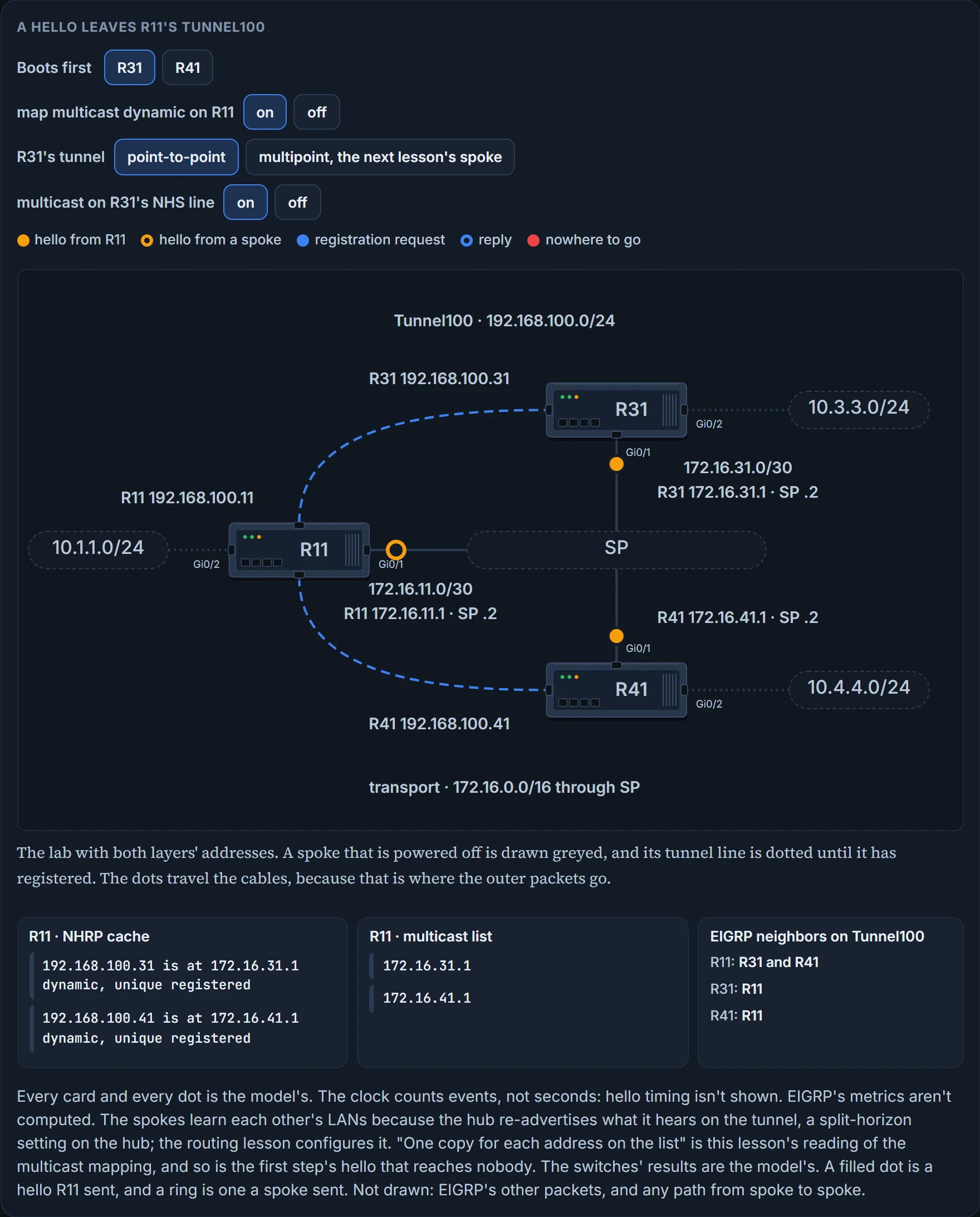
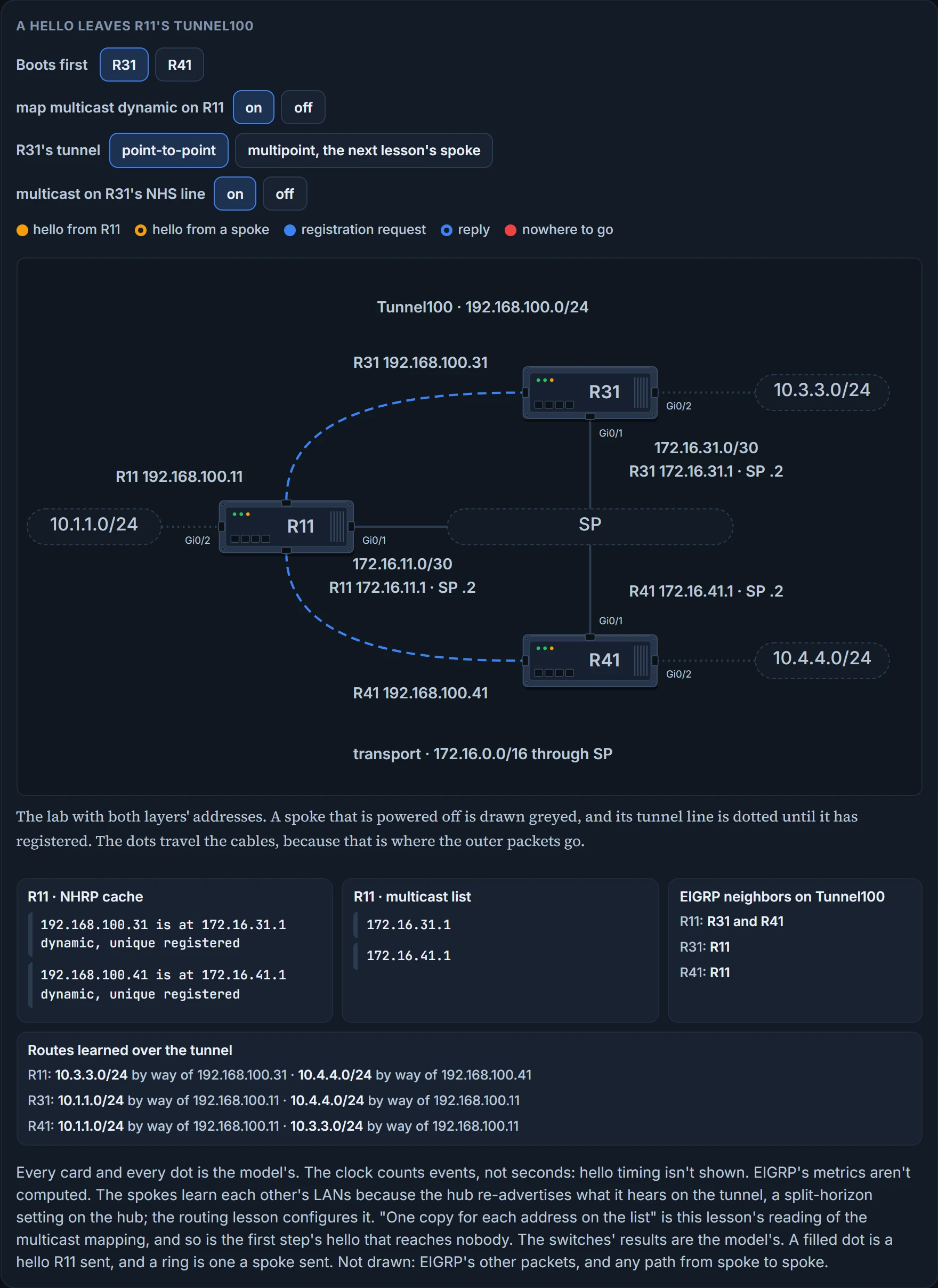
R31, and nobody else. Not "the tunnel's subnet": the list has one address on it. When R41 boots and registers, the list has two, the next hello goes to both, and R41 becomes a neighbor. Neighbors appear on the hub one by one, in the order spokes register, and the hub's routing configuration never names any of them.
That's what this course takes the exam topic "Dynamic neighbor" to mean in the first place: routing neighbors the hub was never told about, arriving because registration put them on the multicast list. One more for the exam, true or false: DMVPN supports multicast. True. BGP has its own way of accepting neighbors it wasn't told about; the routing lesson later in this module has it.
Do you have to type the line? It's an optional step, and it's in every hub configuration you'll be shown. On current software it is enabled by default. Type it anyway: it costs nothing, it matches every exhibit you'll be shown, and it tells the next reader what the hub relies on.
The spoke's side is the multicast keyword on the NHS line. It provides multicast mapping functions in NHRP and is required to support RIP, EIGRP and OSPF. That is the answer to give in the exam and the rule to follow at the keyboard: type the keyword. The three-line form's version of it is ip nhrp map multicast nbma-address: a static multicast mapping of that kind is required on multipoint GRE tunnels and not required on point-to-point GRE tunnels, and what it does is enable the use of a dynamic routing protocol between the spoke and hub, and send multicast packets to the hub router. The list itself has a display, show ip nhrp multicast. IPv6 has the same pair: the hub's line is ipv6 nhrp map multicast dynamic, and the list is read with show ipv6 nhrp multicast, which displays NHRP multicast mapping information.
Now the routing table that results. Here's the lab once more, with a path on it that the tables are about to explain:
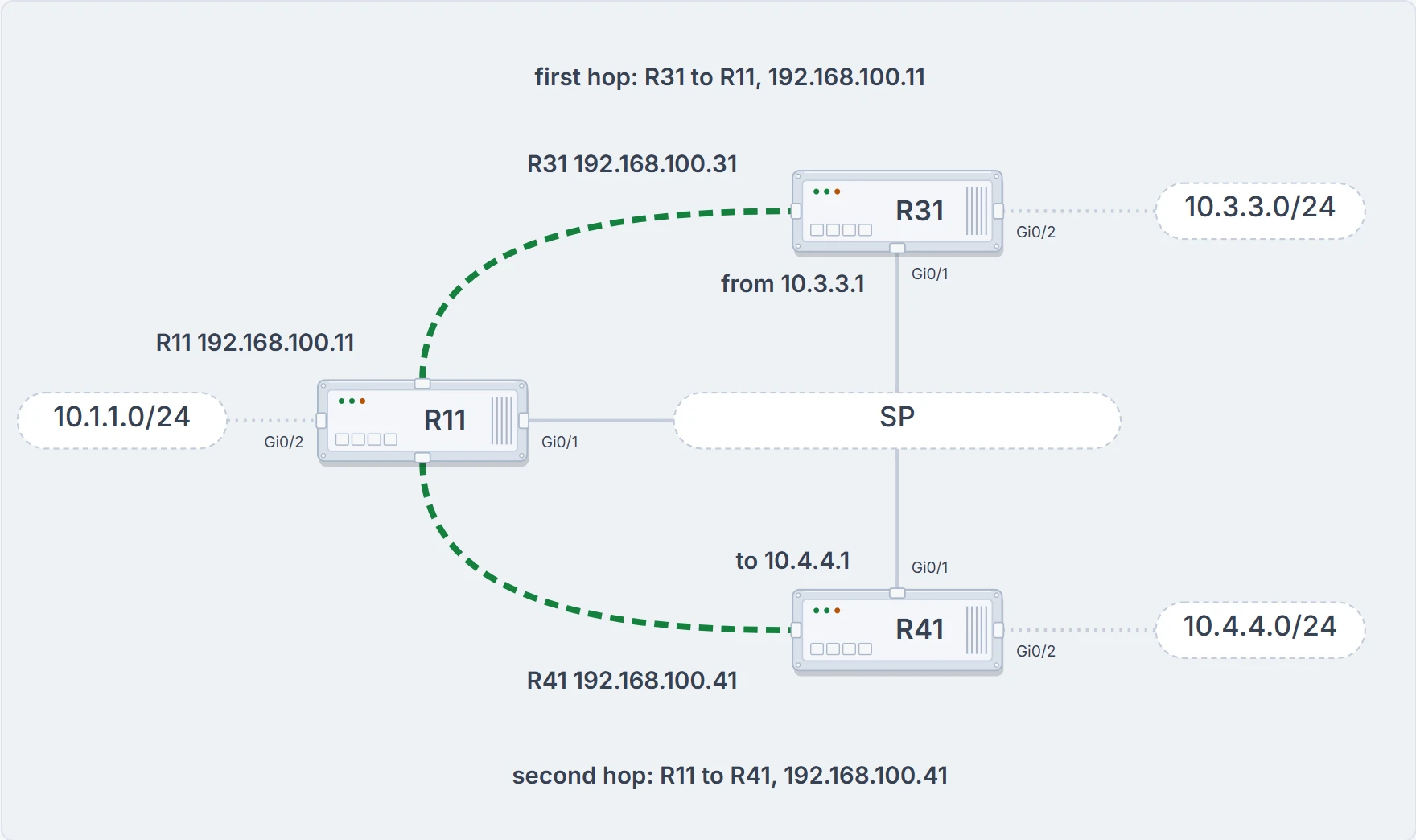
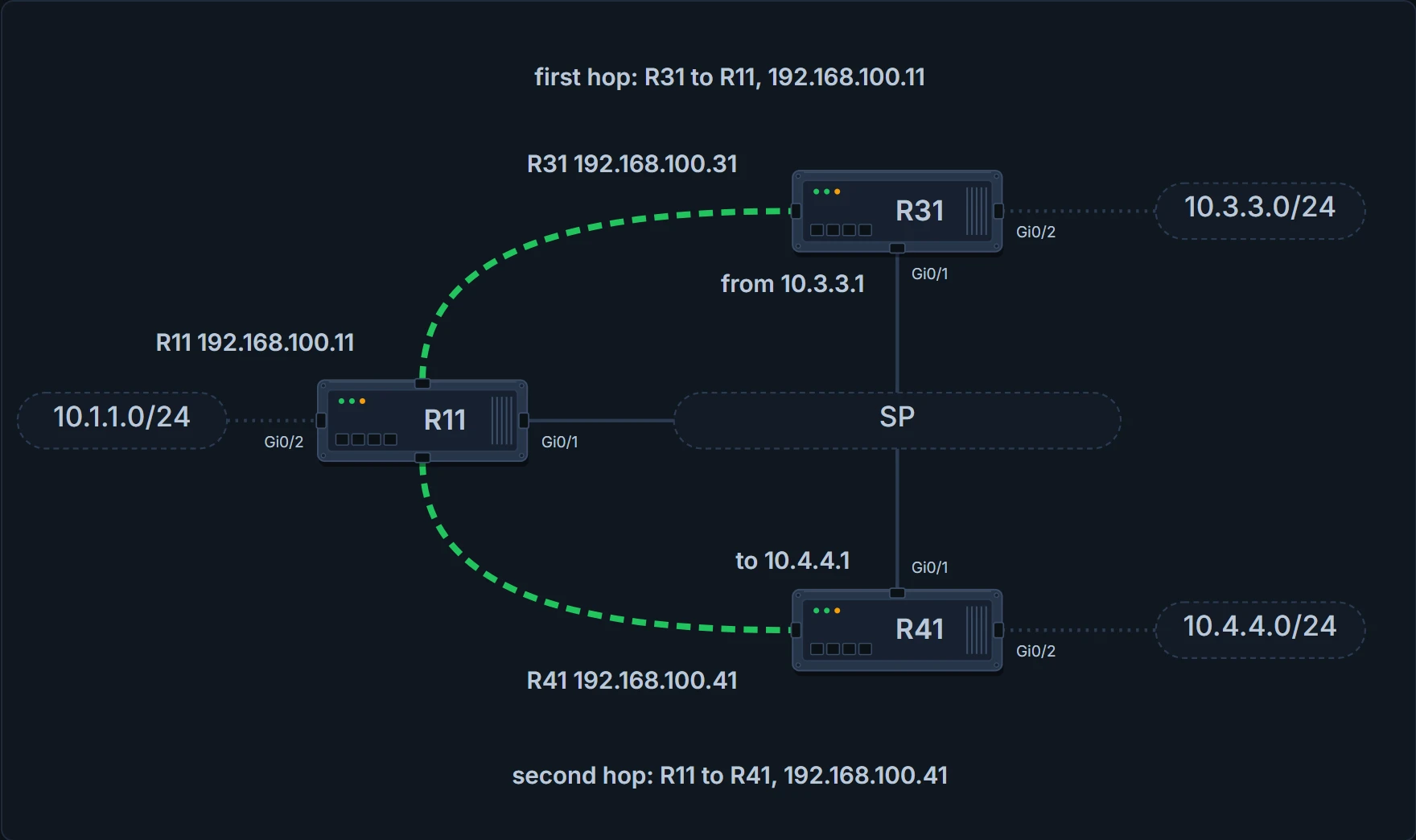
The lab again, with the path of a trace from 10.3.3.1 to 10.4.4.1 drawn heavier along the two tunnel lines: R31 to R11, hop 192.168.100.11, then R11 to R41, hop 192.168.100.41. The path is the model's, from the routes the three tables hold.
The routes each router learned over the tunnel, trimmed to those. On R11:
D  10.3.3.0/24 [90/27392000] via 192.168.100.31, Tunnel100
D  10.4.4.0/24 [90/27392000] via 192.168.100.41, Tunnel100
On R31:
D  10.1.1.0/24 [90/26885120] via 192.168.100.11, Tunnel100
D  10.4.4.0/24 [90/52992000] via 192.168.100.11, Tunnel100
On R41:
D  10.1.1.0/24 [90/26885120] via 192.168.100.11, Tunnel100
D  10.3.3.0/24 [90/52992000] via 192.168.100.11, Tunnel100
All three routers reach all three LANs. Look at R31's route to R41's LAN: the next hop is 192.168.100.11. The next-hop address between spoke routers is R11. R31 has no neighbor called R41 and no mapping for it. (For R31 to hear about 10.4.4.0/24 at all, the hub has to advertise a route back out of the interface it arrived on, which is the split-horizon setting on a hub: left on, EIGRP will not advertise routes learned through that interface back out of it. The routing lesson configures it.) The tables prove where each router would send a packet. They don't prove one gets there.
The trace does that, for one path: from 10.3.3.1 to 10.4.4.1, hop one is 192.168.100.11 and hop two is 192.168.100.41. R31 can connect to R41, but the traffic must still pass through R11. On the hub, that packet arrives through the tunnel and leaves by the same tunnel: R11 looks up the next hop 192.168.100.41 in its NHRP cache, finds the NBMA address 172.16.41.1, and forwards the packet out of the same tunnel interface. The cache row you learned to read, doing its unicast job.
We haven't confirmed on a router, for this section: what no ip nhrp map multicast dynamic does on a router where the line is on by default; what show ip nhrp multicast prints; and whether a point-to-point spoke forms its neighbor without the multicast keyword. A Phase 1 spoke sends everything to its one tunnel destination, so the keyword may change nothing until the spoke's tunnel becomes multipoint in the next lesson: that is what the figure's switch shows, and it is the model's result. The rule to type the keyword is right either way.
What you just built has a name
You've built Phase 1 DMVPN, and now the usual description of DMVPN will read as a summary instead of a promise: a VPN architecture that combines multipoint GRE tunnels, IPsec and NHRP for dynamic VPN tunnel creation and registration. Two of the three are on your screen; IPsec is this module's last lesson.
What the design buys:
- Zero-touch provisioning. The hubs need no additional configuration when spokes are added, which is why DMVPN is called a zero-touch technology, and the spokes can use a templated tunnel configuration. You watched the first half when R31 booted. Notice the second half's wording: templated, not absent. The spoke still names the hub, twice.
- Scalable deployment. Spokes keep minimal peering and minimal permanent state, which allows massive scale, and scale isn't limited by the device, whether physical, virtual or logical.
- Spoke-to-spoke tunnels. Full-mesh connectivity from configuring only the spoke-to-hub tunnel; dynamic spoke-to-spoke tunnels are created as needed and torn down when no longer needed. The next lesson.
- Flexible network topologies. DMVPN makes no rigid assumptions about the overlay's control-plane or data-plane topology. The control plane can be highly distributed and resilient, for massive scale with no single point of failure or congestion. Or it can be centralized, for a single point of control.
- Multiprotocol support. IPv4, IPv6 and MPLS can each be the overlay or the transport network protocol.
- Multicast support. Multicast traffic can flow on the tunnel interfaces. The hello section.
- Adaptable connectivity. DMVPN routers can establish connectivity from behind NAT, and spokes can use dynamic IP addressing such as DHCP. The unique flag is the small print on the second.
- Standardized building blocks. NHRP, GRE and IPsec, each an industry standard.
DMVPN came out in three phases, each adding functions to the one before. All three need only one tunnel interface on a router, and the DMVPN network is sized to hold every endpoint on that tunnel network. Spokes can use DHCP or static addressing for the transport and the overlay, and they find the other spokes' addresses, protocol and NBMA, through NHRP.
Phase 1 is where you are: the first DMVPN implementation, a zero-touch deployment for VPN sites. Tunnels are built only between spoke and hub, so traffic between spokes must traverse the hub. That is the trace you just read, stated as a design. Where it's heading: the spoke keeps a persistent tunnel to the hub, and DMVPN builds a tunnel between two spoke sites as needed, so that traffic such as voice takes the direct path, with less delay and jitter and no bandwidth used at the hub site. The persistent connection is this lesson. The as-needed one is the next.
One for the exam sits on the boundary: what is the configuration difference between DMVPN Phase 1 and Phase 2 on the hub router? There is none: that's the answer to give. The difference between those two phases is on the spokes.
Two housekeeping lines before you leave Phase 1. Each DMVPN phase has its own specific configuration, and intermixing DMVPN phases on the same tunnel network is not recommended: a migration should use a second DMVPN network, with its own subnet and tunnel interface. And this course teaches the fundamentals with Phase 1, then builds Phase 3; Phase 2 is named in the next lesson and not configured.
The same tunnel in IPv6
DMVPN uses GRE tunnels and is capable of tunneling multiple protocols. Enhancements to NHRP added support for IPv6, so that mGRE tunnels can find the appropriate IPv6 addresses; DMVPN supports IPv4 and IPv6 as the tunnel protocol or the transport protocol, in the combination required.
That's two independent choices. The first is the tunneled protocol, the overlay: for all the commands explained for IPv4 there are equivalent commands for IPv6, and for this lesson's commands the rule is to write ipv6 where you wrote ip: ipv6 mtu, ipv6 tcp adjust-mss, ipv6 nhrp network-id, ipv6 nhrp nhs nhs-address nbma nbma-address [multicast], ipv6 nhrp authentication, ipv6 nhrp registration no-unique. The same list is longer than this lesson: it also carries redirect, shortcut, holdtime, registration timeout and a priority option on the server line, for the next two lessons. The second choice is the transport, the underlay, and it has one tunnel line: tunnel mode gre multipoint becomes tunnel mode gre multipoint ipv6. Every other tunnel command is the same on either transport. The one other transport line, the default route in the transport's VRF, waits for the routing lesson.
Three combinations involve IPv6: IPv4 over IPv6, IPv6 over IPv6, and IPv6 over IPv4, the first word being the tunneled protocol and the last the transport. The selection rule: take the tunnel-protocol commands for what's inside, and the transport commands for what's outside. Get that choice right before you type anything. One detail makes the mixed cases possible: the nhs-address and the NBMA-address on the NHS line can be IPv4 or IPv6 addresses. So an IPv6 overlay on an IPv4 underlay has an NHS line with an IPv6 address before nbma and an IPv4 address after it. Same rule as before: overlay first, underlay after the keyword.
And the thing network engineers commonly overlook: it is vital that a unique IPv6 link-local IP address be assigned to the tunnel interface when the tunneling protocol is IPv6, because IPv6 routing protocols use link-local addresses to discover each other and for installation into the routing table. The last lesson gave our tunnel one for that reason. The scope of "unique": one link-local address per IPv6 NHRP interface, unique across all DMVPN hosts in the DMVPN cloud, hubs and spokes.
The display commands follow the same pattern: show ipv6 nhrp [brief | detail], show dmvpn [ipv6] [detail], show ipv6 nhrp traffic, show ipv6 nhrp nhs [detail], each with its ip twin. The traffic form displays NHRP traffic statistics. show ip nhrp nhs detail displays NHRP holdtime details, so it waits for the routing lesson, where the timers are.
The sample is IPv6 over IPv6 on the same three routers. Its addresses follow a scheme: 2001:db8 first, the address space reserved for IPv6 documentation, then each octet of the old IPv4 address copied into a hextet, so 172.16.11.1 becomes 2001:db8:172:16:11::1. The masks grow to match: a /24 becomes a /80, a /30 a /126 and a /32 a /128. Here are the lines of R11's tunnel that belong to this lesson; its description, bandwidth, holdtime, redirect and VRF lines are trimmed, and they belong to the next two lessons:
interface Tunnel100
 ipv6 tcp adjust-mss 1360
 ipv6 address FE80:100::11 link-local
 ipv6 address 2001:DB8:192:168:100::11/80
 ipv6 mtu 1380
 ipv6 nhrp authentication CISCO
 ipv6 nhrp map multicast dynamic
 ipv6 nhrp network-id 100
 tunnel source GigabitEthernet0/1
 tunnel mode gre multipoint ipv6
 tunnel key 100
The tunnel has a regular IPv6 address as well as a link-local one, and the tunnel number is worked into the link-local address. ipv6 mtu 1380 stands where the IPv4 tunnels had 1400: 20 lower, and an outer IPv6 header is 20 bytes longer than an outer IPv4 one. That reason is this lesson's arithmetic. The spokes in this sample carry ipv6 nhrp nhs 2001:DB8:192:168:100::11 nbma 2001:DB8:172:16:11::1 multicast. They also carry ipv6 nhrp map multicast dynamic, the line the hello section taught as the hub's. They are not Phase 1 spokes: they have tunnel mode gre multipoint ipv6 and ipv6 nhrp shortcut, so this is the Phase 3 form, and the next lesson reads the rest of it. Their if-state nhrp line belongs to failure detection, in the routing lesson.
For verification, show dmvpn [detail] can be used for any DMVPN tunnel regardless of the tunnel or transport protocol; the data is structured slightly differently because of the IPv6 address format, and it provides the same information as before. On R31, with the legend trimmed and the server's line cut short:
R31-Spoke# show dmvpn detail
Interface Tunnel100 is up/up, Addr. is 2001:DB8:192:168:100::31, VRF ""
  Tunnel Src./Dest. addr: 2001:DB8:172:16:31::1/MGRE, Tunnel VRF "INET01"
  Protocol/Transport: "multi-GRE/IPv6", Protect ""
  Interface State Control: Enabled
  nhrp event-publisher : Disabled
IPv6 NHS:
2001:DB8:192:168:100::11  RE NBMA Address: 2001:DB8:172:16:11::1 priority = 0 clus
Type:Spoke, Total NBMA Peers (v4/v6): 2
   1.Peer NBMA Address: 2001:DB8:172:16:11::1
       Tunnel IPv6 Address: 2001:DB8:192:168:100::11
       IPv6 Target Network: 2001:DB8:192:168:100::11/128
       # Ent: 2, Status: UP, UpDn Time: 00:00:53, Cache Attrib: S
! Following entry is shown in the detailed view and uses link-local addresses
   2.Peer NBMA Address: 2001:DB8:172:16:11::1
       Tunnel IPv6 Address: FE80:100::11
       IPv6 Target Network: FE80:100::11/128
       # Ent: 0, Status: NHRP, UpDn Time: never, Cache Attrib: SC
Same fields as before, laid out as a block for each peer where IPv4 had a row. The transport half of Protocol/Transport now reads IPv6, and the NHS line shows IPv6 addresses. This is a Phase 3 spoke, so its destination is MGRE; Tunnel VRF and Interface State Control are filled in, by lines the routing lesson types.
Now the peers. One hub, and two numbered entries with the same NBMA address. The second has the hub's link-local address, FE80:100::11, as its tunnel address: that entry is shown in the detailed view and uses link-local addresses, as its comment line says. The first entry prints # Ent: 2 and UP; the second prints # Ent: 0, Status NHRP, UpDn Time never and Cache Attrib SC. SC is two of the legend's letters: S for Static, and C for CTS Capable. Don't read that NHRP the way you learned to read a spoke's only row: by the first entry this spoke is registered and UP.
A hub shows the same pairing from the other side: a registered row for each spoke's global address and one for its link-local. Look for those link-local rows in the full show ipv6 nhrp, not in the brief form, whose banner you read earlier.
One newer option on the server line: ipv6 nhrp nhs takes a scope attribute, and set to global, the spoke registers only with its global unicast address and the link-local is not used.
We haven't confirmed on a router, for this section: what the NHRP status on the link-local entry means; that the brief form of the IPv6 command carries the same banner as the IPv4 one; and the IPv6 server line of a Phase 1, point-to-point spoke on an IPv4 underlay, which is what our network's spokes use in the next section and is this lesson's application of the rules above.
Our network: two of three
Back to HQ-HUB. Today's change converts the last lesson's tunnel and adds two branches.
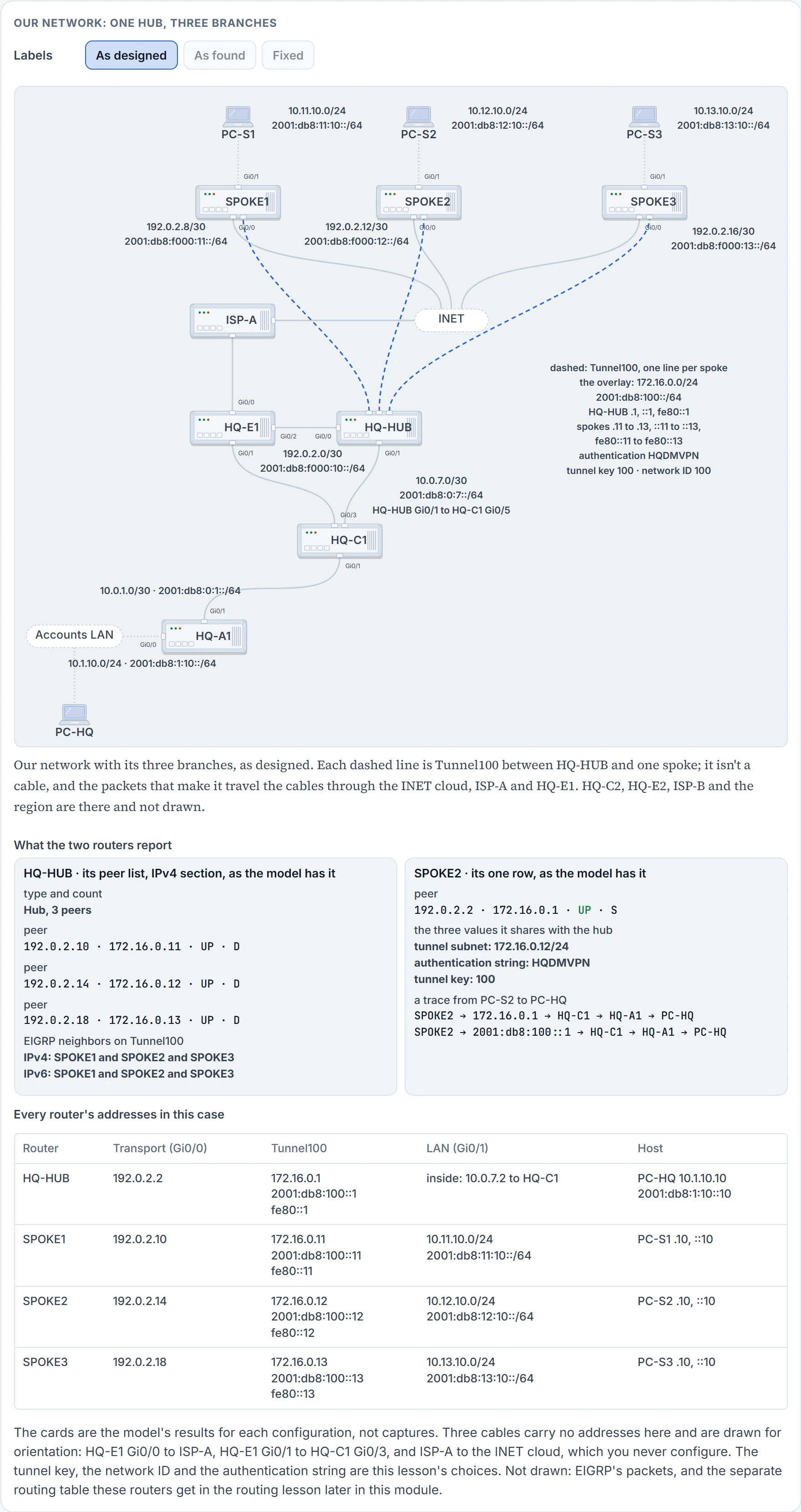
The underlay is IPv4, the 192.0.2 addresses, and both families ride inside: "IPv4 over IPv4" and "IPv6 over IPv4" on one interface. The routes it relies on are static, as before: each spoke has a static default to its provider (192.0.2.9, .13 and .17), HQ-HUB reaches 192.0.2.0/24 by way of 192.0.2.1, and nothing that starts with 192.0.2 is in EIGRP. EIGRP 100 runs on Tunnel100 and the LANs in both families.
HQ-HUB's Tunnel100 loses tunnel destination 192.0.2.10 and keepalive 5 3, and gains:
 tunnel mode gre multipoint
 tunnel key 100
 ip nhrp network-id 100
 ip nhrp authentication HQDMVPN
 ip nhrp map multicast dynamic
 ipv6 nhrp network-id 100
 ipv6 nhrp authentication HQDMVPN
 ipv6 nhrp map multicast dynamic
Each spoke keeps its point-to-point tunnel (source Gi0/0, destination 192.0.2.2), with its own addresses, no keepalive, and these lines:
 tunnel key 100
 ip nhrp network-id 100
 ip nhrp authentication HQDMVPN
 ip nhrp nhs 172.16.0.1 nbma 192.0.2.2 multicast
 ipv6 nhrp network-id 100
 ipv6 nhrp authentication HQDMVPN
 ipv6 nhrp nhs 2001:db8:100::1 nbma 192.0.2.2 multicast
The ticket, next morning: "PC-S1 and PC-S3 reach HQ. PC-S2 reaches nothing at HQ, IPv4 or IPv6. SPOKE2's Tunnel100 is up/up, and SPOKE2 can ping 192.0.2.2."
Start where you can see the whole cloud. On HQ-HUB, the peer list says Type:Hub with two peers, 192.0.2.10 and 192.0.2.18, both UP, both D. Two of three. (Every display in this case is described, not captured: the states are the model's results.)
Not HQ-HUB's configuration. There's no SPOKE2 line on it to be wrong, and there never was one.
On SPOKE2, up/up proves what the last lesson said it proves: a route to 192.0.2.2 exists, here the static default. The ping proves the underlay carries packets both ways between the two transport addresses. Neither is about NHRP. SPOKE2's own peer list has one row, the hub's two addresses, 192.0.2.2 and 172.16.0.1, typed, so attribute S; and its state is NHRP: asked, and not told yes. No EIGRP neighbor on Tunnel100 in either family.
So the spoke is asking and the hub isn't answering. Three values have to agree between a spoke and its hub: the subnet, the authentication string and the tunnel key. Here is SPOKE2's Tunnel100 as it's configured. Compare it with the block above, line by line.
interface Tunnel100
 bandwidth 4000
 ip address 172.16.0.12 255.255.255.0
 ipv6 address fe80::12 link-local
 ipv6 address 2001:db8:100::12/64
 ip mtu 1400
 ipv6 mtu 1400
 tunnel source GigabitEthernet0/0
 tunnel destination 192.0.2.2
 ip nhrp network-id 100
 ip nhrp authentication HQDMVPN
 ip nhrp nhs 172.16.0.1 nbma 192.0.2.2 multicast
 ipv6 nhrp network-id 100
 ipv6 nhrp authentication HQDMVPN
 ipv6 nhrp nhs 2001:db8:100::1 nbma 192.0.2.2 multicast
Subnet: 172.16.0.12/24, right. Authentication: HQDMVPN, right. NHS line: tunnel address first, transport after nbma, right. And there is no tunnel key line.
How does a router end up with every NHRP line right and no key? SPOKE2's Tunnel100 was staged a few days ago from a copy of SPOKE1's, which was the last lesson's tunnel: no key, because a point-to-point tunnel between two routers didn't need one. Last night the change note was applied on top of that. The NHRP lines were plainly new, so they were pasted. tunnel key 100 is the first line of the note's block, above them, and it reads like one of the tunnel lines the staged interface already had. It was skipped. The same change gave HQ-HUB tunnel key 100. The rule, twice over: keys, if configured, must match for a DMVPN tunnel to be established, and if the key is defined on the hub it must be defined on all the spokes. The key travels in each GRE packet, so SPOKE2's registration reaches HQ-HUB's transport address inside a GRE packet that doesn't carry the hub's key, and the hub's Tunnel100 doesn't take it as its own.
The fix is one line on SPOKE2's Tunnel100, tunnel key 100. Then prove it from the outside in.
- On SPOKE2,
show dmvpn: the row for 172.16.0.1 is UP. That proves a registration reply with code zero came back. It doesn't prove any route. - On HQ-HUB,
show dmvpn: three peers in the IPv4 section, andshow ip nhrp 172.16.0.12holds a dynamic entry with NBMA address 192.0.2.14 and the flags unique and registered. That proves the hub can now address an IPv4 packet to SPOKE2. For IPv6,show ipv6 nhrpshould hold two rows for SPOKE2, both with NBMA address 192.0.2.14: one for 2001:db8:100::12 and one for fe80::12. The link-local row is the one EIGRP for IPv6 needs, because its next hop toward SPOKE2 is fe80::12 and the hub can encapsulate to that address only through a row for it. None of these proves a hello crossed. - On both, EIGRP has a neighbor over Tunnel100 in IPv4 and in IPv6. That proves hellos cross both ways in both families. SPOKE2 holds the Accounts LAN, 10.1.10.0/24 and 2001:db8:1:10::/64, by way of 172.16.0.1 and fe80::1.
- And the hosts, because the ticket was PC-S2's. PC-S2 reaches PC-HQ at 10.1.10.10 and at 2001:db8:1:10::10, and PC-HQ reaches PC-S2 at 10.12.10.10 and at 2001:db8:12:10::10. A trace from PC-S2 has five lines in either family: SPOKE2, HQ-HUB's tunnel address (172.16.0.1, or 2001:db8:100::1), HQ-C1, HQ-A1, PC-HQ.
Nobody touched HQ-HUB.
When a branch is off the DMVPN, ask in this order:
- On the hub, count.
show dmvpn: is the spoke's row there? If it is, UP and D, skip to 5. - No row: go to the spoke. The hub has nothing to compare.
- On the spoke: the tunnel's line protocol, then a ping from its transport address to the hub's. That separates the underlay from everything else.
- On the spoke,
show dmvpn. State NHRP: compare the three shared values with the hub's (subnet, authentication, tunnel key) and read the NHS line for swapped addresses. A PAKREPLY line with (14): the hub has a unique row for this tunnel address; find out whose. - Row present, no routing neighbor: the multicast mapping.
ip nhrp map multicast dynamicon the hub; on the spoke, themulticastkeyword or map line. - Neighbor present, a route missing: the routing protocol's own checks, and split horizon at the hub.
The bad instinct is opening the hub's configuration to find the broken spoke. It isn't in there. Its twin is reading up/up on the spoke's tunnel, or a successful ping to the hub's transport address, as "the tunnel is fine": on a Phase 1 spoke both are underlay facts.
We haven't confirmed on a router, for this section: what a router shows or logs when a GRE packet without the key reaches a tunnel that has one. The rule, no match and no tunnel, is firm; that SPOKE2 shows the NHRP state and HQ-HUB shows nothing at all for it is the model's result. Nor what the peer list's IPv6 section prints for these spokes on a tunnel carrying both families, or the two IPv6 rows on the hub. None of that changes the method: the hub's missing row sends you to the spoke, and the three shared values are what you compare there.
Next: PC-S2's packet for PC-S1 goes to HQ and comes back, twice across the internet, to reach a router that's on the same provider cloud. The hub is holding both spokes' transport addresses, written down by the spokes themselves. The next lesson lets one spoke ask for the other's.
The interactive lesson
The whole lesson, with its drawings and its questions. Free with a Daveth account.