
Route Summarization
Route summarization advertises one route for a larger range of addresses instead of many routes for the smaller subnets inside it, so routing tables stay small. To find the smallest summary, count the leading bits all the routes share. A summary claims everything in its range, so it can also attract packets for addresses in the gaps.
By Arif, founder of Daveth · Updated
The full 12 min walkthrough is in Daveth Pro (Network). See what the plan opens
What this page answers
What is route summarization?
Advertising one route for a larger range of addresses instead of many routes for the smaller subnets inside it, such as one route for six /24 LANs. The point is smaller routing tables. Read it in “One route for many”
How do you calculate a summary route?
Write the first octet where the routes differ in binary and count how many leading bits they all share; add the bits of the octets before it. That is the prefix length, never longer than the shortest prefix in the list. Read it in “Finding the summary”
One route for many
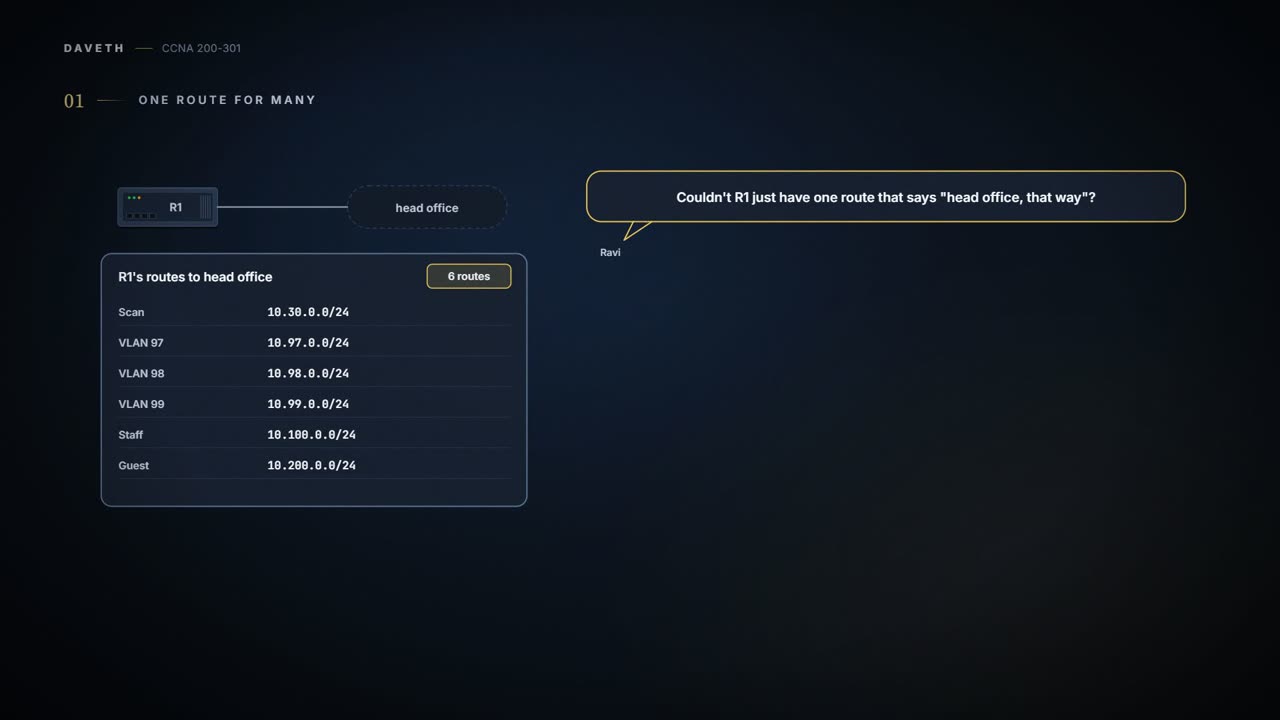
Monday of week three. Maya is looking at the routes R1 needs to reach head office. Head office has six LANs, each a /24: Scan, VLANs 97, 98 and 99, Staff and Guest. So R1 needs six routes. Ravi asks the obvious question: couldn't R1 just have one route that says "head office, that way"?
That's route summarization: advertising one route for a larger range of addresses instead of many routes for the smaller subnets inside it. The point is smaller routing tables. Only routing protocols that send the mask with each route (the classless ones, 04.5) can carry a summary: 10.50.0.0 is a valid subnet ID for several masks, so a summary means nothing without its prefix length. It's the same idea as CIDR's aggregation on the Internet (04.5's example: if one ISP held every address beginning 198, one route, 198.0.0.0/8, could stand for 65,536 Class C networks). There, addresses are assigned on purpose so that they aggregate; the same planning works inside a company. A summary changes routes, and only routes. Every subnet and every host keeps its address and mask.
One route instead of six. The routers get a shorter list; nobody's address changes.
A route is a range
A route says where to send packets for a set of destinations, and its subnet ID and mask define that set: a range of addresses, just as a subnet's are. The longer the prefix, the smaller the range, down to a /32 for one address and up to /0 for every address, which is called the default route:
| Prefix | Addresses it matches |
|---|---|
| 10.50.0.9/32 | 10.50.0.9 alone |
| 10.50.0.0/24 | 10.50.0.0 – 10.50.0.255 |
| 10.50.0.0/22 | 10.50.0.0 – 10.50.3.255 |
| 10.50.0.0/16 | 10.50.0.0 – 10.50.255.255 |
| 0.0.0.0/0 | every address: the default route |
Notice that those ranges overlap: 10.50.0.0/16 contains 10.50.0.0/22, which contains 10.50.0.0/24. Several features can put overlapping routes like these into a routing table: static routes, automatic summarization, and manual summarization, which puts a summary alongside more specific routes inside it. How a router picks between them comes with routing itself.
Finding the summary
A summary is a prefix whose range covers every route it replaces. To find the smallest one, write the first octet (from the left) where the routes differ in binary, and count how many leading bits they all share. Add the bits of the octets before it, which are the same in all of them anyway, and that's the prefix length, with one limit: it can never be longer than the shortest prefix in the list, because a summary has to be at least as big as every route it covers. The summary keeps those shared bits and sets the rest to 0.
Maya pencils in 10.50.0.0/24 and 10.50.1.0/24 for the branch's two LANs, and they show it. Both begin 10.50, so the first 16 bits match. In the third octet, 0 and 1 share their first 7 bits:
| Subnet | Third octet | In binary | Shared |
|---|---|---|---|
| Branch LAN 1, 10.50.0.0/24 | 0 | 00000000 | the first 7 bits: 0000000 |
| Branch LAN 2, 10.50.1.0/24 | 1 | 00000001 | the first 7 bits: 0000000 |
| Summary | 0 | 0000000, then 1 host bit | 16 + 7 = 23 bits: 10.50.0.0/23, 10.50.0.0 – 10.50.1.255 |
16 + 7 = 23, so one route, 10.50.0.0/23, covers exactly the branch's two LANs, 10.50.0.0 to 10.50.1.255. Why Maya chose those numbers comes at the end of the page.
A summary is always a whole block, a power of two in size, starting on a boundary for its own prefix (04.4's magic number): a /23 starts on an even third octet, a /22 on a multiple of 4. That's why neighbouring numbers don't always pair up. 10.20.1.0/24 and 10.20.2.0/24 sit side by side, but 1 is 00000001 and 2 is 00000010: they share only 6 bits, so the smallest summary is 10.20.0.0/22, four /24s. A /23 can't start at 10.20.1.0, an odd third octet.
Summaries only come in binary sizes. Two neighbouring subnets can still need room for four.
What else the summary claims
A summary promises everything in its range, not just the routes it replaced. When the listed routes fill the block exactly, that's fine. When they don't, the summary also claims the addresses in the gaps. Three /24s, 10.20.0.0, 10.20.1.0 and 10.20.2.0, need a /22, and 10.20.0.0/22 also covers 10.20.3.0/24, which none of them do. Packets for 10.20.3.7 that match no other route would follow the summary to the router that advertised it, and what happens to them there depends on the routes beyond it: if nothing there knows 10.20.3.0, they go nowhere useful.
So before trusting a summary, list the addresses it covers that none of the original routes did, and say whether those extras are unused, owned by someone else, or fine to claim. A shorter prefix makes a bigger promise.
Continue the lesson
The whole lesson, with its drawings and its questions. The rest of this section and 2 more after it.