
IPv4 Subnetting: Binary Method
Every address in a subnet has the same prefix bits: the subnet ID, the broadcast address and every usable address between them. So in binary, keep the address's prefix bits and set all its host bits to 0 for the subnet ID, and to 1 for the broadcast. The usable range is everything in between.
By Arif, founder of Daveth · Updated
The full 14 min walkthrough is in Daveth Pro (Network). See what the plan opens
What this page answers
How do you find the subnet ID in binary?
Write the address and mask in binary, keep the address's prefix bits, the ones under the mask's 1s, and set every host bit to 0. Setting every host bit to 1 gives the subnet broadcast address. Read it in “Finding them in binary”
What is a subnet ID?
A short way to write down a whole subnet: with its mask, it is enough to work out the broadcast address and every address in between. It is what routing tables list. Read it in “Subnet ID, broadcast and range”
A subnet is a run of numbers
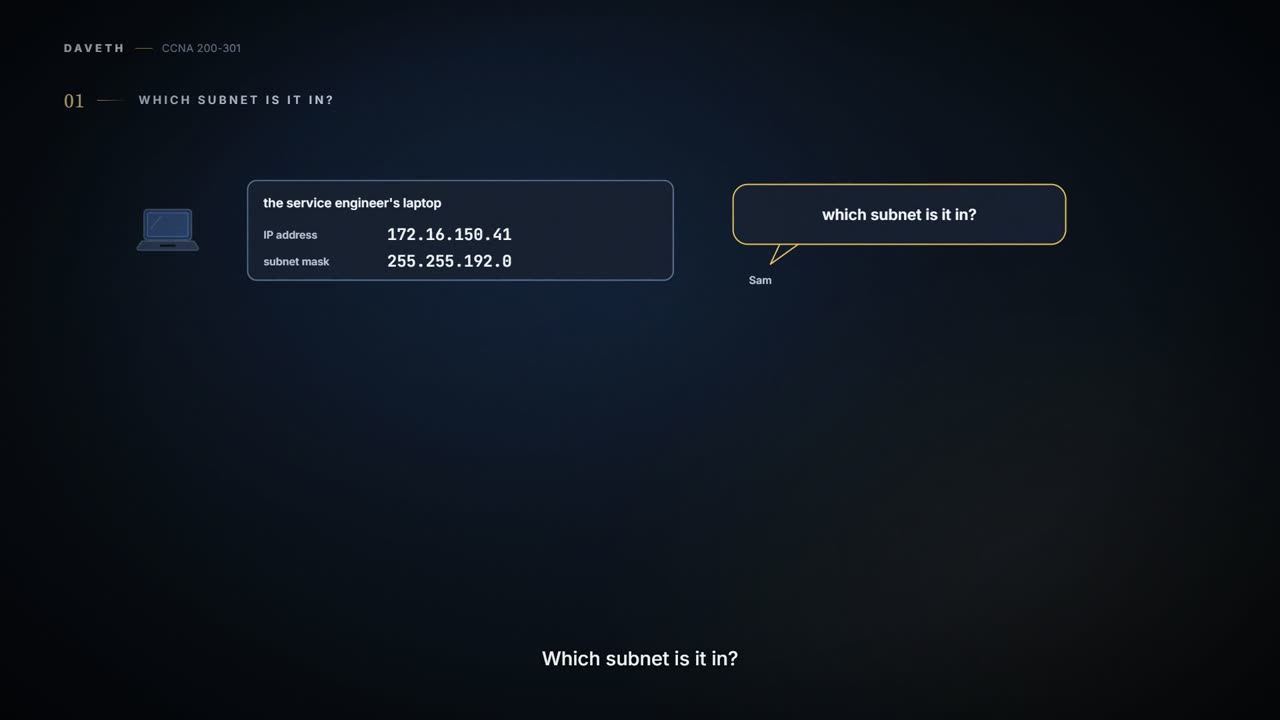
Tuesday. The printer's service engineer turns up with a laptop still set up for their own office: 172.16.150.41, mask 255.255.192.0. Sam, whose window desk is nearest the entrance, takes the laptop and asks one of the most common help-desk questions about an address: which subnet is it in? The subnet an address sits in is called its resident subnet. Maya picks up a whiteboard pen.
It's the right first question. To understand how the network routes packets to a host, you need its subnet ID, its subnet broadcast address and its range of usable addresses, and finding them from an address and mask may be the most-used skill in IP addressing when you operate and troubleshoot real networks.
The dots make 172.16.150.0 look like the answer. The /18 disagrees, and the /18 is the boss.
A subnet is a subset of a classful network, chosen by a network engineer, but not any subset the engineer fancies. It follows rules. It's a set of consecutive numbers. It holds 2^H numbers, where H is the number of host bits the mask defines. Its first (lowest) number is the subnet ID and its last (highest) is the subnet broadcast address, and neither can be used as an IP address. The numbers between them are the unicast addresses hosts use.
If you've ever stayed in a hotel, rooms 300 to 399 are all on floor 3: the floor number is like the prefix, and the rest of the room number like the host part. (Where it stops: a hotel happily lets out room 300. A subnet never gives its first or last number to a host, and its boundary falls between bits, not between decimal digits.)
Start with the mask, as 04.2 did. 255.255.192.0 is /18, and 172 is Class B, so N = 16, S = 2 and H = 14. Two subnet bits mean 2^2 = 4 subnets, and because this page assumes one mask is used throughout the network, all four have the same structure and the same size: 2^14 − 2 host addresses each. Maya draws Class B network 172.16.0.0 on the whiteboard as a number line, and the four subnets are its four quarters:


The engineer's address sits in the third quarter: subnet 172.16.128.0, which runs to 172.16.191.255. The rest of this page is how to find those two numbers from any address and mask.
Subnet ID, broadcast and range
A subnet ID is a short way to write down a whole subnet. With its mask, it's enough to work out the broadcast address and every address in between, so you don't have to write all of that down. It's seen most in routing tables, and in documentation. When you configure a router with an IP address and mask, the router calculates the subnet ID and puts a route for that subnet into its routing table. It then typically advertises the subnet ID and mask to neighbouring routers with a routing protocol, until every router in the enterprise knows the subnet.
The names are loose. Subnet ID, subnet number and subnet address mean the same thing; so does resident subnet, for the one an address is in. With routing, people also say prefix, the classless word for the same idea (as well as the prefix part of an address, from 04.2). People say plain "subnet" for both the idea and the number that is its ID. And people often say "network", "network ID", "network number" or "network address" when they mean the subnet. That's often reasonable; sometimes the difference matters. So when a colleague asks for "the net ID for 172.16.150.41 slash 18", use the context: they might mean the classful network ID, 172.16.0.0, or the subnet ID, 172.16.128.0. Exam questions use the words loosely too.
The subnet broadcast address has two jobs. The original one was to let a host send one packet to every host in a subnet. A host in subnet A sends a packet to subnet B's broadcast address; routers forward it just like a packet for a host in subnet B; and the router connected to subnet B sends it to all of B's hosts, typically inside a data-link broadcast frame. Its other job is marking the high end of the subnet's range. It's also called the directed broadcast address, and more loosely a network broadcast.
The range of usable addresses is what you need before you can plan which addresses to set statically, which the DHCP server leases, and which to keep for later. It sits between the subnet ID and the broadcast, so those come first; the last section of this page turns them into the range.
Finding them in binary
There are several ways to do the maths. This page uses binary, and 04.4 uses decimal only. Many people find decimal faster for the exam, but binary shows what the numbers mean, and it's worth understanding if you go on to certifications beyond this one.
Two facts make the binary method work. Every number in a subnet has the same value in the prefix part: the subnet ID, the broadcast and every usable address. And the subnet ID is the lowest number in the subnet, so its host part, in binary, is all 0s.
First the address has to be in binary. Use 04.2's bit weights, 128 down to 1, one octet at a time. At each weight, write a 1 if what's left is at least that weight, and subtract it; otherwise write a 0. Take 150. It's at least 128, so 1, leaving 22. 64 and 32 are too big: 0, 0. 16 fits: 1, leaving 6. 8 doesn't: 0. 4 fits: 1, leaving 2. 2 fits: 1, leaving 0. 1 doesn't: 0. So 150 is 10010110. The same way, 172 is 10101100, 16 is 00010000 and 41 is 00101001.
Then five steps find the subnet ID:
- Convert the mask to prefix format, to find the prefix length, /P, and the host part, 32 − P bits.
- Convert the IP address to its 32-bit binary form.
- Copy the prefix bits of the address.
- Write 0s for the host bits.
- Convert the result back to decimal, 8 bits at a time.
| Binary | Decimal | |
|---|---|---|
| Mask | 11111111 11111111 11000000 00000000 | 255.255.192.0 |
| Address | 10101100 00010000 10010110 00101001 | 172.16.150.41 |
| Subnet ID: prefix copied, host bits 0 | 10101100 00010000 10000000 00000000 | 172.16.128.0 |
| Broadcast: prefix copied, host bits 1 | 10101100 00010000 10111111 11111111 | 172.16.191.255 |
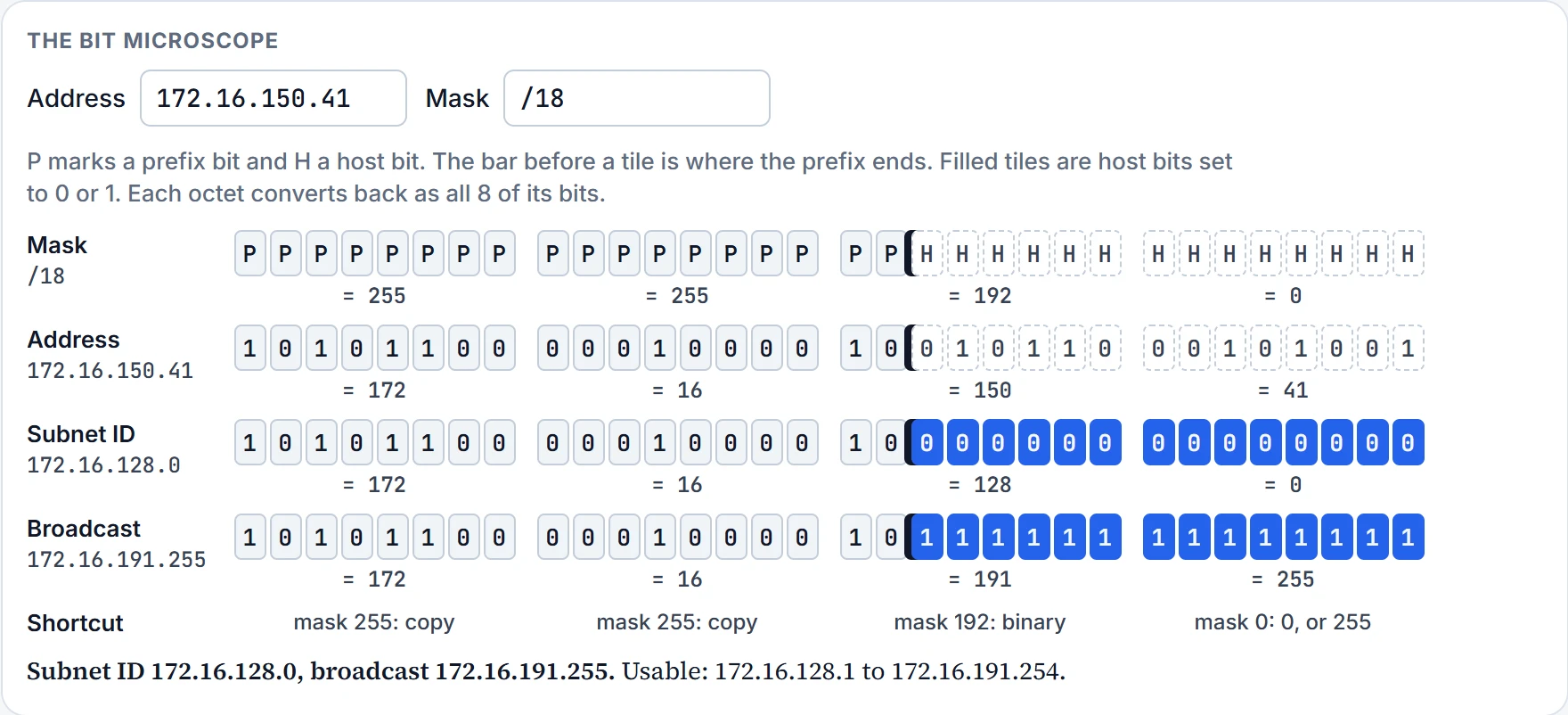
Step 5 is where people slip. Convert 8 bits at a time, whatever the line between prefix and host. The third octet here has 2 prefix bits and 6 host bits, but it converts as all 8: 10000000 is 128, so the subnet ID is 172.16.128.0. Reading the 2 prefix bits, 10, on their own as 2 would give 172.16.2.0, which isn't even in the right quarter.
The bits have different jobs, but decimal still reads them eight at a time. Bits don't get a say in the matter.
The broadcast is the same process with one change at step 4: set the host bits to 1 instead of 0. The third octet becomes 10111111, all 8 bits converted, which is 191, and the broadcast is 172.16.191.255.
Five to try on paper. Find the subnet ID and broadcast for each, and write the mask in prefix format. The microscope near the end of the page shows the bits for any of them:
- 8.1.4.5, mask 255.255.0.0
- 130.4.102.1, mask 255.255.255.0
- 199.1.1.100, mask 255.255.255.0
- 130.4.102.1, mask 255.255.252.0
- 199.1.1.100, mask 255.255.255.224
| Address, mask | Prefix | Subnet ID | Broadcast |
|---|---|---|---|
| 8.1.4.5, 255.255.0.0 | /16 | 8.1.0.0 | 8.1.255.255 |
| 130.4.102.1, 255.255.255.0 | /24 | 130.4.102.0 | 130.4.102.255 |
| 199.1.1.100, 255.255.255.0 | /24 | 199.1.1.0 | 199.1.1.255 |
| 130.4.102.1, 255.255.252.0 | /22 | 130.4.100.0 | 130.4.103.255 |
| 199.1.1.100, 255.255.255.224 | /27 | 199.1.1.96 | 199.1.1.127 |
A shortcut, and how computers do it
Converting all four octets there and back is slow, and most of it can be predicted from the dotted-decimal mask. Where a mask octet is 255, all 8 bits are prefix bits: you'd convert the address octet to binary, copy it, and convert the same bits straight back. So the subnet ID and broadcast simply copy the address's decimal value there. Where a mask octet is 0, all 8 bits are host bits, so the ID gets 0 and the broadcast gets 255. Only an octet whose mask is neither 0 nor 255 needs binary, and a mask has at most one of those.
- Mask octet 255: copy the address's decimal value.
- Mask octet 0: write 0 for the subnet ID, or 255 for the broadcast.
- Anything else: use the binary steps, for that octet only.
For 172.16.150.41 with 255.255.192.0: copy 172 and 16, work the third octet in binary, and write 0 in the fourth for the ID, or 255 for the broadcast.
Computers typically skip the conversions: they already store the address and mask in binary, and use Boolean algebra, which takes the processor just a few instructions. You don't need Boolean maths to understand subnetting, but here's what they do. A Boolean AND of the address and the mask gives the subnet ID, because it turns every host bit into 0. Inverting the mask, then doing a Boolean OR of the address and the inverted mask, gives the broadcast, because it turns every host bit into 1. (Inverting flips every bit, 1 to 0 and 0 to 1. OR gives a 1 wherever either input has a 1, so the inverted mask's 1s, which sit on the host bits, make every host bit 1.)
The AND works kind of like a stencil laid over the address: where the mask has a 1, the bit shows through, and where it has a 0, you get 0. (Where it stops: a stencil only hides things. The broadcast needs the OR, which paints every hidden bit as a 1.)
From the two ends to the range
Once you have the subnet ID and broadcast, the range is simple addition and subtraction: add 1 to the fourth octet of the subnet ID for the first usable address, and subtract 1 from the fourth octet of the broadcast for the last. For the engineer's subnet, that's 172.16.128.1 to 172.16.191.254.
With binary, most people need a lot of practice to get fast at this, which is why 04.4 exists.
The microscope below works any address and mask the binary way, with the shortcut's action shown for each octet. Here it is for 172.16.150.41 /18:
Back at the help desk: the engineer's laptop is in 172.16.128.0/18, which has nothing to do with this office, so it needs the office's settings before it can reach the printer. And 04.2 left WLC1's subnet for today. Under the plan's one mask, /24, WLC1's 10.98.0.5 is in subnet 10.98.0.0, broadcast 10.98.0.255, with 10.98.0.1 to 10.98.0.254 usable. With /24 every mask octet is 255 or 0, so the shortcut does it all without a single bit.
The engineer fixes the printer in ten minutes. The subnet took longer.
Five lines to keep
- A subnet is a run of consecutive numbers: the lowest is the subnet ID, the highest the subnet broadcast address, and the usable addresses sit between them.
- Every number in a subnet has the same prefix bits; the subnet ID's host bits are all 0s and the broadcast's all 1s.
- The binary method: address to binary, copy the prefix bits, host bits to 0 for the ID or 1 for the broadcast, then convert back 8 bits at a time.
- The shortcut: mask 255 copies the octet, mask 0 gives 0 for the ID and 255 for the broadcast, and at most one octet needs binary.
- First usable address: the ID plus 1. Last: the broadcast minus 1.
Next, 04.4: 199.1.1.100/27 gave 96 to 127 in binary. Can you find that without writing a single bit?
The interactive lesson
The whole lesson, with its drawings and its questions. Free with a Daveth account.