
Binary Numbers, Subnet Masks and Prefix Lengths
The first octet of an IPv4 address gives its class: A is 1 to 126, B 128 to 191, C 192 to 223, D is multicast and E reserved. A subnet mask is a 32-bit number with all its 1s on the left and its 0s on the right, written three ways: binary, dotted decimal like 255.255.255.0, or a prefix like /24.
By Arif, founder of Daveth · Updated
The full 16 min walkthrough is in Daveth Pro (Network). See what the plan opens
What this page answers
What are the IP address classes A, B, C, D and E?
Classes A, B and C are unicast, with first octets 1 to 126, 128 to 191 and 192 to 223, and default masks 255.0.0.0, 255.255.0.0 and 255.255.255.0. Class D, 224 to 239, is multicast; Class E is reserved. Read it in “Five classes of address”
What is a subnet mask?
A 32-bit number whose 1s are all on the left and 0s all on the right, marking where the prefix ends and the host part begins. It can be written in binary, in dotted decimal such as 255.255.255.0, or as a prefix length such as /24. Read it in “Three ways to write a mask”
Does /24 mean 24 computers?
No. /24 is a prefix length: the mask has 24 binary 1s, which leaves 8 host bits and 254 usable host addresses. Read it in “Three ways to write a mask”
Masks, and the classes behind them
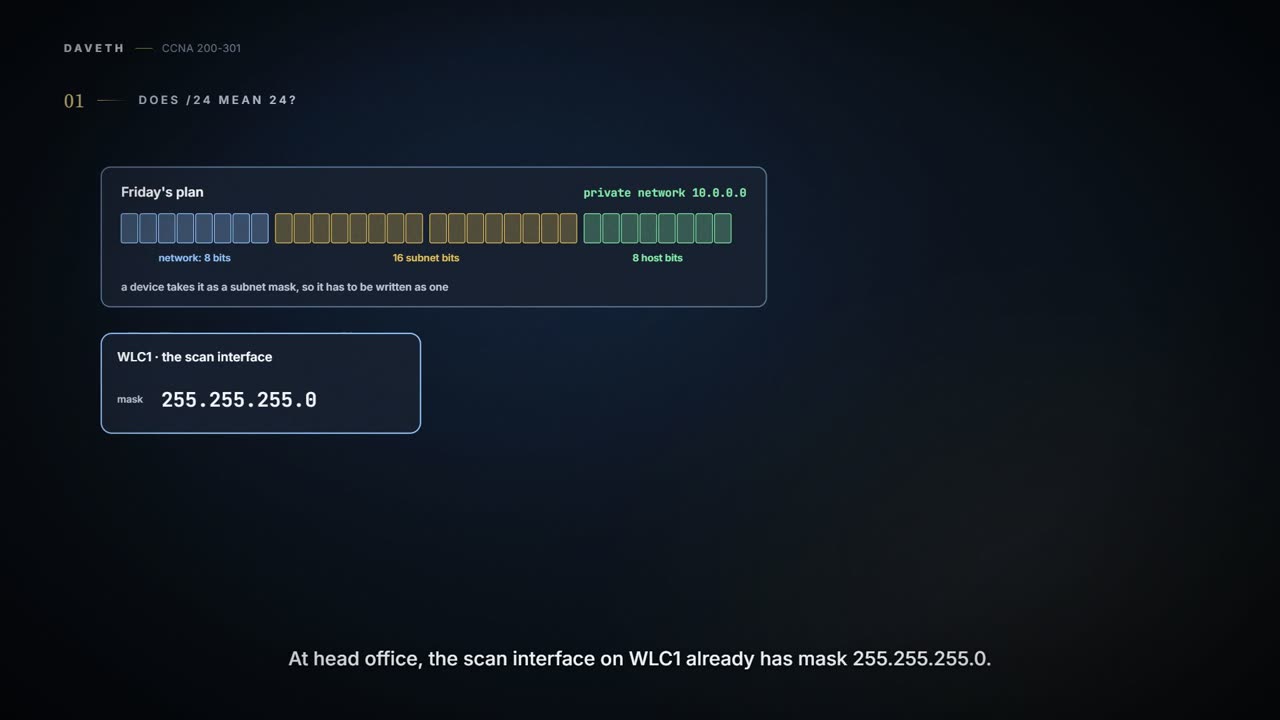
Monday. Friday's printed plan is on Maya's desk: private network 10.0.0.0, 16 subnet bits, 8 host bits. Before any device gets a new address, the plan has to be written as a subnet mask, because that's the form devices take it in. At head office, the scan interface Ravi set up on WLC1 last Thursday already has mask 255.255.255.0. The planning tool Maya found writes /24. Sam, reading both over her shoulder, asks whether /24 means twenty-four computers.
Nobody answers straight away, which is usually the sign of a good question.
When you operate a network, a problem often starts from one IP address and its mask. From the address alone you should be able to say a lot about the Class A, B or C network it's in, and from the mask, a lot about how that network was subnetted. This page covers both: first the classes, then the masks, the three ways to write one, and what a mask says about the address it's paired with.
Five classes of address
IPv4 defines five address classes. Classes A, B and C are unicast addresses: each identifies a single host or interface. Class D addresses are multicast: one packet sent to a Class D address can be delivered to several hosts. Class E was meant for experiments and is now simply reserved for future use. The first octet tells you the class:
| Class | First octet values | Purpose |
|---|---|---|
| A | 1–126 | Unicast (large networks) |
| B | 128–191 | Unicast (medium-sized networks) |
| C | 192–223 | Unicast (small networks) |
| D | 224–239 | Multicast |
| E | 240–255 | Reserved (formerly experimental) |
Once you know an address is Class A, B or C, the rest of its facts follow, and they're worth memorising:
| Class A | Class B | Class C | |
|---|---|---|---|
| First octet range | 1–126 | 128–191 | 192–223 |
| Valid network numbers | 1.0.0.0 – 126.0.0.0 | 128.0.0.0 – 191.255.0.0 | 192.0.0.0 – 223.255.255.0 |
| Total networks | 2^7 − 2 = 126 | 2^14 = 16,384 | 2^21 = 2,097,152 |
| Hosts per network | 2^24 − 2 = 16,777,214 | 2^16 − 2 = 65,534 | 2^8 − 2 = 254 |
| Octets (bits) in network part | 1 (8) | 2 (16) | 3 (24) |
| Octets (bits) in host part | 3 (24) | 2 (16) | 1 (8) |
| Default mask | 255.0.0.0 | 255.255.0.0 | 255.255.255.0 |
The gaps are deliberate. Addresses beginning 0 or 127 have been reserved since Class A networks were first defined, in RFC 791 in 1981, which is why there are 126 Class A networks and not 128. What would have been network 0.0.0.0 was originally reserved for some broadcasting requirements. What would have been 127.0.0.0 is still reserved for the loopback address, 127.0.0.1, used in software testing. Classes B and C have no reserved ranges at their ends. Newer RFCs have reserved small pieces of all three classes as well, so network counts like these change slowly over time.
To give software testing one loopback address, the class system gave up a whole would-be Class A network, over 16 million addresses. Generous.
The numbers and sizes differ hugely. Only 126 Class A networks exist, each with over 16 million host addresses, and they were meant for the largest organisations. There are 16,384 Class B networks, with over 65,000 hosts each, and over 2 million Class C networks, for small organisations, with 254 hosts each.
One address, its whole network
Sometimes you need to think about a Class A, B or C network as if it hadn't been subnetted. Then its addresses have two parts: the network part (sometimes called the prefix) and the host part. Addresses in the same network have the same network part and different host parts. In Class A network 10.0.0.0 the network part is the first octet, so 10.1.1.1 and 10.1.1.2 share the 10 and differ in the last three octets.
People can hold that idea in their heads; computers want numbers. So each class has a default mask, with binary 1s for the bits in the network part and 0s for the bits in the host part. Class A's is 255.0.0.0, which in binary is 11111111 00000000 00000000 00000000 (decimal 255 is 11111111, and 0 is 00000000). Class B's default mask is 255.255.0.0 (11111111 11111111 00000000 00000000), and Class C's is 255.255.255.0 (11111111 11111111 11111111 00000000).
Counting the hosts takes a little binary. One bit has two values, 0 and 1; two bits make four, 00, 01, 10 and 11; n bits make 2^n. Each host needs a unique value in the host part, so H host bits give 2^H combinations. But a network holds 2^H − 2 hosts, not 2^H, because it reserves two numbers: one for the network ID and one for the network broadcast address.
Those two, with the first and last usable addresses, are the four numbers that describe a classful network, and one address is enough to find them all. The network ID (also called the network number or network address) is the numerically lowest number, and, to prevent any ambiguity, it can't be assigned to a host; the first usable address is one more. The network broadcast address is the highest number: a packet sent to it would have routers forward a copy to every host in that classful network. The last usable address is one less. Six steps find all four:
- Find the class (A, B or C) from the first octet.
- Split the address into network octets and host octets; the class says how many of each.
- Network ID: change the host octets to 0.
- First address: add 1 to the fourth octet of the network ID.
- Broadcast address: change the network ID's host octets to 255.
- Last address: subtract 1 from the fourth octet of the broadcast address.
Written down, that looks harder than it is. Here it is on WLC1's management address:
| Step | What to do | Result |
|---|---|---|
| 1 | Find the class from the first octet | Class A (10 is in 1–126) |
| 2 | Split the network and host octets | 10 | 98.0.5 (1 network, 3 host) |
| 3 | Network ID: change the host octets to 0 | 10.0.0.0 |
| 4 | First address: add 1 to the fourth octet of the network ID | 10.0.0.1 |
| 5 | Broadcast: change the host octets of the network ID to 255 | 10.255.255.255 |
| 6 | Last address: subtract 1 from the fourth octet of the broadcast | 10.255.255.254 |
That's the classful network 10.98.0.5 sits in, all of Class A network 10.0.0.0. Which smaller subnet of it WLC1 is in is a different question, and 04.3's.
A Class B address runs the same way with two network octets: for 172.16.8.9, the network ID is 172.16.0.0, the first address 172.16.0.1, the broadcast 172.16.255.255 and the last address 172.16.255.254.
Watch for one habit: reading 0s at the end as "network ID" and 255s at the end as "broadcast". Class B's first network, 128.0.0.0, ends in three 0s and looks like Class A. Class B's last, 191.255.0.0, looks odd too: 191.255.1.47 is in it, and a 255 inside a network ID doesn't make it a broadcast. Its broadcast, 191.255.255.255, looks like a Class A broadcast. 192.0.0.0 is a Class C network, every address beginning 192.0.0, and so is 223.255.255.0. 223.223.0.1 is in Class C network 223.223.0.0, which ends in two 0s and looks like Class B. The other way round, 10.1.255.255 ends in two 255s but isn't a network broadcast: 10 is Class A, so its network's broadcast is 10.255.255.255. And a Class D address such as 224.1.1.255 isn't in any unicast network, so the question doesn't apply. And the broadcast of 192.0.0.1's network is 192.0.0.255: change the host octets to 255, never "all the 0s".
Maya reads the office's old numbers this way before retiring them; they were only ever examples from the setup notes, and 03.5.4 met one of them, 192.0.2.0, as one of those reserved pieces, a documentation range. All three are Class C, each one whole classful network of 254 host addresses:
| Used for | Addresses | Class | Network ID | Broadcast | Default mask |
|---|---|---|---|---|---|
| VLAN 10 | 192.0.2.x | C | 192.0.2.0 | 192.0.2.255 | 255.255.255.0 |
| VLAN 20 | 203.0.113.x | C | 203.0.113.0 | 203.0.113.255 | 255.255.255.0 |
| The training room | 198.51.100.x | C | 198.51.100.0 | 198.51.100.255 | 255.255.255.0 |
While you're learning, aim to get these right 90% of the time, at any speed and with any help. By the exam, the goal is 100%, in about 10 seconds each, with your head and a notepad.
Three ways to write a mask
A mask is a 32-bit binary number, but not any 32-bit number. It must follow three rules: it doesn't interleave 1s and 0s; if it has 1s, they're on the left; if it has 0s, they're on the right. So 10101010 01010101 11110000 00001111 isn't a mask (1s and 0s interleave), and neither is 00000000 00000000 00000000 11111111 (0s on the left, 1s on the right).
A mask gets one boundary. Its 1s don't leave and come back for an encore.
Nobody wants to read 32 bits, so there are two shorter formats. Dotted-decimal notation (DDN), used since the beginning of IPv4 addressing, converts each set of 8 bits to decimal: 11111111 is 255 and 00000000 is 0, so 11111111 11111111 11111111 00000000 is 255.255.255.0. The prefix format, added in the early 1990s, is a slash followed by the number of binary 1s: /24. It works because a mask's 1s all come first. It's also called a CIDR mask, after classless interdomain routing (CIDR), created around the same time, or a slash mask. So one mask can be a binary mask, a decimal mask or a prefix mask, depending on how it's written.
If you've ever bought shoes abroad, you've met the same foot in three sizing systems. A mask is like that: binary, dotted decimal and prefix are three labels for one thing. (Where it stops: shoe charts round to the nearest size, and brands disagree. A mask converts exactly, every time.)
So Sam's /24 counts 1s: twenty-four of them. It doesn't count hosts, and it doesn't count 255s or dots. The hosts come from the 0s.
Binary and prefix: count the binary 1s and write the total after a slash. The other way, write P 1s, then as many 0s as it takes to make 32 bits. 11111111 11111111 11000000 00000000 has 8 + 8 + 2 = 18 1s, so it's /18.
Binary and dotted decimal: convert each octet. Each bit in an octet has a weight: from left to right, 128, 64, 32, 16, 8, 4, 2 and 1. An octet's value is the sum of the weights of its 1s, so 11000000 is 128 + 64 = 192, and 11111111 is 255. Decimal-to-binary conversion works for any octet, but mask octets are special. Because the 1s come first and the 0s last, only nine 8-bit values are legal in a mask:
| Binary octet | Decimal | Binary 1s |
|---|---|---|
| 00000000 | 0 | 0 |
| 10000000 | 128 | 1 |
| 11000000 | 192 | 2 |
| 11100000 | 224 | 3 |
| 11110000 | 240 | 4 |
| 11111000 | 248 | 5 |
| 11111100 | 252 | 6 |
| 11111110 | 254 | 7 |
| 11111111 | 255 | 8 |
It acts kind of like a row of eight light switches that are only ever switched on from the left: one on is 128, two on is 128 + 64 = 192, three is 224, and so on to all eight, 255. (Where it stops: a real row of switches can be set to any pattern. A mask octet can't, which is why it has nine possible values and not 256.)
Learn the nine and conversion is lookup. Binary to decimal: split the bits into four octets and look each one up. Decimal to binary: look up each decimal value. So 11111111 11111111 11000000 00000000 is 255.255.192.0, and 255.255.255.240 is 11111111 11111111 11111111 11110000, which is 8 + 8 + 8 + 4 = 28 1s, so /28.
Prefix and dotted decimal: go through binary. With practice, skip writing the bits and note only the number of 1s in each octet. /18 is 8, 8, 2 and 0, so 255.255.192.0. 255.248.0.0 is 8, 5, 0 and 0, so /13. There are 33 legal masks in all, from /0 to /32. The boundary doesn't have to fall at a dot: with /18 it falls two bits into the third octet.
| Prefix | Binary | 1s per octet | Dotted decimal |
|---|---|---|---|
| /18 | 11111111 11111111 11000000 00000000 | 8 + 8 + 2 + 0 | 255.255.192.0 |
| /27 | 11111111 11111111 11111111 11100000 | 8 + 8 + 8 + 3 | 255.255.255.224 |
| /13 | 11111111 11111000 00000000 00000000 | 8 + 5 + 0 + 0 | 255.248.0.0 |
The exam goal for conversions is the same as for classes: right every time, in about 10 seconds.
Continue the lesson
The whole lesson, with its drawings and its questions. 3 more sections after the ones above.