
Analyzing Existing Subnets
An address alone never says which subnet it is in; its mask does. So take each address with its own mask, find the block that holds it, and compare blocks. Two checks catch many bad assignments: whether the address is a usable host address, neither the subnet ID nor the broadcast, and whether its default gateway is in the same subnet.
By Arif, founder of Daveth · Updated
The full 13 min walkthrough is in Daveth Pro (Network). See what the plan opens
What this page answers
How do you tell if two IP addresses are in the same subnet?
Never judge from the dots. Take each address with its own mask, find the subnet that holds it, and compare the subnets. Two addresses sharing three octets can still be in different subnets. Read it in “Read the mask with the address”
How do you find overlapping subnets?
Compare whole ranges, subnet ID to broadcast, not just the subnet IDs. Two subnets in different places whose ranges share any address are always wrong: hosts can get the same address and routing cannot work. Read it in “Overlaps in a list”
An address on a ticket isn't the whole story
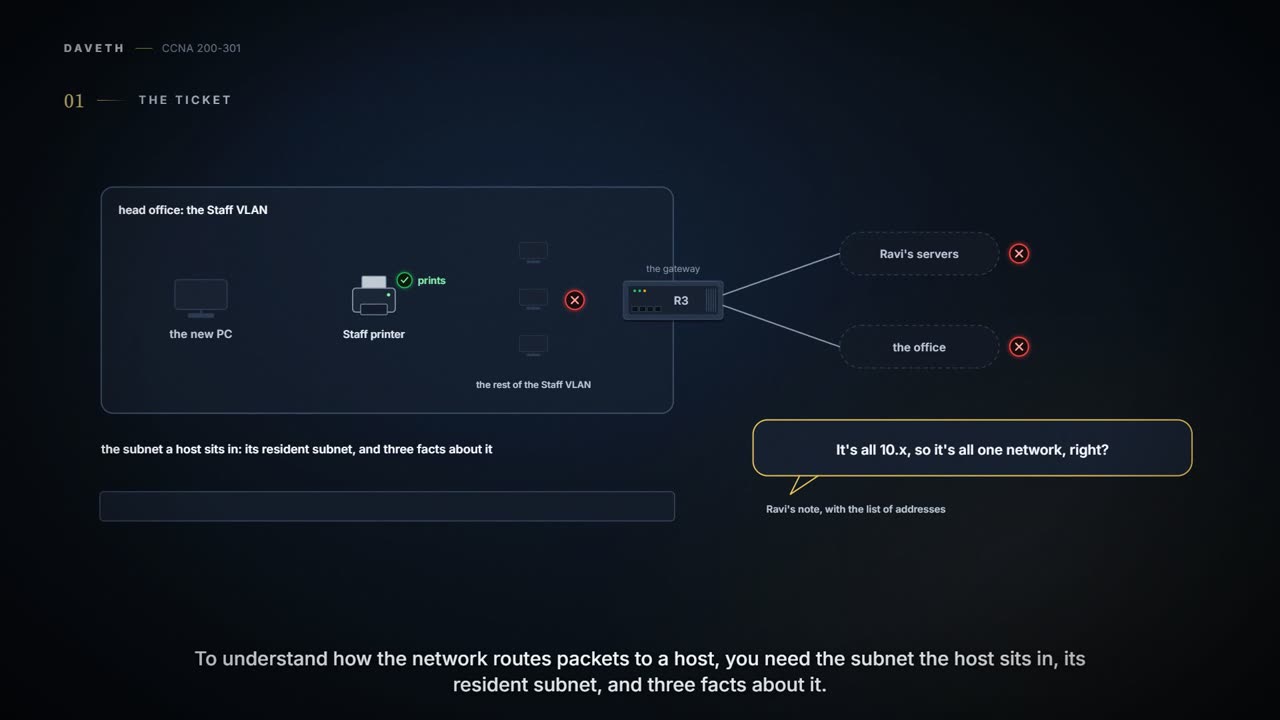
Friday. A new PC has gone onto head office's Staff VLAN. It prints to head office's Staff printer, but it can't reach Ravi's servers, the office, or even most of the Staff VLAN. Ravi sends Maya a list of the addresses involved, with a note: "It's all 10.x, so it's all one network, right?"
The PC printed, so everyone checked everything except the mask.
This is where 04.3 and 04.4 get used for real. To understand how the network routes packets to a host, you need the subnet the host sits in, its resident subnet, and three facts about it: the subnet ID, the broadcast address and the range of usable addresses. Finding them from an address and mask is one of the most common jobs in operating and troubleshooting a network. This page does it for a whole list at once, and checks the list against itself.
Read the mask with the address
"It's all 10.x" is the classful network talking. An address alone never says which subnet it's in; the mask does. Two addresses that share their first three octets can still be in different subnets, and two that don't can be in the same one. So never judge from the dots: take each address with its own mask, find the block that holds it, and compare blocks.
Words make this worse. People say "network" when they mean subnet, and "the network ID" when they mean the subnet ID, so a note that says "same network" might mean the same classful network or the same subnet. Ask which, or check it yourself.
And each host makes the decision for itself. When a host sends a packet, it generally compares the destination with its own address and mask: inside its own subnet, it delivers the packet directly; outside it, it sends the packet to its default gateway (01.6). So two hosts with different masks can disagree about each other.
It works kind of like two neighbours holding different maps: one map shows the other's house on the same street, while the other map puts it a few streets away, so that neighbour sends everything round through the sorting office. (Where it stops: a neighbour can look up and notice the mistake. A host never does; it follows its mask until someone changes it.)
Is it a host address, and is its gateway local?
Two checks catch many bad assignments. First, is the address a host address at all? In binary, a subnet ID's host bits are all 0s and a broadcast's are all 1s (04.3), and neither can be given to a host. So a usable address has host bits that are neither all 0s nor all 1s, and an address that lands exactly on the ID or the broadcast is a mistake, even though it's a perfectly real number. Nor may two devices share one address.
Second, is the host's default gateway inside the host's own subnet? A host reaches other subnets through a gateway on its own subnet (01.6), and to send a frame to the gateway it needs the gateway's MAC address, which it asks for with ARP only for addresses it thinks are on its own LAN (01.7). If the gateway falls outside the host's own range, then by those rules the host has no way to reach it: the configuration is wrong, whatever a particular operating system then does about it.
That's the new PC. It was typed in by hand as 10.100.0.120/26, while the rest of the Staff VLAN uses /24. Worked through, both ways:
| Step | Binary (04.3) | Decimal (04.4) |
|---|---|---|
| Mask | /26: 26 prefix bits, 6 host bits | 255.255.255.192: the fourth octet is interesting, magic 64 |
| Fourth octet | 120 is 01111000: copy the first 2 bits (01), then fill the other 6 | the biggest multiple of 64 not above 120 is 64 |
| Subnet ID | fill with 0s: 01000000 = 64 | 10.100.0.64 |
| Broadcast | fill with 1s: 01111111 = 127 | 64 + 64 − 1 = 127: 10.100.0.127 |
| Usable | 10.100.0.65 – 10.100.0.126 | 10.100.0.65 – 10.100.0.126 |
So the PC believes its subnet is 10.100.0.64 to 10.100.0.127. The printer, at 10.100.0.80, is inside that range, so the PC sends to it directly and printing works. The gateway, R3 at 10.100.0.1, is outside it, so the PC can't use it, and nothing outside .64 to .127 works: not Ravi's servers, not the office, not the Staff hosts at .2 to .63 or .128 and up.
Overlaps in a list
The PC's /26 also sits inside the Staff VLAN's /24. That isn't a second subnet anyone designed; it's one host disagreeing with its LAN's mask. But the check that catches it is the one that catches real design overlaps: two subnets in different places whose ranges share addresses. Those are always wrong, because hosts in two places can get the same address and routing can't work correctly. An exam question may only say that some hosts can't ping each other.
Without VLSM, overlapping subnets have the same subnet ID. With several masks they can have different IDs, so check ranges, not IDs, with 04.5's three steps: work out each subnet's ID and broadcast, sort them by ID, and compare neighbours, comparing the next entry with both whenever two overlap. When you find an overlap, one of the two subnets has to change.
Three sets to try, five addresses each. Find every overlap:
- Problem 1: 10.1.34.9/22, 10.1.29.101/23, 10.1.23.254/22, 10.1.17.1/21, 10.1.1.1/20
- Problem 2: 172.16.126.151/22, 172.16.122.57/27, 172.16.122.33/30, 172.16.122.1/30, 172.16.128.151/20
- Problem 3: 192.168.1.253/30, 192.168.1.113/28, 192.168.1.245/29, 192.168.1.125/30, 192.168.1.122/30
| Address and prefix | Subnet ID | Broadcast | Overlaps |
|---|---|---|---|
| 10.1.1.1/20 | 10.1.0.0 | 10.1.15.255 | no |
| 10.1.17.1/21 | 10.1.16.0 | 10.1.23.255 | yes: with 10.1.23.254/22 |
| 10.1.23.254/22 | 10.1.20.0 | 10.1.23.255 | yes: with 10.1.17.1/21 |
| 10.1.29.101/23 | 10.1.28.0 | 10.1.29.255 | no |
| 10.1.34.9/22 | 10.1.32.0 | 10.1.35.255 | no |
| Address and prefix | Subnet ID | Broadcast | Overlaps |
|---|---|---|---|
| 172.16.122.1/30 | 172.16.122.0 | 172.16.122.3 | no |
| 172.16.122.57/27 | 172.16.122.32 | 172.16.122.63 | yes: with 172.16.122.33/30 |
| 172.16.122.33/30 | 172.16.122.32 | 172.16.122.35 | yes: with 172.16.122.57/27 |
| 172.16.126.151/22 | 172.16.124.0 | 172.16.127.255 | no |
| 172.16.128.151/20 | 172.16.128.0 | 172.16.143.255 | no |
| Address and prefix | Subnet ID | Broadcast | Overlaps |
|---|---|---|---|
| 192.168.1.113/28 | 192.168.1.112 | 192.168.1.127 | yes: with 192.168.1.122/30 and 192.168.1.125/30 |
| 192.168.1.122/30 | 192.168.1.120 | 192.168.1.123 | yes: with 192.168.1.113/28 |
| 192.168.1.125/30 | 192.168.1.124 | 192.168.1.127 | yes: with 192.168.1.113/28 |
| 192.168.1.245/29 | 192.168.1.240 | 192.168.1.247 | no |
| 192.168.1.253/30 | 192.168.1.252 | 192.168.1.255 | no |
Continue the lesson
The whole lesson, with its drawings and its questions. 3 more sections after the ones above.