
Power over Ethernet (PoE)
With Power over Ethernet, the switch, as power sourcing equipment, sends DC power down the same UTP cable as the data, so access points, phones and cameras need no socket. It never simply sends power: it first detects whether the device is a powered device and its power class. Each device must fit both the port's standard and the switch's power budget.
By Arif, founder of Daveth · Updated
The full 9 min walkthrough is in Daveth Pro (Network). See what the plan opens
What this page answers
What is Power over Ethernet (PoE)?
Power sent down the same UTP cable as the data. The switch is the power sourcing equipment (PSE); a device that takes its power that way is a powered device (PD). Read it in “Power from the switch”
How does PoE decide how much power to send?
It supplies nothing until negotiation shows the device needs it: low-power signals first find whether it is a PD at all, detection, and its power class, classification, which sets how much to supply. Read it in “Ask first, then power”
Power from the switch
The Monday after, still month nine, and the fourth floor is being fitted out. The new floor switch, HQ4 (09.2), will feed four access points on the ceiling, two of the new IP phones and a camera over the stairwell. None of those places has a power socket, and nobody wants one run to each. Back in month one, Sam's trial phone ran from its own power adapter (03.1.5); these won't.
Until now, power was the electricians' job; the network team only checked there was enough in the wiring closets. Power over Ethernet (PoE), the general name for a family of IEEE standards, lets the switch supply the power along the same Ethernet cable as the data, often over the same wire pairs. It moves part of the power job to the network team. The switch that supplies the power is the power sourcing equipment (PSE): its own power supply takes AC from an outlet, and it sends DC down the UTP cables. A device that can take its power that way, instead of from a power connector of its own, is a powered device (PD). It saves cable runs and money, gives better control of power, and because PoE delivers DC, the devices need no power brick converting the socket's AC: no brick and no power cord on the desk for a phone.
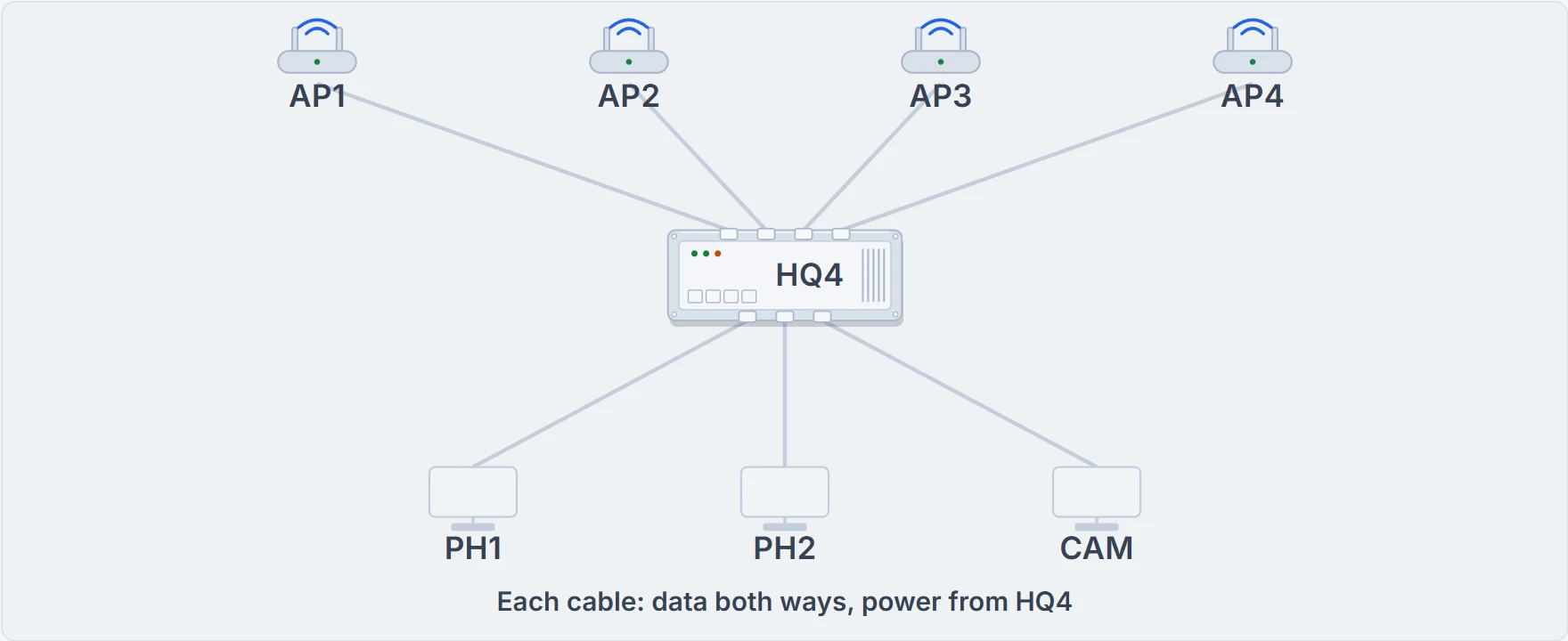
HQ4 as the PSE: four ceiling APs, two phones and a camera, each a PD on its own cable.
Ask first, then power
Too much current can harm any electrical device, which is why buildings have circuit breakers and people buy surge protectors. So PoE never simply sends power down the cable. It uses the Ethernet autonegotiation mechanisms, and it works before the PD has booted, because the PD needs the power to boot:
- Supply no power on a PoE-capable port until negotiation shows the device needs it.
- Send low-power signals and watch what comes back, to find whether the device is a PD at all (detection) and its power class (classification), which sets how much power to supply.
- If it is a PD, supply power for that class, and let it boot.
- Keep watching for a change of class, through autonegotiation and by listening to the device's CDP and LLDP messages (03.4).
- If the class changes, adjust the power to match.
The PDs end up telling the switch how many watts they want. How much a port can give, and over how many of the cable's four pairs, depends on the standard:
| Name | Standard | Watts at the switch (PSE) | Powered wire pairs |
|---|---|---|---|
| PoE | 802.3af | 15 | 2 |
| PoE+ | 802.3at | 30 | 2 |
| UPoE | 802.3bt | 60 | 4 |
| UPoE+ | 802.3bt | 100 | 4 |
The first two standards power two of the cable's pairs; the two 802.3bt standards, UPoE and UPoE+, power all four. The watts are what the switch supplies at its end.
A PoE port is a polite waiter: it asks what you'll have before it pours.
Two gates: the port and the budget
Most switch features are software: configure them and go. PoE needs planning, of the cable plant (the building's cabling), both Ethernet and electrical, and of the hardware to buy; planning it early avoids missing chances to save money and time. Each device has to pass two gates. The port must support a standard big enough for the device. And the switch must have enough power left in its budget: its power supply feeds every PD as well as the switch itself.
HQ4's figures for this page: a PoE budget of 120 W; each AP allocated 25 W on a PoE+ port, each phone 10 W on a PoE port, the camera 25 W. These are example values for this page, not what every AP or phone draws.
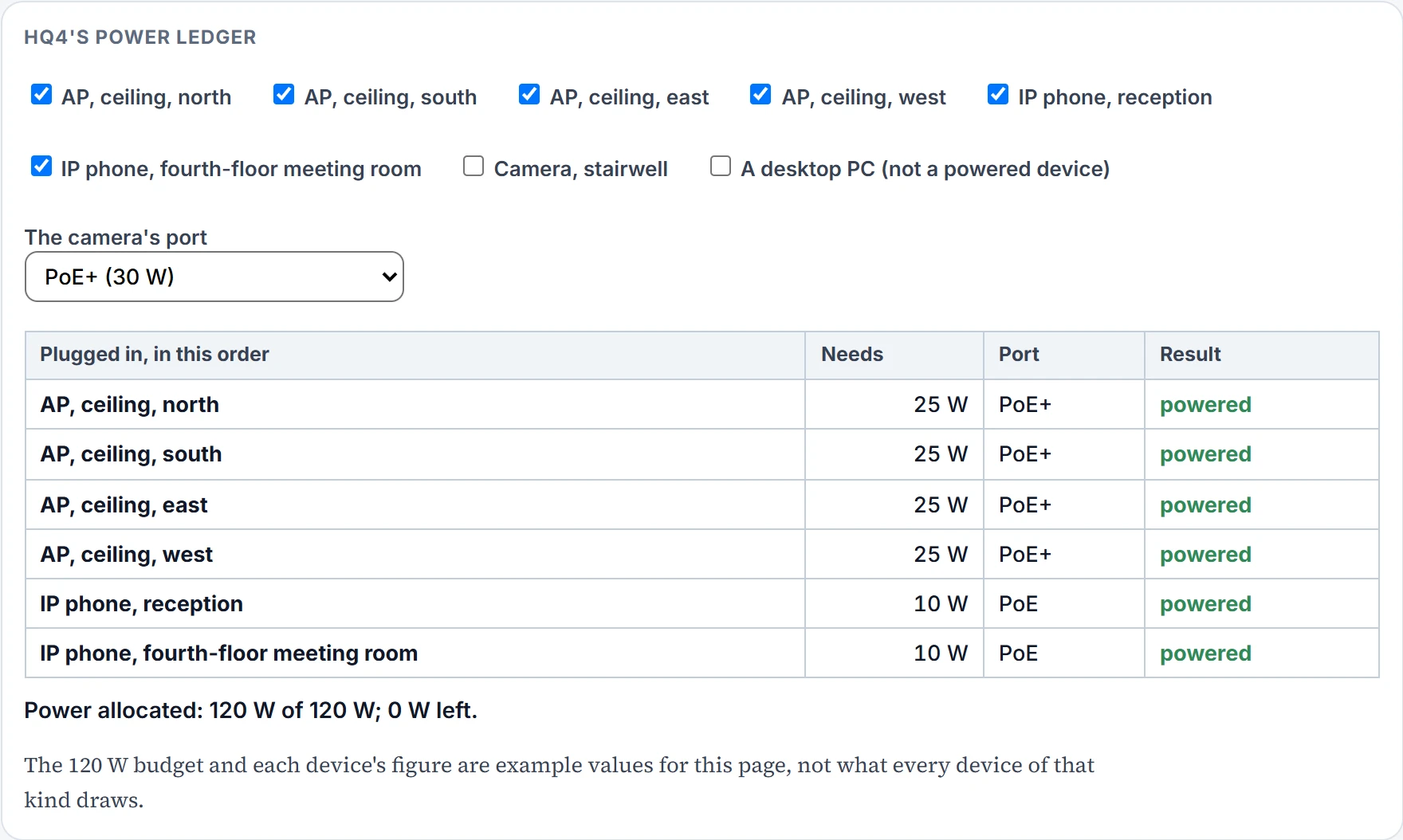
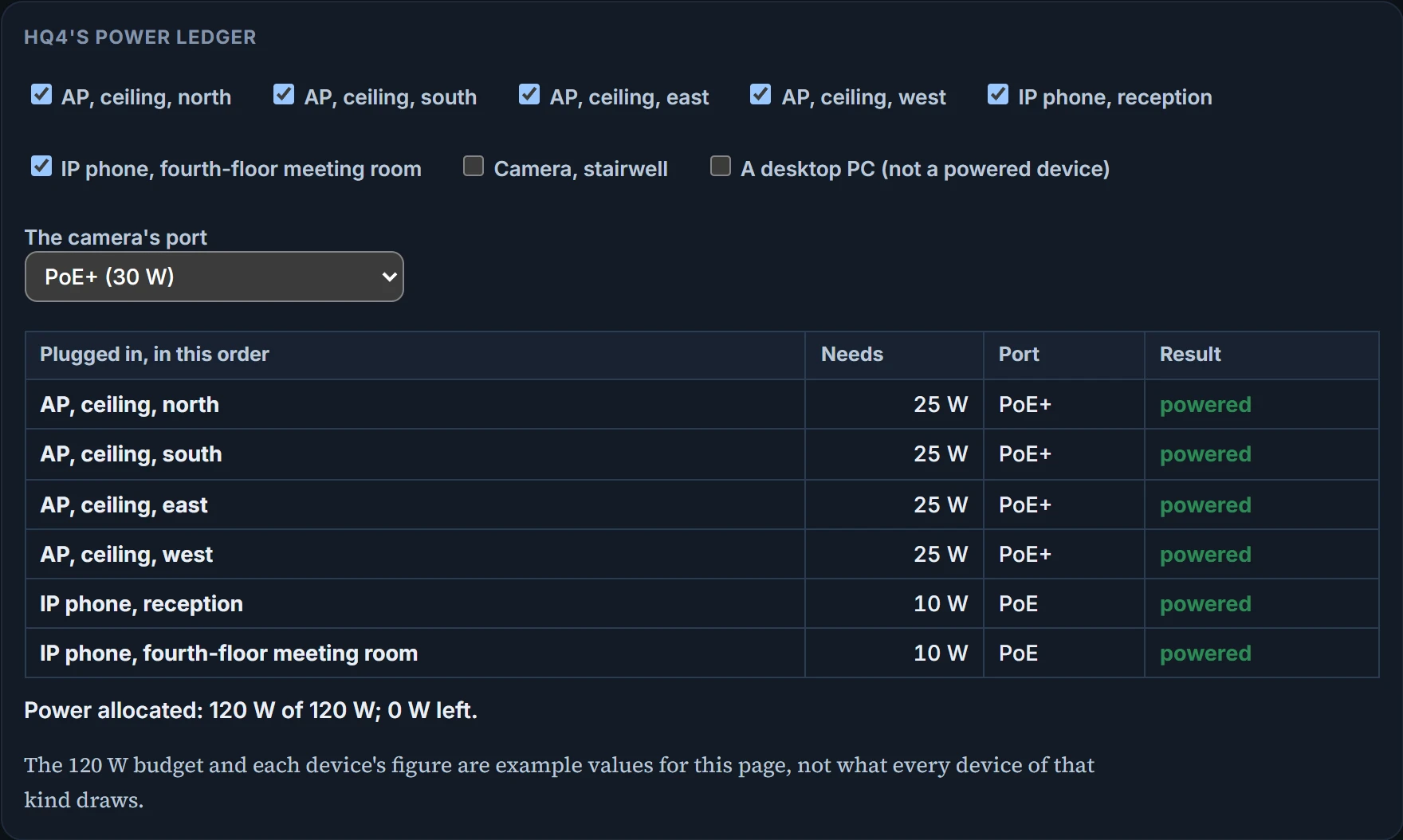
Four APs at 25 W and two phones at 10 W make exactly 120 W, so the seventh device, the camera, gets nothing even though its port could supply 30 W: the switch has no watts left. Move it to a PoE port with watts to spare and it still isn't served as it needs, because a PoE port supplies at most 15 W. Both gates, every time.
Tell the two failures apart. A device with no power usually shows nothing at all, or keeps rebooting on too little; a device with power but no network, an AP that lights up but serves no clients, is usually a VLAN or controller question, once you've checked it isn't running on reduced power. On many switches, show power inline lists each port's power state and what has been allocated against what is available (its exact columns differ between models). A sensible order when a powered device stays dark: the cable, whether the switch and port can supply PoE, detection and class, the port's standard, the budget, whether the port is shut down, and only then the device itself.
Continue the lesson
The whole lesson, with its drawings and its questions. The rest of this section and 1 more after it.