
Cloud Architecture, Connectivity and Cloud-Managed Networks
A cloud is more than virtualized servers: NIST's definition has five criteria, including on-demand self-service and rapid elasticity. A private cloud meets them inside one company; a public cloud is a provider's, reached over a network. Cloud services are sold as IaaS, a VM you run, PaaS, a platform, or SaaS, a finished application.
By Arif, founder of Daveth · Updated
The full 14 min walkthrough is in Daveth Pro (Network). See what the plan opens
What this page answers
What is cloud computing?
A service that meets NIST's five criteria, among them on-demand self-service, where consumers start and stop it without dealing with a person, and rapid elasticity, where the pool looks unlimited and requests are filled quickly. Read it in “From virtualized hosts to a cloud”
What is the difference between IaaS, PaaS and SaaS?
With IaaS you get a VM, choose its hardware and usually its OS, and install and look after the applications. PaaS is a development platform: VMs chosen for their tools, where you write, test and integrate code. With SaaS you get working software. Read it in “What you rent: IaaS, PaaS and SaaS”
What is the difference between a private and a public cloud?
A private cloud is a cloud service inside one company, for its own people, built with a self-service catalog. A public cloud is run by a provider for many customers, so its servers sit on the far side of a WAN or the Internet. Read it in “Private cloud and public cloud”
From virtualized hosts to a cloud
Month ten. HOST1 and HOST2 (09.6) are still a plan, and a developer already has a question for Ravi: once they run, how does anyone get a new VM?
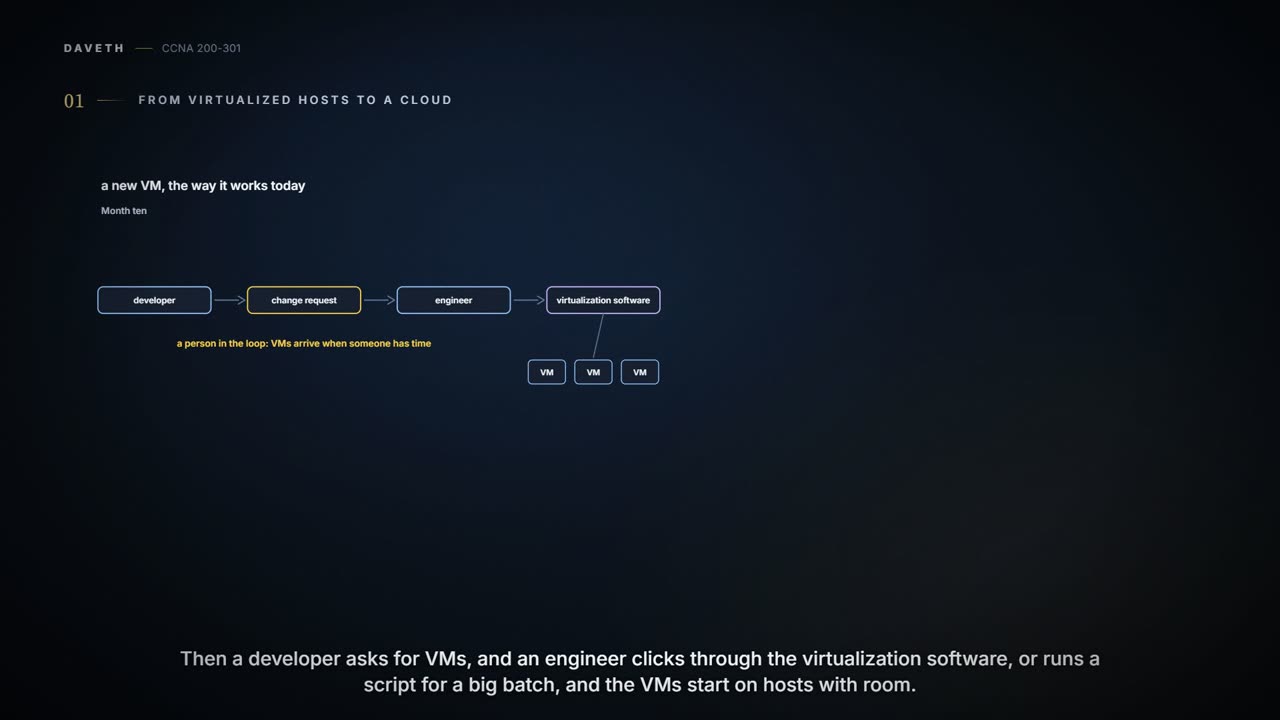
The way a virtualized data center usually works: the server and virtualization engineers plan the capacity, buy and install the hosts, and set up the virtualization tools, including one that shows the whole data center as a pool of capacity for VMs. A customer of the IT team, a developer or someone in operations, sends a change request asking for VMs. An engineer clicks through the virtualization software, or runs a script when there are many, and the software creates the VMs and starts them on hosts with room. It works. It isn't a cloud.
Cloud computing is a way of offering IT services, not a product you install. Virtualization supplies the pieces: an OS decoupled from its hardware, VMs that software can start and move between hosts, virtual switches and NICs in every host, and a data center network the virtualization software can program. What makes it a cloud is how the service is offered. The usual definition comes from the US National Institute of Standards and Technology (NIST), and has five criteria:
- On-demand self-service: the consumer starts and stops using the service without dealing with a person at the provider.
- Broad network access: the service is available from many kinds of device, over many kinds of network, the internet included.
- Resource pooling: the provider keeps one pool of resources and allocates from it for each new request, rather than setting servers aside for each consumer.
- Rapid elasticity: to the consumer the pool looks unlimited, and new requests are filled quickly.
- Measured service: the provider measures the use and reports it to the consumer, for transparency and for billing.
Self-service is the clearest miss. With a person handling each request, the hosts pool their resources, and the pool can grow, but not rapidly: new VMs arrive when someone has time, so rapid elasticity suffers too. In a cloud, the developer asks and the VMs are running minutes later, most of that spent booting them.
Private cloud and public cloud
A private cloud is a cloud service inside one company, for that company's own people, meeting all five criteria. To build one, the IT team adds tools and changes how it works. The key tool is a cloud services catalog: a web application listing everything that can be requested. A developer picks a VM from it, and the catalog software asks the virtualization software to create it, through that software's programming interfaces (APIs), with no one in between. The cloud team, server, virtualization, network and storage engineers together, stops handling requests one at a time. It builds the pool, adds services to the catalog, handles the exceptions, and watches the usage reports (measured service) to know when to add capacity. The same reports let IT bill each department for what it used.
You can think of the catalog as a vending machine for VMs: choose, and it drops out in minutes. (Where it stops: a vending machine runs empty, and a cloud's pool is refilled before anyone notices; keeping it full is the cloud team's job.)
"Private" says who is involved: one company owns the tools and employs the people who use them. It says nothing about private addresses or encryption, just as "public" doesn't mean a workload is open to anyone. A public cloud turns that round: a provider sells its services to consumers in other companies, much as ISPs sell internet access to many enterprises. The consumer uses the same kind of catalog, on the provider's website, and the VMs start in the provider's data center, somewhere else in the world. Providers connect to the internet, and because broad network access is one of the criteria, they also offer VPN and private WAN connections. Newer names for the same pair are on-premise for private cloud and cloud for public cloud.
If you've ever hired a car at an airport, public cloud will feel familiar: you pick the size at the counter, keep it as long as you need it, and pay for the days you used; the company owns the fleet and does the servicing. (Where it stops: a hired car is yours alone while you have it; a provider's hosts aren't set aside for any one customer, but pooled for all of them.)
What you rent: IaaS, PaaS and SaaS
Cloud computing sells services rather than boxes, and the names for them end in "as a Service". Three matter here.
With Infrastructure as a Service (IaaS) you get a VM. You choose how much hardware it gets (vCPUs, memory, storage and so on) and usually an OS. The provider starts it, which cloud people call spinning up or instantiating a VM, and gives you the details to connect to it. From there, installing software on it, and changing its settings, is your work.
With Software as a Service (SaaS) you get working software. The provider may run it on many VMs, but you never see them: it licenses, installs and supports the software, and monitors how it performs. You sign up and use it. Online file storage and most online email are SaaS.
Platform as a Service (PaaS) is a development platform. Like IaaS, it supplies VMs with a chosen amount of CPU and memory; unlike IaaS, it comes with development tools. Typically that means an integrated development environment (IDE) for writing and testing code, and continuous integration tools that test new code automatically and merge it into the larger project. The tools matter while the application is being built; the servers that run it in production don't need them. The mix of tools is the main reason to choose one PaaS over another, or PaaS over IaaS.
| IaaS Infrastructure as a Service | PaaS Platform as a Service | SaaS Software as a Service | |
|---|---|---|---|
| You pick | a VM: its vCPUs, memory, storage and network, and usually its OS | VMs sized much as with IaaS, chosen above all for their development tools | the application |
| Then you | connect to the VM, install the applications and look after them | write, test and integrate code with the tools supplied | sign up and use it; no installation |
| Hidden from you | the hosts and the rest of the provider's data center | the hosts, and much of the platform work: the tools come prebuilt | the VMs, the OS and the hardware; the provider installs, supports and monitors the software |
Normally the company. With IaaS the provider runs the hosts and the data center; the OS on the VM, and what is installed on it, are the customer's to look after. The contract sets the exact split, and it differs from provider to provider, which is worth reading before anything goes live. Even with SaaS, the customer still owns its users' accounts, its data, and whatever settings the service lets it change.
SaaS is the only one of the three where "have you tried turning it off and on again?" is somebody else's line.
When the application moves, the traffic moves
Month ten's real change is email. The company has run its own email server, MAIL1, at head office; now email is moving to a SaaS provider. That takes the servers off Ravi's hands, though the existing mailboxes and contacts still have to be moved across. A private cloud affects the WAN much less, because it runs inside the company. A public cloud puts the servers on the far side of one, so Ravi looks at the office.
The office has no internet link of its own. R3 holds head office's link and hands its default route to the other routers (05.2.4), so the office's internet traffic crosses the E-Line to R3 and leaves through FW1.
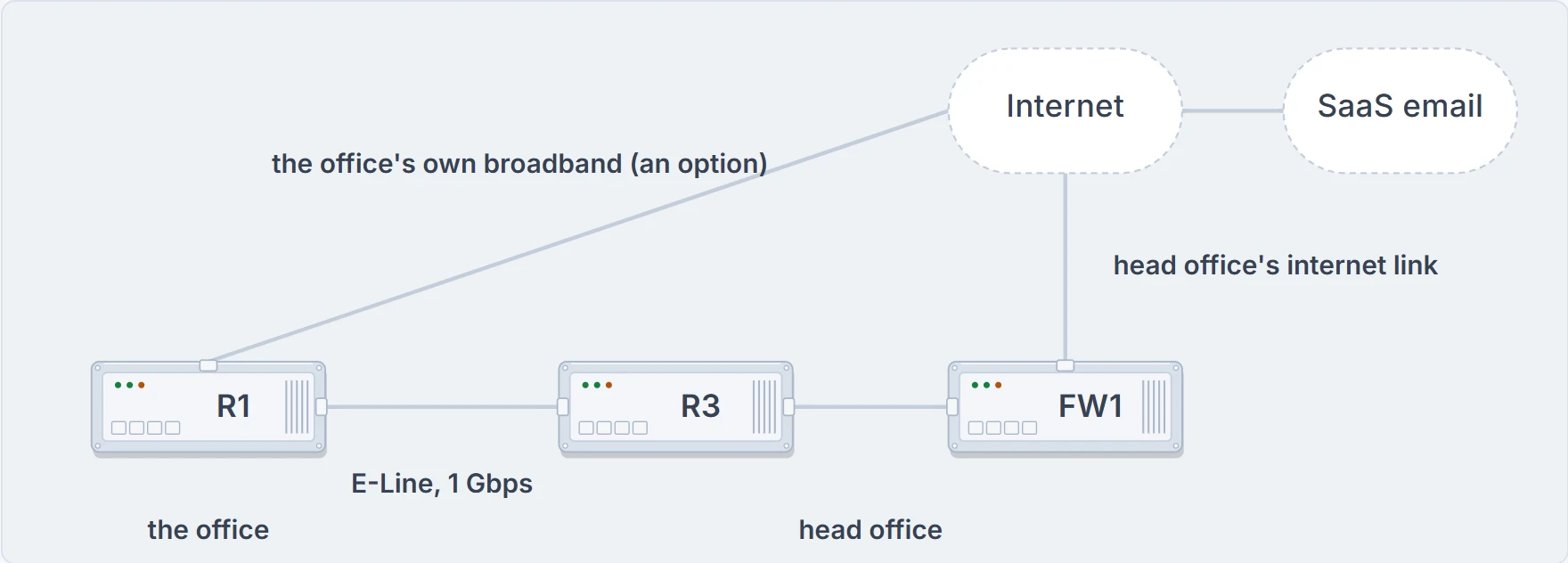
From the office to the SaaS email provider: the E-Line to head office, FW1, head office's internet link, and the office's own broadband line, drawn as an option.
Forty megabytes. Before, the email crossed the E-Line to MAIL1 and came back: 40 MB on the E-Line. Now it crosses the E-Line and head office's internet link on the way to the provider, and both again when the colleague downloads it. The E-Line carries no less than before, and every email the office sends or reads now crosses head office's internet link too. Here is the first design, the email server at head office:
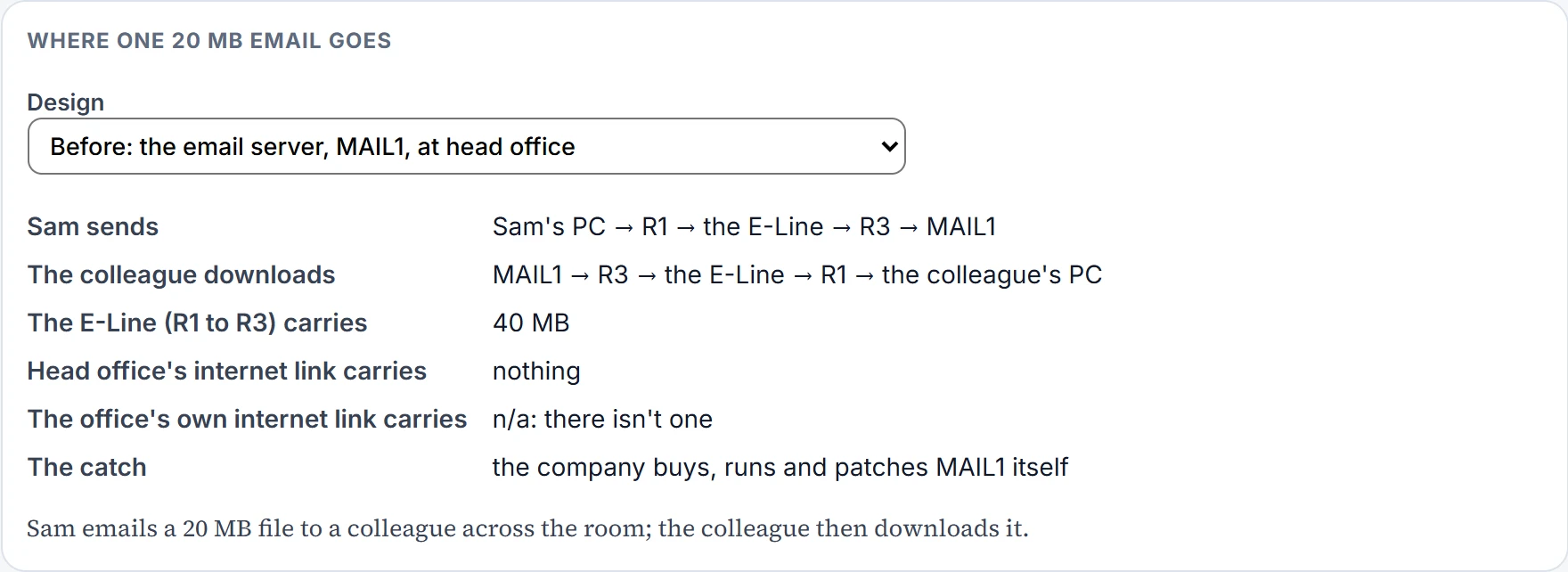
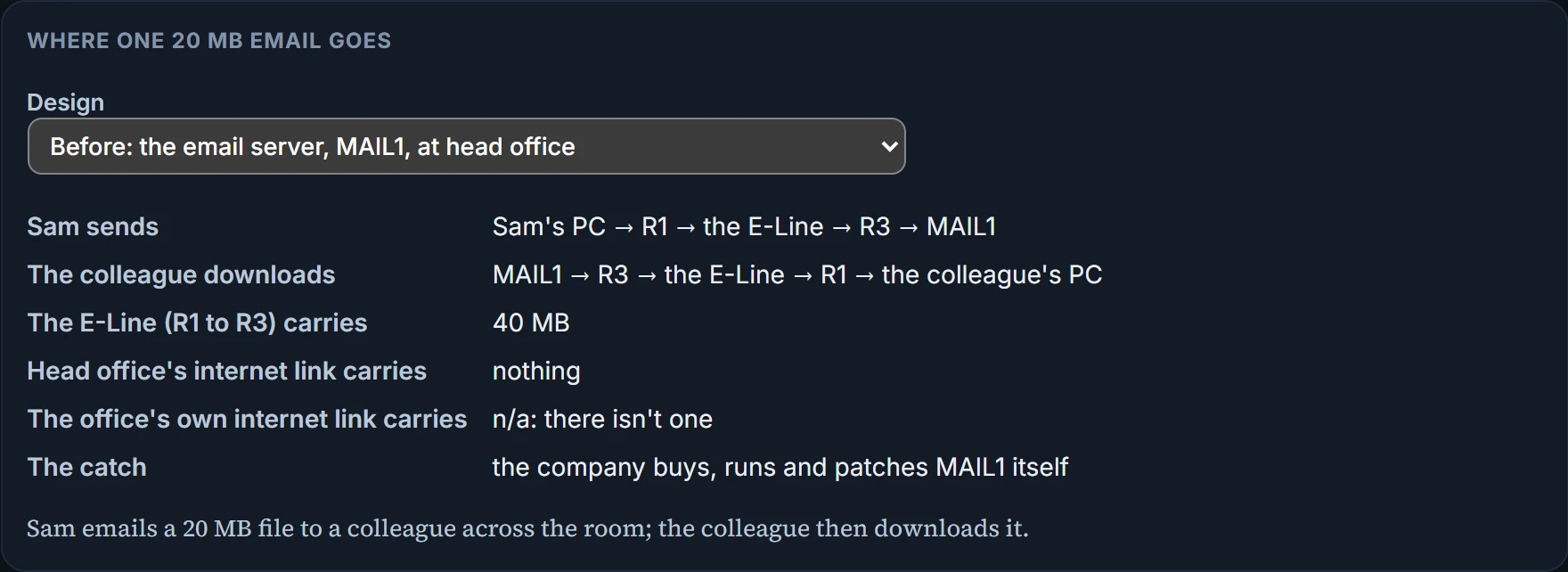
Ravi has three answers. Plan more capacity on head office's internet link. Buy a private WAN connection to the provider. Or give the office its own broadband line, so its internet traffic goes straight out: a shorter path, no load on the E-Line or on head office's link, and broadband is cheap next to a private WAN. The catch is security. One reason to have a few internet links, all at head office, is to concentrate the security effort on them; every new link brings its own security concerns. Many companies go further still, and use the internet, with VPNs, as their only WAN.
Continue the lesson
The whole lesson, with its drawings and its questions. The rest of this section and 3 more after it.