
Implementing IPv6 Addressing on Routers and Hosts
A router routes IPv6 only with both parts in place: ipv6 unicast-routing turned on globally, and ipv6 address on the interface. The show commands mirror IPv4's with ipv6 in place of ip. With modified EUI-64, you configure only the 64-bit prefix and the router builds the interface ID from the interface's MAC address.
By Arif, founder of Daveth · Updated
The full 15 min walkthrough is in Daveth Pro (Network). See what the plan opens
What this page answers
How do you configure an IPv6 address on a Cisco router?
Turn on IPv6 routing for the whole router with ipv6 unicast-routing, then give each interface its address with ipv6 address, such as ipv6 address 2001:DB8:A50:10::1/64. The router adds a link-local address by itself. Read it in “One command for the whole router”
How does EUI-64 work?
Split the 12-hex-digit MAC address into two halves, insert FFFE between them to make 64 bits, and invert the seventh bit of the first byte. The command is ipv6 address with the prefix and the keyword eui-64. Read it in “An interface ID from a MAC”
Routers first
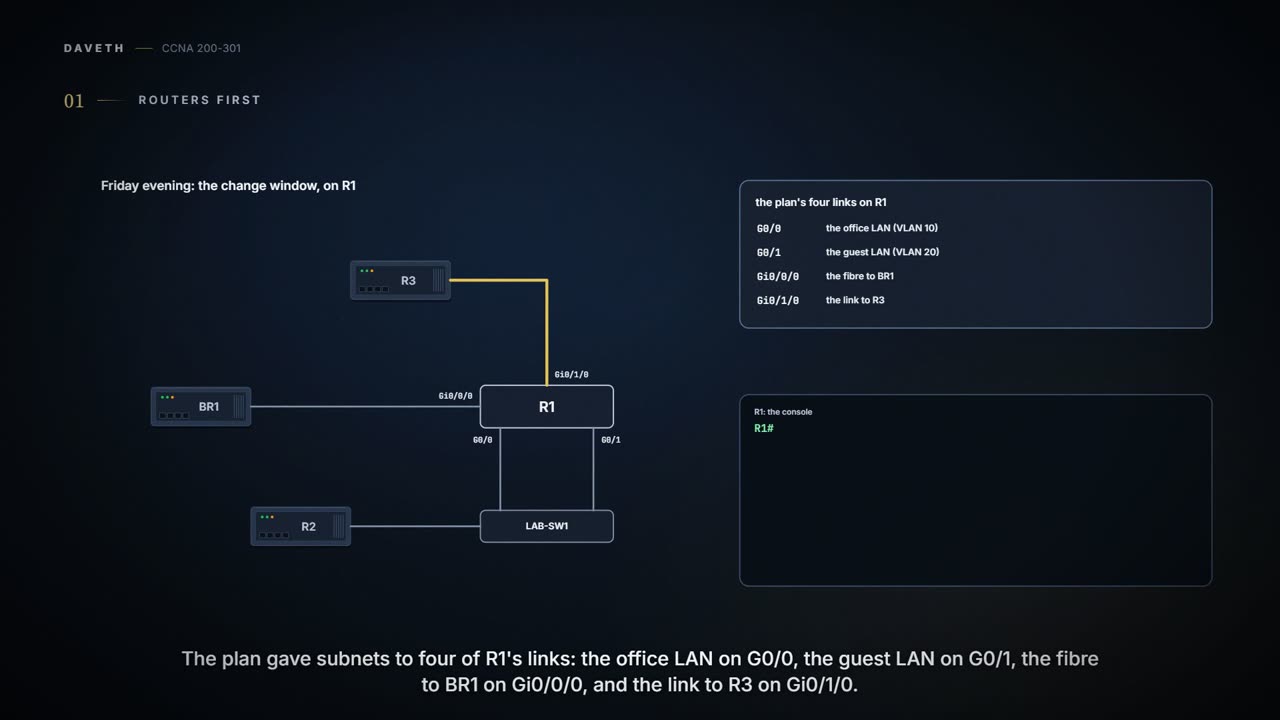
Friday evening, month five, week one: the change window. The plan said routers first, so Ravi starts with R1. Four of R1's links have subnets in the 06.4 plan: the office LAN on G0/0, the guest LAN on G0/1, the fibre to BR1 on Gi0/0/0 and the link to R3 on Gi0/1/0. Tonight Ravi does three and leaves the guest LAN for next week, one change at a time. Everything IPv4 stays as it is: this is dual stack, so R1 will route both. R2, the standby router on the office LAN (05.3.1), gets IPv6 later too.
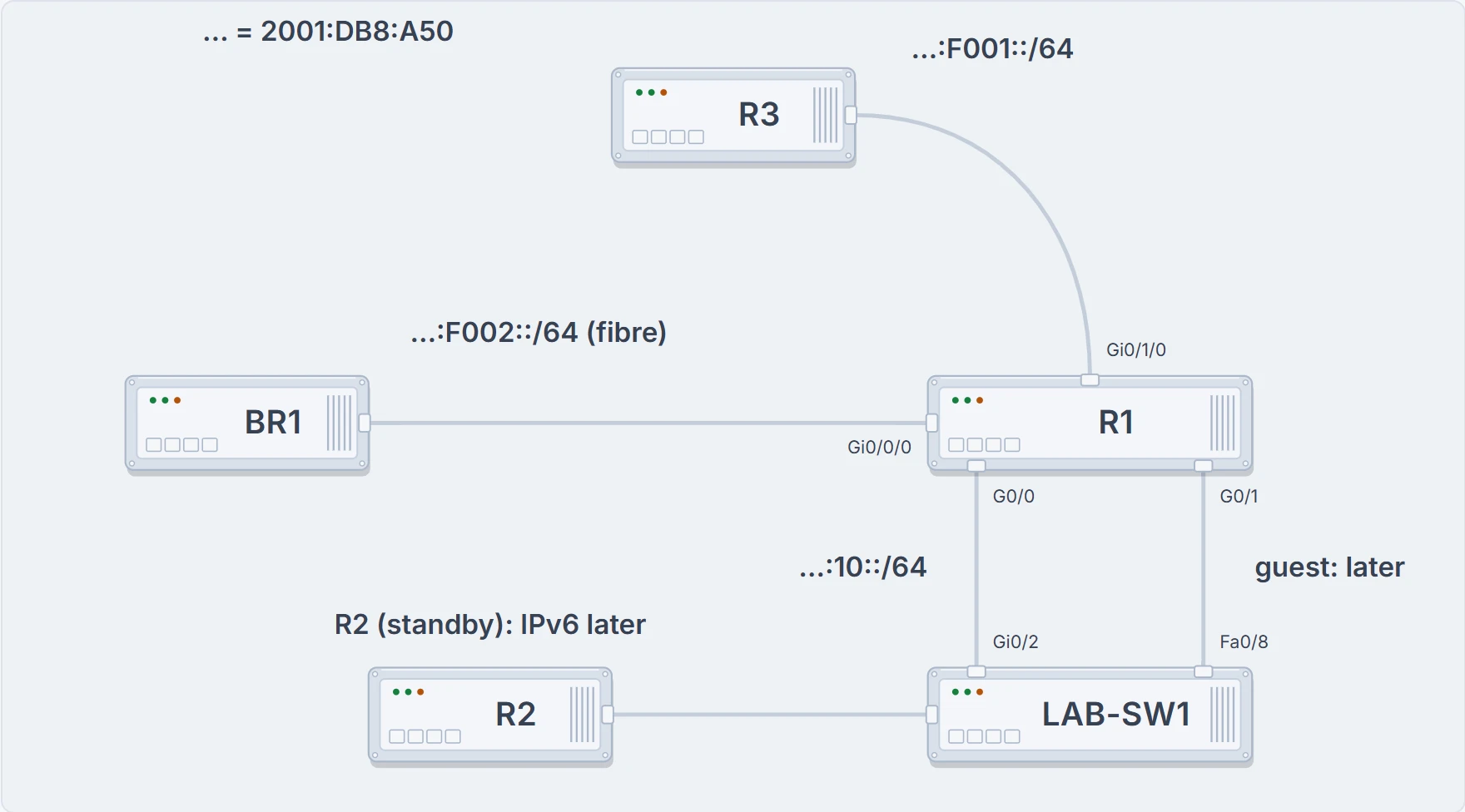
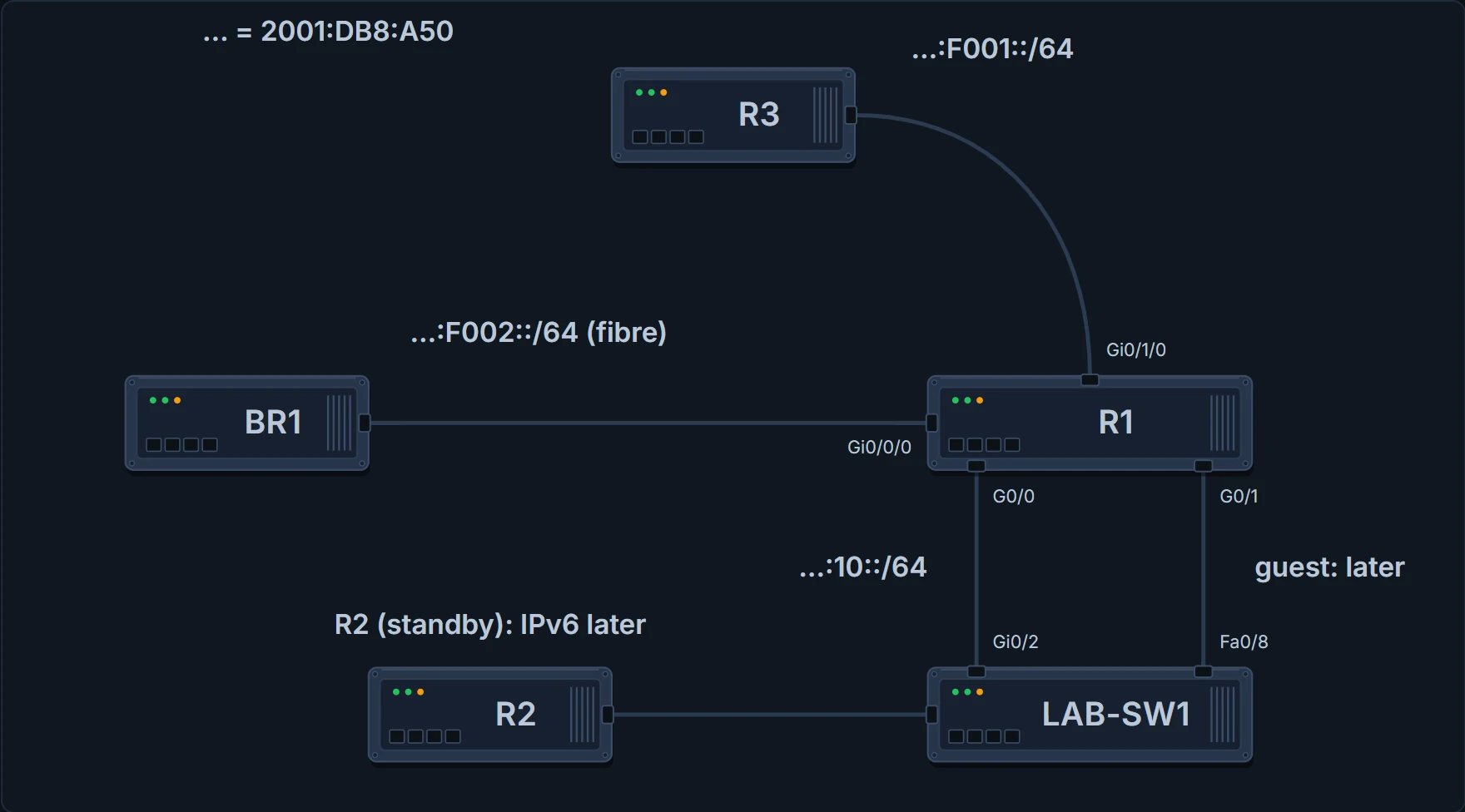
R1's four ports tonight: three get IPv6 addresses from the plan; the guest LAN on G0/1 waits, and so does R2.
IPv6 follows IPv4's habits about who uses fixed addresses: routers inside a company usually get static addresses, while user devices usually learn theirs dynamically. The static way is one interface command, ipv6 address address/prefix-length, with no space before the /. The address can be typed abbreviated or in full, in upper or lower case; the router's show commands list it abbreviated, in upper case. Following the plan, R1's addresses end in ::1, and the window ends, as always, by saving (02.7):
R1# configure terminal
R1(config)# ipv6 unicast-routing
R1(config)# interface GigabitEthernet0/0
R1(config-if)# ipv6 address 2001:DB8:A50:10::1/64
R1(config-if)# interface GigabitEthernet0/0/0
R1(config-if)# ipv6 address 2001:DB8:A50:F002::1/64
R1(config-if)# interface GigabitEthernet0/1/0
R1(config-if)# ipv6 address 2001:DB8:A50:F001::1/64
R1(config-if)# end
R1# copy running-config startup-config
Destination filename [startup-config]?
Building configuration...
[OK]
R1#
Three interfaces, three addresses, one very short evening. Ravi had packed dinner for a long one.
One command for the whole router
The first line of that configuration isn't about any interface.
IPv4 routing is on by default on these routers; IPv6 routing isn't. ipv6 unicast-routing turns it on, for the whole router. A router needs both parts before it routes IPv6 in and out of an interface: IPv6 routing on globally, and IPv6 on the interface, which the ipv6 address command does. Leave out ipv6 unicast-routing and the router won't route the IPv6 packets it receives, though it still takes part in IPv6 as a host would. Configure ipv6 unicast-routing but no interface addresses, and the router is ready to route, but IPv6 is on no interface: no IPv6 routing at all.
With IPv6 routing on, each ipv6 address command does four things, just as an IPv4 address command does for IPv4:
- gives the interface its IPv6 unicast address;
- enables IPv6 routing in and out of that interface;
- defines the IPv6 prefix (subnet) off that interface;
- tells the router to add a connected route for that prefix, while the interface is up/up.
It's easy to forget, because IPv4 never asked. IPv6 is polite: it waits to be invited.
What the show commands prove
Many of IPv6's show commands mirror IPv4's, with ipv6 in place of ip.
R1# show ipv6 interface brief
GigabitEthernet0/0     [up/up]
    FE80::FF:FE00:110
    2001:DB8:A50:10::1
GigabitEthernet0/1     [up/up]
    unassigned
GigabitEthernet0/0/0   [up/up]
    FE80::FF:FE00:130
    2001:DB8:A50:F002::1
GigabitEthernet0/1/0   [up/up]
    FE80::FF:FE00:140
    2001:DB8:A50:F001::1
R1#
show ipv6 interface brief lists every interface, IPv6 or not, with its status and its IPv6 addresses. G0/1 says unassigned: no IPv6 there yet. The FE80 lines are link-local addresses (06.3): R1 made those itself, one per IPv6 interface, alongside each address Ravi configured. What the brief output proves: these addresses are on these interfaces, and the interfaces are up/up. What it doesn't show: the prefix lengths, the subnets, or whether anything beyond R1 can reach them.
R1# show ipv6 interface GigabitEthernet0/0
GigabitEthernet0/0 is up, line protocol is up
  IPv6 is enabled, link-local address is FE80::FF:FE00:110
  No Virtual link-local address(es):
  Global unicast address(es):
    2001:DB8:A50:10::1, subnet is 2001:DB8:A50:10::/64
  Joined group address(es):
    FF02::1
    FF02::2
    FF02::1:FF00:1
    FF02::1:FF00:110
  MTU is 1500 bytes
! (the rest is left out)
R1#
show ipv6 interface for one interface gives the details, much as show ip interface does for IPv4. It lists the address Ravi configured and the subnet the router calculated from it, 2001:DB8:A50:10::/64, and the link-local address. It also lists the multicast groups the interface joined: all-nodes and all-routers (06.3), and two beginning FF02::1:FF, which 06.6 explains. Don't read the "Virtual link-local" line as HSRP: the virtual address R1 shares with R2 (05.3.1) is an IPv4 address, and this output is about IPv6 only. What this output doesn't prove: anything about the other interfaces, or about the devices at the far end of this one.
One familiar command falls short: show interfaces still lists the IPv4 address and mask, and nothing about IPv6. For IPv6 addresses, use the commands that begin show ipv6.
Looking for IPv6 in show interfaces is a very tidy way to find nothing.
R1# show ipv6 route connected
IPv6 Routing Table - default - 7 entries
Codes: C - Connected, L - Local, S - Static, U - Per-user Static route
! (the rest of the code list is left out)
C   2001:DB8:A50:10::/64 [0/0]
     via GigabitEthernet0/0, directly connected
C   2001:DB8:A50:F001::/64 [0/0]
     via GigabitEthernet0/1/0, directly connected
C   2001:DB8:A50:F002::/64 [0/0]
     via GigabitEthernet0/0/0, directly connected
R1#
Just as with IPv4, the router adds a connected IPv6 route for each interface that has an IPv6 unicast address and is up/up, and keeps it only while the interface works. All three appear, including the fibre's, although BR1 has no IPv6 yet: a connected route proves R1's side of a link, and nothing about the far end. (The count of 7 entries also includes three routes of another kind and one multicast route; a later page covers them.)
An interface ID from a MAC
There's a second way to give an interface a stable address. Instead of the whole 128 bits, configure only the 64-bit prefix and let the router make the interface ID, using rules called modified EUI-64 (often just called EUI-64). The command is the same one with a keyword: ipv6 address prefix/prefix-length eui-64. The router builds the interface ID from the interface's MAC address:
- Split the 6-byte (12-hex-digit) MAC address into two halves of 6 hex digits.
- Insert FFFE between them, making 16 hex digits: 64 bits. Write them in quartets, with a colon every four digits.
- Invert the seventh bit of the interface ID, counting from the left of its first byte.
Here's R1's G0/0, MAC 0200.0000.0110. The halves are 020000 and 000110; with FFFE between them, 020000FFFE000110. The first byte, 02, is 0000 0010 in binary, and inverting its seventh bit (0 becomes 1, 1 becomes 0) gives 0000 0000: 00. So the interface ID is 0000:00FF:FE00:0110, and that's exactly the second half of G0/0's link-local address in the output above, FE80::FF:FE00:110.
Most of the time the seventh bit starts as 0 and becomes 1, so the first byte goes up by 2; R1's MAC happens to go the other way. Once you know the trick, you can spot FFFE in the middle of an interface ID and read the two halves of the MAC on either side of it.
Continue the lesson
The whole lesson, with its drawings and its questions. The rest of this section and 3 more after it.