
SLAAC and DHCPv6
An IPv6 host can get its address three ways. With SLAAC it builds one itself from the prefix in a router advertisement plus its own interface ID, with no server. Stateful DHCPv6 works like IPv4's DHCP and tracks the addresses it assigns. SLAAC plus stateless DHCPv6 lets the host build its address and get DNS servers from the server.
By Arif, founder of Daveth · Updated
The full 13 min walkthrough is in Daveth Pro (Network). See what the plan opens
What this page answers
What is SLAAC (stateless address autoconfiguration)?
A way for a host to get an IPv6 unicast address without any DHCP server: it learns the link's prefix and length from a router advertisement and adds its own interface ID, made with EUI-64 or at random. Read it in “Building an address: SLAAC”
What is the difference between stateful and stateless DHCPv6?
A stateful DHCPv6 server works like an IPv4 DHCP server, assigning addresses and keeping track of them. A stateless one hands out other settings, such as DNS servers, while hosts build their own addresses with SLAAC. Read it in “Asking a server: DHCPv6”
Two edges
Tuesday, month five, week two. Most of the router links that need IPv6 have it now. The laptops are next, and nobody wants to type an IPv6 address into every one of them. Two jobs today, at the two edges of the company: Jo's LAN at the branch, VLAN 10, and R3's link to the ISP.
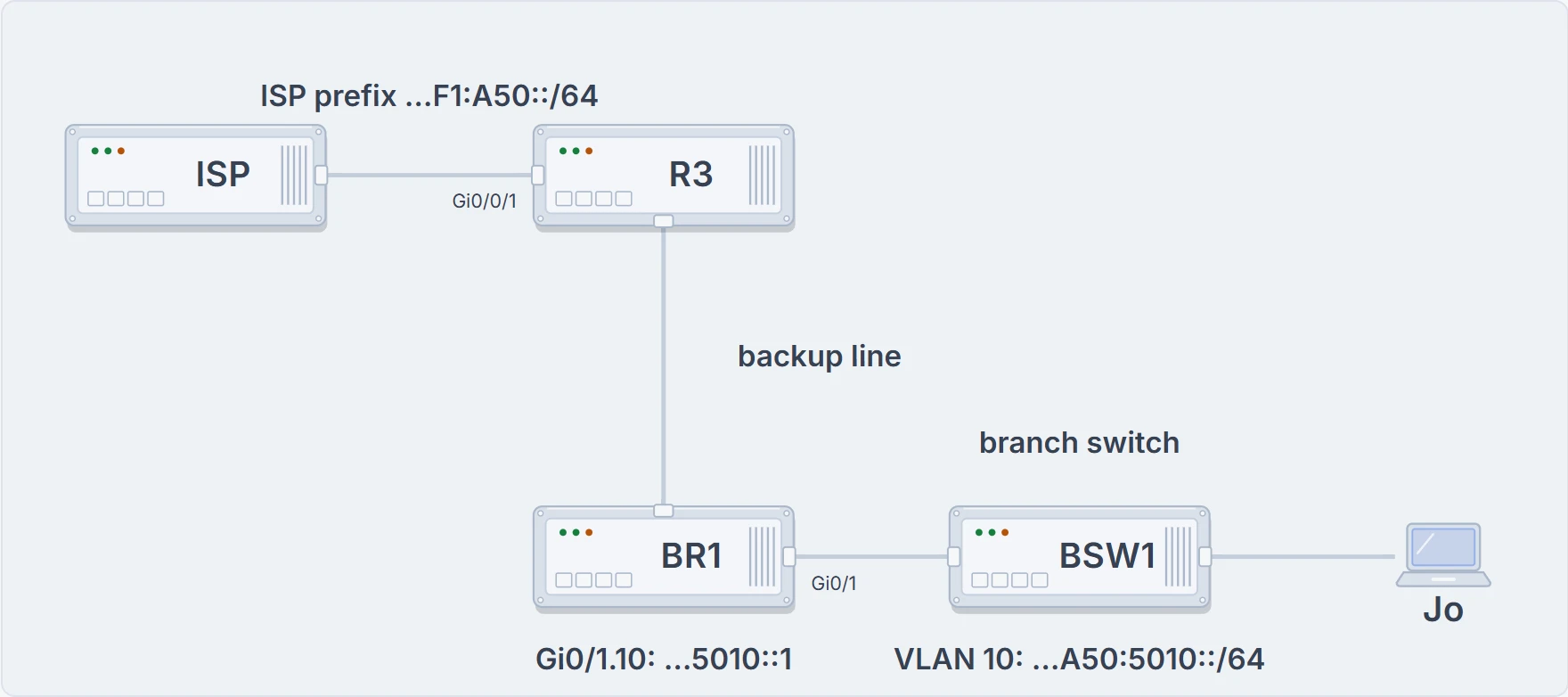
Tuesday's two edges: R3's link to the ISP, and BR1's VLAN 10 down to Jo's laptop.
IPv6 follows IPv4's habit here: routers typically get static addresses, while user devices typically learn theirs dynamically. A host can be set up by hand, with its address, prefix length, default router and DNS servers all typed in (06.5), but IPv6 gives it two dynamic sources instead: DHCP, as in IPv4, or a built-in method with no server at all. Mix the two and you get the three ways below.
Building an address: SLAAC
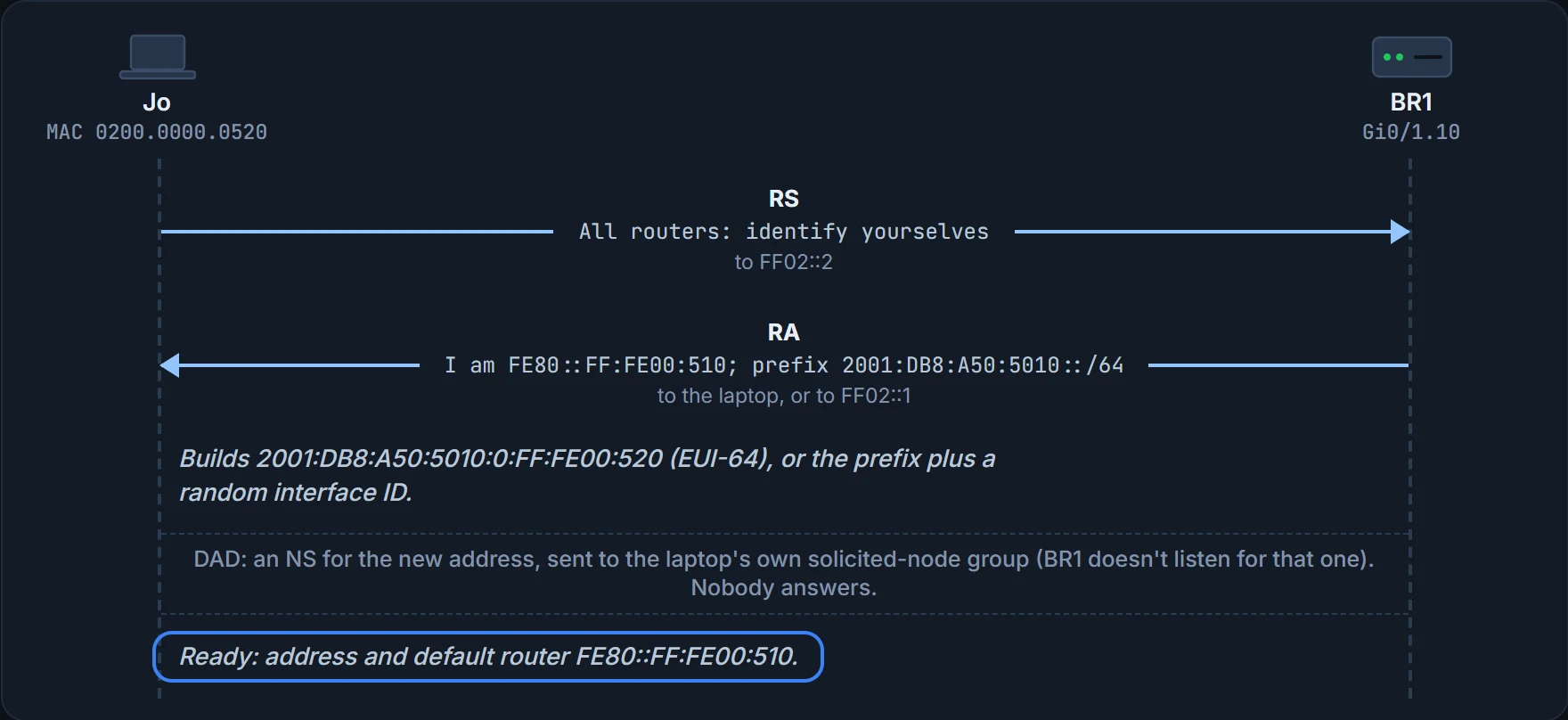
First Ravi gives BR1 an address on VLAN 10's subinterface. BR1 already routes IPv6 (06.6), so from now on it sends RAs on VLAN 10 too.
BR1# configure terminal
BR1(config)# interface GigabitEthernet0/1.10
BR1(config-subif)# ipv6 address 2001:DB8:A50:5010::1/64
BR1(config-subif)# end
BR1#
The built-in method is Stateless Address Autoconfiguration (SLAAC): a host gets an IPv6 unicast address without any DHCP server. It takes three steps:
- Learn the IPv6 prefix used on the link, and its prefix length, from any router, using NDP's RS and RA (06.6).
- Build an address from that prefix plus an interface ID, chosen either with EUI-64 (06.5) or at random.
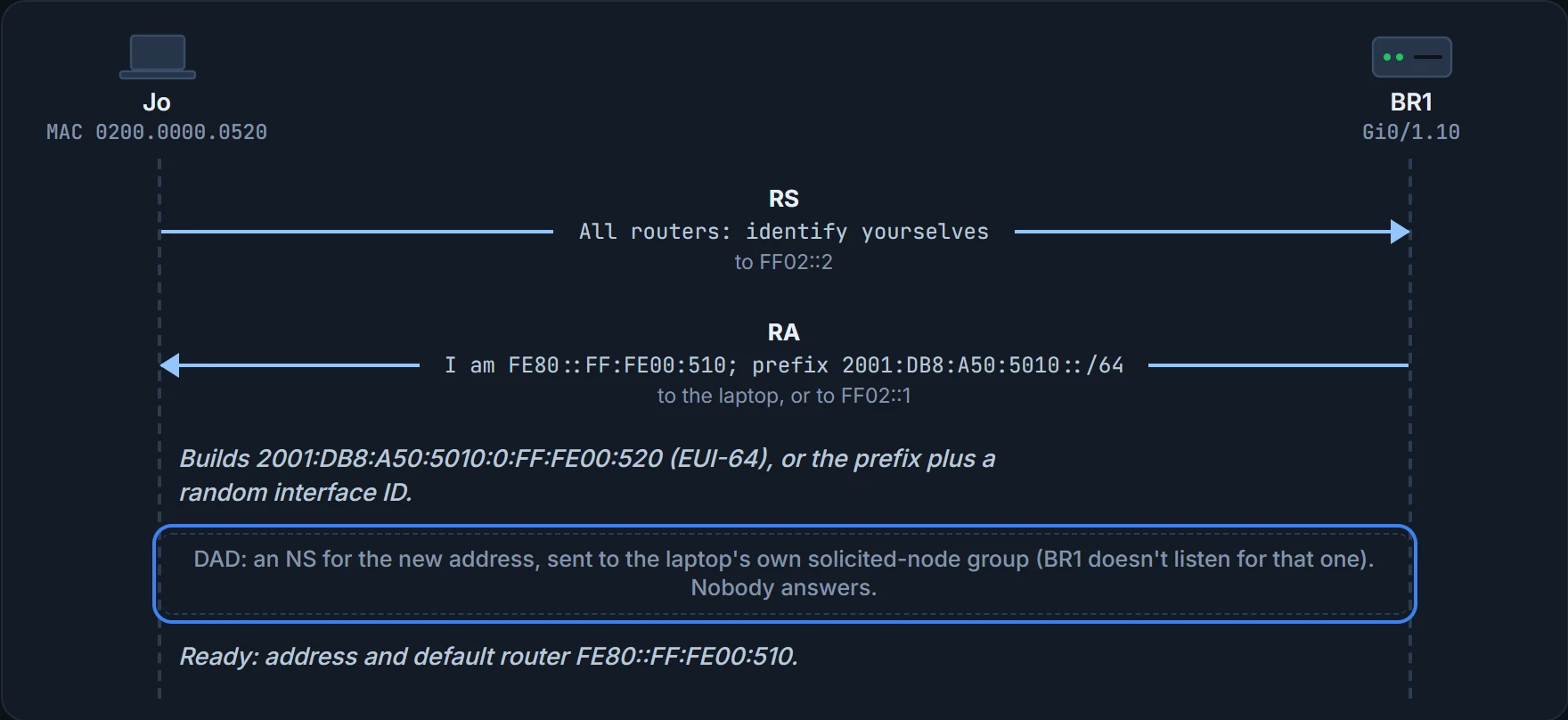
- Before using the address, run DAD to make sure no other host on the link already uses it.
The router supplies the first half of the address; the host chooses the second.
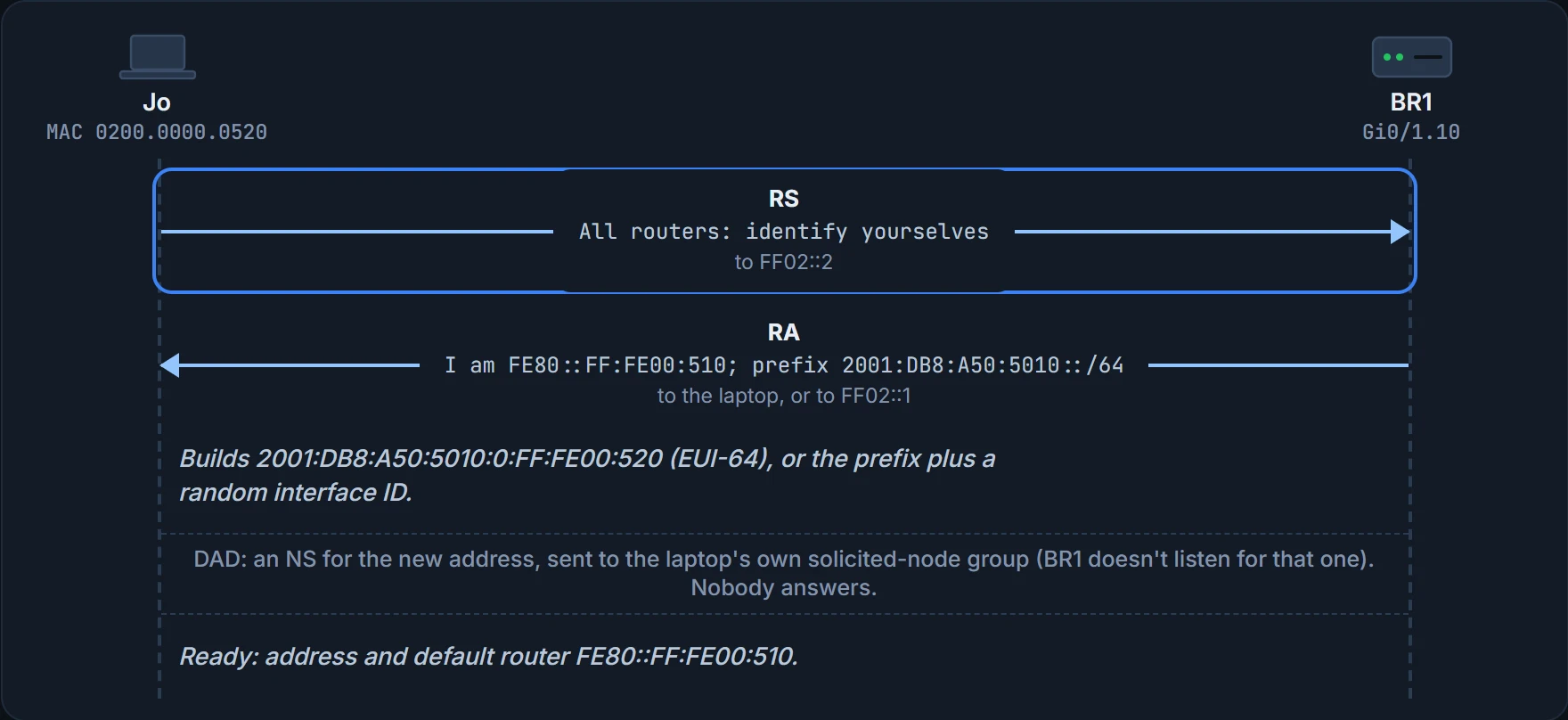
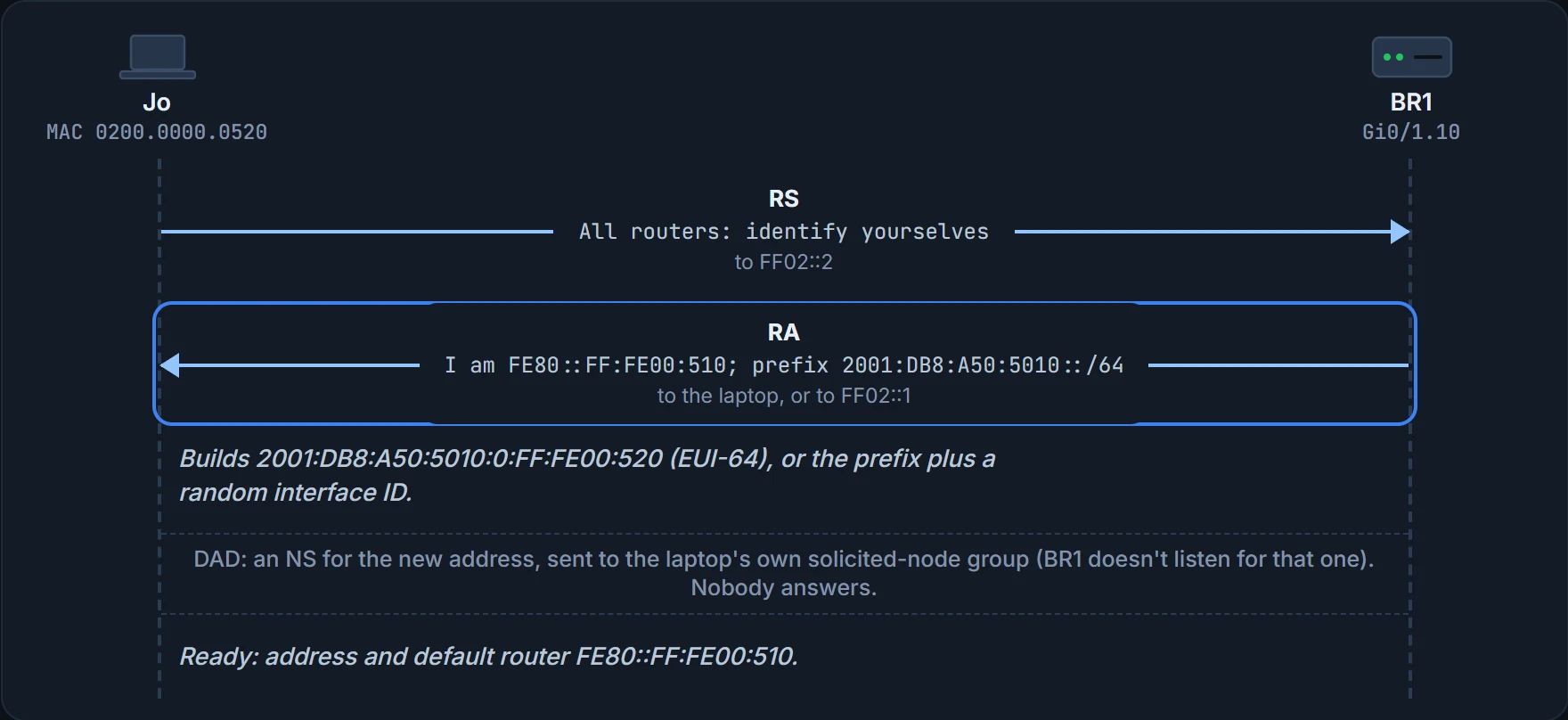
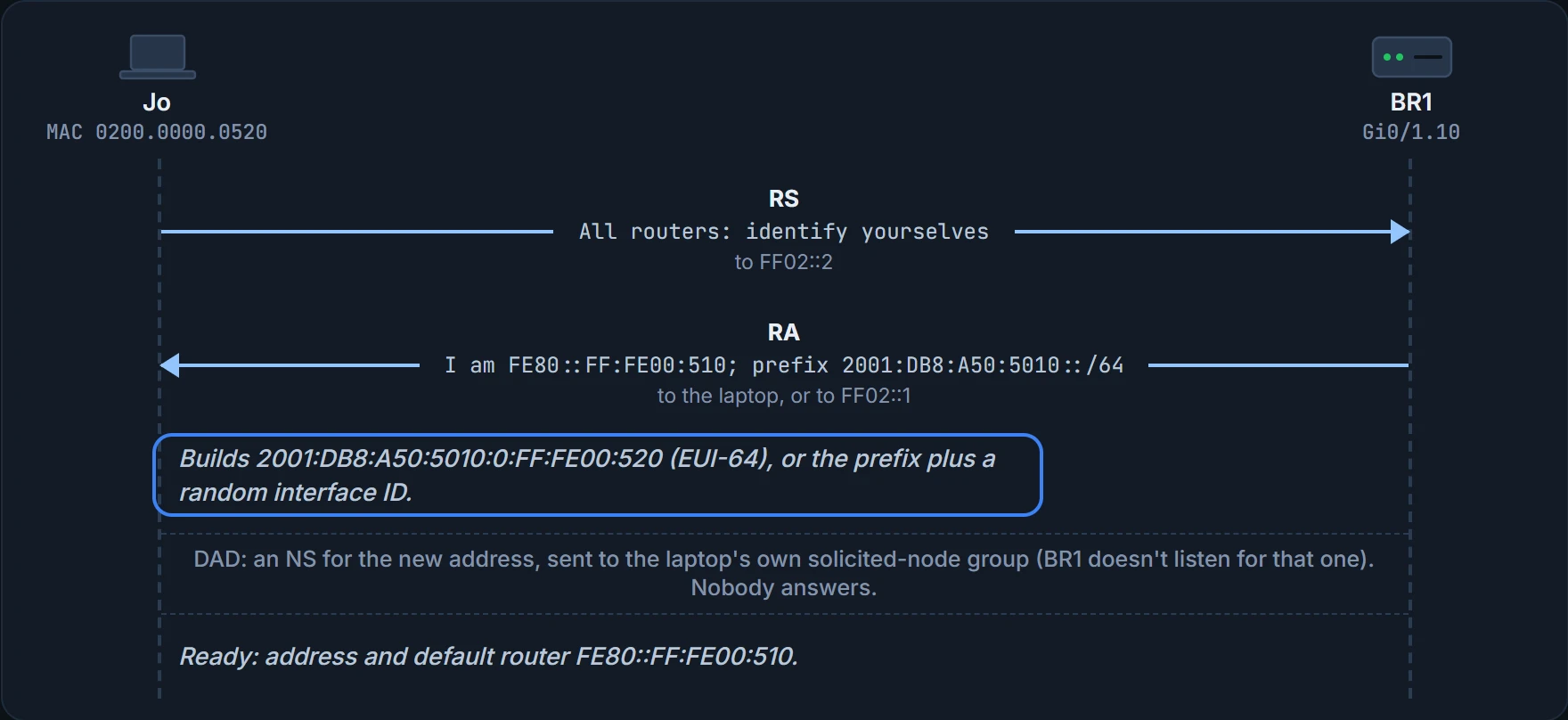
If Jo's laptop uses EUI-64 with its MAC, 0200.0000.0520, its address is 2001:DB8:A50:5010:0:FF:FE00:520. Some systems choose a random interface ID instead, which would give something like 2001:DB8:A50:5010:3A7C:91E2:B4D:C6F5. Either way, DAD comes first, and the RA that taught the prefix also listed BR1's link-local address, so the laptop has its default router too.
The router names the street; the laptop picks its own house number and checks nobody lives there first. (Where it stops: with EUI-64 the laptop doesn't pick the number at all, it works it out from its MAC.)
Asking a server: DHCPv6
DHCP works in IPv6 much as in IPv4: a DHCP client sends messages to a DHCP server, and the server assigns an address that isn't in use, in the right subnet. It relies on a DHCP client in each device and a DHCP server configured and working somewhere in the network. DHCP for IPv6 is called DHCPv6, and it comes in two kinds.
A stateful DHCPv6 server works like an IPv4 DHCP server: it assigns addresses and keeps track of which client has which address. That record is its state. A stateless DHCPv6 server leases no addresses at all. It supplies other useful information, such as the DNS servers' addresses, and needs to keep no information about the clients.
Two things stay the same. With SLAAC or with DHCPv6, a host learns its default router from the router's RAs: the RA lists the router's address, and DHCPv6 doesn't supply the default router. And every host runs DAD before using any unicast address, whether the address was typed in, learned with DHCPv6 or built with SLAAC.
Three ways, side by side
Put those together and a host has three ways to get its IPv6 settings. Here is each one for Jo's laptop:
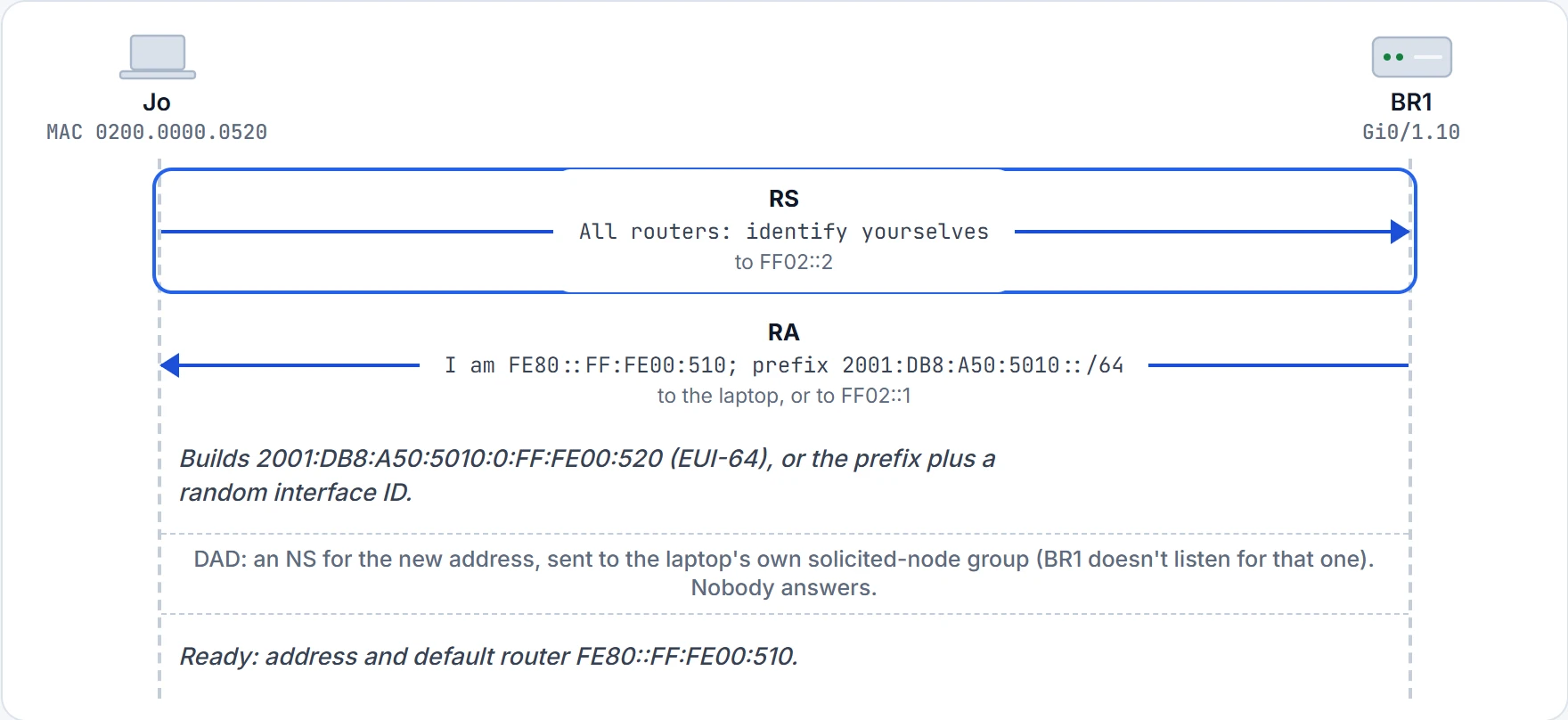
Step 1 of 5 Jo's laptop asks for the routers on VLAN 10 (06.6).
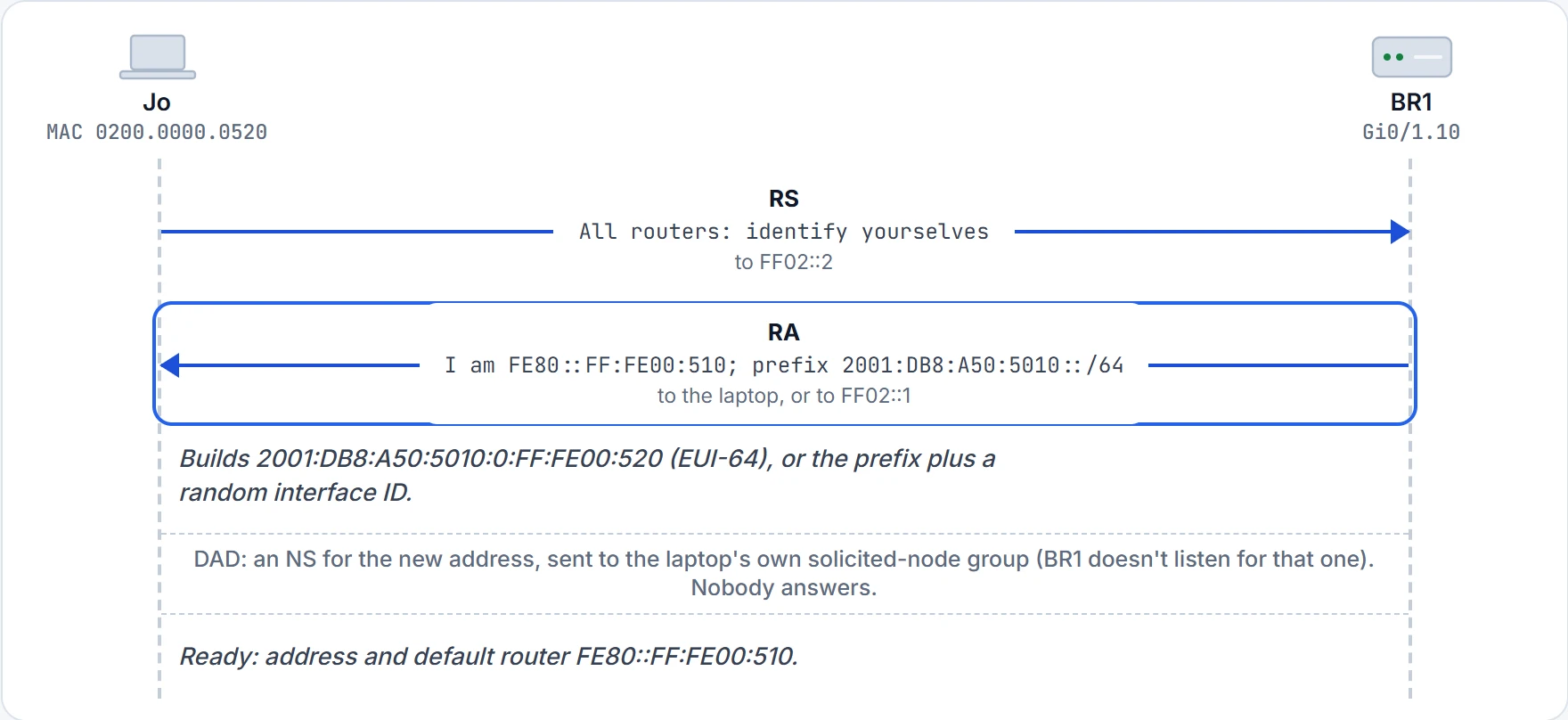
Step 2 of 5 BR1's RA lists its link-local address and the prefix and prefix length used on the link.
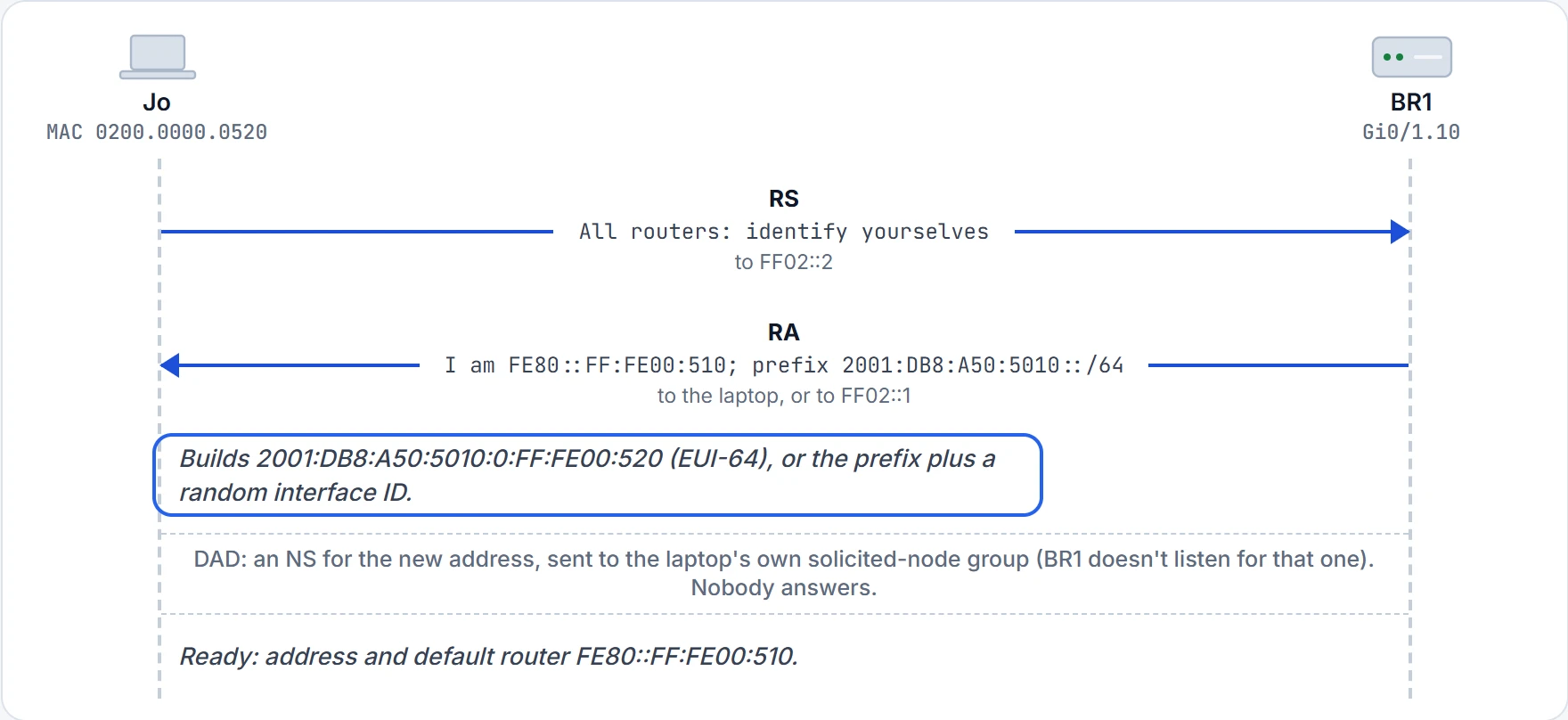
Step 3 of 5 SLAAC step 2: the prefix from the RA plus an interface ID the laptop chooses, by EUI-64 or at random.
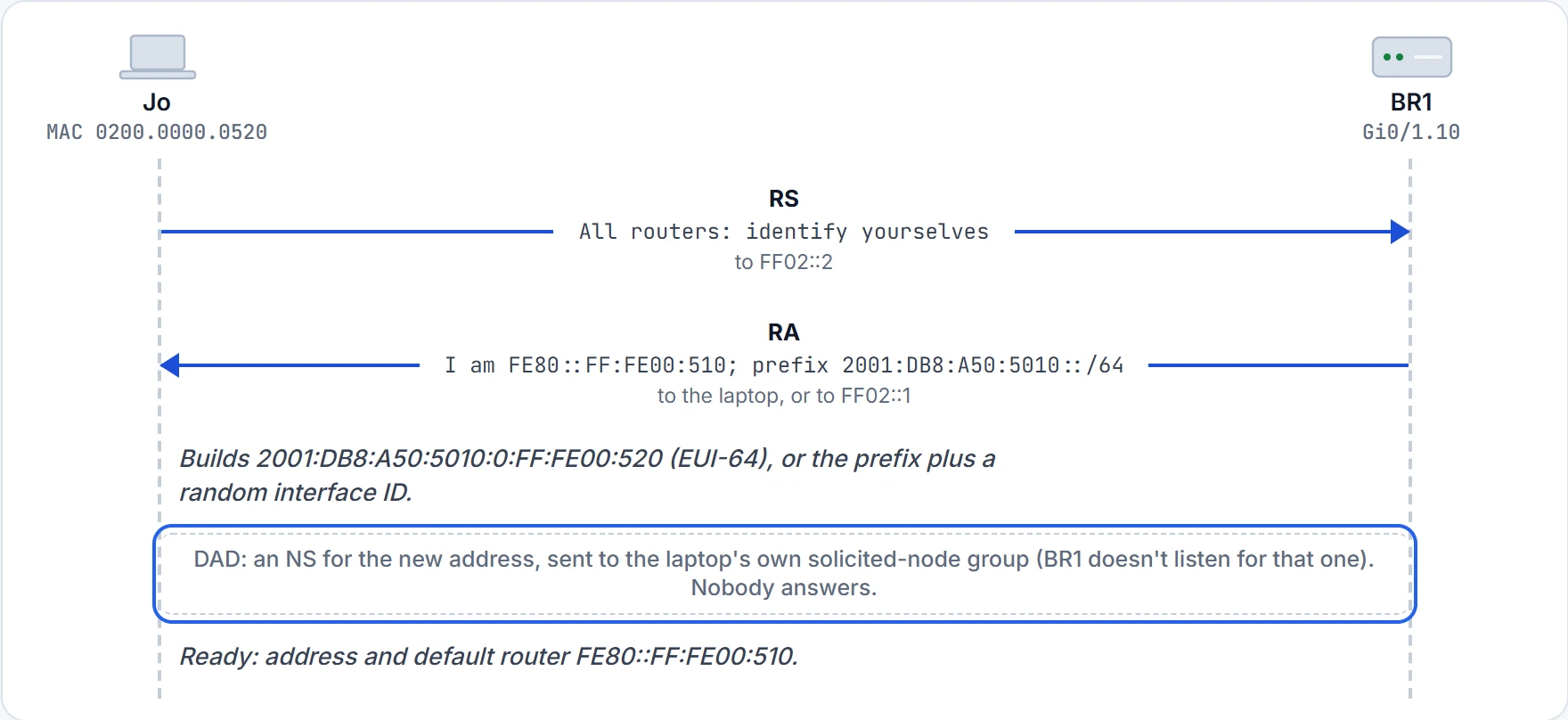
Step 4 of 5 Before using the address, the laptop runs DAD (06.6). Nobody answers, so no duplicate turned up on this link.
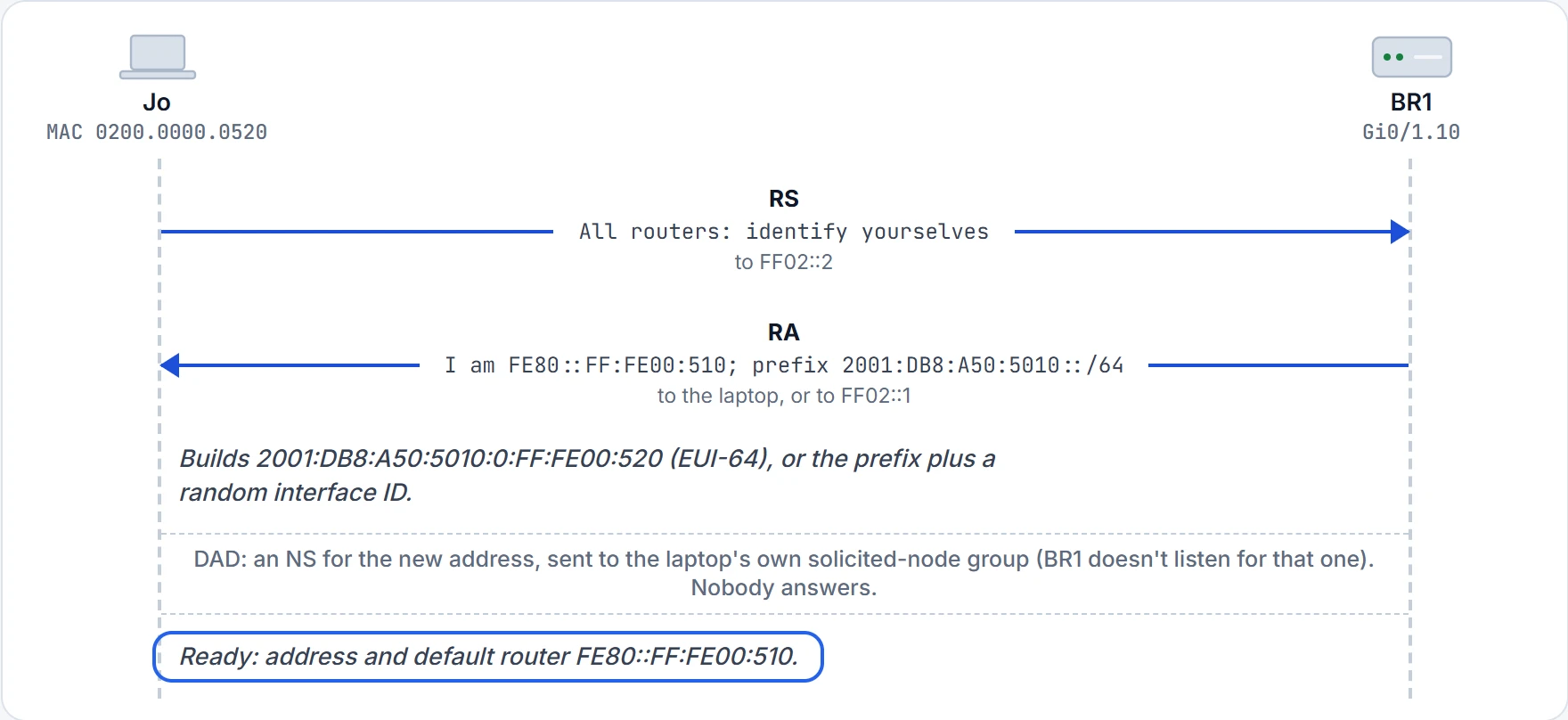
Step 5 of 5 Address, prefix length and default router, all without a server. SLAAC's steps don't include the DNS servers; here they'd come from DHCPv6.
| Method | Its address | Prefix and length | Default router | DNS servers | Server state |
|---|---|---|---|---|---|
| SLAAC | the host builds it: the RA's prefix plus its own interface ID (EUI-64 or random) | the RA | the RA | not part of SLAAC's steps | no server at all |
| SLAAC plus stateless DHCPv6 | the host builds it, as with SLAAC | the RA | the RA | the DHCPv6 server | the server leases no addresses and keeps no client records |
| Stateful DHCPv6 | the DHCPv6 server assigns it | the RA | the RA | the DHCPv6 server | the server tracks which client has which address |
Ravi and Maya pick one for each site. At the branch, SLAAC plus stateless DHCPv6: the laptops build their own addresses and learn the DNS servers from the server, and nobody needs a record of branch addresses. At head office, stateful DHCPv6 for the Staff LAN, because head office wants a record of which PC had which address. Where the DHCPv6 server will live is still to be decided; they settle the methods today and configure them later.
SLAAC plus stateless DHCPv6 works kind of like a hotel where guests pick any free room on the floor they're given, and the front desk only hands out the wifi password. (Where it stops: a hotel desk usually knows who's in which room; a stateless DHCPv6 server doesn't know or care which address a laptop chose.)
Continue the lesson
The whole lesson, with its drawings and its questions. 2 more sections after the ones above.