
Routing protocol authentication
Authentication is the one routing setting that is not local: configure it correctly on one router and the untouched neighbour goes down. A key chain is a named list of keys shared by protocols on purpose. Each key has a number that travels, a string that never does, and separate accept and send lifetimes. EIGRP, OSPFv2 and BGP each choose a different key from the same chain.
By Arif, founder of Daveth · Updated
The full 5 min walkthrough is in Daveth Pro (Network). See what the plan opens
What this page answers
What is the difference between accept-lifetime and send-lifetime?
Accept-lifetime is when you will believe a key that arrives; send-lifetime is when you will use it yourself. They are separate lines on each key. Read it in “One object, shared on purpose”
What happens to ip ospf message-digest-key when a key chain is attached?
The MD5 keys configured with ip ospf message-digest-key are ignored once OSPFv2 uses a key chain on that interface: not merged, not warned about, so an authenticated adjacency can drop. Read it in “The link that was already authenticated”
Which key does EIGRP send when a key chain has several valid keys?
Only one authentication packet is sent. The software examines the key numbers from lowest to highest and uses the first valid key it finds. Read it in “Three chapters, three rules, one chain”
The change that breaks it by working
Everything else in this domain is local. An administrative distance is local and never advertised. A static route is a local assertion, a VRF a local table, a policy route a local override. Get any of them wrong and you damage your own forwarding while the neighbor carries on. Authentication inverts that, and the first step shows how: the engineer configures it correctly on one router, and the neighbor that was never touched goes down.
EIGRP route authentication provides MD5 authentication of routing updates from the EIGRP routing protocol. The MD5 keyed digest in each EIGRP packet prevents the introduction of unauthorized or false routing messages from unapproved sources.
Read the second sentence for what it is defending against, not a misconfiguration but an injection, a router that should not be in this conversation putting routes into it. Before any of it can be typed, the protocol has to exist:
Before you configure EIGRP route authentication, you must enable EIGRP.
And that is the whole of what it defends against, which is worth being exact about. It establishes that an update came from somebody holding the right key and arrived unaltered. It does not conceal anything: the prefixes, the metrics and the neighbours are as readable on the wire afterwards as they were before. Somebody watching the link learns the same topology either way; what they cannot do is contribute to it.
Configuration: the campus core, authenticating EIGRP to the halls of residence, in the command forms the cited chapters print.
CORE-R1# configure terminal
CORE-R1(config)# router eigrp CAMPUS
CORE-R1(config-router)# address-family ipv4 unicast autonomous-system 1
CORE-R1(config-router-af)# af-interface Gi0/0/1
CORE-R1(config-router-af-interface)# authentication mode hmac-sha-256 0 campuspass
CORE-R1(config-router-af-interface)# authentication key-chain CAMPUS-KC
CORE-R1(config-router-af-interface)# exit-af-interface
CORE-R1(config-router-af)# exit-address-family
CORE-R1(config-router)# address-family ipv6 unicast autonomous-system 1
CORE-R1(config-router-af)# af-interface Gi0/0/1
CORE-R1(config-router-af-interface)# authentication mode hmac-sha-256 0 campuspass
CORE-R1(config-router-af-interface)# authentication key-chain CAMPUS-KC
CORE-R1(config-router-af-interface)# exit-af-interface
CORE-R1(config-router-af)# exit-address-family
CORE-R1(config-router)# end
Computed from the state (the three adjacencies, one step in) read the far-end column. No command prints it in this form.
protocol  where                 CORE-R1     the far end  state  drops
EIGRP     Gi0/0/1               key 1       nothing      down   1
OSPFv2    Gi0/0/2               no chain    no chain     up     0
BGP       neighbor 198.51.100.9 no chain    no chain     up     0
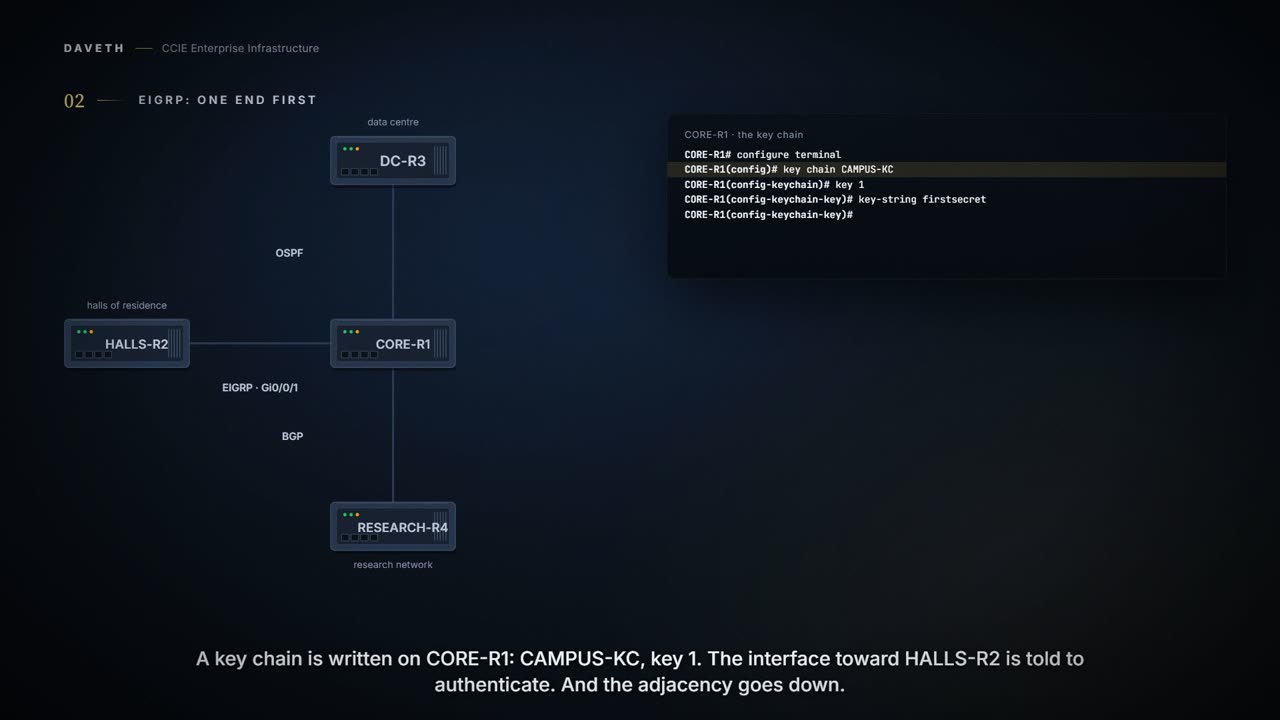
Nothing in that configuration is wrong. It is incomplete, and incomplete here means down. HALLS-R2 has no chain, no key and nothing to answer with, so its packets arrive unauthenticated and CORE-R1 drops them. The fix is not on CORE-R1:
Computed from the state, the same three adjacencies once the far end matches, read that column again. No command prints it in this form.
protocol  where                 CORE-R1     the far end  state  drops
EIGRP     Gi0/0/1               key 1       key 1        up     1
OSPFv2    Gi0/0/2               no chain    no chain     up     0
BGP       neighbor 198.51.100.9 no chain    no chain     up     0
Both ends or neither. Hold on to that as the rule and the rest of this page is detail: except for one thing the rule does not cover, which is what the two ends do when they both have the same chain and still disagree. That is the second half of the lesson.
One object, shared on purpose
A key chain is a named list of keys, and it is deliberately not owned by any one protocol. The OSPFv2 chapter says so in a sentence worth noticing, because it is the reason this lesson exists:
You can use an existing key chain that is being used by another protocol, or you can create a key chain specifically for OSPFv2.
Each key is a number, a string and two lifetimes. The number is what travels; the string never does. Start with what the number is for:
Each key has its own key identifier (specified with the key number key chain configuration command), which is stored locally. The combination of the key identifier and the interface associated with the message uniquely identifies the authentication algorithm and the MD5 authentication key in use. A key-string is essential for a key to be operational.
So the receiving router does not try your key against all of its keys. It reads the key ID out of the packet and fetches that one. Two routers with the same secret under different key numbers do not authenticate: they fail, and they fail silently:
When packets are received, the key ID is used to fetch the data for that key. If the key ID is not found, the packet is dropped.
Now the two lifetimes, and read the pair rather than either one. Accept-lifetime is when you will believe a key that arrives; send-lifetime is when you will use it yourself. They are separate commands because the gap between them is the only safe way to change a key, which the last third of this page is about.
You can configure multiple keys with specific lifetimes. The combination of the cryptographic authentication algorithm and the key is known as a Security Association (SA).
Configuration, the chain the mandate hands every campus router, notice that the two lifetimes are separate lines, in the command forms the cited chapters print.
CORE-R1# configure terminal
CORE-R1(config)# key chain CAMPUS-KC
CORE-R1(config-keychain)# key 1
CORE-R1(config-keychain-key)# key-string firstsecret
CORE-R1(config-keychain-key)# cryptographic-algorithm hmac-sha-256
CORE-R1(config-keychain-key)# accept-lifetime 00:00:00 Sep 1 2026 infinite
CORE-R1(config-keychain-key)# send-lifetime 00:00:00 Sep 1 2026 infinite
CORE-R1(config-keychain-key)# end
One more thing that is not shared: how big a key number may be. The two chapters give different ranges for the same-looking object, because a TCP-AO chain is a different object with a different command:
OSPFv2 supports keys with key IDs ranging from 1 to 255. The key-id must be in the range 0 to 2147483647.
The link that was already authenticated
CORE-R1 and DC-R3 have been authenticating OSPFv2 for years, with the older per-interface command. The engineer attaches the new chain to CORE-R1's interface and that adjacency drops too, and this time the neighbor is not the thing that is missing. Read the note the chapter prints:
If OSPFv2 is configured to use a key chain, all MD5 keys that were previously configured using the ip ospf message-digest-key command are ignored.
Ignored. Not merged, not preferred, not warned about. The moment a key chain is attached to that interface, the keys that were holding the adjacency up stop counting on it.
Configuration, the interface mid-migration, the older key line has been there for years, and one line is typed now; read both, and then which of them still counts, in the command forms the cited chapters print.
! already on Gi0/0/2 for years: ip ospf message-digest-key 1 md5 oldcampus
CORE-R1# configure terminal
CORE-R1(config)# interface Gi0/0/2
CORE-R1(config-if)# ip ospf authentication key-chain CAMPUS-KC
CORE-R1(config-if)# end
Computed from the state: what that did. No command prints it in this form.
adjacency     OSPFv2 to DC-R3
change        a key chain was attached
detail        CORE-R1
now sending   key 1, hmac-sha-256
state         down
drops so far  1
Computed from the state, the OSPF adjacency once DC-R3 is on the same generation, read the state column. No command prints it in this form.
protocol  where                 CORE-R1     the far end  state  drops
EIGRP     Gi0/0/1               key 1       key 1        up     1
OSPFv2    Gi0/0/2               key 1       key 1        up     1
BGP       neighbor 198.51.100.9 no chain    no chain     up     0
Which is the first step wearing different clothes. Both ends or neither: including both ends being on the same generation of the configuration. The older keys stay in both configurations afterwards, doing nothing, which is its own small trap for whoever reads this router next.
The reason to migrate at all is in the chapter's opening, and it is about algorithms rather than convenience:
There are two methods of authentication that are defined for OSPFv2: plain text authentication and cryptographic authentication. OSPFv2 specification (RFC 2328) allows only the Message-Digest 5 (MD5) algorithm for cryptographic authentication. However, RFC 5709 (OSPFv2 HMAC-SHA Cryptographic Authentication) allows OSPFv2 to use HMAC-SHA algorithms for cryptographic authentication.
EIGRP is not stuck on MD5 either, although the first version of this page said so. The autonomous-system task prints one mode and the named configuration prints two:
Enables MD5 authentication in EIGRP packets. authentication mode {hmac-sha-256 encryption-type password | md5 }
That named form is also the dual-stack one, which is why this page uses it. The same af-interface takes an IPv4 address family and an IPv6 one, and the chapter's own final example is the IPv6 case:
From elsewhere: the chapter's named configuration example, IPv6 address family, HMAC-SHA-256. The names, numbers and addresses come from elsewhere, not from this scenario.
!
key chain chain1
 key 1
  key-string securetraffic
  accept-lifetime 04:00:00 Dec 4 2006 infinite
  send-lifetime 04:00:00 Dec 4 2010 04:48:00 Dec 4 2008
 !
 key 2
  key-string newertraffic
  accept-lifetime 01:00:00 Dec 4 2010 infinite
  send-lifetime 03:00:00 Dec 4 2010 infinite
 exit
!
router eigrp virtual-name
  address-family ipv6 autonomous-system 4453
    af-interface ethernet 0
       authentication mode hmac-sha-256 0 password1
       authentication key-chain key1
  !
!
Read the send-lifetime on key 1 in that example before you copy it: send-lifetime 04:00:00 Dec 4 2010 04:48:00 Dec 4 2008. It starts in 2010 and ends in 2008, so the end is two years before the start, and that key can never be sent. It is a typing slip in a published example, and it is the kind of thing worth catching in a lifetime you have written yourself, where nothing will tell you.
One more line in that example is worth copying: the mode line carries a password, 0 password1, and the chain is still named on the line after it. The syntax quoted above requires the password with hmac-sha-256, which is why the campus attachment at the top of this page types 0 campuspass as well. The chapter's example configures both and does not say which of the two secrets signs the packets; the key choices on this page follow the chain.
The peer that is not an interface
The third neighbor is an eBGP peer across the research network, and the chain that works on both IGPs cannot be pointed at it. BGP is not stamping its own packets. It is protecting the TCP connection underneath them:
On a secure control plane, BGP uses Message Digest 5 (MD5) algorithm as the authentication mechanism. It uses the TCP API to configure the keychain on a TCP connection. When authentication is enabled, any Transmission Control Protocol (TCP) segments belonging to BGP are exchanged between peers, verified and then accepted only if authentication is successful.
That single architectural difference explains every other difference. There is no interface to attach anything to, so the chain is named on the neighbor; and because it is TCP's own mechanism, the object it takes is a TCP-AO key chain: a different command, with parts the IGP chain does not have:
TCP-AO key chain and keys must be configured on both the peers communicating through a TCP connection. Ensure that the send-id on a router matches the receiver-id on the peer router. The send-id and recv-id of a key cannot be reused for another key in the same key chain. The send-identifier must be in the range 0 to 255.
Read the identifier rule twice, because it is the one that catches people: the send-id on this router is matched against the recv-id on the other, not against its send-id. And the key string is not a password in the ordinary sense:
Specifies the master-key for deriving traffic keys. The master-key must have 32 or 64 hexadecimal digits. The master-keys must be identical on both the peers. If the master-keys do not match, authentication fails and segments may be rejected by the receiver.
From elsewhere: the chapter's two-end TCP-AO key chain, both routers printed together. The names, numbers and addresses come from elsewhere, not from this scenario.
R1:

key chain kc1 tcp
key 7890
  send-id 215
  recv-id 215
  key-string klomn
  cryptographic-algorithm hmac-sha-1
 include-tcp-options

R2:

key chain kc1 tcp
key 7890
  send-id 215
  recv-id 215
  key-string klomn
  cryptographic-algorithm hmac-sha-1
  include-tcp-options
Configuration, the campus TCP-AO key chain, look at the three lines an IGP chain has no room for, in the command forms the cited chapters print.
CORE-R1# configure terminal
CORE-R1(config)# key chain RESEARCH-AO tcp
CORE-R1(config-keychain-tcp)# key 7890
CORE-R1(config-keychain-tcp-key)# send-id 215
CORE-R1(config-keychain-tcp-key)# recv-id 215
CORE-R1(config-keychain-tcp-key)# key-string 0f1e2d3c4b5a69788796a5b4c3d2e1f0
CORE-R1(config-keychain-tcp-key)# cryptographic-algorithm hmac-sha-1
CORE-R1(config-keychain-tcp-key)# end
Which line on RESEARCH-R4 does CORE-R1's send-id 215 have to match? Its recv-id, not its send-id, which is why both numbers are 215 at both ends here.
Configuration, the campus side of the peering, notice that the chain is named on the neighbor, not on an interface, in the command forms the cited chapters print.
CORE-R1# configure terminal
CORE-R1(config)# router bgp 65001
CORE-R1(config-router)# neighbor 198.51.100.9 ao RESEARCH-AO
CORE-R1(config-router)# neighbor 2001:db8:100::9 ao RESEARCH-AO
CORE-R1(config-router)# end
Now the sentence that the first version of this page turned into "BGP: MD5 only", in bold, in a comparison table:
Routing protocols support a different set of cryptographic algorithms, however, BGP supports only MD5. For example, if BGP is configured with the TCP MD5 key (md5-key), it will not allow to configure TCP-AO and vice versa.
That is a statement about mutual exclusion, not about available algorithms. The example that follows it is the whole point: configure the TCP MD5 key and you cannot configure TCP-AO, and the other way round. What TCP-AO itself offers is on the same page, three steps further down:
cryptographic-algorithm {aes-128-cmac | hmac-sha-1 | hmac-sha-256} Specifies the algorithm to be used to compute MACs for TCP segments.
No MD5 in that list at all, and one of the three is there for a reason worth knowing if the far end is not IOS XE:
The cryptographic algorithm specified by the aes-128-cmac keyword in IOS XE is functionally equivalent to the AES-128-CMAC-96 algorithm in IOS XR.
Two flags come with it, and where you configure them matters:
This flag is disabled by default. The include-tcp-options and accept-ao-mismatch commands are not supported when configured under a key chain for BGP.
Computed from the state, the three adjacencies with the peering authenticated, read the drops column before you go on. No command prints it in this form.
protocol  where                 CORE-R1     the far end  state  drops
EIGRP     Gi0/0/1               key 1       key 1        up     1
OSPFv2    Gi0/0/2               key 1       key 1        up     1
BGP       neighbor 198.51.100.9 key 7890    key 7890     up     1
Three chapters, three rules, one chain
Here is the question this page is really built around. The chain is one object, written once, attached three ways. When it holds more than one valid key, which one does a router actually send? Each of the three chapters answers that, and they do not give the same answer. Start with EIGRP, whose sentence is the one everybody quotes:
Only one authentication packet is sent, regardless of how many valid keys exist. The software examines the key numbers in the order from lowest to highest, and uses the first valid key that it encounters.
Lowest to highest, first valid, one packet. No negotiation, no retry, no list of alternatives offered, which kills a comforting idea: configuring several keys is not redundancy. Now OSPF, in the same kind of note, on its own page:
When key chain has more than one key, OSPF selects the key that has the maximum life time. Key having an infinite lifetime is preferred. If keys have the same lifetime, then key with the higher key ID is preferred.
Maximum lifetime, infinite preferred, and the tie broken on the higher key ID. That is the opposite tie-break to EIGRP's, on the same chain, from the same vendor. And TCP-AO makes a third rule:
TCP AO picks up the most valid key under the key chain. The most valid key is the one which has the longest send lifetime. If there are two keys with the same send lifetime, the first best key is selected.
Longest send lifetime, and "the first best key" when two are equal. The chapter does not say which key is first; by this course's reading that is the lowest key ID in the chain, and the page marks it as a reading rather than a quotation.
Computed from the state, the three rules, read the picks column, and then read it again after Tuesday. No command prints it in this form.
protocol  the chapter's rule                picks     from
EIGRP     lowest valid key ID               key 1     CAMPUS-KC
OSPFv2    maximum lifetime, then higher ID  key 1     CAMPUS-KC
BGP       longest send lifetime             key 7890  RESEARCH-AO
Look at the picks column once more, and then at what it implies. So "both ends agree" is necessary and it is not sufficient. Both ends of one adjacency run the same protocol, so they apply the same rule and reach the same key. But one chain serving two protocols will be read two ways, and nothing on either router is misconfigured when that happens.
Continue the lesson
The whole lesson, with its drawings and its questions. 5 more sections after the ones above.