
Administrative distance
When two sources offer the same prefix, administrative distance decides which goes in the routing table, and lower is more trusted. It is used only when the prefix length matches; each protocol has already chosen its own best path by its metric. Connected is 0, static 1, eBGP 20, EIGRP 90, OSPF 110, iBGP 200. 255 is not worst but never installed, and AD is never advertised.
By Arif, founder of Daveth · Updated
The full 6 min walkthrough is in Daveth Pro (Network). See what the plan opens
What this page answers
What is administrative distance?
A value that ranks the trustworthiness of routing information sources. When several sources offer the same destination prefix, the route with the lowest AD is installed. Read it in “Two sources, one prefix”
What are the default administrative distances?
Connected 0, static 1, EIGRP summary 5, eBGP 20, internal EIGRP 90, OSPF 110, IS-IS 115, RIP 120, external EIGRP 170, iBGP 200, and unknown 255. Read it in “The table”
Is administrative distance advertised to neighbours?
No. AD is a local value, not advertised in routing updates: changing it on one router affects route selection there and nowhere else. Read it in “Now the part that gets people fired”
Two sources, one prefix
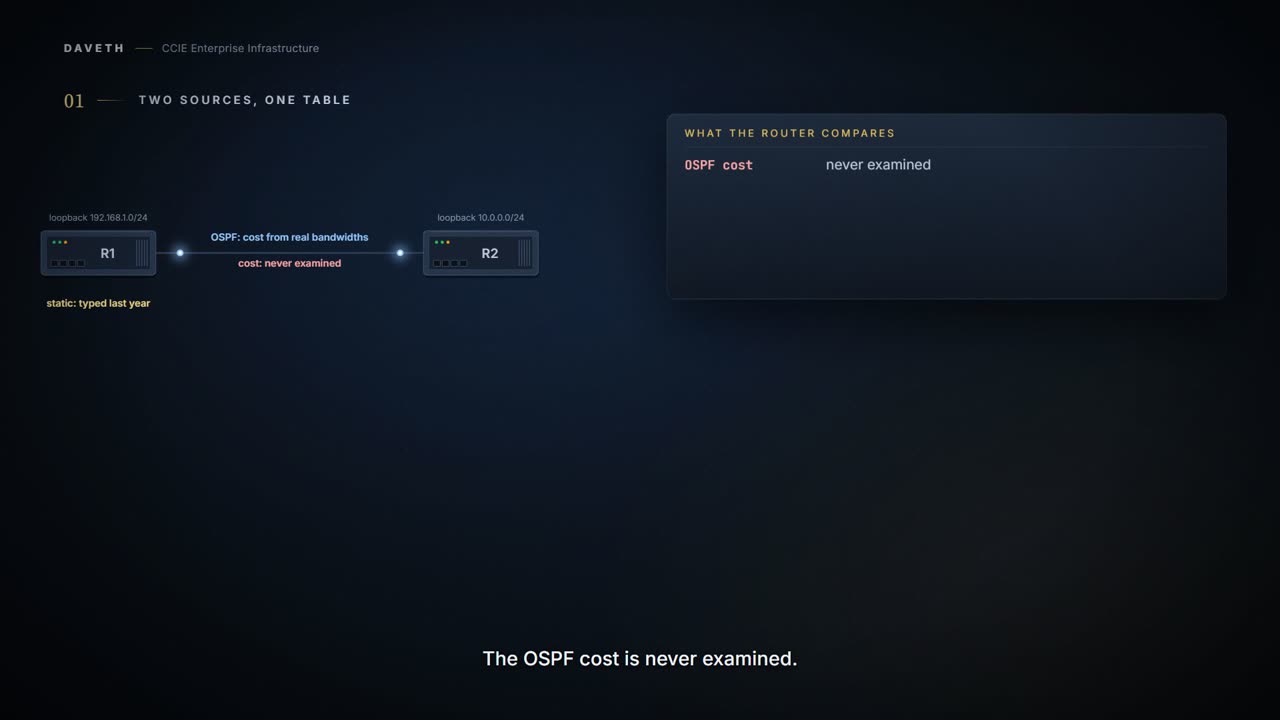
A router learns about 10.1.1.0/24 twice. OSPF has it, cost reflecting real link bandwidths, the whole calculation agreed with every router in the area. And somebody typed a static route for it last year, pointing at a backup link. Only one goes in the routing table. Which one, and before you answer: what do you think the router compares?
AD is a value used to rank the trustworthiness of routing information sources. When the routing table receives candidate routes to the same destination prefix from different route sources, the route with the lowest administrative distance is preferred and installed in the routing table.
Sources, not routes. The OSPF cost that so much machinery went into is never examined. Static is 1, OSPF is 110, 1 is smaller, done. A hand-typed route to a congested backup link beats a route that reflects your topology, and the router considers it an easy call.
Where AD sits
When does AD get a say at all? The guide lays out the order:
The routing protocol uses its own metric and path selection algorithm. If multiple routing sources advertise the same network and prefix length, AD determines which route is installed. AD is used only when multiple routing sources advertise the same destination prefix. If the next hop cannot be resolved, the route is not installed in the routing table.
So three things happen before a route goes in the routing table. Each protocol picks its best path by its own metric. AD chooses between sources, but only for the same prefix and the same length. And the winner still has to have a next hop the router can resolve. Step 1 of the walk: EIGRP and OSPF both carry each router's loopback to the other, and each router puts the EIGRP route, at 90, in its table.
Multiple routes can be installed when ECMP is supported and the routes are considered equal by the routing process or RIB.
That sentence is about routes a routing process or the RIB considers equal. What happens when two different sources offer the same prefix at the same AD is not on the page, and this lesson does not claim it.
The table
The guide's defaults. Lower is more trusted:
| Route source | Default AD |
|---|---|
| Connected | 0 |
| Static | 1 |
| EIGRP summary route | 5 |
| External Border Gateway Protocol (BGP) | 20 |
| Internal EIGRP | 90 |
| Interior Gateway Routing Protocol (IGRP) | 100 |
| OSPF | 110 |
| Intermediate System-to-Intermediate System (IS-IS) | 115 |
| Routing Information Protocol (RIP) | 120 |
| Exterior Gateway Protocol (EGP) | 140 |
| On Demand Routing (ODR) | 160 |
| External EIGRP | 170 |
| Internal BGP | 200 |
| Unknown* | 255 |
Read a few rows against each other. Connected is 0: nothing beats the router's own interface. External BGP at 20 beats every IGP, and internal BGP at 200 is near the bottom. Internal EIGRP is 90 and external EIGRP is 170, worse than OSPF and RIP, which matters when you reach redistribution. The guide gives no reasons for the numbers, and this lesson does not invent them.
The table still ranks IGRP and EGP, two protocols no lab in this course will ever run. Read it as a record of what Cisco has supported over the years, not as a design with a pattern to find.
The row that does something different
If the administrative distance is 255, the router does not consider the route reliable and does not install it in the routing table.
255 is not "worst". It is "no". Every other value is a ranking; 255 is a veto. A route at 255 does not lose a comparison; it never goes in the routing table at all.
So it will turn up in the discussion and never in the table. If you go looking for a 255 route in show ip route you will not find one, and its absence is not evidence that anything is broken.
Now the part that gets people fired
Everything so far happened inside one router. So what happens when you change the number on one router, and leave its neighbour alone? Step 2 of the walk asks it.
AD is a local value and is not advertised in routing updates. The administrative distance change has local significance only. It affects route selection on R1, but it is not advertised to R2.
Administrative distance is not a property of your network. It is one router's private opinion, and no other router is told about it.
Your own contact preferences live on your phone and nobody else's. Set one here and this router will act on it for as long as it stands; walk to the next rack and that router has never heard of your decision and is still doing what it always did.
Which is why a half-finished change is worse than no change. The two routers now disagree about which source wins for the same prefix, both are behaving correctly, and neither of them can tell you that the other one disagrees.
Where the phone stops: you can ask somebody what number they have for you. No command here asks another router what distance it is using, so the only way to know is to go and look on that router.
Where would you see that? Read R1's route before the change, the change itself, and then both routers after it.
The guide's route lines and configuration, excerpted as printed.
R1# show ip route
D 10.0.0.0 [90/130816] via 172.16.1.200, 00:16:10, GigabitEthernet1
R1# configure terminal
R1(config)# router ospf 100
R1(config-router)# distance 85
R1(config-router)# end
R1# show ip route
O 10.0.0.0 [85/2] via 172.16.1.200, 00:00:11, GigabitEthernet1
R2# show ip route
D 192.168.1.0/24 [90/130816] via 172.16.1.100, 00:20:15, GigabitEthernet1
The values in brackets use the format [administrative distance/metric].
Look at the brackets in that order: AD first, then the metric. R1 went from D [90/130816] to O [85/2]. R2 still shows D [90/130816], because nobody told it anything. If that shape feels familiar, it should: Domain 1.1 taught it three times, with a native VLAN mismatch, a one-sided on-mode bundle and an MST region two switches disagree about. A disagreement between two devices is never visible from one of them. Here you create it deliberately, with a command that does exactly what you asked.
Continue the lesson
The whole lesson, with its drawings and its questions. The rest of this section and 6 more after it.