
Appendix B: the troubleshooting playbook, from missing GPUs to NCCL hangs and Xid codes
When a lower layer breaks it rarely speaks; the layer above fails and reports it in its own words, so the error says who noticed, not what broke. Check each layer from the bottom. A classic case: an update replaced the driver on disk while the old module was still loaded, and a reboot fixes it.
What this page answers
Why does nvidia-smi fail after an automatic driver update?
The update replaced the driver files on disk, but the old module was still loaded in the running kernel. New programs load the new library, which refuses to talk to the old module. One reboot loads the new one. Read it in “Three reinstalls later”
How do I find which layer of the GPU stack is broken?
The error message tells you who noticed. Check each layer starting from the bottom, the GPU on the PCIe bus, then the kernel module, the driver libraries, any container and PyTorch; the first check that fails is the layer to fix. Read it in “Noticed here, broken there”
Three reinstalls later
Tuesday morning. Yesterday this machine trained fine. Today PyTorch says there's no GPU. You reinstall PyTorch, then reinstall it with a different CUDA build, then once more from scratch. Nothing changes. Then, finally, you run the GPU's own tool:
$ python -c "import torch; print(torch.cuda.is_available())"
UserWarning: CUDA initialization: ... Error 803: system has unsupported display driver / cuda driver combination
False
$ history | grep -c "pip install.*torch"
3
$ nvidia-smi
Failed to initialize NVML: Driver/library version mismatch
NVML library version: 580.95
$ head -1 /proc/driver/nvidia/version
NVRM version: NVIDIA UNIX x86_64 Kernel Module  580.82.07  ...
The messages are real ones (shortened). The version numbers are an example.
The library on disk says 580.95. The driver loaded in the kernel says 580.82. What fixes this?
- A fourth reinstall, with a PyTorch built for an older CUDA
- Reboot, so the kernel loads the new driver that's already on disk
- Downgrade the driver back to 580.82
Answer. Overnight, automatic updates installed a new driver. The update replaced the driver's files on disk, but the old driver was still loaded in the running kernel, and a kernel module stays in memory until it's unloaded or the machine restarts. Now every new program loads the new 580.95 library, which asks the old 580.82 module for the GPU, and the two refuse to talk. One sudo reboot loads the new module, and both halves match again.
Look at where the error appeared: in Python. Look at where the problem was: two layers lower, in the driver. Every one of the three reinstalls fixed a layer that was never broken. That's the most common way to lose a morning on a GPU machine, and the reason this playbook starts with a method rather than a list.
Noticed here, broken there
Your training code sits on a tall stack: PyTorch, then maybe a container, then the driver's libraries, then the driver's kernel module, then the GPU itself on the PCIe bus. When a lower layer breaks, it usually doesn't say anything. The layer above tries to use it, fails, and reports the failure in its own words. So the error message tells you who noticed, and the real question is how far down to look.
The answer is the same five-step ladder from Down the Lab: check each layer, starting from the bottom. The first check that fails is the layer to fix. Here's the ladder with the hook's results filled in:
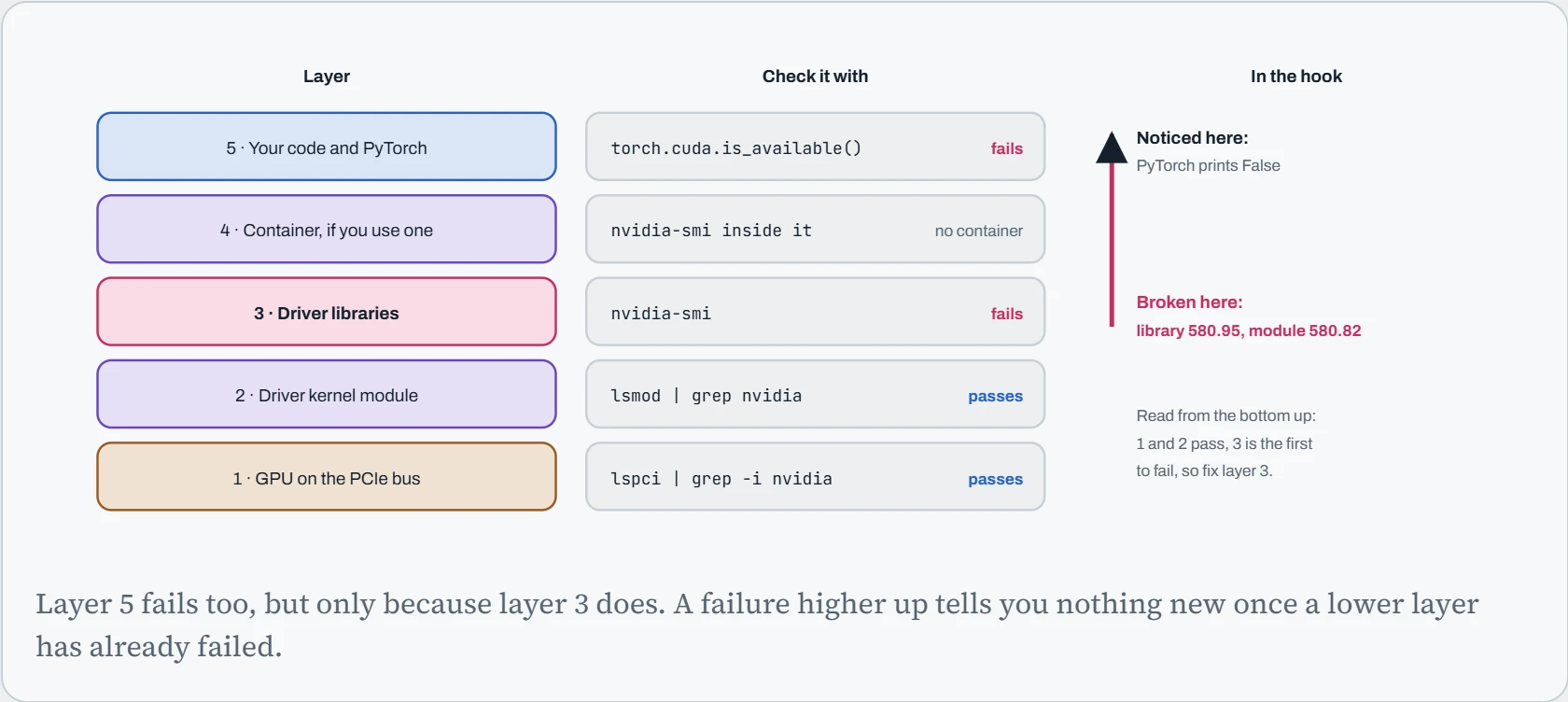
Two habits come out of this picture. First, before you change anything, spend two minutes running the checks from the bottom up. They're fast and they only look, so they can't make things worse. Second, when a reinstall “didn't help”, that's evidence: the layer you reinstalled is probably fine, so look lower. Every playbook below is this ladder, shaped around one particular error.
Paste the error
Error messages are long, but usually one short phrase identifies the problem: version mismatch, GLIBCXX_3.4.32, Bus error, Watchdog caught. Paste the error you're seeing (the last few lines of the traceback are enough), and this box finds the phrase, tells you which layer it usually points to, and opens the right playbook.
A bare Killed means the system's memory ran out and the kernel stopped the program, a different layer with a different fix. The words “out of memory” appear in both, which is exactly why reading the precise phrase matters.
The playbooks
Each step gives you a command to run and asks what you saw. Your answer picks the next step, and the walk ends at a cause and a fix, usually within three or four steps.
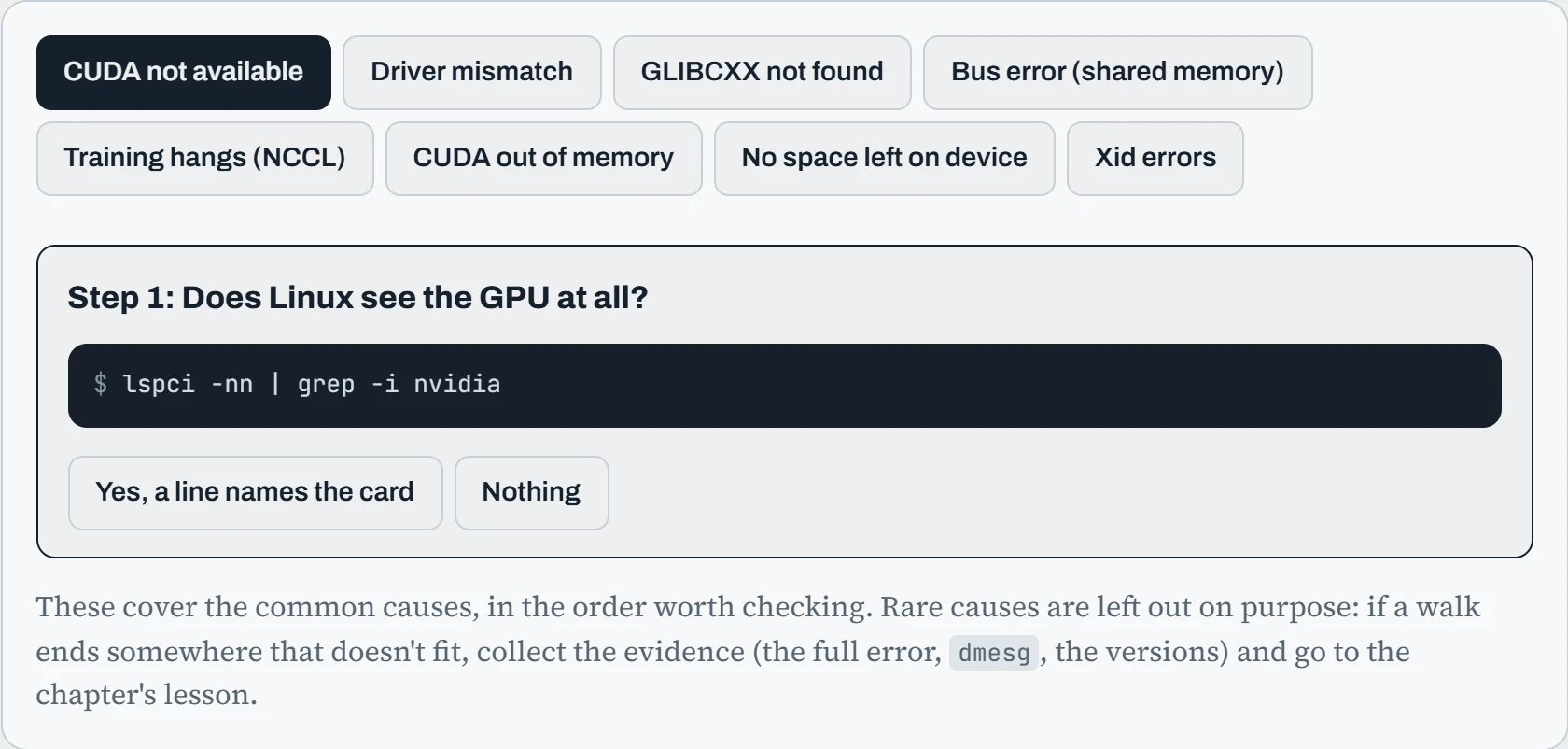
Walk the CUDA playbook twice with different answers and look at where it ends: the hardware, the kernel, the driver, the container, the Python package, an environment variable. Six different layers, one error message. That's the method in action. And notice the order: the checks always go from the cheapest and lowest layer upward, because a hardware or driver problem makes every later check meaningless.
Why version pairs drift apart
A surprising number of the errors on this page are the same mechanism wearing different clothes: two pieces that must match, loaded at different times. The NVIDIA driver is the clearest case. It comes in two halves: a kernel module, loaded into memory when the machine starts, and libraries on disk, loaded fresh by every new program. An update changes the files on disk straight away, but the module in memory stays the old one until the next restart. Here's the hook's week as a timeline:
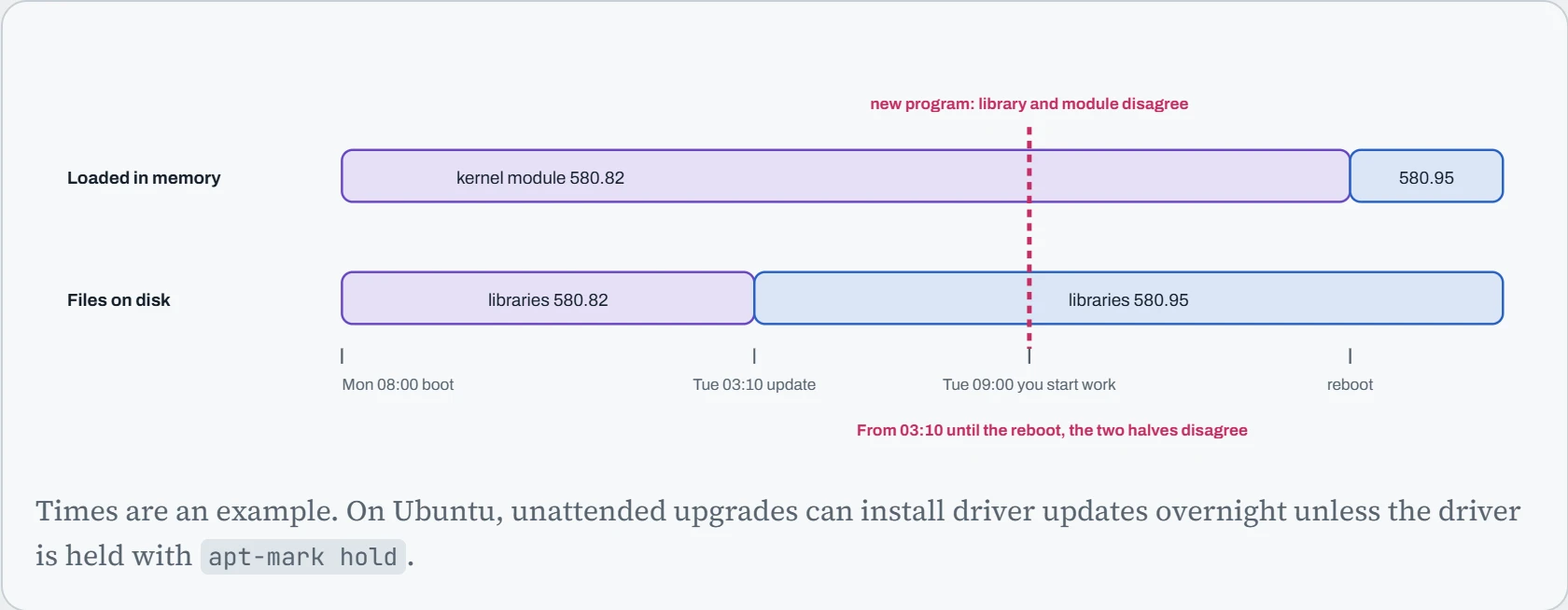
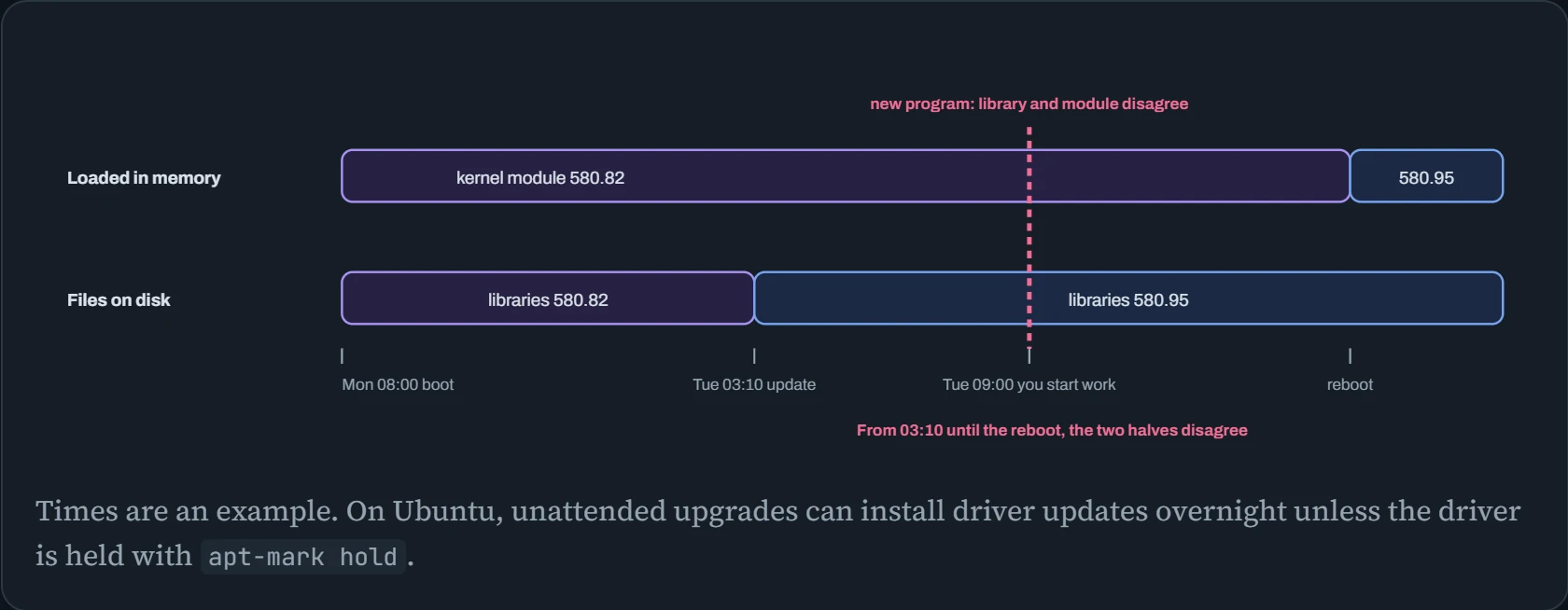
Between the update and the reboot, the machine is in a split state: the top lane still says 580.82, the bottom lane already says 580.95. Once you see that shape, you'll spot it everywhere. Each pair below has one piece fixed early and one piece that can change later:
| The pair | Fixed when | Changes when | The error |
|---|---|---|---|
| Driver module and driver libraries | Boot | A driver update | Driver/library version mismatch |
| Kernel and the driver module built for it | DKMS build | A kernel update | couldn't communicate with the NVIDIA driver |
| A program and the C++ library it was built with | Compile time, on someone's machine | Never, but your OS may be older | GLIBCXX_3.4.32 not found |
| PyTorch's CUDA build and the driver | pip install | A driver change, or a new PyTorch | driver on your system is too old |
| An image's libraries and the host driver | docker build | A host driver update | Mismatch, but only inside the container |
The fix in every row is to make the two match, and the prevention is to control when the “changes later” half changes: hold the driver package, keep kernel headers installed so DKMS rebuilds automatically, pin PyTorch versions, and never copy driver libraries into an image (Down the Image). Down the Library covers the GLIBCXX row in depth.
Predict. A training job started on Monday is still running on Tuesday morning, after the update. nvidia-smi now fails with the mismatch. Is the running job about to crash?
Answer. Usually not. The job loaded the 580.82 libraries when it started, and they're still in its memory, talking to the 580.82 module. It keeps training. Only programs started after the update fail, which is why the error seems to appear out of nowhere.
The trap comes later: if the job crashes or you stop it, it can't start again until you reboot. So let it finish (or reach a checkpoint), stop it cleanly, and reboot then. On a shared machine, that means draining it first.
Continue the lesson
The whole lesson, with its drawings and its questions. 4 more sections after the ones above.