
Appendix E: choosing hardware for AI workstations and servers
Decide in a fixed order: GPU memory size first, because a model that does not fit spills into memory about twenty times slower and every word waits for it. Then memory speed for running models or compute for training, then how GPUs connect, then power, cooling, disks and slots.
What this page answers
Why can a slower GPU run an LLM faster?
If a card cannot fit the whole model, the remaining layers live in system memory, roughly twenty times slower, and every word reads all of them. In the example, one machine fit all 80 layers and the other only 56. Read it in “The slower card that won”
What matters most when choosing a GPU for AI?
Memory size first: will the model and its working data fit? Then speed, memory bandwidth for running models and compute for training, then how the GPUs connect, then the rest of the box. Read it in “Memory first”
The slower card that won
Two machines run the same 70-billion-parameter model, compressed to about 4 bits per weight. Machine A has two RTX 3090s from 2020, 24 GB each. Machine B has one RTX 5090 from 2025, with 32 GB and almost twice the memory speed of a 3090. Both run llama.cpp's speed test for writing text:
# machine A: 2 × RTX 3090 (48 GB in total)
| model                  |      size | ngl | test  |   t/s |
| llama 70B Q4_K_M       | 39.59 GiB |  99 | tg128 | 14.8 |
# machine B: 1 × RTX 5090 (32 GB)
| model                  |      size | ngl | test  |   t/s |
| llama 70B Q4_K_M       | 39.59 GiB |  56 | tg128 |  4.3 |
The speeds are worked out with the same rule as Down the Bits (writing speed is limited by memory speed), so they're realistic estimates rather than one measured run. The table layout is llama-bench's, shortened.
The newer, faster card is more than three times slower. Why?
- Two GPUs add their speed together
- The model doesn't fit in 32 GB, so part of it runs from the much slower system memory
- llama.cpp is better tuned for older cards
Answer. Look at the ngl column: the number of the model's layers placed on the GPU. Machine A has all of them on its GPUs (99 means “all”). Machine B could only fit 56 of the 80 layers. The other 24 live in system memory, which is roughly twenty times slower than the 5090's, and every single word has to read all of them. The slow part sets the pace.
That's the first rule of AI hardware: does it fit? comes before how fast is it? A fast card that's too small loses to a slow card that's big enough, every time. Only once the model fits does speed start to matter, and then it's mostly memory speed, not the compute number on the box.
Memory first
So decide in a fixed order, each step only among the options that passed the step before. First, memory size: will the model and its working data fit in GPU memory? Second, speed: for running models, memory speed (bandwidth, in GB/s) sets how fast words come out; for training, compute speed matters more. Third, how the GPUs connect, if you need more than one. Fourth, the rest of the box: power, cooling, system memory, disks, slots. Skipping a step is how people end up with the regrets at the bottom of this page.
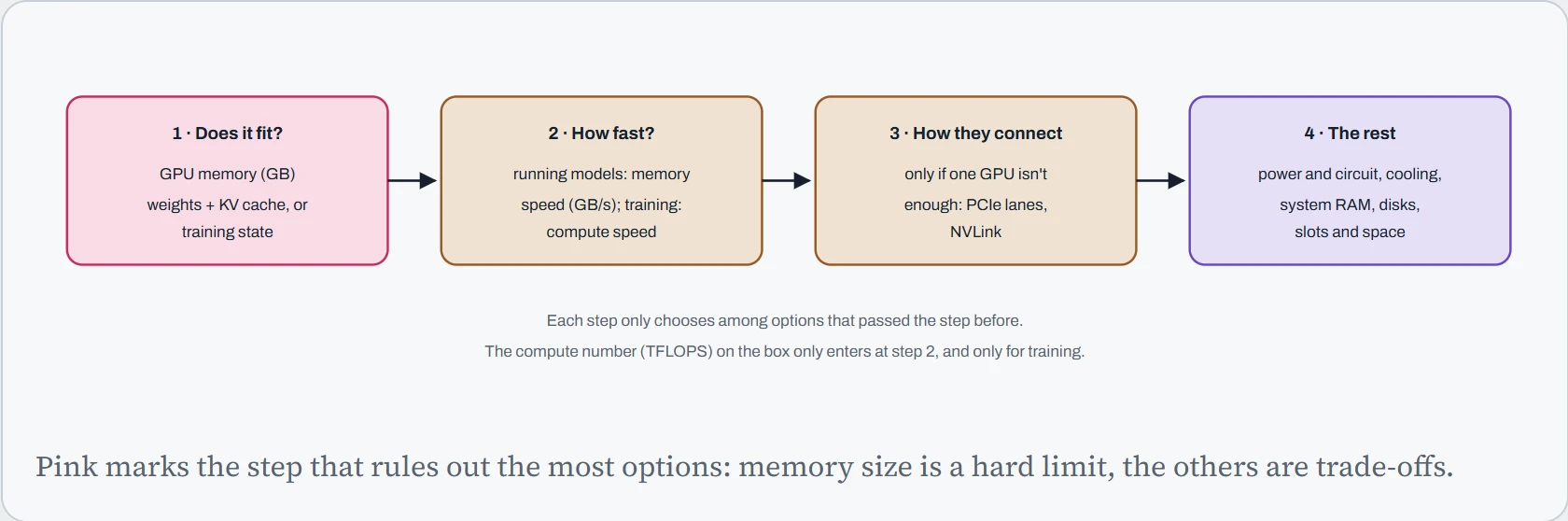
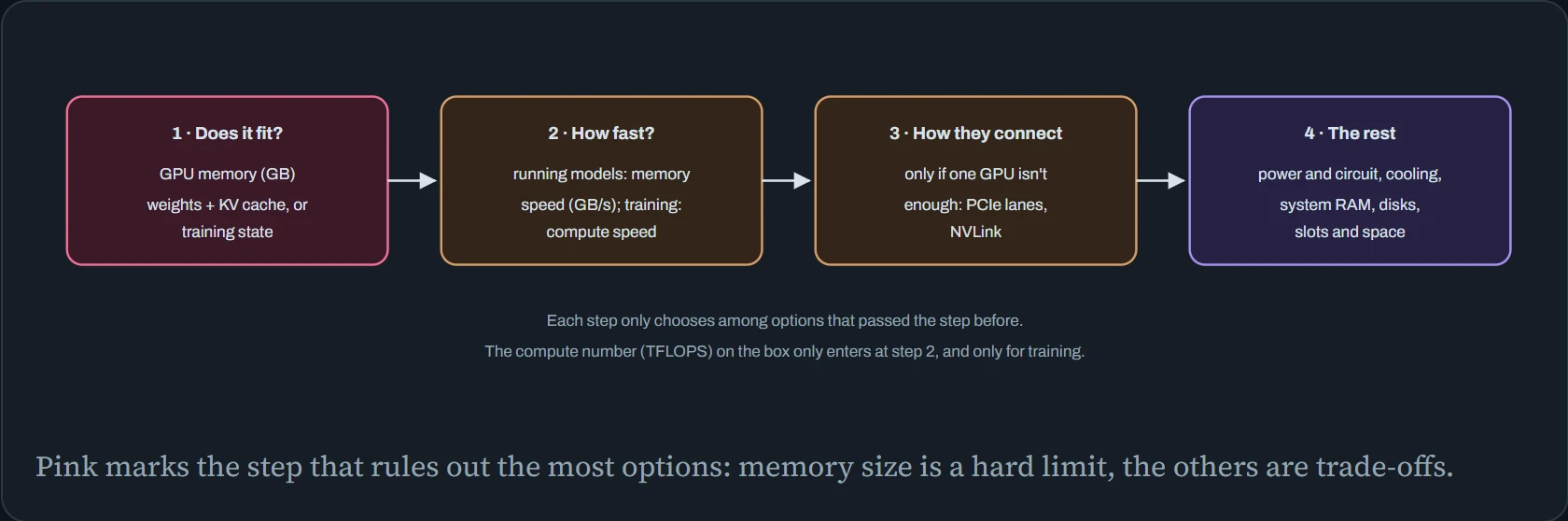
Why is memory a wall and the rest only trade-offs? Because a model that doesn't fit doesn't get a little slower: it either fails or spills into system memory and slows down several times over, as the hook showed. A card with less bandwidth, by contrast, just writes proportionally slower. You can live with “a bit slow”. You can't live with “doesn't fit”.
What do I need?
Here are the first two steps worked out for you. The planner adds up the memory needed (with the same rules as Down the Bits for running models and Down the Memory for training), then goes through common GPUs: how many of each you'd need, and for running models, roughly how fast words would come out for each user.
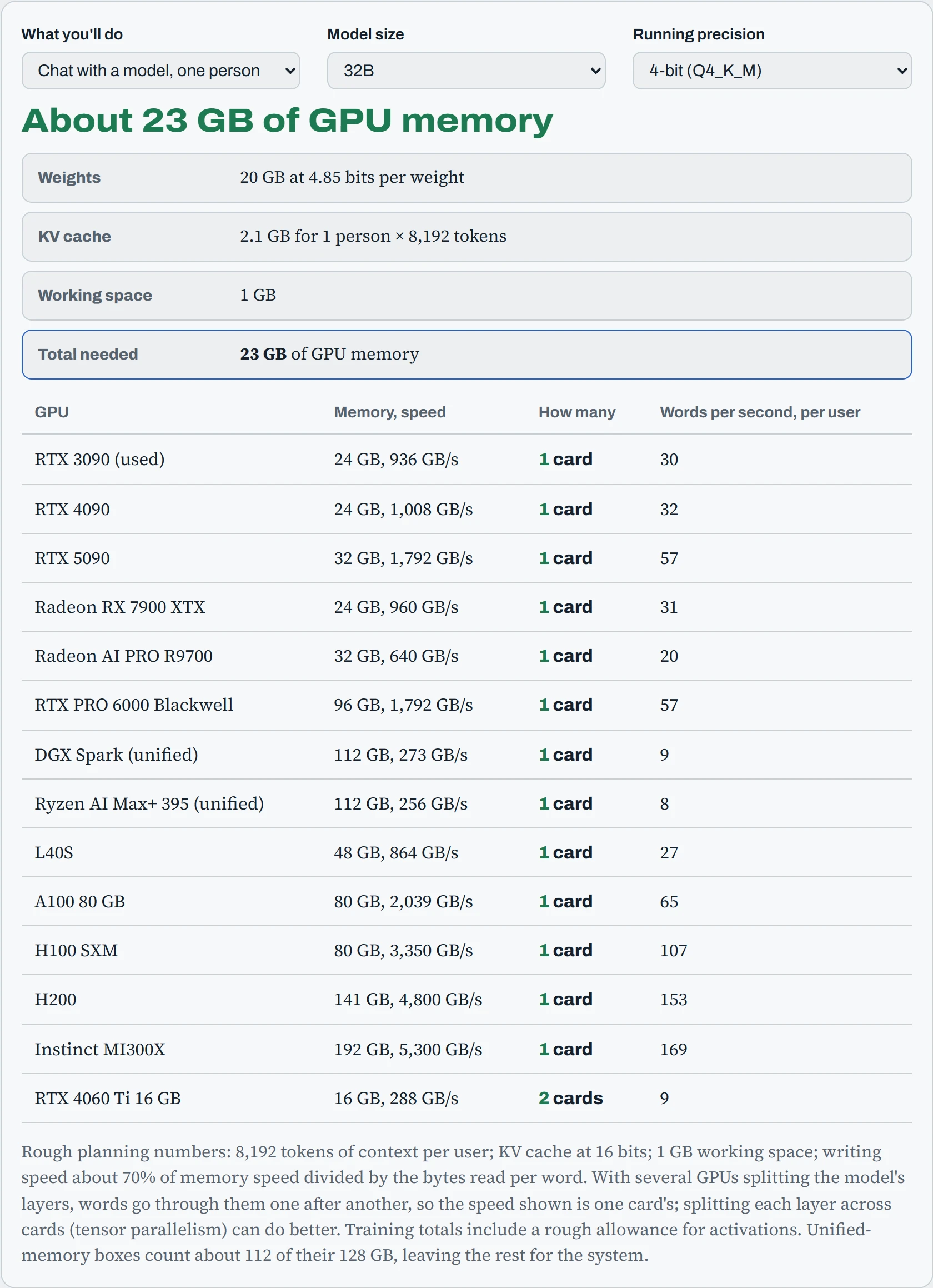
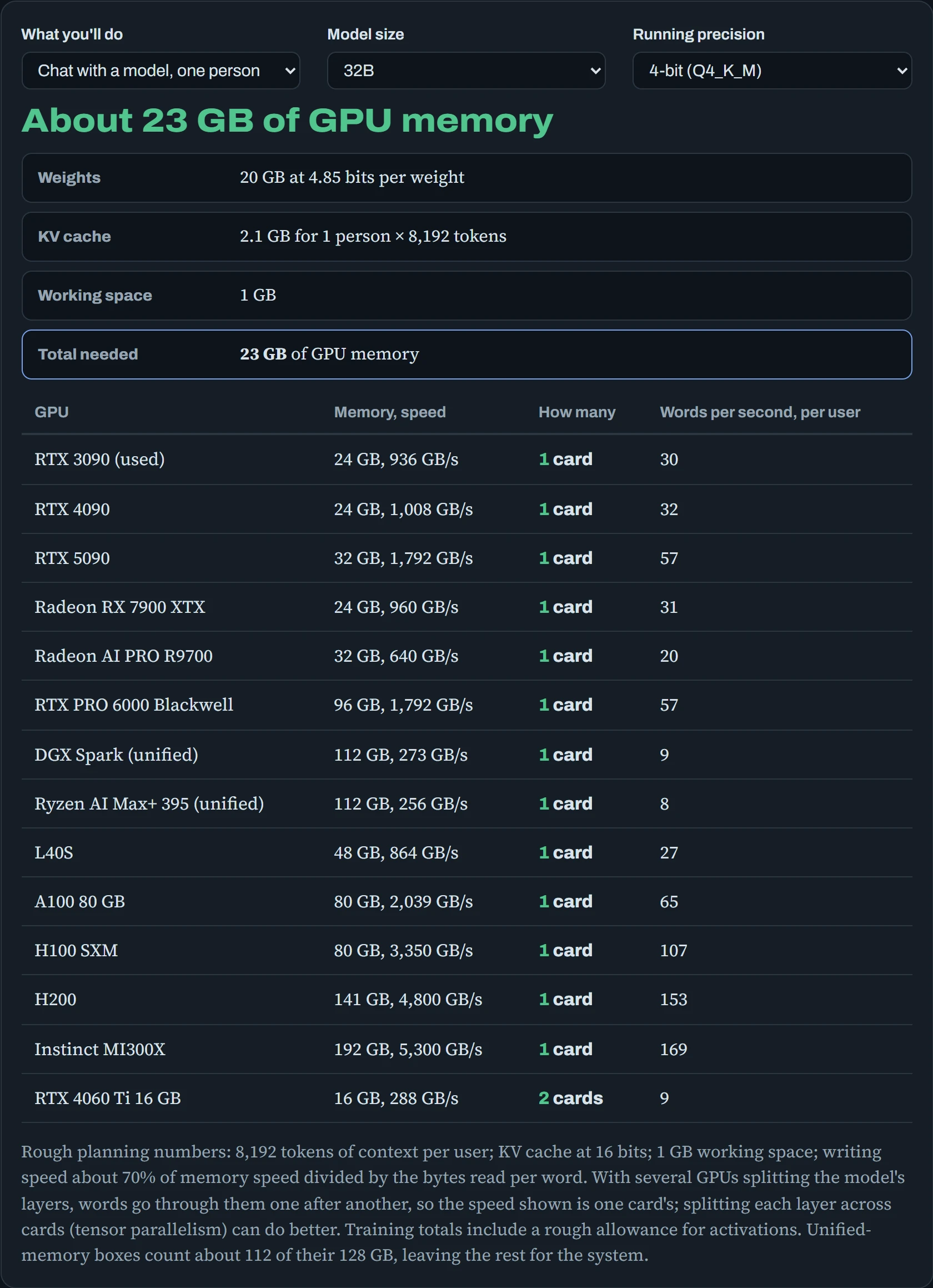
The weights stay the same, but eight people each need their own KV cache (the model's notes about each conversation), and the total jumps. “Full fine-tune” on 8B: about 140 GB, out of reach of any single card in the list except the MI300X, while QLoRA on the same model fits on a gaming card. The workload decides the hardware far more than the model's name does.
The rest of the box
Once you know which GPUs, the rest of the machine has to keep up with them. These are the parts people underestimate, each with a rule of thumb and the reason behind it. None of them makes the GPU faster, but each one can make it slower, or stop it working at all.
| Part | Rule of thumb | Why |
|---|---|---|
| System memory (RAM) | At least as much as all GPU memory together; twice as much is comfortable. | Models are loaded through RAM, data loaders keep batches there, and anything that doesn't fit on the GPU spills into it. |
| CPU and PCIe lanes | Desktop CPUs have about 24 usable lanes: one GPU at full width, or two at half. For 3 or more GPUs, a workstation CPU (Threadripper PRO, Xeon W) with 100+ lanes. | Each GPU wants 16 lanes. Half width barely matters for running a model that fits, but slows loading and multi-GPU training. |
| Disk | NVMe for models and datasets, separate from the system disk; 2 TB fills faster than you think. | A 70B model is 40 to 140 GB per copy, and checkpoints and caches multiply it (Down the Disk). |
| Power supply | About 1.3 times the expected load, ATX 3.x for modern GPUs. See the calculator below. | GPUs draw short spikes well above their rating, which trip undersized supplies. |
| Cooling and case | Plan the airflow for the full load running for days. Several cards side by side need blower-style or server cards, or water cooling. | Cards stacked together breathe each other's hot air and slow themselves down (Down the Bus). |
| Slots and space | Check slot spacing and card thickness: many current cards take 3 to 4 slots. | Two thick cards often physically block each other or the second slot. |
| Network | 10 GbE or faster if you'll copy datasets around or join a second machine; 1 GbE is fine for remote access only. | At 1 GbE, a 140 GB model takes about 20 minutes to copy. |
The first row is the one most often skipped. A 64 GB workstation with a 96 GB GPU sounds fine until you load a 90 GB model and the loader needs room for it in RAM on the way, or a training run's data loaders start four workers each holding batches. When in doubt, buy RAM: it's the cheapest way to avoid a whole class of crashes.
Predict. Two RTX 5090s give you 64 GB of GPU memory. Is that enough for a full fine-tune of a 14B model?
Answer. Not even close. A full fine-tune with the usual optimizer needs about 16 bytes per parameter before activations: 14.77 billion × 16 is about 236 GB. You'd need around four 80 GB data-center GPUs, with sharding (FSDP or ZeRO) splitting that state between them.
The same two cards handle a LoRA or QLoRA fine-tune of a 14B model easily. That's why most people fine-tuning on their own hardware use LoRA: it turns a server problem into a workstation problem (Down the Memory).
Continue the lesson
The whole lesson, with its drawings and its questions. 4 more sections after the ones above.