
Edge AI on ARM64: Jetson, NPUs, fitting models on small devices and remote updates
pip picks a package by CPU type, Linux family and Python version, and never checks for a GPU. The standard aarch64 PyTorch from PyPI matches a Jetson and installs, but it is built for ordinary ARM servers and uses only the CPU. A Jetson needs builds made for JetPack.
What this page answers
Why does PyTorch on a Jetson not use the GPU?
pip matched the standard aarch64 package on PyPI by CPU type, Linux family and Python version. That build is for ordinary ARM servers and uses only the CPU; pip never checks for a GPU. Read it in “Installed fine, but no GPU”
What is JetPack on a Jetson?
NVIDIA's bundle of a customised Ubuntu, L4T, with CUDA, cuDNN and TensorRT built for the device. The GPU driver comes with it, and tegrastats or jtop show memory, GPU load, temperature and power. Read it in “Living with a Jetson”
Installed fine, but no GPU
You get a new NVIDIA Jetson Orin, a small computer with a built-in GPU made for edge AI. You set up Python and install PyTorch the way you always do. Everything installs without a single error. Then:
jetson$ uname -m
aarch64
jetson$ pip install torch
Successfully installed torch-2.9.0 …
jetson$ python -c "import torch; print(torch.cuda.is_available())"
False
Outputs on this page are realistic examples. Device names, commands, file formats and the packaging rules are real, but check versions against your own device.
The device has a GPU, the install worked, and PyTorch can't see the GPU. What went wrong?
- The GPU driver isn't installed
- pip picked a build of PyTorch that has no GPU support for this device
- PyTorch doesn't support ARM
Answer. pip chooses a package file by matching a few labels: the CPU type (aarch64), the Linux version family, and the Python version. The standard PyTorch package for aarch64 on PyPI matches all of them, so pip happily installs it. But that build is for ordinary ARM servers, and it uses only the CPU. pip never checks for a GPU at all.
A Jetson's GPU is built into the same chip as its CPU, and it needs PyTorch built specifically for NVIDIA's Jetson software, JetPack. Those builds come from NVIDIA's own package index for Jetson, not from PyPI. The mechanism section shows exactly how pip makes its choice, and why “it installed” doesn't mean “it works”.
ARM is everywhere now
For a long time, “Linux server” meant an Intel or AMD chip, called x86_64 (or amd64). Today, ARM chips (aarch64, or arm64) run everything from a Raspberry Pi to the biggest AI systems. NVIDIA's Grace CPU is ARM, paired with its GPUs in machines like GH200. AWS's Graviton servers are ARM. Every Jetson is ARM. So AI software now has to come in both flavours. That's why Down the Image built container images for both linux/amd64 and linux/arm64.
A program compiled for one kind of chip can't run on the other, the way a book in Spanish can't be read by someone who only reads Japanese. Python itself runs everywhere, but many Python packages contain compiled parts, and those must be built separately for each chip. When there's no ready-made build for your chip, pip tries to compile it from source on the spot. On a small device that's slow, and it often fails for lack of compilers or memory. The table shows the main ARM platforms in AI, and what's special about each:
| Platform | What it is | What to watch |
|---|---|---|
| Grace (GH200, GB200) | NVIDIA's ARM server CPU, tightly linked to data centre GPUs | Needs PyTorch's CUDA builds for ARM servers, from PyTorch's own package index, not PyPI's default |
| AWS Graviton | ARM server CPUs in the cloud, cheap for CPU work | Great for CPU inference and data processing. No GPU |
| NVIDIA Jetson | Small computers with a GPU on the same chip as the CPU | Needs JetPack-specific builds of CUDA libraries and PyTorch |
| Raspberry Pi 5 | A cheap ARM board, CPU only, with optional AI add-on chips | Use a 64-bit OS. Add a Hailo or similar chip for real-time vision |
The pattern is the same everywhere: the hardware is fine, but the software has to be built for exactly this combination of chip, operating system and accelerator. On a laptop, the defaults happen to match. At the edge, they often don't.
Living with a Jetson
A Jetson runs JetPack, NVIDIA's bundle of a customised Ubuntu (called L4T, Linux for Tegra) with CUDA, cuDNN and TensorRT built for the device. You don't install a GPU driver yourself, as on a PC: it comes with JetPack, and upgrading JetPack means re-flashing or upgrading the whole system image. The everyday tools are different too. tegrastats prints memory, GPU load, temperatures and power draw, and jtop (from the jetson-stats package) shows the same as a friendly screen:
jetson$ tegrastats --interval 1000
RAM 5412/7620MB … CPU [38%@1510,41%@1510,…] … GR3D_FREQ 87% cpu@58.1C gpu@59.4C … VDD_IN 14210mW/12876mW
jetson$ sudo nvpmodel -q
NV Power Mode: 15W
jetson$ sudo nvpmodel -p --verbose | grep -i "POWER_MODEL"   # list this board's modes and their IDs
jetson$ sudo nvpmodel -m <id> && sudo jetson_clocks          # switch mode, then pin clocks high
Read the tegrastats line like a dashboard. 5.4 of 7.6 GB of memory is in use (and that memory is shared by CPU and GPU, more on that below). The GPU (GR3D) is 87% busy, both sides are near 60°C, and the whole board is drawing about 14 watts.
That last number matters most at the edge. A Jetson has several power modes, set with nvpmodel, that cap how much power it may draw. A higher mode gives faster inference, more heat, and a shorter battery life. jetson_clocks pins the clocks at the mode's maximum for steady benchmarks. On a device in a sealed box in the sun, a higher mode can be slower in practice: it heats up, hits its temperature limit, and slows itself down, just like the GPUs in Down the Bus. Test in the real enclosure, for longer than a few minutes.
Small boards and NPUs
Not every edge device needs a GPU. Many add a small NPU (neural processing unit): a chip that runs only neural networks, very efficiently, at a few watts. The Raspberry Pi 5 can take a Hailo NPU as an add-on board. Rockchip's RK3588 boards have one built in. Recent Intel laptop chips include one, reached through OpenVINO. They share one big catch: each NPU only runs models compiled for it, with its vendor's own tools, into its own file format.
pi$ hailortcli fw-control identify
Executing on device: 0000:01:00.0
Board Name: Hailo-8
…
pi$ ls models/
yolov8s.hef                         # compiled for Hailo with its Dataflow Compiler
rk3588$ ls models/
yolov8s.rknn                        # compiled for Rockchip with RKNN-Toolkit2
pi$ lsusb | grep -i -E "google|global unichip"     # a Coral USB Edge TPU
Bus 002 Device 003: ID 18d1:9302 Google Inc.
pi$ ls models/
ssd_mobilenet_v2_edgetpu.tflite     # compiled for Coral with edgetpu_compiler
Google's Coral Edge TPU, the older USB or M.2 option, follows the same pattern with TensorFlow Lite models; it shows up as “Global Unichip” until its firmware loads and then as “Google Inc.”, a classic source of confusion. That compile step is where most NPU projects stall. Not every layer type is supported, so an unusual model may not compile at all, or may run partly on the slow CPU. And the conversion usually includes quantizing to 8-bit integers, which needs a few hundred sample images to calibrate against. Before choosing an NPU, check that your exact model, or a close relative, is already in the vendor's model zoo. If it isn't, plan time for the conversion, not just for the code.
Fitting a model on a small device
On a Jetson, the usual path from a trained model to a fast one is: export it to ONNX (a standard file format for models), then let TensorRT turn it into an engine, a version optimized for this exact GPU, often in 16-bit or 8-bit numbers. The trtexec tool does both the conversion and a quick speed test:
jetson$ python -c "from ultralytics import YOLO; YOLO('yolov8s.pt').export(format='onnx')"
jetson$ trtexec --onnx=yolov8s.onnx --fp16 --saveEngine=yolov8s-fp16.engine
…
[I] Throughput: 212.4 qps
[I] Latency: min = 4.51 ms, max = 5.30 ms, mean = 4.69 ms
One rule surprises people: a TensorRT engine is tied to the GPU model and the TensorRT version it was built with. An engine built on a big server GPU won't load on a Jetson, and an engine built with one JetPack may not load after a JetPack upgrade. So build engines on the device (or one identical to it), as part of installing or updating, and keep the ONNX file as the portable original.
Memory works differently too. A PC with a graphics card has two separate memories: the computer's RAM, and the card's own memory, with data copied between them. A Jetson has just one. The CPU and GPU share the same RAM. The picture compares the two, with an example of how an 8 GB Jetson's memory gets used up.
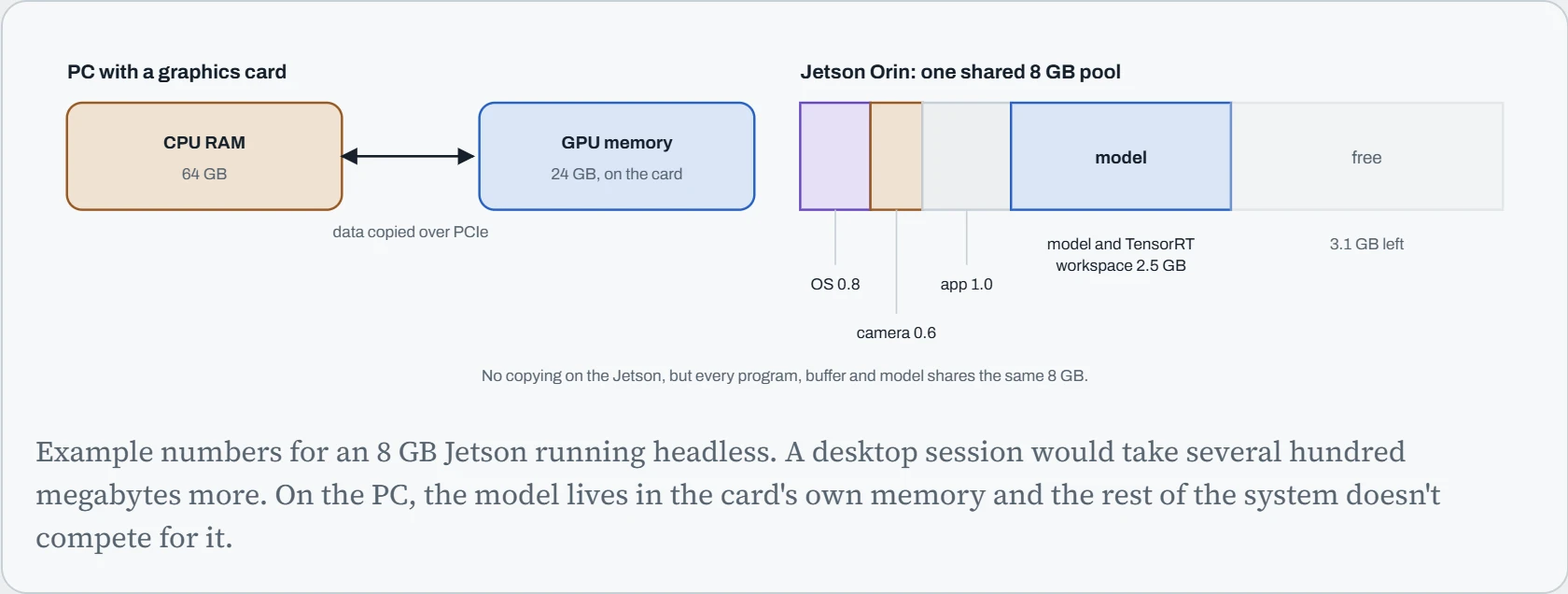
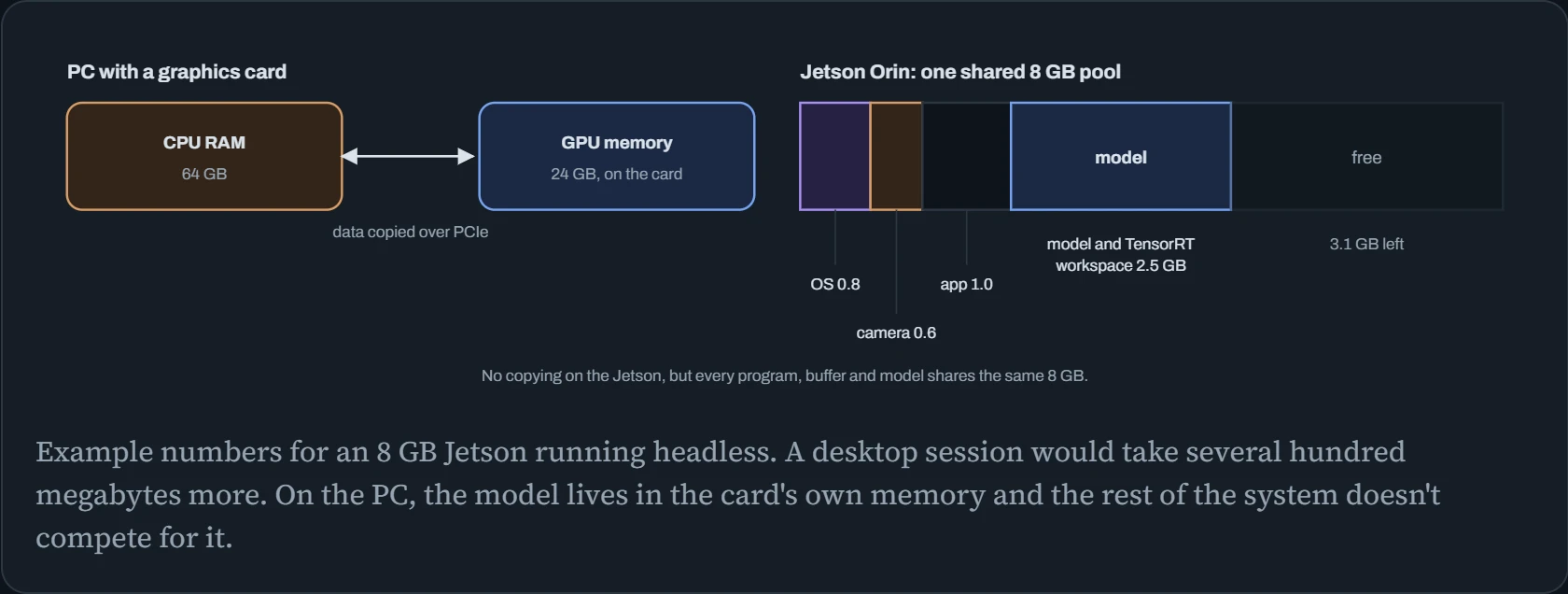
Sharing means no copying between CPU and GPU, which is good. But on the Jetson, the operating system, camera buffers, your app and the model all come out of one small pool. Running the device headless (no desktop) frees hundreds of megabytes, and a smaller or 8-bit model frees more. The quantization ideas from Down the Bits matter even more here than on a workstation.
Continue the lesson
The whole lesson, with its drawings and its questions. 4 more sections after the ones above.