
Kubernetes for AI: the GPU Operator, GPU sharing, DRA and gang scheduling
To Kubernetes a GPU is a name with a whole number beside it, an extended resource reported by the device plugin. If the GPU Operator's driver pod is crashing, the plugin never starts and the node shows no nvidia.com/gpu at all. Kubernetes counts GPUs; it does not understand them.
What this page answers
Why does my Kubernetes node show no GPUs?
In the lesson's example the node's allocatable list has no nvidia.com/gpu because the GPU Operator's driver daemonset is in CrashLoopBackOff and the device plugin waits on it. Its logs show why. Read it in “Eight GPUs, zero available”
How does Kubernetes know a node has GPUs?
A device plugin on each machine reports how many GPUs it found as an extended resource. The scheduler subtracts the ones already handed out and checks whether a request fits, with no idea of memory or topology. Read it in “Kubernetes counts GPUs. It doesn't understand them.”
Eight GPUs, zero available
A pod that fine-tunes a model asks for one GPU. The cluster has a machine (a node) with eight H100 GPUs, all sitting idle. Yet the pod has been stuck in Pending for twenty minutes. Here that means no node has been picked for it yet:
$ kubectl describe pod llama-ft-0 | tail -2
  Warning  FailedScheduling  2m (x5 over 22m)  default-scheduler  0/3 nodes are available: 1 Insufficient nvidia.com/gpu,
  2 node(s) didn't match Pod's node affinity/selector. preemption: 0/3 nodes are available: 1 No preemption
  victims found for incoming pod, 2 Preemption is not helpful for scheduling.
The output on this page is typical of Kubernetes 1.34 with the NVIDIA GPU Operator. Names and exact wording change between versions. How things work underneath doesn't.
Nothing else is running on that node. Why “Insufficient”?
- Other pods hold the GPUs
- The pod is missing a toleration (its pass onto GPU nodes)
- The node isn't advertising any GPUs
Answer.
$ kubectl get node gpu-node-1 -o jsonpath='{.status.allocatable}'
{"cpu":"223","ephemeral-storage":"1771140240860","hugepages-1Gi":"0","hugepages-2Mi":"0","memory":"2113126036Ki","pods":"110"}
                                                          # no nvidia.com/gpu at all
$ kubectl get pods -n gpu-operator
NAME                                       READY   STATUS             RESTARTS   AGE
nvidia-driver-daemonset-k8f3d              0/1     CrashLoopBackOff   14         47m
nvidia-container-toolkit-daemonset-jw9xr   0/1     Init:0/1           0          47m
nvidia-device-plugin-daemonset-9qzlk       0/1     Init:0/1           0          47m
nvidia-operator-validator-tz6hm            0/1     Init:0/4           0          47m
$ kubectl logs -n gpu-operator nvidia-driver-daemonset-k8f3d -c nvidia-driver-ctr | tail -3
Installing Linux kernel headers...
E: Unable to locate package linux-headers-6.8.0-87-generic
Could not install Linux kernel headers
The node restarted into a new Linux kernel last night. The driver container has to build the nvidia kernel module for that new kernel. For that it needs the kernel's header files. It can't find them, so it crashes, restarts and crashes again. That's Seam 0 from Down the CUDA Stack, now happening inside a DaemonSet (Kubernetes's way of running one copy of a pod on each node).
No driver means the next pieces never start: no container toolkit, no device plugin. So the node never reports any nvidia.com/gpu, and you get “Insufficient”. Kubernetes isn't wrong. As far as it knows, this node has no GPUs.
Kubernetes counts GPUs. It doesn't understand them.
To Kubernetes, a GPU is just a name with a whole number next to it, like CPU and memory but with no meaning attached. This is called an extended resource. A small program on each machine, the device plugin, reports how many GPUs it found. The scheduler subtracts the ones already handed out and checks whether your request fits.
On the left is the real server: eight H100s with 80 GB of memory each. A switch chip (NVSwitch) links every GPU to every other, and the machine has two halves that each sit closest to their own CPU (NUMA nodes). The arrow is the device plugin, and the right side is what reaches the scheduler. Here's everything that gets lost on the way:
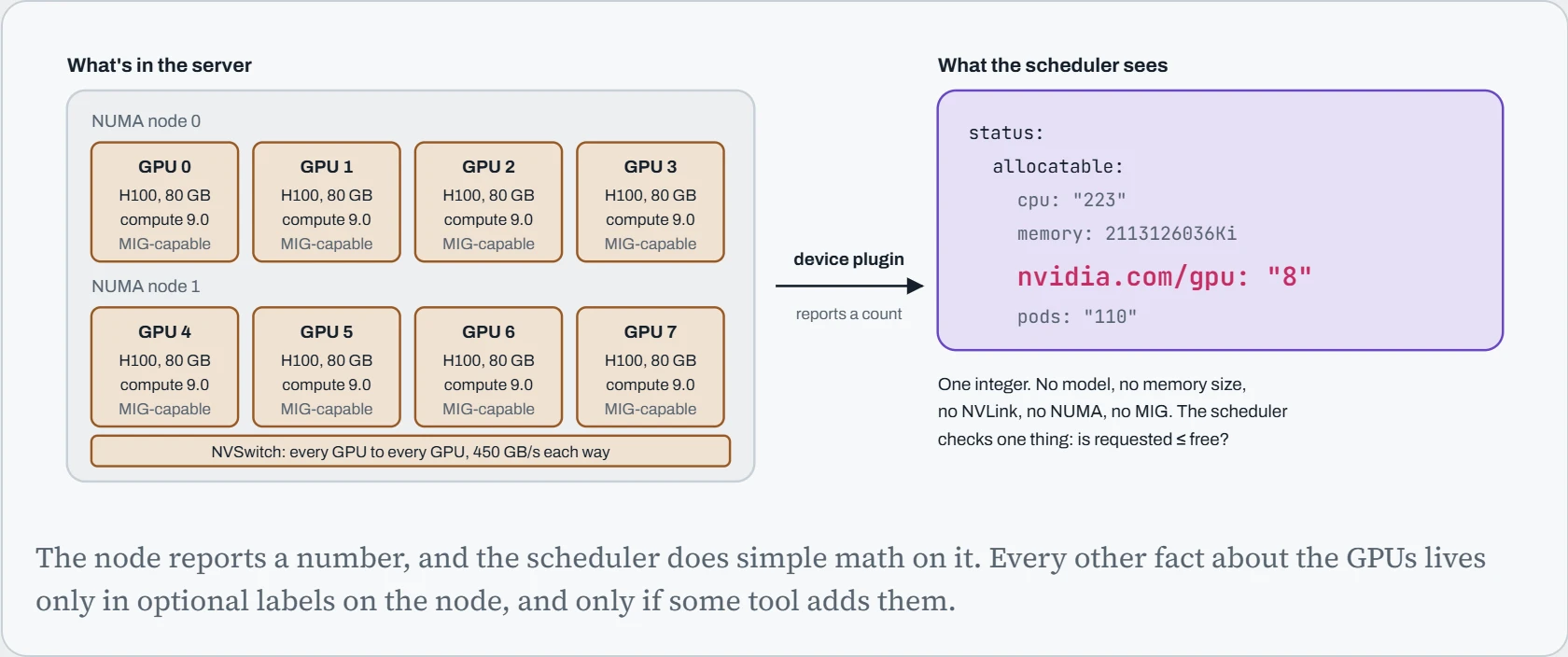
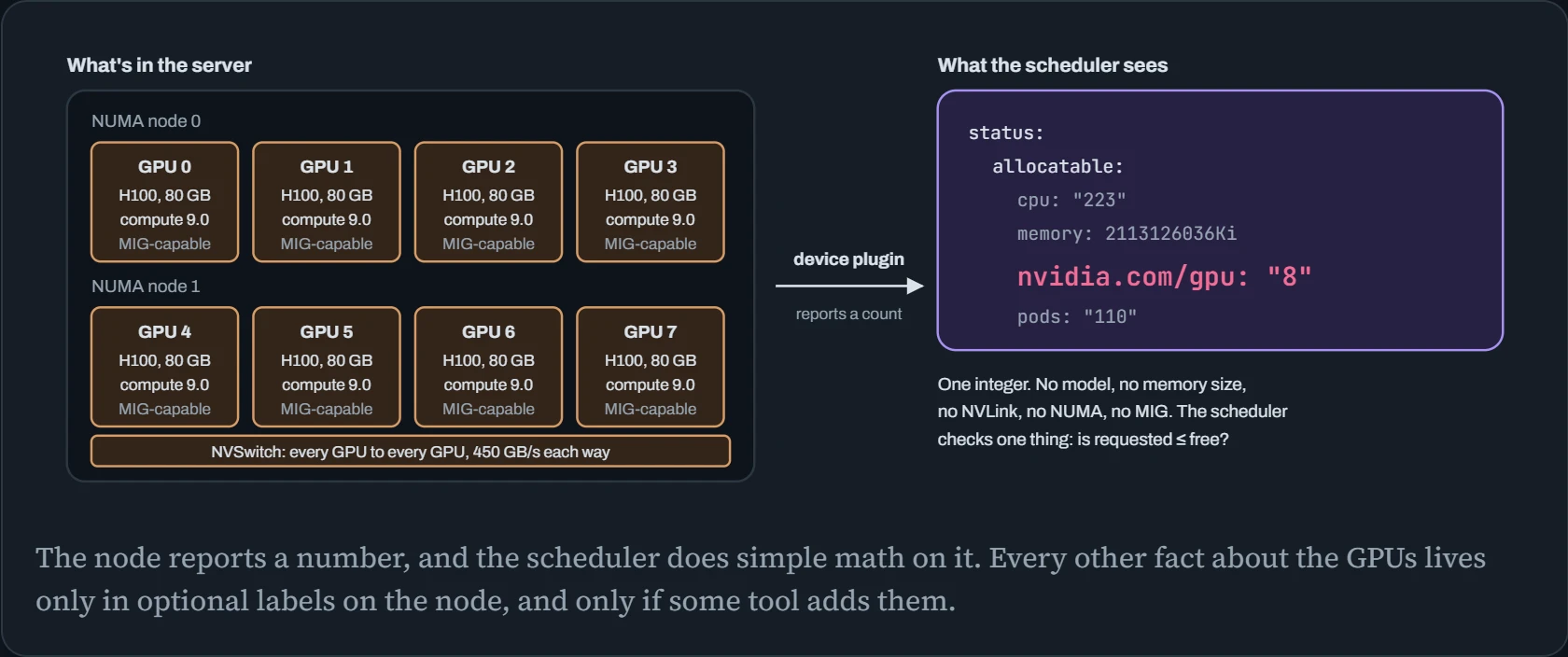
So a pod asking for one GPU fits because 1 is less than 8, and that's the whole decision. It's like a car park sign that shows free spaces but not their size. The scheduler never asks which GPU, how much memory it has, or where it sits in the machine.
Predict. Using only nvidia.com/gpu, can you ask for half a GPU? For “one GPU with at least 40 GB”? For “two GPUs on the same NVLink”?
Answer. None of them. Extended resources only take whole numbers, so 0.5 is rejected. The count says nothing about memory, so you fall back to labels on the node and hope every GPU in that machine is the same. How the GPUs are wired to each other (topology) isn't tracked at all. On a single 8-GPU server where NVLink joins every GPU, you get lucky. On mixed hardware, you don't.
The rest of this lesson covers three ways people work around that: sharing tricks that change what one unit of the count means, DRA, which swaps the count for real descriptions of each GPU, and batch schedulers that think about whole jobs instead of single pods.
Kubernetes in one idea and five objects
Everything on this page rests on one idea. In Kubernetes you don't run programs; you write down what should exist, like “three copies of this model server, each with one GPU”, and controllers keep comparing that wish with reality and fixing the difference, forever. That loop is called reconciliation.
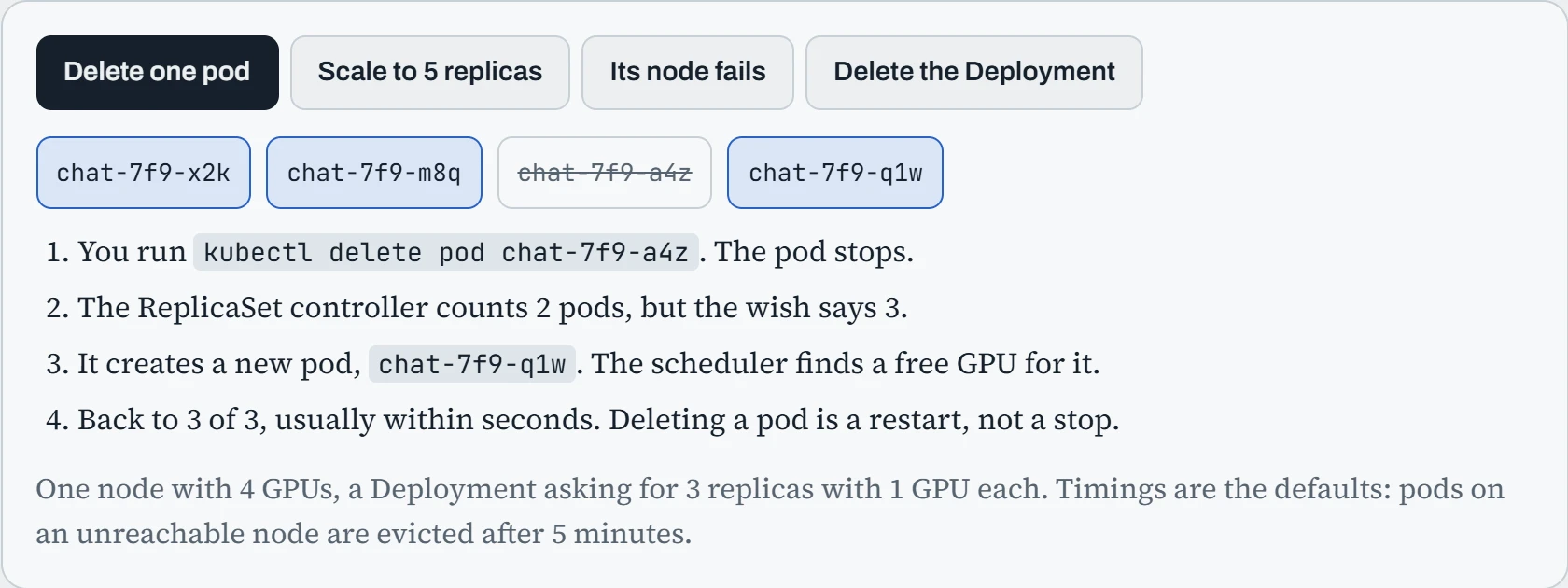
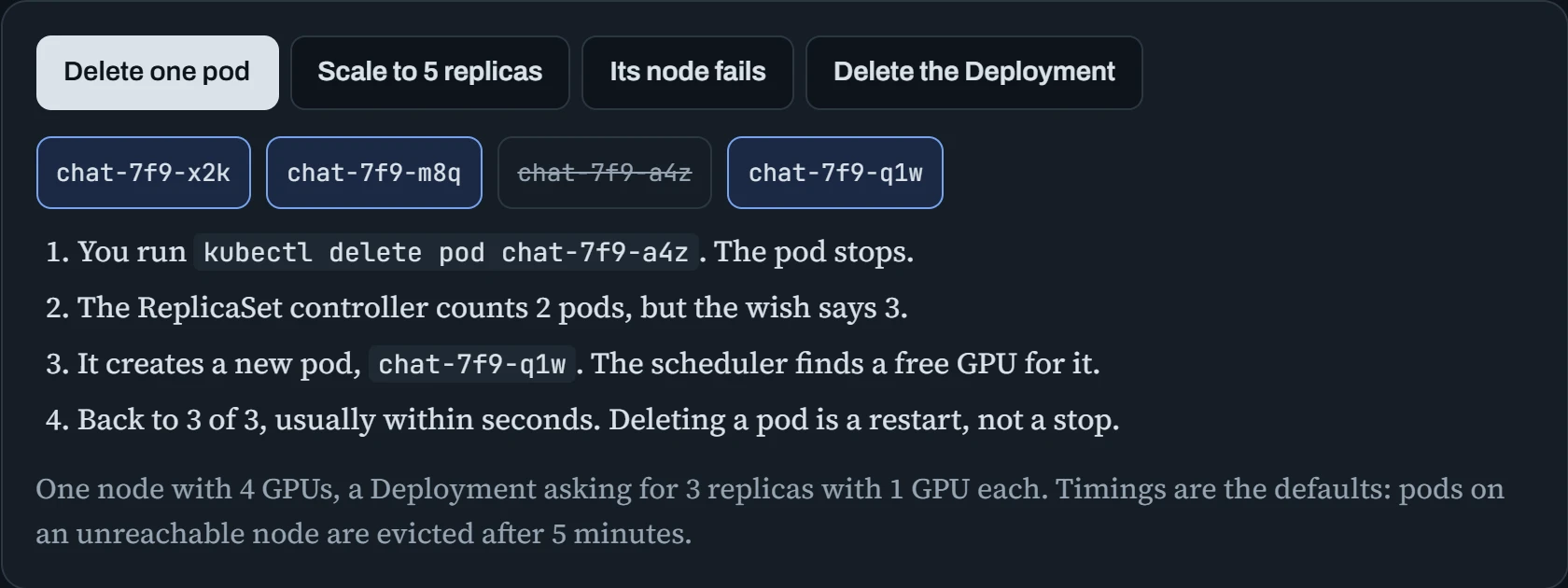
Deleting a pod doesn't stop anything: the controller notices it's one short and makes another. To change what runs, you change the wish. That's why everything is a YAML file you apply with kubectl apply -f, and why “Pending” is so common with GPUs: the wish is recorded, but no node can fulfil it yet. Five kinds of object cover most AI work:
| Object | What it describes | AI example |
|---|---|---|
| Deployment (makes Pods) | Long-running copies, replaced if they die | A vLLM server with 3 replicas |
| Job | Work that runs to the end, then stops | A fine-tune, an evaluation, an indexing run |
| Service, Gateway | A stable name and address in front of changing pods | http://chat:8000 for the gateway to call |
| ConfigMap, Secret | Settings and credentials, kept out of the image | Engine flags; a Hugging Face token |
| PersistentVolumeClaim | A request for storage that outlives pods | A shared model cache, a checkpoint folder |
The daily commands are few: kubectl apply -f to state the wish, kubectl get pods to see reality, kubectl describe pod to read why something is stuck (the Events at the bottom), and kubectl logs for the program's output. Real apps are many YAML files, so they're packaged: Helm charts are templates with settings you fill in (the GPU Operator below is installed this way), and Kustomize layers small changes, like “staging uses one replica”, on top of shared files.
Predict. A training run started as a Deployment instead of a Job finishes successfully after six hours, and the program exits. What happens next?
Answer. It starts training again from the beginning, and again after that, for as long as you let it. A Deployment's wish is “this should always be running”, so a pod that exits, even successfully, counts as missing, and the controller replaces it.
Work that has an end belongs in a Job, whose wish is “run this until it succeeds”. For multi-node training, the JobSet in the next sections groups several Jobs into one.
The GPU Operator: chapter 14, as DaemonSets
Everything you installed by hand in chapter 14 (driver, container toolkit, monitoring) still has to be on every GPU node. The versions have to match, and it all has to keep working after kernel updates. The NVIDIA GPU Operator does that install for you. It runs each piece as a DaemonSet, so a copy lands on every GPU node, and it starts them in order. Each stage waits until the one below it has passed a check.
The top list is the path a GPU request travels. It starts at your pod, passes the scheduler and the node's own agent (the kubelet), then goes down through the three operator pieces to the hardware. Below it are helpers that tag nodes, test each stage, report usage and split GPUs into smaller pieces.
The broken node at the top of this page is this chain failing at the driver. The pieces above it never got past their startup checks, which is what “Init” means in that pod list.
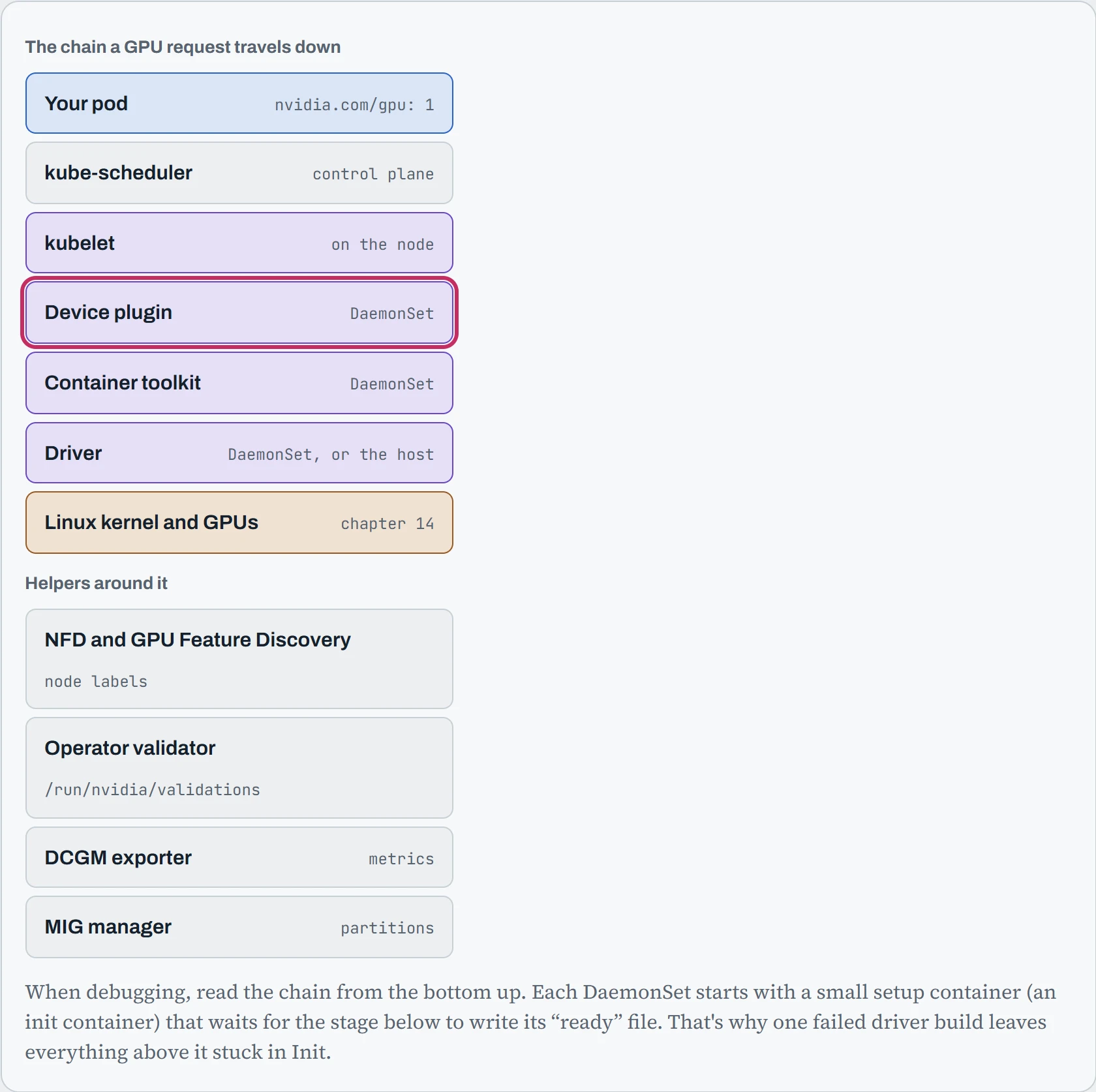
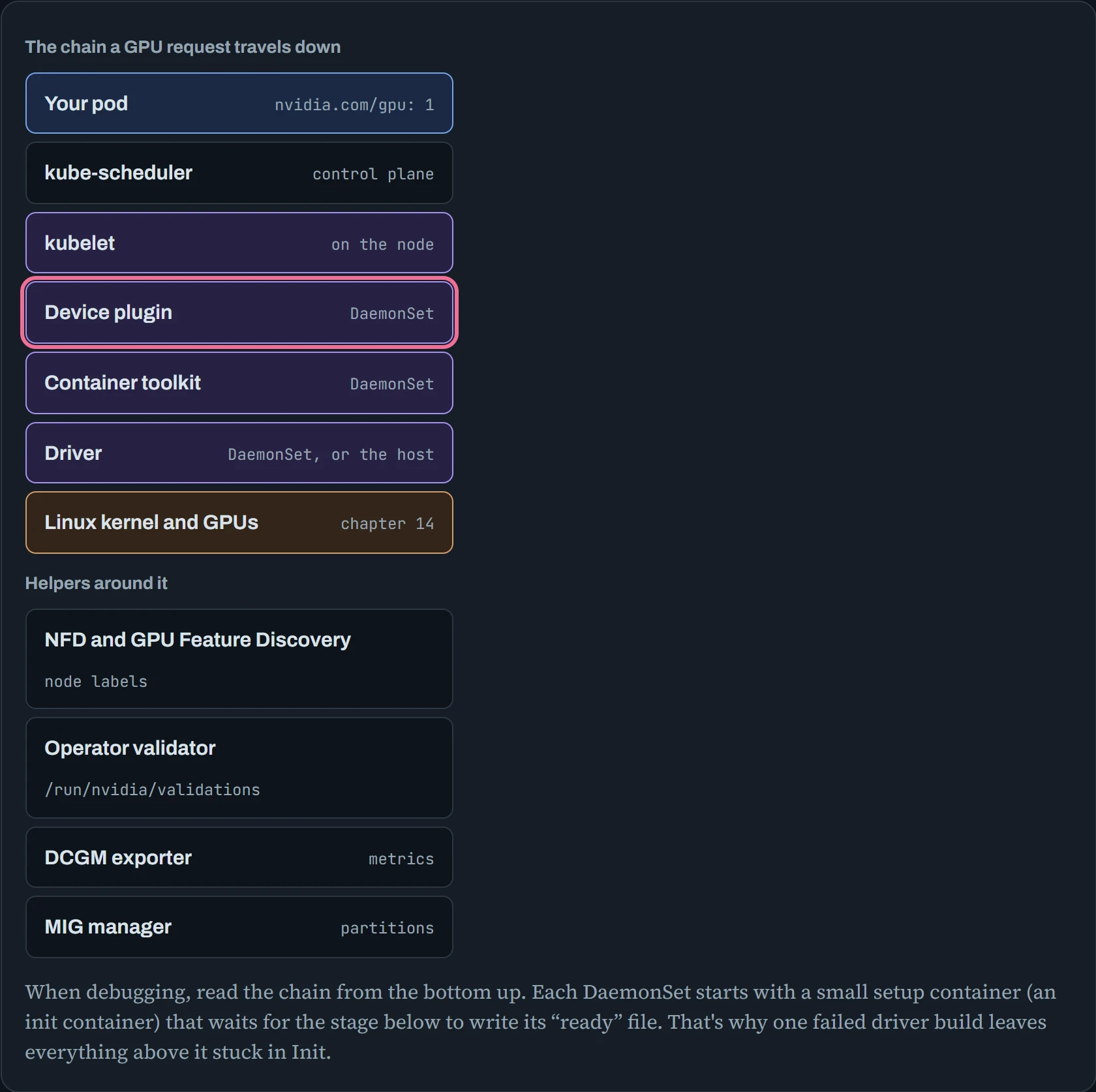
So when a node reports no GPUs, start at the bottom and find the first piece that isn't ready. Like a row of dominoes, everything above it is just waiting on that one.
A healthy node looks like this. Installing it is one Helm command, helm install --wait gpu-operator -n gpu-operator --create-namespace nvidia/gpu-operator:
$ kubectl get pods -n gpu-operator
NAME                                                         READY   STATUS      RESTARTS   AGE
gpu-feature-discovery-x7k2p                                  1/1     Running     0          3d
gpu-operator-7c9b8d6f5d-q2w9m                                1/1     Running     0          3d
gpu-operator-node-feature-discovery-worker-4mfqz             1/1     Running     0          3d
nvidia-container-toolkit-daemonset-jw9xr                     1/1     Running     0          3d
nvidia-cuda-validator-p4v8n                                  0/1     Completed   0          3d
nvidia-dcgm-exporter-c8m2t                                   1/1     Running     0          3d
nvidia-device-plugin-daemonset-9qzlk                         1/1     Running     0          3d
nvidia-driver-daemonset-k8f3d                                1/1     Running     0          3d
nvidia-mig-manager-2wq7b                                     1/1     Running     0          3d
nvidia-operator-validator-tz6hm                              1/1     Running     0          3d
$ kubectl get node gpu-node-1 --show-labels | tr ',' '\n' | grep -E '^nvidia.com/(gpu|cuda|mig)'
nvidia.com/cuda.driver-version.full=580.95.05
nvidia.com/gpu.count=8
nvidia.com/gpu.memory=81559
nvidia.com/gpu.product=NVIDIA-H100-80GB-HBM3
nvidia.com/mig.capable=true
Every pod is Running, or Completed for the one-off test. The labels at the bottom were added by GPU Feature Discovery, and they carry the details the bare count leaves out, such as the GPU model and its memory.
Predict. Your nodes already have the NVIDIA driver installed on the host (say, baked into the machine image every node boots from, often called a golden image). You install the GPU Operator with its defaults. What happens?
Answer. The driver container tries to load its own nvidia module while the host's module is already loaded, and the two fight. Tell the operator to skip that layer: --set driver.enabled=false. The rest of the chain then uses the host driver.
Both setups are fine. A host driver suits golden images that never change once they're built. The driver container suits fleets where you want Kubernetes to roll out new driver versions one node at a time. Pick one per cluster, on purpose.
Asking for a GPU, and sharing one
A pod asks for a GPU with two parts of its spec. One sets the count. The other lets it onto GPU nodes, which are usually marked “keep out” for ordinary pods (a taint):
# the minimum for a GPU pod
apiVersion: v1
kind: Pod
metadata:
  name: llama-ft-0
spec:
  tolerations:
  - key: nvidia.com/gpu            # GPU nodes are usually tainted so CPU pods stay off them
    operator: Exists
    effect: NoSchedule
  containers:
  - name: trainer
    image: nvcr.io/nvidia/pytorch:25.09-py3
    resources:
      limits:
        nvidia.com/gpu: 1          # integers only; requests default to limits
    volumeMounts:
    - name: shm
      mountPath: /dev/shm          # chapter 18's DataLoader lesson still applies
  volumes:
  - name: shm
    emptyDir: {medium: Memory, sizeLimit: 16Gi}
Then check from inside that the container sees exactly what it was given:
$ kubectl exec llama-ft-0 -- nvidia-smi -L
GPU 0: NVIDIA H100 80GB HBM3 (UUID: GPU-4f1c2a9e-7b3d-4c11-9a0e-5d2b8c6f1e73)
Inside the container it's “GPU 0”. On the node it might be GPU 3. The container only sees the device it was assigned.
Whole GPUs are often too much. An inference service doing 20 requests a minute doesn't need 80 GB and 132 SMs (streaming multiprocessors, the GPU's blocks of compute cores) to itself. The device plugin can hand out one H100 in several different ways.
The first is MIG (Multi-Instance GPU), which cuts the chip into up to seven walled-off slices. A name like 3g.40gb means three of the seven compute slices plus 40 GB of memory. Each slice size gets its own resource name, so a pod asks for nvidia.com/mig-1g.10gb: 1 instead of a whole GPU.
The second is time-slicing, which cuts nothing. The plugin just counts each GPU several times, and the pods on it take turns, like flatmates sharing one kitchen. Each row below is one H100, with the request a pod makes on the left. MIG boxes sit side by side in the chip, while time-slicing boxes are turns, one after another.
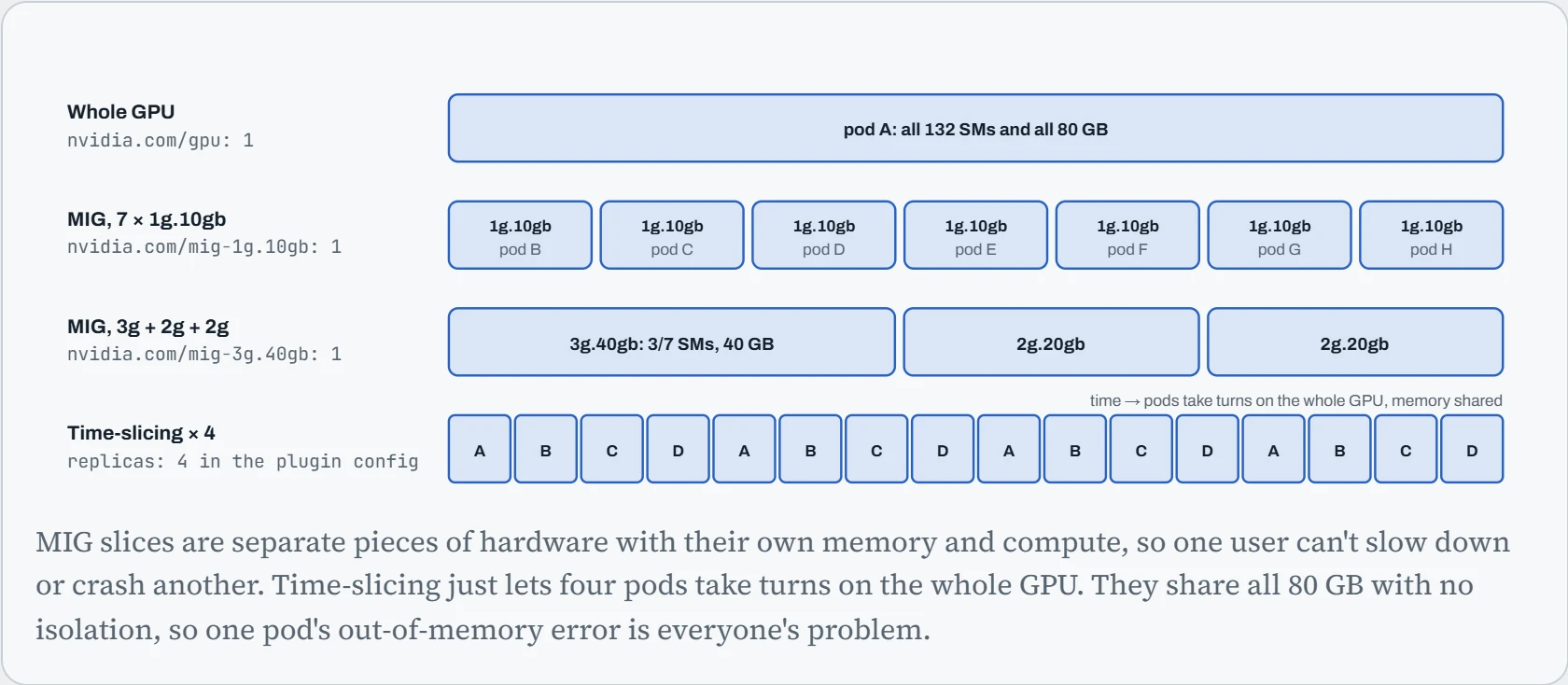
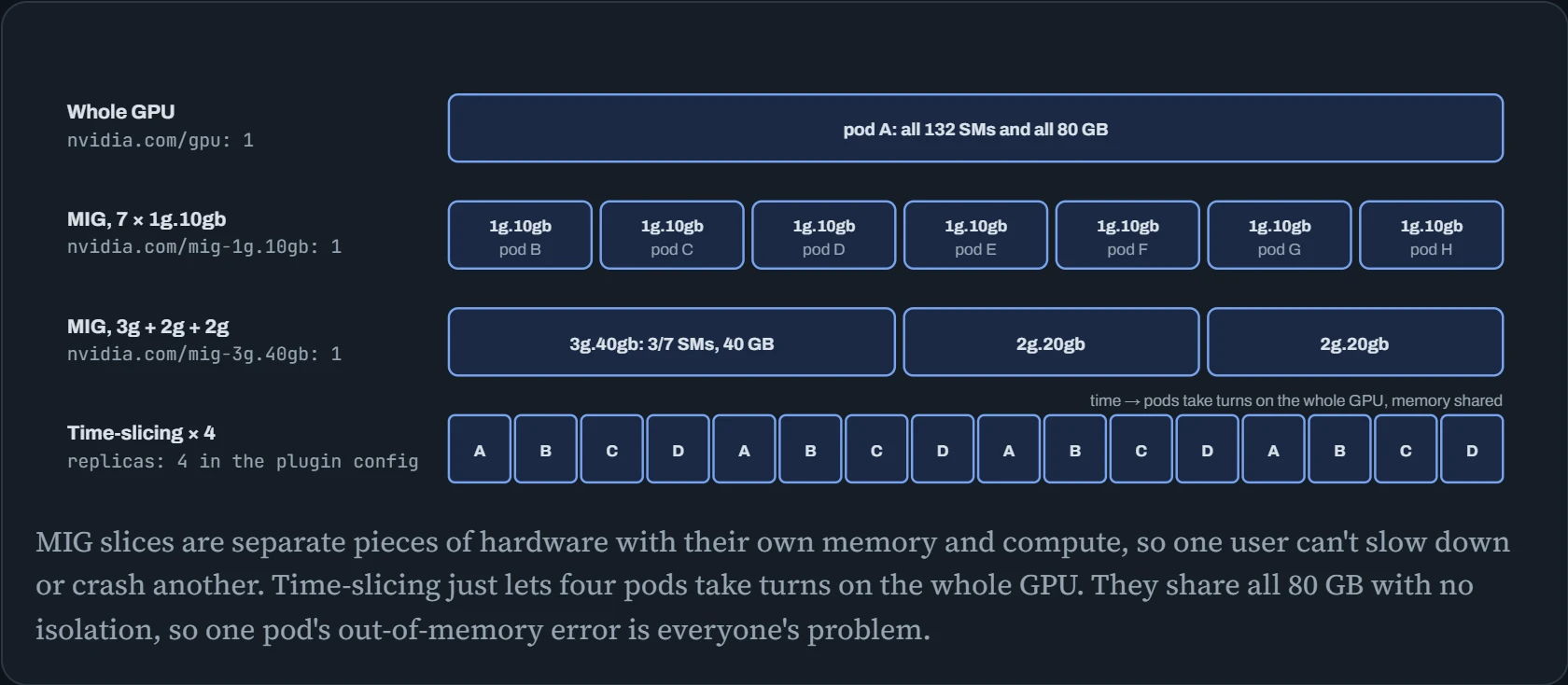
Put simply, MIG gives you smaller real GPUs, and time-slicing sells more tickets for the same one. The table shows what an 8-GPU node then reports under each method. It adds a fourth option, MPS, where several programs run on the GPU at the same moment.
| Method | Isolation | What the node advertises (8 × H100) | Good for |
|---|---|---|---|
| Whole GPU | Complete | nvidia.com/gpu: 8 | Training, large inference |
| MIG | Hardware: memory, cache and SMs split into walled-off pieces | nvidia.com/mig-1g.10gb: 56 (mixed strategy) | Many small, steady inference services; clusters shared by many teams |
| Time-slicing | None: memory is shared, and so is any fault | nvidia.com/gpu: 32 with replicas: 4 | Notebooks, development, light services that get the odd burst |
| MPS | Partial: GPU programs (kernels) from several processes run at the same moment, with limits per process | Set in the plugin config; counted in replicas like time-slicing | Many small kernels from processes that work together |
Predict. You turn on time-slicing with replicas: 4. The node now advertises 32 GPUs. A pod asks for nvidia.com/gpu: 2. How much GPU does it get?
Answer. Possibly just two turns on the same physical GPU. That's no more memory and no more compute than one replica gets. The count now lies, and the scheduler has no way to tell. That's why the plugin can rename the resource (for example nvidia.com/gpu.shared) and reject any request for more than one replica. Keep shared GPUs and whole GPUs on clearly separate nodes, and never let training jobs land on time-sliced ones.
Training and serving workloads
A one-GPU pod is easy. A training run across two nodes is harder: several pods must start together, find each other by name, and stop and restart together if one fails, because a distributed job can't carry on with a rank missing (Down the Wire). JobSet describes exactly that: a group of Jobs that live and die as one, with a stable name for every pod. Here's a two-node, sixteen-GPU fine-tune, sent to the Kueue queue from the gangs section below:
apiVersion: jobset.x-k8s.io/v1alpha2
kind: JobSet
metadata:
  name: sft-8b
  labels:
    kueue.x-k8s.io/queue-name: training     # Kueue admits it only when all 16 GPUs fit
spec:
  failurePolicy:
    maxRestarts: 3                          # any pod fails: restart the whole set
  replicatedJobs:
  - name: workers
    replicas: 2                             # one Job per node
    template:
      spec:
        backoffLimit: 0
        template:
          spec:
            restartPolicy: Never
            containers:
            - name: trainer
              image: nvcr.io/nvidia/pytorch:25.09-py3
              command: ["torchrun", "--nnodes=2", "--nproc-per-node=8", "--rdzv-backend=c10d",
                        "--rdzv-endpoint=sft-8b-workers-0-0.sft-8b:29500", "/code/train.py", "--resume"]
              resources:
                limits:
                  nvidia.com/gpu: 8
JobSet gives each pod a predictable DNS name, sft-8b-workers-0-0.sft-8b for the first, so rank 0 is easy to find. maxRestarts plus --resume gives the restart-from-checkpoint behaviour of Down the Cluster, Kubernetes style. Two higher-level options build on the same idea: Kubeflow Trainer's TrainJob fills in the torchrun details from a ready-made runtime, and KubeRay runs Ray clusters for Ray Train and Ray Data. For fast multi-node training, pods also need the RDMA network: the NVIDIA Network Operator installs the InfiniBand or RoCE drivers, and Multus gives each pod a second network interface on that fabric, alongside the normal pod network.
Serving has its own building block. KServe turns a short InferenceService into a Deployment, a Service, health checks and scaling; its Hugging Face runtime runs supported models on vLLM:
apiVersion: serving.kserve.io/v1beta1
kind: InferenceService
metadata:
  name: chat-8b
spec:
  predictor:
    minReplicas: 1
    maxReplicas: 4
    model:
      modelFormat:
        name: huggingface
      args: ["--model_name=chat-8b", "--model_id=meta-llama/Llama-3.1-8B-Instruct"]
      resources:
        limits:
          nvidia.com/gpu: 1
$ kubectl get inferenceservice chat-8b
NAME      URL                                 READY   AGE
chat-8b   http://chat-8b.default.example.com   True    6m
Scale it on queue length, not CPU, as Down the Platform shows. llm-d goes a step further for big deployments: it routes each request to the replica most likely to already hold its prompt in the KV cache, and can split prefill and decode across pods (Down the Queue).
Predict. Two hours into the JobSet above, one pod on node 2 is evicted because its node is drained for maintenance. What happens to the other fifteen GPUs' worth of training?
Answer. They stop too. With one rank gone, the others would only hang in their next collective (Down the Fleet), so the failure policy restarts the whole set. Kueue holds it until 16 GPUs are free again, and every pod starts over, loading the latest checkpoint because of --resume.
So the cost of the eviction is the time since the last checkpoint plus the restart time. That's why checkpoint frequency and the drain procedure belong in the same runbook.
Running the cluster for many teams
Three operating jobs come up once several teams share GPU nodes. Access: give each team its own namespace and let Kubernetes' role-based access control (RBAC) decide who may do what where, so one team can't delete another's training jobs. kubectl auth can-i checks the result for any user without guessing:
$ kubectl create namespace team-nlp
$ kubectl create rolebinding nlp-edit --clusterrole=edit --group=team-nlp -n team-nlp
$ kubectl auth can-i delete pods -n team-vision --as=alice --as-group=team-nlp
no
Adding GPU nodes on demand: in the cloud, an autoscaler creates GPU machines when pods are waiting for them, and removes them when they've been empty for a while. The Cluster Autoscaler does this with fixed node groups; Karpenter (common on AWS) picks a fitting machine type for whatever is waiting. Both need limits, because a runaway job queue can otherwise buy a lot of GPUs:
# Karpenter NodePool: GPU machines on demand, tainted, capped, removed when empty
apiVersion: karpenter.sh/v1
kind: NodePool
metadata: { name: gpu }
spec:
  template:
    spec:
      requirements:
        - { key: karpenter.k8s.aws/instance-family, operator: In, values: ["p5", "g6e"] }
      taints:
        - { key: nvidia.com/gpu, effect: NoSchedule }
      nodeClassRef: { group: karpenter.k8s.aws, kind: EC2NodeClass, name: gpu }
  limits: { nvidia.com/gpu: 64 }
  disruption: { consolidationPolicy: WhenEmpty, consolidateAfter: 10m }
Upgrading the GPU stack: the GPU Operator owns the driver on every node, so a driver upgrade is a Helm upgrade of the operator, which then rolls through nodes one at a time: drain, swap the driver, validate, return. Treat it like the rolling upgrades in Down the Fleet: try it on one node pool first, watch the validator pods, and never upgrade every node at once.
Continue the lesson
The whole lesson, with its drawings and its questions. 5 more sections after the ones above.