
NAT and PAT
RFC 1918 addresses are never routed on the Internet, so a reply to one has nowhere to go. NAT changes the source or destination address as packets cross interfaces marked inside or outside. Inside static NAT hides a private host behind a fixed public address; PAT shares one address; ip nat outside source translates outside hosts, as when two merged companies' ranges overlap.
By Arif, founder of Daveth · Updated
The full 8 min walkthrough is in Daveth Pro (Network). See what the plan opens
What this page answers
What is the difference between ip nat inside source and ip nat outside source?
ip nat inside source translates inside hosts, mapping an inside local address to an inside global one so the private address is hidden outside. ip nat outside source static translates an outside host's address as the inside sees it, used for overlapping networks. Read it in “4.1 Private addresses and the missing route back”
How do you configure NAT port forwarding?
With a static port translation, such as ip nat inside source static tcp 10.10.10.1 1234 172.16.131.1 5467, which maps one inside address and port to an outside address and port to publish one service. Read it in “4.1 Private addresses and the missing route back”
What are the RFC 1918 private ranges?
10.0.0.0/8, 172.16.0.0/12 and 192.168.0.0/16: address blocks never routed on the Internet, which is why their traffic needs NAT to reach it. Read it in “4.1 Private addresses and the missing route back”
4.1 Private addresses and the missing route back
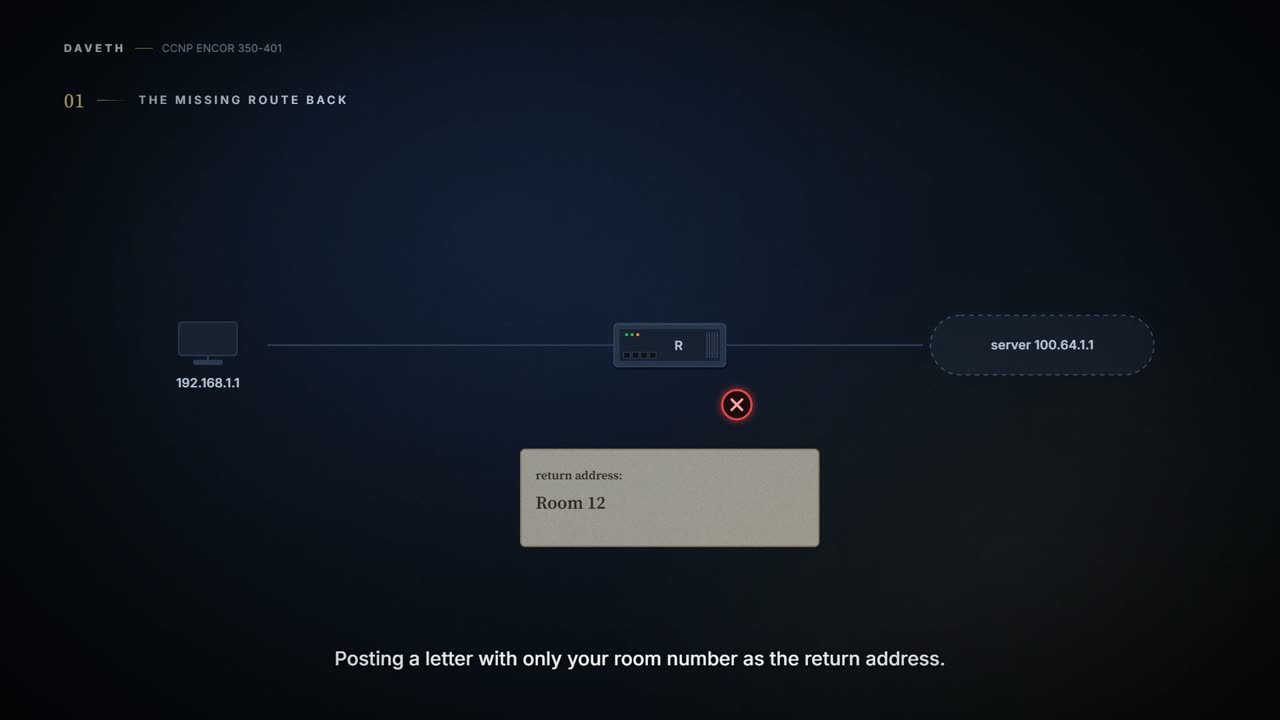
RFC 1918 set aside address blocks that are never routed on the Internet: 10.0.0.0/8, 172.16.0.0/12 and 192.168.0.0/16. (The guide prints the middle one as /24, but gives the /12's size, 1,048,576 addresses). They let a company number everything it owns, and they cause a problem the moment one of those devices talks to the Internet. A packet from 192.168.1.1 reaches a server at 100.64.1.1 perfectly well. The reply has nowhere to go, because no router out there has a route to 192.168.1.1; picture yourself posting a letter with only your room number as the return address. It arrives, and the answer can't find you.
NAT fixes that by making the inside network look like a publicly routed one. A NAT device, usually a router or a firewall, changes the source or destination address in a packet's header as the packet arrives on an interface marked inside or outside. Cisco puts the purpose plainly: NAT "is designed for IP address conservation". It also solves a second, less obvious problem: when one company buys another and both use the same private ranges, NAT lets the overlapping networks talk. It's a bit like a hotel reception: letters go out with the hotel's address on them, and when the replies come back, reception knows which room each one belongs to.
NAT's whole job is to lie about addresses, and its one virtue is that it tells exactly the same lie in both directions.
What NAT changes is the IP header. Most routers and switches don't touch an address carried inside the payload (the guide's example is a DNS request); some firewalls can. Cisco calls the helpers that do this application-level gateways (ALGs); which applications they cover depends on the platform, and on a Catalyst 9300 at 17.9 it's only FTP, TFTP and ICMP.
The terms are where most people trip, because each name answers two questions at once: whose address it is (an inside or an outside host) and who is looking (local: as seen from the inside; global: as seen from the outside):
| Term | Whose address | As seen from | In the guide's inside static example |
|---|---|---|---|
| inside local | an inside host | the inside: its real, private address | 10.78.9.7 (R7) |
| inside global | an inside host | the outside: the public address standing in for it | 10.45.1.7 |
| outside local | an outside host | the inside: how the inside sees it | 10.123.4.1 (R1, not translated here) |
| outside global | an outside host | the outside: its real address | 10.123.4.1 |
Cisco's wording matches: the outside local is "the IP address of an outside host as it appears to the inside network", the outside global "the IP address assigned to a host on the outside network by the owner of the host". The guide adds that an outside local needn't be reachable from the outside but must be reachable from the inside, and that an outside global must be reachable by the outside. The memory hook: local is what the inside sees, global is what the outside sees; inside and outside say whose address it is. That's roughly equivalent to your name at home and the name on your work badge: one person, two labels, and which one you see depends on which side of the front door you're standing.
"Outside local" sounds like a contradiction and isn't: it's simply how the inside sees an outside host.
There are three kinds of NAT. Static NAT is a fixed one-to-one mapping. Pooled NAT is a one-to-one mapping handed out on demand from a pool, and returned after a period of idle time. PAT (Port Address Translation) is many-to-one: every local address shares one global address, and the NAT device tells them apart by a port it keeps unique. Think of it as three ways to give a team phones: a personal number each, a few shared lines you borrow, or one switchboard number with extensions.
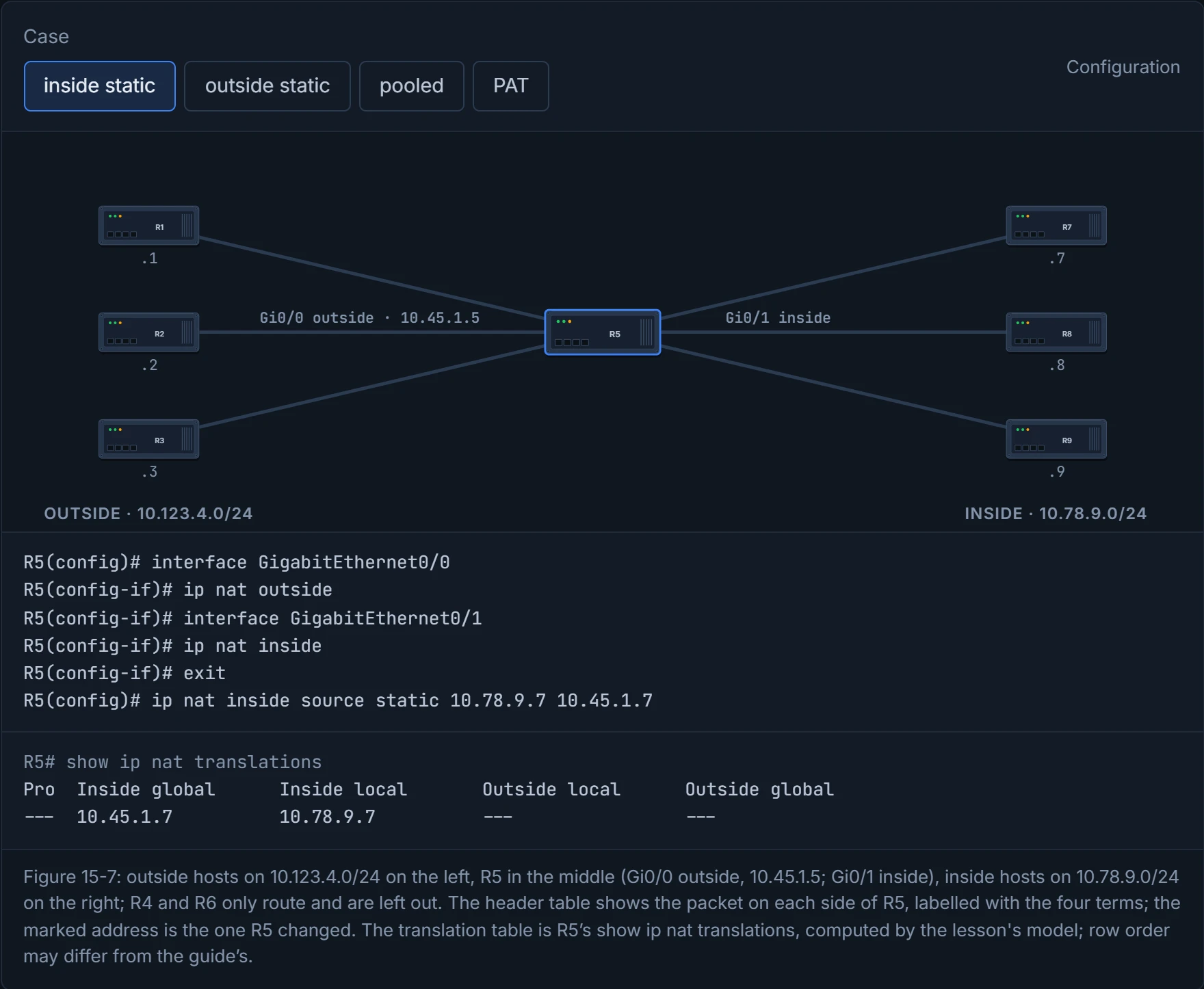
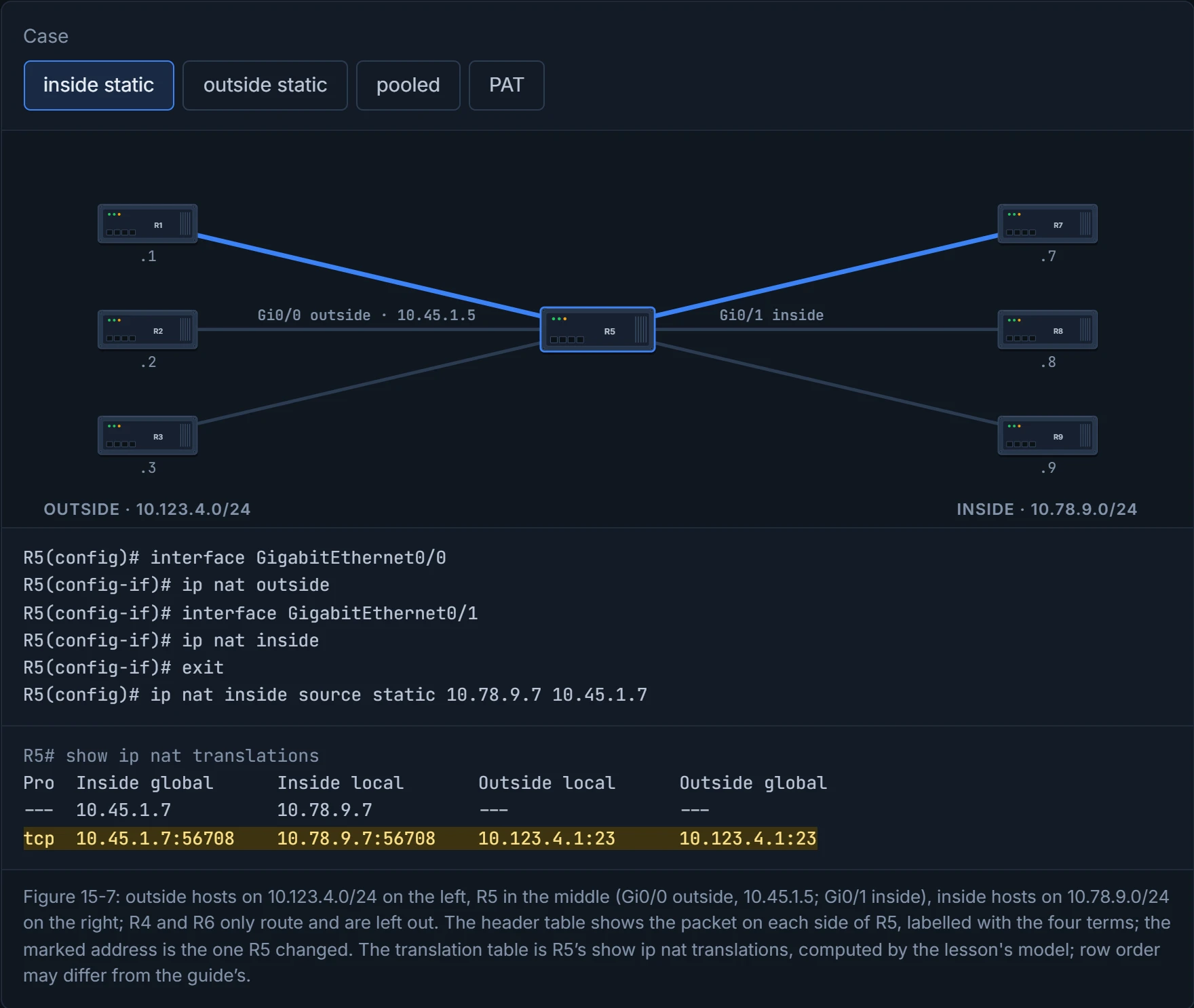
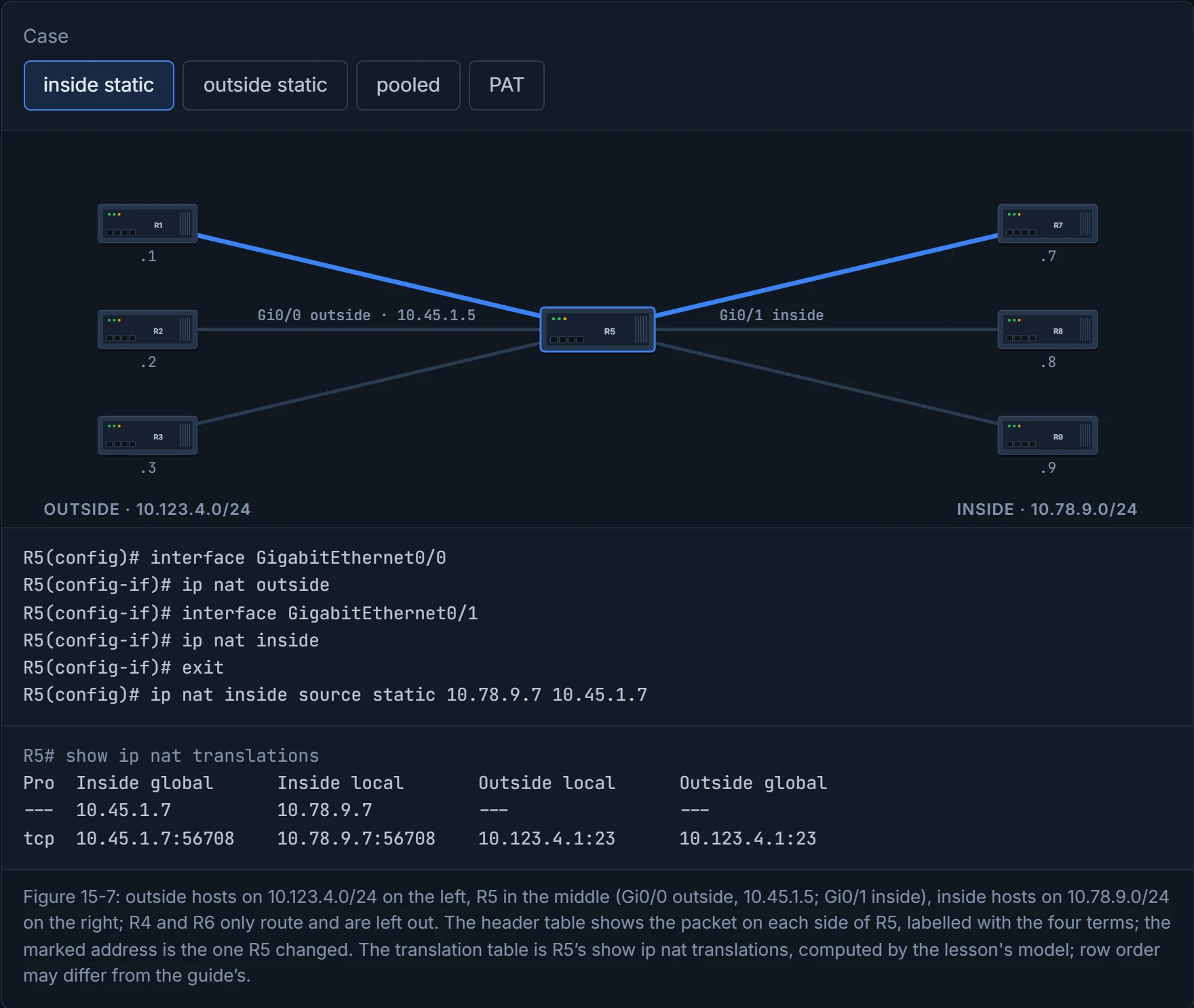
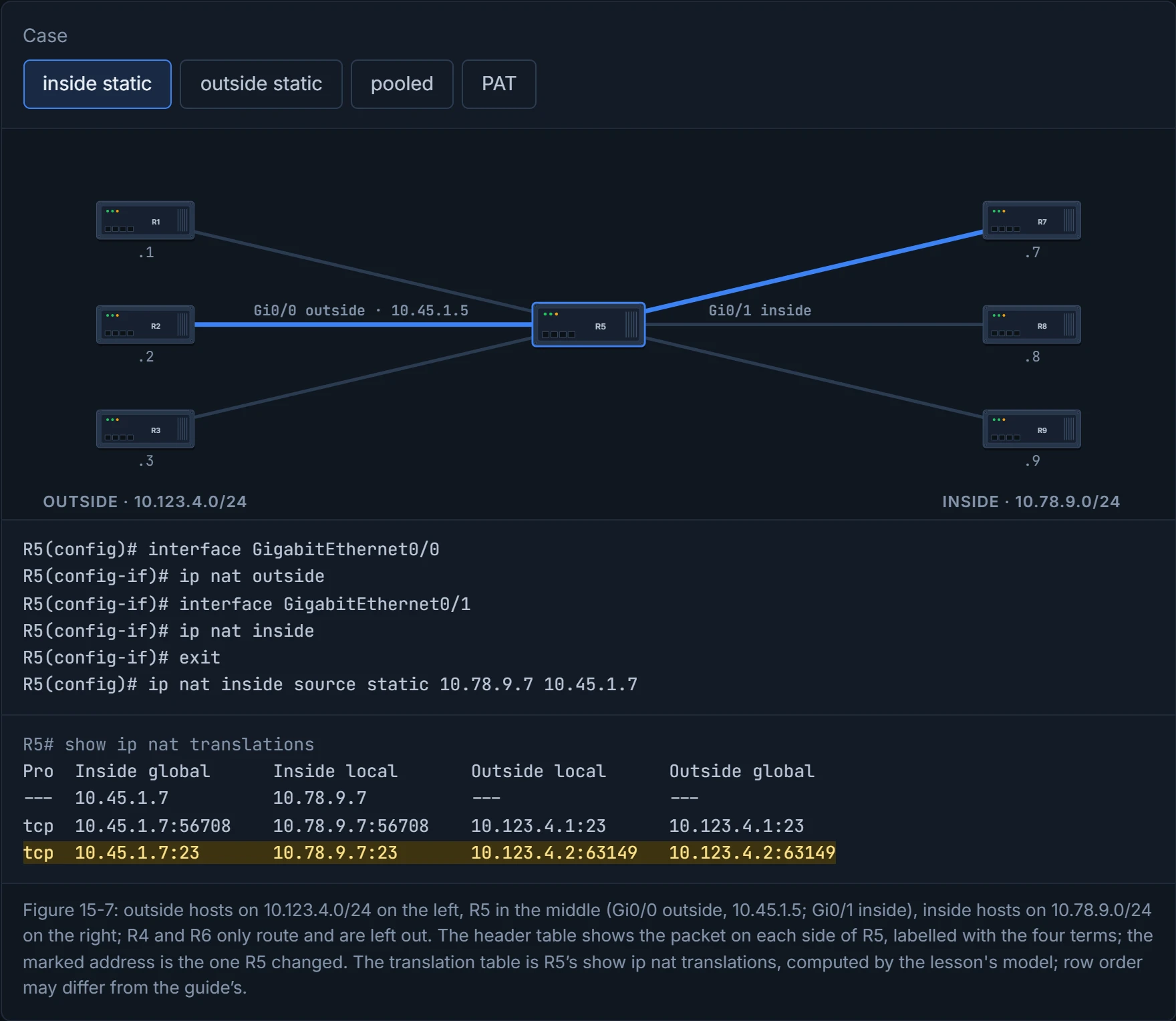
The guide's topology is Figure 15-7. R5 does the translating: Gi0/0 (10.45.1.5) faces the outside and Gi0/1 the inside. R1, R2 and R3 sit outside on 10.123.4.0/24, R7, R8 and R9 inside on 10.78.9.0/24 (R4 and R6 just route between them), and static routes give full reachability. Before any NAT, a Telnet from R7 to R1 shows R7's real address on R1 (show tcp brief). There are two kinds of static NAT: inside static and outside static.
Inside static NAT maps an inside local to an inside global, so the private address is hidden from outside hosts. Three steps: mark the outside interface, mark the inside interface, add the mapping (Example 15-28):
R5(config)# interface GigabitEthernet0/0
R5(config-if)# ip nat outside
R5(config-if)# interface GigabitEthernet0/1
R5(config-if)# ip nat inside
R5(config-if)# exit
R5(config)# ip nat inside source static 10.78.9.7 10.45.1.7
Now R1 sees R7's Telnet arrive from 10.45.1.7. The inside global doesn't have to sit on the outside interface's subnet. It shouldn't be the interface's own address, and it can even belong to a network that doesn't exist on R5 (the guide's example is 10.77.77.77), as long as the outside routers send it toward R5. Consider it your company's direct-dial number for one desk: callers need it to reach the building, not to know which floor you're on.
Two variations you'll meet on IOS XE, from Cisco's 17.9 guide rather than the book: a static port translation, ip nat inside source static tcp 10.10.10.1 1234 172.16.131.1 5467, which maps one address and port to another (the usual way to publish one service, often called port forwarding), and a static network translation, ip nat inside source static network 10.10.10.1 172.16.131.1 prefix_len 24, which translates the network part of a whole subnet and leaves the host part alone.
R7 never sees 10.45.1.7 anywhere on itself. Static NAT gives it a public identity it doesn't know it has.
show ip nat translations shows the table, which holds static and dynamic entries. After R7's Telnet there are two (Example 15-30): the static rule, --- 10.45.1.7 10.78.9.7 --- ---, and a dynamic entry for the session with all four addresses and ports filled in. Cisco calls the first kind a half entry (local to global only) and the second a full entry, which records the destination of one flow too and is "always created dynamically".
What R5 does to the packets (Figure 15-8):
- R7's packet arrives on Gi0/1 (inside). R5 does a route lookup for 10.123.4.1: out of Gi0/0 (outside). Inside to outside, so it checks the NAT table.
- Only the static entry exists, so R5 creates a dynamic entry, with 10.123.4.1 as outside local and outside global.
- It changes the source from 10.78.9.7 to 10.45.1.7 and sends the packet on.
- R1 replies to 10.45.1.7, and R4 routes the reply back to R5.
- The reply arrives on Gi0/0 (outside), so R5 checks the table,
- matches the dynamic entry, and changes the destination from 10.45.1.7 to 10.78.9.7,
- then routes it out of Gi0/1.
Notice the order. Going out, R5 routes, then translates; coming in, it translates, then routes. That's the order in Cisco's NAT order-of-operation note, which also puts the input access list before either. The note was written for IOS 12.2, so treat it as the model and unconfirmed it on 17.9 hardware NAT. It matters when you write an ACL or a route: an input ACL on the outside interface sees the inside global addresses, not the real ones.
Before reading on, predict: R2 has never talked to R7, and Telnets to 10.45.1.7. Does R5 need a new rule, or only a new entry? D1's inside static case answers it.
Because the mapping is static, it works in both directions. R2, which has never talked to R7, can Telnet to 10.45.1.7 and land on R7; R5 simply adds another dynamic entry, tcp 10.45.1.7:23 10.78.9.7:23 10.123.4.2:63149 10.123.4.2:63149 (Example 15-31). Cisco states the rule order from the other side: a matching static rule is used first, then any dynamic rule, and a packet that no rule matches is "forwarded without any address translation". It works just like when you give a supplier your direct line: they can ring you whether or not you called them first.
D1
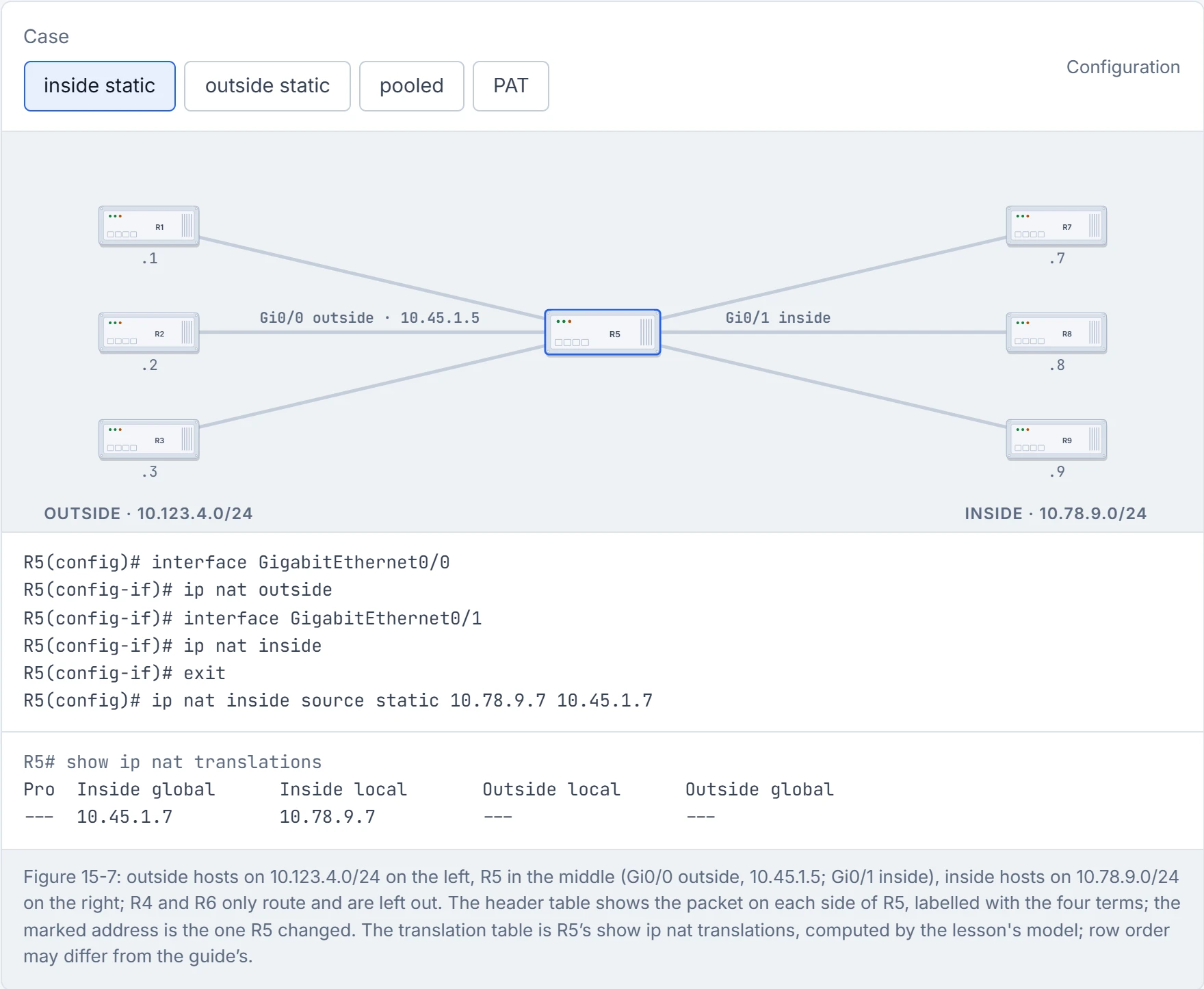
Step 1 of 4 Inside static NAT: R7 (inside local 10.78.9.7) is always 10.45.1.7 (inside global) to the outside. The table starts with just the static rule, a half entry.
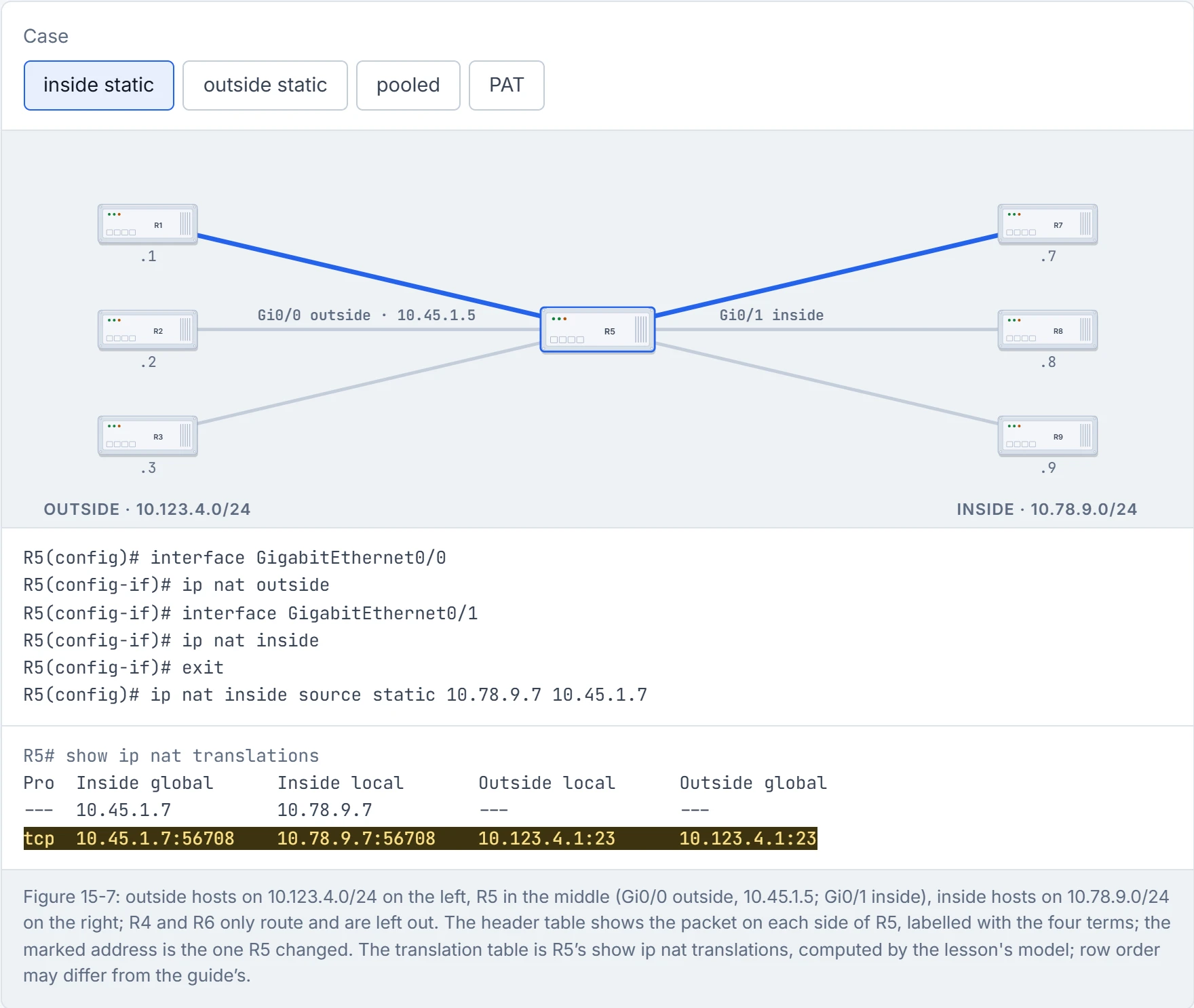
Step 2 of 4 R7 opens Telnet to R1 (Example 15-29). Inside to outside: R5 routes first (10.123.4.1 is out of Gi0/0, outside), then checks NAT. The static rule matches R7, so the source becomes 10.45.1.7, and a full entry records the flow (p422 steps 1-3).
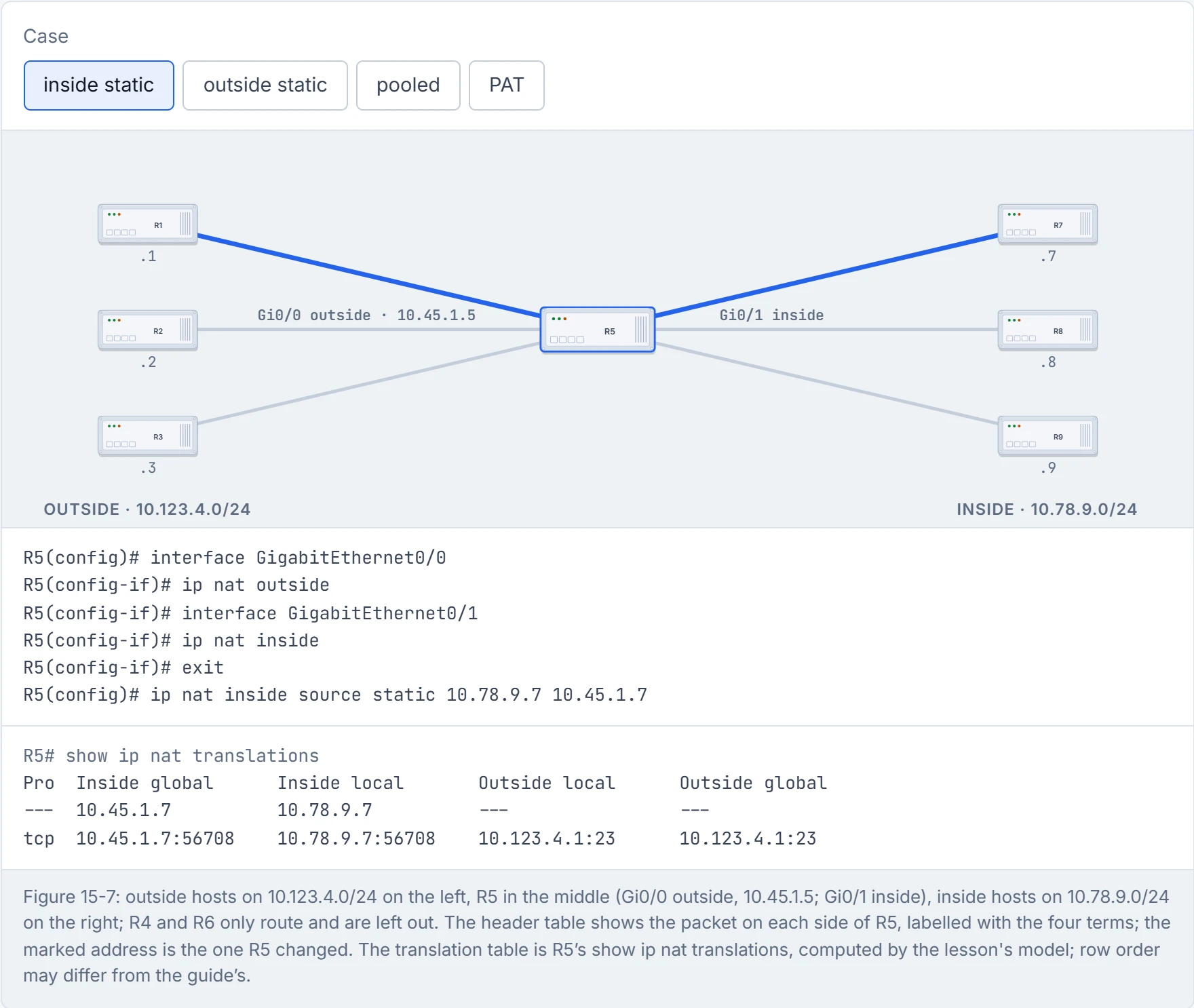
Step 3 of 4 R1 answers. Outside to inside: R5 translates first, then routes. The reply matches the full entry, the destination goes back to 10.78.9.7, and no new line is needed (p422 steps 5-7).
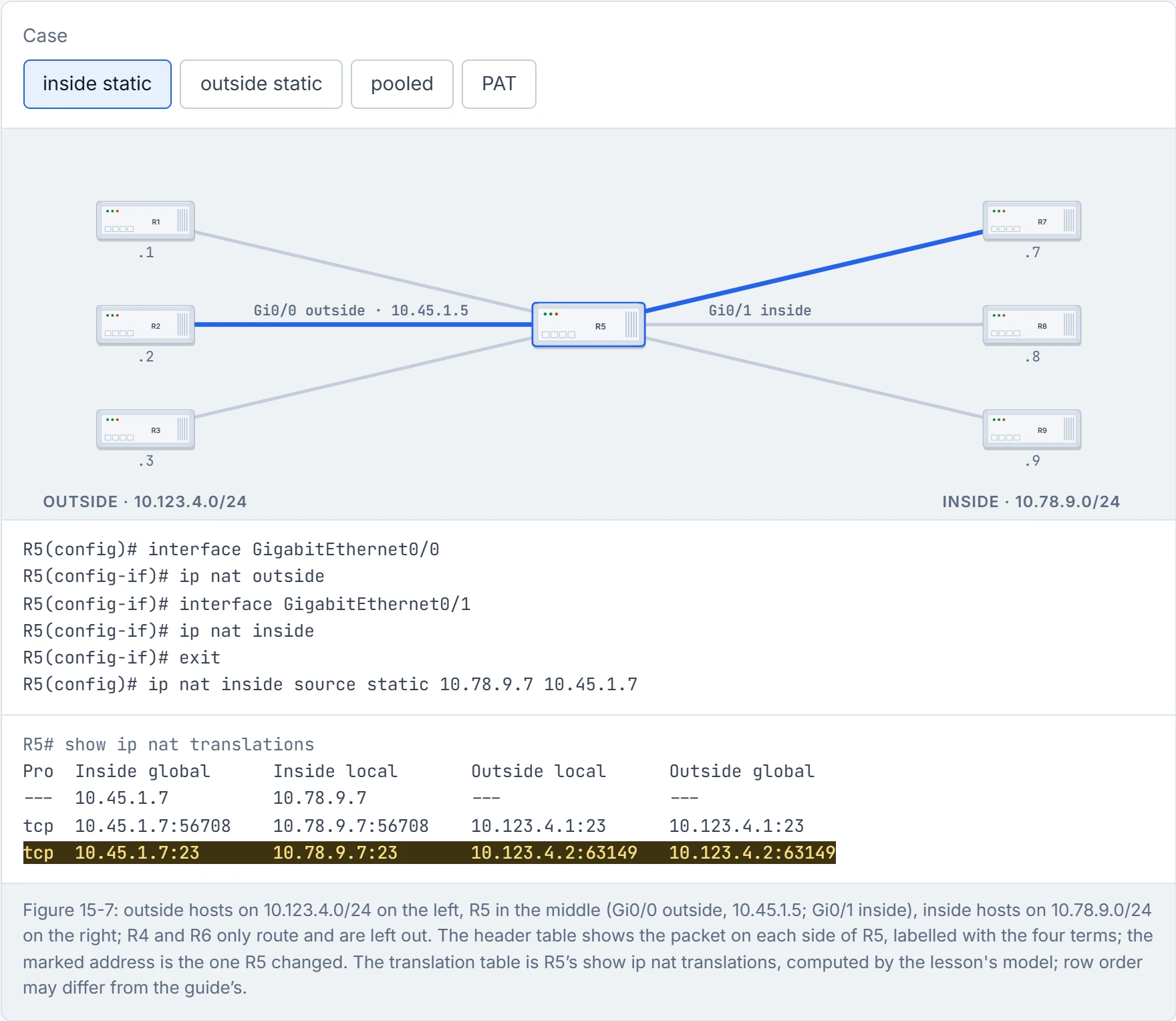
Step 4 of 4 R2, which has never talked to R7, Telnets to 10.45.1.7 (Example 15-31). No entry matches, but the static rule does, so R5 needs no new rule: it creates a second full entry and delivers the session to R7. From R7’s side, R2 is simply 10.123.4.2.
Outside static NAT maps an outside global to an outside local, so a real outside address is hidden from inside hosts. The steps are the same interface commands, then ip nat outside source static outside-global-ip outside-local-ip [add-route]. The router does its route lookup for the outside local address first, so a route for it must point out of the outside interface before NAT happens; add-route creates that route for you, and Cisco recommends it. That fits section 4.3's order: inside to outside, routing comes before translation.
Example 15-32 makes R2 (10.123.4.2) appear to the inside as 10.123.4.222:
R5(config)# ip nat outside source static 10.123.4.2 10.123.4.222
R5 already had a route to 10.123.4.0/24, so add-route wasn't needed. Now R8 can Telnet to 10.123.4.222 and reach R2, which sees R8's real address, 10.78.9.8. R2 can Telnet to R9, which sees the session arrive from 10.123.4.222. And R6 to R9 can still use R2's real address, untranslated. The table (Example 15-34) holds the static entry --- --- --- 10.123.4.222 10.123.4.2 and one full entry per session. It acts kind of like the contact names on your phone: you save the plumber as "Plumber", tap it, and the phone dials the real number.
Outside static NAT gives R2 a second address it knows nothing about, like a nickname used only behind its back.
The guide calls outside static NAT "not very common", used mainly where addresses are duplicated. That's the overlap case from section 4.1: Cisco's recipe pairs an ip nat inside source static with an ip nat outside source static, so each side sees the other at an address that doesn't clash. Have you ever noticed how two companies that merge both turn out to have a "Meeting Room 1"? One of them has to be renamed, at least in the directory.
Static NAT needs a line per host and as many global addresses as local ones. Pooled NAT hands out one-to-one mappings as they're needed. A mapping stays until traffic from that host stops and the timeout expires (24 hours by default), and then the address goes back to the pool. Imagine if a hotel had two outside phone lines, handed out to whoever asks first, and each kept for a whole day after its last call. Pooled NAT can work as inside or as outside NAT; the guide, and this lesson, use inside.
The steps, as Example 15-35 configures them:
R5(config)# ip access-list standard ACL-NAT-CAPABLE
R5(config-std-nacl)# permit 10.78.9.0 0.0.0.255
R5(config-std-nacl)# exit
R5(config)# interface GigabitEthernet0/0
R5(config-if)# ip nat outside
R5(config-if)# interface GigabitEthernet0/1
R5(config-if)# ip nat inside
R5(config-if)# exit
R5(config)# ip nat pool R5-OUTSIDE-POOL 10.45.1.10 10.45.1.11 prefix-length 24
R5(config)# ip nat inside source list ACL-NAT-CAPABLE pool R5-OUTSIDE-POOL
The ACL decides which sources may be translated: standard or extended, referenced by number or by name, though a name is easier to support. Cisco asks that it "permit only those addresses that are to be translated", and warns against permit ip any any. When R7 and R8 ping R1, each gets a pool address: the table shows a full entry for each ping, plus a half entry binding each host to its address (10.45.1.10 for R7, 10.45.1.11 for R8). R8's later Telnet to R2 reuses 10.45.1.11.
Pooled NAT is musical chairs where the music plays for 24 hours.
The catch is the size of the pool. With both addresses bound, R9's Telnet fails: debug ip nat detailed shows "failed to allocate address for 10.78.9.9" and "translation failed (A), dropping packet" (Example 15-39). R9's Telnet reports "% Destination unreachable; gateway or host down". Cisco says that when NAT can't allocate an address it "drops the packet and sends an Internet Control Message Protocol (ICMP) host unreachable packet to the destination"; which host that ICMP message reaches in this example is unconfirmed. It's basically like a pool car scheme with two cars: a third driver isn't queued, just turned away, and has to try again later.
A binding comes back when it times out or when you clear it. The binding (the half entry) times out after 24 hours by default, set with ip nat translation timeout seconds; the flows riding on it have shorter timers of their own (section 4.7). clear ip nat translation * removes dynamic entries at once, but can interrupt live sessions, which may come back on a different global address; after it, R9 connects (Example 15-40). The guide also shows clear ip nat translation ip-address for one entry; the exact arguments IOS XE wants for a single entry are unconfirmed.
Pooled NAT still needs enough global addresses for everyone who's talking at once. PAT maps many local addresses to one global address and keeps each conversation apart by its source port; its other name is NAT overload. Cisco's description: the device "maintains enough information from higher-level protocols (for example, TCP or UDP port numbers) to translate the global address back to the correct local address". If you've ever rung a company's main number and been put through to an extension, you've used the same trick: one number outside, many people inside.
The steps: an ACL for what may be translated, then ip nat inside source list acl {interface interface-id | pool nat-pool-name} overload. Naming an interface uses its primary IP address; naming a pool uses the pool's addresses. Example 15-41 translates 10.78.9.0/24 to R5's Gi0/0 address (the guide's printed command leaves out inside):
R5(config)# ip nat inside source list ACL-NAT-CAPABLE interface GigabitEthernet0/0 overload
With a pool instead, the same line ends pool R5-OUTSIDE-POOL overload, and the flows share the pool's addresses, ports kept unique on each.
After pings from R7, R8 and R9, and Telnets from R7 and R8 to R2, every inside global in the table is 10.45.1.5, and every inside global port is unique (Example 15-43, Figure 15-10):
Pro Inside global      Inside local       Outside local      Outside global
icmp 10.45.1.5:4       10.78.9.7:3        10.123.4.1:3       10.123.4.1:4
icmp 10.45.1.5:3       10.78.9.8:3        10.123.4.1:3       10.123.4.1:3
icmp 10.45.1.5:1       10.78.9.9:1        10.123.4.1:1       10.123.4.1:1
tcp 10.45.1.5:51576    10.78.9.7:51576    10.123.4.2:23      10.123.4.2:23
tcp 10.45.1.5:31515    10.78.9.8:31515    10.123.4.2:23      10.123.4.2:23
Continue the lesson
The whole lesson, with its drawings and its questions. The rest of this section and 9 more after it.