
First-hop redundancy: object tracking and HSRP
A host has one default gateway, so a first-hop redundancy protocol lets routers share a virtual IP address that hosts use instead. HSRP picks one active router, the highest priority, default 100, then the highest IP address. HSRP does not preempt by default. Object tracking watches a WAN interface or route and makes a router step down when it fails.
By Arif, founder of Daveth · Updated
The full 10 min walkthrough is in Daveth Pro (Network). See what the plan opens
What this page answers
What is HSRP (Hot Standby Router Protocol)?
Cisco's first-hop redundancy protocol: routers share a virtual IP address that hosts use as their gateway, one active router forwards for it, and a standby router takes over if the active fails. Read it in “4.1 One gateway, one point of failure”
How do you configure HSRP?
standby instance-id ip vip-address creates the group and its virtual IP; optionally add standby instance-id preempt, standby instance-id priority priority and timers. show standby then shows which router is active. Read it in “4.1 One gateway, one point of failure”
What is HSRP preemption?
What lets a better router take the active role from a worse one that already has it. HSRP does not preempt by default, so a higher-priority router waits until the active one fails unless preempt is configured. Read it in “4.1 One gateway, one point of failure”
How does HSRP object tracking work?
A track object watches something, such as an interface's line protocol or a route's reachability, and HSRP lowers the router's priority when it goes down, so a router with a dead WAN link steps aside. Read it in “4.1 One gateway, one point of failure”
4.1 One gateway, one point of failure
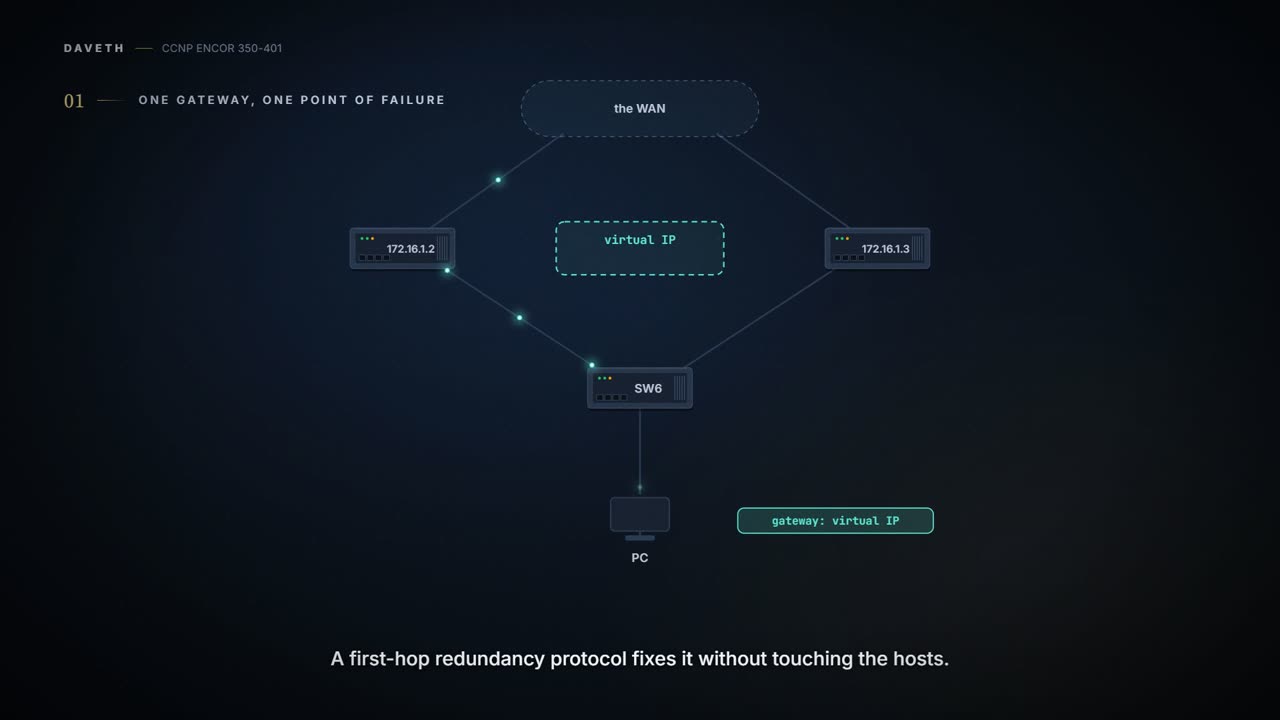
Networks get resilience at Layer 2 by adding switches and links, and at Layer 3 by adding paths and routers. In Figure 15-4, two devices (172.16.1.2 and 172.16.1.3) could each be the PC's gateway, and SW6 has two links towards them, one of them blocked by spanning tree. The trouble is the PC. It's configured with one gateway; if that device fails, the PC is stuck, and while some operating systems accept several gateways, others don't. It's a bit like a building with two fire exits and a map on every desk that shows only one.
A first-hop redundancy protocol (FHRP) fixes it without touching the hosts: the routers share a virtual IP (VIP) address, and the hosts use that as their gateway. The guide covers three: HSRP, VRRP and GLBP. Quiz Q3 puts the problem precisely: FHRPs overcome the limits of a static default route and of a computer with only one default gateway; Q4 notes that HSRP and GLBP are Cisco proprietary, VRRP isn't. Picture yourself phoning a help desk: you dial one number, and whoever is on shift picks up.
An FHRP's greatest achievement is that the hosts never find out anything happened.
Before HSRP, there's a general tool it borrows. Object tracking lets you watch something (a route in the routing table, an interface's state) and have FHRPs and other features, such as a conditional static route, act when it changes. Cisco's 17.9 guide describes it as "a separate standalone tracking process that can be used by processes other than HSRP"; HSRP, VRRP and GLBP "register" their interest and are told when an object's state changes. It acts kind of like a smoke alarm wired to the sprinklers: the alarm only watches, and whatever is wired to it decides what to do.
Two kinds, from Figure 15-5 (R1, R2, R3 exchanging routes with EIGRP):
R1(config)# track 1 ip route 192.168.3.3/32 reachability
R2(config)# track 2 interface GigabitEthernet0/1 line-protocol
show track shows each object's state: R1's object 1 is "Reachability is Up (EIGRP)" while R3's loopback is in its routing table. When R2's Gi0/1 is shut, R2's object 2 goes down at once, and R1's object 1 follows as the route disappears: "Reachability is Down (no ip route)" (Examples 15-5 to 15-8). Cisco adds a third option for an interface, ip routing, which is up only when "IP routing must be enabled and active on the interface. The interface line-protocol state must be up. The interface IP address must be known." Objects are numbered 1 to 500, a delay can hold back a state change for 1 to 180 seconds, and objects can be combined in lists with AND or OR operators. Just like when you set a phone reminder to wait five minutes before nagging, the delay stops a flapping link from causing a flapping gateway.
Object tracking is a very attentive employee whose only job is to shout "it's down!" and let somebody else decide.
FHRPs usually track the WAN interface, or a route learned through it: the thing that decides whether this router is actually a good way out.
HSRP, the Hot Standby Router Protocol, is Cisco proprietary and gives transparent failover of the first hop. One router is active and forwards for the hosts; one is standby, ready to take over. Each group has a virtual IP and a virtual MAC, and the active router answers for the virtual MAC. The hosts ARP for the gateway and get the virtual MAC, not a real router's own MAC. You can think of it as a shop's front door: the street number (the virtual IP) and the name plate (the virtual MAC) stay on the door, whoever is behind the counter today.
Election. The highest priority wins (the default is 100); on a tie, the highest IP address. HSRP needs at least two devices to be of any use: one active, one standby. RFC 2281 says the same: "the router with the numerically higher priority wins. In the case of routers with equal priority the router with the higher IP address wins". Preemption is what lets a better router take the active role from a worse one that already has it, and HSRP doesn't preempt by default. Without it, a better router that comes up later settles as standby and waits. With it, the RFC says, a router with higher priority "MAY take over as the active router using a Coup message". The memory hook: priority picks, preempt lets the better one take over, tracking makes a router step down.
HSRP ships with preemption switched off, which makes it the only election in which the winner can be told to wait politely until the incumbent falls over.
Here the sources pull in different directions. RFC 2281 defines "higher priority" in its Priority field with the address as the tie-break, so reading that comparison into its preemption rule, a router with equal priority and a higher address counts as better and can preempt. The guide's Example 15-9 ends that way, with SW3 (.3) active after preempt at priority 100, but its log is muddled (SW2 logs Speak → Standby before SW3 is even configured, and a preempt line carries an SW1 prompt), so it's weak evidence. Cisco's 17.9 guide says the opposite: "If preemption is enabled, the router with the highest priority becomes the active router. If priorities are equal, the current active router does not change". What IOS XE 17.9 does is unconfirmed; D1 lets you switch between the two readings. If you've ever watched two people reach a door at exactly the same moment, you'll know a tie needs a rule, and here the rulebooks don't agree.
Hellos and failure. Routers send multicast UDP hellos to find each other and notice failure; if the active router stops sending them, the standby becomes active, and the move is invisible to the hosts because the virtual MAC moves with the virtual IP. RFC 2281 gives the plumbing: UDP port 1985, sent to 224.0.0.2 with TTL 1, from the router's real address, not the virtual one. By default a hello goes every 3 seconds and the hold time is 10. The states a router passes through are Initial, Learn (it doesn't know the virtual IP yet, which it can learn from the active router's hellos), Listen, Speak, Standby and Active, and "Excluding transient conditions, there MUST be at most one router in the group in Standby state". A router that wants the active role sends a Coup; the active router that receives one sends a Resign and drops to Speak, then settles as Standby, which is exactly the Active → Speak → Standby of Example 15-14. And a router that becomes active sends a gratuitous ARP from the virtual MAC, so the LAN switches relearn where that MAC now lives.
D1
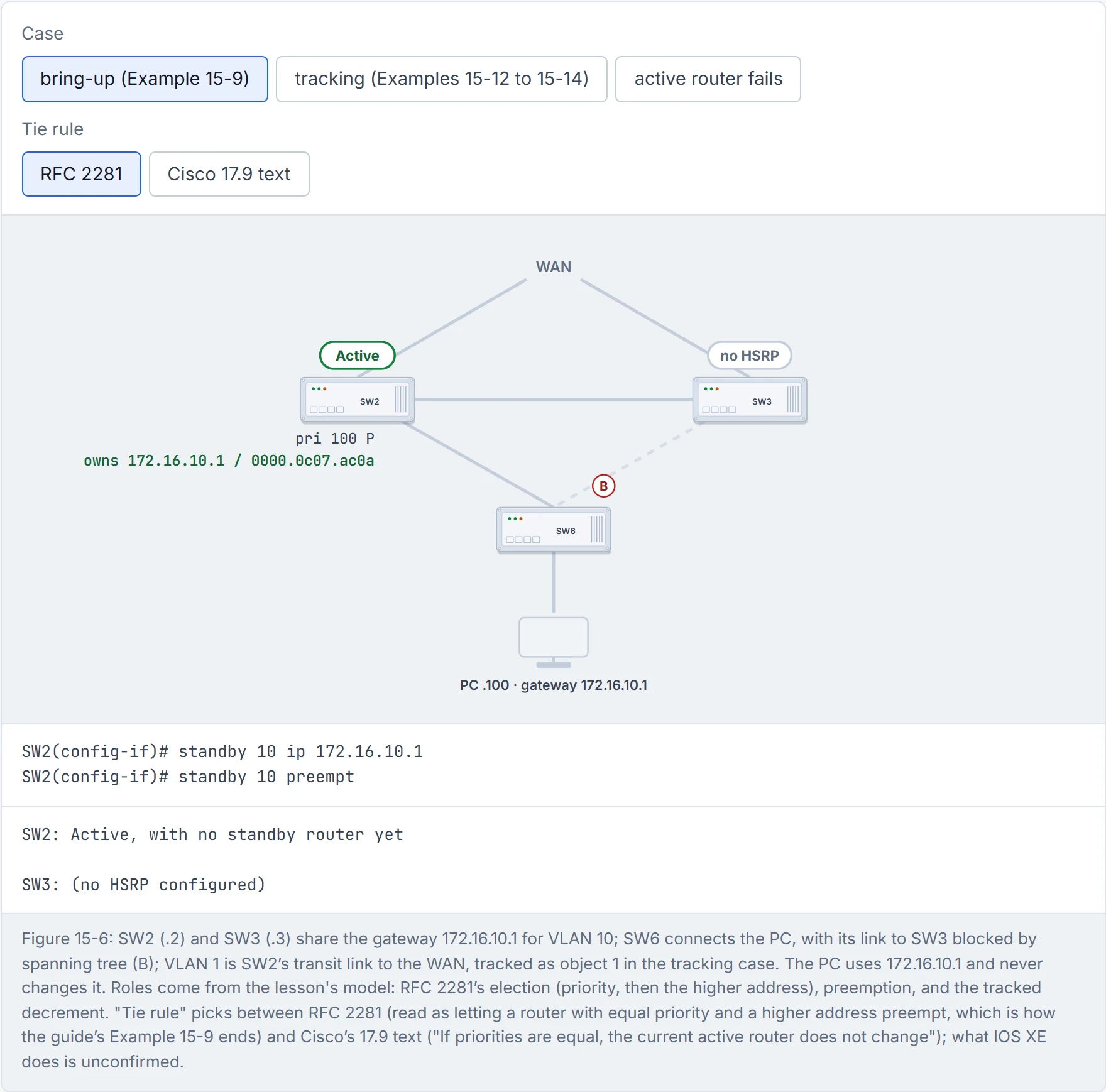
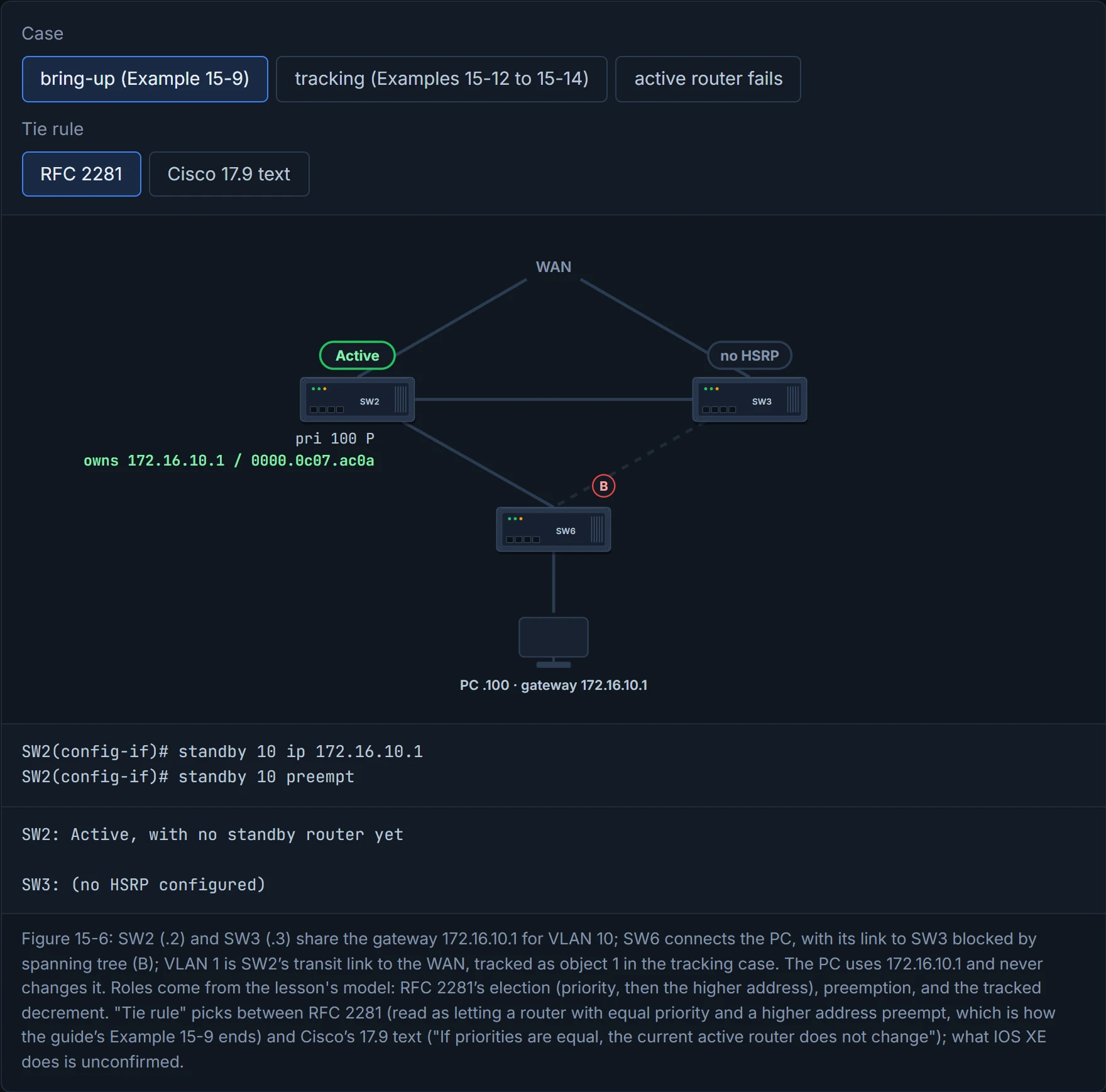
Step 1 of 3 SW2 is the only router in group 10. By RFC 2281’s rules, hearing nobody else it becomes active and answers ARP for 172.16.10.1 with the virtual MAC 0000.0c07.ac0a (group 10 is 0a in hex). The guide’s own log shows SW2 going Speak → Standby here instead, which suggests something else was already in the group.
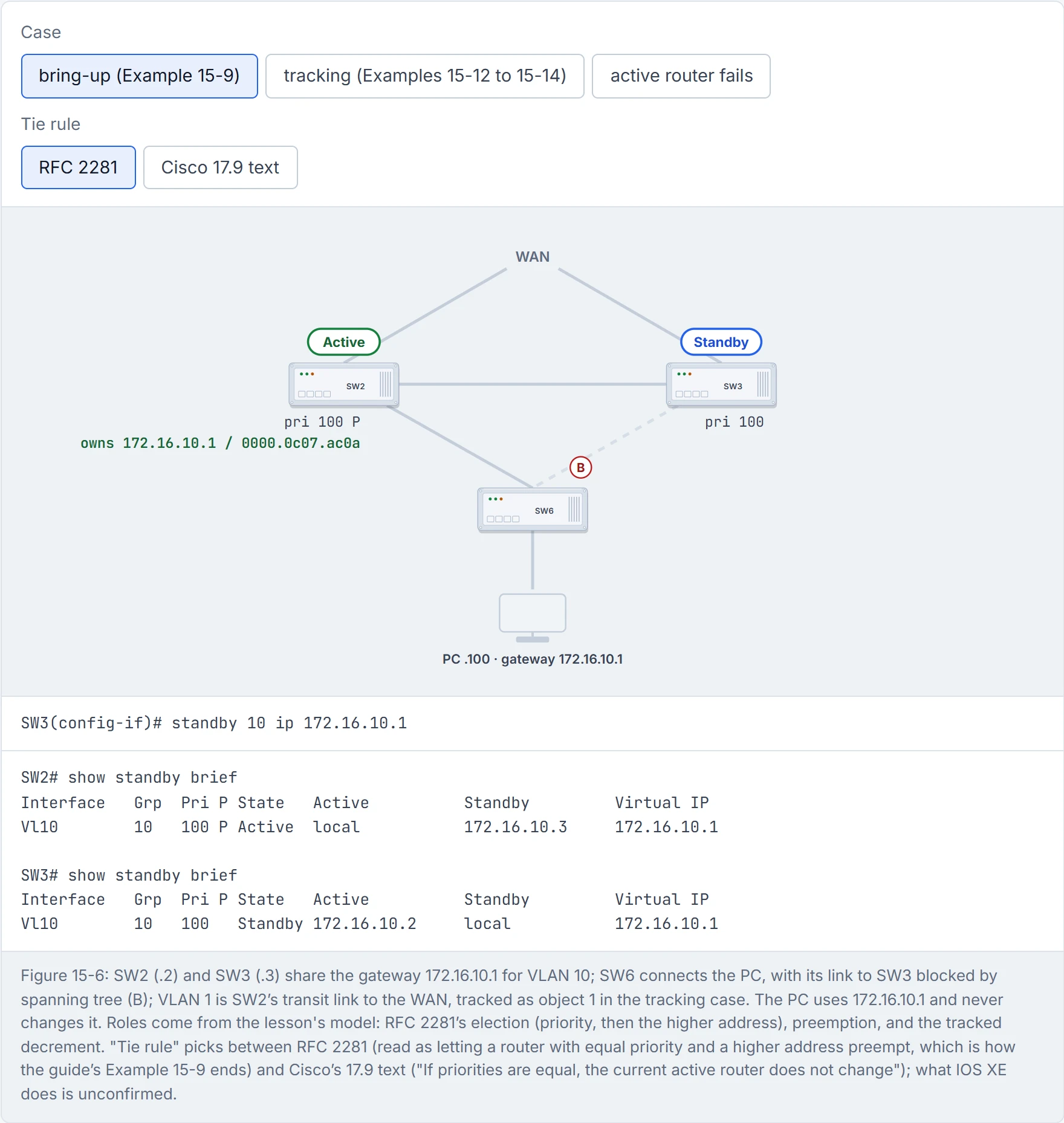
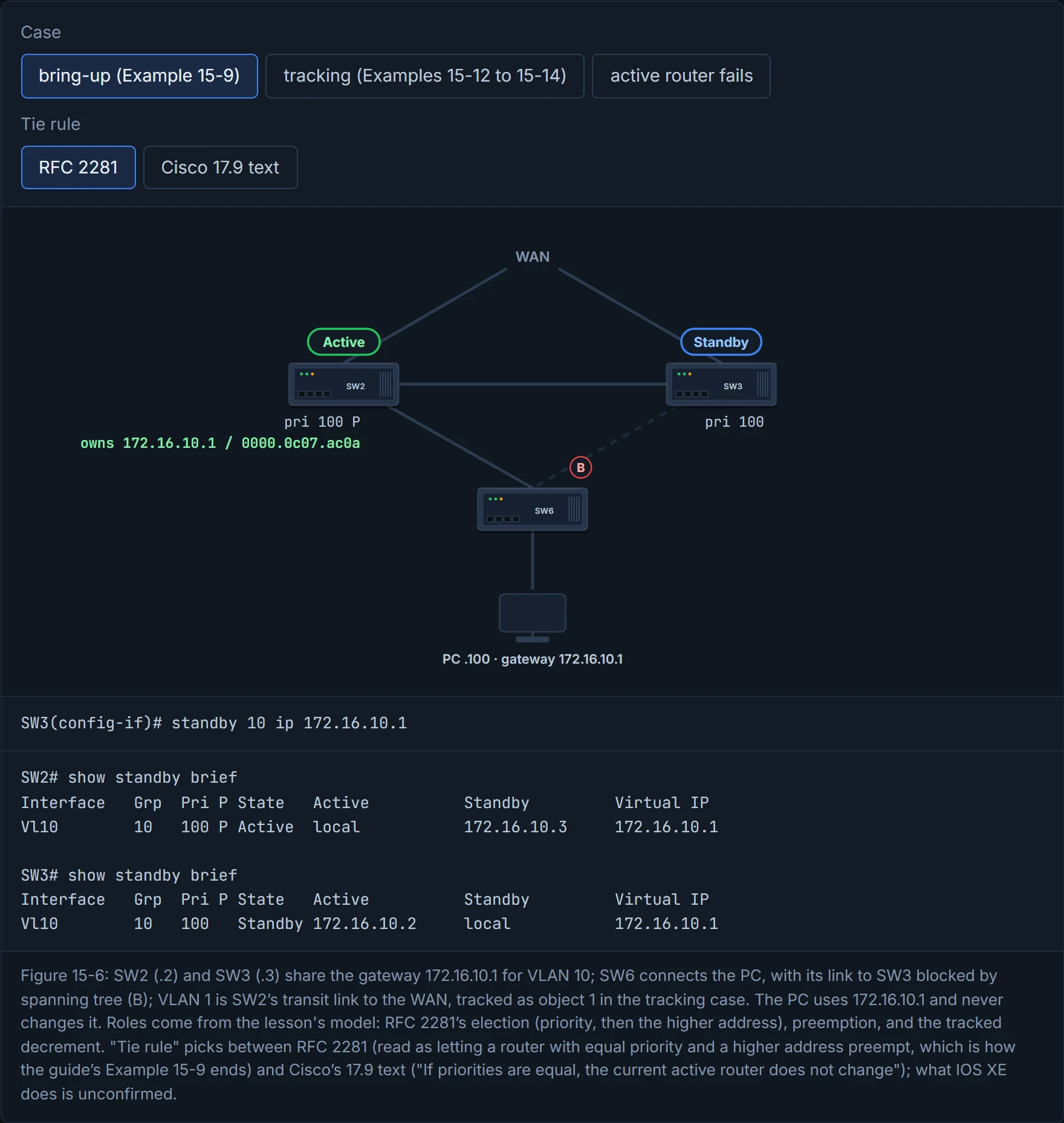
Step 2 of 3 SW3 joins with the same priority, 100, and a higher address. There is already an active router and SW3 has no preempt, so it settles as standby: the one router ready to take over (RFC 2281 §5.3).
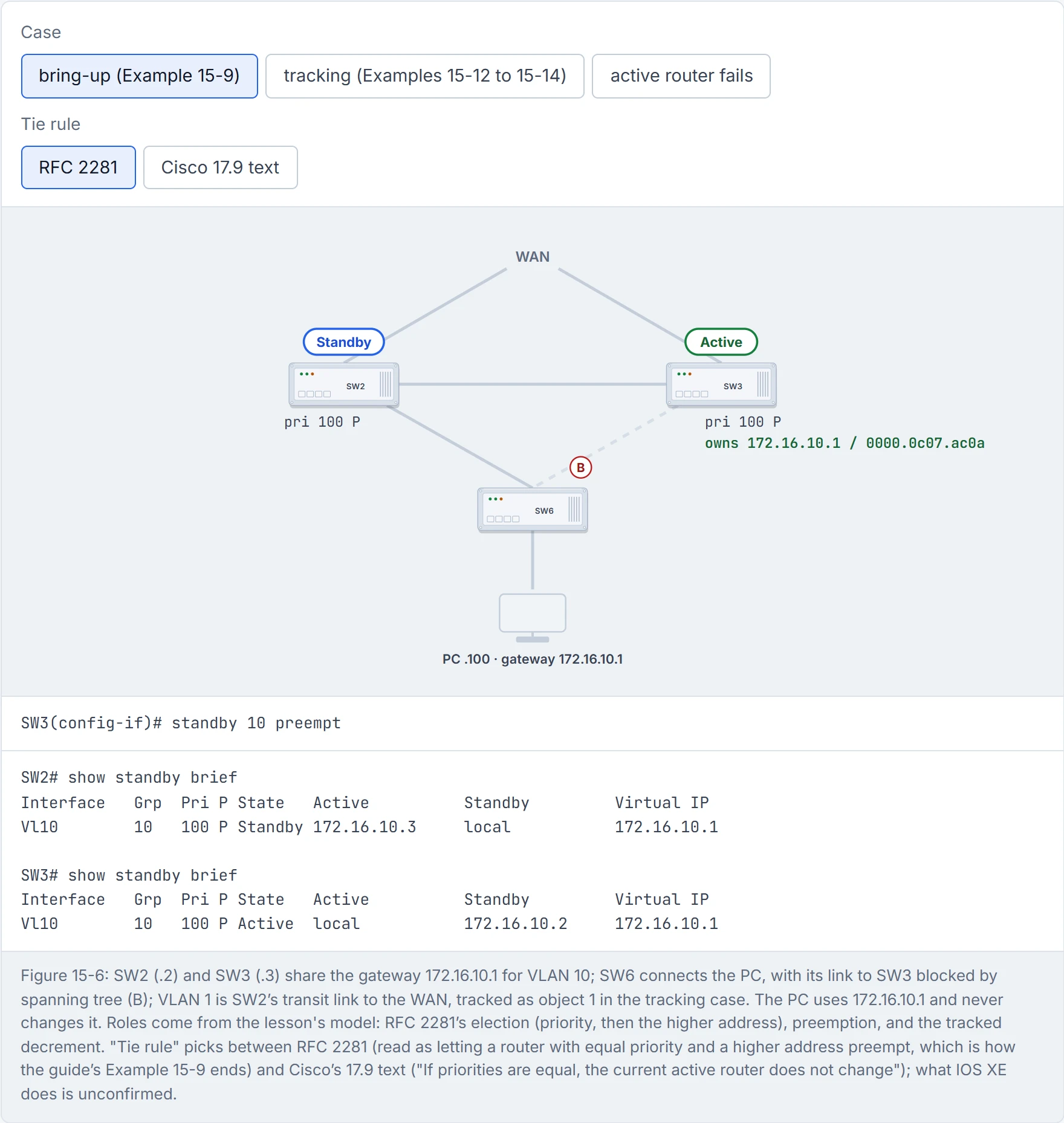
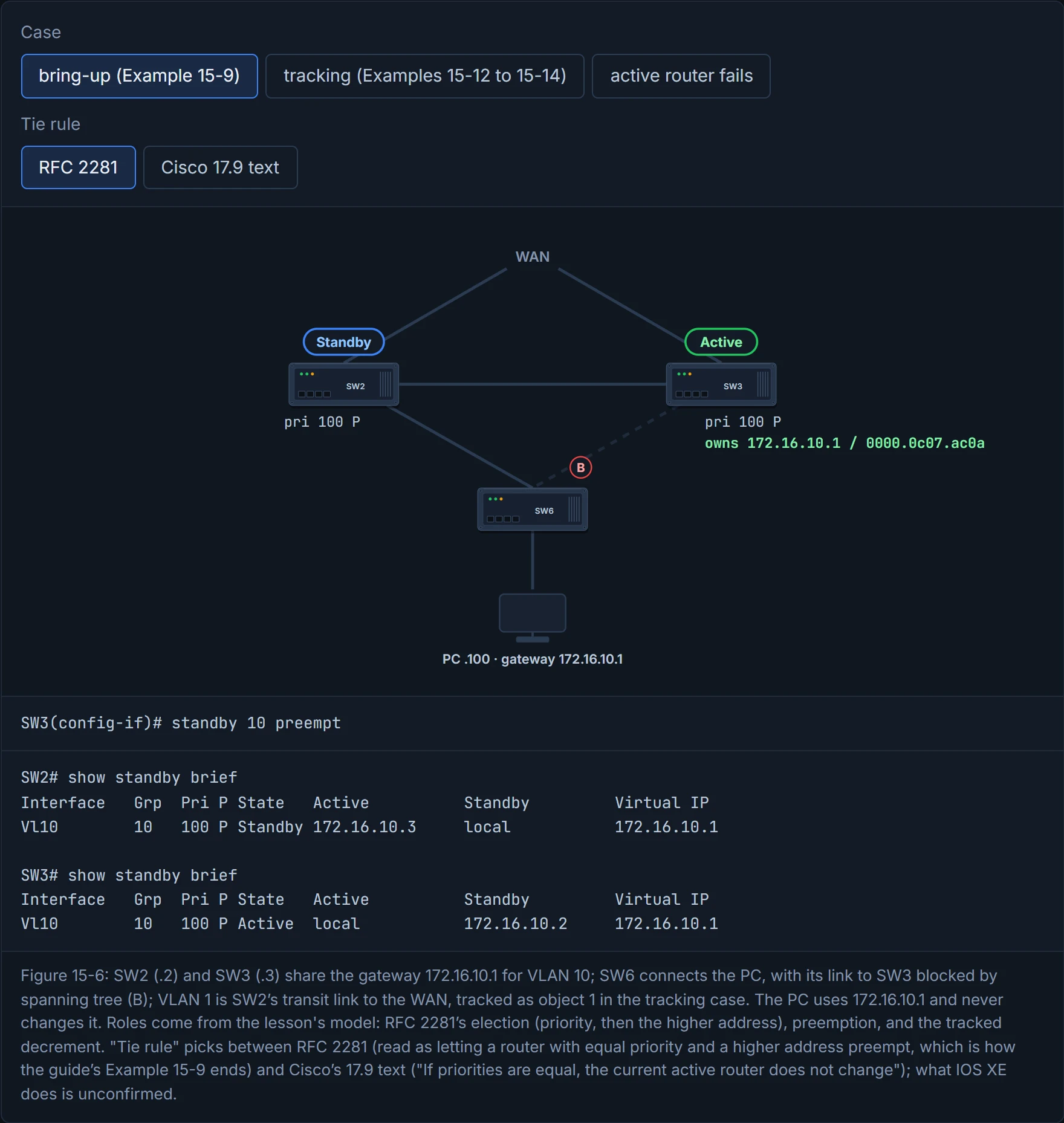
Step 3 of 3 SW3 can now preempt. Priorities are equal, and reading RFC 2281’s address tie-break into preemption, SW3 (.3) outranks SW2 (.2) and takes the active role with a coup; SW2 resigns. Example 15-9 ends this way and Examples 15-10 and 15-11 find SW3 active, though the guide’s log is muddled.
Versions (Table 15-2):
| HSRPv1 | HSRPv2 | |
|---|---|---|
| Groups | 0-255 | 0-4095 |
| Multicast address | 224.0.0.2 | 224.0.0.102 |
| Virtual MAC | 0000.0C07.ACxx (xx = group in hex) | 0000.0C9F.F000 to 0000.0C9F.FFFF |
| Millisecond timers | no | yes (but see section 4.4) |
In both versions the virtual MAC ends in the group number in hex: v1 group 10 is 0000.0c07.ac0a, and Cisco's v2 sample for group 101 is 0000.0c9f.f065 (101 = 0x65). Version 1 is the default; standby version 2 changes it, per interface. The two don't interoperate, and a v2 hello carries the sending router's own MAC in a 6-byte identifier, where a v1 router "cannot identify the physical router that sent a hello packet".
Figure 15-6: SW2 and SW3 are the gateways for VLAN 10 (172.16.10.0/24), and VLAN 1 is their transit link to the WAN. The steps:
standby instance-id ip vip-addresscreates the group and its virtual IP.- (Optional)
standby instance-id preempt. - (Optional)
standby instance-id priority priority. - (Optional)
standby instance-id mac-address mac-address, rarely needed except in migrations. - (Optional)
standby instance-id timers {seconds | msec milliseconds}, as the guide prints it; Cisco's 17.9 syntax takes two values,standby group timers hellotime holdtime. - (Optional)
standby instance-id authentication {text-password | text text-password | md5 {key-chain key-chain | key-string key-string}}.
Example 15-9 configures group 10 with VIP 172.16.10.1 on SW2 and SW3 (the text calls them SW1 and SW2):
SW2(config)# interface vlan 10
SW2(config-if)# ip address 172.16.10.2 255.255.255.0
SW2(config-if)# standby 10 ip 172.16.10.1
SW2(config-if)# standby 10 preempt
SW3(config)# interface vlan 10
SW3(config-if)# ip address 172.16.10.3 255.255.255.0
SW3(config-if)# standby 10 ip 172.16.10.1
SW3(config-if)# standby 10 preempt
Once preempt was on, SW3 became active and SW2 standby: the equal-priority case from section 4.3. Quiz Q5 is the third line of this block with other numbers: standby 1 ip 10.1.1.1. Consider it your team's rota: one line to say which phone number the team answers, and optional lines for who's first in line and whether they can bump whoever's on shift.
Cisco's 17.9 guide adjusts some of the guide's numbers for a Catalyst 9300. The priority range is 1 to 255 (the guide says 0 to 255), "HSRP millisecond timers are not supported", and a preempt delay exists for a real reason: a router that has just booted "does not have a complete routing table. If it is configured to preempt, it becomes the active router, even though it is unable to provide adequate routing services". Timers are standby timers hellotime holdtime in seconds (1 to 255; defaults 3 and 10). Cisco says "All routers in a Hot Standby group should use the same timer values", that a router without its own timers learns them, and that "The timers configured on an active router always override any other timer settings"; and "Normally, the holdtime is greater than or equal to 3 times the hellotime". It's basically like a relief driver who jumps in before they know the route: eager, and briefly worse than the driver they replaced.
Authentication is weaker than it looks. Cisco: the text string "is sent unencrypted in all HSRP messages", it's up to eight characters, and the default is cisco. If you need it to mean something, use the md5 form from step 6.
HSRP's text authentication is an eight-character password that it reads out loud in every hello.
Reading the output. show standby brief lists, per group, the interface, group, local priority, P if preempt is set, the state, the active and standby routers and the VIP. From Example 15-10:
SW2# show standby brief
Interface   Grp  Pri P State   Active          Standby         Virtual IP
Vl10        10   100 P Standby 172.16.10.3     local           172.16.10.1
show standby adds the number of state changes and how long ago the last was, the virtual MAC (and whether it's "MAC In Use", which only the active router shows), the hello and hold times, the other routers and their priorities, and the group name (Example 15-11). On SW3: "Active virtual MAC address is 0000.0c07.ac0a (MAC In Use)"; that's group 10, 0a in hex, in v1's range.
The design in the guide: traffic should leave through SW2's WAN link whenever it can, so SW2 should be active; but if SW2 loses that link, SW3 should take over. Three pieces: track SW2's WAN link (VLAN 1 here), raise SW2's priority above SW3's (110), and tell HSRP to lower it when the object goes down, with standby instance-id track object-id decrement decrement-value. The decrement "should be high enough so that when it is removed from the priority, the value is lower than that of the other HSRP router". Before reading on, predict: SW3 has priority 100 and preempt; SW2 has 110 and a tracked WAN link with a decrement of 20, and the link goes down. Who is active?
SW2(config)# track 1 interface vlan 1 line-protocol
SW2(config-track)# interface vlan 10
SW2(config-if)# standby 10 priority 110
SW2(config-if)# standby 10 track 1 decrement 20
(Example 15-12's order.) With the link up, show standby says "Track object 1 state Up decrement 20" and SW2 is active at 110. Shut VLAN 1, and the object goes down, SW2's priority becomes 90, SW3 (100, preempt) takes over, and SW2 passes Active → Speak → Standby: "Priority 90 (configured 110)", "Track object 1 state Down decrement 20" (Examples 15-13, 15-14). Imagine if a team leader's score dropped below a colleague's: nothing happens until the colleague, who is allowed to, steps up and takes the lead, and that's HSRP, where the peer with preempt does the taking.
The decrement is the one place in networking where the maths is the whole design: 110 − 20 = 90 < 100, or nothing happens at all.
Two details make or break it. Preempt must be on the router that should take over, or it will never do so, and on SW2 too, or it won't take the role back when the link returns. And the decrement has to be big enough: with a decrement of 5, SW2 would drop to 105, still above 100, and stay active with a dead WAN link. Cisco's defaults matter if you leave the number out: the decrement is 10, and when several tracked interfaces are down "and interface-priority values have been configured, the configured priority decrements are cumulative". Have you ever noticed how a car doing "just under the limit" stops being legal the moment the limit changes? A decrement of 10 works against 100 and fails against 105.
Continue the lesson
The whole lesson, with its drawings and its questions. The rest of this section and 9 more after it.